brake FIAT SPIDER ABARTH 2017 Owner's Guide
[x] Cancel search | Manufacturer: FIAT, Model Year: 2017, Model line: SPIDER ABARTH, Model: FIAT SPIDER ABARTH 2017Pages: 292, PDF Size: 9.24 MB
Page 162 of 292
Deactivating Speed Control
Push the OFF/CAN button. The
warning light (amber) in the
instrument cluster turns off.
When a speed has been set :the
warning light (green) in the
instrument cluster is illuminated, push
and hold the OFF/CAN button or push
the OFF/CAN button twice to
deactivate.
When a speed has not been set :the
warning light (amber) in the
instrument cluster is illuminated, push
the OFF/CAN button to deactivate.
Setting A Desired Speed
Proceed as follows:
1. Activate the Speed Control device
by pushing the ON button. The cruise
warning light (amber) illuminates.
2. Accelerate to the desired speed,
which must be more than 25 mph
(40 km/h).
3. Set the Speed Control by pushing
the SET (-) button at the desired speed.
The Speed Control is set at the
moment the SET (-) button is pushed.
Release the accelerator pedal
simultaneously. The
warning light
(green) illuminates.
Note: The Speed Control setting
cannot be performed under the
following conditions: Automatic transmission: the gear
selector is in the PARK or NEUTRAL
position.
Manual transmission: the gear
selector is in the NEUTRAL position or
when the clutch is disengaged (clutch
is depressed).
The parking brake is applied.
Release the SET (-) button at the
desired speed, otherwise the speed will
continue decreasing while the SET (-)
button is pushed and held (except
when the accelerator pedal is
depressed).
Note:
Release the SET (-) button at the
desired speed, otherwise the speed
will continue decreasing while the SET
(-) button is pushed and held (except
when the accelerator pedal is
depressed).
On a steep grade, the vehicle may
momentarily slow down while
ascending, or speed up while
descending.
The Speed Control will cancel if the
vehicle speed decreases below
16 mph (25 km/h) when climbing a
steep incline.
The Speed Control may cancel at
about 9 mph (15 km/h) below the
preset speed such as when climbing a
long, steep incline. The vehicle’s set speed is displayed in
the instrument cluster.
Increasing Speed
To increase speed using the Speed
Control buttons:
Push the RES (+) button and hold it ,
your vehicle will accelerate. Release the
button at the desired speed.
Push the RES (+) button and release
it immediately , to adjust the set speed.
Multiple pushes of the button will
increase the set speed according to the
number of times it is pushed.
Increasing speed with a single RES
(+) button operation:
If the instrument cluster display for
vehicle speed is indicated in mph:
speed will increase in 1 mph
increments.
If the instrument cluster display for
vehicle speed is indicated in km/h:
speed will increase in 1 km/h
increments.
To increase speed using
accelerator pedal:
Press the accelerator pedal to
accelerate to the desired speed.
Push the SET (-) button and release it
immediately. This new set speed will be
saved.
160
STARTING AND OPERATING
Page 163 of 292
Note: Accelerate the vehicle to speed
up temporarily with the accelerator
pedal when the Speed Control is on.
Increasing the speed will not interfere
with, or change the set speed. Take
your foot off the accelerator to return to
the set speed.
Decreasing Speed
To decrease speed using the Speed
Control buttons:
Push the SET (-) button and hold it ,
the vehicle will gradually slow down.
Release the button at the desired
speed.
Push the SET (-) button and release
it immediately to adjust the set speed.
Multiple button pushes will decrease
the set speed according to the number
of times it is pushed.
Decreasing speed with a single SET
(-) button operation:
If the instrument cluster display for
vehicle speed is indicated in mph: the
speed will decrease in 1 mph
increments.
If the instrument cluster display for
vehicle speed is indicated in km/h: the
speed will decrease in 1 km/h
increments. Resume Speed
If any other method besides the
OFF/CAN button was used to cancel
cruising speed (such as applying the
brake pedal or pressing in the clutch
pedal) and the system is still activated,
the most recent set speed will
automatically resume when the RES (+)
button is pushed.
If vehicle speed is below 25 mph
(40 km/h), increase the vehicle speed
up to 16 mph (25 km/h) or more and
push RES (+) button.
Temporarily Canceling
The System
Warning!Leaving the Speed Control system on
when not in use is dangerous. You could
accidentally set the system or cause it to
go faster than you want. You could lose
control and have an accident. Always leave
the system OFF when you are not using it.
To temporarily cancel the system, use
one of these methods:
Slightly press the brake pedal.
Press the clutch pedal (if equipped
with a manual transmission). Push OFF/CAN button.
If the RES (+) button is pushed when
the vehicle speed is 25 mph (40 km/h)
or higher, the system reverts to the
previously set speed.
Note: If any of the following conditions
occur, the Speed Control system is
temporarily canceled:
The parking brake is applied.
Automatic Transmission: the
gear selector is in the PARK or
NEUTRAL position.
Manual Transmission: the gear
selector is in the NEUTRAL position.
Automatic Transmission: the
Speed Control cannot be canceled
while driving in manual mode (gear
selector shifted from D to M position).
Therefore, engine braking will not be
applied even if the transmission is
shifted down to a lower gear. If
deceleration is required, lower the set
speed or press the brake pedal.
When the Speed Control system is
temporarily canceled, the speed cannot
be reset.
161
Page 165 of 292
REAR PARK ASSIST
— IF EQUIPPED Rear Park Assist
Warning!Do not rely completely on the parking
sensor system and be sure to confirm the
safety around your vehicle visually when
driving. This system can assist the driver in
operating the vehicle in the forward and
backward directions while parking. The
detection ranges of the sensors are limited,
therefore, driving the vehicle while relying
only on the system may cause an accident.
Always confirm the safety around your
vehicle visually when driving.
Parking and other potentially dangerous
maneuvers are, however, always the
driver’s responsibility. When performing
these operations, always make sure that
there are no other people (especially
children) or animals on the route you want
to drive into. The parking sensors are an
aid for the driver, but the driver must never
allow their attention to lapse during
potentially dangerous maneuvers, even
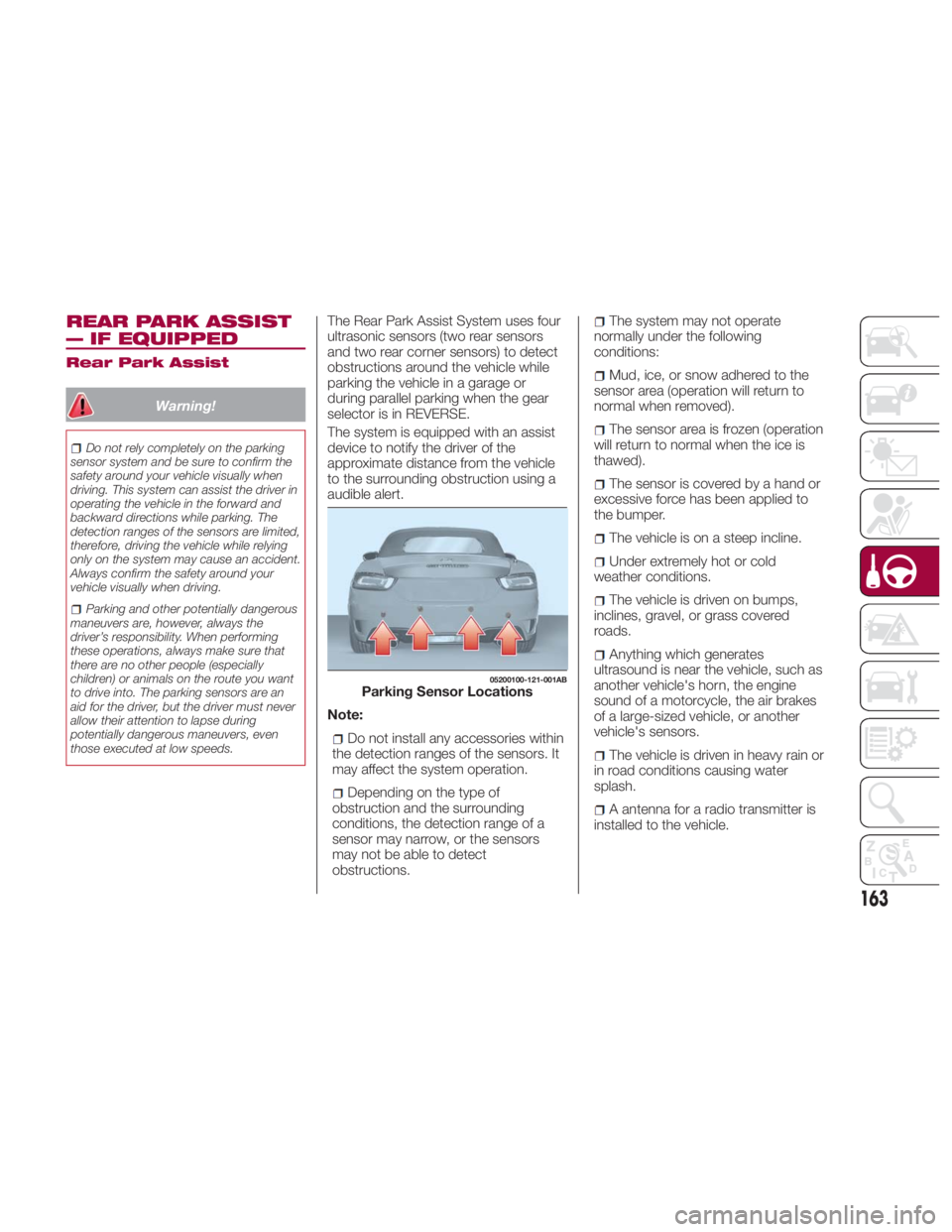
those executed at low speeds. The Rear Park Assist System uses four
ultrasonic sensors (two rear sensors
and two rear corner sensors) to detect
obstructions around the vehicle while
parking the vehicle in a garage or
during parallel parking when the gear
selector is in REVERSE.
The system is equipped with an assist
device to notify the driver of the
approximate distance from the vehicle
to the surrounding obstruction using a
audible alert.
Note:
Do not install any accessories within
the detection ranges of the sensors. It
may affect the system operation.
Depending on the type of
obstruction and the surrounding
conditions, the detection range of a
sensor may narrow, or the sensors
may not be able to detect
obstructions. The system may not operate
normally under the following
conditions:
Mud, ice, or snow adhered to the
sensor area (operation will return to
normal when removed).
The sensor area is frozen (operation
will return to normal when the ice is
thawed).
The sensor is covered by a hand or
excessive force has been applied to
the bumper.
The vehicle is on a steep incline.
Under extremely hot or cold
weather conditions.
The vehicle is driven on bumps,
inclines, gravel, or grass covered
roads.
Anything which generates
ultrasound is near the vehicle, such as
another vehicle's horn, the engine
sound of a motorcycle, the air brakes
of a large-sized vehicle, or another
vehicle's sensors.
The vehicle is driven in heavy rain or
in road conditions causing water
splash.
A antenna for a radio transmitter is
installed to the vehicle. 05200100-121-001AB
Parking Sensor Locations
163
Page 179 of 292
Gross Axle Weight Rating
(GAWR) The GAWR is the maximum permissible
load on the front and rear axles. The
load must be distributed in the cargo
area so that the GAWR of each axle is
not exceeded.
Each axle GAWR is determined by the
components in the system with the
lowest load carrying capacity (axle,
springs, tires or wheels). Heavier axles
or suspension components sometimes
specified by purchasers for increased
durability does not necessarily increase
the vehicle's GVWR.
Tire Size The tire size on the Vehicle Certification
Label represents the actual tire size on
your vehicle. Replacement tires must be
equal to the load capacity of this tire
size.
Rim Size This is the rim size that is appropriate
for the tire size listed. Inflation Pressure This is the cold tire inflation pressure for
your vehicle for all loading conditions up
to full GAWR.
Curb Weight The curb weight of a vehicle is defined
as the total weight of the vehicle with all
fluids, including vehicle fuel, at full
capacity conditions, and with no
occupants or cargo loaded into the
vehicle. The front and rear curb weight
values are determined by weighing your
vehicle on a commercial scale before
any occupants or cargo are added.
Loading The actual total weight and the weight
of the front and rear of your vehicle at
the ground can best be determined by
weighing it when it is loaded and ready
for operation.
The entire vehicle should first be
weighed on a commercial scale to
insure that the GVWR has not been
exceeded. The weight on the front and
rear of the vehicle should then be
determined separately to be sure that
the load is properly distributed over the
front and rear axle. Weighing the vehicle
may show that the GAWR of either the
front or rear axles has been exceeded
but the total load is within the specified
GVWR. If so, weight must be shifted
from front to rear or rear to front as
appropriate until the specified weight limitations are met. Store the heavier
items down low and be sure that the
weight is distributed equally. Stow all
loose items securely before driving.
Improper weight distributions can have
an adverse effect on the way your
vehicle steers and handles and the way
the brakes operate.
Caution!Do not load your vehicle any heavier than
the GVWR or the maximum front and rear
GAWR. If you do, parts on your vehicle can
break, or it can change the way your
vehicle handles. This could cause you to
lose control. Also overloading can shorten
the life of your vehicle.
177
Page 180 of 292
TOWING TRAILERS Trailer Towing
Your car is not designed for towing.
Recreational Towing
An example of "recreational towing" is
towing your vehicle behind a
motorhome.
The transmission is not designed for
towing this vehicle on all four wheels.
Caution!DO NOT flat tow this vehicle. Damage to
the drivetrain will result. If this vehicle
requires towing, make sure the drive
wheels are OFF the ground.
Towing this vehicle in violation of the
above requirements can cause severe
transmission damage. Damage from
improper towing is not covered under the
New Vehicle Limited Warranty. DRIVING TIPS Engine Break-In
Recommendation
No special break-in is necessary, but a
few precautions in the first 620 miles
(1000 km) may add to the performance,
economy, and life of the vehicle:
Do not race the engine.
Do not maintain one constant speed,
either slow or fast, for a long period of
time.
Do not drive constantly at full-throttle
or high engine rpm for extended
periods of time.
Avoid unnecessary hard stops.
Avoid full-throttle starts.
Saving Fuel And
Protection Of The
Environment
How you operate your vehicle
determines how far it will travel on a
tank of fuel.
Use these suggestions to help save fuel
andreduceCO 2
:
Avoid long warm-ups. Once the
engine runs smoothly, begin driving.
Avoid fast starts.
Drive at lower speeds.
Anticipate when to apply the brakes
(avoid sudden braking). Follow the maintenance schedule
and contact your authorized dealer.
Use the air conditioner only when
necessary.
Slow down on rough roads.
Keep the tires properly inflated.
Do not carry unnecessary weight.
Do not rest your foot on the brake
pedal while driving.
Keep the wheels in correct
alignment.
Keep windows closed at high
speeds.
Slow down when driving in
crosswinds and headwinds.
Hazardous Driving
When driving on ice or in water, snow,
mud, sand, or similar hazards:
Be cautious and allow extra distance
for braking.
Avoid sudden braking and sudden
maneuvering.
Do not pump the brakes. Continue to
press down on the brake pedal.
If you get stuck, select a lower gear
and accelerate slowly. Do not spin the
rear wheels.
178
STARTING AND OPERATING
Page 181 of 292
For more traction in starting on
slippery surfaces such as ice or packed
snow, use sand, rock salt, chains,
carpeting, or other nonslip material
under the rear wheels.
Note: Use snow chains only on the
rear wheels.
Floor Mat Safety
Information
Always use floor mats designed to fit
the footwell of your vehicle. Use only
floor mats that leave the pedal area
unobstructed and that are firmly
secured so that they cannot slip out of
position and interfere with the pedals or
impair safe operation of your vehicle in
other ways. Warning!An improperly attached, damaged, folded,
or stacked floor mat, or damaged floor mat
fasteners may cause your floor mat to
interfere with the accelerator, brake, or
clutch pedals and cause a loss of vehicle
control. To prevent SERIOUS INJURY or
DEATH:
ALWAYS securely attach your floor
mat using the floor mat fasteners. DO NOT
install your floor mat upside down or turn
your floor mat over. Lightly pull to confirm
mat is secured using the floor mat
fasteners on a regular basis.
ALWAYS REMOVE THE EXISTING
FLOOR MAT FROM THE VEHICLE
before installing any other floor mat.
NEVER install or stack an additional floor
mat on top of an existing floor mat.
ONLY install floor mats designed to fit
your vehicle. NEVER install a floor mat that
cannot be properly attached and secured
to your vehicle. If a floor mat needs to be
replaced, only use a FCA approved floor
mat for the specific make, model, and year
of your vehicle.
ONLY use the driver’s side floor mat on
the driver’s side floor area. To check for
interference, with the vehicle properly
parked with the engine off, fully depress the
accelerator, the brake, and the clutch pedal
(if present) to check for interference. If your
floor mat interferes with the operation of
any pedal, or is not secure to the floor,
remove the floor mat from the vehicle and
place the floor mat in your trunk. ONLY use the passenger’s side floor mat
on the passenger’s side floor area.
ALWAYS make sure objects cannot fall
or slide into the driver’s side floor area
when the vehicle is moving. Objects can
become trapped under accelerator, brake,
or clutch pedals and could cause a loss of
vehicle control.
NEVER place any objects under the floor
mat (e.g., towels, keys, etc.). These objects
could change the position of the floor mat
and may cause interference with the
accelerator, brake, or clutch pedals.
If the vehicle carpet has been removed
and re-installed, always properly attach
carpet to the floor and check the floor mat
fasteners are secure to the vehicle carpet.
Fully depress each pedal to check for
interference with the accelerator, brake, or
clutch pedals then re-install the floor mats.
It is recommended to only use mild soap
and water to clean your floor mats. After
cleaning, always check your floor mat has
been properly installed and is secured to
your vehicle using the floor mat fasteners
by lightly pulling mat.
Rocking The Vehicle
Note: Too much rocking may cause
engine overheating, transmission failure,
and tire damage.
If you must rock the vehicle to free it
from snow, sand or mud, depress the
accelerator slightly and slowly move the
gear selector from 1 (D) to R.04090400-USA-001
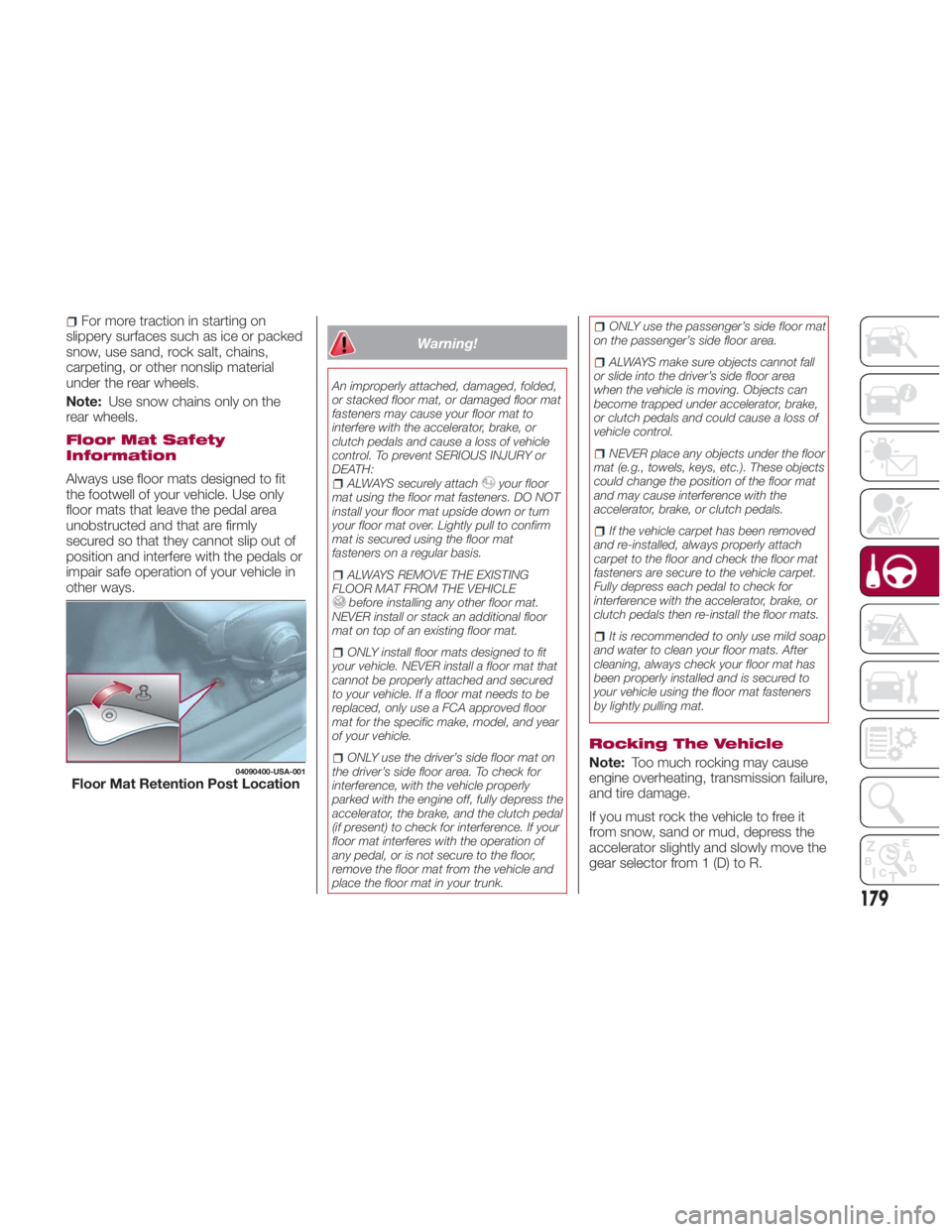
Floor Mat Retention Post Location
179
Page 182 of 292

Warning!Fast spinning tires can be dangerous.
Forces generated by excessive wheel
speeds may cause damage, or even
failure, of the axle and tires. A tire could
explode and injure someone. Do not spin
your vehicle's wheels faster than 30 mph
(48 km/h) or for longer than 30 seconds
continuously without stopping when you
are stuck and do not let anyone near a
spinning wheel, no matter what the speed.
Caution!When “rocking” a stuck vehicle by
shifting between DRIVE and REVERSE, do
not spin the wheels faster than 15 mph
(24 km/h), or drivetrain damage may result.
Revving the engine or spinning the
wheels too fast may lead to transmission
overheating and failure. It can also damage
the tires. Do not spin the wheels above
30 mph (48 km/h) while in gear (no
transmission shifting occurring).
Winter Driving
Carry emergency gear, including tire
chains, window scraper, flares, a small
shovel, jumper leads, and a small bag
of sand or salt. Contact an authorized dealer to check
the following:
Have the proper ratio of antifreeze in
the radiator.
Inspect the battery and its leads.
Cold reduces battery capacity.
Use an engine oil appropriate for the
lowest ambient temperatures that the
vehicle will be driven in.
Inspect the ignition system for
damage and loose connections.
Use winter windshield washer fluid
that will not freeze.
Note:
Remove snow before driving. Snow
left on the windshield is dangerous as
it could obstruct vision.
Drive slowly. Braking performance
can be adversely affected if snow or
ice adheres to the brake components.
If this situation occurs, drive the vehicle
slowly, releasing the accelerator pedal
and lightly applying the brakes several
times until the brake performance
returns to normal.
Do not open or close the soft top when
the temperature is 41 °F (5 °C) or less.
The material of the soft top could be
damaged by freezing. Do not apply excessive force to a
window scraper when removing ice or
frozen snow on the mirror glass and
windshield.
Never use warm or hot water for
removing snow or ice from windows
and mirrors as it could result in the
glass cracking.
Snow Tires
If your vehicle is equipped with the tire
pressure monitoring system (vehicle
with run-flat tires), the system may not
function correctly when using tires with
steel wire reinforcement in the
sidewalls.
Use Snow Tires on all Four Wheels :
Do not exceed the maximum
permissible speed for your snow tires or
legal speed limits.
When snow tires are used, select the
specified size and pressure.
Tire Chains
Check local regulations before using tire
chains.
If your vehicle is equipped with the
TPMS system, the system may not
function correctly when using tire
chains.
180
STARTING AND OPERATING
Page 183 of 292
Install the chains on the rear tires only.
Do not use chains on the front tires.
Note:
Chains may affect handling.
Do not go faster than 30 mph
(50 km/h) or the chain manufacturer's
recommended limit, whichever is lower.
Drive carefully and avoid bumps,
holes, and sharp turns.
Avoid locked-wheel braking.
Do not use chains on roads that are
free of snow or ice. The tires and
chains could be damaged.
Chains may scratch or chip
aluminium wheels.
Warning!Using tires of different size and type (M+S,
Snow) between front and rear axles can
cause unpredictable handling. You could
lose control and have a collision. Caution!To avoid damage to your vehicle or tires,
observe the following precautions:
Because of restricted traction device
clearance between tires and other
suspension components, it is important
that only traction devices in good condition
are used. Broken devices can cause
serious damage. Stop the vehicle
immediately if noise occurs that could
indicate device breakage. Remove the
damaged parts of the device before further
use.
Install device as tightly as possible and
then retighten after driving about ½ mile
(0.8 km).
Do not exceed 30 mph (48 km/h).
Drive cautiously and avoid severe turns
and large bumps, especially with a loaded
vehicle.
Do not drive for a prolonged period on
dry pavement.
Observe the traction device
manufacturer’s instructions on the method
of installation, operating speed, and
conditions for use. Always use the
suggested operating speed of the device
manufacturer’s if it is less than 30 mph
(48 km/h).
Do not use traction devices on a
compact spare tire. Driving In Flooded Area
Note: Do not drive the vehicle on
flooded roads as it could cause short
circuit of electrical/electronic parts, or
water enters the engine and causes it
to lock up (hydro-lock) and stall. If the
vehicle has been immersed in water
contact your authorized dealer.
Although your vehicle is capable of
driving through shallow standing water,
consider the following Cautions and
Warnings before doing so.
Warning! Driving through standing water limits
your vehicle’s traction capabilities. Do not
exceed 5 mph (8 km/h) when driving
through standing water.
Driving through standing water limits
your vehicle’s braking capabilities, which
increases stopping distances. Therefore,
after driving through standing water, drive
slowly and lightly press on the brake pedal
several times to dry the brakes.
Failure to follow these warnings may
result in injuries that are serious or fatal to
you, your passengers, and others around
you.
181
Page 186 of 292
HAZARD WARNING
LIGHTS Control
The Hazard Warning Lights should
always be used when you stop on or
near a roadway in an emergency.
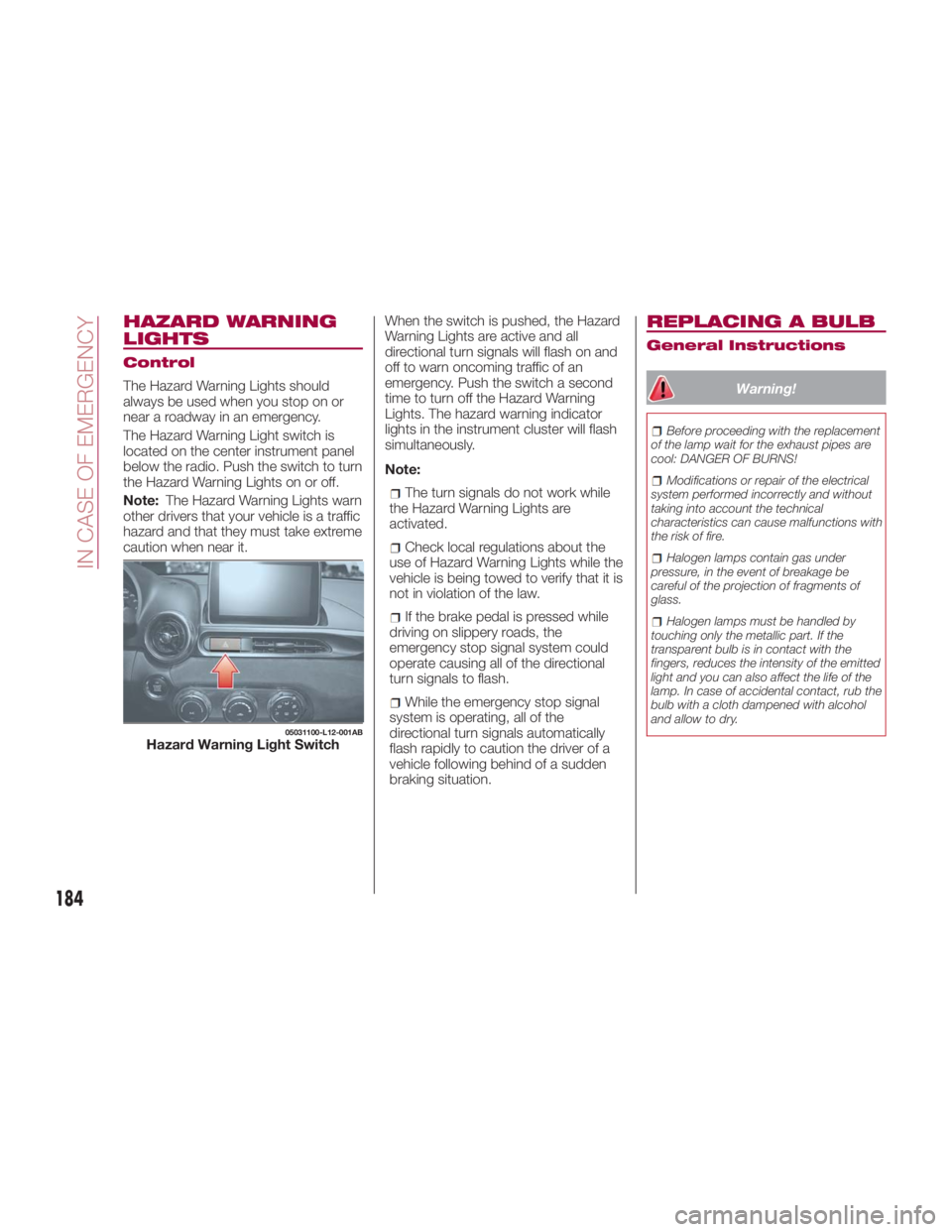
The Hazard Warning Light switch is
located on the center instrument panel
below the radio. Push the switch to turn
theHazardWarningLightsonoroff.
Note: The Hazard Warning Lights warn
other drivers that your vehicle is a traffic
hazard and that they must take extreme
caution when near it. When the switch is pushed, the Hazard
Warning Lights are active and all
directional turn signals will flash on and
off to warn oncoming traffic of an
emergency. Push the switch a second
time to turn off the Hazard Warning
Lights. The hazard warning indicator
lights in the instrument cluster will flash
simultaneously.
Note:
The turn signals do not work while
the Hazard Warning Lights are
activated.
Check local regulations about the
use of Hazard Warning Lights while the
vehicle is being towed to verify that it is
not in violation of the law.
If the brake pedal is pressed while
driving on slippery roads, the
emergency stop signal system could
operate causing all of the directional
turn signals to flash.
While the emergency stop signal
system is operating, all of the
directional turn signals automatically
flash rapidly to caution the driver of a
vehicle following behind of a sudden
braking situation. REPLACING A BULB General Instructions
Warning! Before proceeding with the replacement
of the lamp wait for the exhaust pipes are
cool: DANGER OF BURNS!
Modifications or repair of the electrical
system performed incorrectly and without
taking into account the technical
characteristics can cause malfunctions with
the risk of fire.
Halogen lamps contain gas under
pressure, in the event of breakage be
careful of the projection of fragments of
glass.
Halogen lamps must be handled by
touching only the metallic part. If the
transparent bulb is in contact with the
fingers, reduces the intensity of the emitted
light and you can also affect the life of the
lamp. In case of accidental contact, rub the
bulb with a cloth dampened with alcohol
and allow to dry.05031100-L12-001AB
Hazard Warning Light Switch
184
IN CASE OF EMERGENCY
Page 191 of 292
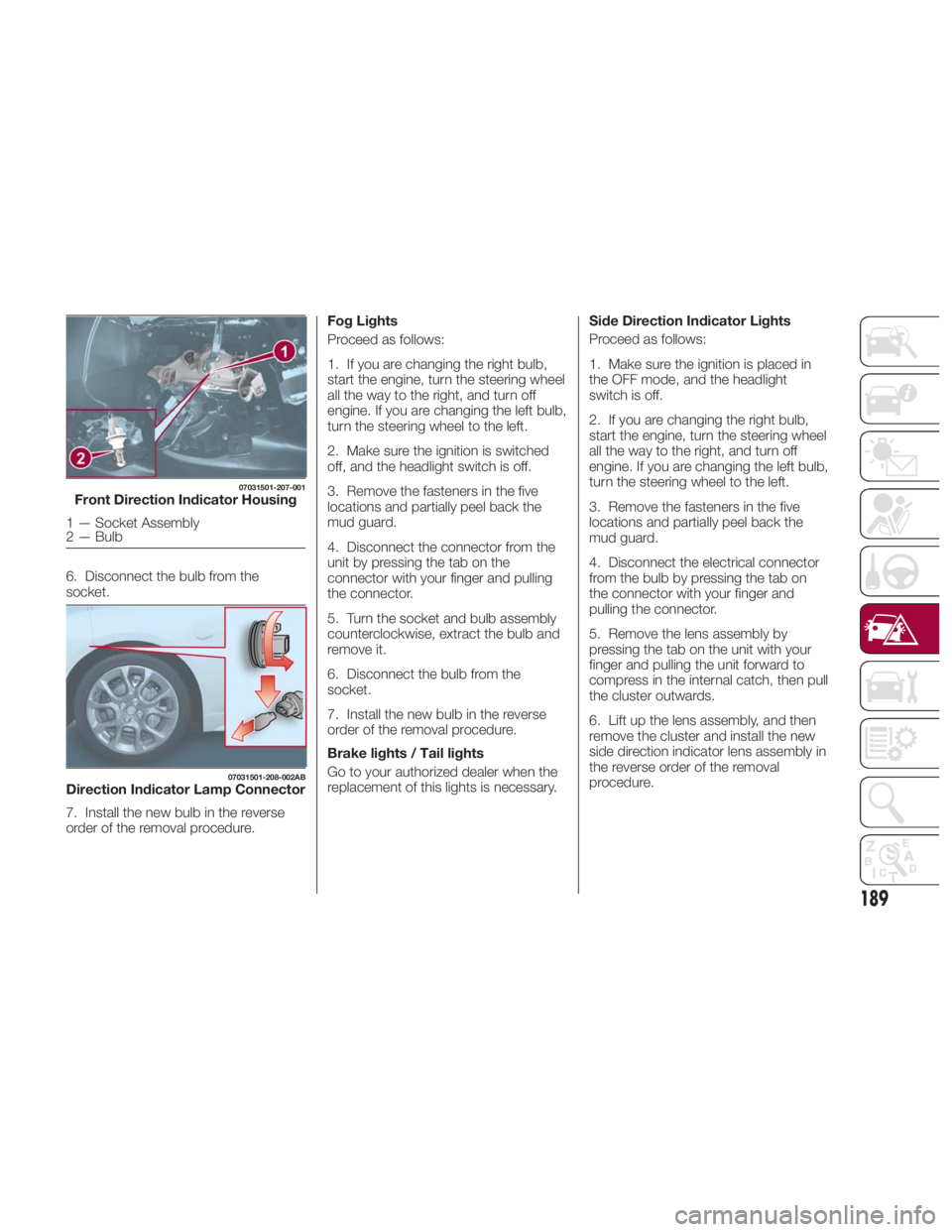
6. Disconnect the bulb from the
socket.
7. Install the new bulb in the reverse
order of the removal procedure. Fog Lights
Proceed as follows:
1. If you are changing the right bulb,
start the engine, turn the steering wheel
all the way to the right, and turn off
engine. If you are changing the left bulb,
turn the steering wheel to the left.
2. Make sure the ignition is switched
off, and the headlight switch is off.
3. Remove the fasteners in the five
locations and partially peel back the
mud guard.
4. Disconnect the connector from the
unit by pressing the tab on the
connector with your finger and pulling
the connector.
5. Turn the socket and bulb assembly
counterclockwise, extract the bulb and
remove it.
6. Disconnect the bulb from the
socket.
7. Install the new bulb in the reverse
order of the removal procedure.
Brake lights / Tail lights
Go to your authorized dealer when the
replacement of this lights is necessary. Side Direction Indicator Lights
Proceed as follows:
1. Make sure the ignition is placed in
the OFF mode, and the headlight
switch is off.
2. If you are changing the right bulb,
start the engine, turn the steering wheel
all the way to the right, and turn off
engine. If you are changing the left bulb,
turn the steering wheel to the left.
3. Remove the fasteners in the five
locations and partially peel back the
mud guard.
4. Disconnect the electrical connector
from the bulb by pressing the tab on
the connector with your finger and
pulling the connector.
5. Remove the lens assembly by
pressing the tab on the unit with your
finger and pulling the unit forward to
compress in the internal catch, then pull
the cluster outwards.
6. Lift up the lens assembly, and then
remove the cluster and install the new
side direction indicator lens assembly in
the reverse order of the removal
procedure.07031501-207-001
Front Direction Indicator Housing
1 — Socket Assembly
2 — Bulb 07031501-208-002AB
Direction Indicator Lamp Connector
189