brake FIAT SPIDER ABARTH 2017 User Guide
[x] Cancel search | Manufacturer: FIAT, Model Year: 2017, Model line: SPIDER ABARTH, Model: FIAT SPIDER ABARTH 2017Pages: 292, PDF Size: 9.24 MB
Page 72 of 292
CONVERTIBLE TOP
(SOFT TOP) Lowering The
Convertible Top
Warning!Do not sit on the folded convertible top,
otherwise the convertible top could be
damaged or you may fall off and be injured.
To lower the convertible top, Proceed
as follows:
1. Make sure the parking brake is
applied and the engine is OFF.
2. Make sure there are no objects
which have been placed in the area
where the convertible top is to be
retracted.
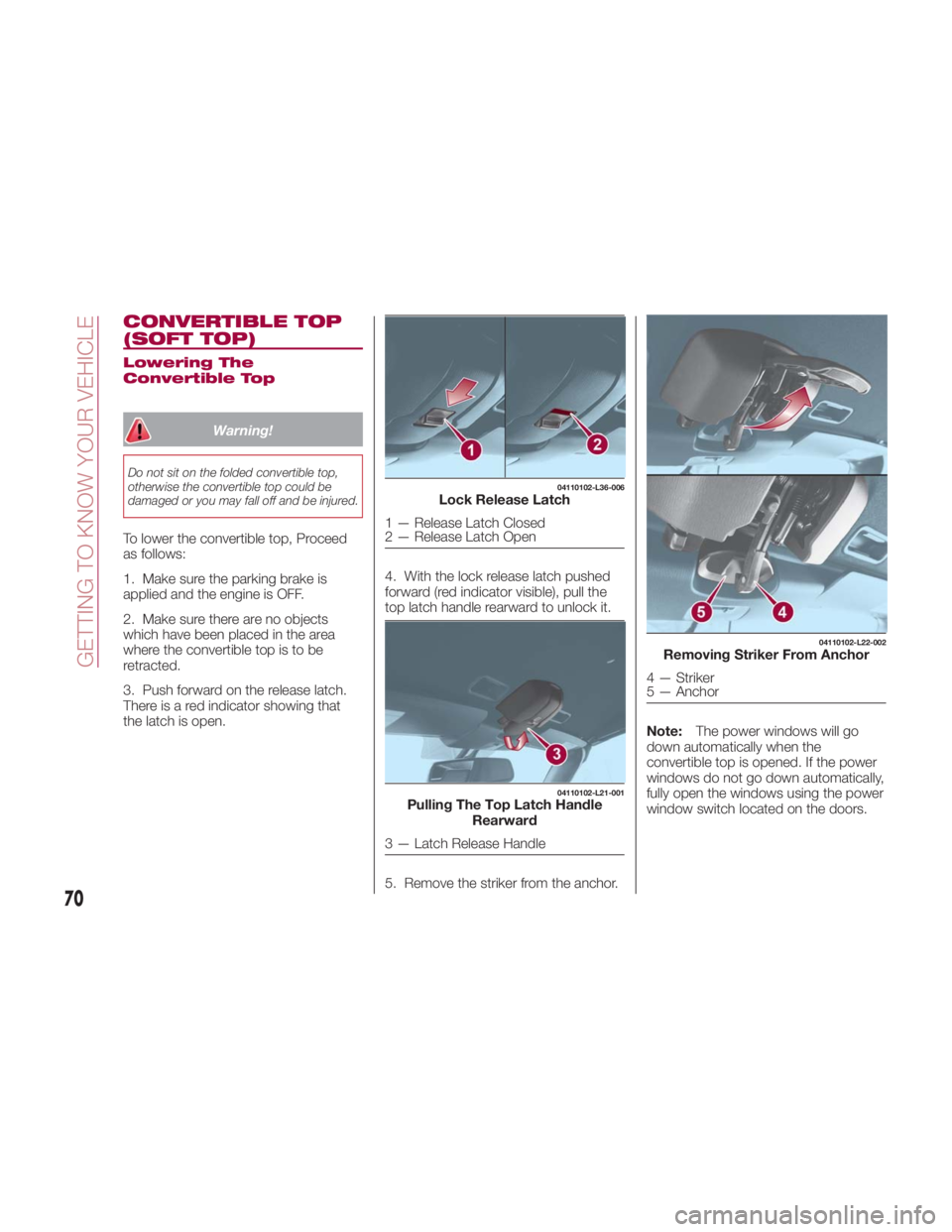
3. Push forward on the release latch.
There is a red indicator showing that
the latch is open. 4. With the lock release latch pushed
forward (red indicator visible), pull the
top latch handle rearward to unlock it.
5. Remove the striker from the anchor. Note: The power windows will go
down automatically when the
convertible top is opened. If the power
windows do not go down automatically,
fully open the windows using the power
window switch located on the doors. 04110102-L36-006
Lock Release Latch
1 — Release Latch Closed
2 — Release Latch Open 04110102-L21-001
Pulling The Top Latch Handle
Rearward
3 — Latch Release Handle 04110102-L22-002
Removing Striker From Anchor
4 — Striker
5 — Anchor
70
GETTING TO KNOW YOUR VEHICLE
Page 73 of 292
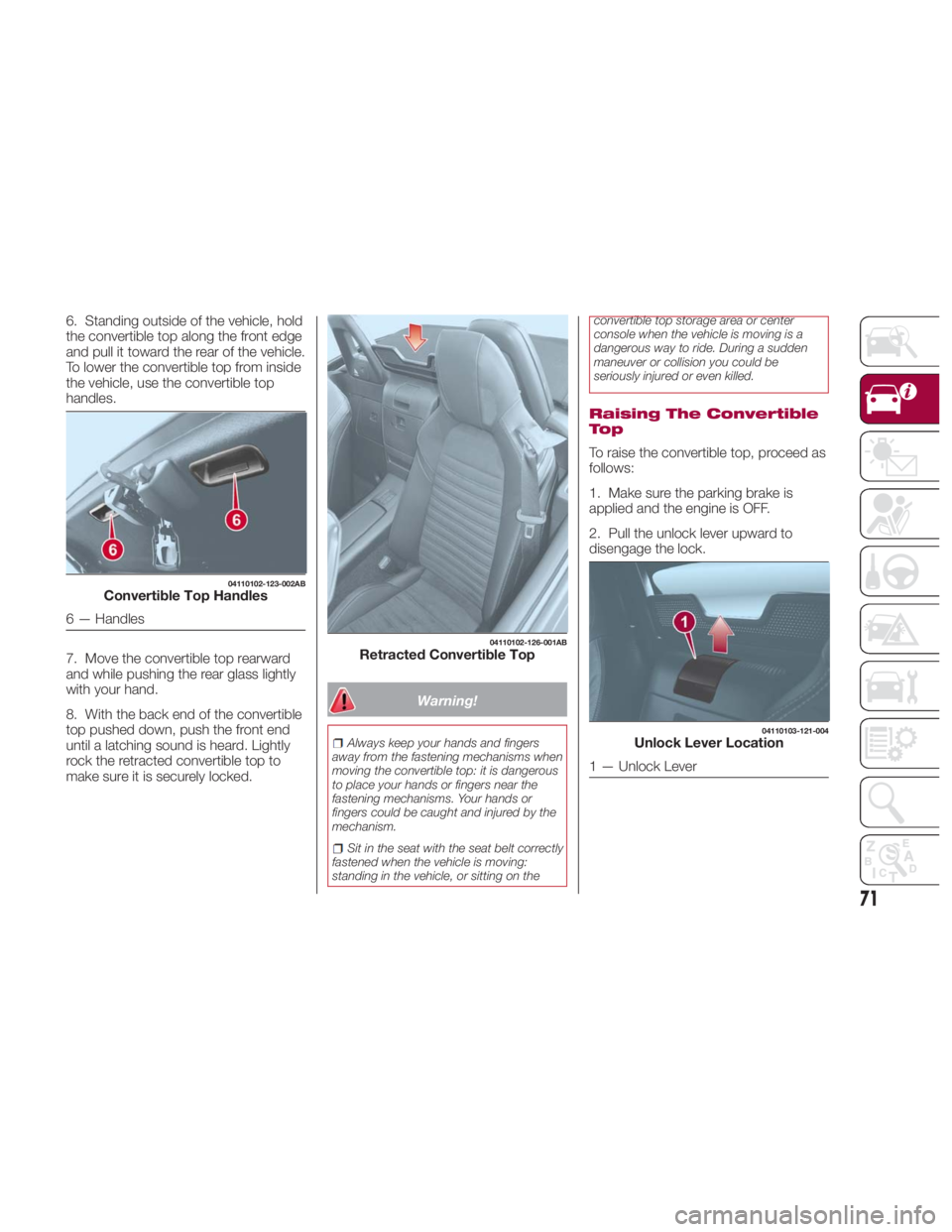
6. Standing outside of the vehicle, hold
the convertible top along the front edge
and pull it toward the rear of the vehicle.
To lower the convertible top from inside
the vehicle, use the convertible top
handles.
7. Move the convertible top rearward
and while pushing the rear glass lightly
with your hand.
8. With the back end of the convertible
top pushed down, push the front end
until a latching sound is heard. Lightly
rock the retracted convertible top to
make sure it is securely locked. Warning!Always keep your hands and fingers
away from the fastening mechanisms when
moving the convertible top: it is dangerous
to place your hands or fingers near the
fastening mechanisms. Your hands or
fingers could be caught and injured by the
mechanism.
Sit in the seat with the seat belt correctly
fastened when the vehicle is moving:
standing in the vehicle, or sitting on the convertible top storage area or center
console when the vehicle is moving is a
dangerous way to ride. During a sudden
maneuver or collision you could be
seriously injured or even killed.
Raising The Convertible
To p
To raise the convertible top, proceed as
follows:
1. Make sure the parking brake is
applied and the engine is OFF.
2. Pull the unlock lever upward to
disengage the lock.04110102-123-002AB
Convertible Top Handles
6 — Handles 04110102-126-001AB
Retracted Convertible Top 04110103-121-004
Unlock Lever Location
1 — Unlock Lever
71
Page 88 of 292
WARNING LIGHTS
AND MESSAGES Warning Lights And
Messages
Note:
The warning light in the instrument
panel appears together with a
dedicated message and/or acoustic
signal when applicable. These
indications are indicative and
precautionary and as such must not be
considered as exhaustive and/or
alternative to the information contained
in the Owner’s Manual, which you are
advised to read carefully in all cases.
Always refer to the information in this
chapter in the event of a failure
indication.
Failure indications displayed are
divided into two categories: serious
and less serious failures. Serious
failures are indicated by a repeated
and prolonged warning "cycle". Less
serious failures are indicated by a
warning "cycle" with a shorter duration.
The display cycle of both categories
can be interrupted. The instrument
panel warning light will stay on until the
cause of the failure is eliminated.
The warning contents can be verified
on the audio system. Proceed as follows:
1. If the warning light is turned on,
select
icon on the home screen to
display the application screen.
2. Select “ Warning Guidance ”to
display the current warnings.
3. Select the applicable warning to
view the warning details.
For the following warning/indicator
lights:
Master Warning Light
Brake System Warning Light
ABS Warning Light
Charging System Warning Light
Engine Oil Warning Light
Electric Throttle Warning Light
Cold Start Warning Light
Check Engine Warning Light
Coolant Temperature Warning Light
Automatic Transmission Warning
Light
Power Steering Malfunction Indicator
Light
Air Bag/Seat Belt Pretensioner
System Warning Light
Check Fuel Cap Warning Light
Low Fuel Warning Light Seat Belt Warning Light
Door Ajar Warning Light
Low Washer Fluid Level Warning
Light
Tire Pressure Monitoring System
Warning Light
KEY Warning Light
LED Headlight KEY Warning Light
BSM (Blind Spot Monitoring) OFF
Indicator Light
TCS/DSC Indicator Light
DSC OFF Indicator Light
Security Indicator Light
Indicator Light
Passenger Air Bag Deactivation
Warning Light
The light turns on when the ignition is
switched on for an operation check,
and turns off a few seconds later or
when the engine is started. If the light
does not turn on or remains turned on,
have the vehicle inspected at an
authorized dealer.
Note: Only for “Brake System Warning
Light:” the light turns on continuously
when the parking brake is applied.
86
GETTING TO KNOW YOUR INSTRUMENT PANEL
Page 89 of 292
Red Warning Lights Warning Light What It Means
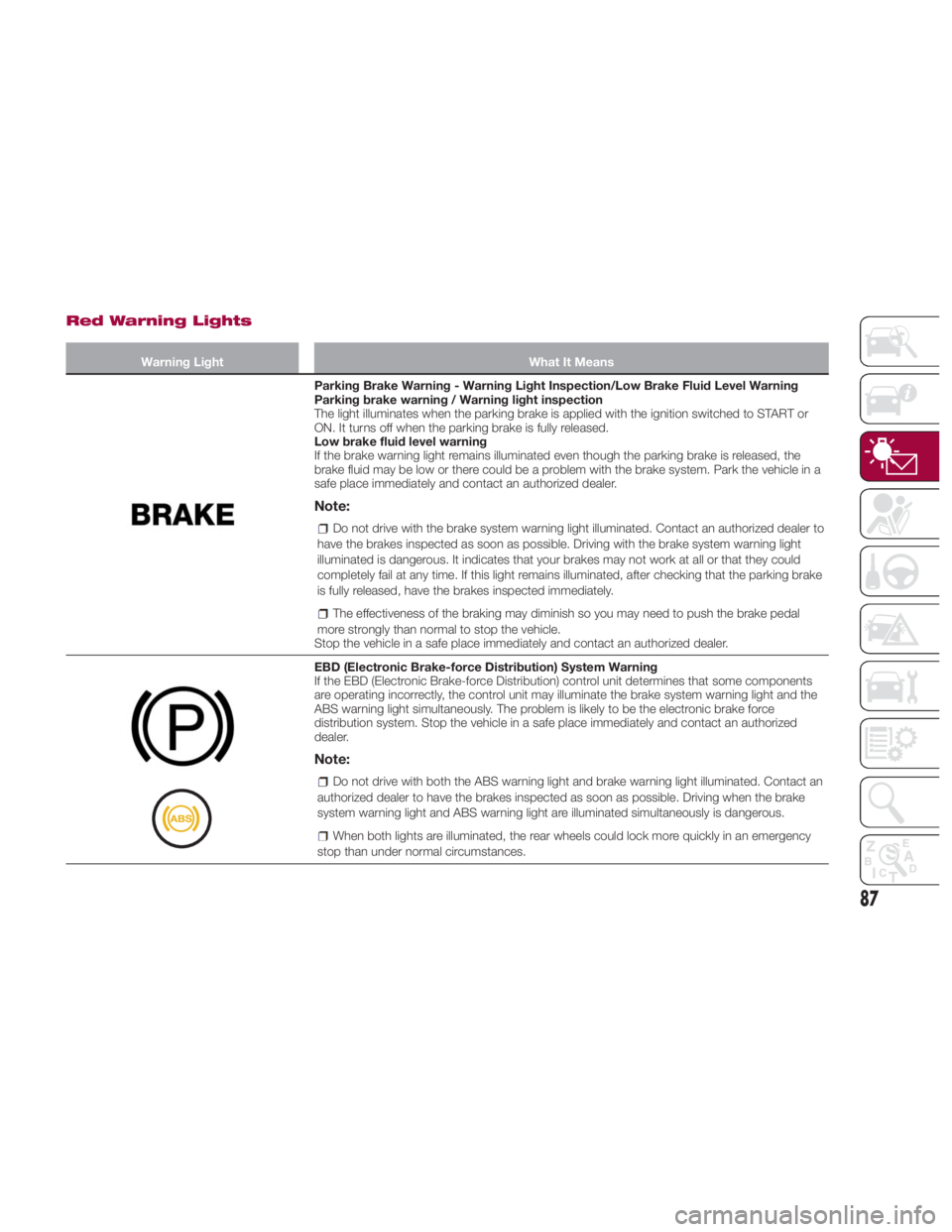
Parking Brake Warning - Warning Light Inspection/Low Brake Fluid Level Warning
Parking brake warning / Warning light inspection
The light illuminates when the parking brake is applied with the ignition switched to START or
ON. It turns off when the parking brake is fully released.
Low brake fluid level warning
If the brake warning light remains illuminated even though the parking brake is released, the
brake fluid may be low or there could be a problem with the brake system. Park the vehicle in a
safe place immediately and contact an authorized dealer.
Note: Do not drive with the brake system warning light illuminated. Contact an authorized dealer to
have the brakes inspected as soon as possible. Driving with the brake system warning light
illuminated is dangerous. It indicates that your brakes may not work at all or that they could
completely fail at any time. If this light remains illuminated, after checking that the parking brake
is fully released, have the brakes inspected immediately.
The effectiveness of the braking may diminish so you may need to push the brake pedal
more strongly than normal to stop the vehicle.
Stop the vehicle in a safe place immediately and contact an authorized dealer.
EBD (Electronic Brake-force Distribution) System Warning
If the EBD (Electronic Brake-force Distribution) control unit determines that some components
are operating incorrectly, the control unit may illuminate the brake system warning light and the
ABS warning light simultaneously. The problem is likely to be the electronic brake force
distribution system. Stop the vehicle in a safe place immediately and contact an authorized
dealer.
Note: Do not drive with both the ABS warning light and brake warning light illuminated. Contact an
authorized dealer to have the brakes inspected as soon as possible. Driving when the brake
system warning light and ABS warning light are illuminated simultaneously is dangerous.
When both lights are illuminated, the rear wheels could lock more quickly in an emergency
stop than under normal circumstances.
87
Page 90 of 292
Warning Light What It Means
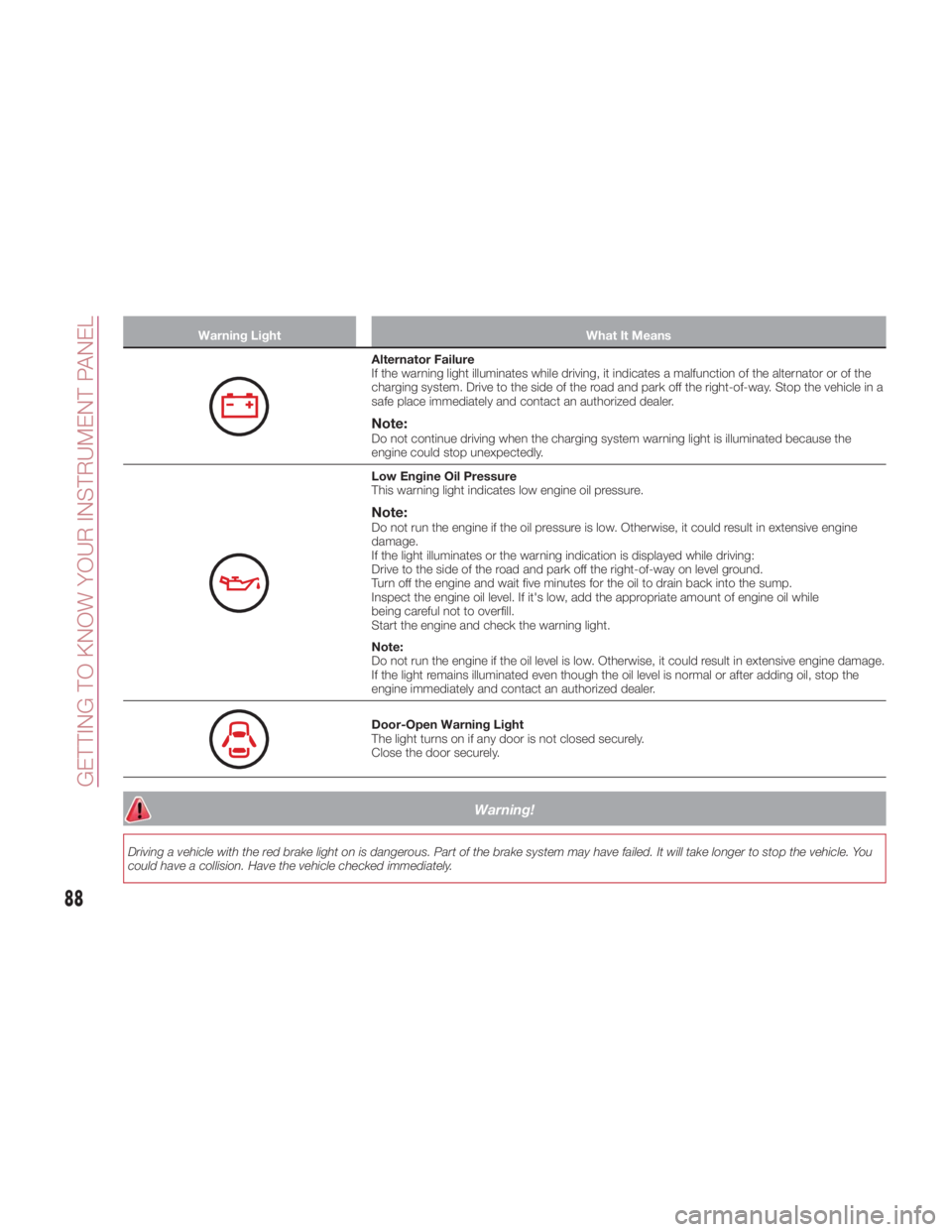
Alternator Failure
If the warning light illuminates while driving, it indicates a malfunction of the alternator or of the
charging system. Drive to the side of the road and park off the right-of-way. Stop the vehicle in a
safe place immediately and contact an authorized dealer.
Note: Do not continue driving when the charging system warning light is illuminated because the
engine could stop unexpectedly.
Low Engine Oil Pressure
This warning light indicates low engine oil pressure.
Note: Do not run the engine if the oil pressure is low. Otherwise, it could result in extensive engine
damage.
If the light illuminates or the warning indication is displayed while driving:
Drive to the side of the road and park off the right-of-way on level ground.
Turn off the engine and wait five minutes for the oil to drain back into the sump.
Inspect the engine oil level. If it's low, add the appropriate amount of engine oil while
being careful not to overfill.
Start the engine and check the warning light.
Note:
Do not run the engine if the oil level is low. Otherwise, it could result in extensive engine damage.
If the light remains illuminated even though the oil level is normal or after adding oil, stop the
engine immediately and contact an authorized dealer.
Door-Open Warning Light
The light turns on if any door is not closed securely.
Close the door securely.
Warning!Driving a vehicle with the red brake light on is dangerous. Part of the brake system may have failed. It will take longer to stop the vehicle. You
could have a collision. Have the vehicle checked immediately.
88
GETTING TO KNOW YOUR INSTRUMENT PANEL
Page 93 of 292
Amber Warning Lights Warning Light What It Means
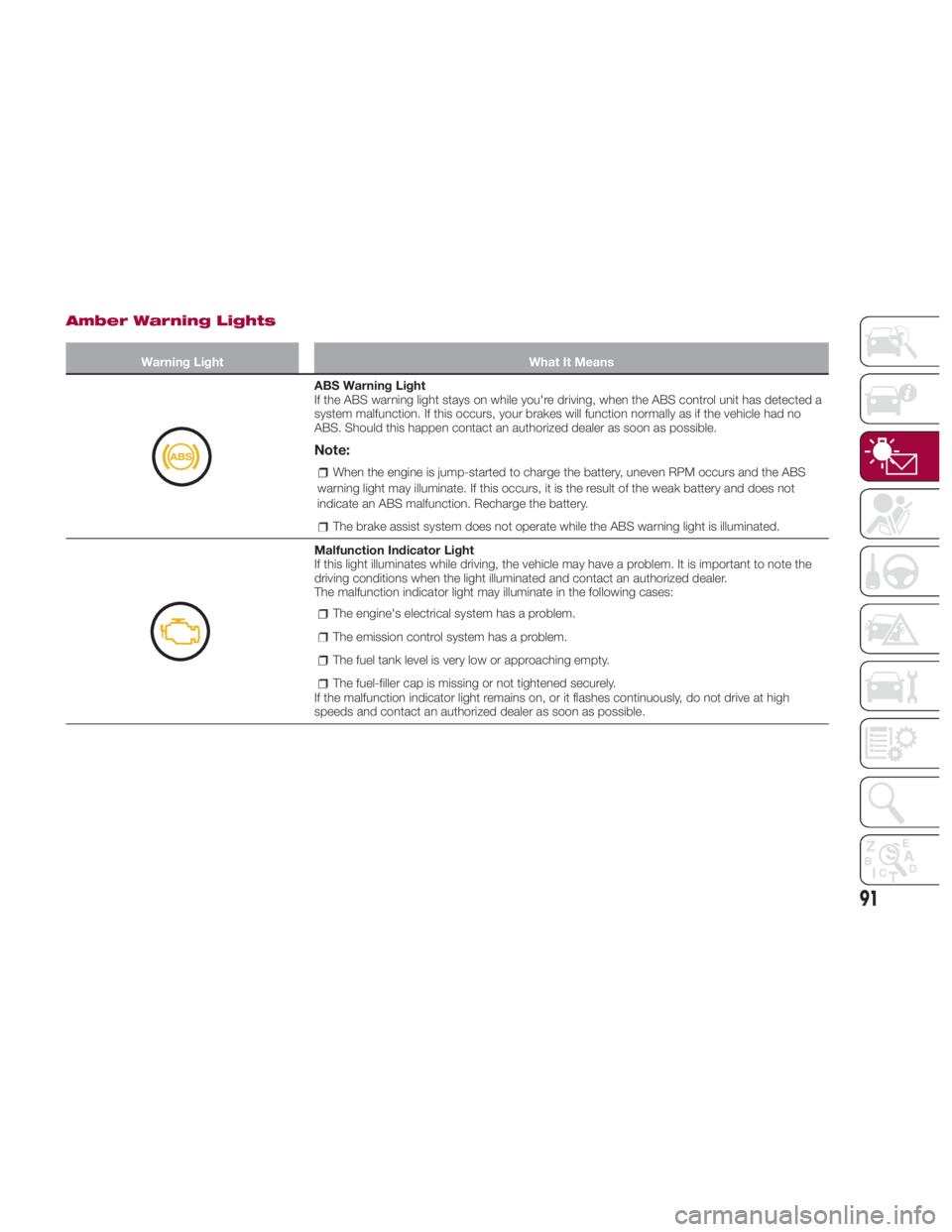
ABS Warning Light
If the ABS warning light stays on while you're driving, when the ABS control unit has detected a
system malfunction. If this occurs, your brakes will function normally as if the vehicle had no
ABS. Should this happen contact an authorized dealer as soon as possible.
Note: When the engine is jump-started to charge the battery, uneven RPM occurs and the ABS
warning light may illuminate. If this occurs, it is the result of the weak battery and does not
indicate an ABS malfunction. Recharge the battery.
The brake assist system does not operate while the ABS warning light is illuminated.
Malfunction Indicator Light
If this light illuminates while driving, the vehicle may have a problem. It is important to note the
driving conditions when the light illuminated and contact an authorized dealer.
The malfunction indicator light may illuminate in the following cases:
The engine's electrical system has a problem.
The emission control system has a problem.
The fuel tank level is very low or approaching empty.
The fuel-filler cap is missing or not tightened securely.
If the malfunction indicator light remains on, or it flashes continuously, do not drive at high
speeds and contact an authorized dealer as soon as possible.
91
Page 114 of 292
SAFETY SYSTEMS Safety Systems
The vehicle has the following safety
systems:
Anti-lock Braking System (ABS)
Traction Contol System (TCS)
Dynamic Stability Control (DSC)
For the operation of the systems, see
the following pages.
ABS System (Anti-lock
Braking System)
The ABS control unit continuously
monitors the speed of each wheel. If
one wheel is about to lock up, the ABS
responds by automatically releasing
and reapplying that wheel's brake. The
driver will feel a slight vibration in the
brake pedal and may hear a chattering
noise from the brake system. This is
normal ABS system operation.
Continue to depress the brake pedal
without pumping the brakes. The
warning light turns on when the system
has a malfunction. Refer to “Warning
Lights And Messages” in “Getting To
Know Your Instrument Panel” for further
information. Note:
Braking distances may be longer on
loose surfaces (snow or gravel, for
example) which usually have a hard
foundation. A vehicle with a normal
braking system may require less
distance to stop under these
conditions because the tires will build
up a wedge of surface layer when the
wheels skid.
The sound of the ABS operating
may be heard when starting the engine
or immediately after starting the
vehicle; however, it does not indicate a
malfunction.
Warning!The ABS contains sophisticated
electronic equipment that may be
susceptible to interference caused by
improperly installed or high output radio
transmitting equipment. This interference
can cause possible loss of anti-lock braking
capability. Installation of such equipment
should be performed by qualified
professionals.
Pumping of the Anti-Lock Brakes will
diminish their effectiveness and may lead to
a collision. Pumping makes the stopping
distance longer. Just press firmly on your
brake pedal when you need to slow down
or stop. The ABS cannot prevent the natural
laws of physics from acting on the vehicle,
nor can it increase braking or steering
efficiency beyond that afforded by the
condition of the vehicle brakes and tires or
the traction afforded.
The ABS cannot prevent collisions,
including those resulting from excessive
speed in turns, following another vehicle
too closely, or hydroplaning.
The capabilities of an ABS equipped
vehicle must never be exploited in a
reckless or dangerous manner that could
jeopardize the user’s safety or the safety of
others.
TCS System (Traction
Control System)
Warning!The capability of the TCS must never be
tested irresponsibly and dangerously, in
such a way as to compromise personal
safety and the safety of others.
The Traction Control System (TCS)
enhances traction and safety by
controlling engine torque and braking.
When the TCS detects driving wheel
slippage, it can lower engine torque and
operate the brakes to prevent loss of
traction. This means that on a slick
surface, the engine adjusts
automatically to provide optimum
112
SAFETY
Page 115 of 292
power to the drive wheels, limiting
wheel spin and loss of traction.
The indicator light turns on when the
system has a malfunction. Refer to
“Warning Lights And Messages” in
“Getting To Know Your Instrument
Panel” for further information.
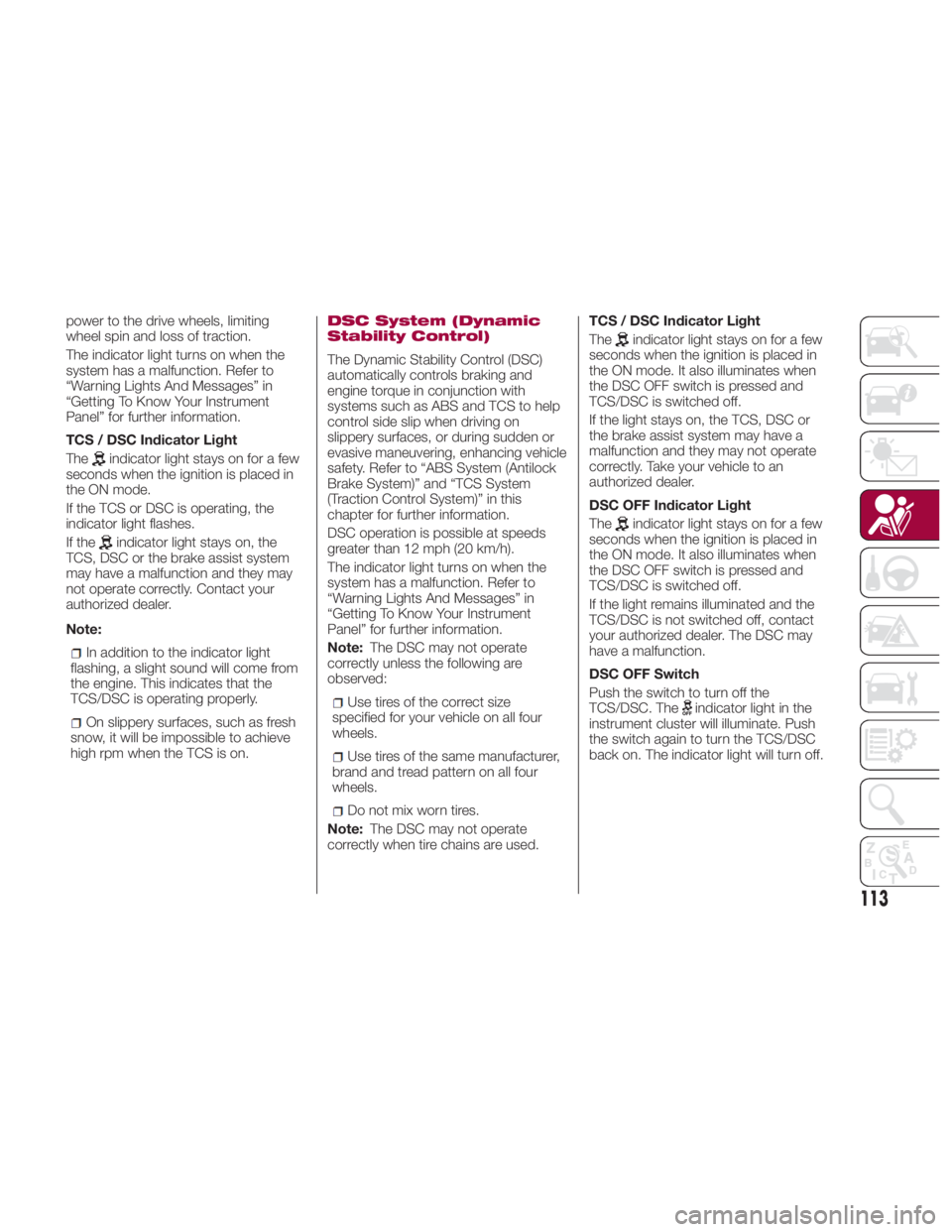
TCS / DSC Indicator Light
The
indicator light stays on for a few
seconds when the ignition is placed in
the ON mode.
If the TCS or DSC is operating, the
indicator light flashes.
If the
indicator light stays on, the
TCS, DSC or the brake assist system
may have a malfunction and they may
not operate correctly. Contact your
authorized dealer.
Note:
In addition to the indicator light
flashing, a slight sound will come from
the engine. This indicates that the
TCS/DSC is operating properly.
On slippery surfaces, such as fresh
snow, it will be impossible to achieve
high rpm when the TCS is on. DSC System (Dynamic
Stability Control)
The Dynamic Stability Control (DSC)
automatically controls braking and
engine torque in conjunction with
systems such as ABS and TCS to help
control side slip when driving on
slippery surfaces, or during sudden or
evasive maneuvering, enhancing vehicle
safety. Refer to “ABS System (Antilock
Brake System)” and “TCS System
(Traction Control System)” in this
chapter for further information.
DSC operation is possible at speeds
greater than 12 mph (20 km/h).
The indicator light turns on when the
system has a malfunction. Refer to
“Warning Lights And Messages” in
“Getting To Know Your Instrument
Panel” for further information.
Note: The DSC may not operate
correctly unless the following are
observed:
Use tires of the correct size
specified for your vehicle on all four
wheels.
Use tires of the same manufacturer,
brand and tread pattern on all four
wheels.
Do not mix worn tires.
Note: The DSC may not operate
correctly when tire chains are used. TCS / DSC Indicator Light
The
indicator light stays on for a few
seconds when the ignition is placed in
the ON mode. It also illuminates when
the DSC OFF switch is pressed and
TCS/DSC is switched off.
If the light stays on, the TCS, DSC or
the brake assist system may have a
malfunction and they may not operate
correctly. Take your vehicle to an
authorized dealer.
DSC OFF Indicator Light
The
indicator light stays on for a few
seconds when the ignition is placed in
the ON mode. It also illuminates when
the DSC OFF switch is pressed and
TCS/DSC is switched off.
If the light remains illuminated and the
TCS/DSC is not switched off, contact
your authorized dealer. The DSC may
have a malfunction.
DSC OFF Switch
Push the switch to turn off the
TCS/DSC. The
indicator light in the
instrument cluster will illuminate. Push
the switch again to turn the TCS/DSC
back on. The indicator light will turn off.
113
Page 147 of 292
Warning!Never place a rear-facing child restraint
in front of an air bag. A deploying
passenger front air bag can cause death or
serious injury to a child 12 years or
younger, including a child in a rear-facing
child restraint.
Only use a rear-facing child restraint in a
vehicle with a rear seat.
Children 12 years or younger should
always ride buckled up in a vehicle with a
rear seat.
Warning!No objects should be placed over or
near the air bag on the instrument panel or
steering wheel because any such objects
could cause harm if the vehicle is in a
collision severe enough to cause the air
bag to inflate.
Do not put anything on or around the air
bag covers or attempt to open them
manually. You may damage the air bags
and you could be injured because the air
bags may no longer be functional. The
protective covers for the air bag cushions
are designed to open only when the air
bags are inflating.
Relying on the air bags alone could lead
to more severe injuries in a collision. The air
bags work with your seat belt to restrain
you properly. In some collisions, air bags won’t deploy at all. Always wear your seat
belts even though you have air bags.
Maintaining Your Air Bag
System
Warning!Modifications to any part of the air bag
system could cause it to fail when you
need it. You could be injured if the air bag
system is not there to protect you. Do not
modify the components or wiring, including
adding any kind of badges or stickers to
the steering wheel hub trim cover or the
upper right side of the instrument panel. Do
not modify the front bumper, vehicle body
structure, or add aftermarket side steps or
running boards.
It is dangerous to try to repair any part
of the air bag system yourself. Be sure to
tell anyone who works on your vehicle that
it has an air bag system.
Do not attempt to modify any part of your
air bag system. The air bag may inflate
accidentally or may not function properly if
modifications are made. Take your vehicle to
an authorized dealer for any air bag system
service. If your seat, including your trim cover
and cushion, needs to be serviced in any way
(including removal or loosening/tightening of
seat attachment bolts), take the vehicle to
your authorized dealer. Only manufacturer
approved seat accessories may be used. If it
is necessary to modify the air bag system for
persons with disabilities, contact your
authorized dealer. EVENT DATA
RECORDER (EDR) This vehicle is equipped with an event
data recorder (EDR).
The main purpose of an EDR is to
record, in certain crash or near
crash-like situations, such as an air bag
deployment or hitting a road obstacle,
data that will assist in understanding
how a vehicle’s systems performed.
The EDR is designed to record data
related to vehicle dynamics and safety
systems for a short period of time,
typically 30 seconds or less.
The EDR in this vehicle is designed to
record such data as:
How various systems in your vehicle
were operating.
Whether or not the driver and
passenger safety belts were
buckled/fastened.
How far (if at all) the driver was
pushing the accelerator and/or brake
pedal.
How fast the vehicle was traveling.
This data can help provide a better
understanding of the circumstances in
which crashes and injuries occur.
145
Page 148 of 292
Note:
EDR data are recorded by your
vehicle only if a non-trivial crash or near
crash-like situation occurs; no data are
recorded by the EDR under normal
driving conditions and no personal
data (e.g., name, gender, age, and
crash location) are recorded. However,
other parties, such as law
enforcement, could combine the EDR
data with the type of personally
identifying data routinely acquired
during a crash investigation.
To read data recorded by an EDR,
special equipment is required, and
access to the vehicle or the EDR is
needed. In addition to the vehicle
manufacturer, other parties, such as
law enforcement, that have the special
equipment, can read the information if
they have access to the vehicle or the
EDR.FCA will not disclose any of the
data recorded in an EDR to a third party
unless:
A written agreement from the
vehicle owner or the lessee is
obtained.
Officially requested by the police or
other law enforcement authorities.
Used as a defense for FCA in a law
suit, claim, or arbitration. Ordered by a judge or court.
However, if necessary, FCA will:
Use the data for research on FCA
vehicle performance, including safety.
Disclose the data or the
summarized data to a third party for
research purposes without disclosing
vehicle or owner identification
information.
Recording Of Vehicle Data
This vehicle is equipped with a
computer which records the following
main vehicle data related to vehicle
controls, operation, and other driving
conditions.
Recorded Data
Vehicle conditions such as engine
speed and vehicle speed.
Driving operation conditions such
as accelerator and brake pedals, and
information related to the
environmental circumstances while the
vehicle is driven.
Malfunction diagnosis information
from each on-vehicle computer.
Information related to controls of
other on-vehicle computers.
The recorded data may vary depending
on the vehicle grade and optional
equipment. Voice and images are not
recorded. Data Handling
FCA and its subcontracting parties may
obtain and use the recorded data for
vehicle malfunction diagnosis, research
and development, and quality
improvement.
FCA will not disclose or provide any of
the obtained data to a third party
unless:
An agreement from the vehicle
owner (agreements from lessor and
lessee for leased vehicle) is obtained.
Officially requested by the police or
other law enforcement authorities.
For statistical processing by a
research institution, after processing
the data so that identification of the
owner or the vehicle is impossible.
146
SAFETY