instrument panel FIAT SPIDER ABARTH 2017 Owner's Guide
[x] Cancel search | Manufacturer: FIAT, Model Year: 2017, Model line: SPIDER ABARTH, Model: FIAT SPIDER ABARTH 2017Pages: 292, PDF Size: 9.24 MB
Page 108 of 292
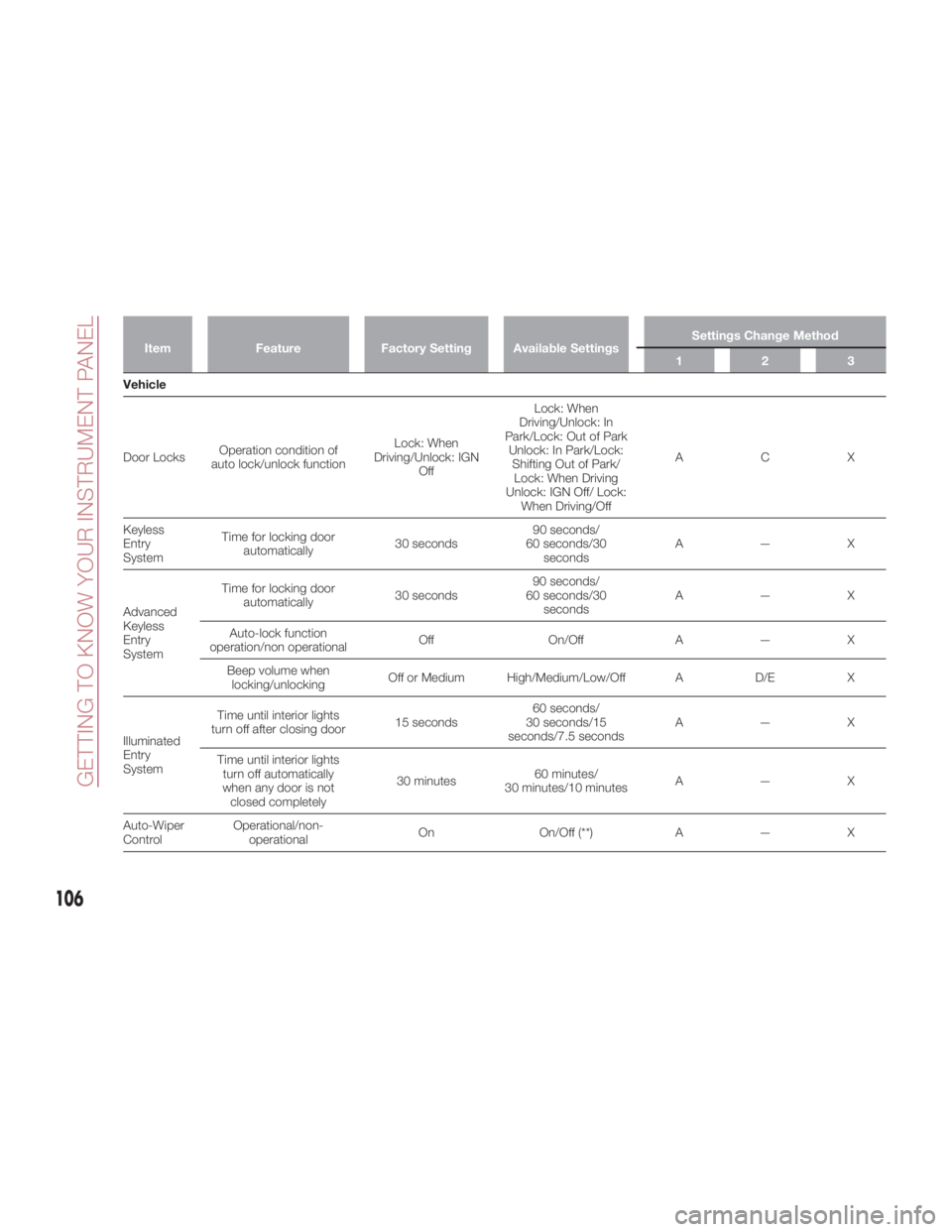
Item Feature Factory Setting Available Settings Settings Change Method
123
Vehicle
Door
Locks Operation condition of
auto lock/unlock function Lock: When
Driving/Unlock: IGN
Off Lock: When
Driving/Unlock: In
Park/Lock: Out of Park
Unlock: In Park/Lock:
Shifting Out of Park/
Lock: When Driving
Unlock: IGN Off/ Lock:
When Driving/Off ACX
Keyless
Entry
System Time for locking door
automatically 30 seconds 90 seconds/
60 seconds/30
seconds A—X
Advanced
Keyless
Entry
System Time for locking door
automatically 30 seconds 90 seconds/
60 seconds/30
seconds A—X
Auto-lock function
operation/non operational Off On/Off A — X
Beep volume when
locking/unlocking Off or Medium High/Medium/Low/Off A D/E X
Illuminated
Entry
System Time until interior lights
turn off after closing door 15 seconds 60 seconds/
30 seconds/15
seconds/7.5 seconds A—X
Time until interior lights
turn off automatically
when any door is not
closed completely 30 minutes 60 minutes/
30 minutes/10 minutes A—X
Auto-Wiper
Control Operational/non-
operational On On/Off (**) A — X
106
GETTING TO KNOW YOUR INSTRUMENT PANEL
Page 110 of 292
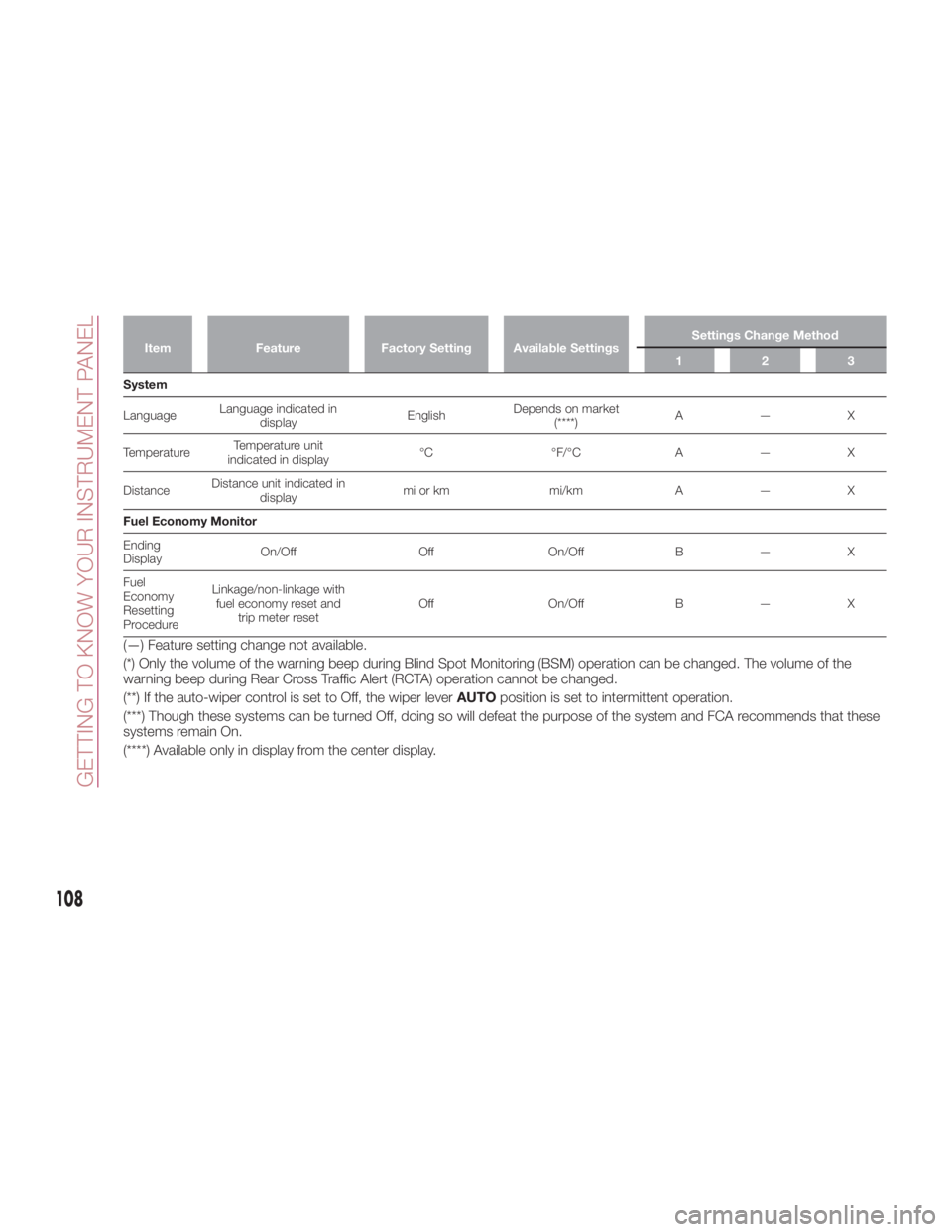
Item Feature Factory Setting Available Settings Settings Change Method
123
System
Language Language indicated in
display English Depends on market
(****) A—X
Temperature Temperature unit
indicated in display °C °F/°C A — X
Distance Distance unit indicated in
display mi or km mi/km A — X
Fuel Economy Monitor
Ending
Display On/Off Off On/Off B — X
Fuel
Economy
Resetting
Procedure Linkage/non-linkage with
fuel economy reset and
trip meter reset Off On/Off B — X
(—) Feature setting change not available.
(*) Only the volume of the warning beep during Blind Spot Monitoring (BSM) operation can be changed. The volume of the
warning beep during Rear Cross Traffic Alert (RCTA) operation cannot be changed.
(**) If the auto-wiper control is set to Off, the wiper lever AUTO position is set to intermittent operation.
(***) Though these systems can be turned Off, doing so will defeat the purpose of the system and FCA recommends that these
systems remain On.
(****) Available only in display from the center display.
108
GETTING TO KNOW YOUR INSTRUMENT PANEL
Page 112 of 292
EMISSIONS
INSPECTION AND
MAINTENANCE
PROGRAMS In some localities, it may be a legal
requirement to pass an inspection of
your vehicle's emissions control
system. Failure to pass could prevent
vehicle registration.
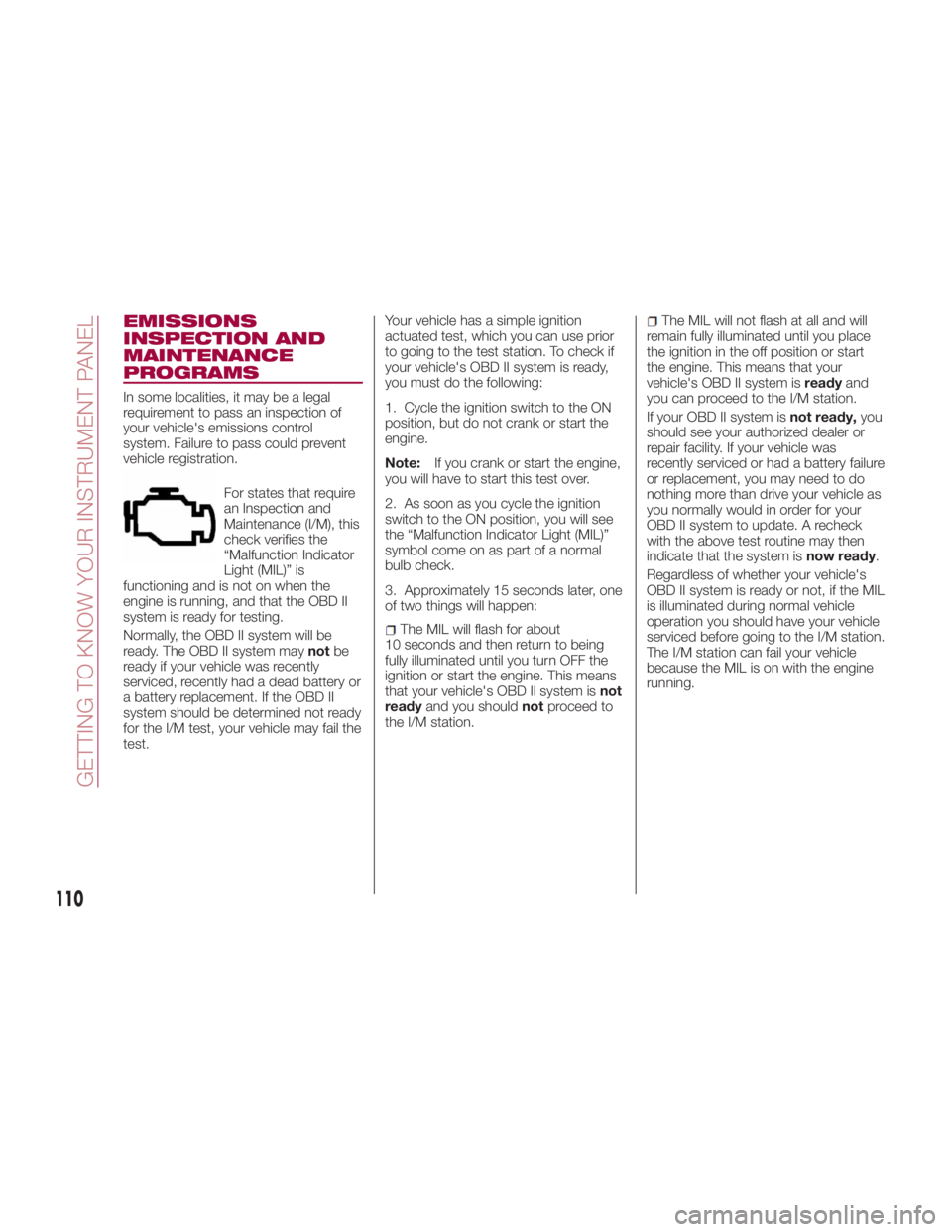
For states that require
an Inspection and
Maintenance (I/M), this
check verifies the
“Malfunction Indicator
Light (MIL)” is
functioning and is not on when the
engine is running, and that the OBD II
system is ready for testing.
Normally, the OBD II system will be
ready. The OBD II system may not be
ready if your vehicle was recently
serviced, recently had a dead battery or
a battery replacement. If the OBD II
system should be determined not ready
for the I/M test, your vehicle may fail the
test. Your vehicle has a simple ignition
actuated test, which you can use prior
to going to the test station. To check if
your vehicle's OBD II system is ready,
you must do the following:
1. Cycle the ignition switch to the ON
position, but do not crank or start the
engine.
Note: If you crank or start the engine,
you will have to start this test over.
2. As soon as you cycle the ignition
switch to the ON position, you will see
the “Malfunction Indicator Light (MIL)”
symbol come on as part of a normal
bulb check.
3. Approximately 15 seconds later, one
of two things will happen:
The MIL will flash for about
10 seconds and then return to being
fully illuminated until you turn OFF the
ignition or start the engine. This means
that your vehicle's OBD II system is not
ready and you should not proceed to
the I/M station. The MIL will not flash at all and will
remain fully illuminated until you place
the ignition in the off position or start
the engine. This means that your
vehicle's OBD II system is ready and
you can proceed to the I/M station.
If your OBD II system is not ready, you
should see your authorized dealer or
repair facility. If your vehicle was
recently serviced or had a battery failure
or replacement, you may need to do
nothing more than drive your vehicle as
you normally would in order for your
OBD II system to update. A recheck
with the above test routine may then
indicate that the system is now ready .
Regardless of whether your vehicle's
OBD II system is ready or not, if the MIL
is illuminated during normal vehicle
operation you should have your vehicle
serviced before going to the I/M station.
The I/M station can fail your vehicle
because the MIL is on with the engine
running.
110
GETTING TO KNOW YOUR INSTRUMENT PANEL
Page 114 of 292
SAFETY SYSTEMS Safety Systems
The vehicle has the following safety
systems:
Anti-lock Braking System (ABS)
Traction Contol System (TCS)
Dynamic Stability Control (DSC)
For the operation of the systems, see
the following pages.
ABS System (Anti-lock
Braking System)
The ABS control unit continuously
monitors the speed of each wheel. If
one wheel is about to lock up, the ABS
responds by automatically releasing
and reapplying that wheel's brake. The
driver will feel a slight vibration in the
brake pedal and may hear a chattering
noise from the brake system. This is
normal ABS system operation.
Continue to depress the brake pedal
without pumping the brakes. The
warning light turns on when the system
has a malfunction. Refer to “Warning
Lights And Messages” in “Getting To
Know Your Instrument Panel” for further
information. Note:
Braking distances may be longer on
loose surfaces (snow or gravel, for
example) which usually have a hard
foundation. A vehicle with a normal
braking system may require less
distance to stop under these
conditions because the tires will build
up a wedge of surface layer when the
wheels skid.
The sound of the ABS operating
may be heard when starting the engine
or immediately after starting the
vehicle; however, it does not indicate a
malfunction.
Warning!The ABS contains sophisticated
electronic equipment that may be
susceptible to interference caused by
improperly installed or high output radio
transmitting equipment. This interference
can cause possible loss of anti-lock braking
capability. Installation of such equipment
should be performed by qualified
professionals.
Pumping of the Anti-Lock Brakes will
diminish their effectiveness and may lead to
a collision. Pumping makes the stopping
distance longer. Just press firmly on your
brake pedal when you need to slow down
or stop. The ABS cannot prevent the natural
laws of physics from acting on the vehicle,
nor can it increase braking or steering
efficiency beyond that afforded by the
condition of the vehicle brakes and tires or
the traction afforded.
The ABS cannot prevent collisions,
including those resulting from excessive
speed in turns, following another vehicle
too closely, or hydroplaning.
The capabilities of an ABS equipped
vehicle must never be exploited in a
reckless or dangerous manner that could
jeopardize the user’s safety or the safety of
others.
TCS System (Traction
Control System)
Warning!The capability of the TCS must never be
tested irresponsibly and dangerously, in
such a way as to compromise personal
safety and the safety of others.
The Traction Control System (TCS)
enhances traction and safety by
controlling engine torque and braking.
When the TCS detects driving wheel
slippage, it can lower engine torque and
operate the brakes to prevent loss of
traction. This means that on a slick
surface, the engine adjusts
automatically to provide optimum
112
SAFETY
Page 115 of 292
power to the drive wheels, limiting
wheel spin and loss of traction.
The indicator light turns on when the
system has a malfunction. Refer to
“Warning Lights And Messages” in
“Getting To Know Your Instrument
Panel” for further information.
TCS / DSC Indicator Light
The
indicator light stays on for a few
seconds when the ignition is placed in
the ON mode.
If the TCS or DSC is operating, the
indicator light flashes.
If the
indicator light stays on, the
TCS, DSC or the brake assist system
may have a malfunction and they may
not operate correctly. Contact your
authorized dealer.
Note:
In addition to the indicator light
flashing, a slight sound will come from
the engine. This indicates that the
TCS/DSC is operating properly.
On slippery surfaces, such as fresh
snow, it will be impossible to achieve
high rpm when the TCS is on. DSC System (Dynamic
Stability Control)
The Dynamic Stability Control (DSC)
automatically controls braking and
engine torque in conjunction with
systems such as ABS and TCS to help
control side slip when driving on
slippery surfaces, or during sudden or
evasive maneuvering, enhancing vehicle
safety. Refer to “ABS System (Antilock
Brake System)” and “TCS System
(Traction Control System)” in this
chapter for further information.
DSC operation is possible at speeds
greater than 12 mph (20 km/h).
The indicator light turns on when the
system has a malfunction. Refer to
“Warning Lights And Messages” in
“Getting To Know Your Instrument
Panel” for further information.
Note: The DSC may not operate
correctly unless the following are
observed:
Use tires of the correct size
specified for your vehicle on all four
wheels.
Use tires of the same manufacturer,
brand and tread pattern on all four
wheels.
Do not mix worn tires.
Note: The DSC may not operate
correctly when tire chains are used. TCS / DSC Indicator Light
The
indicator light stays on for a few
seconds when the ignition is placed in
the ON mode. It also illuminates when
the DSC OFF switch is pressed and
TCS/DSC is switched off.
If the light stays on, the TCS, DSC or
the brake assist system may have a
malfunction and they may not operate
correctly. Take your vehicle to an
authorized dealer.
DSC OFF Indicator Light
The
indicator light stays on for a few
seconds when the ignition is placed in
the ON mode. It also illuminates when
the DSC OFF switch is pressed and
TCS/DSC is switched off.
If the light remains illuminated and the
TCS/DSC is not switched off, contact
your authorized dealer. The DSC may
have a malfunction.
DSC OFF Switch
Push the switch to turn off the
TCS/DSC. The
indicator light in the
instrument cluster will illuminate. Push
the switch again to turn the TCS/DSC
back on. The indicator light will turn off.
113
Page 118 of 292
Whenthereisadifferenceinthe
height between your driving lane and
the adjacent lane.
Immediately after pushing the BSM
switch and the system becomes
operable.
If the road width is extremely narrow,
vehicles two lanes over may be
detected. The detection area of the rear
radar sensors is set according to the
road width of expressways.
The BSM warning lights may turn on in
reaction to stationary objects on the
road or the roadside such as guardrails,
tunnels, sidewalls, and parked vehicles.
A BSM warning light may flash or the
audible alert may be activated several
times when making a turn at a city
intersection.
Turn off the BSM system while pulling a
trailer or while an accessory such as a
bicycle carrier is installed to the rear of
the vehicle. Otherwise, the radar’s
sound system waves will be blocked
causing the system to not operate
normally.
In the following cases, it may be difficult
to view the illumination/flashing of the
BSM warning lights equipped on the
door mirrors:
Snow or ice is adhering to the door
mirrors.
The door glass is fogged or covered
in snow, frost or dirt. The system switches to the Rear Cross
Traffic Alert function when the gear
selector is shifted to the REVERSE
position.
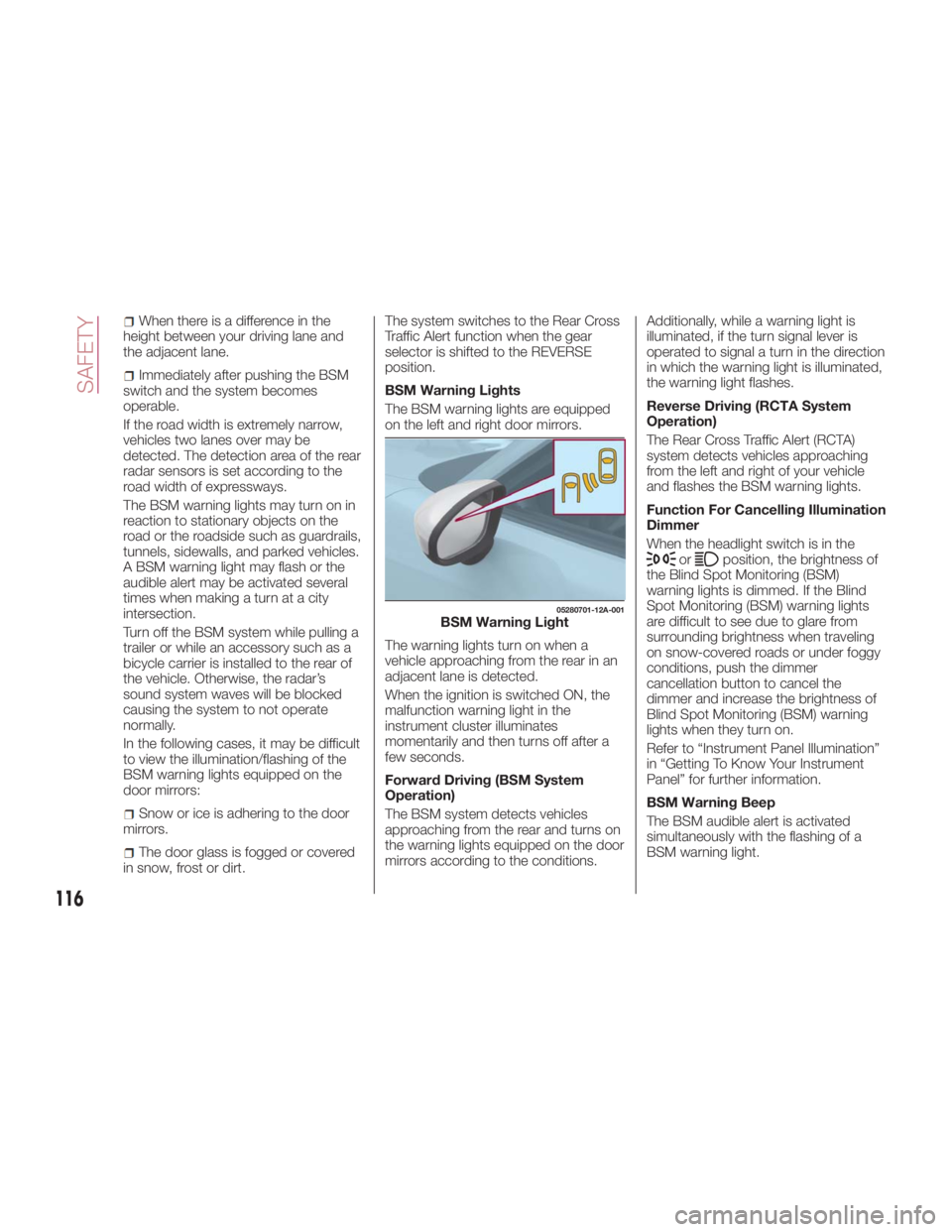
BSM Warning Lights
The BSM warning lights are equipped
on the left and right door mirrors.
The warning lights turn on when a
vehicle approaching from the rear in an
adjacent lane is detected.
When the ignition is switched ON, the
malfunction warning light in the
instrument cluster illuminates
momentarily and then turns off after a
few seconds.
Forward Driving (BSM System
Operation)
The BSM system detects vehicles
approaching from the rear and turns on
the warning lights equipped on the door
mirrors according to the conditions. Additionally, while a warning light is
illuminated, if the turn signal lever is
operated to signal a turn in the direction
in which the warning light is illuminated,
the warning light flashes.
Reverse Driving (RCTA System
Operation)
The Rear Cross Traffic Alert (RCTA)
system detects vehicles approaching
from the left and right of your vehicle
and flashes the BSM warning lights.
Function For Cancelling Illumination
Dimmer
When the headlight switch is in the
or position, the brightness of
the Blind Spot Monitoring (BSM)
warning lights is dimmed. If the Blind
Spot Monitoring (BSM) warning lights
are difficult to see due to glare from
surrounding brightness when traveling
on snow-covered roads or under foggy
conditions, push the dimmer
cancellation button to cancel the
dimmer and increase the brightness of
Blind Spot Monitoring (BSM) warning
lights when they turn on.
Refer to “Instrument Panel Illumination”
in “Getting To Know Your Instrument
Panel” for further information.
BSM Warning Beep
The BSM audible alert is activated
simultaneously with the flashing of a
BSM warning light. 05280701-12A-001
BSM Warning Light
116
SAFETY
Page 128 of 292
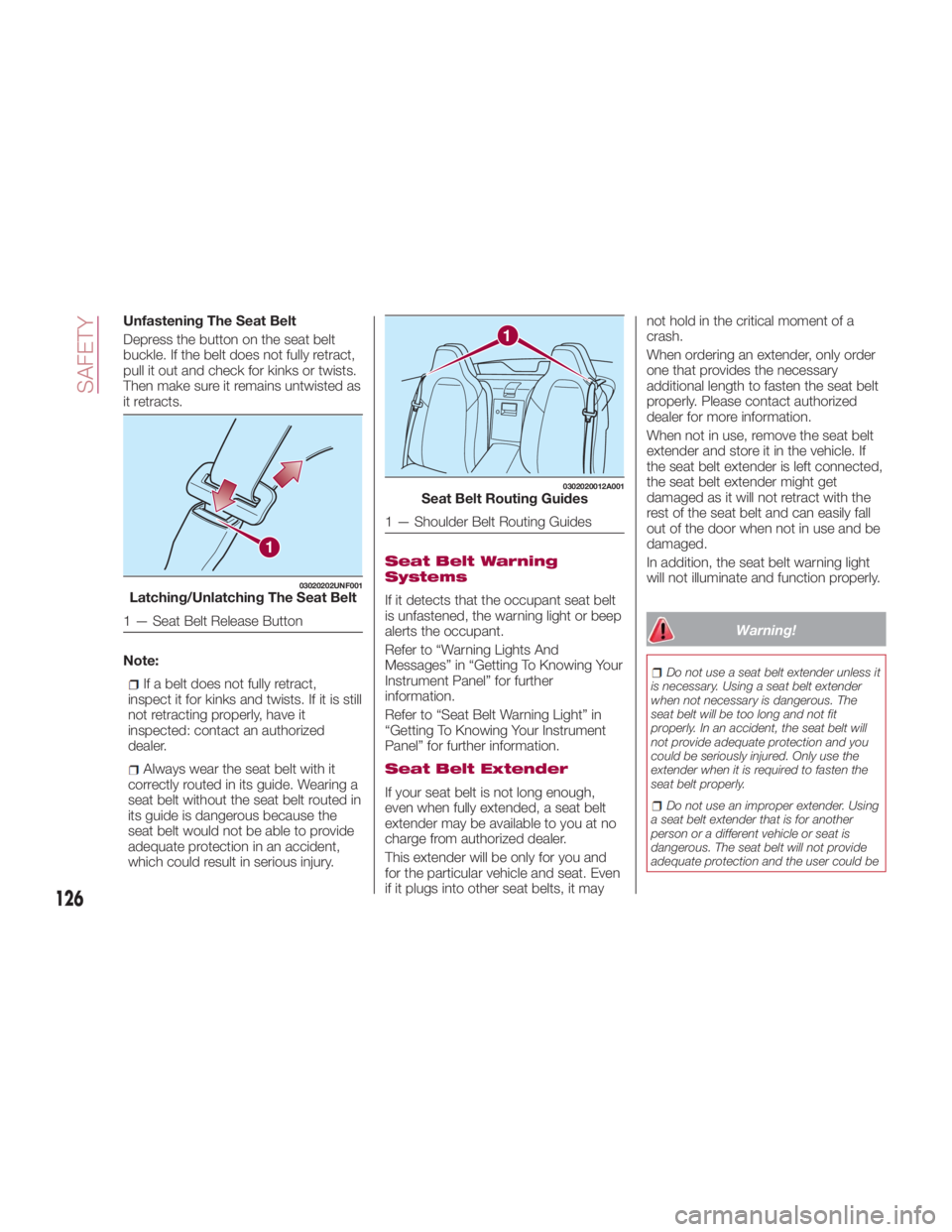
Unfastening The Seat Belt
Depress the button on the seat belt
buckle. If the belt does not fully retract,
pull it out and check for kinks or twists.
Then make sure it remains untwisted as
it retracts.
Note:
If a belt does not fully retract,
inspect it for kinks and twists. If it is still
not retracting properly, have it
inspected: contact an authorized
dealer.
Always wear the seat belt with it
correctly routed in its guide. Wearing a
seat belt without the seat belt routed in
its guide is dangerous because the
seat belt would not be able to provide
adequate protection in an accident,
which could result in serious injury. Seat Belt Warning
Systems
If it detects that the occupant seat belt
is unfastened, the warning light or beep
alerts the occupant.
Referto“WarningLightsAnd
Messages” in “Getting To Knowing Your
Instrument Panel” for further
information.
Refer to “Seat Belt Warning Light” in
“Getting To Knowing Your Instrument
Panel” for further information.
Seat Belt Extender
If your seat belt is not long enough,
even when fully extended, a seat belt
extender may be available to you at no
charge from authorized dealer.
This extender will be only for you and
for the particular vehicle and seat. Even
if it plugs into other seat belts, it may not hold in the critical moment of a
crash.
When ordering an extender, only order
one that provides the necessary
additional length to fasten the seat belt
properly. Please contact authorized
dealer for more information.
When not in use, remove the seat belt
extender and store it in the vehicle. If
the seat belt extender is left connected,
the seat belt extender might get
damaged as it will not retract with the
rest of the seat belt and can easily fall
out of the door when not in use and be
damaged.
In addition, the seat belt warning light
will not illuminate and function properly.
Warning! Do not use a seat belt extender unless it
is necessary. Using a seat belt extender
when not necessary is dangerous. The
seat belt will be too long and not fit
properly. In an accident, the seat belt will
not provide adequate protection and you
could be seriously injured. Only use the
extender when it is required to fasten the
seat belt properly.
Do not use an improper extender. Using
a seat belt extender that is for another
person or a different vehicle or seat is
dangerous. The seat belt will not provide
adequate protection and the user could be1 03020202UNF001
Latching/Unlatching The Seat Belt
1 — Seat Belt Release Button 1 0302020012A001
Seat Belt Routing Guides
1 — Shoulder Belt Routing Guides
126
SAFETY
Page 139 of 292
Warning Light/Beep
A system malfunction or operation
conditions are indicated by a warning.
Refer to the beginning paragraph of
“Warning Lights And Messages” in
“Getting To Know Your Instrument
Panel” for further information.
Warning!Ignoring the Air Bag Warning Light in your
instrument panel could mean you won’t
have the air bags to protect you in a
collision. If the light does not come on as a
bulb check when the ignition is first turned
on, stays on after you start the vehicle, or if
it comes on as you drive, have an
authorized dealer service the air bag
system immediately.
Passenger Side Front Air Bag And
Child Restraint Systems
Rearward-facing child restraint systems
must NEVER be fitted on the front seat
with an active passenger side air bag
since in the event of an impact the air
bag activation may cause fatal injuries
to the transported child.
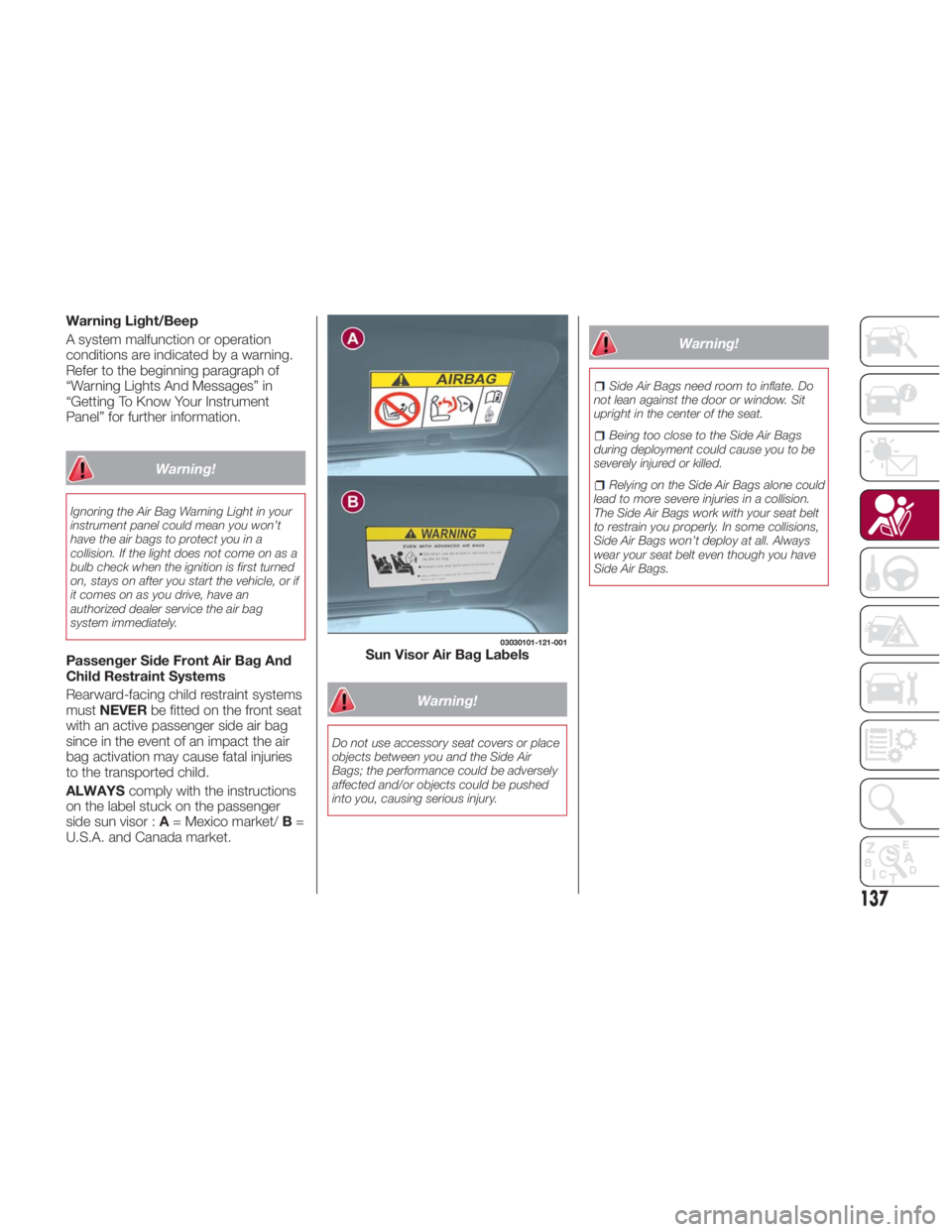
ALWAYS comply with the instructions
on the label stuck on the passenger
side sun visor : A = Mexico market/ B =
U.S.A. and Canada market. Warning!Do not use accessory seat covers or place
objects between you and the Side Air
Bags; the performance could be adversely
affected and/or objects could be pushed
into you, causing serious injury. Warning! Side Air Bags need room to inflate. Do
not lean against the door or window. Sit
upright in the center of the seat.
Being too close to the Side Air Bags
during deployment could cause you to be
severely injured or killed.
Relying on the Side Air Bags alone could
lead to more severe injuries in a collision.
The Side Air Bags work with your seat belt
to restrain you properly. In some collisions,
Side Air Bags won’t deploy at all. Always
wear your seat belt even though you have
Side Air Bags. 03030101-121-001
Sun Visor Air Bag Labels
137
Page 141 of 292
(**) Passenger Occupant Classification System : the passenger front and side air bags and the seat belt pretensioner are
designed to deploy when the passenger occupant classification sensor detects a passenger sitting on the passenger's seat.
Note: In a frontal offset collision, the equipped air bags and pretensioners may all deploy depending on the direction, angle,
and rate of impact.
Warning!Unapproved modifications or service procedures to the passenger seat assembly, its related components, seat cover, or cushion may
inadvertently change the air bag deployment in case of a frontal collision. This could result in death or serious injury to the front passenger if
the vehicle is involved in a collision. A modified vehicle may not comply with required Federal Motor Vehicle Safety Standards (FMVSS) and/or
Canadian Motor Vehicle Safety Standards (CMVSS).
If it is necessary to modify the air bag system for persons with disabilities, contact your authorized dealer.
Warning!Deployed air bags and seat belt pretensioners cannot protect you in another collision. Have the air bags, seat belt pretensioners, and the seat
belt retractor assemblies replaced by an authorized dealer immediately. Also, have the Occupant Restraint Controller System serviced as well.
Warning!Ignoring the Air Bag Warning Light in your instrument panel could mean you won’t have the air bags to protect you in a collision. If the light
does not come on as a bulb check when the ignition is first turned on, stays on after you start the vehicle, or if it comes on as you drive, have
an authorized dealer service the air bag system immediately.
Placing an object on the floor under the front passenger seat may prevent the occupant classification sensor from working properly, which
may result in serious injury or death in a collision. Do not place any objects on the floor under the front passenger seat.
If there is a fault present in the occupant classification sensor, both the Indicator Light and the Air Bag Warning Light will illuminate to show
that the Passenger Advanced Front Air Bag is deactivated. Should this occur, the Passenger Advanced Front Air Bag will remain deactivated
until the fault is cleared. This indicates that you should take the vehicle to an authorized dealer for service immediately.
139
Page 143 of 292
Passenger Occupant
Classification Sensor
Your vehicle is equipped with a
passenger occupant classification
sensor as a part of the supplementary
restraint system. This sensor is
equipped in the passenger's seat
cushion. This sensor measures the
electrostatic capacity of the
passenger's seat.
The SRS unit is designed to prevent the
passenger front and side Air Bags and
seat belt pretensioner system from
deploying if the passenger Air Bag
deactivation indicator light turns on.
To reduce the chance of injuries caused
by deployment of the passenger Air
Bag, the system deactivates the
passenger front and side Air Bags and
also the seat belt pretensioner system
when the passenger Air Bag
deactivation indicator light turns on.
This system shuts off the passenger
front and side Air Bags and seat belt
pretensioner system, so make sure the
passenger Air Bag deactivation
indicator light turns on.
The air bag/seat belt pretensioner
system warning light flashes and the
passenger Air Bag deactivation
indicator light illuminates if the sensors
have a possible malfunction. If this
happens, the passenger front and side
Air Bags and seat belt pretensioner
system will not deploy. Note: If a passenger is seated as
shown in the following figure the
passenger occupant classification
sensor cannot detect a passenger
sitting on the passenger's seat correctly
and the deployment/non-deployment of
the Air Bags cannot be controlled as
indicated in the passenger Air Bag
deactivation indicator light on/off
condition chart.
Warning!If a child restraint system, child, small
teenager or adult in the front passenger
seat is seated improperly, the occupant
may provide an output signal to the
occupant classification sensor that is
different from the occupant’s properly
seated weight input. This may result in
serious injury or death in a collision.
Warning! Ignoring the Air Bag Warning Light in
your instrument panel could mean you
won’t have the air bags to protect you in a
collision. If the light does not come on as a
bulb check when the ignition is first turned
on, stays on after you start the vehicle, or if
it comes on as you drive, have an
authorized dealer service the air bag
system immediately.A
B 03040600-123-001
Side Collision 03040600-124-002
Roll-Over Collision
141