instrument panel FIAT SPIDER ABARTH 2017 User Guide
[x] Cancel search | Manufacturer: FIAT, Model Year: 2017, Model line: SPIDER ABARTH, Model: FIAT SPIDER ABARTH 2017Pages: 292, PDF Size: 9.24 MB
Page 41 of 292
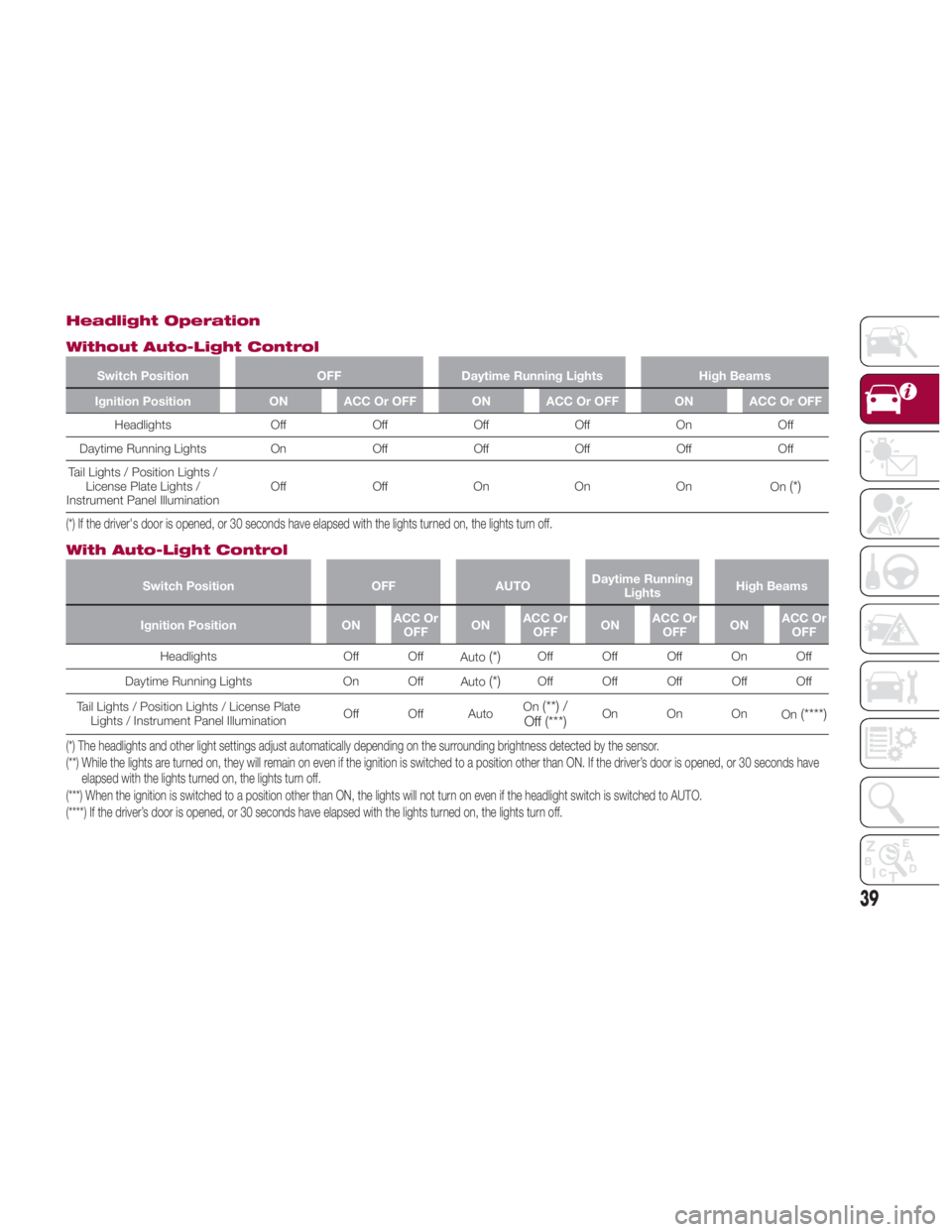
Headlight Operation
Without Auto-Light Control Switch Position OFF Daytime Running Lights High Beams
Ignition Position ON ACC Or OFF ON ACC Or OFF ON ACC Or OFF
Headlights Off Off Off Off On Off
Daytime Running
Lights On Off Off Off Off Off
Tail Lights / Position Lights /
License Plate Lights /
Instrument Panel Illumination Off Off On On On
On
(*)
(*) If the driver's door is opened, or 30 seconds have elapsed with the lights turned on, the lights turn off.
With Auto-Light Control Switch Position OFF AUTO Daytime Running
Lights High Beams
Ignition Position ON ACC Or
OFF ON ACC Or
OFF ON ACC Or
OFF ON ACC Or
OFF
Headlights Off Off
Auto
(*) Off Off Off On Off
Daytime Running Lights On Off
Auto
(*) Off Off Off Off Off
Tail Lights / Position Lights / License Plate
Lights / Instrument Panel Illumination Off Off Auto On
(**) /
Off
(***) On On On
On
(****)
(*) The headlights and other light settings adjust automatically depending on the surrounding brightness detected by the sensor.
(**) While the lights are turned on, they will remain on even if the ignition is switched to a position other than ON. If the driver’s door is opened, or 30 seconds have
elapsed with the lights turned on, the lights turn off.
(***) When the ignition is switched to a position other than ON, the lights will not turn on even if the headlight switch is switched to AUTO.
(****) If the driver’s door is opened, or 30 seconds have elapsed with the lights turned on, the lights turn off.
39
Page 42 of 292
Daytime Running Lights
(DRL)
The daytime running lights turn on
automatically when the vehicle starts
moving.
They turn off when the parking brake is
engaged or the gear selector is shifted
to the PARK position (if equipped with
automatic transmission).
Note: In some markets, the daytime
running lights can be deactivated. Refer
to “Personalization Features” in “Getting
To Know Your Instrument Panel” for
further information.
High Beams
The headlights can be switched
between high and low beams by
pushing the headlight switch lever
forward for high beams, and pulling the
lever rearward to return to low beams.
When the headlight high beams are on,
the
high beam indicator is
illuminated in the instrument cluster.
Flash To Pass
You can signal another vehicle with your
headlights by partially pulling the
headlight lever toward the steering
wheel. This will cause the high beam
headlights to turn on until the lever is
released.
The
high beam indicator in the
instrument cluster illuminates while the
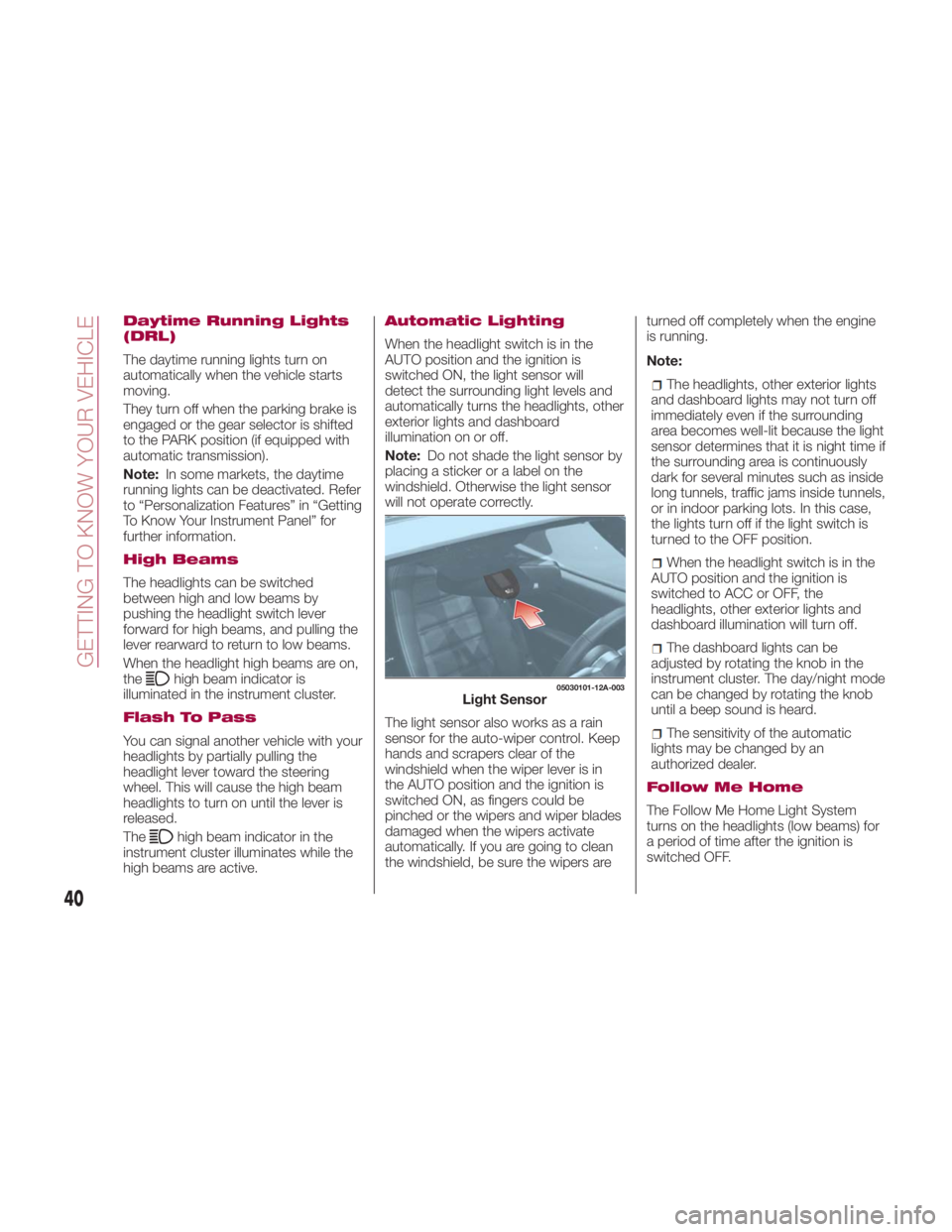
high beams are active. Automatic Lighting
When the headlight switch is in the
AUTO position and the ignition is
switched ON, the light sensor will
detect the surrounding light levels and
automatically turns the headlights, other
exterior lights and dashboard
illumination on or off.
Note: Do not shade the light sensor by
placing a sticker or a label on the
windshield. Otherwise the light sensor
will not operate correctly.
The light sensor also works as a rain
sensor for the auto-wiper control. Keep
hands and scrapers clear of the
windshield when the wiper lever is in
the AUTO position and the ignition is
switched ON, as fingers could be
pinched or the wipers and wiper blades
damaged when the wipers activate
automatically. If you are going to clean
the windshield, be sure the wipers are turned off completely when the engine
is running.
Note:
The headlights, other exterior lights
and dashboard lights may not turn off
immediately even if the surrounding
area becomes well-lit because the light
sensor determines that it is night time if
the surrounding area is continuously
dark for several minutes such as inside
long tunnels, traffic jams inside tunnels,
or in indoor parking lots. In this case,
the lights turn off if the light switch is
turned to the OFF position.
When the headlight switch is in the
AUTO position and the ignition is
switched to ACC or OFF, the
headlights, other exterior lights and
dashboard illumination will turn off.
The dashboard lights can be
adjusted by rotating the knob in the
instrument cluster. The day/night mode
can be changed by rotating the knob
until a beep sound is heard.
The sensitivity of the automatic
lightsmaybechangedbyan
authorized dealer.
Follow Me Home
The Follow Me Home Light System
turns on the headlights (low beams) for
a period of time after the ignition is
switched OFF. 05030101-12A-003
Light Sensor
40
GETTING TO KNOW YOUR VEHICLE
Page 70 of 292
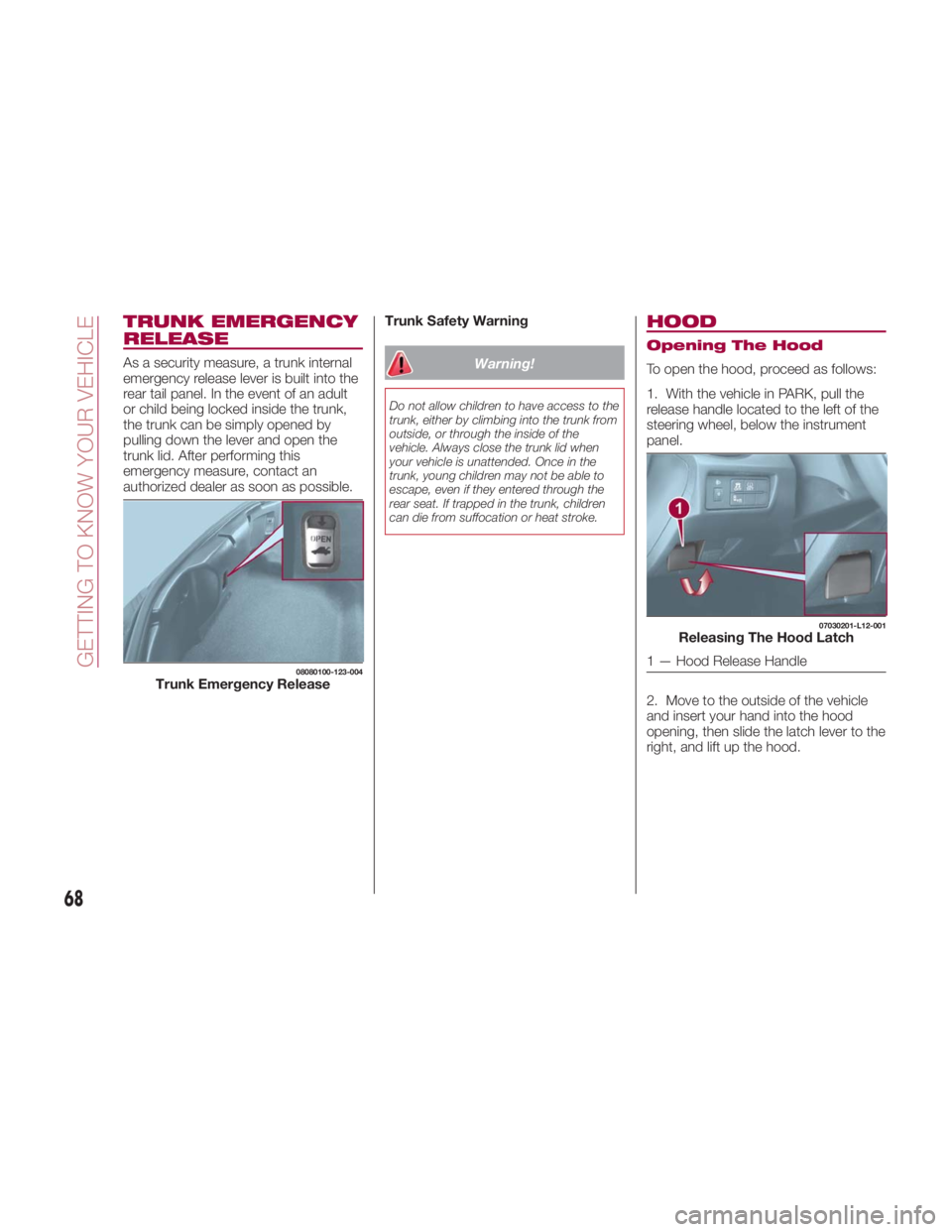
TRUNK EMERGENCY
RELEASE As a security measure, a trunk internal
emergency release lever is built into the
rear tail panel. In the event of an adult
or child being locked inside the trunk,
the trunk can be simply opened by
pulling down the lever and open the
trunk lid. After performing this
emergency measure, contact an
authorized dealer as soon as possible. Trunk Safety Warning
Warning!Do not allow children to have access to the
trunk, either by climbing into the trunk from
outside, or through the inside of the
vehicle. Always close the trunk lid when
your vehicle is unattended. Once in the
trunk, young children may not be able to
escape, even if they entered through the
rear seat. If trapped in the trunk, children
can die from suffocation or heat stroke.
HOOD Opening The Hood
To open the hood, proceed as follows:
1. With the vehicle in PARK, pull the
release handle located to the left of the
steering wheel, below the instrument
panel.
2. Move to the outside of the vehicle
and insert your hand into the hood
opening, then slide the latch lever to the
right, and lift up the hood.08080100-123-004
Trunk Emergency Release 07030201-L12-001
Releasing The Hood Latch
1 — Hood Release Handle
68
GETTING TO KNOW YOUR VEHICLE
Page 77 of 292
GETTING TO KNOW YOUR INSTRUMENT PANEL CONTROL PANEL AND
INSTRUMENTS..............76
MAINTENANCE MONITOR — IF
EQUIPPED .................81
FUEL ECONOMY MONITOR — IF
EQUIPPED .................84
WARNING LIGHTS AND
MESSAGES ................86
PERSONALIZATION FEATURES . .105
ONBOARD DIAGNOSTIC SYSTEM —
OBDII.................. .109
EMISSIONS INSPECTION AND
MAINTENANCE PROGRAMS . . . .110
75
Page 78 of 292
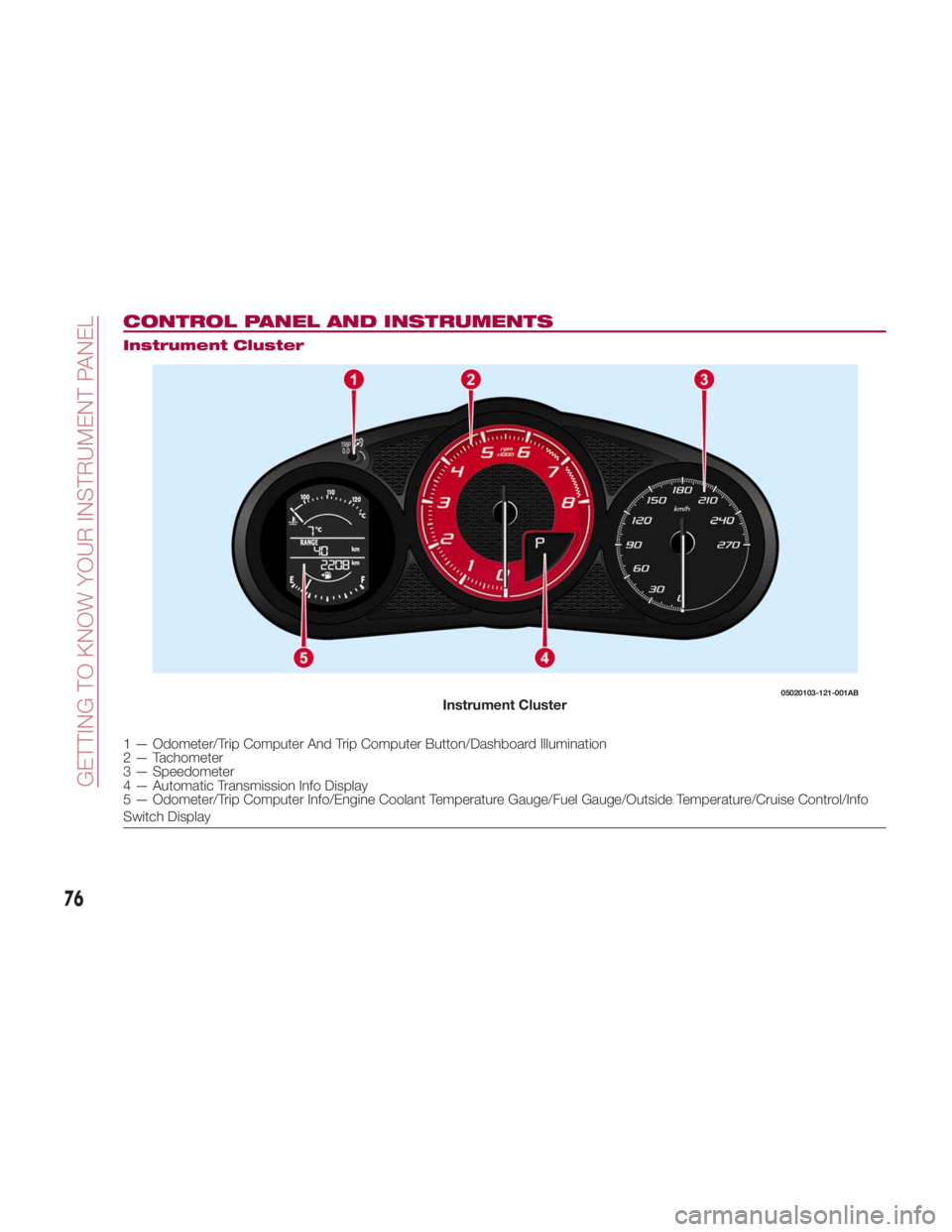
CONTROL PANEL AND INSTRUMENTS Instrument Cluster
1 — Odometer/Trip Computer And Trip Computer Button/Dashboard Illumination
2 — Tachometer
3 — Speedometer
4 — Automatic Transmission Info Display
5 — Odometer/Trip Computer Info/Engine Coolant Temperature Gauge/Fuel Gauge/Outside Temperature/Cruise Control/Info
Switch Display 05020103-121-001AB
Instrument Cluster
76
GETTING TO KNOW YOUR INSTRUMENT PANEL
Page 79 of 292
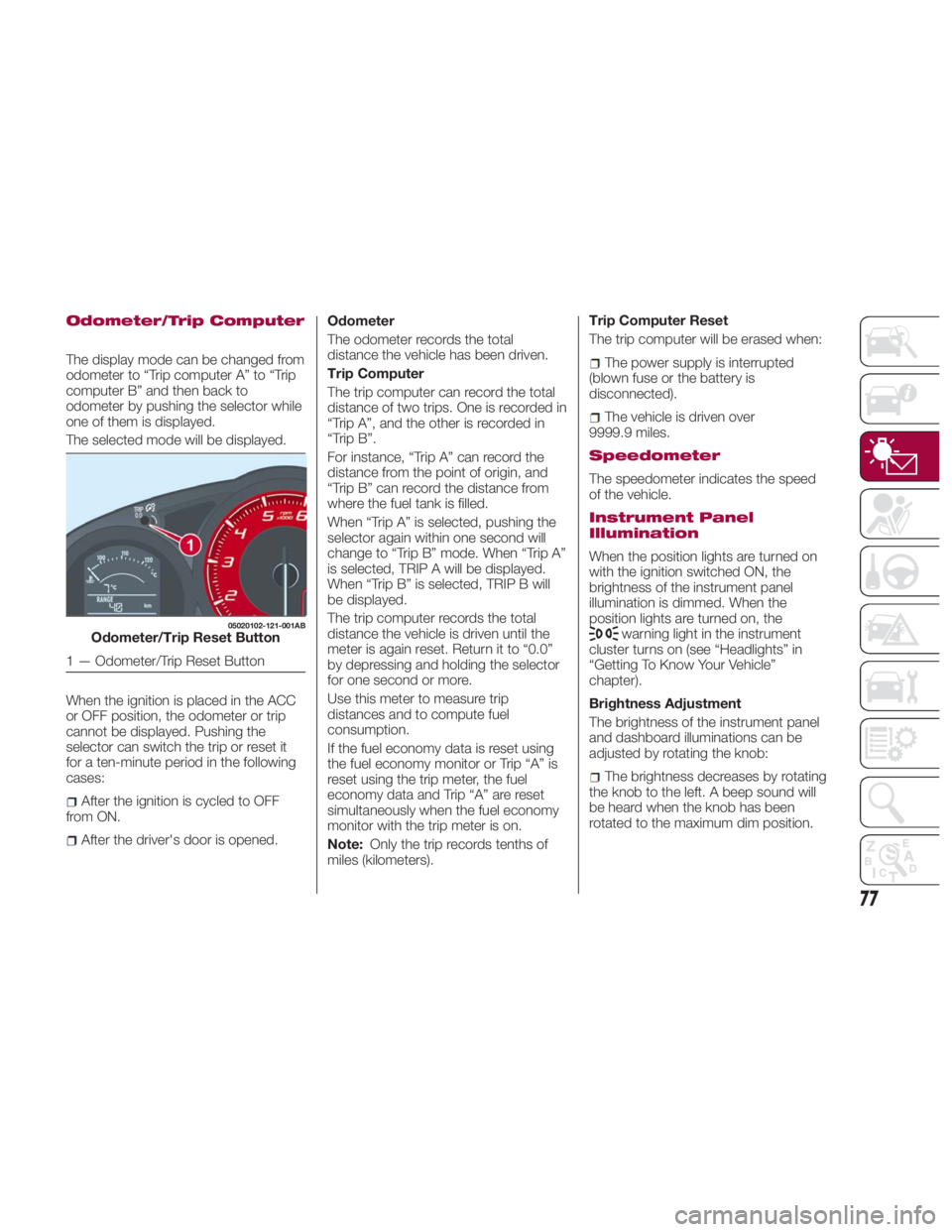
Odometer/Trip Computer
The display mode can be changed from
odometer to “Trip computer A” to “Trip
computer B” and then back to
odometer by pushing the selector while
one of them is displayed.
The selected mode will be displayed.
When the ignition is placed in the ACC
or OFF position, the odometer or trip
cannot be displayed. Pushing the
selector can switch the trip or reset it
for a ten-minute period in the following
cases:
After the ignition is cycled to OFF
from ON.
After the driver's door is opened. Odometer
The odometer records the total
distance the vehicle has been driven.
Trip Computer
The trip computer can record the total
distance of two trips. One is recorded in
“Trip A”, and the other is recorded in
“Trip B”.
For instance, “Trip A” can record the
distance from the point of origin, and
“Trip B” can record the distance from
where the fuel tank is filled.
When “Trip A” is selected, pushing the
selector again within one second will
change to “Trip B” mode. When “Trip A”
is selected, TRIP A will be displayed.
When “Trip B” is selected, TRIP B will
be displayed.
The trip computer records the total
distance the vehicle is driven until the
meter is again reset. Return it to “0.0”
by depressing and holding the selector
for one second or more.
Use this meter to measure trip
distances and to compute fuel
consumption.
If the fuel economy data is reset using
the fuel economy monitor or Trip “A” is
reset using the trip meter, the fuel
economy data and Trip “A” are reset
simultaneously when the fuel economy
monitor with the trip meter is on.
Note: Only the trip records tenths of
miles (kilometers). Trip Computer Reset
The trip computer will be erased when:
The power supply is interrupted
(blown fuse or the battery is
disconnected).
The vehicle is driven over
9999.9 miles.
Speedometer
The speedometer indicates the speed
of the vehicle.
Instrument Panel
Illumination
When the position lights are turned on
with the ignition switched ON, the
brightness of the instrument panel
illumination is dimmed. When the
position lights are turned on, the
warning light in the instrument
cluster turns on (see “Headlights” in
“Getting To Know Your Vehicle”
chapter).
Brightness Adjustment
The brightness of the instrument panel
and dashboard illuminations can be
adjusted by rotating the knob:
The brightness decreases by rotating
the knob to the left. A beep sound will
be heard when the knob has been
rotated to the maximum dim position.05020102-121-001AB
Odometer/Trip Reset Button
1 — Odometer/Trip Reset Button
77
Page 80 of 292
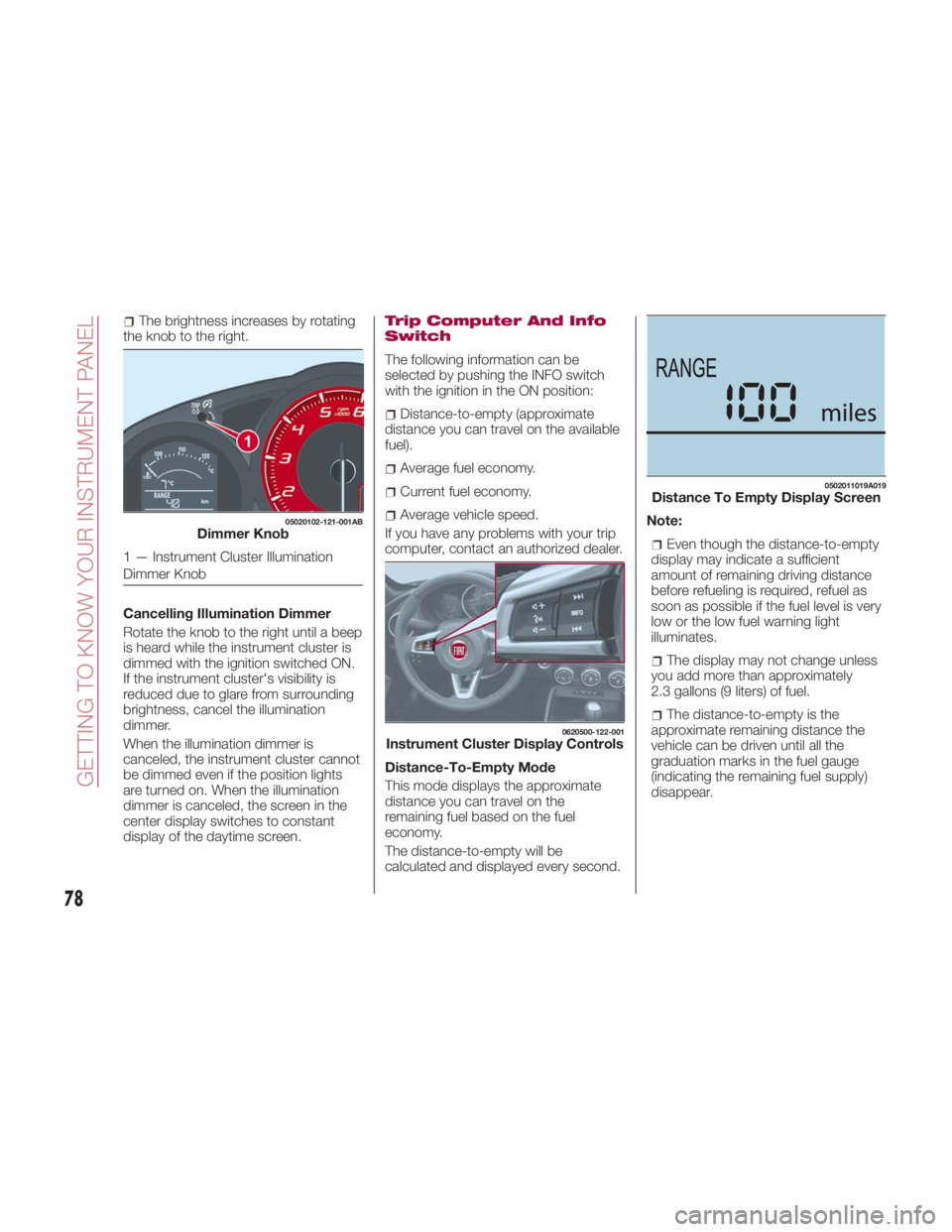
The brightness increases by rotating
the knob to the right.
Cancelling Illumination Dimmer
Rotate the knob to the right until a beep
is heard while the instrument cluster is
dimmed with the ignition switched ON.
If the instrument cluster's visibility is
reduced due to glare from surrounding
brightness, cancel the illumination
dimmer.
When the illumination dimmer is
canceled, the instrument cluster cannot
be dimmed even if the position lights
are turned on. When the illumination
dimmer is canceled, the screen in the
center display switches to constant
display of the daytime screen. Trip Computer And Info
Switch
The following information can be
selected by pushing the INFO switch
with the ignition in the ON position:
Distance-to-empty (approximate
distance you can travel on the available
fuel).
Average fuel economy.
Current fuel economy.
Average vehicle speed.
If you have any problems with your trip
computer, contact an authorized dealer.
Distance-To-Empty Mode
This mode displays the approximate
distance you can travel on the
remaining fuel based on the fuel
economy.
The distance-to-empty will be
calculated and displayed every second. Note:
Even though the distance-to-empty
display may indicate a sufficient
amount of remaining driving distance
before refueling is required, refuel as
soon as possible if the fuel level is very
low or the low fuel warning light
illuminates.
The display may not change unless
you add more than approximately
2.3 gallons (9 liters) of fuel.
The distance-to-empty is the
approximate remaining distance the
vehicle can be driven until all the
graduation marks in the fuel gauge
(indicating the remaining fuel supply)
disappear.05020102-121-001AB
Dimmer Knob
1 — Instrument Cluster Illumination
Dimmer Knob 0620500-122-001
Instrument Cluster Display Controls 0502011019A019
Distance To Empty Display Screen
78
GETTING TO KNOW YOUR INSTRUMENT PANEL
Page 82 of 292
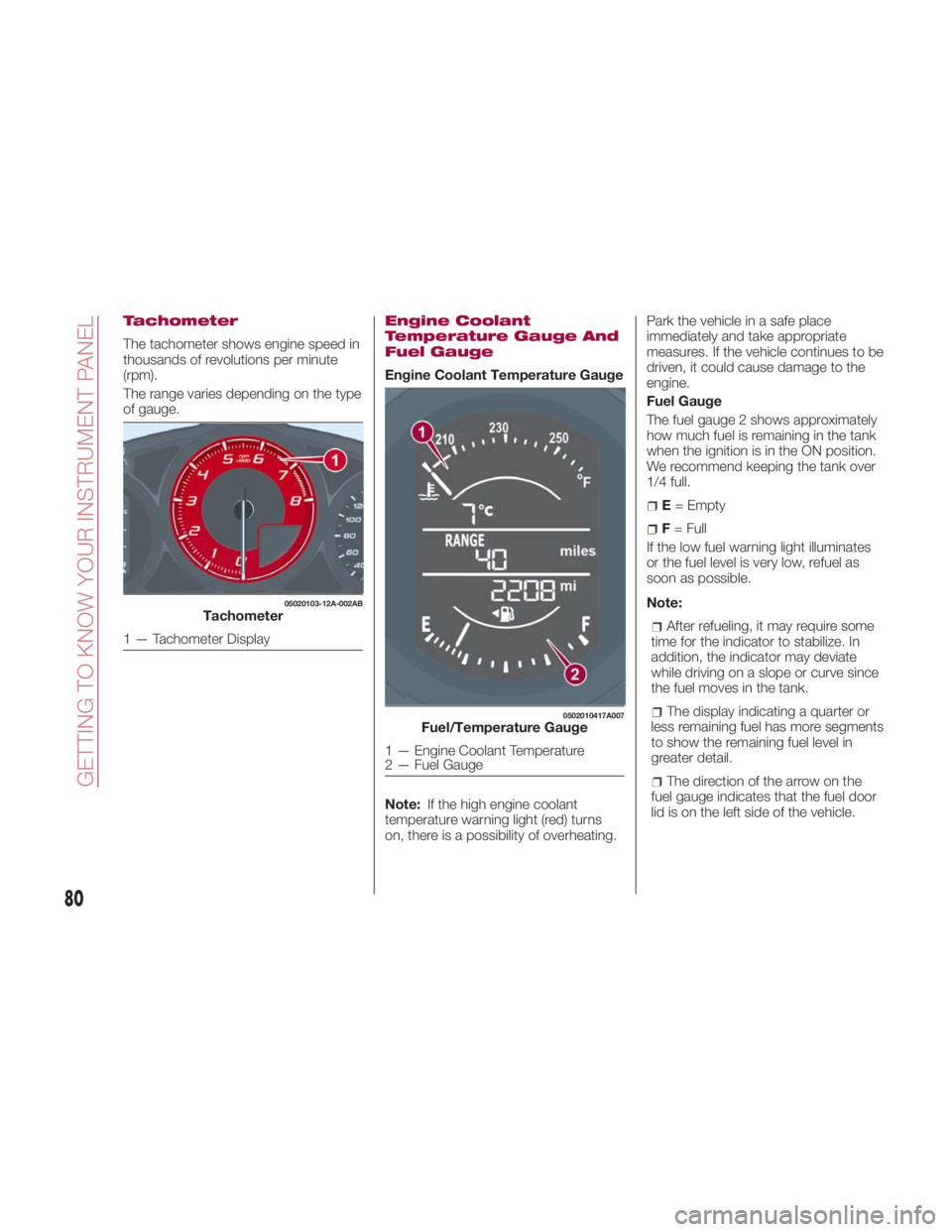
Tachometer
The tachometer shows engine speed in
thousands of revolutions per minute
(rpm).
The range varies depending on the type
of gauge. Engine Coolant
Temperature Gauge And
Fuel Gauge
Engine Coolant Temperature Gauge
Note: If the high engine coolant
temperature warning light (red) turns
on, there is a possibility of overheating. Park the vehicle in a safe place
immediately and take appropriate
measures. If the vehicle continues to be
driven, it could cause damage to the
engine.
Fuel Gauge
The fuel gauge 2 shows approximately
how much fuel is remaining in the tank
when the ignition is in the ON position.
We recommend keeping the tank over
1/4 full.
E = Empty
F = Full
If the low fuel warning light illuminates
or the fuel level is very low, refuel as
soon as possible.
Note:
After refueling, it may require some
time for the indicator to stabilize. In
addition, the indicator may deviate
while driving on a slope or curve since
the fuel moves in the tank.
The display indicating a quarter or
less remaining fuel has more segments
to show the remaining fuel level in
greater detail.
The direction of the arrow on the
fuel gauge indicates that the fuel door
lid is on the left side of the vehicle.05020103-12A-002AB
Tachometer
1 — Tachometer Display 0502010417A007
Fuel/Temperature Gauge
1 — Engine Coolant Temperature
2 — Fuel Gauge
80
GETTING TO KNOW YOUR INSTRUMENT PANEL
Page 84 of 292
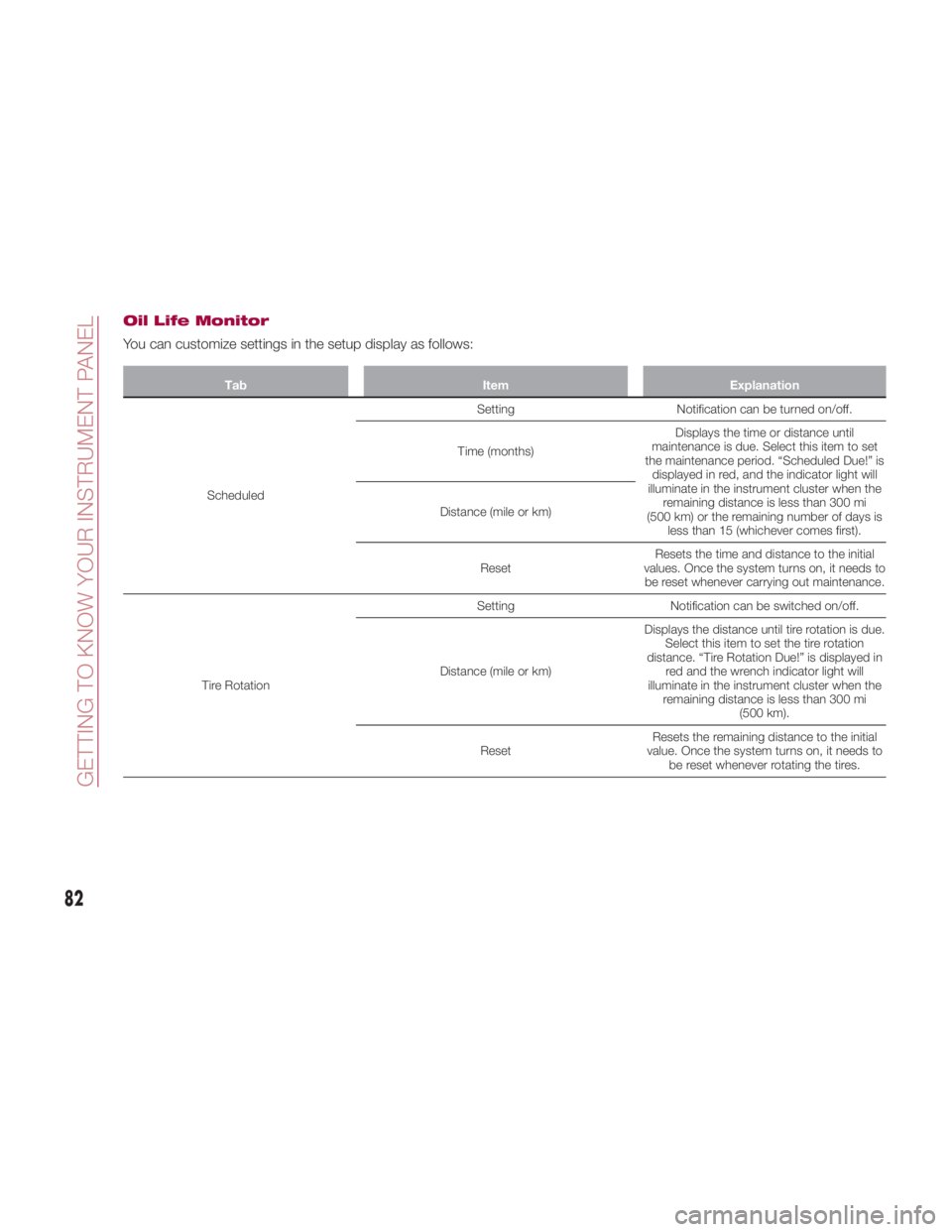
Oil Life Monitor
You can customize settings in the setup display as follows: Tab Item Explanation
Scheduled Setting Notification can be turned on/off.
Time (months) Displays the time or distance until
maintenance is due. Select this item to set
the maintenance period. “Scheduled Due!” is
displayed in red, and the indicator light will
illuminate in the instrument cluster when the
remaining distance is less than 300 mi
(500 km) or the remaining number of days is
less than 15 (whichever comes first).Distance (mile or km)
Reset Resets the time and distance to the initial
values. Once the system turns on, it needs to
be reset whenever carrying out maintenance.
Tire Rotation Setting Notification can be switched on/off.
Distance (mile or km) Displays the distance until tire rotation is due.
Select this item to set the tire rotation
distance. “Tire Rotation Due!” is displayed in
red and the wrench indicator light will
illuminate in the instrument cluster when the
remaining distance is less than 300 mi
(500 km).
Reset Resets the remaining distance to the initial
value. Once the system turns on, it needs to
be reset whenever rotating the tires.
82
GETTING TO KNOW YOUR INSTRUMENT PANEL
Page 86 of 292
FUEL ECONOMY
MONITOR — IF
EQUIPPED Description
The “Fuel Consumption” information is
displayed by operating each icon in the
display.
In addition, after completing a trip, the
total energy efficiency to date is
displayed in the ending display when
the ending display is turned on.
Proceed as follows:
1. Select the
icon on the home
screen to display the applications
screen.
2. Select the “Fuel Economy Monitor”. 3. Operate the Multimedia Control
Knob or touch the screen and display
the menu.
Note: When the menu is displayed by
touching the screen, the display is
hidden automatically after 6 seconds.
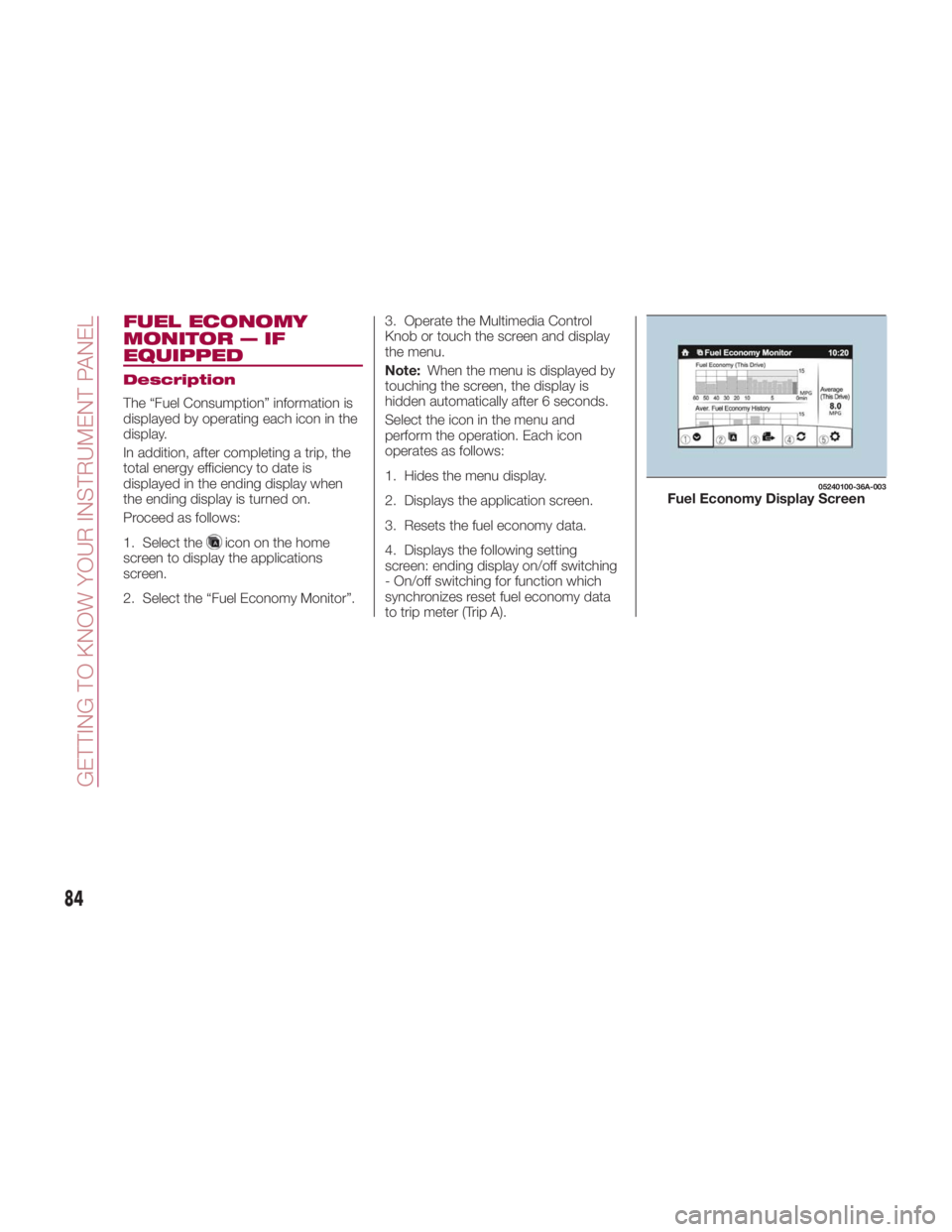
Select the icon in the menu and
perform the operation. Each icon
operates as follows:
1. Hides the menu display.
2. Displays the application screen.
3. Resets the fuel economy data.
4. Displays the following setting
screen: ending display on/off switching
- On/off switching for function which
synchronizes reset fuel economy data
to trip meter (Trip A). 05240100-36A-003
Fuel Economy Display Screen
84
GETTING TO KNOW YOUR INSTRUMENT PANEL