instrument panel FIAT SPIDER ABARTH 2017 Service Manual
[x] Cancel search | Manufacturer: FIAT, Model Year: 2017, Model line: SPIDER ABARTH, Model: FIAT SPIDER ABARTH 2017Pages: 292, PDF Size: 9.24 MB
Page 147 of 292
Warning!Never place a rear-facing child restraint
in front of an air bag. A deploying
passenger front air bag can cause death or
serious injury to a child 12 years or
younger, including a child in a rear-facing
child restraint.
Only use a rear-facing child restraint in a
vehicle with a rear seat.
Children 12 years or younger should
always ride buckled up in a vehicle with a
rear seat.
Warning!No objects should be placed over or
near the air bag on the instrument panel or
steering wheel because any such objects
could cause harm if the vehicle is in a
collision severe enough to cause the air
bag to inflate.
Do not put anything on or around the air
bag covers or attempt to open them
manually. You may damage the air bags
and you could be injured because the air
bags may no longer be functional. The
protective covers for the air bag cushions
are designed to open only when the air
bags are inflating.
Relying on the air bags alone could lead
to more severe injuries in a collision. The air
bags work with your seat belt to restrain
you properly. In some collisions, air bags won’t deploy at all. Always wear your seat
belts even though you have air bags.
Maintaining Your Air Bag
System
Warning!Modifications to any part of the air bag
system could cause it to fail when you
need it. You could be injured if the air bag
system is not there to protect you. Do not
modify the components or wiring, including
adding any kind of badges or stickers to
the steering wheel hub trim cover or the
upper right side of the instrument panel. Do
not modify the front bumper, vehicle body
structure, or add aftermarket side steps or
running boards.
It is dangerous to try to repair any part
of the air bag system yourself. Be sure to
tell anyone who works on your vehicle that
it has an air bag system.
Do not attempt to modify any part of your
air bag system. The air bag may inflate
accidentally or may not function properly if
modifications are made. Take your vehicle to
an authorized dealer for any air bag system
service. If your seat, including your trim cover
and cushion, needs to be serviced in any way
(including removal or loosening/tightening of
seat attachment bolts), take the vehicle to
your authorized dealer. Only manufacturer
approved seat accessories may be used. If it
is necessary to modify the air bag system for
persons with disabilities, contact your
authorized dealer. EVENT DATA
RECORDER (EDR) This vehicle is equipped with an event
data recorder (EDR).
The main purpose of an EDR is to
record, in certain crash or near
crash-like situations, such as an air bag
deployment or hitting a road obstacle,
data that will assist in understanding
how a vehicle’s systems performed.
The EDR is designed to record data
related to vehicle dynamics and safety
systems for a short period of time,
typically 30 seconds or less.
The EDR in this vehicle is designed to
record such data as:
How various systems in your vehicle
were operating.
Whether or not the driver and
passenger safety belts were
buckled/fastened.
How far (if at all) the driver was
pushing the accelerator and/or brake
pedal.
How fast the vehicle was traveling.
This data can help provide a better
understanding of the circumstances in
which crashes and injuries occur.
145
Page 151 of 292
STARTING THE
ENGINE Starting The Engine
Before starting the engine, adjust the
seat, the interior rear view mirrors, and
the door mirrors, and fasten the seat
belt correctly.
Warning!When leaving the vehicle, always remove
the key fob from the vehicle and lock your
vehicle.
Never leave children alone in a vehicle,
or with access to an unlocked vehicle.
Allowing children to be in a vehicle
unattended is dangerous for a number of
reasons. A child or others could be
seriously or fatally injured. Children should
be warned not to touch the parking brake,
brake pedal or the transmission gear
selector.
Do not leave the key fob in or near the
vehicle, or in a location accessible to
children, and do not leave the ignition of a
vehicle equipped with Advanced Keyless
Entry in the ACC or ON/RUN mode. A child
could operate power windows, other
controls, or move the vehicle.
Do not leave children or animals inside
parked vehicles in hot weather. Interior heat
build-up may cause serious injury or death. Never press the accelerator pedal for
starting the engine.
Models Equipped With A
Manual Transmission
Proceed as follows:
1. Engage the parking brake and place
the gear selector in NEUTRAL.
2. Place the start button in the ACC
mode.
3. Fully depress the clutch pedal
without touching the accelerator.
4. Place the start button in the ON
mode, push and release it as soon as
the engine starts. If the engine does not
start within 10 seconds, push the start
button to OFF mode and wait for
10-15 seconds before repeating the
starting procedure.
Models Equipped With
An Automatic
Transmission
Proceed as follows:
1. Engage the parking brake and place
the gear selector to P (PARK) or N
(NEUTRAL).
2. Fully depress the brake pedal
without touching the accelerator.
3. Place the start button in the ACC
mode. 4. Place the start button in the ON
mode, push and release it as soon as
the engine starts. If the engine does not
start within 10 seconds, push the start
button to OFF mode and wait for
10-15 seconds before repeating the
starting procedure.
Cold Weather Operation
Regarding Cold Start Disable
When the ambient temperature is
extremely low, the engine may not
crank even when the engine starting
procedure is performed. At this time,
the Cold Start Disable Indicator light in
the instrument cluster flashes. However,
this does not indicate a problem.
Perform the necessary procedures (see
“Warning lights And Messages”
paragraph in “Getting To Know Your
Instrument Panel” chapter).
Regarding Ice Breaker
When the ambient temperature is low,
the start of cranking may be delayed
after engine starting procedure is
performed. At this time, the Cold Start
Disable Indicator light in the instrument
cluster illumintes. However, this does
not indicate a problem.
Refer to your authorized dealer
regarding other related parts which are
to be input such as function name,
operating scenario (condition) of each
function, indicator operation, and user
operation/procedure information.
149
Page 153 of 292
Warning!Riding the brakes can lead to brake
failure and possibly a collision. Driving with
your foot resting or riding on the brake
pedal can result in abnormally high brake
temperatures, excessive lining wear, and
possible brake damage. You would not
have your full braking capacity in an
emergency.
Driving a vehicle with the “Brake
Warning Light” on is dangerous. A
significant decrease in braking performance
or vehicle stability during braking may
occur. It will take you longer to stop the
vehicle or will make your vehicle harder to
control. You could have a collision. Have
the vehicle checked immediately.
Caution!Wear shoes appropriate for driving in order
to avoid your shoe contacting the brake
pedal when depressing the accelerator
pedal.
Parking Brake
Note: Driving with the parking brake on
will cause excessive wear of the brake
parts. Warning!Never leave children alone in a vehicle,
or with access to an unlocked vehicle.
Allowing children to be in a vehicle
unattended is dangerous for a number of
reasons. A child or others could be
seriously or fatally injured. Children should
be warned not to touch the park brake,
brake pedal or the gear selector.
Do not leave the key fob in or near the
vehicle or in a location accessible to
children. A child could operate power
windows, other controls, or move the
vehicle.
Be sure the park brake is fully
disengaged before driving; failure to do so
can lead to brake failure and a collision.
Always fully apply the park brake when
leaving your vehicle, or it may roll and
cause damage or injury. Also be certain to
leave a manual transmission in REVERSE
(R) or FIRST (1st) gear. Failure to do so may
allow the vehicle to roll and cause damage
or injury.
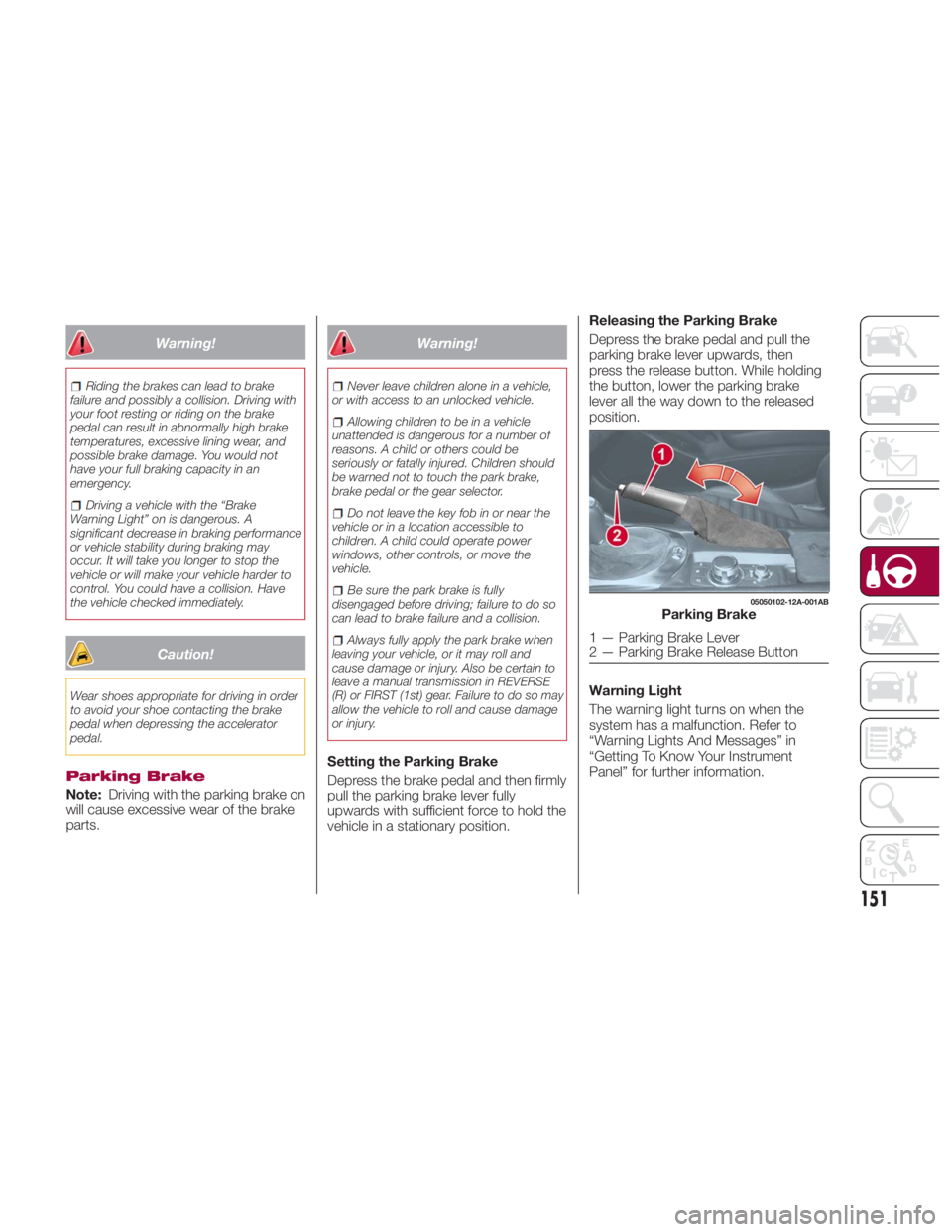
Setting the Parking Brake
Depress the brake pedal and then firmly
pull the parking brake lever fully
upwards with sufficient force to hold the
vehicle in a stationary position. Releasing the Parking Brake
Depress the brake pedal and pull the
parking brake lever upwards, then
press the release button. While holding
the button, lower the parking brake
lever all the way down to the released
position.
Warning Light
The warning light turns on when the
system has a malfunction. Refer to
“Warning Lights And Messages” in
“Getting To Know Your Instrument
Panel” for further information. 05050102-12A-001AB
Parking Brake
1 — Parking Brake Lever
2 — Parking Brake Release Button
151
Page 159 of 292
Manual Shift Mode
The manual shift mode gives you the
feel of driving a manual transmission
vehicle by allowing you to operate the
gear selector manually.
This allows you to control engine rpm
and torque to the drive wheels much
like a manual transmission when more
control is desired.
To change to MANUAL (M) shift mode,
shift the gear selector from DRIVE (D) to
MANUAL (M). To return to automatic
shift mode, shift the gear selector from
MANUAL (M) to DRIVE (D).
You can shift between DRIVE (D) and
MANUAL (M) mode at any time, without
taking your foot off the accelerator.
Note:
If you change to manual shift mode
when the vehicle is stopped, the gear
will shift to M1.
If you change to manual shift mode
while the vehicle is moving it will remain
in the current gear until a manual shift
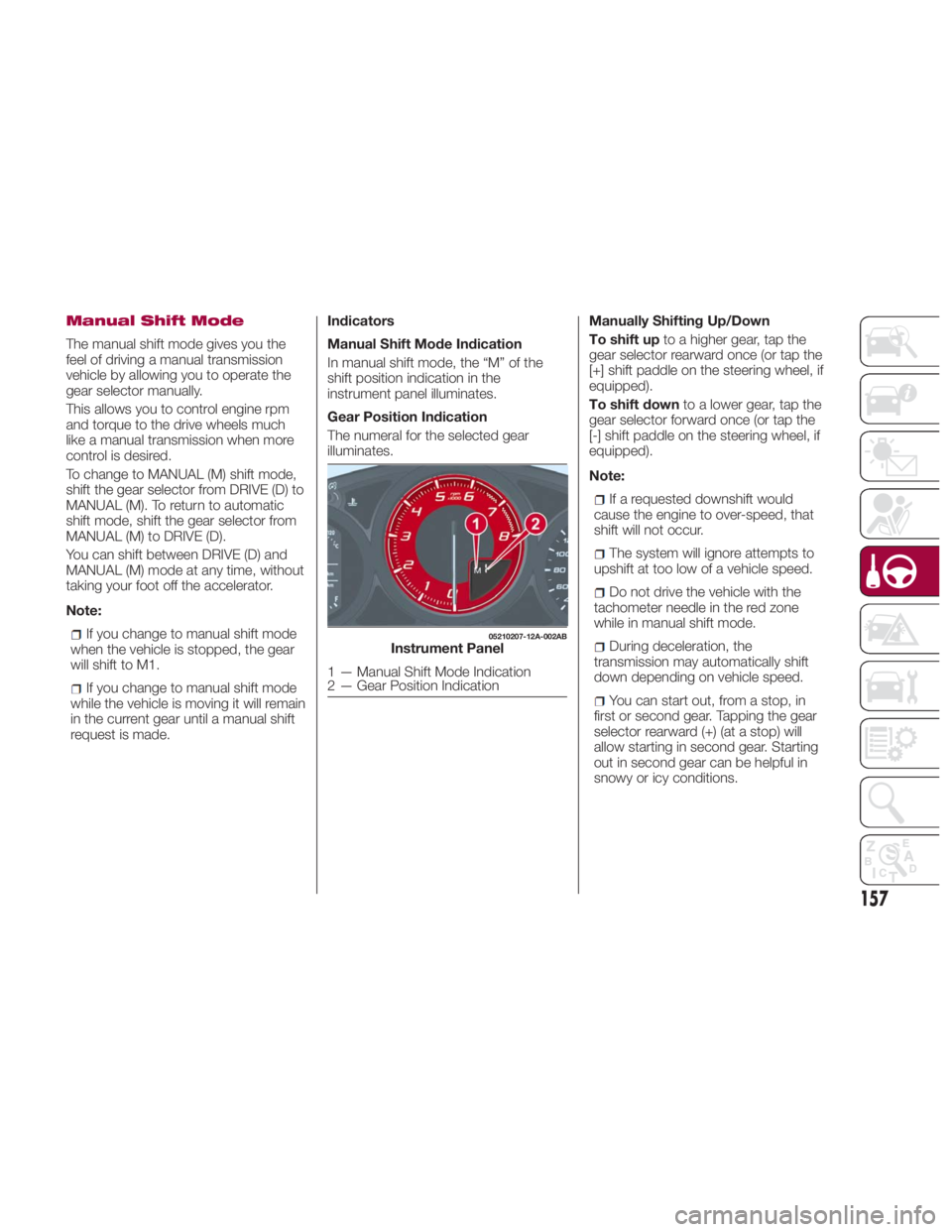
request is made. Indicators
Manual Shift Mode Indication
In manual shift mode, the “M” of the
shift position indication in the
instrument panel illuminates.
Gear Position Indication
The numeral for the selected gear
illuminates. Manually Shifting Up/Down
To shift up to a higher gear, tap the
gear selector rearward once (or tap the
[+] shift paddle on the steering wheel, if
equipped).
To shift down to a lower gear, tap the
gear selector forward once (or tap the
[-] shift paddle on the steering wheel, if
equipped).
Note:
If a requested downshift would
cause the engine to over-speed, that
shift will not occur.
The system will ignore attempts to
upshift at too low of a vehicle speed.
Do not drive the vehicle with the
tachometer needle in the red zone
while in manual shift mode.
During deceleration, the
transmission may automatically shift
down depending on vehicle speed.
You can start out, from a stop, in
first or second gear. Tapping the gear
selector rearward (+) (at a stop) will
allow starting in second gear. Starting
out in second gear can be helpful in
snowy or icy conditions. 05210207-12A-002AB
Instrument Panel
1 — Manual Shift Mode Indication
2 — Gear Position Indication
157
Page 160 of 292
Paddle Mode — If
Equipped
Tapping one of the steering
wheel-mounted shift paddles (+/-), if
equipped, while the gear selector is in
DRIVE (D), will activate Paddle Mode (a
temporary manual mode). The current
gear will be displayed in the instrument
cluster, with the "M" also illuminated.
The transmission will revert back to
normal operation (if the gear selector
remains in DRIVE) after a period of time,
depending on accelerator pedal activity.
Note: Because Paddle mode is only
temporary, use of the MANUAL (M)
position is recommended if you need to
drive the vehicle in a particular gear for
long periods.
Driving Tips
Overtaking
For extra power when passing another
vehicle or climbing steep grades, press
the accelerator fully. The transmission
will shift to a lower gear, depending on
vehicle speed.
Note:
The accelerator pedal may initially
feel heavy as it is being pressed, then
feel lighter as it is pressed further. This
change in pedal force controls whether
or not kickdown should be performed. While the gear selector is in the
MANUAL (M) position and the Dynamic
Stability Control (DSC) is turned off,
manual shift mode does not switch to
automatic shift mode even if the
accelerator pedal is completely
pressed. Tap the gear selector forward
or rearward to select the appropriate
gear.
Climbing steep grades from a stop
To climb a steep grade from a stopped
position:
1. Press the brake pedal.
2. Shift to DRIVE (D) or M1, depending
on the load weight and grade
steepness.
3. Release the brake pedal while
gradually accelerating.
Descending steep grades
When descending a steep grade, shift
to lower gears, depending on load
weight and grade steepness.
Descend slowly, using the brakes only
occasionally to prevent them from
overheating. SPORT MODE The Sport mode increases steering
feedback to the driver with slight
increase in effort and changes the
transmission shift schedules for more
aggressive shifting. This driving mode is
useful while driving on twisty roads
where more steering precision is
desired in spirited cornering.
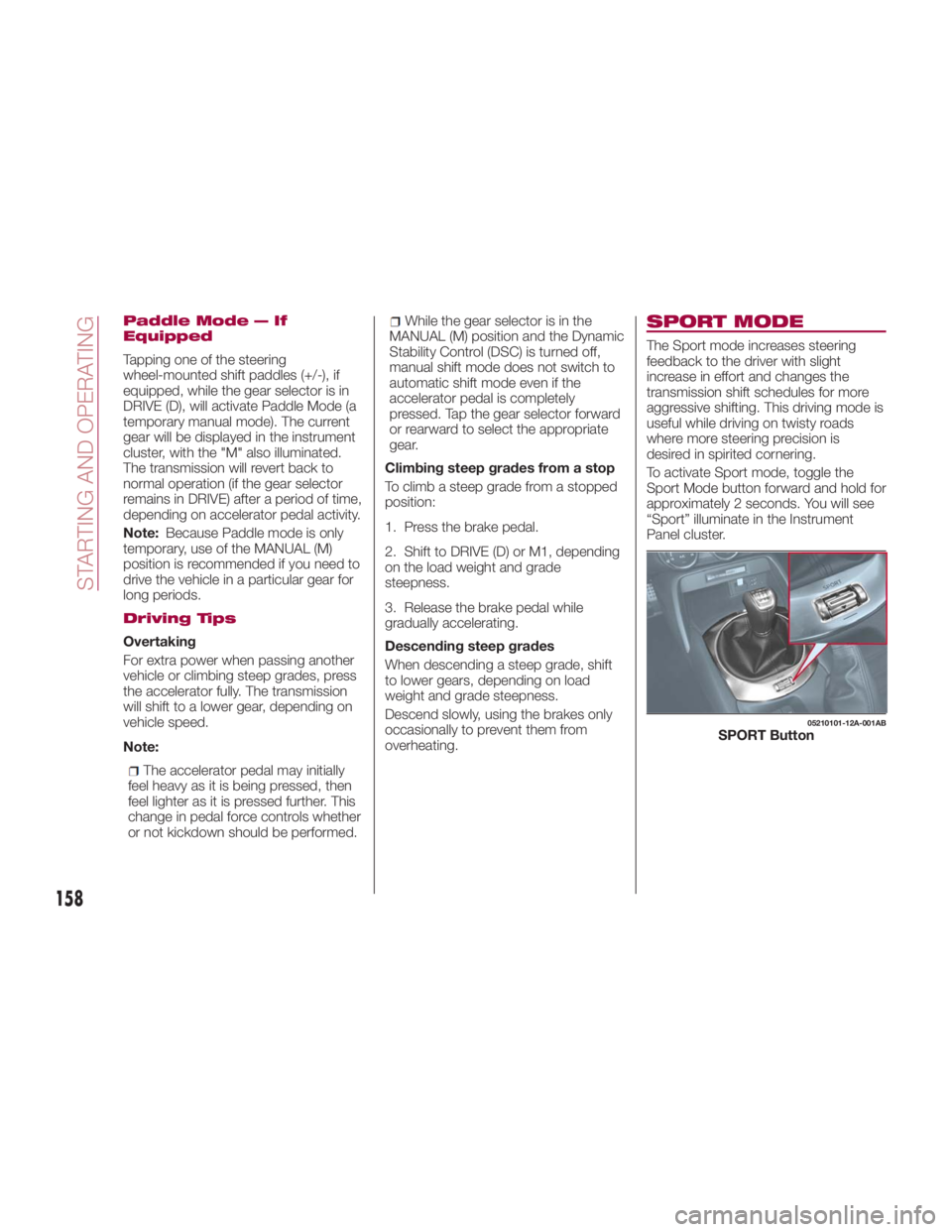
To activate Sport mode, toggle the
Sport Mode button forward and hold for
approximately 2 seconds. You will see
“Sport” illuminate in the Instrument
Panel cluster. 05210101-12A-001AB
SPORT Button
158
STARTING AND OPERATING
Page 186 of 292
HAZARD WARNING
LIGHTS Control
The Hazard Warning Lights should
always be used when you stop on or
near a roadway in an emergency.
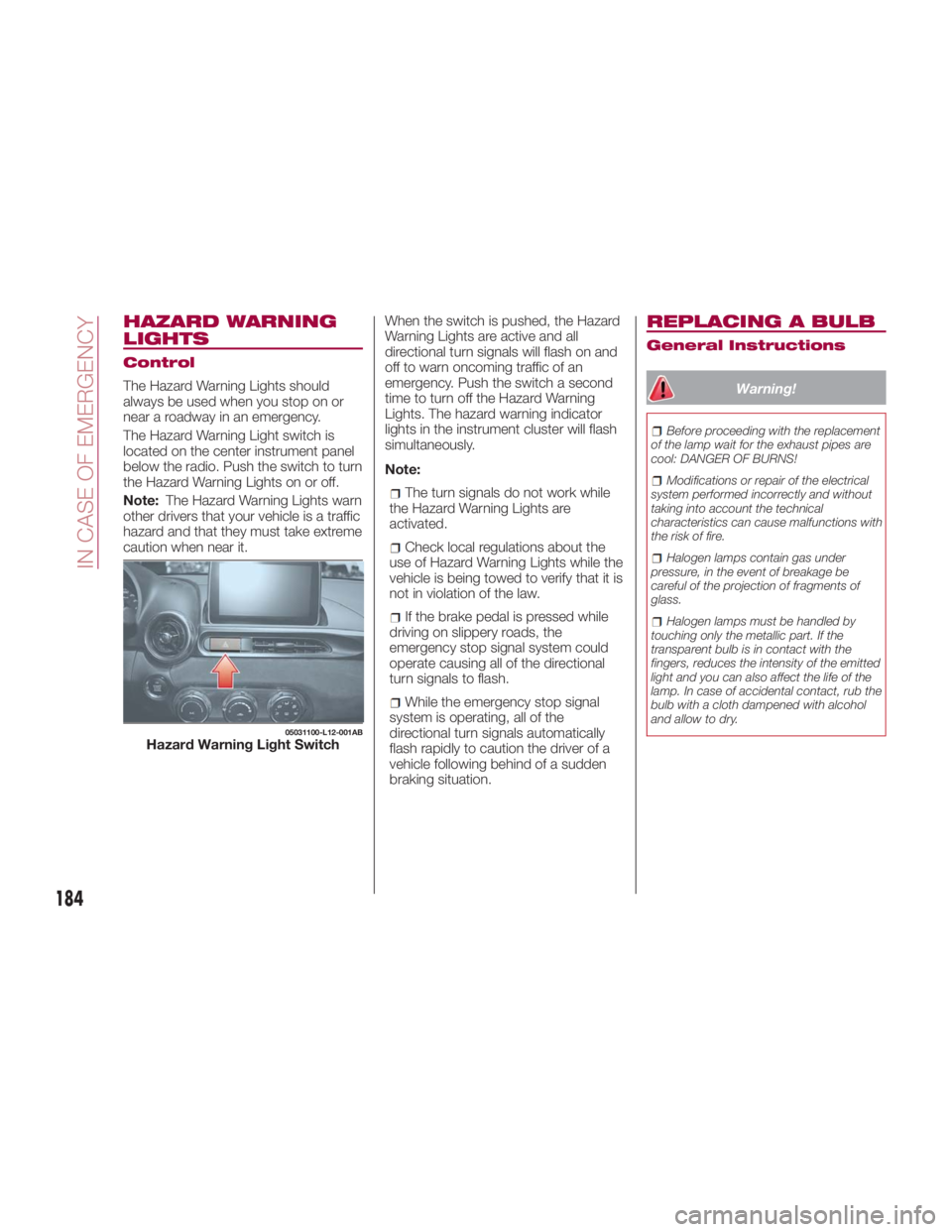
The Hazard Warning Light switch is
located on the center instrument panel
below the radio. Push the switch to turn
theHazardWarningLightsonoroff.
Note: The Hazard Warning Lights warn
other drivers that your vehicle is a traffic
hazard and that they must take extreme
caution when near it. When the switch is pushed, the Hazard
Warning Lights are active and all
directional turn signals will flash on and
off to warn oncoming traffic of an
emergency. Push the switch a second
time to turn off the Hazard Warning
Lights. The hazard warning indicator
lights in the instrument cluster will flash
simultaneously.
Note:
The turn signals do not work while
the Hazard Warning Lights are
activated.
Check local regulations about the
use of Hazard Warning Lights while the
vehicle is being towed to verify that it is
not in violation of the law.
If the brake pedal is pressed while
driving on slippery roads, the
emergency stop signal system could
operate causing all of the directional
turn signals to flash.
While the emergency stop signal
system is operating, all of the
directional turn signals automatically
flash rapidly to caution the driver of a
vehicle following behind of a sudden
braking situation. REPLACING A BULB General Instructions
Warning! Before proceeding with the replacement
of the lamp wait for the exhaust pipes are
cool: DANGER OF BURNS!
Modifications or repair of the electrical
system performed incorrectly and without
taking into account the technical
characteristics can cause malfunctions with
the risk of fire.
Halogen lamps contain gas under
pressure, in the event of breakage be
careful of the projection of fragments of
glass.
Halogen lamps must be handled by
touching only the metallic part. If the
transparent bulb is in contact with the
fingers, reduces the intensity of the emitted
light and you can also affect the life of the
lamp. In case of accidental contact, rub the
bulb with a cloth dampened with alcohol
and allow to dry.05031100-L12-001AB
Hazard Warning Light Switch
184
IN CASE OF EMERGENCY
Page 228 of 292
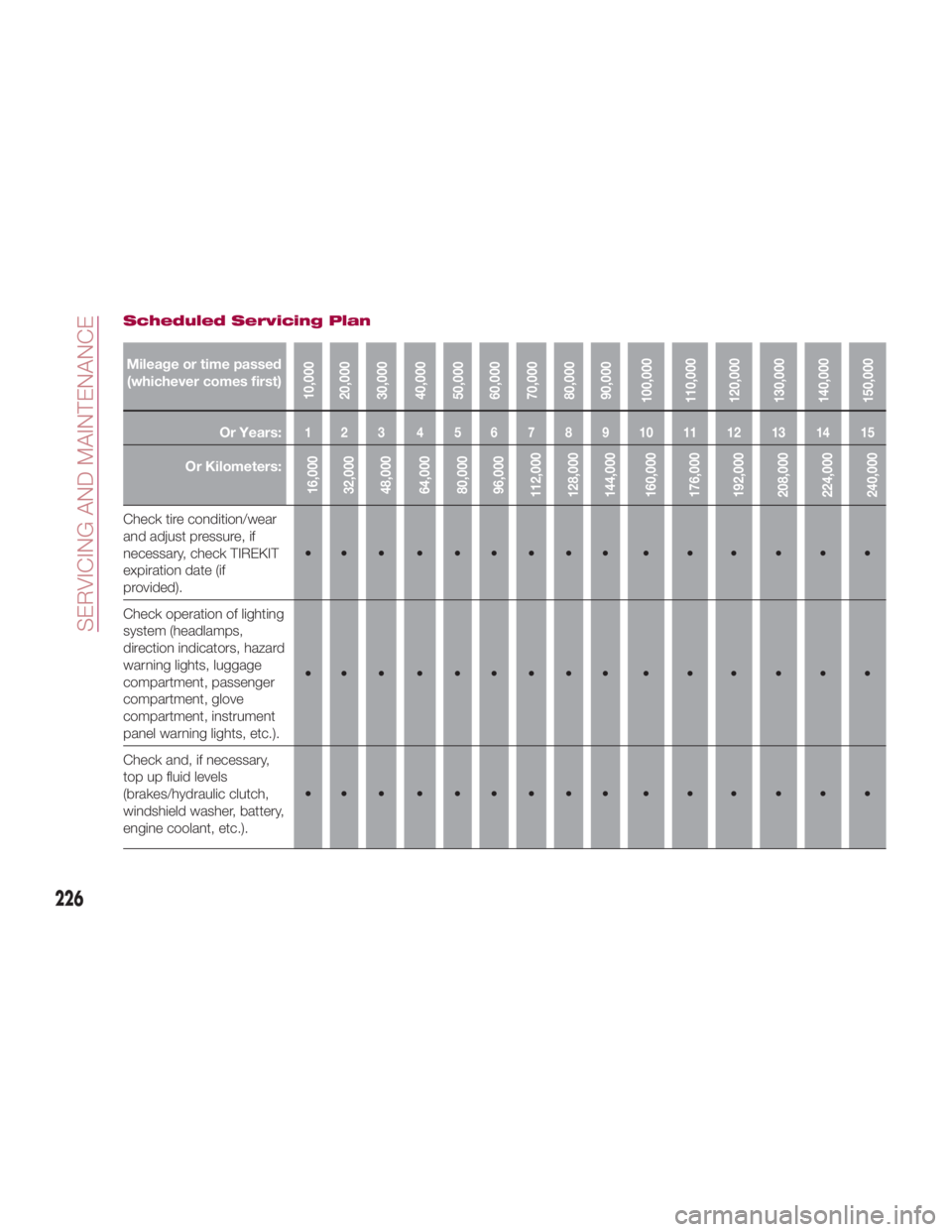
Scheduled Servicing Plan
Mileage or time passed
(whichever comes first)
10,000
20,000
30,000
40,000
50,000
60,000
70,000
80,000
90,000
100,000
110,000
120,000
130,000
140,000
150,000Or Years: 123 456789101112131415
Or Kilometers:
16,000
32,000
48,000
64,000
80,000
96,000
112,000
128,000
144,000
160,000
176,000
192,000
208,000
224,000
240,000Check tire condition/wear
and adjust pressure, if
necessary, check TIREKIT
expiration date (if
provided). •••••••••••••••
Check operation of lighting
system (headlamps,
direction indicators, hazard
warning lights, luggage
compartment, passenger
compartment, glove
compartment, instrument
panel warning lights, etc.). •••••••••••••••
Check and, if necessary,
top up fluid levels
(brakes/hydraulic clutch,
windshield washer, battery,
engine coolant, etc.). •••••••••••••••
226
SERVICING AND MAINTENANCE
Page 231 of 292
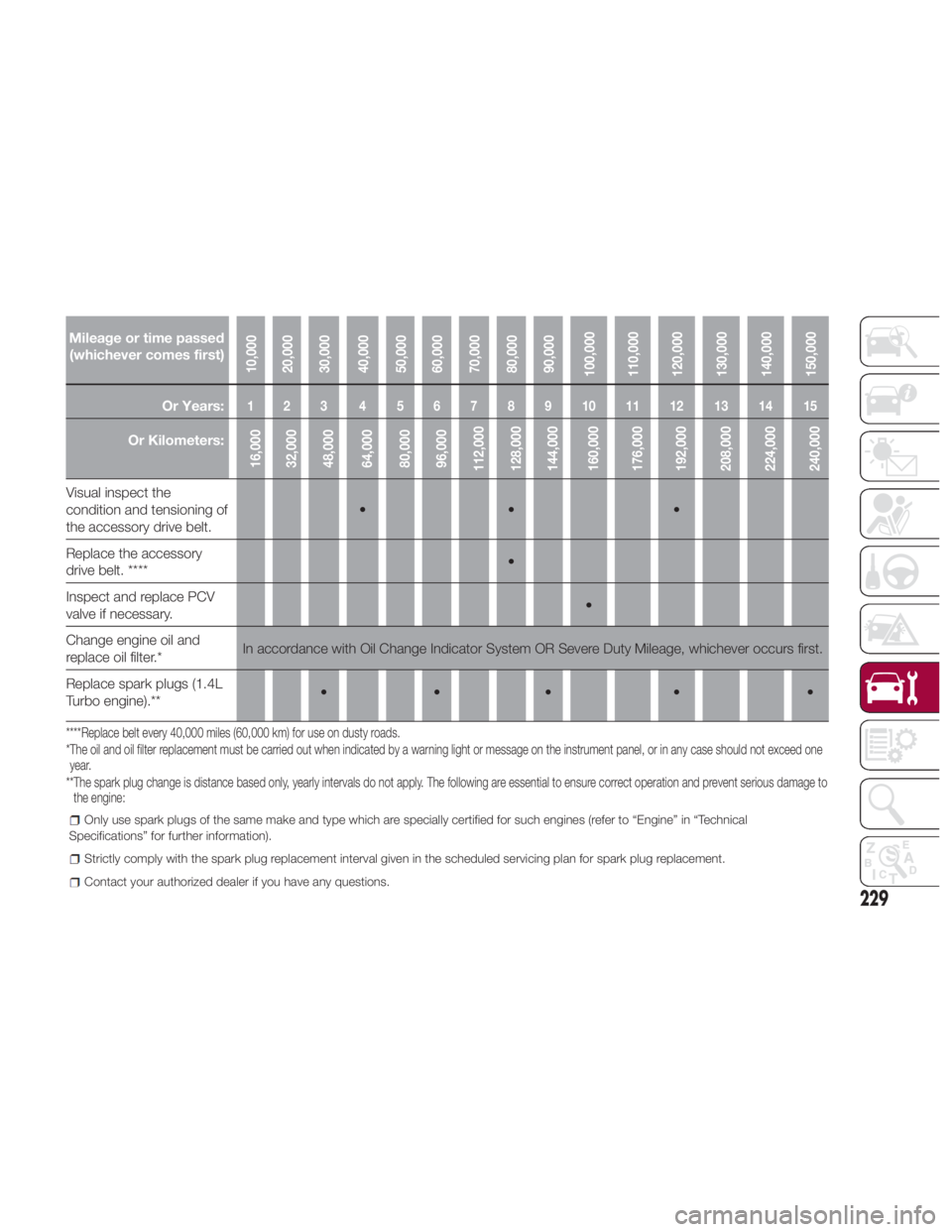
Mileage or time passed
(whichever comes first)
10,000
20,000
30,000
40,000
50,000
60,000
70,000
80,000
90,000
100,000
110,000
120,000
130,000
140,000
150,000Or Years: 123 456789101112131415
Or Kilometers:
16,000
32,000
48,000
64,000
80,000
96,000
112,000
128,000
144,000
160,000
176,000
192,000
208,000
224,000
240,000Visual inspect the
condition and tensioning of
the accessory drive belt. •• •
Replace the accessory
drive belt.
**** •
Inspect and replace PCV
valve if necessary. •
Change engine oil and
replace oil filter.
* In accordance with Oil Change Indicator System OR Severe Duty Mileage, whichever occurs first.
Replace spark plugs (1.4L
Turbo engine).
** ••• • •
****Replace belt every 40,000 miles (60,000 km) for use on dusty roads.
*The oil and oil filter replacement must be carried out when indicated by a warning light or message on the instrument panel, or in any case should not exceed one
year.
**The spark plug change is distance based only, yearly intervals do not apply. The following are essential to ensure correct operation and prevent serious damage to
the engine: Only use spark plugs of the same make and type which are specially certified for such engines (refer to “Engine” in “Technical
Specifications” for further information).
Strictly comply with the spark plug replacement interval given in the scheduled servicing plan for spark plug replacement.
Contact your authorized dealer if you have any questions.
229
Page 265 of 292
Clean the webbing with a mild soap
solution recommended for upholstery or
carpets. Follow instructions. Do not
bleach or dye the belts, this may
weaken them.
After cleaning the belts, thoroughly dry
the belt webbing and make sure there
is no remaining moisture before
retracting them.
Plastic And Coated
Parts
Clean interior plastic parts with a damp
cloth (if possible made from microfiber),
and a solution of water and neutral,
non-abrasive detergent.
To clean oily or persistent stains, use
specific products free from solvents and
designed to maintain the original
appearance and color of the
components.
Remove any dust using a microfiber
cloth, if necessary moistened with
water. The use of paper tissues is not
recommended as these may leave
residues. Instrument panel precautions
Prevent caustic solutions such as
perfume and cosmetic oils from
contacting the instrument panel. They
will damage and discolor the instrument
panel. If these solutions get on the
instrument panel, wipe them off
immediately.
Note: Never use alcohol, gasoline and
derivatives to clean the instrument
panel lens.
Caution!Do not use glazing agents. Glazing agents
contain ingredients which may cause
discoloration, wrinkling, cracks and peeling.
Instrument Panel Top
When cleaning, it is recommended that
you use a clean towel dampened in a
mild detergent to remove debris.
Caution!If the surface is rubbed harshly, it could
result in the surface being damaged leaving
white scratch marks. Window Interiors
If the windows become covered with an
oily, greasy, or waxy film, clean them
with glass cleaner. Follow the directions
on the container.
Note: Do not scrape or scratch the
inside of the window glass. It could
damage the thermal filaments.
Caution!When washing the inside of the window
glass, use a soft cloth dampened in
lukewarm water, gently wiping the thermal
filaments. Use of glass cleaning products
could damage the thermal filaments.
263