lock FIAT SPIDER ABARTH 2017 Repair Manual
[x] Cancel search | Manufacturer: FIAT, Model Year: 2017, Model line: SPIDER ABARTH, Model: FIAT SPIDER ABARTH 2017Pages: 292, PDF Size: 9.24 MB
Page 158 of 292
Active Adaptive Shift
(AAS)
Active Adaptive Shift (AAS)
automatically controls the transmission
shift points to best suit the road
conditions and driver input. This
improves driving feel.
The transmission may switch to AAS
mode when driving up and down
slopes, cornering, driving at high
elevations, or depressing the
accelerator pedal quickly while the gear
selector is in the DRIVE (D) position.
Depending on the road and driving
conditions/vehicle operations, gear
shifting could be delayed or not occur,
however, this does not indicate a
problem because the AAS mode will
maintain the optimum gear position.
Shift-Lock System
The shift-lock system prevents shifting
out of PARK (P) unless the brake pedal
is depressed.
To shift from PARK (P):
1. Depress and hold the brake pedal.
2. Turn the ignition to the ON/RUN
mode.
3. Press and hold the lock-release
button on the gear selector.
4. Move the gear selector. When the ignition is in the ACC or OFF
mode, the gear selector cannot be
shifted from PARK (P).
The ignition cannot be placed in the
OFF mode if the gear selector is not in
PARK (P).
Shift Lock Override
If the gear selector will not move from
PARK (P) using the proper shift
procedure, continue to press the brake
pedal and proceed as follows:
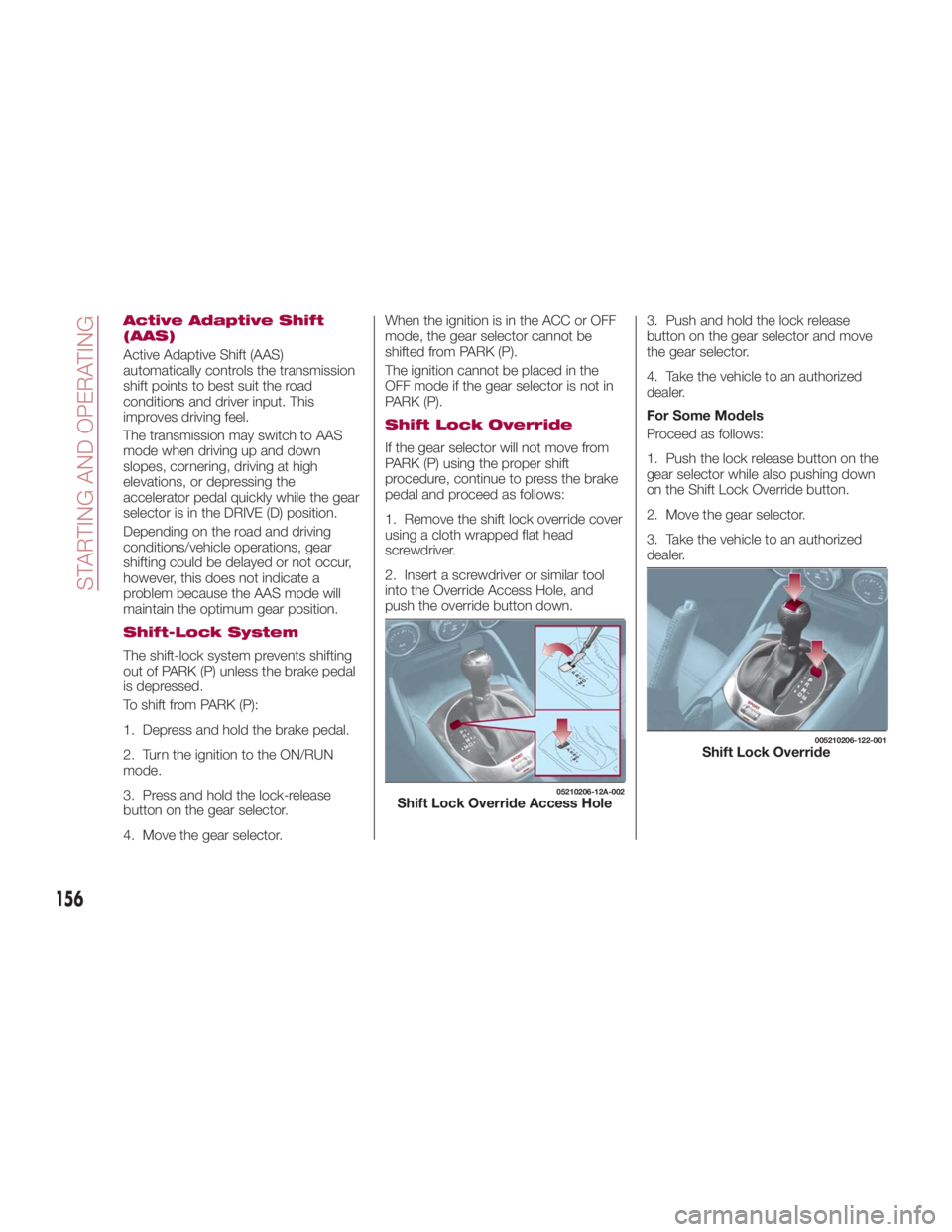
1. Remove the shift lock override cover
using a cloth wrapped flat head
screwdriver.
2. Insert a screwdriver or similar tool
into the Override Access Hole, and
push the override button down. 3. Push and hold the lock release
button on the gear selector and move
the gear selector.
4. Take the vehicle to an authorized
dealer.
For Some Models
Proceed as follows:
1. Push the lock release button on the
gear selector while also pushing down
on the Shift Lock Override button.
2. Move the gear selector.
3. Take the vehicle to an authorized
dealer. 05210206-12A-002
Shift Lock Override Access Hole 005210206-122-001
Shift Lock Override
156
STARTING AND OPERATING
Page 164 of 292
RADAR SENSORS —
IF EQUIPPED Rear Radar Sensors
The following systems use the rear
radar sensors:
Blind Spot Monitoring System (BSM)
Rear Cross Traffic Alert (RCTA)
The radar sensors function by detecting
the radio waves reflected off of a vehicle
approaching from the rear, or an
obstruction, sent from the radar sensor.
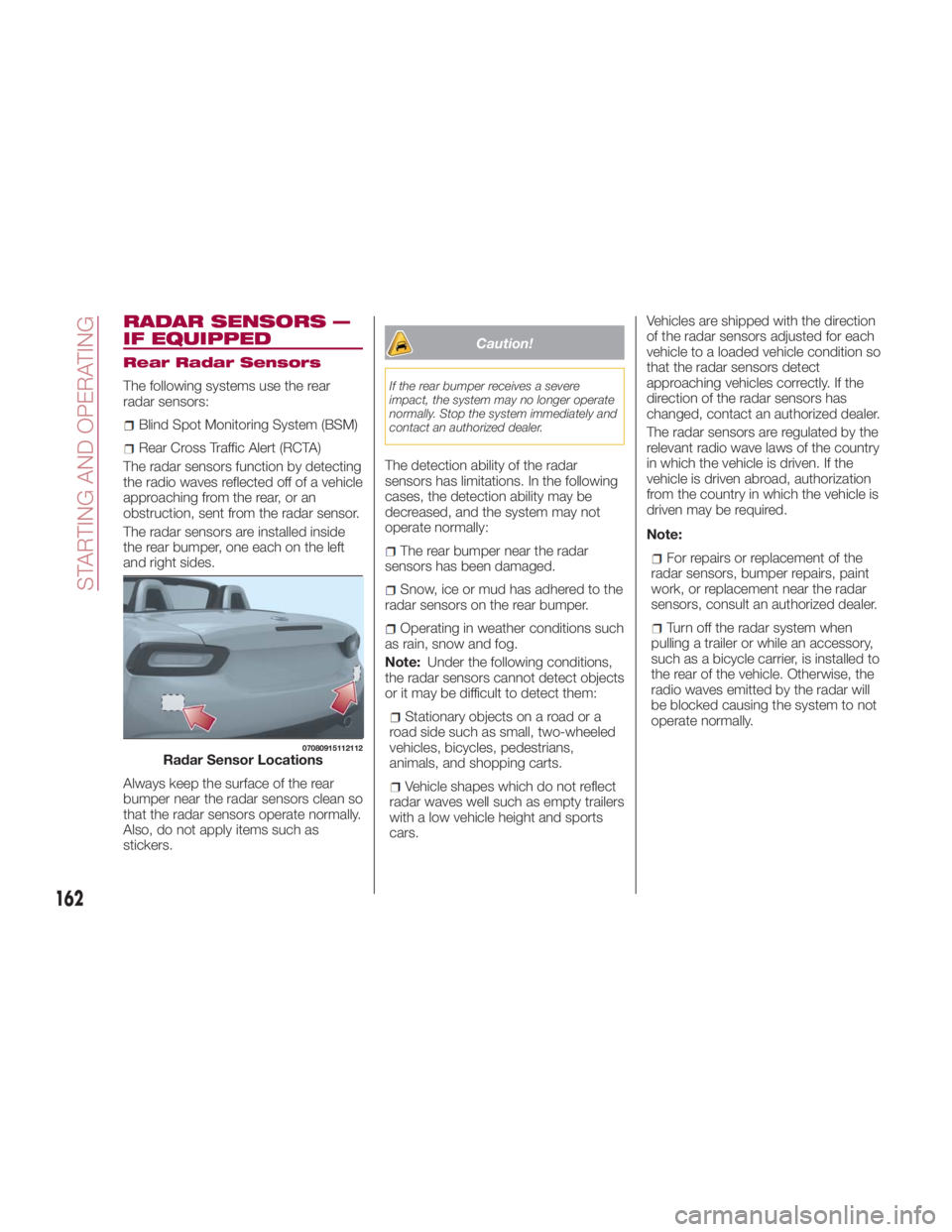
The radar sensors are installed inside
the rear bumper, one each on the left
and right sides.
Always keep the surface of the rear
bumper near the radar sensors clean so
that the radar sensors operate normally.
Also, do not apply items such as
stickers. Caution!If the rear bumper receives a severe
impact, the system may no longer operate
normally. Stop the system immediately and
contact an authorized dealer.
The detection ability of the radar
sensors has limitations. In the following
cases, the detection ability may be
decreased, and the system may not
operate normally:
The rear bumper near the radar
sensors has been damaged.
Snow, ice or mud has adhered to the
radar sensors on the rear bumper.
Operating in weather conditions such
as rain, snow and fog.
Note: Under the following conditions,
the radar sensors cannot detect objects
or it may be difficult to detect them:
Stationary objects on a road or a
road side such as small, two-wheeled
vehicles, bicycles, pedestrians,
animals, and shopping carts.
Vehicle shapes which do not reflect
radar waves well such as empty trailers
with a low vehicle height and sports
cars. Vehicles are shipped with the direction
of the radar sensors adjusted for each
vehicle to a loaded vehicle condition so
that the radar sensors detect
approaching vehicles correctly. If the
direction of the radar sensors has
changed, contact an authorized dealer.
The radar sensors are regulated by the
relevant radio wave laws of the country
in which the vehicle is driven. If the
vehicle is driven abroad, authorization
from the country in which the vehicle is
driven may be required.
Note:
For repairs or replacement of the
radar sensors, bumper repairs, paint
work, or replacement near the radar
sensors, consult an authorized dealer.
Turn off the radar system when
pulling a trailer or while an accessory,
such as a bicycle carrier, is installed to
the rear of the vehicle. Otherwise, the
radio waves emitted by the radar will
be blocked causing the system to not
operate normally.07080915112112
Radar Sensor Locations
162
STARTING AND OPERATING
Page 170 of 292
Display
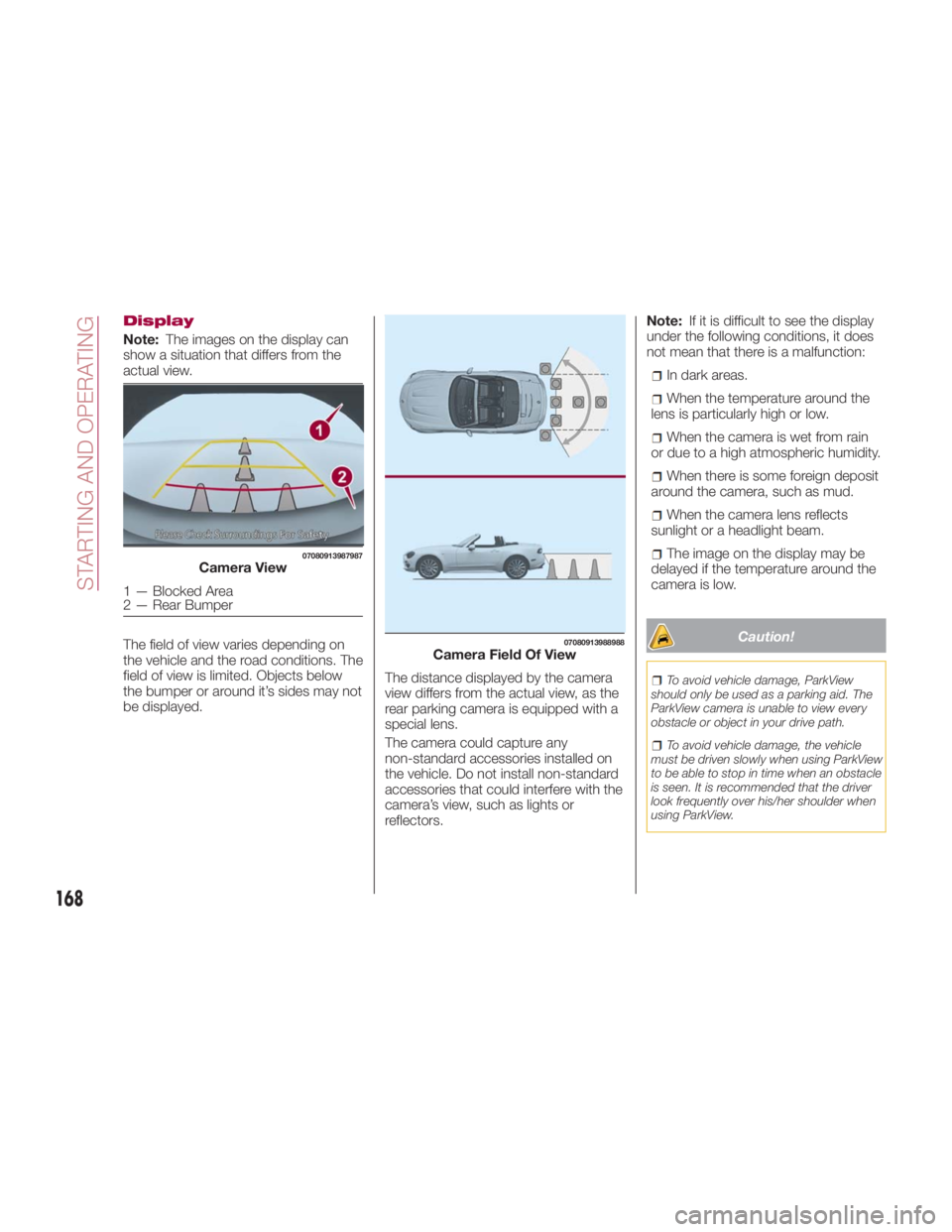
Note: The images on the display can
show a situation that differs from the
actual view.
The field of view varies depending on
the vehicle and the road conditions. The
field of view is limited. Objects below
the bumper or around it’s sides may not
be displayed. The distance displayed by the camera
view differs from the actual view, as the
rear parking camera is equipped with a
special lens.
The camera could capture any
non-standard accessories installed on
the vehicle. Do not install non-standard
accessories that could interfere with the
camera’s view, such as lights or
reflectors. Note: If it is difficult to see the display
under the following conditions, it does
not mean that there is a malfunction:
In dark areas.
When the temperature around the
lens is particularly high or low.
When the camera is wet from rain
or due to a high atmospheric humidity.
When there is some foreign deposit
around the camera, such as mud.
When the camera lens reflects
sunlight or a headlight beam.
The image on the display may be
delayed if the temperature around the
camera is low.
Caution! To avoid vehicle damage, ParkView
should only be used as a parking aid. The
ParkView camera is unable to view every
obstacle or object in your drive path.
To avoid vehicle damage, the vehicle
must be driven slowly when using ParkView
to be able to stop in time when an obstacle
is seen. It is recommended that the driver
look frequently over his/her shoulder when
using ParkView.07080913987987
Camera View
1—BlockedArea
2 — Rear Bumper 07080913988988
Camera Field Of View
168
STARTING AND OPERATING
Page 177 of 292
Carbon Monoxide
Warnings
Warning!Carbon monoxide (CO) in exhaust gases is
deadly. Follow the precautions below to
prevent carbon monoxide poisoning:
Do not inhale exhaust gases. They
contain carbon monoxide, a colorless and
odorless gas, which can kill. Never run the
engine in a closed area, such as a garage,
and never sit in a parked vehicle with the
engine running for an extended period. If
the vehicle is stopped in an open area with
the engine running for more than a short
period, adjust the ventilation system to
force fresh, outside air into the vehicle.
Guard against carbon monoxide with
proper maintenance. Have the exhaust
system inspected every time the vehicle is
raised. Have any abnormal conditions
repaired promptly. Until repaired, drive with
all side windows fully open.
Refueling Procedure
Fuel Filler Door
Note: Always use only a designated
FCA fuel filler cap or an approved
equivalent, available at your authorized
dealer. The wrong cap can result in a
serious malfunction of the fuel and
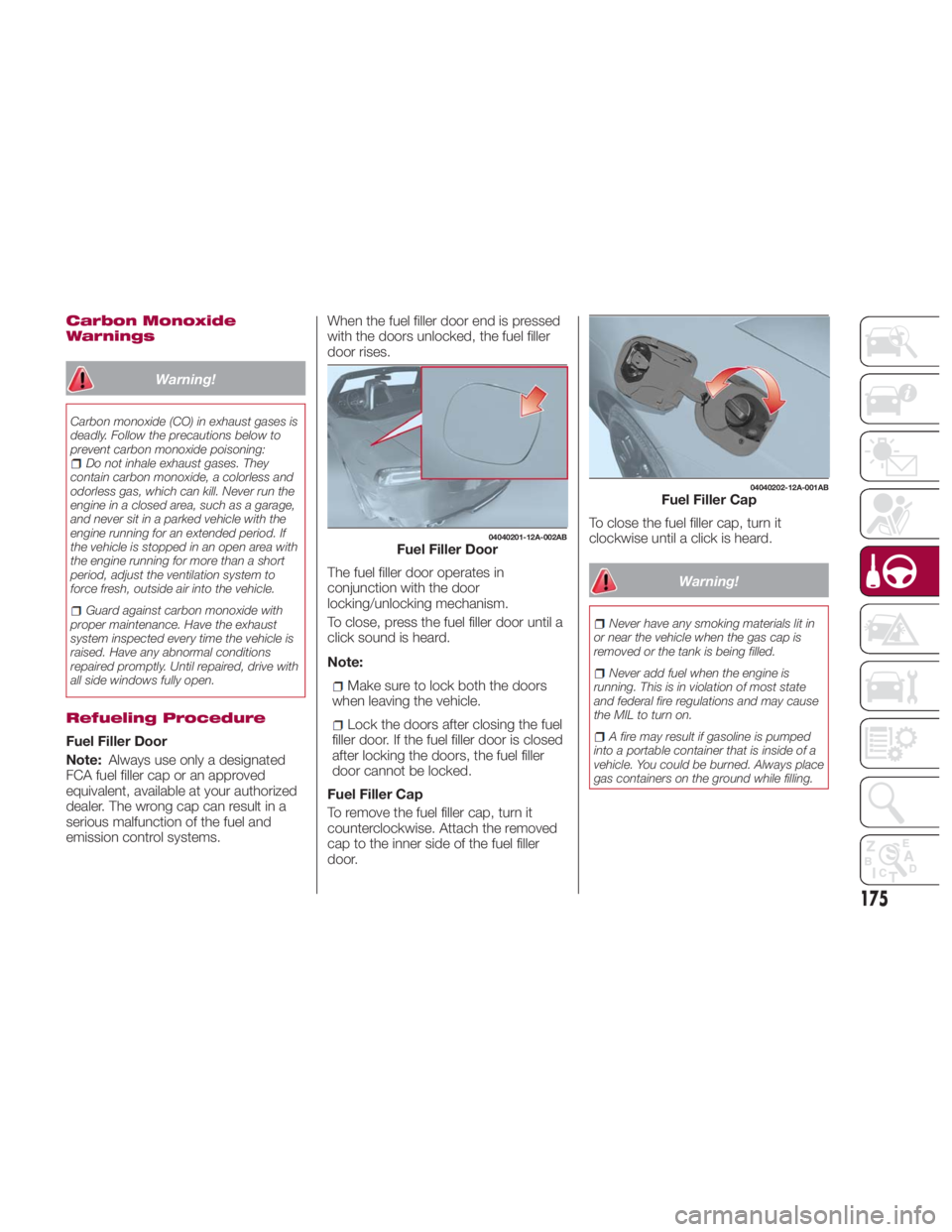
emission control systems. When the fuel filler door end is pressed
with the doors unlocked, the fuel filler
door rises.
The fuel filler door operates in
conjunction with the door
locking/unlocking mechanism.
To close, press the fuel filler door until a
click sound is heard.
Note:
Make sure to lock both the doors
when leaving the vehicle.
Lock the doors after closing the fuel
filler door. If the fuel filler door is closed
after locking the doors, the fuel filler
door cannot be locked.
Fuel Filler Cap
To remove the fuel filler cap, turn it
counterclockwise. Attach the removed
cap to the inner side of the fuel filler
door. To close the fuel filler cap, turn it
clockwise until a click is heard.
Warning! Never have any smoking materials lit in
or near the vehicle when the gas cap is
removed or the tank is being filled.
Never add fuel when the engine is
running. This is in violation of most state
and federal fire regulations and may cause
the MIL to turn on.
A fire may result if gasoline is pumped
into a portable container that is inside of a
vehicle. You could be burned. Always place
gas containers on the ground while filling. 04040201-12A-002AB
Fuel Filler Door 04040202-12A-001AB
Fuel Filler Cap
175
Page 183 of 292
Install the chains on the rear tires only.
Do not use chains on the front tires.
Note:
Chains may affect handling.
Do not go faster than 30 mph
(50 km/h) or the chain manufacturer's
recommended limit, whichever is lower.
Drive carefully and avoid bumps,
holes, and sharp turns.
Avoid locked-wheel braking.
Do not use chains on roads that are
free of snow or ice. The tires and
chains could be damaged.
Chains may scratch or chip
aluminium wheels.
Warning!Using tires of different size and type (M+S,
Snow) between front and rear axles can
cause unpredictable handling. You could
lose control and have a collision. Caution!To avoid damage to your vehicle or tires,
observe the following precautions:
Because of restricted traction device
clearance between tires and other
suspension components, it is important
that only traction devices in good condition
are used. Broken devices can cause
serious damage. Stop the vehicle
immediately if noise occurs that could
indicate device breakage. Remove the
damaged parts of the device before further
use.
Install device as tightly as possible and
then retighten after driving about ½ mile
(0.8 km).
Do not exceed 30 mph (48 km/h).
Drive cautiously and avoid severe turns
and large bumps, especially with a loaded
vehicle.
Do not drive for a prolonged period on
dry pavement.
Observe the traction device
manufacturer’s instructions on the method
of installation, operating speed, and
conditions for use. Always use the
suggested operating speed of the device
manufacturer’s if it is less than 30 mph
(48 km/h).
Do not use traction devices on a
compact spare tire. Driving In Flooded Area
Note: Do not drive the vehicle on
flooded roads as it could cause short
circuit of electrical/electronic parts, or
water enters the engine and causes it
to lock up (hydro-lock) and stall. If the
vehicle has been immersed in water
contact your authorized dealer.
Although your vehicle is capable of
driving through shallow standing water,
consider the following Cautions and
Warnings before doing so.
Warning! Driving through standing water limits
your vehicle’s traction capabilities. Do not
exceed 5 mph (8 km/h) when driving
through standing water.
Driving through standing water limits
your vehicle’s braking capabilities, which
increases stopping distances. Therefore,
after driving through standing water, drive
slowly and lightly press on the brake pedal
several times to dry the brakes.
Failure to follow these warnings may
result in injuries that are serious or fatal to
you, your passengers, and others around
you.
181
Page 184 of 292
Caution!Always check the depth of the standing
water before driving through it. Never drive
through standing water that is deeper than
the bottom of the tire rims mounted on the
vehicle.
Determine the condition of the road or
the path that is under water and if there are
any obstacles in the way before driving
through the standing water.
Do not exceed 5 mph (8 km/h) when
driving through standing water. This will
minimize wave effects.
Driving through standing water may
cause damage to your vehicle’s drivetrain
components. Always inspect your vehicle’s
fluids (i.e., engine oil, transmission, axle,
etc.) for signs of contamination (i.e., fluid
that is milky or foamy in appearance) after
driving through standing water. Do not
continue to operate the vehicle if any fluid
appears contaminated, as this may result in
further damage. Such damage is not
covered by the New Vehicle Limited
Warranty.
Getting water inside your vehicle’s
engine can cause it to lock up and stall out,
and cause serious internal damage to the
engine. Such damage is not covered by
the New Vehicle Limited Warranty. Overloading
Note: Be careful not to overload your
vehicle. The gross axle weight rating
(GAWR) and the gross vehicle weight
rating (GVWR) of the vehicle are on the
Motor Vehicle Safety Standard Label on
the driver's door frame. Exceeding
these ratings can cause an accident or
vehicle damage. You can estimate the
weight of the load by weighing the
items (or people) before putting them in
the vehicle.
Driving On Uneven Road
Your vehicle's suspension and
underbody can be damaged if driven
on rough/uneven roads or over speed
bumps at excessive speeds.
Use care and reduce speed when
traveling on rough/uneven roads or over
speed bumps.
Use care not to damage the vehicle's
underbody, bumpers or muffler(s) when
driving under the following conditions:
Ascending or descending a slope
with a sharp transition angle.
Ascending or descending a driveway
or trailer ramp with a sharp transition
angle. This vehicle is equipped with low profile
tires allowing class-leading performance
and handling. As a result, the sidewall
of the tires are very thin and the tires
and wheels can be damaged if driven
through potholes or on rough/uneven
roads at excessive speeds.
Use care and reduce speed when
traveling on rough/uneven roads or
through potholes.
182
STARTING AND OPERATING
Page 189 of 292
Light Bulbs
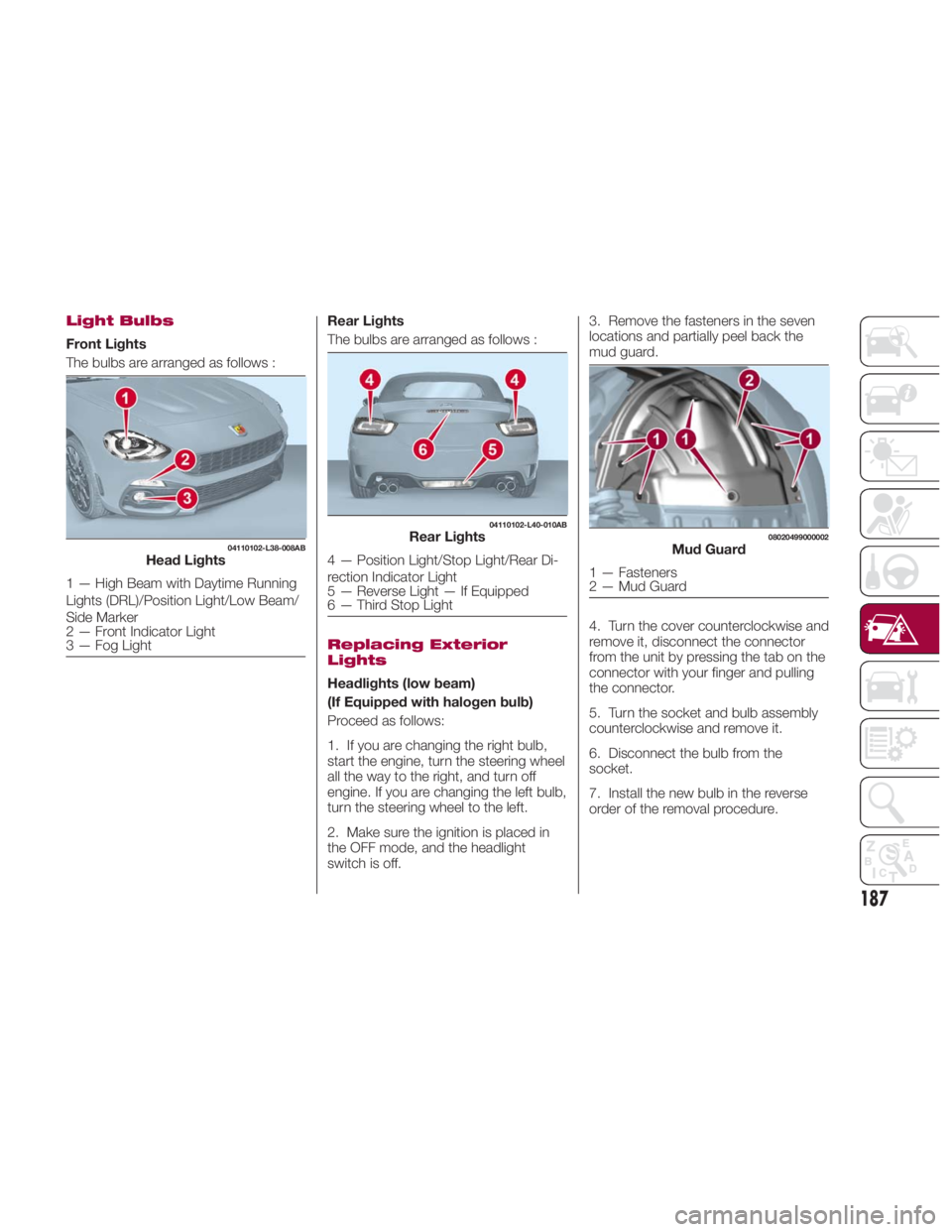
Front Lights
The bulbs are arranged as follows : Rear Lights
The bulbs are arranged as follows :
Replacing Exterior
Lights
Headlights (low beam)
(If Equipped with halogen bulb)
Proceed as follows:
1. If you are changing the right bulb,
start the engine, turn the steering wheel
all the way to the right, and turn off
engine. If you are changing the left bulb,
turn the steering wheel to the left.
2. Make sure the ignition is placed in
the OFF mode, and the headlight
switch is off. 3. Remove the fasteners in the seven
locations and partially peel back the
mud guard.
4. Turn the cover counterclockwise and
remove it, disconnect the connector
from the unit by pressing the tab on the
connector with your finger and pulling
the connector.
5. Turn the socket and bulb assembly
counterclockwise and remove it.
6. Disconnect the bulb from the
socket.
7. Install the new bulb in the reverse
order of the removal procedure.04110102-L38-008AB
Head Lights
1 — High Beam with Daytime Running
Lights (DRL)/Position Light/Low Beam/
Side Marker
2 — Front Indicator Light
3 — Fog Light 04110102-L40-010AB
Rear Lights
4 — Position Light/Stop Light/Rear Di-
rection Indicator Light
5 — Reverse Light — If Equipped
6 — Third Stop Light 08020499000002
Mud Guard
1 — Fasteners
2 — Mud Guard
187
Page 190 of 292
Headlights (High Beam) With
Daytime Running Lights
(If Equipped With LED Lamps)
Proceed as follows:
1. If you are changing the right bulb,
start the engine, turn the steering wheel
all the way to the right, and turn off
engine. If you are changing the left bulb,
turn the steering wheel to the left.
2. Make sure the ignition is placed in
the OFF mode, and the headlight
switch is off.
3. Remove the fasteners in the seven
locations and partially peel back the
mud guard.
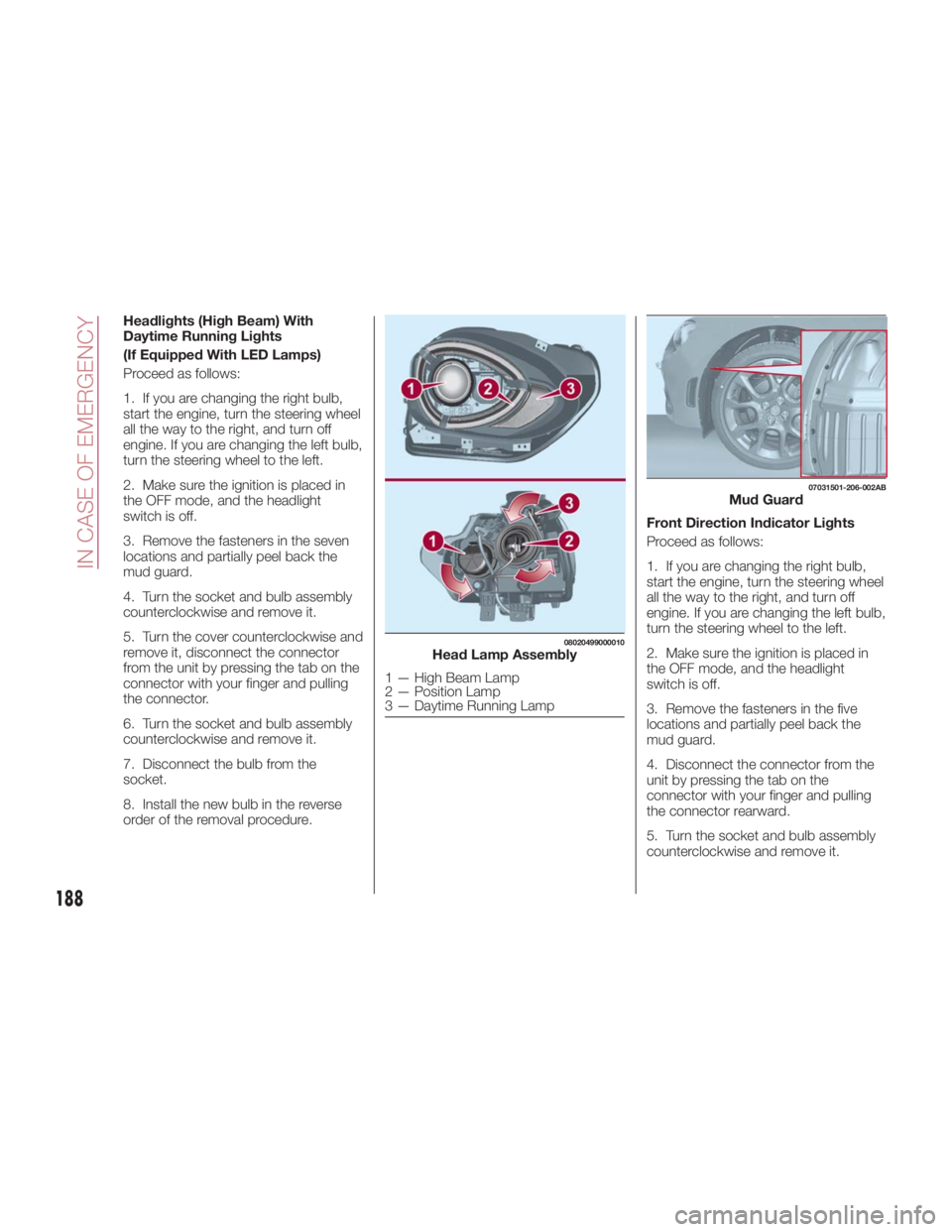
4. Turn the socket and bulb assembly
counterclockwise and remove it.
5. Turn the cover counterclockwise and
remove it, disconnect the connector
from the unit by pressing the tab on the
connector with your finger and pulling
the connector.
6. Turn the socket and bulb assembly
counterclockwise and remove it.
7. Disconnect the bulb from the
socket.
8. Install the new bulb in the reverse
order of the removal procedure. Front Direction Indicator Lights
Proceed as follows:
1. If you are changing the right bulb,
start the engine, turn the steering wheel
all the way to the right, and turn off
engine. If you are changing the left bulb,
turn the steering wheel to the left.
2. Make sure the ignition is placed in
the OFF mode, and the headlight
switch is off.
3. Remove the fasteners in the five
locations and partially peel back the
mud guard.
4. Disconnect the connector from the
unit by pressing the tab on the
connector with your finger and pulling
the connector rearward.
5. Turn the socket and bulb assembly
counterclockwise and remove it. 08020499000010
Head Lamp Assembly
1 — High Beam Lamp
2 — Position Lamp
3 — Daytime Running Lamp 07031501-206-002AB
Mud Guard
188
IN CASE OF EMERGENCY
Page 191 of 292
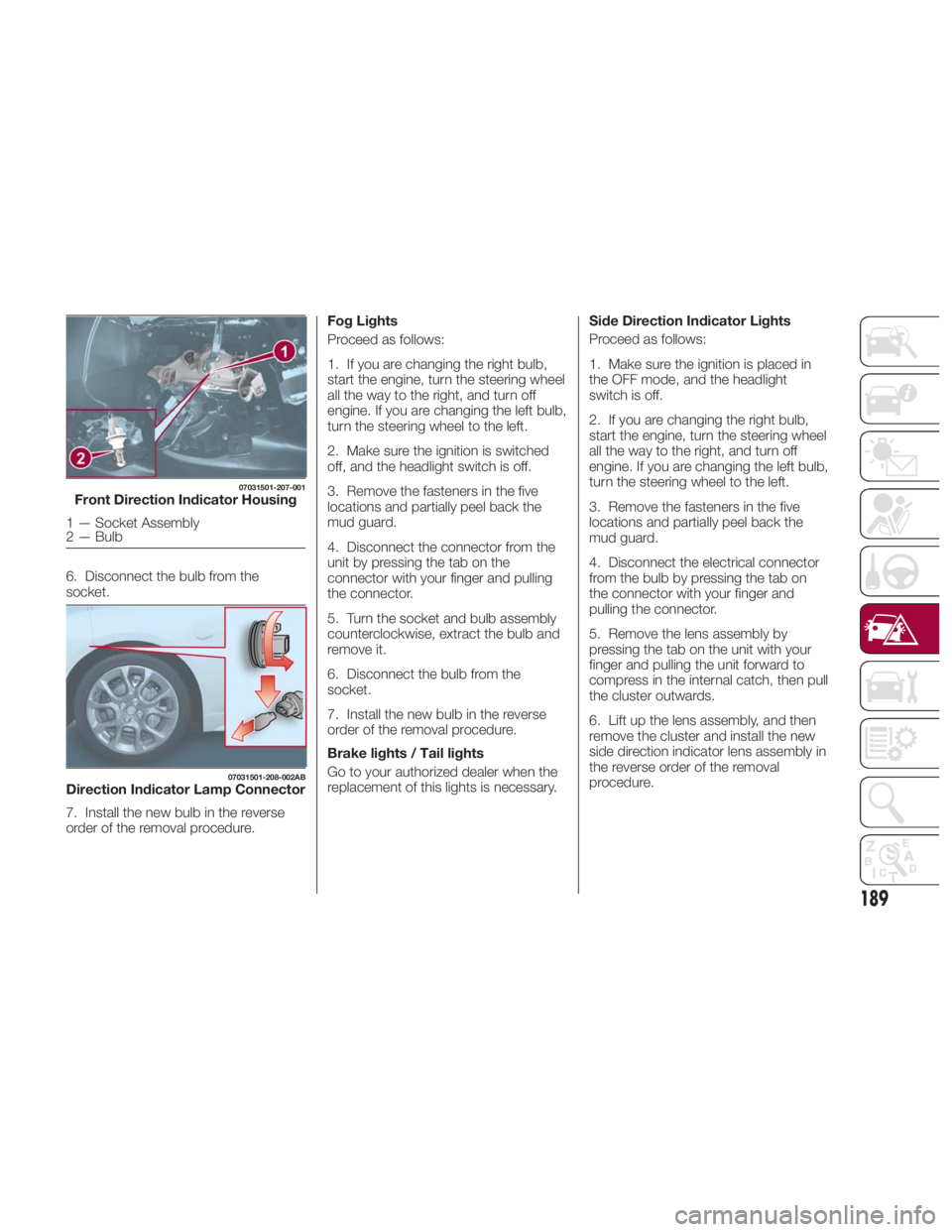
6. Disconnect the bulb from the
socket.
7. Install the new bulb in the reverse
order of the removal procedure. Fog Lights
Proceed as follows:
1. If you are changing the right bulb,
start the engine, turn the steering wheel
all the way to the right, and turn off
engine. If you are changing the left bulb,
turn the steering wheel to the left.
2. Make sure the ignition is switched
off, and the headlight switch is off.
3. Remove the fasteners in the five
locations and partially peel back the
mud guard.
4. Disconnect the connector from the
unit by pressing the tab on the
connector with your finger and pulling
the connector.
5. Turn the socket and bulb assembly
counterclockwise, extract the bulb and
remove it.
6. Disconnect the bulb from the
socket.
7. Install the new bulb in the reverse
order of the removal procedure.
Brake lights / Tail lights
Go to your authorized dealer when the
replacement of this lights is necessary. Side Direction Indicator Lights
Proceed as follows:
1. Make sure the ignition is placed in
the OFF mode, and the headlight
switch is off.
2. If you are changing the right bulb,
start the engine, turn the steering wheel
all the way to the right, and turn off
engine. If you are changing the left bulb,
turn the steering wheel to the left.
3. Remove the fasteners in the five
locations and partially peel back the
mud guard.
4. Disconnect the electrical connector
from the bulb by pressing the tab on
the connector with your finger and
pulling the connector.
5. Remove the lens assembly by
pressing the tab on the unit with your
finger and pulling the unit forward to
compress in the internal catch, then pull
the cluster outwards.
6. Lift up the lens assembly, and then
remove the cluster and install the new
side direction indicator lens assembly in
the reverse order of the removal
procedure.07031501-207-001
Front Direction Indicator Housing
1 — Socket Assembly
2 — Bulb 07031501-208-002AB
Direction Indicator Lamp Connector
189
Page 192 of 292
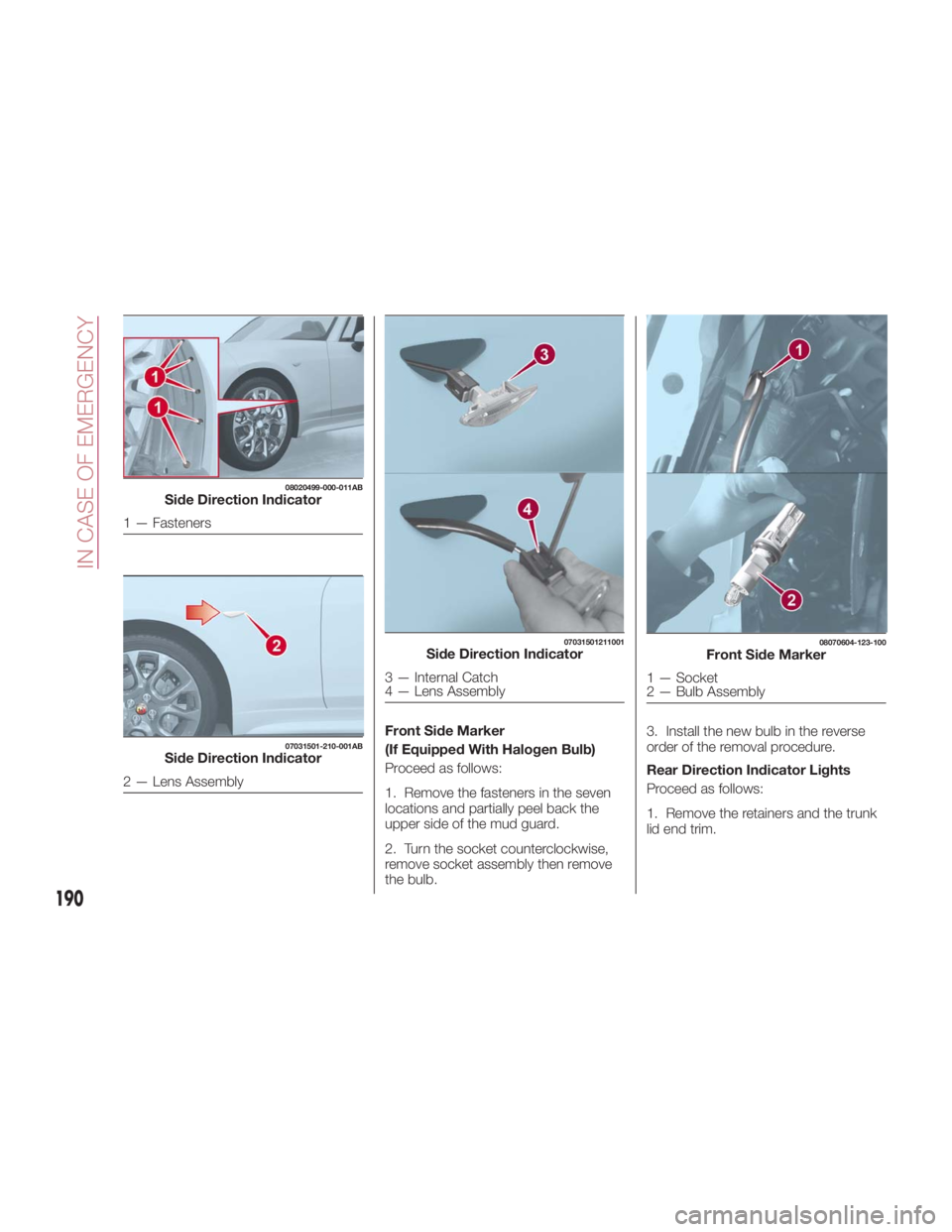
Front Side Marker
(If Equipped With Halogen Bulb)
Proceed as follows:
1. Remove the fasteners in the seven
locations and partially peel back the
upper side of the mud guard.
2. Turn the socket counterclockwise,
remove socket assembly then remove
the bulb. 3. Install the new bulb in the reverse
order of the removal procedure.
Rear Direction Indicator Lights
Proceed as follows:
1. Remove the retainers and the trunk
lid end trim.08020499-000-011AB
Side Direction Indicator
1 — Fasteners 07031501-210-001AB
Side Direction Indicator
2 — Lens Assembly 07031501211001
Side Direction Indicator
3 — Internal Catch
4 — Lens Assembly 08070604-123-100
Front Side Marker
1 — Socket
2 — Bulb Assembly
190
IN CASE OF EMERGENCY