automat FIAT TALENTO 2016 2.G Owner's Manual
[x] Cancel search | Manufacturer: FIAT, Model Year: 2016, Model line: TALENTO, Model: FIAT TALENTO 2016 2.GPages: 232, PDF Size: 5.01 MB
Page 57 of 232
IMPORTANT Vehicles equipped with
the ECOMODE function (button 9
fig. 95 ): when enabled, the ECOMODE
function can reduce the automatic
climate control system performance.
Please see the paragraph "Driving
suggestions".
Internal air recirculation
This function is managed automatically,
but you can also enable it manually. It
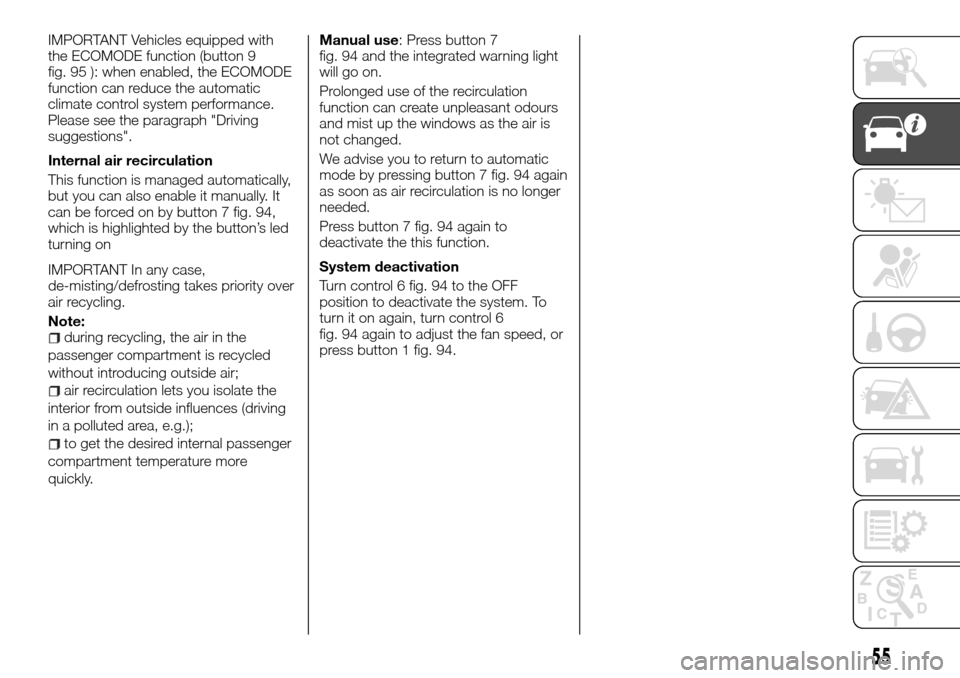
can be forced on by button 7 fig. 94,
which is highlighted by the button’s led
turning on
IMPORTANT In any case,
de-misting/defrosting takes priority over
air recycling.
Note:
during recycling, the air in the
passenger compartment is recycled
without introducing outside air;
air recirculation lets you isolate the
interior from outside influences (driving
in a polluted area, e.g.);
to get the desired internal passenger
compartment temperature more
quickly.Manual use: Press button 7
fig. 94 and the integrated warning light
will go on.
Prolonged use of the recirculation
function can create unpleasant odours
and mist up the windows as the air is
not changed.
We advise you to return to automatic
mode by pressing button 7 fig. 94 again
as soon as air recirculation is no longer
needed.
Press button 7 fig. 94 again to
deactivate the this function.
System deactivation
Turn control 6 fig. 94 to the OFF
position to deactivate the system. To
turn it on again, turn control 6
fig. 94 again to adjust the fan speed, or
press button 1 fig. 94.
55
Page 73 of 232
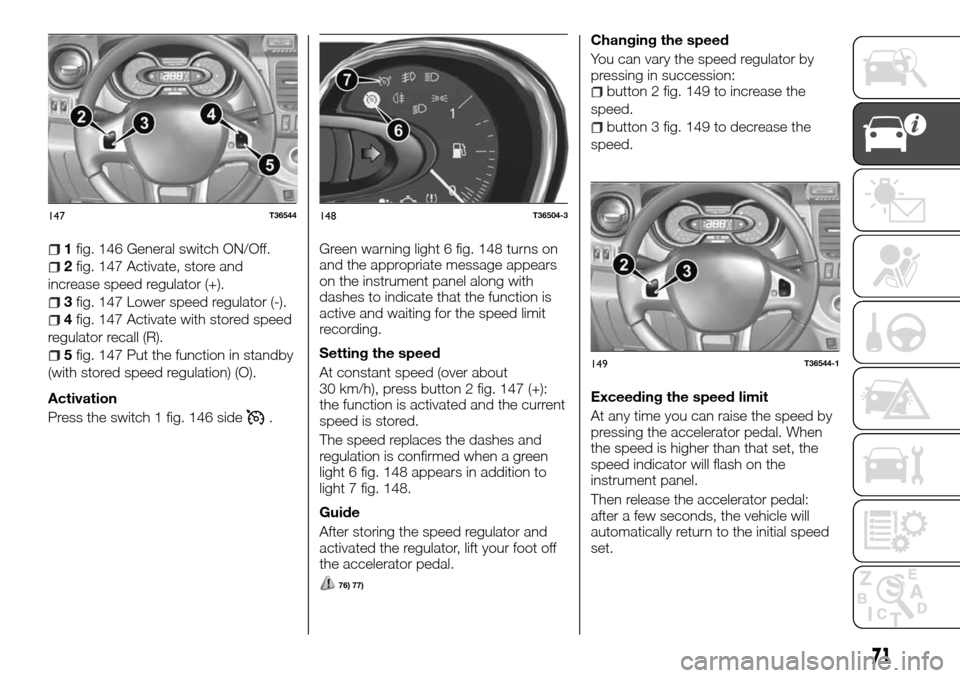
1fig. 146 General switch ON/Off.
2fig. 147 Activate, store and
increase speed regulator (+).
3fig. 147 Lower speed regulator (-).
4fig. 147 Activate with stored speed
regulator recall (R).
5fig. 147 Put the function in standby
(with stored speed regulation) (O).
Activation
Press the switch 1 fig. 146 side
.Green warning light 6 fig. 148 turns on
and the appropriate message appears
on the instrument panel along with
dashes to indicate that the function is
active and waiting for the speed limit
recording.
Setting the speed
At constant speed (over about
30 km/h), press button 2 fig. 147 (+):
the function is activated and the current
speed is stored.
The speed replaces the dashes and
regulation is confirmed when a green
light 6 fig. 148 appears in addition to
light 7 fig. 148.
Guide
After storing the speed regulator and
activated the regulator, lift your foot off
the accelerator pedal.
76) 77)
Changing the speed
You can vary the speed regulator by
pressing in succession:
button 2 fig. 149 to increase the
speed.
button 3 fig. 149 to decrease the
speed.
Exceeding the speed limit
At any time you can raise the speed by
pressing the accelerator pedal. When
the speed is higher than that set, the
speed indicator will flash on the
instrument panel.
Then release the accelerator pedal:
after a few seconds, the vehicle will
automatically return to the initial speed
set.
147T36544148T36504-3
149T36544-1
71
Page 78 of 232
DIESEL VERSION
PARTICULARITIES
17)
Engine speed
Diesel engines are equipped with an
injection system that does not let the
engine exceed a certain number of
revs, no matter what gear is engaged.
If you see the message "Anti-pollution
control" with the warning light
and
the alarm light, contact a Fiat
Dealership immediately.
While driving, depending on the fuel
type used, in exceptional cases the
vehicle might emit white smoke.
This is due to the automatic
regeneration of the anti-particulate filter
and has no consequences on the
vehicle's performance.
Complete lack of fuel
When refuelling after completely using
up all fuel, you need to restore the fuel
circuit: refer to the "Refuelling the
vehicle" paragraph before restarting the
engine.Winter precautions
To prevent any ice-related
inconvenience:
make sure that the battery is always
charged,
make sure not to leave too little
diesel in the tank, so it doesn't form
water vapour condensation that
accumulates on the bottom of the tank.
IMPORTANT
17)Modifications or repairs to the supply
system that are not carried out correctly or
do not take the system technical
specifications into account can cause
malfunctions leading to the risk of fire.
76
KNOWING YOUR VEHICLE
Page 81 of 232
To go back to the preceding mode,
repeat the same operation.
NOTE After disconnecting the battery,
the on-board computer automatically
returns to the original unit of measure.
Time and outside temperature
Display A (depending on the vehicle
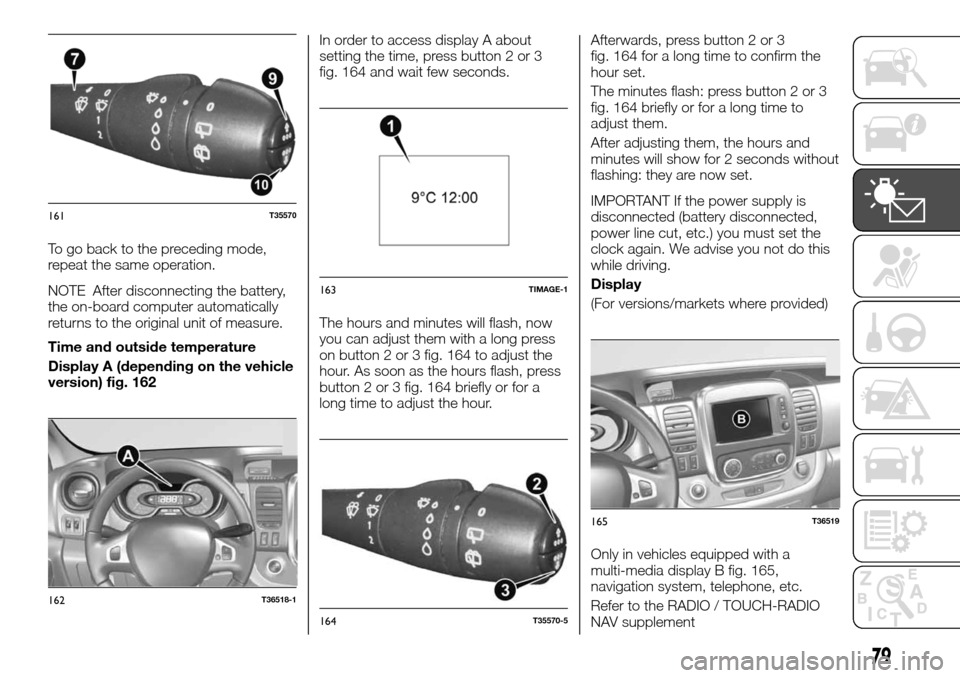
version) fig. 162In order to access display A about
setting the time, press button 2 or 3
fig. 164 and wait few seconds.
The hours and minutes will flash, now
you can adjust them with a long press
on button 2 or 3 fig. 164 to adjust the
hour. As soon as the hours flash, press
button 2 or 3 fig. 164 briefly or for a
long time to adjust the hour.Afterwards, press button 2 or 3
fig. 164 for a long time to confirm the
hour set.
The minutes flash: press button 2 or 3
fig. 164 briefly or for a long time to
adjust them.
After adjusting them, the hours and
minutes will show for 2 seconds without
flashing: they are now set.
IMPORTANT If the power supply is
disconnected (battery disconnected,
power line cut, etc.) you must set the
clock again. We advise you not do this
while driving.
Display
(For versions/markets where provided)
Only in vehicles equipped with a
multi-media display B fig. 165,
navigation system, telephone, etc.
Refer to the RADIO / TOUCH-RADIO
NAV supplement
161T35570
162T36518-1
163TIMAGE-1
164T35570-5
165T36519
79
Page 90 of 232
CONTROL PANEL
AND ON-BOARD
INSTRUMENTS
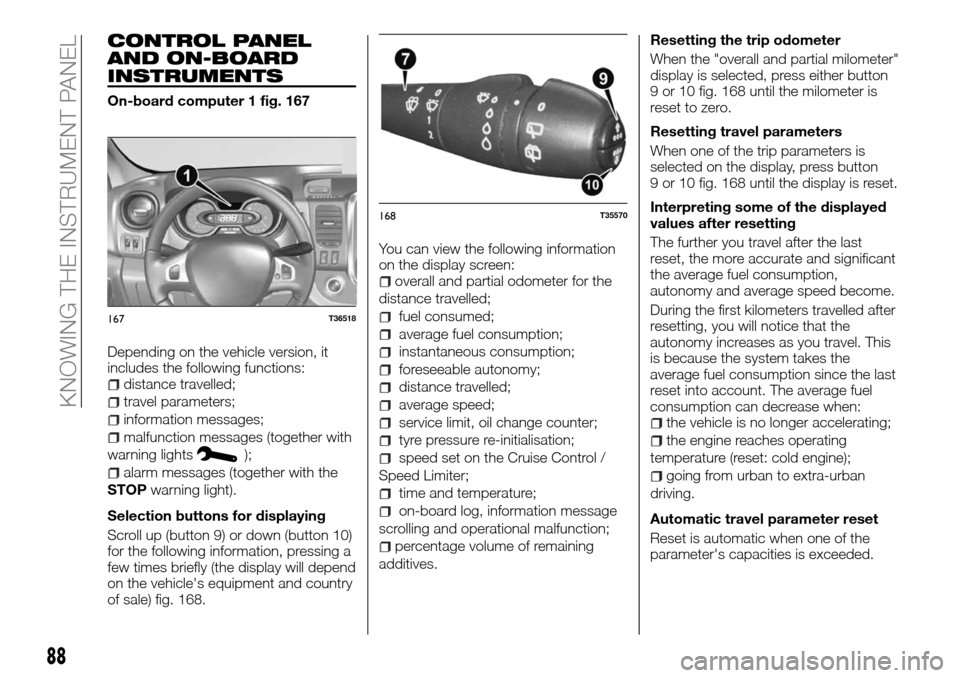
On-board computer 1 fig. 167
Depending on the vehicle version, it
includes the following functions:
distance travelled;
travel parameters;
information messages;
malfunction messages (together with
warning lights
);
alarm messages (together with the
STOPwarning light).
Selection buttons for displaying
Scroll up (button 9) or down (button 10)
for the following information, pressing a
few times briefly (the display will depend
on the vehicle's equipment and country
of sale) fig. 168.You can view the following information
on the display screen:
overall and partial odometer for the
distance travelled;
fuel consumed;
average fuel consumption;
instantaneous consumption;
foreseeable autonomy;
distance travelled;
average speed;
service limit, oil change counter;
tyre pressure re-initialisation;
speed set on the Cruise Control /
Speed Limiter;
time and temperature;
on-board log, information message
scrolling and operational malfunction;
percentage volume of remaining
additives.Resetting the trip odometer
When the "overall and partial milometer"
display is selected, press either button
9 or 10 fig. 168 until the milometer is
reset to zero.
Resetting travel parameters
When one of the trip parameters is
selected on the display, press button
9 or 10 fig. 168 until the display is reset.
Interpreting some of the displayed
values after resetting
The further you travel after the last
reset, the more accurate and significant
the average fuel consumption,
autonomy and average speed become.
During the first kilometers travelled after
resetting, you will notice that the
autonomy increases as you travel. This
is because the system takes the
average fuel consumption since the last
reset into account. The average fuel
consumption can decrease when:
the vehicle is no longer accelerating;
the engine reaches operating
temperature (reset: cold engine);
going from urban to extra-urban
driving.
Automatic travel parameter reset
Reset is automatic when one of the
parameter's capacities is exceeded.
167T36518
168T35570
88
KNOWING THE INSTRUMENT PANEL
Page 93 of 232
Selection examples
Meaning of the data selected
On-board computer with service limit message
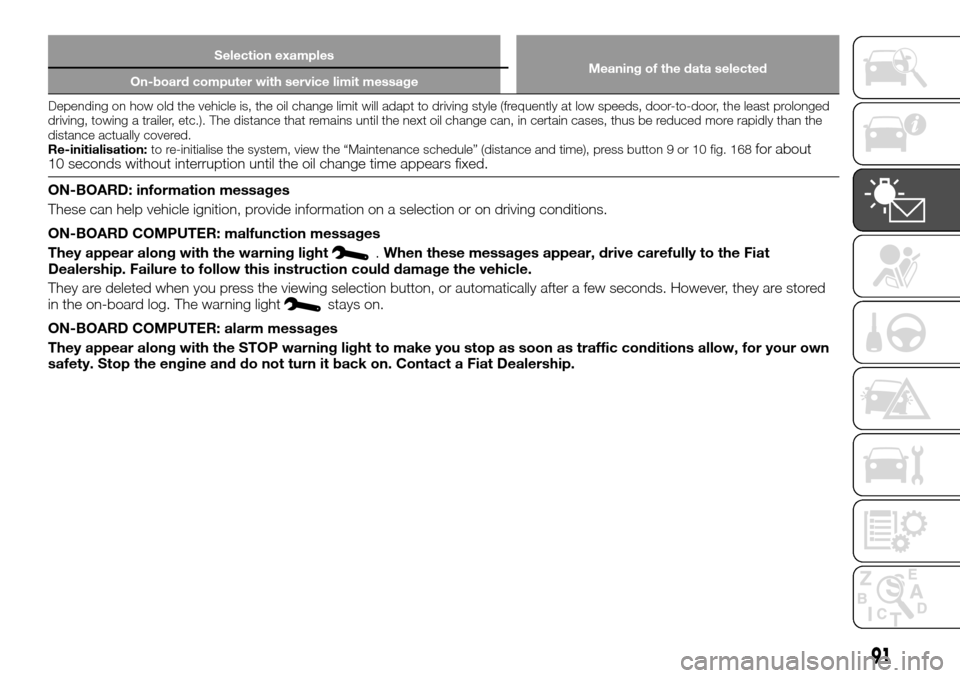
Depending on how old the vehicle is, the oil change limit will adapt to driving style (frequently at low speeds, door-to-door, the least prolonged
driving, towing a trailer, etc.). The distance that remains until the next oil change can, in certain cases, thus be reduced more rapidly than the
distance actually covered.
Re-initialisation:to re-initialise the system, view the “Maintenance schedule” (distance and time), press button 9 or 10 fig. 168
for about
10 seconds without interruption until the oil change time appears fixed.
ON-BOARD: information messages
These can help vehicle ignition, provide information on a selection or on driving conditions.
ON-BOARD COMPUTER: malfunction messages
They appear along with the warning light
.When these messages appear, drive carefully to the Fiat
Dealership. Failure to follow this instruction could damage the vehicle.
They are deleted when you press the viewing selection button, or automatically after a few seconds. However, they are stored
in the on-board log. The warning light
stays on.
ON-BOARD COMPUTER: alarm messages
They appear along with the STOP warning light to make you stop as soon as traffic conditions allow, for your own
safety. Stop the engine and do not turn it back on. Contact a Fiat Dealership.
91
Page 130 of 232
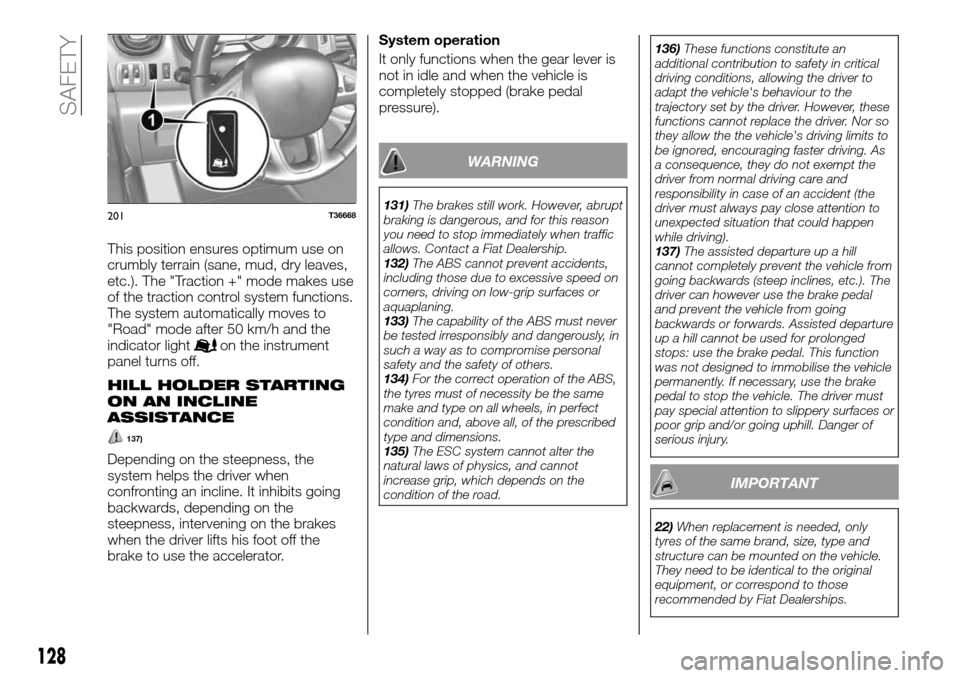
This position ensures optimum use on
crumbly terrain (sane, mud, dry leaves,
etc.). The "Traction +" mode makes use
of the traction control system functions.
The system automatically moves to
"Road" mode after 50 km/h and the
indicator light
on the instrument
panel turns off.
HILL HOLDER STARTING
ON AN INCLINE
ASSISTANCE
137)
Depending on the steepness, the
system helps the driver when
confronting an incline. It inhibits going
backwards, depending on the
steepness, intervening on the brakes
when the driver lifts his foot off the
brake to use the accelerator.System operation
It only functions when the gear lever is
not in idle and when the vehicle is
completely stopped (brake pedal
pressure).
WARNING
131)The brakes still work. However, abrupt
braking is dangerous, and for this reason
you need to stop immediately when traffic
allows. Contact a Fiat Dealership.
132)The ABS cannot prevent accidents,
including those due to excessive speed on
corners, driving on low-grip surfaces or
aquaplaning.
133)The capability of the ABS must never
be tested irresponsibly and dangerously, in
such a way as to compromise personal
safety and the safety of others.
134)For the correct operation of the ABS,
the tyres must of necessity be the same
make and type on all wheels, in perfect
condition and, above all, of the prescribed
type and dimensions.
135)The ESC system cannot alter the
natural laws of physics, and cannot
increase grip, which depends on the
condition of the road.136)These functions constitute an
additional contribution to safety in critical
driving conditions, allowing the driver to
adapt the vehicle's behaviour to the
trajectory set by the driver. However, these
functions cannot replace the driver. Nor so
they allow the the vehicle's driving limits to
be ignored, encouraging faster driving. As
a consequence, they do not exempt the
driver from normal driving care and
responsibility in case of an accident (the
driver must always pay close attention to
unexpected situation that could happen
while driving).
137)The assisted departure up a hill
cannot completely prevent the vehicle from
going backwards (steep inclines, etc.). The
driver can however use the brake pedal
and prevent the vehicle from going
backwards or forwards. Assisted departure
up a hill cannot be used for prolonged
stops: use the brake pedal. This function
was not designed to immobilise the vehicle
permanently. If necessary, use the brake
pedal to stop the vehicle. The driver must
pay special attention to slippery surfaces or
poor grip and/or going uphill. Danger of
serious injury.
IMPORTANT
22)When replacement is needed, only
tyres of the same brand, size, type and
structure can be mounted on the vehicle.
They need to be identical to the original
equipment, or correspond to those
recommended by Fiat Dealerships.
201T36668
128
SAFETY
Page 145 of 232
HAZARD WARNING
LIGHTS
CONTROL
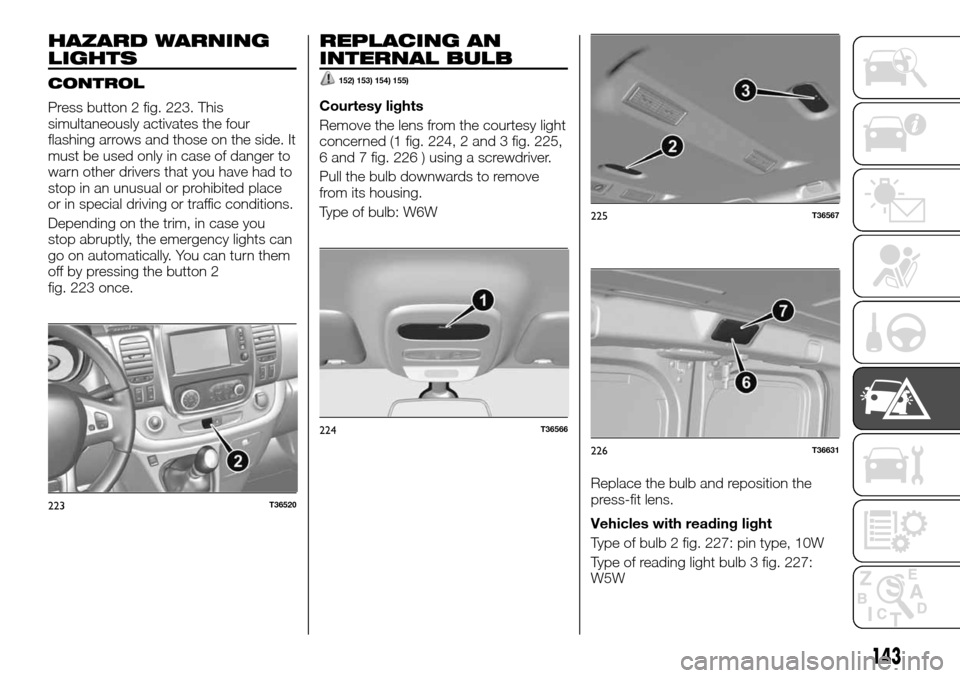
Press button 2 fig. 223. This
simultaneously activates the four
flashing arrows and those on the side. It
must be used only in case of danger to
warn other drivers that you have had to
stop in an unusual or prohibited place
or in special driving or traffic conditions.
Depending on the trim, in case you
stop abruptly, the emergency lights can
go on automatically. You can turn them
off by pressing the button 2
fig. 223 once.
REPLACING AN
INTERNAL BULB
152) 153) 154) 155)
Courtesy lights
Remove the lens from the courtesy light
concerned (1 fig. 224, 2 and 3 fig. 225,
6 and 7 fig. 226 ) using a screwdriver.
Pull the bulb downwards to remove
from its housing.
Type of bulb: W6W
Replace the bulb and reposition the
press-fit lens.
Vehicles with reading light
Type of bulb 2 fig. 227: pin type, 10W
Type of reading light bulb 3 fig. 227:
W5W
223T36520
224T36566
225T36567
226T36631
143
Page 150 of 232
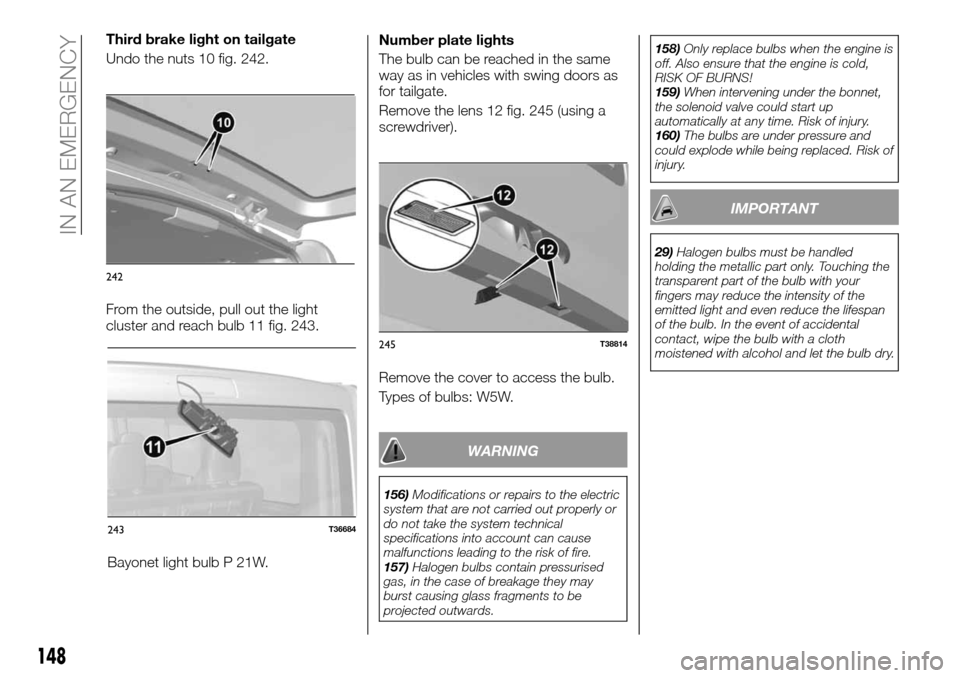
Bayonet light bulb P 21W.Number plate lights
The bulb can be reached in the same
way as in vehicles with swing doors as
for tailgate.
Remove the lens 12 fig. 245 (using a
screwdriver).
Remove the cover to access the bulb.
Types of bulbs: W5W.
WARNING
156)Modifications or repairs to the electric
system that are not carried out properly or
do not take the system technical
specifications into account can cause
malfunctions leading to the risk of fire.
157)Halogen bulbs contain pressurised
gas, in the case of breakage they may
burst causing glass fragments to be
projected outwards.158)Only replace bulbs when the engine is
off. Also ensure that the engine is cold,
RISK OF BURNS!
159)When intervening under the bonnet,
the solenoid valve could start up
automatically at any time. Risk of injury.
160)The bulbs are under pressure and
could explode while being replaced. Risk of
injury.
IMPORTANT
29)Halogen bulbs must be handled
holding the metallic part only. Touching the
transparent part of the bulb with your
fingers may reduce the intensity of the
emitted light and even reduce the lifespan
of the bulb. In the event of accidental
contact, wipe the bulb with a cloth
moistened with alcohol and let the bulb dry.
243T36684
245T38814
148
IN AN EMERGENCY
Third brake light on tailgate
Undo the nuts 10 fig. 242.
From the outside, pull out the light
cluster and reach bulb 11 fig. 243.
242
Page 162 of 232
TOWING THE
VEHICLE
182) 183) 184)
41) 42) 43)
The steering wheel should not be
locked; the starter device has to be in
position "M" (ignition) to allow signalling
("Stop" lights, emergency lights). At
night the outside vehicle lighting must
remain on.
Detach the trailer where there is one.
Moreover, you have to comply with the
towing conditions, defined by the
regulations in force in the country you
are in.
Contact a Fiat Dealership.
Never use the gear or drive shafts to
tow the vehicle.
Use the rings exclusively for towing; in
no case must they be used to lift the
vehicle up, directly or indirectly.
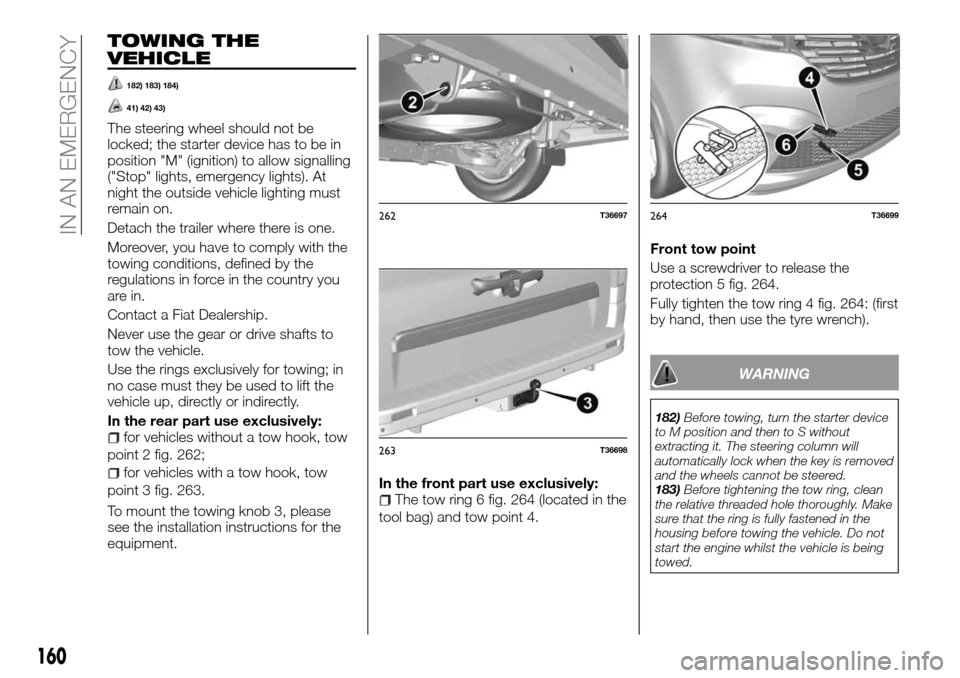
In the rear part use exclusively:
for vehicles without a tow hook, tow
point 2 fig. 262;
for vehicles with a tow hook, tow
point 3 fig. 263.
To mount the towing knob 3, please
see the installation instructions for the
equipment.In the front part use exclusively:
The tow ring 6 fig. 264 (located in the
tool bag) and tow point 4.Front tow point
Use a screwdriver to release the
protection 5 fig. 264.
Fully tighten the tow ring 4 fig. 264: (first
by hand, then use the tyre wrench).
WARNING
182)Before towing, turn the starter device
to M position and then to S without
extracting it. The steering column will
automatically lock when the key is removed
and the wheels cannot be steered.
183)Before tightening the tow ring, clean
the relative threaded hole thoroughly. Make
sure that the ring is fully fastened in the
housing before towing the vehicle. Do not
start the engine whilst the vehicle is being
towed.
262T36697
263T36698
264T36699
160
IN AN EMERGENCY