steering FIAT TIPO 4DOORS 2017 1.G User Guide
[x] Cancel search | Manufacturer: FIAT, Model Year: 2017, Model line: TIPO 4DOORS, Model: FIAT TIPO 4DOORS 2017 1.GPages: 240, PDF Size: 4.15 MB
Page 36 of 240
WARNING
28)It is absolutely forbidden to carry out
any after-market operation involving
steering system or steering column
modifications (e.g. installation of anti-theft
device) that could adversely affect
performance, invalidate the warranty, cause
serious safety problems and also result in
the car not meeting type-approval
requirements.
29)Before performing any maintenance
operations, always turn off the engine and
remove the key from the ignition to lock the
steering column (especially when the car
wheels are not touching the ground). If this
is not possible (for example if the key
needs to be turned to MAR or the engine
must be running), remove the main fuse
that protects the electric power steering.
BOOT
9)
IMPORTANT When travelling, do not
put any object on the rear parcel shelf
because they can injure passengers in
the event of an accident or sudden
braking.
OPENING
30)
Rear flap opening
When the central locking system is
unlocked, the rear boot flap can be
opened from outside the car using the
electric opening handle (where
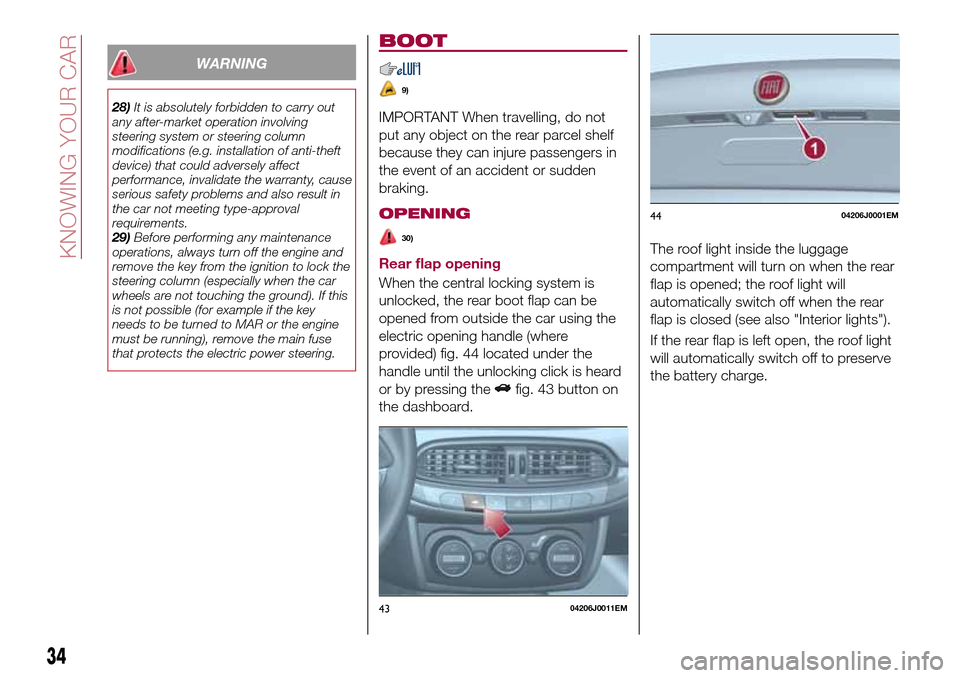
provided) fig. 44 located under the
handle until the unlocking click is heard
or by pressing the
fig. 43 button on
the dashboard.The roof light inside the luggage
compartment will turn on when the rear
flap is opened; the roof light will
automatically switch off when the rear
flap is closed (see also "Interior lights").
If the rear flap is left open, the roof light
will automatically switch off to preserve
the battery charge.
4304206J0011EM
4404206J0001EM
34
KNOWING YOUR CAR
Page 49 of 240
DISPLAY
DESCRIPTION
The vehicle is equipped with a display
that can show useful information to the
driver while driving.
GEAR SHIFT INDICATOR
The Gear Shift Indicator (GSI) system
advises the driver to change gear
through a special indication on the
display.
Through the GSI, the driver is informed
that the gear change will allow a
reduction in fuel consumption.
When the
icon appears on the
display, the GSI suggests switching to a
higher gear, while when the
icon is
displayed, the GSI suggests changing
to a lower gear.
The indication in the display remains
until a gear is shifted or the driving
conditions go back to a situation where
gearshifting is not required to improve
consumption.
MULTIFUNCTION
DISPLAY
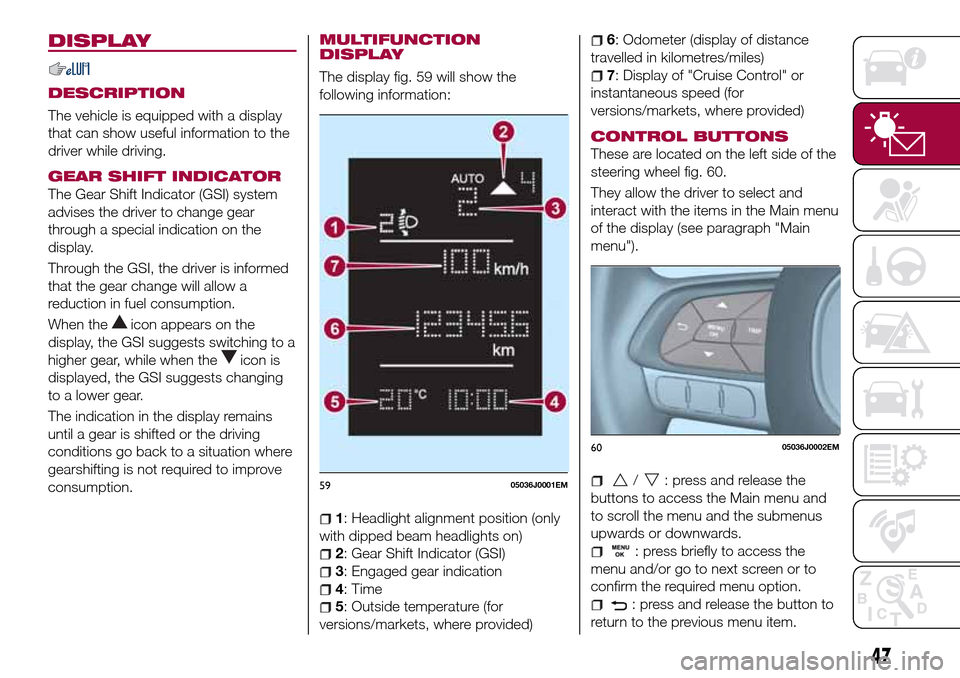
The display fig. 59 will show the
following information:
1: Headlight alignment position (only
with dipped beam headlights on)
2: Gear Shift Indicator (GSI)
3: Engaged gear indication
4: Time
5: Outside temperature (for
versions/markets, where provided)
6: Odometer (display of distance
travelled in kilometres/miles)
7: Display of "Cruise Control" or
instantaneous speed (for
versions/markets, where provided)
CONTROL BUTTONS
These are located on the left side of the
steering wheel fig. 60.
They allow the driver to select and
interact with the items in the Main menu
of the display (see paragraph "Main
menu").
/: press and release the
buttons to access the Main menu and
to scroll the menu and the submenus
upwards or downwards.
: press briefly to access the
menu and/or go to next screen or to
confirm the required menu option.
: press and release the button to
return to the previous menu item.
5905036J0001EM
6005036J0002EM
47
Page 51 of 240
CONTROL BUTTONS
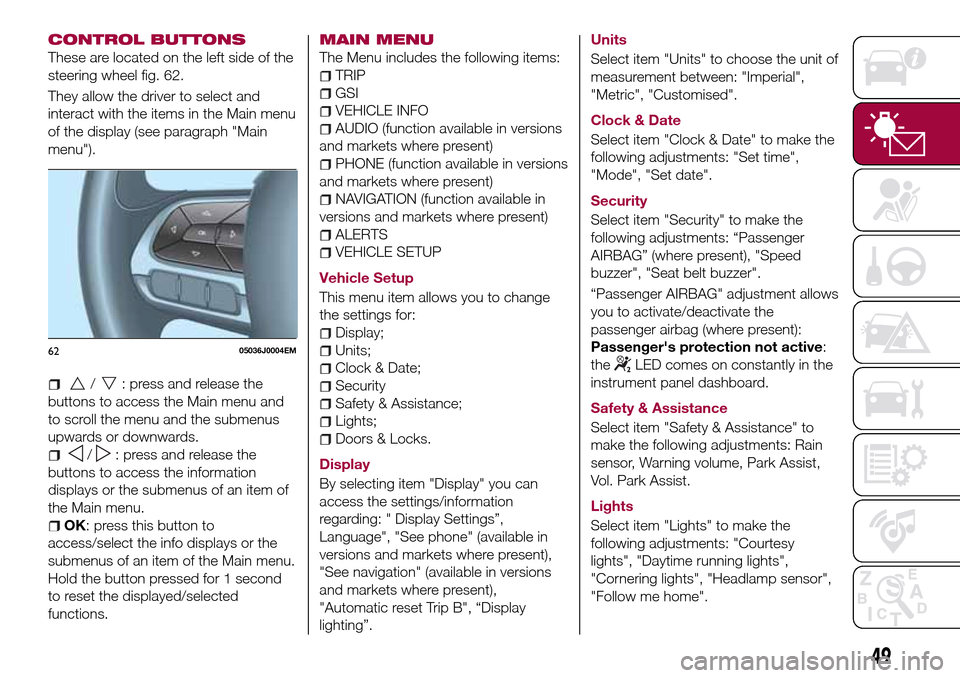
These are located on the left side of the
steering wheel fig. 62.
They allow the driver to select and
interact with the items in the Main menu
of the display (see paragraph "Main
menu").
/: press and release the
buttons to access the Main menu and
to scroll the menu and the submenus
upwards or downwards.
/: press and release the
buttons to access the information
displays or the submenus of an item of
the Main menu.
OK: press this button to
access/select the info displays or the
submenus of an item of the Main menu.
Hold the button pressed for 1 second
to reset the displayed/selected
functions.
MAIN MENU
The Menu includes the following items:
TRIP
GSI
VEHICLE INFO
AUDIO (function available in versions
and markets where present)
PHONE (function available in versions
and markets where present)
NAVIGATION (function available in
versions and markets where present)
ALERTS
VEHICLE SETUP
Vehicle Setup
This menu item allows you to change
the settings for:
Display;
Units;
Clock & Date;
Security
Safety & Assistance;
Lights;
Doors & Locks.
Display
By selecting item "Display" you can
access the settings/information
regarding: " Display Settings”,
Language", "See phone" (available in
versions and markets where present),
"See navigation" (available in versions
and markets where present),
"Automatic reset Trip B", “Display
lighting”.Units
Select item "Units" to choose the unit of
measurement between: "Imperial",
"Metric", "Customised".
Clock & Date
Select item "Clock & Date" to make the
following adjustments: "Set time",
"Mode", "Set date".
Security
Select item "Security" to make the
following adjustments: “Passenger
AIRBAG” (where present), "Speed
buzzer", "Seat belt buzzer".
“Passenger AIRBAG" adjustment allows
you to activate/deactivate the
passenger airbag (where present):
Passenger's protection not active:
the
LED comes on constantly in the
instrument panel dashboard.
Safety & Assistance
Select item "Safety & Assistance" to
make the following adjustments: Rain
sensor, Warning volume, Park Assist,
Vol. Park Assist.
Lights
Select item "Lights" to make the
following adjustments: "Courtesy
lights", "Daytime running lights",
"Cornering lights", "Headlamp sensor",
"Follow me home".6205036J0004EM
49
Page 52 of 240
Doors & Locks
Select item "Doors & Locks" to make
the following adjustments: "Autoclose",
"Flash Lights w/Lock", "Auto unlock on
exit".
With theUconnect™system, some
Menu items are shown and managed
on the display of the latter and not on
the instrument panel display (refer to
the dedicated Multimedia chapter or to
the supplement available online).
TRIP COMPUTER
The "Trip computer" is used to display
information on vehicle operation when
the ignition device is at MAR.
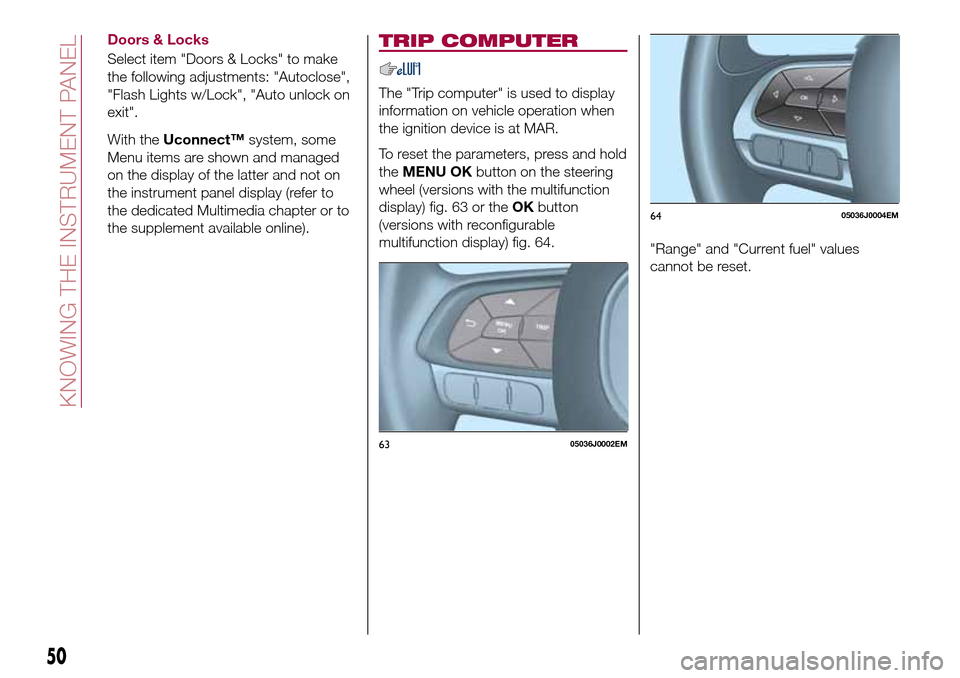
To reset the parameters, press and hold
theMENU OKbutton on the steering
wheel (versions with the multifunction
display) fig. 63 or theOKbutton
(versions with reconfigurable
multifunction display) fig. 64.
"Range" and "Current fuel" values
cannot be reset.
6305036J0002EM
6405036J0004EM
50
KNOWING THE INSTRUMENT PANEL
Page 55 of 240
Warning light What it means
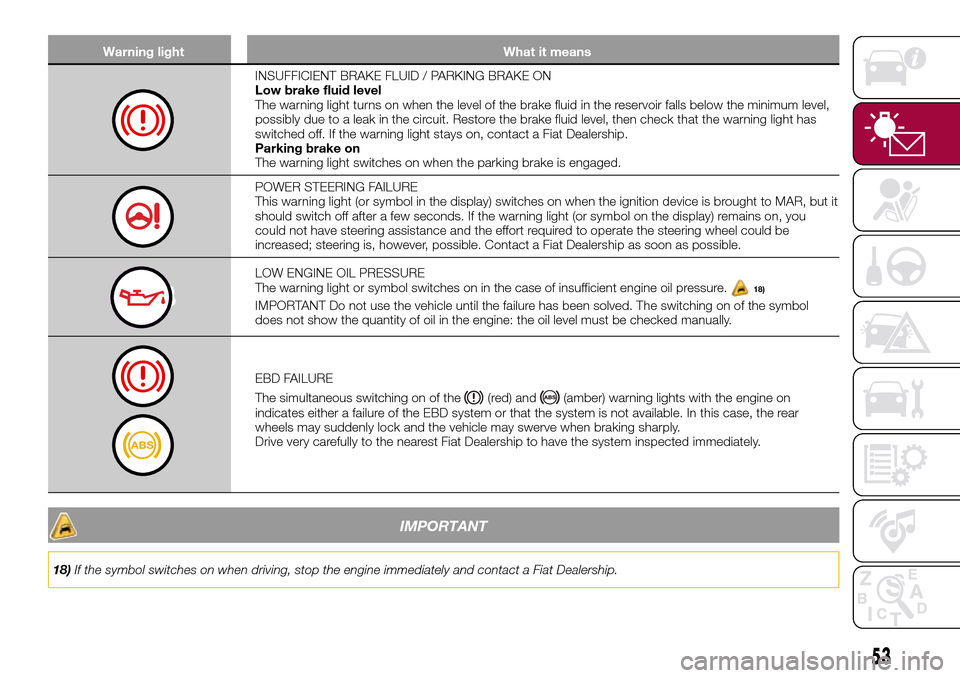
INSUFFICIENT BRAKE FLUID / PARKING BRAKE ON
Low brake fluid level
The warning light turns on when the level of the brake fluid in the reservoir falls below the minimum level,
possibly due to a leak in the circuit. Restore the brake fluid level, then check that the warning light has
switched off. If the warning light stays on, contact a Fiat Dealership.
Parking brake on
The warning light switches on when the parking brake is engaged.
POWER STEERING FAILURE
This warning light (or symbol in the display) switches on when the ignition device is brought to MAR, but it
should switch off after a few seconds. If the warning light (or symbol on the display) remains on, you
could not have steering assistance and the effort required to operate the steering wheel could be
increased; steering is, however, possible. Contact a Fiat Dealership as soon as possible.
LOW ENGINE OIL PRESSURE
The warning light or symbol switches on in the case of insufficient engine oil pressure.18)
IMPORTANT Do not use the vehicle until the failure has been solved. The switching on of the symbol
does not show the quantity of oil in the engine: the oil level must be checked manually.
EBD FAILURE
The simultaneous switching on of the
(red) and(amber) warning lights with the engine on
indicates either a failure of the EBD system or that the system is not available. In this case, the rear
wheels may suddenly lock and the vehicle may swerve when braking sharply.
Drive very carefully to the nearest Fiat Dealership to have the system inspected immediately.
IMPORTANT
18)If the symbol switches on when driving, stop the engine immediately and contact a Fiat Dealership.
53
Page 58 of 240
Warning light What it means
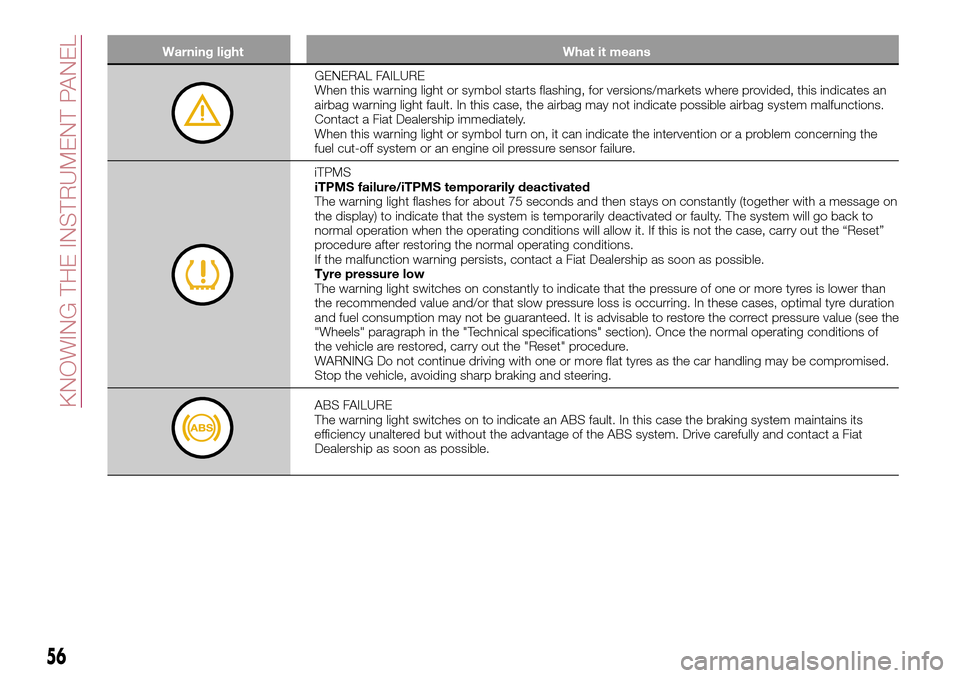
GENERAL FAILURE
When this warning light or symbol starts flashing, for versions/markets where provided, this indicates an
airbag warning light fault. In this case, the airbag may not indicate possible airbag system malfunctions.
Contact a Fiat Dealership immediately.
When this warning light or symbol turn on, it can indicate the intervention or a problem concerning the
fuel cut-off system or an engine oil pressure sensor failure.
iTPMS
iTPMS failure/iTPMS temporarily deactivated
The warning light flashes for about 75 seconds and then stays on constantly (together with a message on
the display) to indicate that the system is temporarily deactivated or faulty. The system will go back to
normal operation when the operating conditions will allow it. If this is not the case, carry out the “Reset”
procedure after restoring the normal operating conditions.
If the malfunction warning persists, contact a Fiat Dealership as soon as possible.
Tyre pressure low
The warning light switches on constantly to indicate that the pressure of one or more tyres is lower than
the recommended value and/or that slow pressure loss is occurring. In these cases, optimal tyre duration
and fuel consumption may not be guaranteed. It is advisable to restore the correct pressure value (see the
"Wheels" paragraph in the "Technical specifications" section). Once the normal operating conditions of
the vehicle are restored, carry out the "Reset" procedure.
WARNING Do not continue driving with one or more flat tyres as the car handling may be compromised.
Stop the vehicle, avoiding sharp braking and steering.
ABS FAILURE
The warning light switches on to indicate an ABS fault. In this case the braking system maintains its
efficiency unaltered but without the advantage of the ABS system. Drive carefully and contact a Fiat
Dealership as soon as possible.
56
KNOWING THE INSTRUMENT PANEL
Page 63 of 240
Warning light What it means
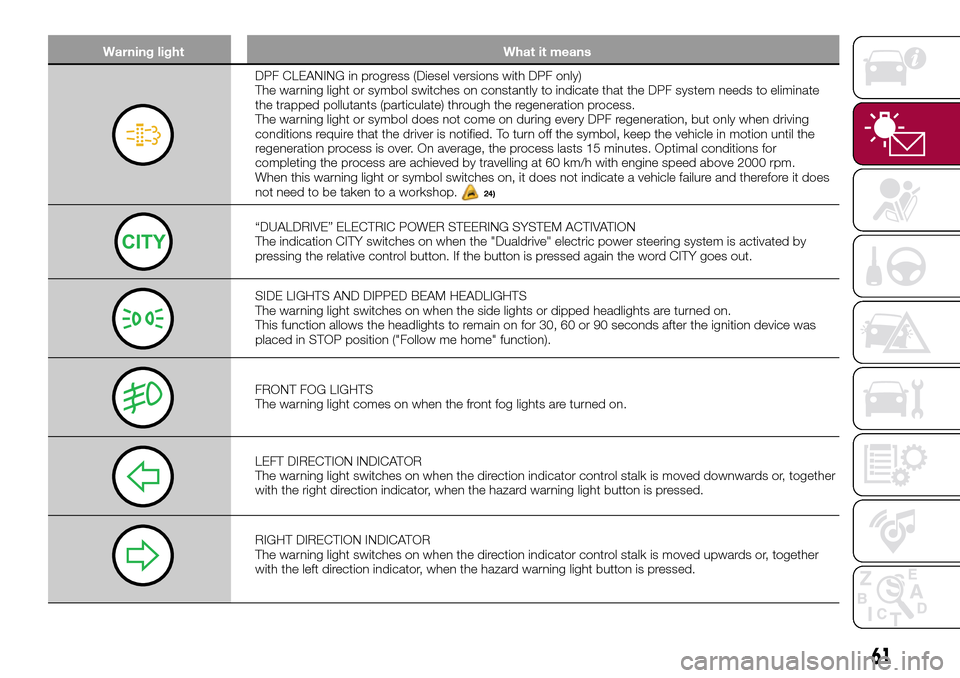
DPF CLEANING in progress (Diesel versions with DPF only)
The warning light or symbol switches on constantly to indicate that the DPF system needs to eliminate
the trapped pollutants (particulate) through the regeneration process.
The warning light or symbol does not come on during every DPF regeneration, but only when driving
conditions require that the driver is notified. To turn off the symbol, keep the vehicle in motion until the
regeneration process is over. On average, the process lasts 15 minutes. Optimal conditions for
completing the process are achieved by travelling at 60 km/h with engine speed above 2000 rpm.
When this warning light or symbol switches on, it does not indicate a vehicle failure and therefore it does
not need to be taken to a workshop.
24)
“DUALDRIVE” ELECTRIC POWER STEERING SYSTEM ACTIVATION
The indication CITY switches on when the "Dualdrive" electric power steering system is activated by
pressing the relative control button. If the button is pressed again the word CITY goes out.
SIDE LIGHTS AND DIPPED BEAM HEADLIGHTS
The warning light switches on when the side lights or dipped headlights are turned on.
This function allows the headlights to remain on for 30, 60 or 90 seconds after the ignition device was
placed in STOP position ("Follow me home" function).
FRONT FOG LIGHTS
The warning light comes on when the front fog lights are turned on.
LEFT DIRECTION INDICATOR
The warning light switches on when the direction indicator control stalk is moved downwards or, together
with the right direction indicator, when the hazard warning light button is pressed.
RIGHT DIRECTION INDICATOR
The warning light switches on when the direction indicator control stalk is moved upwards or, together
with the left direction indicator, when the hazard warning light button is pressed.
61
Page 70 of 240
ACTIVE SAFETY
SYSTEMS
The vehicle has the following active
safety systems:
ABS (Anti-lock Braking System);
DTC (Drag Torque Control);
ESC (Electronic Stability Control);
TC (Traction Control);
PBA (Panic Brake Assist);
HHC (Hill Hold Control);
ERM (Electronic Rollover Mitigation);
TSC (Trailer Sway Control).
For the operation of the systems, see
the following description.
ABS (Anti-lock Braking
System)
This system, which is an integral part of
the braking system, prevents one or
more wheels from locking and slipping
in all road surface conditions,
irrespective of the intensity of the
braking action, ensuring that the vehicle
can be controlled even during
emergency braking and optimising
stopping distances.
The system intervenes during braking
when the wheels are about to lock,
typically in emergency braking or
low-grip conditions, when locking may
be more frequent.The system also improves control and
stability of the vehicle when braking on
a surface where the grip of the left and
right wheels varies, or on corners.
The Electronic Braking Force
Distribution (EBD) system completes
the system allowing the brake force to
be distributed between the front and
rear wheels.
System intervention
The driver can feel that the ABS system
has come into action because the
brake pedal pulsates slightly and the
system gets noisier: this is entirely
normal with the system operating.35) 36) 37) 38) 39) 40) 41)
DTC (Drag Torque
Control) SYSTEM
The system prevents the drive wheels
from possibly locking, which could
happen, for example, if the accelerator
pedal is released suddenly or in the
case of a sudden downshifting in
conditions of poor grip. In this
conditions, the engine braking effect
could cause the drive wheels to slip,
resulting in a loss of vehicle stability. In
these situations, the DTC system
intervenes, restoring torque to the
engine in order to conserve vehicle
stability and increase vehicle safety.
ESC (Electronic Stability
Control) SYSTEM
The ESC system improves the
directional control and stability of the
car in various driving conditions.
The ESC system corrects the vehicle’s
understeer and oversteer, distributing
the brake force on the wheels
appropriately. The torque supplied by
the engine can also be reduced in order
to maintain control of the vehicle.
The ESC system uses sensors installed
on the vehicle to determine the
trajectory that the driver intends to
follow and compares it with the
vehicle’s effective trajectory. When the
real trajectory deviates from the desired
trajectory, the ESC system intervenes to
counter the vehicle’s understeer or
oversteer.
Oversteer: occurs when the car is
turning more than it should according
to the angle of the steering wheel.
Understeer: occurs when the vehicle
is turning less than it should according
to the angle of the steering wheel.
68
SAFETY
Page 72 of 240
ERM (Electronic Rollover
Mitigation) SYSTEM
The system monitors the tendency of
the wheels to rise from the ground if the
driver performs extreme manoeuvres
like quick steering to avoid an obstacle,
especially in poor road conditions.
If these conditions occur, the warning
light
flashes on the instrument panel
and the system, intervening on the
brakes and engine power, limits the
possibility that the wheels are raised
from the ground. It is not possible to
avoid tendency to roll over if the
phenomenon is due to reasons such as
driving on high side gradients, collision
with objects or other vehicles.
57)
TSC (Trailer Sway
Control) SYSTEM
The system employs a series of sensors
located on the vehicle to identify
excessive swerving of the trailer and
take the necessary precautions to
eliminate it.
To counteract the effect of trailer sway,
the system can reduce the engine
power and intervene on the wheels
involved. The TSC system activates
automatically once excessive sway of
the trailer is detected.System intervention
When the system is active, the
warning light flashes on the
instrument panel, the engine power is
reduced and braking can be felt on the
individual wheels, following the attempt
to eliminate the swerving of the trailer.
58) 59)
WARNING
35)When the ABS intervenes and you feel
the brake pedal pulsating, do not reduce
the pressure, but hold it down firmly and
confidently; in doing so you will brake in the
shortest distance possible, depending on
the current road conditions.
36)To obtain the maximum efficiency of
the braking system, a bedding-in period of
about 500 km is needed: during this period
it is better to avoid sharp, repeated and
prolonged braking.
37)If the ABS intervenes, this indicates
that the grip of the tyres on the road is
nearing its limit: you must slow down to a
speed compatible with the available grip.
38)The ABS cannot overrule the natural
laws of physics, and cannot increase the
grip available according to the condition of
the road.
39)The ABS cannot prevent accidents,
including those due to excessive speed on
corners, driving on low-grip surfaces or
aquaplaning.40)The capability of the ABS must never
be tested irresponsibly and dangerously, in
such a way as to compromise personal
safety and the safety of others.
41)For the correct operation of the ABS,
the tyres must of necessity be the same
make and type on all wheels, in perfect
condition and, above all, of the prescribed
type and dimensions.
42)The ESC system cannot alter the
natural laws of physics, and cannot
increase grip, which depends on the
condition of the road.
43)The ESC system cannot prevent
accidents, including those due to excessive
speed on corners, driving on low-grip
surfaces or aquaplaning.
44)The capability of the ESC system must
never be tested irresponsibly and
dangerously, in such a way as to
compromise personal safety and the safety
of others.
45)For the correct operation of the ESC
system, the tyres must necessarily be of
the same make and type on all wheels, in
perfect condition and, above all, of the
prescribed type and size.
46)ESC performance features must not
induce the driver to take unnecessary or
unwarranted risks. Your driving style must
always be suited to the road conditions,
visibility and traffic. The driver is, in any
case, responsible for safe driving.
47)For the correct operation of the TC
system, the tyres must of necessity be the
same make and type on all wheels, in
perfect condition and, above all, of the
prescribed type and dimensions.
70
SAFETY
Page 79 of 240
Under special conditions (e.g. vehicle
loaded asymmetrically on one side,
towing a trailer, damaged or worn tyre,
fitting the space-saver wheel, use of the
"Fix&Go Automatic" tyre repair kit, fitting
snow chains, fitting different tyres on
the axles) the system may provide false
indications or be temporarily
deactivated.
If the system is temporarily deactivated
the
warning light flashes for about
75 seconds and then is continuously
on; at the same time, the display shows
a warning message.
This indication is displayed also after
the engine has been switched off and
then on again if the correct operating
conditions are not restored.
In the case of abnormal signals, it is
recommended to perform the RESET
procedure. If the signals reappear once
the RESET procedure has started,
check that the type of tyres used are
the same on all four wheels and that the
tyres are not damaged; if the
space-saver wheel is being used, refit
the wheel with a tire with normal
dimensions instead of the space-saver
wheel as soon as possible; if possible
remove the snow chains; make sure
that the load is distributed correctly and
repeat the RESET procedure, driving on
a clean and surfaced road. If the signals
persist, contact a Fiat Dealership.
WARNING
60)The system is an aid for the driver, who
must always pay full attention while driving.
The responsibility always rests with the
driver, who must take into account the
traffic conditions in order to drive in
complete safety. The driver must always
maintain a safe distance from the vehicle in
front.
61)If the driver depresses the brake pedal
fully or carries out a fast steering during
system operation, the automatic braking
function may stop (e.g. to allow a possible
manoeuvre to avoid the obstacle).
62)The system intervenes on vehicles
travelling in the same lane. People, animals
and things (e.g. pushchairs) are not taken
into consideration.
63)If the car must be placed on a roller
bench for maintenance interventions or if it
is washed in an automatic roller washing
tunnel with an obstacle in the front part
(e.g. another car, a wall or another
obstacle), the system may detect its
presence and activate. In this case the
system must be deactivated through the
settings of the5”Uconnect™system.
64)If the iTMPS system signals a pressure
decrease on the tyres, it is recommended
to check the pressure on all four tyres.
65)The iTPMS does not relieve the driver
from the obligation to check the tyre
pressure every month; it is not even to be
considered a replacing system for
maintenance or a safety system.66)Tyre pressure must be checked with
tyres cold. Should it become necessary for
whatever reason to check pressure with
warm tyres, do not reduce pressure even
though it is higher than the prescribed
value, but repeat the check when tyres are
cold
67)The iTPMS cannot indicate sudden tyre
pressure drops (e.g. if a tyre bursts). In this
case, stop the vehicle, braking with caution
and avoiding abrupt steering.
68)The system only warns that the tyre
pressure is low: it is not able to inflate
them.
69)Insufficient tyre inflation increases fuel
consumption, reduces the tread duration
and may affect the capacity to drive safely.
IMPORTANT
26)The system may have limited or absent
operation due to weather conditions such
as: heavy rain, hail, thick fog, heavy snow.
27)The section of the bumper before the
sensor must not be covered with
adhesives, auxiliary headlights or any other
object.
28)System intervention might be
unexpected or delayed when other vehicles
transport loads projecting from the side,
above or from the rear, with respect to the
normal size of the vehicle.
29)Operation can be adversely affected by
any structural change made to the vehicle,
such as a modification to the front
geometry, tyre change, or a heavier load
than the standard load of the vehicle.
77