ECO FIAT TIPO 4DOORS 2017 1.G Manual PDF
[x] Cancel search | Manufacturer: FIAT, Model Year: 2017, Model line: TIPO 4DOORS, Model: FIAT TIPO 4DOORS 2017 1.GPages: 240, PDF Size: 4.15 MB
Page 199 of 240
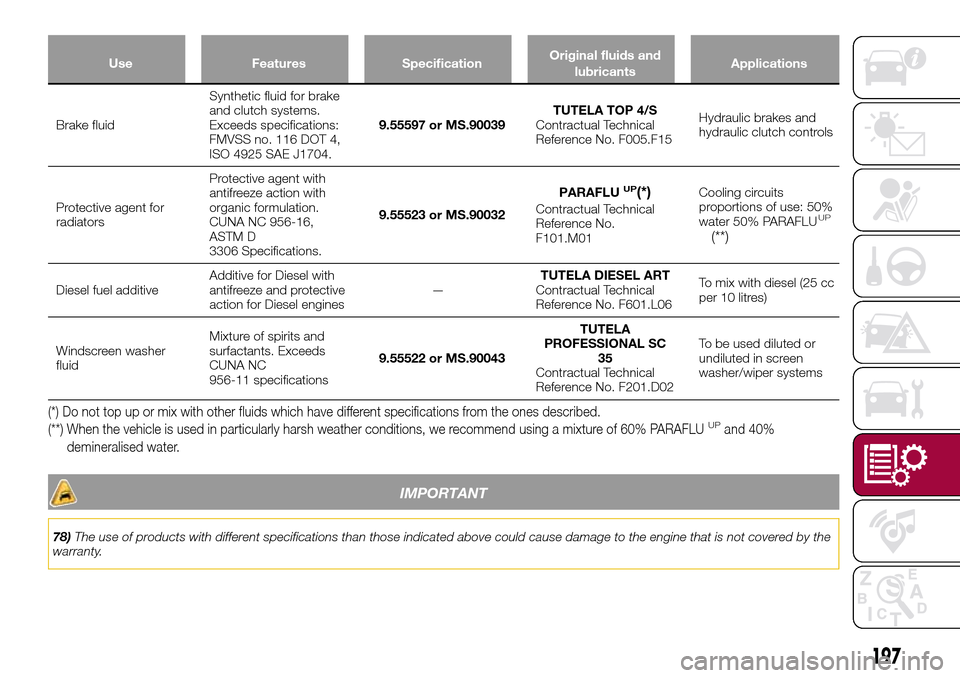
Use Features SpecificationOriginal fluids and
lubricantsApplications
Brake fluidSynthetic fluid for brake
and clutch systems.
Exceeds specifications:
FMVSS no. 116 DOT 4,
ISO 4925 SAE J1704.9.55597 or MS.90039TUTELA TOP 4/S
Contractual Technical
Reference No. F005.F15Hydraulic brakes and
hydraulic clutch controls
Protective agent for
radiatorsProtective agent with
antifreeze action with
organic formulation.
CUNA NC 956-16,
ASTM D
3306 Specifications.9.55523 or MS.90032PARAFLU
UP(*)
Contractual Technical
Reference No.
F101.M01Cooling circuits
proportions of use: 50%
water 50% PARAFLUUP
(**)
Diesel fuel additiveAdditive for Diesel with
antifreeze and protective
action for Diesel engines—TUTELA DIESEL ART
Contractual Technical
Reference No. F601.L06To mix with diesel (25 cc
per 10 litres)
Windscreen washer
fluidMixture of spirits and
surfactants. Exceeds
CUNA NC
956-11 specifications9.55522 or MS.90043TUTELA
PROFESSIONAL SC
35
Contractual Technical
Reference No. F201.D02To be used diluted or
undiluted in screen
washer/wiper systems
(*) Do not top up or mix with other fluids which have different specifications from the ones described.
(**) When the vehicle is used in particularly harsh weather conditions, we recommend using a mixture of 60% PARAFLUUPand 40%
demineralised water.
IMPORTANT
78)The use of products with different specifications than those indicated above could cause damage to the engine that is not covered by the
warranty.
197
Page 200 of 240
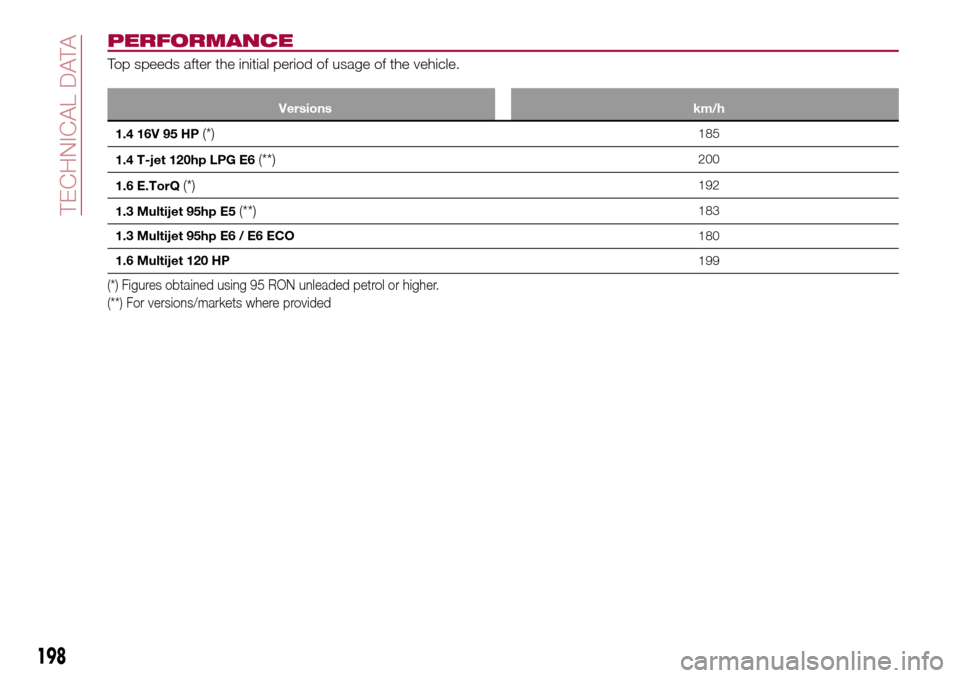
PERFORMANCE
Top speeds after the initial period of usage of the vehicle.
Versions km/h
1.4 16V 95 HP(*)185
1.4 T-jet 120hp LPG E6
(**)200
1.6 E.TorQ
(*)192
1.3 Multijet 95hp E5
(**)183
1.3 Multijet 95hp E6 / E6 ECO180
1.6 Multijet 120 HP199
(*) Figures obtained using 95 RON unleaded petrol or higher.
(**) For versions/markets where provided
198
TECHNICAL DATA
Page 202 of 240
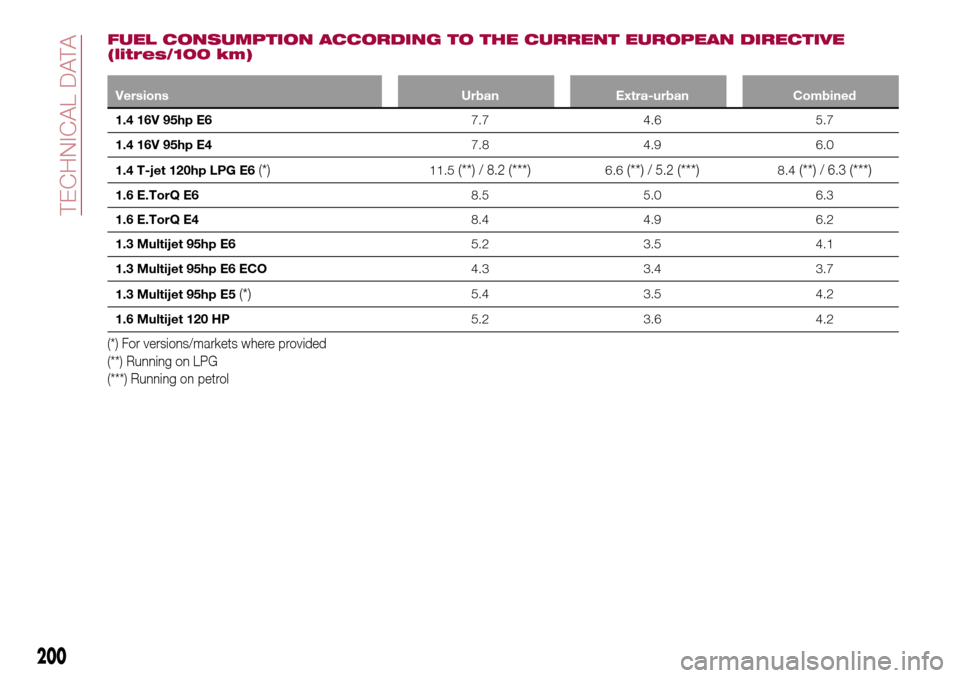
FUEL CONSUMPTION ACCORDING TO THE CURRENT EUROPEAN DIRECTIVE
(litres/100 km)
Versions Urban Extra-urban Combined
1.4 16V 95hp E67.7 4.6 5.7
1.4 16V 95hp E47.8 4.9 6.0
1.4 T-jet 120hp LPG E6
(*)11.5(**)/ 8.2(***)6.6(**)/ 5.2(***)8.4(**)/ 6.3(***)
1.6 E.TorQ E68.5 5.0 6.3
1.6 E.TorQ E48.4 4.9 6.2
1.3 Multijet 95hp E65.2 3.5 4.1
1.3 Multijet 95hp E6 ECO4.3 3.4 3.7
1.3 Multijet 95hp E5
(*)5.4 3.5 4.2
1.6 Multijet 120 HP5.2 3.6 4.2
(*) For versions/markets where provided
(**) Running on LPG
(***) Running on petrol
200
TECHNICAL DATA
Page 203 of 240
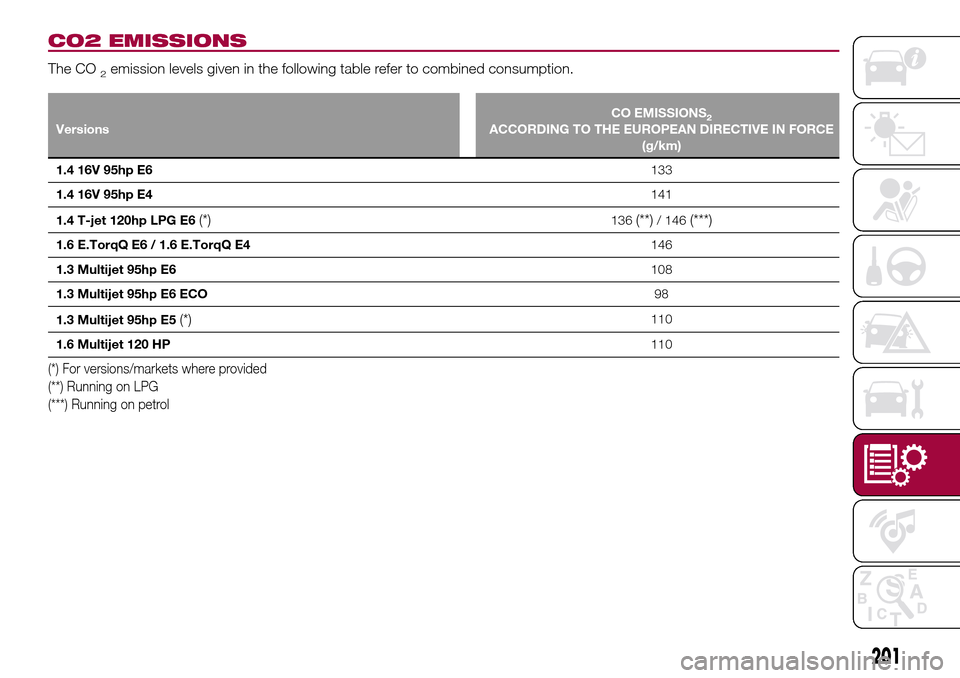
CO2 EMISSIONS
The CO2emission levels given in the following table refer to combined consumption.
VersionsCO EMISSIONS2ACCORDING TO THE EUROPEAN DIRECTIVE IN FORCE
(g/km)
1.4 16V 95hp E6133
1.4 16V 95hp E4141
1.4 T-jet 120hp LPG E6
(*)136(**)/ 146(***)
1.6 E.TorqQ E6 / 1.6 E.TorqQ E4146
1.3 Multijet 95hp E6108
1.3 Multijet 95hp E6 ECO98
1.3 Multijet 95hp E5
(*)110
1.6 Multijet 120 HP110
(*) For versions/markets where provided
(**) Running on LPG
(***) Running on petrol
201
Page 204 of 240
PRESCRIPTIONS FOR HANDLING THE VEHICLE AT THE END OF ITS
LIFE
(for versions/markets, where provided)
FCA has been committed for many years to safeguarding the environment through the constant improvement of its production
processes and manufacturing products that are increasingly "eco-compatible". To grant customers the best possible service in
terms of respecting environmental laws and in response to European Directive 2000/53/EC governing vehicles at the end of
their life, FCA is offering its customers the chance to hand over their vehicle at the end of its life without incurring any additional
costs. The European Directive sets out that when the vehicle is handed over, the last keeper or owner should not incur any
expenses as a result of it having a zero or negative market value.
To hand your vehicle over at the end of its life without extra cost, contact one of our dealerships if you are purchasing another
vehicle or an FCA-authorised collection and scrapping centre. These centres have been carefully chosen to offer high quality
service for the collection, treatment and recycling of vehicles at their end of life, respecting the surrounding environment.
You can find further information on these collection and scrapping centres either from an FCA dealership or by calling the
number in the Warranty Booklet or by consulting the websites of the various FCA brands.
202
TECHNICAL DATA
Page 212 of 240
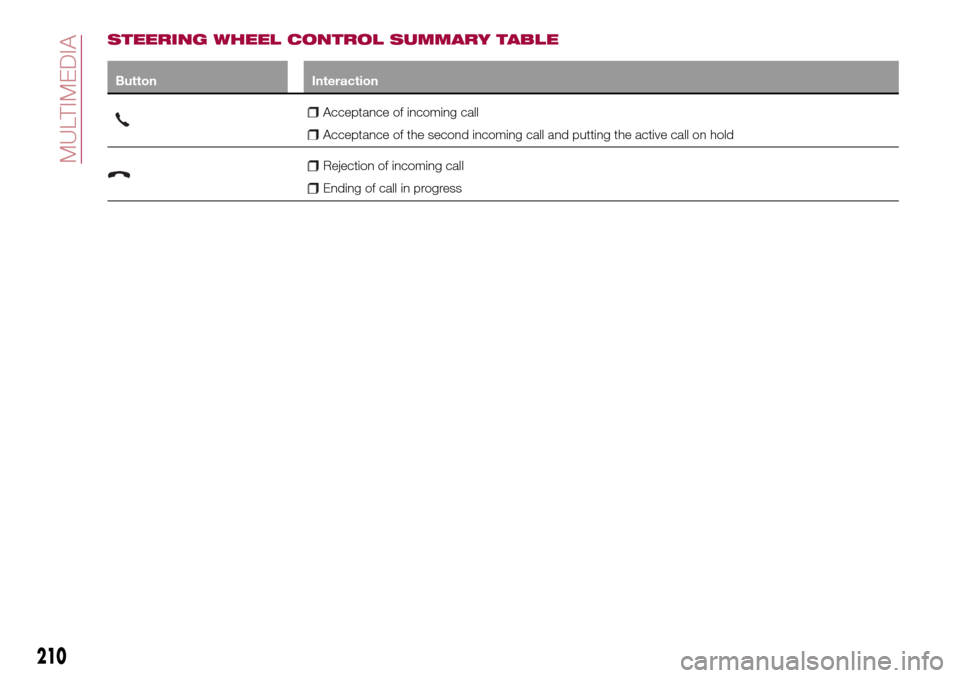
STEERING WHEEL CONTROL SUMMARY TABLE
Button Interaction
Acceptance of incoming call
Acceptance of the second incoming call and putting the active call on hold
Rejection of incoming call
Ending of call in progress
210
MULTIMEDIA
Page 214 of 240
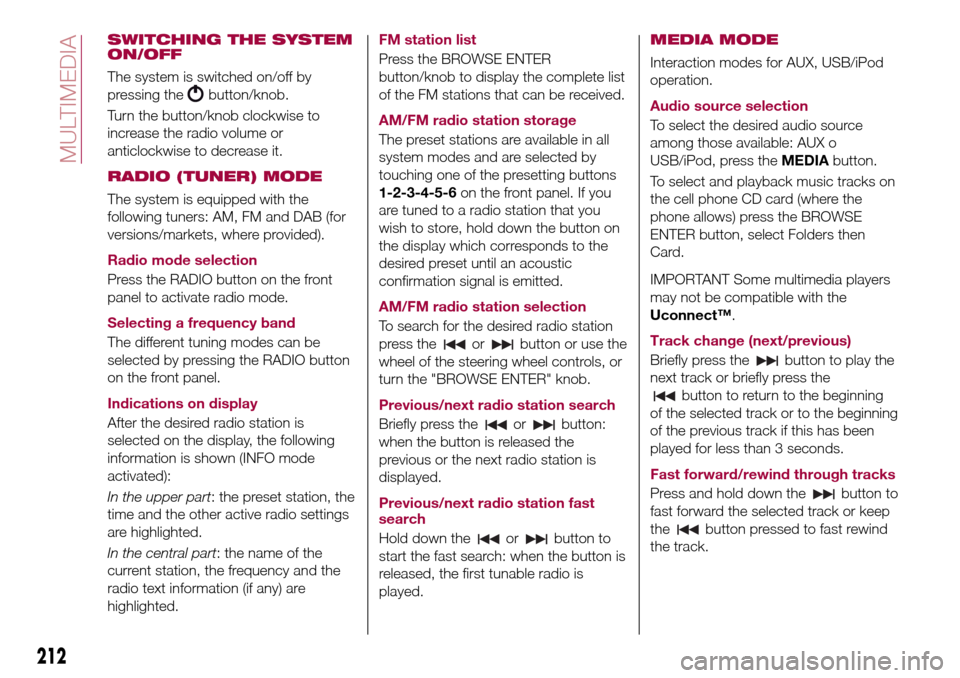
SWITCHING THE SYSTEM
ON/OFF
The system is switched on/off by
pressing the
button/knob.
Turn the button/knob clockwise to
increase the radio volume or
anticlockwise to decrease it.
RADIO (TUNER) MODE
The system is equipped with the
following tuners: AM, FM and DAB (for
versions/markets, where provided).
Radio mode selection
Press the RADIO button on the front
panel to activate radio mode.
Selecting a frequency band
The different tuning modes can be
selected by pressing the RADIO button
on the front panel.
Indications on display
After the desired radio station is
selected on the display, the following
information is shown (INFO mode
activated):
In the upper part: the preset station, the
time and the other active radio settings
are highlighted.
In the central part: the name of the
current station, the frequency and the
radio text information (if any) are
highlighted.FM station list
Press the BROWSE ENTER
button/knob to display the complete list
of the FM stations that can be received.
AM/FM radio station storage
The preset stations are available in all
system modes and are selected by
touching one of the presetting buttons
1-2-3-4-5-6on the front panel. If you
are tuned to a radio station that you
wish to store, hold down the button on
the display which corresponds to the
desired preset until an acoustic
confirmation signal is emitted.
AM/FM radio station selection
To search for the desired radio station
press the
orbutton or use the
wheel of the steering wheel controls, or
turn the "BROWSE ENTER" knob.
Previous/next radio station search
Briefly press the
orbutton:
when the button is released the
previous or the next radio station is
displayed.
Previous/next radio station fast
search
Hold down the
orbutton to
start the fast search: when the button is
released, the first tunable radio is
played.
MEDIA MODE
Interaction modes for AUX, USB/iPod
operation.
Audio source selection
To select the desired audio source
among those available: AUX o
USB/iPod, press theMEDIAbutton.
To select and playback music tracks on
the cell phone CD card (where the
phone allows) press the BROWSE
ENTER button, select Folders then
Card.
IMPORTANT Some multimedia players
may not be compatible with the
Uconnect™.
Track change (next/previous)
Briefly press the
button to play the
next track or briefly press the
button to return to the beginning
of the selected track or to the beginning
of the previous track if this has been
played for less than 3 seconds.
Fast forward/rewind through tracks
Press and hold down the
button to
fast forward the selected track or keep
the
button pressed to fast rewind
the track.
212
MULTIMEDIA
Page 220 of 240
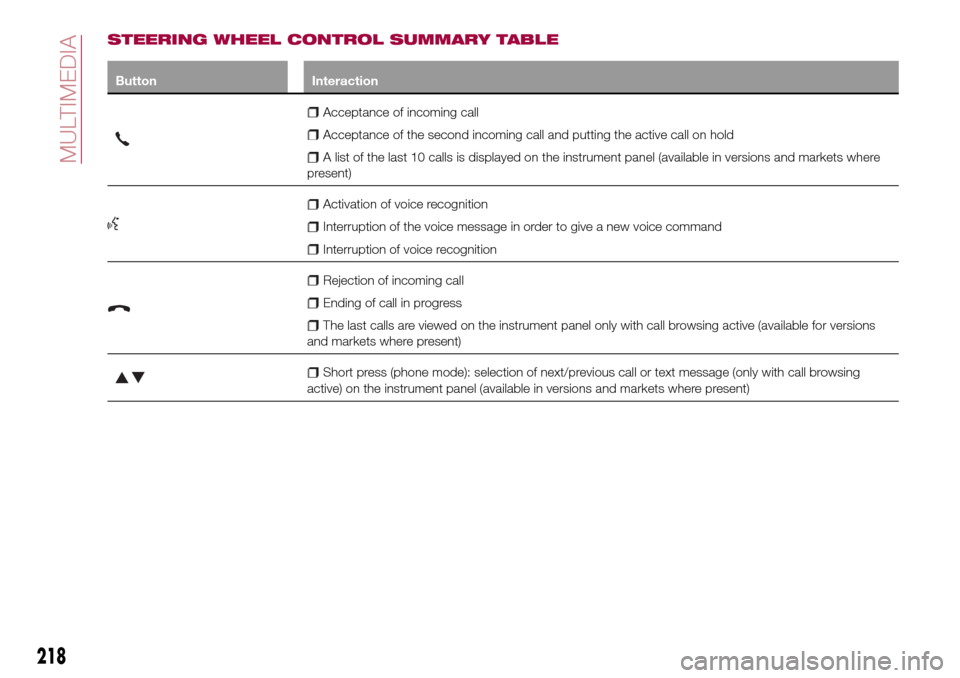
STEERING WHEEL CONTROL SUMMARY TABLE
Button Interaction
Acceptance of incoming call
Acceptance of the second incoming call and putting the active call on hold
A list of the last 10 calls is displayed on the instrument panel (available in versions and markets where
present)
Activation of voice recognition
Interruption of the voice message in order to give a new voice command
Interruption of voice recognition
Rejection of incoming call
Ending of call in progress
The last calls are viewed on the instrument panel only with call browsing active (available for versions
and markets where present)
Short press (phone mode): selection of next/previous call or text message (only with call browsing
active) on the instrument panel (available in versions and markets where present)
218
MULTIMEDIA
Page 222 of 240
SWITCHING THE SYSTEM
ON/OFF
The system is switched on/off by
pressing the
button/knob.
Turn the button/knob clockwise to
increase the radio volume or
anticlockwise to decrease it.
RADIO MODE
After the desired radio station is
selected, the following information is
shown on the display:
At the top: the list of radio stations
stored (preset) is displayed; the station
being listened to is highlighted.
In the middle: display of the name of
the current radio station and the
buttons for selecting the previous or
next radio station.
At the bottom: display of the following
buttons:
"Browse": list of the radio stations
available;
"AM/FM", "AM/DAB", "FM/DAB":
selection of the desired frequency band
(button reconfigurable according to the
band selected: AM, FM or DAB);
"Tune" : manual radio station tuning
(not available for DAB radios);
"Info": additional information on the
source being listened to;
"Audio": access to the "Audio
setting" screen.Audio menu
To access the "Audio" menu press the
Audio" button located at the bottom of
the display.
The following adjustments can be
carried out using the "Audio" menu:
"Equalizer" (for versions/markets,
where provided);
"Balance/Fader" (left/right and
front/rear audio balance adjustment);
"Speed/Volume" (speed-dependent
automatic volume control);
"Loudness" (for versions/markets,
where provided);
"Auto-On Radio";
To exit the "Audio" menu, press the
/Done button.
MEDIA MODE
Press the "Source" button to select the
desired audio source among those
available: AUX, USB, iPod and
Bluetooth®.
Applications used on portable devices
may be not compatible with the
Uconnect™system
Track selection (browse)
Use this function to scroll through and
select the tracks on the active device.
The choices available depend on the
device connected.For example, on a USB/iPod device you
can also scroll through the list of artists,
genres and albums available on the
device depending on the information
present on the tracks using the
BROWSE ENTER button/knob.
Within each list, the "ABC" button
allows the user to skip to the desired
letter in the list.
NOTE This button might be disabled for
some
Apple®devices.
NOTE The BROWSE ENTER button
does not allow any operation on an
AUX device.
Press the BROWSE ENTER button to
activate this function on the source
being played.
Turn the BROWSE ENTER button/knob
to select the desired category and then
press the button/knob to confirm the
selection.
Press the
button to cancel the
function.
Bluetooth® SOURCE
This mode is activated by pairing a
Bluetooth®device containing music
tracks with the system.
220
MULTIMEDIA
Page 228 of 240
IMPORTANT INFORMATION AND RECOMMENDATIONS
WARNING
INTERIOR FITTINGS
Do not travel with the storage compartment open: it may injure the front seat occupants in the event of an accident.
The cigar lighter gets extremely hot. Handle it carefully and make sure that children don’t use it: risk of fire and/or burns.
Do not use the ashtray as a waste paper basket: it may catch fire in contact with cigarette stubs.
ROOF RACK/SKI RACK
Before driving, make sure that the transversal bars have been fitted properly.
ENVIRONMENTAL PROTECTION SYSTEMS
The catalytic converter and particulate filter (DPF) reach very high temperatures during operation. Therefore do not park the
vehicle on flammable materials (e.g. grass, dry leaves, pine needles, etc.): fire hazard.
FUEL
Modifications or repairs to the supply system that are not carried out correctly or do not take the system technical
specifications into account can cause malfunctions leading to the risk of fire.
IMPORTANT
ROOF RACK/SKI RACK
Never exceed the maximum permitted loads (see the "Weights" paragraph in the "Technical specifications" chapter).
Fully comply with the regulations in force concerning maximum clearance.
IMPORTANT
THE KEYS
Used batteries may be harmful to the environment if not disposed of correctly. They must be disposed of as specified by law
in the special containers or taken to a Fiat Dealership, which will take care of their disposal.