AUX FORD B MAX 2012 1.G User Guide
[x] Cancel search | Manufacturer: FORD, Model Year: 2012, Model line: B MAX, Model: FORD B MAX 2012 1.GPages: 256, PDF Size: 19.67 MB
Page 216 of 256
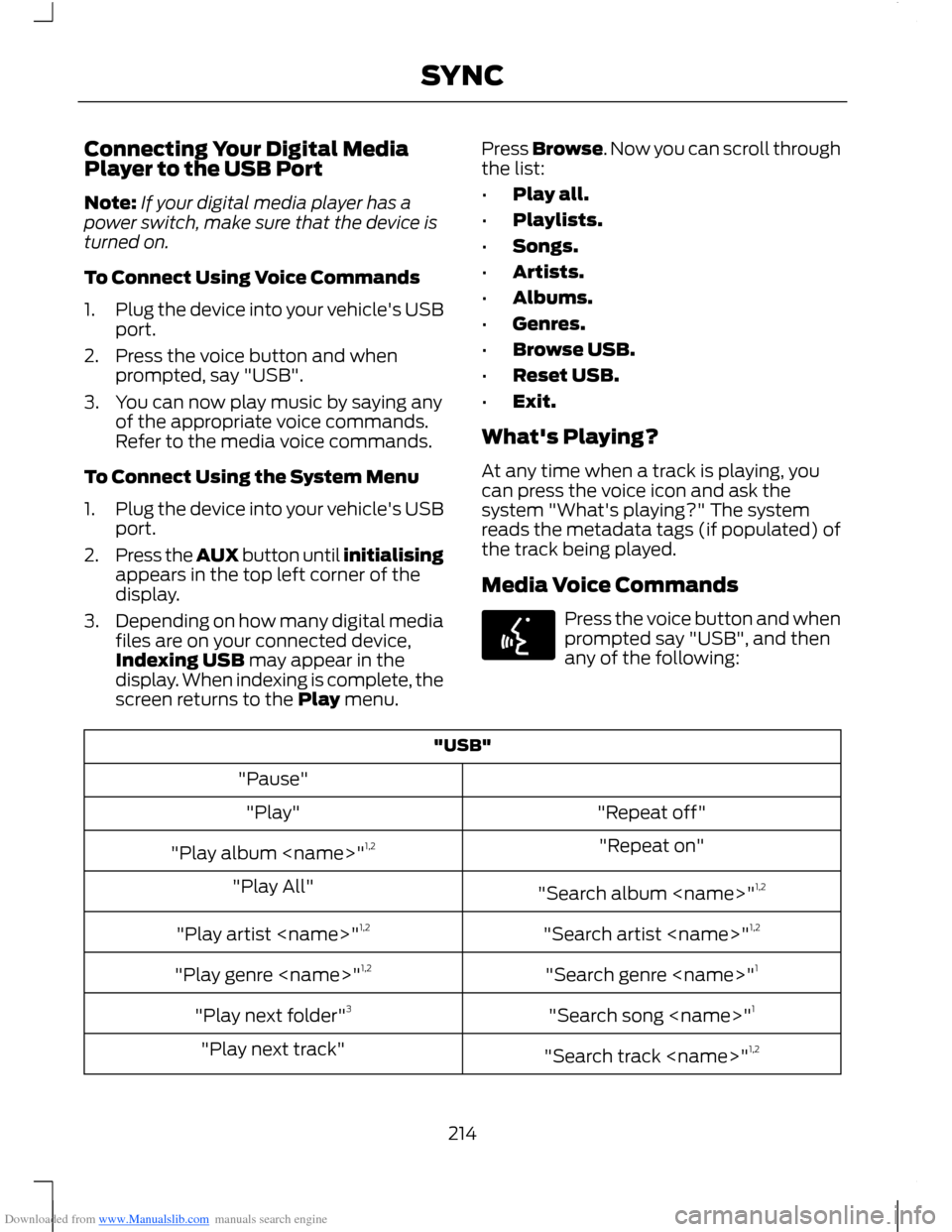
Downloaded from www.Manualslib.com manuals search engine Connecting Your Digital MediaPlayer to the USB Port
Note:If your digital media player has apower switch, make sure that the device isturned on.
To Connect Using Voice Commands
1.Plug the device into your vehicle's USBport.
2.Press the voice button and whenprompted, say "USB".
3.You can now play music by saying anyof the appropriate voice commands.Refer to the media voice commands.
To Connect Using the System Menu
1.Plug the device into your vehicle's USBport.
2.Press the AUX button until initialisingappears in the top left corner of thedisplay.
3.Depending on how many digital mediafiles are on your connected device,Indexing USB may appear in thedisplay. When indexing is complete, thescreen returns to the Play menu.
Press Browse. Now you can scroll throughthe list:
•Play all.
•Playlists.
•Songs.
•Artists.
•Albums.
•Genres.
•Browse USB.
•Reset USB.
•Exit.
What's Playing?
At any time when a track is playing, youcan press the voice icon and ask thesystem "What's playing?" The systemreads the metadata tags (if populated) ofthe track being played.
Media Voice Commands
Press the voice button and whenprompted say "USB", and thenany of the following:
"USB"
"Pause"
"Repeat off""Play"
"Repeat on""Play album
"Search album
"Search artist
"Search genre
"Search song
"Search track
214SYNC
Page 217 of 256
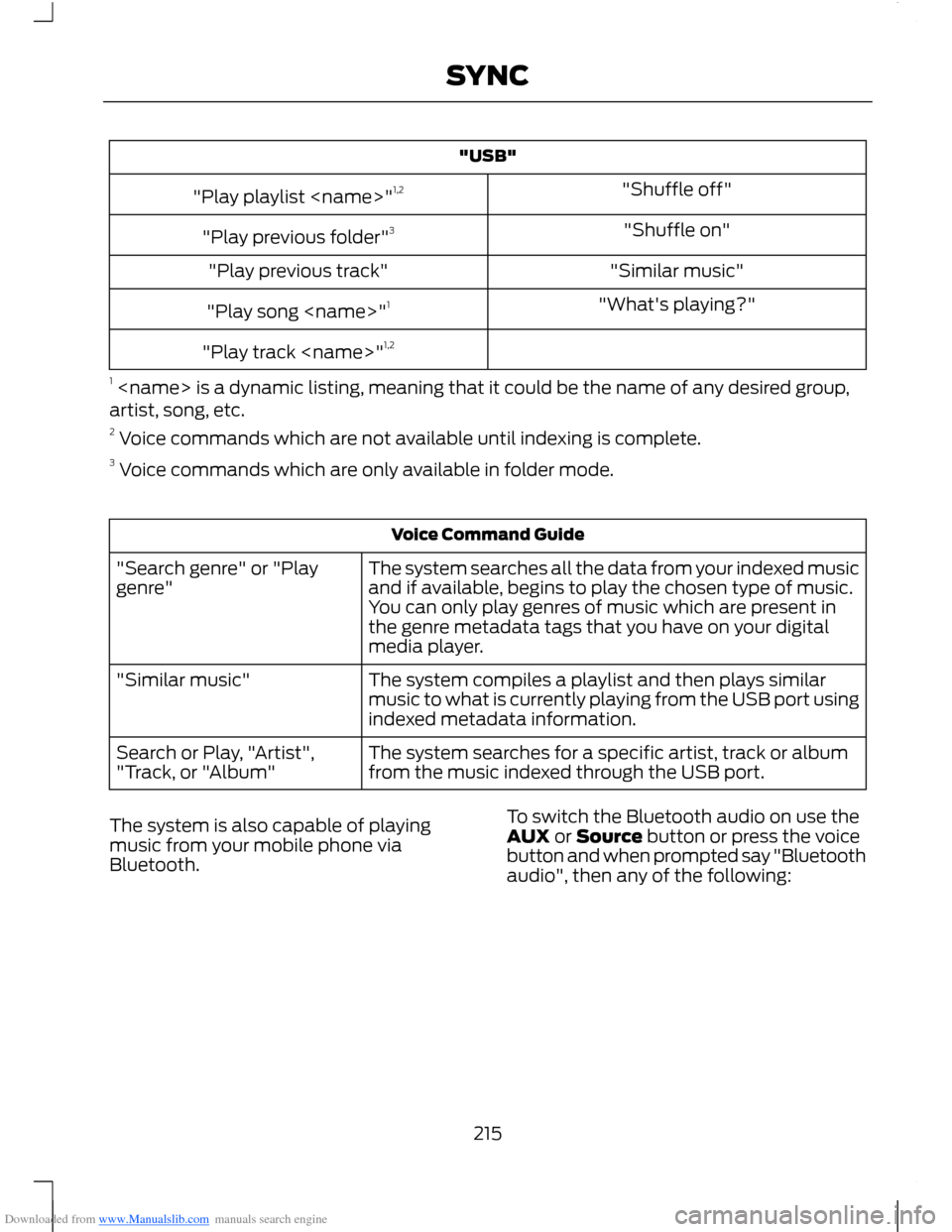
Downloaded from www.Manualslib.com manuals search engine "USB"
"Shuffle off""Play playlist
"Shuffle on""Play previous folder"3
"Similar music""Play previous track"
"What's playing?""Play song
"Play track
1
Voice Command Guide
The system searches all the data from your indexed musicand if available, begins to play the chosen type of music.You can only play genres of music which are present inthe genre metadata tags that you have on your digitalmedia player.
"Search genre" or "Playgenre"
The system compiles a playlist and then plays similarmusic to what is currently playing from the USB port usingindexed metadata information.
"Similar music"
The system searches for a specific artist, track or albumfrom the music indexed through the USB port.Search or Play, "Artist","Track, or "Album"
The system is also capable of playingmusic from your mobile phone viaBluetooth.
To switch the Bluetooth audio on use theAUX or Source button or press the voicebutton and when prompted say "Bluetoothaudio", then any of the following:
215SYNC
Page 218 of 256
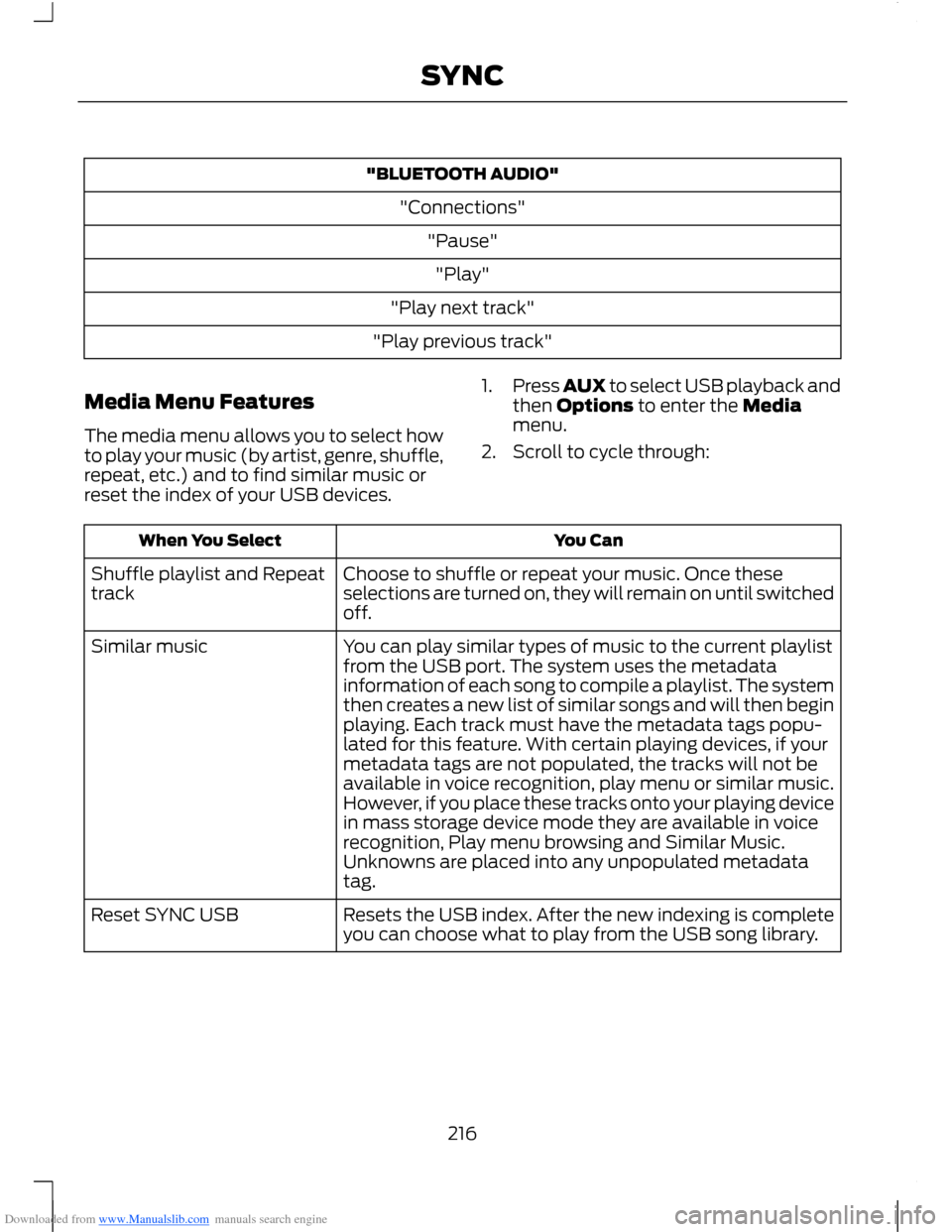
Downloaded from www.Manualslib.com manuals search engine "BLUETOOTH AUDIO"
"Connections"
"Pause"
"Play"
"Play next track"
"Play previous track"
Media Menu Features
The media menu allows you to select howto play your music (by artist, genre, shuffle,repeat, etc.) and to find similar music orreset the index of your USB devices.
1.Press AUX to select USB playback andthen Options to enter the Mediamenu.
2.Scroll to cycle through:
You CanWhen You Select
Choose to shuffle or repeat your music. Once theseselections are turned on, they will remain on until switchedoff.
Shuffle playlist and Repeattrack
You can play similar types of music to the current playlistfrom the USB port. The system uses the metadatainformation of each song to compile a playlist. The systemthen creates a new list of similar songs and will then beginplaying. Each track must have the metadata tags popu-lated for this feature. With certain playing devices, if your
Similar music
metadata tags are not populated, the tracks will not beavailable in voice recognition, play menu or similar music.However, if you place these tracks onto your playing devicein mass storage device mode they are available in voicerecognition, Play menu browsing and Similar Music.Unknowns are placed into any unpopulated metadatatag.
Resets the USB index. After the new indexing is completeyou can choose what to play from the USB song library.Reset SYNC USB
216SYNC
Page 219 of 256
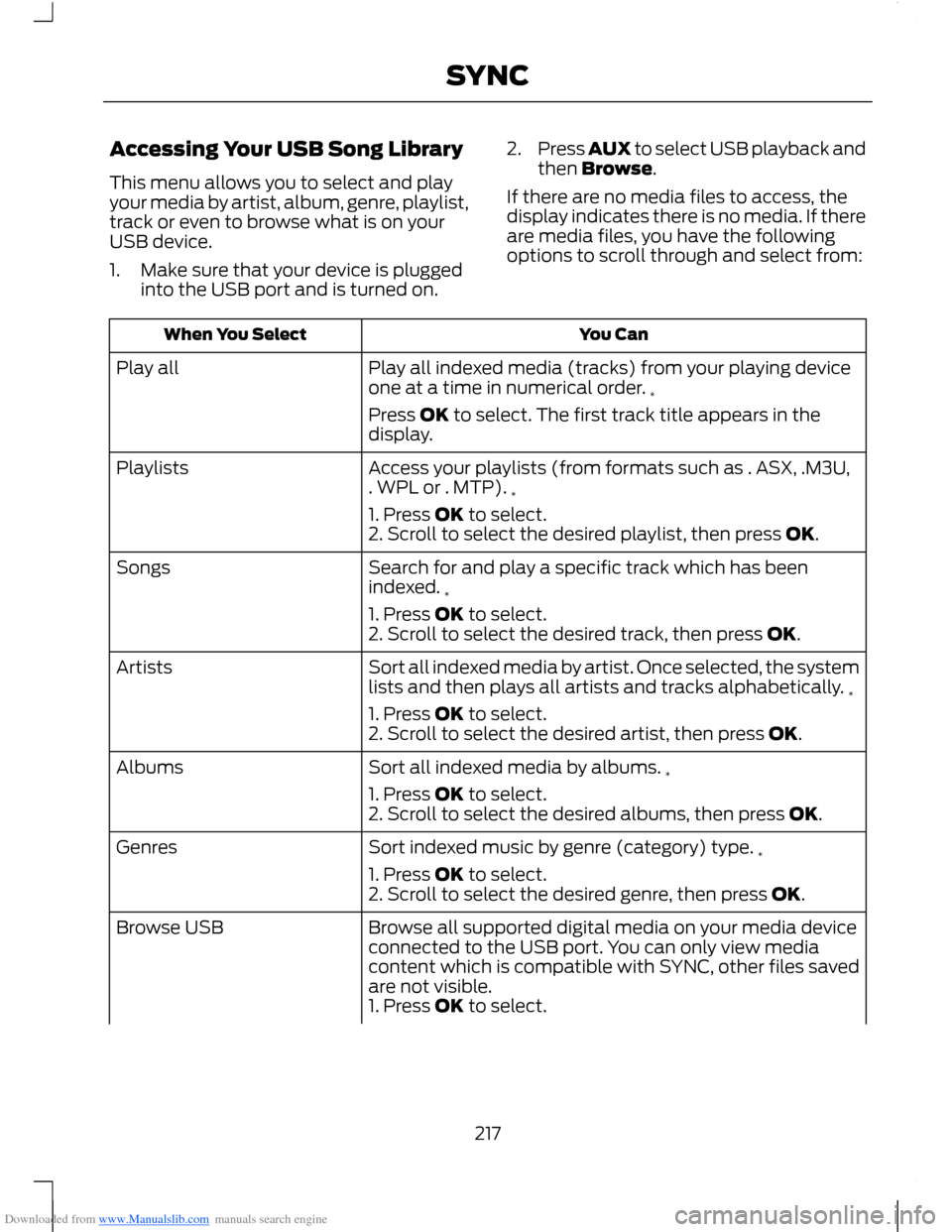
Downloaded from www.Manualslib.com manuals search engine Accessing Your USB Song Library
This menu allows you to select and playyour media by artist, album, genre, playlist,track or even to browse what is on yourUSB device.
1.Make sure that your device is pluggedinto the USB port and is turned on.
2.Press AUX to select USB playback andthen Browse.
If there are no media files to access, thedisplay indicates there is no media. If thereare media files, you have the followingoptions to scroll through and select from:
You CanWhen You Select
Play all indexed media (tracks) from your playing deviceone at a time in numerical order.*
Play all
Press OK to select. The first track title appears in thedisplay.
Access your playlists (from formats such as . ASX, .M3U,. WPL or . MTP).*
Playlists
1. Press OK to select.2. Scroll to select the desired playlist, then press OK.
Search for and play a specific track which has beenindexed.*
Songs
1. Press OK to select.2. Scroll to select the desired track, then press OK.
Sort all indexed media by artist. Once selected, the systemlists and then plays all artists and tracks alphabetically.*
Artists
1. Press OK to select.2. Scroll to select the desired artist, then press OK.
Sort all indexed media by albums.*Albums
1. Press OK to select.2. Scroll to select the desired albums, then press OK.
Sort indexed music by genre (category) type.*Genres
1. Press OK to select.2. Scroll to select the desired genre, then press OK.
Browse all supported digital media on your media deviceconnected to the USB port. You can only view mediacontent which is compatible with SYNC, other files savedare not visible.
Browse USB
1. Press OK to select.
217SYNC
Page 246 of 256
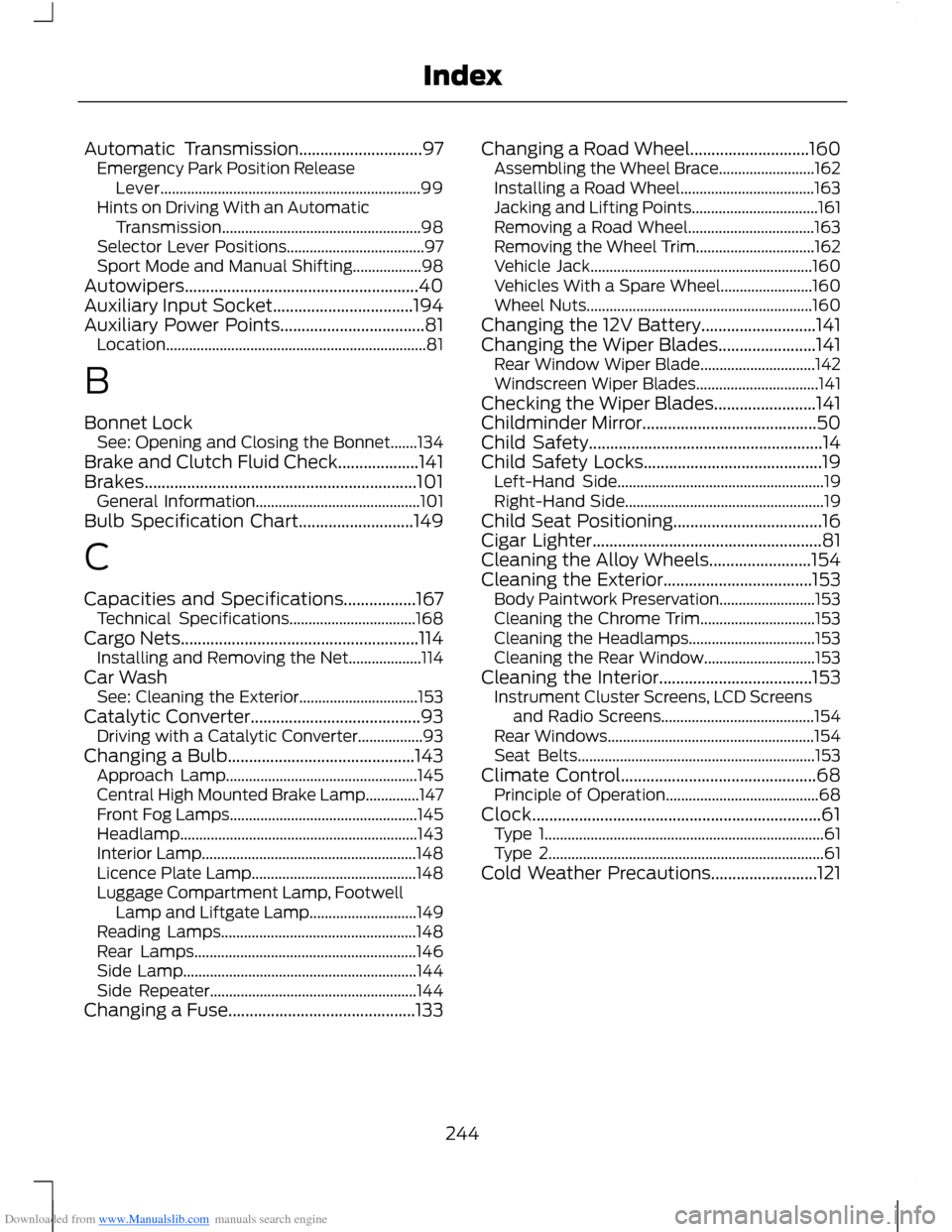
Downloaded from www.Manualslib.com manuals search engine Automatic Transmission.............................97Emergency Park Position ReleaseLever....................................................................99Hints on Driving With an AutomaticTransmission....................................................98Selector Lever Positions....................................97Sport Mode and Manual Shifting..................98Autowipers.......................................................40Auxiliary Input Socket.................................194Auxiliary Power Points..................................81Location....................................................................81
B
Bonnet LockSee: Opening and Closing the Bonnet.......134Brake and Clutch Fluid Check...................141Brakes................................................................101General Information...........................................101Bulb Specification Chart...........................149
C
Capacities and Specifications.................167Technical Specifications.................................168Cargo Nets........................................................114Installing and Removing the Net...................114Car WashSee: Cleaning the Exterior...............................153Catalytic Converter........................................93Driving with a Catalytic Converter.................93Changing a Bulb............................................143Approach Lamp..................................................145Central High Mounted Brake Lamp..............147Front Fog Lamps.................................................145Headlamp..............................................................143Interior Lamp........................................................148Licence Plate Lamp...........................................148Luggage Compartment Lamp, FootwellLamp and Liftgate Lamp............................149Reading Lamps...................................................148Rear Lamps..........................................................146Side Lamp.............................................................144Side Repeater......................................................144Changing a Fuse............................................133
Changing a Road Wheel............................160Assembling the Wheel Brace.........................162Installing a Road Wheel...................................163Jacking and Lifting Points.................................161Removing a Road Wheel.................................163Removing the Wheel Trim...............................162Vehicle Jack..........................................................160Vehicles With a Spare Wheel........................160Wheel Nuts...........................................................160Changing the 12V Battery...........................141Changing the Wiper Blades.......................141Rear Window Wiper Blade..............................142Windscreen Wiper Blades................................141Checking the Wiper Blades........................141Childminder Mirror.........................................50Child Safety.......................................................14Child Safety Locks..........................................19Left-Hand Side......................................................19Right-Hand Side....................................................19Child Seat Positioning...................................16Cigar Lighter......................................................81Cleaning the Alloy Wheels........................154Cleaning the Exterior...................................153Body Paintwork Preservation.........................153Cleaning the Chrome Trim..............................153Cleaning the Headlamps.................................153Cleaning the Rear Window.............................153Cleaning the Interior....................................153Instrument Cluster Screens, LCD Screensand Radio Screens........................................154Rear Windows......................................................154Seat Belts..............................................................153Climate Control..............................................68Principle of Operation........................................68Clock....................................................................61Type 1.........................................................................61Type 2........................................................................61Cold Weather Precautions.........................121
244Index