instrument panel FORD B MAX 2012 1.G User Guide
[x] Cancel search | Manufacturer: FORD, Model Year: 2012, Model line: B MAX, Model: FORD B MAX 2012 1.GPages: 256, PDF Size: 19.67 MB
Page 86 of 256
Downloaded from www.Manualslib.com manuals search engine Note:A valid key must be located insideyour vehicle to switch the ignition on andstart the engine.
Ignition On
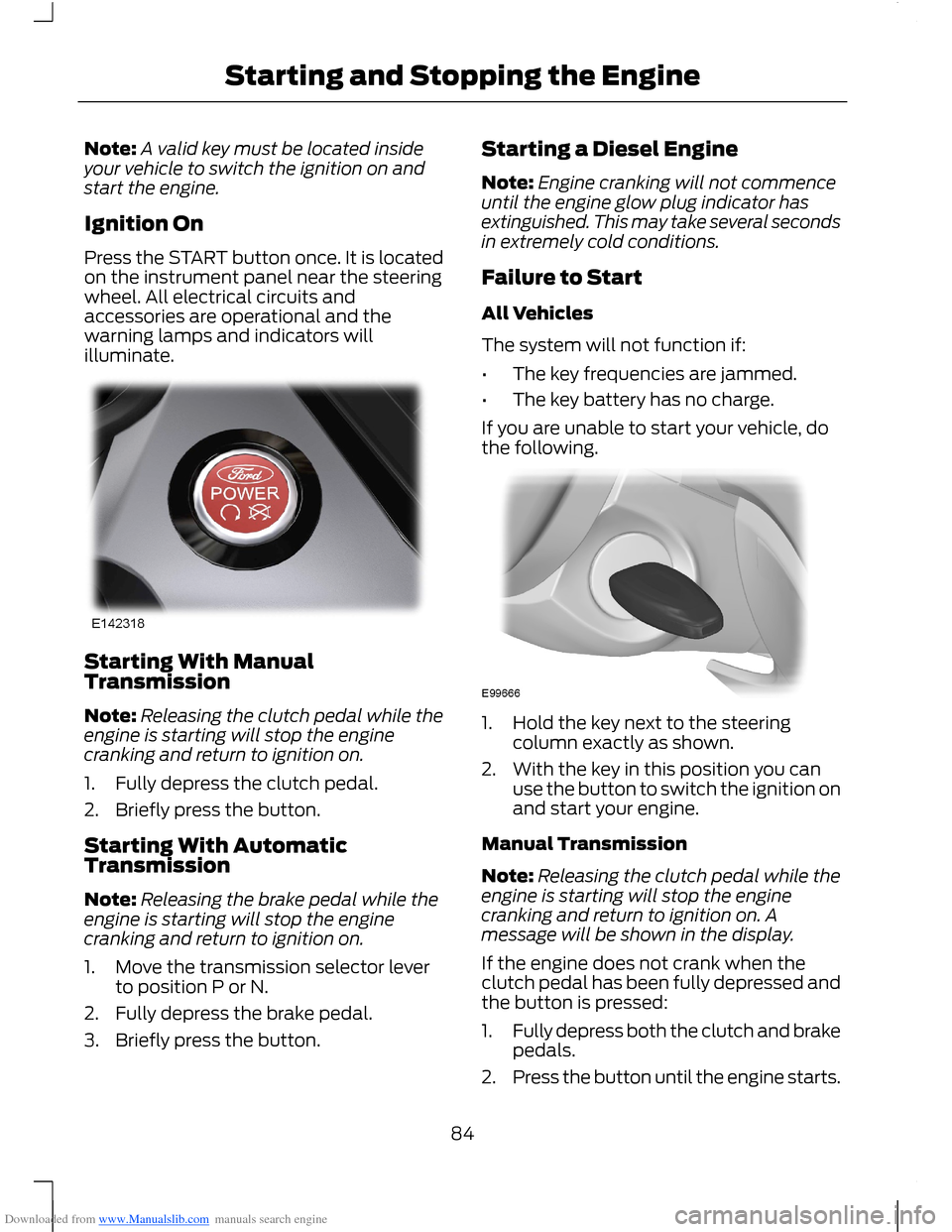
Press the START button once. It is locatedon the instrument panel near the steeringwheel. All electrical circuits andaccessories are operational and thewarning lamps and indicators willilluminate.
Starting With ManualTransmission
Note:Releasing the clutch pedal while theengine is starting will stop the enginecranking and return to ignition on.
1.Fully depress the clutch pedal.
2.Briefly press the button.
Starting With AutomaticTransmission
Note:Releasing the brake pedal while theengine is starting will stop the enginecranking and return to ignition on.
1.Move the transmission selector leverto position P or N.
2.Fully depress the brake pedal.
3.Briefly press the button.
Starting a Diesel Engine
Note:Engine cranking will not commenceuntil the engine glow plug indicator hasextinguished. This may take several secondsin extremely cold conditions.
Failure to Start
All Vehicles
The system will not function if:
•The key frequencies are jammed.
•The key battery has no charge.
If you are unable to start your vehicle, dothe following.
1.Hold the key next to the steeringcolumn exactly as shown.
2.With the key in this position you canuse the button to switch the ignition onand start your engine.
Manual Transmission
Note:Releasing the clutch pedal while theengine is starting will stop the enginecranking and return to ignition on. Amessage will be shown in the display.
If the engine does not crank when theclutch pedal has been fully depressed andthe button is pressed:
1.Fully depress both the clutch and brakepedals.
2.Press the button until the engine starts.
84Starting and Stopping the Engine
Page 91 of 256
Downloaded from www.Manualslib.com manuals search engine START-STOP
Note:For vehicles with start-stop thebattery requirement is different. It must bereplaced by one of exactly the samespecification as the original.
The system reduces fuel consumption andCO2 emissions by shutting down theengine when your vehicle is idling, forexample at traffic lights. The engine willautomatically restart when you press theclutch pedal or when required by a vehiclesystem, for example to recharge thebattery.
To obtain maximum benefit from thesystem, move the transmission selectorlever to neutral and release the clutchpedal during any stop of longer than threeseconds.
Using Start-Stop
WARNINGS
The engine may restartautomatically if required by thesystem.
Switch the ignition off beforeopening the bonnet or carrying outany maintenance.
Always switch the ignition off beforeleaving your vehicle, as the systemmay have shut down the engine butthe ignition will still be live.
Note:The system only operates when theengine is warm and the outside temperatureis between 32°F (0°C) and 86°F (30°C).
Note:If you stall the engine, and thendepress the clutch pedal within a shortperiod of time, the system will automaticallyrestart the engine.
Note:The start-stop indicator willilluminate green when the engine shutsdown. See Warning Lamps and Indicators(page 53).
Note:When the start-stop indicator flashesamber, move the transmission selector leverto neutral or depress the clutch pedal.
Note:If the system detects a malfunction,it will switch off. Have the system checkedby an authorised dealer.
Note:When you switch the system off, theswitch will illuminate.
Note:The system automatically turns onevery time you switch the ignition on. Toswitch the system off, press the switch inthe instrument panel. The system will onlybe switched off for the current ignition cycle.To turn it on, press the switch again. For itemlocation See At a Glance (page 8).
To Stop the Engine
1.Stop your vehicle.
2.Move the transmission selector leverto neutral.
3.Release the clutch pedal.
4.Release the accelerator pedal.
The system may not shut down the engineunder certain conditions, for example:
•To maintain the interior climate.
•Low battery voltage.
•The outside temperature is too low ortoo high.
•The driver's door has been opened.
•Low engine operating temperature.
•Low brake system vacuum.
•If a road speed of 3 mph (5 km/h) hasnot been exceeded.
•The driver's seat belt has not beenfastened.
89Unique Driving Characteristics
Page 109 of 256
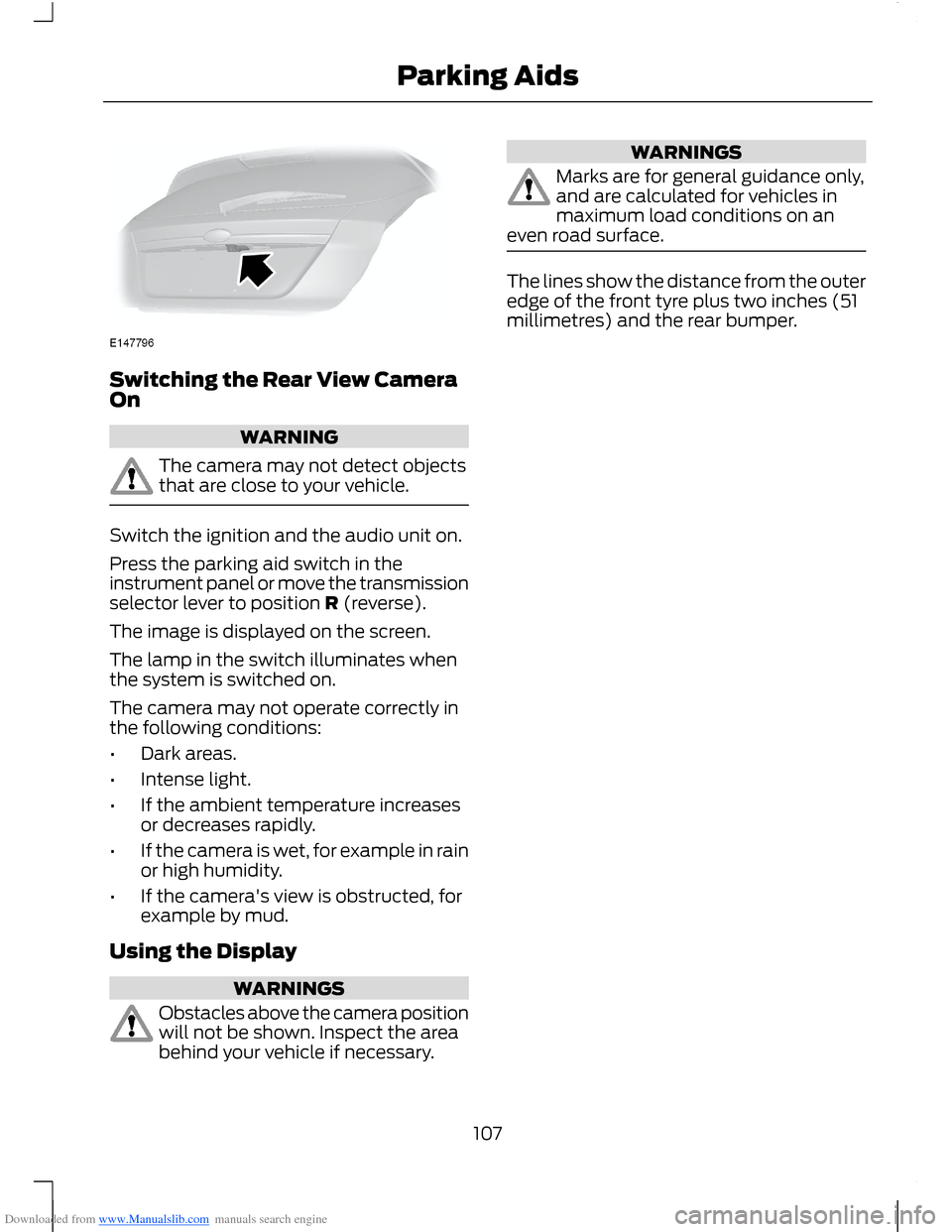
Downloaded from www.Manualslib.com manuals search engine Switching the Rear View CameraOn
WARNING
The camera may not detect objectsthat are close to your vehicle.
Switch the ignition and the audio unit on.
Press the parking aid switch in theinstrument panel or move the transmissionselector lever to position R (reverse).
The image is displayed on the screen.
The lamp in the switch illuminates whenthe system is switched on.
The camera may not operate correctly inthe following conditions:
•Dark areas.
•Intense light.
•If the ambient temperature increasesor decreases rapidly.
•If the camera is wet, for example in rainor high humidity.
•If the camera's view is obstructed, forexample by mud.
Using the Display
WARNINGS
Obstacles above the camera positionwill not be shown. Inspect the areabehind your vehicle if necessary.
WARNINGS
Marks are for general guidance only,and are calculated for vehicles inmaximum load conditions on aneven road surface.
The lines show the distance from the outeredge of the front tyre plus two inches (51millimetres) and the rear bumper.
107Parking Aids
Page 110 of 256
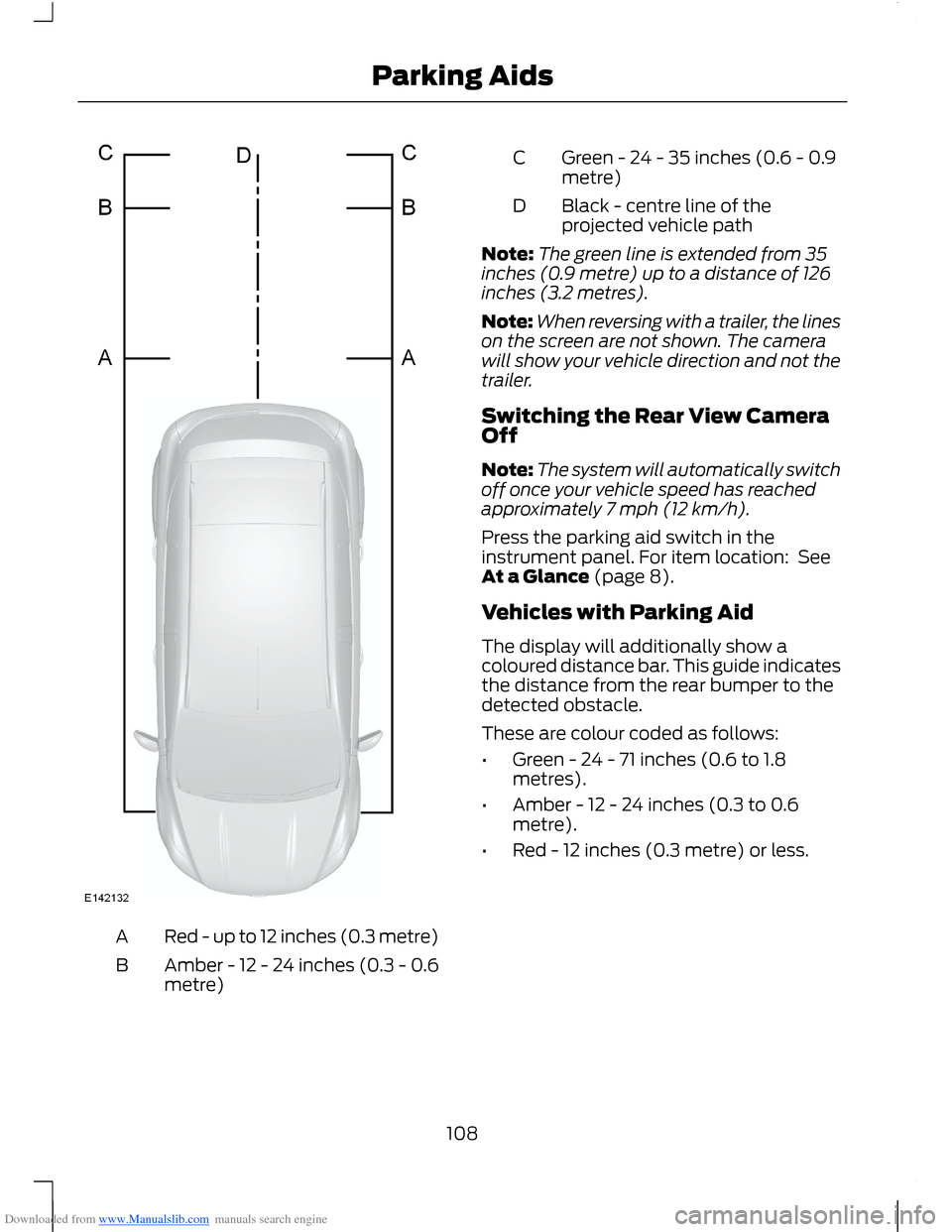
Downloaded from www.Manualslib.com manuals search engine Red - up to 12 inches (0.3 metre)A
Amber - 12 - 24 inches (0.3 - 0.6metre)B
Green - 24 - 35 inches (0.6 - 0.9metre)C
Black - centre line of theprojected vehicle pathD
Note:The green line is extended from 35inches (0.9 metre) up to a distance of 126inches (3.2 metres).
Note:When reversing with a trailer, the lineson the screen are not shown. The camerawill show your vehicle direction and not thetrailer.
Switching the Rear View CameraOff
Note:The system will automatically switchoff once your vehicle speed has reachedapproximately 7 mph (12 km/h).
Press the parking aid switch in theinstrument panel. For item location: SeeAt a Glance (page 8).
Vehicles with Parking Aid
The display will additionally show acoloured distance bar. This guide indicatesthe distance from the rear bumper to thedetected obstacle.
These are colour coded as follows:
•Green - 24 - 71 inches (0.6 to 1.8metres).
•Amber - 12 - 24 inches (0.3 to 0.6metre).
•Red - 12 inches (0.3 metre) or less.
108Parking Aids
Page 131 of 256
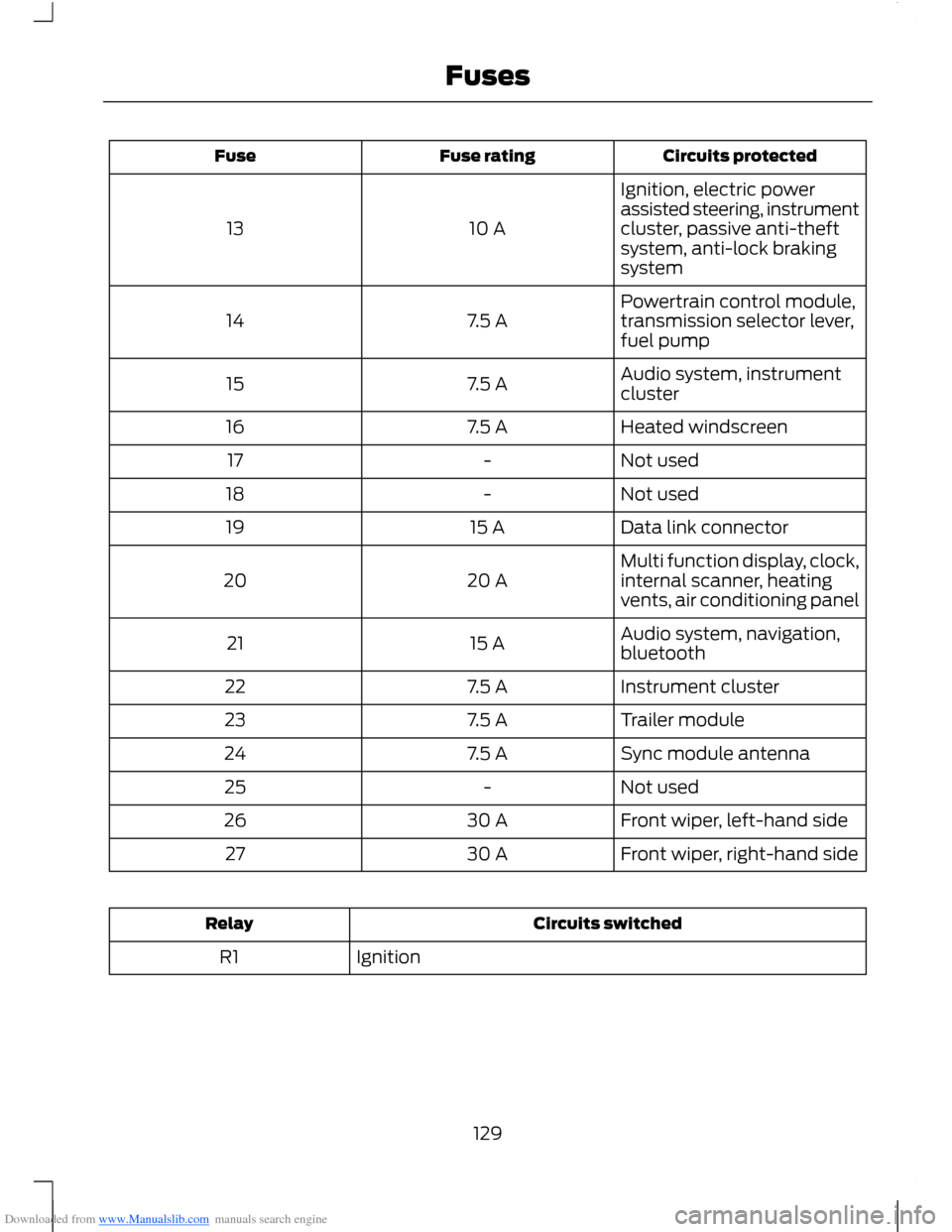
Downloaded from www.Manualslib.com manuals search engine Circuits protectedFuse ratingFuse
Ignition, electric powerassisted steering, instrumentcluster, passive anti-theftsystem, anti-lock brakingsystem
10 A13
Powertrain control module,transmission selector lever,fuel pump7.5 A14
Audio system, instrumentcluster7.5 A15
Heated windscreen7.5 A16
Not used-17
Not used-18
Data link connector15 A19
Multi function display, clock,internal scanner, heatingvents, air conditioning panel20 A20
Audio system, navigation,bluetooth15 A21
Instrument cluster7.5 A22
Trailer module7.5 A23
Sync module antenna7.5 A24
Not used-25
Front wiper, left-hand side30 A26
Front wiper, right-hand side30 A27
Circuits switchedRelay
IgnitionR1
129Fuses
Page 133 of 256
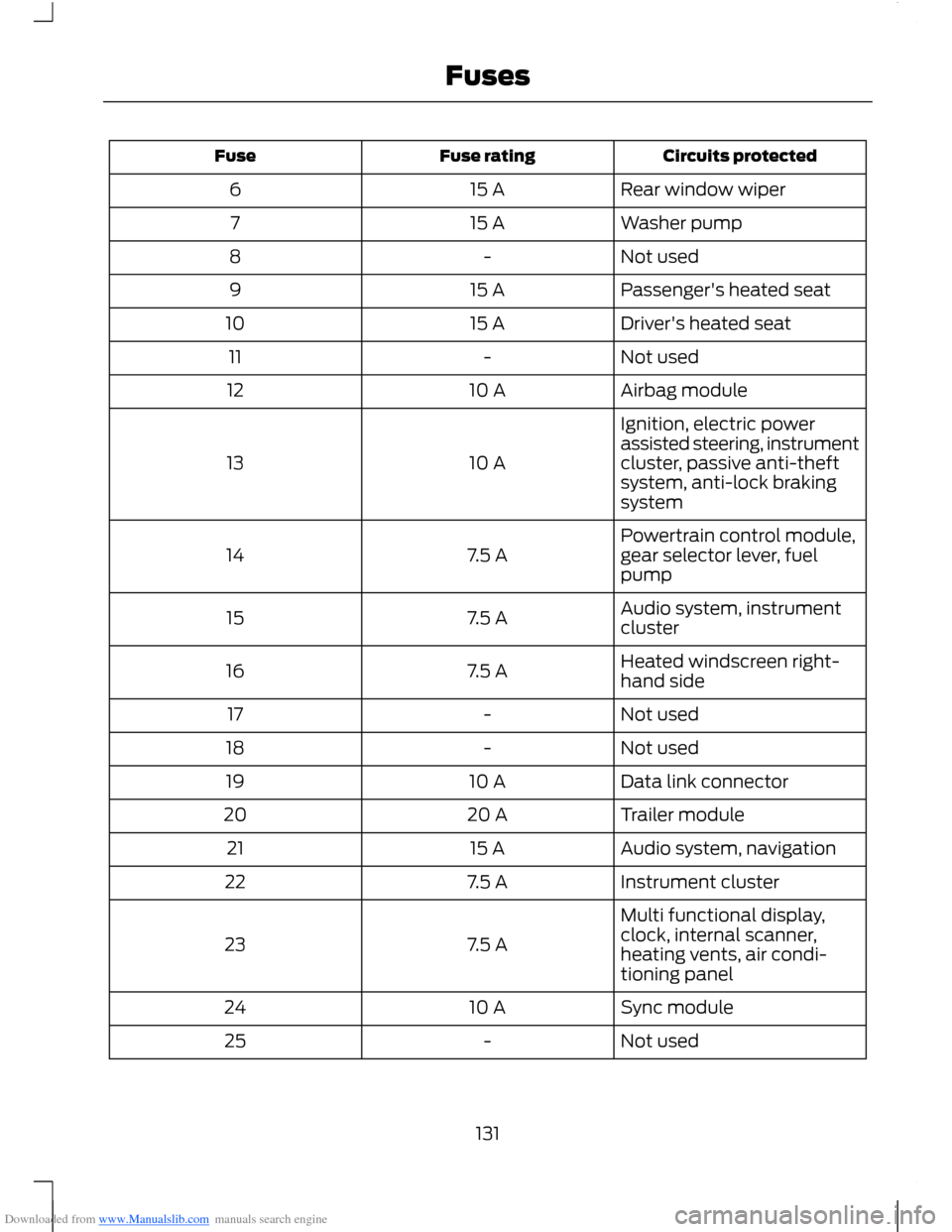
Downloaded from www.Manualslib.com manuals search engine Circuits protectedFuse ratingFuse
Rear window wiper15 A6
Washer pump15 A7
Not used-8
Passenger's heated seat15 A9
Driver's heated seat15 A10
Not used-11
Airbag module10 A12
Ignition, electric powerassisted steering, instrumentcluster, passive anti-theftsystem, anti-lock brakingsystem
10 A13
Powertrain control module,gear selector lever, fuelpump7.5 A14
Audio system, instrumentcluster7.5 A15
Heated windscreen right-hand side7.5 A16
Not used-17
Not used-18
Data link connector10 A19
Trailer module20 A20
Audio system, navigation15 A21
Instrument cluster7.5 A22
Multi functional display,clock, internal scanner,heating vents, air condi-tioning panel
7.5 A23
Sync module10 A24
Not used-25
131Fuses
Page 159 of 256
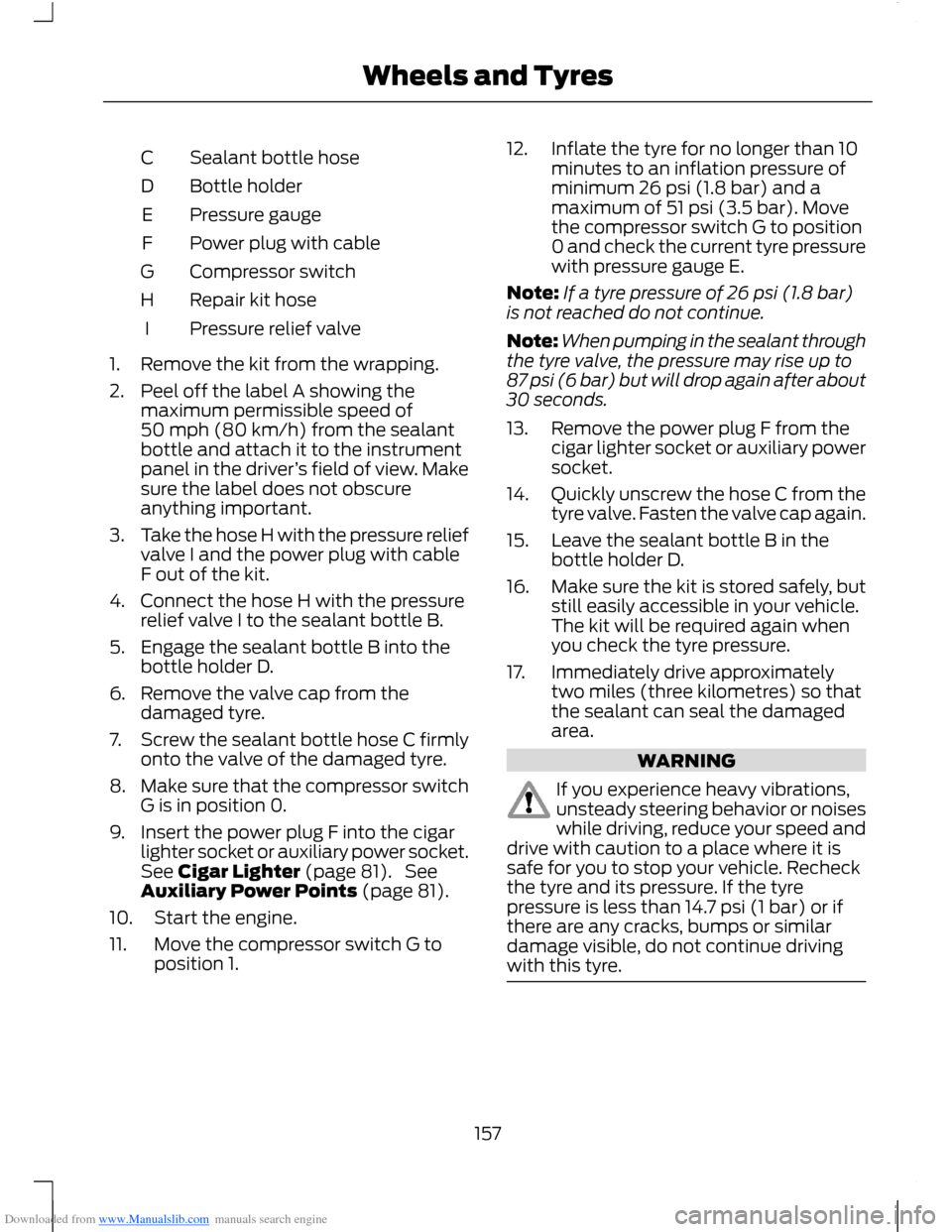
Downloaded from www.Manualslib.com manuals search engine Sealant bottle hoseC
Bottle holderD
Pressure gaugeE
Power plug with cableF
Compressor switchG
Repair kit hoseH
Pressure relief valveI
1.Remove the kit from the wrapping.
2.Peel off the label A showing themaximum permissible speed of50 mph (80 km/h) from the sealantbottle and attach it to the instrumentpanel in the driver’s field of view. Makesure the label does not obscureanything important.
3.Take the hose H with the pressure reliefvalve I and the power plug with cableF out of the kit.
4.Connect the hose H with the pressurerelief valve I to the sealant bottle B.
5.Engage the sealant bottle B into thebottle holder D.
6.Remove the valve cap from thedamaged tyre.
7.Screw the sealant bottle hose C firmlyonto the valve of the damaged tyre.
8.Make sure that the compressor switchG is in position 0.
9.Insert the power plug F into the cigarlighter socket or auxiliary power socket.See Cigar Lighter (page 81). SeeAuxiliary Power Points (page 81).
10.Start the engine.
11.Move the compressor switch G toposition 1.
12.Inflate the tyre for no longer than 10minutes to an inflation pressure ofminimum 26 psi (1.8 bar) and amaximum of 51 psi (3.5 bar). Movethe compressor switch G to position0 and check the current tyre pressurewith pressure gauge E.
Note:If a tyre pressure of 26 psi (1.8 bar)is not reached do not continue.
Note:When pumping in the sealant throughthe tyre valve, the pressure may rise up to87 psi (6 bar) but will drop again after about30 seconds.
13.Remove the power plug F from thecigar lighter socket or auxiliary powersocket.
14.Quickly unscrew the hose C from thetyre valve. Fasten the valve cap again.
15.Leave the sealant bottle B in thebottle holder D.
16.Make sure the kit is stored safely, butstill easily accessible in your vehicle.The kit will be required again whenyou check the tyre pressure.
17.Immediately drive approximatelytwo miles (three kilometres) so thatthe sealant can seal the damagedarea.
WARNING
If you experience heavy vibrations,unsteady steering behavior or noiseswhile driving, reduce your speed anddrive with caution to a place where it issafe for you to stop your vehicle. Recheckthe tyre and its pressure. If the tyrepressure is less than 14.7 psi (1 bar) or ifthere are any cracks, bumps or similardamage visible, do not continue drivingwith this tyre.
157Wheels and Tyres
Page 170 of 256
Downloaded from www.Manualslib.com manuals search engine VEHICLE IDENTIFICATION
NUMBER
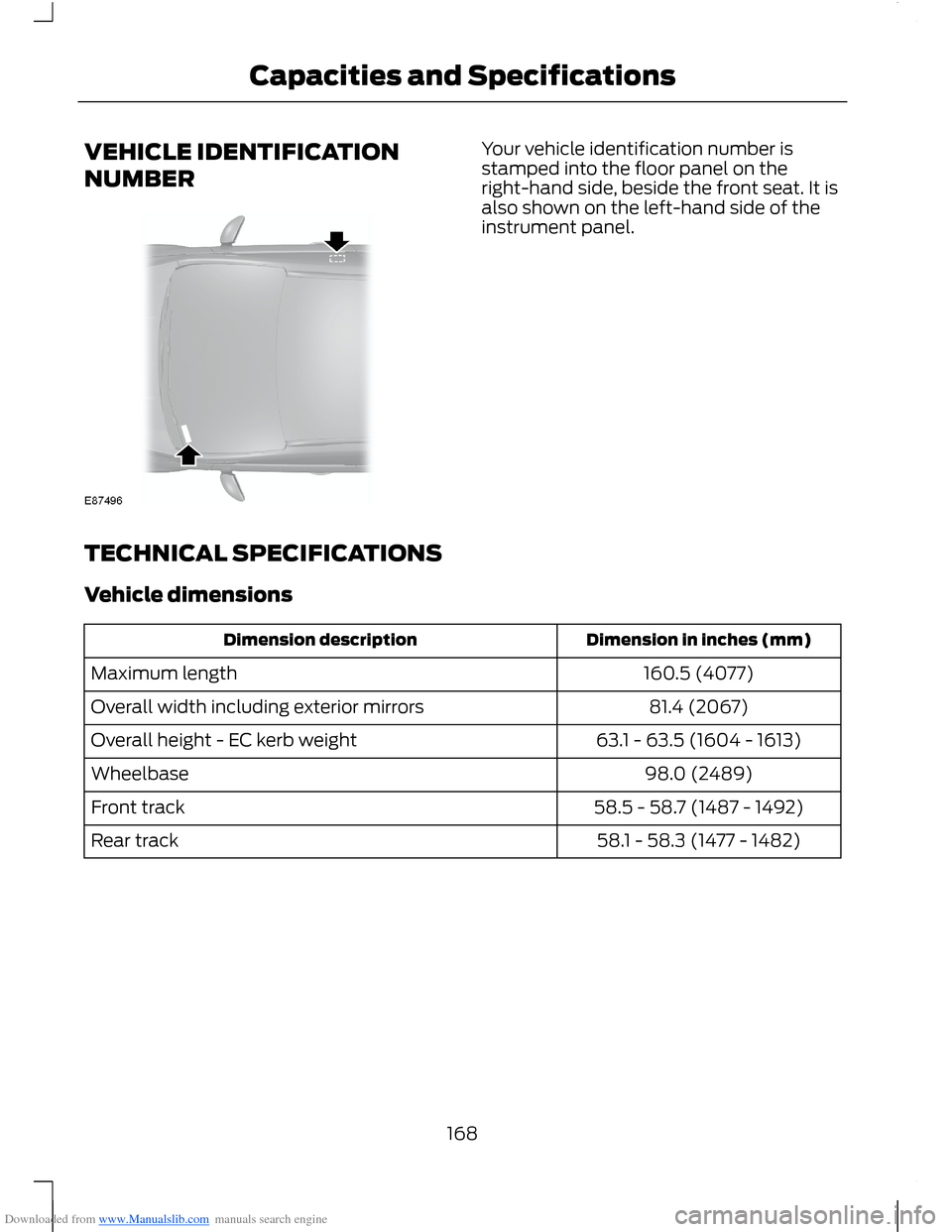
Your vehicle identification number isstamped into the floor panel on theright-hand side, beside the front seat. It isalso shown on the left-hand side of theinstrument panel.
TECHNICAL SPECIFICATIONS
Vehicle dimensions
Dimension in inches (mm)Dimension description
160.5 (4077)Maximum length
81.4 (2067)Overall width including exterior mirrors
63.1 - 63.5 (1604 - 1613)Overall height - EC kerb weight
98.0 (2489)Wheelbase
58.5 - 58.7 (1487 - 1492)Front track
58.1 - 58.3 (1477 - 1482)Rear track
168Capacities and Specifications
Page 245 of 256
Downloaded from www.Manualslib.com manuals search engine A
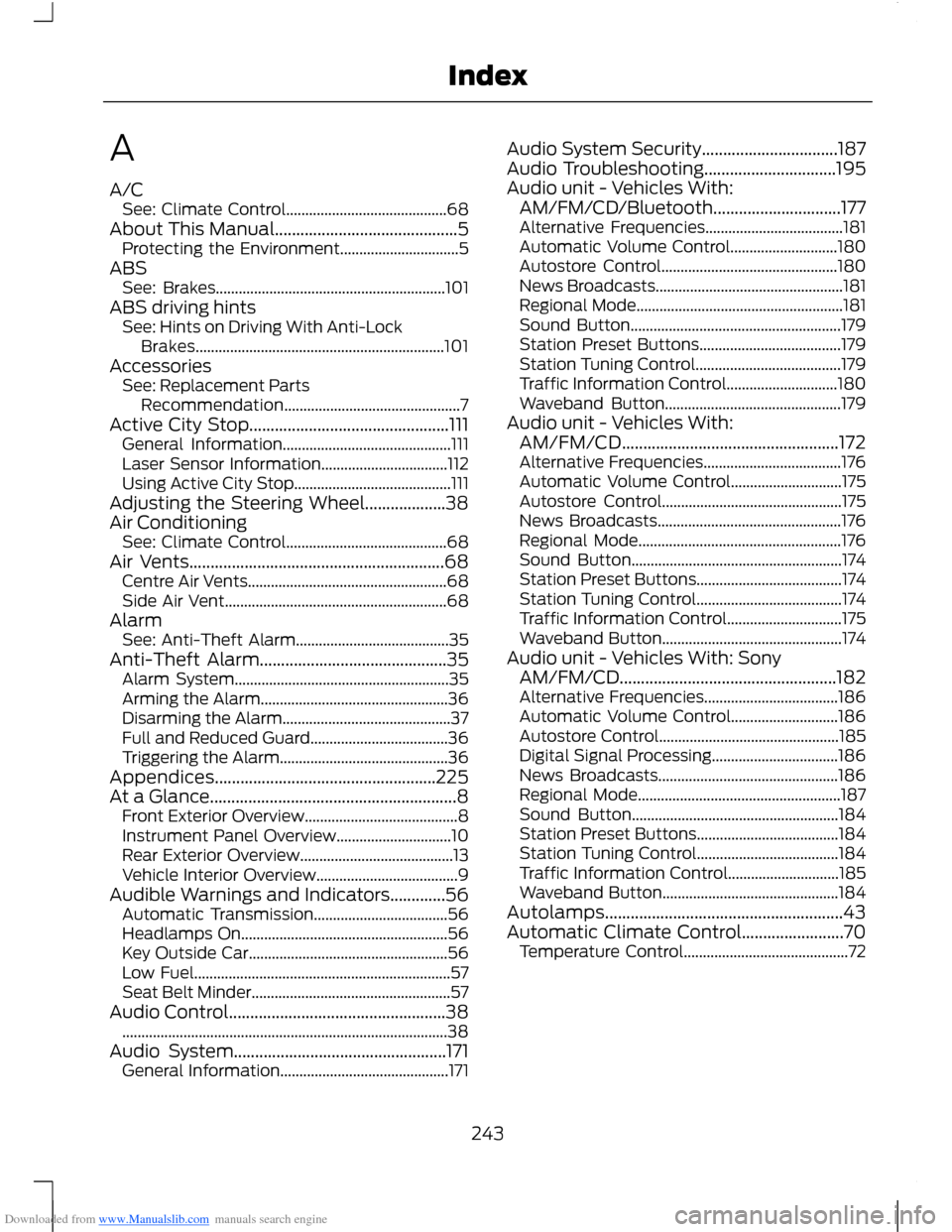
A/CSee: Climate Control..........................................68About This Manual...........................................5Protecting the Environment...............................5ABSSee: Brakes............................................................101ABS driving hintsSee: Hints on Driving With Anti-LockBrakes.................................................................101AccessoriesSee: Replacement PartsRecommendation..............................................7Active City Stop...............................................111General Information............................................111Laser Sensor Information.................................112Using Active City Stop.........................................111Adjusting the Steering Wheel...................38Air ConditioningSee: Climate Control..........................................68Air Vents............................................................68Centre Air Vents....................................................68Side Air Vent..........................................................68AlarmSee: Anti-Theft Alarm........................................35Anti-Theft Alarm............................................35Alarm System........................................................35Arming the Alarm.................................................36Disarming the Alarm............................................37Full and Reduced Guard....................................36Triggering the Alarm............................................36Appendices....................................................225At a Glance..........................................................8Front Exterior Overview........................................8Instrument Panel Overview..............................10Rear Exterior Overview........................................13Vehicle Interior Overview.....................................9Audible Warnings and Indicators.............56Automatic Transmission...................................56Headlamps On......................................................56Key Outside Car....................................................56Low Fuel...................................................................57Seat Belt Minder....................................................57Audio Control...................................................38.....................................................................................38Audio System..................................................171General Information............................................171
Audio System Security................................187Audio Troubleshooting...............................195Audio unit - Vehicles With:AM/FM/CD/Bluetooth..............................177Alternative Frequencies....................................181Automatic Volume Control............................180Autostore Control..............................................180News Broadcasts.................................................181Regional Mode......................................................181Sound Button.......................................................179Station Preset Buttons.....................................179Station Tuning Control......................................179Traffic Information Control.............................180Waveband Button..............................................179Audio unit - Vehicles With:AM/FM/CD...................................................172Alternative Frequencies....................................176Automatic Volume Control.............................175Autostore Control...............................................175News Broadcasts................................................176Regional Mode.....................................................176Sound Button.......................................................174Station Preset Buttons......................................174Station Tuning Control......................................174Traffic Information Control..............................175Waveband Button...............................................174Audio unit - Vehicles With: SonyAM/FM/CD...................................................182Alternative Frequencies...................................186Automatic Volume Control............................186Autostore Control...............................................185Digital Signal Processing.................................186News Broadcasts...............................................186Regional Mode.....................................................187Sound Button......................................................184Station Preset Buttons.....................................184Station Tuning Control.....................................184Traffic Information Control.............................185Waveband Button..............................................184Autolamps........................................................43Automatic Climate Control........................70Temperature Control...........................................72
243Index
Page 248 of 256
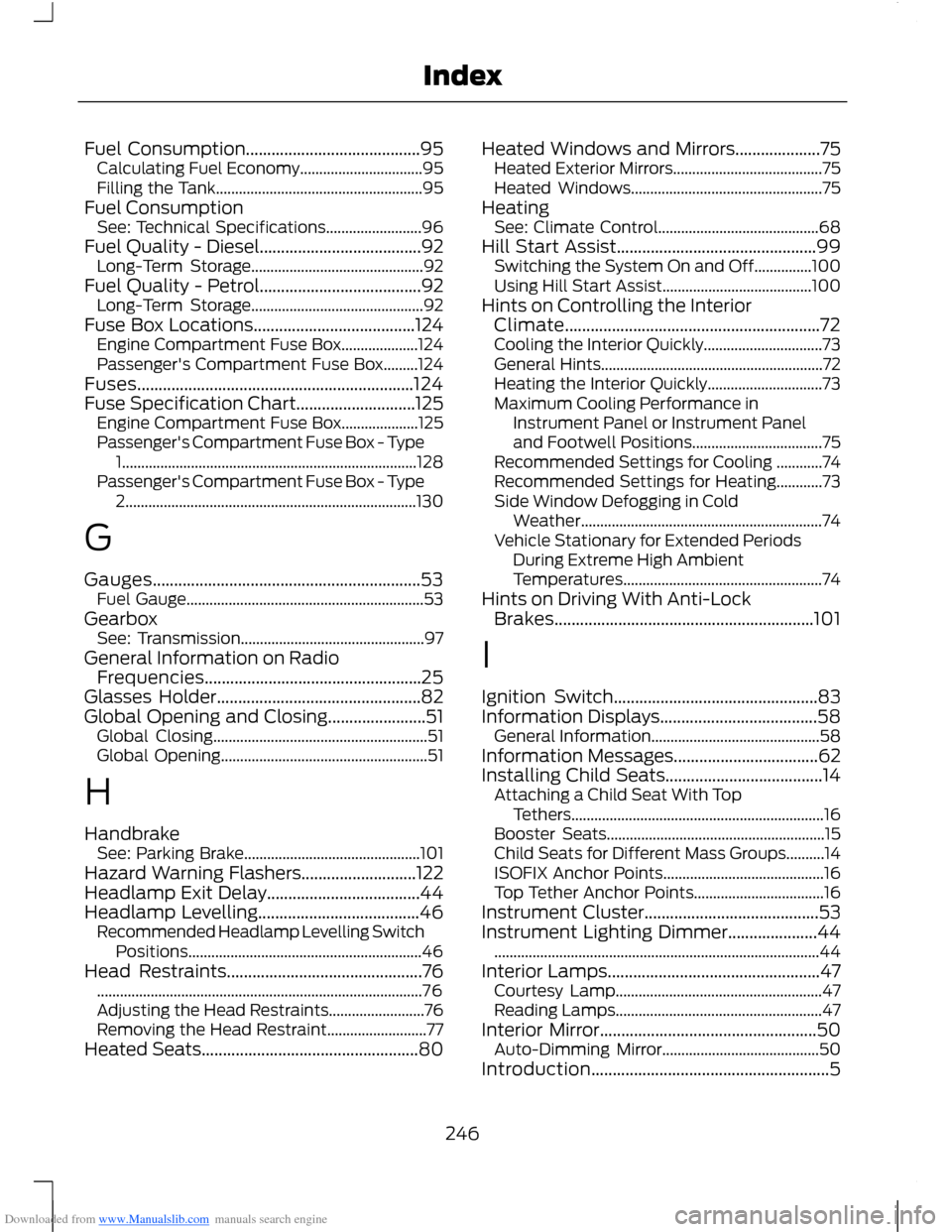
Downloaded from www.Manualslib.com manuals search engine Fuel Consumption.........................................95Calculating Fuel Economy................................95Filling the Tank......................................................95Fuel ConsumptionSee: Technical Specifications.........................96Fuel Quality - Diesel......................................92Long-Term Storage.............................................92Fuel Quality - Petrol......................................92Long-Term Storage.............................................92Fuse Box Locations......................................124Engine Compartment Fuse Box....................124Passenger's Compartment Fuse Box.........124Fuses.................................................................124Fuse Specification Chart............................125Engine Compartment Fuse Box....................125Passenger's Compartment Fuse Box - Type1.............................................................................128Passenger's Compartment Fuse Box - Type2............................................................................130
G
Gauges...............................................................53Fuel Gauge..............................................................53GearboxSee: Transmission................................................97General Information on RadioFrequencies...................................................25Glasses Holder................................................82Global Opening and Closing.......................51Global Closing........................................................51Global Opening......................................................51
H
HandbrakeSee: Parking Brake..............................................101Hazard Warning Flashers...........................122Headlamp Exit Delay....................................44Headlamp Levelling......................................46Recommended Headlamp Levelling SwitchPositions.............................................................46Head Restraints..............................................76.....................................................................................76Adjusting the Head Restraints.........................76Removing the Head Restraint..........................77Heated Seats...................................................80
Heated Windows and Mirrors....................75Heated Exterior Mirrors.......................................75Heated Windows..................................................75HeatingSee: Climate Control..........................................68Hill Start Assist...............................................99Switching the System On and Off...............100Using Hill Start Assist.......................................100Hints on Controlling the InteriorClimate............................................................72Cooling the Interior Quickly...............................73General Hints..........................................................72Heating the Interior Quickly..............................73Maximum Cooling Performance inInstrument Panel or Instrument Paneland Footwell Positions..................................75Recommended Settings for Cooling ............74Recommended Settings for Heating............73Side Window Defogging in ColdWeather...............................................................74Vehicle Stationary for Extended PeriodsDuring Extreme High AmbientTemperatures....................................................74Hints on Driving With Anti-LockBrakes.............................................................101
I
Ignition Switch................................................83Information Displays.....................................58General Information............................................58Information Messages..................................62Installing Child Seats.....................................14Attaching a Child Seat With TopTethers..................................................................16Booster Seats.........................................................15Child Seats for Different Mass Groups..........14ISOFIX Anchor Points..........................................16Top Tether Anchor Points..................................16Instrument Cluster.........................................53Instrument Lighting Dimmer.....................44.....................................................................................44Interior Lamps..................................................47Courtesy Lamp......................................................47Reading Lamps......................................................47Interior Mirror...................................................50Auto-Dimming Mirror.........................................50Introduction........................................................5
246Index