navigation FORD B MAX 2013 1.G Owner's Manual
[x] Cancel search | Manufacturer: FORD, Model Year: 2013, Model line: B MAX, Model: FORD B MAX 2013 1.GPages: 298, PDF Size: 20.63 MB
Page 237 of 298
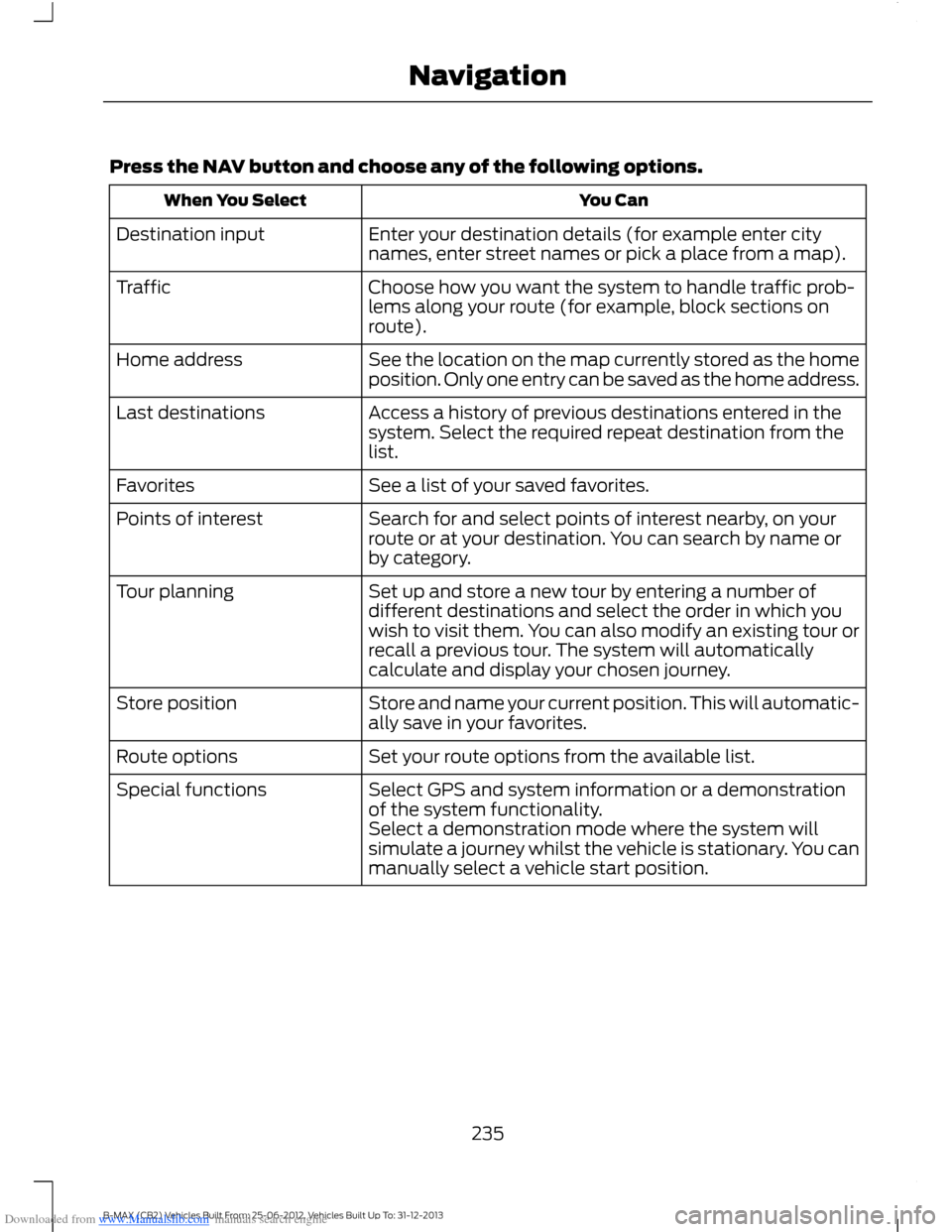
Downloaded from www.Manualslib.com manuals search engine Press the NAV button and choose any of the following options.
You CanWhen You Select
Enter your destination details (for example enter citynames, enter street names or pick a place from a map).Destination input
Choose how you want the system to handle traffic prob-lems along your route (for example, block sections onroute).
Traffic
See the location on the map currently stored as the homeposition. Only one entry can be saved as the home address.Home address
Access a history of previous destinations entered in thesystem. Select the required repeat destination from thelist.
Last destinations
See a list of your saved favorites.Favorites
Search for and select points of interest nearby, on yourroute or at your destination. You can search by name orby category.
Points of interest
Set up and store a new tour by entering a number ofdifferent destinations and select the order in which youwish to visit them. You can also modify an existing tour orrecall a previous tour. The system will automaticallycalculate and display your chosen journey.
Tour planning
Store and name your current position. This will automatic-ally save in your favorites.Store position
Set your route options from the available list.Route options
Select GPS and system information or a demonstrationof the system functionality.Special functions
Select a demonstration mode where the system willsimulate a journey whilst the vehicle is stationary. You canmanually select a vehicle start position.
235B-MAX (CB2) Vehicles Built From: 25-06-2012, Vehicles Built Up To: 31-12-2013Navigation
Page 238 of 298
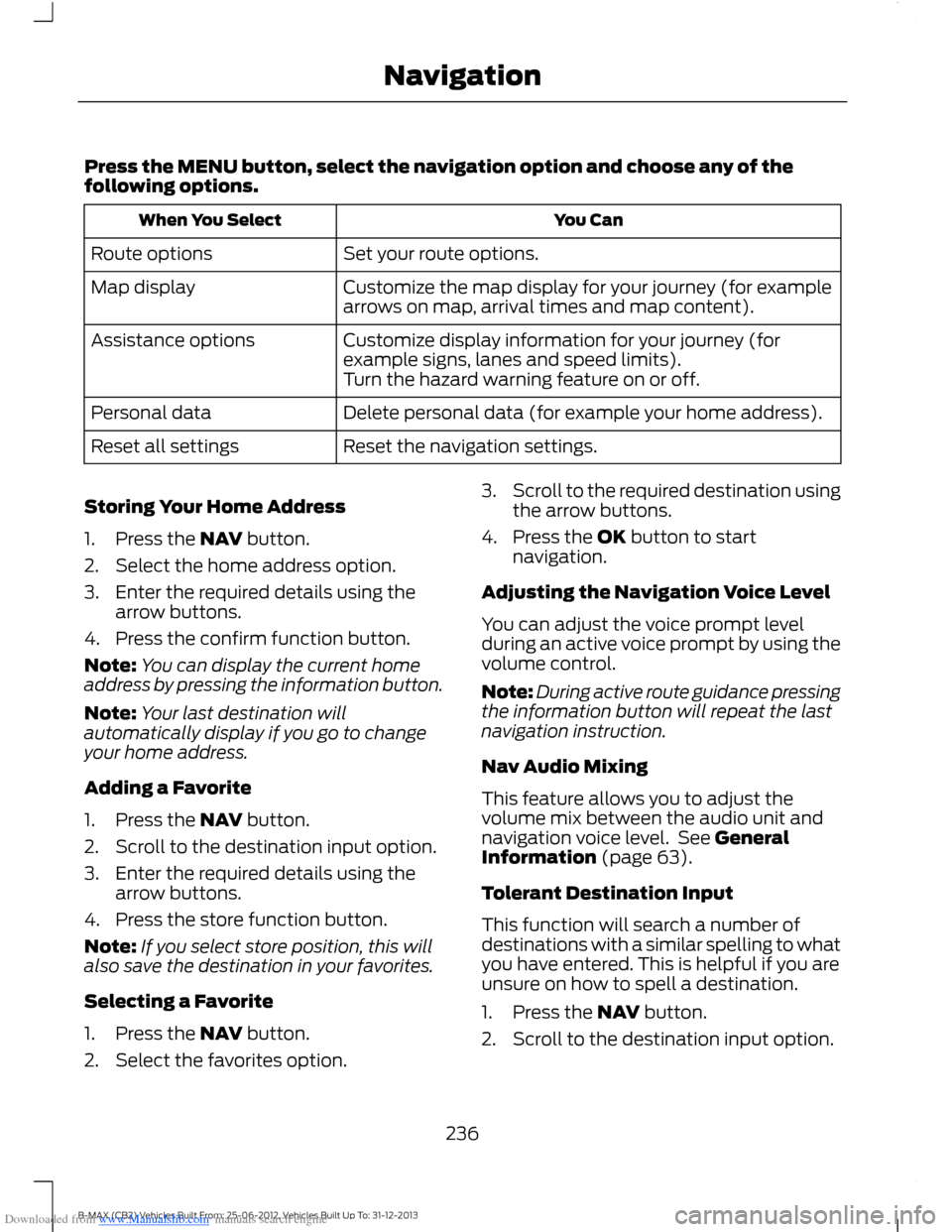
Downloaded from www.Manualslib.com manuals search engine Press the MENU button, select the navigation option and choose any of thefollowing options.
You CanWhen You Select
Set your route options.Route options
Customize the map display for your journey (for examplearrows on map, arrival times and map content).Map display
Customize display information for your journey (forexample signs, lanes and speed limits).Assistance options
Turn the hazard warning feature on or off.
Delete personal data (for example your home address).Personal data
Reset the navigation settings.Reset all settings
Storing Your Home Address
1.Press the NAV button.
2.Select the home address option.
3.Enter the required details using thearrow buttons.
4.Press the confirm function button.
Note:You can display the current homeaddress by pressing the information button.
Note:Your last destination willautomatically display if you go to changeyour home address.
Adding a Favorite
1.Press the NAV button.
2.Scroll to the destination input option.
3.Enter the required details using thearrow buttons.
4.Press the store function button.
Note:If you select store position, this willalso save the destination in your favorites.
Selecting a Favorite
1.Press the NAV button.
2.Select the favorites option.
3.Scroll to the required destination usingthe arrow buttons.
4.Press the OK button to startnavigation.
Adjusting the Navigation Voice Level
You can adjust the voice prompt levelduring an active voice prompt by using thevolume control.
Note:During active route guidance pressingthe information button will repeat the lastnavigation instruction.
Nav Audio Mixing
This feature allows you to adjust thevolume mix between the audio unit andnavigation voice level. See GeneralInformation (page 63).
Tolerant Destination Input
This function will search a number ofdestinations with a similar spelling to whatyou have entered. This is helpful if you areunsure on how to spell a destination.
1.Press the NAV button.
2.Scroll to the destination input option.
236B-MAX (CB2) Vehicles Built From: 25-06-2012, Vehicles Built Up To: 31-12-2013Navigation
Page 239 of 298
Downloaded from www.Manualslib.com manuals search engine 3.Before entering your destination detailsselect Tolerant and then begin toinput your destination.
4.Press the OK button. The system willsearch for destinations with similarspellings.
5.Use the arrow buttons to select adestination from the list and press theOK button to confirm your destination.
Route Displays
Map Display
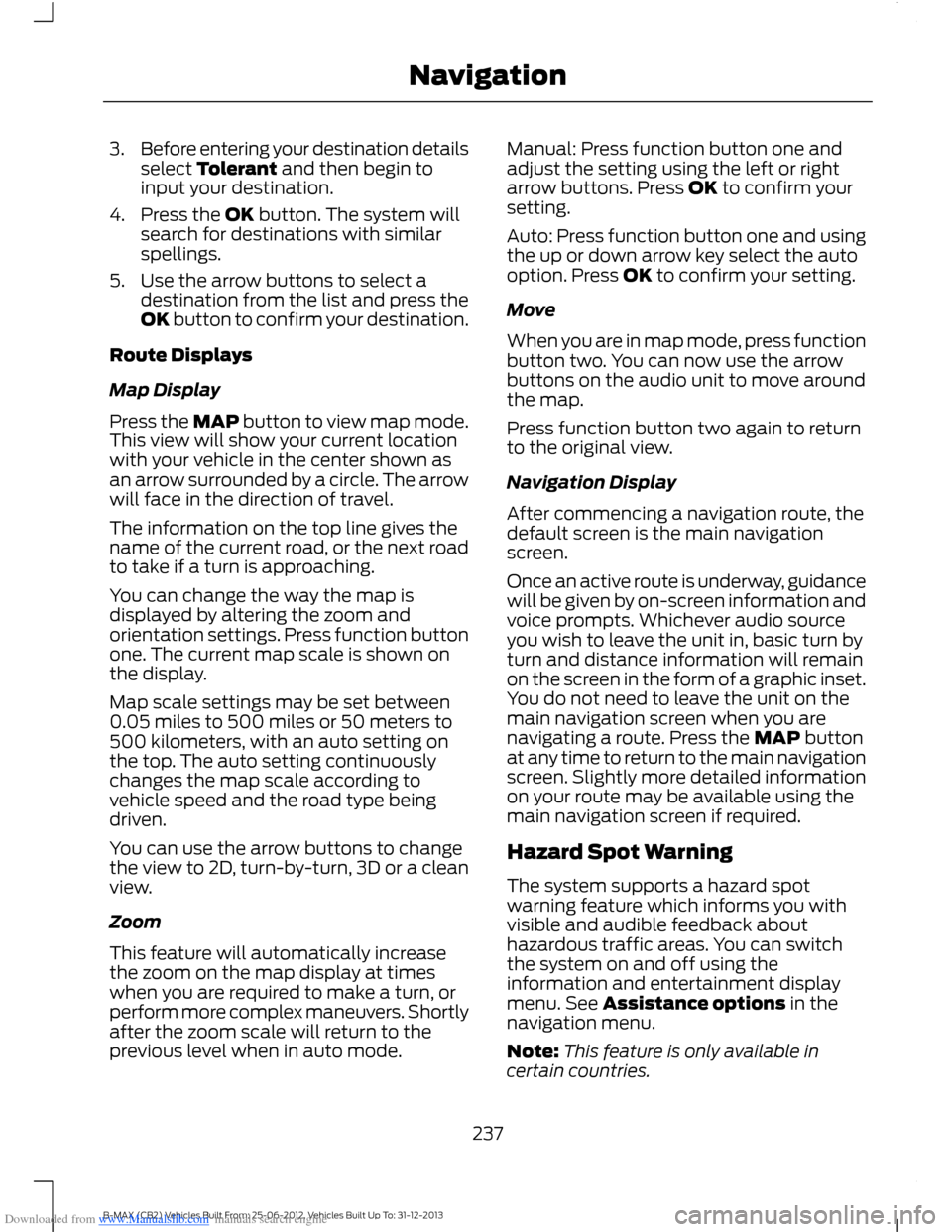
Press the MAP button to view map mode.This view will show your current locationwith your vehicle in the center shown asan arrow surrounded by a circle. The arrowwill face in the direction of travel.
The information on the top line gives thename of the current road, or the next roadto take if a turn is approaching.
You can change the way the map isdisplayed by altering the zoom andorientation settings. Press function buttonone. The current map scale is shown onthe display.
Map scale settings may be set between0.05 miles to 500 miles or 50 meters to500 kilometers, with an auto setting onthe top. The auto setting continuouslychanges the map scale according tovehicle speed and the road type beingdriven.
You can use the arrow buttons to changethe view to 2D, turn-by-turn, 3D or a cleanview.
Zoom
This feature will automatically increasethe zoom on the map display at timeswhen you are required to make a turn, orperform more complex maneuvers. Shortlyafter the zoom scale will return to theprevious level when in auto mode.
Manual: Press function button one andadjust the setting using the left or rightarrow buttons. Press OK to confirm yoursetting.
Auto: Press function button one and usingthe up or down arrow key select the autooption. Press OK to confirm your setting.
Move
When you are in map mode, press functionbutton two. You can now use the arrowbuttons on the audio unit to move aroundthe map.
Press function button two again to returnto the original view.
Navigation Display
After commencing a navigation route, thedefault screen is the main navigationscreen.
Once an active route is underway, guidancewill be given by on-screen information andvoice prompts. Whichever audio sourceyou wish to leave the unit in, basic turn byturn and distance information will remainon the screen in the form of a graphic inset.You do not need to leave the unit on themain navigation screen when you arenavigating a route. Press the MAP buttonat any time to return to the main navigationscreen. Slightly more detailed informationon your route may be available using themain navigation screen if required.
Hazard Spot Warning
The system supports a hazard spotwarning feature which informs you withvisible and audible feedback abouthazardous traffic areas. You can switchthe system on and off using theinformation and entertainment displaymenu. See Assistance options in thenavigation menu.
Note:This feature is only available incertain countries.
237B-MAX (CB2) Vehicles Built From: 25-06-2012, Vehicles Built Up To: 31-12-2013Navigation
Page 240 of 298
Downloaded from www.Manualslib.com manuals search engine Navigation Map Updates
Annual navigation map updates areavailable for purchase. See an authorizeddealer.
Type Approvals
SD Logo is a trademark.
The navigation software is based in parton the work of the FreeType team © 2006
The navigation software is based in parton the work of the independent JPEGGroup.
238B-MAX (CB2) Vehicles Built From: 25-06-2012, Vehicles Built Up To: 31-12-2013Navigation
Page 277 of 298
Downloaded from www.Manualslib.com manuals search engine Use of Speech Recognition Functions:Speech recognition software is inherentlya statistical process which is subject toerrors. It is your responsibility to monitorany speech recognition functions includedin the system and address any errors.
Navigation Features: Any navigationfeatures included in the system areintended to provide turn by turninstructions to get you to a desireddestination. Please make certain allpersons using this system carefully readand follow instructions and safetyinformation fully.
Distraction Hazard: Any navigationfeatures may require manual (non-verbal)setup. Attempting to perform such set-upor insert data while driving can seriouslydistract your attention and could cause anaccident or other serious consequences.Stop the vehicle in a safe and legal mannerbefore attempting these operations.
Let Your Judgment Prevail: Anynavigation features are provided only asan aid. Make your driving decisions basedon your observations of local conditionsand existing traffic regulations. Any suchfeature is not a substitute for your personaljudgment. Any route suggestions made bythis system should never replace any localtraffic regulations or your personaljudgment or knowledge of safe drivingpractices.
Route Safety: Do not follow the routesuggestions if doing so would result in anunsafe or illegal maneuver, if you would beplaced in an unsafe situation, or if youwould be directed into an area that youconsider unsafe. The driver is ultimatelyresponsible for the safe operation of thevehicle and therefore, must evaluatewhether it is safe to follow the suggesteddirections.
Potential Map Inaccuracy: Maps usedby this system may be inaccurate becauseof changes in roads, traffic controls ordriving conditions. Always use goodjudgment and common sense whenfollowing the suggested routes.
Emergency Services: Do not rely on anynavigation features included in the systemto route you to emergency services. Asklocal authorities or an emergency servicesoperator for these locations. Not allemergency services such as police, firestations, hospitals and clinics are likely tobe contained in the map database for suchnavigation features.
TeleNav Software End User LicenseAgreement
Please read these terms and conditionscarefully before you use the TeleNavSoftware. Your use of the TeleNavSoftware indicates that you accept theseterms and conditions. If you do not acceptthese terms and conditions, do not breakthe seal of the package, launch, orotherwise use the TeleNav Software.
TeleNav may revise this Agreement andthe privacy policy at any time, with orwithout notice to you. You agree to visithttp://www.telenav.com from time to timeto review the then current version of thisAgreement and of the privacy policy.
1. Safe and Lawful Use
You acknowledge that devoting attentionto the TeleNav Software may pose a riskof injury or death to you and others insituations that otherwise require yourundivided attention, and you thereforeagree to comply with the following whenusing the TeleNav Software: (a) observeall traffic laws and otherwise drive safely;(b) use your own personal judgment whiledriving. If you feel that a route suggestedby the TeleNav Software instructs you toperform an unsafe or illegal maneuver,
275B-MAX (CB2) Vehicles Built From: 25-06-2012, Vehicles Built Up To: 31-12-2013Appendices
Page 278 of 298
Downloaded from www.Manualslib.com manuals search engine places you in an unsafe situation, or directsyou into an area that you consider to beunsafe, do not follow such instructions; (c)do not input destinations, or otherwisemanipulate the TeleNav Software, unlessyour vehicle is stationary and parked; (d)do not use the TeleNav Software for anyillegal, unauthorized, unintended, unsafe,hazardous, or unlawful purposes, or in anymanner inconsistent with this Agreement;(e) arrange all GPS and wireless devicesand cables necessary for use of theTeleNav Software in a secure manner inyour vehicle so that they will not interferewith your driving and will not prevent theoperation of any safety device (such as anairbag).
You agree to indemnify and hold TeleNavharmless against all claims resulting fromany dangerous or otherwise inappropriateuse of the TeleNav Software in any movingvehicle, including as a result of your failureto comply with the directions above.
2. Account Information
You agree: (a) when registering theTeleNav Software, to provide TeleNav withtrue, accurate, current, and completeinformation about yourself, and (b) toinform TeleNav promptly of any changesto such information, and to keep it true,accurate, current and complete.
3. Software License
Subject to your compliance with the termsof this Agreement, TeleNav hereby grantsto you a personal, non-exclusive,non-transferable license (except asexpressly permitted below in connectionwith your permanent transfer of theTeleNav Software license), without theright to sublicense, to use the TeleNavSoftware (in object code form only) inorder to access and use the TeleNavSoftware. This license shall terminate upon
any termination or expiration of thisAgreement. You agree that you will use theTeleNav Software only for your personalbusiness or leisure purposes, and not toprovide commercial navigation services toother parties.
3.1 License Limitations
You agree not to do any of the following:(a) reverse engineer, decompile,disassemble, translate, modify, alter orotherwise change the TeleNav Softwareor any part thereof; (b) attempt to derivethe source code, audio library or structureof the TeleNav Software without the priorexpress written consent of TeleNav; (c)remove from the TeleNav Software, oralter, any of TeleNav's or its suppliers'trademarks, trade names, logos, patent orcopyright notices, or other notices ormarkings; (d) distribute, sublicense orotherwise transfer the TeleNav Softwareto others, except as part of your permanenttransfer of the TeleNav Software; or (e)use the TeleNav Software in any mannerthat (i) infringes the intellectual propertyor proprietary rights, rights of publicity orprivacy or other rights of any party, (ii)violates any law, statute, ordinance orregulation, including but not limited to lawsand regulations related to spamming,privacy, consumer and child protection,obscenity or defamation, or (iii) is harmful,threatening, abusive, harassing, tortuous,defamatory, vulgar, obscene, libelous, orotherwise objectionable; and (f) lease, rentout, or otherwise permit unauthorizedaccess by third parties to the TeleNavSoftware without advanced writtenpermission of TeleNav.
276B-MAX (CB2) Vehicles Built From: 25-06-2012, Vehicles Built Up To: 31-12-2013Appendices
Page 279 of 298
Downloaded from www.Manualslib.com manuals search engine 4. Disclaimers
To the fullest extent permissible pursuantto applicable law, in no event will TeleNav,its licensors and suppliers, or agents oremployees of any of the foregoing, beliable for any decision made or actiontaken by you or anyone else in reliance onthe information provided by the TeleNavSoftware. TeleNav also does not warrantthe accuracy of the map or other data usedfor the TeleNav Software. Such data maynot always reflect reality due to, amongother things, road closures, construction,weather, new roads and other changingconditions. You are responsible for theentire risk arising out of your use of theTeleNav Software. For example butwithout limitation, you agree not to rely onthe TeleNav Software for criticalnavigation in areas where the well-beingor survival of you or others is dependenton the accuracy of navigation, as the mapsor functionality of the TeleNav Softwareare not intended to support such high riskapplications, especially in more remotegeographical areas.
TELENAV EXPRESSLY DISCLAIMS ANDEXCLUDES ALL WARRANTIES INCONNECTION WITH THE TELENAVSOFTWARE, WHETHER STATUTORY,EXPRESS OR IMPLIED, INCLUDING ALLWARRANTIES WHICH MAY ARISE FROMCOURSE OF DEALING, CUSTOM ORTRADE AND INCLUDING, BUT NOTLIMITED TO, THE IMPLIED WARRANTIESOF MERCHANTABILITY, FITNESS FOR APARTICULAR PURPOSE ANDNON-INFRINGEMENT OF THIRD PARTYRIGHTS WITH RESPECT TO THE TELENAVSOFTWARE. Certain jurisdictions do notpermit the disclaimer of certain warranties,so this limitation may not apply to you.
5. Limitation of Liability
TO THE EXTENT PERMITTED UNDERAPPLICABLE LAW, UNDER NOCIRCUMSTANCES SHALL TELENAV ORITS LICENSORS AND SUPPLIERS BELIABLE TO YOU OR TO ANY THIRD PARTYFOR ANY INDIRECT, INCIDENTAL,CONSEQUENTIAL, SPECIAL OREXEMPLARY DAMAGES (INCLUDING INEACH CASE, BUT NOT LIMITED TO,DAMAGES FOR THE INABILITY TO USETHE EQUIPMENT OR ACCESS DATA,LOSS OF DATA, LOSS OF BUSINESS,LOSS OF PROFITS, BUSINESSINTERRUPTION OR THE LIKE) ARISINGOUT OF THE USE OF OR INABILITY TOUSE THE TELENAV SOFTWARE, EVEN IFTELENAV HAS BEEN ADVISED OF THEPOSSIBILITY OF SUCH DAMAGES.
NOTWITHSTANDING ANY DAMAGESTHAT YOU MIGHT INCUR FOR ANYREASON WHATSOEVER (INCLUDING,WITHOUT LIMITATION, ALL DAMAGESREFERENCED HEREIN AND ALL DIRECTOR GENERAL DAMAGES IN CONTRACT,TORT (INCLUDING NEGLIGENCE) OROTHERWISE), THE ENTIRE LIABILITY OFTELENAV AND OF ALL OF TELENAV'SSUPPLIERS SHALL BE LIMITED TO THEAMOUNT ACTUALLY PAID BY YOU FORTHE TELENAV SOFTWARE. SOMESTATES AND/OR JURISDICTIONS DO NOTALLOW THE EXCLUSION OR LIMITATIONOF INCIDENTAL OR CONSEQUENTIALDAMAGES, SO THE ABOVE LIMITATIONSOR EXCLUSIONS MAY NOT APPLY TOYOU.
6. Arbitration and Governing Law
You agree that any dispute, claim orcontroversy arising out of or relating to thisAgreement or the TeleNav Software shallbe settled by independent arbitrationinvolving a neutral arbitrator andadministered by the American ArbitrationAssociation in the County of Santa Clara,California. The arbitrator shall apply the
277B-MAX (CB2) Vehicles Built From: 25-06-2012, Vehicles Built Up To: 31-12-2013Appendices
Page 282 of 298
Downloaded from www.Manualslib.com manuals search engine reproduce, copy, modify, decompile,disassemble or reverse engineer anyportion of this Data, and may not transferor distribute it in any form, for any purpose,except to the extent permitted bymandatory laws.
License Limitations on Transfer: Yourlimited license does not allow transfer orresale of the Data, except on the conditionthat you may transfer the Data and allaccompanying materials on a permanentbasis if: (a) you retain no copies of theData; (b) the recipient agrees to the termsof this End User License Agreement; and(c) you transfer the Data in the exact sameform as you purchased it by physicallytransferring the original media (e.g., theCD-ROM or DVD you purchased), alloriginal packaging, all Manuals and otherdocumentation. Specifically, Multi-discsets may only be transferred or sold as acomplete set as provided to you and notas a subset thereof.
Additional License Limitations: Exceptwhere you have been specifically licensedto do so by NT in a separate writtenagreement, and without limiting thepreceding paragraph, your license isconditioned on use of the Data asprescribed in this agreement, and you maynot (a) use this Data with any products,systems, or applications installed orotherwise connected to or incommunication with vehicles capable ofvehicle navigation, positioning, dispatch,real time route guidance, fleetmanagement or similar applications; or (b)with, or in communication with, includingwithout limitation, cellular phones,palmtop and handheld computers, pagers,and personal digital assistants or PDAs.
WARNING
This Data may contain inaccurate orincomplete information due to thepassage of time, changingcircumstances, sources used and thenature of collecting comprehensivegeographic Data, any of which may leadto incorrect results.
No Warranty: This Data is provided to you"as is" , and you agree to use it at your ownrisk. NT and its licensors (and theirlicensors and suppliers) make noguarantees, representations or warrantiesof any kind, express or implied, arising bylaw or otherwise, including but not limitedto, content, quality, accuracy,completeness, effectiveness, reliability,fitness for a particular purpose, usefulness,use or results to be obtained from thisData, or that the Data or server will beuninterrupted or error free.
Disclaimer of Warranty: NT AND ITSLICENSORS (INCLUDING THEIRLICENSORS AND SUPPLIERS) DISCLAIMANY WARRANTIES, EXPRESS OR IMPLIED,OF QUALITY, PERFORMANCE,MERCHANTABILITY, FITNESS FOR APARTICULAR PURPOSE ORNON-INFRINGEMENT. Some States,Territories and Countries do not allowcertain warranty exclusions, so to thatextent the above exclusion may not applyto you.
Disclaimer of Liability: NT AND ITSLICENSORS (INCLUDING THEIRLICENSORS AND SUPPLIERS) SHALL NOTBE LIABLE TO YOU IN RESPECT OF ANYCLAIM, DEMAND OR ACTION,IRRESPECTIVE OF THE NATURE OF THECAUSE OF THE CLAIM, DEMAND ORACTION ALLEGING ANY LOSS, INJURY ORDAMAGES, DIRECT OR INDIRECT, WHICHMAY RESULT FROM THE USE ORPOSSESSION OF THIS DATA; OR FOR ANYLOSS OF PROFIT, REVENUE, CONTRACTS
280B-MAX (CB2) Vehicles Built From: 25-06-2012, Vehicles Built Up To: 31-12-2013Appendices
Page 287 of 298
Downloaded from www.Manualslib.com manuals search engine A
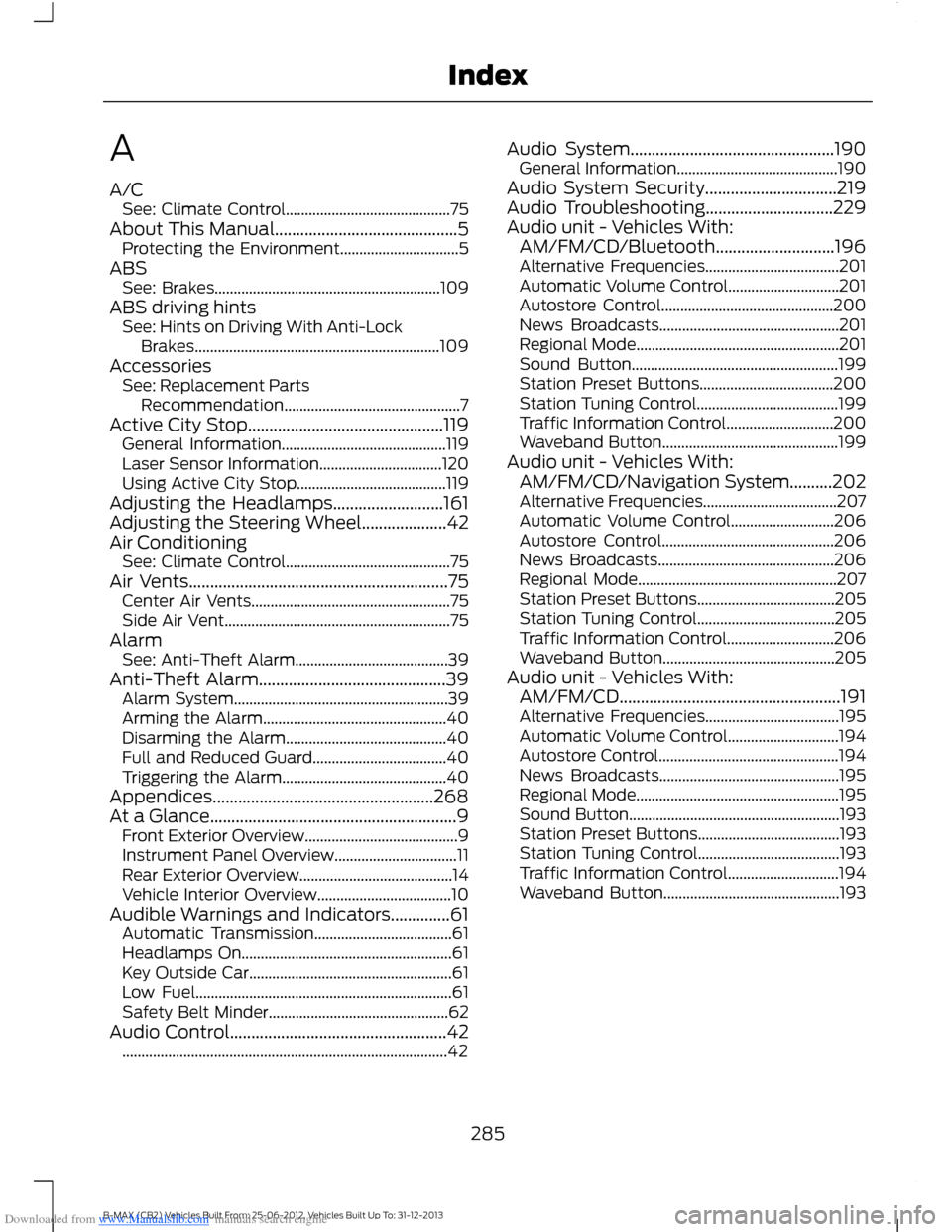
A/CSee: Climate Control...........................................75About This Manual...........................................5Protecting the Environment...............................5ABSSee: Brakes...........................................................109ABS driving hintsSee: Hints on Driving With Anti-LockBrakes................................................................109AccessoriesSee: Replacement PartsRecommendation..............................................7Active City Stop..............................................119General Information...........................................119Laser Sensor Information................................120Using Active City Stop.......................................119Adjusting the Headlamps..........................161Adjusting the Steering Wheel....................42Air ConditioningSee: Climate Control...........................................75Air Vents.............................................................75Center Air Vents....................................................75Side Air Vent...........................................................75AlarmSee: Anti-Theft Alarm........................................39Anti-Theft Alarm............................................39Alarm System........................................................39Arming the Alarm................................................40Disarming the Alarm..........................................40Full and Reduced Guard...................................40Triggering the Alarm...........................................40Appendices....................................................268At a Glance..........................................................9Front Exterior Overview........................................9Instrument Panel Overview................................11Rear Exterior Overview........................................14Vehicle Interior Overview...................................10Audible Warnings and Indicators..............61Automatic Transmission....................................61Headlamps On.......................................................61Key Outside Car.....................................................61Low Fuel...................................................................61Safety Belt Minder...............................................62Audio Control...................................................42.....................................................................................42
Audio System................................................190General Information..........................................190Audio System Security...............................219Audio Troubleshooting..............................229Audio unit - Vehicles With:AM/FM/CD/Bluetooth............................196Alternative Frequencies...................................201Automatic Volume Control.............................201Autostore Control.............................................200News Broadcasts...............................................201Regional Mode.....................................................201Sound Button......................................................199Station Preset Buttons...................................200Station Tuning Control.....................................199Traffic Information Control............................200Waveband Button..............................................199Audio unit - Vehicles With:AM/FM/CD/Navigation System..........202Alternative Frequencies...................................207Automatic Volume Control...........................206Autostore Control.............................................206News Broadcasts..............................................206Regional Mode....................................................207Station Preset Buttons....................................205Station Tuning Control....................................205Traffic Information Control............................206Waveband Button.............................................205Audio unit - Vehicles With:AM/FM/CD....................................................191Alternative Frequencies...................................195Automatic Volume Control.............................194Autostore Control...............................................194News Broadcasts...............................................195Regional Mode.....................................................195Sound Button.......................................................193Station Preset Buttons.....................................193Station Tuning Control.....................................193Traffic Information Control.............................194Waveband Button..............................................193
285B-MAX (CB2) Vehicles Built From: 25-06-2012, Vehicles Built Up To: 31-12-2013Index
Page 288 of 298
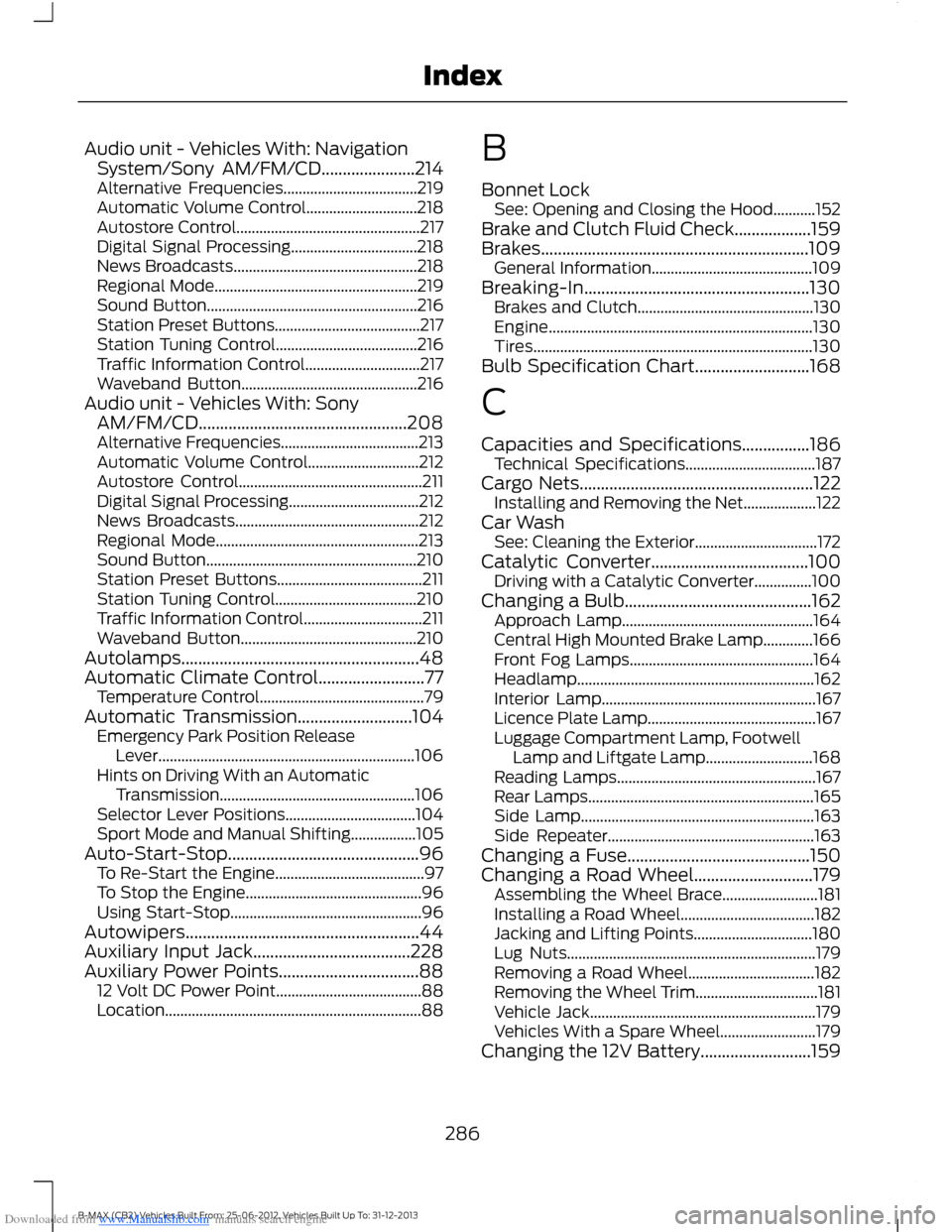
Downloaded from www.Manualslib.com manuals search engine Audio unit - Vehicles With: NavigationSystem/Sony AM/FM/CD......................214Alternative Frequencies...................................219Automatic Volume Control.............................218Autostore Control................................................217Digital Signal Processing.................................218News Broadcasts................................................218Regional Mode.....................................................219Sound Button.......................................................216Station Preset Buttons......................................217Station Tuning Control.....................................216Traffic Information Control..............................217Waveband Button..............................................216Audio unit - Vehicles With: SonyAM/FM/CD.................................................208Alternative Frequencies....................................213Automatic Volume Control.............................212Autostore Control................................................211Digital Signal Processing..................................212News Broadcasts................................................212Regional Mode.....................................................213Sound Button.......................................................210Station Preset Buttons......................................211Station Tuning Control.....................................210Traffic Information Control...............................211Waveband Button..............................................210Autolamps........................................................48Automatic Climate Control.........................77Temperature Control...........................................79Automatic Transmission...........................104Emergency Park Position ReleaseLever...................................................................106Hints on Driving With an AutomaticTransmission...................................................106Selector Lever Positions..................................104Sport Mode and Manual Shifting.................105Auto-Start-Stop.............................................96To Re-Start the Engine.......................................97To Stop the Engine..............................................96Using Start-Stop..................................................96Autowipers.......................................................44Auxiliary Input Jack.....................................228Auxiliary Power Points.................................8812 Volt DC Power Point......................................88Location...................................................................88
B
Bonnet LockSee: Opening and Closing the Hood...........152Brake and Clutch Fluid Check..................159Brakes...............................................................109General Information..........................................109Breaking-In.....................................................130Brakes and Clutch..............................................130Engine.....................................................................130Tires.........................................................................130Bulb Specification Chart...........................168
C
Capacities and Specifications................186Technical Specifications..................................187Cargo Nets.......................................................122Installing and Removing the Net...................122Car WashSee: Cleaning the Exterior................................172Catalytic Converter.....................................100Driving with a Catalytic Converter...............100Changing a Bulb............................................162Approach Lamp..................................................164Central High Mounted Brake Lamp.............166Front Fog Lamps................................................164Headlamp..............................................................162Interior Lamp........................................................167Licence Plate Lamp............................................167Luggage Compartment Lamp, FootwellLamp and Liftgate Lamp............................168Reading Lamps....................................................167Rear Lamps...........................................................165Side Lamp.............................................................163Side Repeater......................................................163Changing a Fuse...........................................150Changing a Road Wheel............................179Assembling the Wheel Brace.........................181Installing a Road Wheel...................................182Jacking and Lifting Points...............................180Lug Nuts.................................................................179Removing a Road Wheel.................................182Removing the Wheel Trim................................181Vehicle Jack...........................................................179Vehicles With a Spare Wheel.........................179Changing the 12V Battery..........................159
286B-MAX (CB2) Vehicles Built From: 25-06-2012, Vehicles Built Up To: 31-12-2013Index