service FORD B MAX 2013 1.G Owner's Guide
[x] Cancel search | Manufacturer: FORD, Model Year: 2013, Model line: B MAX, Model: FORD B MAX 2013 1.GPages: 298, PDF Size: 20.63 MB
Page 278 of 298
Downloaded from www.Manualslib.com manuals search engine places you in an unsafe situation, or directsyou into an area that you consider to beunsafe, do not follow such instructions; (c)do not input destinations, or otherwisemanipulate the TeleNav Software, unlessyour vehicle is stationary and parked; (d)do not use the TeleNav Software for anyillegal, unauthorized, unintended, unsafe,hazardous, or unlawful purposes, or in anymanner inconsistent with this Agreement;(e) arrange all GPS and wireless devicesand cables necessary for use of theTeleNav Software in a secure manner inyour vehicle so that they will not interferewith your driving and will not prevent theoperation of any safety device (such as anairbag).
You agree to indemnify and hold TeleNavharmless against all claims resulting fromany dangerous or otherwise inappropriateuse of the TeleNav Software in any movingvehicle, including as a result of your failureto comply with the directions above.
2. Account Information
You agree: (a) when registering theTeleNav Software, to provide TeleNav withtrue, accurate, current, and completeinformation about yourself, and (b) toinform TeleNav promptly of any changesto such information, and to keep it true,accurate, current and complete.
3. Software License
Subject to your compliance with the termsof this Agreement, TeleNav hereby grantsto you a personal, non-exclusive,non-transferable license (except asexpressly permitted below in connectionwith your permanent transfer of theTeleNav Software license), without theright to sublicense, to use the TeleNavSoftware (in object code form only) inorder to access and use the TeleNavSoftware. This license shall terminate upon
any termination or expiration of thisAgreement. You agree that you will use theTeleNav Software only for your personalbusiness or leisure purposes, and not toprovide commercial navigation services toother parties.
3.1 License Limitations
You agree not to do any of the following:(a) reverse engineer, decompile,disassemble, translate, modify, alter orotherwise change the TeleNav Softwareor any part thereof; (b) attempt to derivethe source code, audio library or structureof the TeleNav Software without the priorexpress written consent of TeleNav; (c)remove from the TeleNav Software, oralter, any of TeleNav's or its suppliers'trademarks, trade names, logos, patent orcopyright notices, or other notices ormarkings; (d) distribute, sublicense orotherwise transfer the TeleNav Softwareto others, except as part of your permanenttransfer of the TeleNav Software; or (e)use the TeleNav Software in any mannerthat (i) infringes the intellectual propertyor proprietary rights, rights of publicity orprivacy or other rights of any party, (ii)violates any law, statute, ordinance orregulation, including but not limited to lawsand regulations related to spamming,privacy, consumer and child protection,obscenity or defamation, or (iii) is harmful,threatening, abusive, harassing, tortuous,defamatory, vulgar, obscene, libelous, orotherwise objectionable; and (f) lease, rentout, or otherwise permit unauthorizedaccess by third parties to the TeleNavSoftware without advanced writtenpermission of TeleNav.
276B-MAX (CB2) Vehicles Built From: 25-06-2012, Vehicles Built Up To: 31-12-2013Appendices
Page 281 of 298
Downloaded from www.Manualslib.com manuals search engine 8.5
If any provision herein is heldunenforceable, then such provision will bemodified to reflect the intention of theparties, and the remaining provisions ofthis Agreement will remain in full force andeffect
8.6
The headings in this Agreement are forconvenience of reference only, will not bedeemed to be a part of this Agreement,and will not be referred to in connectionwith the construction or interpretation ofthis Agreement. As used in this Agreement,the words "include" and "including" andvariations thereof, will not be deemed tobe terms of limitation, but rather will bedeemed to be followed by the words"without limitation".
9. Other Vendors Terms and Conditions
The TeleNav Software utilizes map andother data licensed to TeleNav by thirdparty vendors for the benefit of you andother end users. This Agreement includesend-user terms applicable to thesecompanies (included at the end of thisAgreement), and thus your use of theTeleNav Software is also subject to suchterms. You agree to comply with thefollowing additional terms and conditions,which are applicable to TeleNav's thirdparty vendor licensors:
NavTeq End User License Agreement
END USER TERMS
The content provided ("Data") is licensed,not sold. By opening this package, orinstalling, copying, or otherwise using theData, you agree to be bound by the termsof this agreement. If you do not agree tothe terms of this agreement, you are notpermitted to install, copy, use, resell ortransfer the Data. If you wish to reject theterms of this agreement, and have not
installed, copied, or used the Data, youmust contact your retailer or NAVTEQNorth America, LLC ("NT") within thirty(30) days of purchase for a refund of yourpurchase price. To contact NT, please visitwww.navteq.com.
The Data is provided for your personal,internal use only and may not be resold. Itis protected by copyright, and is subject tothe following terms (this "End User LicenseAgreement") and conditions which areagreed to by you, on the one hand, andNAVTEQ North America, LLC ("NT") andits licensors (including their licensors andsuppliers) on the other hand.
The Data for areas of Canada includesinformation taken with permission fromCanadian authorities, including: © HerMajesty the Queen in Right of Canada, ©Queen's Printer for Ontario, © Canada PostCorporation, GeoBase®.
NT holds a nonexclusive license from theUnited States Postal Service ® to publishand sell ZIP+4 ® information.
© United States Postal Service ® 2009.Prices are not established, controlled orapproved by the United States PostalService ® The following trademarks andregistrations are owned by the USPS:United States Postal Service, USPS, andZIP+4.
The Data for Mexico includes certain Datafrom Instituto Nacional de Estadística yGeografía.
TERMS AND CONDITIONS
License Limitations on Use: You agreethat your license to use this Data is limitedto and conditioned on use for solelypersonal, noncommercial purposes, andnot for service bureau, timesharing or othersimilar purposes. Except as otherwise setforth herein, you agree not to otherwise
279B-MAX (CB2) Vehicles Built From: 25-06-2012, Vehicles Built Up To: 31-12-2013Appendices
Page 284 of 298
Downloaded from www.Manualslib.com manuals search engine This Data is a commercial item as definedin FAR 2.101
and is subject to the End User LicenseAgreement under
which this Data was provided.
© 2011 NAVTEQ. All rights reserved.
If the Contracting Officer, federalgovernment agency, or any federal officialrefuses to use the legend provided herein,the Contracting Officer, federalgovernment agency, or any federal officialmust notify NAVTEQ prior to seekingadditional or alternative rights in the Data.
Wi-Fi hotspot data provided by JiWire, ©2013 JiWire.
Gracenote® Copyright
CD and music-related data fromGracenote, Inc., copyright© 2000-2007Gracenote. Gracenote Software, copyright© 2000-2007 Gracenote. This product andservice may practice one or more of thefollowing U.S. Patents #5,987,525,#6,061,680, #6,154,773, #6,161,132,#6,230,192, #6,230,207, #6.240,459,#6,330,593 and other patents issued orpending. Some services supplied underlicense from Open Globe, Inc. for U.S.Patent: #6,304,523.
Gracenote and CDDB are registeredtrademarks of Gracenote. The Gracenotelogo and logotype, and the "Powered byGracenote™" logo are trademarks ofGracenote.
Gracenote® End User License Agreement(EULA)
This device contains software fromGracenote, Inc. of 2000 Powell StreetEmeryville, California 94608("Gracenote").
The software from Gracenote (the"Gracenote Software") enables this deviceto do disc and music file identification andobtain music-related information, includingname, artist, track, and title information("Gracenote Data") from online servers("Gracenote Servers"), and to performother functions. You may use GracenoteData only by means of the intended EndUser functions of this device.
This device may contain content belongingto Gracenote's providers. If so, all of therestrictions set forth herein with respect toGracenote Data shall also apply to suchcontent and such content providers shallbe entitled to all of the benefits andprotections set forth herein that areavailable to Gracenote.
You agree that you will use the contentfrom Gracenote ("Gracenote Content") ,Gracenote Data, the Gracenote Software,and Gracenote Servers for your ownpersonal, non-commercial use only. Youagree not to assign, copy, transfer ortransmit the Gracenote Content,Gracenote Software or any GracenoteData (except in a Tag associated with amusic file) to any third party. YOU AGREENOT TO USE OR EXPLOIT GRACENOTECONTENT, GRACENOTE DATA, THEGRACENOTE SOFTWARE, ORGRACENOTE SERVERS, EXCEPT ASEXPRESSLY PERMITTED HEREIN.
You agree that your non-exclusive licensesto use the Gracenote Content, GracenoteData, the Gracenote Software, andGracenote Servers will terminate if youviolate these restrictions. If your licensesterminate, you agree to cease any and alluse of the Gracenote Content, GracenoteData, the Gracenote Software, andGracenote Servers. Gracenote,respectively, reserve all rights in GracenoteData, the Gracenote Software, and theGracenote Servers and Gracenote Content,including all ownership rights. Under nocircumstances will either Gracenote
282B-MAX (CB2) Vehicles Built From: 25-06-2012, Vehicles Built Up To: 31-12-2013Appendices
Page 285 of 298
Downloaded from www.Manualslib.com manuals search engine become liable for any payment to you forany information that you provide, includingany copyrighted material or music fileinformation. You agree that Gracenotemay enforce its respective rights,collectively or separately, under thisagreement against you, directly in eachcompany's own name.
Gracenote uses a unique identifier to trackqueries for statistical purposes. Thepurpose of a randomly assigned numericidentifier is to allow Gracenote to countqueries without knowing anything aboutwho you are. For more information, see theweb page at www.gracenote.com for theGracenote Privacy Policy.
THE GRACENOTE SOFTWARE, EACH ITEMOF GRACENOTE DATA AND THEGRACENOTE CONTENT ARE LICENSEDTO YOU "AS IS". NEITHER GRACENOTEMAKES ANY REPRESENTATIONS ORWARRANTIES, EXPRESS OR IMPLIED,REGARDING THE ACCURACY OF ANYGRACENOTE DATA FROM THEGRACENOTE SERVERS OR GRACENOTECONTENT. GRACENOTE COLLECTIVELYAND SEPARATELY RESERVE THE RIGHTTO DELETE DATA AND/OR CONTENTFROM THE COMPANIES' RESPECTIVESERVERS OR, IN THE CASE OFGRACENOTE, CHANGE DATACATEGORIES FOR ANY CAUSE THATGRACENOTE DEEMS SUFFICIENT. NOWARRANTY IS MADE THAT EITHERGRACENOTE CONTENT OR THEGRACENOTE SOFTWARE ORGRACENOTE SERVERS ARE ERROR-FREEOR THAT THE FUNCTIONING OF THEGRACENOTE SOFTWARE ORGRACENOTE SERVERS WILL BEUNINTERRUPTED. GRACENOTE IS NOTOBLIGATED TO PROVIDE YOU WITH ANYENHANCED OR ADDITIONAL DATA TYPESTHAT GRACENOTE MAY CHOOSE TOPROVIDE IN THE FUTURE AND IS FREETO DISCONTINUE ITS ONLINE SERVICESAT ANY TIME. GRACENOTE DISCLAIM ALL
WARRANTIES EXPRESS OR IMPLIED,INCLUDING, BUT NOT LIMITED TO,IMPLIED WARRANTIES OFMERCHANTABILITY, FITNESS FOR APARTICULAR PURPOSE, TITLE, ANDNON-INFRINGEMENT. NEITHERGRACENOTE WARRANTS THE RESULTSTHAT WILL BE OBTAINED BY YOUR USEOF THE GRACENOTE SOFTWARE OR ANYGRACENOTE SERVER. IN NO CASE WILLGRACENOTE BE LIABLE FOR ANYCONSEQUENTIAL OR INCIDENTALDAMAGES OR FOR ANY LOST PROFITSOR LOST REVENUES FOR ANY REASONWHATSOEVER.
© Gracenote 2007.
FCC ID: KMHSYNCG2
IC: 1422A-SYNCG2
This device complies with Part 15 of theFCC Rules and with RSS-210 of IndustryCanada. Operation is subject to thefollowing two conditions: (1) This devicemay not cause harmful interference, and(2) this device must accept anyinterference received, includinginterference that may cause undesiredoperation.
WARNING
Changes or modifications notexpressively approved by the partyresponsible for compliance couldvoid the user's authority to operate theequipment. The term "IC" before the radiocertification number only signifies thatIndustry Canada technical specificationswere met.
The antenna used for this transmitter mustnot be co-located or operating inconjunction with any other antenna ortransmitter.
283B-MAX (CB2) Vehicles Built From: 25-06-2012, Vehicles Built Up To: 31-12-2013Appendices
Page 294 of 298
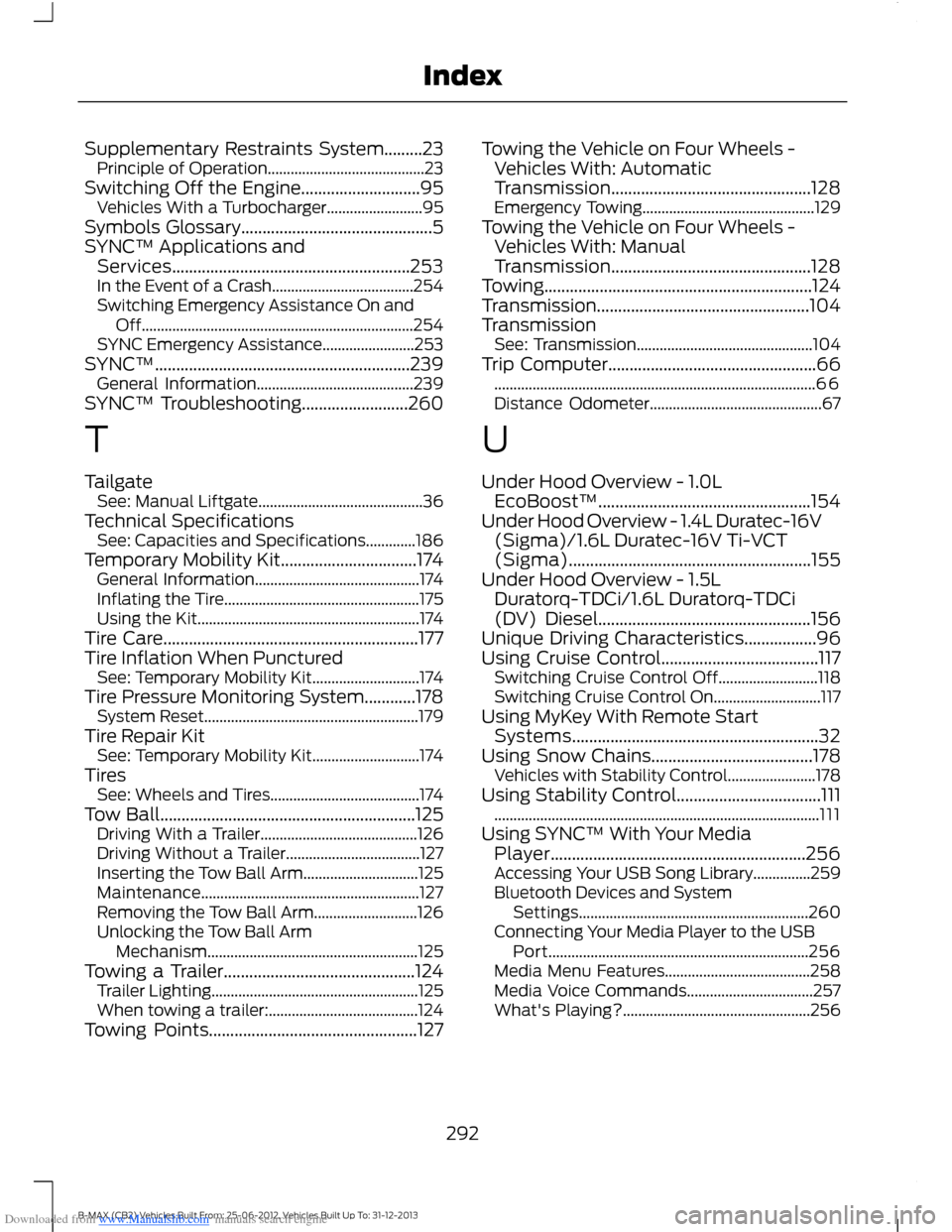
Downloaded from www.Manualslib.com manuals search engine Supplementary Restraints System.........23Principle of Operation.........................................23Switching Off the Engine............................95Vehicles With a Turbocharger.........................95Symbols Glossary.............................................5SYNC™ Applications andServices........................................................253In the Event of a Crash.....................................254Switching Emergency Assistance On andOff.......................................................................254SYNC Emergency Assistance........................253SYNC™............................................................239General Information.........................................239SYNC™ Troubleshooting.........................260
T
TailgateSee: Manual Liftgate...........................................36Technical SpecificationsSee: Capacities and Specifications.............186Temporary Mobility Kit................................174General Information...........................................174Inflating the Tire...................................................175Using the Kit..........................................................174Tire Care............................................................177Tire Inflation When PuncturedSee: Temporary Mobility Kit............................174Tire Pressure Monitoring System............178System Reset........................................................179Tire Repair KitSee: Temporary Mobility Kit............................174TiresSee: Wheels and Tires.......................................174Tow Ball............................................................125Driving With a Trailer.........................................126Driving Without a Trailer...................................127Inserting the Tow Ball Arm..............................125Maintenance.........................................................127Removing the Tow Ball Arm...........................126Unlocking the Tow Ball ArmMechanism.......................................................125Towing a Trailer.............................................124Trailer Lighting......................................................125When towing a trailer:.......................................124Towing Points.................................................127
Towing the Vehicle on Four Wheels -Vehicles With: AutomaticTransmission...............................................128Emergency Towing.............................................129Towing the Vehicle on Four Wheels -Vehicles With: ManualTransmission...............................................128Towing...............................................................124Transmission..................................................104TransmissionSee: Transmission..............................................104Trip Computer.................................................66....................................................................................66Distance Odometer.............................................67
U
Under Hood Overview - 1.0LEcoBoost™..................................................154Under Hood Overview - 1.4L Duratec-16V(Sigma)/1.6L Duratec-16V Ti-VCT(Sigma).........................................................155Under Hood Overview - 1.5LDuratorq-TDCi/1.6L Duratorq-TDCi(DV) Diesel..................................................156Unique Driving Characteristics.................96Using Cruise Control.....................................117Switching Cruise Control Off..........................118Switching Cruise Control On............................117Using MyKey With Remote StartSystems..........................................................32Using Snow Chains......................................178Vehicles with Stability Control.......................178Using Stability Control..................................111.....................................................................................111Using SYNC™ With Your MediaPlayer............................................................256Accessing Your USB Song Library...............259Bluetooth Devices and SystemSettings............................................................260Connecting Your Media Player to the USBPort....................................................................256Media Menu Features......................................258Media Voice Commands.................................257What's Playing?.................................................256
292B-MAX (CB2) Vehicles Built From: 25-06-2012, Vehicles Built Up To: 31-12-2013Index