warning FORD B MAX 2013 1.G Repair Manual
[x] Cancel search | Manufacturer: FORD, Model Year: 2013, Model line: B MAX, Model: FORD B MAX 2013 1.GPages: 298, PDF Size: 20.63 MB
Page 111 of 298
Downloaded from www.Manualslib.com manuals search engine GENERAL INFORMATION
WARNING
The system does not relieve you ofyour responsibility to drive with duecare and attention.
Note:Occasional brake noise is normal. Ifa metal-to-metal, continuous grinding orcontinuous squeal sound is present, thebrake linings may be worn-out. If the vehiclehas continuous vibration or shudder in thesteering wheel while braking, have yourvehicle checked by an authorized dealer.
Note:Brake dust may accumulate on thewheels, even under normal drivingconditions. Some dust is inevitable as thebrakes wear. See Cleaning the AlloyWheels (page 173).
Wet brakes result in reduced brakingefficiency. Gently press the brake pedal afew times when driving from a car wash orstanding water to dry the brakes.
Emergency Brake Assist
Emergency brake assist detects when youbrake heavily by measuring the rate atwhich you press the brake pedal. Itprovides maximum braking efficiency aslong as you press the pedal. Emergencybrake assist can reduce stopping distancesin critical situations.
Anti-lock Brake System
This system helps you maintain steeringcontrol and vehicle stability duringemergency stops by keeping the brakesfrom locking.
HINTS ON DRIVING WITH
ANTI-LOCK BRAKES
Note:When the system is operating, thebrake pedal will pulse and may travelfurther. Maintain pressure on the brakepedal. You may also hear a noise from thesystem. This is normal.
The anti-lock braking system will noteliminate the risks when:
•you drive too closely to the vehicle infront of you
•your vehicle is hydroplaning
•you take corners too fast
•the road surface is poor.
PARKING BRAKE
Vehicles With AutomaticTransmission
WARNING
Always set the parking brake fullyand leave your vehicle with thetransmission selector lever inposition P.
Note:If you park your vehicle on a hill andfacing uphill move the transmission selectorlever to position P and turn the steeringwheel away from the curb.
Note:If you park your vehicle on a hill andfacing downhill move the transmissionselector lever to position P and turn thesteering wheel toward the curb.
Vehicles With ManualTransmission
Note:If you park your vehicle on a hill andfacing uphill select first gear and turn thesteering wheel away from the curb.
109B-MAX (CB2) Vehicles Built From: 25-06-2012, Vehicles Built Up To: 31-12-2013Brakes
Page 113 of 298
Downloaded from www.Manualslib.com manuals search engine PRINCIPLE OF OPERATION
Electronic Stability Program
WARNING
The system does not relieve you ofyour responsibility to drive with duecare and attention. Failure to do socould result in loss of vehicle control,personal injury or death.
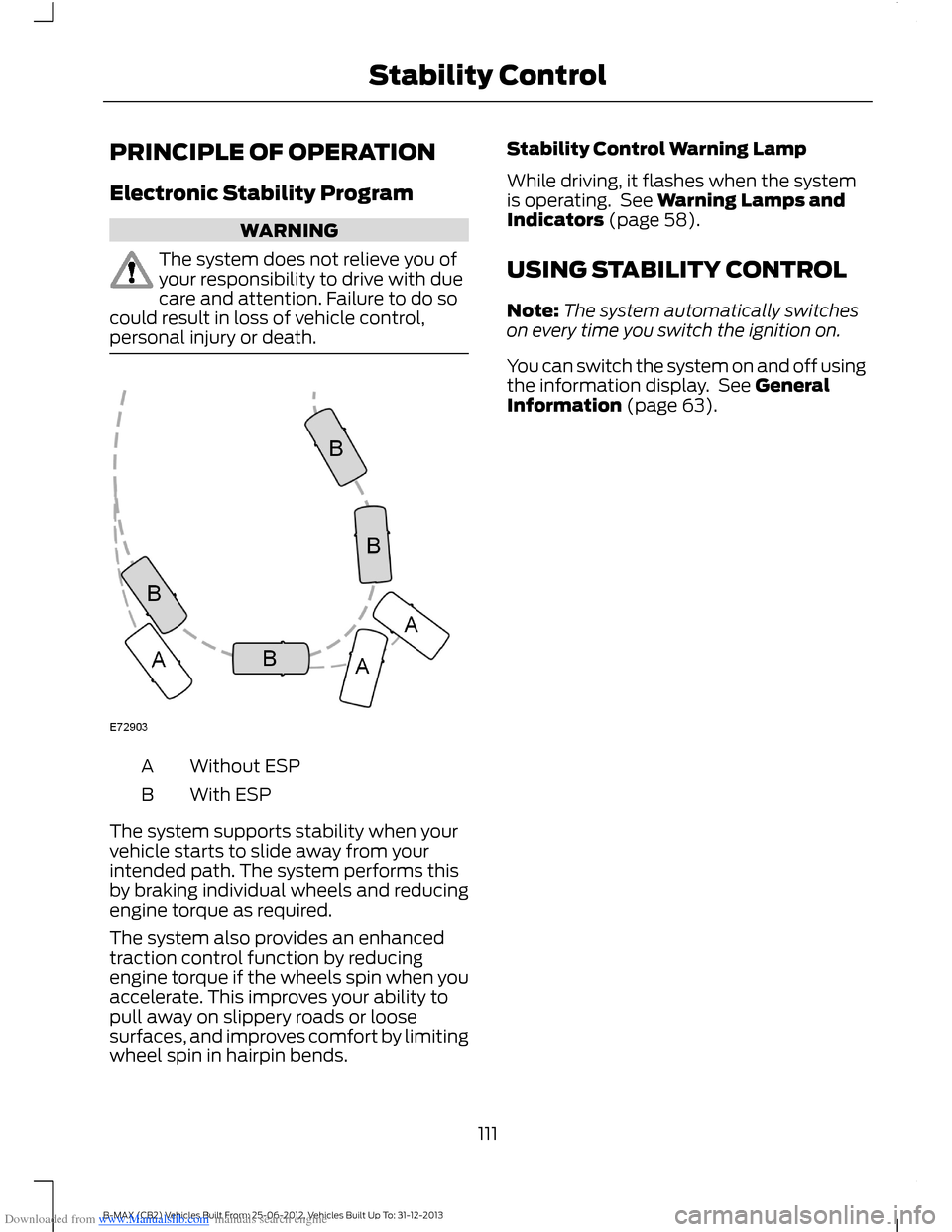
Without ESPA
With ESPB
The system supports stability when yourvehicle starts to slide away from yourintended path. The system performs thisby braking individual wheels and reducingengine torque as required.
The system also provides an enhancedtraction control function by reducingengine torque if the wheels spin when youaccelerate. This improves your ability topull away on slippery roads or loosesurfaces, and improves comfort by limitingwheel spin in hairpin bends.
Stability Control Warning Lamp
While driving, it flashes when the systemis operating. See Warning Lamps andIndicators (page 58).
USING STABILITY CONTROL
Note:The system automatically switcheson every time you switch the ignition on.
You can switch the system on and off usingthe information display. See GeneralInformation (page 63).
111B-MAX (CB2) Vehicles Built From: 25-06-2012, Vehicles Built Up To: 31-12-2013Stability Control
Page 114 of 298
Downloaded from www.Manualslib.com manuals search engine PRINCIPLE OF OPERATION
WARNINGS
The system does not relieve you ofyour responsibility to drive with duecare and attention.
If your vehicles has a non-Fordapproved trailer tow module thesystem may not correctly detectobjects.
The sensors may not detect objectsin heavy rain or other conditions thatcause disruptive reflections.
The sensors may not detect objectswith surfaces that absorb ultrasonicwaves.
The system does not detect objectsthat are moving away from yourvehicle. They will only be detectedshortly after they start to move towardyour vehicle.
Take particular care when reversingwith a tow ball arm or a rear fittedaccessory. For example, a bicyclecarrier. The rear parking aid will onlyindicate the approximate distance fromthe rear bumper to an object.
If you use a high pressure spray towash your vehicle, only spray thesensors briefly from a distance notless than eight inches (20 centimeters).
Note:If your vehicle has a tow ball arm, thesystem is turned off automatically whentrailer lamps (or lighting boards) areconnected to the 13-pin socket through aFord approved trailer tow module.
Note:Keep the sensors free from dirt, iceor snow. Do not clean with sharp objects.
Note:The system may emit false alerts ifit detects a signal using the same frequencyas the sensors or if your vehicle is fullyloaded.
Note:The outer sensors may detect theside walls of a garage. If the distancebetween the outer sensors and the side wallremains constant for three seconds, thealert will turn off. As you continue the innersensors will detect objects directly behindyour vehicle.
PARKING AID
WARNINGS
Sensing is only an aid to detect someobjects when moving forward orbackward at low speeds. Trafficcontrol systems, inclement weather or anexternal motor and fan can affect thesensors; this may include reducedperformance or false activation. To helpavoid personal injury you must read andunderstand the limitations of the systemdetailed in this section.
The parking aid system may notprevent contact with small or movingobjects that are close to the ground.The parking aid system gives an audiblewarning when it detects a large objecthelping to avoid damage to your vehicle.To help avoid personal injury you must takecare when using the parking aid system.
Note:Some add-on equipment can causereduced performance or false activation.For example, large trailer hitches, bike orsurfboard racks.
Note:The parking aid system sensors mustbe kept clean and free from snow or ice toavoid reduced performance or falseactivation. Do not clean the sensors withsharp objects.
Note:If the parking aid sensors aremisaligned due to vehicle bumper damageit will cause reduced performance or falseactivation.
112B-MAX (CB2) Vehicles Built From: 25-06-2012, Vehicles Built Up To: 31-12-2013Parking Aids
Page 115 of 298
Downloaded from www.Manualslib.com manuals search engine The parking aid system gives an audiblewarning and reduces the radio volumewhen it detects a large object within alimited range of your vehicle’s bumpers.
Note:When the parking aid system nolonger detects a large object the radiovolume will return to the previous level.
Rear Sensing System
The rear parking aid sensors turn onautomatically when you move thetransmission selector lever to R (reverse)and your vehicle is moving at a speed ofless than 3 mph (5 km/h). Moving yourvehicle closer to a large object will increasethe audible warning repeat rate. When theobject is less than 12 inches (30centimeters) from the center of yourvehicle’s rear bumper the audible warningwill sound continuously. If the object ismore than 12 inches (30 centimeters) fromthe side of your vehicle’s rear bumper theaudible warning will sound for threeseconds. If the object is less than 12 inches(30 centimeters) from the side of yourvehicle’s rear bumper the audible warningwill sound continuously.
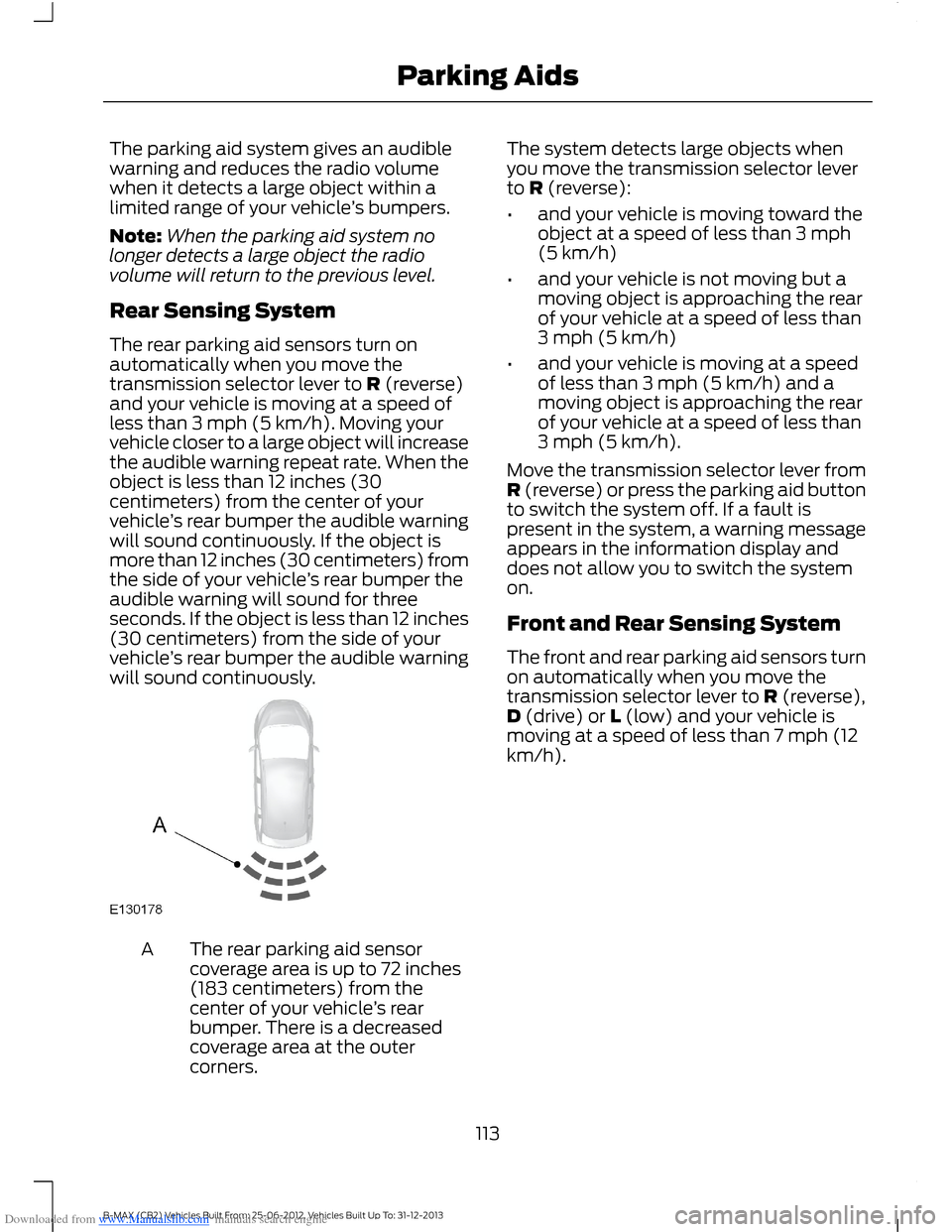
The rear parking aid sensorcoverage area is up to 72 inches(183 centimeters) from thecenter of your vehicle’s rearbumper. There is a decreasedcoverage area at the outercorners.
A
The system detects large objects whenyou move the transmission selector leverto R (reverse):
•and your vehicle is moving toward theobject at a speed of less than 3 mph(5 km/h)
•and your vehicle is not moving but amoving object is approaching the rearof your vehicle at a speed of less than3 mph (5 km/h)
•and your vehicle is moving at a speedof less than 3 mph (5 km/h) and amoving object is approaching the rearof your vehicle at a speed of less than3 mph (5 km/h).
Move the transmission selector lever fromR (reverse) or press the parking aid buttonto switch the system off. If a fault ispresent in the system, a warning messageappears in the information display anddoes not allow you to switch the systemon.
Front and Rear Sensing System
The front and rear parking aid sensors turnon automatically when you move thetransmission selector lever to R (reverse),D (drive) or L (low) and your vehicle ismoving at a speed of less than 7 mph (12km/h).
113B-MAX (CB2) Vehicles Built From: 25-06-2012, Vehicles Built Up To: 31-12-2013Parking Aids
Page 116 of 298
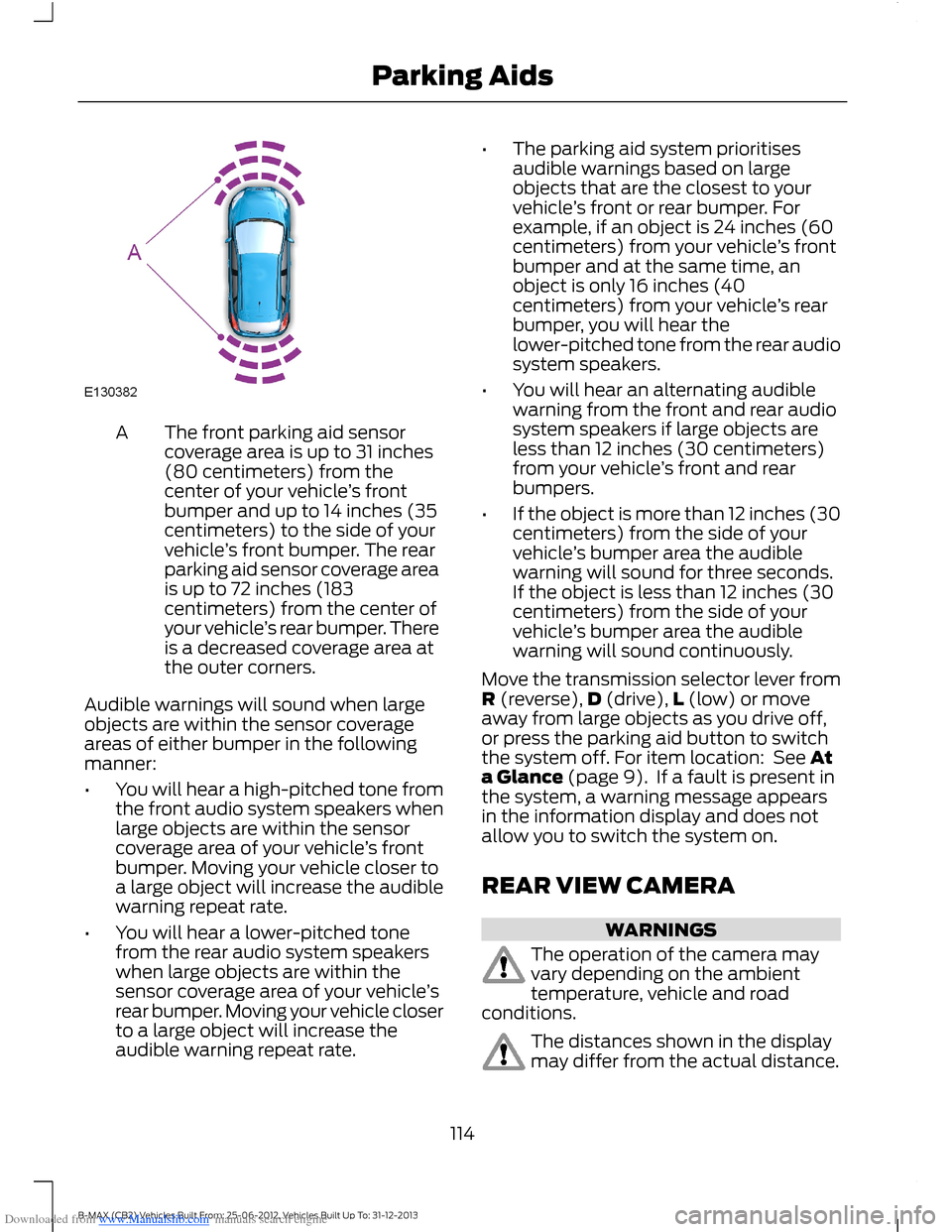
Downloaded from www.Manualslib.com manuals search engine The front parking aid sensorcoverage area is up to 31 inches(80 centimeters) from thecenter of your vehicle’s frontbumper and up to 14 inches (35centimeters) to the side of your
A
vehicle’s front bumper. The rearparking aid sensor coverage areais up to 72 inches (183centimeters) from the center ofyour vehicle’s rear bumper. Thereis a decreased coverage area atthe outer corners.
Audible warnings will sound when largeobjects are within the sensor coverageareas of either bumper in the followingmanner:
•You will hear a high-pitched tone fromthe front audio system speakers whenlarge objects are within the sensorcoverage area of your vehicle’s frontbumper. Moving your vehicle closer toa large object will increase the audiblewarning repeat rate.
•You will hear a lower-pitched tonefrom the rear audio system speakerswhen large objects are within thesensor coverage area of your vehicle’srear bumper. Moving your vehicle closerto a large object will increase theaudible warning repeat rate.
•The parking aid system prioritisesaudible warnings based on largeobjects that are the closest to yourvehicle’s front or rear bumper. Forexample, if an object is 24 inches (60centimeters) from your vehicle’s frontbumper and at the same time, anobject is only 16 inches (40centimeters) from your vehicle’s rearbumper, you will hear thelower-pitched tone from the rear audiosystem speakers.
•You will hear an alternating audiblewarning from the front and rear audiosystem speakers if large objects areless than 12 inches (30 centimeters)from your vehicle’s front and rearbumpers.
•If the object is more than 12 inches (30centimeters) from the side of yourvehicle’s bumper area the audiblewarning will sound for three seconds.If the object is less than 12 inches (30centimeters) from the side of yourvehicle’s bumper area the audiblewarning will sound continuously.
Move the transmission selector lever fromR (reverse),D (drive),L (low) or moveaway from large objects as you drive off,or press the parking aid button to switchthe system off. For item location: See Ata Glance (page 9). If a fault is present inthe system, a warning message appearsin the information display and does notallow you to switch the system on.
REAR VIEW CAMERA
WARNINGS
The operation of the camera mayvary depending on the ambienttemperature, vehicle and roadconditions.
The distances shown in the displaymay differ from the actual distance.
114B-MAX (CB2) Vehicles Built From: 25-06-2012, Vehicles Built Up To: 31-12-2013Parking Aids
Page 117 of 298
Downloaded from www.Manualslib.com manuals search engine WARNINGS
Do not place objects in front of thecamera.
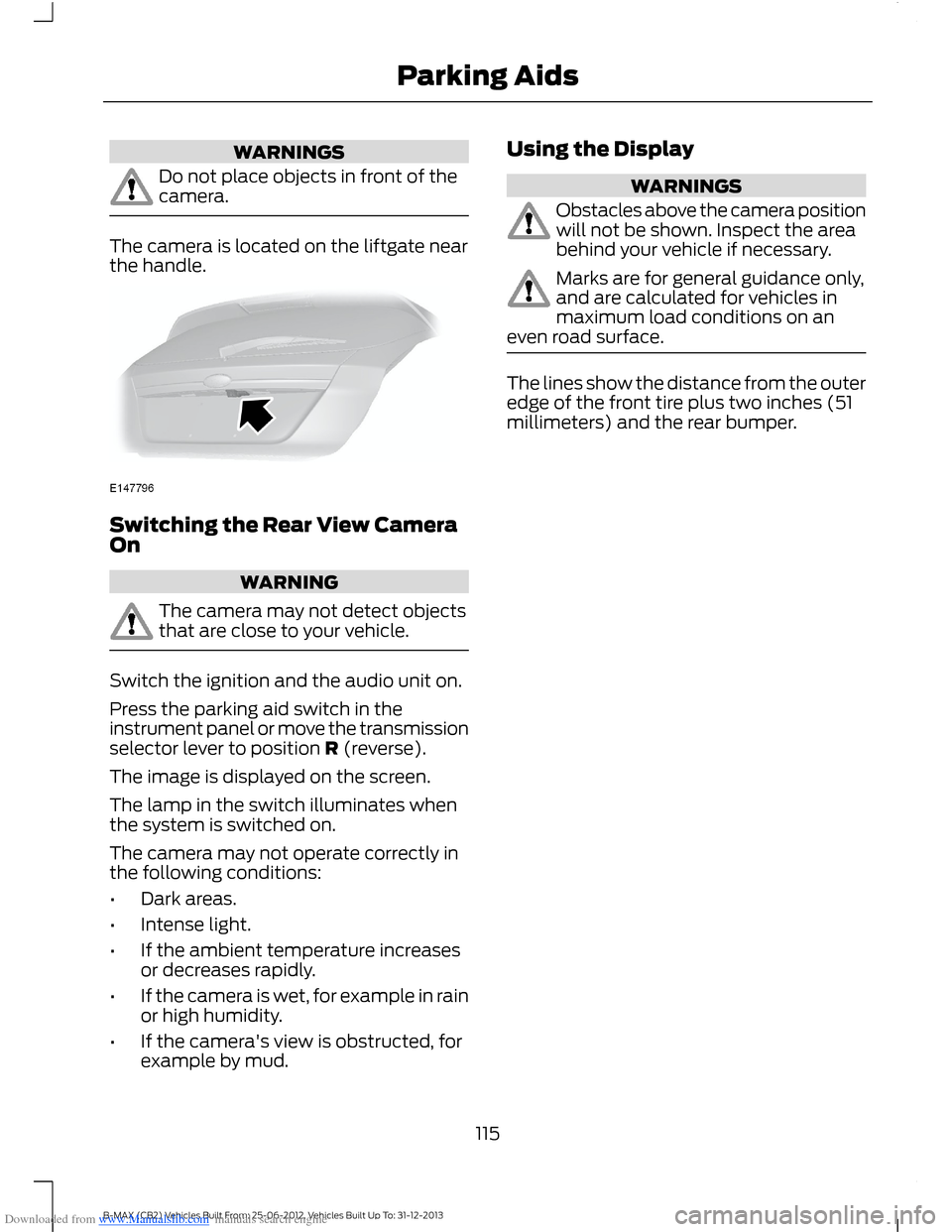
The camera is located on the liftgate nearthe handle.
Switching the Rear View CameraOn
WARNING
The camera may not detect objectsthat are close to your vehicle.
Switch the ignition and the audio unit on.
Press the parking aid switch in theinstrument panel or move the transmissionselector lever to position R (reverse).
The image is displayed on the screen.
The lamp in the switch illuminates whenthe system is switched on.
The camera may not operate correctly inthe following conditions:
•Dark areas.
•Intense light.
•If the ambient temperature increasesor decreases rapidly.
•If the camera is wet, for example in rainor high humidity.
•If the camera's view is obstructed, forexample by mud.
Using the Display
WARNINGS
Obstacles above the camera positionwill not be shown. Inspect the areabehind your vehicle if necessary.
Marks are for general guidance only,and are calculated for vehicles inmaximum load conditions on aneven road surface.
The lines show the distance from the outeredge of the front tire plus two inches (51millimeters) and the rear bumper.
115B-MAX (CB2) Vehicles Built From: 25-06-2012, Vehicles Built Up To: 31-12-2013Parking Aids
Page 119 of 298
Downloaded from www.Manualslib.com manuals search engine PRINCIPLE OF OPERATION
WARNING
The system does not relieve you ofyour responsibility to drive with duecare and attention.
Cruise control allows you to control yourspeed using the switches on the steeringwheel. You can use cruise control whenyou exceed approximately 20 mph (30km/h).
USING CRUISE CONTROL
WARNINGS
Do not use cruise control in heavytraffic, on winding roads or when theroad surface is slippery. This couldresult in loss of vehicle control, seriousinjury or death.
When you are going downhill, yourspeed may increase above the setspeed. The system will not apply thebrakes. Change down a gear to assist thesystem in maintaining the set speed.Failure to do so could result in loss ofvehicle control, serious injury or death.
Note:Cruise control will disengage if yourvehicle speed decreases more than 10 mph(16 km/h) below your set speed whiledriving uphill.
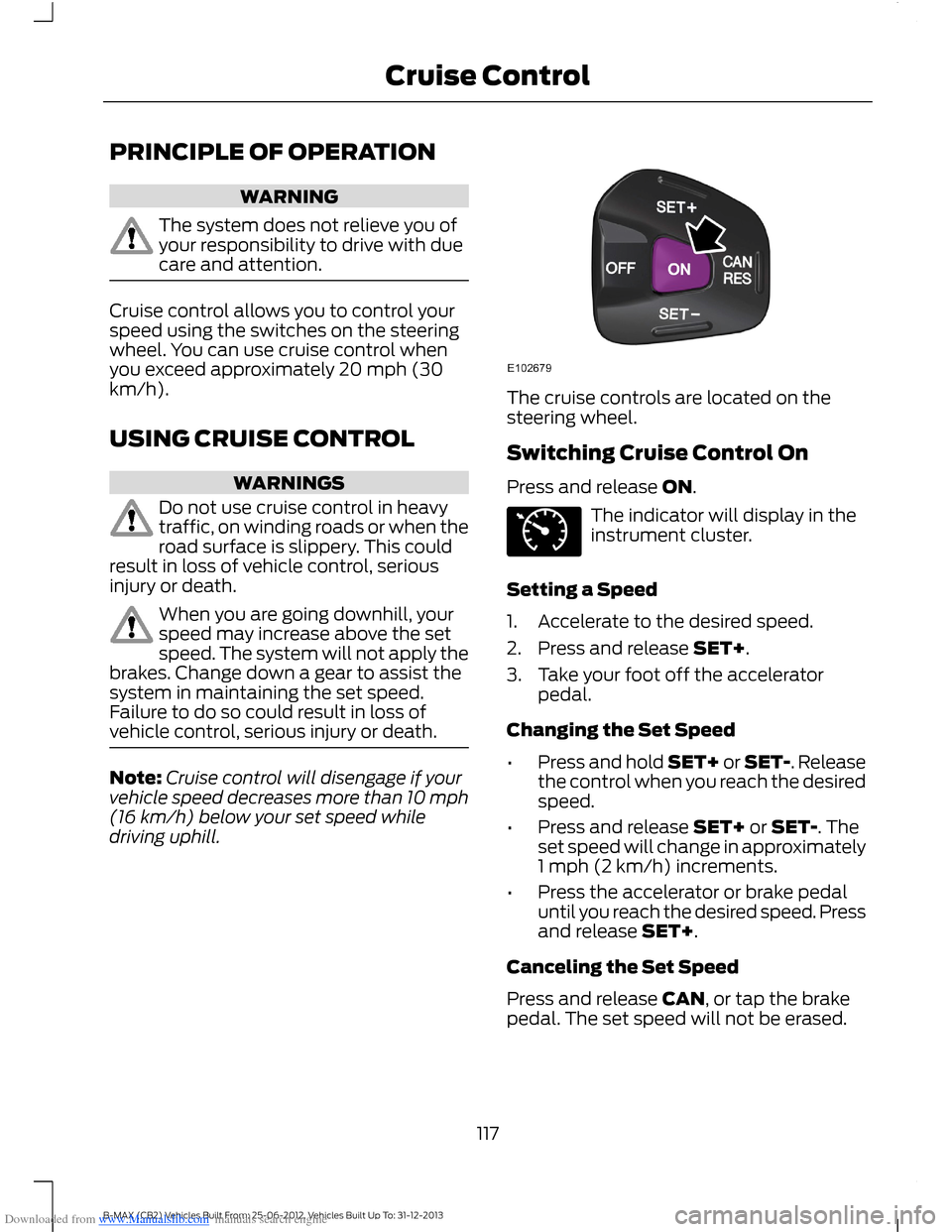
The cruise controls are located on thesteering wheel.
Switching Cruise Control On
Press and release ON.
The indicator will display in theinstrument cluster.
Setting a Speed
1.Accelerate to the desired speed.
2.Press and release SET+.
3.Take your foot off the acceleratorpedal.
Changing the Set Speed
•Press and hold SET+ or SET-. Releasethe control when you reach the desiredspeed.
•Press and release SET+ or SET-. Theset speed will change in approximately1 mph (2 km/h) increments.
•Press the accelerator or brake pedaluntil you reach the desired speed. Pressand release SET+.
Canceling the Set Speed
Press and release CAN, or tap the brakepedal. The set speed will not be erased.
117B-MAX (CB2) Vehicles Built From: 25-06-2012, Vehicles Built Up To: 31-12-2013Cruise Control
Page 121 of 298
Downloaded from www.Manualslib.com manuals search engine ACTIVE CITY STOP
General Information
WARNINGS
The system does not relieve you ofyour responsibility to drive with duecare and attention.
At all times you are responsible forcontrolling your vehicle, supervisingthe system and intervening ifrequired.
Never look directly into the sensorwith any type of object. There is a riskof eye injury.
If the sensor becomes blocked thesystem may not function.
To achieve full system performance,you must bed the braking system in.See Breaking-In (page 130).
The system performance may varydepending on your vehicle and roadconditions.
The system will not react to vehiclesdriving in a different direction.
The system will not react to bicycles,motorcycles, people or animals.
When the ignition is on the sensorwill constantly transmit a laserbeam.
The system will not operate duringharsh acceleration and steering.
In cold and severe weatherconditions the system may notfunction. Rain, snow, spray and icecan all influence the sensor.
Do not carry out windshield repairsin the immediate area surroundingthe sensor.
WARNINGS
If you install a windshield notapproved by us, the system may notfunction correctly.
If the engine stops after the systemhas been switched on, the hazardwarning flashers will turn on.
The system may not function whendriving around sharp curves.
Note:Keep the windshield free fromobstructions such as bird droppings, insects,snow or ice.
Note:Keep the hood free of ice and snow,otherwise the system may not functioncorrectly.
A sensor is mounted behind the interiorrear view mirror. It continuously monitorsconditions to decide when to intervene.
The system is designed to help you reducelow speed collisions into the rear ofanother vehicle. It will also help you reducethe impact damage or potentially avoidthe collision completely.
The system operates at speeds belowapproximately 19 mph (30 km/h) byapplying the brakes when the sensordetects that a collision is likely.
You must depress the brake pedal toobtain full braking force.
When the system is braking or hasautomatically applied the brakes, amessage will be shown in the informationdisplay.
Using Active City Stop
Switching the System Off and On
Note:The system automatically turns onevery time you switch the ignition on.
119B-MAX (CB2) Vehicles Built From: 25-06-2012, Vehicles Built Up To: 31-12-2013Driving Aids
Page 122 of 298
Downloaded from www.Manualslib.com manuals search engine In certain situations it is advisable todisable the system, for example:
•Driving off road when objects maycover the windshield.
•Driving through a car wash facility.
You can switch the system off and on usingthe information display. See GeneralInformation (page 63).
Active City Stop Relearning Procedure
Note:When you disconnect the battery, thesystem will go through a relearningprocedure. During this time the system willnot be available.
You must drive your vehicle above 31mph(50 km/h) in a straight line for theprocedure to complete. This proceduremay take several minutes.
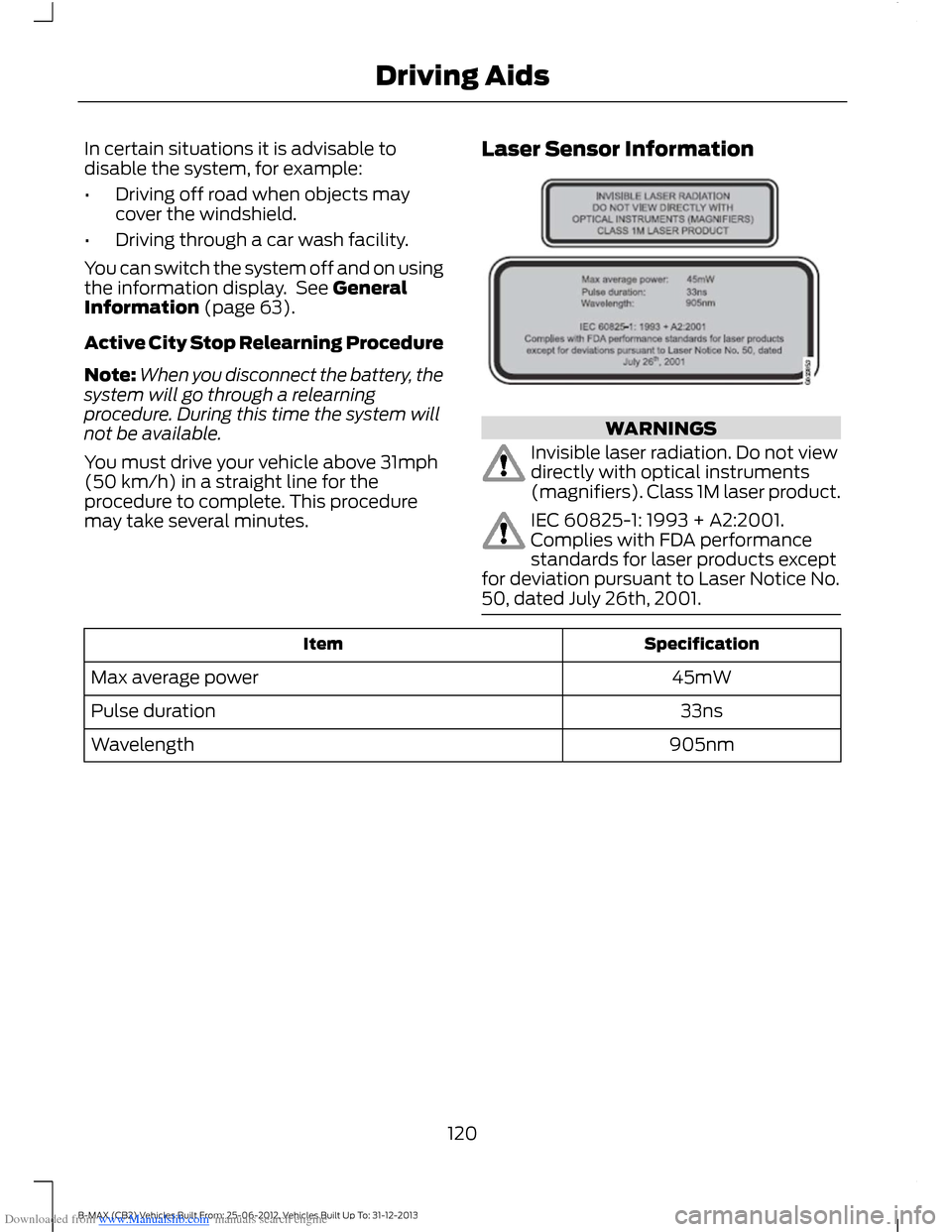
Laser Sensor Information
WARNINGS
Invisible laser radiation. Do not viewdirectly with optical instruments(magnifiers). Class 1M laser product.
IEC 60825-1: 1993 + A2:2001.Complies with FDA performancestandards for laser products exceptfor deviation pursuant to Laser Notice No.50, dated July 26th, 2001.
SpecificationItem
45mWMax average power
33nsPulse duration
905nmWavelength
120B-MAX (CB2) Vehicles Built From: 25-06-2012, Vehicles Built Up To: 31-12-2013Driving Aids
Page 123 of 298
Downloaded from www.Manualslib.com manuals search engine GENERAL INFORMATION
WARNINGS
Use load securing straps to anapproved standard, e.g. DIN.
Make sure that you secure all looseitems properly.
Place luggage and other loads as lowand as far forward as possible withinthe luggage or loadspace.
Do not drive with the liftgate or reardoor open. Exhaust fumes may enteryour vehicle.
Do not exceed the maximum frontand rear axle loads for your vehicle.See Vehicle Identification Plate(page 186).
Do not allow items to contact therear windows.
Note:When loading long objects in to yourvehicle, for example pipes, timber orfurniture be careful not to damage theinterior trim.
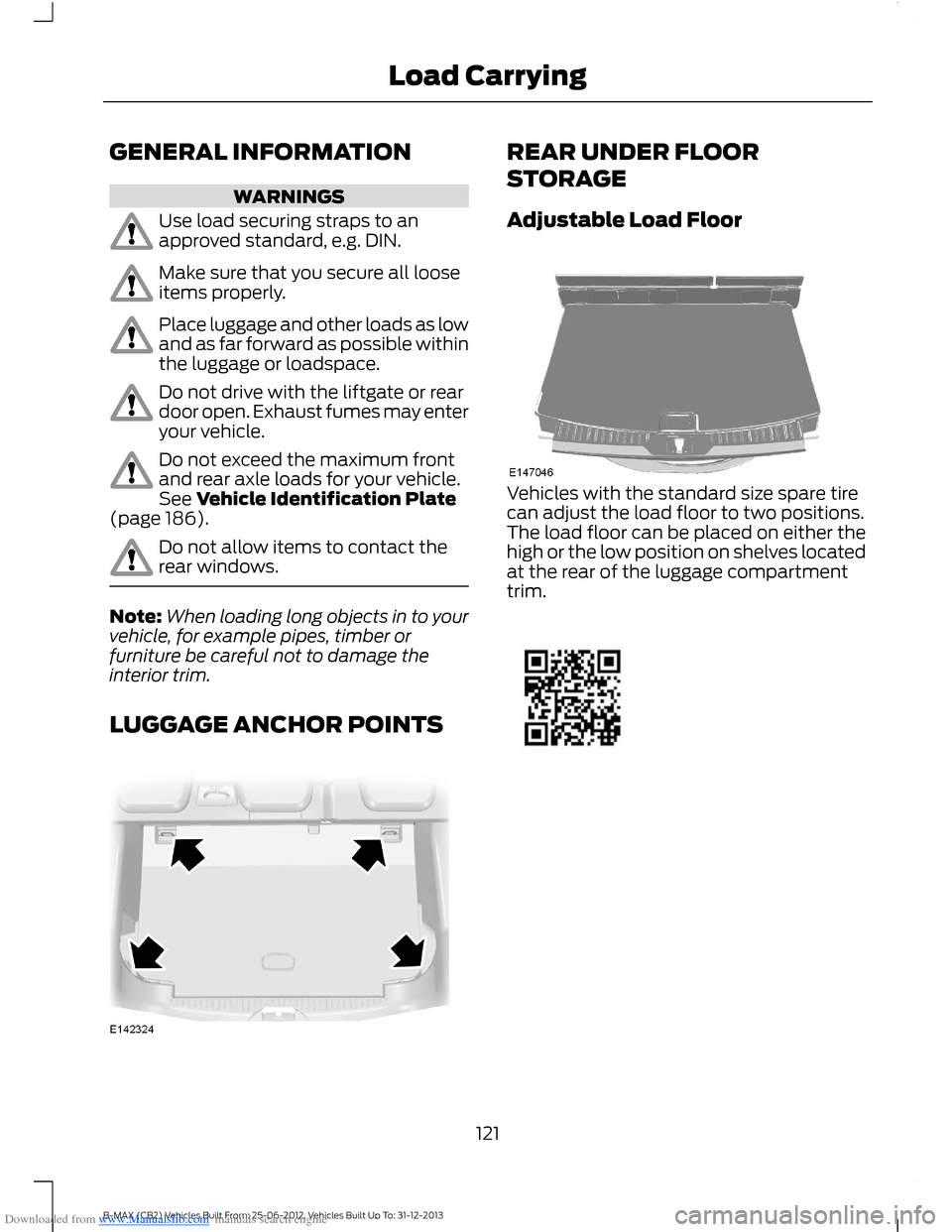
LUGGAGE ANCHOR POINTS
REAR UNDER FLOOR
STORAGE
Adjustable Load Floor
Vehicles with the standard size spare tirecan adjust the load floor to two positions.The load floor can be placed on either thehigh or the low position on shelves locatedat the rear of the luggage compartmenttrim.
121B-MAX (CB2) Vehicles Built From: 25-06-2012, Vehicles Built Up To: 31-12-2013Load Carrying