page 1 FORD BRONCO 2022 Owners Manual
[x] Cancel search | Manufacturer: FORD, Model Year: 2022, Model line: BRONCO, Model: FORD BRONCO 2022Pages: 562, PDF Size: 73 MB
Page 391 of 562
CHECKING THE TIRE
PRESSURES
Safe operation of your vehiclerequires that your tires areproperly inflated. Every day beforeyou drive, check your tires.
At least once a month and beforelong trips, inspect each tire andcheck the tire pressure with a tiregauge. Inflate all tires to therecommended inflation pressure.See Inflating the Tires (page387).
INFLATING THE TIRES
WARNING: Under-inflationis the most common cause oftire failures and may result insevere tire cracking, treadseparation or blowout, withunexpected loss of vehiclecontrol and increased risk ofinjury. Under-inflation increasessidewall flexing and rollingresistance, resulting in heatbuildup and internal damage tothe tire. It also may result inunnecessary tire stress, irregularwear, loss of vehicle control andaccidents. A tire can lose up tohalf of its air pressure and notappear to be flat!
WARNING: Do not use thetire pressure displayed in theinformation display as a tirepressure gauge. Failure to followthis instruction could result inpersonal injury or death.
Use the recommended coldinflation pressure for optimum tireperformance and wear.Under-inflation or over-inflationmay cause uneven treadwearpatterns.
Inflate your tires to therecommended inflation pressureeven if it is less than the maximuminflation pressure informationfound on the tire. You can find thetire label with the recommendedtire inflation pressure next to thetire size on the B-Pillar or the edgeof the driver door.
The recommended tire inflationpressure is also found on theSafety Compliance CertificationLabel, affixed to either the doorhinge pillar, door-latch post, or thedoor edge that meets thedoor-latch on the B-pillar, or onthe edge of the driver door.
Failure to follow the tire pressurerecommendations can causeuneven treadwear patterns andadversely affect the way yourvehicle handles.
387
2022 Bronco (TG1) Canada/United States of America, enUSA, Edition date: 202109, First-PrintingTire Care
Page 416 of 562
CLUTCH FLUID CAPACITY AND
SPECIFICATION
The clutch and brake systems share thesame fluid reservoir. See Brake FluidSpecification (page 412).
AUTOMATIC TRANSMISSION
FLUID CAPACITY AND
SPECIFICATION
Use fluid that meets the definedspecification and viscosity grade.
If you do not use fluid that meets thedefined specification and viscosity grade,it could result in:
•Component damage that your vehiclewarranty does not cover.
•Reduced vehicle performance.
•Reduced fuel economy.
Note:Only use MERCON ULV transmissionfluid for automatic transmissions thatrequire MERCON ULV transmission fluid.The use of any other fluid could causetransmission damage.
Capacities
QuantityVariant
13.1 qt (12.4 L)1All.
1 Approximate dry fill capacity. Actual amount could vary during fluid changes.
Materials
SpecificationName
WSS-M2C949-A, MERCON® ULVMotorcraft® MERCON® ULV Automatic Transmis-sion Fluid(U.S.)Motorcraft® MERCON® ULV Automatic Transmis-sion Fluid / MERCON® ULV huile pour boîtes auto-matique Motorcraft®(Canada)XT-12-QULV(U.S. & Canada)
BRAKE FLUID SPECIFICATION
Use fluid that meets the definedspecification and viscosity grade.
If you do not use fluid that meets thedefined specification and viscosity grade,it could result in:
•Component damage that your vehiclewarranty does not cover.
•Reduced brake performance.
Note:We recommend you use Dot 4 LowViscosity (LV) High Performance Brake Fluidmeeting WSS-M6C65-A2 specifications orISO 4925 Class 6 standards. If you use anyfluid other than the recommended fluid, itcould cause reduced brake performanceand not meet our performance standards.Keep brake fluid clean and dry.Contamination with dirt, water, petroleumproducts or other materials could result inbrake system damage and possible failure.
412
2022 Bronco (TG1) Canada/United States of America, enUSA, Edition date: 202109, First-PrintingCapacities and Specifications
Page 433 of 562
AUDIO SYSTEM – TROUBLESHOOTING
AUDIO SYSTEM – INFORMATION MESSAGES
Satellite Radio Troubleshooting
Recommended ActionPotential EffectsError Message
Internet connectivity isturned off. See ConnectedVehicle (page 417).
Internet streaming and OnDemand shows are unavail-able and some SiriusXMfeatures are disabled.
Connectivity Disabled
SYNC will attempt toconnect. See SatelliteRadio Limitations (page426). Switch to a satelliteconnection for the currentchannel if the option isavailable.
Audio system may mute."Switch to Satellite" buttonmay be displayed on theSiriusXM audio screen if thechannel is also available viasatellite.
No Internet
Antenna may be obstructedor satellite reception is weakin your location. See Satel-lite Radio Limitations(page 426). Switch to aninternet connection for thecurrent channel if the optionis available.
Audio system may mute.“Switch to Internet” buttonmay be displayed on theSiriusXM audio screen if thechannel is also available viastreaming.
No Satellite Signal
Allow some time for audioto load or tune to a differentchannel.
Audio system may mutewhile audio attempts toload.
Slow Network Connection
A temporary update may bein progress. Allow some timebefore retrying to tune to thechannel. If issue persists, thechannel may no longer beavailable.
Audio system may mute.Radio may tune to adifferent channel.
Channel Unavailable
A temporary update may bein progress. Allow some timebefore retrying to play theepisode. If issue persists, theepisode may no longer beavailable.
Audio system may mute.Radio may tune to adifferent channel.
Episode Unavailable
429
2022 Bronco (TG1) Canada/United States of America, enUSA, Edition date: 202109, First-PrintingAudio System
Page 434 of 562
Retry action after some timeor tune to a differentchannel.
Audio system may mute.Radio may tune to adifferent channel.
Something went wrong
Your subscription hasexpired or you have not yetsubscribed for access to thelisted content. Navigate toSubscription under theSatellite Radio Settingsmenu. If you have an activesubscription which includesthe listed channel or contentand you see this error, youmay need to refresh yourradio. To refresh your Siri-usXM radio, visit www.siri-usxm.com/refresh in the US,or www.siriusxm.ca/refreshin Canada.You may need to provideyour SiriusXM Radio identific-ation number. SeeLocating the SatelliteRadio IdentificationNumber (page 427).
Cannot listen to selectedcontent. Content mayappear grayed out and somefeatures may be disabled.
Subscribe to Listen
430
2022 Bronco (TG1) Canada/United States of America, enUSA, Edition date: 202109, First-PrintingAudio System
Page 435 of 562
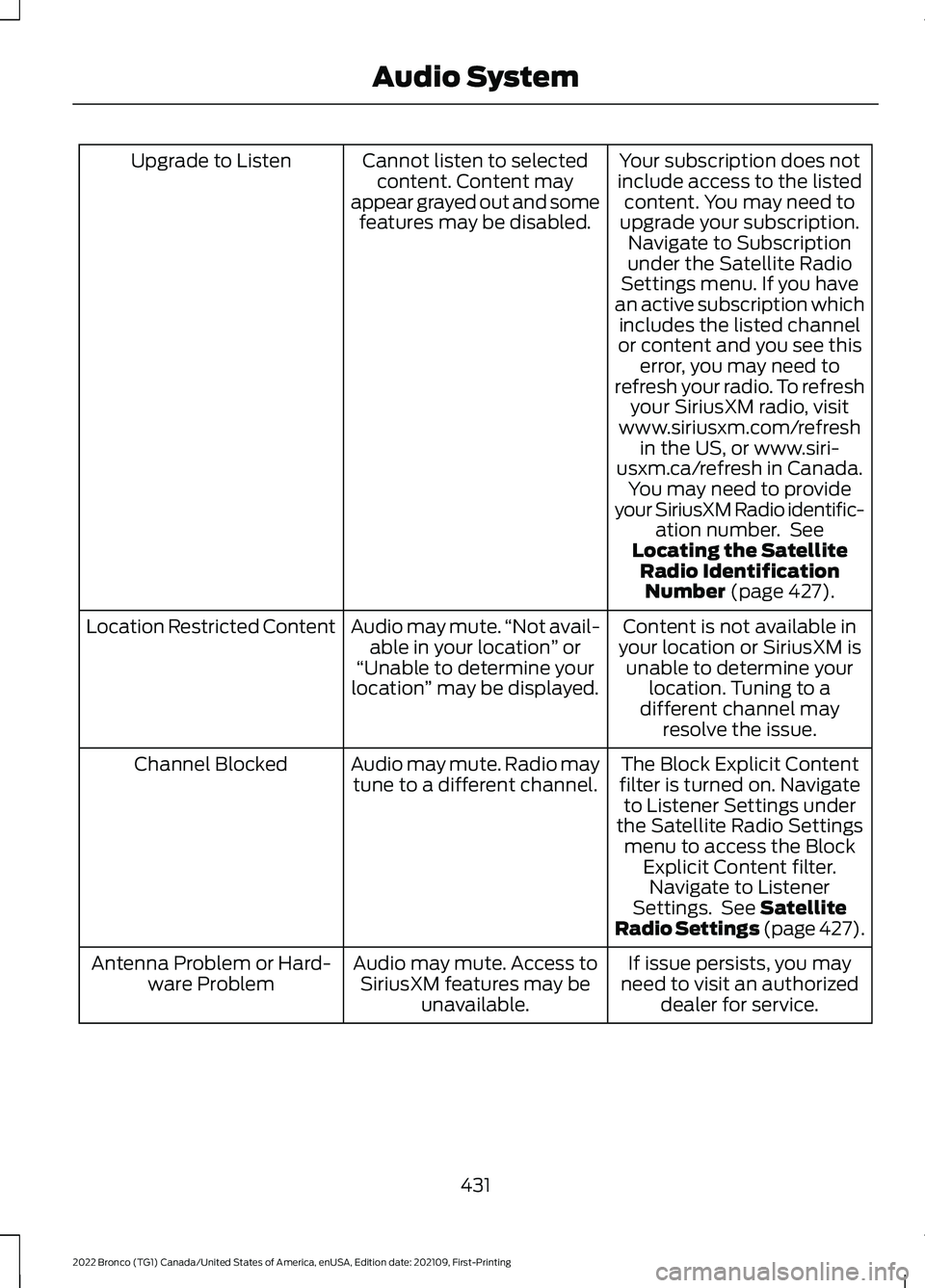
Your subscription does notinclude access to the listedcontent. You may need toupgrade your subscription.Navigate to Subscriptionunder the Satellite RadioSettings menu. If you havean active subscription whichincludes the listed channelor content and you see thiserror, you may need torefresh your radio. To refreshyour SiriusXM radio, visitwww.siriusxm.com/refreshin the US, or www.siri-usxm.ca/refresh in Canada.You may need to provideyour SiriusXM Radio identific-ation number. SeeLocating the SatelliteRadio IdentificationNumber (page 427).
Cannot listen to selectedcontent. Content mayappear grayed out and somefeatures may be disabled.
Upgrade to Listen
Content is not available inyour location or SiriusXM isunable to determine yourlocation. Tuning to adifferent channel mayresolve the issue.
Audio may mute.“Not avail-able in your location” or“Unable to determine yourlocation” may be displayed.
Location Restricted Content
The Block Explicit Contentfilter is turned on. Navigateto Listener Settings underthe Satellite Radio Settingsmenu to access the BlockExplicit Content filter.Navigate to ListenerSettings. See SatelliteRadio Settings (page 427).
Audio may mute. Radio maytune to a different channel.Channel Blocked
If issue persists, you mayneed to visit an authorizeddealer for service.
Audio may mute. Access toSiriusXM features may beunavailable.
Antenna Problem or Hard-ware Problem
431
2022 Bronco (TG1) Canada/United States of America, enUSA, Edition date: 202109, First-PrintingAudio System
Page 436 of 562
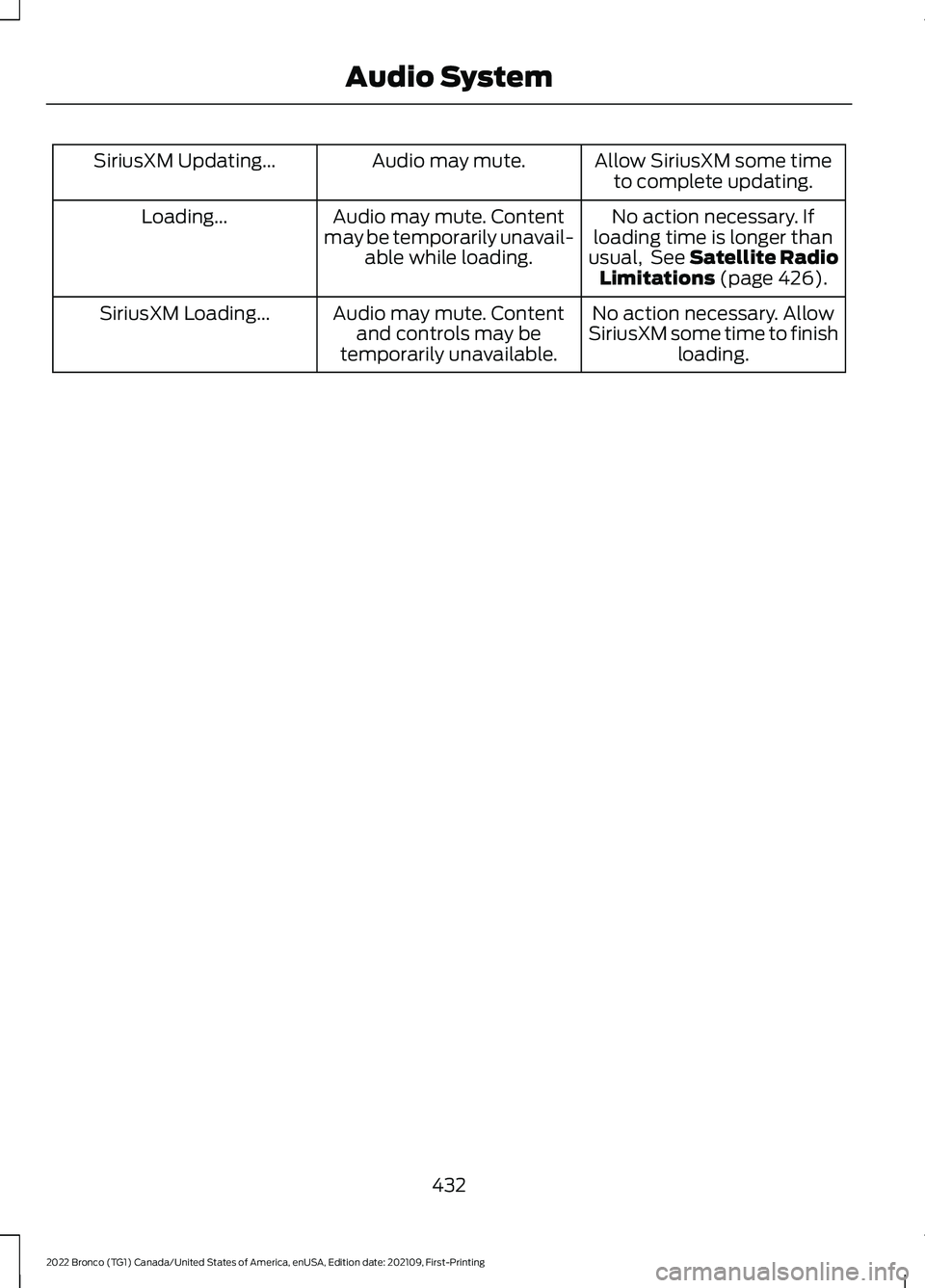
Allow SiriusXM some timeto complete updating.Audio may mute.SiriusXM Updating...
No action necessary. Ifloading time is longer thanusual, See Satellite RadioLimitations (page 426).
Audio may mute. Contentmay be temporarily unavail-able while loading.
Loading...
No action necessary. AllowSiriusXM some time to finishloading.
Audio may mute. Contentand controls may betemporarily unavailable.
SiriusXM Loading...
432
2022 Bronco (TG1) Canada/United States of America, enUSA, Edition date: 202109, First-PrintingAudio System
Page 440 of 562
WHAT IS VOICE INTERACTION
Voice Interaction allows you to controlvehicle features using conversationalrequests.
VOICE INTERACTION
EXAMPLES
Note:You may need to enable yourvehicle's modem to use certain voicecommands. See Enabling and Disablingthe Modem (page 417).
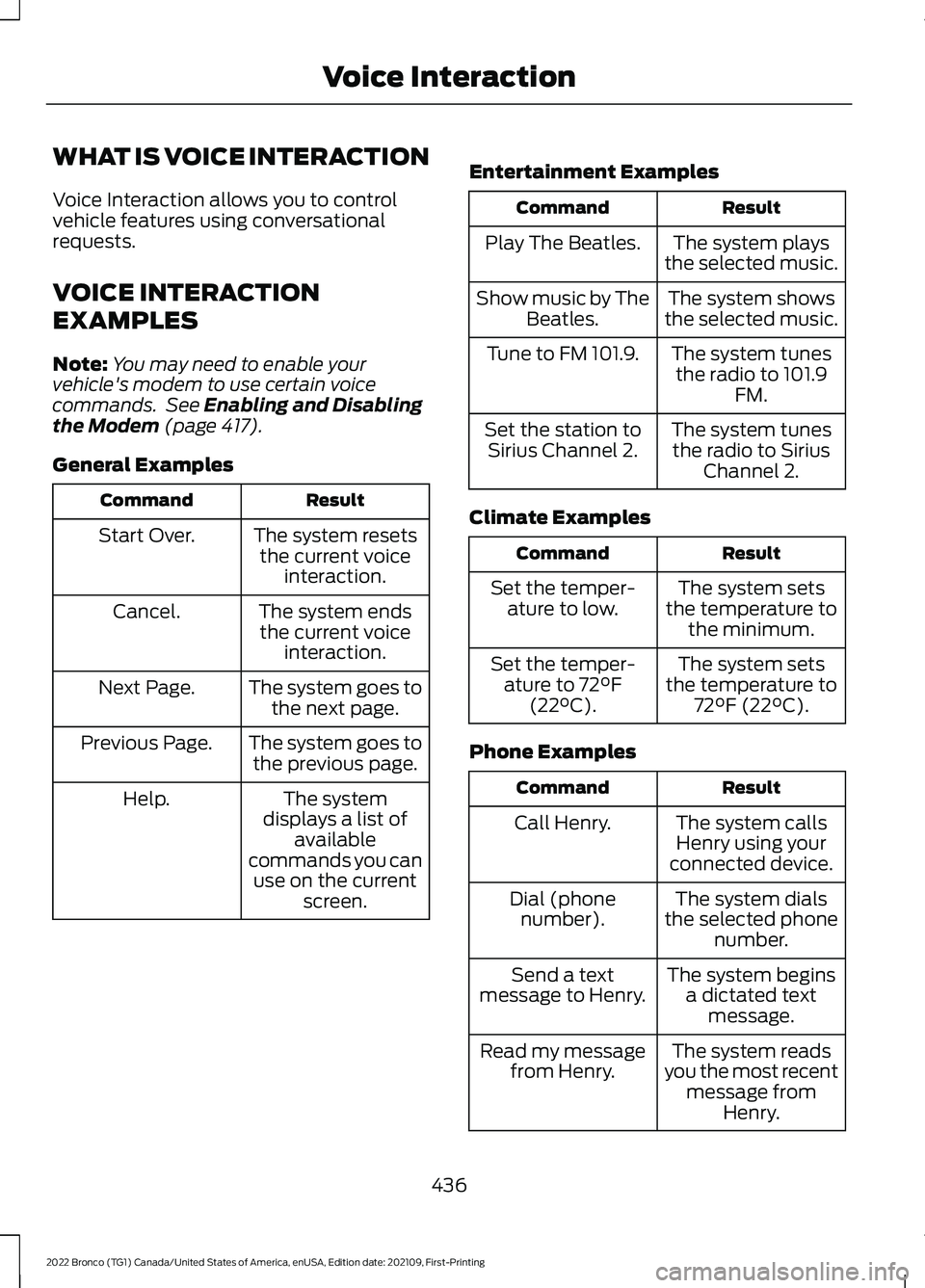
General Examples
ResultCommand
The system resetsthe current voiceinteraction.
Start Over.
The system endsthe current voiceinteraction.
Cancel.
The system goes tothe next page.Next Page.
The system goes tothe previous page.Previous Page.
The systemdisplays a list ofavailablecommands you canuse on the currentscreen.
Help.
Entertainment Examples
ResultCommand
The system playsthe selected music.Play The Beatles.
The system showsthe selected music.Show music by TheBeatles.
The system tunesthe radio to 101.9FM.
Tune to FM 101.9.
The system tunesthe radio to SiriusChannel 2.
Set the station toSirius Channel 2.
Climate Examples
ResultCommand
The system setsthe temperature tothe minimum.
Set the temper-ature to low.
The system setsthe temperature to72°F (22°C).
Set the temper-ature to 72°F(22°C).
Phone Examples
ResultCommand
The system callsHenry using yourconnected device.
Call Henry.
The system dialsthe selected phonenumber.
Dial (phonenumber).
The system beginsa dictated textmessage.
Send a textmessage to Henry.
The system readsyou the most recentmessage fromHenry.
Read my messagefrom Henry.
436
2022 Bronco (TG1) Canada/United States of America, enUSA, Edition date: 202109, First-PrintingVoice Interaction
Page 453 of 562
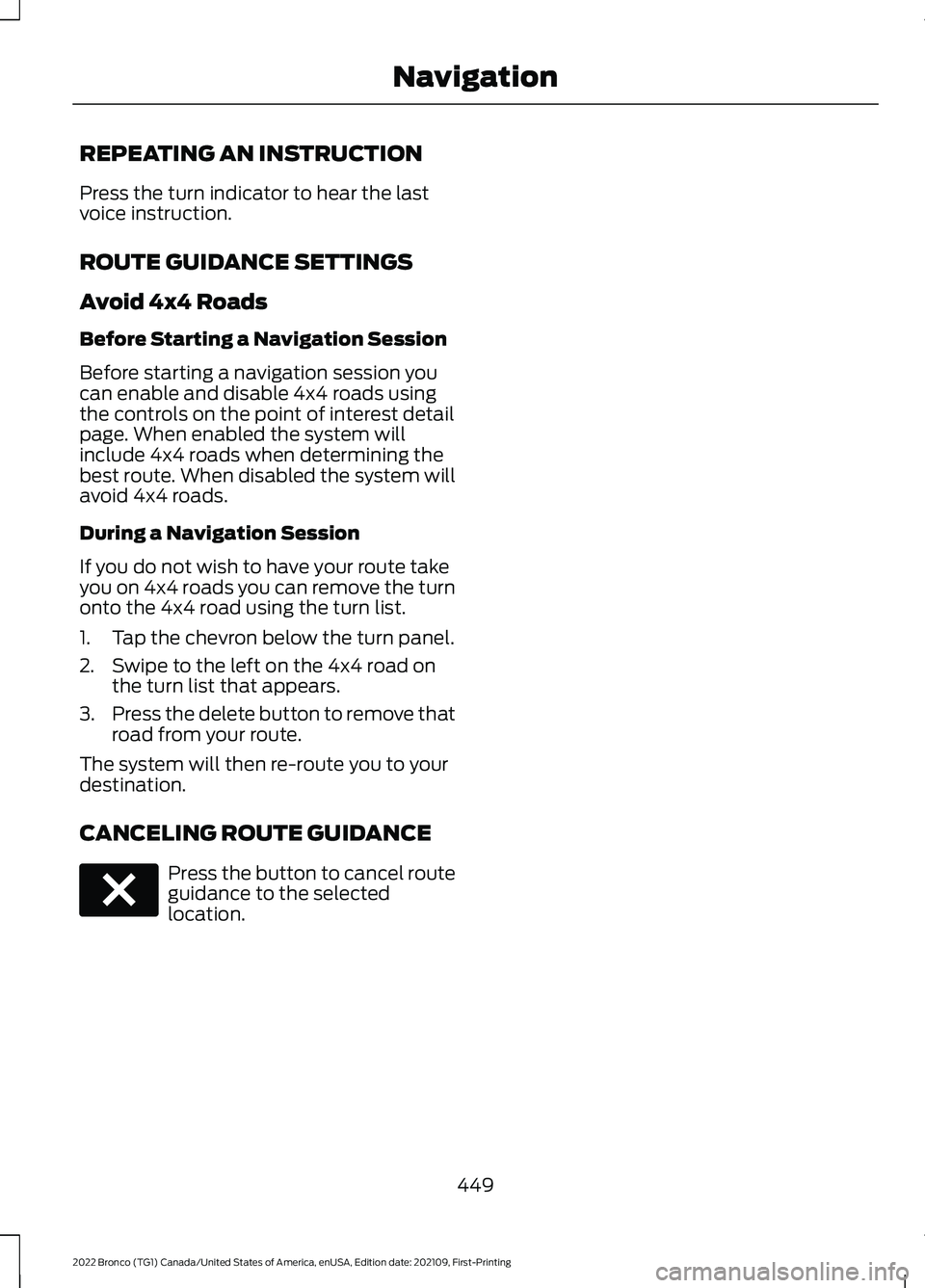
REPEATING AN INSTRUCTION
Press the turn indicator to hear the lastvoice instruction.
ROUTE GUIDANCE SETTINGS
Avoid 4x4 Roads
Before Starting a Navigation Session
Before starting a navigation session youcan enable and disable 4x4 roads usingthe controls on the point of interest detailpage. When enabled the system willinclude 4x4 roads when determining thebest route. When disabled the system willavoid 4x4 roads.
During a Navigation Session
If you do not wish to have your route takeyou on 4x4 roads you can remove the turnonto the 4x4 road using the turn list.
1.Tap the chevron below the turn panel.
2.Swipe to the left on the 4x4 road onthe turn list that appears.
3.Press the delete button to remove thatroad from your route.
The system will then re-route you to yourdestination.
CANCELING ROUTE GUIDANCE
Press the button to cancel routeguidance to the selectedlocation.
449
2022 Bronco (TG1) Canada/United States of America, enUSA, Edition date: 202109, First-PrintingNavigationE280804
Page 454 of 562
UPDATING THE VEHICLE
SYSTEMS WIRELESSLY
Over the air system updatesallow you to update your vehiclesystem software wirelessly. Tomake sure you receive all updates, set arecurring schedule and connect to Wi-Fi.Updates may take longer if not connectedto Wi-Fi, or may not download at all. SeeConnected Vehicle (page 417).
Over the Air System UpdateRequirements
Before updating, reference this list to makesure your vehicle is ready be updated. Ifthese requirements are not met during ascheduled update, the update will becanceled and you can reschedule.
•Your vehicle is not running.
•Your vehicle is stopped.
•Your vehicle is parked.
•The hazard indicators are switched off.
•The alarm is not sounding.
•The doors are closed.
•The parking lights are switched off.
•You are not pressing the brake pedal.
•An emergency call is not in progress.
•Your vehicle is not in limp mode.
Enabling Over the Air Updates
1.Press Settings on the touchscreen.
2.Press Software Update.
3.Switch Automatic Updates on or off.
Note:Over the air updates are enabled bydefault.
Note:If you do not want to receive over theair updates you can turn them off. You willnot be notified of new updates.
Scheduling an Update
Scheduling an update allows you to set aconvenient time for the update tocomplete. We recommend updatingovernight when your vehicle is not in use.Ensure Vehicle Connectivity and AutomaticUpdates are enabled. Once you completethese steps, your schedule will be savedfor future updates. As long as an update isnot in process you can adjust yourschedule.
Note:Some updates may be appliedoutside of your set schedule. Informationabout the unscheduled update appears onthe touchscreen after it is applied.
Using the Settings Menu
1.Press Settings on the touchscreen.
2.Press Software Update.
3.Press Schedule Updates.
4.Use the controls to set the time andday of the update.
5.Save the schedule.
Note:You can set the updates to occur atany time.
Using the Status Bar Icon
When an update is available, tapthe notification icon and followthe prompts on the screen.
Applying an Over the Air Update
You can see the progress of the update onthe touchscreen. An update cannot becanceled once it has been started.
450
2022 Bronco (TG1) Canada/United States of America, enUSA, Edition date: 202109, First-PrintingVehicle System UpdatesE327789 E327785
Page 459 of 562
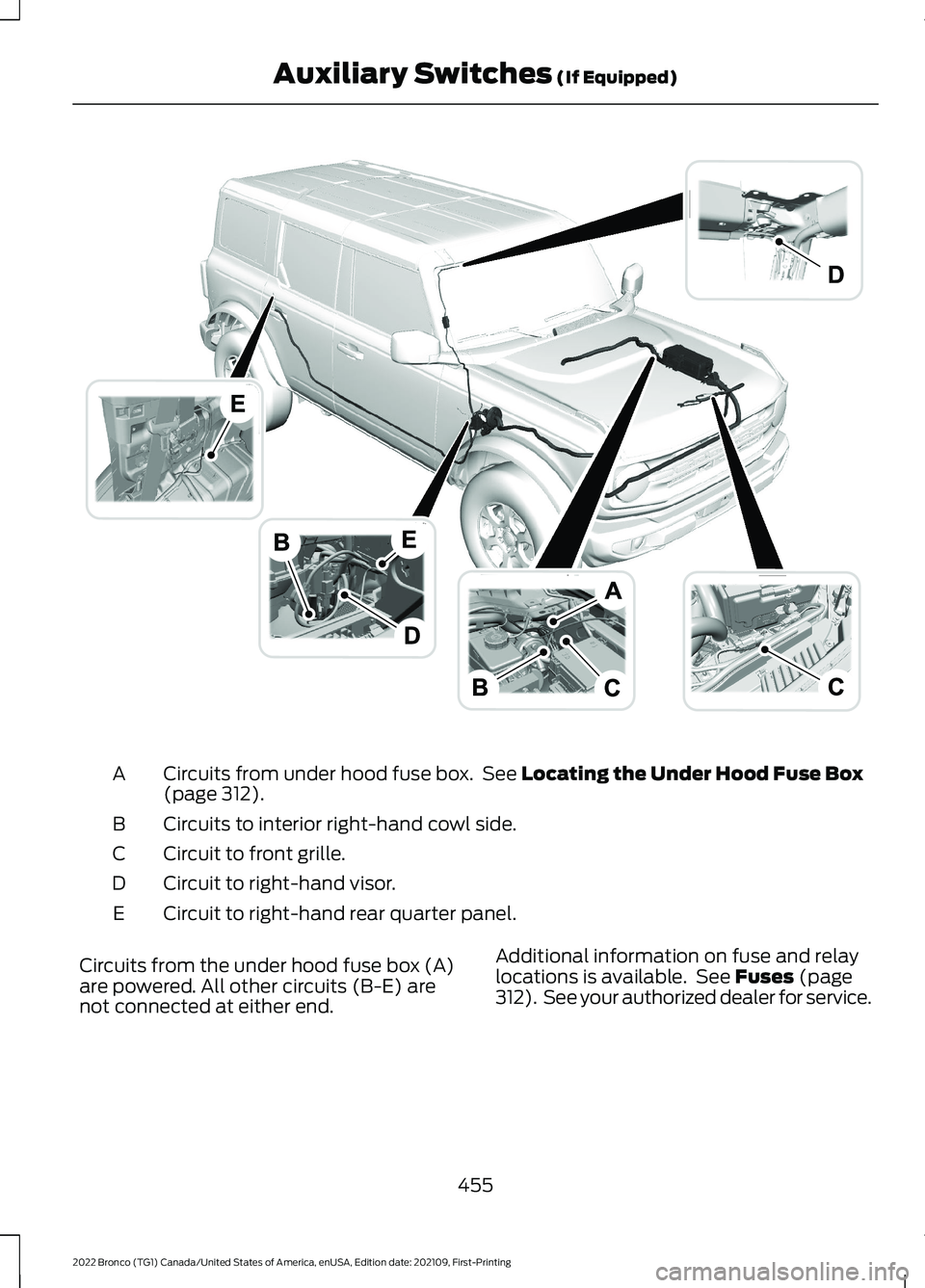
Circuits from under hood fuse box. See Locating the Under Hood Fuse Box(page 312).A
Circuits to interior right-hand cowl side.B
Circuit to front grille.C
Circuit to right-hand visor.D
Circuit to right-hand rear quarter panel.E
Circuits from the under hood fuse box (A)are powered. All other circuits (B-E) arenot connected at either end.
Additional information on fuse and relaylocations is available. See Fuses (page312). See your authorized dealer for service.
455
2022 Bronco (TG1) Canada/United States of America, enUSA, Edition date: 202109, First-PrintingAuxiliary Switches (If Equipped)E343821