instrument panel FORD BRONCO 2022 User Guide
[x] Cancel search | Manufacturer: FORD, Model Year: 2022, Model line: BRONCO, Model: FORD BRONCO 2022Pages: 562, PDF Size: 73 MB
Page 147 of 562
LOCATING THE USB PORTS
Data Transfer USB Ports
The USB ports could be in the followinglocations:
•On the lower instrument panel belowthe climate control.
•Inside the center console.
Note: These USB ports can also chargedevices.
Note: Not all USB ports in your vehicle havedata transfer capabilities.
Note: We recommend using only USB-IFcertified cables and adapters. Non-certifiedcables and adapters may not work.
Charge Only USB Ports
The USB ports could be in the followinglocations:
•On the lower instrument panel.
•On the upper instrument panel.
•Inside the media bin.
•Inside the center console.
•On the rear of the center console.
•In the cargo area.
•In the frunk.
PLAYING MEDIA USING THE
USB PORT
WARNING: Driving while distractedcan result in loss of vehicle control, crashand injury. We strongly recommend thatyou use extreme caution when using anydevice that may take your focus off theroad. Your primary responsibility is thesafe operation of your vehicle. Werecommend against the use of anyhand-held device while driving andencourage the use of voice-operatedsystems when possible. Make sure youare aware of all applicable local lawsthat may affect the use of electronicdevices while driving.
Connect your device to the USB port.
Press the audio button on thefeature bar.
Select Sources.
Select the USB option.
Press the button to play a track.Press the button again to pausethe track.
Press the button to skip to thenext track.
Press and hold the button to fastforward through the track.
Press the button once to returnto the beginning of a track.Repeatedly press the button toreturn to previous tracks.
Press and hold the button to fast rewind.
143
2022 Bronco (TG1) Canada/United States of America, enUSA, Edition date: 202109, First-PrintingUSB Ports E100027
Page 151 of 562
WHAT IS THE POWER OUTLET
The power outlet can power devices usinga 12 V outlet adapter.
POWER OUTLET
PRECAUTIONS
WARNING: Do not plug optionalelectrical accessories into the cigarlighter socket. Incorrect use of the cigarlighter can cause damage not coveredby the vehicle warranty, and can resultin fire or serious injury.
When you switch the vehicle on, you canuse the socket to power 12 V applianceswith a maximum current rating of 20 A. Donot use the power point over the vehiclecapacity of 12 V DC 240 W or a fuse couldblow. Do not plug in any device thatsupplies power to the vehicle through thepower points. This could result in damageto vehicle systems. Do not hang anyaccessory from the accessory plug. Alwayskeep the power point caps closed whennot in use. Do not insert objects other thanan accessory plug into the power point.
To prevent the battery from running out ofcharge:
•Do not use the power point longer thannecessary when the vehicle is off.
•Do not leave devices plugged inovernight or when you park your vehiclefor extended periods.
LOCATING THE POWER
OUTLETS
Power outlets may be in the followinglocations:
•On the lower instrument panel.
•Inside the center console.
•On the front of the center console.
•On the rear of the center console.
•In the cargo area.
•On the passenger side floor panel.
•3rd row on the quarter trim panels.
147
2022 Bronco (TG1) Canada/United States of America, enUSA, Edition date: 202109, First-PrintingPower Outlet - Vehicles With: 12V Power Outlet
Page 152 of 562
WHAT IS THE WIRELESS
ACCESSORY CHARGER
The wireless accessory charger allows youto charge one compatible Qi wirelesscharging device on the charging area.
WIRELESS ACCESSORY
CHARGER PRECAUTIONS
WARNING: Wireless chargingdevices can affect the operation ofimplanted medical devices, includingcardiac pacemakers. If you have anyimplanted medical devices, werecommend that you consult with yourphysician.
Keep the charging area clean and removeforeign objects prior to charging a device.
Do not place items with a magnetic stripor radio-frequency identification chip, forexample passports, parking tickets,transportation passes or credit cards, nearthe charging area when charging a device.Damage could occur to the magnetic stripor radio-frequency identification chip.
Do not place metal objects, for exampleremote controls, coins and candywrappers, on or near the charging areawhen charging a device. Metal objects mayheat up and degrade the chargingperformance, in addition to causinginterruptions in charging.
Charging could be interrupted, degraded,or could stop if any of the following occur:
•The system detects a foreign object.
•The device is misaligned on thecharging area.
•The device moves on the activecharging area when the vehicle is inmotion.
•The vehicle ambient temperature is toohigh.
•You attempt to charge a non-Qicompatible device on the wirelesscharger.
Note:During charging, the device and thecharger could heat up, this is normal. If thebattery gets hotter than usual, the devicemay stop charging.
LOCATING THE WIRELESS
ACCESSORY CHARGER
The charging area is on thecenter console or in the mediabin below the instrument panel.
CHARGING A WIRELESS
DEVICE
Place the device on the center of thecharging surface with the charging sidedown. The charging stops after your devicereaches a full charge.
You can use the charger when the vehicleis in accessory mode, when the vehicle isrunning, or when SYNC is on.
Displays on the status bar whenwireless charging is in progress.
Note:The charging performance may beaffected if your device is in a case. It may benecessary to remove the case to wirelesslycharge your device.
Note:Software and firmware updates mayaffect device compatibility, including theuse of unofficial software or firmware.Customers should verify chargingfunctionality with their specific devicesin-vehicle.
148
2022 Bronco (TG1) Canada/United States of America, enUSA, Edition date: 202109, First-PrintingWireless Accessory Charger (If Equipped)E297549
Page 202 of 562
WHAT IS THE ELECTRIC
PARKING BRAKE
The electric parking brake is used to holdyour vehicle on slopes and flat roads.
APPLYING THE ELECTRIC
PARKING BRAKE
WARNING: Always fully apply theparking brake. Failure to follow thisinstruction could result in personal injuryor death.
WARNING: If you drive extendeddistances with the parking brake applied,you could cause damage to the brakesystem.
The switch is on the lower partof the instrument panel.
Pull the electric parking brake switch.
The red warning lamp flashes duringoperation and illuminates when the parkingbrake is applied.
Note:You can apply the electric parkingbrake when the ignition is off.
Note:The electric parking brake couldapply when the transmission selector is inpark (P). See Park (P) (page 178).
APPLYING THE ELECTRIC
PARKING BRAKE IN AN
EMERGENCY
You can use the electric parking brake toslow or stop your vehicle in an emergency.
Pull and hold the electric parking brakeswitch.
The electric parking brake continues toslow your vehicle down unless you releasethe switch.
The red warning lamp illuminates, a tonesounds and the stoplamps turn on whenyou use the electric parking brake in anemergency.
Note:Do not apply the electric parkingbrake when your vehicle is moving, exceptin an emergency. If you repeatedly use theelectric parking brake to slow or stop yourvehicle, you could cause damage to thebrake system.
MANUALLY RELEASING THE
ELECTRIC PARKING BRAKE
1.Switch the ignition on.
2.Apply and hold the brake pedal.
3.Push the electric parking brake switch.
The red warning lamp turns off.
Pulling Away on a Hill When Towing aTrailer
1.Apply and hold the brake pedal.
2.Pull and hold the electric parking brakeswitch.
3.Shift the vehicle into gear.
4.Apply the accelerator pedal until theengine has developed sufficient torqueto prevent your vehicle from rollingdown the hill.
5.Release the switch and pull away in anormal manner.
AUTOMATICALLY RELEASING
THE ELECTRIC PARKING
BRAKE
Note:If the driver door is removed, bucklethe driver seatbelt and proceed to step 2.
198
2022 Bronco (TG1) Canada/United States of America, enUSA, Edition date: 202109, First-PrintingElectric Parking BrakeE267156
Page 206 of 562
WHAT IS TRACTION CONTROL
The traction control system helps to avoiddrive wheel spin and loss of traction.
HOW DOES TRACTION
CONTROL WORK
If your wheels begin to spin, the loss oftraction can compromise steering controland stability of the vehicle. The tractioncontrol system applies the brakes toindividual wheels and when needed,reduces engine power at the same time toincrease traction.
SWITCHING TRACTION
CONTROL ON AND OFF
WARNING: Operating your vehiclewith the traction control disabled couldlead to an increased risk of loss of vehiclecontrol, vehicle rollover, personal injuryand death.
The system turns on each time you switchthe ignition on.
If your vehicle is stuck in mud or snow,switching traction control off may bebeneficial as this allows the wheels to spin.
Switching the System Off
The switch for the stability andtraction control system is on theinstrument panel.
When you switch the system off, amessage and an illuminated icon appearon the instrument cluster.
Use the switch again to return the tractioncontrol system to normal operation.
Note:When you switch traction control off,stability control remains fully active.
Note:When you place your vehicle intofour-wheel drive low (4L), the tractioncontrol disables. Traction control resumeswhen you put your vehicle back intotwo-wheel drive or four-wheel drive high(4H).
Note:For additional information on thetraction and stability control systems. SeeStability Control (page 204).
TRACTION CONTROL
INDICATOR
Stability and Traction ControlIndicator
If the indicator does notilluminate when you switch theignition on, or remains on whenthe engine is running, this indicates amalfunction. Have your vehicle checkedby an authorized dealer as soon aspossible.
The traction control off indicatorilluminates when you switch thetraction control system off, orwhen an alternative stability control modeis selected that requires the tractioncontrol off depending on the drive modeselected.
202
2022 Bronco (TG1) Canada/United States of America, enUSA, Edition date: 202109, First-PrintingTraction ControlE348750 E138639 E130458
Page 218 of 562
WHAT IS THE STABILIZER BAR
DISCONNECT
Stabilizer bar disconnect is a feature thatallows the front stabilizer bar to bedisconnected for off-road use. This allowsfor increased front wheel articulation toimprove capability and comfort on off-roadterrain.
STABILIZER BAR DISCONNECT
PRECAUTIONS
WARNING: If the stabilizer bardisconnect warning lamp illuminates red,a fault could be detected and thestabilizer bar could not be connected.Do not drive your vehicle above 20 mph(32 km/h) and have the system checkedas soon as possible. Driving your vehicleabove 20 mph (32 km/h) could reducevehicle stability.
WARNING: Do not get under avehicle that is switched on as thestabilizer bar disconnect could activateand the vehicle could unexpectedly drop.Failure to follow this instruction couldresult in personal injury or death.
If an amber warning message appears inthe cluster indicating that the systemrequires service, the stabilizer bardisconnect will not be available. Have yourvehicle checked by an authorized dealeras soon as possible.
SWITCHING THE STABILIZER
BAR DISCONNECT ON AND
OFF
Switching the Stabilizer BarDisconnect On
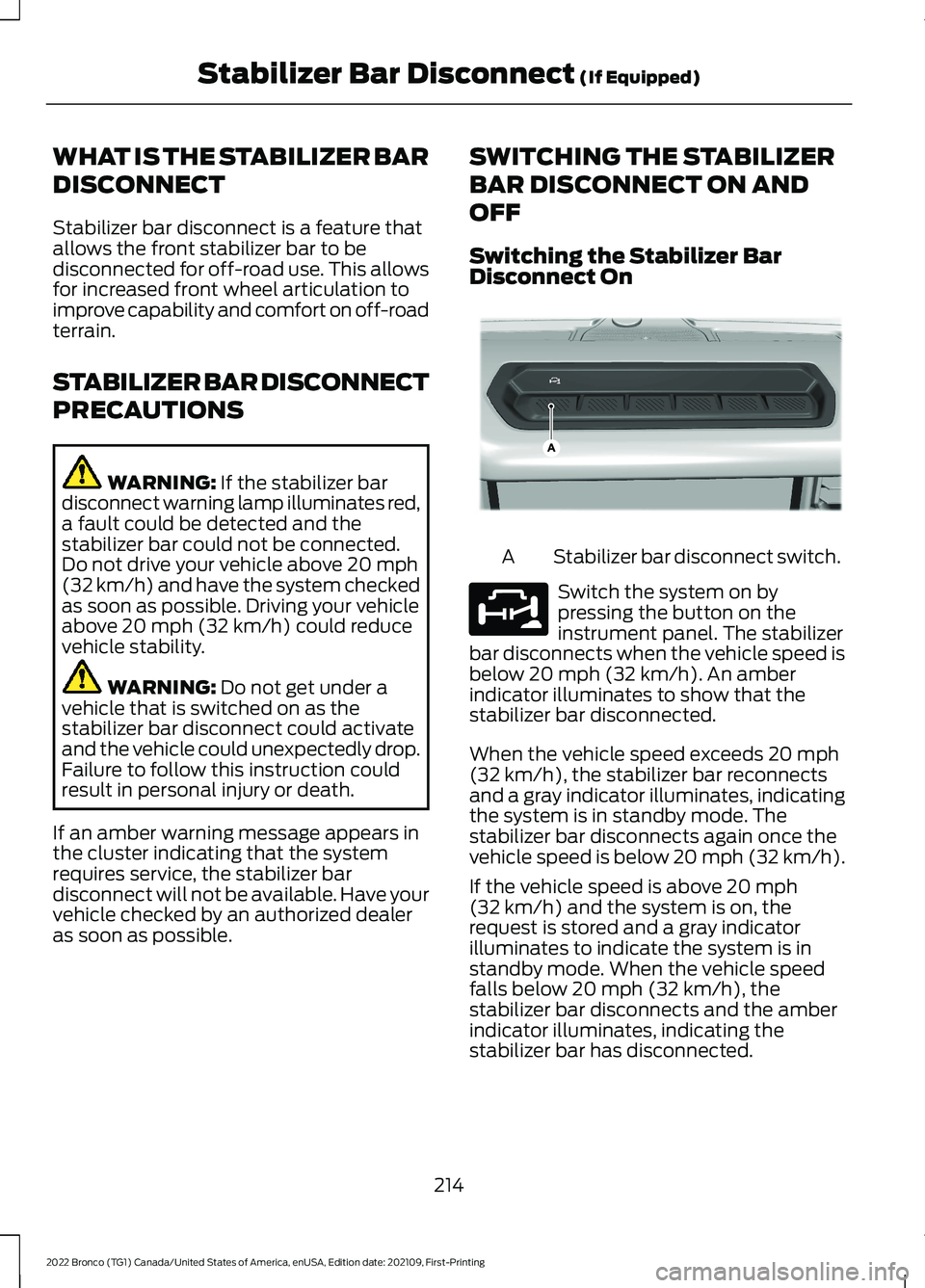
Stabilizer bar disconnect switch.A
Switch the system on bypressing the button on theinstrument panel. The stabilizerbar disconnects when the vehicle speed isbelow 20 mph (32 km/h). An amberindicator illuminates to show that thestabilizer bar disconnected.
When the vehicle speed exceeds 20 mph(32 km/h), the stabilizer bar reconnectsand a gray indicator illuminates, indicatingthe system is in standby mode. Thestabilizer bar disconnects again once thevehicle speed is below 20 mph (32 km/h).
If the vehicle speed is above 20 mph(32 km/h) and the system is on, therequest is stored and a gray indicatorilluminates to indicate the system is instandby mode. When the vehicle speedfalls below 20 mph (32 km/h), thestabilizer bar disconnects and the amberindicator illuminates, indicating thestabilizer bar has disconnected.
214
2022 Bronco (TG1) Canada/United States of America, enUSA, Edition date: 202109, First-PrintingStabilizer Bar Disconnect (If Equipped)E358560 E329476
Page 235 of 562
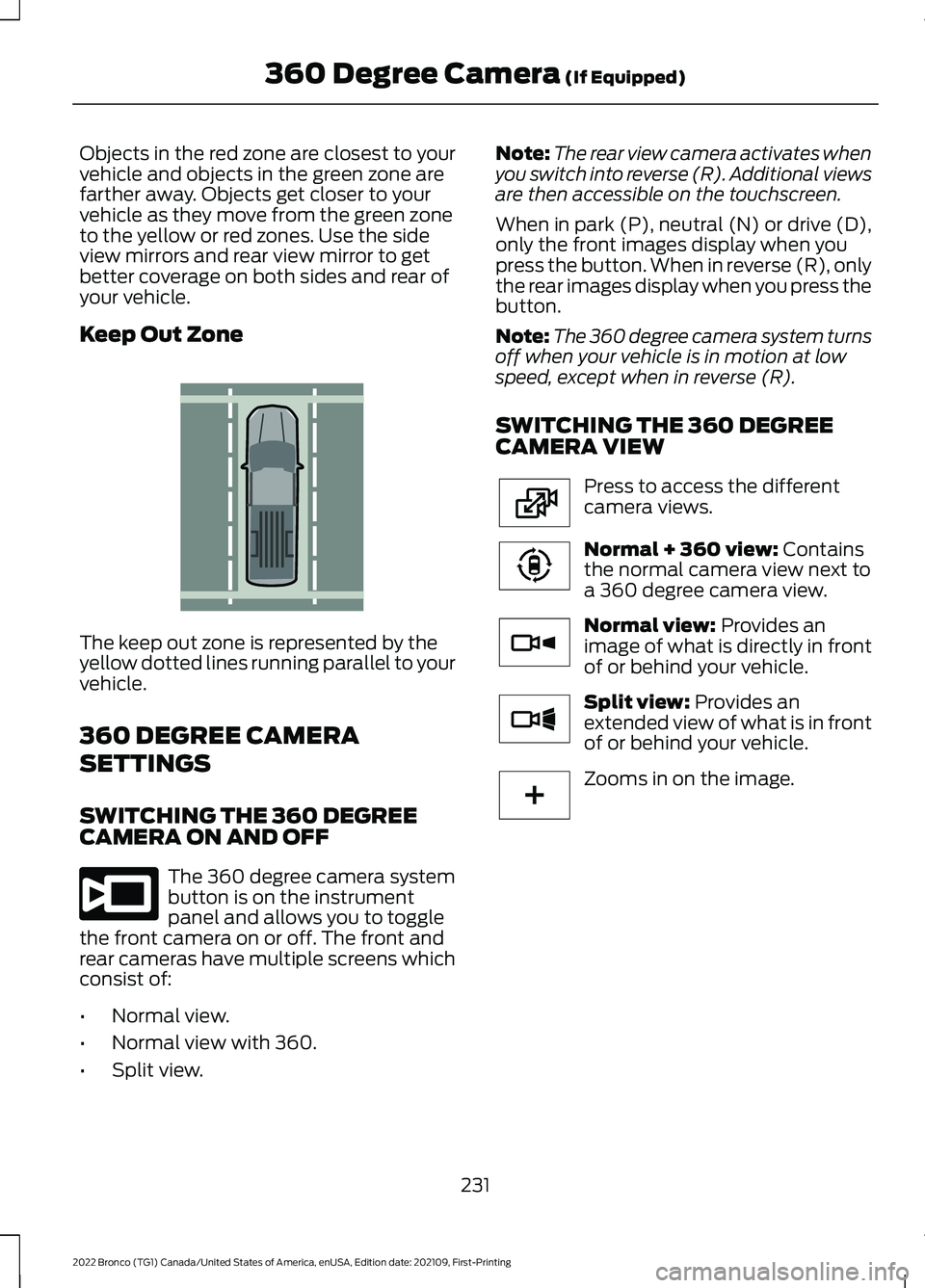
Objects in the red zone are closest to yourvehicle and objects in the green zone arefarther away. Objects get closer to yourvehicle as they move from the green zoneto the yellow or red zones. Use the sideview mirrors and rear view mirror to getbetter coverage on both sides and rear ofyour vehicle.
Keep Out Zone
The keep out zone is represented by theyellow dotted lines running parallel to yourvehicle.
360 DEGREE CAMERA
SETTINGS
SWITCHING THE 360 DEGREECAMERA ON AND OFF
The 360 degree camera systembutton is on the instrumentpanel and allows you to togglethe front camera on or off. The front andrear cameras have multiple screens whichconsist of:
•Normal view.
•Normal view with 360.
•Split view.
Note:The rear view camera activates whenyou switch into reverse (R). Additional viewsare then accessible on the touchscreen.
When in park (P), neutral (N) or drive (D),only the front images display when youpress the button. When in reverse (R), onlythe rear images display when you press thebutton.
Note:The 360 degree camera system turnsoff when your vehicle is in motion at lowspeed, except when in reverse (R).
SWITCHING THE 360 DEGREECAMERA VIEW
Press to access the differentcamera views.
Normal + 360 view: Containsthe normal camera view next toa 360 degree camera view.
Normal view: Provides animage of what is directly in frontof or behind your vehicle.
Split view: Provides anextended view of what is in frontof or behind your vehicle.
Zooms in on the image.
231
2022 Bronco (TG1) Canada/United States of America, enUSA, Edition date: 202109, First-Printing360 Degree Camera (If Equipped)E310341 E332186 E224483 E224783 E224784 E224785 E224485
Page 261 of 562
BLIND SPOT INFORMATION
SYSTEM REQUIREMENTS -
AUTOMATIC TRANSMISSION
Blind spot information system turns onwhen all the following occur:
•You start your vehicle.
•You shift into drive (D).
•The vehicle speed is greater than6 mph (10 km/h).
SWITCHING BLIND SPOT
INFORMATION SYSTEM ON
AND OFF
To switch blind spot information systemon or off, use the touchscreen:
1.Press Features on the touchscreen.
2.Press Driver Assistance.
3.Press Blind Spot Information System.
4.Switch the feature on or off.
When you switch blind spot informationsystem off, a warning lamp illuminates anda message displays. When you switch thesystem on or off, the alert indicators flashtwice.
Note:The system remembers the lastsetting when you start your vehicle.
To permanently switch the system off,contact an authorized dealer.
LOCATING THE BLIND SPOT
INFORMATION SYSTEM
SENSORS
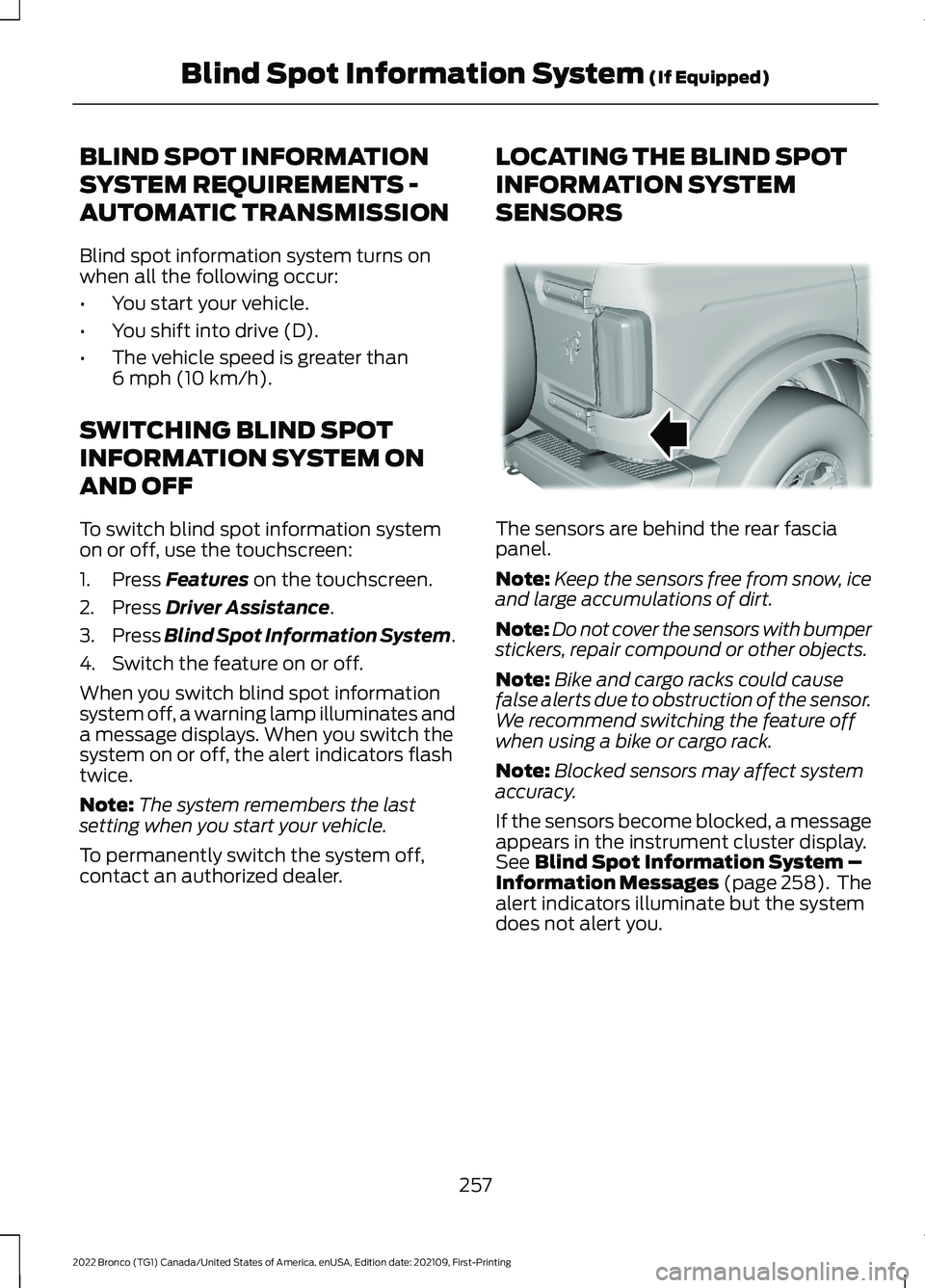
The sensors are behind the rear fasciapanel.
Note:Keep the sensors free from snow, iceand large accumulations of dirt.
Note:Do not cover the sensors with bumperstickers, repair compound or other objects.
Note:Bike and cargo racks could causefalse alerts due to obstruction of the sensor.We recommend switching the feature offwhen using a bike or cargo rack.
Note:Blocked sensors may affect systemaccuracy.
If the sensors become blocked, a messageappears in the instrument cluster display.See Blind Spot Information System –Information Messages (page 258). Thealert indicators illuminate but the systemdoes not alert you.
257
2022 Bronco (TG1) Canada/United States of America, enUSA, Edition date: 202109, First-PrintingBlind Spot Information System (If Equipped)E339014
Page 264 of 562
3.Switch Cross Traffic Alert on or off.
Note:The system switches on every timeyou switch the ignition on. To permanentlyswitch the system off, contact an authorizeddealer.
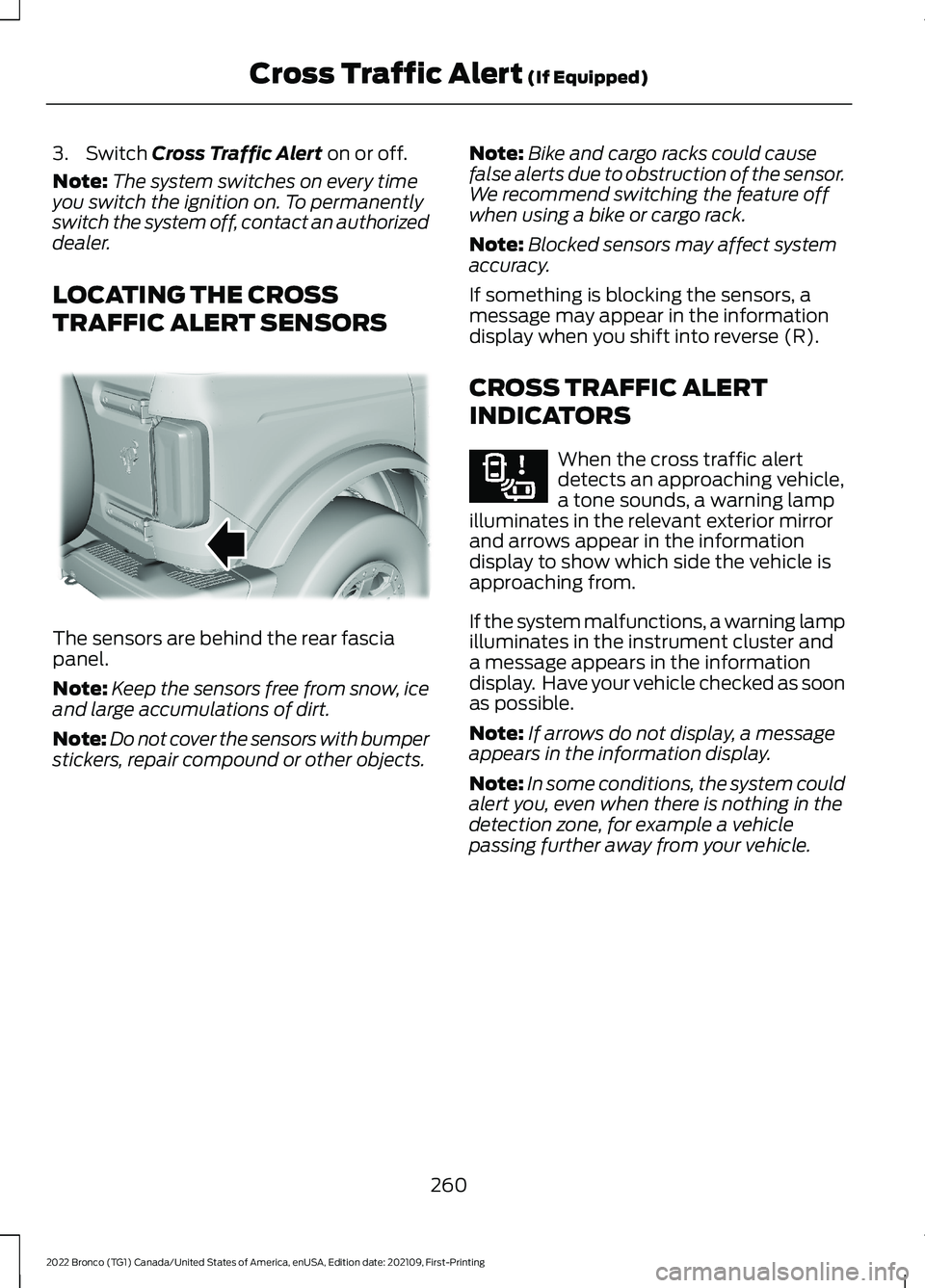
LOCATING THE CROSS
TRAFFIC ALERT SENSORS
The sensors are behind the rear fasciapanel.
Note:Keep the sensors free from snow, iceand large accumulations of dirt.
Note:Do not cover the sensors with bumperstickers, repair compound or other objects.
Note:Bike and cargo racks could causefalse alerts due to obstruction of the sensor.We recommend switching the feature offwhen using a bike or cargo rack.
Note:Blocked sensors may affect systemaccuracy.
If something is blocking the sensors, amessage may appear in the informationdisplay when you shift into reverse (R).
CROSS TRAFFIC ALERT
INDICATORS
When the cross traffic alertdetects an approaching vehicle,a tone sounds, a warning lampilluminates in the relevant exterior mirrorand arrows appear in the informationdisplay to show which side the vehicle isapproaching from.
If the system malfunctions, a warning lampilluminates in the instrument cluster anda message appears in the informationdisplay. Have your vehicle checked as soonas possible.
Note:If arrows do not display, a messageappears in the information display.
Note:In some conditions, the system couldalert you, even when there is nothing in thedetection zone, for example a vehiclepassing further away from your vehicle.
260
2022 Bronco (TG1) Canada/United States of America, enUSA, Edition date: 202109, First-PrintingCross Traffic Alert (If Equipped)E339014 E268294
Page 306 of 562
Vehicles Sold in Canada: GettingRoadside Assistance
To fully assist you should you have avehicle concern, Ford Motor Company ofCanada, Limited offers a complimentaryroadside assistance program. Thisprogram is eligible within Canada or thecontinental United States.
The service is available 24 hours a day,seven days a week.
This program is separate from the NewVehicle Limited Warranty, but the coverageis concurrent with the powertrain coverageperiod of your vehicle. Canadian roadsidecoverage and benefits may differ from theU.S. coverage.
If you require more information, please callus in Canada at 1-800-665-2006, or visitour website at www.ford.ca.
SWITCHING THE HAZARD
FLASHERS ON AND OFF
The hazard flasher button is onthe instrument panel. Press thebutton to switch the hazardflashers on if your vehicle is creating asafety hazard for other road users.
When you switch the hazard flashers on,all front and rear direction indicators flash.
Note:The hazard flashers operate whenthe ignition is in any position, or if the key isnot in the ignition. The battery loses chargeand could have insufficient power to restartyour vehicle.
Press the button again to switch them off.
JUMP STARTING THE VEHICLE
JUMP STARTING PRECAUTIONS
WARNING: Batteries normallyproduce explosive gases which cancause personal injury. Therefore, do notallow flames, sparks or lightedsubstances to come near the battery.When working near the battery, alwaysshield your face and protect your eyes.Always provide correct ventilation.
WARNING: Keep batteries out ofreach of children. Batteries containsulfuric acid. Avoid contact with skin,eyes or clothing. Shield your eyes whenworking near the battery to protectagainst possible splashing of acidsolution. In case of acid contact with skinor eyes, flush immediately with water fora minimum of 15 minutes and get promptmedical attention. If acid is swallowed,call a physician immediately.
WARNING: Use only adequatelysized cables with insulated clamps.
WARNING: Make sure that thecables are clear of any moving parts andfuel delivery system parts.
WARNING: Connect batteries withonly the same nominal voltage.
WARNING: If the engine is runningwhile the hood is open, stay clear ofmoving engine components. Failure tofollow this warning could result in seriouspersonal injury or death.
Do not attempt to push-start an automatictransmission vehicle. This could causetransmission damage.
302
2022 Bronco (TG1) Canada/United States of America, enUSA, Edition date: 202109, First-PrintingCrash and Breakdown Information