instrument panel FORD BRONCO 2022 Owner's Manual
[x] Cancel search | Manufacturer: FORD, Model Year: 2022, Model line: BRONCO, Model: FORD BRONCO 2022Pages: 562, PDF Size: 73 MB
Page 322 of 562
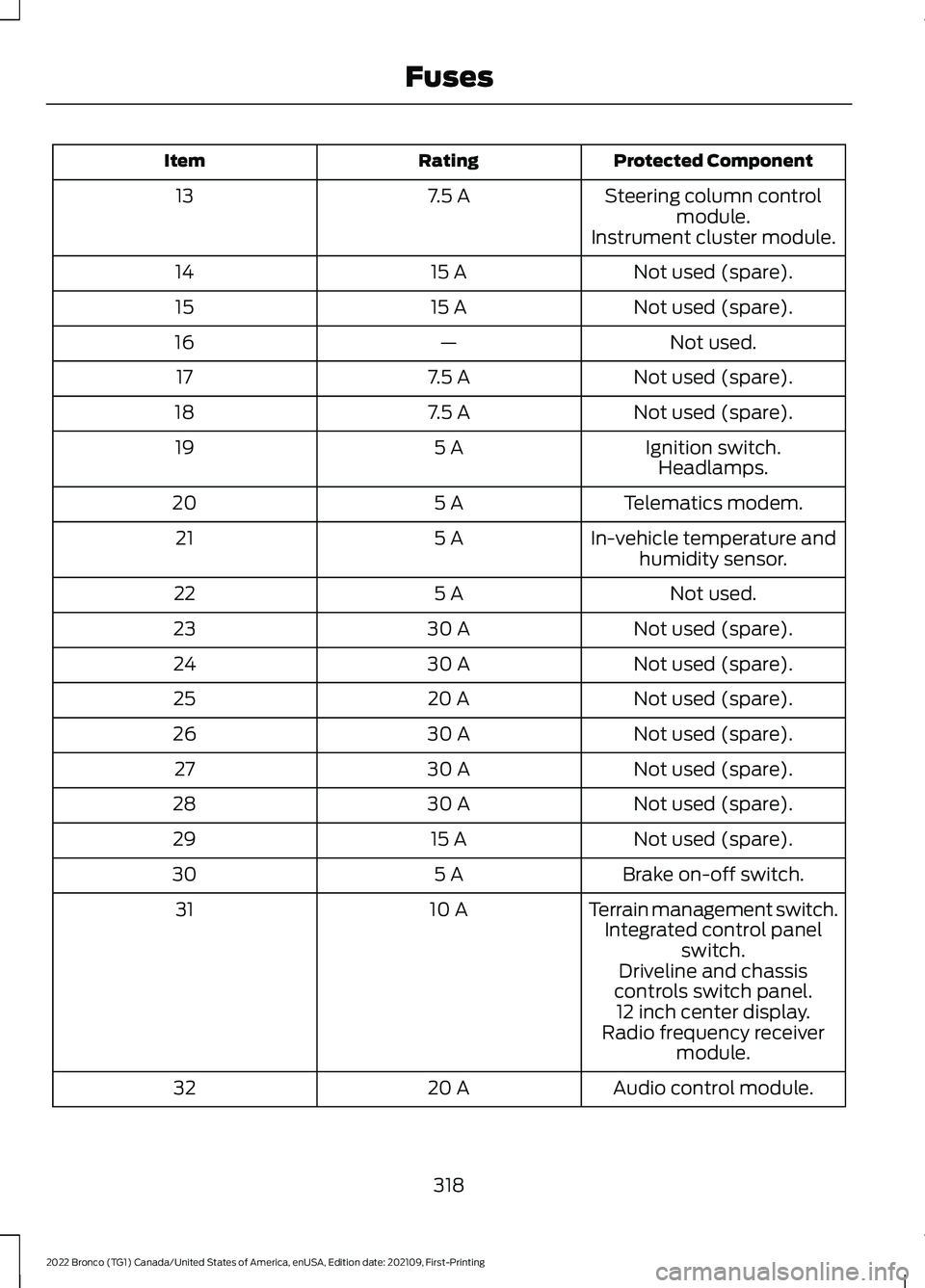
Protected ComponentRatingItem
Steering column controlmodule.7.5 A13
Instrument cluster module.
Not used (spare).15 A14
Not used (spare).15 A15
Not used.—16
Not used (spare).7.5 A17
Not used (spare).7.5 A18
Ignition switch.5 A19Headlamps.
Telematics modem.5 A20
In-vehicle temperature andhumidity sensor.5 A21
Not used.5 A22
Not used (spare).30 A23
Not used (spare).30 A24
Not used (spare).20 A25
Not used (spare).30 A26
Not used (spare).30 A27
Not used (spare).30 A28
Not used (spare).15 A29
Brake on-off switch.5 A30
Terrain management switch.10 A31Integrated control panelswitch.Driveline and chassiscontrols switch panel.12 inch center display.Radio frequency receivermodule.
Audio control module.20 A32
318
2022 Bronco (TG1) Canada/United States of America, enUSA, Edition date: 202109, First-PrintingFuses
Page 324 of 562
MAINTENANCE PRECAUTIONS
Service your vehicle regularly to helpmaintain its roadworthiness and resalevalue. There is a large network ofauthorized dealers that are there to helpyou with their professional servicingexpertise. We believe that their speciallytrained technicians are best qualified toservice your vehicle properly and expertly.They are supported by a wide range ofhighly specialized tools developedspecifically for servicing your vehicle.
If your vehicle requires professional service,an authorized dealer can provide thenecessary parts and service. Check yourwarranty information to find out whichparts and services are covered.
Use only recommended fuels, lubricants,fluids and service parts conforming tospecifications. See Capacities andSpecifications (page 401).
•Do not work on a hot engine.
•Make sure that nothing gets caught inmoving parts.
•Do not work on a vehicle with theengine running in an enclosed space,unless you are sure you have enoughventilation.
•Keep all open flames and other burningmaterial, such as cigarettes, away fromthe battery and all fuel related parts.
•Set the parking brake, shift thetransmission to park (P) and block thewheels.
OPENING AND CLOSING THE
HOOD
Opening the Hood
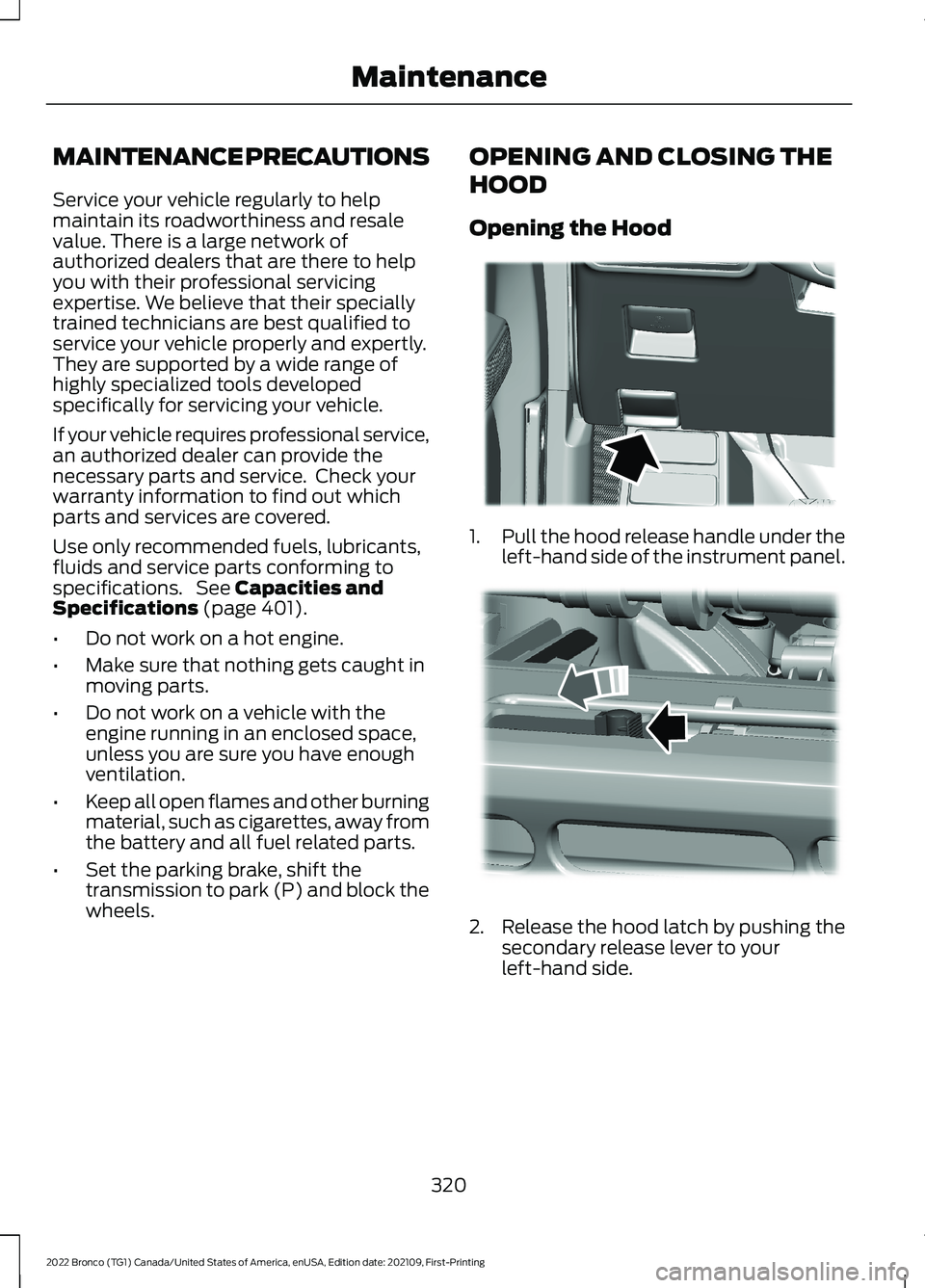
1.Pull the hood release handle under theleft-hand side of the instrument panel.
2.Release the hood latch by pushing thesecondary release lever to yourleft-hand side.
320
2022 Bronco (TG1) Canada/United States of America, enUSA, Edition date: 202109, First-PrintingMaintenanceE331612 E331900
Page 373 of 562
CLEANING HEADLAMPS ANDREAR LAMPS
We recommend that you only use cold orlukewarm water containing car shampooto clean the headlamps and the rearlamps.
Do not scrape the lamps.
Do not wipe lamps when they are dry.
CLEANING WINDOWS AND WIPERBLADES
To clean the windshield and wiper blades:
•Clean the windshield with anon-abrasive glass cleaner.
Note:When cleaning the interior of thewindshield, avoid getting any glass cleaneron the instrument panel or door panels.Wipe any glass cleaner off these surfacesimmediately.
•Clean the wiper blades with washerfluid or water applied with a softsponge or cloth.
Note: Do not use razor blades or othersharp objects to clean or remove decalsfrom the inside of the heated rear window.This can cause damage not covered by thevehicle Warranty.
CLEANING CHROME, ALUMINIUMOR STAINLESS STEEL
We recommend that you only use a carshampoo, a soft cloth and water onbumpers and other chrome, aluminium orstainless steel parts.
Note:For additional information andassistance, we recommend that you contactan authorized dealer.
Note:Rinse the area well after cleaning.
Note:Do not use abrasive materials, forexample steel wool or plastic pads, as theycan scratch these surfaces.
Note:Do not use chrome cleaner, metalcleaner or polish on wheels or wheel covers.
CLEANING WHEELS
Only use a recommended wheel and tirecleaner to clean the wheels weekly. Foradditional information and assistance, werecommend that you contact anauthorized dealer.
1.Use a sponge to remove heavydeposits of dirt and brake dust.
2.Rinse well after cleaning.
Note:Do not apply a cleaning chemical towarm or hot wheel rims and covers.
If you intend on parking your vehicle for anextended period after cleaning the wheelswith a wheel cleaner, drive your vehicle fora few minutes before parking your vehicle.This reduces the risk of corrosion of thebrake discs, brake pads and linings.
Do not clean the wheels when they are hot.
Note: Some car washes could damagewheel rims and covers.
Note: Using non-recommended cleaners,harsh cleaning products, chrome wheelcleaners or abrasive materials coulddamage wheel rims and covers.
CLEANING THE ENGINECOMPARTMENT
Use a vacuum cleaner to remove debrisfrom the screen area below windshield.
Note:If you are not familiar with the partsaround the engine do not wash the enginecompartment. Avoid frequent enginewashes.
369
2022 Bronco (TG1) Canada/United States of America, enUSA, Edition date: 202109, First-PrintingVehicle Care
Page 375 of 562
Note:Do not pressure wash camera lensand sensors.
CLEANING THE HARD TOP
We recommend that you only clean thehard top in the following way:
1.Use a sponge to remove dust and loosedirt on the hard top surface.
2.Wipe the surface with a soft, dampcloth and a mild soap and watersolution. Dry the area with a clean, softcloth.
3.Make sure the surface of your hard topis dry before applying a small amountof conditioner or spray wax.
4.For additional information andassistance, we recommend that youcontact an authorized dealer.
Note:Test any conditioner or spray wax onan inconspicuous area before applyingbroadly.
Note:Do not use alcohol containing cleaneror any type of solvent on the hard topsurface.
Note:Do not use power tools, paste waxor polish on the hard top surface.
CLEANING THE UNDERBODY
Regularly clean the underside of yourvehicle using water. Keep body and doordrain holes free of debris or foreignmaterial.
CLEANING THE INTERIOR
CLEANING THE INSTRUMENTPANEL
WARNING: Do not use chemicalsolvents or strong detergents whencleaning the steering wheel orinstrument panel to avoid contaminationof the airbag system.
We recommend that you only clean theinstrument panel and cluster lens with adamp soft cloth. Dry the area with a clean,soft cloth.
For additional information and assistance,we recommend that you contact anauthorized dealer.
Note:Avoid cleaners or polishes thatincrease the gloss of the upper portion ofthe instrument panel. The dull finish in thisarea helps protect you from undesirablewindshield reflection.
CLEANING PLASTIC
We recommend that you only use a mildsoap and water solution on a soft cloth.Dry the area with a clean, soft cloth.
CLEANING DISPLAYS ANDSCREENS
We recommend that you only use amicrofiber cloth in a circular motion toclean off the fingerprint or dust.
If dirt or fingerprints are still on the screen,apply a small amount of alcohol to thecloth and try to clean it again.
Note:Do not pour or spray alcohol onto thetouchscreen.
Note: Do not use detergent or any type ofsolvent to clean the touchscreen.
371
2022 Bronco (TG1) Canada/United States of America, enUSA, Edition date: 202109, First-PrintingVehicle Care
Page 377 of 562
3.Wash out debris using a standardgarden style hose.
Note:Use caution to not spray seats,console, door interior, electrical connections,instrument cluster display and underside ofthe instrument panel on both driver andpassenger sides.
4.Wipe out remaining water or debrisfrom the floor.
5.Install active drain plugs and turnclockwise to close.
6.Reinstall floor mats.
CLEANING SEATBELTS
WARNING: Do not use cleaningsolvents, bleach or dye on the vehicle'sseatbelts, as these actions may weakenthe belt webbing.
1.Wipe the surface with a soft, dampcloth and a mild soap and watersolution. Dry the area with a clean, softcloth.
REPAIRING MINOR PAINT
DAMAGE
Authorized dealers have touch-up paint tomatch your vehicle’s color. Your vehiclecolor code is printed on a sticker on thefront, left-hand side door jamb. Take yourcolor code to your authorized dealer tomake sure you get the correct color.
Before repairing minor paint damage, usea cleaner to remove particles such as birddroppings, tree sap, insect deposits, tarspots, road salt and industrial fallout.
Read the instructions before using cleaningproducts.
WAXING YOUR VEHICLE
Wax the high-gloss painted surface of yourprewashed vehicle once or twice a year.
We recommend that you only use anapproved quality wax that does notcontain abrasives. Follow themanufacturer's instructions to apply andremove the wax. For additional informationand assistance, we recommend that youcontact an authorized dealer.
When washing and waxing, park yourvehicle in a shaded area out of directsunlight.
Note:Avoid waxing unpainted or low-glossblack colored parts, they discolor over time.
373
2022 Bronco (TG1) Canada/United States of America, enUSA, Edition date: 202109, First-PrintingVehicle Care
Page 420 of 562
VEHICLE IDENTIFICATION
NUMBER
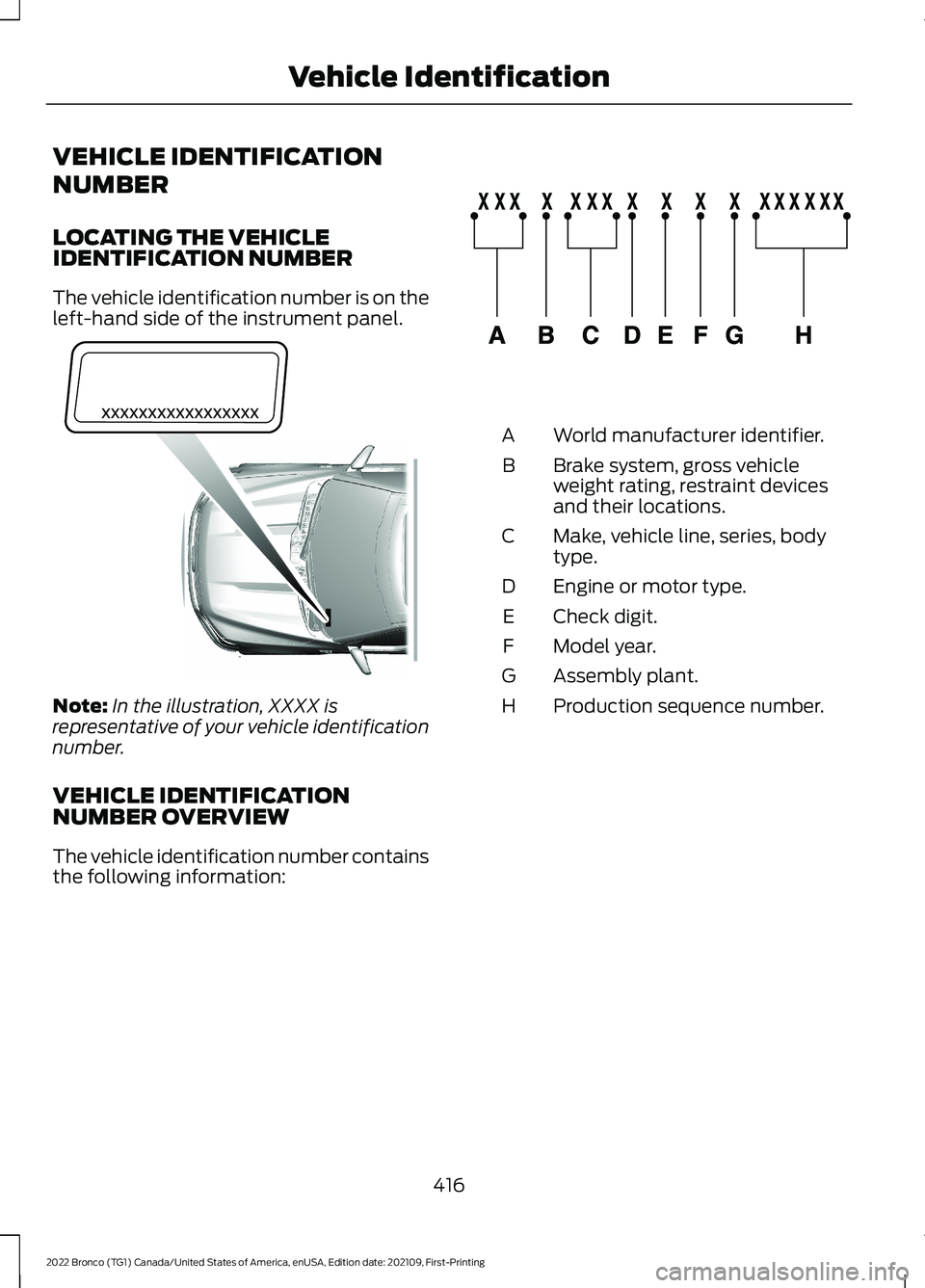
LOCATING THE VEHICLEIDENTIFICATION NUMBER
The vehicle identification number is on theleft-hand side of the instrument panel.
Note:In the illustration, XXXX isrepresentative of your vehicle identificationnumber.
VEHICLE IDENTIFICATIONNUMBER OVERVIEW
The vehicle identification number containsthe following information:
World manufacturer identifier.A
Brake system, gross vehicleweight rating, restraint devicesand their locations.
B
Make, vehicle line, series, bodytype.C
Engine or motor type.D
Check digit.E
Model year.F
Assembly plant.G
Production sequence number.H
416
2022 Bronco (TG1) Canada/United States of America, enUSA, Edition date: 202109, First-PrintingVehicle IdentificationE311767 E142477
Page 541 of 562
1
12V Battery.....................................................32912V Battery Precautions..................................329Battery Management SystemLimitations......................................................330How Does the Battery ManagementSystem Work..................................................330Recycling and Disposing of the 12VBattery..............................................................330Resetting the Battery Sensor........................330What Is the Battery ManagementSystem..............................................................32912V Battery – Troubleshooting...............33012V Battery – Information Messages..........33112V Battery – Warning Lamps......................330
3
360 Degree Camera...................................229360 Degree Camera Settings.........................231360 Degree Camera Guide Lines..........230360 Degree Camera Limitations...........229360 Degree Camera Precautions..........229360 Degree Camera Settings..................231Switching the 360 Degree Camera On andOff........................................................................231Switching the 360 Degree CameraView.....................................................................231
4
4WDSee: Four-Wheel Drive......................................182
9
911 Assist...........................................................68
A
A/CSee: Climate Control - Vehicles With:Automatic Temperature Control..............118See: Climate Control - Vehicles With: ManualTemperature Control....................................123About This Publication..................................17
ABSSee: Brakes...........................................................194Accessing Apps............................................444Accessing Navigation.................................447Accessing the Passive Key BackupPosition.........................................................156Accessories....................................................452Adaptive Cruise Control............................234Adaptive Cruise Control –Troubleshooting............................................240Adaptive Cruise Control Indicators.......239Adaptive Cruise ControlLimitations...................................................235Adaptive Cruise ControlPrecautions.................................................234Adaptive Cruise Control –Troubleshooting........................................240Adaptive Cruise Control – InformationMessages.........................................................240Adjusting the Exterior Mirrors..................106Adjusting the Headlamps.........................333Adjusting the Instrument Panel LightingBrightness....................................................102Adjusting the Map.......................................447Changing the Format of the Map................447Zooming the Map In and Out........................447Adjusting the Seatbelts DuringPregnancy......................................................54Adjusting the Sound Settings.................423Adjusting the Steering Wheel...................89Adjusting the Volume.................................423Aid Mode..........................................................251How Does Aid Mode Work...............................251What Is Aid Mode................................................251Airbag Precautions.........................................61Airbags...............................................................59Front Passenger Sensing System..................63Air ConditioningSee: Climate Control - Vehicles With:Automatic Temperature Control..............118See: Climate Control - Vehicles With: ManualTemperature Control....................................123Air Conditioning System Capacity andSpecification...............................................410Air FilterSee: Changing the Engine Air Filter.............328Alert and Aid Mode......................................251How Does Alert and Aid Mode Work..........252
537
2022 Bronco (TG1) Canada/United States of America, enUSA, Edition date: 202109, First-PrintingIndex
Page 544 of 562
Catalytic Converter –Troubleshooting.........................................173Catalytic Converter – WarningLamps.................................................................173Center Console - AutomaticTransmission..................................................31Center Console..............................................149Locking the Center Console...........................149Opening the Center Console..........................149Center Console - ManualTransmission................................................30Center Display Limitations.......................433Center Display Overview...........................433Center Display Precautions.....................433Changing a Flat Tire...................................395Changing a Road Wheel...........................395Changing the 12V Battery..........................331Changing the Engine Air Filter................328Changing the Fuel Filter............................329Changing the Remote ControlBattery.............................................................70Changing the Vehicle Wi-Fi HotspotName or Password..................................420Charging a Device.........................................144Charging a Wireless Device......................148Checking MyKey System Status...............76Checking the Brake Fluid...........................194Checking the Clutch Fluid Level..............176Checking the Coolant.................................324Checking the Manual Transmission FluidLevel................................................................176Checking the Seatbelts...............................56Checking the Tire Pressures....................387Checking the Wiper Blades.........................91Children and Airbags....................................62Child Restraint Anchor Points....................41Locating the Child Restraint Lower AnchorPoints....................................................................41Locating the Child Restraint Top TetherAnchor Points...................................................42What Are the Child Restraint AnchorPoints....................................................................41Child Restraints...............................................42Child Restraint Position Information.............42Child Restraints Recommendation...............44Child Safety......................................................40Child Restraint Anchor Points..........................41Child Restraints.....................................................42
Installing Child Restraints.................................44Child Safety Locks.........................................50Child Safety Precautions............................40Cleaning Products......................................368Cleaning the Exterior..................................368Cleaning Camera Lenses andSensors.............................................................370Cleaning Chrome, Aluminium or StainlessSteel..................................................................369Cleaning Headlamps and RearLamps...............................................................369Cleaning Stripes or Graphics.........................370Cleaning the Convertible Top........................370Cleaning the Engine Compartment...........369Cleaning the Exterior Precautions..............368Cleaning the Hard Top.......................................371Cleaning the Underbody..................................371Cleaning Wheels................................................369Cleaning Windows and WiperBlades...............................................................369Cleaning the Interior.....................................371Cleaning Carpets and Floor Mats.................372Cleaning Displays and Screens......................371Cleaning Fabric Seats andHeadliners........................................................372Cleaning Leather and Vinyl.............................372Cleaning Plastic...................................................371Cleaning Seatbelts............................................373Cleaning the Instrument Panel......................371Clearing All MyKeys.......................................75Clearing the Garage Door Opener...........141Climate Control..............................................118Auto Mode.............................................................120Climate Control Hints...................................121Closing the Tailgate......................................84Closing the Tailgate From Outside YourVehicle.................................................................84Clutch Fluid Capacity andSpecification................................................176Cold Weather Precautions.......................298Connected Vehicle.......................................417Connected Vehicle –Troubleshooting.............................................418Connecting the Vehicle to a MobileNetwork.............................................................417Connected Vehicle Data..............................24Connected Vehicle Limitations................417Connected Vehicle Requirements..........417
540
2022 Bronco (TG1) Canada/United States of America, enUSA, Edition date: 202109, First-PrintingIndex
Page 549 of 562
How Does Stability Control Work.........204How Does the 360 Degree CameraWork...............................................................229How Does the Garage Door OpenerWork...............................................................139How Does the Lane Keeping SystemWork..............................................................249How Does the Personal Safety SystemWork.................................................................58How Does the Rear Occupant AlertSystem Work................................................137How Does the Safety Canopy™Work................................................................60How Does Traction Control Work..........202How Does Trailer Sway ControlWork..............................................................289How Do the Front Airbags Work...............59How Do the Side Airbags Work................59
I
Identifying Fuse Types................................319Identifying the Audio Unit.........................422Identifying the Auxiliary SwitchWiring............................................................456Identifying the Climate ControlUnit..................................................................118Inflating the Tires.........................................387Information On Demand Screen -Vehicles With: 12.3 Inch Screen...........435Information on the Tire Sidewall............377Inspecting the Tire for Damage.............388Inspecting the Tire for Wear....................388Inspecting the Wheel ValveStems...........................................................389Installing Child Restraints...........................44Combining the Seatbelt and Lower Anchorsfor Attaching Child Restraints.....................47Installing a Child Restraint in a CenterSeat.......................................................................47Using Lower Anchors and Tethers forChildren...............................................................46Using Seatbelts....................................................44Using Tether Straps............................................48Instrument Cluster Display........................113Personalized Settings........................................114Trip Computer.......................................................114
Instrument Cluster Display MainMenu................................................................113Instrument Cluster Indicators...................110Instrument Cluster.......................................107Fuel Gauge............................................................107Instrument Cluster Overview...................107Instrument Cluster WarningLamps............................................................109Instrument Panel...........................................29Interior Air Quality........................................126Interior Bulbs.................................................336Interior Bulb Specification Chart.................336Interior Lamp Function................................101Switching the Interior Lamp Function Onand Off...............................................................101What Is the Interior Lamp Function.............101Interior Lighting..............................................101Ambient Lighting................................................102Interior Lamp Function......................................101Interior Lighting – Troubleshooting.............102Interior Lighting – Troubleshooting.......102Interior Lighting – Frequently AskedQuestions.........................................................102Interior Mirror.................................................105Auto-Dimming Interior Mirror........................105Interior Mirror Precautions........................105Introduction.......................................................17
J
Jump Starting the Vehicle........................302Jump Starting Precautions............................302Jump Starting the Vehicle..............................303Preparing the Vehicle.......................................303
K
Keyless Entry....................................................82Keyless Entry – Troubleshooting....................83Keyless Entry Limitations............................82Keyless Entry Settings..................................82Keyless Entry – Troubleshooting.............83Keyless Entry – Frequently AskedQuestions...........................................................83Keys and Remote Controls........................69Keys and Remote Controls –Troubleshooting...............................................73
545
2022 Bronco (TG1) Canada/United States of America, enUSA, Edition date: 202109, First-PrintingIndex