brake light FORD BRONCO 2022 Owner's Manual
[x] Cancel search | Manufacturer: FORD, Model Year: 2022, Model line: BRONCO, Model: FORD BRONCO 2022Pages: 562, PDF Size: 73 MB
Page 295 of 562
Look ahead on your route noting upcomingobstacles, surface texture or color changesor any other factors which may indicate achange in available traction. Adjust thevehicle speed and route to avoid a loss intraction. Conditions can change causingthe course to vary day to day. Markobstacles with GPS markers to avoidpotential vehicle damage. Wherenecessary, get out of your vehicle andcheck the terrain.
When driving off-road, if the front or rearsuspension is bottoming-out or excessivecontact with the skid-plates is happening,reduce the vehicle's speed to avoidpotential damage to your vehicle.
If you are driving in a dusty area, be sure toleave ample distance between your vehicleand any other vehicles to allow foradequate vision.
When driving off-road verify that yourwipers and washers are working properlyand reduce your speed for better visibility.
When driving in desert conditions, werecommend driving with your headlampson to help other drivers easily see you.
When convoying with other vehicles, werecommend that communication is used,and the lead vehicle notify other vehiclesof upcoming obstacles.
Keep available ground clearance in mindand pick a route that minimizes the risk ofcatching the underside of the vehicle onan obstacle.
When negotiating low speed obstacles,applying light brake pressure in conjunctionwith the throttle allows you to negotiatethe obstacle in a more controlled manner.
Driving off-road requires a high amount ofconcentration. Even if your local law doesnot prohibit drinking alcohol when drivingoff-road we do not recommend it.
DRIVING OFF-ROAD
Driving In Snow and Ice
WARNING: If you are driving inslippery conditions that require tirechains or cables, then it is critical thatyou drive cautiously. Keep speeds down,allow for longer stopping distances andavoid aggressive steering to reduce thechances of a loss of vehicle controlwhich can lead to serious injury or death.If the rear end of your vehicle slides whilecornering, steer in the direction of theslide until you regain control of yourvehicle.
Four-wheel drive vehicles have advantagesover two-wheel drive vehicles in snow andice but can skid like any other vehicle. Ifyour vehicle slides when driving on snowyor icy roads, turn the steering wheel in thedirection of the slide until you regaincontrol. Avoid sudden applications ofpower and quick changes of direction onsnow and ice. Slowly and steadily applythe accelerator when starting from a fullstop. Avoid sudden braking.
WARNING: Do not becomeoverconfident in the ability of four-wheeldrive vehicles. Although a four-wheeldrive vehicle may accelerate better thana two-wheel drive vehicle in low tractionsituations, it won't stop any faster thantwo-wheel drive vehicles. Always driveat a safe speed.
Make sure you allow sufficient distancebetween your vehicle and other vehiclesfor stopping.
In emergency stopping situations, do notpump the brake pedal, apply the brakefirmly.
291
2022 Bronco (TG1) Canada/United States of America, enUSA, Edition date: 202109, First-PrintingDriving Hints
Page 298 of 562
Muddy waters can reduce the coolingsystem effectiveness by depositing debrisinto the radiator.
Extra care must be taken crossing any typeof water. Do not drive into water unlessnecessary. You should only drive throughareas that are designated and approved.
High currents even in shallow water canwash the dirt out from around your tires orpush your vehicle across slippery rocks orsurfaces.
Never attempt to cross flowing water thatis deeper than your vehicles groundclearance. Even in low currents yourvehicles body surface area can be pusheddownstream and out of control.
Do not cross any body of water that is fastflowing and rising, wait for the flow rate toreduce.
Determine exit points that are downstreamof your entry point to allow for drifting.
If there are other vehicles ahead, wait untilthey’ve left the water. Unsettled water canmake a safe passage more challenging.
Know your vehicle’s abilities and be ableto recover it if something goes wrong.
Keep the doors fully closed during a watercrossing.
Vehicles used to traverse water regularlyshould be periodically inspected for signsof water ingestion in all of the vehicle'sfluids. If water is found inside your vehiclefluids, service your vehicle or see anauthorized dealer.
After driving through water and as soon asit is safe to do so, check the brakes, horn,lights, and steering wheel to make sureeverything is still in working order.
Avoid Getting High-Centered
Always keep available ground clearancein mind and pick a route that minimizes therisk of catching the underside of the vehicleon an obstacle and getting high-centered.
Freeing A Stuck Vehicle
WARNING: Do not spin the wheelsat over 34 mph (55 km/h). The tires mayfail and injure a passenger or bystander.
Recovery hooks are mounted to thevehicle's structure and are used to pull outthe vehicle from a surface or location whenstuck. Recover your vehicle using varioustowing apparatus attached to yourrecovery hook such as winch, open hook,or strap.
Note:Do not use recovery hooks torecreationally tow your vehicle. SeeRecreationally Towing Your Vehicle (page309).
If your vehicle gets stuck in mud or snow,you may rock it out by shifting betweenforward and reverse gears, stoppingbetween shifts in a steady pattern. Pressthe accelerator in each gear.
Note: Do not rock your vehicle if the engineis not at normal operating temperaturedamage to the transmission may occur.
Note:Do not rock your vehicle for morethan a minute damage to the transmissionand tires may occur or the engine mayoverheat.
If you are unable to free your vehicle callroadside assistance. See RoadsideAssistance (page 301).
294
2022 Bronco (TG1) Canada/United States of America, enUSA, Edition date: 202109, First-PrintingDriving Hints
Page 299 of 562
Crossing A Ravine, Gully, Ditch,Washout Or Rut
Review the path ahead before attemptingto cross any obstacle. Review the obstaclefrom outside the vehicle for anunderstanding of the terrain condition infront of and behind the obstacle. Approachobstacles slowly and inch the vehicle over.Ditches and washouts should be crossedat a 45 degree angle when possible.
Driving Over Logs
Review the path ahead before attemptingto cross any obstacle. Review the obstaclefrom outside the vehicle for anunderstanding of the terrain condition infront of and behind the obstacle.
Approach obstacles slowly and inch thevehicle over, approaching at a 15 degreeangle.
Note:It is best to have a front tire on top ofthe log when the other begins to climb over.
If a large obstacle near the log such as arock cannot be avoided, choose a path thatplaces the rock directly under the tirerather than the undercarriage of thevehicle. This helps prevent damage to thevehicle.
DRIVING YOUR VEHICLE AT HIGHSPEEDS
Before off-road driving in unfamiliar areasat high speeds, do a low speedreconnaissance run to become aware ofany obstacles that you could encounter.
Your vehicle can incur damage if drivenbeyond its capabilities. Skid plates androck rails are designed to help limitdamage to vital components and exteriorfinishes, but cannot prevent all damage ifdriven in extreme off-road conditions.Damage to skid plates, rock rails andexterior finishes as well as bent, crackedor broken body, frame and chassiscomponents may not be covered bywarranty.
It is important that you take the time tobecome familiar with the controls anddynamics of your vehicle beforeattempting higher speed off-road driving.
Some points to consider:
•Slowly build up speed. Initially, drive ata speed that allows ample time to fullyassess the terrain around you and tounderstand how the vehicle respondsto both the terrain and your inputs.Increase speed as comfort increases,being mindful of how the vehicleresponds to various conditions atdifferent speeds.
•Find a wide open place to experimentwith different functions on your vehicleand different driving techniques. Try agiven maneuver with differentfunctions, such as drive modes,four-wheel drive modes or switchingthe electronic locking differential onand off and see how your vehicleresponds. If the vehicle is tending topush straight ahead when trying tonegotiate a turn, a light application ofthe brake when turning could help turnyour vehicle. A wider entry to a corneror entering a corner more slowly couldhelp your vehicle turn and allow you toapply the throttle sooner afternegotiating the turn.
295
2022 Bronco (TG1) Canada/United States of America, enUSA, Edition date: 202109, First-PrintingDriving Hints
Page 313 of 562
Note: If completed successfully, theinformation display shows Neutral TowEnabled Leave Transmission in Neutral.This indicates that your vehicle is safe totow with all wheels on the ground.
Note:If you do not see a confirmationmessage in the instrument cluster display,you must perform the procedure again fromthe beginning.
Note:You may hear noise as the transfercase shifts into its neutral position. This isnormal.
7.Release both the clutch and the brakepedals and leave the gearshift lever inthe neutral position.
8.Switch your vehicle off by pressing thepush button ignition switch oncewithout pressing any pedals.
Switching Neutral Tow Off
1.With your vehicle properly secured tothe tow vehicle, switch your vehicle toaccessory mode by pressing the pushbutton ignition switch without pressingany pedals.
2.Starting with both the brake and clutchpedal released, fully press and holdboth pedals at the same time forapproximately seven seconds.Continue holding both pedals until theinstrument cluster display shows 2Hand Neutral Tow Disabled.
Note:If completed successfully, theinstrument cluster displays 2H and NeutralTow Disabled.
Note:You must perform the switchingneutral tow on and switching neutral towoff procedures again from the beginning ifthe indicator light and message do notdisplay.
Note:You may hear a noise as the transfercase shifts out of its neutral position. Thisis normal.
3.Release the pedals.
4.Apply the parking brake, thendisconnect your vehicle from the towvehicle.
5.Release the parking brake, start yourvehicle, and shift into either a forwardor a reverse gear to make sure thetransfer case is out of the neutral towposition.
6.If the transfer case did not successfullyshift out of its neutral position, set theparking brake. Have your vehiclechecked as soon as possible.
Resolving the Shift Delayed DriveForward Message
1.Fully press and hold both the brake andthe clutch pedals.
2.Press the push button ignition switch.
3.With the vehicle running, shift into aforward gear and release the clutch.Let the vehicle roll forward up to 3 ft(1 m).
Note:You may hear a noise as the transfercase shifts out of its neutral position. Thisis normal.
4.Make sure the instrument clusterdisplays Neutral Tow Disabled.
RECREATIONALLY TOWING
YOUR VEHICLE - AUTOMATIC
TRANSMISSION
WARNING: Do not disconnect thebattery when recreationally towing yourvehicle. This prevents the transfer casefrom shifting properly and could causethe vehicle to roll, even if thetransmission is in park (P).
309
2022 Bronco (TG1) Canada/United States of America, enUSA, Edition date: 202109, First-PrintingTowing Your Vehicle
Page 315 of 562
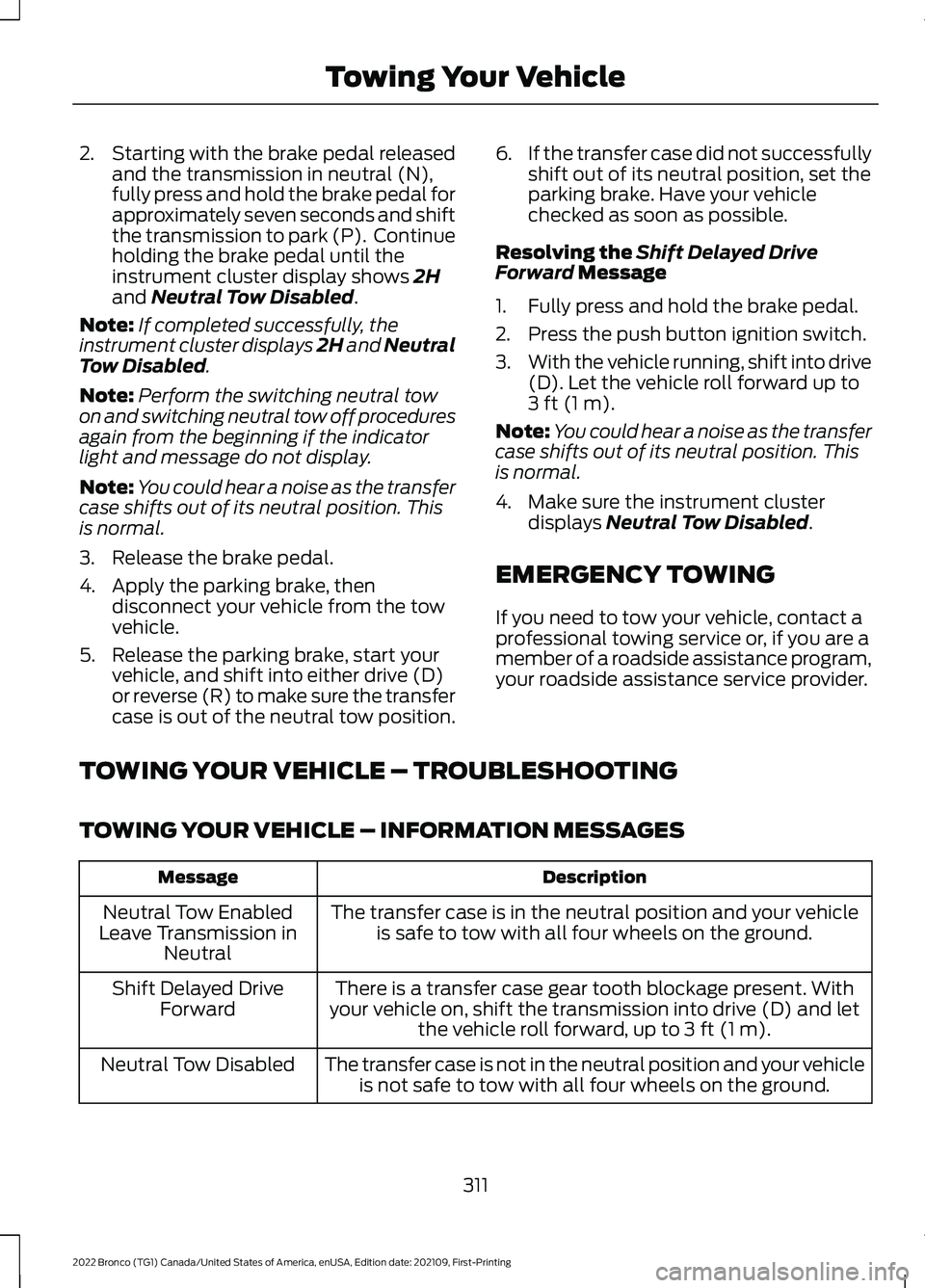
2.Starting with the brake pedal releasedand the transmission in neutral (N),fully press and hold the brake pedal forapproximately seven seconds and shiftthe transmission to park (P). Continueholding the brake pedal until theinstrument cluster display shows 2Hand Neutral Tow Disabled.
Note:If completed successfully, theinstrument cluster displays 2H and NeutralTow Disabled.
Note:Perform the switching neutral towon and switching neutral tow off proceduresagain from the beginning if the indicatorlight and message do not display.
Note:You could hear a noise as the transfercase shifts out of its neutral position. Thisis normal.
3.Release the brake pedal.
4.Apply the parking brake, thendisconnect your vehicle from the towvehicle.
5.Release the parking brake, start yourvehicle, and shift into either drive (D)or reverse (R) to make sure the transfercase is out of the neutral tow position.
6.If the transfer case did not successfullyshift out of its neutral position, set theparking brake. Have your vehiclechecked as soon as possible.
Resolving the Shift Delayed DriveForward Message
1.Fully press and hold the brake pedal.
2.Press the push button ignition switch.
3.With the vehicle running, shift into drive(D). Let the vehicle roll forward up to3 ft (1 m).
Note:You could hear a noise as the transfercase shifts out of its neutral position. Thisis normal.
4.Make sure the instrument clusterdisplays Neutral Tow Disabled.
EMERGENCY TOWING
If you need to tow your vehicle, contact aprofessional towing service or, if you are amember of a roadside assistance program,your roadside assistance service provider.
TOWING YOUR VEHICLE – TROUBLESHOOTING
TOWING YOUR VEHICLE – INFORMATION MESSAGES
DescriptionMessage
The transfer case is in the neutral position and your vehicleis safe to tow with all four wheels on the ground.Neutral Tow EnabledLeave Transmission inNeutral
There is a transfer case gear tooth blockage present. Withyour vehicle on, shift the transmission into drive (D) and letthe vehicle roll forward, up to 3 ft (1 m).
Shift Delayed DriveForward
The transfer case is not in the neutral position and your vehicleis not safe to tow with all four wheels on the ground.Neutral Tow Disabled
311
2022 Bronco (TG1) Canada/United States of America, enUSA, Edition date: 202109, First-PrintingTowing Your Vehicle
Page 336 of 562
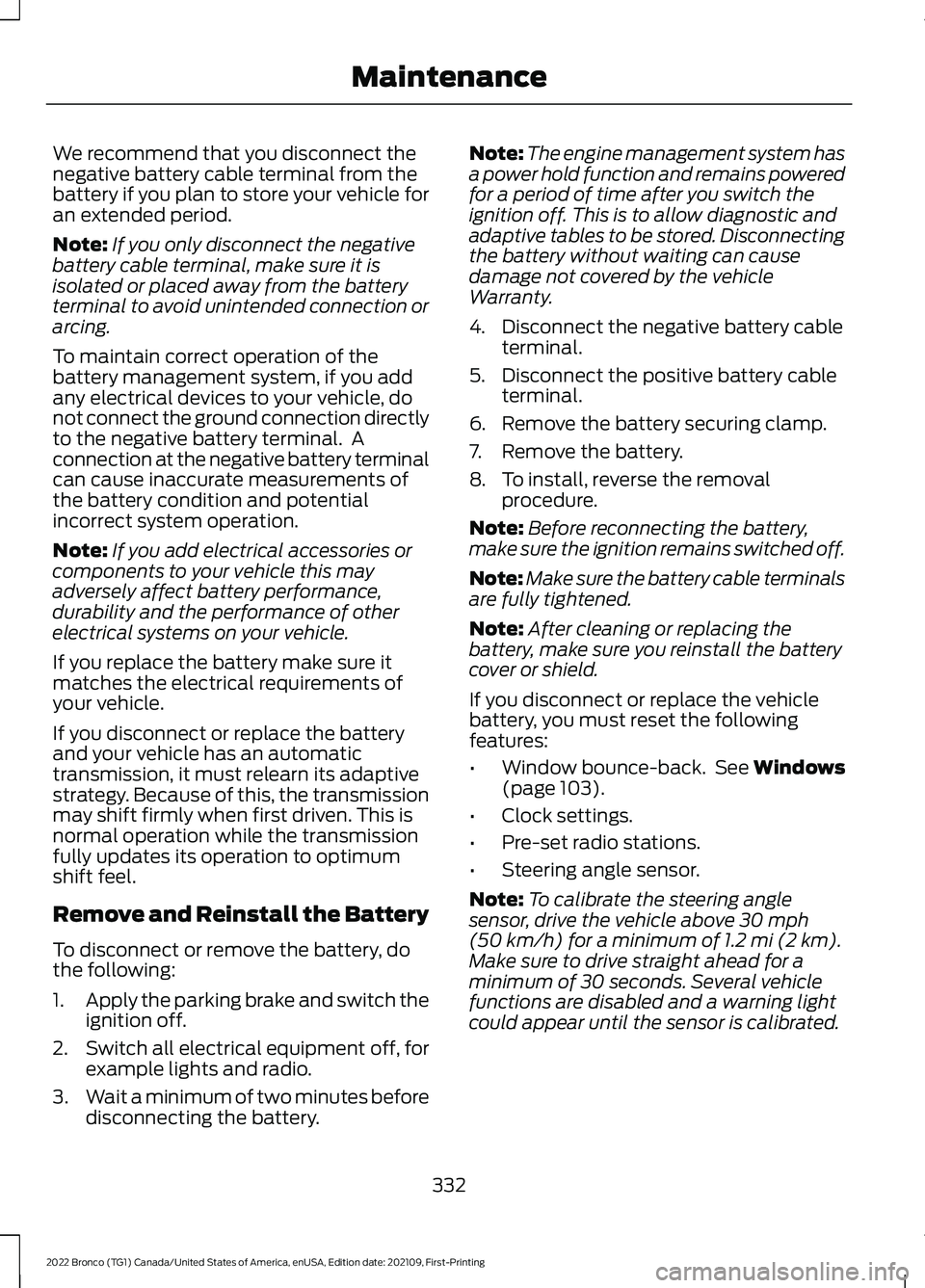
We recommend that you disconnect thenegative battery cable terminal from thebattery if you plan to store your vehicle foran extended period.
Note:If you only disconnect the negativebattery cable terminal, make sure it isisolated or placed away from the batteryterminal to avoid unintended connection orarcing.
To maintain correct operation of thebattery management system, if you addany electrical devices to your vehicle, donot connect the ground connection directlyto the negative battery terminal. Aconnection at the negative battery terminalcan cause inaccurate measurements ofthe battery condition and potentialincorrect system operation.
Note:If you add electrical accessories orcomponents to your vehicle this mayadversely affect battery performance,durability and the performance of otherelectrical systems on your vehicle.
If you replace the battery make sure itmatches the electrical requirements ofyour vehicle.
If you disconnect or replace the batteryand your vehicle has an automatictransmission, it must relearn its adaptivestrategy. Because of this, the transmissionmay shift firmly when first driven. This isnormal operation while the transmissionfully updates its operation to optimumshift feel.
Remove and Reinstall the Battery
To disconnect or remove the battery, dothe following:
1.Apply the parking brake and switch theignition off.
2.Switch all electrical equipment off, forexample lights and radio.
3.Wait a minimum of two minutes beforedisconnecting the battery.
Note:The engine management system hasa power hold function and remains poweredfor a period of time after you switch theignition off. This is to allow diagnostic andadaptive tables to be stored. Disconnectingthe battery without waiting can causedamage not covered by the vehicleWarranty.
4.Disconnect the negative battery cableterminal.
5.Disconnect the positive battery cableterminal.
6.Remove the battery securing clamp.
7.Remove the battery.
8.To install, reverse the removalprocedure.
Note:Before reconnecting the battery,make sure the ignition remains switched off.
Note:Make sure the battery cable terminalsare fully tightened.
Note:After cleaning or replacing thebattery, make sure you reinstall the batterycover or shield.
If you disconnect or replace the vehiclebattery, you must reset the followingfeatures:
•Window bounce-back. See Windows(page 103).
•Clock settings.
•Pre-set radio stations.
•Steering angle sensor.
Note:To calibrate the steering anglesensor, drive the vehicle above 30 mph(50 km/h) for a minimum of 1.2 mi (2 km).Make sure to drive straight ahead for aminimum of 30 seconds. Several vehiclefunctions are disabled and a warning lightcould appear until the sensor is calibrated.
332
2022 Bronco (TG1) Canada/United States of America, enUSA, Edition date: 202109, First-PrintingMaintenance
Page 378 of 562
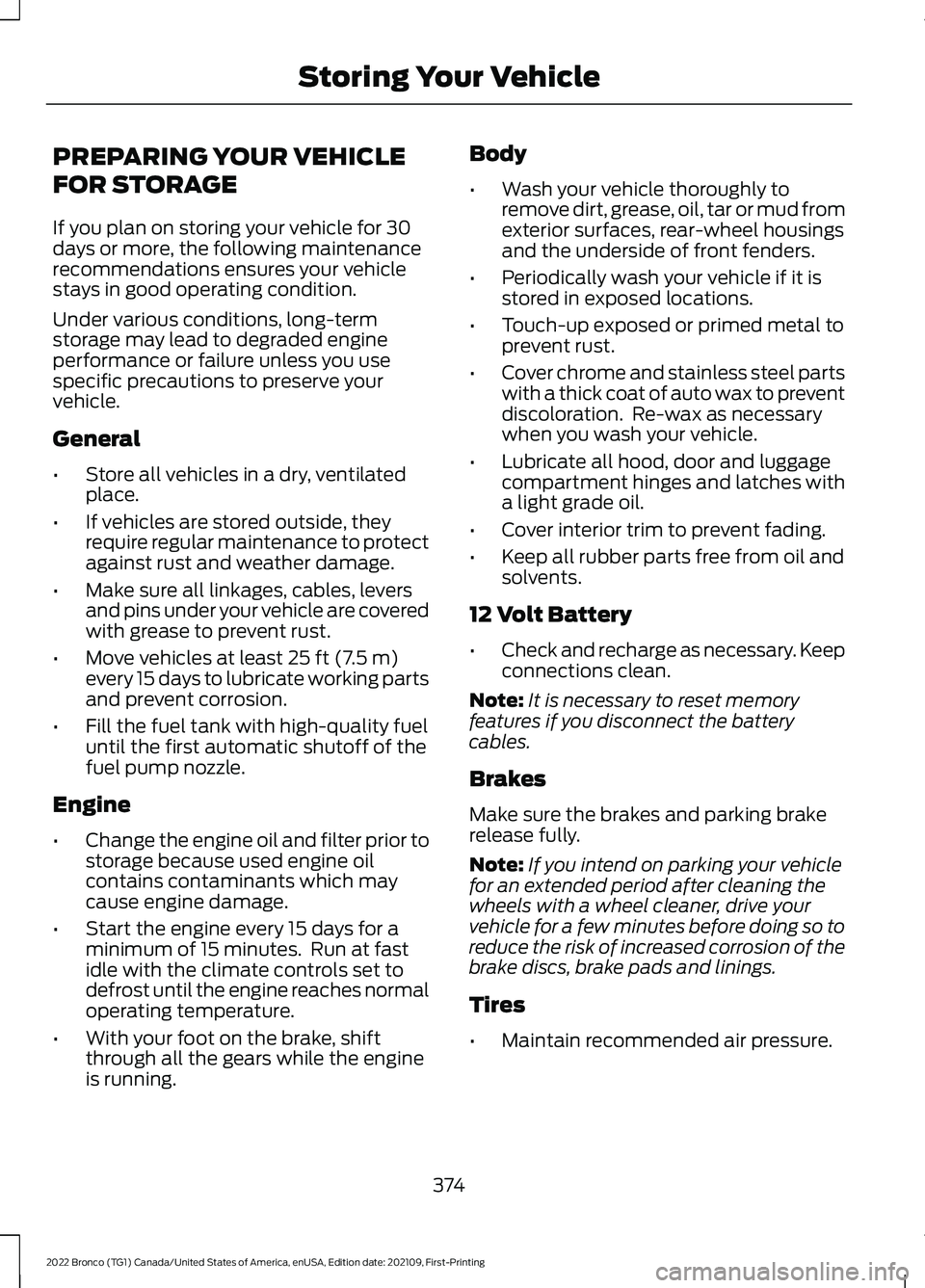
PREPARING YOUR VEHICLE
FOR STORAGE
If you plan on storing your vehicle for 30days or more, the following maintenancerecommendations ensures your vehiclestays in good operating condition.
Under various conditions, long-termstorage may lead to degraded engineperformance or failure unless you usespecific precautions to preserve yourvehicle.
General
•Store all vehicles in a dry, ventilatedplace.
•If vehicles are stored outside, theyrequire regular maintenance to protectagainst rust and weather damage.
•Make sure all linkages, cables, leversand pins under your vehicle are coveredwith grease to prevent rust.
•Move vehicles at least 25 ft (7.5 m)every 15 days to lubricate working partsand prevent corrosion.
•Fill the fuel tank with high-quality fueluntil the first automatic shutoff of thefuel pump nozzle.
Engine
•Change the engine oil and filter prior tostorage because used engine oilcontains contaminants which maycause engine damage.
•Start the engine every 15 days for aminimum of 15 minutes. Run at fastidle with the climate controls set todefrost until the engine reaches normaloperating temperature.
•With your foot on the brake, shiftthrough all the gears while the engineis running.
Body
•Wash your vehicle thoroughly toremove dirt, grease, oil, tar or mud fromexterior surfaces, rear-wheel housingsand the underside of front fenders.
•Periodically wash your vehicle if it isstored in exposed locations.
•Touch-up exposed or primed metal toprevent rust.
•Cover chrome and stainless steel partswith a thick coat of auto wax to preventdiscoloration. Re-wax as necessarywhen you wash your vehicle.
•Lubricate all hood, door and luggagecompartment hinges and latches witha light grade oil.
•Cover interior trim to prevent fading.
•Keep all rubber parts free from oil andsolvents.
12 Volt Battery
•Check and recharge as necessary. Keepconnections clean.
Note:It is necessary to reset memoryfeatures if you disconnect the batterycables.
Brakes
Make sure the brakes and parking brakerelease fully.
Note:If you intend on parking your vehiclefor an extended period after cleaning thewheels with a wheel cleaner, drive yourvehicle for a few minutes before doing so toreduce the risk of increased corrosion of thebrake discs, brake pads and linings.
Tires
•Maintain recommended air pressure.
374
2022 Bronco (TG1) Canada/United States of America, enUSA, Edition date: 202109, First-PrintingStoring Your Vehicle
Page 399 of 562
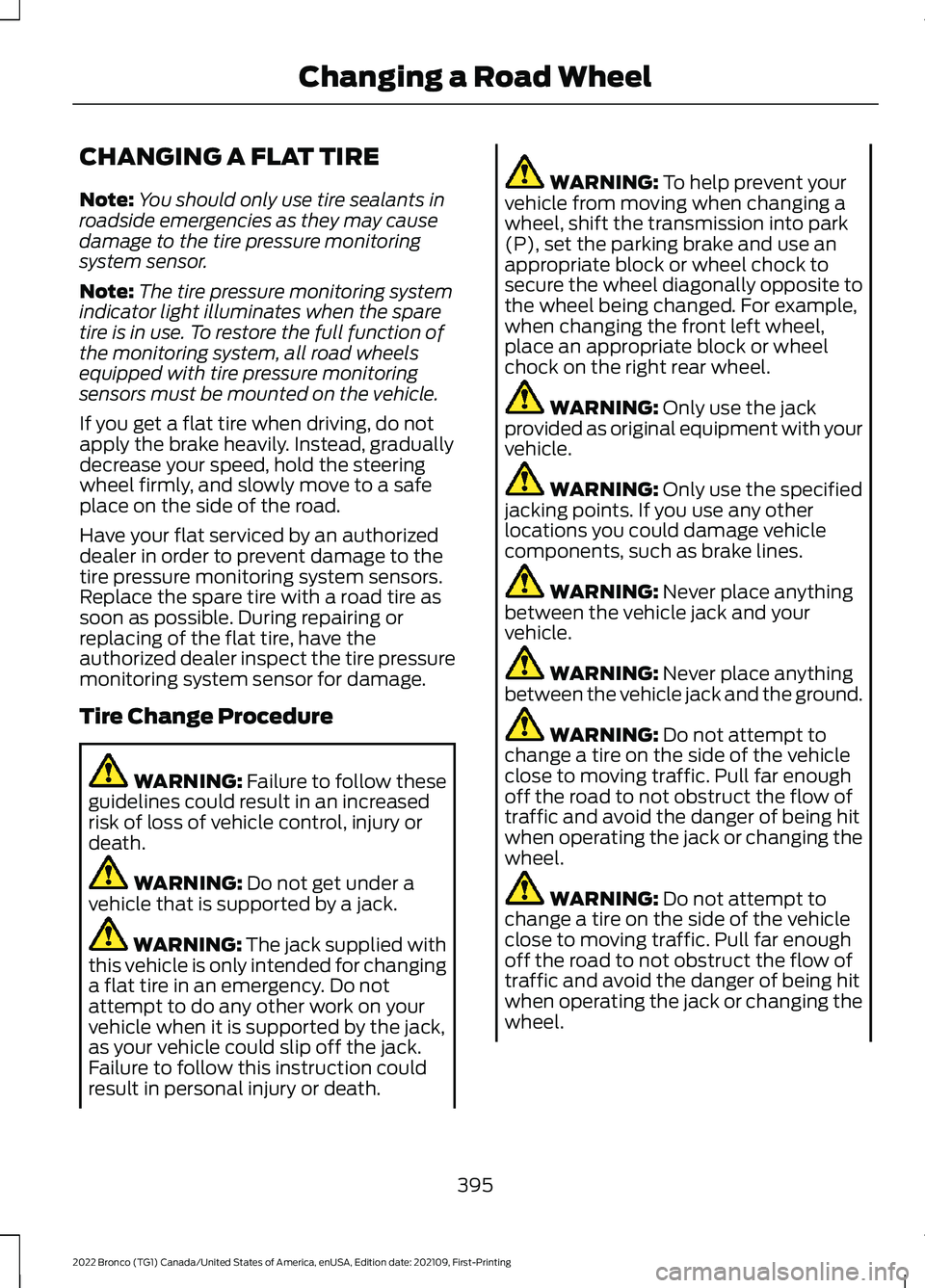
CHANGING A FLAT TIRE
Note:You should only use tire sealants inroadside emergencies as they may causedamage to the tire pressure monitoringsystem sensor.
Note:The tire pressure monitoring systemindicator light illuminates when the sparetire is in use. To restore the full function ofthe monitoring system, all road wheelsequipped with tire pressure monitoringsensors must be mounted on the vehicle.
If you get a flat tire when driving, do notapply the brake heavily. Instead, graduallydecrease your speed, hold the steeringwheel firmly, and slowly move to a safeplace on the side of the road.
Have your flat serviced by an authorizeddealer in order to prevent damage to thetire pressure monitoring system sensors.Replace the spare tire with a road tire assoon as possible. During repairing orreplacing of the flat tire, have theauthorized dealer inspect the tire pressuremonitoring system sensor for damage.
Tire Change Procedure
WARNING: Failure to follow theseguidelines could result in an increasedrisk of loss of vehicle control, injury ordeath.
WARNING: Do not get under avehicle that is supported by a jack.
WARNING: The jack supplied withthis vehicle is only intended for changinga flat tire in an emergency. Do notattempt to do any other work on yourvehicle when it is supported by the jack,as your vehicle could slip off the jack.Failure to follow this instruction couldresult in personal injury or death.
WARNING: To help prevent yourvehicle from moving when changing awheel, shift the transmission into park(P), set the parking brake and use anappropriate block or wheel chock tosecure the wheel diagonally opposite tothe wheel being changed. For example,when changing the front left wheel,place an appropriate block or wheelchock on the right rear wheel.
WARNING: Only use the jackprovided as original equipment with yourvehicle.
WARNING: Only use the specifiedjacking points. If you use any otherlocations you could damage vehiclecomponents, such as brake lines.
WARNING: Never place anythingbetween the vehicle jack and yourvehicle.
WARNING: Never place anythingbetween the vehicle jack and the ground.
WARNING: Do not attempt tochange a tire on the side of the vehicleclose to moving traffic. Pull far enoughoff the road to not obstruct the flow oftraffic and avoid the danger of being hitwhen operating the jack or changing thewheel.
WARNING: Do not attempt tochange a tire on the side of the vehicleclose to moving traffic. Pull far enoughoff the road to not obstruct the flow oftraffic and avoid the danger of being hitwhen operating the jack or changing thewheel.
395
2022 Bronco (TG1) Canada/United States of America, enUSA, Edition date: 202109, First-PrintingChanging a Road Wheel
Page 454 of 562
UPDATING THE VEHICLE
SYSTEMS WIRELESSLY
Over the air system updatesallow you to update your vehiclesystem software wirelessly. Tomake sure you receive all updates, set arecurring schedule and connect to Wi-Fi.Updates may take longer if not connectedto Wi-Fi, or may not download at all. SeeConnected Vehicle (page 417).
Over the Air System UpdateRequirements
Before updating, reference this list to makesure your vehicle is ready be updated. Ifthese requirements are not met during ascheduled update, the update will becanceled and you can reschedule.
•Your vehicle is not running.
•Your vehicle is stopped.
•Your vehicle is parked.
•The hazard indicators are switched off.
•The alarm is not sounding.
•The doors are closed.
•The parking lights are switched off.
•You are not pressing the brake pedal.
•An emergency call is not in progress.
•Your vehicle is not in limp mode.
Enabling Over the Air Updates
1.Press Settings on the touchscreen.
2.Press Software Update.
3.Switch Automatic Updates on or off.
Note:Over the air updates are enabled bydefault.
Note:If you do not want to receive over theair updates you can turn them off. You willnot be notified of new updates.
Scheduling an Update
Scheduling an update allows you to set aconvenient time for the update tocomplete. We recommend updatingovernight when your vehicle is not in use.Ensure Vehicle Connectivity and AutomaticUpdates are enabled. Once you completethese steps, your schedule will be savedfor future updates. As long as an update isnot in process you can adjust yourschedule.
Note:Some updates may be appliedoutside of your set schedule. Informationabout the unscheduled update appears onthe touchscreen after it is applied.
Using the Settings Menu
1.Press Settings on the touchscreen.
2.Press Software Update.
3.Press Schedule Updates.
4.Use the controls to set the time andday of the update.
5.Save the schedule.
Note:You can set the updates to occur atany time.
Using the Status Bar Icon
When an update is available, tapthe notification icon and followthe prompts on the screen.
Applying an Over the Air Update
You can see the progress of the update onthe touchscreen. An update cannot becanceled once it has been started.
450
2022 Bronco (TG1) Canada/United States of America, enUSA, Edition date: 202109, First-PrintingVehicle System UpdatesE327789 E327785
Page 541 of 562
1
12V Battery.....................................................32912V Battery Precautions..................................329Battery Management SystemLimitations......................................................330How Does the Battery ManagementSystem Work..................................................330Recycling and Disposing of the 12VBattery..............................................................330Resetting the Battery Sensor........................330What Is the Battery ManagementSystem..............................................................32912V Battery – Troubleshooting...............33012V Battery – Information Messages..........33112V Battery – Warning Lamps......................330
3
360 Degree Camera...................................229360 Degree Camera Settings.........................231360 Degree Camera Guide Lines..........230360 Degree Camera Limitations...........229360 Degree Camera Precautions..........229360 Degree Camera Settings..................231Switching the 360 Degree Camera On andOff........................................................................231Switching the 360 Degree CameraView.....................................................................231
4
4WDSee: Four-Wheel Drive......................................182
9
911 Assist...........................................................68
A
A/CSee: Climate Control - Vehicles With:Automatic Temperature Control..............118See: Climate Control - Vehicles With: ManualTemperature Control....................................123About This Publication..................................17
ABSSee: Brakes...........................................................194Accessing Apps............................................444Accessing Navigation.................................447Accessing the Passive Key BackupPosition.........................................................156Accessories....................................................452Adaptive Cruise Control............................234Adaptive Cruise Control –Troubleshooting............................................240Adaptive Cruise Control Indicators.......239Adaptive Cruise ControlLimitations...................................................235Adaptive Cruise ControlPrecautions.................................................234Adaptive Cruise Control –Troubleshooting........................................240Adaptive Cruise Control – InformationMessages.........................................................240Adjusting the Exterior Mirrors..................106Adjusting the Headlamps.........................333Adjusting the Instrument Panel LightingBrightness....................................................102Adjusting the Map.......................................447Changing the Format of the Map................447Zooming the Map In and Out........................447Adjusting the Seatbelts DuringPregnancy......................................................54Adjusting the Sound Settings.................423Adjusting the Steering Wheel...................89Adjusting the Volume.................................423Aid Mode..........................................................251How Does Aid Mode Work...............................251What Is Aid Mode................................................251Airbag Precautions.........................................61Airbags...............................................................59Front Passenger Sensing System..................63Air ConditioningSee: Climate Control - Vehicles With:Automatic Temperature Control..............118See: Climate Control - Vehicles With: ManualTemperature Control....................................123Air Conditioning System Capacity andSpecification...............................................410Air FilterSee: Changing the Engine Air Filter.............328Alert and Aid Mode......................................251How Does Alert and Aid Mode Work..........252
537
2022 Bronco (TG1) Canada/United States of America, enUSA, Edition date: 202109, First-PrintingIndex