page 1 FORD BRONCO 2022 Owner's Manual
[x] Cancel search | Manufacturer: FORD, Model Year: 2022, Model line: BRONCO, Model: FORD BRONCO 2022Pages: 562, PDF Size: 73 MB
Page 63 of 562
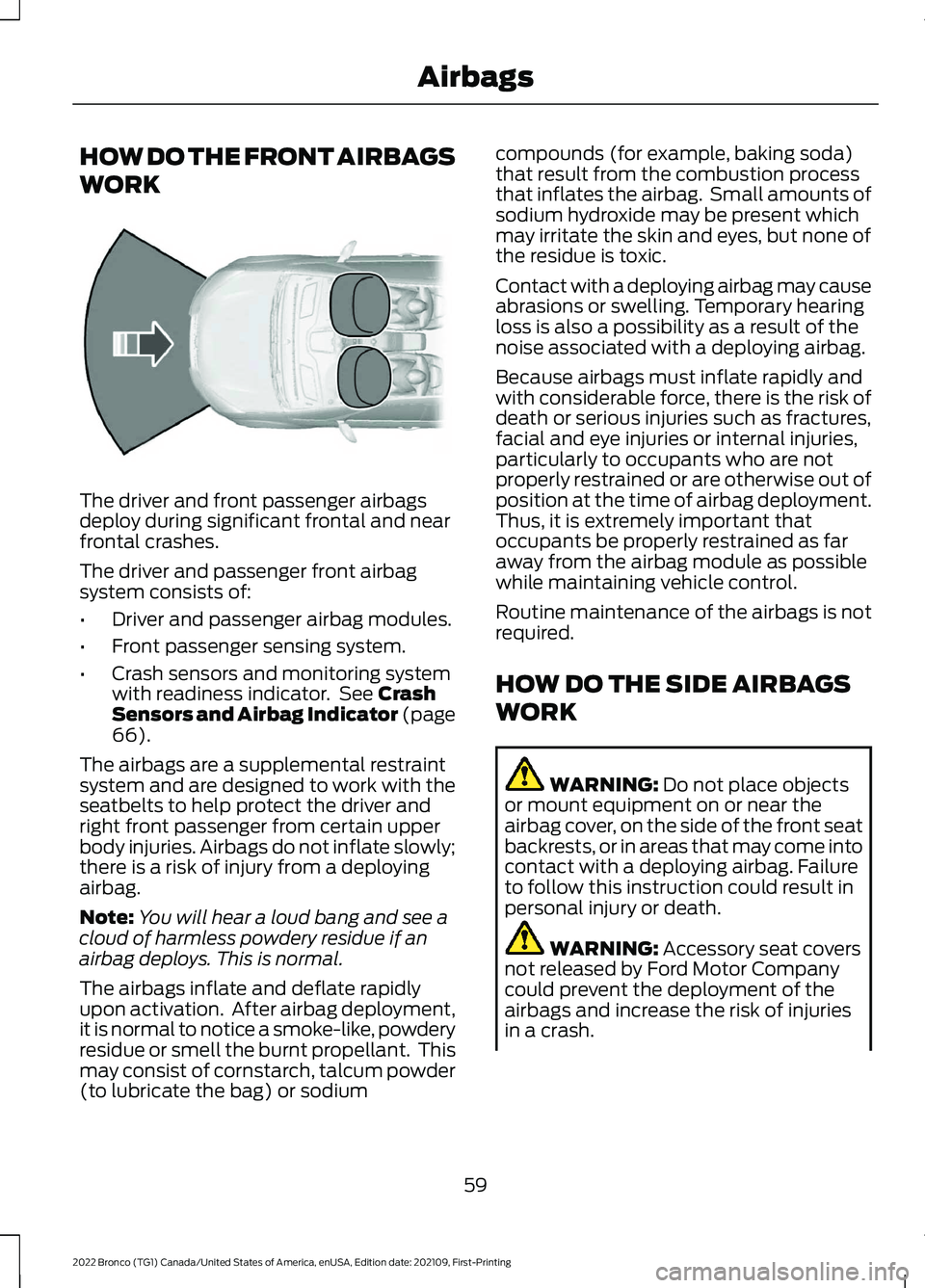
HOW DO THE FRONT AIRBAGS
WORK
The driver and front passenger airbagsdeploy during significant frontal and nearfrontal crashes.
The driver and passenger front airbagsystem consists of:
•Driver and passenger airbag modules.
•Front passenger sensing system.
•Crash sensors and monitoring systemwith readiness indicator. See CrashSensors and Airbag Indicator (page66).
The airbags are a supplemental restraintsystem and are designed to work with theseatbelts to help protect the driver andright front passenger from certain upperbody injuries. Airbags do not inflate slowly;there is a risk of injury from a deployingairbag.
Note:You will hear a loud bang and see acloud of harmless powdery residue if anairbag deploys. This is normal.
The airbags inflate and deflate rapidlyupon activation. After airbag deployment,it is normal to notice a smoke-like, powderyresidue or smell the burnt propellant. Thismay consist of cornstarch, talcum powder(to lubricate the bag) or sodium
compounds (for example, baking soda)that result from the combustion processthat inflates the airbag. Small amounts ofsodium hydroxide may be present whichmay irritate the skin and eyes, but none ofthe residue is toxic.
Contact with a deploying airbag may causeabrasions or swelling. Temporary hearingloss is also a possibility as a result of thenoise associated with a deploying airbag.
Because airbags must inflate rapidly andwith considerable force, there is the risk ofdeath or serious injuries such as fractures,facial and eye injuries or internal injuries,particularly to occupants who are notproperly restrained or are otherwise out ofposition at the time of airbag deployment.Thus, it is extremely important thatoccupants be properly restrained as faraway from the airbag module as possiblewhile maintaining vehicle control.
Routine maintenance of the airbags is notrequired.
HOW DO THE SIDE AIRBAGS
WORK
WARNING: Do not place objectsor mount equipment on or near theairbag cover, on the side of the front seatbackrests, or in areas that may come intocontact with a deploying airbag. Failureto follow this instruction could result inpersonal injury or death.
WARNING: Accessory seat coversnot released by Ford Motor Companycould prevent the deployment of theairbags and increase the risk of injuriesin a crash.
59
2022 Bronco (TG1) Canada/United States of America, enUSA, Edition date: 202109, First-PrintingAirbagsE151127
Page 64 of 562
WARNING: Do not lean your headon the door. The side airbag could injureyou as it deploys from the side of theseatback.
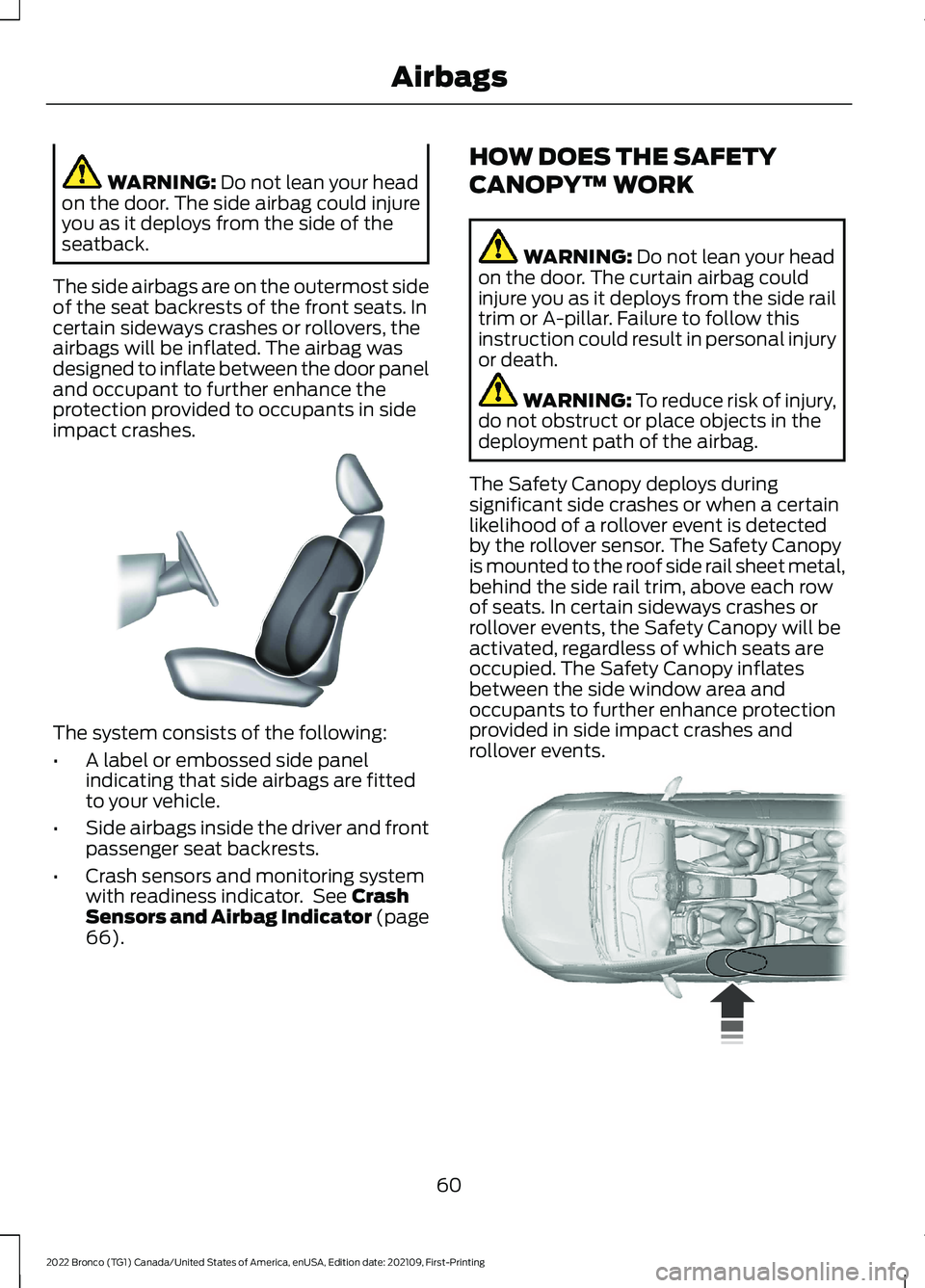
The side airbags are on the outermost sideof the seat backrests of the front seats. Incertain sideways crashes or rollovers, theairbags will be inflated. The airbag wasdesigned to inflate between the door paneland occupant to further enhance theprotection provided to occupants in sideimpact crashes.
The system consists of the following:
•A label or embossed side panelindicating that side airbags are fittedto your vehicle.
•Side airbags inside the driver and frontpassenger seat backrests.
•Crash sensors and monitoring systemwith readiness indicator. See CrashSensors and Airbag Indicator (page66).
HOW DOES THE SAFETY
CANOPY™ WORK
WARNING: Do not lean your headon the door. The curtain airbag couldinjure you as it deploys from the side railtrim or A-pillar. Failure to follow thisinstruction could result in personal injuryor death.
WARNING: To reduce risk of injury,do not obstruct or place objects in thedeployment path of the airbag.
The Safety Canopy deploys duringsignificant side crashes or when a certainlikelihood of a rollover event is detectedby the rollover sensor. The Safety Canopyis mounted to the roof side rail sheet metal,behind the side rail trim, above each rowof seats. In certain sideways crashes orrollover events, the Safety Canopy will beactivated, regardless of which seats areoccupied. The Safety Canopy inflatesbetween the side window area andoccupants to further enhance protectionprovided in side impact crashes androllover events.
60
2022 Bronco (TG1) Canada/United States of America, enUSA, Edition date: 202109, First-PrintingAirbagsE152533 E75004
Page 65 of 562
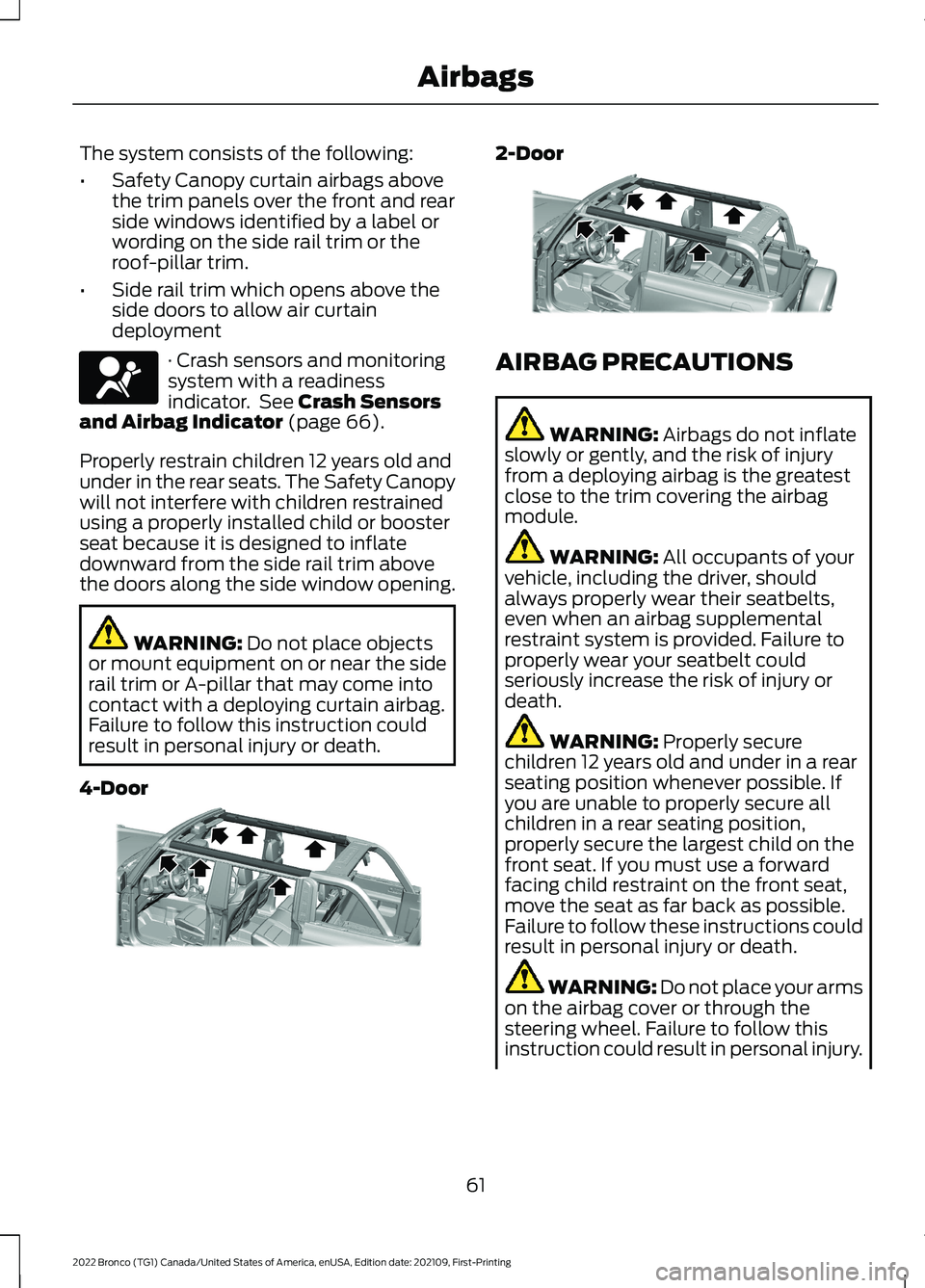
The system consists of the following:
•Safety Canopy curtain airbags abovethe trim panels over the front and rearside windows identified by a label orwording on the side rail trim or theroof-pillar trim.
•Side rail trim which opens above theside doors to allow air curtaindeployment
· Crash sensors and monitoringsystem with a readinessindicator. See Crash Sensorsand Airbag Indicator (page 66).
Properly restrain children 12 years old andunder in the rear seats. The Safety Canopywill not interfere with children restrainedusing a properly installed child or boosterseat because it is designed to inflatedownward from the side rail trim abovethe doors along the side window opening.
WARNING: Do not place objectsor mount equipment on or near the siderail trim or A-pillar that may come intocontact with a deploying curtain airbag.Failure to follow this instruction couldresult in personal injury or death.
4-Door
2-Door
AIRBAG PRECAUTIONS
WARNING: Airbags do not inflateslowly or gently, and the risk of injuryfrom a deploying airbag is the greatestclose to the trim covering the airbagmodule.
WARNING: All occupants of yourvehicle, including the driver, shouldalways properly wear their seatbelts,even when an airbag supplementalrestraint system is provided. Failure toproperly wear your seatbelt couldseriously increase the risk of injury ordeath.
WARNING: Properly securechildren 12 years old and under in a rearseating position whenever possible. Ifyou are unable to properly secure allchildren in a rear seating position,properly secure the largest child on thefront seat. If you must use a forwardfacing child restraint on the front seat,move the seat as far back as possible.Failure to follow these instructions couldresult in personal injury or death.
WARNING: Do not place your armson the airbag cover or through thesteering wheel. Failure to follow thisinstruction could result in personal injury.
61
2022 Bronco (TG1) Canada/United States of America, enUSA, Edition date: 202109, First-PrintingAirbagsE67017 E339113 E339112
Page 68 of 562
•When the front passenger sensingsystem enables the front passengerfrontal airbag, the passenger airbagstatus indicator illuminates the onlamp.
If a person of adult size is sitting in the frontpassenger seat, but the passenger airbagstatus indicator off lamp is illuminated, itis possible that the person is not sittingproperly in the seat. If this happens:
•Switch your vehicle off and ask theperson to place the seat backrest in anupright position.
•Have the person sit upright in the seat,centered on the seat cushion, with theperson's legs comfortably extended.
•Restart your vehicle and have theperson remain in this position for abouttwo minutes. This allows the systemto detect that person and enable thepassenger frontal airbag.
•If the indicator off lamp remainsilluminated even after this, you shouldadvise the person to ride in the rearseat.
After all occupants have adjusted theirseats and put on seatbelts, it is veryimportant that they continue to sit upright,leaning against the seat backrest, andcentered on the seat cushion, with theirfeet comfortably extended on the floor.
Sitting improperly can increase the chanceof injury in a crash event. For example, ifan occupant slouches, lies down, turnssideways, sits forward, leans forward orsideways, or puts one or both feet up, thechance of injury during a crash greatlyincreases.
If you think that the state of the passengerairbag status indicator lamp is incorrect,check for the following:
•Objects lodged underneath the seat.
•Objects between the seat cushion andthe center console.
•Objects hanging off the seat backrest.
•Objects stowed in the seat backrestmap pocket.
•Objects placed on the occupant's lap.
•Cargo interference with the seat
•Other passengers pushing or pulling onthe seat.
•Rear passenger feet and knees restingor pushing on the seat.
The listed conditions could cause theweight of a properly seated occupant tobe incorrectly interpreted by the frontpassenger sensing system. The person inthe front passenger seat could appearheavier or lighter due to the conditionslisted.
Make sure the front passengersensing system is operatingproperly. See Crash Sensorsand Airbag Indicator (page 66).
If the airbag readiness light is on, do thefollowing:
•Pull your vehicle over.
•Switch your vehicle off.
•Check for any objects lodgedunderneath the front passenger seator cargo interfering with the seat.
•Remove the obstruction if found.
•Restart your vehicle.
•Wait at least two minutes and verifythat the airbag readiness light in theinstrument cluster is no longerilluminated.
•If the airbag readiness light in theinstrument cluster remains illuminated,there may be a problem due to thefront passenger sensing system.
Do not attempt to repair or service thesystem. Take your vehicle in for serviceimmediately.
64
2022 Bronco (TG1) Canada/United States of America, enUSA, Edition date: 202109, First-PrintingAirbagsE67017
Page 69 of 562
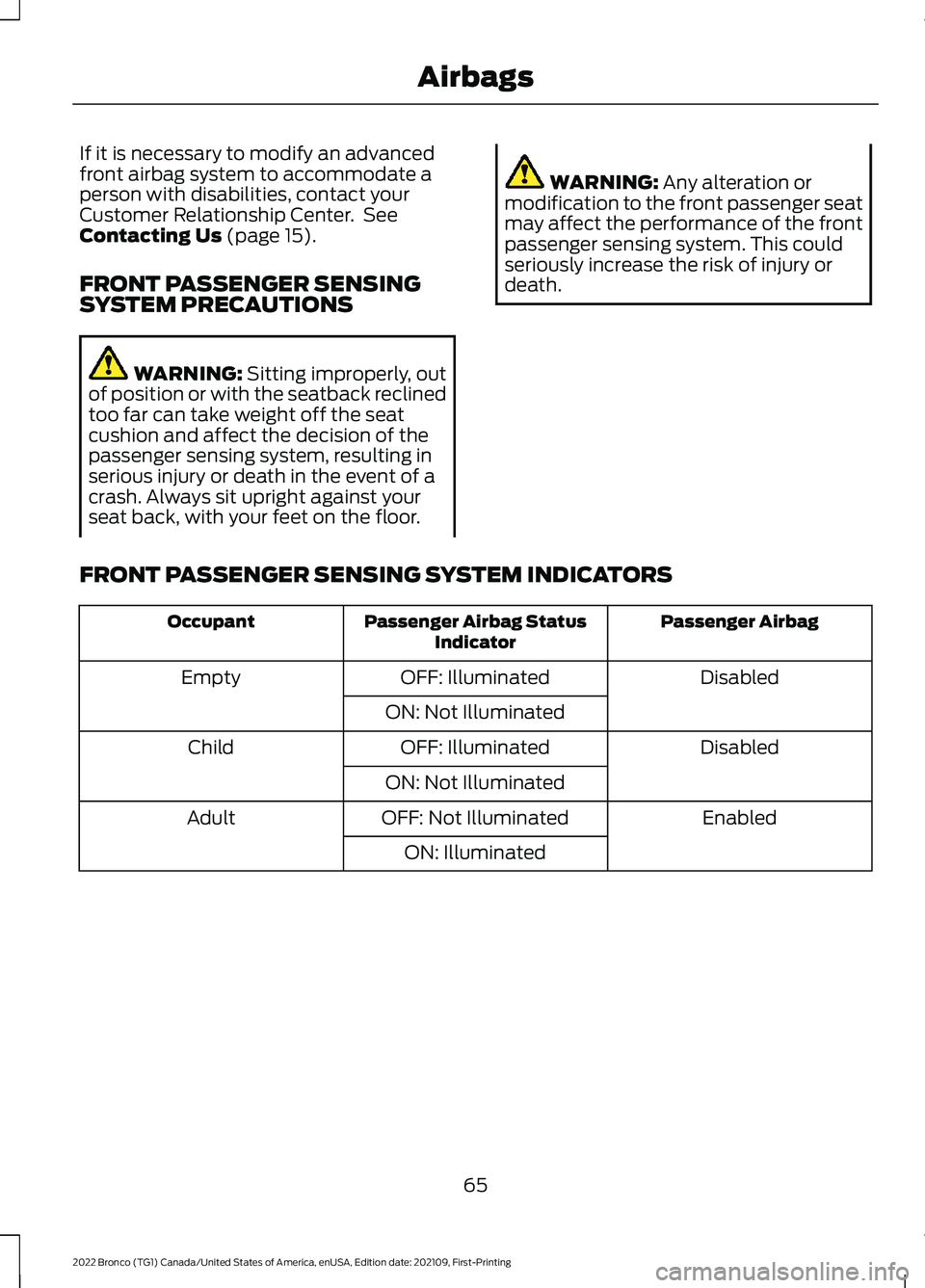
If it is necessary to modify an advancedfront airbag system to accommodate aperson with disabilities, contact yourCustomer Relationship Center. SeeContacting Us (page 15).
FRONT PASSENGER SENSINGSYSTEM PRECAUTIONS
WARNING: Sitting improperly, outof position or with the seatback reclinedtoo far can take weight off the seatcushion and affect the decision of thepassenger sensing system, resulting inserious injury or death in the event of acrash. Always sit upright against yourseat back, with your feet on the floor.
WARNING: Any alteration ormodification to the front passenger seatmay affect the performance of the frontpassenger sensing system. This couldseriously increase the risk of injury ordeath.
FRONT PASSENGER SENSING SYSTEM INDICATORS
Passenger AirbagPassenger Airbag StatusIndicatorOccupant
DisabledOFF: IlluminatedEmpty
ON: Not Illuminated
DisabledOFF: IlluminatedChild
ON: Not Illuminated
EnabledOFF: Not IlluminatedAdult
ON: Illuminated
65
2022 Bronco (TG1) Canada/United States of America, enUSA, Edition date: 202109, First-PrintingAirbags
Page 73 of 562
REMOTE CONTROL
LIMITATIONS
WARNING: Changes ormodifications not expressively approvedby the party responsible for compliancecould void the user's authority to operatethe equipment. The term "IC:" before theradio certification number only signifiesthat Industry Canada technicalspecifications were met.
This device complies with Part 15 of theFCC Rules and with Industry Canadalicense-exempt RSS standard(s).Operation is subject to the following twoconditions: (1) This device may not causeharmful interference, and (2) This devicemust accept any interference received,including interference that may causeundesired operation.
Make sure a valid remote control is within5 ft (1.5 m) from the front door handlesand rear of vehicle.
The system may not function if:
•The remote control remains stationaryfor about a minute.
•The vehicle battery has no charge.
•The remote control battery has nocharge.
•There is interference causing issueswith the remote control frequencies.
•The remote control is too close tometal objects or electronic devices, forexample keys or a cell phone.
USING THE REMOTE CONTROL
Use your remote control to access variousvehicle systems.
Note:The buttons on your remote may varydepending on the vehicle region or options.
Unlock
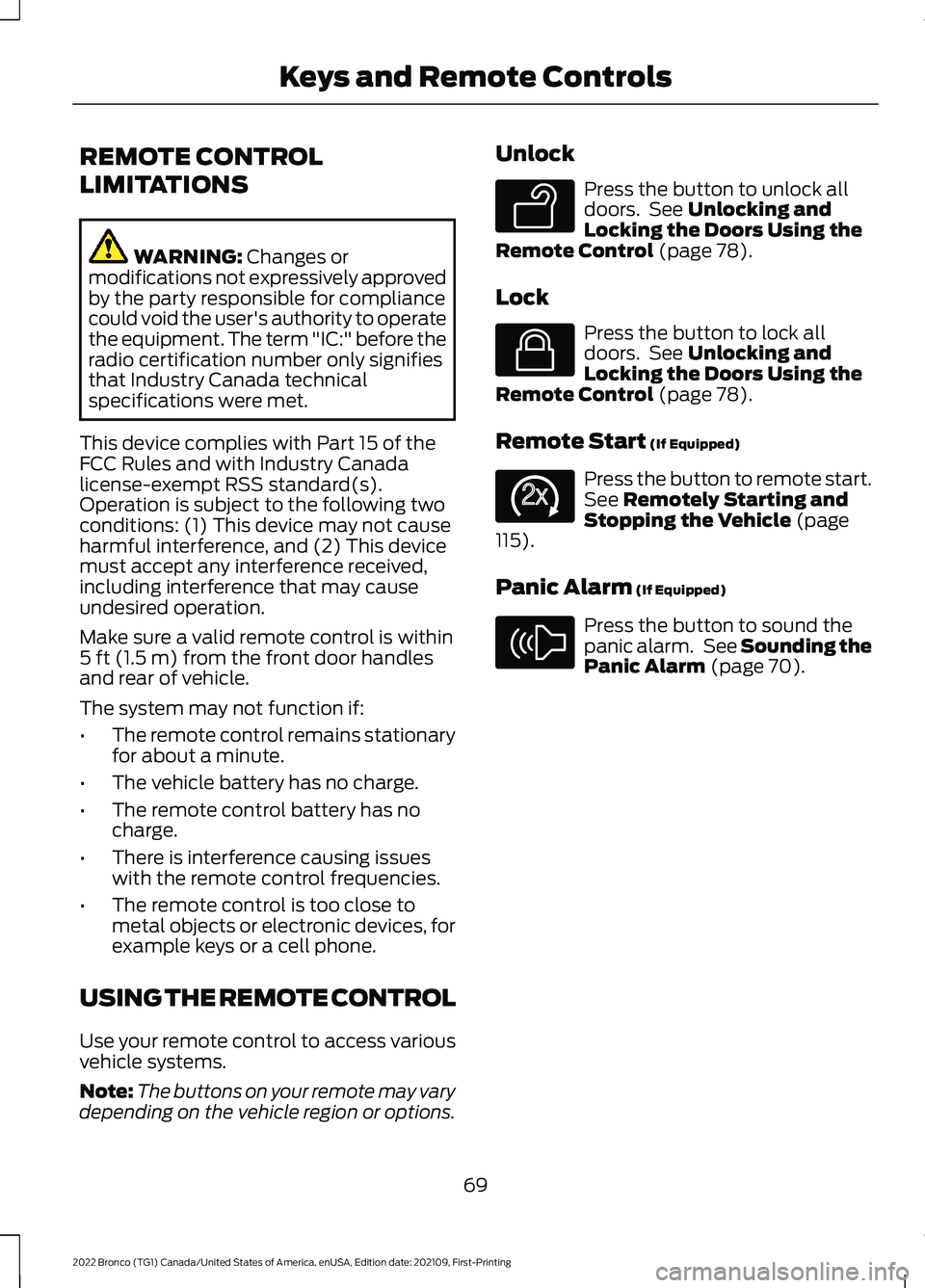
Press the button to unlock alldoors. See Unlocking andLocking the Doors Using theRemote Control (page 78).
Lock
Press the button to lock alldoors. See Unlocking andLocking the Doors Using theRemote Control (page 78).
Remote Start (If Equipped)
Press the button to remote start.See Remotely Starting andStopping the Vehicle (page115).
Panic Alarm (If Equipped)
Press the button to sound thepanic alarm. See Sounding thePanic Alarm (page 70).
69
2022 Bronco (TG1) Canada/United States of America, enUSA, Edition date: 202109, First-PrintingKeys and Remote ControlsE138629 E138623 E138625 E138624
Page 78 of 562
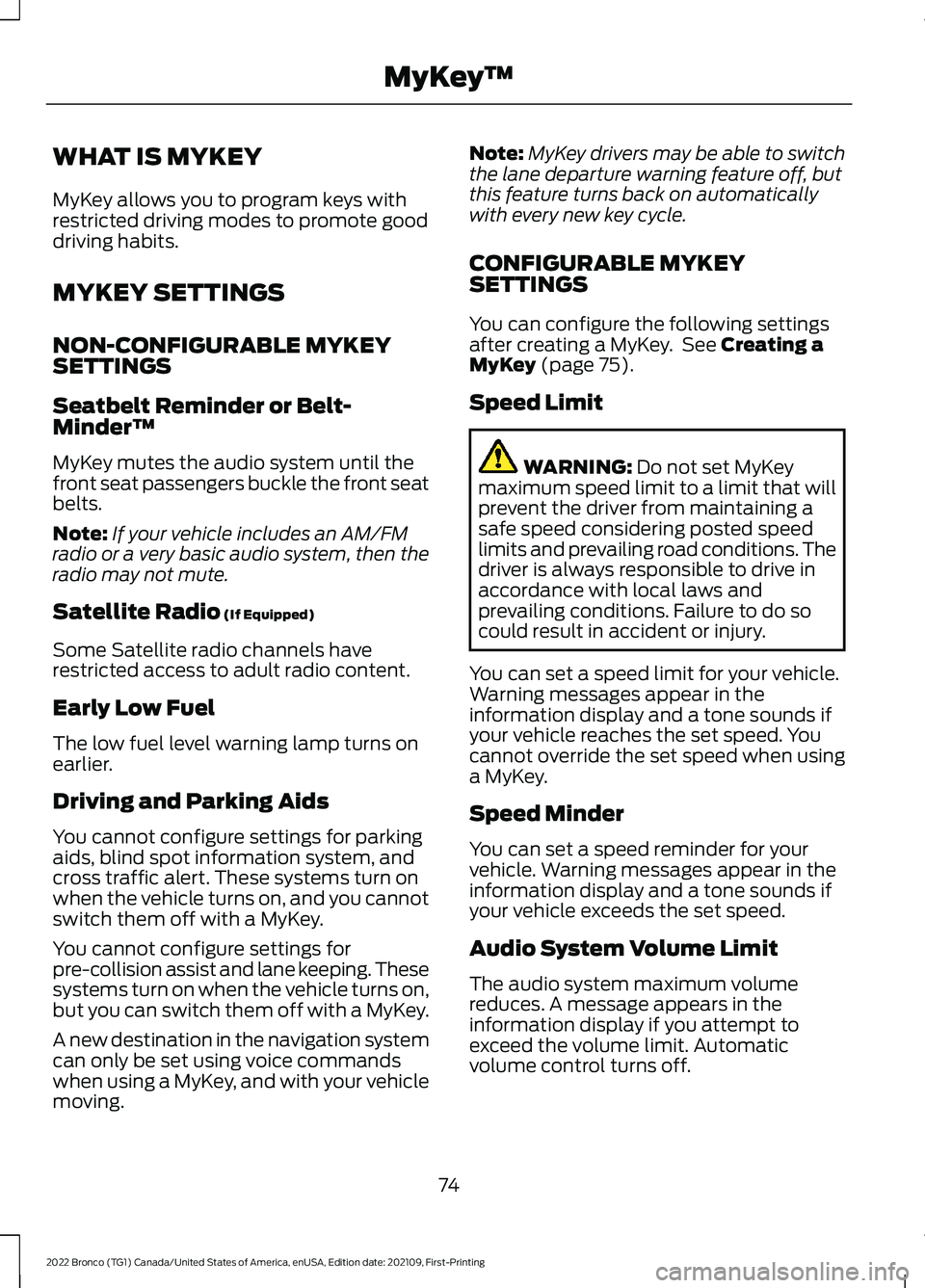
WHAT IS MYKEY
MyKey allows you to program keys withrestricted driving modes to promote gooddriving habits.
MYKEY SETTINGS
NON-CONFIGURABLE MYKEYSETTINGS
Seatbelt Reminder or Belt-Minder™
MyKey mutes the audio system until thefront seat passengers buckle the front seatbelts.
Note:If your vehicle includes an AM/FMradio or a very basic audio system, then theradio may not mute.
Satellite Radio (If Equipped)
Some Satellite radio channels haverestricted access to adult radio content.
Early Low Fuel
The low fuel level warning lamp turns onearlier.
Driving and Parking Aids
You cannot configure settings for parkingaids, blind spot information system, andcross traffic alert. These systems turn onwhen the vehicle turns on, and you cannotswitch them off with a MyKey.
You cannot configure settings forpre-collision assist and lane keeping. Thesesystems turn on when the vehicle turns on,but you can switch them off with a MyKey.
A new destination in the navigation systemcan only be set using voice commandswhen using a MyKey, and with your vehiclemoving.
Note:MyKey drivers may be able to switchthe lane departure warning feature off, butthis feature turns back on automaticallywith every new key cycle.
CONFIGURABLE MYKEYSETTINGS
You can configure the following settingsafter creating a MyKey. See Creating aMyKey (page 75).
Speed Limit
WARNING: Do not set MyKeymaximum speed limit to a limit that willprevent the driver from maintaining asafe speed considering posted speedlimits and prevailing road conditions. Thedriver is always responsible to drive inaccordance with local laws andprevailing conditions. Failure to do socould result in accident or injury.
You can set a speed limit for your vehicle.Warning messages appear in theinformation display and a tone sounds ifyour vehicle reaches the set speed. Youcannot override the set speed when usinga MyKey.
Speed Minder
You can set a speed reminder for yourvehicle. Warning messages appear in theinformation display and a tone sounds ifyour vehicle exceeds the set speed.
Audio System Volume Limit
The audio system maximum volumereduces. A message appears in theinformation display if you attempt toexceed the volume limit. Automaticvolume control turns off.
74
2022 Bronco (TG1) Canada/United States of America, enUSA, Edition date: 202109, First-PrintingMyKey™
Page 80 of 562
5.Press Clear All MyKeys.
6.Press Yes.
CHECKING MYKEY SYSTEM
STATUS
You can find information about thedistance traveled using a MyKey, and thenumber of admin keys and MyKeys createdfor your vehicle.
1.Switch the ignition on.
2.Press Settings on the touchscreen.
3.Press Vehicle Settings.
4.Press MyKey.
5.Press MyKey Information.
USING MYKEY WITH REMOTE
START SYSTEMS
MyKey is not compatible with unapproved,aftermarket remote start systems. If youchoose to install a remote start system,see an authorized dealer for an approvedremote start system.
MYKEY – TROUBLESHOOTING
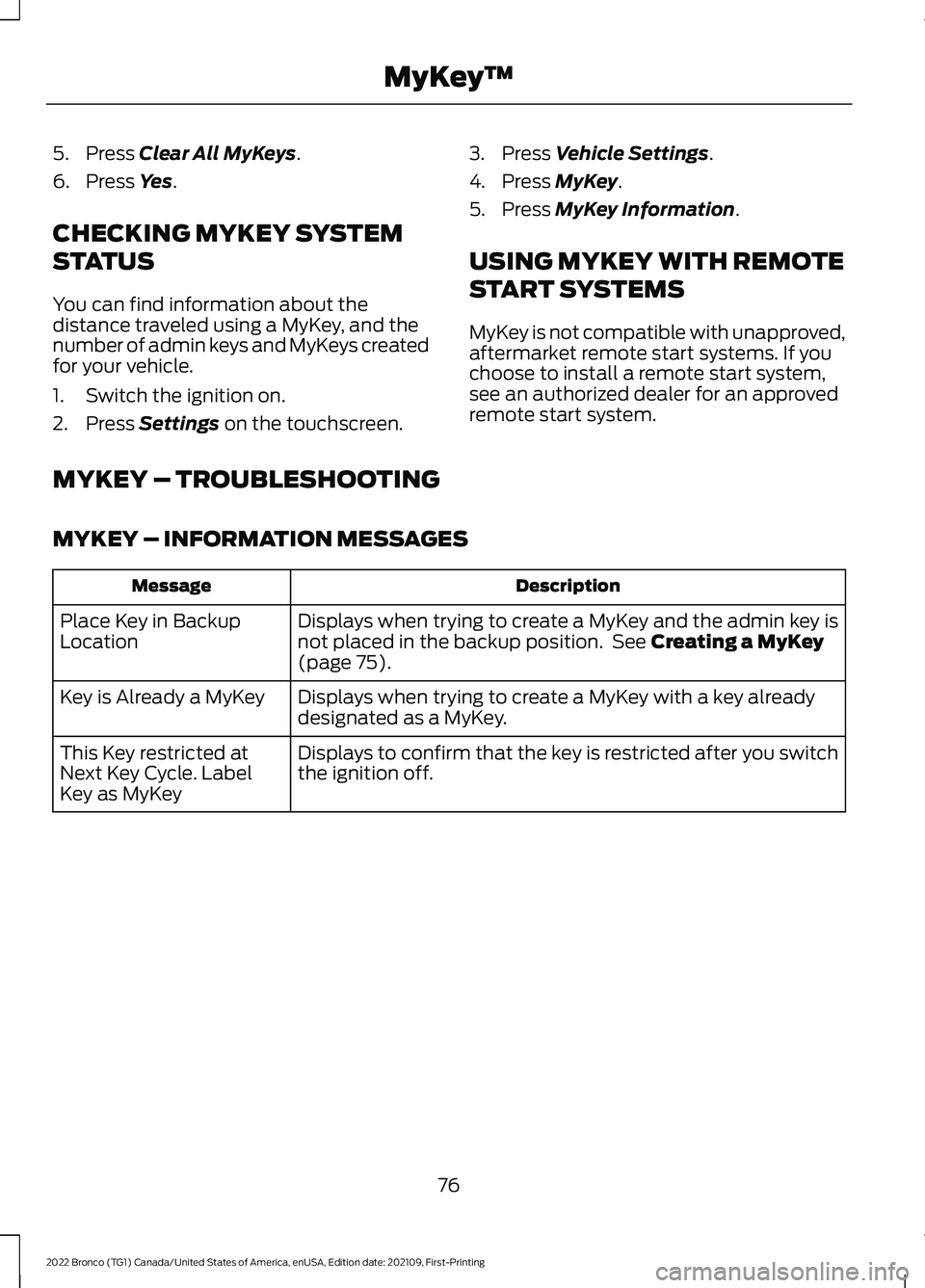
MYKEY – INFORMATION MESSAGES
DescriptionMessage
Displays when trying to create a MyKey and the admin key isnot placed in the backup position. See Creating a MyKey(page 75).
Place Key in BackupLocation
Displays when trying to create a MyKey with a key alreadydesignated as a MyKey.Key is Already a MyKey
Displays to confirm that the key is restricted after you switchthe ignition off.This Key restricted atNext Key Cycle. LabelKey as MyKey
76
2022 Bronco (TG1) Canada/United States of America, enUSA, Edition date: 202109, First-PrintingMyKey™
Page 81 of 562
MYKEY – FREQUENTLY ASKEDQUESTIONS
What is an admin key?
An admin key is a key that you havenot created as a MyKey. See Creatinga MyKey (page 75).
Why am I not able to create a MyKey?
You have not placed the admin key inthe backup position. See Creating aMyKey (page 75). The key used toswitch the ignition on is not an adminkey. The key used to switch the ignitionon is the only admin key. There has tobe at least one admin key. You did notswitch the ignition off after creatingthe last MyKey.
Why am I not able to program a MyKey?
The admin key is not inside yourvehicle. The key used to switch theignition on is not an admin key. Youhave not created any MyKeys. SeeCreating a MyKey (page 75).
Why am I not able to clear the MyKeys?
The admin key is not inside yourvehicle. The key used to switch theignition on is not an admin key. Youhave not created any MyKeys. SeeCreating a MyKey (page 75).
Why is the MyKey distance notaccumulating?
The key used to start the engine is anadmin key. An admin key and a MyKeyare inside your vehicle. You have notcreated any MyKeys. See Creating aMyKey (page 75). You have clearedthe MyKeys. See Clearing AllMyKeys (page 75).
Why am I not able to start the enginewith a MyKey?
An admin key and a MyKey are insideyour vehicle. The system recognizesonly the admin key when both arepresent.
77
2022 Bronco (TG1) Canada/United States of America, enUSA, Edition date: 202109, First-PrintingMyKey™
Page 87 of 562
KEYLESS ENTRY –
TROUBLESHOOTING
KEYLESS ENTRY – FREQUENTLYASKED QUESTIONS
Why does the keyless entry system notfunction?
If the system does not function it maybe limited. See Keyless EntryLimitations (page 82). If the systemstill does not function use the remotecontrol or the key blade to lock andunlock your vehicle.
Why can I not lock my vehicle?
If you electronically lock your vehiclewith a rear door or the tailgate open,the system searches for a passive keyinside your vehicle after you close thelast door. If the system detects a key,all doors unlock indicating that a keyis inside. Your vehicle locks if anotherpassive key is within the detectionrange after you close the last door.
Why does the passive key not work?
The system deactivates passive keysleft inside your vehicle when you lockit. You cannot switch the ignition onusing a deactivated passive key. Pressthe unlock button on the remotecontrol to reactivate a passive key.
83
2022 Bronco (TG1) Canada/United States of America, enUSA, Edition date: 202109, First-PrintingKeyless Entry (If Equipped)