service FORD BRONCO 2022 Workshop Manual
[x] Cancel search | Manufacturer: FORD, Model Year: 2022, Model line: BRONCO, Model: FORD BRONCO 2022Pages: 562, PDF Size: 73 MB
Page 394 of 562
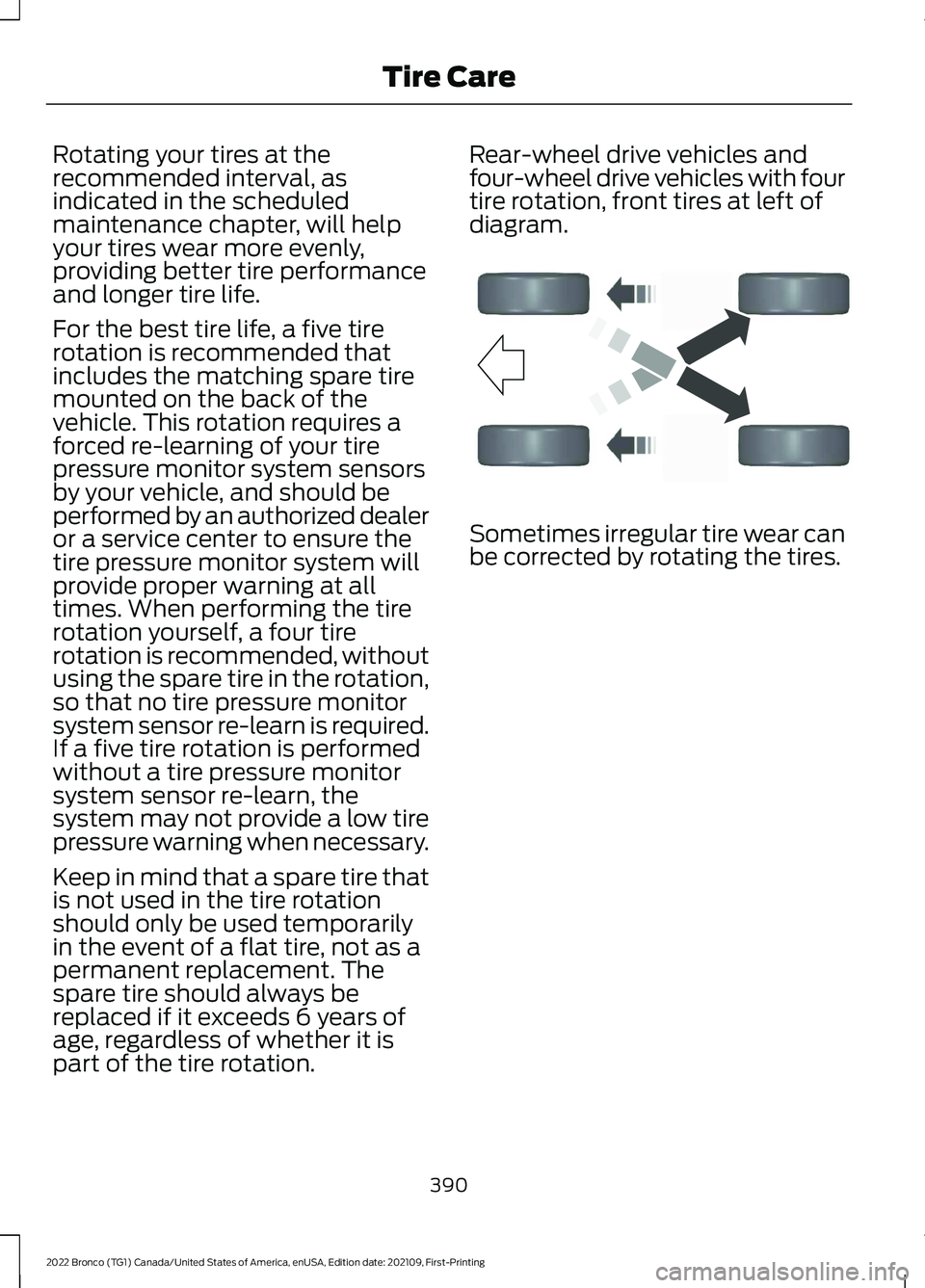
Rotating your tires at therecommended interval, asindicated in the scheduledmaintenance chapter, will helpyour tires wear more evenly,providing better tire performanceand longer tire life.
For the best tire life, a five tirerotation is recommended thatincludes the matching spare tiremounted on the back of thevehicle. This rotation requires aforced re-learning of your tirepressure monitor system sensorsby your vehicle, and should beperformed by an authorized dealeror a service center to ensure thetire pressure monitor system willprovide proper warning at alltimes. When performing the tirerotation yourself, a four tirerotation is recommended, withoutusing the spare tire in the rotation,so that no tire pressure monitorsystem sensor re-learn is required.If a five tire rotation is performedwithout a tire pressure monitorsystem sensor re-learn, thesystem may not provide a low tirepressure warning when necessary.
Keep in mind that a spare tire thatis not used in the tire rotationshould only be used temporarilyin the event of a flat tire, not as apermanent replacement. Thespare tire should always bereplaced if it exceeds 6 years ofage, regardless of whether it ispart of the tire rotation.
Rear-wheel drive vehicles andfour-wheel drive vehicles with fourtire rotation, front tires at left ofdiagram.
Sometimes irregular tire wear canbe corrected by rotating the tires.
390
2022 Bronco (TG1) Canada/United States of America, enUSA, Edition date: 202109, First-PrintingTire CareE142548
Page 397 of 562
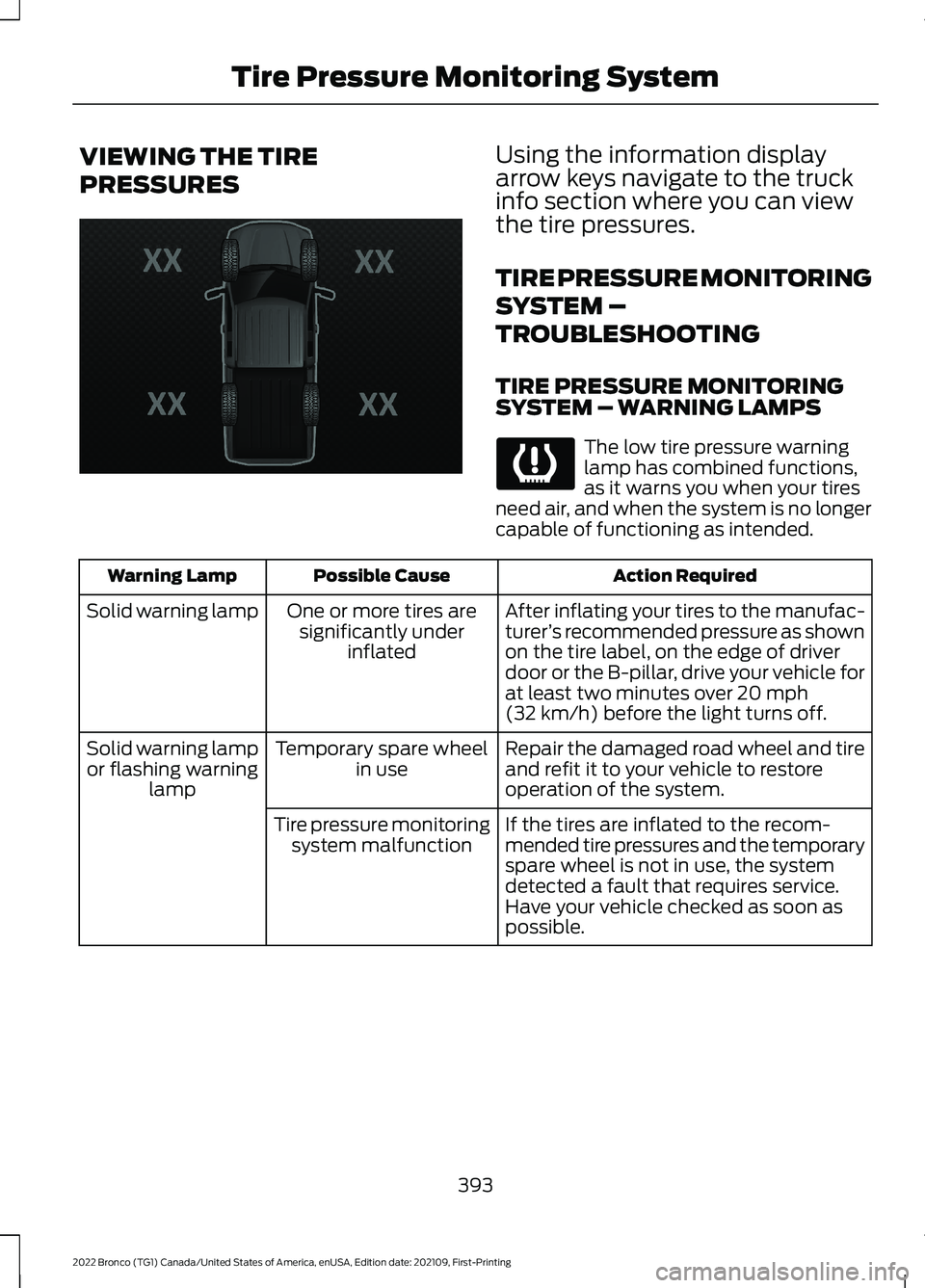
VIEWING THE TIRE
PRESSURES
Using the information displayarrow keys navigate to the truckinfo section where you can viewthe tire pressures.
TIRE PRESSURE MONITORING
SYSTEM –
TROUBLESHOOTING
TIRE PRESSURE MONITORINGSYSTEM – WARNING LAMPS
The low tire pressure warninglamp has combined functions,as it warns you when your tiresneed air, and when the system is no longercapable of functioning as intended.
Action RequiredPossible CauseWarning Lamp
After inflating your tires to the manufac-turer’s recommended pressure as shownon the tire label, on the edge of driverdoor or the B-pillar, drive your vehicle forat least two minutes over 20 mph(32 km/h) before the light turns off.
One or more tires aresignificantly underinflated
Solid warning lamp
Repair the damaged road wheel and tireand refit it to your vehicle to restoreoperation of the system.
Temporary spare wheelin useSolid warning lampor flashing warninglamp
If the tires are inflated to the recom-mended tire pressures and the temporaryspare wheel is not in use, the systemdetected a fault that requires service.Have your vehicle checked as soon aspossible.
Tire pressure monitoringsystem malfunction
393
2022 Bronco (TG1) Canada/United States of America, enUSA, Edition date: 202109, First-PrintingTire Pressure Monitoring SystemE224333
Page 398 of 562
TIRE PRESSURE MONITORING SYSTEM – INFORMATION MESSAGES
ActionMessage
After inflating your tires to the manufacturer’s recommendedpressure as shown on the tire label, on the edge of the driverdoor or the B-pillar, drive your vehicle for at least two minutesover 20 mph (32 km/h) before the light turns off.
Tire Pressure Low
The system has detected a fault that requires service. Haveyour vehicle checked as soon as possible.Tire Pressure MonitorFault
The system has detected a fault that requires service or aspare tire is in use. Have your vehicle checked as soon aspossible.
Tire Pressure SensorFault
394
2022 Bronco (TG1) Canada/United States of America, enUSA, Edition date: 202109, First-PrintingTire Pressure Monitoring System
Page 399 of 562
CHANGING A FLAT TIRE
Note:You should only use tire sealants inroadside emergencies as they may causedamage to the tire pressure monitoringsystem sensor.
Note:The tire pressure monitoring systemindicator light illuminates when the sparetire is in use. To restore the full function ofthe monitoring system, all road wheelsequipped with tire pressure monitoringsensors must be mounted on the vehicle.
If you get a flat tire when driving, do notapply the brake heavily. Instead, graduallydecrease your speed, hold the steeringwheel firmly, and slowly move to a safeplace on the side of the road.
Have your flat serviced by an authorizeddealer in order to prevent damage to thetire pressure monitoring system sensors.Replace the spare tire with a road tire assoon as possible. During repairing orreplacing of the flat tire, have theauthorized dealer inspect the tire pressuremonitoring system sensor for damage.
Tire Change Procedure
WARNING: Failure to follow theseguidelines could result in an increasedrisk of loss of vehicle control, injury ordeath.
WARNING: Do not get under avehicle that is supported by a jack.
WARNING: The jack supplied withthis vehicle is only intended for changinga flat tire in an emergency. Do notattempt to do any other work on yourvehicle when it is supported by the jack,as your vehicle could slip off the jack.Failure to follow this instruction couldresult in personal injury or death.
WARNING: To help prevent yourvehicle from moving when changing awheel, shift the transmission into park(P), set the parking brake and use anappropriate block or wheel chock tosecure the wheel diagonally opposite tothe wheel being changed. For example,when changing the front left wheel,place an appropriate block or wheelchock on the right rear wheel.
WARNING: Only use the jackprovided as original equipment with yourvehicle.
WARNING: Only use the specifiedjacking points. If you use any otherlocations you could damage vehiclecomponents, such as brake lines.
WARNING: Never place anythingbetween the vehicle jack and yourvehicle.
WARNING: Never place anythingbetween the vehicle jack and the ground.
WARNING: Do not attempt tochange a tire on the side of the vehicleclose to moving traffic. Pull far enoughoff the road to not obstruct the flow oftraffic and avoid the danger of being hitwhen operating the jack or changing thewheel.
WARNING: Do not attempt tochange a tire on the side of the vehicleclose to moving traffic. Pull far enoughoff the road to not obstruct the flow oftraffic and avoid the danger of being hitwhen operating the jack or changing thewheel.
395
2022 Bronco (TG1) Canada/United States of America, enUSA, Edition date: 202109, First-PrintingChanging a Road Wheel
Page 400 of 562
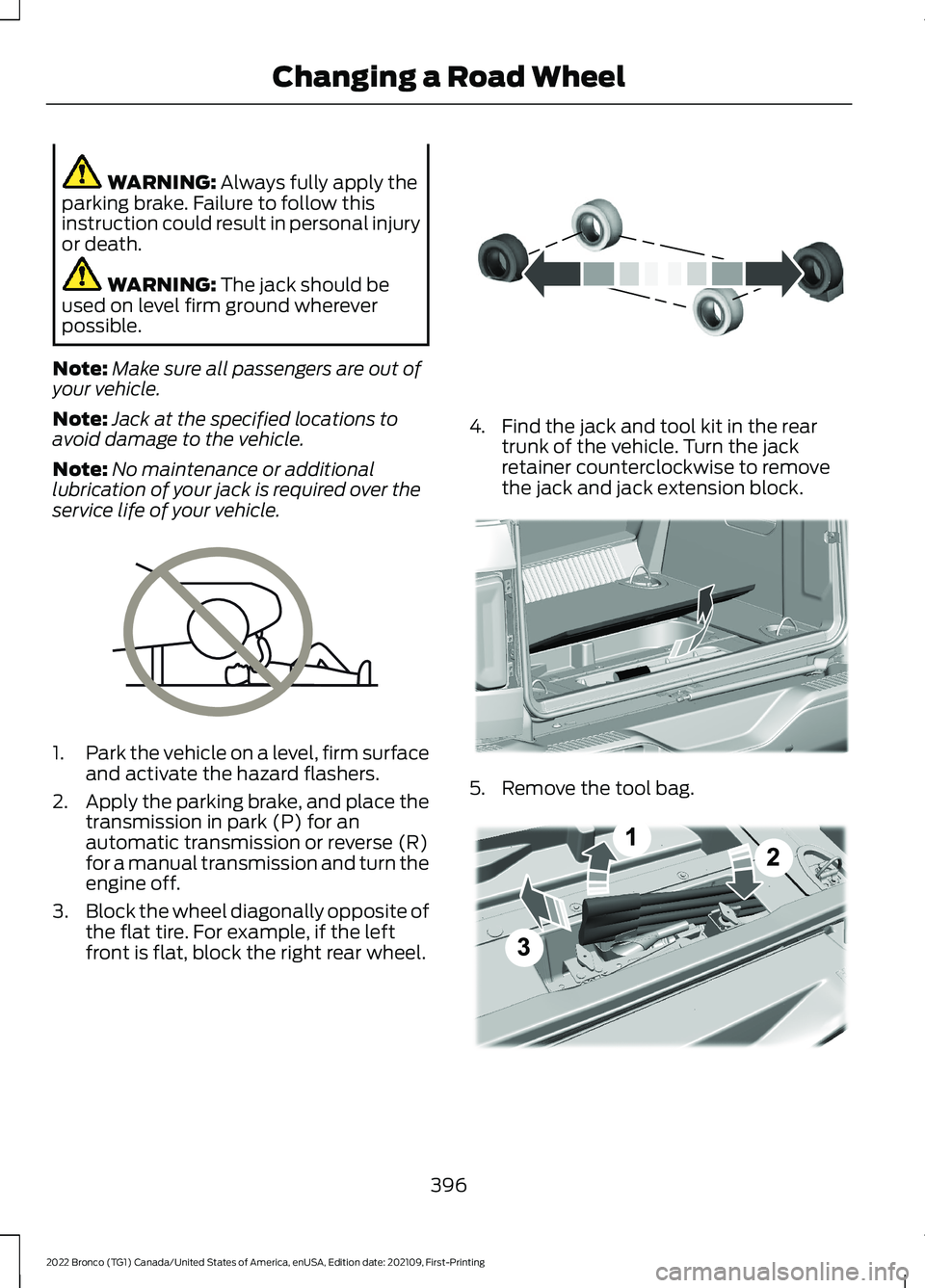
WARNING: Always fully apply theparking brake. Failure to follow thisinstruction could result in personal injuryor death.
WARNING: The jack should beused on level firm ground whereverpossible.
Note:Make sure all passengers are out ofyour vehicle.
Note:Jack at the specified locations toavoid damage to the vehicle.
Note:No maintenance or additionallubrication of your jack is required over theservice life of your vehicle.
1.Park the vehicle on a level, firm surfaceand activate the hazard flashers.
2.Apply the parking brake, and place thetransmission in park (P) for anautomatic transmission or reverse (R)for a manual transmission and turn theengine off.
3.Block the wheel diagonally opposite ofthe flat tire. For example, if the leftfront is flat, block the right rear wheel.
4.Find the jack and tool kit in the reartrunk of the vehicle. Turn the jackretainer counterclockwise to removethe jack and jack extension block.
5.Remove the tool bag.
396
2022 Bronco (TG1) Canada/United States of America, enUSA, Edition date: 202109, First-PrintingChanging a Road WheelE166722 E142551 E324358 E343390
Page 414 of 562
AIR CONDITIONING SYSTEM
CAPACITY AND
SPECIFICATION
WARNING: The air conditioningrefrigerant system contains refrigerantunder high pressure. Only qualifiedpersonnel should service the airconditioning refrigerant system. Opening
the air conditioning refrigerant systemcan cause personal injury.
Use refrigerant and oil that meets thedefined specifications.
If you do not use refrigerant and oil thatmeets the defined specifications, it couldresult in:
•Component damage that your vehiclewarranty does not cover.
•Reduced vehicle performance.
Capacities
RefrigerantVariant
19.4 oz (0.55 kg)All.
Materials
SpecificationName
WSS-M17B21-AR-1234yf Refrigerant(U.S.)R-1234yf Refrigerant / Frigorigène R-1234yf(Canada)YN-33-A(U.S.)HS7Z-19B519-BA(Canada)
WSS-M2C300-A2Motorcraft® R-1234yf Refrigerant PAG Oil(U.S.)Motorcraft® R-1234yf Refrigerant PAG Oil / HuilePAG pour frigorigène R-1234yf Motorcraft®(Canada)YN-35(U.S. & Canada)
WASHER FLUID SPECIFICATION
Capacities
QuantityVariant
Fill as required.All.
410
2022 Bronco (TG1) Canada/United States of America, enUSA, Edition date: 202109, First-PrintingCapacities and Specifications
Page 415 of 562
Materials
SpecificationName
WSS-M14P19-AMotorcraft® Premium Windshield Wash Concen-trate with Bitterant(U.S.)Motorcraft® Premium Quality Windshield WasherFluid / Liquide lave-glace de haute qualité Motor-craft®(Canada)ZC-32-B2(U.S.)CXC-37-F/M(Canada)
MANUAL TRANSMISSION
FLUID CAPACITY AND
SPECIFICATION
Use fluid that meets the definedspecification and viscosity grade.
If you do not use fluid that meets thedefined specification and viscosity grade,it could result in:
•Component damage that your vehiclewarranty does not cover.
•Reduced vehicle performance.
•Reduced fuel economy.
Capacities
QuantityVariant
2.5 qt (2.4 L)1All.
1 Approximate total oil volume/capacity. Actual amount could vary between fluid changes.
Note:Transmission Oil is “filled-for-life” –No requirement to Service the transmissionoil.
Materials
SpecificationName
WSS-M2C200-D2Motorcraft® Dual Clutch Transmission Fluid(U.S.)Motorcraft® Dual Clutch Transmission Fluid / Huilepour boîtes embrayage double Motor-craft®(Canada)XT-11-QDC(U.S. & Canada)
411
2022 Bronco (TG1) Canada/United States of America, enUSA, Edition date: 202109, First-PrintingCapacities and Specifications
Page 421 of 562
WHAT IS A CONNECTED
VEHICLE
A connected vehicle has technology thatallows your vehicle to connect to a mobilenetwork and for you to access a range offeatures. When used in conjunction withthe FordPass app, it could allow you tomonitor and control your vehicle further,for example checking the tire pressures,the fuel level and the vehicle location. Foradditional information, refer to the localFord website.
CONNECTED VEHICLE
REQUIREMENTS
Connected service and related featurefunctionality requires a compatible vehiclenetwork.
Some remote features require additionalservice activation. Log in to your Fordaccount for details. Some restrictions, thirdparty terms and message or data ratesmay apply.
CONNECTED VEHICLE
LIMITATIONS
Evolving technology, cellular networks, orregulations could affect functionality andavailability, or continued provision of somefeatures. These changes could even stopsome features from functioning.
CONNECTING THE VEHICLE TO
A MOBILE NETWORK
WHAT IS THE MODEM
The modem allows access to arange of features built into yourvehicle.
ENABLING AND DISABLING THEMODEM
1.Press Settings.
2.Press Connectivity.
3.Press Connected Vehicle Features.
4.Switch vehicle connectivity on or off.
CONNECTING FORDPASS TO THEMODEM
1.Make sure that the modem is enabledusing the vehicle settings menu.
2.Open the FordPass app on your deviceand log in.
3.Add your vehicle or select your vehicleif already added.
4.Select the option to activate yourvehicle.
5.Make sure that the name on the screenmatches the name shown in yourFordPass account.
6.Confirm that FordPass account isconnected to the modem.
CONNECTING THE VEHICLE TO
A WI-FI NETWORK
Select the settings option on thefeature bar.
1.Press Connectivity.
2.Press Manage Wi-Fi Networks.
3.Switch Wi-Fi on.
4.Press View Available Networks.
5.Select an available Wi-Fi network.
Note:Enter the network password toconnect to a secure network.
417
2022 Bronco (TG1) Canada/United States of America, enUSA, Edition date: 202109, First-PrintingConnected Vehicle E280315
Page 424 of 562
CREATING A VEHICLE WI-FI
HOTSPOT
You can create a Wi-Fi hotspot in yourvehicle and allow devices to connect to itfor access to the Internet.
Select the settings option on thefeature bar.
1.Press Vehicle Hotspot.
Note:The vehicle hotspot default settingis on.
2.Press Settings.
3.Press Edit.
4.Press Hotspot visibility.
Note:The hotspot visibility default settingis on.
Finding the Wi-Fi Hotspot Nameand Password
Select the settings option on thefeature bar.
1.Press Vehicle Hotspot.
2.Press Settings.
Note:The network name is the hotspotname.
3.Press View Password.
Connecting a Device to the Wi-FiHotspot
1.On your device, switch Wi-Fi on andselect the hotspot from the list ofavailable Wi-Fi networks.
2.When prompted, enter the password.
Purchasing a Data Plan
1.Connect a device to the hotspot.
Note:The vehicle network carrier’s portalopens on your device.
2.If the portal does not open on yourdevice, open a website and it redirectsto the vehicle network carrier’s portal.
Note:Secure websites do not redirect.
3.Follow the instructions on the carrierportal to purchase a plan.
Note:If you have an active plan, the systemdoes not redirect to the vehicle networkcarrier’s portal when you connect a device.Visit the vehicle network carrier’s websiteto purchase more data.
Note:If data usage information is availablein the vehicle hotspot menu, it isapproximate.
Note:If you carry out a master reset, thesystem does not remove your vehicle fromyour vehicle network carrier’s account. Toremove your vehicle from the account,contact your vehicle network carrier.
Note:The vehicle network carrier providesVehicle Hotspot services, subject to yourvehicle network carrier agreement, coverageand availability.
CHANGING THE VEHICLE WI-
FI HOTSPOT NAME OR
PASSWORD
Select the settings option on thefeature bar.
1.Press Vehicle Hotspot.
2.Press Settings.
3.Press Edit.
4.Press Change Network Name.
5.Enter your required network name.
6.Press Done.
7.Press Change Password.
8.Enter your required password.
9.Press Done.
420
2022 Bronco (TG1) Canada/United States of America, enUSA, Edition date: 202109, First-PrintingVehicle Wi-Fi HotspotE280315 E280315 E280315
Page 435 of 562
Your subscription does notinclude access to the listedcontent. You may need toupgrade your subscription.Navigate to Subscriptionunder the Satellite RadioSettings menu. If you havean active subscription whichincludes the listed channelor content and you see thiserror, you may need torefresh your radio. To refreshyour SiriusXM radio, visitwww.siriusxm.com/refreshin the US, or www.siri-usxm.ca/refresh in Canada.You may need to provideyour SiriusXM Radio identific-ation number. SeeLocating the SatelliteRadio IdentificationNumber (page 427).
Cannot listen to selectedcontent. Content mayappear grayed out and somefeatures may be disabled.
Upgrade to Listen
Content is not available inyour location or SiriusXM isunable to determine yourlocation. Tuning to adifferent channel mayresolve the issue.
Audio may mute.“Not avail-able in your location” or“Unable to determine yourlocation” may be displayed.
Location Restricted Content
The Block Explicit Contentfilter is turned on. Navigateto Listener Settings underthe Satellite Radio Settingsmenu to access the BlockExplicit Content filter.Navigate to ListenerSettings. See SatelliteRadio Settings (page 427).
Audio may mute. Radio maytune to a different channel.Channel Blocked
If issue persists, you mayneed to visit an authorizeddealer for service.
Audio may mute. Access toSiriusXM features may beunavailable.
Antenna Problem or Hard-ware Problem
431
2022 Bronco (TG1) Canada/United States of America, enUSA, Edition date: 202109, First-PrintingAudio System