door lock FORD BRONCO 2022 Owners Manual
[x] Cancel search | Manufacturer: FORD, Model Year: 2022, Model line: BRONCO, Model: FORD BRONCO 2022Pages: 562, PDF Size: 73 MB
Page 5 of 562
Contacting Us
Contacting Us..................................................15
Introduction
About This Publication.................................17
Using This Publication.................................18
Symbols Glossary
Symbols Used on Your Vehicle.................19
Data Privacy
Data Privacy.....................................................22
Service Data....................................................23
Event Data........................................................23
Settings Data..................................................24
Connected Vehicle Data.............................24
Mobile Device Data.......................................25
Emergency Call System Data...................25
Visual Search
Steering Wheel - Vehicles With: CruiseControl, Vehicles Without: LaneKeeping Aid.................................................26
Steering Wheel - Vehicles With: AdaptiveCruise Control.............................................27
Steering Wheel - Vehicles With: CruiseControl/Lane Keeping Aid.....................28
Instrument Panel..........................................29
Center Console - Manual Transmission..........................................................................30
Center Console - AutomaticTransmission................................................31
Vehicle Interior - 2-Door..............................32
Vehicle Interior - 4-Door.............................33
Front Exterior - 2-Door................................34
Front Exterior - 4-Door, Vehicles With:Hard Top.......................................................35
Front Exterior - 4-Door, Vehicles With:Soft Top........................................................36
Rear Exterior - 2-Door..................................37
Rear Exterior - 4-Door, Vehicles With:Hard Top.......................................................38
Rear Exterior - 4-Door, Vehicles With:Soft Top........................................................39
Child Safety
Child Safety Precautions...........................40
Child Restraint Anchor Points...................41
Child Restraints..............................................42
Installing Child Restraints..........................44
Booster Seats.................................................48
Child Safety Locks........................................50
Seatbelts
Seatbelt Precautions...................................52
Fastening and Unfastening the Seatbelts...........................................................................53
Sensitive Locking Mode..............................53
Automatic Locking Mode...........................54
Adjusting the Seatbelts DuringPregnancy....................................................54
Seatbelt Reminder.......................................54
Checking the Seatbelts..............................56
Seatbelt Extensions......................................57
Personal Safety System™
What Is the Personal Safety System..........................................................................58
How Does the Personal Safety SystemWork...............................................................58
Personal Safety System Components..........................................................................58
Airbags
How Do the Front Airbags Work..............59
How Do the Side Airbags Work...............59
How Does the Safety Canopy™ Work..........................................................................60
Airbag Precautions........................................61
Properly Adjusting the Driver and FrontPassenger Seats........................................62
Children and Airbags...................................62
1
2022 Bronco (TG1) Canada/United States of America, enUSA, Edition date: 202109, First-PrintingTable of Contents
Page 6 of 562
Front Passenger Sensing System...........63
Crash Sensors and Airbag Indicator......66
Disposing of Airbags....................................67
911 Assist
What Is 911 Assist.........................................68
Emergency Call Requirements................68
Emergency Call Limitations......................68
Keys and Remote Controls
Remote Control Limitations.....................69
Using the Remote Control.........................69
Removing the Key Blade............................70
Sounding the Panic Alarm.........................70
Locating Your Vehicle..................................70
Changing the Remote Control Battery...........................................................................70
Replacing a Lost Key or Remote Control............................................................................71
Programming the Remote Control.........72
Keys and Remote Controls –Troubleshooting.........................................73
MyKey™
What Is MyKey................................................74
MyKey Settings...............................................74
Creating a MyKey...........................................75
Programming a MyKey................................75
Clearing All MyKeys......................................75
Checking MyKey System Status..............76
Using MyKey With Remote StartSystems........................................................76
MyKey – Troubleshooting..........................76
Doors and Locks
Operating the Doors From Outside YourVehicle...........................................................78
Operating the Doors From Inside YourVehicle...........................................................78
Autounlock.......................................................78
Autolock............................................................79
Mislock...............................................................79
Doors and Locks – Troubleshooting...........................................................................79
Keyless Entry
Keyless Entry Limitations...........................82
Keyless Entry Settings.................................82
Using Keyless Entry......................................82
Keyless Entry – Troubleshooting............83
Tailgate
Opening the Tailgate...................................84
Closing the Tailgate.....................................84
Locking and Unlocking the Tailgate.......84
Tailgate – Troubleshooting.......................86
Security
Passive Anti-Theft System........................87
Security – Troubleshooting.......................87
Steering Wheel
Adjusting the Steering Wheel..................89
Horn...................................................................89
Switching the Heated Steering WheelOn and Off..................................................89
Wipers and Washers
Wipers...............................................................90
Switching the Rear Window Wiper Onand Off.........................................................90
Reverse Wipe.................................................90
Checking the Wiper Blades........................91
Replacing the Front Wiper Blades...........91
Replacing the Rear Wiper Blades...........92
Washers............................................................92
Wipers and Washers – Troubleshooting..........................................................................93
Exterior Lighting
Exterior Lighting Control............................94
2
2022 Bronco (TG1) Canada/United States of America, enUSA, Edition date: 202109, First-PrintingTable of Contents
Page 9 of 562
Clearing the Garage Door Opener..........141
Reprogramming the Garage Door Opener.........................................................................142
Garage Door Opener Radio Frequencies.........................................................................142
USB Ports
Locating the USB Ports.............................143
Playing Media Using the USB Port........143
Charging a Device........................................144
Power Outlet - Vehicles With:120V Power Outlet
What Is the Power Outlet.........................145
Power Outlet Precautions........................145
Locating the Power Outlets.....................145
Power Outlet Indicators............................145
Power Outlet - Vehicles With:12V Power Outlet
What Is the Power Outlet.........................147
Power Outlet Precautions........................147
Locating the Power Outlets.....................147
Wireless Accessory Charger
What Is the Wireless Accessory Charger.........................................................................148
Wireless Accessory Charger Precautions.........................................................................148
Locating the Wireless Accessory Charger.........................................................................148
Charging a Wireless Device.....................148
Storage
Glove Compartment..................................149
Center Console.............................................149
Under Floor Storage...................................150
Glasses Holder.............................................150
Map Pocket....................................................150
Starting and Stopping theEngine
Starting and Stopping the Engine –Precautions.................................................151
Push Button Ignition Switch.....................151
Starting the Engine.....................................152
Engine Block Heater...................................153
Stopping the Engine...................................154
Automatic Engine Stop.............................155
Accessing the Passive Key BackupPosition.......................................................156
Starting and Stopping the Engine –Troubleshooting.......................................156
Start in Gear - ManualTransmission
What Is Start in Gear..................................159
Start in Gear Precautions.........................159
Start in Gear Limitations..........................159
Using Start in Gear......................................159
Start in Gear – Troubleshooting............160
Auto-Start-Stop
What Is Auto-Start-Stop...........................161
Auto-Start-Stop Precautions - ManualTransmission..............................................161
Auto-Start-Stop Precautions -Automatic Transmission.......................161
Switching Auto-Start-Stop On and Off..........................................................................161
Stopping the Engine - ManualTransmission..............................................161
Stopping the Engine - AutomaticTransmission.............................................162
Restarting the Engine - ManualTransmission.............................................162
Restarting the Engine - AutomaticTransmission.............................................163
Auto-Start-Stop Indicators.....................163
Auto-Start-Stop – Troubleshooting.........................................................................163
5
2022 Bronco (TG1) Canada/United States of America, enUSA, Edition date: 202109, First-PrintingTable of Contents
Page 23 of 562
SYMBOLS USED ON YOUR
VEHICLE
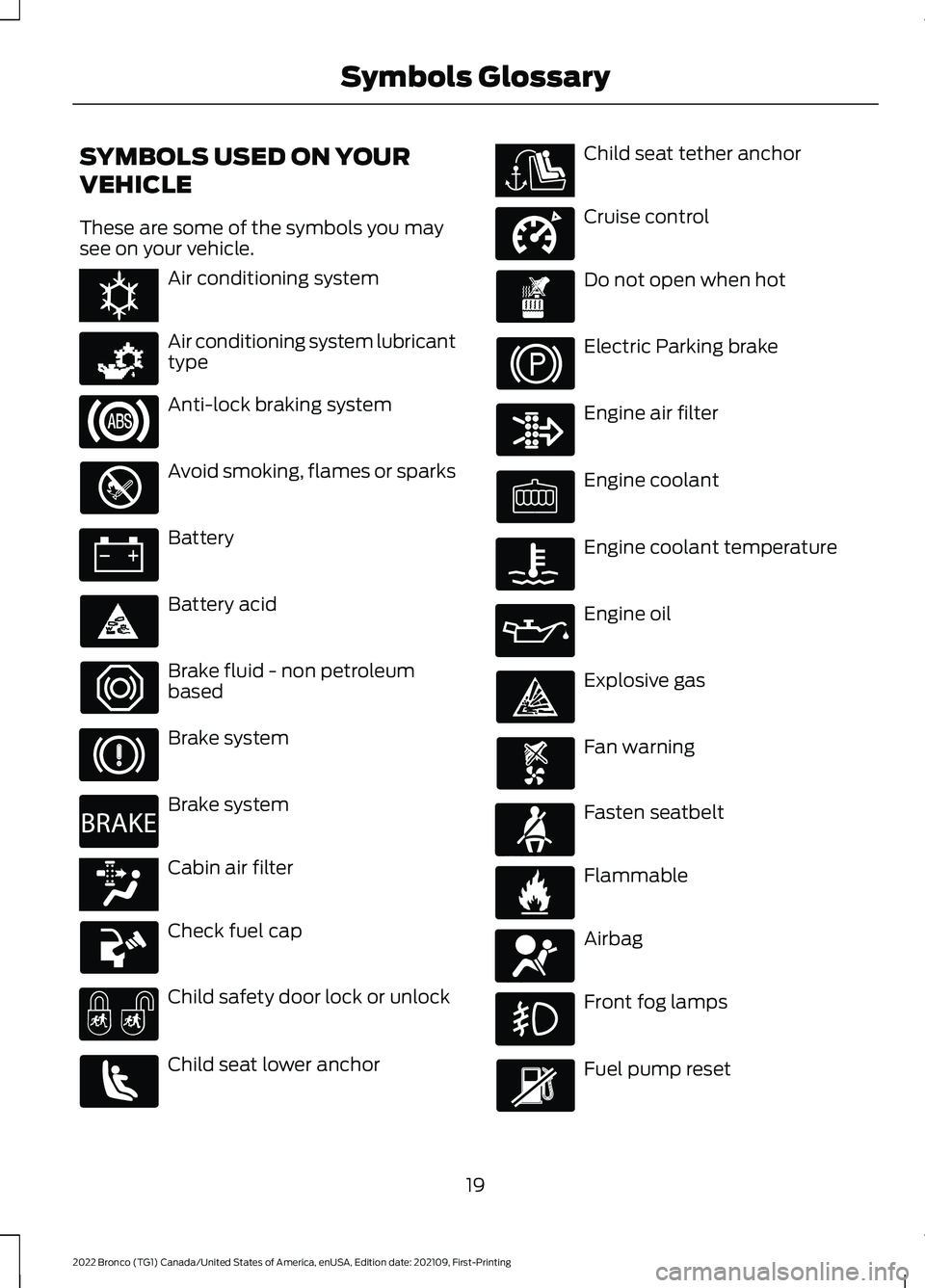
These are some of the symbols you maysee on your vehicle.
Air conditioning system
Air conditioning system lubricanttype
Anti-lock braking system
Avoid smoking, flames or sparks
Battery
Battery acid
Brake fluid - non petroleumbased
Brake system
Brake system
Cabin air filter
Check fuel cap
Child safety door lock or unlock
Child seat lower anchor
Child seat tether anchor
Cruise control
Do not open when hot
Electric Parking brake
Engine air filter
Engine coolant
Engine coolant temperature
Engine oil
Explosive gas
Fan warning
Fasten seatbelt
Flammable
Airbag
Front fog lamps
Fuel pump reset
19
2022 Bronco (TG1) Canada/United States of America, enUSA, Edition date: 202109, First-PrintingSymbols GlossaryE162384 E231157 E270480 E139223 E141128 E332905 E71880 E231160 E67017
Page 43 of 562
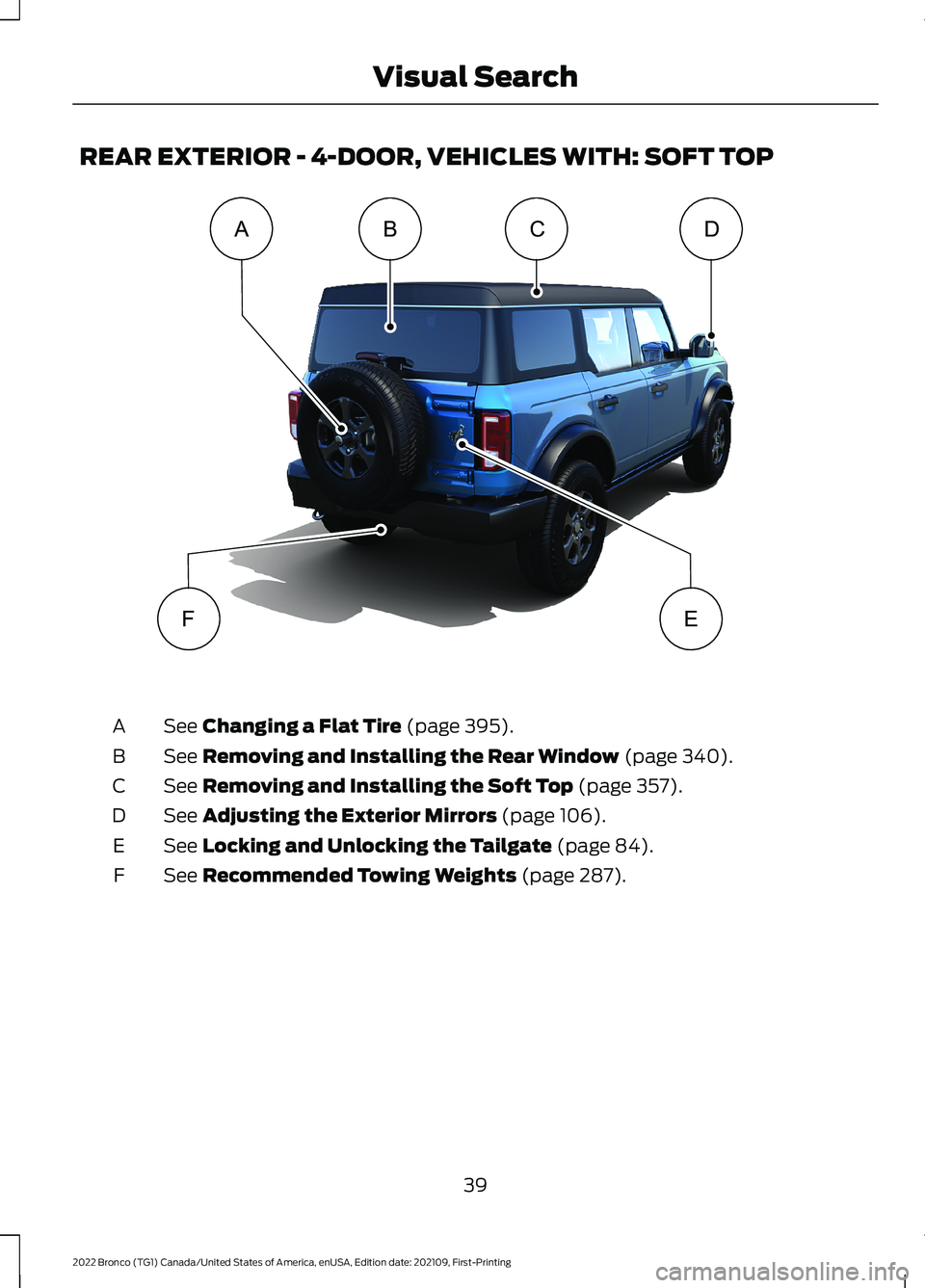
REAR EXTERIOR - 4-DOOR, VEHICLES WITH: SOFT TOP
See Changing a Flat Tire (page 395).A
See Removing and Installing the Rear Window (page 340).B
See Removing and Installing the Soft Top (page 357).C
See Adjusting the Exterior Mirrors (page 106).D
See Locking and Unlocking the Tailgate (page 84).E
See Recommended Towing Weights (page 287).F
39
2022 Bronco (TG1) Canada/United States of America, enUSA, Edition date: 202109, First-PrintingVisual SearchABFECDE341713
Page 45 of 562
WARNING: Do not allow apassenger to hold a child on their lapwhen your vehicle is moving. Failure tofollow this instruction could result inpersonal injury or death in the event of asudden stop or crash.
WARNING: Do not use pillows,books or towels to boost your child'sheight. Failure to follow this instructioncould result in personal injury or death.
WARNING: Properly secure childrestraints or booster seats when they arenot in use. They could become projectilesin a sudden stop or crash. Failure tofollow this instruction could result inpersonal injury or death.
WARNING: Do not put the shouldersection of the seatbelt or allow the childto put the shoulder section of theseatbelt under their arm or behind theirback. Failure to follow this instructioncould reduce the effectiveness of theseatbelt and increase the risk of injury ordeath in a crash.
WARNING: Do not leave childrenor pets unattended in your vehicle.Failure to follow this instruction couldresult in personal injury or death.
When installing a child restraint withseatbelts:
•Place the vehicle seat in the uprightposition before you install the childrestraint.
•Use the correct seatbelt buckle for thatseating position.
•Insert the belt tongue into the buckle.Make sure the tongue is securelyfastened in the buckle.
•Keep the buckle release buttonpointing up and away from the childrestraint, with the tongue between thechild restraint and the release button,to prevent accidental unbuckling.
•Put the seatbelt in the automaticlocking mode.
CHILD RESTRAINT ANCHOR
POINTS
WHAT ARE THE CHILD RESTRAINTANCHOR POINTS
Anchor points allow you to quickly andsafely install a child restraint.
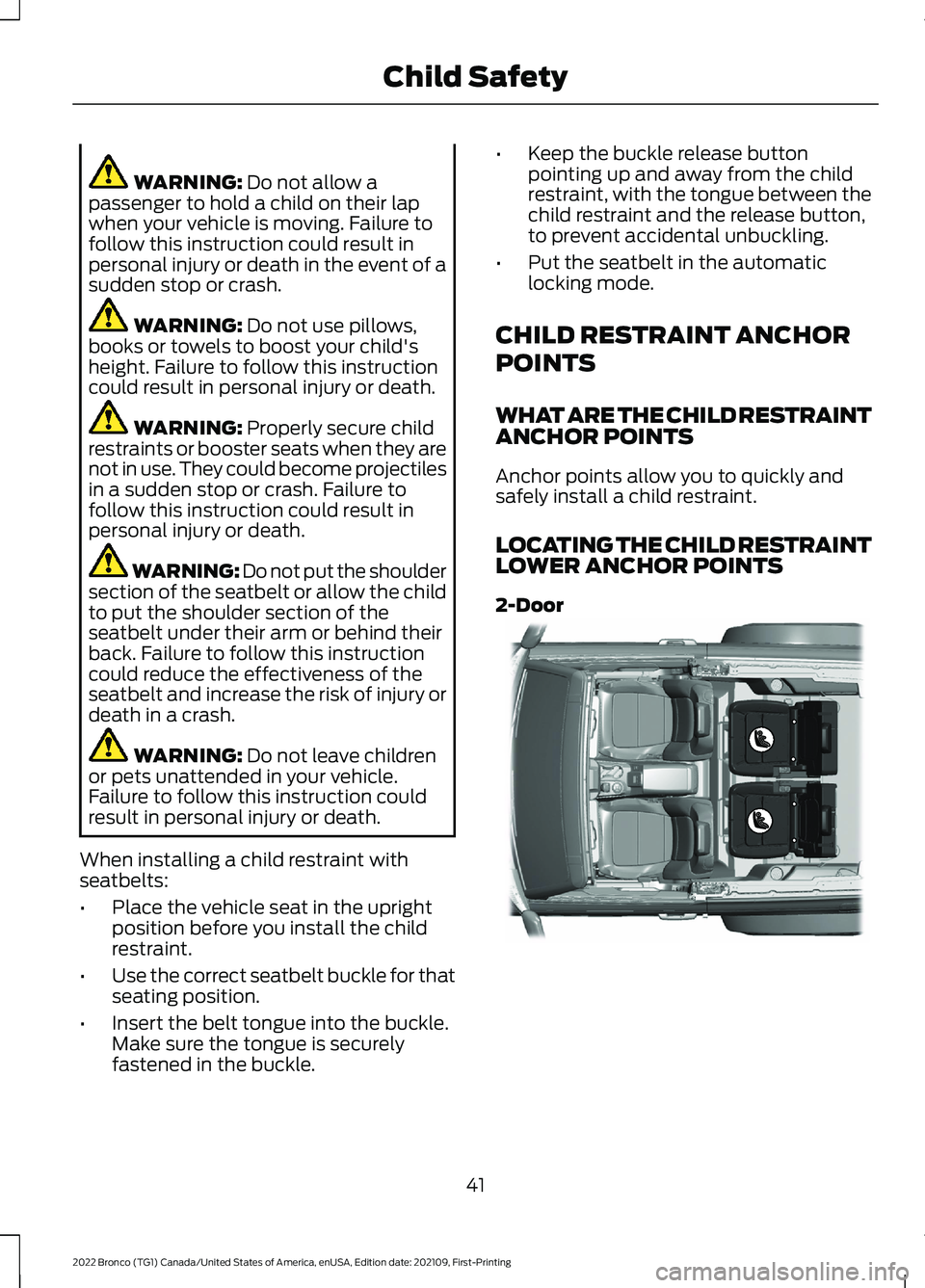
LOCATING THE CHILD RESTRAINTLOWER ANCHOR POINTS
2-Door
41
2022 Bronco (TG1) Canada/United States of America, enUSA, Edition date: 202109, First-PrintingChild SafetyE328020
Page 54 of 562
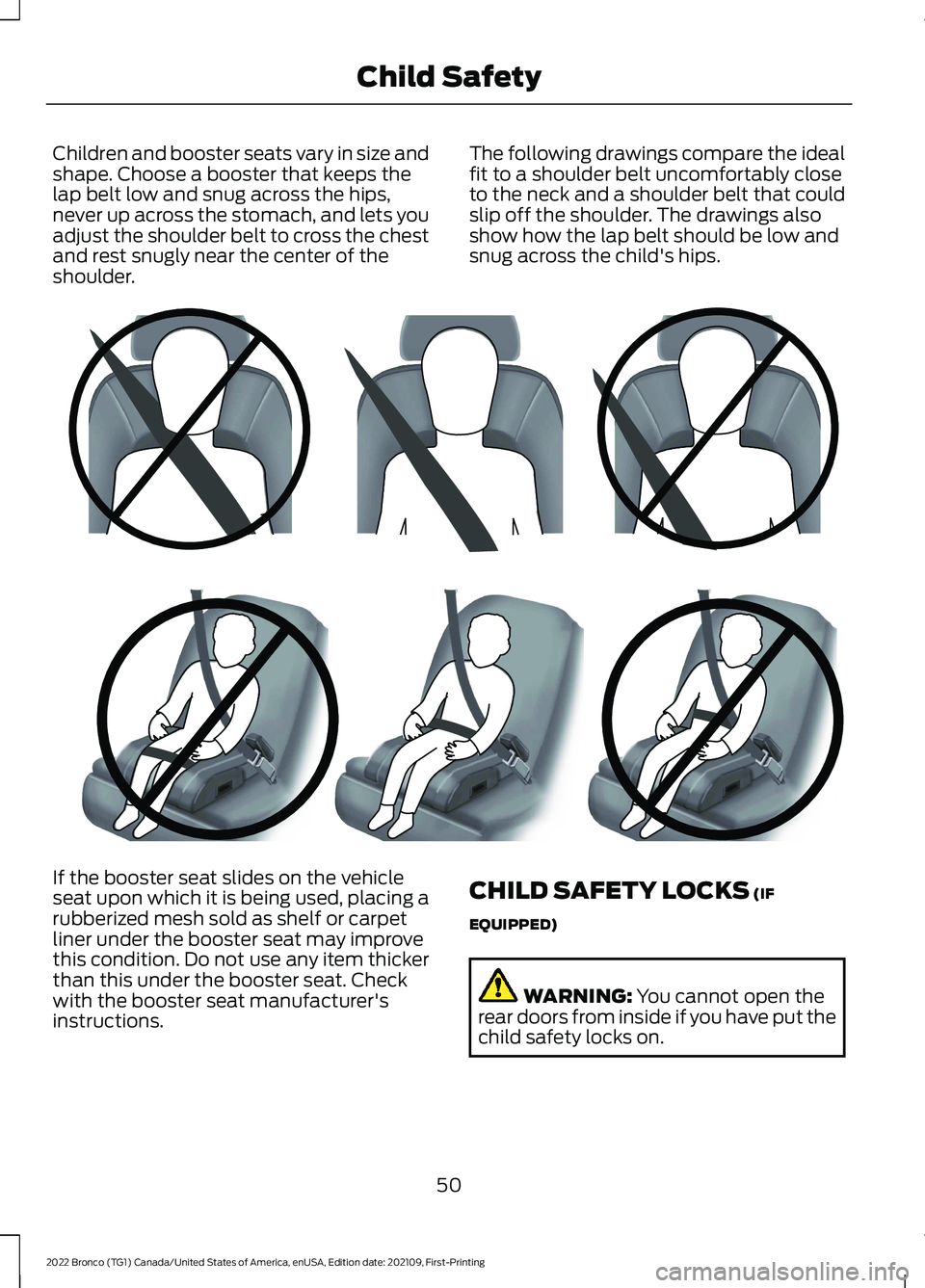
Children and booster seats vary in size andshape. Choose a booster that keeps thelap belt low and snug across the hips,never up across the stomach, and lets youadjust the shoulder belt to cross the chestand rest snugly near the center of theshoulder.
The following drawings compare the idealfit to a shoulder belt uncomfortably closeto the neck and a shoulder belt that couldslip off the shoulder. The drawings alsoshow how the lap belt should be low andsnug across the child's hips.
If the booster seat slides on the vehicleseat upon which it is being used, placing arubberized mesh sold as shelf or carpetliner under the booster seat may improvethis condition. Do not use any item thickerthan this under the booster seat. Checkwith the booster seat manufacturer'sinstructions.
CHILD SAFETY LOCKS (IF
EQUIPPED)
WARNING: You cannot open therear doors from inside if you have put thechild safety locks on.
50
2022 Bronco (TG1) Canada/United States of America, enUSA, Edition date: 202109, First-PrintingChild SafetyE142596 E142597
Page 55 of 562
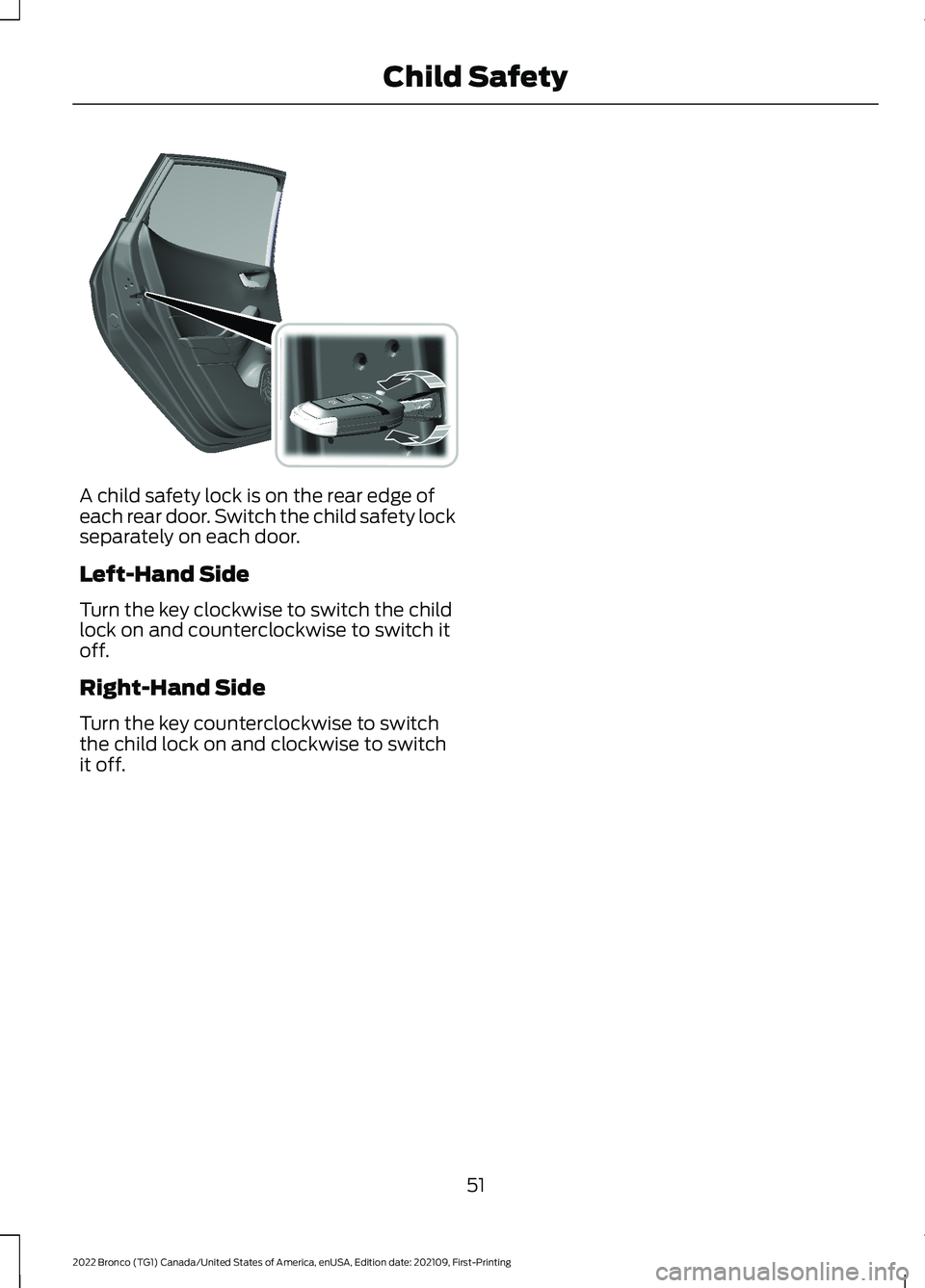
A child safety lock is on the rear edge ofeach rear door. Switch the child safety lockseparately on each door.
Left-Hand Side
Turn the key clockwise to switch the childlock on and counterclockwise to switch itoff.
Right-Hand Side
Turn the key counterclockwise to switchthe child lock on and clockwise to switchit off.
51
2022 Bronco (TG1) Canada/United States of America, enUSA, Edition date: 202109, First-PrintingChild Safety E238364
Page 73 of 562
REMOTE CONTROL
LIMITATIONS
WARNING: Changes ormodifications not expressively approvedby the party responsible for compliancecould void the user's authority to operatethe equipment. The term "IC:" before theradio certification number only signifiesthat Industry Canada technicalspecifications were met.
This device complies with Part 15 of theFCC Rules and with Industry Canadalicense-exempt RSS standard(s).Operation is subject to the following twoconditions: (1) This device may not causeharmful interference, and (2) This devicemust accept any interference received,including interference that may causeundesired operation.
Make sure a valid remote control is within5 ft (1.5 m) from the front door handlesand rear of vehicle.
The system may not function if:
•The remote control remains stationaryfor about a minute.
•The vehicle battery has no charge.
•The remote control battery has nocharge.
•There is interference causing issueswith the remote control frequencies.
•The remote control is too close tometal objects or electronic devices, forexample keys or a cell phone.
USING THE REMOTE CONTROL
Use your remote control to access variousvehicle systems.
Note:The buttons on your remote may varydepending on the vehicle region or options.
Unlock
Press the button to unlock alldoors. See Unlocking andLocking the Doors Using theRemote Control (page 78).
Lock
Press the button to lock alldoors. See Unlocking andLocking the Doors Using theRemote Control (page 78).
Remote Start (If Equipped)
Press the button to remote start.See Remotely Starting andStopping the Vehicle (page115).
Panic Alarm (If Equipped)
Press the button to sound thepanic alarm. See Sounding thePanic Alarm (page 70).
69
2022 Bronco (TG1) Canada/United States of America, enUSA, Edition date: 202109, First-PrintingKeys and Remote ControlsE138629 E138623 E138625 E138624
Page 82 of 562
OPERATING THE DOORS
FROM OUTSIDE YOUR
VEHICLE
UNLOCKING AND LOCKING THEDOORS USING THE REMOTECONTROL
You can only use the remote control whenyour vehicle is stationary.
Unlocking the Doors
Press the button to unlock alldoors.
Locking the Doors
Press the button to lock alldoors. One short flash of theturn signal lamps confirms thatyour vehicle has locked.
Note:For more information on operatingthe doors from outside your vehicle
OPERATING THE DOORS
FROM INSIDE YOUR VEHICLE
UNLOCKING AND LOCKING THEDOORS USING THE CENTRALLOCKING
The power door lock control is on the driverdoor.
Press the button to unlock alldoors.
Press the button to lock alldoors.
Note:The central locking only operates ifthe front doors are fully closed.
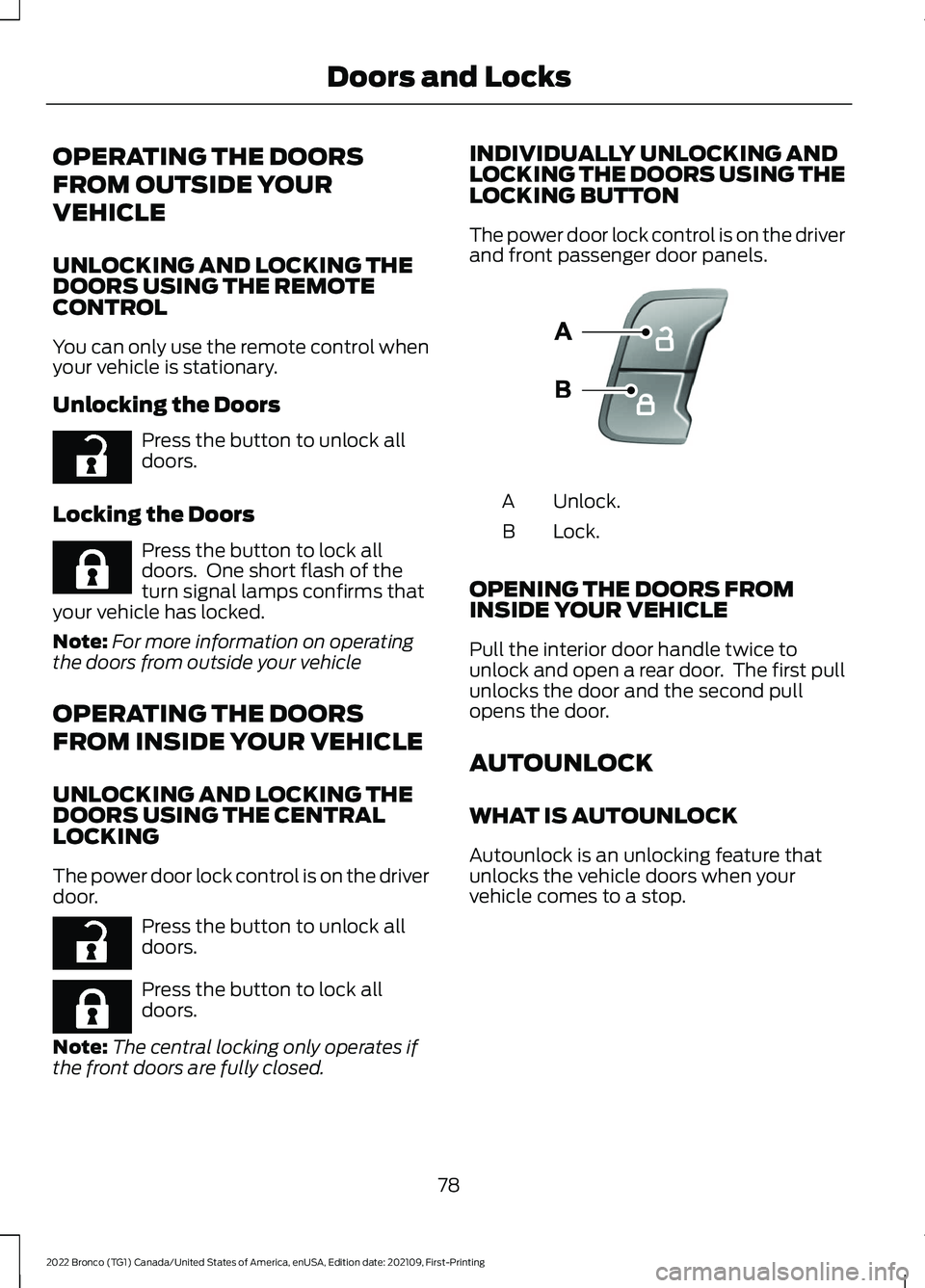
INDIVIDUALLY UNLOCKING ANDLOCKING THE DOORS USING THELOCKING BUTTON
The power door lock control is on the driverand front passenger door panels.
Unlock.A
Lock.B
OPENING THE DOORS FROMINSIDE YOUR VEHICLE
Pull the interior door handle twice tounlock and open a rear door. The first pullunlocks the door and the second pullopens the door.
AUTOUNLOCK
WHAT IS AUTOUNLOCK
Autounlock is an unlocking feature thatunlocks the vehicle doors when yourvehicle comes to a stop.
78
2022 Bronco (TG1) Canada/United States of America, enUSA, Edition date: 202109, First-PrintingDoors and LocksE267112 E267111 E267112 E267111 E138628