door locks FORD BRONCO 2022 Owners Manual
[x] Cancel search | Manufacturer: FORD, Model Year: 2022, Model line: BRONCO, Model: FORD BRONCO 2022Pages: 562, PDF Size: 73 MB
Page 5 of 562
Contacting Us
Contacting Us..................................................15
Introduction
About This Publication.................................17
Using This Publication.................................18
Symbols Glossary
Symbols Used on Your Vehicle.................19
Data Privacy
Data Privacy.....................................................22
Service Data....................................................23
Event Data........................................................23
Settings Data..................................................24
Connected Vehicle Data.............................24
Mobile Device Data.......................................25
Emergency Call System Data...................25
Visual Search
Steering Wheel - Vehicles With: CruiseControl, Vehicles Without: LaneKeeping Aid.................................................26
Steering Wheel - Vehicles With: AdaptiveCruise Control.............................................27
Steering Wheel - Vehicles With: CruiseControl/Lane Keeping Aid.....................28
Instrument Panel..........................................29
Center Console - Manual Transmission..........................................................................30
Center Console - AutomaticTransmission................................................31
Vehicle Interior - 2-Door..............................32
Vehicle Interior - 4-Door.............................33
Front Exterior - 2-Door................................34
Front Exterior - 4-Door, Vehicles With:Hard Top.......................................................35
Front Exterior - 4-Door, Vehicles With:Soft Top........................................................36
Rear Exterior - 2-Door..................................37
Rear Exterior - 4-Door, Vehicles With:Hard Top.......................................................38
Rear Exterior - 4-Door, Vehicles With:Soft Top........................................................39
Child Safety
Child Safety Precautions...........................40
Child Restraint Anchor Points...................41
Child Restraints..............................................42
Installing Child Restraints..........................44
Booster Seats.................................................48
Child Safety Locks........................................50
Seatbelts
Seatbelt Precautions...................................52
Fastening and Unfastening the Seatbelts...........................................................................53
Sensitive Locking Mode..............................53
Automatic Locking Mode...........................54
Adjusting the Seatbelts DuringPregnancy....................................................54
Seatbelt Reminder.......................................54
Checking the Seatbelts..............................56
Seatbelt Extensions......................................57
Personal Safety System™
What Is the Personal Safety System..........................................................................58
How Does the Personal Safety SystemWork...............................................................58
Personal Safety System Components..........................................................................58
Airbags
How Do the Front Airbags Work..............59
How Do the Side Airbags Work...............59
How Does the Safety Canopy™ Work..........................................................................60
Airbag Precautions........................................61
Properly Adjusting the Driver and FrontPassenger Seats........................................62
Children and Airbags...................................62
1
2022 Bronco (TG1) Canada/United States of America, enUSA, Edition date: 202109, First-PrintingTable of Contents
Page 6 of 562
Front Passenger Sensing System...........63
Crash Sensors and Airbag Indicator......66
Disposing of Airbags....................................67
911 Assist
What Is 911 Assist.........................................68
Emergency Call Requirements................68
Emergency Call Limitations......................68
Keys and Remote Controls
Remote Control Limitations.....................69
Using the Remote Control.........................69
Removing the Key Blade............................70
Sounding the Panic Alarm.........................70
Locating Your Vehicle..................................70
Changing the Remote Control Battery...........................................................................70
Replacing a Lost Key or Remote Control............................................................................71
Programming the Remote Control.........72
Keys and Remote Controls –Troubleshooting.........................................73
MyKey™
What Is MyKey................................................74
MyKey Settings...............................................74
Creating a MyKey...........................................75
Programming a MyKey................................75
Clearing All MyKeys......................................75
Checking MyKey System Status..............76
Using MyKey With Remote StartSystems........................................................76
MyKey – Troubleshooting..........................76
Doors and Locks
Operating the Doors From Outside YourVehicle...........................................................78
Operating the Doors From Inside YourVehicle...........................................................78
Autounlock.......................................................78
Autolock............................................................79
Mislock...............................................................79
Doors and Locks – Troubleshooting...........................................................................79
Keyless Entry
Keyless Entry Limitations...........................82
Keyless Entry Settings.................................82
Using Keyless Entry......................................82
Keyless Entry – Troubleshooting............83
Tailgate
Opening the Tailgate...................................84
Closing the Tailgate.....................................84
Locking and Unlocking the Tailgate.......84
Tailgate – Troubleshooting.......................86
Security
Passive Anti-Theft System........................87
Security – Troubleshooting.......................87
Steering Wheel
Adjusting the Steering Wheel..................89
Horn...................................................................89
Switching the Heated Steering WheelOn and Off..................................................89
Wipers and Washers
Wipers...............................................................90
Switching the Rear Window Wiper Onand Off.........................................................90
Reverse Wipe.................................................90
Checking the Wiper Blades........................91
Replacing the Front Wiper Blades...........91
Replacing the Rear Wiper Blades...........92
Washers............................................................92
Wipers and Washers – Troubleshooting..........................................................................93
Exterior Lighting
Exterior Lighting Control............................94
2
2022 Bronco (TG1) Canada/United States of America, enUSA, Edition date: 202109, First-PrintingTable of Contents
Page 54 of 562
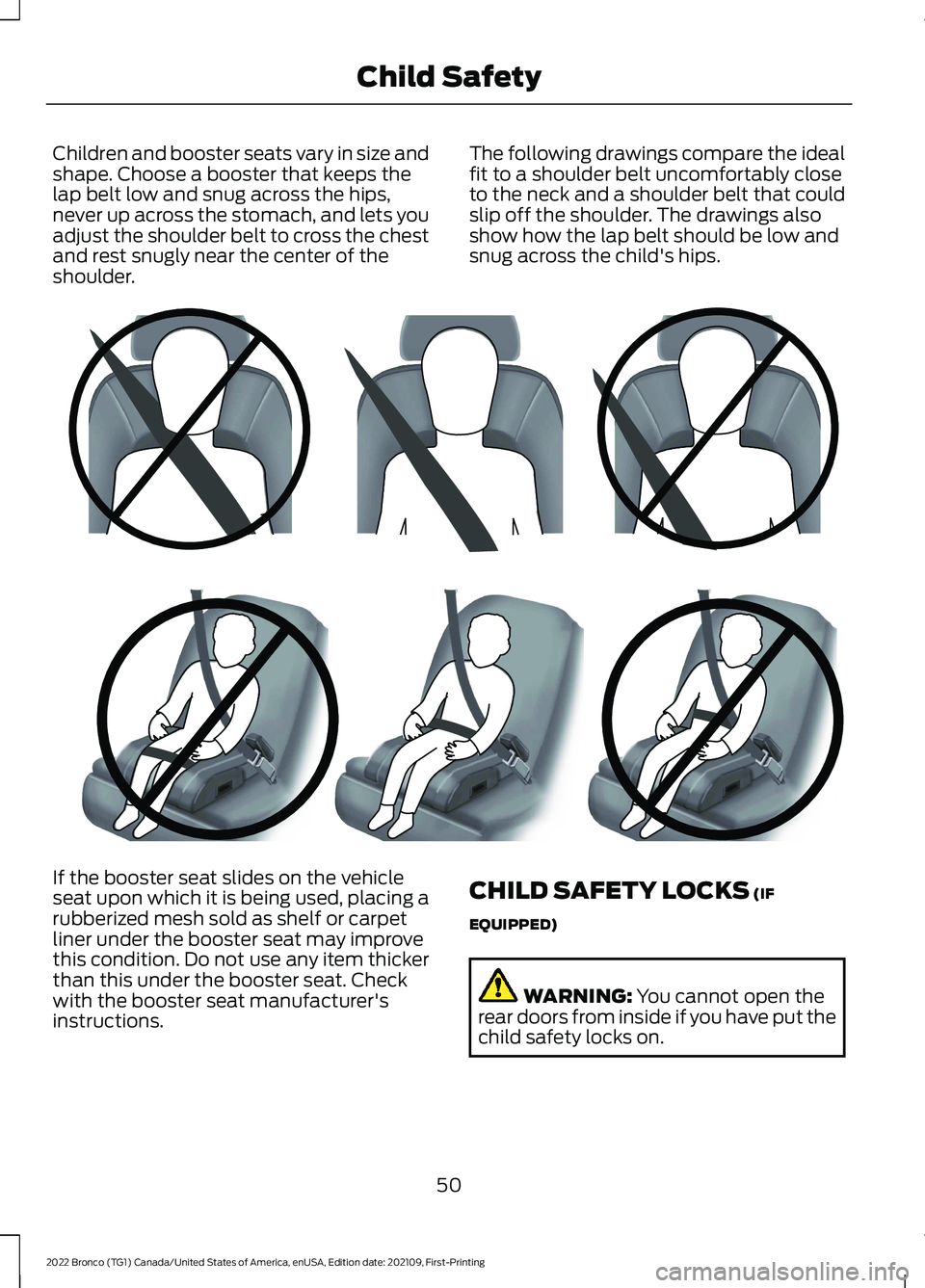
Children and booster seats vary in size andshape. Choose a booster that keeps thelap belt low and snug across the hips,never up across the stomach, and lets youadjust the shoulder belt to cross the chestand rest snugly near the center of theshoulder.
The following drawings compare the idealfit to a shoulder belt uncomfortably closeto the neck and a shoulder belt that couldslip off the shoulder. The drawings alsoshow how the lap belt should be low andsnug across the child's hips.
If the booster seat slides on the vehicleseat upon which it is being used, placing arubberized mesh sold as shelf or carpetliner under the booster seat may improvethis condition. Do not use any item thickerthan this under the booster seat. Checkwith the booster seat manufacturer'sinstructions.
CHILD SAFETY LOCKS (IF
EQUIPPED)
WARNING: You cannot open therear doors from inside if you have put thechild safety locks on.
50
2022 Bronco (TG1) Canada/United States of America, enUSA, Edition date: 202109, First-PrintingChild SafetyE142596 E142597
Page 55 of 562
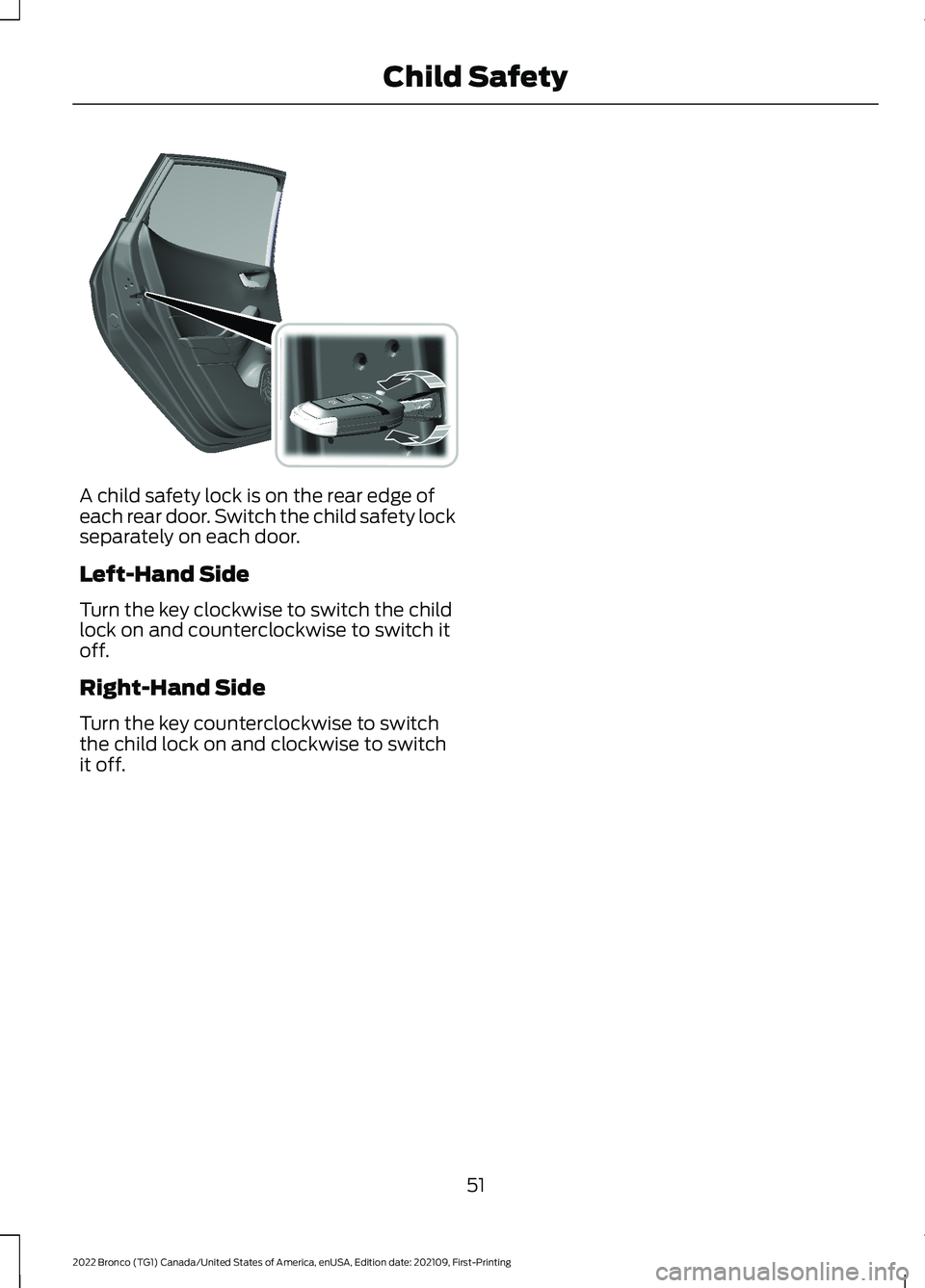
A child safety lock is on the rear edge ofeach rear door. Switch the child safety lockseparately on each door.
Left-Hand Side
Turn the key clockwise to switch the childlock on and counterclockwise to switch itoff.
Right-Hand Side
Turn the key counterclockwise to switchthe child lock on and clockwise to switchit off.
51
2022 Bronco (TG1) Canada/United States of America, enUSA, Edition date: 202109, First-PrintingChild Safety E238364
Page 82 of 562
OPERATING THE DOORS
FROM OUTSIDE YOUR
VEHICLE
UNLOCKING AND LOCKING THEDOORS USING THE REMOTECONTROL
You can only use the remote control whenyour vehicle is stationary.
Unlocking the Doors
Press the button to unlock alldoors.
Locking the Doors
Press the button to lock alldoors. One short flash of theturn signal lamps confirms thatyour vehicle has locked.
Note:For more information on operatingthe doors from outside your vehicle
OPERATING THE DOORS
FROM INSIDE YOUR VEHICLE
UNLOCKING AND LOCKING THEDOORS USING THE CENTRALLOCKING
The power door lock control is on the driverdoor.
Press the button to unlock alldoors.
Press the button to lock alldoors.
Note:The central locking only operates ifthe front doors are fully closed.
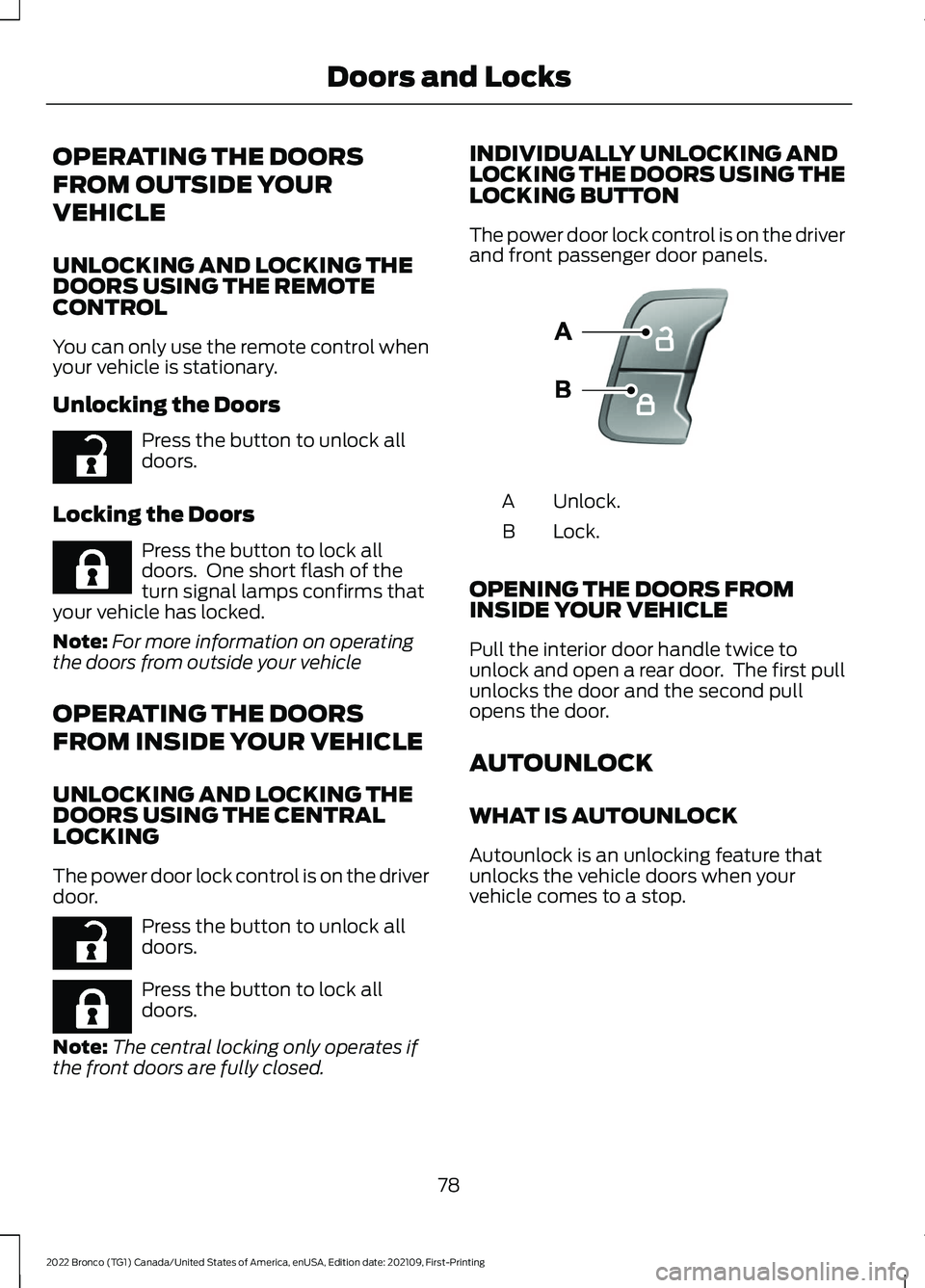
INDIVIDUALLY UNLOCKING ANDLOCKING THE DOORS USING THELOCKING BUTTON
The power door lock control is on the driverand front passenger door panels.
Unlock.A
Lock.B
OPENING THE DOORS FROMINSIDE YOUR VEHICLE
Pull the interior door handle twice tounlock and open a rear door. The first pullunlocks the door and the second pullopens the door.
AUTOUNLOCK
WHAT IS AUTOUNLOCK
Autounlock is an unlocking feature thatunlocks the vehicle doors when yourvehicle comes to a stop.
78
2022 Bronco (TG1) Canada/United States of America, enUSA, Edition date: 202109, First-PrintingDoors and LocksE267112 E267111 E267112 E267111 E138628
Page 83 of 562
AUTOUNLOCK REQUIREMENTS
Autounlock unlocks all the doors when allof the following occur:
•The ignition is on, all the doors areclosed and your vehicle is moving at aspeed greater than 12 mph (20 km/h).
•Your vehicle comes to a stop.
•You open the driver door within 10minutes of switching the ignition off orto the accessory position.
SWITCHING AUTOUNLOCK ONAND OFF
1.Press Settings on the touchscreen.
2.Press Vehicle Settings.
3.Press Locks.
4.Switch Autounlock on or off.
AUTOLOCK
WHAT IS AUTOLOCK
Autolock is a locking feature that locksyour vehicle doors when you start driving.
AUTOLOCK REQUIREMENTS
Autolock locks all the doors when all of thefollowing occur:
•All doors are closed.
•The ignition is on.
•Your vehicle reaches a speed greaterthan 12 mph (20 km/h).
MISLOCK
WHAT IS MISLOCK
Mislock is a locking feature that warns youif your vehicle has not locked.
MISLOCK LIMITATIONS
When you press the lock button once, theturn signals do not flash if:
•Any door or the tailgate is open.
•The hood is open.
If you switch mislock off, the horn does notsound if you press the lock button on theremote control when a door is open.
SWITCHING MISLOCK ON ANDOFF
1.Press Settings on the touchscreen.
2.Press Vehicle Settings.
3.Press Locks.
4.Switch Mislock Chirp on or off.
DOORS AND LOCKS –
TROUBLESHOOTING
DOORS AND LOCKS – WARNINGLAMPS
Door Ajar Warning Lamp
It illuminates when you switchthe ignition on and remains on ifany door or the hood is open.
79
2022 Bronco (TG1) Canada/United States of America, enUSA, Edition date: 202109, First-PrintingDoors and LocksE249859
Page 84 of 562
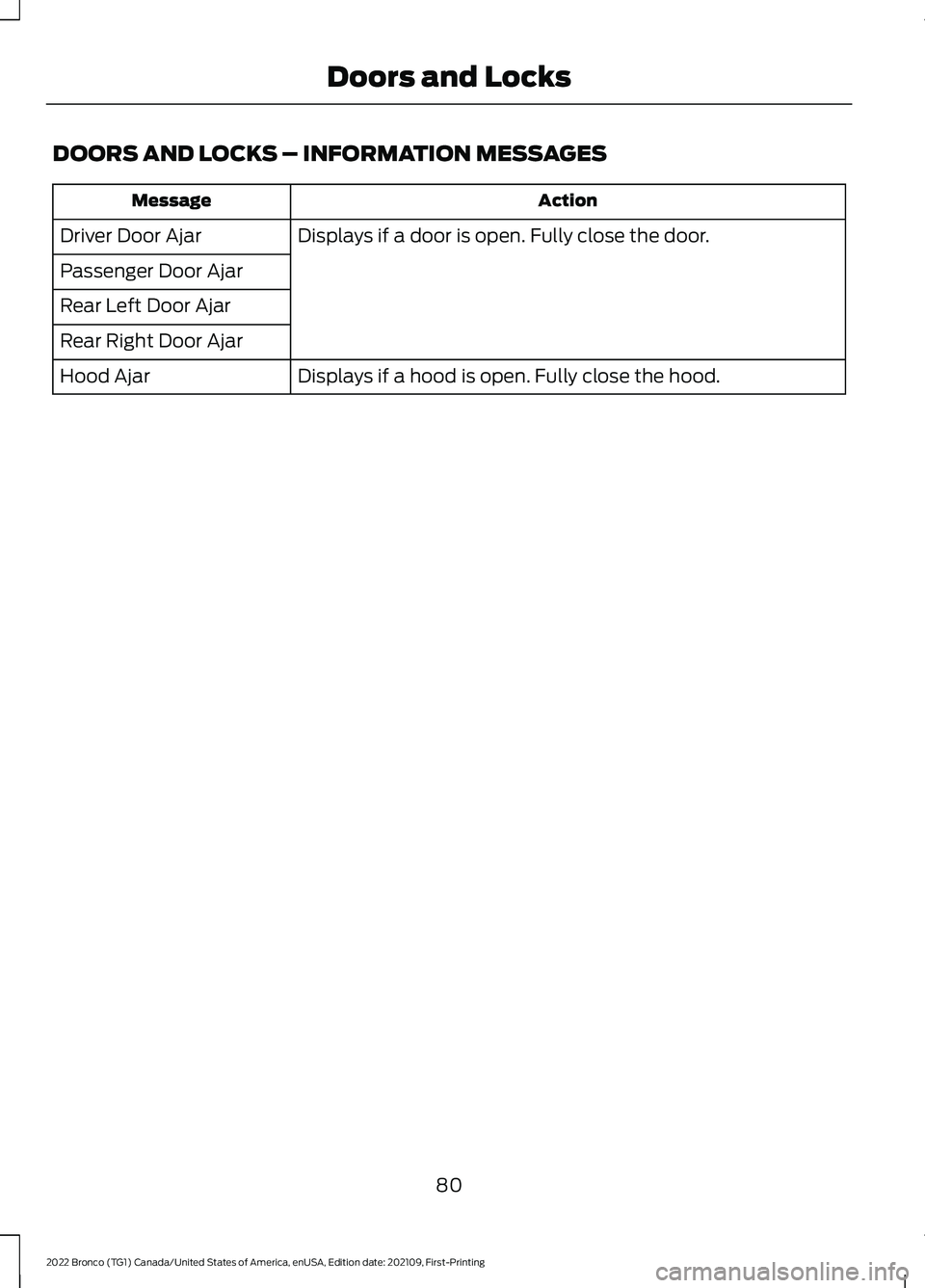
DOORS AND LOCKS – INFORMATION MESSAGES
ActionMessage
Displays if a door is open. Fully close the door.Driver Door Ajar
Passenger Door Ajar
Rear Left Door Ajar
Rear Right Door Ajar
Displays if a hood is open. Fully close the hood.Hood Ajar
80
2022 Bronco (TG1) Canada/United States of America, enUSA, Edition date: 202109, First-PrintingDoors and Locks
Page 85 of 562
DOORS AND LOCKS –FREQUENTLY ASKED QUESTIONS
Can accessories such as steps orhandles be used with the latchassembly?
Do not use the door latch assembly toattach any accessory, such as handlesor steps, as this can cause damage toyour vehicle.
81
2022 Bronco (TG1) Canada/United States of America, enUSA, Edition date: 202109, First-PrintingDoors and Locks
Page 86 of 562
KEYLESS ENTRY LIMITATIONS
Make sure your remote control is within 3 ft(1 m) from the front door handles and thetailgate.
The system could not function if:
•The remote control remains stationaryfor about a minute.
•The vehicle battery has no charge.
•The remote control battery has nocharge.
•There is interference causing issueswith the remote control frequencies.
•The remote control is too close tometal objects or electronic devices, forexample keys or a cell phone.
KEYLESS ENTRY SETTINGS
Switching Keyless Entry On andOff
1.Switch the ignition on using an originalkey that has not been created as aMyKey.
2.Press Settings on the touchscreen.
3.Press Vehicle Settings.
4.Press Locks.
Reprogramming the UnlockingFunction
You can enable two-stage unlockingfunction allowing you to unlock only thedriver door when you touch the unlocksensor.
Press and hold both the lock and unlockbuttons on the remote control for fourseconds to disable or enable two-stageunlocking.
If you program the unlocking function sothat only the driver door unlocks, you canunlock all of the other doors from insideyour vehicle using the power door lockcontrol. You can unlock individual doorsby pulling the interior door handles onthose doors.
USING KEYLESS ENTRY
Unlocking the Doors
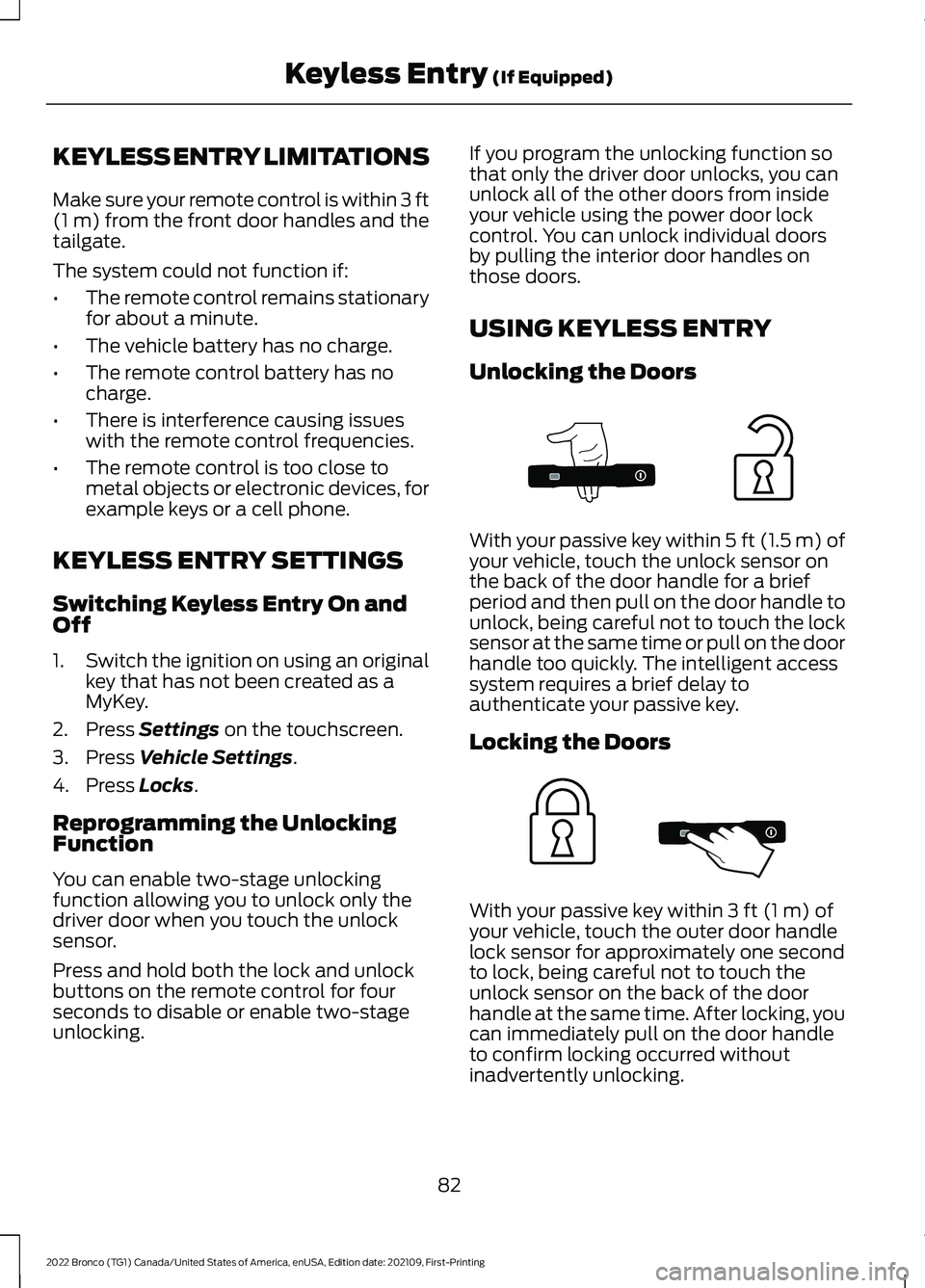
With your passive key within 5 ft (1.5 m) ofyour vehicle, touch the unlock sensor onthe back of the door handle for a briefperiod and then pull on the door handle tounlock, being careful not to touch the locksensor at the same time or pull on the doorhandle too quickly. The intelligent accesssystem requires a brief delay toauthenticate your passive key.
Locking the Doors
With your passive key within 3 ft (1 m) ofyour vehicle, touch the outer door handlelock sensor for approximately one secondto lock, being careful not to touch theunlock sensor on the back of the doorhandle at the same time. After locking, youcan immediately pull on the door handleto confirm locking occurred withoutinadvertently unlocking.
82
2022 Bronco (TG1) Canada/United States of America, enUSA, Edition date: 202109, First-PrintingKeyless Entry (If Equipped)E333747 E333746
Page 87 of 562
KEYLESS ENTRY –
TROUBLESHOOTING
KEYLESS ENTRY – FREQUENTLYASKED QUESTIONS
Why does the keyless entry system notfunction?
If the system does not function it maybe limited. See Keyless EntryLimitations (page 82). If the systemstill does not function use the remotecontrol or the key blade to lock andunlock your vehicle.
Why can I not lock my vehicle?
If you electronically lock your vehiclewith a rear door or the tailgate open,the system searches for a passive keyinside your vehicle after you close thelast door. If the system detects a key,all doors unlock indicating that a keyis inside. Your vehicle locks if anotherpassive key is within the detectionrange after you close the last door.
Why does the passive key not work?
The system deactivates passive keysleft inside your vehicle when you lockit. You cannot switch the ignition onusing a deactivated passive key. Pressthe unlock button on the remotecontrol to reactivate a passive key.
83
2022 Bronco (TG1) Canada/United States of America, enUSA, Edition date: 202109, First-PrintingKeyless Entry (If Equipped)