change wheel FORD BRONCO 2023 User Guide
[x] Cancel search | Manufacturer: FORD, Model Year: 2023, Model line: BRONCO, Model: FORD BRONCO 2023Pages: 642, PDF Size: 14.71 MB
Page 254 of 642
WHAT IS CRUISE CONTROL
Cruise control lets you maintain a setspeed without keeping your foot on theaccelerator pedal.
Requirements
Use cruise control when the vehicle speedis greater than 15 mph in imperial units and20 km/h in metric units.
SWITCHING CRUISE CONTROL
ON AND OFF
WARNING: Do not use cruisecontrol on winding roads, in heavy trafficor when the road surface is slippery. Thiscould result in loss of vehicle control,serious injury or death.
The cruise controls are on the steeringwheel.
Switching Cruise Control On
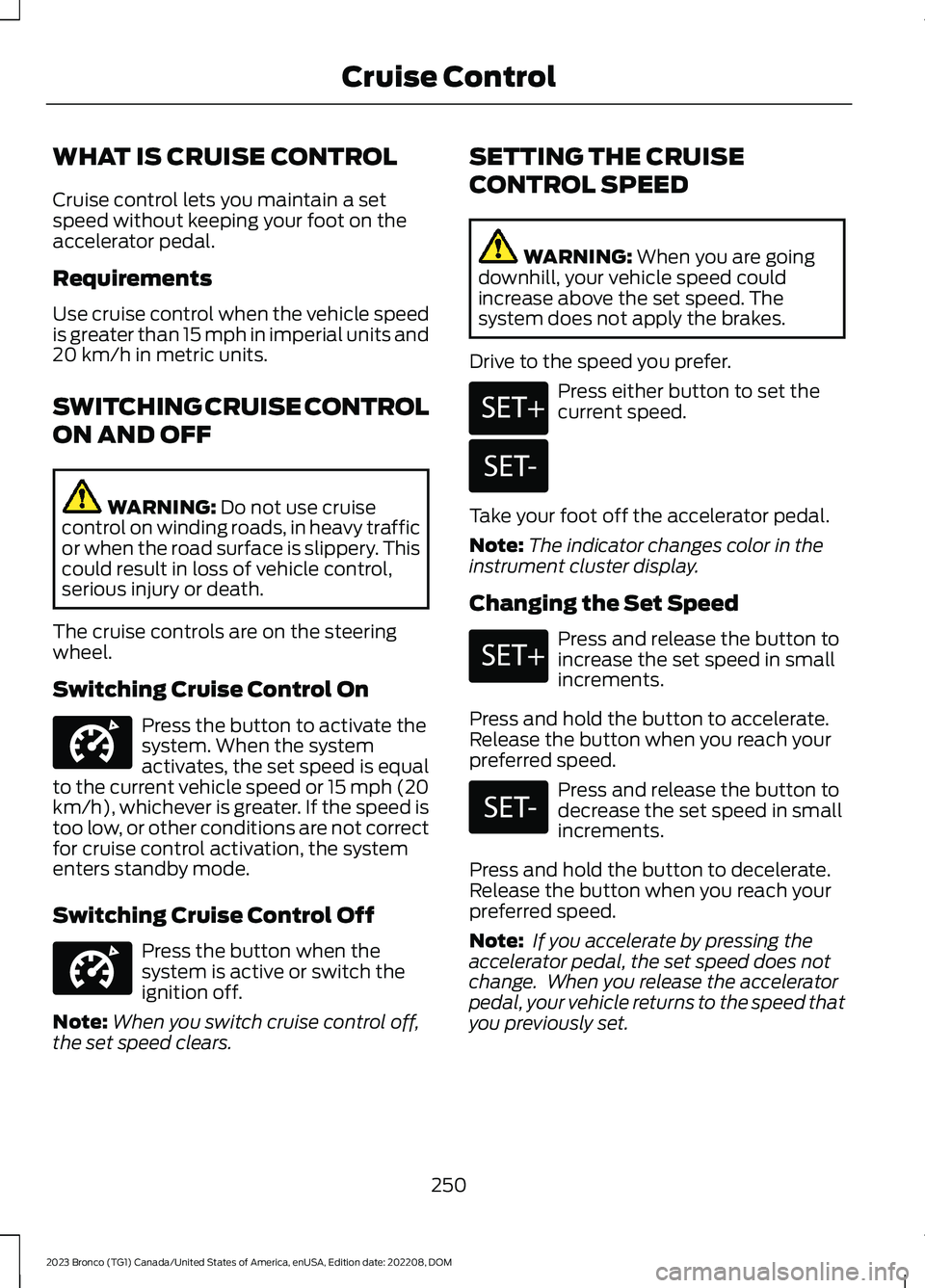
Press the button to activate thesystem. When the systemactivates, the set speed is equalto the current vehicle speed or 15 mph (20km/h), whichever is greater. If the speed istoo low, or other conditions are not correctfor cruise control activation, the systementers standby mode.
Switching Cruise Control Off
Press the button when thesystem is active or switch theignition off.
Note:When you switch cruise control off,the set speed clears.
SETTING THE CRUISE
CONTROL SPEED
WARNING: When you are goingdownhill, your vehicle speed couldincrease above the set speed. Thesystem does not apply the brakes.
Drive to the speed you prefer.
Press either button to set thecurrent speed.
Take your foot off the accelerator pedal.
Note:The indicator changes color in theinstrument cluster display.
Changing the Set Speed
Press and release the button toincrease the set speed in smallincrements.
Press and hold the button to accelerate.Release the button when you reach yourpreferred speed.
Press and release the button todecrease the set speed in smallincrements.
Press and hold the button to decelerate.Release the button when you reach yourpreferred speed.
Note: If you accelerate by pressing theaccelerator pedal, the set speed does notchange. When you release the acceleratorpedal, your vehicle returns to the speed thatyou previously set.
250
2023 Bronco (TG1) Canada/United States of America, enUSA, Edition date: 202208, DOMCruise ControlE332905 E332905 E246884 E246885 E246884 E246885
Page 264 of 642
WHAT IS G.O.A.T. MODE
CONTROL
Your vehicle has several goes overany-type of terrain (G.O.A.T.) modes thatyou can select for different drivingconditions. Depending on the mode thatyou select, the system adjusts variousvehicle settings.
HOW DOES G.O.A.T. MODE
CONTROL WORK
Each selectable mode changes variouselectronic and mechanical settings withinyour vehicle to tailor its performance anddriving characteristics to on-road oroff-road driving conditions. The systemmay alter steering feel and effort, tractioncontrol, stability control, chassis controls,powertrain response, transmission shiftpoints, four-wheel driveline setting,exhaust noise level and suspensiondampening to predetermined settings,depending upon the mode that you select.
The system reverts to the normal modeeach time you start your vehicle. At startupthe system also displays a prompt on theinstrument cluster display that gives youthe option to return to the previouslyselected drive mode during the last ignitioncycle. If you select yes, the system returnsto the last selected drive mode and thedefault driveline settings associated withthat mode. If you select no or do not makea selection within a short time, the systemremains in normal mode and the drivelinesettings remain the same as selected inthe prior ignition cycle.
Note:Your vehicle has diagnostic checksthat continuously monitor all systems forproper operation. If a mode is unavailabledue to a system fault, your vehicle defaultsto normal mode and the driveline remainsin the four-wheel drive setting that you lastselected prior to the system fault.
SELECTING A G.O.A.T. MODE -
EXCLUDING: RAPTOR
Bronco 4x4 Systems
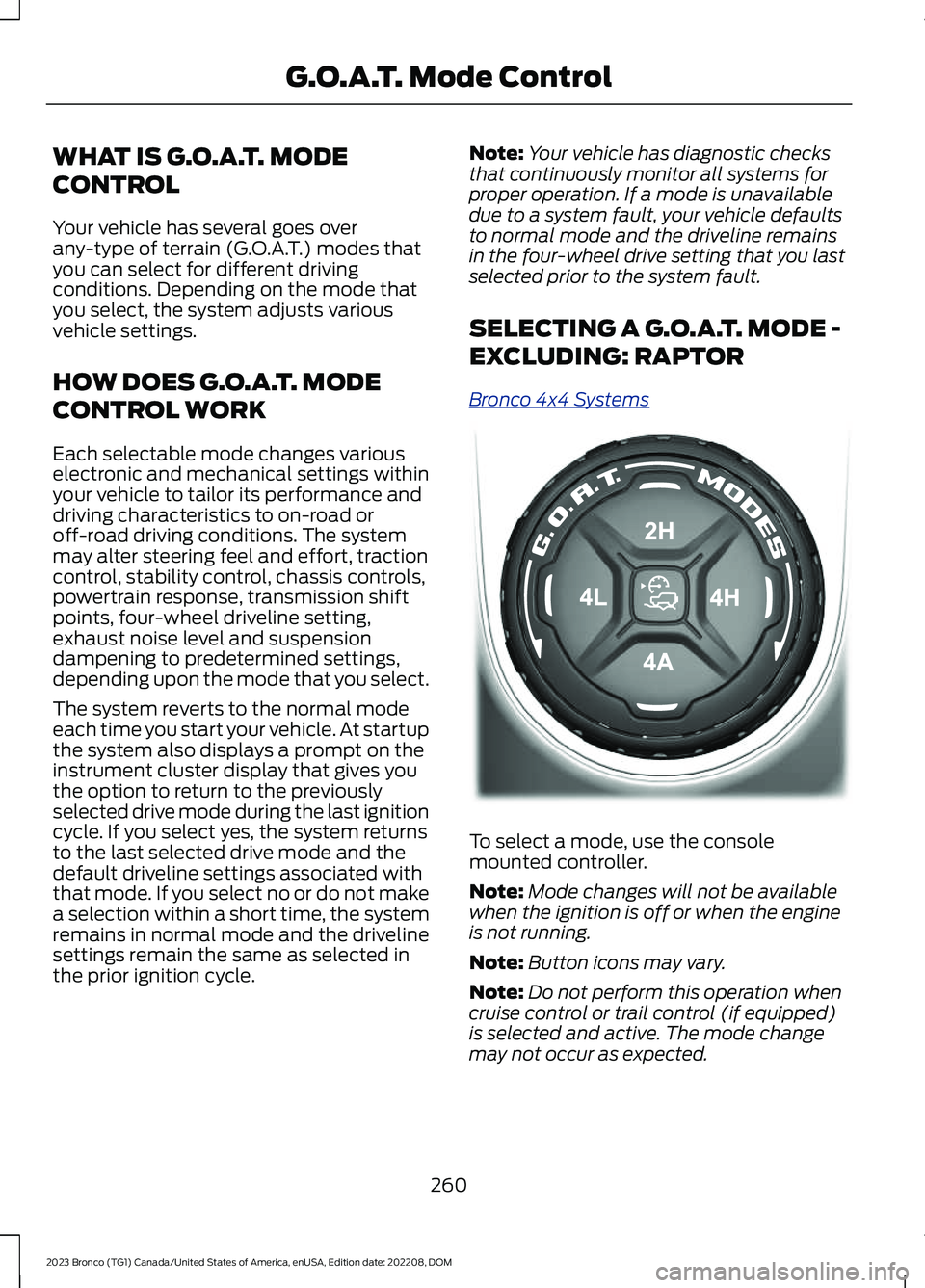
To select a mode, use the consolemounted controller.
Note:Mode changes will not be availablewhen the ignition is off or when the engineis not running.
Note:Button icons may vary.
Note:Do not perform this operation whencruise control or trail control (if equipped)is selected and active. The mode changemay not occur as expected.
260
2023 Bronco (TG1) Canada/United States of America, enUSA, Edition date: 202208, DOMG.O.A.T. Mode ControlE324543
Page 265 of 642
Note:To optimize off-road drivingperformance, the system disables the brakeover accelerator feature when in off-roadmodes, including mud/ruts, sand, baja androck crawl modes. A message displays inthe instrument cluster when you select anoff-road mode. See G.O.A.T. Mode Control– Information Messages (page 269). Brakeover accelerator enables when an off-roadmode is exited or during the next key cycle.Return to on-road modes, normal, eco, sportor slippery, when driving on regular roads.See Brake Over Accelerator (page 209).
SELECTING A G.O.A.T. MODE -
RAPTOR
Bronco 4x4 Systems
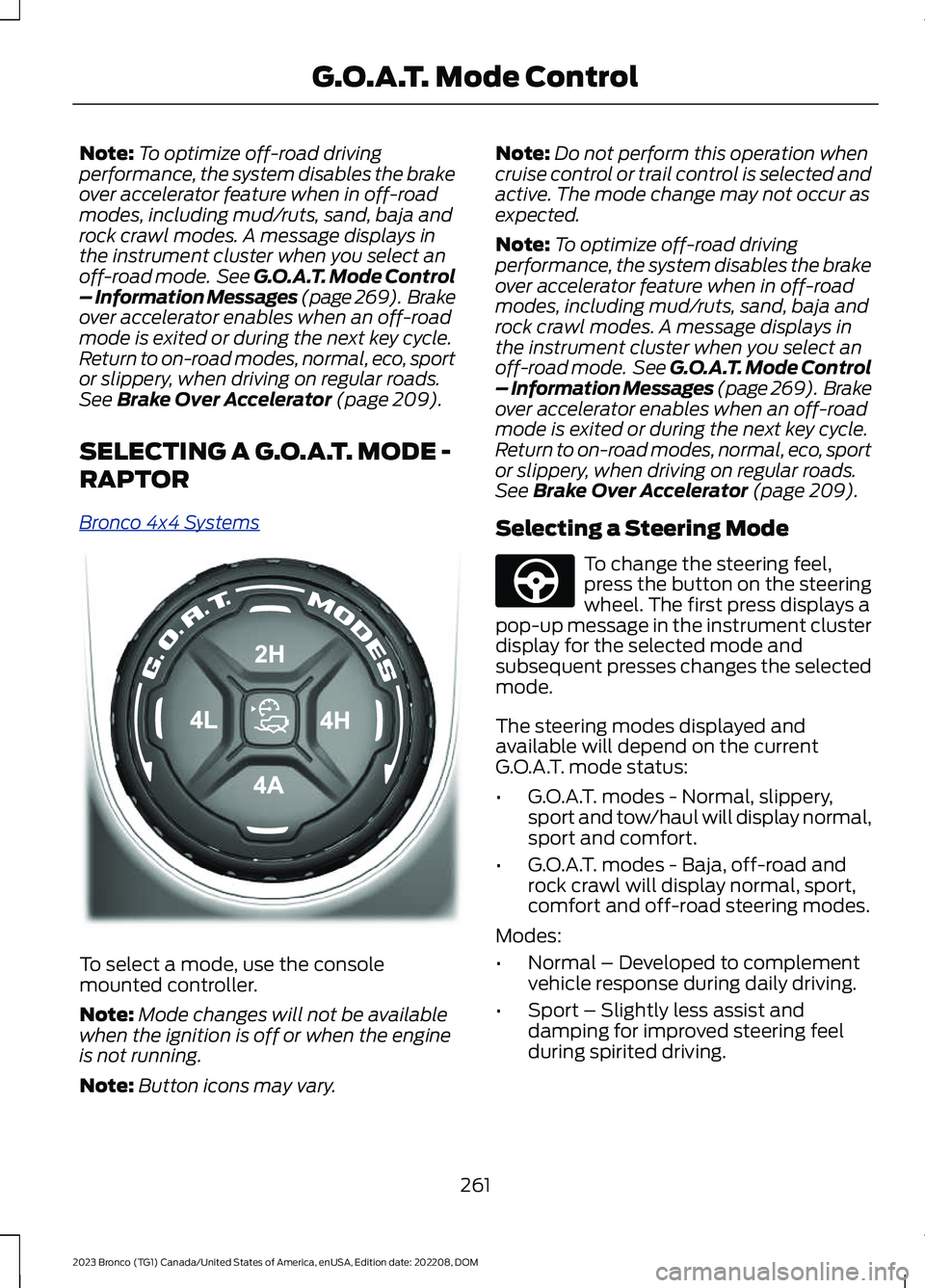
To select a mode, use the consolemounted controller.
Note:Mode changes will not be availablewhen the ignition is off or when the engineis not running.
Note:Button icons may vary.
Note:Do not perform this operation whencruise control or trail control is selected andactive. The mode change may not occur asexpected.
Note:To optimize off-road drivingperformance, the system disables the brakeover accelerator feature when in off-roadmodes, including mud/ruts, sand, baja androck crawl modes. A message displays inthe instrument cluster when you select anoff-road mode. See G.O.A.T. Mode Control– Information Messages (page 269). Brakeover accelerator enables when an off-roadmode is exited or during the next key cycle.Return to on-road modes, normal, eco, sportor slippery, when driving on regular roads.See Brake Over Accelerator (page 209).
Selecting a Steering Mode
To change the steering feel,press the button on the steeringwheel. The first press displays apop-up message in the instrument clusterdisplay for the selected mode andsubsequent presses changes the selectedmode.
The steering modes displayed andavailable will depend on the currentG.O.A.T. mode status:
•G.O.A.T. modes - Normal, slippery,sport and tow/haul will display normal,sport and comfort.
•G.O.A.T. modes - Baja, off-road androck crawl will display normal, sport,comfort and off-road steering modes.
Modes:
•Normal – Developed to complementvehicle response during daily driving.
•Sport – Slightly less assist anddamping for improved steering feelduring spirited driving.
261
2023 Bronco (TG1) Canada/United States of America, enUSA, Edition date: 202208, DOMG.O.A.T. Mode ControlE324543 E347142
Page 266 of 642
•Comfort – Slightly more assist fordriver preference and daily driving ease.
•Off-road – Similar assist to Normalwith added damping for improvedcontrol during off-road driving.
After selecting the desired setting, you mayfeel a soft feedback bump in the steeringwheel when the changeover occurs.
Note:If you disconnect or remove thebattery, the steering system defaults tonormal.
Selecting a Suspension Mode
To change the suspension feel,press the button on the steeringwheel. The first press displays apop-up message in the instrument clusterdisplay for the selected mode andsubsequent presses changes the selectedmode.
Modes:
•Normal – Default factory setting.
•Sport – Slightly stiffer suspension withemphasis on handling and control.
•Off-road – Maximizes shockperformance in extreme off-roadenvironments.
Selecting an Exhaust Mode
To change the exhaust sound,press the button on the steeringwheel. The first press displays apop-up message in the instrument clusterdisplay for the selected mode andsubsequent presses changes the selectedmode.
Modes:
•Normal – Default setting provides abalance of comfort and feedback.
•Sport – Slightly louder than normal forspirited driving.
•Baja – Loudest setting for off-road useonly. Maximum exhaust noise under alldriving conditions.
•Quiet – Quietest setting for maximumcomfort under all driving conditions.
Quiet Start
Quiet start allows you to schedule whenthe exhaust mode turns on the quietsetting. The time window can be from 1 to24 hours
Enabling and disabling quiet start:
1.Press Settings.
2.Press Vehicle.
3.Press Quiet Start.
4.Press Quiet Start.
5.Press Settings.
Setting quiet time:
1.Press Settings.
2.Press Vehicle.
3.Press Quiet Start.
4.Press Set Quiet Time.
5.Set your desired start and end times.
MyMode
You can use MyMode to createone custom vehicleconfiguration based on thecurrent state of your vehicle.
When you have your vehicle configured toyour desired settings, you can press andhold the button for a few seconds to saveas MyMode.
Double-pressing the button activates yoursaved MyMode.
You can check the saved MyMode settingswith a single press of the button.
262
2023 Bronco (TG1) Canada/United States of America, enUSA, Edition date: 202208, DOMG.O.A.T. Mode ControlE347107 E347131 E359278
Page 277 of 642
•You apply direct steering, acceleratefast or brake hard.
•The vehicle speed is less than 40 mph(64 km/h).
•The anti-lock brake, stability control ortraction control system activates.
•The lane is too narrow.
•Something is obscuring the camera orit is unable to detect the lane markingsdue to environment, traffic or vehicleconditions.
The lane keeping system may not correctlane positioning in any of the followingconditions:
•High winds.
•Uneven road surfaces.
•Heavy or uneven loads.
•Incorrect tire pressure.
SWITCHING THE LANE
KEEPING SYSTEM ON AND
OFF
To activate the lane keepingsystem, press the button on thesteering wheel.
To deactivate the lane keeping system,press the button again.
Note:When switching the system on or offa message appears in the information andentertainment display to show the status.
Note:The system stores the on or offsetting until manually changed, unless itdetects a MyKey™. If the system detects aMyKey™, it defaults to the last setting forthat MyKey™.
Note: If the system detects a MyKey™,pressing the button does not affect the onor off status of the system. You can onlychange the mode and intensity settings.
SWITCHING THE LANE
KEEPING SYSTEM MODE
The lane keeping system has differentsettings that you can view or adjust usingthe information display.
The system stores the last known selectionfor each of these settings. You do not needto readjust your settings each time youswitch on the system.
To change the lane keeping system mode,use the touchscreen:
1.Select Driver Assistance.
2.Select Lane Keeping System.
3.Select Mode.
4.Select a setting.
Note:The system remembers the lastsetting when you start your vehicle. If thesystem detects a MyKey™, the mode is setto alert.
ALERT MODE
WHAT IS ALERT MODE
Alert mode vibrates the steering wheelwhen it detects an unintended lanedeparture.
273
2023 Bronco (TG1) Canada/United States of America, enUSA, Edition date: 202208, DOMLane Keeping System (If Equipped)E308131
Page 278 of 642
HOW DOES ALERT MODE WORK
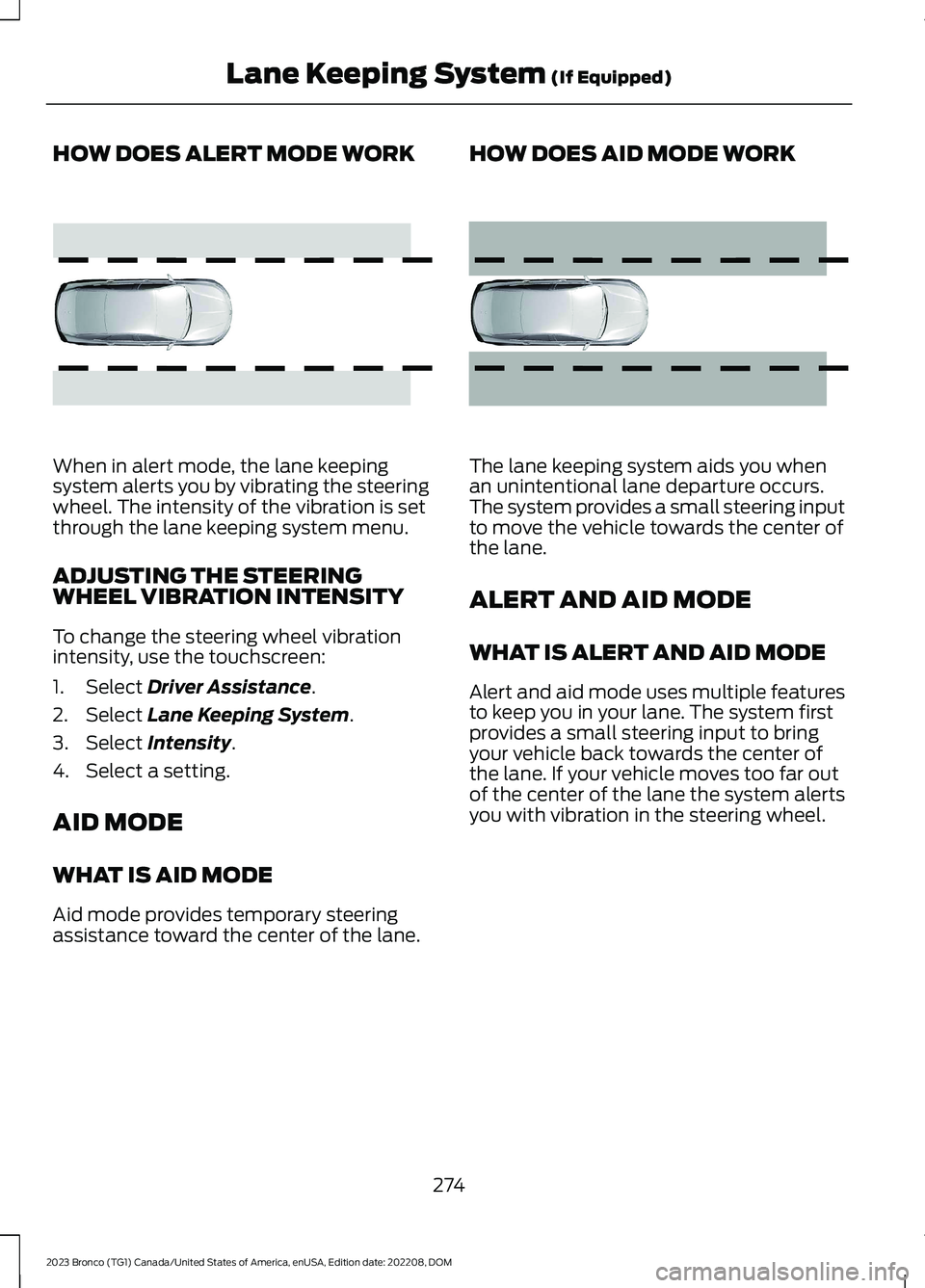
When in alert mode, the lane keepingsystem alerts you by vibrating the steeringwheel. The intensity of the vibration is setthrough the lane keeping system menu.
ADJUSTING THE STEERINGWHEEL VIBRATION INTENSITY
To change the steering wheel vibrationintensity, use the touchscreen:
1.Select Driver Assistance.
2.Select Lane Keeping System.
3.Select Intensity.
4.Select a setting.
AID MODE
WHAT IS AID MODE
Aid mode provides temporary steeringassistance toward the center of the lane.
HOW DOES AID MODE WORK
The lane keeping system aids you whenan unintentional lane departure occurs.The system provides a small steering inputto move the vehicle towards the center ofthe lane.
ALERT AND AID MODE
WHAT IS ALERT AND AID MODE
Alert and aid mode uses multiple featuresto keep you in your lane. The system firstprovides a small steering input to bringyour vehicle back towards the center ofthe lane. If your vehicle moves too far outof the center of the lane the system alertsyou with vibration in the steering wheel.
274
2023 Bronco (TG1) Canada/United States of America, enUSA, Edition date: 202208, DOMLane Keeping System (If Equipped)E165515 E165516
Page 323 of 642
Look ahead on your route noting upcomingobstacles, surface texture or color changesor any other factors which may indicate achange in available traction. Adjust thevehicle speed and route to avoid a loss intraction. Conditions can change causingthe course to vary day to day. Markobstacles with GPS markers to avoidpotential vehicle damage. Wherenecessary, get out of your vehicle andcheck the terrain.
When driving off-road, if the front or rearsuspension is bottoming-out or excessivecontact with the skid-plates is happening,reduce the vehicle's speed to avoidpotential damage to your vehicle.
If you are driving in a dusty area, be sure toleave ample distance between your vehicleand any other vehicles to allow foradequate vision.
When driving off-road verify that yourwipers and washers are working properlyand reduce your speed for better visibility.
When driving in desert conditions, werecommend driving with your headlampson to help other drivers easily see you.
When convoying with other vehicles, werecommend that communication is used,and the lead vehicle notify other vehiclesof upcoming obstacles.
Keep available ground clearance in mindand pick a route that minimizes the risk ofcatching the underside of the vehicle onan obstacle.
When negotiating low speed obstacles,applying light brake pressure in conjunctionwith the throttle allows you to negotiatethe obstacle in a more controlled manner.
Driving off-road requires a high amount ofconcentration. Even if your local law doesnot prohibit drinking alcohol when drivingoff-road we do not recommend it.
DRIVING OFF-ROAD
Driving In Snow and Ice
WARNING: If you are driving inslippery conditions that require tirechains or cables, then it is critical thatyou drive cautiously. Keep speeds down,allow for longer stopping distances andavoid aggressive steering to reduce thechances of a loss of vehicle controlwhich can lead to serious injury or death.If the rear end of your vehicle slides whilecornering, steer in the direction of theslide until you regain control of yourvehicle.
Four-wheel drive vehicles have advantagesover two-wheel drive vehicles in snow andice but can skid like any other vehicle. Ifyour vehicle slides when driving on snowyor icy roads, turn the steering wheel in thedirection of the slide until you regaincontrol. Avoid sudden applications ofpower and quick changes of direction onsnow and ice. Slowly and steadily applythe accelerator when starting from a fullstop. Avoid sudden braking.
WARNING: Do not becomeoverconfident in the ability of four-wheeldrive vehicles. Although a four-wheeldrive vehicle may accelerate better thana two-wheel drive vehicle in low tractionsituations, it won't stop any faster thantwo-wheel drive vehicles. Always driveat a safe speed.
Make sure you allow sufficient distancebetween your vehicle and other vehiclesfor stopping.
In emergency stopping situations, do notpump the brake pedal, apply the brakefirmly.
319
2023 Bronco (TG1) Canada/United States of America, enUSA, Edition date: 202208, DOMDriving Hints
Page 324 of 642
Driving In Sand
When driving over sand, try to keep all fourwheels on the most solid area of the trail.Drive through the terrain without varyingvehicle speed. Apply the accelerator andavoid excessive wheel slip.
Use the vehicle's momentum to maintainforward motion in sand. Avoid coming toa stop on steep sand slopes as the vehiclemay not be able to continue forward afterit has stopped.
Driving In Mud
Be cautious of sudden changes in vehiclespeed or direction when you are driving inmud.
Even four-wheel drive vehicles can losetraction in slick mud. If your vehicle doesslide, steer in the direction of the slide untilyou regain control of your vehicle.
After driving through mud, clean off residuestuck to the wheels and tires and rotatingdriveshafts. Excess mud stuck on thewheels and tires and rotating driveshaftscan cause an imbalance that coulddamage drive components.
Note:The vehicle brakes are less effectivewhen wet or muddy.
Driving Over Rocks and Gravel
Gravel is a constantly changing, low-gripsurface. Driving at slow speeds on gravelreduces the risk of losing traction when youstop, accelerate or turn a corner.
When approaching large rocks, positionthe vehicle so that the tires pass over thelargest obstacle.
Note:Never attempt to straddle a rock thatis large enough to strike your axles orundercarriage.
Note:Never attempt to drive over a rockwhich is large enough to contact the doorsills if your vehicle does not have rock rails.
If you lose traction on your wheels facinguphill, stop and choose a more suitableroute.
Leave a generous gap between yourvehicle and other vehicles to minimize therisk of damage from flying gravel. Avoiddust clouds as they reduce visibility.
Before navigating on uneven ground,secure anything inside the vehicle. Ifpossible, remove any roof-rack items. Usethe lowest gear possible and approach theobstacle at a slow speed.
If your vehicle begins to slide down a slope,steer downhill and gently apply thethrottle. If you lose traction on your uphillwheels, stop immediately and choose amore suitable route.
Approach logs, rocky steps or ditchesdiagonally. Keep at least three wheels onthe ground at all times.
Climbing A Hill
WARNING: Extreme care shouldbe used when steering the vehicle inreverse down a slope so as not to causethe vehicle to swerve out of control.
Although natural obstacles can make itnecessary to travel diagonally up or downa hill or steep incline, try to drive straightup or straight down.
Note: Avoid turning on steep slopes orhills. A danger lies in losing traction, slippingsideways and possible vehicle roll over.
Whenever driving on a hill, you must firstdetermine the route you can use.
When climbing a steep slope or hill, startin a lower gear rather than downshifting toa lower gear from a higher gear. Thisreduces strain on the engine and thepossibility of stalling.
320
2023 Bronco (TG1) Canada/United States of America, enUSA, Edition date: 202208, DOMDriving Hints
Page 359 of 642
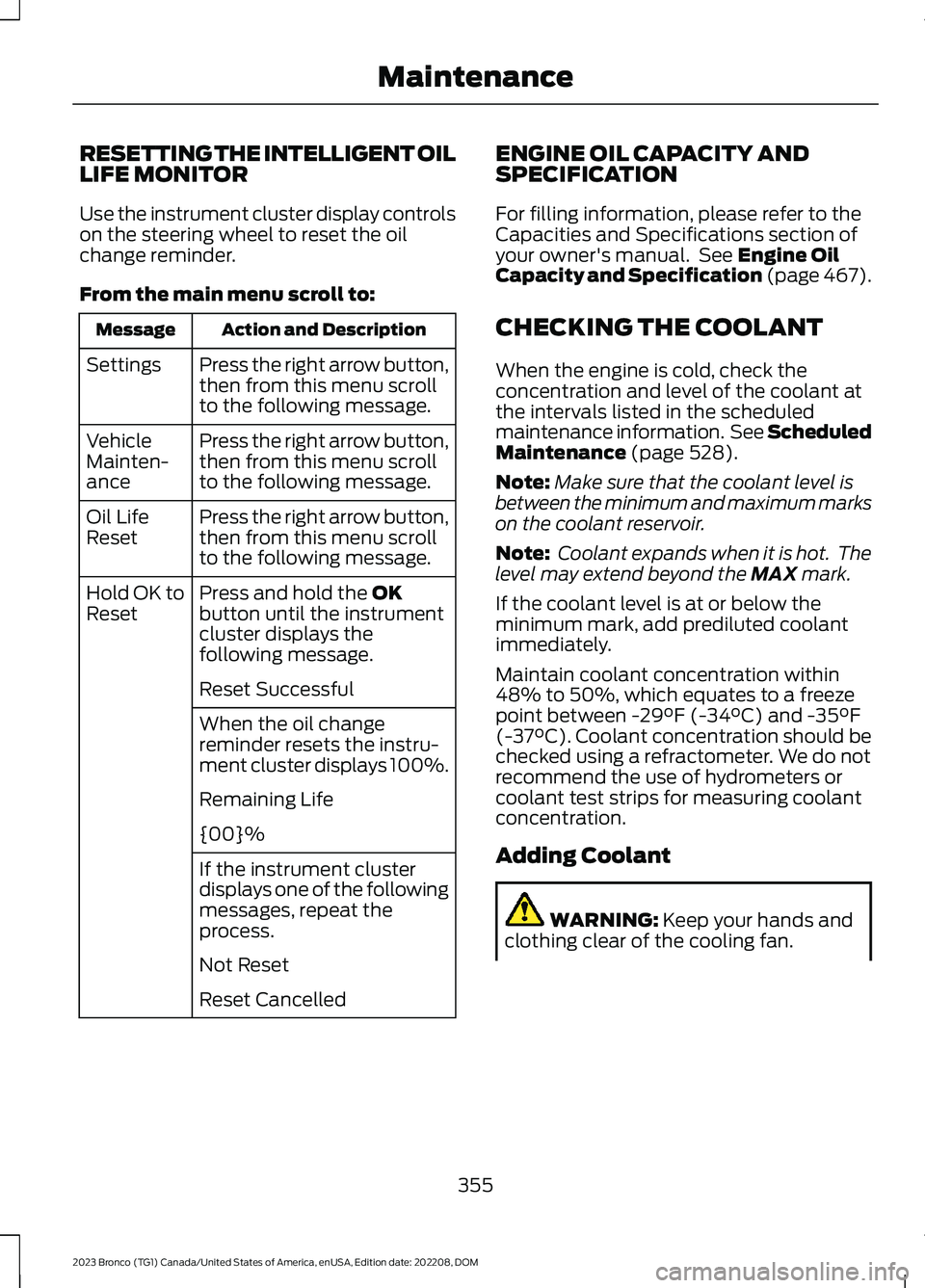
RESETTING THE INTELLIGENT OILLIFE MONITOR
Use the instrument cluster display controlson the steering wheel to reset the oilchange reminder.
From the main menu scroll to:
Action and DescriptionMessage
Press the right arrow button,then from this menu scrollto the following message.
Settings
Press the right arrow button,then from this menu scrollto the following message.
VehicleMainten-ance
Press the right arrow button,then from this menu scrollto the following message.
Oil LifeReset
Press and hold the OKbutton until the instrumentcluster displays thefollowing message.
Hold OK toReset
Reset Successful
When the oil changereminder resets the instru-ment cluster displays 100%.
Remaining Life
{00}%
If the instrument clusterdisplays one of the followingmessages, repeat theprocess.
Not Reset
Reset Cancelled
ENGINE OIL CAPACITY ANDSPECIFICATION
For filling information, please refer to theCapacities and Specifications section ofyour owner's manual. See Engine OilCapacity and Specification (page 467).
CHECKING THE COOLANT
When the engine is cold, check theconcentration and level of the coolant atthe intervals listed in the scheduledmaintenance information. See ScheduledMaintenance (page 528).
Note:Make sure that the coolant level isbetween the minimum and maximum markson the coolant reservoir.
Note: Coolant expands when it is hot. Thelevel may extend beyond the MAX mark.
If the coolant level is at or below theminimum mark, add prediluted coolantimmediately.
Maintain coolant concentration within48% to 50%, which equates to a freezepoint between -29°F (-34°C) and -35°F(-37°C). Coolant concentration should bechecked using a refractometer. We do notrecommend the use of hydrometers orcoolant test strips for measuring coolantconcentration.
Adding Coolant
WARNING: Keep your hands andclothing clear of the cooling fan.
355
2023 Bronco (TG1) Canada/United States of America, enUSA, Edition date: 202208, DOMMaintenance
Page 432 of 642
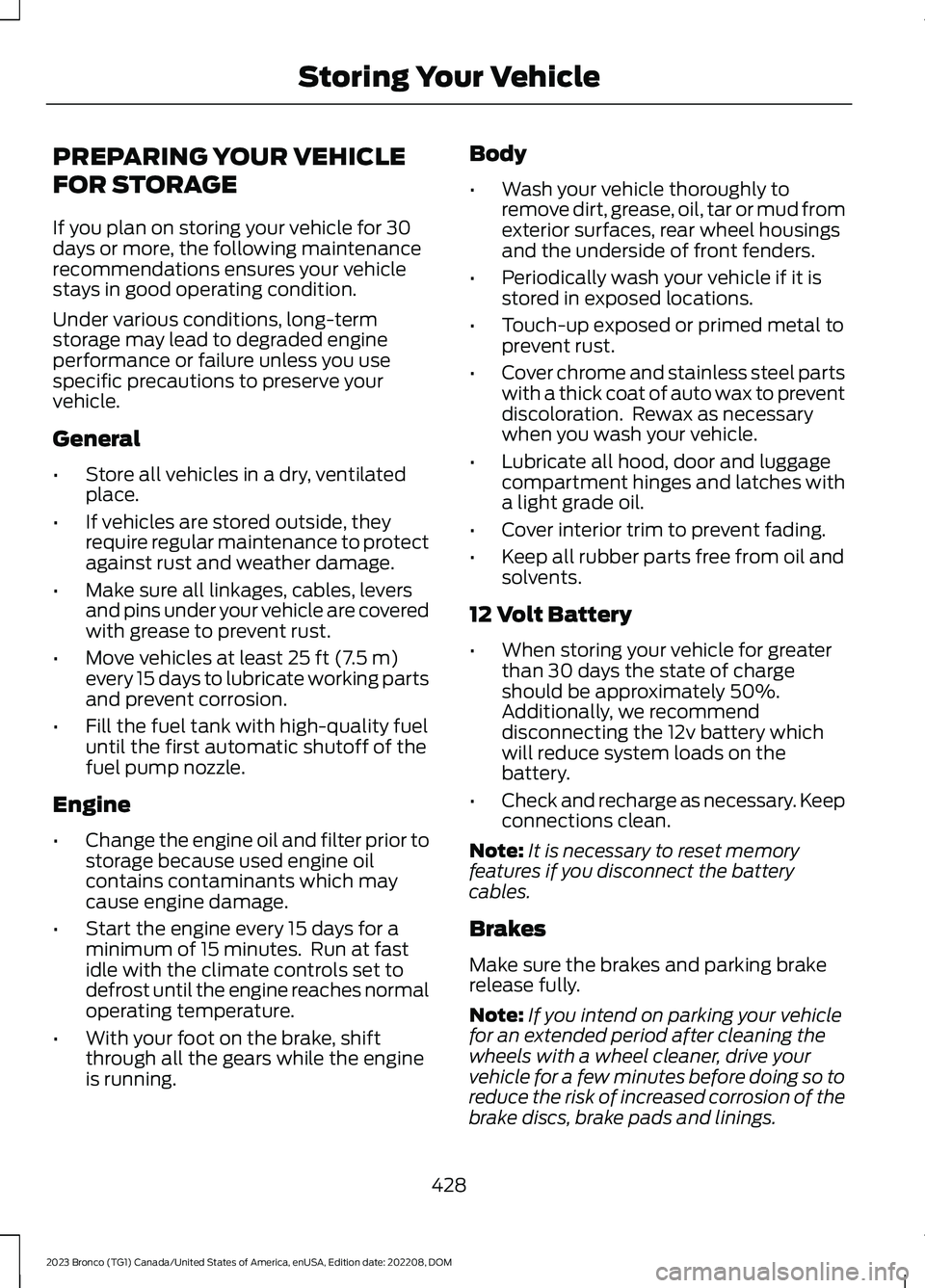
PREPARING YOUR VEHICLE
FOR STORAGE
If you plan on storing your vehicle for 30days or more, the following maintenancerecommendations ensures your vehiclestays in good operating condition.
Under various conditions, long-termstorage may lead to degraded engineperformance or failure unless you usespecific precautions to preserve yourvehicle.
General
•Store all vehicles in a dry, ventilatedplace.
•If vehicles are stored outside, theyrequire regular maintenance to protectagainst rust and weather damage.
•Make sure all linkages, cables, leversand pins under your vehicle are coveredwith grease to prevent rust.
•Move vehicles at least 25 ft (7.5 m)every 15 days to lubricate working partsand prevent corrosion.
•Fill the fuel tank with high-quality fueluntil the first automatic shutoff of thefuel pump nozzle.
Engine
•Change the engine oil and filter prior tostorage because used engine oilcontains contaminants which maycause engine damage.
•Start the engine every 15 days for aminimum of 15 minutes. Run at fastidle with the climate controls set todefrost until the engine reaches normaloperating temperature.
•With your foot on the brake, shiftthrough all the gears while the engineis running.
Body
•Wash your vehicle thoroughly toremove dirt, grease, oil, tar or mud fromexterior surfaces, rear wheel housingsand the underside of front fenders.
•Periodically wash your vehicle if it isstored in exposed locations.
•Touch-up exposed or primed metal toprevent rust.
•Cover chrome and stainless steel partswith a thick coat of auto wax to preventdiscoloration. Rewax as necessarywhen you wash your vehicle.
•Lubricate all hood, door and luggagecompartment hinges and latches witha light grade oil.
•Cover interior trim to prevent fading.
•Keep all rubber parts free from oil andsolvents.
12 Volt Battery
•When storing your vehicle for greaterthan 30 days the state of chargeshould be approximately 50%.Additionally, we recommenddisconnecting the 12v battery whichwill reduce system loads on thebattery.
•Check and recharge as necessary. Keepconnections clean.
Note:It is necessary to reset memoryfeatures if you disconnect the batterycables.
Brakes
Make sure the brakes and parking brakerelease fully.
Note:If you intend on parking your vehiclefor an extended period after cleaning thewheels with a wheel cleaner, drive yourvehicle for a few minutes before doing so toreduce the risk of increased corrosion of thebrake discs, brake pads and linings.
428
2023 Bronco (TG1) Canada/United States of America, enUSA, Edition date: 202208, DOMStoring Your Vehicle