child lock FORD BRONCO 2023 User Guide
[x] Cancel search | Manufacturer: FORD, Model Year: 2023, Model line: BRONCO, Model: FORD BRONCO 2023Pages: 642, PDF Size: 14.71 MB
Page 64 of 642
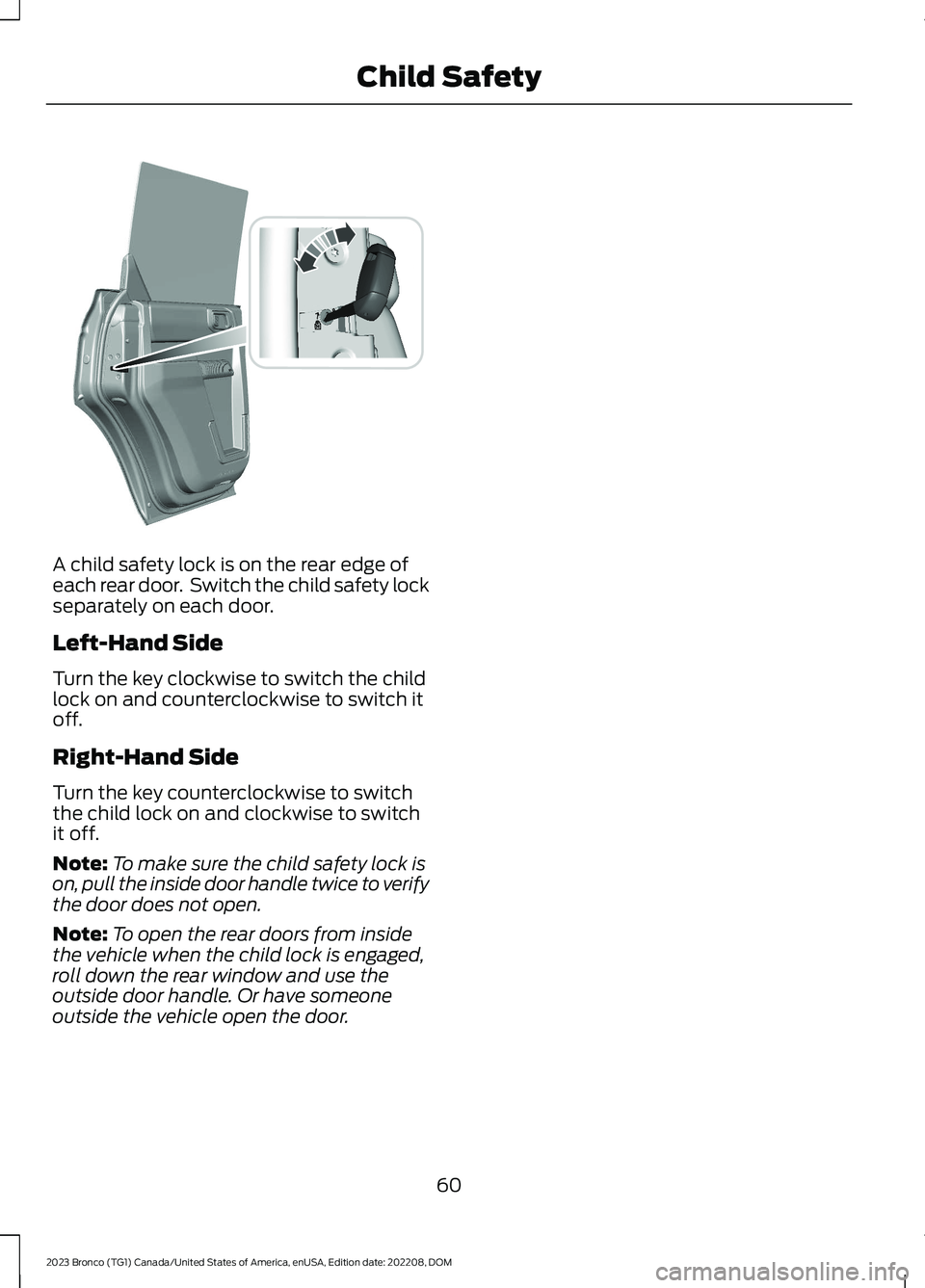
A child safety lock is on the rear edge ofeach rear door. Switch the child safety lockseparately on each door.
Left-Hand Side
Turn the key clockwise to switch the childlock on and counterclockwise to switch itoff.
Right-Hand Side
Turn the key counterclockwise to switchthe child lock on and clockwise to switchit off.
Note:To make sure the child safety lock ison, pull the inside door handle twice to verifythe door does not open.
Note:To open the rear doors from insidethe vehicle when the child lock is engaged,roll down the rear window and use theoutside door handle. Or have someoneoutside the vehicle open the door.
60
2023 Bronco (TG1) Canada/United States of America, enUSA, Edition date: 202208, DOMChild SafetyE373050
Page 65 of 642
SEATBELT PRECAUTIONS
WARNING: Always drive and ridewith your seatback upright and the lapbelt snug and low across the hips.
WARNING: Children must alwaysbe properly restrained.
WARNING: Do not allow apassenger to hold a child on their lapwhen your vehicle is moving. Failure tofollow this instruction could result inpersonal injury or death in the event of asudden stop or crash.
WARNING: All occupants of yourvehicle, including the driver, shouldalways properly wear their seatbelts,even when an airbag supplementalrestraint system is provided. Failure toproperly wear your seatbelt couldseriously increase the risk of injury ordeath.
WARNING: It is extremelydangerous to ride in a cargo area, insideor outside of a vehicle. In a crash, peopleriding in these areas are more likely to beseriously injured or killed. Do not allowpeople to ride in any area of your vehiclethat is not equipped with seats andseatbelts. Make sure everyone in yourvehicle is in a seat and properly using aseatbelt. Failure to follow this warningcould result in serious personal injury ordeath.
WARNING: In a rollover crash, anunbelted person is significantly morelikely to die than a person wearing aseatbelt.
WARNING: Each seating positionin your vehicle has a specific seatbeltassembly made up of one buckle andone tongue designed to be used as a pair.Use the shoulder belt on the outsideshoulder only. Never wear the shoulderbelt under the arm. Never use a singleseatbelt for more than one person.
WARNING: Even with advancedrestraints systems, properly restrainchildren 12 and under in a rear seatingposition. Failure to follow this couldseriously increase the risk of injury ordeath.
WARNING: Seatbelts and seatsmay be hot in a vehicle that is in thesunshine. The hot seatbelts or seats mayburn a small child. Check seat covers andbuckles before you place a childanywhere near them.
WARNING: If your vehicle isinvolved in a crash, have the seatbeltsand associated components inspectedas soon as possible. Failure to follow thisinstruction could result in personal injuryor death.
All seating positions in this vehicle havelap and shoulder seatbelts. All occupantsof the vehicle should properly wear theirseatbelts, even when an airbagsupplemental restraint system is provided.
The seatbelt system consists of:
•Lap and shoulder seatbelts.
•A shoulder seatbelt with automaticlocking mode, except driver seatbelt.
•Seatbelt pretensioners at the frontoutermost and rear outermost seatingpositions.
·A seatbelt warning light andchime.
61
2023 Bronco (TG1) Canada/United States of America, enUSA, Edition date: 202208, DOMSeatbeltsE71880
Page 84 of 642
REMOVING THE KEY BLADE
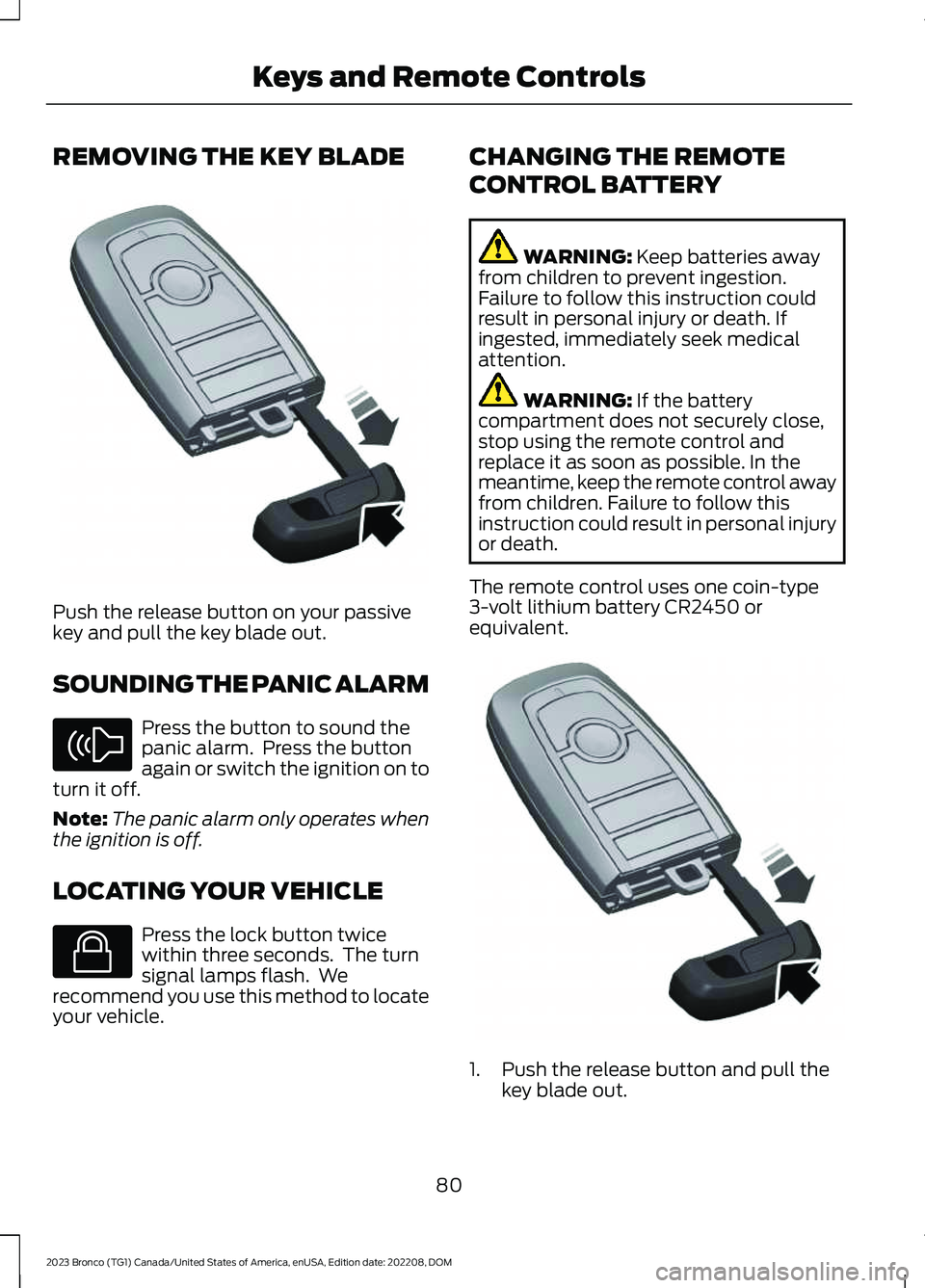
Push the release button on your passivekey and pull the key blade out.
SOUNDING THE PANIC ALARM
Press the button to sound thepanic alarm. Press the buttonagain or switch the ignition on toturn it off.
Note:The panic alarm only operates whenthe ignition is off.
LOCATING YOUR VEHICLE
Press the lock button twicewithin three seconds. The turnsignal lamps flash. Werecommend you use this method to locateyour vehicle.
CHANGING THE REMOTE
CONTROL BATTERY
WARNING: Keep batteries awayfrom children to prevent ingestion.Failure to follow this instruction couldresult in personal injury or death. Ifingested, immediately seek medicalattention.
WARNING: If the batterycompartment does not securely close,stop using the remote control andreplace it as soon as possible. In themeantime, keep the remote control awayfrom children. Failure to follow thisinstruction could result in personal injuryor death.
The remote control uses one coin-type3-volt lithium battery CR2450 orequivalent.
1.Push the release button and pull thekey blade out.
80
2023 Bronco (TG1) Canada/United States of America, enUSA, Edition date: 202208, DOMKeys and Remote ControlsE322866 E138624 E138623 E322866
Page 117 of 642
OPENING AND CLOSING THE
WINDOWS
WARNING: Do not leave childrenunattended in your vehicle and do notlet them play with the power windows.Failure to follow this instruction couldresult in personal injury.
WARNING: When closing thepower windows, verify they are free ofobstruction and make sure that childrenand pets are not in the proximity of thewindow openings.
Press the control to open thewindow. Lift the control to closethe window.
Note:The power windows operate with theignition on, and for several minutes after youswitch the ignition off or until you open afront door.
To reduce wind noise or pulsing noise whenone window is open, slightly open theopposite window.
One-Touch Open (If Equipped)
Fully press the window control and releaseit. Press again or lift it to stop the window.
One-Touch Close (If Equipped)
Fully lift the window control and releaseit. Press again or lift it to stop the window.
Resetting One-Touch Close
Carry out all steps within 30 seconds ofstarting the sequence.
1.Fully open the window.
2.Lift and hold the window control untilthe window is fully closed. Keep thewindow control held for a two seconds
3.Press and hold the window control untilthe window is fully open. Keep thewindow control pressed for twoseconds.
4.Lift and hold the window control untilthe window is fully closed. Keep thewindow control held for a two seconds
Note:Repeat the procedure if the windowdoes not close when you use one-touch.
Tailgate Window
To open the window, do the following:
1.Open the tailgate. See Opening theTailgate From Outside Your Vehicle(page 93).
2.Lift the window.
To close the window, do the following:
1.Push the window down.
2.Close the tailgate. See Closing theTailgate From Outside Your Vehicle(page 93).
GLOBAL OPENING
WHAT IS GLOBAL OPENING
You can use the remote control to openthe windows with the ignition off.
USING GLOBAL OPENING
1.Press and release the unlock button onthe remote control.
2.Press and hold the unlock button onthe remote control.
3.Release the button when the windowsstart to open.
Press the lock or the unlock button on theremote control to stop global opening.
Note:You can use global opening for ashort period of time when you unlock yourvehicle using the remote control.
113
2023 Bronco (TG1) Canada/United States of America, enUSA, Edition date: 202208, DOMWindows
Page 521 of 642
This introduces new features and providesupdates to the vehicle's software systems.Make sure to switch Automatic Updateson, set a recurring update schedule andconnect your vehicle to Wi-Fi. Updatescould take longer when not connected toWi-Fi or could not download at all. SeeConnecting the Vehicle to a Wi-FiNetwork (page 483). See Connecting theVehicle to a Wi-Fi Network (page 483).
Your vehicle may be able to receivedrivable software updates, non-drivablesoftware updates or both. Drivablesoftware updates happen during normalvehicle usage and require limited inputfrom you. You are notified on yourtouchscreen and connected device priorto a non-drivable update.
Most updates complete in less than 30minutes, although some updates couldtake up to a few hours. Check yourtouchscreen or connected device for themost accurate estimated update time.
You are notified of the status of the vehiclesoftware update in the touchscreen andon your connected device. See SoftwareUpdate Indicators (page 518).
Vehicle Software UpdateRequirements
Non-drivable software updates do notinstall if any of the following occur:
•Your vehicle is running.
•Your vehicle is switched on.
•Your vehicle is not parked.
•The 12 V battery charge is too low.
•The hazard indicators are switched on.
•The alarm is sounding.
•The doors are open.
•The parking lamps are switched on.
•You are pressing the brake pedal.
•An emergency call is in process.
•Your vehicle is in limp home mode.
Vehicle Software UpdateLimitations
Once you begin a non-drivable softwareupdate, you cannot:
•Cancel the update.
•Lock, unlock or enter your vehicleunless you have a key blade.
•You can open the doors using themechanical latch if child locks arenot on.
•Drive your vehicle.
•Start your vehicle.
•Use the remote control to lock, unlockor start your vehicle.
•Use the alarm, central locks or doortones.
•Use the electronic door locks.
•Charge your vehicle.
•Charging resumes once the updatecompletes.
SOFTWARE UPDATE
SETTINGS
To access the Software Updates menu:
1.Press Settings on the touchscreen.
2.Press Software Updates.
You can do the following in the SoftwareUpdates menu:
•Switch Automatic Updates on and off.
•Schedule and install software updates.
•View software update details.
Press the button next to a menuoption for more information.
517
2023 Bronco (TG1) Canada/United States of America, enUSA, Edition date: 202208, DOMVehicle Software UpdatesE366956
Page 622 of 642
Calculating the Load Limit.......................298Canceling the Set Speed..........................223Capacities and Specifications.................461Catalytic Converter......................................185Catalytic Converter –Troubleshooting.............................................185Catalytic Converter Precautions.............185Catalytic Converter –Troubleshooting.........................................185Catalytic Converter – WarningLamps................................................................185Center Console - AutomaticTransmission.................................................35Center Console..............................................162Locking the Center Console............................162Opening the Center Console..........................162Center Console - ManualTransmission.................................................34Center Display Limitations......................498Center Display Overview..........................498Center Display Precautions.....................498Changing a Flat Tire - Excluding:Raptor...........................................................449Changing a Flat Tire - Raptor..................453Changing a Road Wheel...........................449Changing the Engine Air Filter - 2.3LEcoBoost™/2.7L EcoBoost™..............359Changing the Engine Air Filter - 3.0LEcoBoost™................................................360Changing the Fuel Filter.............................361Changing the Remote ControlBattery............................................................80Changing the Vehicle Wi-Fi HotspotName or Password..................................486Charging a Device.........................................156Charging a Wireless Device.......................161Checking MyKey System Status..............86Checking the Brake Fluid..........................209Checking the Clutch Fluid Level.............188Checking the Coolant................................355Checking the Manual Transmission FluidLevel...............................................................188Checking the Seatbelts...............................65Checking the Tire Pressures.....................441Checking the Wiper Blades.......................101Children and Airbags......................................71
Child Restraint Anchor Points...................50Locating the Child Restraint Lower AnchorPoints...................................................................50Locating the Child Restraint Top TetherAnchor Points....................................................51What Are the Child Restraint AnchorPoints...................................................................50Child Restraints................................................51Child Restraint Position Information..............51Child Restraints Recommendation...............53Child Safety......................................................49Child Restraint Anchor Points.........................50Child Restraints......................................................51Installing Child Restraints.................................53Child Safety Locks.........................................59Child Safety Precautions.............................49Cleaning Products........................................421Cleaning the Exterior..................................422Cleaning Camera Lenses andSensors.............................................................424Cleaning Chrome, Aluminium or StainlessSteel...................................................................422Cleaning Headlamps and RearLamps...............................................................422Cleaning Stripes or Graphics.........................424Cleaning the Convertible Top........................423Cleaning the Engine Compartment............423Cleaning the Exterior Precautions...............422Cleaning the Hard Top.....................................424Cleaning the Underbody.................................424Cleaning Wheels................................................422Cleaning Windows and WiperBlades...............................................................422Cleaning the Interior...................................424Cleaning Carpets and Floor Mats................426Cleaning Displays and Screens....................425Cleaning Fabric...................................................425Cleaning Leather................................................425Cleaning Plastic..................................................425Cleaning Seatbelts............................................426Cleaning the Instrument Panel....................424Cleaning Vinyl.....................................................426Clearing All MyKeys.......................................86Climate Control..............................................131Auto Mode.............................................................133Climate Control Hints.................................134
618
2023 Bronco (TG1) Canada/United States of America, enUSA, Edition date: 202208, DOMIndex
Page 627 of 642
Heated Seats.................................................146Heated Seat Precautions................................146Switching the Heated Seats On andOff.......................................................................146HeatingSee: Climate Control - Vehicles With:Automatic Temperature Control...............131See: Climate Control - Vehicles With: ManualTemperature Control....................................136Hill Descent Control....................................235Hill Descent Control –Troubleshooting............................................236Hill Descent Control Indicator.................235Hill Descent Control Precautions..........235Hill Descent Control –Troubleshooting........................................236Hill Descent Control – InformationMessages.........................................................236Hill Start Assist..............................................216Hill Start Assist – Troubleshooting..............216Hill Start Assist Precautions.....................216Hill Start Assist – Troubleshooting........216Hill Start Assist – InformationMessages..........................................................216Hood LockSee: Opening and Closing the Hood..........349See: Opening and Closing the Hood -Raptor...............................................................350Horn....................................................................99How Does 911 Assist Work...........................77How Does Adaptive Cruise ControlWork...............................................................252How Does Blind Spot InformationSystem Work..............................................279How Does Cross Traffic AlertWork..............................................................283How Does Driver Alert Work....................293How Does Four-Wheel Drive Work - 4x4with Part Time Engagement.................195How Does Four-Wheel Drive Work -Advanced 4x4 with 4A Mode...............195How Does G.O.A.T. Mode ControlWork..............................................................260How Does Hill Descent ControlWork...............................................................235How Does Hill Start Assist Work............216How Does Pre-Collision AssistWork..............................................................286
How Does Stability Control Work...........219How Does the 360 Degree CameraWork...............................................................247How Does the Lane Keeping SystemWork...............................................................272How Does the Personal Safety SystemWork.................................................................67How Does the Rear Occupant AlertSystem Work...............................................150How Does the Safety Canopy™Work.................................................................69How Does Traction Control Work...........217How Does Trailer Sway ControlWork................................................................313How Do the Front Airbags Work..............68How Do the Side Airbags Work................68
I
Identifying Fuse Types..............................348Identifying the Audio Unit........................488Identifying the Auxiliary Switch Wiring -Excluding: Raptor.....................................524Identifying the Auxiliary Switch Wiring -Raptor...........................................................525Identifying the Climate Control Unit......131Inflating the Tires..........................................441Information On Demand Screen -Vehicles With: 12 Inch Screen..............499Information on the Tire Sidewall............431Inspecting the Tire for Damage.............442Inspecting the Tire for Wear....................442Inspecting the Wheel ValveStems............................................................443Installing Child Restraints...........................53Combining the Seatbelt and Lower Anchorsfor Attaching Child Restraints....................56Installing a Child Restraint in a CenterSeat......................................................................56Using Lower Anchors and Tethers forChildren...............................................................55Using Seatbelts.....................................................53Using Tether Straps.............................................57Instrument Cluster Display.......................126Personalized Settings.......................................128Trip Computer.......................................................127Instrument Cluster Display Main Menu -Excluding: Raptor......................................126
623
2023 Bronco (TG1) Canada/United States of America, enUSA, Edition date: 202208, DOMIndex