radio controls FORD BRONCO 2023 Owners Manual
[x] Cancel search | Manufacturer: FORD, Model Year: 2023, Model line: BRONCO, Model: FORD BRONCO 2023Pages: 642, PDF Size: 14.71 MB
Page 35 of 642
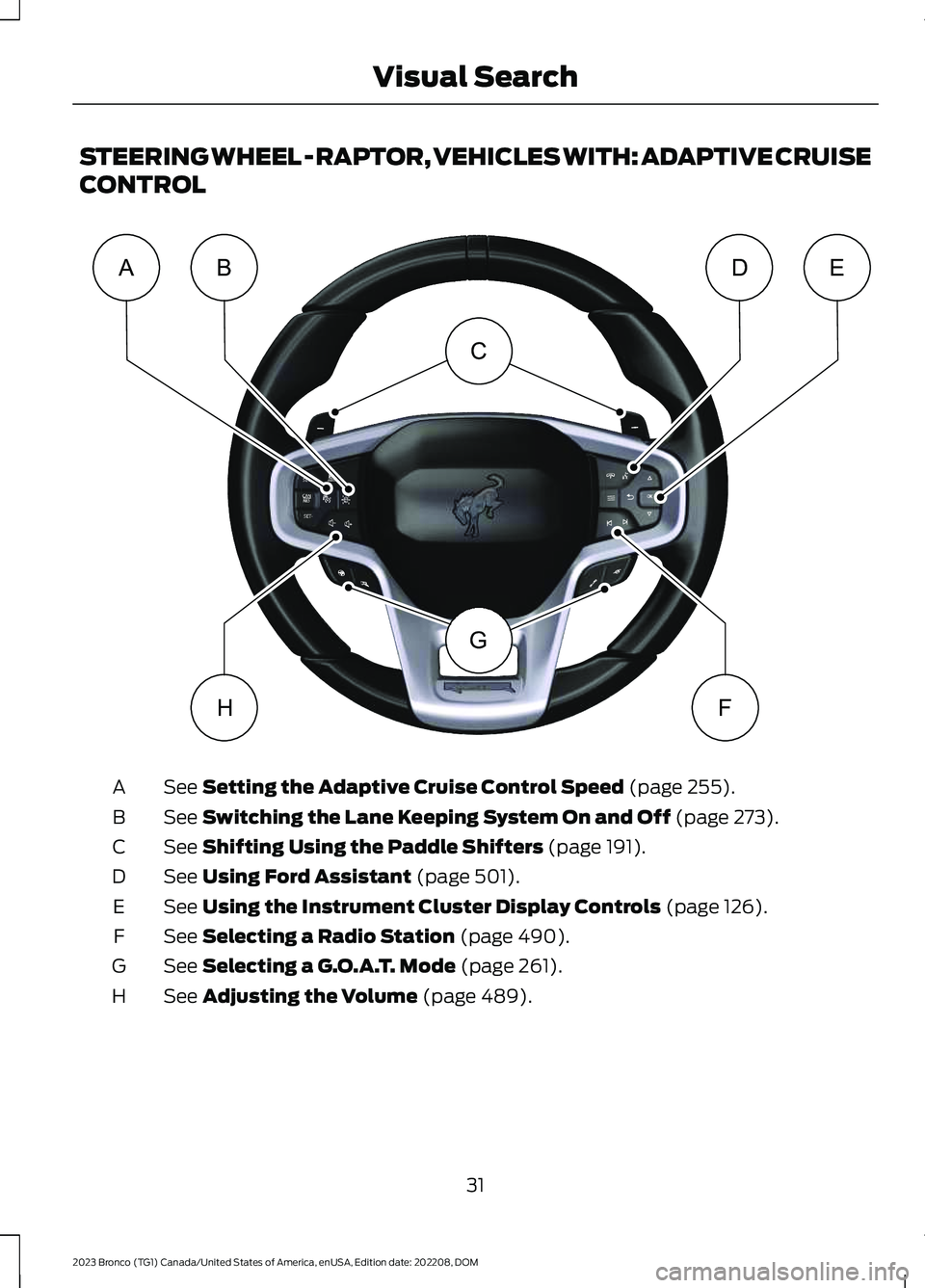
STEERING WHEEL - RAPTOR, VEHICLES WITH: ADAPTIVE CRUISE
CONTROL
See Setting the Adaptive Cruise Control Speed (page 255).A
See Switching the Lane Keeping System On and Off (page 273).B
See Shifting Using the Paddle Shifters (page 191).C
See Using Ford Assistant (page 501).D
See Using the Instrument Cluster Display Controls (page 126).E
See Selecting a Radio Station (page 490).F
See Selecting a G.O.A.T. Mode (page 261).G
See Adjusting the Volume (page 489).H
31
2023 Bronco (TG1) Canada/United States of America, enUSA, Edition date: 202208, DOMVisual SearchCGABDEHFE366539
Page 36 of 642
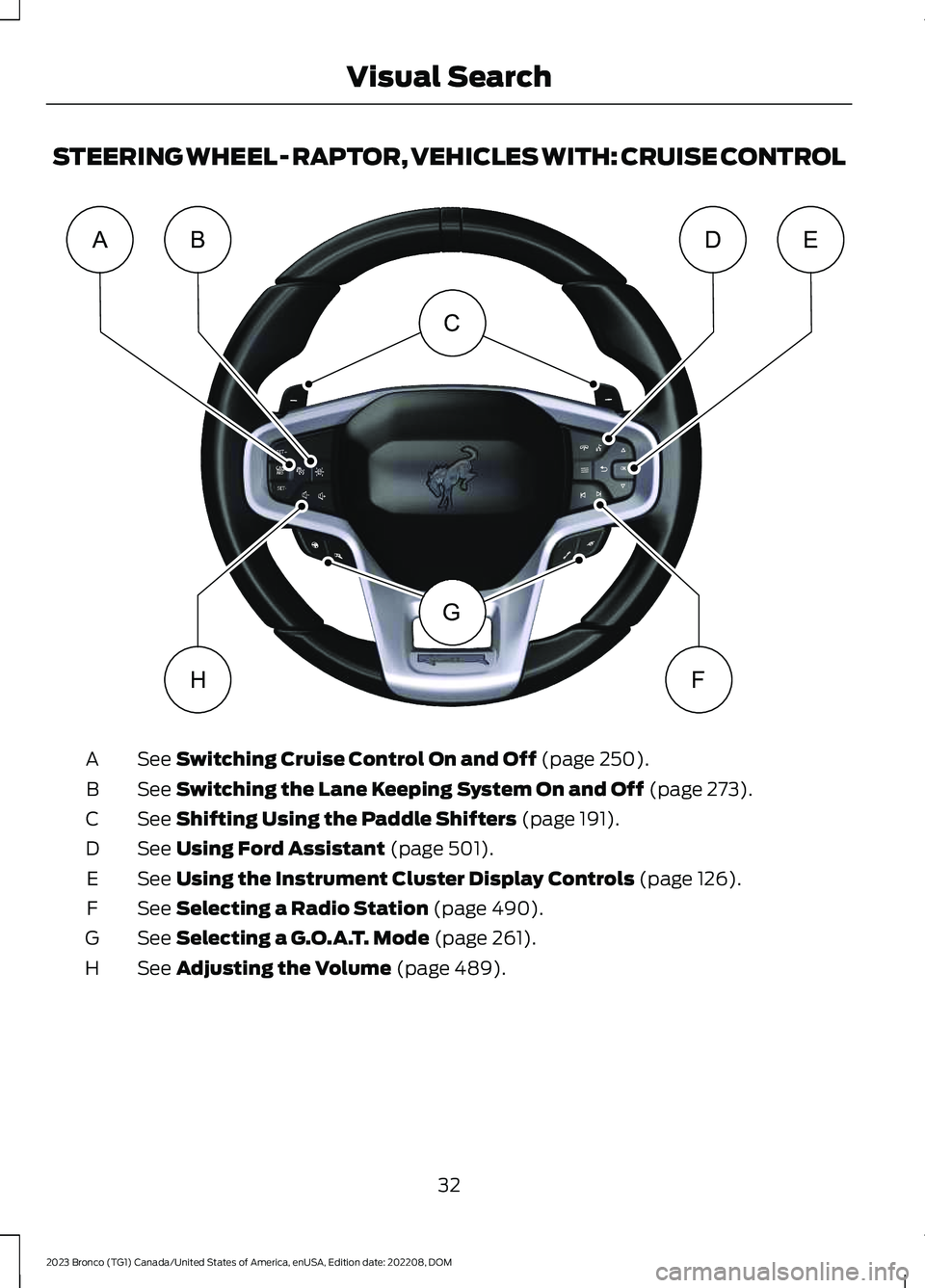
STEERING WHEEL - RAPTOR, VEHICLES WITH: CRUISE CONTROL
See Switching Cruise Control On and Off (page 250).A
See Switching the Lane Keeping System On and Off (page 273).B
See Shifting Using the Paddle Shifters (page 191).C
See Using Ford Assistant (page 501).D
See Using the Instrument Cluster Display Controls (page 126).E
See Selecting a Radio Station (page 490).F
See Selecting a G.O.A.T. Mode (page 261).G
See Adjusting the Volume (page 489).H
32
2023 Bronco (TG1) Canada/United States of America, enUSA, Edition date: 202208, DOMVisual SearchCGABDEHFE366538
Page 83 of 642
REMOTE CONTROL
LIMITATIONS
WARNING: Changes ormodifications not expressively approvedby the party responsible for compliancecould void the user's authority to operatethe equipment. The term "IC:" before theradio certification number only signifiesthat Industry Canada technicalspecifications were met.
This device complies with Part 15 of theFCC Rules and with Industry Canadalicense-exempt RSS standard(s).Operation is subject to the following twoconditions: (1) This device may not causeharmful interference, and (2) This devicemust accept any interference received,including interference that may causeundesired operation.
Make sure a valid remote control is within3 ft (1 m) from the front door handles andrear of vehicle.
The system may not function if:
•The remote control remains stationaryfor about a minute.
•The vehicle battery has no charge.
•The remote control battery has nocharge.
•There is interference causing issueswith the remote control frequencies.
•The remote control is too close tometal objects or electronic devices, forexample keys or a cell phone.
USING THE REMOTE CONTROL
Use your remote control to access variousvehicle systems.
Note:The buttons on your remote may varydepending on the vehicle region or options.
Unlock
Press the button to unlock alldoors. See Unlocking andLocking the Doors Using theRemote Control (page 88).
Lock
Press the button to lock alldoors. See Unlocking andLocking the Doors Using theRemote Control (page 88).
Remote Start (If Equipped)
Press the button to remote start.See Remotely Starting andStopping the Vehicle (page129).
Panic Alarm (If Equipped)
Press the button to sound thepanic alarm. See Sounding thePanic Alarm (page 80).
79
2023 Bronco (TG1) Canada/United States of America, enUSA, Edition date: 202208, DOMKeys and Remote ControlsE138629 E138623 E138625 E138624
Page 156 of 642
GARAGE DOOR OPENER
INTRODUCTION
HomeLink Wireless ControlSystem
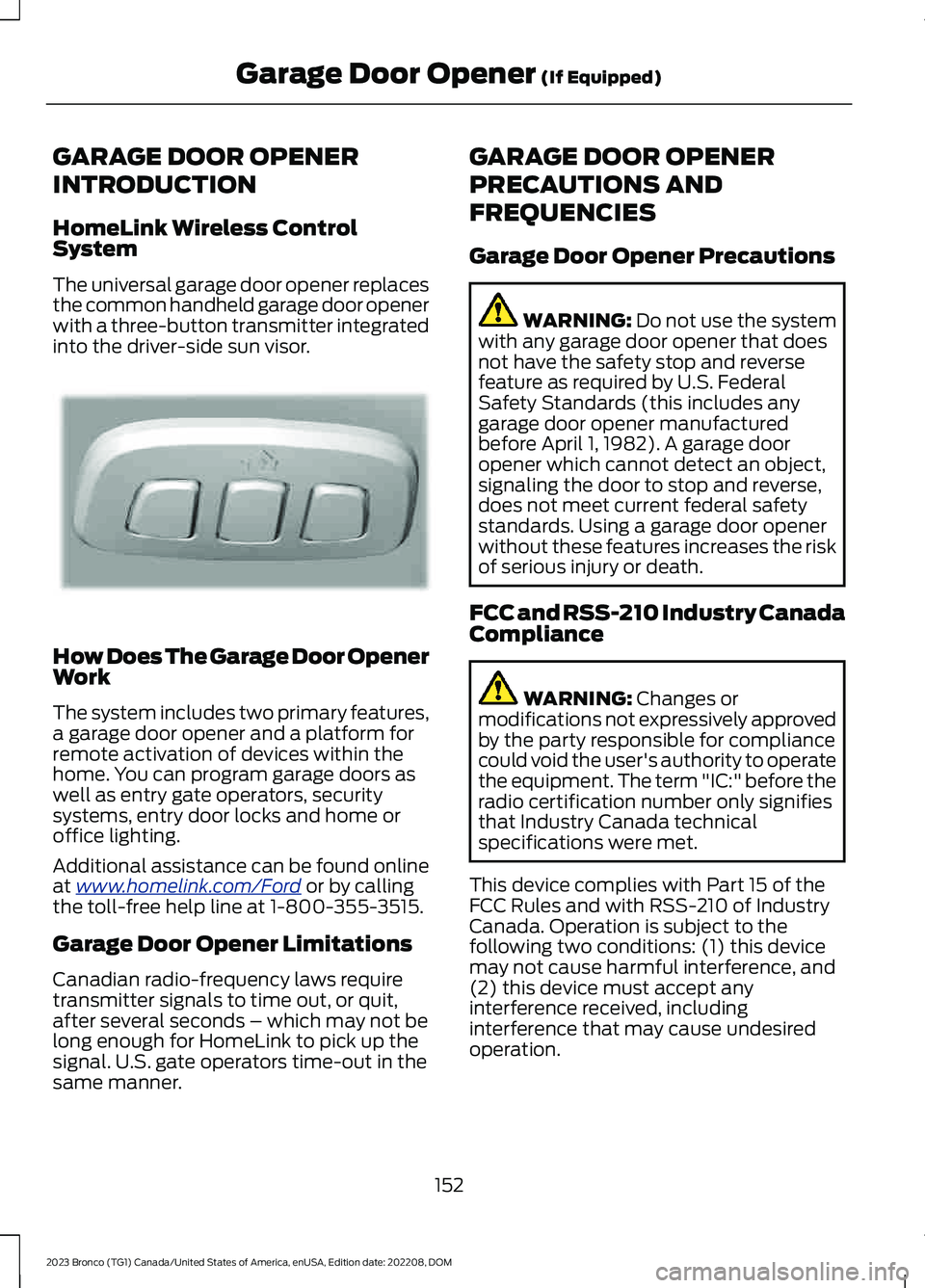
The universal garage door opener replacesthe common handheld garage door openerwith a three-button transmitter integratedinto the driver-side sun visor.
How Does The Garage Door OpenerWork
The system includes two primary features,a garage door opener and a platform forremote activation of devices within thehome. You can program garage doors aswell as entry gate operators, securitysystems, entry door locks and home oroffice lighting.
Additional assistance can be found onlineat www.homelink.com/Ford or by callingthe toll-free help line at 1-800-355-3515.
Garage Door Opener Limitations
Canadian radio-frequency laws requiretransmitter signals to time out, or quit,after several seconds – which may not belong enough for HomeLink to pick up thesignal. U.S. gate operators time-out in thesame manner.
GARAGE DOOR OPENER
PRECAUTIONS AND
FREQUENCIES
Garage Door Opener Precautions
WARNING: Do not use the systemwith any garage door opener that doesnot have the safety stop and reversefeature as required by U.S. FederalSafety Standards (this includes anygarage door opener manufacturedbefore April 1, 1982). A garage dooropener which cannot detect an object,signaling the door to stop and reverse,does not meet current federal safetystandards. Using a garage door openerwithout these features increases the riskof serious injury or death.
FCC and RSS-210 Industry CanadaCompliance
WARNING: Changes ormodifications not expressively approvedby the party responsible for compliancecould void the user's authority to operatethe equipment. The term "IC:" before theradio certification number only signifiesthat Industry Canada technicalspecifications were met.
This device complies with Part 15 of theFCC Rules and with RSS-210 of IndustryCanada. Operation is subject to thefollowing two conditions: (1) this devicemay not cause harmful interference, and(2) this device must accept anyinterference received, includinginterference that may cause undesiredoperation.
152
2023 Bronco (TG1) Canada/United States of America, enUSA, Edition date: 202208, DOMGarage Door Opener (If Equipped)E188211
Page 165 of 642
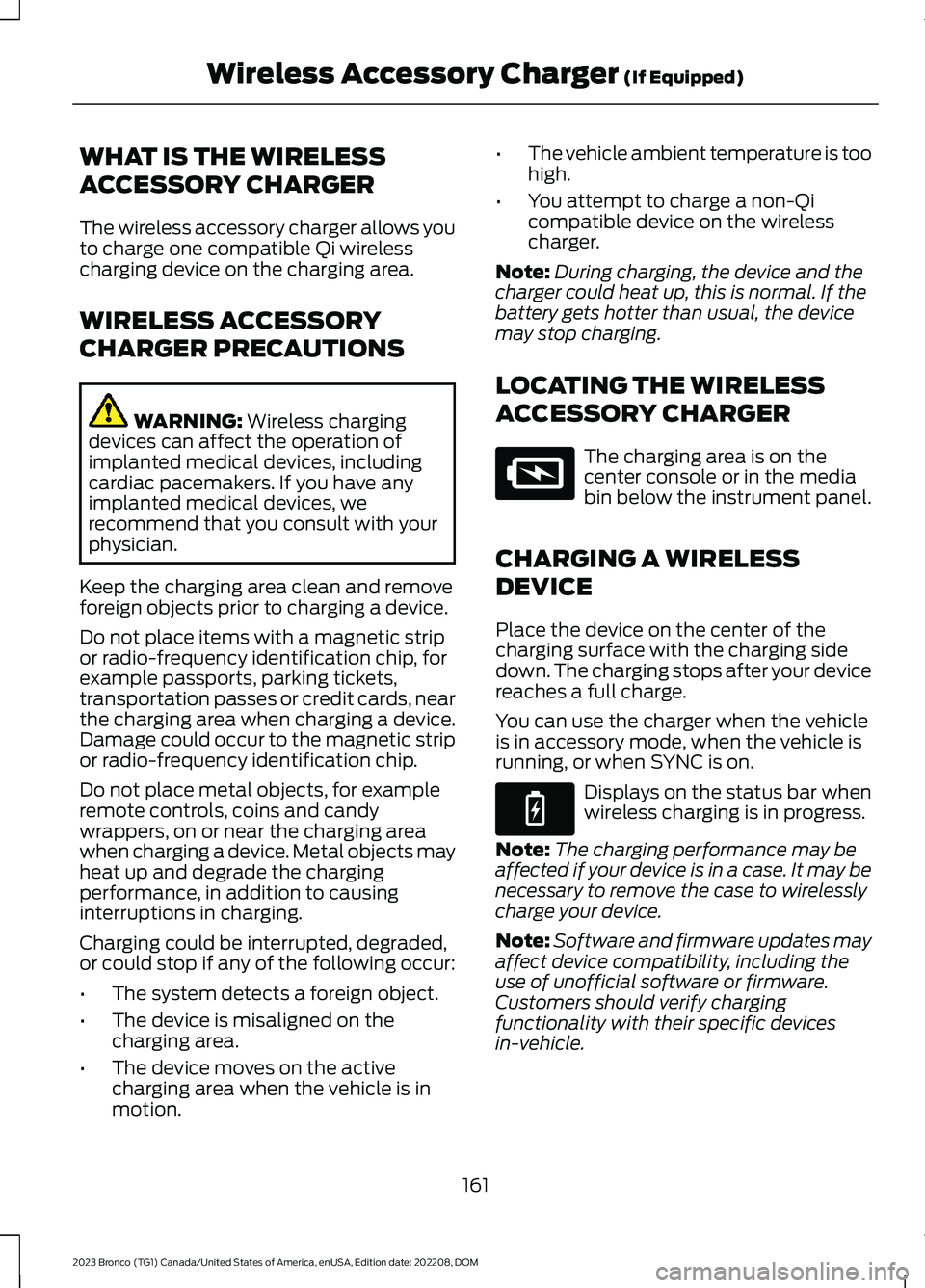
WHAT IS THE WIRELESS
ACCESSORY CHARGER
The wireless accessory charger allows youto charge one compatible Qi wirelesscharging device on the charging area.
WIRELESS ACCESSORY
CHARGER PRECAUTIONS
WARNING: Wireless chargingdevices can affect the operation ofimplanted medical devices, includingcardiac pacemakers. If you have anyimplanted medical devices, werecommend that you consult with yourphysician.
Keep the charging area clean and removeforeign objects prior to charging a device.
Do not place items with a magnetic stripor radio-frequency identification chip, forexample passports, parking tickets,transportation passes or credit cards, nearthe charging area when charging a device.Damage could occur to the magnetic stripor radio-frequency identification chip.
Do not place metal objects, for exampleremote controls, coins and candywrappers, on or near the charging areawhen charging a device. Metal objects mayheat up and degrade the chargingperformance, in addition to causinginterruptions in charging.
Charging could be interrupted, degraded,or could stop if any of the following occur:
•The system detects a foreign object.
•The device is misaligned on thecharging area.
•The device moves on the activecharging area when the vehicle is inmotion.
•The vehicle ambient temperature is toohigh.
•You attempt to charge a non-Qicompatible device on the wirelesscharger.
Note:During charging, the device and thecharger could heat up, this is normal. If thebattery gets hotter than usual, the devicemay stop charging.
LOCATING THE WIRELESS
ACCESSORY CHARGER
The charging area is on thecenter console or in the mediabin below the instrument panel.
CHARGING A WIRELESS
DEVICE
Place the device on the center of thecharging surface with the charging sidedown. The charging stops after your devicereaches a full charge.
You can use the charger when the vehicleis in accessory mode, when the vehicle isrunning, or when SYNC is on.
Displays on the status bar whenwireless charging is in progress.
Note:The charging performance may beaffected if your device is in a case. It may benecessary to remove the case to wirelesslycharge your device.
Note:Software and firmware updates mayaffect device compatibility, including theuse of unofficial software or firmware.Customers should verify chargingfunctionality with their specific devicesin-vehicle.
161
2023 Bronco (TG1) Canada/United States of America, enUSA, Edition date: 202208, DOMWireless Accessory Charger (If Equipped)E297549 E263583
Page 351 of 642
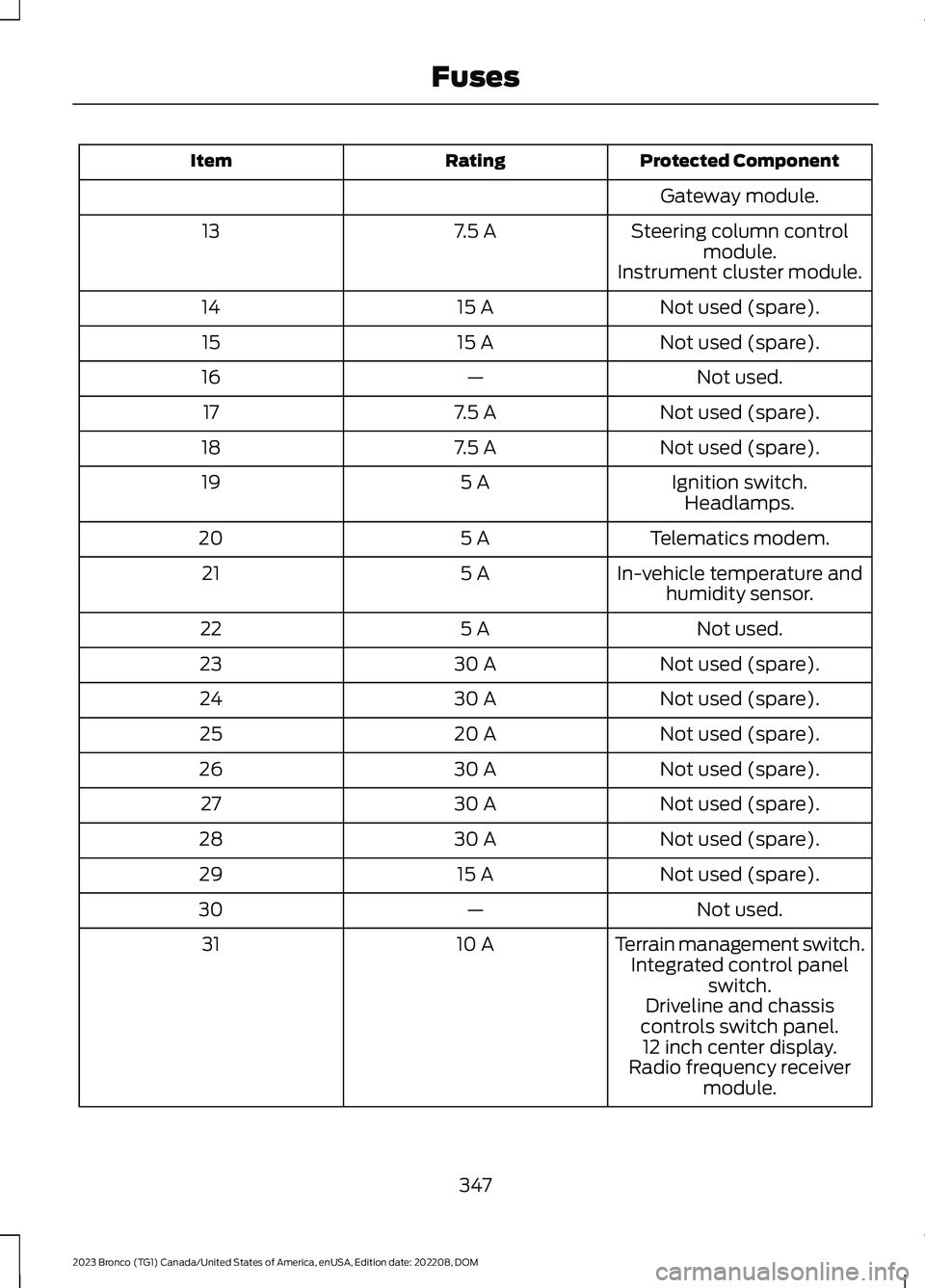
Protected ComponentRatingItem
Gateway module.
Steering column controlmodule.7.5 A13
Instrument cluster module.
Not used (spare).15 A14
Not used (spare).15 A15
Not used.—16
Not used (spare).7.5 A17
Not used (spare).7.5 A18
Ignition switch.5 A19Headlamps.
Telematics modem.5 A20
In-vehicle temperature andhumidity sensor.5 A21
Not used.5 A22
Not used (spare).30 A23
Not used (spare).30 A24
Not used (spare).20 A25
Not used (spare).30 A26
Not used (spare).30 A27
Not used (spare).30 A28
Not used (spare).15 A29
Not used.—30
Terrain management switch.10 A31Integrated control panelswitch.Driveline and chassiscontrols switch panel.12 inch center display.Radio frequency receivermodule.
347
2023 Bronco (TG1) Canada/United States of America, enUSA, Edition date: 202208, DOMFuses
Page 497 of 642
Hills, mountains, tall buildings, bridges,tunnels, freeway overpasses, parkinggarages, dense tree foliage andthunderstorms can interfere with yourreception.
When you pass a ground-basedbroadcast-repeating tower, a strongersignal may overtake a weaker one andcould result in the audio system muting.Your display could show an error messageto indicate the interference.
LOCATING THE SATELLITE RADIOIDENTIFICATION NUMBER
1.Select SiriusXM as the audio source.
2.Tune to channel 0.
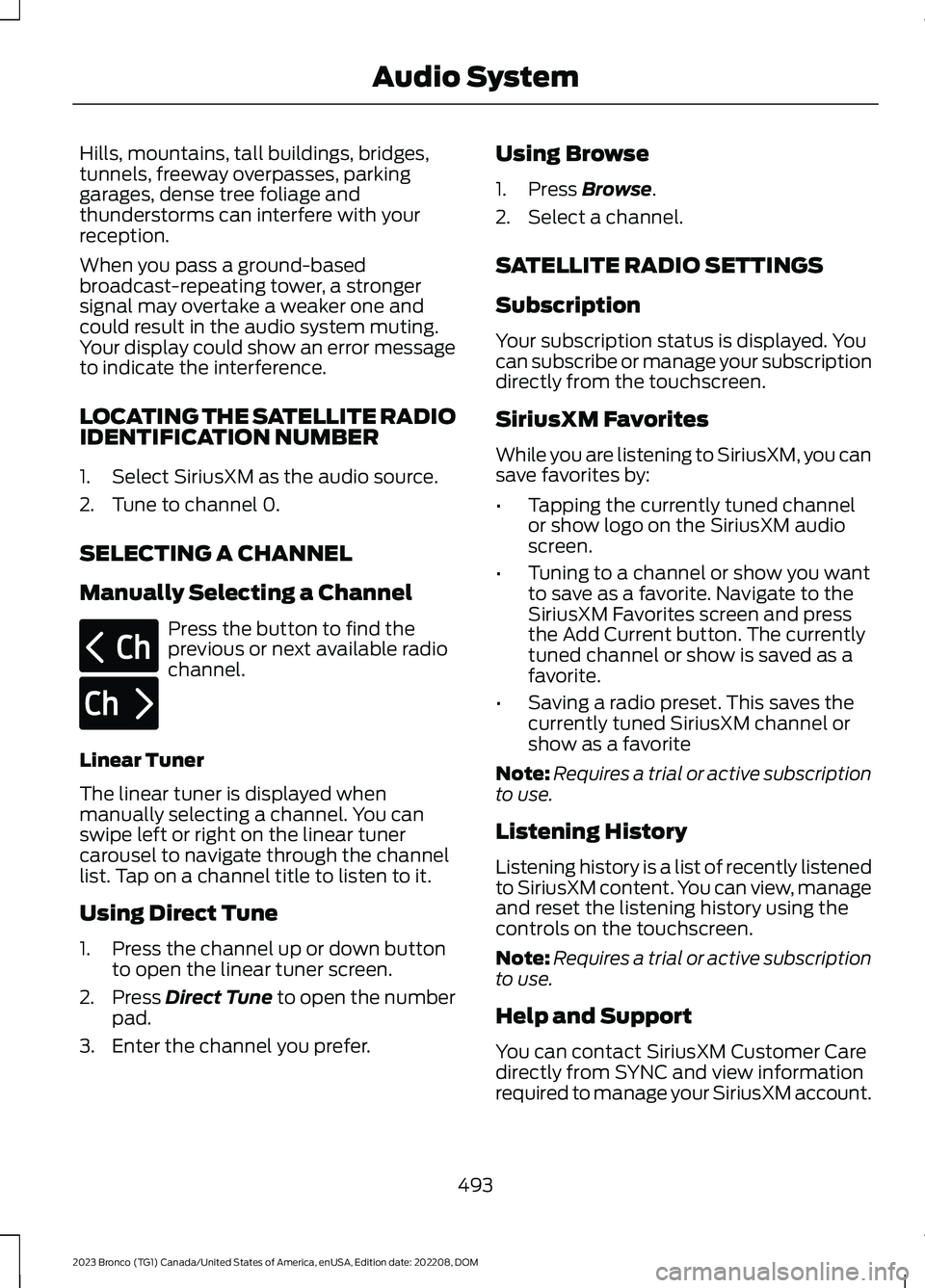
SELECTING A CHANNEL
Manually Selecting a Channel
Press the button to find theprevious or next available radiochannel.
Linear Tuner
The linear tuner is displayed whenmanually selecting a channel. You canswipe left or right on the linear tunercarousel to navigate through the channellist. Tap on a channel title to listen to it.
Using Direct Tune
1.Press the channel up or down buttonto open the linear tuner screen.
2.Press Direct Tune to open the numberpad.
3.Enter the channel you prefer.
Using Browse
1.Press Browse.
2.Select a channel.
SATELLITE RADIO SETTINGS
Subscription
Your subscription status is displayed. Youcan subscribe or manage your subscriptiondirectly from the touchscreen.
SiriusXM Favorites
While you are listening to SiriusXM, you cansave favorites by:
•Tapping the currently tuned channelor show logo on the SiriusXM audioscreen.
•Tuning to a channel or show you wantto save as a favorite. Navigate to theSiriusXM Favorites screen and pressthe Add Current button. The currentlytuned channel or show is saved as afavorite.
•Saving a radio preset. This saves thecurrently tuned SiriusXM channel orshow as a favorite
Note:Requires a trial or active subscriptionto use.
Listening History
Listening history is a list of recently listenedto SiriusXM content. You can view, manageand reset the listening history using thecontrols on the touchscreen.
Note:Requires a trial or active subscriptionto use.
Help and Support
You can contact SiriusXM Customer Caredirectly from SYNC and view informationrequired to manage your SiriusXM account.
493
2023 Bronco (TG1) Canada/United States of America, enUSA, Edition date: 202208, DOMAudio SystemE328569 E328570
Page 501 of 642
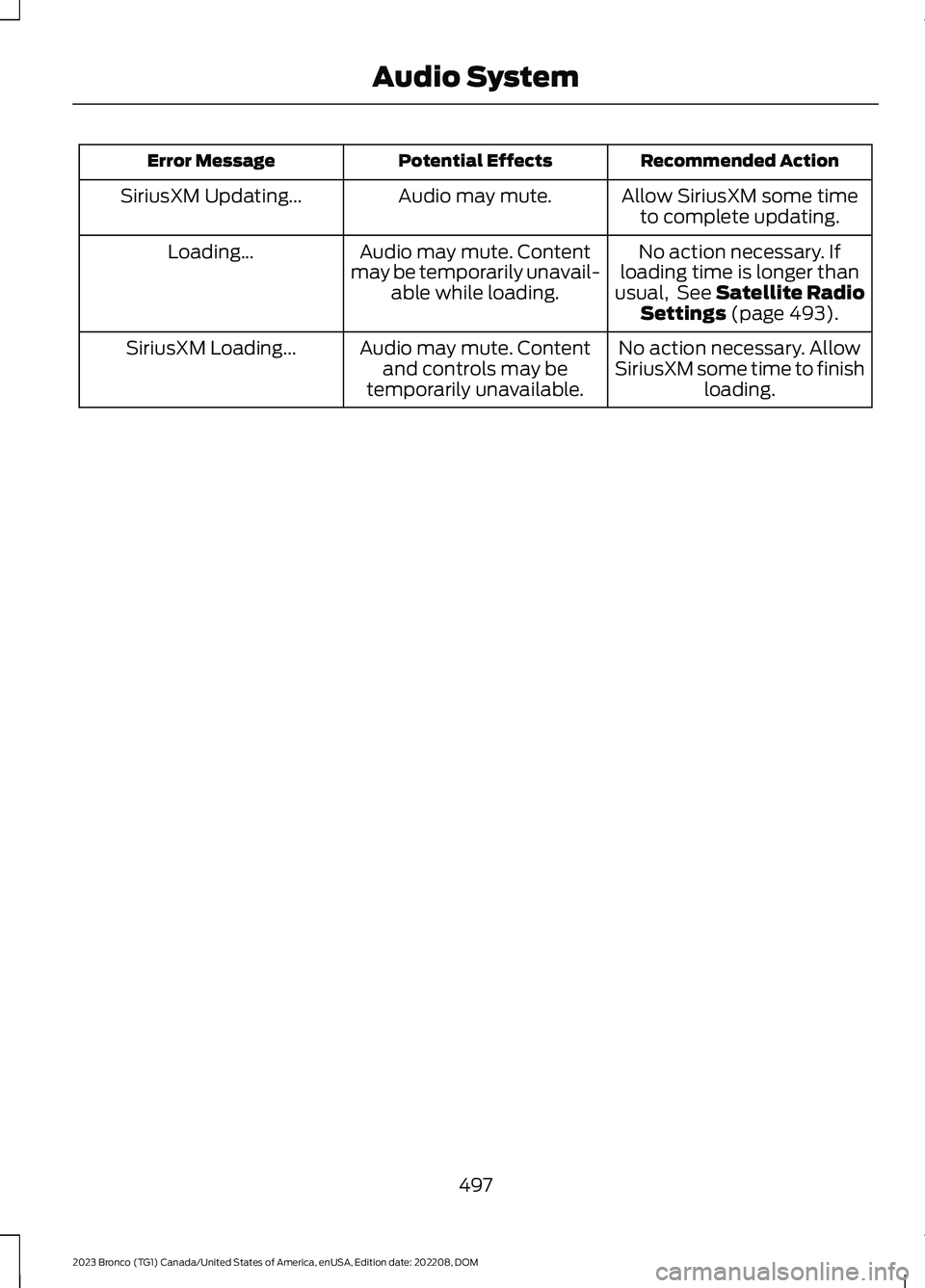
Recommended ActionPotential EffectsError Message
Allow SiriusXM some timeto complete updating.Audio may mute.SiriusXM Updating...
No action necessary. Ifloading time is longer thanusual, See Satellite RadioSettings (page 493).
Audio may mute. Contentmay be temporarily unavail-able while loading.
Loading...
No action necessary. AllowSiriusXM some time to finishloading.
Audio may mute. Contentand controls may betemporarily unavailable.
SiriusXM Loading...
497
2023 Bronco (TG1) Canada/United States of America, enUSA, Edition date: 202208, DOMAudio System
Page 631 of 642
Adjusting the Lumbar Support......................145Adjusting the Seat Backrest...........................145Adjusting the Seat Cushion............................145Adjusting the Seat Height...............................145Head Restraint Components.........................143Installing the Head Restraint.........................144Moving the Seat Backward andForward.............................................................144Removing the Head Restraint.......................144Pre-Collision Assist Limitations.............287Pre-Collision Assist Precautions...........286Pre-Collision Assist....................................286Automatic Emergency Braking....................290Distance Indication...........................................289Evasive Steering Assist...................................290Pre-Collision Assist –Troubleshooting.............................................291Pre-Collision Assist –Troubleshooting.........................................291Pre-Collision Assist – Frequently AskedQuestions.........................................................292Pre-Collision Assist – InformationMessages..........................................................291Pre-Collision Assist – WarningLamps................................................................291Preparing Your Vehicle forStorage.........................................................428Programming a MyKey................................86Programming the Garage DoorOpener...........................................................153Programming the Remote Control..........82Properly Adjusting the Driver and FrontPassenger Seats...........................................71Protecting the Environment.......................27PunctureSee: Changing a Flat Tire - Excluding:Raptor...............................................................449See: Changing a Flat Tire - Raptor..............453Push Button Ignition Switch....................164
R
Radio Frequency CertificationLabels............................................................542Blind Spot Information SystemSensors.............................................................542Body Control Module.......................................548Cruise Control Module......................................551
Garage Door Opener........................................554Keys and Remote Controls............................555Radio Transceiver Module.............................560SYNC......................................................................563Telematics Control Unit..................................568Tire Pressure Monitoring SystemSensors.............................................................570Wireless Accessory Charging Module........575Rear Axle Fluid Capacity andSpecification...............................................481Rear Cargo Area Anchor Points.............304Locating the Rear Cargo Area AnchorPoints................................................................304Rear Cargo Area Anchor Point LoadCapacities.......................................................304Rear Cargo Area Anchor PointPrecautions....................................................304Rear Cargo Area...........................................304Rear Cargo Area Anchor Points...................304Rear Exterior - 2-Door..................................46Rear Exterior - 4-Door, Vehicles With:Hard Top, Excluding: Raptor....................43Rear Exterior - 4-Door, Vehicles With:Soft Top..........................................................44Rear Exterior - Raptor...................................45Rear Occupant Alert System AudibleWarnings........................................................151Rear Occupant Alert SystemIndicators.......................................................151Rear Occupant Alert SystemLimitations...................................................150Rear Occupant Alert SystemPrecautions.................................................150Rear Occupant Alert System...................150Rear Parking Aid............................................241Locating the Rear Parking AidSensors..............................................................241Rear Parking Aid Audible Warnings.............241Rear Parking Aid Limitations..........................241What is the Rear Parking Aid..........................241Rear Seats........................................................147Manual Seats........................................................147Rear View Camera Guide Lines..............244Rear View Camera Object DistanceIndicators.....................................................245Rear View Camera Precautions.............244Rear View Camera......................................244Rear View Camera Settings...........................245
627
2023 Bronco (TG1) Canada/United States of America, enUSA, Edition date: 202208, DOMIndex
Page 633 of 642
Reverse Wipe.................................................100Reverse Wipe Settings.....................................100What Is Reverse Wipe......................................100Roadside Assistance..................................328Rollover Warning.........................................538Roof Rack.......................................................299Adjusting a Roof Rack Crossbar..................302Removing and Installing the RoofRack..................................................................300Roof Rack Load Capacities...........................302Roof Rack Precautions....................................299Route Guidance............................................516Adjusting the Guidance PromptVolume..............................................................516Canceling Route Guidance.............................516Repeating an Instruction.................................516Route Guidance Settings................................516Running-InSee: Breaking-In.................................................326Running Out of Fuel.....................................181Adding Fuel From a Portable FuelContainer...........................................................181Filling a Portable Fuel Container...................181
S
Satellite Radio..............................................492Locating the Satellite Radio IdentificationNumber............................................................493Satellite Radio Limitations............................492Satellite Radio Settings..................................493Selecting a Channel.........................................493What Is Satellite Radio....................................492Scheduled Maintenance...........................528Seatbelt Extensions......................................66Seatbelt Precautions.....................................61Seatbelt Reminder........................................63How Does the Seatbelt ReminderWork.....................................................................63Seatbelt Reminder Indicators.........................64Switching the Seatbelt Reminder On andOff.........................................................................65Seatbelts............................................................61Automatic Locking Mode..................................63Seatbelt Reminder..............................................63Sensitive Locking Mode.....................................62Security..............................................................97Passive Anti-Theft System...............................97
Security – Troubleshooting..............................97Security – Troubleshooting........................97Security – Frequently AskedQuestions...........................................................98Security – Information Messages..................97Selecting a Four-Wheel Drive Mode - 4x4with Part Time Engagement.................197Selecting a Four-Wheel Drive Mode -Advanced 4x4 with 4A Mode...............198Selecting a G.O.A.T. Mode - Excluding:Raptor...........................................................260Selecting a G.O.A.T. Mode - Raptor........261Selecting the Audio Source.....................488Sending and Receiving a TextMessage......................................................508Sensitive Locking Mode...............................62How Does Sensitive Locking ModeWork.....................................................................62What is Sensitive Locking Mode.....................62Service Data.....................................................24Setting a Destination..................................515Setting a Destination Using a Point ofInterest...............................................................515Setting a Destination Using a PredictiveDestination.......................................................515Setting a Destination Using a RecentDestination.......................................................515Setting a Destination Using a SavedDestination.......................................................515Setting a Destination Using the MapScreen................................................................515Setting a Destination Using the Text EntryScreen................................................................515Setting a Memory Preset.........................489Settings Data...................................................25Setting the Adaptive Cruise ControlGap.................................................................256Setting the Adaptive Cruise ControlSpeed............................................................255Setting the Blower Motor Speed............132Setting the Clock and Date.....................490Setting the Cruise Control Speed.........250Setting the Hill Descent Speed..............235Setting the Temperature............................132Setting the Trail Control Speed..............222Shifting Into Reverse...................................186Shifting Your Vehicle Into Gear................191Signing Into Your Account........................503
629
2023 Bronco (TG1) Canada/United States of America, enUSA, Edition date: 202208, DOMIndex