display FORD BRONCO 2023 User Guide
[x] Cancel search | Manufacturer: FORD, Model Year: 2023, Model line: BRONCO, Model: FORD BRONCO 2023Pages: 642, PDF Size: 14.71 MB
Page 87 of 642
Programming is now complete. With yourfoot on the brake pedal, press the pushbutton ignition switch to verify the remotecontrol functions operate and your vehiclestarts with the new remote control.
If programming was not successful, wait10 seconds and repeat Steps 1 through 7.If you are still unsuccessful, take yourvehicle to an authorized dealer.
KEYS AND REMOTE CONTROLS – TROUBLESHOOTING
KEYS AND REMOTE CONTROLS – INFORMATION MESSAGES
ActionMessage
Displays when the remote control battery requires replacing.Key Battery Low ReplaceSoon
83
2023 Bronco (TG1) Canada/United States of America, enUSA, Edition date: 202208, DOMKeys and Remote Controls
Page 90 of 642
PROGRAMMING A MYKEY
You can program any remote control tobecome a restricted MyKey, but you mustleave one unmodified as an admin key.
1.Switch the vehicle on using an adminkey.
2.Press Settings on the touchscreen.
3.Press Vehicle Settings.
4.Press MyKey.
5.Select and configure the settings.
CLEARING ALL MYKEYS
When you clear all MyKeys, you remove allrestrictions and return all MyKeys to theiroriginal admin key status.
1.Switch the vehicle on using an adminkey.
2.Press Settings on the touchscreen.
3.Press Vehicle Settings.
4.Press MyKey.
5.Press Clear All MyKeys.
6.Press Yes.
CHECKING MYKEY SYSTEM
STATUS
You can find information about thedistance traveled using a MyKey, and thenumber of admin keys and MyKeys createdfor your vehicle.
1.Switch the vehicle on.
2.Press Settings on the touchscreen.
3.Press Vehicle Settings.
4.Press MyKey.
5.Press MyKey Information.
USING MYKEY WITH REMOTE
START SYSTEMS (IF EQUIPPED)
MyKey is not compatible with unapproved,aftermarket remote start systems. If youchoose to install a remote start system,see an authorized dealer for an approvedremote start system.
MYKEY – TROUBLESHOOTING
MYKEY – INFORMATION MESSAGES
DescriptionMessage
Displays when trying to create a MyKey and the admin key isnot placed in the backup position. See Creating a MyKey(page 85).
Place Key in BackupLocation
Displays when trying to create a MyKey with a key alreadydesignated as a MyKey.Key is Already a MyKey
Displays to confirm that the key is restricted after you switchthe ignition off.This Key restricted atNext Key Cycle. LabelKey as MyKey
86
2023 Bronco (TG1) Canada/United States of America, enUSA, Edition date: 202208, DOMMyKey™
Page 93 of 642
AUTOLOCK
WHAT IS AUTOLOCK
Autolock is a locking feature that locksyour vehicle doors when you start driving.
AUTOLOCK REQUIREMENTS
Autolock locks all the doors when all of thefollowing occur:
•All doors are closed.
•The ignition is on.
•Your vehicle reaches a speed greaterthan 12 mph (20 km/h).
MISLOCK
WHAT IS MISLOCK
Mislock is a locking feature that warns youif your vehicle has not locked.
MISLOCK LIMITATIONS
When you press the lock button once, theturn signals do not flash if:
•Any door or the tailgate is open.
•The hood is open.
If you switch mislock off, the horn does notsound if you press the lock button on theremote control when a door is open.
SWITCHING MISLOCK ON ANDOFF
1.Press Settings on the touchscreen.
2.Press Vehicle Settings.
3.Press Locks.
4.Switch Mislock Chirp on or off.
DOORS AND LOCKS –
TROUBLESHOOTING
DOORS AND LOCKS – WARNINGLAMPS
Door Ajar Warning Lamp
Illuminates when you switch theignition on and remains on if anydoor or the hood is open.
DOORS AND LOCKS – INFORMATION MESSAGES
ActionMessage
Displays if a door is open. Fully close the door.Driver Door Ajar
Passenger Door Ajar
Rear Left Door Ajar
Rear Right Door Ajar
Displays if a hood is open. Fully close the hood.Hood Ajar
89
2023 Bronco (TG1) Canada/United States of America, enUSA, Edition date: 202208, DOMDoors and LocksE249859
Page 101 of 642
PASSIVE ANTI-THEFT
SYSTEM
WHAT IS THE PASSIVE ANTI-THEFT SYSTEM
The passive anti-theft system preventssomeone from starting the vehicle with anincorrectly coded key.
Note:Do not leave a duplicate coded keyin your vehicle. Always take the keys andlock all the doors when leaving your vehicle.
HOW DOES THE PASSIVE ANTI-THEFT SYSTEM WORK
The passive anti-theft system arms whenyou switch the ignition off.
It disarms when the ignition is switched onwith a correctly coded key.
Note:The system is not compatible withnon-Ford aftermarket remote start systems.
Note:Do not leave a duplicate coded keyin your vehicle. Always take the keys andlock all doors when leaving your vehicle.
SECURITY – TROUBLESHOOTING
SECURITY – INFORMATION MESSAGES
DetailsMessage
The system has not detected a correctly coded key.No Key Detected
The system has malfunctioned. Have your vehicle checkedas soon as possible.Starting System Fault
Displays when the alarm has been triggered due to unauthor-ized entry.Vehicle Alarm To StopAlarm, Start Vehicle.
Alarm Announcement
97
2023 Bronco (TG1) Canada/United States of America, enUSA, Edition date: 202208, DOMSecurity
Page 123 of 642
FUEL GAUGE LIMITATIONS
The fuel gauge may not provide anaccurate reading when your vehicle is onan incline.
LOCATING THE FUEL FILLERDOOR
The arrow adjacent to the fuel pumpsymbol indicates on which side of yourvehicle the fuel filler door is located.
WHAT IS THE LOW FUELREMINDER
A low fuel level reminder displays andsounds when the distance to emptyreaches 75 mi (120 km) to empty forMyKey, and at 50 mi (80 km),25 mi(40 km),12 mi (20 km) and 0 mi (0 km)for all vehicle keys.
Note:The low fuel reminder can appear atdifferent fuel gauge positions depending onfuel economy conditions. This variation isnormal.
WHAT IS DISTANCE TO EMPTY
Indicates the approximate distance yourvehicle can travel on the fuel remaining inthe tank. Changes in driving pattern cancause the value to not only decrease butalso increase or stay constant for periodsof time.
ENGINE COOLANT
TEMPERATURE GAUGE
Indicates the engine coolant temperature.
TRANSMISSION FLUID
TEMPERATURE GAUGE
Indicates the transmission fluidtemperature.
Special operating conditions can causehigher than normal operatingtemperatures. See Special OperatingConditions Scheduled Maintenance(page 533).
Note:This is a configurable gauge.
TURBO BOOST GAUGE - 2.3L
ECOBOOST™
Indicates the amount of manifold airpressure in the engine.
Note:This is a configurable gauge.
WHAT IS THE INFORMATION
BAR
Displays information for navigation, outsideair temperature, odometer and distanceto empty.
WHAT ARE THE INSTRUMENT
CLUSTER WARNING LAMPS
Warning lamps alert you to a vehiclecondition that could become serious.Some lamps illuminate when you startyour vehicle to make sure they work. If anylamps remain on after starting your vehicle,refer to the respective system warninglamp for further information.
119
2023 Bronco (TG1) Canada/United States of America, enUSA, Edition date: 202208, DOMInstrument Cluster
Page 130 of 642
USING THE INSTRUMENT
CLUSTER DISPLAY CONTROLS
WARNING: Driving while distractedcan result in loss of vehicle control, crashand injury. We strongly recommend thatyou use extreme caution when using anydevice that may take your focus off theroad. Your primary responsibility is thesafe operation of your vehicle. Werecommend against the use of anyhand-held device while driving andencourage the use of voice-operatedsystems when possible. Make sure youare aware of all applicable local lawsthat may affect the use of electronicdevices while driving.
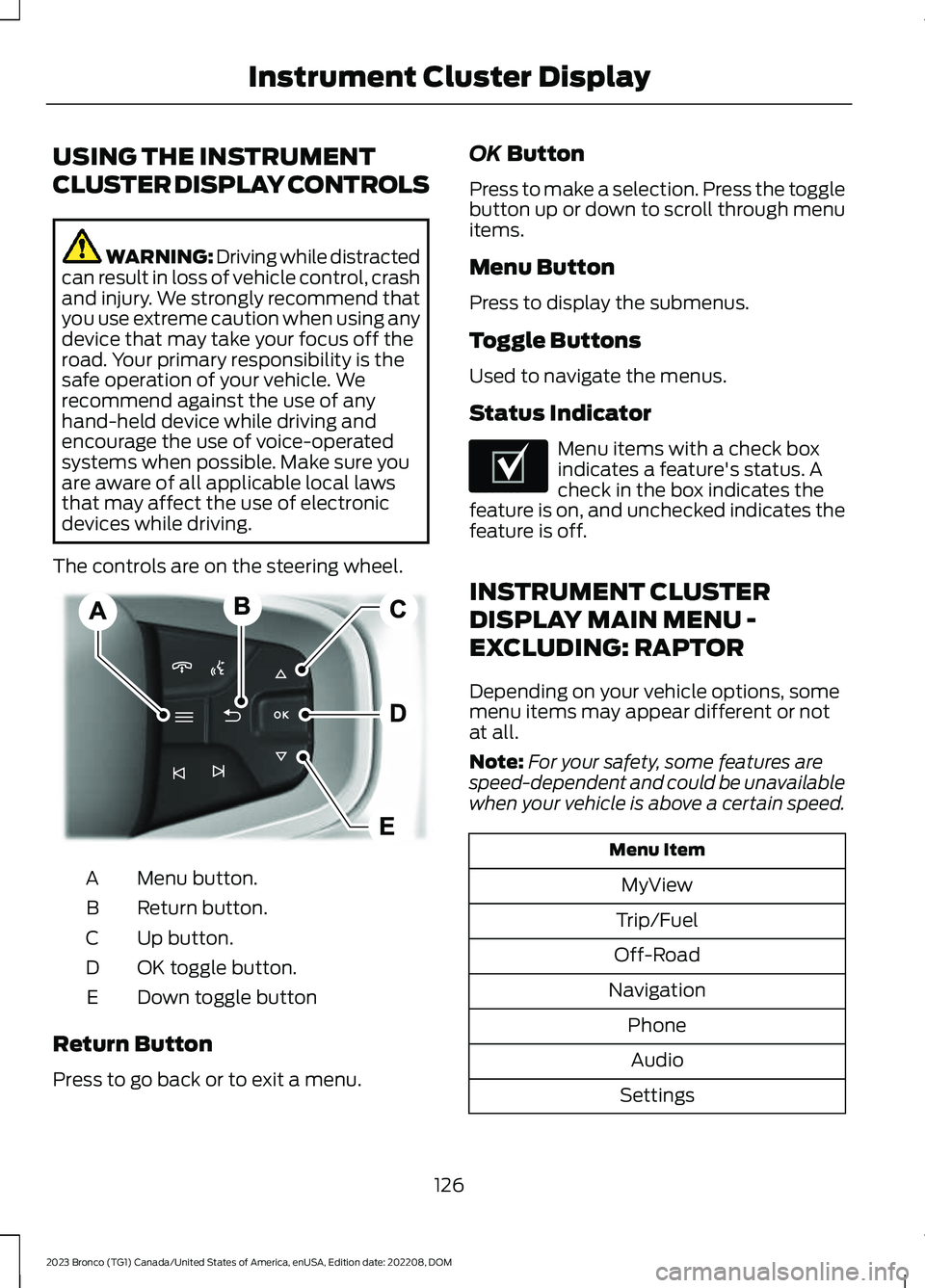
The controls are on the steering wheel.
Menu button.A
Return button.B
Up button.C
OK toggle button.D
Down toggle buttonE
Return Button
Press to go back or to exit a menu.
OK Button
Press to make a selection. Press the togglebutton up or down to scroll through menuitems.
Menu Button
Press to display the submenus.
Toggle Buttons
Used to navigate the menus.
Status Indicator
Menu items with a check boxindicates a feature's status. Acheck in the box indicates thefeature is on, and unchecked indicates thefeature is off.
INSTRUMENT CLUSTER
DISPLAY MAIN MENU -
EXCLUDING: RAPTOR
Depending on your vehicle options, somemenu items may appear different or notat all.
Note:For your safety, some features arespeed-dependent and could be unavailablewhen your vehicle is above a certain speed.
Menu Item
MyView
Trip/Fuel
Off-Road
Navigation
Phone
Audio
Settings
126
2023 Bronco (TG1) Canada/United States of America, enUSA, Edition date: 202208, DOMInstrument Cluster DisplayE326969 E204495
Page 131 of 642
INSTRUMENT CLUSTER
DISPLAY MAIN MENU -
RAPTOR
Depending on your vehicle options, somemenu items can appear different or not atall.
Note:For your safety, some features arespeed-dependent and could be unavailablewhen your vehicle is above a certain speed.
Menu Item
MyView
Trip/Fuel
Raptor Information
Navigation
Phone
Audio
Settings
TRIP COMPUTER
ACCESSING THE TRIP COMPUTER
1.Select Trip/Fuel.
2.Select Fuel Economy,Trip 1 or Trip 2.
RESETTING THE TRIP COMPUTER
1.Select Trip/Fuel.
2.Press and hold the OK button for a fewseconds.
RESETTING THE INDIVIDUAL TRIPVALUES
1.Select Trip/Fuel.
2.Select Trip 1 or Trip 2.
3.Press and hold the OK button for a fewseconds.
CUSTOMIZING THE
INSTRUMENT CLUSTER
DISPLAY
Adding Screens Using MyView
1.Using the information display controlson the steering wheel, select MyView.
2.Select Configure MyView.
3.Select a screen.
4.Press the OK button.
Note:The number of screens you can addis limited. If the selected screen does notappear you must deselect screens from theMyView menu.
Adding Screens Using SelectScreens
1.Select Select Screens.
2.Use the controls on the steering wheelto highlight a screen to add.
3.Press the OK button.
Note:The number of screens you can addis limited. If the selected screen does notappear you must deselect screens from theSelect Screens menu.
Configuring Gauges
1.Select Settings.
2.Select Configure Gauges.
3.Select to swap or change left-handside and right-hand side gauges.
127
2023 Bronco (TG1) Canada/United States of America, enUSA, Edition date: 202208, DOMInstrument Cluster Display
Page 132 of 642
PERSONALIZED SETTINGS
CHANGING THE INSTRUMENTCLUSTER DISPLAY LANGUAGE
Note:Available languages vary by region.
1.Press Settings on the touchscreen.
2.Press General.
3.Press Language.
4.Select a language.
CHANGING THE MEASUREMENTUNIT
1.Press Settings on the touchscreen.
2.Press General.
3.Press Measure Units.
4.Select a measurement unit.
CHANGING THE TEMPERATUREUNIT
1.Press Settings on the touchscreen.
2.Press General.
3.Press Temperature Units.
4.Select Fahrenheit or Celsius.
CHANGING THE TIRE PRESSUREUNIT
1.Press Settings on the touchscreen.
2.Press General.
3.Press Tire Pressure Units.
4.Select a pressure unit.
128
2023 Bronco (TG1) Canada/United States of America, enUSA, Edition date: 202208, DOMInstrument Cluster Display
Page 150 of 642
HEATED SEATS (IF EQUIPPED)
HEATED SEAT PRECAUTIONS
WARNING: Use caution when usingthe heated seat if you are unable to feelpain to your skin because of advancedage, chronic illness, diabetes, spinal cordinjury, medication, alcohol use,exhaustion or other physical conditions.The heated seat could cause burns evenat low temperatures, especially if usedfor long periods of time. Failure to followthis instruction could result in personalinjury.
WARNING: Do not poke sharpobjects into the seat cushion or seatbackrest. This could damage the heatedseat element and cause it to overheat.Failure to follow this instruction couldresult in personal injury.
WARNING: Do not place anythingon the seat that blocks the heat, forexample a seat cover or a cushion. Thiscould cause the seat to overheat. Failureto follow this instruction could result inpersonal injury.
Do not:
•Place heavy objects on the seat.
•Operate the heated seat if water or anyother liquid spills on the seat. Allow theseat to dry.
SWITCHING THE HEATED SEATSON AND OFF
The vehicle must be running to use thisfeature.
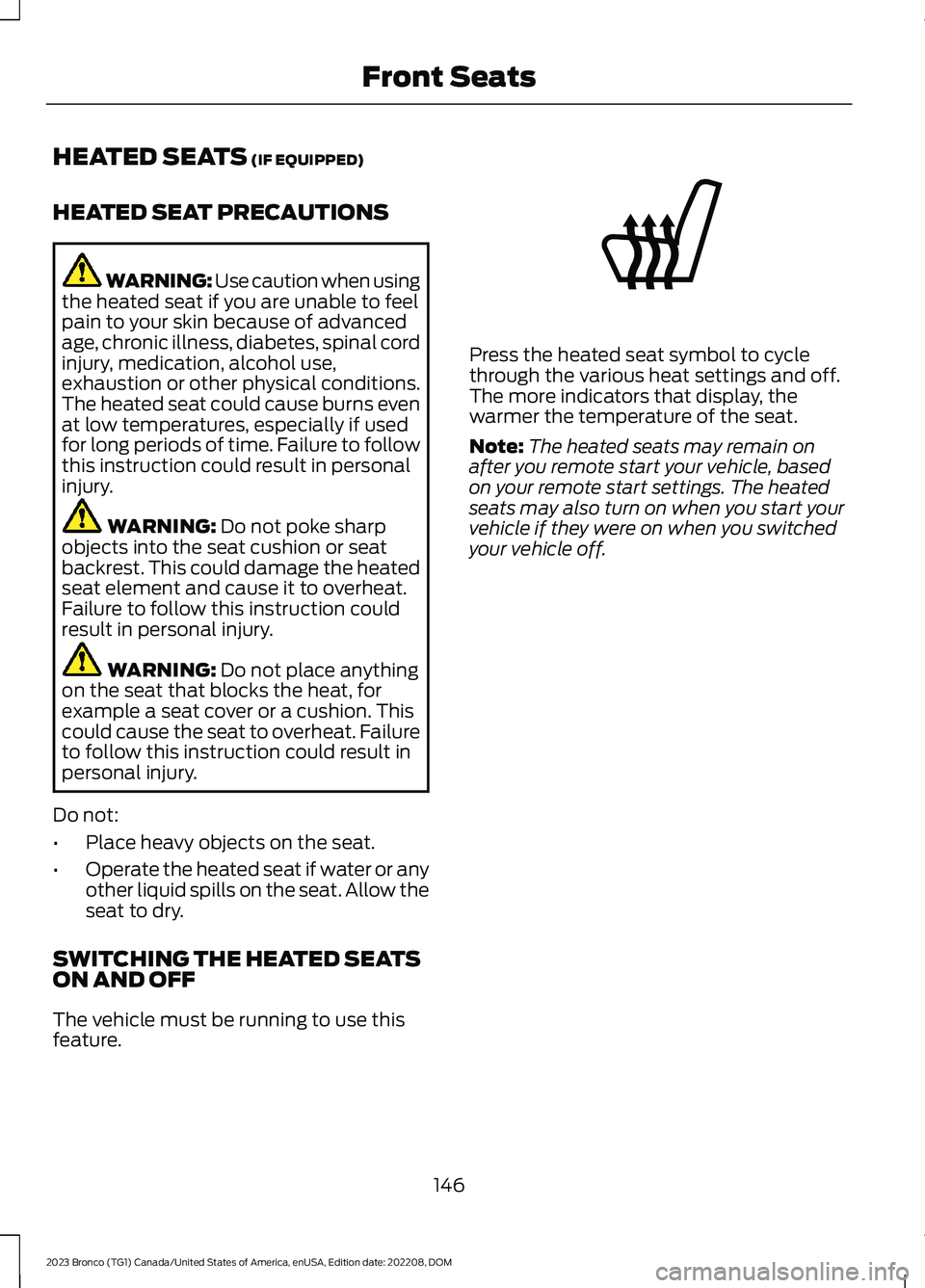
Press the heated seat symbol to cyclethrough the various heat settings and off.The more indicators that display, thewarmer the temperature of the seat.
Note:The heated seats may remain onafter you remote start your vehicle, basedon your remote start settings. The heatedseats may also turn on when you start yourvehicle if they were on when you switchedyour vehicle off.
146
2023 Bronco (TG1) Canada/United States of America, enUSA, Edition date: 202208, DOMFront SeatsE146322
Page 154 of 642
WHAT IS THE REAR
OCCUPANT ALERT SYSTEM
The rear occupant alert system monitorsvehicle conditions and notifies you to checkfor rear seat occupants when you switchthe ignition off.
HOW DOES THE REAR
OCCUPANT ALERT SYSTEM
WORK
The system monitors when rear doors havebeen opened and closed to indicate thepotential presence of an occupant in therear seat.
A message displays in the information andentertainment display screen and anaudible warning sounds when you switchthe ignition off after any of the followingconditions have been met:
•A rear door is opened or closed whilethe ignition is on.
•You switch the ignition on within 15minutes of a rear door opening andclosing.
•You switch the ignition on within 15minutes of the alert having displayedor sounded.
REAR OCCUPANT ALERT
SYSTEM PRECAUTIONS
WARNING: On hot days, thetemperature inside the vehicle can risevery quickly. Exposure of people oranimals to these high temperatures foreven a short time can cause death orserious heat related injuries, includingbrain damage. Small children areparticularly at risk.
WARNING: Do not leave childrenor pets unattended in your vehicle.Failure to follow this instruction couldresult in personal injury or death.
REAR OCCUPANT ALERT
SYSTEM LIMITATIONS
The system does not function if any dooris removed.
The system does not detect the presenceof objects or passengers in the rear seat.It monitors when rear doors are openedand closed.
Note:It is possible to receive an alert whenthere is no rear seat occupant, but alertconditions are met.
Note:It is possible to receive no alert whenthere is an occupant in the rear seat, if alertconditions are not met. For example, if a rearseat occupant does not enter the vehiclethrough a rear door.
Note:The audible warning does not soundwhen the front door is opened before youswitch the ignition off.
SWITCHING REAR OCCUPANT
ALERT SYSTEM ON AND OFF
1.Press Settings on the touchscreen.
2.Press Vehicle.
3.Switch Rear Occupant Alert on or off.
Note:The default setting is on.
Note:Performing a master reset causes thesystem to switch on again.
150
2023 Bronco (TG1) Canada/United States of America, enUSA, Edition date: 202208, DOMRear Occupant Alert System (If Equipped)