lights FORD BRONCO 2023 User Guide
[x] Cancel search | Manufacturer: FORD, Model Year: 2023, Model line: BRONCO, Model: FORD BRONCO 2023Pages: 642, PDF Size: 14.71 MB
Page 202 of 642
•2H - Two-wheel drive high.
•4H - Four-wheel drive high. SeeFour-Wheel Drive High (page 199).
•4L - Four-wheel drive low. SeeFour-Wheel Drive Low (page 200).
Note:Do not perform this operation whenyou have cruise control or trail controlselected and active. The system may notshift as expected.
Note:Do not perform this operation if therear wheels are slipping or when applyingthe accelerator pedal or when driving in atight turn.
Note:Momentarily releasing the acceleratorpedal when a shift in progress messagedisplays can improve engagement ordisengagement performance.
Note:When the light is solid, the systemhas achieved the desired four-wheel drivemode. When a selected four-wheel drivemode light is blinking, the system isattempting to shift to that specificfour-wheel drive mode.
Note:When you achieve recreationaltowing, all lights are off and Neutral TowEnabled Leave Transmission in Neutralappears in the instrument cluster display.
Shifting to or from Four-WheelDrive Low
1.Bring your vehicle to a stop.
2.For vehicles with an automatictransmission, place in neutral (N). Forvehicles with a manual transmission,fully press the clutch pedal.
3.Push 4L on the four-wheel drive modeselector.
Note: A 4x4 Shift in Progress messageappears in the instrument cluster displayindicating the shift is in progress. If any ofthe previous shift conditions are not met,the shift should not occur and theinstrument cluster display can guide youthrough the proper shifting procedures.
Note: If Shift Delayed Drive Forwarddisplays in the instrument cluster display,place the transmission in a forward gear,move your vehicle forward approximately5 ft (1.5 m), and shift the transmission backto neutral (N) to allow the transfer case tocomplete the range shift.
SELECTING A FOUR-WHEEL
DRIVE MODE - ADVANCED 4X4
WITH 4A MODE
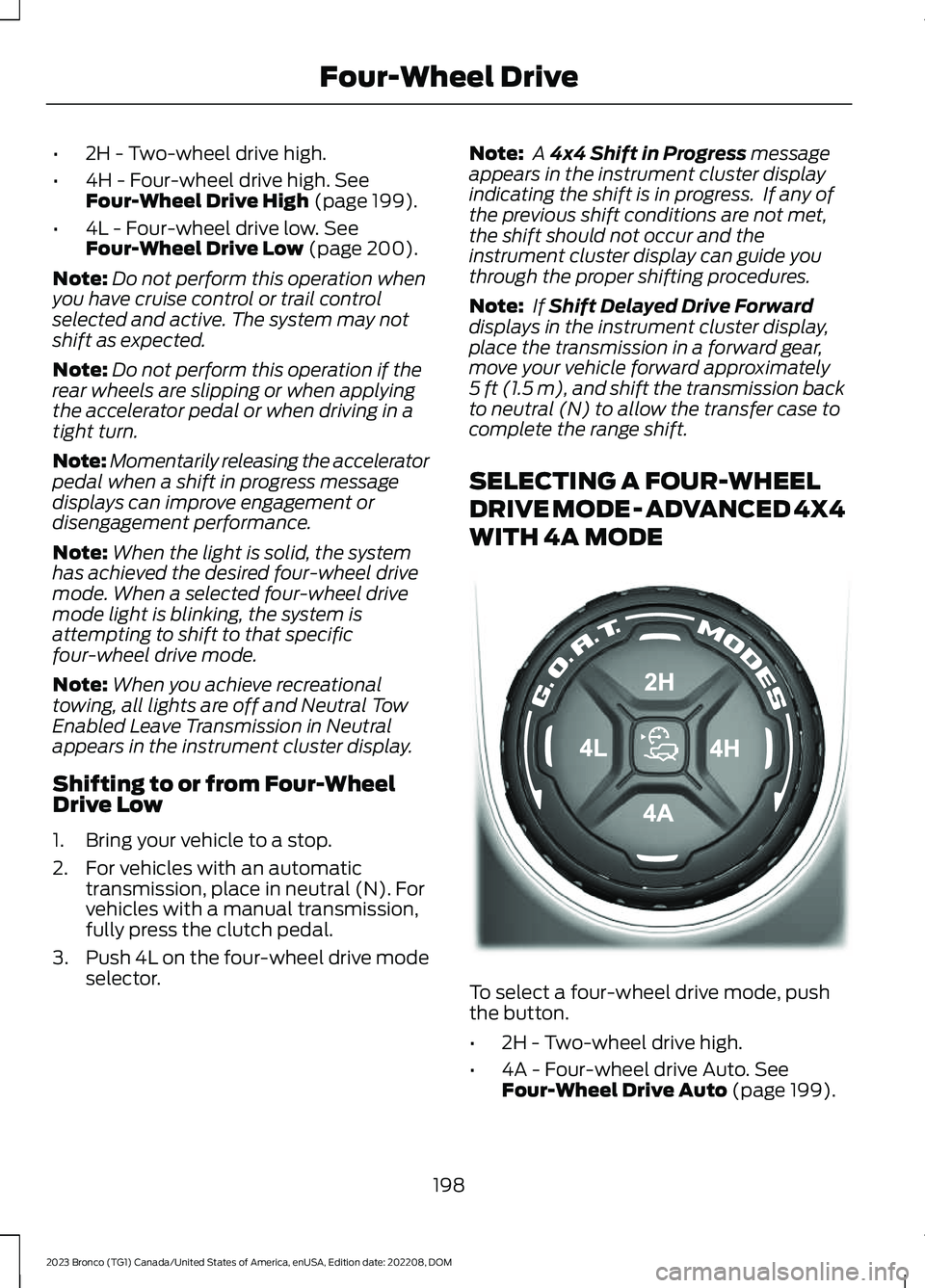
To select a four-wheel drive mode, pushthe button.
•2H - Two-wheel drive high.
•4A - Four-wheel drive Auto. SeeFour-Wheel Drive Auto (page 199).
198
2023 Bronco (TG1) Canada/United States of America, enUSA, Edition date: 202208, DOMFour-Wheel DriveE324543
Page 203 of 642
•4H - Four-wheel drive high. SeeFour-Wheel Drive High (page 199).
•4L - Four-wheel drive low. SeeFour-Wheel Drive Low (page 200).
Note:Do not perform this operation whenyou have cruise control or trail controlselected and active. The system may notshift as expected.
Note: Do not perform this operation if therear wheels are slipping or when applyingthe accelerator pedal.
Note:When the light is solid, the systemhas achieved the desired four-wheel drivemode. When a selected four-wheel drivemode LED is blinking, the system isattempting to shift to that specificfour-wheel drive mode.
Note:When all lights are blinking, have yourvehicle serviced as soon as possible.
Note:When you achieve recreationaltowing, all lights are off and Neutral TowEnabled Leave Transmission in Neutralappears in the instrument cluster display.
Shifting to or from Four-WheelDrive Low
1.Bring your vehicle to a stop.
2.For vehicles with an automatictransmission, place in neutral (N). Forvehicles with a manual transmission,fully press the clutch pedal.
3.Push 4L on the four-wheel drive modeselector.
Note: A 4x4 Shift in Progress messageappears in the instrument cluster displayindicating the shift is in progress. If any ofthe previous shift conditions are not met,the shift should not occur and theinstrument cluster display can guide youthrough the proper shifting procedures.
Note: If Shift Delayed Drive Forwarddisplays in the instrument cluster display,place the transmission in a forward gear,move your vehicle forward approximately5 ft (1.5 m), and shift the transmission backto neutral (N) to allow the transfer case tocomplete the range shift.
FOUR-WHEEL DRIVE MODES
TWO-WHEEL DRIVE HIGH
Two-wheel drive high is for generalon-road driving. Power is sent to the rearwheels only.
Note:Two-wheel drive high can turn on oroff based on Drive Mode selection SeeG.O.A.T. Mode Control (page 260).
FOUR-WHEEL DRIVE AUTO (If
Equipped)
Four-wheel drive auto provideselectronically controlled four-wheel drivepower to both the front and rear wheels,as required, for increased traction in varyingon-road conditions. The four-wheel driveauto tuning varies based on selected DriveMode. See Selecting a Four-Wheel DriveMode (page 197).
Note:Four-wheel drive auto can turn on oroff automatically based on Drive Modeselection. See Selecting a Four-WheelDrive Mode (page 197).
FOUR-WHEEL DRIVE HIGH
Four-wheel drive high provideselectronically or mechanically lockedfour-wheel drive power to both the frontand rear wheels for use in off-road orwinter conditions such as deep snow, sandor mud. This mode is not for use on drypavement.
199
2023 Bronco (TG1) Canada/United States of America, enUSA, Edition date: 202208, DOMFour-Wheel Drive
Page 258 of 642
Note:Keep the front of your vehicle free ofdirt, metal badges or objects. Vehicle frontprotectors, aftermarket lights, additionalpaint or plastic coatings could also degradesensor performance.
A message displays if something obstructsthe camera or the sensor. When somethingblocks the sensor, the system cannotdetect a vehicle ahead and does notfunction. See Adaptive Cruise Control –Information Messages (page 258).
The radar sensor has a limited field ofview. It may not detect vehicles at all ordetect a vehicle later than expected insome situations. The lead vehicle imagedoes not illuminate if the system does notdetect a vehicle in front of you.
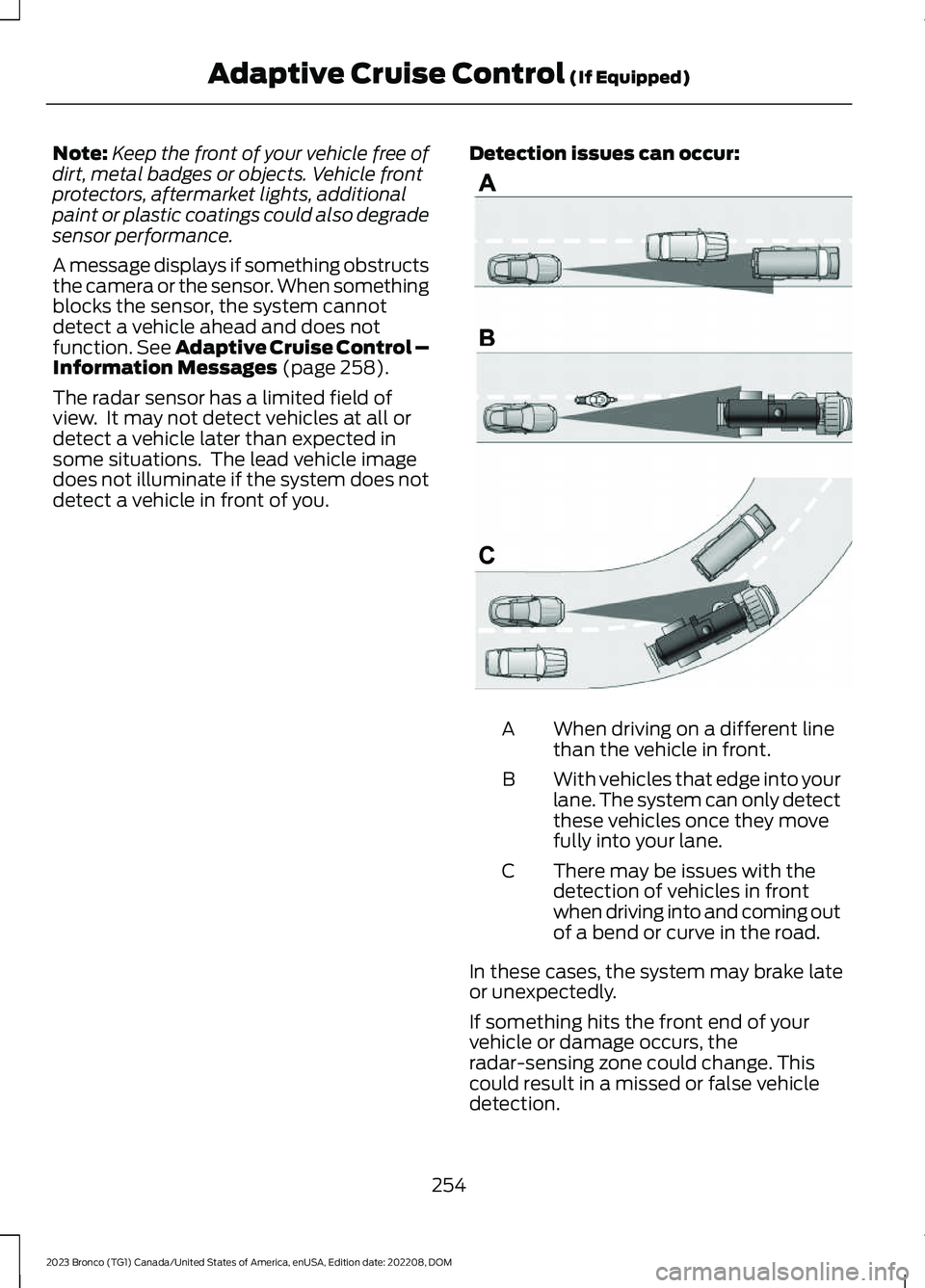
Detection issues can occur:
When driving on a different linethan the vehicle in front.A
With vehicles that edge into yourlane. The system can only detectthese vehicles once they movefully into your lane.
B
There may be issues with thedetection of vehicles in frontwhen driving into and coming outof a bend or curve in the road.
C
In these cases, the system may brake lateor unexpectedly.
If something hits the front end of yourvehicle or damage occurs, theradar-sensing zone could change. Thiscould result in a missed or false vehicledetection.
254
2023 Bronco (TG1) Canada/United States of America, enUSA, Edition date: 202208, DOMAdaptive Cruise Control (If Equipped)E71621
Page 291 of 642
WARNING: The system mayoperate with reduced function duringcold and inclement weather conditions.Snow, ice, rain, spray and fog canadversely affect the system. Keep thefront camera and radar free of snow andice. Failure to follow this instruction mayresult in the loss of control of yourvehicle, serious personal injury or death.
WARNING: Take additional care ifyour vehicle is heavily loaded or you aretowing a trailer. These conditions couldresult in reduced performance of thissystem. Failure to follow this instructioncould result in the loss of control of yourvehicle, personal injury or death.
WARNING: The system cannothelp prevent all crashes. Do not rely onthis system to replace driver judgmentand the need to maintain a safe distanceand speed.
WARNING: System performancecould be reduced in situations where thevehicle camera has limited detectioncapability. These situations include butare not limited to direct or low sunlight,vehicles at night without tail lights,unconventional vehicle types, andpedestrians and cyclists with complex,partially obscured backgrounds. Failureto take care may result in the loss ofcontrol of your vehicle, personal injury ordeath.
PRE-COLLISION ASSIST
LIMITATIONS
Pre-collision assist depends on thedetection ability of its camera and sensors.Any obstructions or damage to these areascan limit detection or prevent the systemfrom functioning. See Locating thePre-Collision Assist Sensors (page 288).
The system is active at 3 mph (5 km/h)and above.
Note:The pre-collision assist systemautomatically disables when you selectfour-wheel drive low, manually disableAdvanceTrac™, or select rock crawl mode.
Note:Brake support and automaticemergency braking are active up to themaximum speed of the vehicle.
Pedestrian Detection Limitations
Pedestrian detection is active at speedsup to 50 mph (80 km/h).
Pedestrian detection operates optimallywhen detected hazards are clearlyidentifiable. System performance mayreduce in situations where pedestrians arerunning, partly obscured, have a complexbackground, or cannot be distinguishedfrom a group.
SWITCHING PRE-COLLISION
ASSIST ON AND OFF
To switch the system on or off, use thetouchscreen:
1.Press Features on the touchscreen.
2.Press Driver Assistance.
3.Press Pre-Collision Assist.
4.Switch the feature on or off.
287
2023 Bronco (TG1) Canada/United States of America, enUSA, Edition date: 202208, DOMPre-Collision Assist
Page 309 of 642
CONNECTING A TRAILER
PRECAUTIONS
Do not tow a trailer until you drive yourvehicle at least 1,000 mi (1,600 km).
Consult your local motor vehicle laws fortowing a trailer.
See the instructions included with towingaccessories for the proper installation andadjustment specifications.
Service your vehicle more frequently if youtow a trailer. See Normal ScheduledMaintenance (page 531).
If you use a rental trailer, follow theinstructions the rental agency gives you.
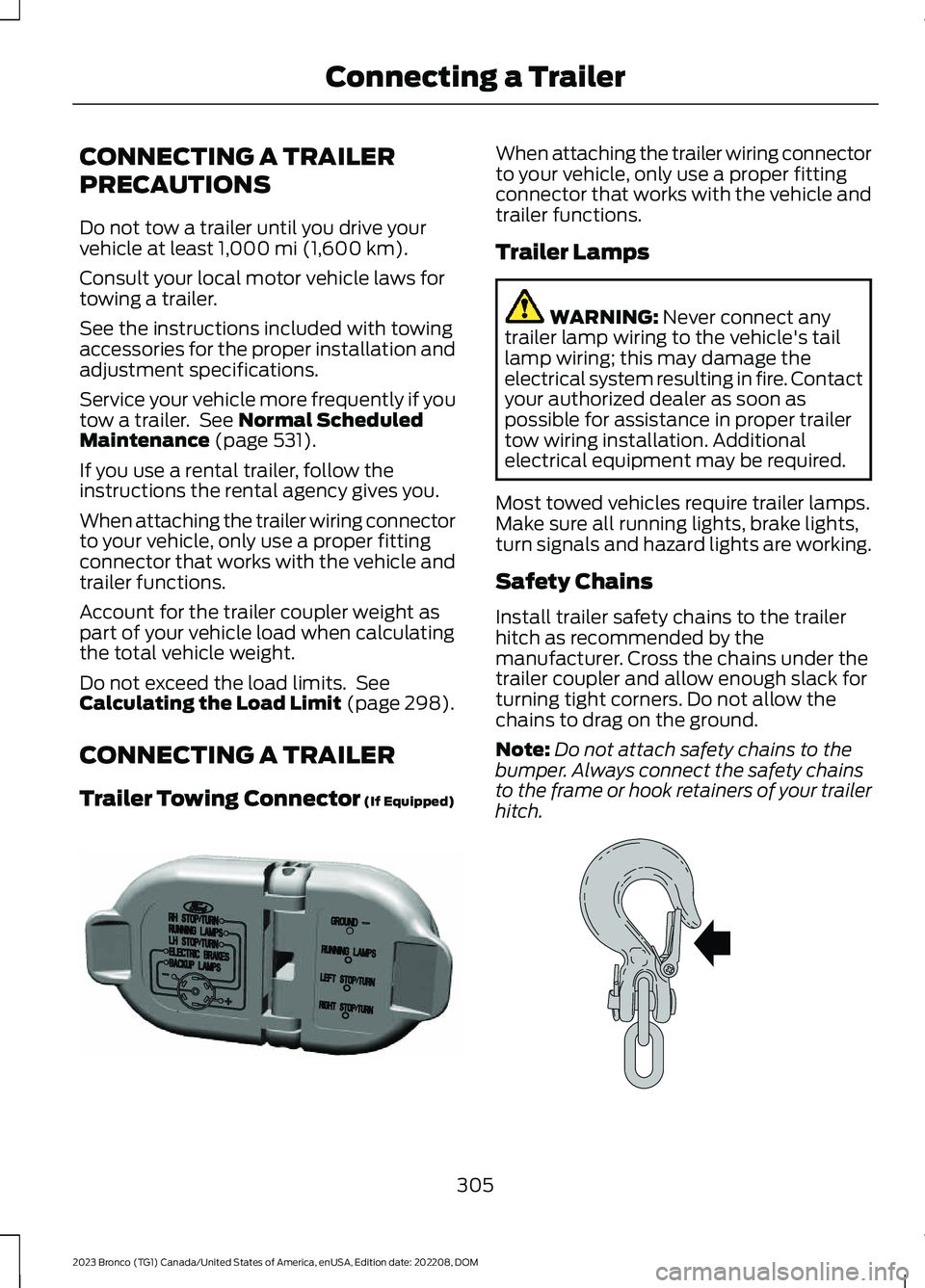
When attaching the trailer wiring connectorto your vehicle, only use a proper fittingconnector that works with the vehicle andtrailer functions.
Account for the trailer coupler weight aspart of your vehicle load when calculatingthe total vehicle weight.
Do not exceed the load limits. SeeCalculating the Load Limit (page 298).
CONNECTING A TRAILER
Trailer Towing Connector (If Equipped)
When attaching the trailer wiring connectorto your vehicle, only use a proper fittingconnector that works with the vehicle andtrailer functions.
Trailer Lamps
WARNING: Never connect anytrailer lamp wiring to the vehicle's taillamp wiring; this may damage theelectrical system resulting in fire. Contactyour authorized dealer as soon aspossible for assistance in proper trailertow wiring installation. Additionalelectrical equipment may be required.
Most towed vehicles require trailer lamps.Make sure all running lights, brake lights,turn signals and hazard lights are working.
Safety Chains
Install trailer safety chains to the trailerhitch as recommended by themanufacturer. Cross the chains under thetrailer coupler and allow enough slack forturning tight corners. Do not allow thechains to drag on the ground.
Note:Do not attach safety chains to thebumper. Always connect the safety chainsto the frame or hook retainers of your trailerhitch.
305
2023 Bronco (TG1) Canada/United States of America, enUSA, Edition date: 202208, DOMConnecting a TrailerE163167 E265060
Page 326 of 642
Muddy waters can reduce the coolingsystem effectiveness by depositing debrisinto the radiator.
Extra care must be taken crossing any typeof water. Do not drive into water unlessnecessary. You should only drive throughareas that are designated and approved.
High currents even in shallow water canwash the dirt out from around your tires orpush your vehicle across slippery rocks orsurfaces.
Never attempt to cross flowing water thatis deeper than your vehicles groundclearance. Even in low currents yourvehicles body surface area can be pusheddownstream and out of control.
Do not cross any body of water that is fastflowing and rising, wait for the flow rate toreduce.
Determine exit points that are downstreamof your entry point to allow for drifting.
If there are other vehicles ahead, wait untilthey’ve left the water. Unsettled water canmake a safe passage more challenging.
Know your vehicle’s abilities and be ableto recover it if something goes wrong.
Keep the doors fully closed during a watercrossing.
Vehicles used to traverse water regularlyshould be periodically inspected for signsof water ingestion in all of the vehicle'sfluids. If water is found inside your vehiclefluids, service your vehicle or see anauthorized dealer.
After driving through water and as soon asit is safe to do so, check the brakes, horn,lights, and steering wheel to make sureeverything is still in working order.
Avoid Getting High-Centered
Always keep available ground clearancein mind and pick a route that minimizes therisk of catching the underside of the vehicleon an obstacle and getting high-centered.
Freeing A Stuck Vehicle
WARNING: Do not spin the wheelsat over 34 mph (55 km/h). The tires mayfail and injure a passenger or bystander.
Recovery hooks are mounted to thevehicle's structure and are used to pull outthe vehicle from a surface or location whenstuck. Recover your vehicle using varioustowing apparatus attached to yourrecovery hook such as winch, open hook,or strap.
Note:Do not use recovery hooks torecreationally tow your vehicle. SeeRecreationally Towing Your Vehicle (page338).
If your vehicle gets stuck in mud or snow,you may rock it out by shifting betweenforward and reverse gears, stoppingbetween shifts in a steady pattern. Pressthe accelerator in each gear.
Note: Do not rock your vehicle if the engineis not at normal operating temperaturedamage to the transmission may occur.
Note:Do not rock your vehicle for morethan a minute damage to the transmissionand tires may occur or the engine mayoverheat.
If you are unable to free your vehicle callroadside assistance. See RoadsideAssistance (page 328).
322
2023 Bronco (TG1) Canada/United States of America, enUSA, Edition date: 202208, DOMDriving Hints
Page 348 of 642
Protected ComponentRatingItem
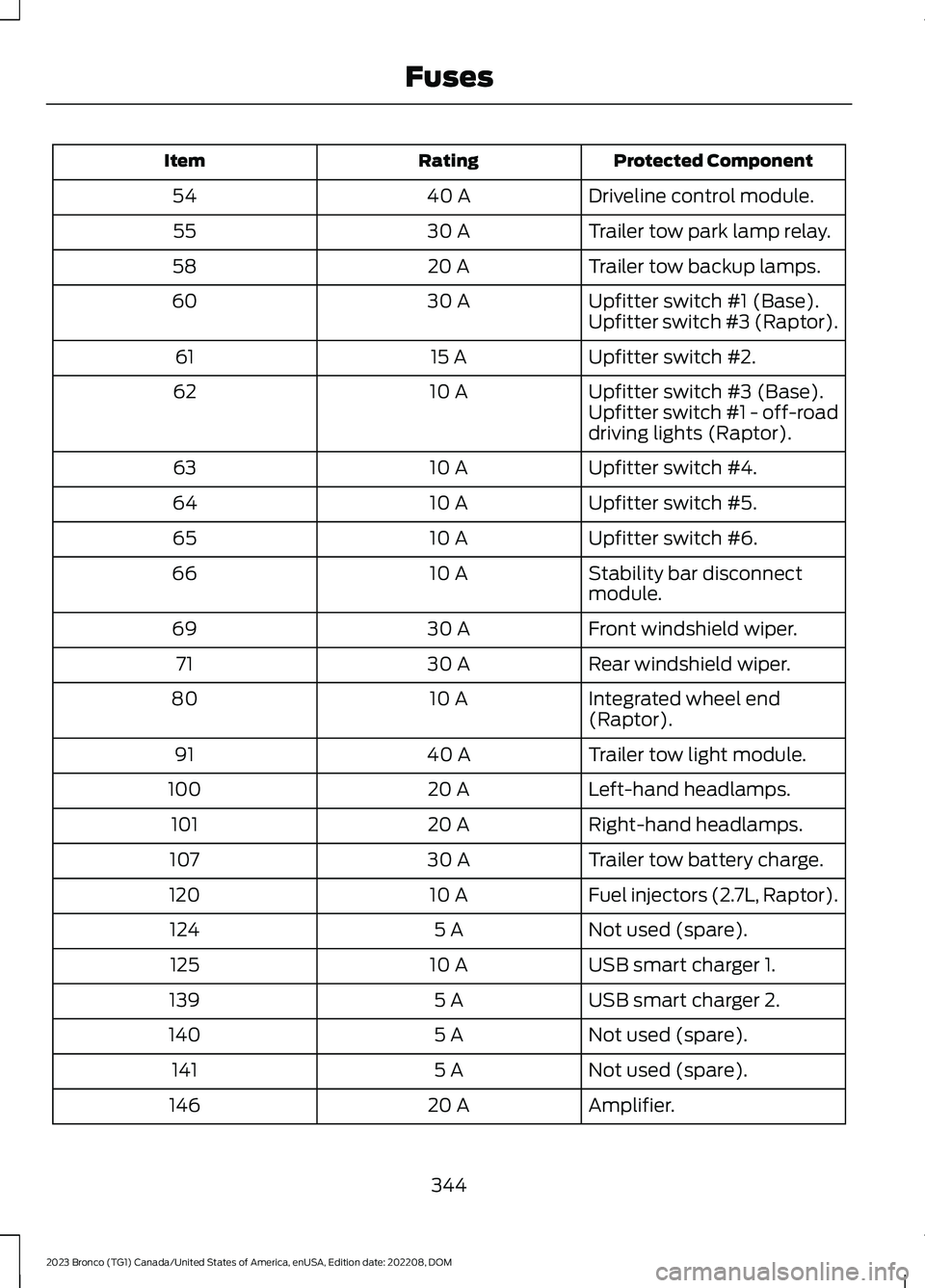
Driveline control module.40 A54
Trailer tow park lamp relay.30 A55
Trailer tow backup lamps.20 A58
Upfitter switch #1 (Base).30 A60Upfitter switch #3 (Raptor).
Upfitter switch #2.15 A61
Upfitter switch #3 (Base).10 A62Upfitter switch #1 - off-roaddriving lights (Raptor).
Upfitter switch #4.10 A63
Upfitter switch #5.10 A64
Upfitter switch #6.10 A65
Stability bar disconnectmodule.10 A66
Front windshield wiper.30 A69
Rear windshield wiper.30 A71
Integrated wheel end(Raptor).10 A80
Trailer tow light module.40 A91
Left-hand headlamps.20 A100
Right-hand headlamps.20 A101
Trailer tow battery charge.30 A107
Fuel injectors (2.7L, Raptor).10 A120
Not used (spare).5 A124
USB smart charger 1.10 A125
USB smart charger 2.5 A139
Not used (spare).5 A140
Not used (spare).5 A141
Amplifier.20 A146
344
2023 Bronco (TG1) Canada/United States of America, enUSA, Edition date: 202208, DOMFuses
Page 367 of 642
For longer, trouble-free operation, keep thetop of the battery clean and dry and thebattery cables tightly fastened to thebattery terminals. If any corrosion ispresent on the battery or terminals, removethe cables from the terminals and cleanwith a wire brush. You can neutralize theacid with a solution of baking soda andwater.
We recommend that you disconnect thenegative battery cable terminal from thebattery if you plan to store your vehicle foran extended period.
Note:If you only disconnect the negativebattery cable terminal, make sure it isisolated or placed away from the batteryterminal to avoid unintended connection orarcing.
If you disconnect or replace the batteryand your vehicle has an automatictransmission, it must relearn its adaptivestrategy. Because of this, the transmissionmay shift firmly when first driven. This isnormal operation while the transmissionfully updates its operation to optimumshift feel.
Removing the Battery
1.Apply the parking brake and switch theignition off.
2.Switch all electrical equipment off, forexample lights and radio.
3.Wait a minimum of two minutes beforedisconnecting the battery.
Note:The engine management system hasa power hold function and remains poweredfor a period of time after you switch theignition off. This is to allow diagnostic andadaptive tables to be stored. Disconnectingthe battery without waiting can causedamage not covered by the vehicleWarranty.
4.Disconnect and isolate the negativebattery cable terminal.
5.Disconnect and isolate the positivebattery cable terminal.
6.Remove the battery securing clamp.
7.Remove the battery.
If you disconnect or replace the vehiclebattery, you must reset the followingfeatures:
•Window bounce-back. See WindowBounce-Back (page 114).
•Clock Settings.
•Pre-set radio stations.
Replacing the Battery
Note:Before reconnecting the battery,make sure the ignition remains switched off.
You must replace the battery with one ofexactly the same specification.
To install, reverse the removal procedure.
Note:Make sure that you correctly installthe battery terminal covers, battery coverand battery cable terminals.
RESETTING THE BATTERYSENSOR
When you install a new battery, reset thebattery sensor by doing the following:
1.Switch the ignition on, and leave theengine off.
Note:Complete Steps 2 and 3 within 10seconds.
2.Flash the high beam headlamps fivetimes, ending with the high beams off.
3.Press and release the brake pedal threetimes.
The battery warning lamp flashes threetimes to confirm that the reset issuccessful.
363
2023 Bronco (TG1) Canada/United States of America, enUSA, Edition date: 202208, DOMMaintenance
Page 529 of 642
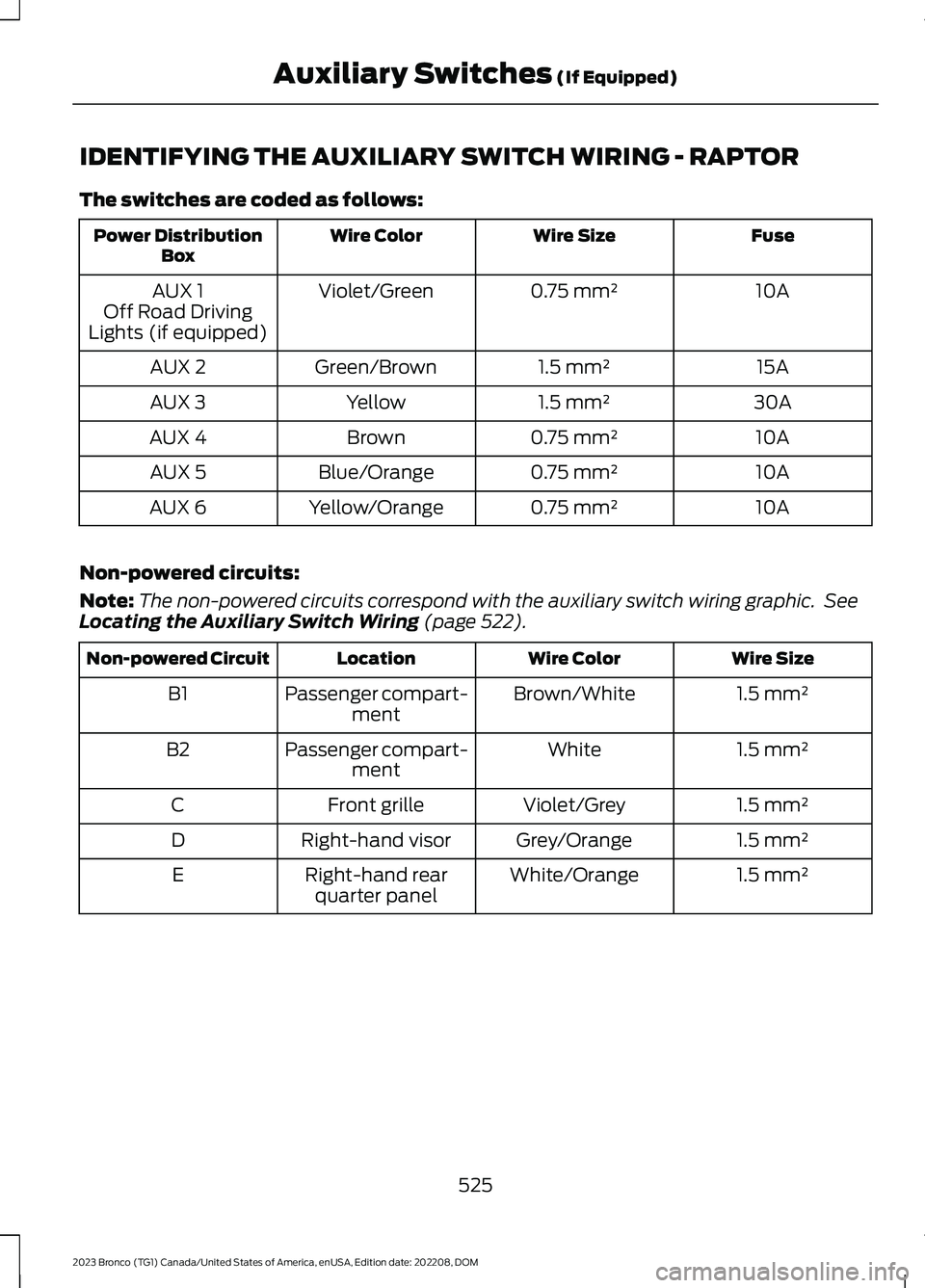
IDENTIFYING THE AUXILIARY SWITCH WIRING - RAPTOR
The switches are coded as follows:
FuseWire SizeWire ColorPower DistributionBox
10A0.75 mm²Violet/GreenAUX 1Off Road DrivingLights (if equipped)
15A1.5 mm²Green/BrownAUX 2
30A1.5 mm²YellowAUX 3
10A0.75 mm²BrownAUX 4
10A0.75 mm²Blue/OrangeAUX 5
10A0.75 mm²Yellow/OrangeAUX 6
Non-powered circuits:
Note:The non-powered circuits correspond with the auxiliary switch wiring graphic. SeeLocating the Auxiliary Switch Wiring (page 522).
Wire SizeWire ColorLocationNon-powered Circuit
1.5 mm²Brown/WhitePassenger compart-mentB1
1.5 mm²WhitePassenger compart-mentB2
1.5 mm²Violet/GreyFront grilleC
1.5 mm²Grey/OrangeRight-hand visorD
1.5 mm²White/OrangeRight-hand rearquarter panelE
525
2023 Bronco (TG1) Canada/United States of America, enUSA, Edition date: 202208, DOMAuxiliary Switches (If Equipped)
Page 533 of 642
You can also drive your vehicle in such away that dilutes and increases the level ofoil by frequent short trips that do not allowthe engine to get to operating temperature,extended idling and low speed driving forlong periods of time.
It is important to rely upon your dealershipto properly diagnose and repair yourvehicle.
We strongly recommend only using ourgenuine or our authorized re-manufacturedreplacement parts engineered for yourvehicle.
Additives and Chemicals
We do not recommend using chemicals oradditives not approved by us as part ofyour vehicle’s normal maintenance. Pleaseconsult your warranty information.
Oils, Fluids and Flushing
In many cases, fluid discoloration is anormal operating characteristic and, byitself, does not necessarily indicate aconcern or that the fluid needs to bechanged. Have discolored fluids that alsoshow signs of overheating or foreignmaterial contamination checkedimmediately.
Make sure to change the vehicle’s oils andfluids at the specified intervals or inconjunction with a repair. Flushing is aviable way to change fluid for many vehiclesub-systems during scheduledmaintenance. It is critical that systems areflushed only with new fluid that is the sameas that required to fill and operate thesystem or using our approved flushingchemical.
Owner Checks and Services
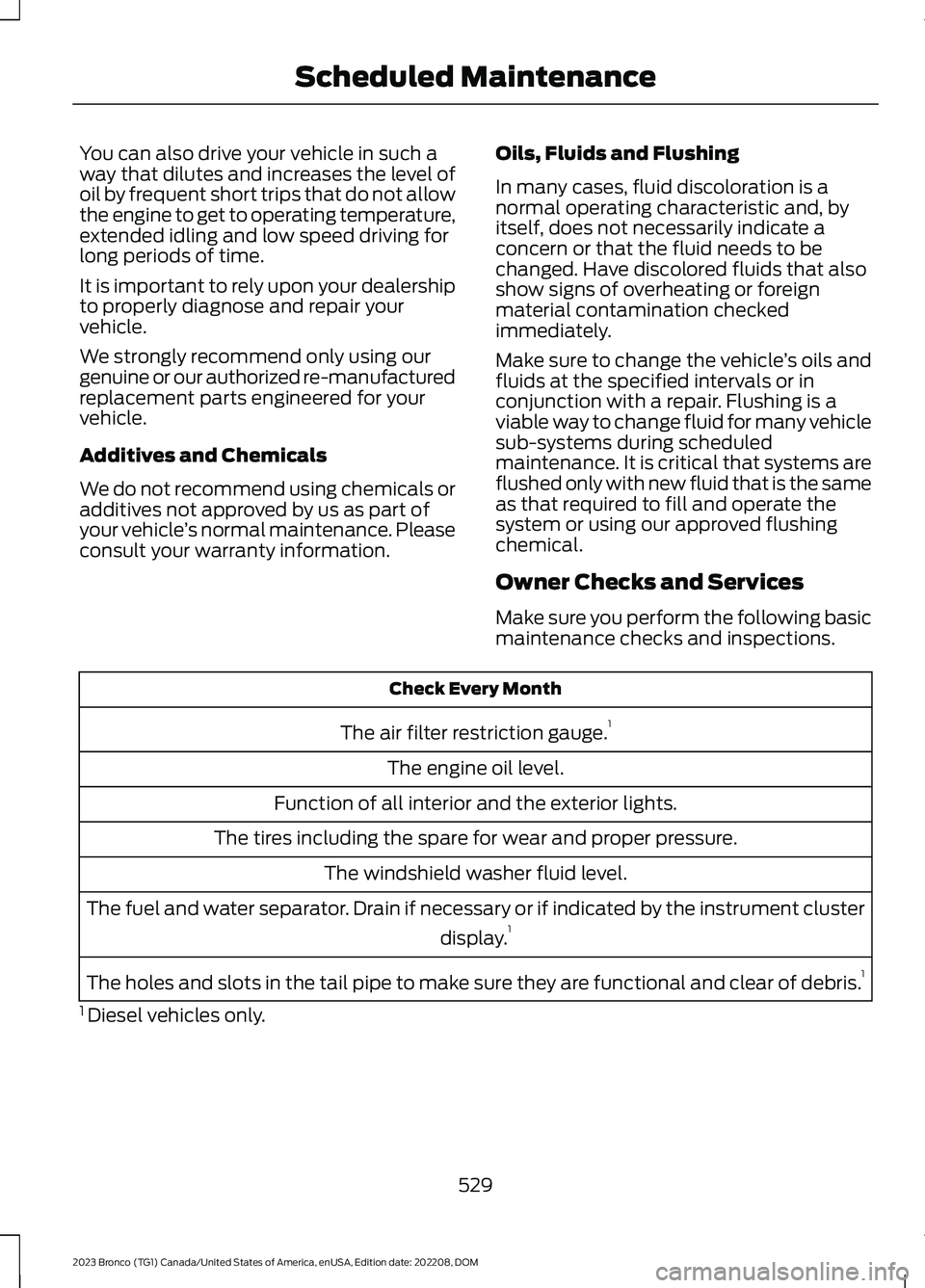
Make sure you perform the following basicmaintenance checks and inspections.
Check Every Month
The air filter restriction gauge.1
The engine oil level.
Function of all interior and the exterior lights.
The tires including the spare for wear and proper pressure.
The windshield washer fluid level.
The fuel and water separator. Drain if necessary or if indicated by the instrument cluster
display.1
The holes and slots in the tail pipe to make sure they are functional and clear of debris.1
1 Diesel vehicles only.
529
2023 Bronco (TG1) Canada/United States of America, enUSA, Edition date: 202208, DOMScheduled Maintenance