service indicator FORD BRONCO 2023 User Guide
[x] Cancel search | Manufacturer: FORD, Model Year: 2023, Model line: BRONCO, Model: FORD BRONCO 2023Pages: 642, PDF Size: 14.71 MB
Page 344 of 642
2.Starting with the brake pedal releasedand the transmission in neutral (N),fully press and hold the brake pedal forapproximately seven seconds and shiftthe transmission to park (P). Continueholding the brake pedal until theinstrument cluster display shows 2Hand Neutral Tow Disabled.
Note:If completed successfully, theinstrument cluster displays 2H and NeutralTow Disabled.
Note:Perform the switching neutral towon and switching neutral tow off proceduresagain from the beginning if the indicatorlight and message do not display.
Note:You could hear a noise as the transfercase shifts out of its neutral position. Thisis normal.
3.Release the brake pedal.
4.Apply the parking brake, thendisconnect your vehicle from the towvehicle.
5.Release the parking brake, start yourvehicle, and shift into either drive (D)or reverse (R) to make sure the transfercase is out of the neutral tow position.
6.If the transfer case did not successfullyshift out of its neutral position, set theparking brake. Have your vehiclechecked as soon as possible.
Resolving the Shift Delayed DriveForward Message
1.Fully press and hold the brake pedal.
2.Press the push button ignition switch.
3.With the vehicle running, shift into drive(D). Let the vehicle roll forward up to3 ft (1 m).
Note:You could hear a noise as the transfercase shifts out of its neutral position. Thisis normal.
4.Make sure the instrument clusterdisplays Neutral Tow Disabled.
EMERGENCY TOWING
If you need to tow your vehicle, contact aprofessional towing service or, if you are amember of a roadside assistance program,your roadside assistance service provider.
TOWING YOUR VEHICLE – TROUBLESHOOTING
TOWING YOUR VEHICLE – INFORMATION MESSAGES
DescriptionMessage
The transfer case is in the neutral position and your vehicleis safe to tow with all four wheels on the ground.Neutral Tow EnabledLeave Transmission inNeutral
There is a transfer case gear tooth blockage present. Withyour vehicle on, shift the transmission into drive (D) and letthe vehicle roll forward, up to 3 ft (1 m).
Shift Delayed DriveForward
The transfer case is not in the neutral position and your vehicleis not safe to tow with all four wheels on the ground.Neutral Tow Disabled
340
2023 Bronco (TG1) Canada/United States of America, enUSA, Edition date: 202208, DOMTowing Your Vehicle
Page 453 of 642
CHANGING A FLAT TIRE -
EXCLUDING: RAPTOR
Note:You should only use tire sealants inroadside emergencies as they may causedamage to the tire pressure monitoringsystem sensor.
Note:The tire pressure monitoring systemindicator light illuminates when the sparetire is in use. To restore the full function ofthe monitoring system, all road wheelsequipped with tire pressure monitoringsensors must be mounted on the vehicle.
If you get a flat tire when driving, do notapply the brake heavily. Instead, graduallydecrease your speed, hold the steeringwheel firmly, and slowly move to a safeplace on the side of the road.
Have your flat serviced by an authorizeddealer in order to prevent damage to thetire pressure monitoring system sensors.Replace the spare tire with a road tire assoon as possible. During repairing orreplacing of the flat tire, have theauthorized dealer inspect the tire pressuremonitoring system sensor for damage.
Tire Change Procedure
WARNING: Failure to follow theseguidelines could result in an increasedrisk of loss of vehicle control, injury ordeath.
WARNING: Do not get under avehicle that is supported by a jack.
WARNING: The jack supplied withthis vehicle is only intended for changinga flat tire in an emergency. Do notattempt to do any other work on yourvehicle when it is supported by the jack,as your vehicle could slip off the jack.Failure to follow this instruction couldresult in personal injury or death.
WARNING: To help prevent yourvehicle from moving when changing awheel, shift the transmission into park(P), set the parking brake and use anappropriate block or wheel chock tosecure the wheel diagonally opposite tothe wheel being changed. For example,when changing the front left wheel,place an appropriate block or wheelchock on the right rear wheel.
WARNING: Only use the jackprovided as original equipment with yourvehicle.
WARNING: Only use the specifiedjacking points. If you use any otherlocations you could damage vehiclecomponents, such as brake lines.
WARNING: Never place anythingbetween the vehicle jack and yourvehicle.
WARNING: Never place anythingbetween the vehicle jack and the ground.
WARNING: Do not attempt tochange a tire on the side of the vehicleclose to moving traffic. Pull far enoughoff the road to not obstruct the flow oftraffic and avoid the danger of being hitwhen operating the jack or changing thewheel.
WARNING: Always fully apply theparking brake. Failure to follow thisinstruction could result in personal injuryor death.
WARNING: The jack should beused on level firm ground whereverpossible.
449
2023 Bronco (TG1) Canada/United States of America, enUSA, Edition date: 202208, DOMChanging a Road Wheel
Page 457 of 642
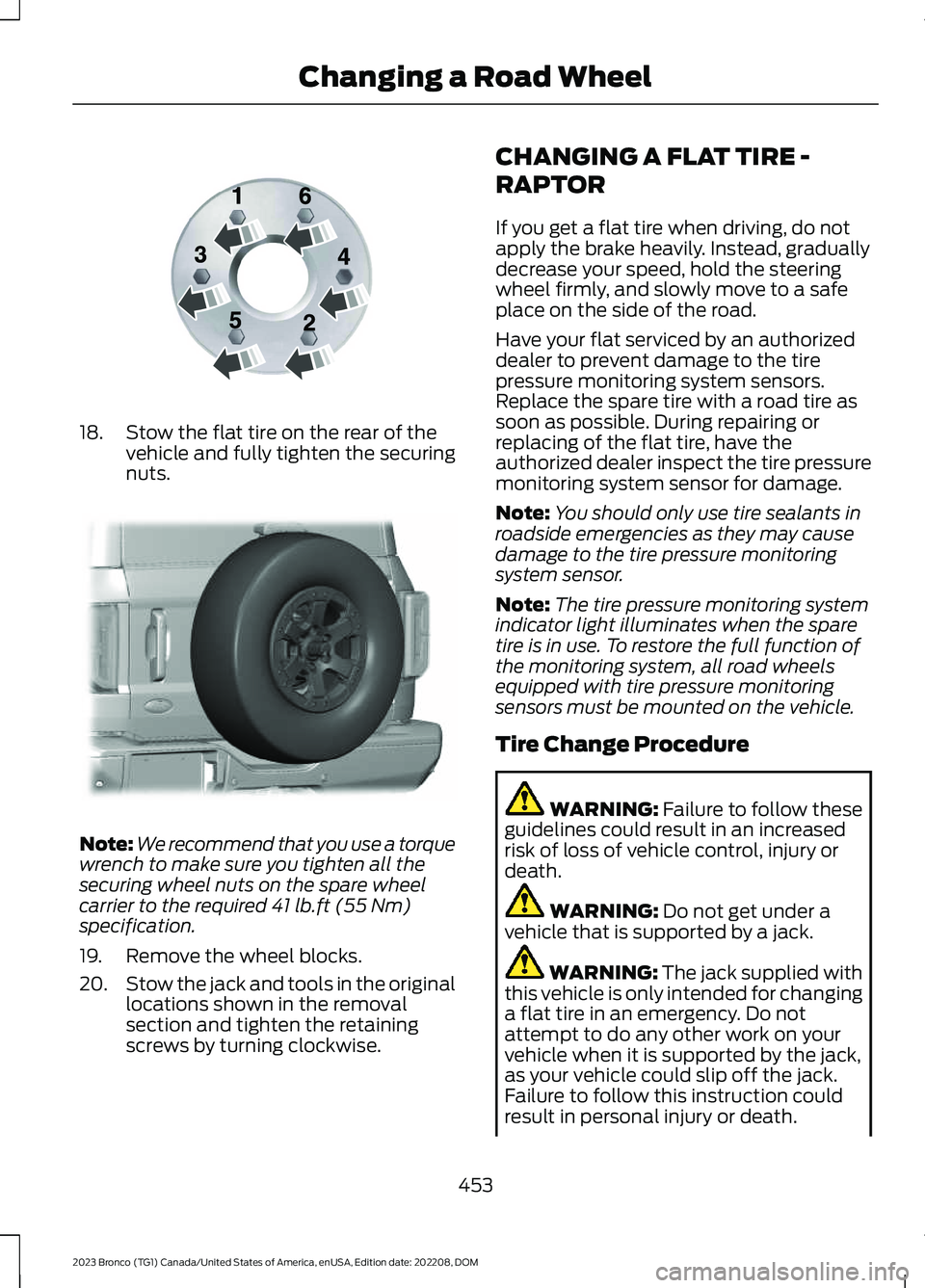
18.Stow the flat tire on the rear of thevehicle and fully tighten the securingnuts.
Note:We recommend that you use a torquewrench to make sure you tighten all thesecuring wheel nuts on the spare wheelcarrier to the required 41 lb.ft (55 Nm)specification.
19.Remove the wheel blocks.
20.Stow the jack and tools in the originallocations shown in the removalsection and tighten the retainingscrews by turning clockwise.
CHANGING A FLAT TIRE -
RAPTOR
If you get a flat tire when driving, do notapply the brake heavily. Instead, graduallydecrease your speed, hold the steeringwheel firmly, and slowly move to a safeplace on the side of the road.
Have your flat serviced by an authorizeddealer to prevent damage to the tirepressure monitoring system sensors.Replace the spare tire with a road tire assoon as possible. During repairing orreplacing of the flat tire, have theauthorized dealer inspect the tire pressuremonitoring system sensor for damage.
Note:You should only use tire sealants inroadside emergencies as they may causedamage to the tire pressure monitoringsystem sensor.
Note:The tire pressure monitoring systemindicator light illuminates when the sparetire is in use. To restore the full function ofthe monitoring system, all road wheelsequipped with tire pressure monitoringsensors must be mounted on the vehicle.
Tire Change Procedure
WARNING: Failure to follow theseguidelines could result in an increasedrisk of loss of vehicle control, injury ordeath.
WARNING: Do not get under avehicle that is supported by a jack.
WARNING: The jack supplied withthis vehicle is only intended for changinga flat tire in an emergency. Do notattempt to do any other work on yourvehicle when it is supported by the jack,as your vehicle could slip off the jack.Failure to follow this instruction couldresult in personal injury or death.
453
2023 Bronco (TG1) Canada/United States of America, enUSA, Edition date: 202208, DOMChanging a Road WheelE166719 E324079
Page 633 of 642
Reverse Wipe.................................................100Reverse Wipe Settings.....................................100What Is Reverse Wipe......................................100Roadside Assistance..................................328Rollover Warning.........................................538Roof Rack.......................................................299Adjusting a Roof Rack Crossbar..................302Removing and Installing the RoofRack..................................................................300Roof Rack Load Capacities...........................302Roof Rack Precautions....................................299Route Guidance............................................516Adjusting the Guidance PromptVolume..............................................................516Canceling Route Guidance.............................516Repeating an Instruction.................................516Route Guidance Settings................................516Running-InSee: Breaking-In.................................................326Running Out of Fuel.....................................181Adding Fuel From a Portable FuelContainer...........................................................181Filling a Portable Fuel Container...................181
S
Satellite Radio..............................................492Locating the Satellite Radio IdentificationNumber............................................................493Satellite Radio Limitations............................492Satellite Radio Settings..................................493Selecting a Channel.........................................493What Is Satellite Radio....................................492Scheduled Maintenance...........................528Seatbelt Extensions......................................66Seatbelt Precautions.....................................61Seatbelt Reminder........................................63How Does the Seatbelt ReminderWork.....................................................................63Seatbelt Reminder Indicators.........................64Switching the Seatbelt Reminder On andOff.........................................................................65Seatbelts............................................................61Automatic Locking Mode..................................63Seatbelt Reminder..............................................63Sensitive Locking Mode.....................................62Security..............................................................97Passive Anti-Theft System...............................97
Security – Troubleshooting..............................97Security – Troubleshooting........................97Security – Frequently AskedQuestions...........................................................98Security – Information Messages..................97Selecting a Four-Wheel Drive Mode - 4x4with Part Time Engagement.................197Selecting a Four-Wheel Drive Mode -Advanced 4x4 with 4A Mode...............198Selecting a G.O.A.T. Mode - Excluding:Raptor...........................................................260Selecting a G.O.A.T. Mode - Raptor........261Selecting the Audio Source.....................488Sending and Receiving a TextMessage......................................................508Sensitive Locking Mode...............................62How Does Sensitive Locking ModeWork.....................................................................62What is Sensitive Locking Mode.....................62Service Data.....................................................24Setting a Destination..................................515Setting a Destination Using a Point ofInterest...............................................................515Setting a Destination Using a PredictiveDestination.......................................................515Setting a Destination Using a RecentDestination.......................................................515Setting a Destination Using a SavedDestination.......................................................515Setting a Destination Using the MapScreen................................................................515Setting a Destination Using the Text EntryScreen................................................................515Setting a Memory Preset.........................489Settings Data...................................................25Setting the Adaptive Cruise ControlGap.................................................................256Setting the Adaptive Cruise ControlSpeed............................................................255Setting the Blower Motor Speed............132Setting the Clock and Date.....................490Setting the Cruise Control Speed.........250Setting the Hill Descent Speed..............235Setting the Temperature............................132Setting the Trail Control Speed..............222Shifting Into Reverse...................................186Shifting Your Vehicle Into Gear................191Signing Into Your Account........................503
629
2023 Bronco (TG1) Canada/United States of America, enUSA, Edition date: 202208, DOMIndex