steering FORD BRONCO 2023 User Guide
[x] Cancel search | Manufacturer: FORD, Model Year: 2023, Model line: BRONCO, Model: FORD BRONCO 2023Pages: 642, PDF Size: 14.71 MB
Page 35 of 642
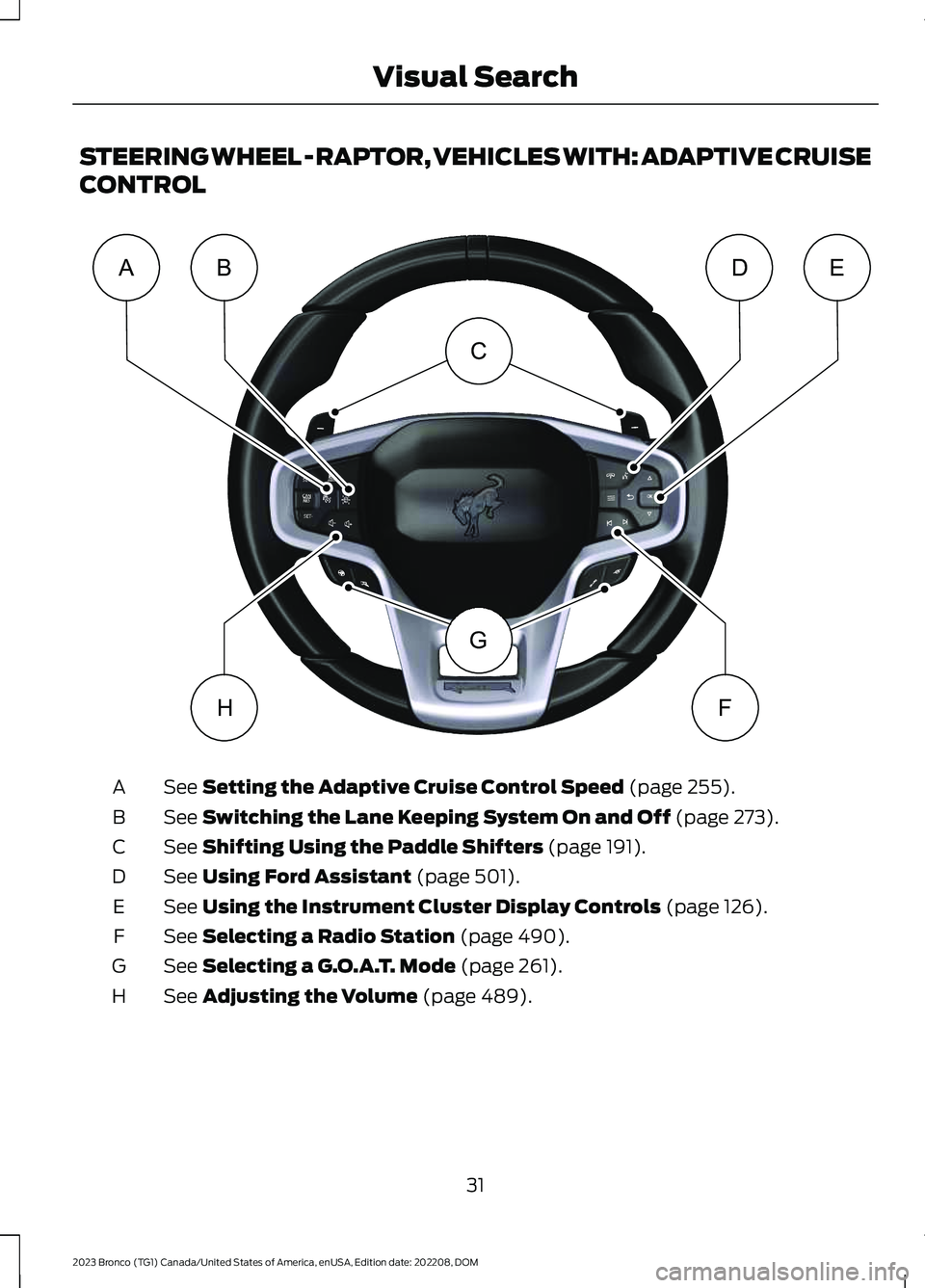
STEERING WHEEL - RAPTOR, VEHICLES WITH: ADAPTIVE CRUISE
CONTROL
See Setting the Adaptive Cruise Control Speed (page 255).A
See Switching the Lane Keeping System On and Off (page 273).B
See Shifting Using the Paddle Shifters (page 191).C
See Using Ford Assistant (page 501).D
See Using the Instrument Cluster Display Controls (page 126).E
See Selecting a Radio Station (page 490).F
See Selecting a G.O.A.T. Mode (page 261).G
See Adjusting the Volume (page 489).H
31
2023 Bronco (TG1) Canada/United States of America, enUSA, Edition date: 202208, DOMVisual SearchCGABDEHFE366539
Page 36 of 642
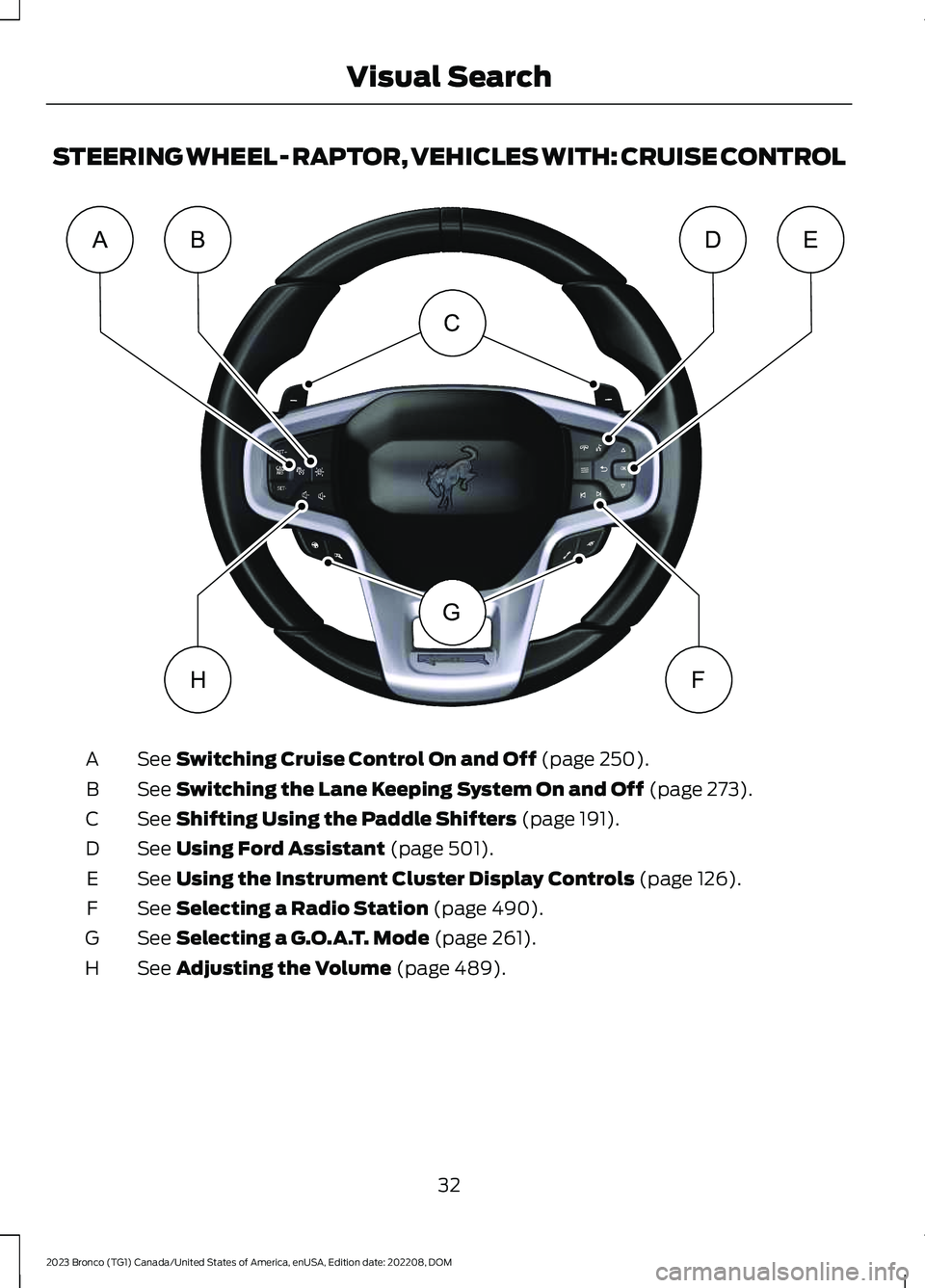
STEERING WHEEL - RAPTOR, VEHICLES WITH: CRUISE CONTROL
See Switching Cruise Control On and Off (page 250).A
See Switching the Lane Keeping System On and Off (page 273).B
See Shifting Using the Paddle Shifters (page 191).C
See Using Ford Assistant (page 501).D
See Using the Instrument Cluster Display Controls (page 126).E
See Selecting a Radio Station (page 490).F
See Selecting a G.O.A.T. Mode (page 261).G
See Adjusting the Volume (page 489).H
32
2023 Bronco (TG1) Canada/United States of America, enUSA, Edition date: 202208, DOMVisual SearchCGABDEHFE366538
Page 68 of 642
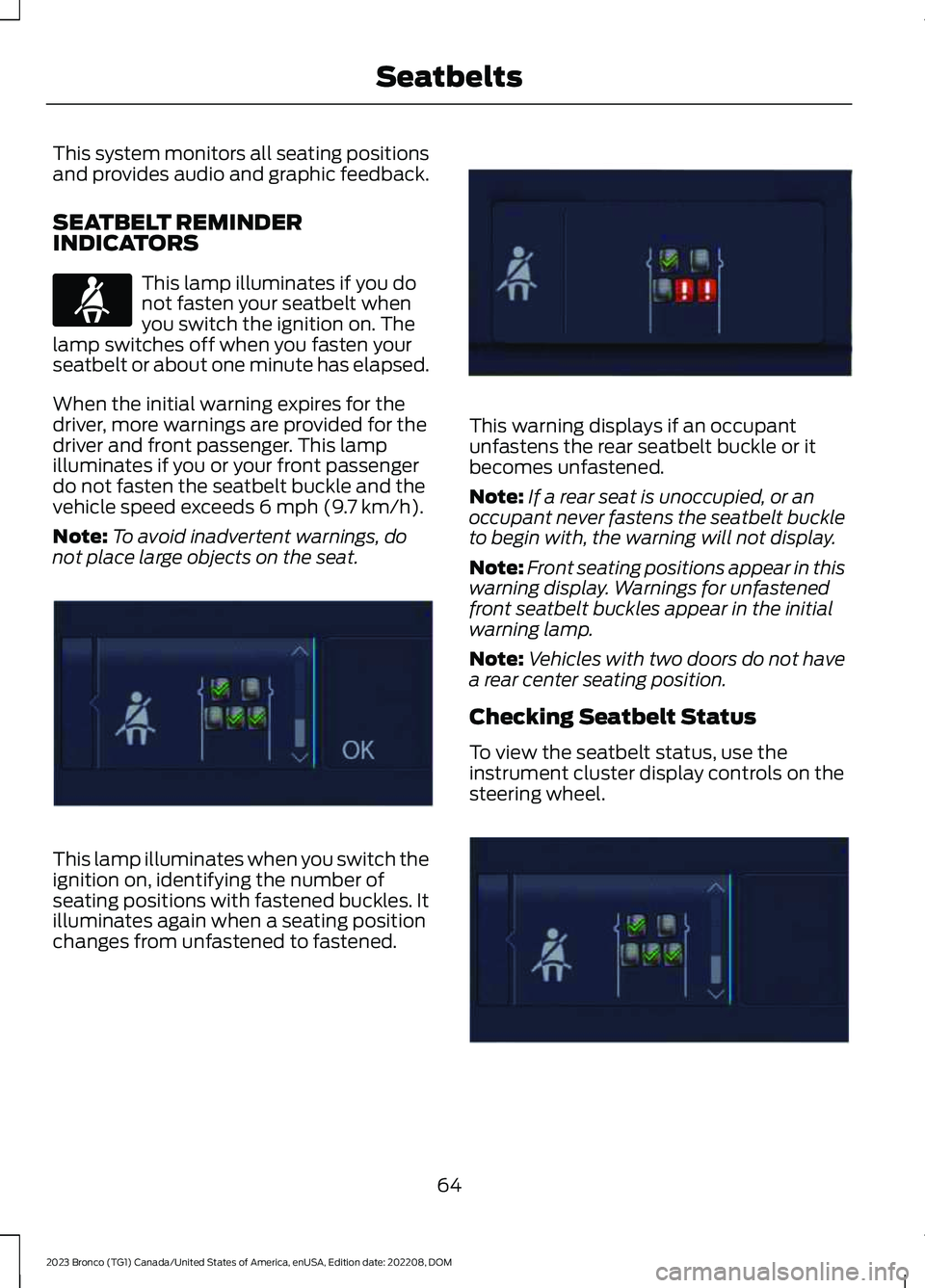
This system monitors all seating positionsand provides audio and graphic feedback.
SEATBELT REMINDERINDICATORS
This lamp illuminates if you donot fasten your seatbelt whenyou switch the ignition on. Thelamp switches off when you fasten yourseatbelt or about one minute has elapsed.
When the initial warning expires for thedriver, more warnings are provided for thedriver and front passenger. This lampilluminates if you or your front passengerdo not fasten the seatbelt buckle and thevehicle speed exceeds 6 mph (9.7 km/h).
Note:To avoid inadvertent warnings, donot place large objects on the seat.
This lamp illuminates when you switch theignition on, identifying the number ofseating positions with fastened buckles. Itilluminates again when a seating positionchanges from unfastened to fastened.
This warning displays if an occupantunfastens the rear seatbelt buckle or itbecomes unfastened.
Note:If a rear seat is unoccupied, or anoccupant never fastens the seatbelt buckleto begin with, the warning will not display.
Note:Front seating positions appear in thiswarning display. Warnings for unfastenedfront seatbelt buckles appear in the initialwarning lamp.
Note:Vehicles with two doors do not havea rear center seating position.
Checking Seatbelt Status
To view the seatbelt status, use theinstrument cluster display controls on thesteering wheel.
64
2023 Bronco (TG1) Canada/United States of America, enUSA, Edition date: 202208, DOMSeatbeltsE71880 E352172 E352170 E352171
Page 74 of 642
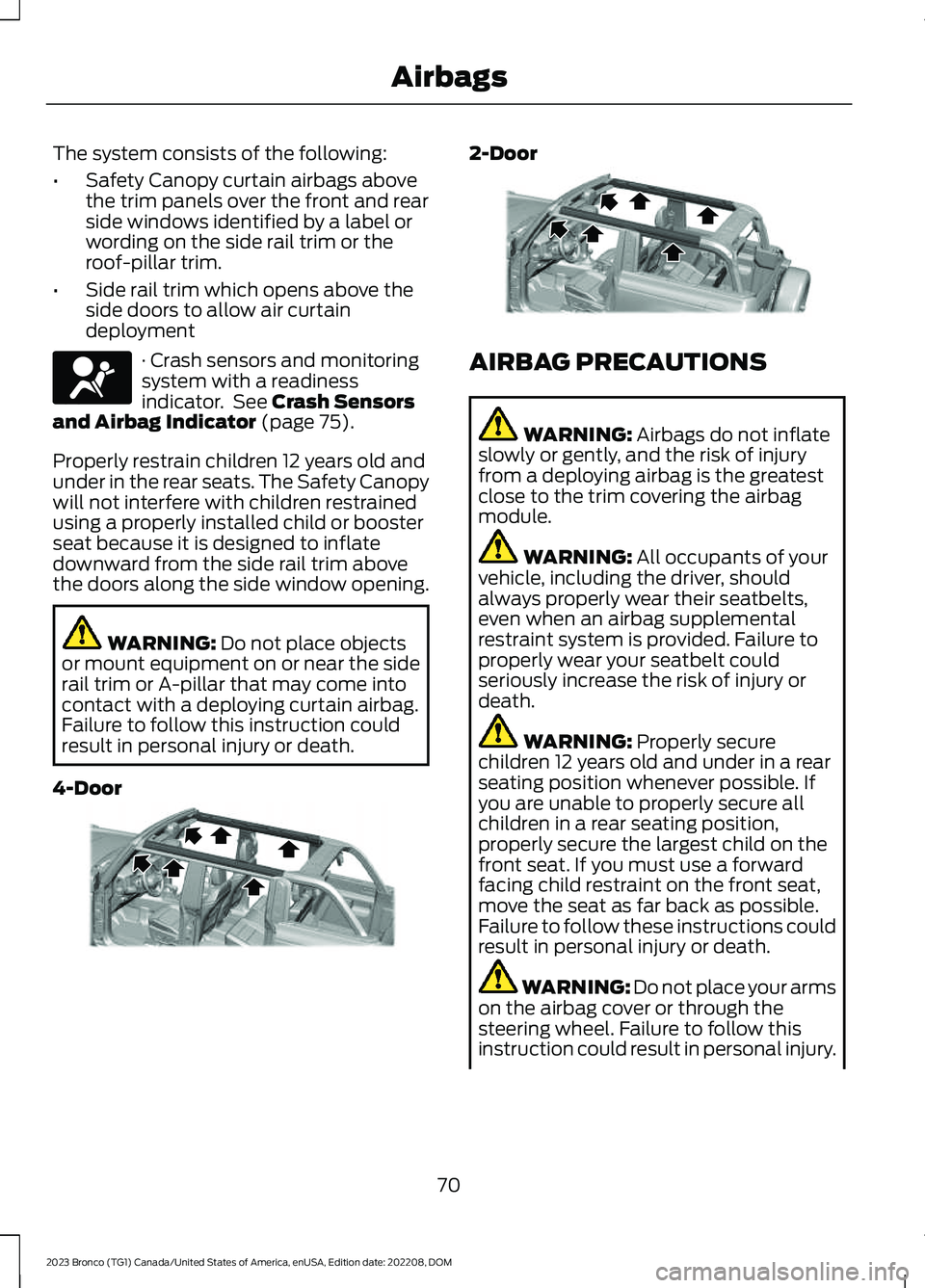
The system consists of the following:
•Safety Canopy curtain airbags abovethe trim panels over the front and rearside windows identified by a label orwording on the side rail trim or theroof-pillar trim.
•Side rail trim which opens above theside doors to allow air curtaindeployment
· Crash sensors and monitoringsystem with a readinessindicator. See Crash Sensorsand Airbag Indicator (page 75).
Properly restrain children 12 years old andunder in the rear seats. The Safety Canopywill not interfere with children restrainedusing a properly installed child or boosterseat because it is designed to inflatedownward from the side rail trim abovethe doors along the side window opening.
WARNING: Do not place objectsor mount equipment on or near the siderail trim or A-pillar that may come intocontact with a deploying curtain airbag.Failure to follow this instruction couldresult in personal injury or death.
4-Door
2-Door
AIRBAG PRECAUTIONS
WARNING: Airbags do not inflateslowly or gently, and the risk of injuryfrom a deploying airbag is the greatestclose to the trim covering the airbagmodule.
WARNING: All occupants of yourvehicle, including the driver, shouldalways properly wear their seatbelts,even when an airbag supplementalrestraint system is provided. Failure toproperly wear your seatbelt couldseriously increase the risk of injury ordeath.
WARNING: Properly securechildren 12 years old and under in a rearseating position whenever possible. Ifyou are unable to properly secure allchildren in a rear seating position,properly secure the largest child on thefront seat. If you must use a forwardfacing child restraint on the front seat,move the seat as far back as possible.Failure to follow these instructions couldresult in personal injury or death.
WARNING: Do not place your armson the airbag cover or through thesteering wheel. Failure to follow thisinstruction could result in personal injury.
70
2023 Bronco (TG1) Canada/United States of America, enUSA, Edition date: 202208, DOMAirbagsE67017 E339113 E339112
Page 81 of 642
WHAT IS 911 ASSIST
911 Assist is a SYNC system feature thatcan call for help.
For more information, visitwww.owner.ford.com.
HOW DOES 911 ASSIST WORK
If a crash deploys an airbag, excluding kneeairbags and rear inflatable seatbelts, oractivates the fuel pump shut-off, yourvehicle may be able to contact emergencyservices by dialing 911 through a paired andconnected Bluetooth® enabled phone.
Not all crashes deploy an airbag or activatethe fuel pump shut-off. If a connected cellphone sustains damage or loses itsconnection to SYNC during a crash, SYNCsearches for and tries to connect to apreviously paired cell phone. SYNC thenattempts to call the emergency services.
Before making the call:
•SYNC provides about 10 seconds tocancel the call. If you fail to cancel thecall, SYNC attempts to dial 911.
•SYNC says the following, or a similarmessage: SYNC will attempt to call 911,to cancel the call, press Cancel on yourscreen or press and hold the phonebutton on your steering wheel.
If you do not cancel the call and SYNCmakes a successful call a pre-recordedmessage plays for the 911 operator. Theoccupants in your vehicle are able to talkwith the operator. Be prepared to provideyour name, phone number and locationimmediately because not all 911 systemsare capable of receiving this informationelectronically.
During an emergency call the systemtransmits vehicle data to the emergencyservice.
EMERGENCY CALL
REQUIREMENTS
WARNING: Do not wait for 911Assist to make an emergency call if youcan do it yourself. Dial emergencyservices immediately to avoid delayedresponse time which could increase therisk of serious injury or death after acrash. If you do not hear 911 Assist withinfive seconds of the crash, the system orphone may be damaged ornon-functional.
WARNING: Always place yourphone in a secure location in your vehicleso it does not become a projectile or getdamaged in a crash. Failure to do so maycause serious injury to someone ordamage the phone which could prevent911 Assist from working properly.
WARNING: Unless the 911 Assistsetting is set on before a crash, thesystem will not dial for help which coulddelay response time, potentiallyincreasing the risk of serious injury ordeath after a crash.
•SYNC must be powered and workingproperly at the time of the incident andthroughout feature activation and use.
•The 911 Assist feature must be set onbefore the incident.
•You must pair and connect aBluetooth® enabled and compatiblecell phone to SYNC.
•A connected Bluetooth® enabledphone must have the ability to makeand maintain an outgoing call at thetime of the incident.
77
2023 Bronco (TG1) Canada/United States of America, enUSA, Edition date: 202208, DOM911 Assist
Page 103 of 642
ADJUSTING THE STEERING
WHEEL
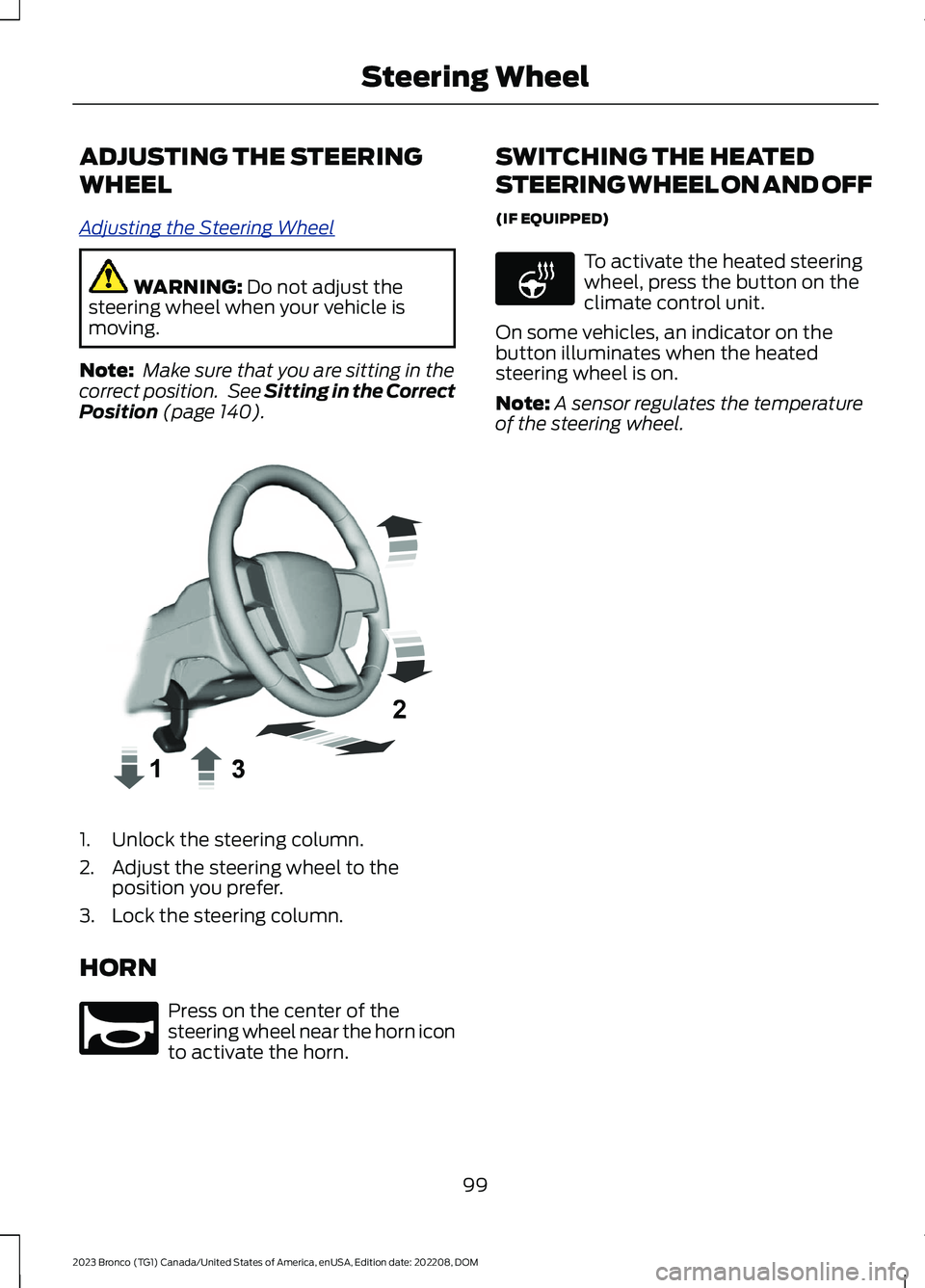
Adjusting the Steering Wheel
WARNING: Do not adjust thesteering wheel when your vehicle ismoving.
Note: Make sure that you are sitting in thecorrect position. See Sitting in the CorrectPosition (page 140).
1.Unlock the steering column.
2.Adjust the steering wheel to theposition you prefer.
3.Lock the steering column.
HORN
Press on the center of thesteering wheel near the horn iconto activate the horn.
SWITCHING THE HEATED
STEERING WHEEL ON AND OFF
(IF EQUIPPED)
To activate the heated steeringwheel, press the button on theclimate control unit.
On some vehicles, an indicator on thebutton illuminates when the heatedsteering wheel is on.
Note:A sensor regulates the temperatureof the steering wheel.
99
2023 Bronco (TG1) Canada/United States of America, enUSA, Edition date: 202208, DOMSteering WheelE359744 E270945 E256621
Page 129 of 642
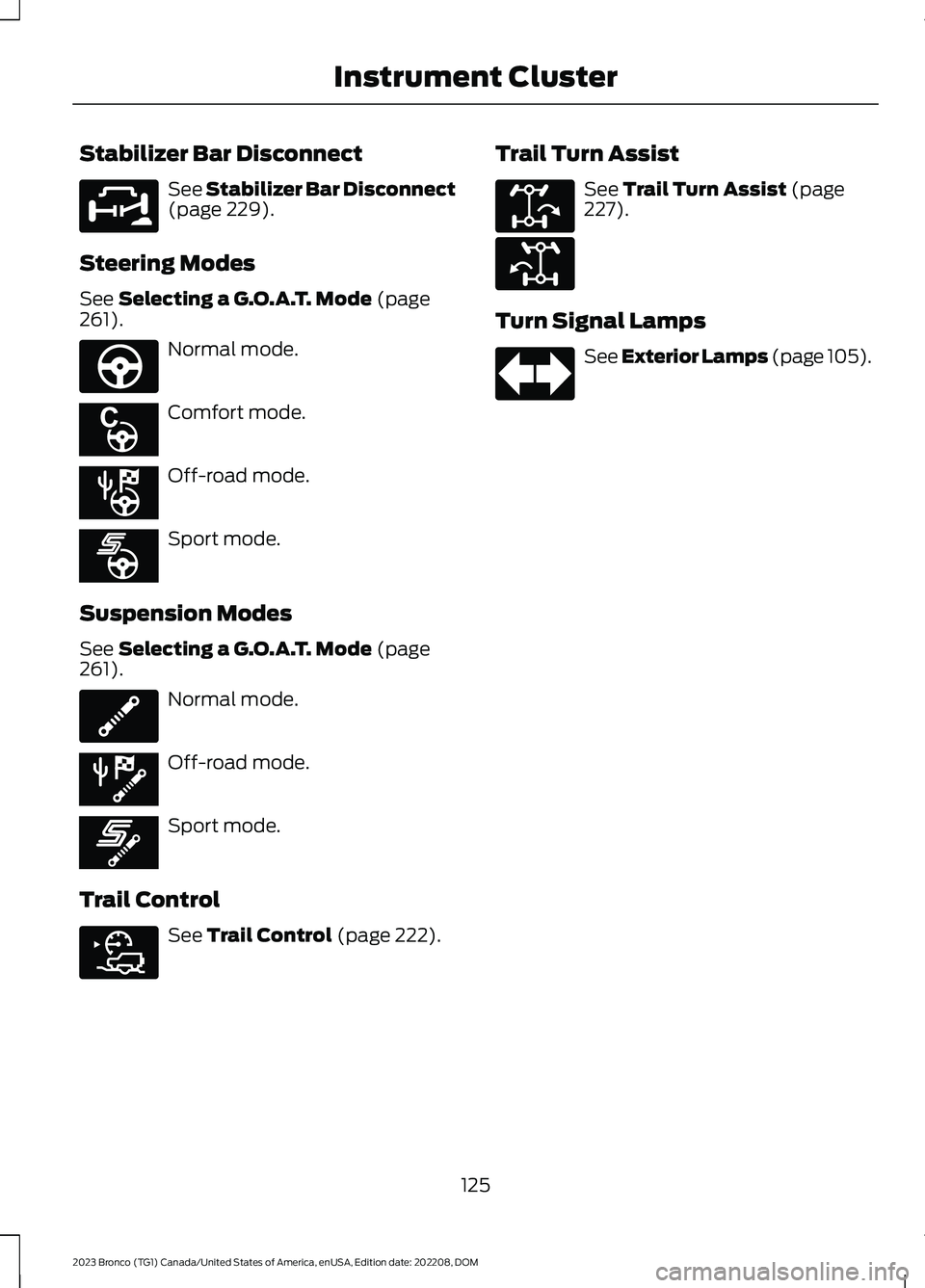
Stabilizer Bar Disconnect
See Stabilizer Bar Disconnect(page 229).
Steering Modes
See Selecting a G.O.A.T. Mode (page261).
Normal mode.
Comfort mode.
Off-road mode.
Sport mode.
Suspension Modes
See Selecting a G.O.A.T. Mode (page261).
Normal mode.
Off-road mode.
Sport mode.
Trail Control
See Trail Control (page 222).
Trail Turn Assist
See Trail Turn Assist (page227).
Turn Signal Lamps
See Exterior Lamps (page 105).
125
2023 Bronco (TG1) Canada/United States of America, enUSA, Edition date: 202208, DOMInstrument ClusterE329476 E347142 E367614 E367611 E367608 E347107 E367610 E367607 E318506 E329474 E329475 E67018
Page 130 of 642
USING THE INSTRUMENT
CLUSTER DISPLAY CONTROLS
WARNING: Driving while distractedcan result in loss of vehicle control, crashand injury. We strongly recommend thatyou use extreme caution when using anydevice that may take your focus off theroad. Your primary responsibility is thesafe operation of your vehicle. Werecommend against the use of anyhand-held device while driving andencourage the use of voice-operatedsystems when possible. Make sure youare aware of all applicable local lawsthat may affect the use of electronicdevices while driving.
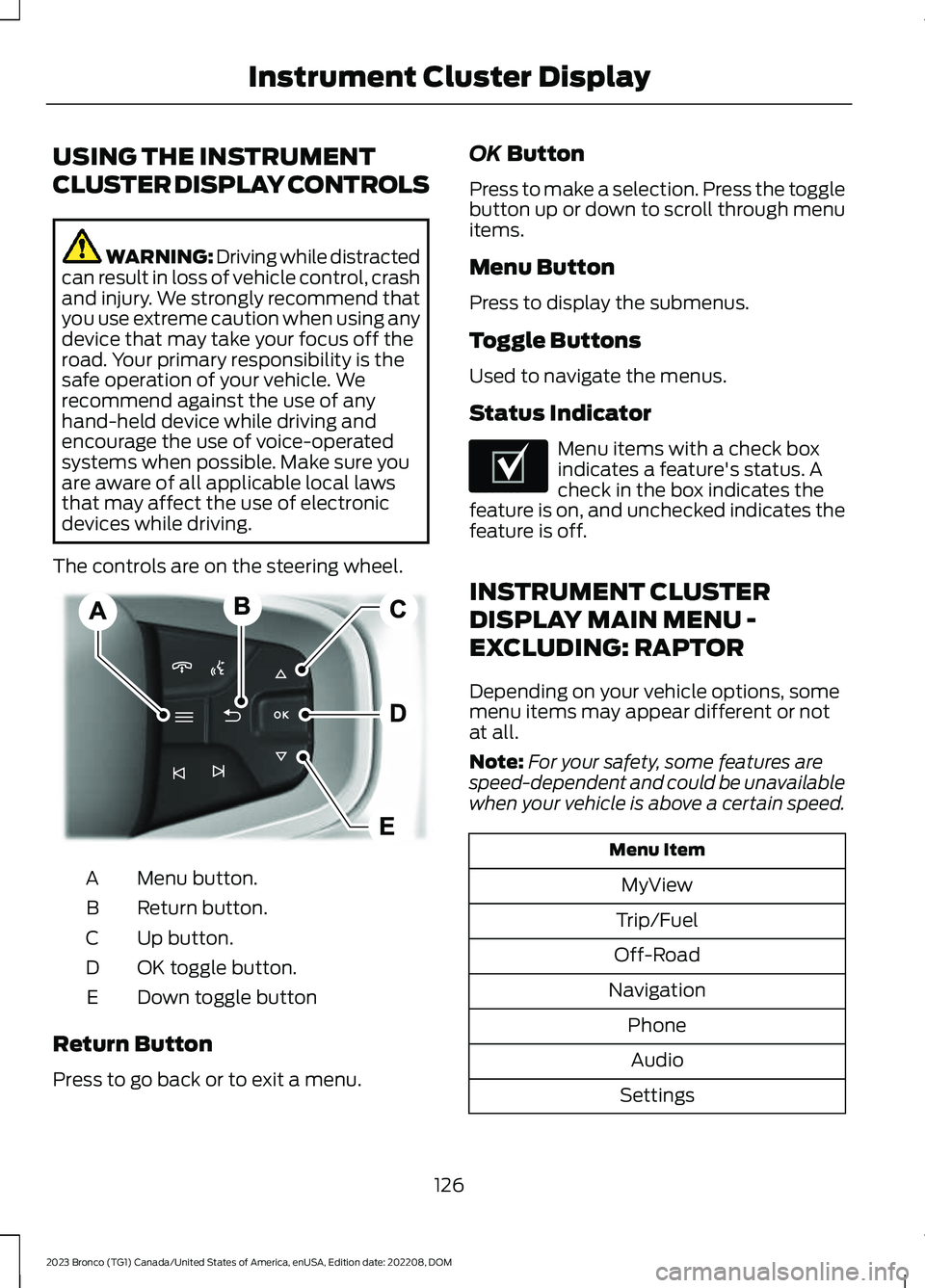
The controls are on the steering wheel.
Menu button.A
Return button.B
Up button.C
OK toggle button.D
Down toggle buttonE
Return Button
Press to go back or to exit a menu.
OK Button
Press to make a selection. Press the togglebutton up or down to scroll through menuitems.
Menu Button
Press to display the submenus.
Toggle Buttons
Used to navigate the menus.
Status Indicator
Menu items with a check boxindicates a feature's status. Acheck in the box indicates thefeature is on, and unchecked indicates thefeature is off.
INSTRUMENT CLUSTER
DISPLAY MAIN MENU -
EXCLUDING: RAPTOR
Depending on your vehicle options, somemenu items may appear different or notat all.
Note:For your safety, some features arespeed-dependent and could be unavailablewhen your vehicle is above a certain speed.
Menu Item
MyView
Trip/Fuel
Off-Road
Navigation
Phone
Audio
Settings
126
2023 Bronco (TG1) Canada/United States of America, enUSA, Edition date: 202208, DOMInstrument Cluster DisplayE326969 E204495
Page 131 of 642
INSTRUMENT CLUSTER
DISPLAY MAIN MENU -
RAPTOR
Depending on your vehicle options, somemenu items can appear different or not atall.
Note:For your safety, some features arespeed-dependent and could be unavailablewhen your vehicle is above a certain speed.
Menu Item
MyView
Trip/Fuel
Raptor Information
Navigation
Phone
Audio
Settings
TRIP COMPUTER
ACCESSING THE TRIP COMPUTER
1.Select Trip/Fuel.
2.Select Fuel Economy,Trip 1 or Trip 2.
RESETTING THE TRIP COMPUTER
1.Select Trip/Fuel.
2.Press and hold the OK button for a fewseconds.
RESETTING THE INDIVIDUAL TRIPVALUES
1.Select Trip/Fuel.
2.Select Trip 1 or Trip 2.
3.Press and hold the OK button for a fewseconds.
CUSTOMIZING THE
INSTRUMENT CLUSTER
DISPLAY
Adding Screens Using MyView
1.Using the information display controlson the steering wheel, select MyView.
2.Select Configure MyView.
3.Select a screen.
4.Press the OK button.
Note:The number of screens you can addis limited. If the selected screen does notappear you must deselect screens from theMyView menu.
Adding Screens Using SelectScreens
1.Select Select Screens.
2.Use the controls on the steering wheelto highlight a screen to add.
3.Press the OK button.
Note:The number of screens you can addis limited. If the selected screen does notappear you must deselect screens from theSelect Screens menu.
Configuring Gauges
1.Select Settings.
2.Select Configure Gauges.
3.Select to swap or change left-handside and right-hand side gauges.
127
2023 Bronco (TG1) Canada/United States of America, enUSA, Edition date: 202208, DOMInstrument Cluster Display
Page 134 of 642
REMOTE START REMOTE
CONTROL INDICATORS (IF
EQUIPPED)
Remote Control Feedback
An LED on the remote control providesstatus feedback of remote start or stopcommands.
StatusLED
Remote startsuccessful.Solid green.
Remote stopsuccessful.Solid red.
Request failed orstatus not received.Blinking red.
Status incomplete.Blinking green.
REMOTE START SETTINGS
Climate Control Settings
1.Press Settings on the touchscreen.
2.Press Vehicle Settings.
3.Press Remote Start Setup.
4.Press Climate Control.
5.Press Auto or Last settings.
Note:If you switch the auto mode on, thesystem attempts to heat or cool the interiorto 72°F (22°C). When you switch the vehicleon, the climate control system returns tothe last used settings.
Note:If you switch the last settings on, thesystem remembers the last used settings.
Heated Seat Settings (If Equipped)
1.Press Settings on the touchscreen.
2.Press Vehicle Settings.
3.Press Remote Start Setup.
4.Press Seats.
5.Press Auto or Off.
Note:If you switch the heated seat settingson, the heated seats turn on during coldweather.
Note:You cannot adjust the heated seatsettings when you remotely start yourvehicle.
Heated Steering Wheel Settings (If
Equipped)
1.Press Settings on the touchscreen.
2.Press Vehicle Settings.
3.Press Remote Start Setup.
4.Press Seats and Steering Wheel.
5.Press Auto or Off.
Note:If you switch the heated steeringwheel settings on, the heated steering wheelturns on during cold weather.
Note:You cannot adjust the heatedsteering wheel settings when you remotelystart your vehicle.
Remote Start Duration
1.Press Settings on the touchscreen.
2.Press Vehicle Settings.
3.Press Remote Start Setup.
4.Press Duration.
5.Press the duration you prefer.
130
2023 Bronco (TG1) Canada/United States of America, enUSA, Edition date: 202208, DOMRemote Start (If Equipped)