warning FORD BRONCO 2023 Owners Manual
[x] Cancel search | Manufacturer: FORD, Model Year: 2023, Model line: BRONCO, Model: FORD BRONCO 2023Pages: 642, PDF Size: 14.71 MB
Page 462 of 642
22.Stow the jack and tools in the originallocations shown in the removalsection and tighten the retainingscrews by turning clockwise.
WHEEL NUTS - EXCLUDING: RAPTOR
Wheel Nut Torque Specifications
WARNING: When you install a wheel, always remove any corrosion, dirt or foreignmaterials present on the mounting surfaces of the wheel or the surface of the wheelhub, brake drum or brake disc that contacts the wheel. Make sure to secure any fastenersthat attach the rotor to the hub so they do not interfere with the mounting surfaces ofthe wheel. Installing wheels without correct metal-to-metal contact at the wheelmounting surfaces can cause the wheel nuts to loosen and the wheel to come off whileyour vehicle is in motion, resulting in loss of vehicle control, personal injury or death.
WARNING: If the tire pressure monitor sensor becomes damaged it may notfunction.
lb.ft (Nm)*Bolt size
100 lb.ft (135 Nm)M12 X 1.5
*Torque specifications are for nut and bolt threads free of dirt and rust. Use only ourrecommended replacement fasteners.
Retighten the lug nuts to the specified torque within 100 mi (160 km) after any wheeldisturbance (such as tire rotation, changing a flat tire, wheel removal).
458
2023 Bronco (TG1) Canada/United States of America, enUSA, Edition date: 202208, DOMChanging a Road Wheel
Page 463 of 642
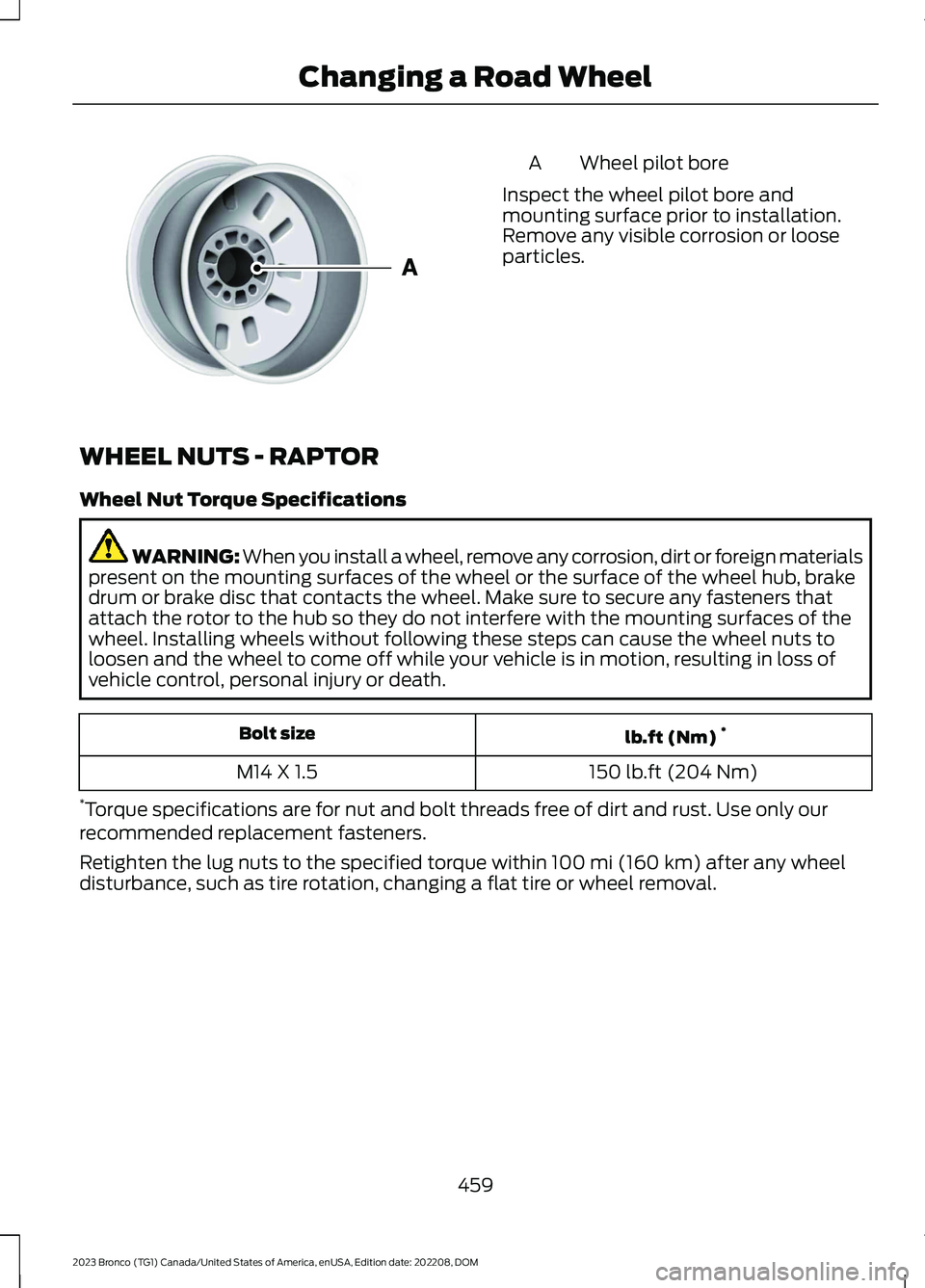
Wheel pilot boreA
Inspect the wheel pilot bore andmounting surface prior to installation.Remove any visible corrosion or looseparticles.
WHEEL NUTS - RAPTOR
Wheel Nut Torque Specifications
WARNING: When you install a wheel, remove any corrosion, dirt or foreign materialspresent on the mounting surfaces of the wheel or the surface of the wheel hub, brakedrum or brake disc that contacts the wheel. Make sure to secure any fasteners thatattach the rotor to the hub so they do not interfere with the mounting surfaces of thewheel. Installing wheels without following these steps can cause the wheel nuts toloosen and the wheel to come off while your vehicle is in motion, resulting in loss ofvehicle control, personal injury or death.
lb.ft (Nm)*Bolt size
150 lb.ft (204 Nm)M14 X 1.5
*Torque specifications are for nut and bolt threads free of dirt and rust. Use only ourrecommended replacement fasteners.
Retighten the lug nuts to the specified torque within 100 mi (160 km) after any wheeldisturbance, such as tire rotation, changing a flat tire or wheel removal.
459
2023 Bronco (TG1) Canada/United States of America, enUSA, Edition date: 202208, DOMChanging a Road WheelE145950
Page 479 of 642
AIR CONDITIONING SYSTEM
CAPACITY AND
SPECIFICATION - 3.0L
ECOBOOST™
WARNING: The air conditioningrefrigerant system contains refrigerantunder high pressure. Only qualifiedpersonnel should service the airconditioning refrigerant system. Opening
the air conditioning refrigerant systemcan cause personal injury.
Use refrigerant and oil that meets thedefined specifications.
If you do not use refrigerant and oil thatmeets the defined specifications, it couldresult in:
•Component damage that your vehiclewarranty does not cover.
•Reduced vehicle performance.
Capacities
Refrigerant oilRefrigerantVariant
2.71 fl oz (80 ml)19.4 oz (0.55 kg)All.
Materials
SpecificationName
WSS-M17B21-AR-1234yf Refrigerant(U.S.)R-1234yf Refrigerant / Frigorigène R-1234yf(Canada)YN-33-A(U.S.)HS7Z-19B519-BA(Canada)
WSS-M2C300-A2Motorcraft® R-1234yf Refrigerant PAG Oil(U.S.)Motorcraft® R-1234yf Refrigerant PAG Oil / HuilePAG pour frigorigène R-1234yf Motorcraft®(Canada)YN-35(U.S. & Canada)
475
2023 Bronco (TG1) Canada/United States of America, enUSA, Edition date: 202208, DOMCapacities and Specifications
Page 480 of 642
AIR CONDITIONING SYSTEM
CAPACITY AND
SPECIFICATION - 2.3L
ECOBOOST™/2.7L
ECOBOOST™
WARNING: The air conditioningrefrigerant system contains refrigerantunder high pressure. Only qualifiedpersonnel should service the air
conditioning refrigerant system. Openingthe air conditioning refrigerant systemcan cause personal injury.
Use refrigerant and oil that meets thedefined specifications.
If you do not use refrigerant and oil thatmeets the defined specifications, it couldresult in:
•Component damage that your vehiclewarranty does not cover.
•Reduced vehicle performance.
Capacities
RefrigerantVariant
19.4 oz (0.55 kg)All.
Materials
SpecificationName
WSS-M17B21-AR-1234yf Refrigerant(U.S.)R-1234yf Refrigerant / Frigorigène R-1234yf(Canada)YN-33-A(U.S.)HS7Z-19B519-BA(Canada)
WSS-M2C300-A2Motorcraft® R-1234yf Refrigerant PAG Oil(U.S.)Motorcraft® R-1234yf Refrigerant PAG Oil / HuilePAG pour frigorigène R-1234yf Motorcraft®(Canada)YN-35(U.S. & Canada)
WASHER FLUID SPECIFICATION
Capacities
QuantityVariant
Fill as required.All.
476
2023 Bronco (TG1) Canada/United States of America, enUSA, Edition date: 202208, DOMCapacities and Specifications
Page 492 of 642
AUDIO SYSTEM
PRECAUTIONS
WARNING: Driving while distractedcan result in loss of vehicle control, crashand injury. We strongly recommend thatyou use extreme caution when using anydevice that may take your focus off theroad. Your primary responsibility is thesafe operation of your vehicle. Werecommend against the use of anyhand-held device while driving andencourage the use of voice-operatedsystems when possible. Make sure youare aware of all applicable local lawsthat may affect the use of electronicdevices while driving.
Listening to loud audio for long periods oftime could damage your hearing.
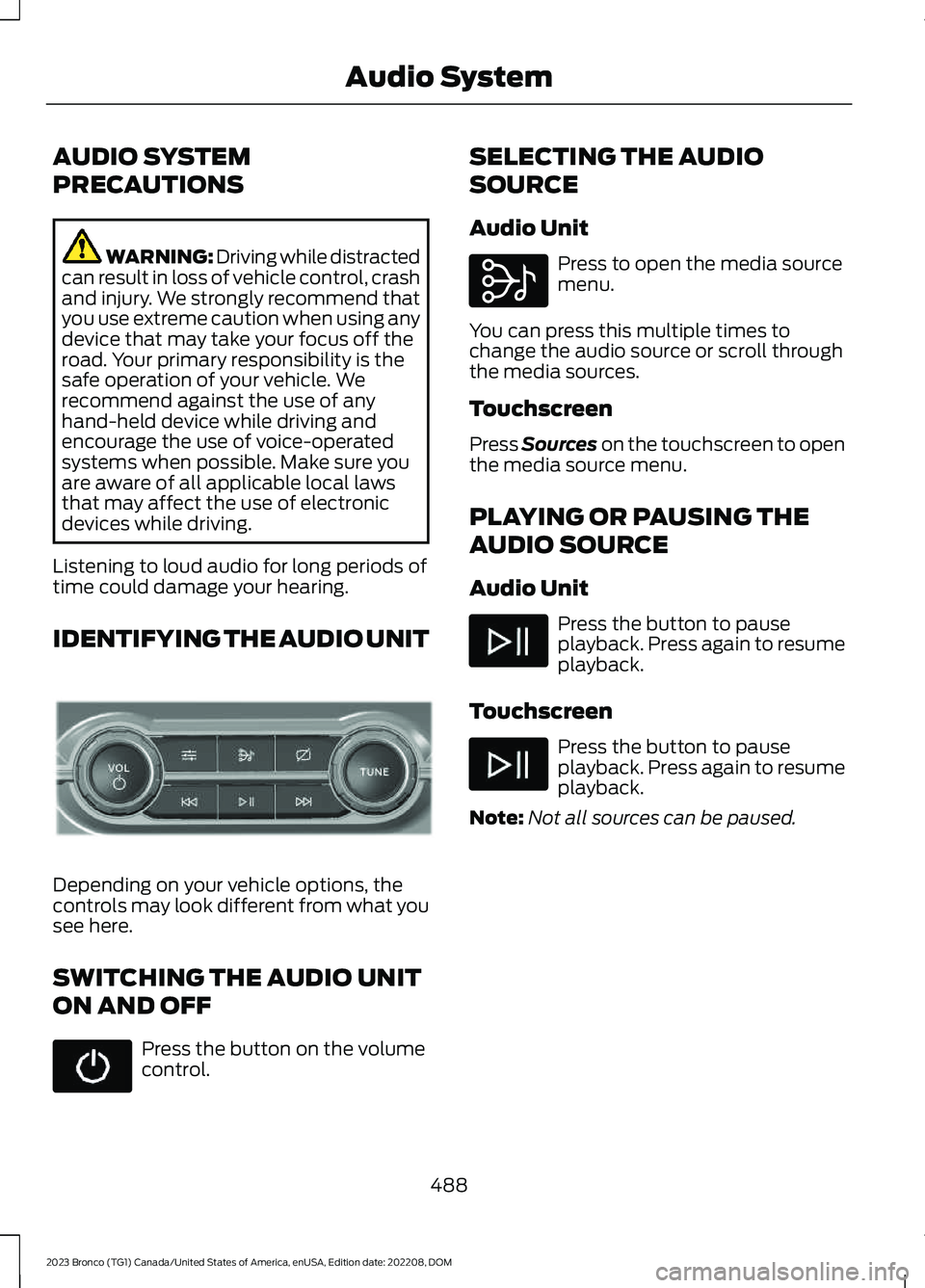
IDENTIFYING THE AUDIO UNIT
Depending on your vehicle options, thecontrols may look different from what yousee here.
SWITCHING THE AUDIO UNIT
ON AND OFF
Press the button on the volumecontrol.
SELECTING THE AUDIO
SOURCE
Audio Unit
Press to open the media sourcemenu.
You can press this multiple times tochange the audio source or scroll throughthe media sources.
Touchscreen
Press Sources on the touchscreen to openthe media source menu.
PLAYING OR PAUSING THE
AUDIO SOURCE
Audio Unit
Press the button to pauseplayback. Press again to resumeplayback.
Touchscreen
Press the button to pauseplayback. Press again to resumeplayback.
Note:Not all sources can be paused.
488
2023 Bronco (TG1) Canada/United States of America, enUSA, Edition date: 202208, DOMAudio SystemE308144 E308143
Page 502 of 642
CENTER DISPLAY
PRECAUTIONS
WARNING: Driving while distractedcan result in loss of vehicle control, crashand injury. We strongly recommend thatyou use extreme caution when using anydevice that may take your focus off theroad. Your primary responsibility is thesafe operation of your vehicle. Werecommend against the use of anyhand-held device while driving andencourage the use of voice-operatedsystems when possible. Make sure youare aware of all applicable local lawsthat may affect the use of electronicdevices while driving.
CENTER DISPLAY
LIMITATIONS
Speed-restricted Features
For your safety, some features are notavailable while the vehicle is in motion ator above 5 mph (8 km/h). Settings thatare not critical while driving your vehicleare shown as restricted on your display.Some of these settings include:
•Software updates.
•Personal profiles setup.
•Valet mode setup.
•Driver assistance settings.
•MyKey setup.
•Door keypad code setup.
These restricted features becomeavailable when your vehicle is no longer inmotion.
STATUS BAR
The bar is on top of the display andindicates the status of your vehicle'sfeatures.
Audio System
Audio system muted.
Connected Device
Cell phone microphone muted.
Phone call in progress.
Media player connected usingBluetooth®.
Cell phone network signalstrength.
Cell phone roaming.
Text message received.
Unread email message.
Automatic crash notificationsystem off.
Cell phone battery status.
Vehicle Data
Wi-Fi available.
498
2023 Bronco (TG1) Canada/United States of America, enUSA, Edition date: 202208, DOMCenter Display OverviewE353221 E353213 E353208 E335295 E353216 E335293 E353219
Page 509 of 642
PHONE PRECAUTIONS
WARNING: Driving while distractedcan result in loss of vehicle control, crashand injury. We strongly recommend thatyou use extreme caution when using anydevice that may take your focus off theroad. Your primary responsibility is thesafe operation of your vehicle. Werecommend against the use of anyhand-held device while driving andencourage the use of voice-operatedsystems when possible. Make sure youare aware of all applicable local lawsthat may affect the use of electronicdevices while driving.
CONNECTING YOUR PHONE
Go to the settings menu on your device andswitch Bluetooth® on.
Press the phone option on thefeature bar.
1.Press Add Phone.
Note:A prompt alerts you to search for yourvehicle on your cell phone.
2.Select your vehicle on your cell phone.
Note:A number appears on your cell phoneand on the touchscreen.
3.Confirm the number on your cell phonematches the number on thetouchscreen.
Note:The touchscreen indicates that youhave successfully paired your cell phone.
4.Approve phonebook download requeston your cell phone.
PHONE MENU
This menu becomes available after pairinga phone.
Recent Call List
Display and select an entry from a list ofprevious calls.
Contacts
Display a smart search form to look up yourcontacts. Use the List button toalphabetically sort your contacts.
Favorites
Display the list of favorite contacts thatare set up on your phone.
Messaging
Displays the list of text messages to read,listen to, or respond to.
Email
Displays the list of emails to read, listen to,or respond to.
Phone List
Display the list of paired or connecteddevices that you can select.
Note:Up to 12 devices can be stored.
Do Not Disturb
Reject incoming calls and switch ring tonesand alerts off.
Phone Keypad
Directly dial a number.
505
2023 Bronco (TG1) Canada/United States of America, enUSA, Edition date: 202208, DOMPhone
Page 514 of 642
CONNECTING A BLUETOOTH®
DEVICE
1.Make sure Bluetooth® is enabled onyour device.
2.Press Settings on the touchscreen.
3.Press Connectivity.
4.Press Bluetooth.
5.Press Add a Bluetooth Device.
Note:A prompt alerts you to search for yourvehicle on your device.
6.Select your vehicle on your device.
Note:A number appears on your device andon the touchscreen.
7.Confirm that the number on yourdevice matches the number on thetouchscreen.
Note:The touchscreen indicates that youhave successfully paired your device.
The Bluetooth® word mark and logos areregistered trademarks owned by BluetoothSIG, Inc. and any use of such marks byFord Motor Company is under license.Other trademarks and trade names arethose of their respective owners.
PLAYING MEDIA USING
BLUETOOTH®
WARNING: Driving while distractedcan result in loss of vehicle control, crashand injury. We strongly recommend thatyou use extreme caution when using anydevice that may take your focus off theroad. Your primary responsibility is thesafe operation of your vehicle. Werecommend against the use of any
hand-held device while driving andencourage the use of voice-operatedsystems when possible. Make sure youare aware of all applicable local lawsthat may affect the use of electronicdevices while driving.
Connect your device.
Press the audio button on thefeature bar.
Press Sources.
Press the Bluetooth® option.
Press to play a track. Press againto pause the track.
Press to skip to the next track.
Press and hold to fast forwardthrough the track.
Press once to return to thebeginning of a track. Repeatedlypress to return to previoustracks.
Press and hold to fast rewind through thetrack.
510
2023 Bronco (TG1) Canada/United States of America, enUSA, Edition date: 202208, DOMBluetooth®E100027 E250655
Page 515 of 642
APP PRECAUTIONS
WARNING: Driving while distractedcan result in loss of vehicle control, crashand injury. We strongly recommend thatyou use extreme caution when using anydevice that may take your focus off theroad. Your primary responsibility is thesafe operation of your vehicle. Werecommend against the use of anyhand-held device while driving andencourage the use of voice-operatedsystems when possible. Make sure youare aware of all applicable local lawsthat may affect the use of electronicdevices while driving.
APP REQUIREMENTS
When you start an app through the systemfor the first time, you could be asked togrant certain permissions. You can reviewand change the permissions that you havegranted at any time when your vehicle isnot moving. We recommend that youcheck your data plan before using yourapps through the system. Using themcould result in additional charges. We alsorecommend that you check the appprovider's terms and conditions andprivacy policy before using their app. Makesure that you have an active account forapps that you want to use through thesystem. Some apps will work with nosetup. Others require you to configuresome personal settings before you can usethem.
ACCESSING APPS
Select the apps option on thefeature bar.
ENABLING APPS ON AN IOS
DEVICE
Select the apps option on thefeature bar.
1.Select Mobile Apps Help.
2.Follow the instructions to pair andconnect your device via Bluetooth® orwith a USB cable.
3.Start the apps on your device that youwant to use.
4.Select the app that you want to use onthe touchscreen.
Note:Some apps may run through AppleCarPlay if it is enabled.
Note:Closing an app on your device willclose it on the touchscreen.
Note:For troubleshooting assistance selectCompatible Apps List or My App Isn't Listedunder Mobile Apps Help.
ENABLING APPS ON AN
ANDROID DEVICE
Select the apps option on thefeature bar.
1.Select Mobile Apps Help.
2.Follow the instructions to pair andconnect your device via Bluetooth® orwith a USB cable.
3.Start the apps on your device that youwant to use.
4.Select Find Mobile Apps.
5.Select the app that you want to use onthe touchscreen.
Note:To enable apps when pairing with aUSB cable, switch on Android Apps via USBin Settings.
511
2023 Bronco (TG1) Canada/United States of America, enUSA, Edition date: 202208, DOMApps
Page 518 of 642
CONNECTED NAVIGATION (IF
EQUIPPED)
Your vehicle may be equipped withconnected navigation. Depending on yourversion, you are given a 90 day or 3 yeartrial. After the trial period, you need to signup to continue the experience. Foradditional information, visit ford.com/connectedservices.
Note:If you do not sign up or renew yoursubscription, you can still use navigationthrough a connected device.
ACCESSING NAVIGATION
Bronco Off-Road App
WARNING: Driving while distractedcan result in loss of vehicle control, crashand injury. We strongly recommend thatyou use extreme caution when using anydevice that may take your focus off theroad. Your primary responsibility is thesafe operation of your vehicle. Werecommend against the use of anyhand-held device while driving andencourage the use of voice-operatedsystems when possible. Make sure youare aware of all applicable local lawsthat may affect the use of electronicdevices while driving.
Press the button to accessNavigation.
Note:For optimal reception performance,keep the antenna clear of snow and icebuild-up and keep luggage and othermaterial as far away from the antenna aspossible. Placing luggage over the antennamay reduce performance.
NAVIGATION MAP UPDATES
To update your map data over Wi-Fi, yourvehicle must be connected to a Wi-Fiaccess point. For USB updates and otherdetails, contact dealers at1-866-462-8837 in the United States andCanada, or 800-557-5539 in Mexico.
Note:If you find map data errors, you mayreport them by going towww.here.com/mapcreator.
ADJUSTING THE MAP
ZOOMING THE MAP IN AND OUT
You can use pinch gestures to zoom in andout. Place two fingers on the screen andmove them apart to zoom in. Place twofingers on the screen and bring themtogether to zoom out.
CHANGING THE FORMAT OF THEMAP
Press the Menu button.
1.Press the Map Orientation tile.
2.Select a map orientation.
LIVE TRAFFIC
WHAT IS LIVE TRAFFIC
You can observe real-time road congestionwhen live traffic is on.
SWITCHING LIVE TRAFFIC ONAND OFF
Press the Menu button.
514
2023 Bronco (TG1) Canada/United States of America, enUSA, Edition date: 202208, DOMNavigation (If Equipped) E328845 E328845