instrument panel FORD BRONCO 2023 Owner's Manual
[x] Cancel search | Manufacturer: FORD, Model Year: 2023, Model line: BRONCO, Model: FORD BRONCO 2023Pages: 642, PDF Size: 14.71 MB
Page 353 of 642
MAINTENANCE PRECAUTIONS
Service your vehicle regularly to helpmaintain its roadworthiness and resalevalue. There is a large network ofauthorized dealers that are there to helpyou with their professional servicingexpertise. We believe that their speciallytrained technicians are best qualified toservice your vehicle properly and expertly.They are supported by a wide range ofhighly specialized tools developedspecifically for servicing your vehicle.
If your vehicle requires professional service,an authorized dealer can provide thenecessary parts and service. Check yourwarranty information to find out whichparts and services are covered.
Use only recommended fuels, lubricants,fluids and service parts conforming tospecifications. See Capacities andSpecifications (page 461).
•Do not work on a hot engine.
•Make sure that nothing gets caught inmoving parts.
•Do not work on a vehicle with theengine running in an enclosed space,unless you are sure you have enoughventilation.
•Keep all open flames and other burningmaterial, such as cigarettes, away fromthe battery and all fuel related parts.
•Set the parking brake, shift thetransmission to park (P) and block thewheels.
OPENING AND CLOSING THE
HOOD
Opening the Hood
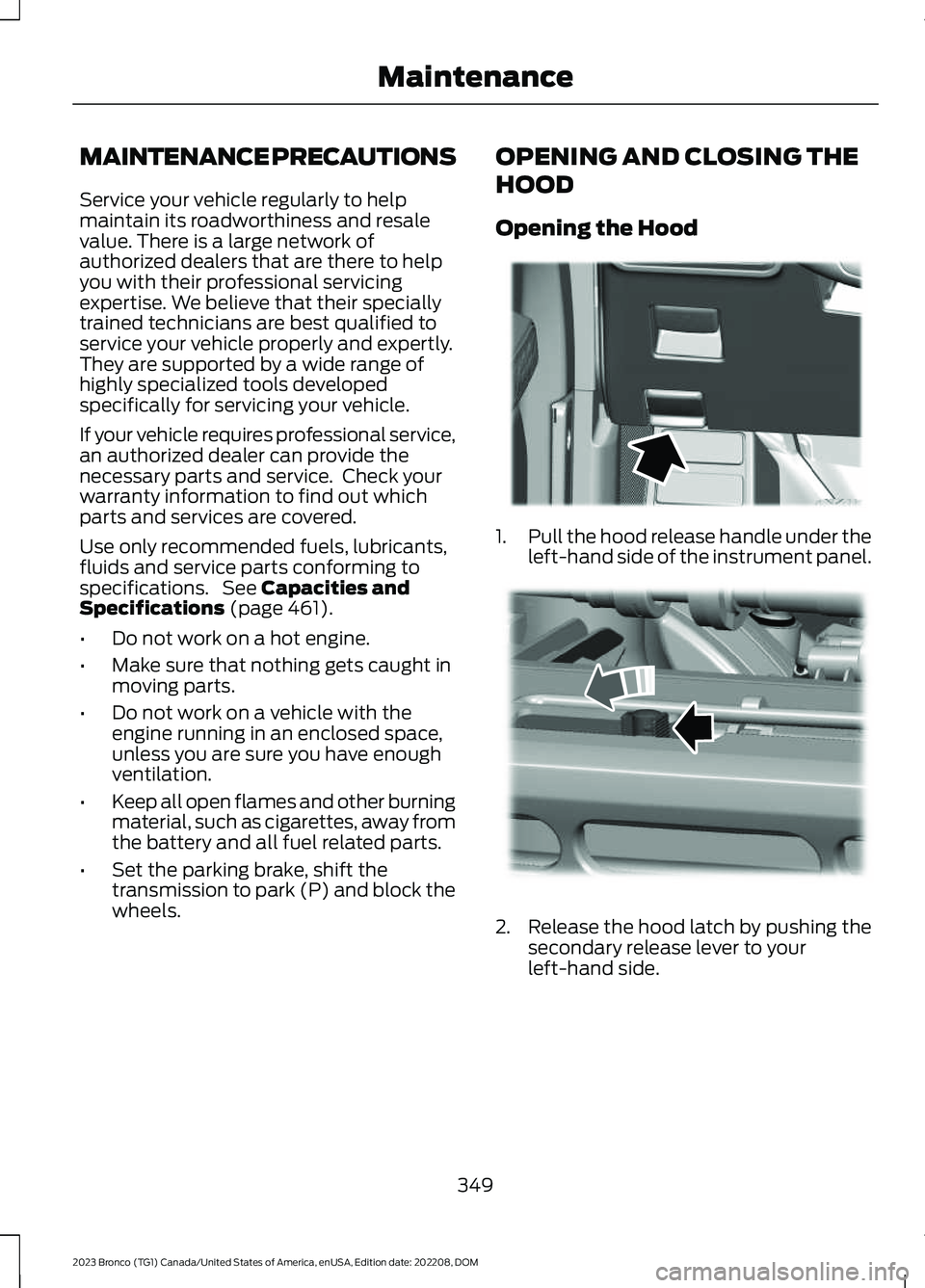
1.Pull the hood release handle under theleft-hand side of the instrument panel.
2.Release the hood latch by pushing thesecondary release lever to yourleft-hand side.
349
2023 Bronco (TG1) Canada/United States of America, enUSA, Edition date: 202208, DOMMaintenanceE331612 E331900
Page 354 of 642
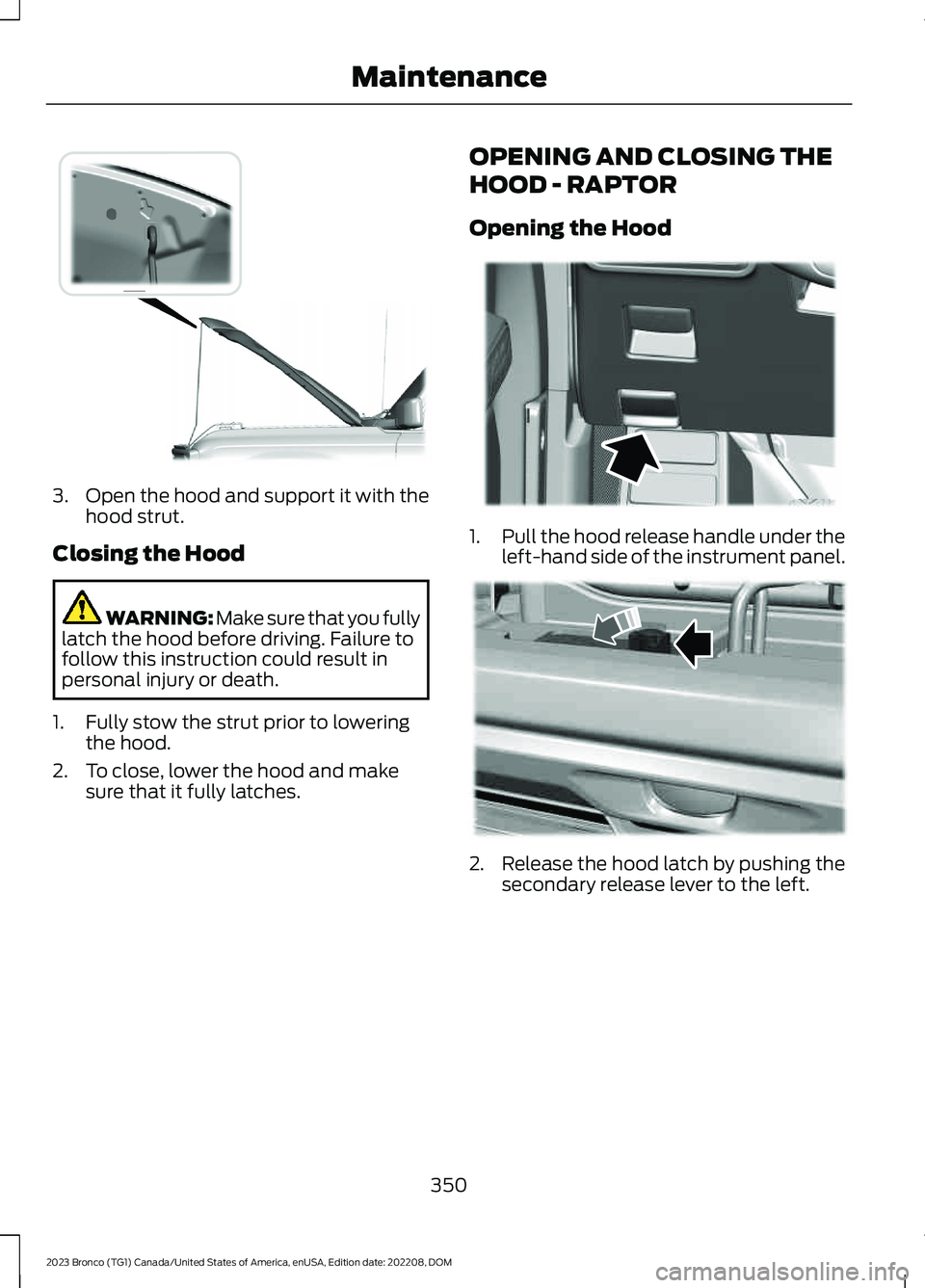
3.Open the hood and support it with thehood strut.
Closing the Hood
WARNING: Make sure that you fullylatch the hood before driving. Failure tofollow this instruction could result inpersonal injury or death.
1.Fully stow the strut prior to loweringthe hood.
2.To close, lower the hood and makesure that it fully latches.
OPENING AND CLOSING THE
HOOD - RAPTOR
Opening the Hood
1.Pull the hood release handle under theleft-hand side of the instrument panel.
2.Release the hood latch by pushing thesecondary release lever to the left.
350
2023 Bronco (TG1) Canada/United States of America, enUSA, Edition date: 202208, DOMMaintenanceE331793 E331612 E367125
Page 426 of 642
CLEANING THE EXTERIOR
CLEANING THE EXTERIORPRECAUTIONS
Immediately remove fuel spillages, birddroppings, insect deposits and road tarfrom your vehicle. These items may causedamage to your vehicle’s paintwork or trimover time.
Remove any exterior accessories, forexample antennas, before entering a carwash.
Cleaning the Exterior Precautions- Raptor, Sasquatch or Soft Toppackage
Wash your vehicle by hand, or by using atouchless commercial wash with nomechanical tracks on the floor.
CLEANING HEADLAMPS ANDREAR LAMPS
We recommend that you only use cold orlukewarm water containing car shampooto clean the headlamps and the rearlamps.
Do not scrape the lamps.
Do not wipe lamps when they are dry.
CLEANING WINDOWS AND WIPERBLADES
To clean the windshield and wiper blades:
•Clean the windshield with anon-abrasive glass cleaner.
Note:When cleaning the interior of thewindshield, avoid getting any glass cleaneron the instrument panel or door panels.Wipe any glass cleaner off these surfacesimmediately.
•Clean the wiper blades with washerfluid or water applied with a softsponge or cloth.
Note: Do not use razor blades or othersharp objects to clean or remove decalsfrom the inside of the heated rear window.This can cause damage not covered by thevehicle Warranty.
CLEANING CHROME, ALUMINIUMOR STAINLESS STEEL
We recommend that you only use a carshampoo, a soft cloth and water onbumpers and other chrome, aluminium orstainless steel parts.
Note:For additional information andassistance, we recommend that you contactan authorized dealer.
Note:Rinse the area well after cleaning.
Note:Do not use abrasive materials, forexample steel wool or plastic pads, as theycan scratch these surfaces.
Note:Do not use chrome cleaner, metalcleaner or polish on wheels or wheel covers.
CLEANING WHEELS
Only use a recommended wheel and tirecleaner to clean the wheels weekly. Foradditional information and assistance, werecommend that you contact anauthorized dealer.
1.Use a sponge to remove heavydeposits of dirt and brake dust.
2.Rinse well after cleaning.
Note:Do not apply a cleaning chemical towarm or hot wheel rims and covers.
422
2023 Bronco (TG1) Canada/United States of America, enUSA, Edition date: 202208, DOMVehicle Care
Page 428 of 642
CLEANING STRIPES ORGRAPHICS
It is recommended to wash your vehicle byhand however, pressure washing may beused under the following conditions:
•Use a spray with a 40° wide sprayangle pattern.
•Keep the nozzle at a 12 in (305 mm)distance and 90° angle to yourvehicle's surface.
•Do not use water pressure higher than2,000 psi (14,000 kPa).
•Do not use water hotter than 179°F(82°C).
Note:Holding the pressure washer nozzleat an angle to the vehicle's surface maydamage graphics and cause the edges topeel away from the vehicle's surface.
CLEANING CAMERA LENSES ANDSENSORS
We recommend that you only uselukewarm or cold water and a soft clothto clean the camera lens and sensors.
Note:Do not pressure wash camera lensand sensors.
CLEANING THE HARD TOP
We recommend that you only clean thehard top in the following way:
1.Use a sponge to remove dust and loosedirt on the hard top surface.
2.Wipe the surface with a soft, dampcloth and a mild soap and watersolution. Dry the area with a clean, softcloth.
3.Make sure the surface of your hard topis dry before applying a small amountof conditioner or spray wax.
4.For additional information andassistance, we recommend that youcontact an authorized dealer.
Note:Test any conditioner or spray wax onan inconspicuous area before applyingbroadly.
Note:Do not use alcohol containing cleaneror any type of solvent on the hard topsurface.
Note:Do not use power tools, paste waxor polish on the hard top surface.
CLEANING THE UNDERBODY
Regularly clean the underside of yourvehicle using water. Keep body and doordrain holes free of debris or foreignmaterial.
CLEANING THE INTERIOR
CLEANING THE INSTRUMENTPANEL
WARNING: Do not use chemicalsolvents or strong detergents whencleaning the steering wheel orinstrument panel to avoid contaminationof the airbag system.
We recommend that you only clean theinstrument panel and cluster lens with adamp soft cloth. Dry the area with a clean,soft cloth.
For additional information and assistance,we recommend that you contact anauthorized dealer.
Note:Avoid cleaners or polishes thatincrease the gloss of the upper portion ofthe instrument panel. The dull finish in thisarea helps protect you from undesirablewindshield reflection.
424
2023 Bronco (TG1) Canada/United States of America, enUSA, Edition date: 202208, DOMVehicle Care
Page 430 of 642
CLEANING VINYL
WARNING: On vehicles equippedwith seat-mounted airbags, do not usechemical solvents or strong detergents.Such products could contaminate theside airbag system and affectperformance of the side airbag in a crash.
We recommend that you only clean vinylsurfaces in the following way:
1.Remove dust and loose dirt with avacuum cleaner.
2.Wipe the surface with a soft, dampcloth and a mild soap and watersolution. Dry the area with a clean, softcloth.
3.For additional information andassistance, we recommend that youcontact an authorized dealer.
CLEANING CARPETS AND FLOORMATS
We recommend that you only clean yourcarpets in the following way:
1.Remove dust and loose dirt with avacuum cleaner.
2.Wipe the surface with a soft, dampcloth and a mild soap and watersolution. Dry the area with a clean, softcloth.
3.For additional information andassistance, we recommend that youcontact an authorized dealer.
For heavy stains, spot clean the area. If aring forms on the fabric, clean the entirearea immediately, but do not over-saturateor the ring could set.
We recommend that you only clean yourfloor mats in the following way:
1.Remove dust and loose dirt with avacuum cleaner.
2.Wash rubber floor mats using mildsoap and lukewarm or cold water.
3.Completely dry the floor mat beforeplacing them back in your vehicle.
Cleaning Rubber Floors
1.Remove the floor mats prior to washingout. See Floor Mats (page 327).
Note:Prior to washing out, remove largedebris to prevent clogging the drain.
2.Turn active drain plugs in eachpassenger compartmentcounterclockwise to open.
3.Wash out debris using a standardgarden style hose.
Note:Use caution to not spray seats,console, door interior, electrical connections,instrument cluster display and underside ofthe instrument panel on both driver andpassenger sides.
4.Wipe out remaining water or debrisfrom the floor.
5.Install active drain plugs and turnclockwise to close.
6.Reinstall floor mats.
CLEANING SEATBELTS
WARNING: Do not use cleaningsolvents, bleach or dye on the vehicle'sseatbelts, as these actions may weakenthe belt webbing.
1.Wipe the surface with a soft, dampcloth and a mild soap and watersolution. Dry the area with a clean, softcloth.
426
2023 Bronco (TG1) Canada/United States of America, enUSA, Edition date: 202208, DOMVehicle Care
Page 486 of 642
VEHICLE IDENTIFICATION
NUMBER
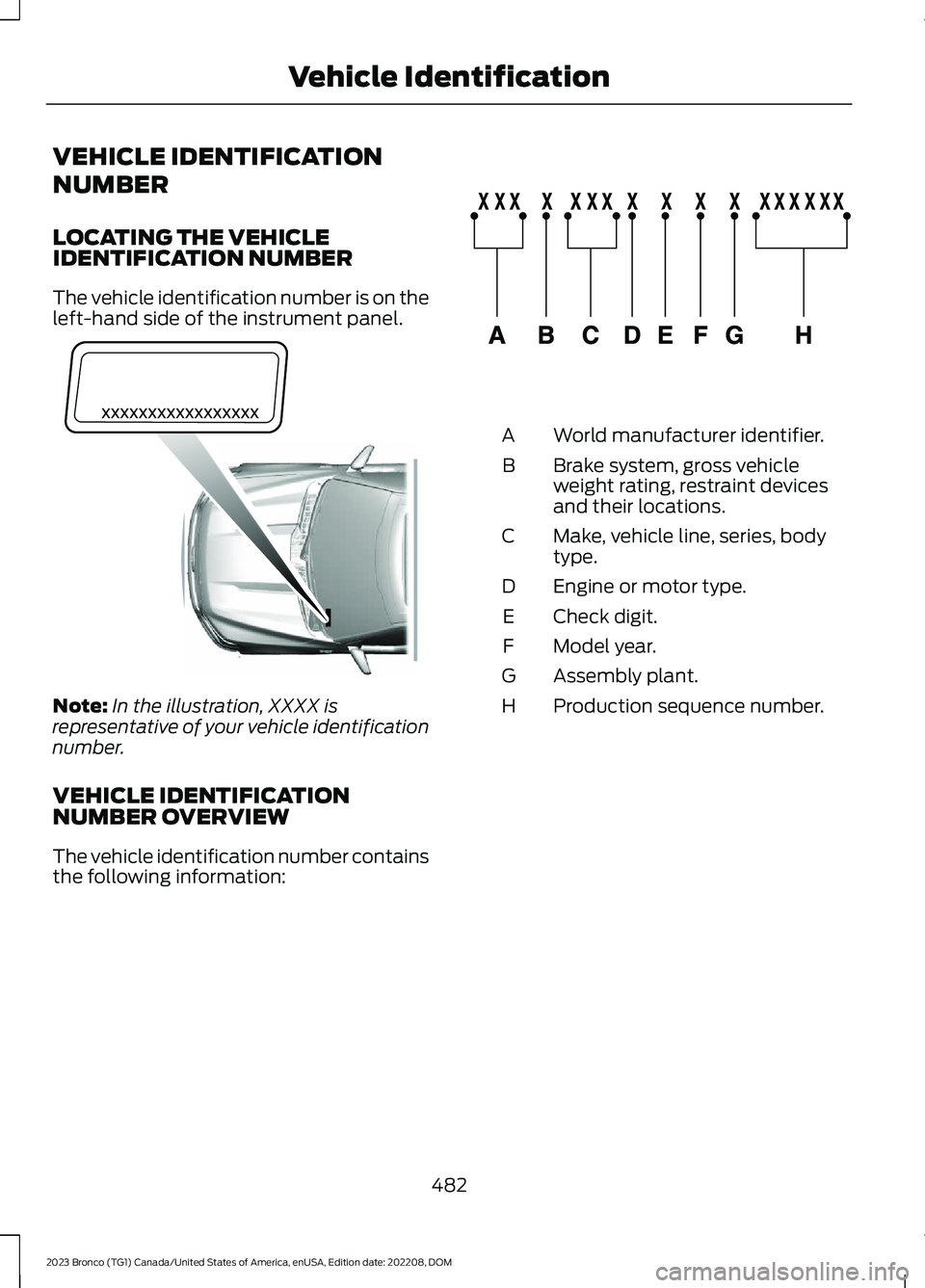
LOCATING THE VEHICLEIDENTIFICATION NUMBER
The vehicle identification number is on theleft-hand side of the instrument panel.
Note:In the illustration, XXXX isrepresentative of your vehicle identificationnumber.
VEHICLE IDENTIFICATIONNUMBER OVERVIEW
The vehicle identification number containsthe following information:
World manufacturer identifier.A
Brake system, gross vehicleweight rating, restraint devicesand their locations.
B
Make, vehicle line, series, bodytype.C
Engine or motor type.D
Check digit.E
Model year.F
Assembly plant.G
Production sequence number.H
482
2023 Bronco (TG1) Canada/United States of America, enUSA, Edition date: 202208, DOMVehicle IdentificationE311767 E142477
Page 619 of 642
1
12V Battery......................................................36112V Battery Precautions...................................361Battery Management SystemLimitations......................................................362Changing the 12V Battery...............................362Charging the 12V Battery................................364How Does the Battery ManagementSystem Work..................................................362Recycling and Disposing of the 12VBattery..............................................................364Resetting the Battery Sensor........................363What Is the Battery ManagementSystem..............................................................36212V Battery – Troubleshooting...............36412V Battery – Information Messages.........36412V Battery – Warning Lamps......................364
3
360 Degree Camera....................................247360 Degree Camera Settings.......................249360 Degree Camera Guide Lines..........248360 Degree Camera Precautions..........247360 Degree Camera Settings.................249Switching the 360 Degree Camera On andOff......................................................................249Switching the 360 Degree CameraView...................................................................249
4
4WDSee: Four-Wheel Drive.....................................195
9
911 Assist............................................................77
A
A/CSee: Climate Control - Vehicles With:Automatic Temperature Control...............131See: Climate Control - Vehicles With: ManualTemperature Control....................................136About This Publication.................................18
About Us.............................................................15ABSSee: Brakes..........................................................209Accessing Apps..............................................511Accessing Navigation..................................514Accessing the Passive Key BackupPosition.........................................................169Accessories....................................................520Adaptive Cruise Control............................252Adaptive Cruise Control –Troubleshooting............................................258Adaptive Cruise Control Indicators........257Adaptive Cruise ControlLimitations...................................................253Adaptive Cruise ControlPrecautions.................................................252Adaptive Cruise Control –Troubleshooting........................................258Adaptive Cruise Control – InformationMessages.........................................................258Adjusting the Exterior Mirrors....................116Adjusting the Headlamps........................365Adjusting the Instrument Panel LightingBrightness......................................................112Adjusting the Map........................................514Changing the Format of the Map.................514Zooming the Map In and Out.........................514Adjusting the Seatbelts DuringPregnancy......................................................63Adjusting the Sound Settings................489Adjusting the Steering Wheel...................99Adjusting the Volume................................489Aid Mode.........................................................274How Does Aid Mode Work..............................274What Is Aid Mode...............................................274Airbag Precautions........................................70Airbags...............................................................68Front Passenger Sensing System...................72Air ConditioningSee: Climate Control - Vehicles With:Automatic Temperature Control...............131See: Climate Control - Vehicles With: ManualTemperature Control....................................136Air Conditioning System Capacity andSpecification - 2.3L EcoBoost™/2.7LEcoBoost™.................................................476Air Conditioning System Capacity andSpecification - 3.0L EcoBoost™.........475
615
2023 Bronco (TG1) Canada/United States of America, enUSA, Edition date: 202208, DOMIndex
Page 622 of 642
Calculating the Load Limit.......................298Canceling the Set Speed..........................223Capacities and Specifications.................461Catalytic Converter......................................185Catalytic Converter –Troubleshooting.............................................185Catalytic Converter Precautions.............185Catalytic Converter –Troubleshooting.........................................185Catalytic Converter – WarningLamps................................................................185Center Console - AutomaticTransmission.................................................35Center Console..............................................162Locking the Center Console............................162Opening the Center Console..........................162Center Console - ManualTransmission.................................................34Center Display Limitations......................498Center Display Overview..........................498Center Display Precautions.....................498Changing a Flat Tire - Excluding:Raptor...........................................................449Changing a Flat Tire - Raptor..................453Changing a Road Wheel...........................449Changing the Engine Air Filter - 2.3LEcoBoost™/2.7L EcoBoost™..............359Changing the Engine Air Filter - 3.0LEcoBoost™................................................360Changing the Fuel Filter.............................361Changing the Remote ControlBattery............................................................80Changing the Vehicle Wi-Fi HotspotName or Password..................................486Charging a Device.........................................156Charging a Wireless Device.......................161Checking MyKey System Status..............86Checking the Brake Fluid..........................209Checking the Clutch Fluid Level.............188Checking the Coolant................................355Checking the Manual Transmission FluidLevel...............................................................188Checking the Seatbelts...............................65Checking the Tire Pressures.....................441Checking the Wiper Blades.......................101Children and Airbags......................................71
Child Restraint Anchor Points...................50Locating the Child Restraint Lower AnchorPoints...................................................................50Locating the Child Restraint Top TetherAnchor Points....................................................51What Are the Child Restraint AnchorPoints...................................................................50Child Restraints................................................51Child Restraint Position Information..............51Child Restraints Recommendation...............53Child Safety......................................................49Child Restraint Anchor Points.........................50Child Restraints......................................................51Installing Child Restraints.................................53Child Safety Locks.........................................59Child Safety Precautions.............................49Cleaning Products........................................421Cleaning the Exterior..................................422Cleaning Camera Lenses andSensors.............................................................424Cleaning Chrome, Aluminium or StainlessSteel...................................................................422Cleaning Headlamps and RearLamps...............................................................422Cleaning Stripes or Graphics.........................424Cleaning the Convertible Top........................423Cleaning the Engine Compartment............423Cleaning the Exterior Precautions...............422Cleaning the Hard Top.....................................424Cleaning the Underbody.................................424Cleaning Wheels................................................422Cleaning Windows and WiperBlades...............................................................422Cleaning the Interior...................................424Cleaning Carpets and Floor Mats................426Cleaning Displays and Screens....................425Cleaning Fabric...................................................425Cleaning Leather................................................425Cleaning Plastic..................................................425Cleaning Seatbelts............................................426Cleaning the Instrument Panel....................424Cleaning Vinyl.....................................................426Clearing All MyKeys.......................................86Climate Control..............................................131Auto Mode.............................................................133Climate Control Hints.................................134
618
2023 Bronco (TG1) Canada/United States of America, enUSA, Edition date: 202208, DOMIndex
Page 628 of 642
Instrument Cluster Display Main Menu -Raptor.............................................................127Instrument Cluster Indicators -Excluding: Raptor........................................121Instrument Cluster Indicators -Raptor............................................................123Instrument Cluster.........................................117Fuel Gauge.............................................................118Instrument Cluster Overview - Excluding:Raptor..............................................................117Instrument Cluster Overview -Raptor.............................................................118Instrument Cluster WarningLamps............................................................120Instrument Panel............................................33Interior Air Quality........................................139Interior Bulbs.................................................369Interior Bulb Specification Chart.................369Interior Lamp Function.................................111Switching the Interior Lamp Function Onand Off.................................................................111What Is the Interior Lamp Function...............111Interior Lighting................................................111Ambient Lighting..................................................112Interior Lamp Function.......................................111Interior Lighting – Troubleshooting...............112Interior Lighting – Troubleshooting.........112Interior Lighting – Frequently AskedQuestions...........................................................112Interior Mirror...................................................115Auto-Dimming Interior Mirror..........................115Interior Mirror Precautions..........................115Introduction.......................................................18
J
Jump Starting the Vehicle........................329Jump Starting Precautions............................329Jump Starting the Vehicle..............................330Preparing the Vehicle.......................................330
K
Keyless Entry.....................................................91Keyless Entry – Troubleshooting....................92Keyless Entry Limitations.............................91Keyless Entry Settings...................................91
Keyless Entry – Troubleshooting..............92Keyless Entry – Frequently AskedQuestions...........................................................92Keys and Remote Controls.........................79Keys and Remote Controls –Troubleshooting..............................................83Keys and Remote Controls –Troubleshooting..........................................83Keys and Remote Controls – InformationMessages...........................................................83
L
Lane Keeping System Indicators............275Lane Keeping System.................................272Aid Mode...............................................................274Alert and Aid Mode............................................274Alert Mode............................................................273Lane Keeping System –Troubleshooting............................................276Lane Keeping System Limitations.........272Lane Keeping System Precautions........272Lane Keeping System –Troubleshooting........................................276Lane Keeping System – Frequently AskedQuestions.........................................................277Lane Keeping System – InformationMessages.........................................................276Launching or Retrieving a Boat orPersonal Watercraft.................................310Live Traffic.......................................................514Switching Live Traffic On and Off................514What Is Live Traffic.............................................514Load Carrying................................................295Fender Anchor Points......................................303Roof Rack.............................................................299Load Carrying Precautions.......................295Loading Your Trailer...................................308Locating the 360 Degree Cameras.......247Locating the Auxiliary Switches.............522Locating the Auxiliary SwitchWiring............................................................522Locating the Blind Spot InformationSystem Sensors - Excluding:Raptor...........................................................280Locating the Blind Spot InformationSystem Sensors - Raptor........................281
624
2023 Bronco (TG1) Canada/United States of America, enUSA, Edition date: 202208, DOMIndex