tailgate FORD BRONCO 2023 Owner's Manual
[x] Cancel search | Manufacturer: FORD, Model Year: 2023, Model line: BRONCO, Model: FORD BRONCO 2023Pages: 642, PDF Size: 14.71 MB
Page 395 of 642
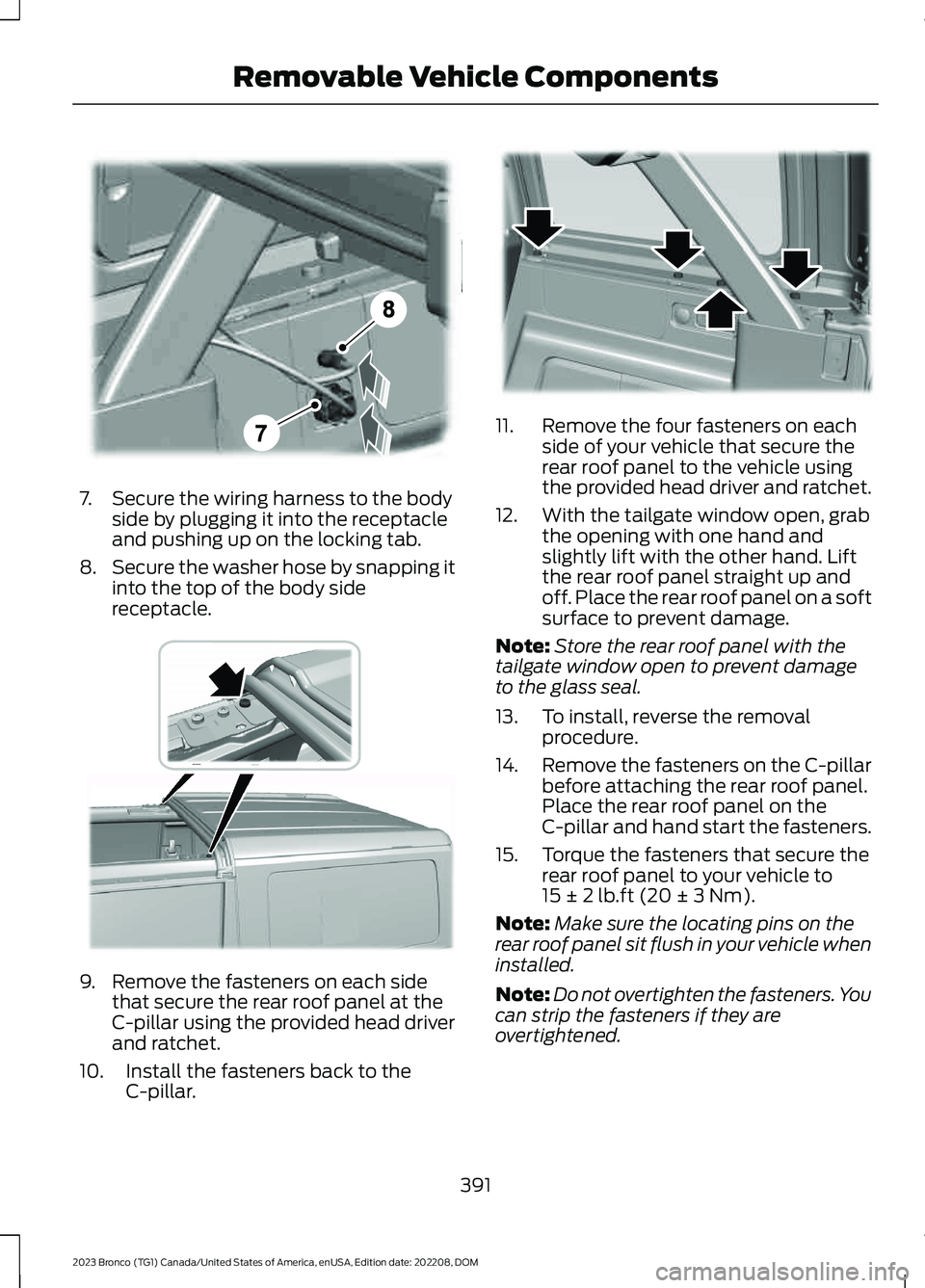
7.Secure the wiring harness to the bodyside by plugging it into the receptacleand pushing up on the locking tab.
8.Secure the washer hose by snapping itinto the top of the body sidereceptacle.
9.Remove the fasteners on each sidethat secure the rear roof panel at theC-pillar using the provided head driverand ratchet.
10.Install the fasteners back to theC-pillar.
11.Remove the four fasteners on eachside of your vehicle that secure therear roof panel to the vehicle usingthe provided head driver and ratchet.
12.With the tailgate window open, grabthe opening with one hand andslightly lift with the other hand. Liftthe rear roof panel straight up andoff. Place the rear roof panel on a softsurface to prevent damage.
Note:Store the rear roof panel with thetailgate window open to prevent damageto the glass seal.
13.To install, reverse the removalprocedure.
14.Remove the fasteners on the C-pillarbefore attaching the rear roof panel.Place the rear roof panel on theC-pillar and hand start the fasteners.
15.Torque the fasteners that secure therear roof panel to your vehicle to15 ± 2 lb.ft (20 ± 3 Nm).
Note:Make sure the locating pins on therear roof panel sit flush in your vehicle wheninstalled.
Note:Do not overtighten the fasteners. Youcan strip the fasteners if they areovertightened.
391
2023 Bronco (TG1) Canada/United States of America, enUSA, Edition date: 202208, DOMRemovable Vehicle ComponentsE335340 E376079 E333997
Page 400 of 642
Note:Do not lift using the top rail only.
3.Make sure both sides fully latch.
4.Latch the two latches at the header.
Note:Do not drive without the soft topproperly latched or fully open.
Accessing the Rear Cargo Area
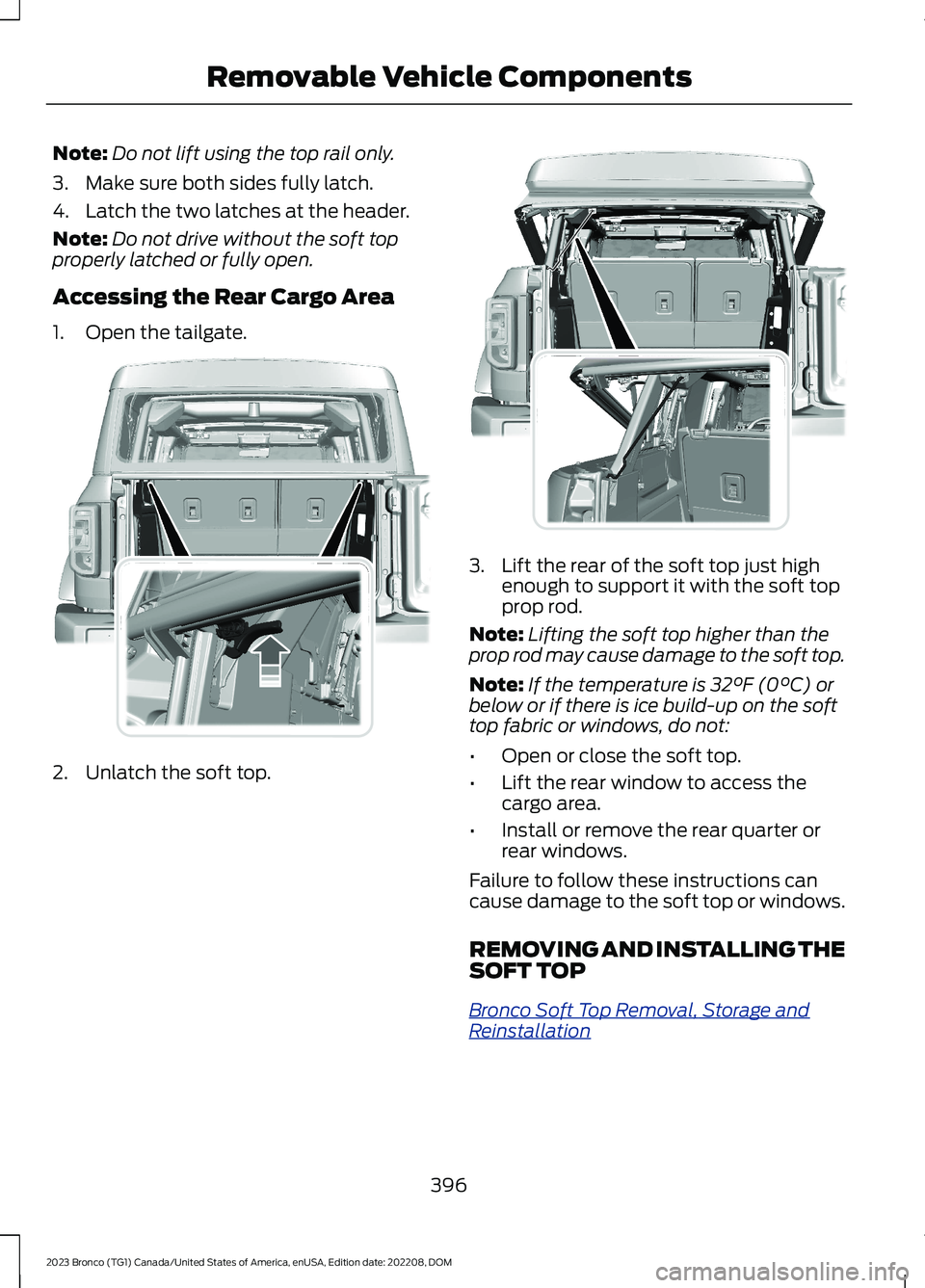
1.Open the tailgate.
2.Unlatch the soft top.
3.Lift the rear of the soft top just highenough to support it with the soft topprop rod.
Note:Lifting the soft top higher than theprop rod may cause damage to the soft top.
Note:If the temperature is 32°F (0°C) orbelow or if there is ice build-up on the softtop fabric or windows, do not:
•Open or close the soft top.
•Lift the rear window to access thecargo area.
•Install or remove the rear quarter orrear windows.
Failure to follow these instructions cancause damage to the soft top or windows.
REMOVING AND INSTALLING THESOFT TOP
Bronco Soft Top Removal, Storage andReinstallation
396
2023 Bronco (TG1) Canada/United States of America, enUSA, Edition date: 202208, DOMRemovable Vehicle ComponentsABA12203AAE343763 ABA12203AAE343786
Page 414 of 642
Note:We recommend tightening theeyebolts to 13 lb.ft (17 Nm).
Note:The eyebolts can remain installed onthe vehicle. Make sure the eyebolts are fullytightened each time they are used.
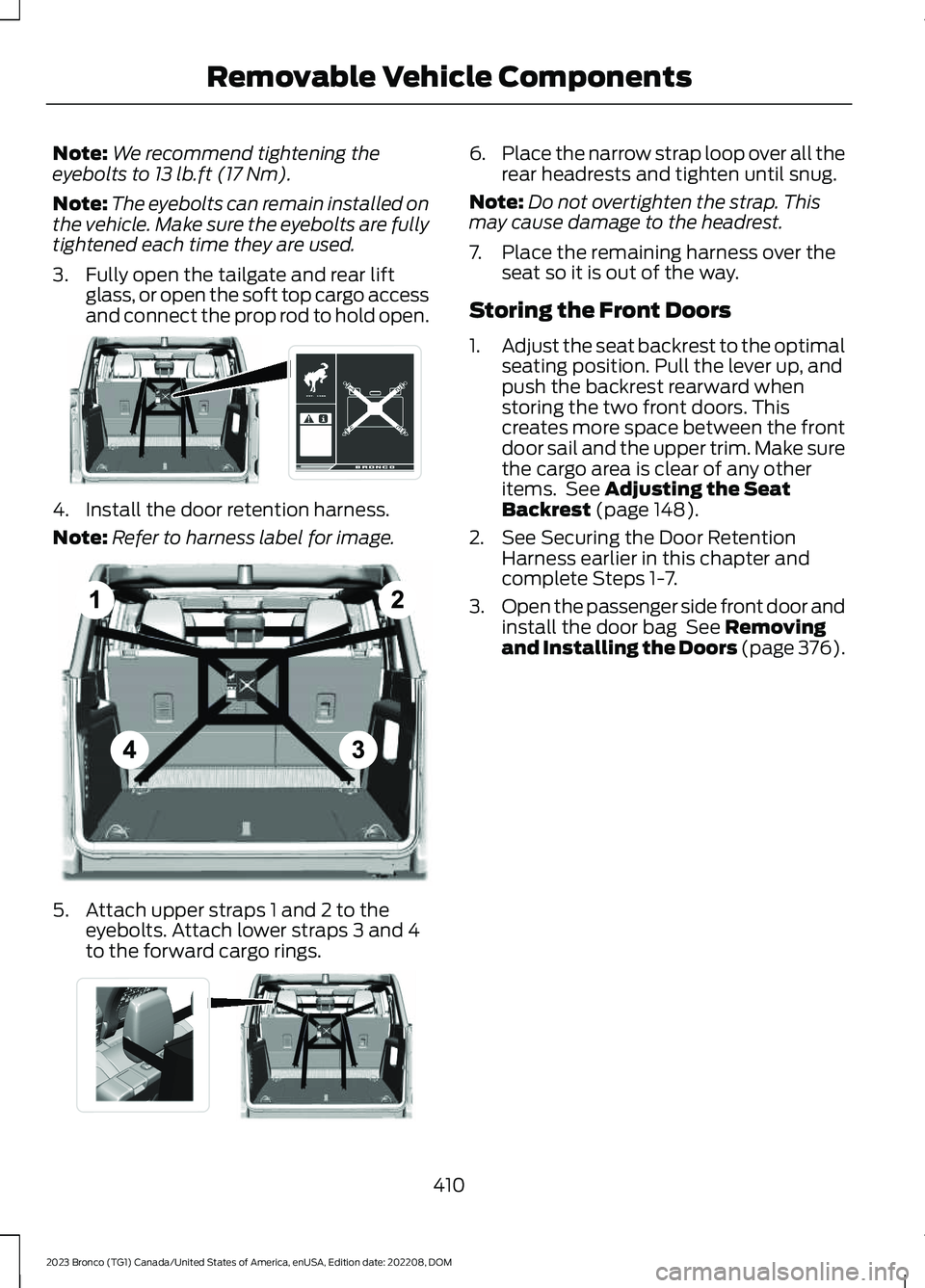
3.Fully open the tailgate and rear liftglass, or open the soft top cargo accessand connect the prop rod to hold open.
4.Install the door retention harness.
Note:Refer to harness label for image.
5.Attach upper straps 1 and 2 to theeyebolts. Attach lower straps 3 and 4to the forward cargo rings.
6.Place the narrow strap loop over all therear headrests and tighten until snug.
Note:Do not overtighten the strap. Thismay cause damage to the headrest.
7.Place the remaining harness over theseat so it is out of the way.
Storing the Front Doors
1.Adjust the seat backrest to the optimalseating position. Pull the lever up, andpush the backrest rearward whenstoring the two front doors. Thiscreates more space between the frontdoor sail and the upper trim. Make surethe cargo area is clear of any otheritems. See Adjusting the SeatBackrest (page 148).
2.See Securing the Door RetentionHarness earlier in this chapter andcomplete Steps 1-7.
3.Open the passenger side front door andinstall the door bag See Removingand Installing the Doors (page 376).
410
2023 Bronco (TG1) Canada/United States of America, enUSA, Edition date: 202208, DOMRemovable Vehicle ComponentsE339054 E339061 E339067
Page 417 of 642
Note:Four door storage in the cargo areawill prevent the soft tops from fullyretracting. Limit to the partially openposition.
Note:Make sure the rear seat headrests areupright.
2.See Securing the Door RetentionHarness earlier in this chapter andcomplete Steps 1-7.
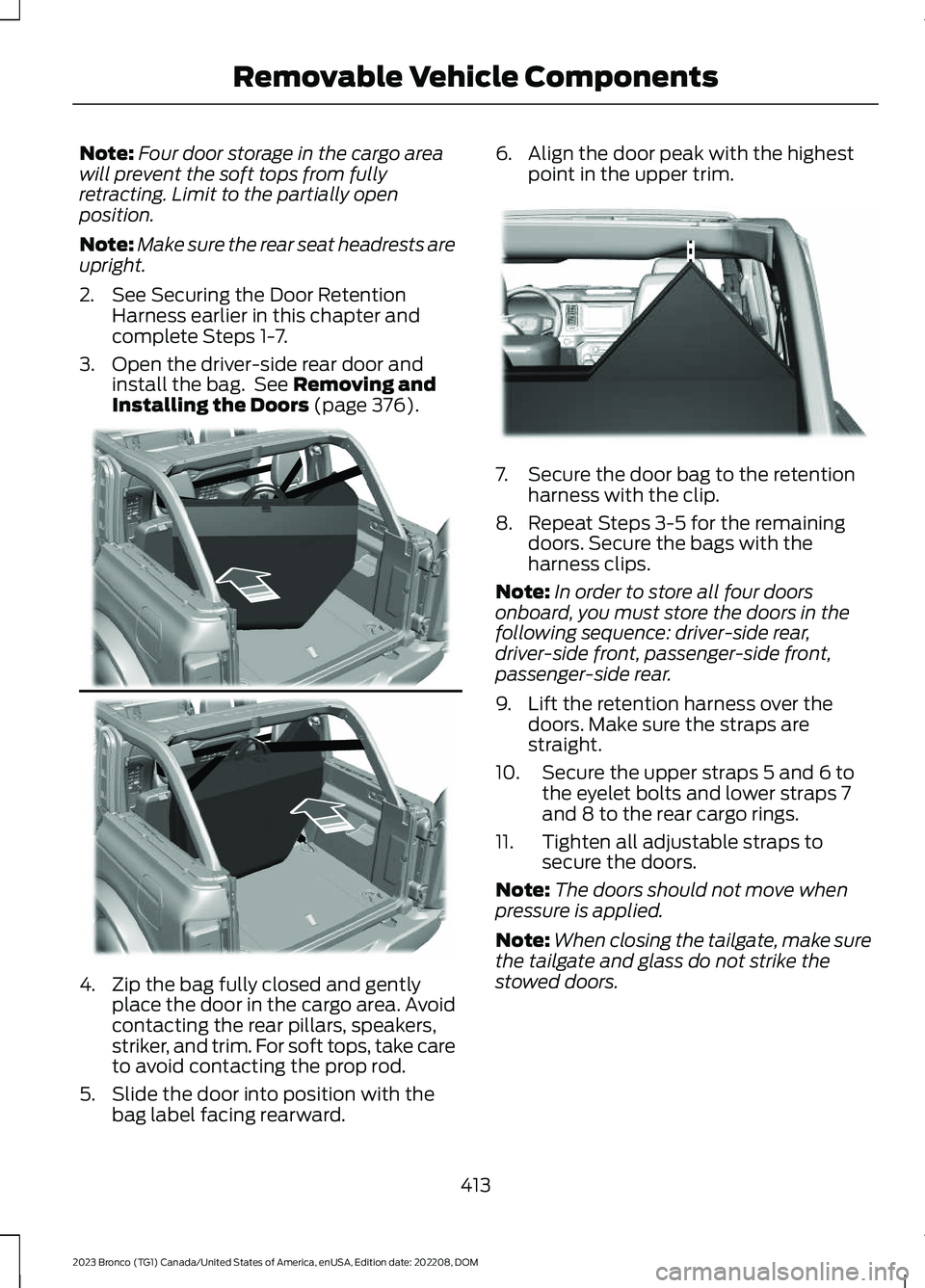
3.Open the driver-side rear door andinstall the bag. See Removing andInstalling the Doors (page 376).
4.Zip the bag fully closed and gentlyplace the door in the cargo area. Avoidcontacting the rear pillars, speakers,striker, and trim. For soft tops, take careto avoid contacting the prop rod.
5.Slide the door into position with thebag label facing rearward.
6.Align the door peak with the highestpoint in the upper trim.
7.Secure the door bag to the retentionharness with the clip.
8.Repeat Steps 3-5 for the remainingdoors. Secure the bags with theharness clips.
Note:In order to store all four doorsonboard, you must store the doors in thefollowing sequence: driver-side rear,driver-side front, passenger-side front,passenger-side rear.
9.Lift the retention harness over thedoors. Make sure the straps arestraight.
10.Secure the upper straps 5 and 6 tothe eyelet bolts and lower straps 7and 8 to the rear cargo rings.
11.Tighten all adjustable straps tosecure the doors.
Note:The doors should not move whenpressure is applied.
Note:When closing the tailgate, make surethe tailgate and glass do not strike thestowed doors.
413
2023 Bronco (TG1) Canada/United States of America, enUSA, Edition date: 202208, DOMRemovable Vehicle ComponentsE338915 E339016
Page 420 of 642
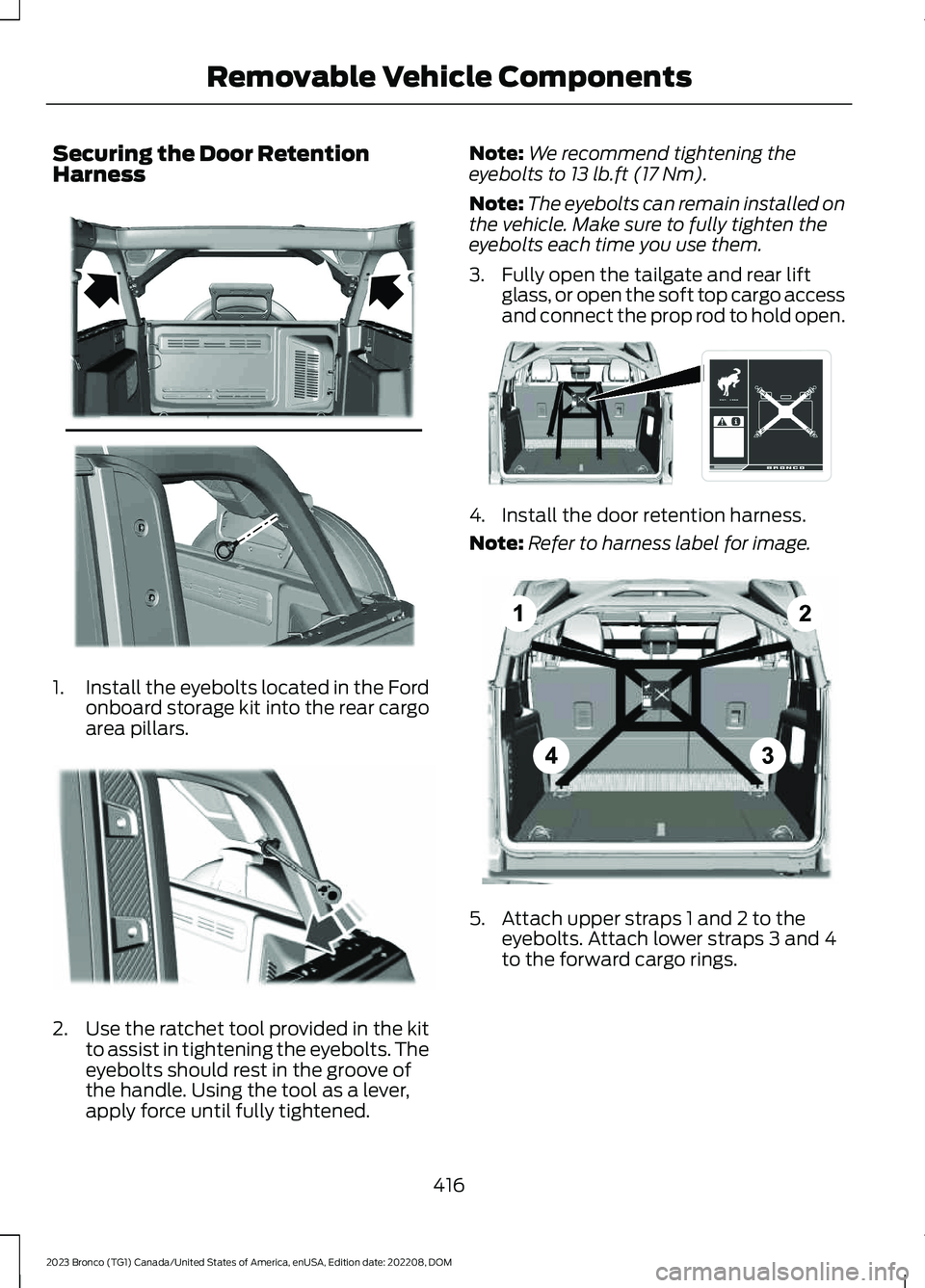
Securing the Door RetentionHarness
1.Install the eyebolts located in the Fordonboard storage kit into the rear cargoarea pillars.
2.Use the ratchet tool provided in the kitto assist in tightening the eyebolts. Theeyebolts should rest in the groove ofthe handle. Using the tool as a lever,apply force until fully tightened.
Note:We recommend tightening theeyebolts to 13 lb.ft (17 Nm).
Note:The eyebolts can remain installed onthe vehicle. Make sure to fully tighten theeyebolts each time you use them.
3.Fully open the tailgate and rear liftglass, or open the soft top cargo accessand connect the prop rod to hold open.
4.Install the door retention harness.
Note:Refer to harness label for image.
5.Attach upper straps 1 and 2 to theeyebolts. Attach lower straps 3 and 4to the forward cargo rings.
416
2023 Bronco (TG1) Canada/United States of America, enUSA, Edition date: 202208, DOMRemovable Vehicle ComponentsE368480 E339585 E368481 E368482
Page 623 of 642
Closing the Tailgate.......................................93Closing the Tailgate From Outside YourVehicle.................................................................93Clutch Fluid Capacity andSpecification...............................................188Cold Weather Precautions.......................326Connected Navigation................................514Connected Vehicle......................................483Connected Vehicle –Troubleshooting...........................................484Connecting the Vehicle to a MobileNetwork............................................................483Connected Vehicle Data..............................25Connected Vehicle Limitations..............483Connected Vehicle Requirements........483Connected Vehicle –Troubleshooting.......................................484Connected Vehicle – Frequently AskedQuestions........................................................484Connecting a Bluetooth® Device...........510Connecting a Trailer...................................305Connecting a Trailer –Troubleshooting...........................................306Connecting a Trailer Precautions..........305Connecting a Trailer –Troubleshooting.......................................306Connecting a Trailer – InformationMessages........................................................306Connecting the Vehicle to a MobileNetwork.......................................................483Connecting FordPass to the Modem.........483Enabling and Disabling the Modem...........483What Is the Modem..........................................483Connecting the Vehicle to a Wi-FiNetwork.......................................................483Connecting Your Phone............................505Contacting Us...................................................16Cooling System Capacity andSpecification - 2.3L EcoBoost™.........472Cooling System Capacity andSpecification - 2.7L EcoBoost™/3.0LEcoBoost™.................................................473Crash and BreakdownInformation.................................................328Automatic Crash Shutoff................................332Jump Starting the Vehicle..............................329Post-Crash Alert System.................................331Post Impact Braking..........................................331
Recovery Towing................................................332Crash Sensors and Airbag Indicator........75Crawler Gear..................................................186Using Crawler Gear............................................186What Is Crawler Gear........................................186Creating a MyKey...........................................85Creating a Vehicle Wi-Fi Hotspot.........486Cross Traffic Alert........................................283Cross Traffic Alert –Troubleshooting............................................285Cross Traffic Alert Indicators...................284Cross Traffic Alert Limitations................283Cross Traffic Alert Precautions...............283Cross Traffic Alert –Troubleshooting........................................285Cross Traffic Alert – InformationMessages.........................................................285Cruise Control...............................................250Cruise Control Indicators...........................251Customer Information...............................538Radio Frequency CertificationLabels................................................................542Customizing the Instrument ClusterDisplay............................................................127
D
Data Privacy.....................................................23Department of Transportation UniformTire Quality Grades..................................430Digital Radio...................................................491Digital Radio Indicators...................................492Digital Radio Limitations.................................491How Does Digital Radio Work.......................491Switching Digital Radio Reception On andOff......................................................................492What Is Digital Radio........................................491Directing the Flow of Air.............................132Disposing of Airbags.....................................76Distance Indication.....................................289Distance Indication Indicator........................290Switching Distance Indication On andOff......................................................................290What Is Distance Indication..........................289Doors and Locks.............................................88Autolock..................................................................89Autounlock.............................................................88Doors and Locks – Troubleshooting.............89
619
2023 Bronco (TG1) Canada/United States of America, enUSA, Edition date: 202208, DOMIndex
Page 629 of 642
Locating the Brake Fluid Reservoir - 2.3LEcoBoost™................................................209Locating the Brake Fluid Reservoir - 2.7LEcoBoost™/3.0L EcoBoost™............209Locating the Cross Traffic Alert Sensors- Excluding: Raptor..................................284Locating the Cross Traffic Alert Sensors- Raptor........................................................284Locating the Fuel Filler Funnel................180Locating the Power Outlets......................158Locating the Pre-Collision AssistSensors........................................................288Locating the Rear View Camera............244Locating the Safety ComplianceCertification Labels.................................296Locating the Tire label...............................430Locating the USB Ports..............................156Locating the Wireless AccessoryCharger...........................................................161Locating Your Vehicle...................................80Locking and Unlocking the Tailgate........93Locking the Rear Window Controls........114
M
Maintenance.................................................34912V Battery............................................................36112V Battery – Troubleshooting.....................364Engine Oil..............................................................354Exterior Bulbs......................................................367Interior Bulbs.......................................................369Maintenance Precautions........................349Making and Receiving a PhoneCall.................................................................507Manually Dimming the InteriorMirror...............................................................115Manually Releasing the Electric ParkingBrake...............................................................213Manually Shifting Gears..............................191Shifting Using the Buttons on the SelectorLever...................................................................192Shifting Using the Paddle Shifters................191Manual Seats..................................................141Adjusting the Head Restraint..........................141Adjusting the Seat Backrest...........................143Folding the Seats...............................................148Head Restraint Components..........................141Installing the Head Restraint..........................142
Moving the Seat Backward andForward.............................................................142Removing the Head Restraint........................142Unfolding the Seats...........................................149Manual Transmission Fluid Capacity andSpecification...............................................188Manual Transmission.................................186Crawler Gear........................................................186Manual Transmission –Troubleshooting.............................................189Manual Transmission Precautions........186Manual Transmission –Troubleshooting........................................189Manual Transmission – Frequently AskedQuestions.........................................................189Map Pocket.....................................................163Locating the Map Pocket.................................163Mislock...............................................................89Mislock Limitations.............................................89Switching Mislock On and Off........................89What Is Mislock....................................................89Mobile CommunicationsEquipment..................................................583Mobile Device Data.......................................26Motorcraft Parts - 2.3LEcoBoost™................................................464Motorcraft Parts - 2.7LEcoBoost™.................................................465Motorcraft Parts - 3.0LEcoBoost™................................................466Muting the Audio.........................................489MyKey Settings...............................................84Configurable MyKey Settings..........................84Non-Configurable MyKey Settings................84MyKey – Troubleshooting...........................86MyKey – Frequently Asked Questions..........87MyKey – Information Messages.....................86MyKey™............................................................84MyKey Settings.....................................................84MyKey – Troubleshooting.................................86
N
Navigation Map Updates...........................514Navigation.......................................................514Adjusting the Map..............................................514Live Traffic.............................................................514Route Guidance..................................................516
625
2023 Bronco (TG1) Canada/United States of America, enUSA, Edition date: 202208, DOMIndex
Page 630 of 642
Setting a Destination........................................515Waypoints.............................................................515Normal Scheduled Maintenance...........531
O
Off-Road Driving...........................................318After Driving Your Vehicle Off-Road...........325Basic Off-Road Driving Techniques.............318Driving Off-Road.................................................319Driving Through Water Limitations.............323Driving Your Vehicle at High Speeds...........323Off-Road Driving Aids......................................324Off-Road Driving Precautions.......................318What Is Off-Road Driving................................318Opening and Closing the Hood..............349Opening and Closing the Hood -Raptor...........................................................350Opening and Closing the Windows........113Opening the Tailgate....................................93Opening the Tailgate From Outside YourVehicle.................................................................93Operating the Doors From Inside YourVehicle............................................................88Opening the Doors From Inside YourVehicle.................................................................88Unlocking and Locking the Doors Using theCentral Locking................................................88Operating the Doors From Outside YourVehicle............................................................88Unlocking and Locking the Doors Using theRemote Control...............................................88Ordering a Canadian French Owner'sManual..........................................................539OTASee: Software Update Settings.....................517See: Vehicle Software Updates.....................517Overriding the Set Speed..........................257Over the airSee: Software Update Settings.....................517Over-the-airSee: Software Update Settings.....................517See: Vehicle Software Updates.....................517See: Vehicle Software Updates.....................517
P
Parking Aid Indicators................................243
Parking Aid Precautions............................240Parking Aids...................................................240Front Parking Aid.................................................241Parking Aids – Troubleshooting...................243Rear Parking Aid..................................................241Parking Aids – Troubleshooting.............243Parking Aids – InformationMessages.........................................................243Passive Anti-Theft System.........................97How Does the Passive Anti-Theft SystemWork.....................................................................97What Is the Passive Anti-TheftSystem.................................................................97Perchlorate.....................................................582Performing a System Reset......................519Personalized Settings.................................128Changing the Instrument Cluster DisplayLanguage..........................................................128Changing the Measurement Unit.................128Changing the Temperature Unit...................128Changing the Tire Pressure Unit...................128Personal Safety SystemComponents.................................................67Personal Safety System™..........................67Phone Menu..................................................505Phone..............................................................505Phone Precautions.....................................505Playing Media Using Bluetooth®...........510Playing Media Using the USB Port........156Playing or Pausing the AudioSource..........................................................488Post-Crash Alert System...........................331How Does the Post-Crash Alert SystemWork....................................................................331Post-Crash Alert System Limitations..........331Switching the Post-Crash Alert SystemOff........................................................................331What Is the Post-Crash Alert System.........331Post Impact Braking....................................331How Does Post Impact Braking Work.........331Overriding Post Impact Braking...................332Post Impact Braking Indicators....................332Post Impact Braking Limitations..................331Power Outlet Indicators.............................158Power Outlet..................................................158Power Outlet Precautions.........................158Power Seats....................................................143Adjusting the Head Restraint.........................143
626
2023 Bronco (TG1) Canada/United States of America, enUSA, Edition date: 202208, DOMIndex
Page 634 of 642
Sitting in the Correct Position.................140Slide Out Tailgate..........................................95Software Update Indicators.....................518Software Update Settings.........................517Software UpdateSee: Software Update Settings.....................517See: Vehicle Software Updates.....................517Sounding the Panic Alarm.........................80Special Operating Conditions ScheduledMaintenance...............................................533Speed ControlSee: Cruise Control...........................................250Speedometer..................................................118Stability Control Indicator..........................221Stability Control............................................219Stabilizer Bar DisconnectIndicators......................................................231Stabilizer Bar DisconnectPrecautions.................................................229Stabilizer Bar Disconnect.........................229Stabilizer Bar Disconnect –Troubleshooting.............................................231Stabilizer Bar Disconnect –Troubleshooting.........................................231Stabilizer Bar Disconnect – FrequentlyAsked Questions...........................................233Stabilizer Bar Disconnect – InformationMessages..........................................................231Starting and Stopping the Engine –Precautions.................................................164Starting and Stopping the Engine.........164Automatic Engine Stop....................................168Engine Block Heater..........................................166Starting and Stopping the Engine –Troubleshooting.............................................169Starting the Engine............................................165Stopping the Engine..........................................167Starting and Stopping the Engine –Troubleshooting.........................................169Starting and Stopping the Engine –Frequently Asked Questions.......................171Starting and Stopping the Engine –Information Messages.................................170Starting and Stopping the Engine –Warning Lamps..............................................169Start in Gear Limitations............................172Start in Gear Precautions...........................172
Start in Gear....................................................172Start in Gear – Troubleshooting....................173Start in Gear – Troubleshooting..............173Start in Gear – Frequently AskedQuestions..........................................................173Start in Gear – Information Messages........173Starting the Engine......................................165Restarting the Engine After Stoppingit...........................................................................165Starting a Gasoline Engine.............................165Status Bar......................................................498Steering............................................................237Electric Power Steering....................................237Steering – Troubleshooting............................237Steering – Troubleshooting......................237Steering – Frequently AskedQuestions........................................................239Steering – Information Messages...............238Steering – Warning Indicators.......................237Steering Wheel - Raptor, Vehicles With:Adaptive Cruise Control.............................31Steering Wheel - Raptor, Vehicles With:Cruise Control...............................................32Steering Wheel...............................................99Steering Wheel - Vehicles With: AdaptiveCruise Control, Excluding: Raptor.........29Steering Wheel - Vehicles With: CruiseControl, Vehicles Without: LaneKeeping Aid, Excluding: Raptor..............28Steering Wheel - Vehicles With: CruiseControl/Lane Keeping Aid, Excluding:Raptor.............................................................30Stopping the Engine - AutomaticTransmission................................................175Stopping the Engine - ManualTransmission................................................174Stopping the Engine....................................167Stopping the Engine When Your Vehicle isMoving................................................................167Stopping the Engine When Your Vehicle isStationary.........................................................167Storage.............................................................162Center Console....................................................162Glasses Holder.....................................................163Glove Compartment.........................................162Map Pocket...........................................................163Under Floor Storage..........................................163
630
2023 Bronco (TG1) Canada/United States of America, enUSA, Edition date: 202208, DOMIndex
Page 636 of 642
Symbols Used on Your Vehicle.................20System UpdateSee: Software Update Settings.....................517See: Vehicle Software Updates.....................517
T
Tachometer.....................................................118Tailgate Precautions.....................................93Tailgate..............................................................93Closing the Tailgate.............................................93Opening the Tailgate..........................................93Tailgate – Troubleshooting..............................95Tailgate – Troubleshooting........................95Tailgate – Information Messages..................96Tailgate – Warning Lamps................................95Team RS.............................................................15Technical SpecificationsSee: Capacities and Specifications.............461The Better Business Bureau Auto LineProgram - United States ofAmerica........................................................538The Mediation and Arbitration Program- Canada......................................................539Third Party Software CopyrightAcknowledgment.....................................542Tire Care...........................................................441Tire Pressure Monitoring SystemLimitations..................................................446Tire Pressure Monitoring SystemOverview......................................................445Tire Pressure Monitoring SystemPrecautions................................................446Tire Pressure Monitoring System..........445Tire Pressure Monitoring System –Troubleshooting............................................447Tire Pressure Monitoring System –Troubleshooting........................................447Tire Pressure Monitoring System –Information Messages................................448Tire Pressure Monitoring System – WarningLamps...............................................................447Tire Replacement Requirements...........437Tire Rotation..................................................443Towing a Trailer Limitations....................308Towing a Trailer Precautions...................307Towing a Trailer............................................307Towing a Trailer – Troubleshooting..............312
Towing Weights and Dimensions..................311Towing a Trailer –Troubleshooting.........................................312Towing a Trailer – InformationMessages..........................................................312Towing Weights and Dimensions............311Calculating the Maximum Loaded TrailerWeight for Your Vehicle...............................312Recommended Towing Weights....................311What Is the Maximum Loaded TrailerWeight................................................................312Towing Your Vehicle Precautions...........337Towing Your Vehicle....................................337Towing Your Vehicle –Troubleshooting............................................340Towing Your Vehicle –Troubleshooting.......................................340Towing Your Vehicle – InformationMessages.........................................................340Traction Control Indicator..........................217Traction Control.............................................217Traction Control – Troubleshooting............218Traction Control –Troubleshooting.........................................218Traction Control – InformationMessages..........................................................218Trail Control Indicators...............................223Trail Control Limitations............................222Trail Control....................................................222Trail Control – Troubleshooting...................226Trail One Pedal Drive........................................223Trail One Pedal Drive –Troubleshooting............................................225Trail Control – Troubleshooting.............226Trail Control – InformationMessages.........................................................226Trailer Brake Precautions..........................307Trailer Sway Control Precautions...........313Trailer Sway Control.....................................313Trailer Towing Hints - AutomaticTransmission..............................................309Trailer Towing Hints - ManualTransmission..............................................308Trail One Pedal Drive..................................223Switching Trail One Pedal Drive On andOff.......................................................................224Trail One Pedal Drive Indicators...................224Trail One Pedal Drive Limitations................224
632
2023 Bronco (TG1) Canada/United States of America, enUSA, Edition date: 202208, DOMIndex