wheel FORD BRONCO 2023 Owner's Manual
[x] Cancel search | Manufacturer: FORD, Model Year: 2023, Model line: BRONCO, Model: FORD BRONCO 2023Pages: 642, PDF Size: 14.71 MB
Page 128 of 642
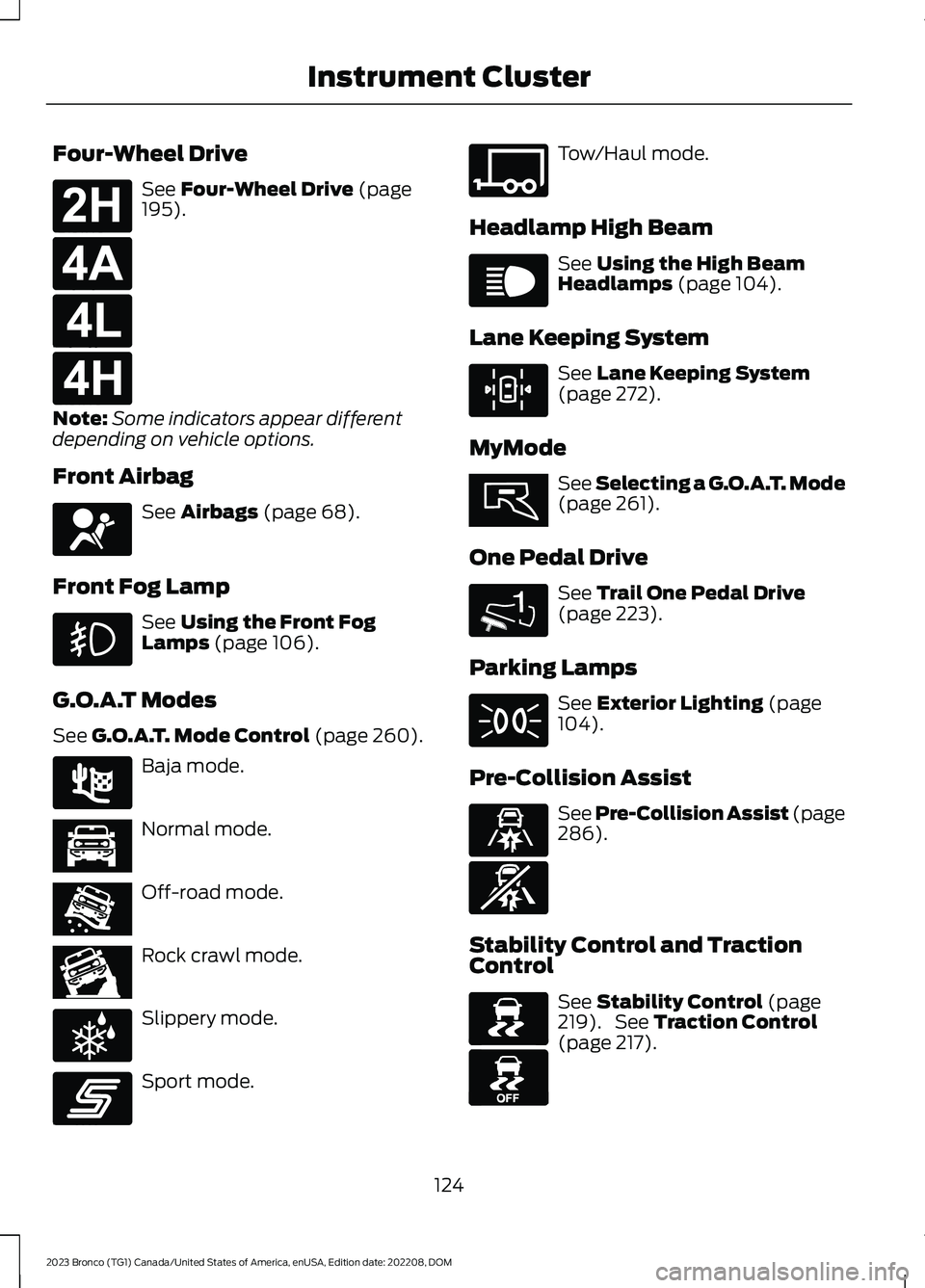
Four-Wheel Drive
See Four-Wheel Drive (page195).
Note:Some indicators appear differentdepending on vehicle options.
Front Airbag
See Airbags (page 68).
Front Fog Lamp
See Using the Front FogLamps (page 106).
G.O.A.T Modes
See G.O.A.T. Mode Control (page 260).
Baja mode.
Normal mode.
Off-road mode.
Rock crawl mode.
Slippery mode.
Sport mode.
Tow/Haul mode.
Headlamp High Beam
See Using the High BeamHeadlamps (page 104).
Lane Keeping System
See Lane Keeping System(page 272).
MyMode
See Selecting a G.O.A.T. Mode(page 261).
One Pedal Drive
See Trail One Pedal Drive(page 223).
Parking Lamps
See Exterior Lighting (page104).
Pre-Collision Assist
See Pre-Collision Assist (page286).
Stability Control and TractionControl
See Stability Control (page219). See Traction Control(page 217).
124
2023 Bronco (TG1) Canada/United States of America, enUSA, Edition date: 202208, DOMInstrument ClusterE181778 E181781 E181780 E181779 E67017 E225314 E366490 E366491 E366492 E347004 E246593 E347108 E67019 E308131 E359278 1E328584 E71341 E329466 E329467 E138639 E130458
Page 130 of 642
USING THE INSTRUMENT
CLUSTER DISPLAY CONTROLS
WARNING: Driving while distractedcan result in loss of vehicle control, crashand injury. We strongly recommend thatyou use extreme caution when using anydevice that may take your focus off theroad. Your primary responsibility is thesafe operation of your vehicle. Werecommend against the use of anyhand-held device while driving andencourage the use of voice-operatedsystems when possible. Make sure youare aware of all applicable local lawsthat may affect the use of electronicdevices while driving.
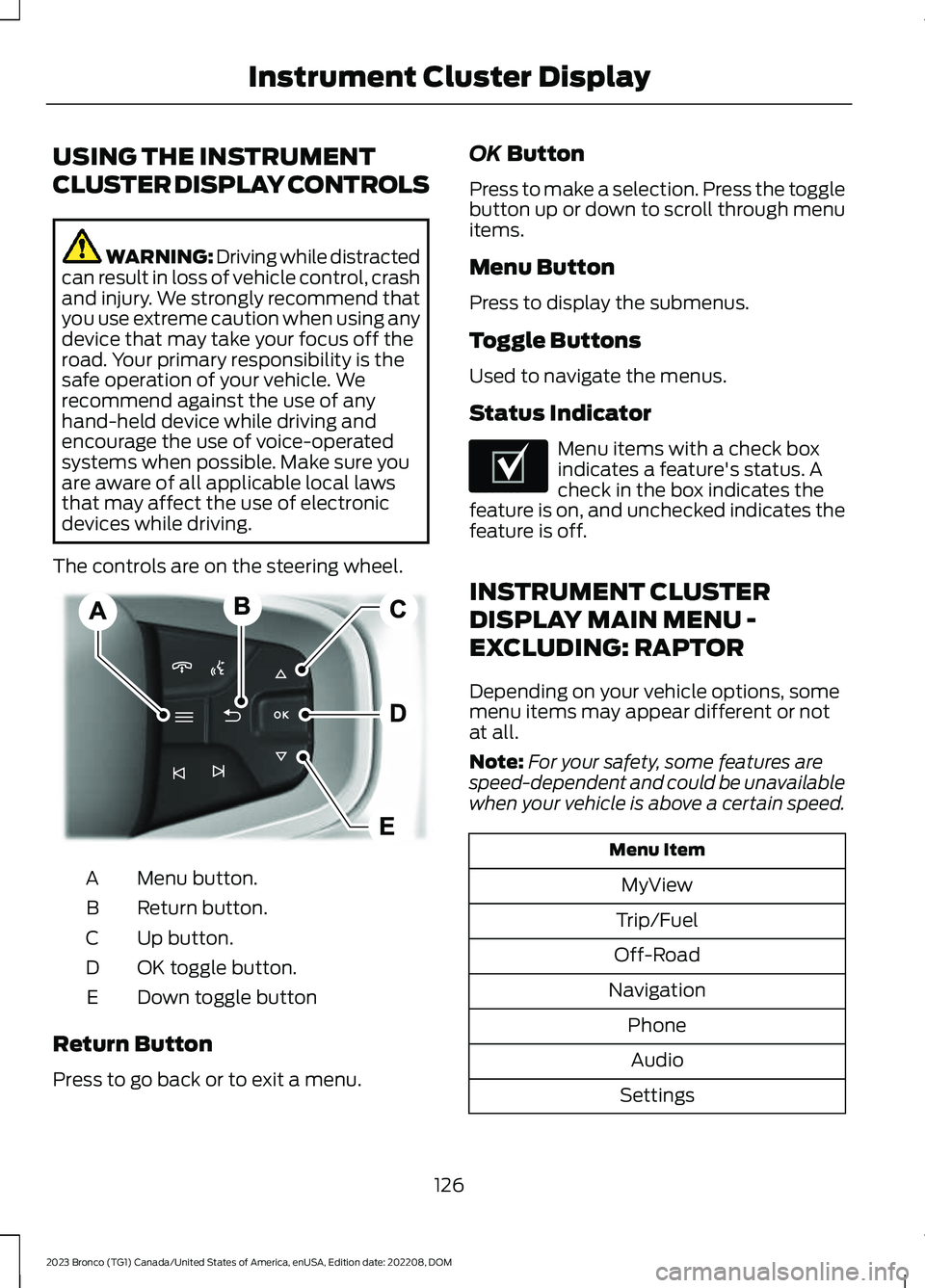
The controls are on the steering wheel.
Menu button.A
Return button.B
Up button.C
OK toggle button.D
Down toggle buttonE
Return Button
Press to go back or to exit a menu.
OK Button
Press to make a selection. Press the togglebutton up or down to scroll through menuitems.
Menu Button
Press to display the submenus.
Toggle Buttons
Used to navigate the menus.
Status Indicator
Menu items with a check boxindicates a feature's status. Acheck in the box indicates thefeature is on, and unchecked indicates thefeature is off.
INSTRUMENT CLUSTER
DISPLAY MAIN MENU -
EXCLUDING: RAPTOR
Depending on your vehicle options, somemenu items may appear different or notat all.
Note:For your safety, some features arespeed-dependent and could be unavailablewhen your vehicle is above a certain speed.
Menu Item
MyView
Trip/Fuel
Off-Road
Navigation
Phone
Audio
Settings
126
2023 Bronco (TG1) Canada/United States of America, enUSA, Edition date: 202208, DOMInstrument Cluster DisplayE326969 E204495
Page 131 of 642
INSTRUMENT CLUSTER
DISPLAY MAIN MENU -
RAPTOR
Depending on your vehicle options, somemenu items can appear different or not atall.
Note:For your safety, some features arespeed-dependent and could be unavailablewhen your vehicle is above a certain speed.
Menu Item
MyView
Trip/Fuel
Raptor Information
Navigation
Phone
Audio
Settings
TRIP COMPUTER
ACCESSING THE TRIP COMPUTER
1.Select Trip/Fuel.
2.Select Fuel Economy,Trip 1 or Trip 2.
RESETTING THE TRIP COMPUTER
1.Select Trip/Fuel.
2.Press and hold the OK button for a fewseconds.
RESETTING THE INDIVIDUAL TRIPVALUES
1.Select Trip/Fuel.
2.Select Trip 1 or Trip 2.
3.Press and hold the OK button for a fewseconds.
CUSTOMIZING THE
INSTRUMENT CLUSTER
DISPLAY
Adding Screens Using MyView
1.Using the information display controlson the steering wheel, select MyView.
2.Select Configure MyView.
3.Select a screen.
4.Press the OK button.
Note:The number of screens you can addis limited. If the selected screen does notappear you must deselect screens from theMyView menu.
Adding Screens Using SelectScreens
1.Select Select Screens.
2.Use the controls on the steering wheelto highlight a screen to add.
3.Press the OK button.
Note:The number of screens you can addis limited. If the selected screen does notappear you must deselect screens from theSelect Screens menu.
Configuring Gauges
1.Select Settings.
2.Select Configure Gauges.
3.Select to swap or change left-handside and right-hand side gauges.
127
2023 Bronco (TG1) Canada/United States of America, enUSA, Edition date: 202208, DOMInstrument Cluster Display
Page 134 of 642
REMOTE START REMOTE
CONTROL INDICATORS (IF
EQUIPPED)
Remote Control Feedback
An LED on the remote control providesstatus feedback of remote start or stopcommands.
StatusLED
Remote startsuccessful.Solid green.
Remote stopsuccessful.Solid red.
Request failed orstatus not received.Blinking red.
Status incomplete.Blinking green.
REMOTE START SETTINGS
Climate Control Settings
1.Press Settings on the touchscreen.
2.Press Vehicle Settings.
3.Press Remote Start Setup.
4.Press Climate Control.
5.Press Auto or Last settings.
Note:If you switch the auto mode on, thesystem attempts to heat or cool the interiorto 72°F (22°C). When you switch the vehicleon, the climate control system returns tothe last used settings.
Note:If you switch the last settings on, thesystem remembers the last used settings.
Heated Seat Settings (If Equipped)
1.Press Settings on the touchscreen.
2.Press Vehicle Settings.
3.Press Remote Start Setup.
4.Press Seats.
5.Press Auto or Off.
Note:If you switch the heated seat settingson, the heated seats turn on during coldweather.
Note:You cannot adjust the heated seatsettings when you remotely start yourvehicle.
Heated Steering Wheel Settings (If
Equipped)
1.Press Settings on the touchscreen.
2.Press Vehicle Settings.
3.Press Remote Start Setup.
4.Press Seats and Steering Wheel.
5.Press Auto or Off.
Note:If you switch the heated steeringwheel settings on, the heated steering wheelturns on during cold weather.
Note:You cannot adjust the heatedsteering wheel settings when you remotelystart your vehicle.
Remote Start Duration
1.Press Settings on the touchscreen.
2.Press Vehicle Settings.
3.Press Remote Start Setup.
4.Press Duration.
5.Press the duration you prefer.
130
2023 Bronco (TG1) Canada/United States of America, enUSA, Edition date: 202208, DOMRemote Start (If Equipped)
Page 144 of 642
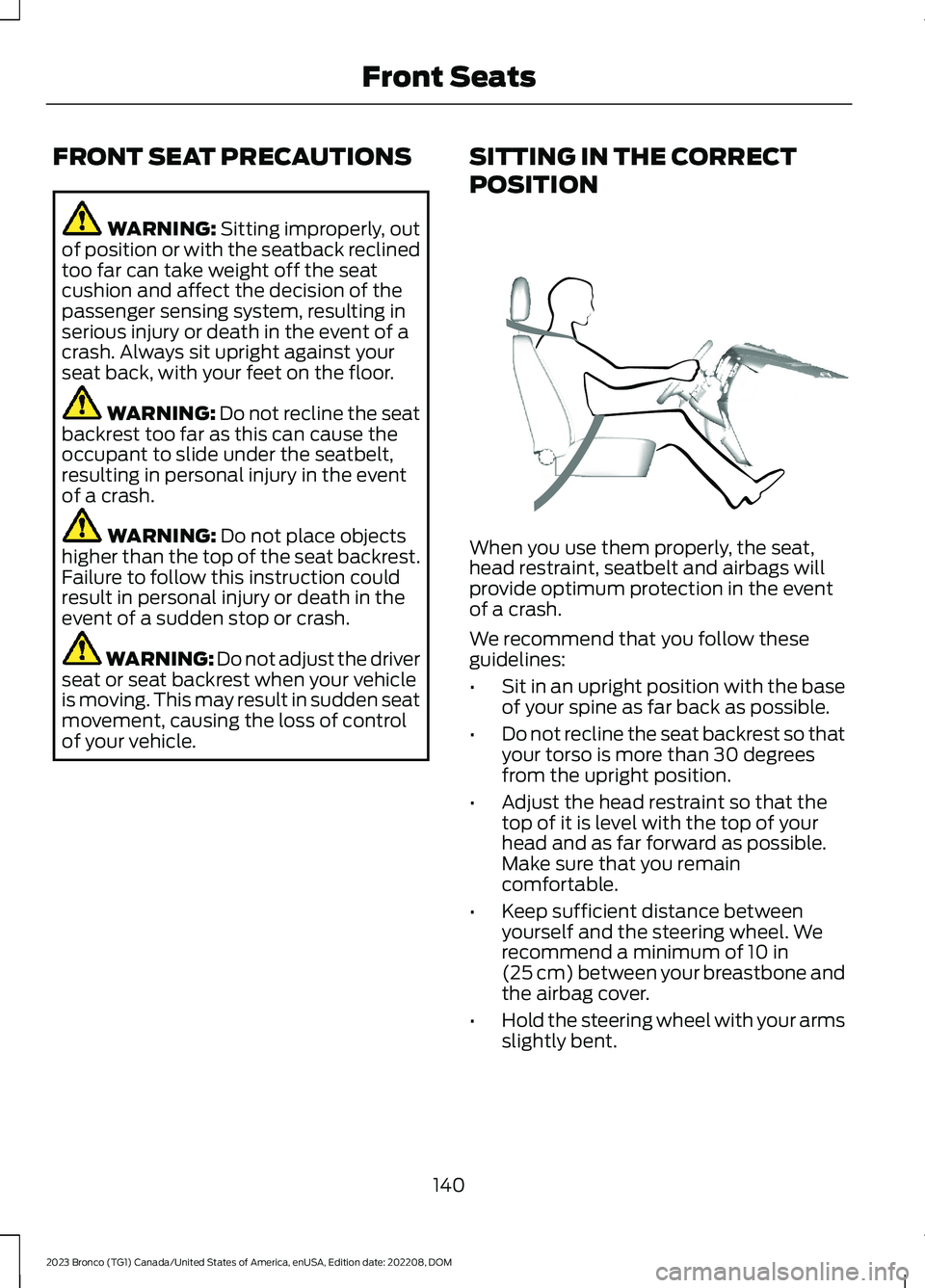
FRONT SEAT PRECAUTIONS
WARNING: Sitting improperly, outof position or with the seatback reclinedtoo far can take weight off the seatcushion and affect the decision of thepassenger sensing system, resulting inserious injury or death in the event of acrash. Always sit upright against yourseat back, with your feet on the floor.
WARNING: Do not recline the seatbackrest too far as this can cause theoccupant to slide under the seatbelt,resulting in personal injury in the eventof a crash.
WARNING: Do not place objectshigher than the top of the seat backrest.Failure to follow this instruction couldresult in personal injury or death in theevent of a sudden stop or crash.
WARNING: Do not adjust the driverseat or seat backrest when your vehicleis moving. This may result in sudden seatmovement, causing the loss of controlof your vehicle.
SITTING IN THE CORRECT
POSITION
When you use them properly, the seat,head restraint, seatbelt and airbags willprovide optimum protection in the eventof a crash.
We recommend that you follow theseguidelines:
•Sit in an upright position with the baseof your spine as far back as possible.
•Do not recline the seat backrest so thatyour torso is more than 30 degreesfrom the upright position.
•Adjust the head restraint so that thetop of it is level with the top of yourhead and as far forward as possible.Make sure that you remaincomfortable.
•Keep sufficient distance betweenyourself and the steering wheel. Werecommend a minimum of 10 in(25 cm) between your breastbone andthe airbag cover.
•Hold the steering wheel with your armsslightly bent.
140
2023 Bronco (TG1) Canada/United States of America, enUSA, Edition date: 202208, DOMFront SeatsE68595
Page 174 of 642
If it flashes, engine misfire could beoccurring. Increased exhaust gastemperatures could damage the catalyticconverter or other vehicle components.Avoid heavy acceleration and deceleration,and have your vehicle checked as soon aspossible.
Powertrain Warning Lamp
If it illuminates when the engineis running, this indicates apowertrain or four-wheel drivefault. If it flashes when you are driving,immediately reduce the vehicle speed.Avoid heavy acceleration and deceleration,and have your vehicle checked as soon aspossible.
If both lamps illuminate when the engineis running, stop your vehicle as soon as itis safe to do so. Continuing to drive yourvehicle could cause reduced power or theengine to stop. Switch the ignition off andattempt to restart the engine. Have yourvehicle checked as soon as possible.
STARTING AND STOPPING THE ENGINE – INFORMATION MESSAGES
ActionMessage
Displays if you exceed the starting time limit. You cannotattempt to start the engine for 15 minutes. If you cannot startthe engine after 15 minutes passes, have your vehicle imme-diately checked.
Cranking Time Exceeded
Displays if you are unable to start your vehicle with a correctlycoded key. The system has detected a fault that requiresservice. Have your vehicle checked as soon as possible.
Starting System Fault
Displays if the system does not detect a valid passive key.No Key Detected
170
2023 Bronco (TG1) Canada/United States of America, enUSA, Edition date: 202208, DOMStarting and Stopping the Engine
Page 176 of 642
WHAT IS START IN GEAR
Crank in gear allows the driver to restartthe engine and launch the vehicle afterstalling in four-wheel drive low (4L). Usethe instrument cluster display to direct youwhen to apply the brake and push the startbutton. While driving off road, it is possibleto stall the engine trying to maneuverterrains. Trying to restart your vehicle byusing the clutch or shifting into neutral torestart the engine can be difficult andcause potential roll back situations whendriving uphill.
Note:Crank in gear is an alternate namefor the feature.
START IN GEAR
PRECAUTIONS
Always press the brake pedal whenstarting the vehicle to prevent unwantedvehicle movement, and release afterstarting to drive away. Start in gear is onlypossible with the brake pedal pressed.
START IN GEAR LIMITATIONS
You can only use start in gear in four-wheeldrive low (4L).
USING START IN GEAR
When driving difficult terrains in four-wheeldrive low (4L), it is possible to stall theengine when your vehicle is not able tomaintain speed. To easily start the engineand launch your vehicle, perform thefollowing steps:
1.After the vehicle stalls an informationmessage displays in the cluster,Tostart in gear select YES and pressOK.
2.Firmly press the brake pedal when ingear and press and hold the Startbutton.
3.When the engine starts and yourvehicle begins to move, release thebrake pedal.
172
2023 Bronco (TG1) Canada/United States of America, enUSA, Edition date: 202208, DOMStart in Gear - Manual Transmission
Page 177 of 642
START IN GEAR –
TROUBLESHOOTING
START IN GEAR – INFORMATIONMESSAGES
ActionMessage
After stalling yourvehicle, a messagecan displayprompting you startin gear is now avail-able.
Do you want tostart in gear?
For use with pushbutton vehicles,press the brakepedal and press thepush to start buttonto begin start ingear.
Press Brake andHold Start Buttonto Start in Gear
After stalling infour-wheel drivelow (4L), if yourvehicle does notmeet all therequirements or youmake any otherinputs, a messagecan display in theinstrument cluster.
Start in GearCanceled
After stalling infour-wheel drivelow (4L), amessage candisplay if you haveincorrectlyattempted a startin gear situation orhave attemptedtoo many times.
Start in Gear LimitReached NormalStart Available
START IN GEAR – FREQUENTLYASKED QUESTIONS
Can I use start in gear in reverse?
You can use start in gear in anyforward or reverse gear.
Will this start my vehicle?
Upon following the maneuvers, theengine starts, runs and launches thevehicle in gear.
If my vehicle stalls, do I have to usestart in gear?
After your vehicle stalls in four-wheeldrive low (4L), you do not have to usestart in gear. You can still start yourvehicle normally with use of the clutch.
How hard does the brake need pressingfor start in gear?
The brake requires a hard press at thetime you press the push button, andthen you need to release it to allow thevehicle to move.
173
2023 Bronco (TG1) Canada/United States of America, enUSA, Edition date: 202208, DOMStart in Gear - Manual Transmission
Page 194 of 642
AUTOMATIC TRANSMISSION
PRECAUTIONS
WARNING: Apply the parkingbrake, shift into park (P), switch theignition off and remove the key beforeyou leave your vehicle. Failure to followthis instruction could result in personalinjury or death.
WARNING: When your vehicle isstationary, keep the brake pedal fullypressed when shifting gears. Failure tofollow this instruction could result inpersonal injury, death or propertydamage.
WARNING: Do not apply the brakepedal and accelerator pedalsimultaneously. Applying both pedalssimultaneously for more than a fewseconds will limit engine performance,which may result in difficulty maintainingspeed in traffic and could lead to seriousinjury.
AUTOMATIC TRANSMISSION
POSITIONS
PARK (P)
WARNING: Shift into park (P) onlywhen your vehicle is stationary.
In park (P) power is not transmitted to thedriven wheels.
Note:A tone sounds if you attempt to exityour vehicle without the vehicle in park (P).
Note:Your vehicle may not shift out of park(P) if the 12 V battery has run out of charge.
Note:Your vehicle may not shift out of park(P) if a fuse is blown.
Note:Your vehicle may not shift out of park(P) unless the key or remote control is insideyour vehicle.
Note:The electronic parking brake couldapply when you power your vehicle on withthe selector in park (P).
Note:The electronic parking brake couldapply if you shift to park (P) without fullypressing the brake pedal.
Note:The electronic parking brake couldapply if you shift to park (P) on a slope.
Note:Do not manually release the parkingbrake when the selector is in park (P). SeeAutomatically Releasing the ElectricParking Brake (page 213).
REVERSE (R)
WARNING: Shift into reverse (R)only when your vehicle is stationary.
In reverse (R) power is transmitted to thedriven wheels.
NEUTRAL (N)
WARNING: In neutral (N) yourvehicle is free to roll.
In neutral (N) power is not transmitted tothe driven wheels.
DRIVE (D)
In drive (D) power is transmitted to thedriven wheels.
190
2023 Bronco (TG1) Canada/United States of America, enUSA, Edition date: 202208, DOMAutomatic Transmission (If Equipped)
Page 197 of 642
•Press the lower (-) button todownshift.
•Hold the (+) button for a few secondsto switch the feature off.
Note:The feature switches off after a shortperiod of time if neither button is pressed.
Manually Shifting Gears in Sport(S)
Use this feature to select a specific gear.
Note:We recommend using this feature forengine braking, driving on hilly ormountainous roads, or when towing a trailer.See Towing a Trailer (page 307).
•Press any button to switch the featureon.
•Press the upper (+) button to upshift.
•Press the lower (-) button todownshift.
•Hold the (+) button for a few secondsto switch the feature off.
Manually Shifting Gears in Manual(M)
Use this feature to select a specific gear.
Note:We recommend using this feature forengine braking, driving on hilly ormountainous roads, or when towing a trailer.See Towing a Trailer (page 307).
•Shift to manual (M) to switch thefeature on.
•Press the upper (+) button to upshift.
•Press the lower (-) button todownshift.
•Shift to drive (D) to switch the featureoff.
BRAKE SHIFT INTERLOCK
WHAT IS BRAKE SHIFTINTERLOCK
Brake shift interlock allows you to shiftyour vehicle out of park (P) in the event ofan electrical malfunction or emergency.
BRAKE SHIFT INTERLOCKPRECAUTIONS
WARNING: Do not drive yourvehicle until you verify that thestoplamps are working.
WARNING: When doing thisprocedure, you need to take thetransmission out of park (P) whichmeans your vehicle can roll freely. Toavoid unwanted vehicle movement,apply the parking brake prior to doingthis procedure. Use wheel chocks ifappropriate.
WARNING: If the parking brake isfully released, but the brake warninglamp remains illuminated, the brakesmay not be working properly. Have yourvehicle checked as soon as possible.
193
2023 Bronco (TG1) Canada/United States of America, enUSA, Edition date: 202208, DOMAutomatic Transmission (If Equipped)