belt FORD BRONCO 2023 Owner's Guide
[x] Cancel search | Manufacturer: FORD, Model Year: 2023, Model line: BRONCO, Model: FORD BRONCO 2023Pages: 642, PDF Size: 14.71 MB
Page 88 of 642
WHAT IS MYKEY
MyKey allows you to program keys withrestricted driving modes to promote gooddriving habits.
You can program the restrictions to all keysexcept one. Any keys that you did notprogram are administrator keys or adminkeys.
Note:Every MyKey receives the samerestrictions and settings. You cannotprogram them individually.
MYKEY SETTINGS
NON-CONFIGURABLE MYKEYSETTINGS
Seatbelt Reminder or Belt-Minder™
MyKey mutes the audio system until thefront seat passengers buckle the front seatbelts.
Note:If your vehicle includes an AM/FMradio or a very basic audio system, the radiomay not mute.
Satellite Radio (If Equipped)
Some satellite radio channels haverestricted access to adult radio content.
Early Low Fuel
The low fuel level warning lamp turns onearlier.
Driving and Parking Aids
You cannot configure settings for parkingaids, blind spot information system, andcross traffic alert. These systems turn onwhen the vehicle turns on, and you cannotswitch them off with a MyKey.
You cannot configure settings forpre-collision assist and lane keeping. Thesesystems turn on when the vehicle turns on.
A new destination in the navigation systemcan only be set using voice commandswhen using a MyKey, and with your vehiclemoving.
Note:MyKey drivers may be able to switchthe lane keeping assist off, but this featureturns back on automatically with every newkey cycle.
CONFIGURABLE MYKEYSETTINGS
You can configure the following settingsafter creating a MyKey. See Creating aMyKey (page 85).
Speed Limit
WARNING: Do not set MyKeymaximum speed limit to a limit that willprevent the driver from maintaining asafe speed considering posted speedlimits and prevailing road conditions. Thedriver is always responsible to drive inaccordance with local laws andprevailing conditions. Failure to do socould result in accident or injury.
You can set a speed limit for your vehicle.Warning messages appear on thetouchscreen and a tone sounds if yourvehicle reaches the set speed. You cannotoverride the set speed when using a MyKey.
Speed Minder
You can set a speed reminder for yourvehicle. Warning messages appear on thetouchscreen and a tone sounds if yourvehicle exceeds the set speed.
84
2023 Bronco (TG1) Canada/United States of America, enUSA, Edition date: 202208, DOMMyKey™
Page 97 of 642
TAILGATE PRECAUTIONS
WARNING: It is extremelydangerous to ride in a cargo area, insideor outside of a vehicle. In a crash, peopleriding in these areas are more likely to beseriously injured or killed. Do not allowpeople to ride in any area of your vehiclethat is not equipped with seats andseatbelts. Make sure everyone in yourvehicle is in a seat and properly using aseatbelt. Failure to follow this warningcould result in serious personal injury ordeath.
OPENING THE TAILGATE
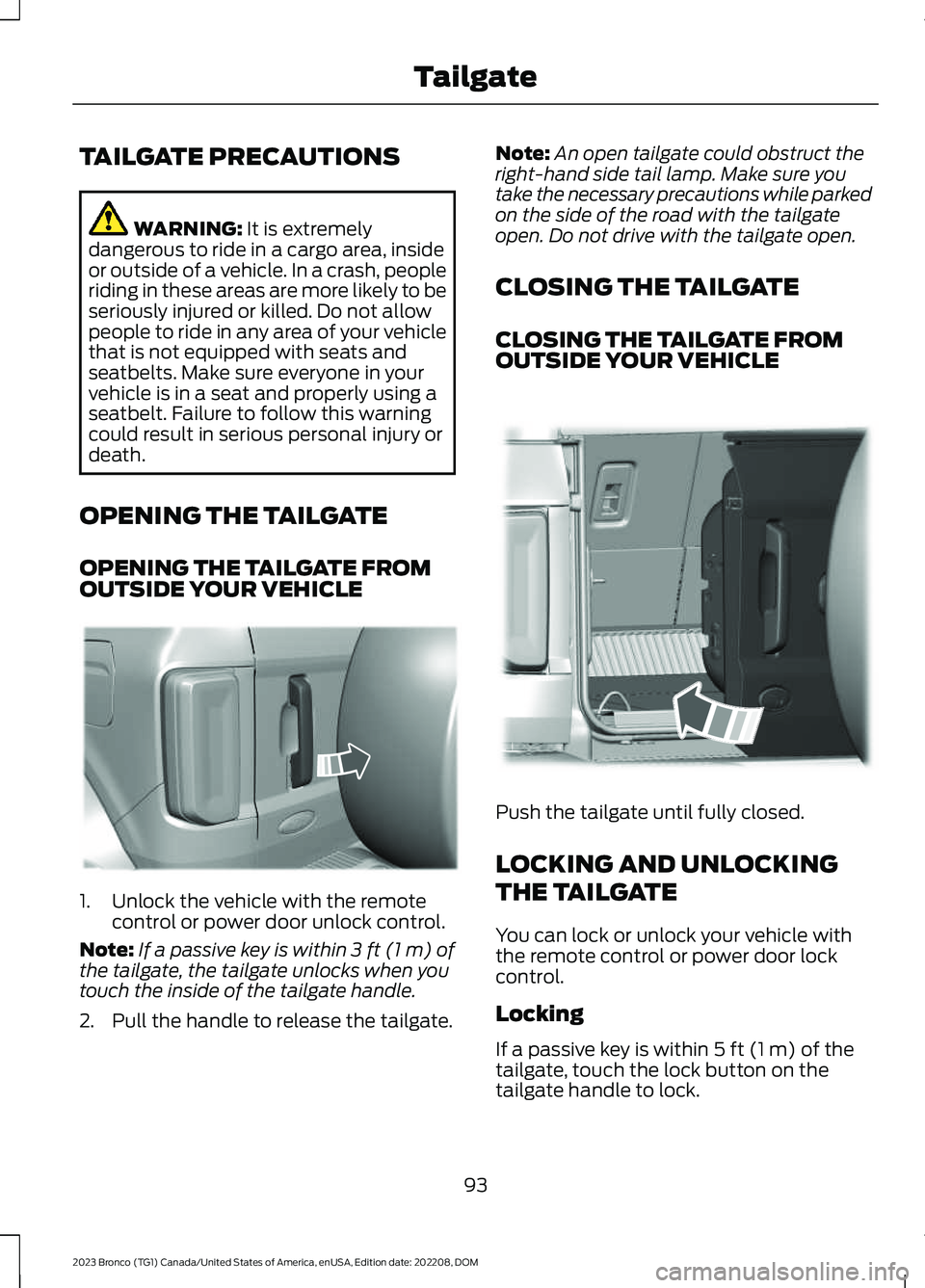
OPENING THE TAILGATE FROMOUTSIDE YOUR VEHICLE
1.Unlock the vehicle with the remotecontrol or power door unlock control.
Note:If a passive key is within 3 ft (1 m) ofthe tailgate, the tailgate unlocks when youtouch the inside of the tailgate handle.
2.Pull the handle to release the tailgate.
Note:An open tailgate could obstruct theright-hand side tail lamp. Make sure youtake the necessary precautions while parkedon the side of the road with the tailgateopen. Do not drive with the tailgate open.
CLOSING THE TAILGATE
CLOSING THE TAILGATE FROMOUTSIDE YOUR VEHICLE
Push the tailgate until fully closed.
LOCKING AND UNLOCKING
THE TAILGATE
You can lock or unlock your vehicle withthe remote control or power door lockcontrol.
Locking
If a passive key is within 5 ft (1 m) of thetailgate, touch the lock button on thetailgate handle to lock.
93
2023 Bronco (TG1) Canada/United States of America, enUSA, Edition date: 202208, DOMTailgateE323095 E323153
Page 124 of 642
INSTRUMENT CLUSTER
WARNING LAMPS
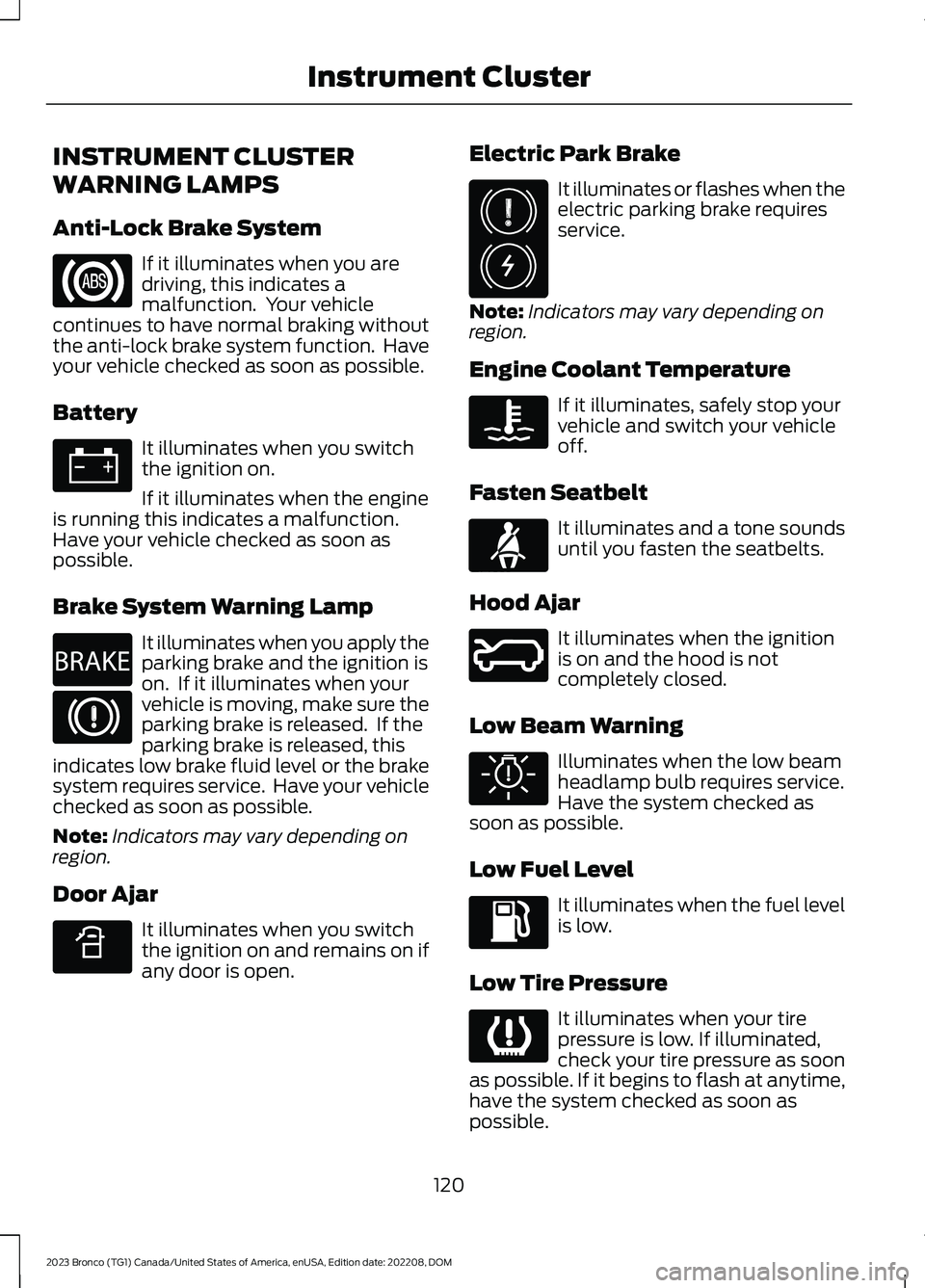
Anti-Lock Brake System
If it illuminates when you aredriving, this indicates amalfunction. Your vehiclecontinues to have normal braking withoutthe anti-lock brake system function. Haveyour vehicle checked as soon as possible.
Battery
It illuminates when you switchthe ignition on.
If it illuminates when the engineis running this indicates a malfunction.Have your vehicle checked as soon aspossible.
Brake System Warning Lamp
It illuminates when you apply theparking brake and the ignition ison. If it illuminates when yourvehicle is moving, make sure theparking brake is released. If theparking brake is released, thisindicates low brake fluid level or the brakesystem requires service. Have your vehiclechecked as soon as possible.
Note:Indicators may vary depending onregion.
Door Ajar
It illuminates when you switchthe ignition on and remains on ifany door is open.
Electric Park Brake
It illuminates or flashes when theelectric parking brake requiresservice.
Note:Indicators may vary depending onregion.
Engine Coolant Temperature
If it illuminates, safely stop yourvehicle and switch your vehicleoff.
Fasten Seatbelt
It illuminates and a tone soundsuntil you fasten the seatbelts.
Hood Ajar
It illuminates when the ignitionis on and the hood is notcompletely closed.
Low Beam Warning
Illuminates when the low beamheadlamp bulb requires service.Have the system checked assoon as possible.
Low Fuel Level
It illuminates when the fuel levelis low.
Low Tire Pressure
It illuminates when your tirepressure is low. If illuminated,check your tire pressure as soonas possible. If it begins to flash at anytime,have the system checked as soon aspossible.
120
2023 Bronco (TG1) Canada/United States of America, enUSA, Edition date: 202208, DOMInstrument ClusterE67020 E67021 E270480 E67024 E340898 E325775 E103308 E71880 E324249 E325579 E139232
Page 144 of 642
FRONT SEAT PRECAUTIONS
WARNING: Sitting improperly, outof position or with the seatback reclinedtoo far can take weight off the seatcushion and affect the decision of thepassenger sensing system, resulting inserious injury or death in the event of acrash. Always sit upright against yourseat back, with your feet on the floor.
WARNING: Do not recline the seatbackrest too far as this can cause theoccupant to slide under the seatbelt,resulting in personal injury in the eventof a crash.
WARNING: Do not place objectshigher than the top of the seat backrest.Failure to follow this instruction couldresult in personal injury or death in theevent of a sudden stop or crash.
WARNING: Do not adjust the driverseat or seat backrest when your vehicleis moving. This may result in sudden seatmovement, causing the loss of controlof your vehicle.
SITTING IN THE CORRECT
POSITION
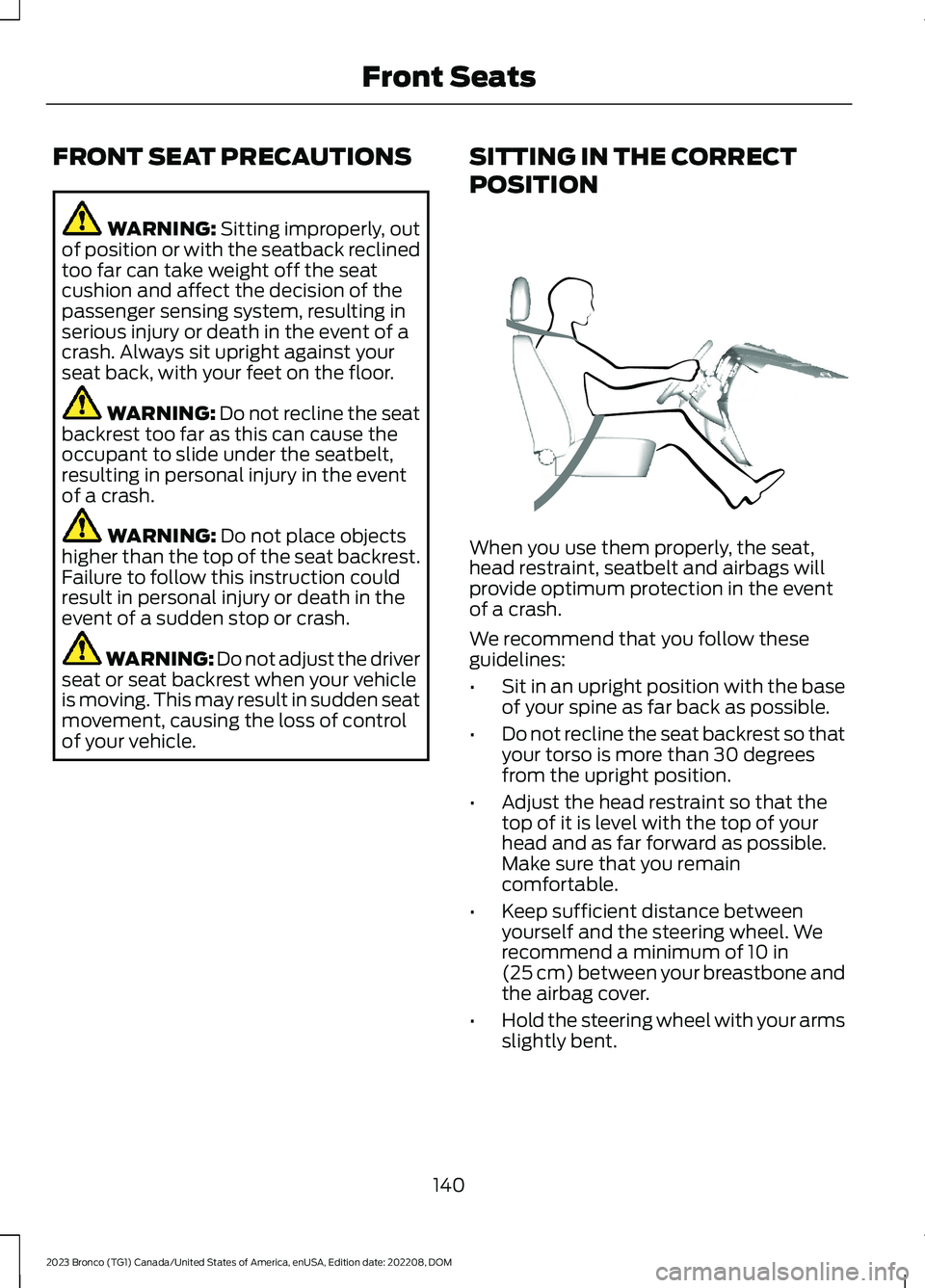
When you use them properly, the seat,head restraint, seatbelt and airbags willprovide optimum protection in the eventof a crash.
We recommend that you follow theseguidelines:
•Sit in an upright position with the baseof your spine as far back as possible.
•Do not recline the seat backrest so thatyour torso is more than 30 degreesfrom the upright position.
•Adjust the head restraint so that thetop of it is level with the top of yourhead and as far forward as possible.Make sure that you remaincomfortable.
•Keep sufficient distance betweenyourself and the steering wheel. Werecommend a minimum of 10 in(25 cm) between your breastbone andthe airbag cover.
•Hold the steering wheel with your armsslightly bent.
140
2023 Bronco (TG1) Canada/United States of America, enUSA, Edition date: 202208, DOMFront SeatsE68595
Page 145 of 642
•Bend your legs slightly so that you canpress the pedals fully.
•Position the shoulder strap of theseatbelt over the center of yourshoulder and position the lap straptightly across your hips.
Make sure that your driving position iscomfortable and that you can maintain fullcontrol of your vehicle.
MANUAL SEATS
HEAD RESTRAINT COMPONENTS
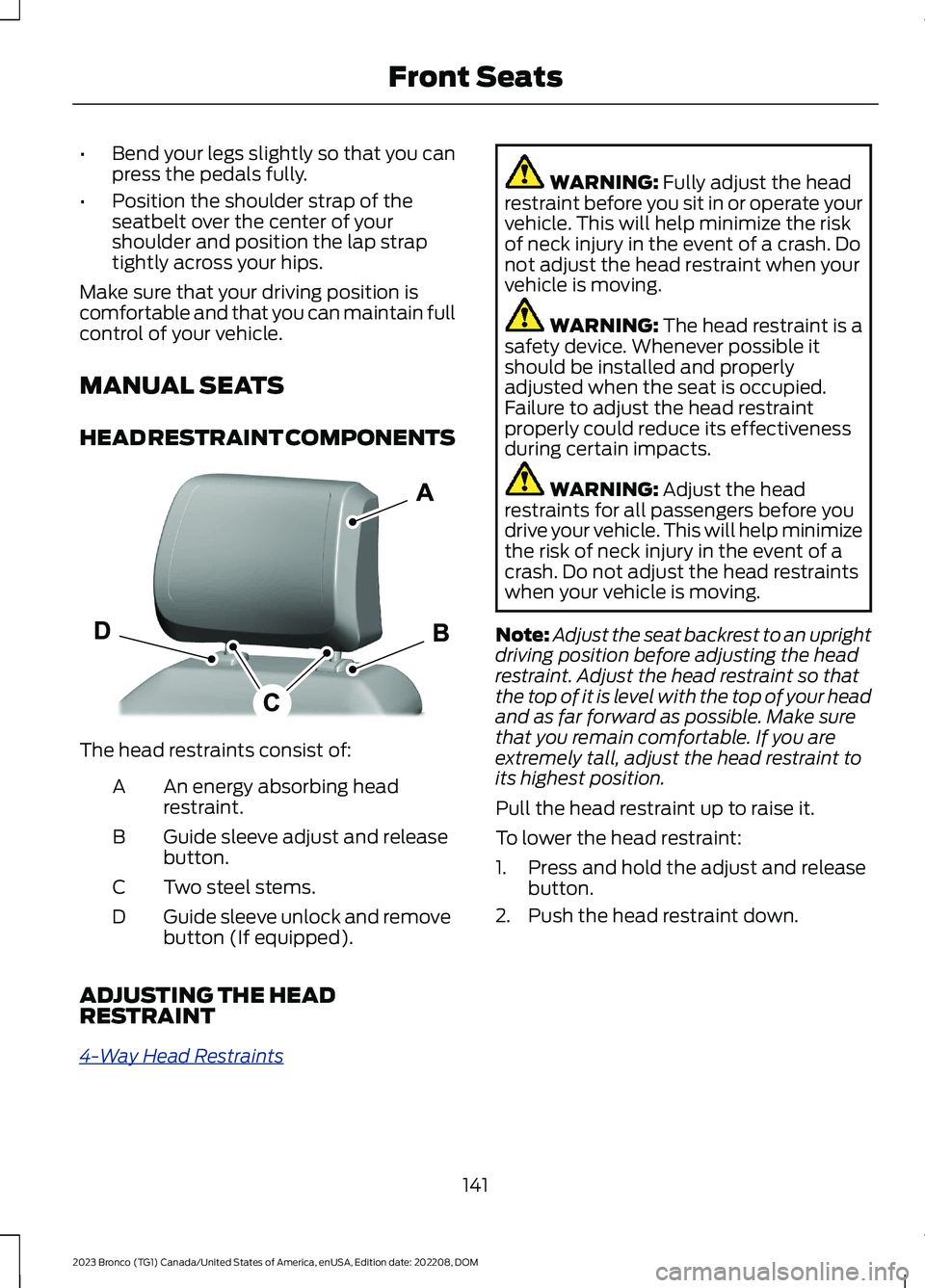
The head restraints consist of:
An energy absorbing headrestraint.A
Guide sleeve adjust and releasebutton.B
Two steel stems.C
Guide sleeve unlock and removebutton (If equipped).D
ADJUSTING THE HEADRESTRAINT
4-Way Head Restraints
WARNING: Fully adjust the headrestraint before you sit in or operate yourvehicle. This will help minimize the riskof neck injury in the event of a crash. Donot adjust the head restraint when yourvehicle is moving.
WARNING: The head restraint is asafety device. Whenever possible itshould be installed and properlyadjusted when the seat is occupied.Failure to adjust the head restraintproperly could reduce its effectivenessduring certain impacts.
WARNING: Adjust the headrestraints for all passengers before youdrive your vehicle. This will help minimizethe risk of neck injury in the event of acrash. Do not adjust the head restraintswhen your vehicle is moving.
Note:Adjust the seat backrest to an uprightdriving position before adjusting the headrestraint. Adjust the head restraint so thatthe top of it is level with the top of your headand as far forward as possible. Make surethat you remain comfortable. If you areextremely tall, adjust the head restraint toits highest position.
Pull the head restraint up to raise it.
To lower the head restraint:
1.Press and hold the adjust and releasebutton.
2.Push the head restraint down.
141
2023 Bronco (TG1) Canada/United States of America, enUSA, Edition date: 202208, DOMFront SeatsE308298
Page 147 of 642
ADJUSTING THE SEAT BACKREST
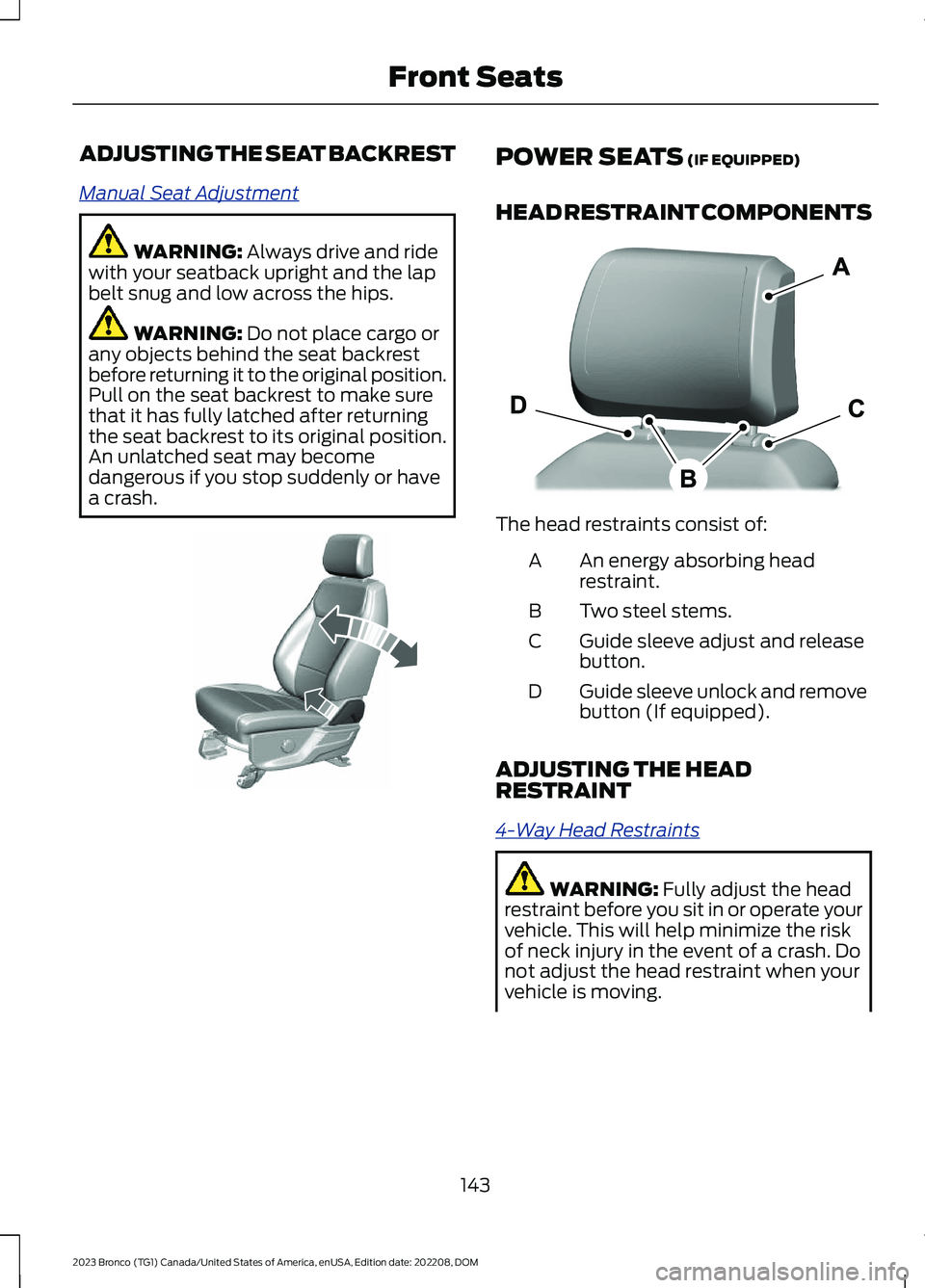
Manual Seat Adjustment
WARNING: Always drive and ridewith your seatback upright and the lapbelt snug and low across the hips.
WARNING: Do not place cargo orany objects behind the seat backrestbefore returning it to the original position.Pull on the seat backrest to make surethat it has fully latched after returningthe seat backrest to its original position.An unlatched seat may becomedangerous if you stop suddenly or havea crash.
POWER SEATS (IF EQUIPPED)
HEAD RESTRAINT COMPONENTS
The head restraints consist of:
An energy absorbing headrestraint.A
Two steel stems.B
Guide sleeve adjust and releasebutton.C
Guide sleeve unlock and removebutton (If equipped).D
ADJUSTING THE HEADRESTRAINT
4-Way Head Restraints
WARNING: Fully adjust the headrestraint before you sit in or operate yourvehicle. This will help minimize the riskof neck injury in the event of a crash. Donot adjust the head restraint when yourvehicle is moving.
143
2023 Bronco (TG1) Canada/United States of America, enUSA, Edition date: 202208, DOMFront SeatsE327922 E327921
Page 198 of 642
USING BRAKE SHIFT INTERLOCK
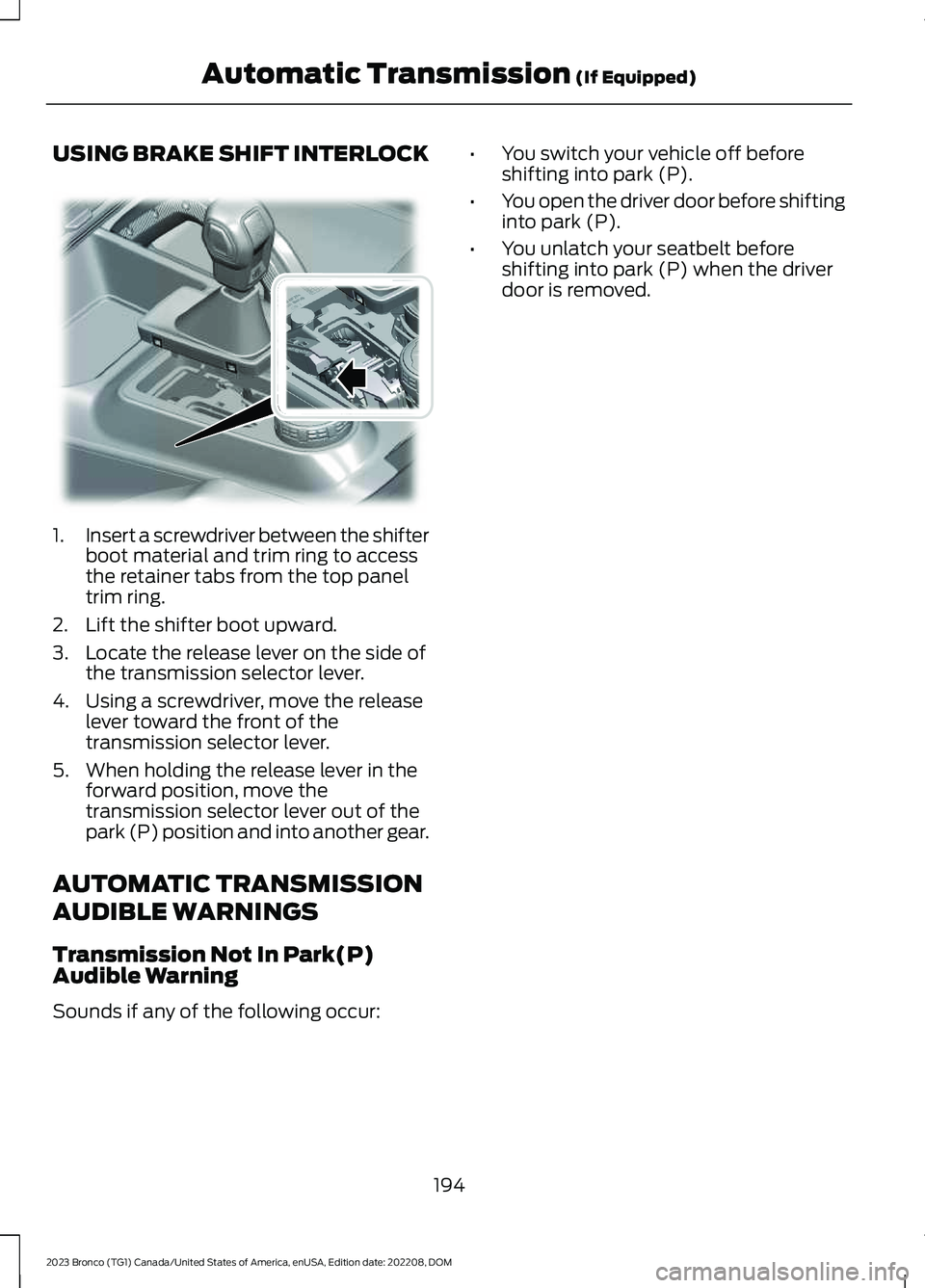
1.Insert a screwdriver between the shifterboot material and trim ring to accessthe retainer tabs from the top paneltrim ring.
2.Lift the shifter boot upward.
3.Locate the release lever on the side ofthe transmission selector lever.
4.Using a screwdriver, move the releaselever toward the front of thetransmission selector lever.
5.When holding the release lever in theforward position, move thetransmission selector lever out of thepark (P) position and into another gear.
AUTOMATIC TRANSMISSION
AUDIBLE WARNINGS
Transmission Not In Park(P)Audible Warning
Sounds if any of the following occur:
•You switch your vehicle off beforeshifting into park (P).
•You open the driver door before shiftinginto park (P).
•You unlatch your seatbelt beforeshifting into park (P) when the driverdoor is removed.
194
2023 Bronco (TG1) Canada/United States of America, enUSA, Edition date: 202208, DOMAutomatic Transmission (If Equipped)E346836
Page 217 of 642
WHAT IS THE ELECTRIC
PARKING BRAKE
Electric Parking Brake
The electric parking brake is used to holdyour vehicle on slopes and flat roads.
APPLYING THE ELECTRIC
PARKING BRAKE
WARNING: Always fully apply theparking brake. Failure to follow thisinstruction could result in personal injuryor death.
WARNING: If you drive extendeddistances with the parking brake applied,you could cause damage to the brakesystem.
The switch is on the lower partof the instrument panel.
Pull the electric parking brake switch.
The red warning lamp flashes duringoperation and illuminates when the parkingbrake is applied.
Note:You can apply the electric parkingbrake when the ignition is off.
Note:The electric parking brake couldapply when the transmission selector is inpark (P). See Park (P) (page 190).
APPLYING THE ELECTRIC
PARKING BRAKE IN AN
EMERGENCY
You can use the electric parking brake toslow or stop your vehicle in an emergency.
Pull and hold the electric parking brakeswitch.
The electric parking brake continues toslow your vehicle down unless you releasethe switch.
The red warning lamp illuminates, a tonesounds and the stoplamps turn on whenyou use the electric parking brake in anemergency.
Note:Do not apply the electric parkingbrake when your vehicle is moving, exceptin an emergency. If you repeatedly use theelectric parking brake to slow or stop yourvehicle, you could cause damage to thebrake system.
MANUALLY RELEASING THE
ELECTRIC PARKING BRAKE
1.Switch the ignition on.
2.Apply and hold the brake pedal.
3.Push the electric parking brake switch.
The red warning lamp turns off.
Pulling Away on a Hill When Towing aTrailer
1.Apply and hold the brake pedal.
2.Pull and hold the electric parking brakeswitch.
3.Shift the vehicle into gear.
4.Apply the accelerator pedal until theengine has developed sufficient torqueto prevent your vehicle from rollingdown the hill.
5.Release the switch and pull away in anormal manner.
AUTOMATICALLY RELEASING
THE ELECTRIC PARKING
BRAKE
Note:If the driver door is removed, bucklethe driver seatbelt and proceed to step 2.
213
2023 Bronco (TG1) Canada/United States of America, enUSA, Edition date: 202208, DOMElectric Parking BrakeE267156
Page 226 of 642
WHAT IS TRAIL CONTROL
WARNING: The system does notcontrol speed in low traction conditionsor extremely steep slopes. The systemis designed to be an aid and does notrelieve you of your responsibility to drivewith due care and attention. Failure tofollow this instruction could result inpersonal injury.
Trail control lets you focus on steeringduring low-speed and off-road use bycontrolling your vehicle's acceleration andbraking to maintain the speed that you set.
You may hear a noise from the anti-lockbrake system pump motor when you usethe system. This is normal.
TRAIL CONTROL LIMITATIONS
Trail control is unavailable when any of thefollowing occur:
•Your vehicle speed is greater than20 mph (32 km/h) in two-wheel drivehigh (2H) or four-wheel drive high (4H)modes.
•Your vehicle speed is greater than9 mph (15 km/h) in four-wheel drivelow (4L) mode.
•Your vehicle speed is greater than5 mph (8 km/h) in reverse (R).
•The transmission is in park (P).
•The driver side door is open or yourseatbelt is off when the driver side dooris removed.
•Cruise control is on.
•Pro trailer backup assist is on.
SWITCHING TRAIL CONTROL
ON AND OFF
Bronco Off-Road Features
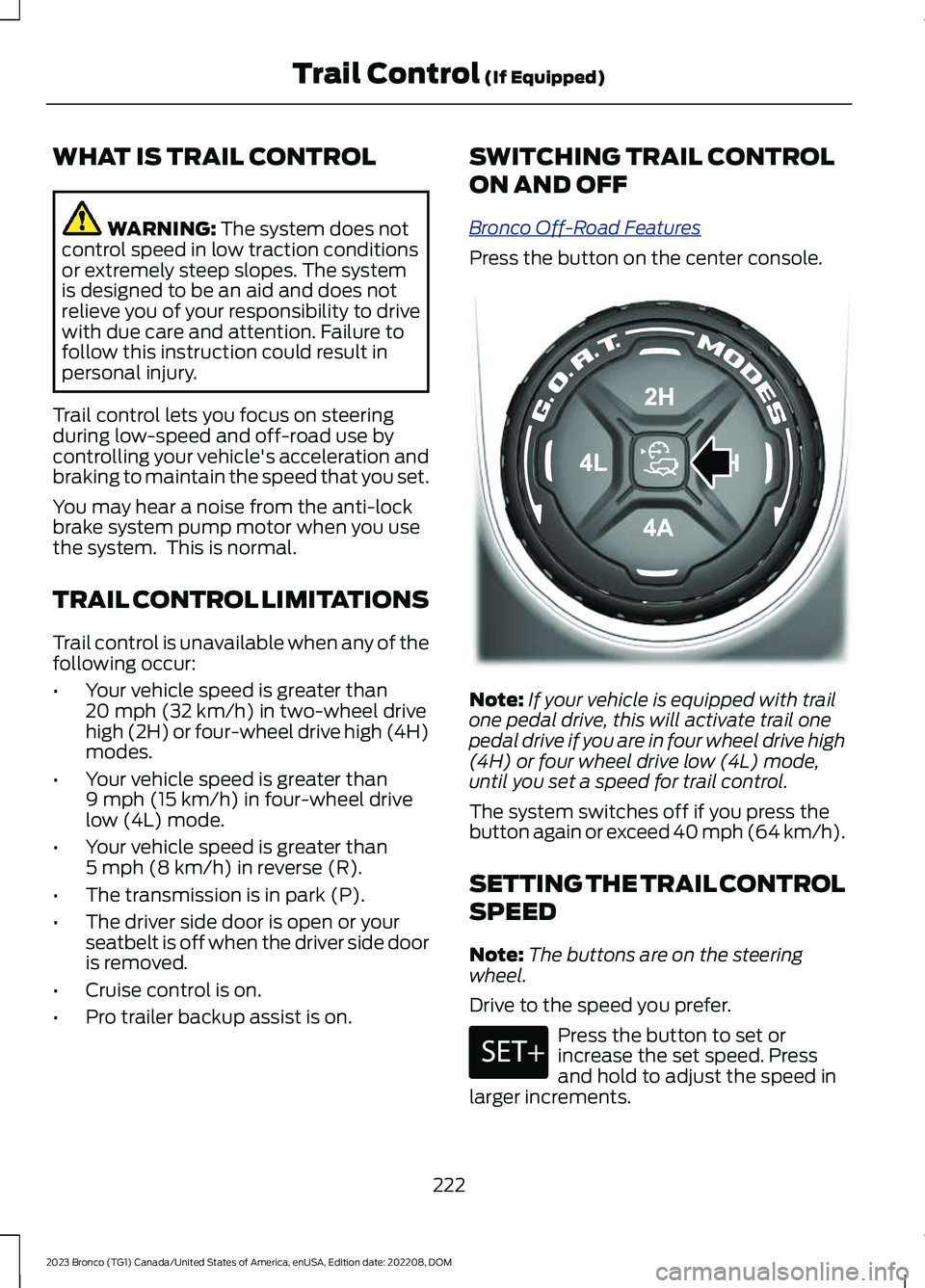
Press the button on the center console.
Note:If your vehicle is equipped with trailone pedal drive, this will activate trail onepedal drive if you are in four wheel drive high(4H) or four wheel drive low (4L) mode,until you set a speed for trail control.
The system switches off if you press thebutton again or exceed 40 mph (64 km/h).
SETTING THE TRAIL CONTROL
SPEED
Note:The buttons are on the steeringwheel.
Drive to the speed you prefer.
Press the button to set orincrease the set speed. Pressand hold to adjust the speed inlarger increments.
222
2023 Bronco (TG1) Canada/United States of America, enUSA, Edition date: 202208, DOMTrail Control (If Equipped)E329455 E246884
Page 230 of 642
TRAIL CONTROL – TROUBLESHOOTING
TRAIL CONTROL – INFORMATION MESSAGES
DetailsMessage
Displays when you must reduce your vehicle speed touse trail control.Reduce Speed To Enter TrailControl
Displays when you must release the park brake to usetrail control.Trail Control Not Available withPark Brake Applied
Displays when you must switch off the trailer backupassist to use trail control.Trail Control Not AvailableWhile Pro Trailer BackupAssist™ Active
Displays when you successfully enabled trail controland can set a speed with the Set+ or Set- control.Trail Control Enabled Use SETButton to Set Speed
Displays when a system fault has occurred when trailcontrol was active and the driver must resume control.Trail Control Off Driver ResumeControl
Displays when the system has turned off.Trail Control Off
Displays when a system fault is present. See the trailcontrol section in your Owner's Manual. See yourauthorized dealer for diagnosis.
Trail Control Fault See Manual
Displays when you must be in drive (D), neutral (N) orreverse (R) to use trail control.Trail Control To Activate SelectGear
Displays when you must switch the cruise control offto use trail control.Trail Control Not Available withCruise Control Active
Displays when you must close the driver door to usetrail control.Trail Control Not Available withDriver Door Open
Displays when the system detects you may be stuckin sand and recommends using trail control on to thelowest set speed. Doing this could slowly pull sandunder the tires to free the vehicle.
Set Trail Control to 1 MPH to Aidin Getting Unstuck in Sand
Set Trail Control to 2 km/h toAid in Getting Unstuck in Sand
Due to some driver action, Trail Control propulsion wasturned off but the vehicle will still brake if descendinga hill. The driver must press the Trail Control switch toturn the feature OFF, they can then turn it back on.
Descent Control Now ActivePress Trail Control Switch ToExit
Displays when you must have the seatbelt on to usetrail control.Trail Control Not Available withSeatbelt Off
226
2023 Bronco (TG1) Canada/United States of America, enUSA, Edition date: 202208, DOMTrail Control (If Equipped)