trailer FORD BRONCO 2023 Owner's Guide
[x] Cancel search | Manufacturer: FORD, Model Year: 2023, Model line: BRONCO, Model: FORD BRONCO 2023Pages: 642, PDF Size: 14.71 MB
Page 319 of 642
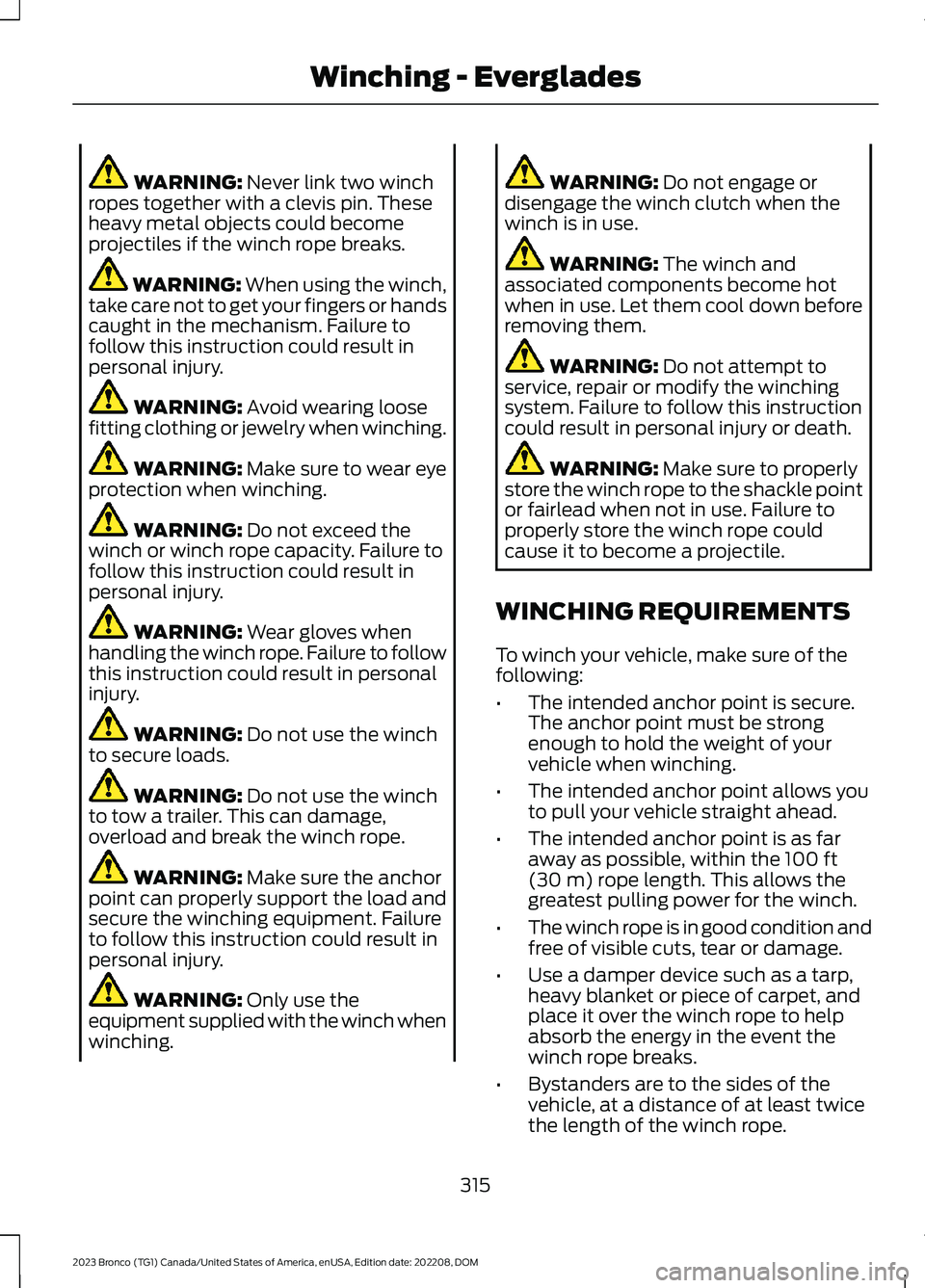
WARNING: Never link two winchropes together with a clevis pin. Theseheavy metal objects could becomeprojectiles if the winch rope breaks.
WARNING: When using the winch,take care not to get your fingers or handscaught in the mechanism. Failure tofollow this instruction could result inpersonal injury.
WARNING: Avoid wearing loosefitting clothing or jewelry when winching.
WARNING: Make sure to wear eyeprotection when winching.
WARNING: Do not exceed thewinch or winch rope capacity. Failure tofollow this instruction could result inpersonal injury.
WARNING: Wear gloves whenhandling the winch rope. Failure to followthis instruction could result in personalinjury.
WARNING: Do not use the winchto secure loads.
WARNING: Do not use the winchto tow a trailer. This can damage,overload and break the winch rope.
WARNING: Make sure the anchorpoint can properly support the load andsecure the winching equipment. Failureto follow this instruction could result inpersonal injury.
WARNING: Only use theequipment supplied with the winch whenwinching.
WARNING: Do not engage ordisengage the winch clutch when thewinch is in use.
WARNING: The winch andassociated components become hotwhen in use. Let them cool down beforeremoving them.
WARNING: Do not attempt toservice, repair or modify the winchingsystem. Failure to follow this instructioncould result in personal injury or death.
WARNING: Make sure to properlystore the winch rope to the shackle pointor fairlead when not in use. Failure toproperly store the winch rope couldcause it to become a projectile.
WINCHING REQUIREMENTS
To winch your vehicle, make sure of thefollowing:
•The intended anchor point is secure.The anchor point must be strongenough to hold the weight of yourvehicle when winching.
•The intended anchor point allows youto pull your vehicle straight ahead.
•The intended anchor point is as faraway as possible, within the 100 ft(30 m) rope length. This allows thegreatest pulling power for the winch.
•The winch rope is in good condition andfree of visible cuts, tear or damage.
•Use a damper device such as a tarp,heavy blanket or piece of carpet, andplace it over the winch rope to helpabsorb the energy in the event thewinch rope breaks.
•Bystanders are to the sides of thevehicle, at a distance of at least twicethe length of the winch rope.
315
2023 Bronco (TG1) Canada/United States of America, enUSA, Edition date: 202208, DOMWinching - Everglades
Page 332 of 642
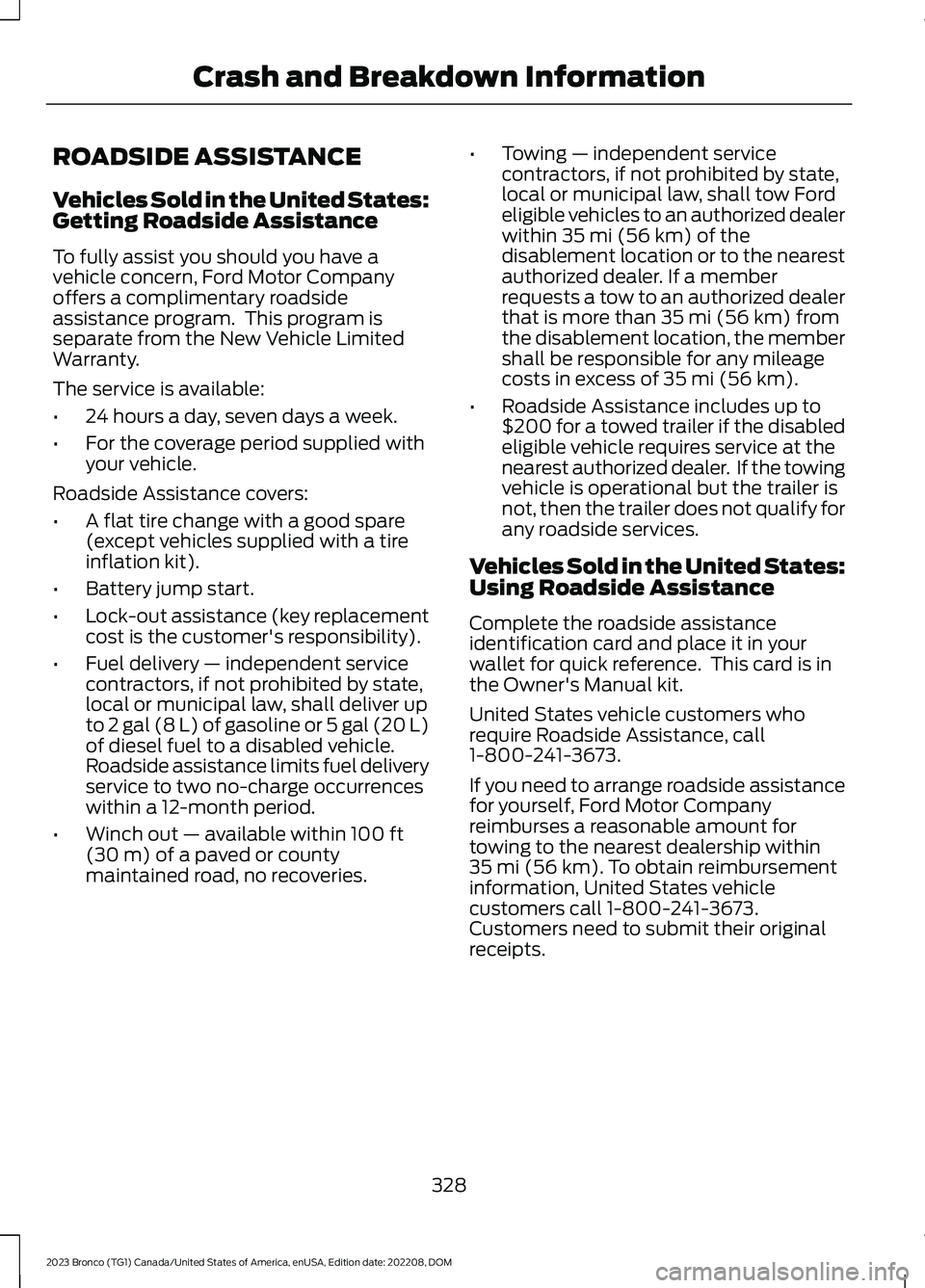
ROADSIDE ASSISTANCE
Vehicles Sold in the United States:Getting Roadside Assistance
To fully assist you should you have avehicle concern, Ford Motor Companyoffers a complimentary roadsideassistance program. This program isseparate from the New Vehicle LimitedWarranty.
The service is available:
•24 hours a day, seven days a week.
•For the coverage period supplied withyour vehicle.
Roadside Assistance covers:
•A flat tire change with a good spare(except vehicles supplied with a tireinflation kit).
•Battery jump start.
•Lock-out assistance (key replacementcost is the customer's responsibility).
•Fuel delivery — independent servicecontractors, if not prohibited by state,local or municipal law, shall deliver upto 2 gal (8 L) of gasoline or 5 gal (20 L)of diesel fuel to a disabled vehicle.Roadside assistance limits fuel deliveryservice to two no-charge occurrenceswithin a 12-month period.
•Winch out — available within 100 ft(30 m) of a paved or countymaintained road, no recoveries.
•Towing — independent servicecontractors, if not prohibited by state,local or municipal law, shall tow Fordeligible vehicles to an authorized dealerwithin 35 mi (56 km) of thedisablement location or to the nearestauthorized dealer. If a memberrequests a tow to an authorized dealerthat is more than 35 mi (56 km) fromthe disablement location, the membershall be responsible for any mileagecosts in excess of 35 mi (56 km).
•Roadside Assistance includes up to$200 for a towed trailer if the disabledeligible vehicle requires service at thenearest authorized dealer. If the towingvehicle is operational but the trailer isnot, then the trailer does not qualify forany roadside services.
Vehicles Sold in the United States:Using Roadside Assistance
Complete the roadside assistanceidentification card and place it in yourwallet for quick reference. This card is inthe Owner's Manual kit.
United States vehicle customers whorequire Roadside Assistance, call1-800-241-3673.
If you need to arrange roadside assistancefor yourself, Ford Motor Companyreimburses a reasonable amount fortowing to the nearest dealership within35 mi (56 km). To obtain reimbursementinformation, United States vehiclecustomers call 1-800-241-3673.Customers need to submit their originalreceipts.
328
2023 Bronco (TG1) Canada/United States of America, enUSA, Edition date: 202208, DOMCrash and Breakdown Information
Page 347 of 642
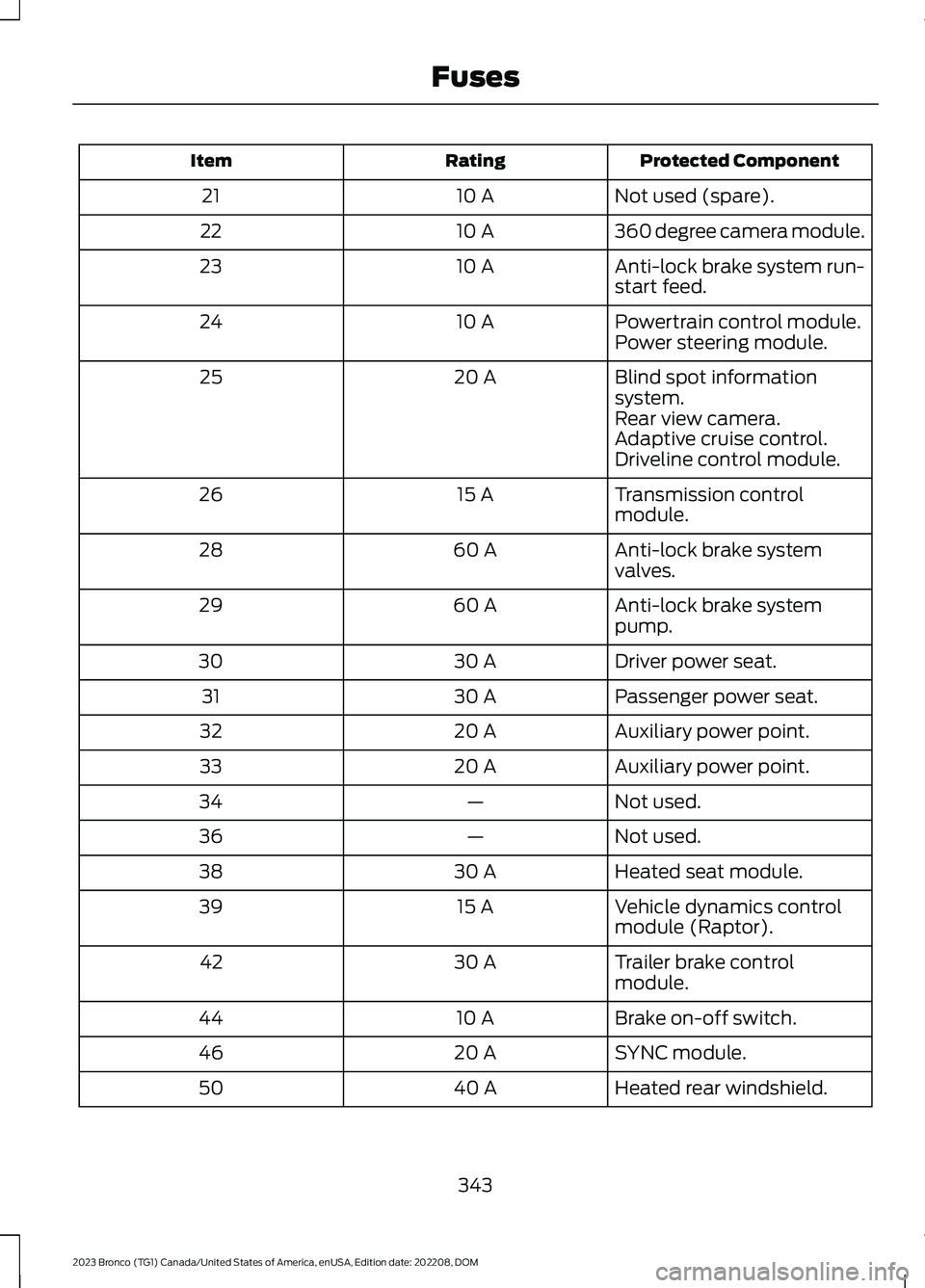
Protected ComponentRatingItem
Not used (spare).10 A21
360 degree camera module.10 A22
Anti-lock brake system run-start feed.10 A23
Powertrain control module.10 A24Power steering module.
Blind spot informationsystem.20 A25
Rear view camera.Adaptive cruise control.Driveline control module.
Transmission controlmodule.15 A26
Anti-lock brake systemvalves.60 A28
Anti-lock brake systempump.60 A29
Driver power seat.30 A30
Passenger power seat.30 A31
Auxiliary power point.20 A32
Auxiliary power point.20 A33
Not used.—34
Not used.—36
Heated seat module.30 A38
Vehicle dynamics controlmodule (Raptor).15 A39
Trailer brake controlmodule.30 A42
Brake on-off switch.10 A44
SYNC module.20 A46
Heated rear windshield.40 A50
343
2023 Bronco (TG1) Canada/United States of America, enUSA, Edition date: 202208, DOMFuses
Page 348 of 642
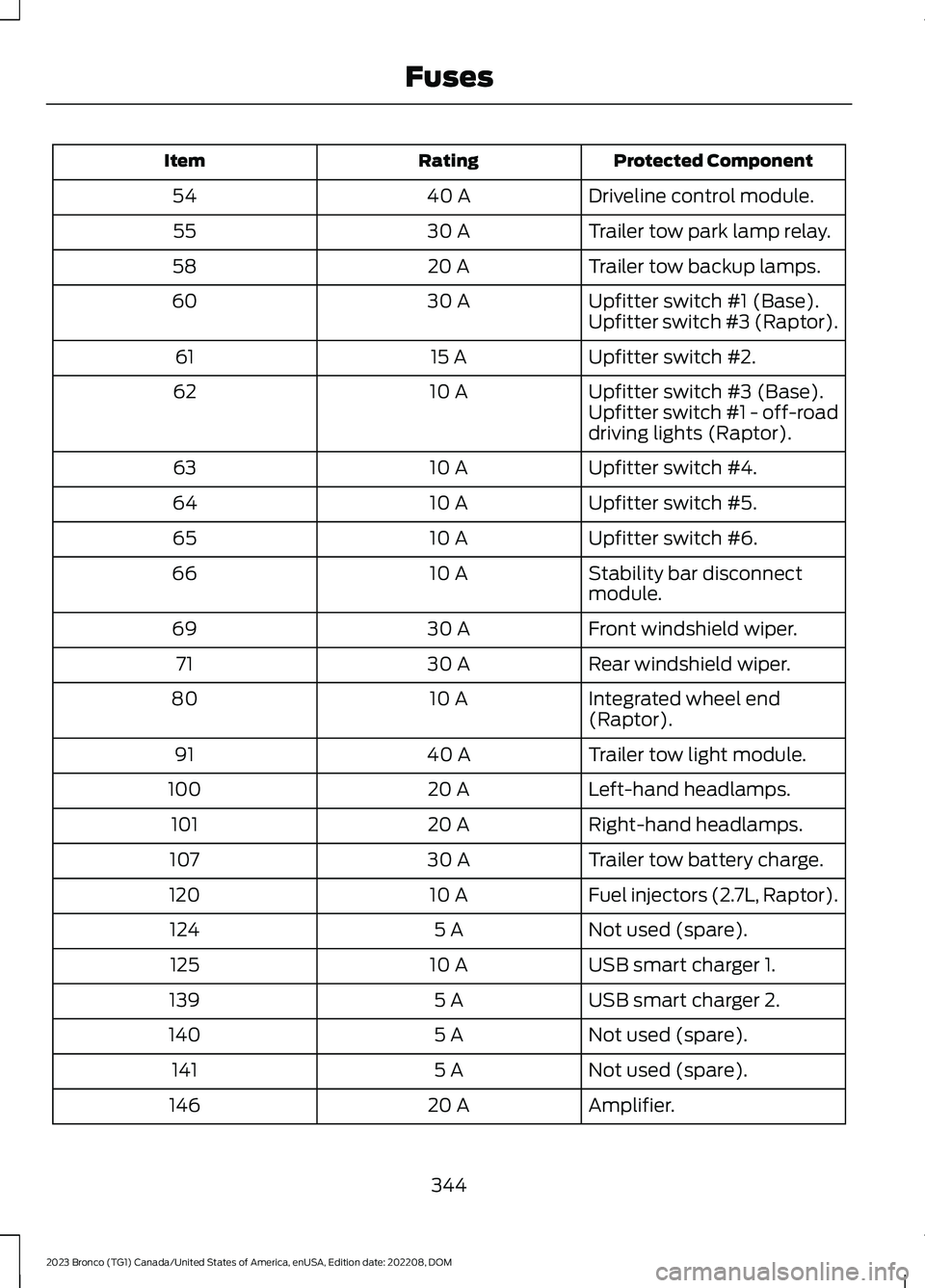
Protected ComponentRatingItem
Driveline control module.40 A54
Trailer tow park lamp relay.30 A55
Trailer tow backup lamps.20 A58
Upfitter switch #1 (Base).30 A60Upfitter switch #3 (Raptor).
Upfitter switch #2.15 A61
Upfitter switch #3 (Base).10 A62Upfitter switch #1 - off-roaddriving lights (Raptor).
Upfitter switch #4.10 A63
Upfitter switch #5.10 A64
Upfitter switch #6.10 A65
Stability bar disconnectmodule.10 A66
Front windshield wiper.30 A69
Rear windshield wiper.30 A71
Integrated wheel end(Raptor).10 A80
Trailer tow light module.40 A91
Left-hand headlamps.20 A100
Right-hand headlamps.20 A101
Trailer tow battery charge.30 A107
Fuel injectors (2.7L, Raptor).10 A120
Not used (spare).5 A124
USB smart charger 1.10 A125
USB smart charger 2.5 A139
Not used (spare).5 A140
Not used (spare).5 A141
Amplifier.20 A146
344
2023 Bronco (TG1) Canada/United States of America, enUSA, Edition date: 202208, DOMFuses
Page 362 of 642
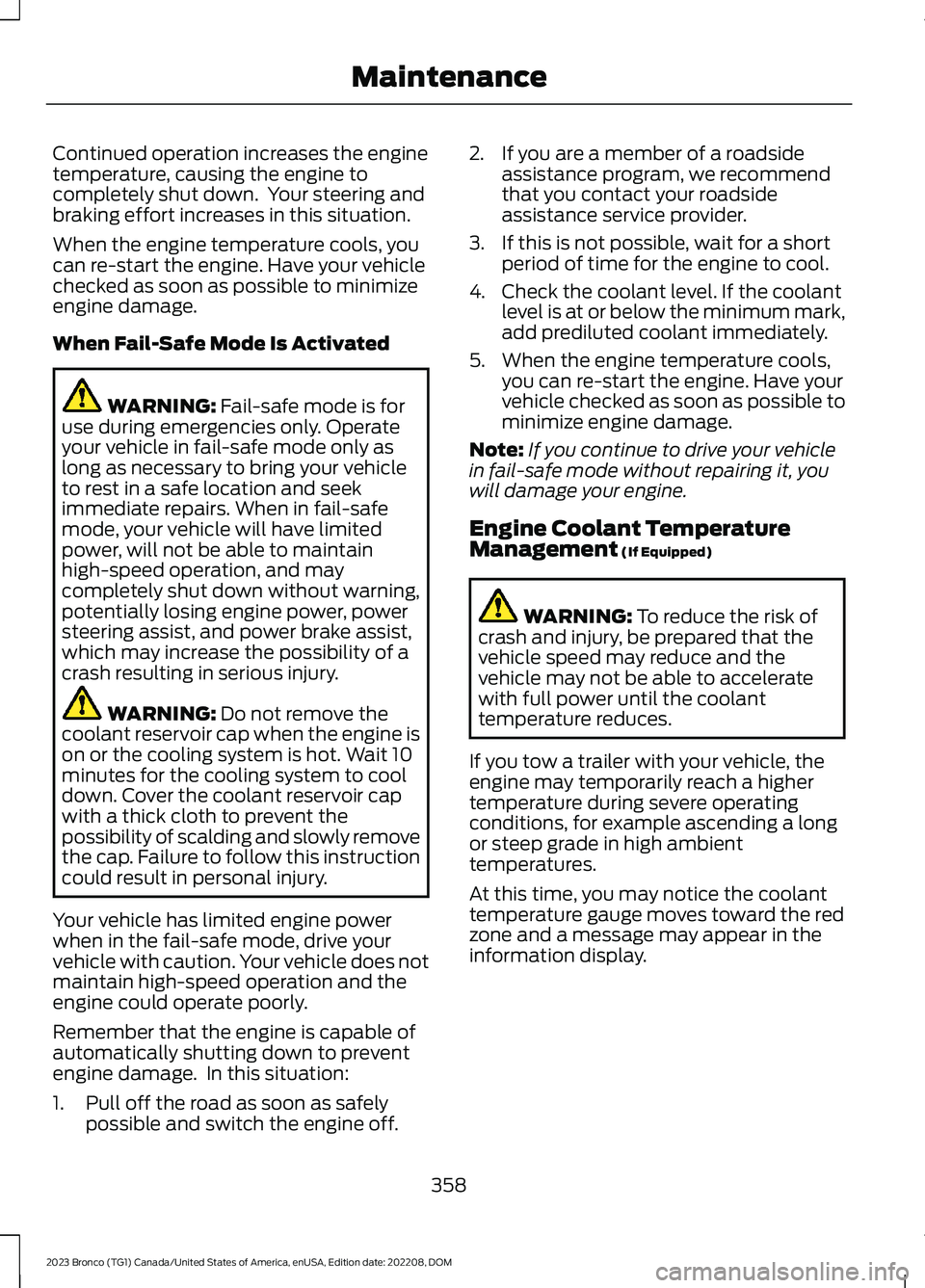
Continued operation increases the enginetemperature, causing the engine tocompletely shut down. Your steering andbraking effort increases in this situation.
When the engine temperature cools, youcan re-start the engine. Have your vehiclechecked as soon as possible to minimizeengine damage.
When Fail-Safe Mode Is Activated
WARNING: Fail-safe mode is foruse during emergencies only. Operateyour vehicle in fail-safe mode only aslong as necessary to bring your vehicleto rest in a safe location and seekimmediate repairs. When in fail-safemode, your vehicle will have limitedpower, will not be able to maintainhigh-speed operation, and maycompletely shut down without warning,potentially losing engine power, powersteering assist, and power brake assist,which may increase the possibility of acrash resulting in serious injury.
WARNING: Do not remove thecoolant reservoir cap when the engine ison or the cooling system is hot. Wait 10minutes for the cooling system to cooldown. Cover the coolant reservoir capwith a thick cloth to prevent thepossibility of scalding and slowly removethe cap. Failure to follow this instructioncould result in personal injury.
Your vehicle has limited engine powerwhen in the fail-safe mode, drive yourvehicle with caution. Your vehicle does notmaintain high-speed operation and theengine could operate poorly.
Remember that the engine is capable ofautomatically shutting down to preventengine damage. In this situation:
1.Pull off the road as soon as safelypossible and switch the engine off.
2.If you are a member of a roadsideassistance program, we recommendthat you contact your roadsideassistance service provider.
3.If this is not possible, wait for a shortperiod of time for the engine to cool.
4.Check the coolant level. If the coolantlevel is at or below the minimum mark,add prediluted coolant immediately.
5.When the engine temperature cools,you can re-start the engine. Have yourvehicle checked as soon as possible tominimize engine damage.
Note:If you continue to drive your vehiclein fail-safe mode without repairing it, youwill damage your engine.
Engine Coolant TemperatureManagement (If Equipped)
WARNING: To reduce the risk ofcrash and injury, be prepared that thevehicle speed may reduce and thevehicle may not be able to acceleratewith full power until the coolanttemperature reduces.
If you tow a trailer with your vehicle, theengine may temporarily reach a highertemperature during severe operatingconditions, for example ascending a longor steep grade in high ambienttemperatures.
At this time, you may notice the coolanttemperature gauge moves toward the redzone and a message may appear in theinformation display.
358
2023 Bronco (TG1) Canada/United States of America, enUSA, Edition date: 202208, DOMMaintenance
Page 538 of 642
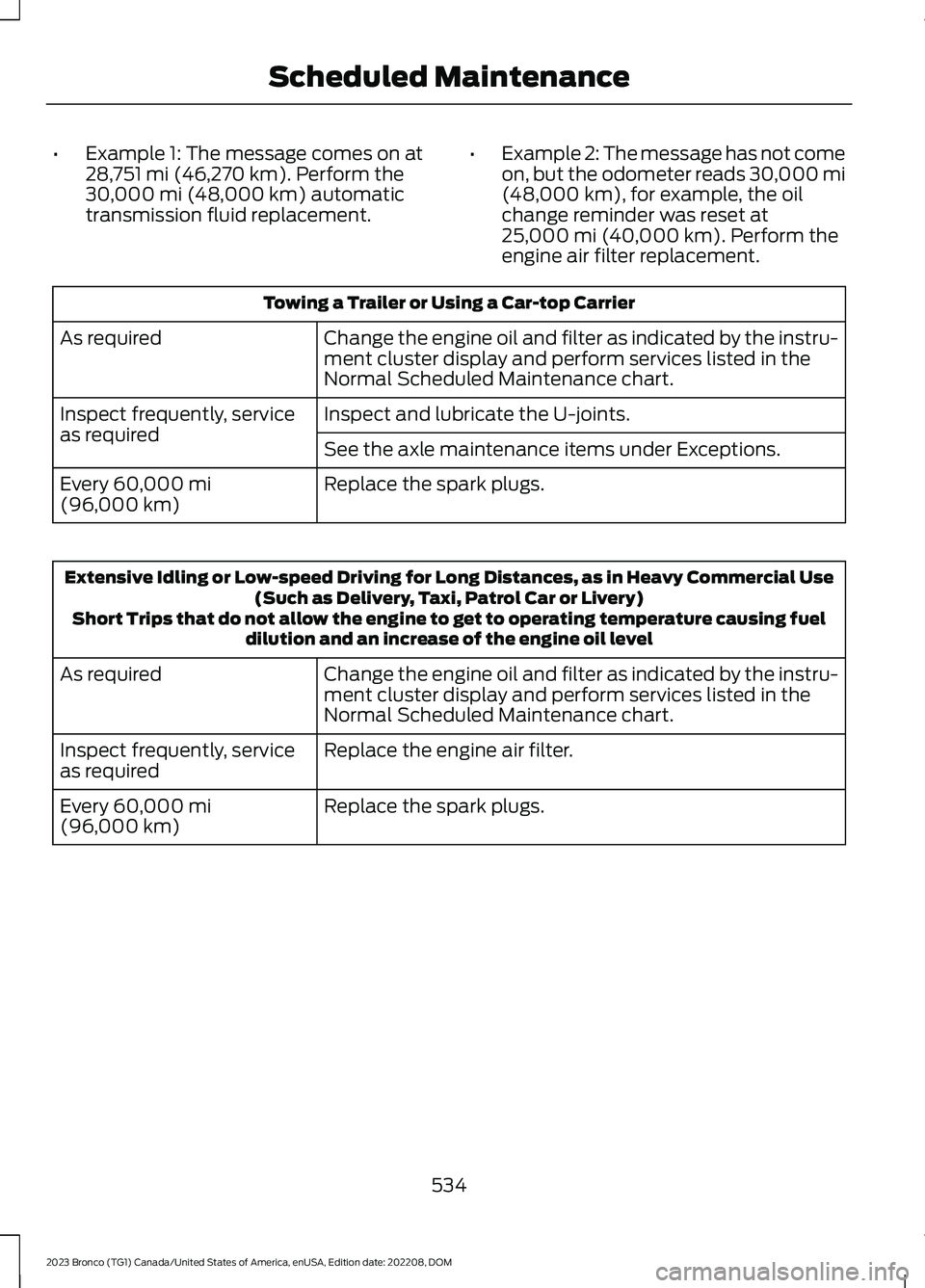
•Example 1: The message comes on at28,751 mi (46,270 km). Perform the30,000 mi (48,000 km) automatictransmission fluid replacement.
•Example 2: The message has not comeon, but the odometer reads 30,000 mi(48,000 km), for example, the oilchange reminder was reset at25,000 mi (40,000 km). Perform theengine air filter replacement.
Towing a Trailer or Using a Car-top Carrier
Change the engine oil and filter as indicated by the instru-ment cluster display and perform services listed in theNormal Scheduled Maintenance chart.
As required
Inspect and lubricate the U-joints.Inspect frequently, serviceas requiredSee the axle maintenance items under Exceptions.
Replace the spark plugs.Every 60,000 mi(96,000 km)
Extensive Idling or Low-speed Driving for Long Distances, as in Heavy Commercial Use(Such as Delivery, Taxi, Patrol Car or Livery)Short Trips that do not allow the engine to get to operating temperature causing fueldilution and an increase of the engine oil level
Change the engine oil and filter as indicated by the instru-ment cluster display and perform services listed in theNormal Scheduled Maintenance chart.
As required
Replace the engine air filter.Inspect frequently, serviceas required
Replace the spark plugs.Every 60,000 mi(96,000 km)
534
2023 Bronco (TG1) Canada/United States of America, enUSA, Edition date: 202208, DOMScheduled Maintenance
Page 623 of 642
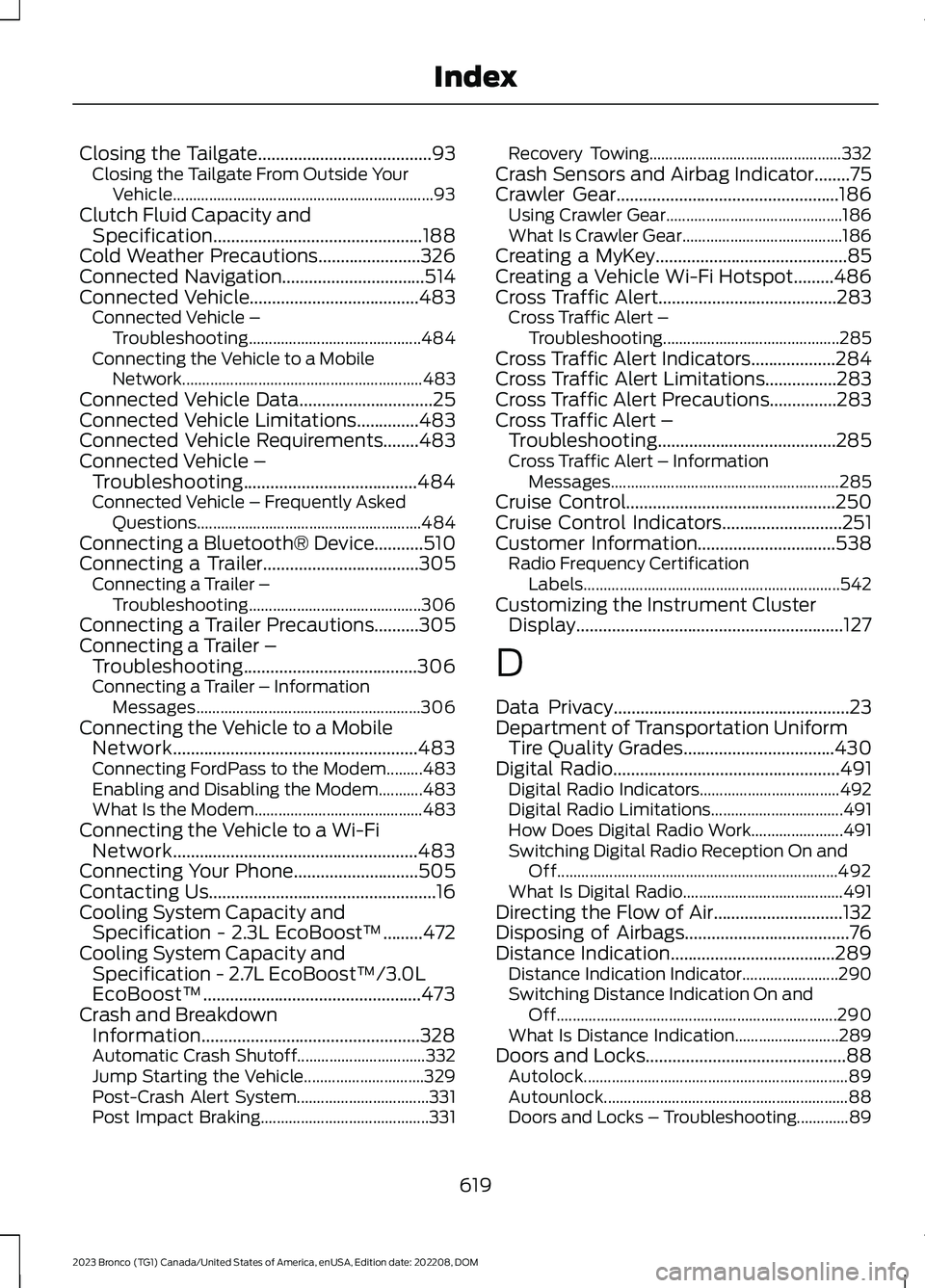
Closing the Tailgate.......................................93Closing the Tailgate From Outside YourVehicle.................................................................93Clutch Fluid Capacity andSpecification...............................................188Cold Weather Precautions.......................326Connected Navigation................................514Connected Vehicle......................................483Connected Vehicle –Troubleshooting...........................................484Connecting the Vehicle to a MobileNetwork............................................................483Connected Vehicle Data..............................25Connected Vehicle Limitations..............483Connected Vehicle Requirements........483Connected Vehicle –Troubleshooting.......................................484Connected Vehicle – Frequently AskedQuestions........................................................484Connecting a Bluetooth® Device...........510Connecting a Trailer...................................305Connecting a Trailer –Troubleshooting...........................................306Connecting a Trailer Precautions..........305Connecting a Trailer –Troubleshooting.......................................306Connecting a Trailer – InformationMessages........................................................306Connecting the Vehicle to a MobileNetwork.......................................................483Connecting FordPass to the Modem.........483Enabling and Disabling the Modem...........483What Is the Modem..........................................483Connecting the Vehicle to a Wi-FiNetwork.......................................................483Connecting Your Phone............................505Contacting Us...................................................16Cooling System Capacity andSpecification - 2.3L EcoBoost™.........472Cooling System Capacity andSpecification - 2.7L EcoBoost™/3.0LEcoBoost™.................................................473Crash and BreakdownInformation.................................................328Automatic Crash Shutoff................................332Jump Starting the Vehicle..............................329Post-Crash Alert System.................................331Post Impact Braking..........................................331
Recovery Towing................................................332Crash Sensors and Airbag Indicator........75Crawler Gear..................................................186Using Crawler Gear............................................186What Is Crawler Gear........................................186Creating a MyKey...........................................85Creating a Vehicle Wi-Fi Hotspot.........486Cross Traffic Alert........................................283Cross Traffic Alert –Troubleshooting............................................285Cross Traffic Alert Indicators...................284Cross Traffic Alert Limitations................283Cross Traffic Alert Precautions...............283Cross Traffic Alert –Troubleshooting........................................285Cross Traffic Alert – InformationMessages.........................................................285Cruise Control...............................................250Cruise Control Indicators...........................251Customer Information...............................538Radio Frequency CertificationLabels................................................................542Customizing the Instrument ClusterDisplay............................................................127
D
Data Privacy.....................................................23Department of Transportation UniformTire Quality Grades..................................430Digital Radio...................................................491Digital Radio Indicators...................................492Digital Radio Limitations.................................491How Does Digital Radio Work.......................491Switching Digital Radio Reception On andOff......................................................................492What Is Digital Radio........................................491Directing the Flow of Air.............................132Disposing of Airbags.....................................76Distance Indication.....................................289Distance Indication Indicator........................290Switching Distance Indication On andOff......................................................................290What Is Distance Indication..........................289Doors and Locks.............................................88Autolock..................................................................89Autounlock.............................................................88Doors and Locks – Troubleshooting.............89
619
2023 Bronco (TG1) Canada/United States of America, enUSA, Edition date: 202208, DOMIndex
Page 627 of 642
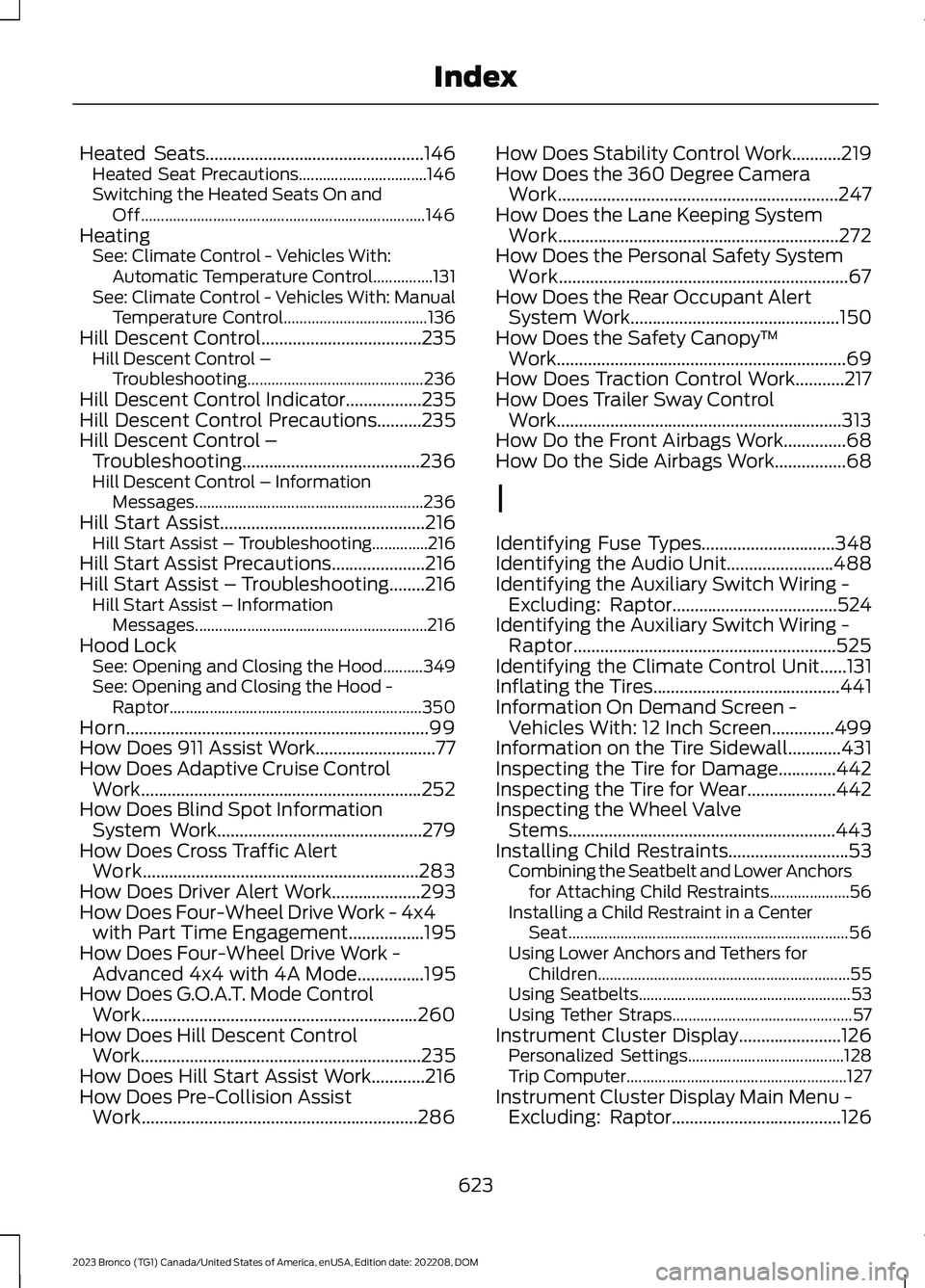
Heated Seats.................................................146Heated Seat Precautions................................146Switching the Heated Seats On andOff.......................................................................146HeatingSee: Climate Control - Vehicles With:Automatic Temperature Control...............131See: Climate Control - Vehicles With: ManualTemperature Control....................................136Hill Descent Control....................................235Hill Descent Control –Troubleshooting............................................236Hill Descent Control Indicator.................235Hill Descent Control Precautions..........235Hill Descent Control –Troubleshooting........................................236Hill Descent Control – InformationMessages.........................................................236Hill Start Assist..............................................216Hill Start Assist – Troubleshooting..............216Hill Start Assist Precautions.....................216Hill Start Assist – Troubleshooting........216Hill Start Assist – InformationMessages..........................................................216Hood LockSee: Opening and Closing the Hood..........349See: Opening and Closing the Hood -Raptor...............................................................350Horn....................................................................99How Does 911 Assist Work...........................77How Does Adaptive Cruise ControlWork...............................................................252How Does Blind Spot InformationSystem Work..............................................279How Does Cross Traffic AlertWork..............................................................283How Does Driver Alert Work....................293How Does Four-Wheel Drive Work - 4x4with Part Time Engagement.................195How Does Four-Wheel Drive Work -Advanced 4x4 with 4A Mode...............195How Does G.O.A.T. Mode ControlWork..............................................................260How Does Hill Descent ControlWork...............................................................235How Does Hill Start Assist Work............216How Does Pre-Collision AssistWork..............................................................286
How Does Stability Control Work...........219How Does the 360 Degree CameraWork...............................................................247How Does the Lane Keeping SystemWork...............................................................272How Does the Personal Safety SystemWork.................................................................67How Does the Rear Occupant AlertSystem Work...............................................150How Does the Safety Canopy™Work.................................................................69How Does Traction Control Work...........217How Does Trailer Sway ControlWork................................................................313How Do the Front Airbags Work..............68How Do the Side Airbags Work................68
I
Identifying Fuse Types..............................348Identifying the Audio Unit........................488Identifying the Auxiliary Switch Wiring -Excluding: Raptor.....................................524Identifying the Auxiliary Switch Wiring -Raptor...........................................................525Identifying the Climate Control Unit......131Inflating the Tires..........................................441Information On Demand Screen -Vehicles With: 12 Inch Screen..............499Information on the Tire Sidewall............431Inspecting the Tire for Damage.............442Inspecting the Tire for Wear....................442Inspecting the Wheel ValveStems............................................................443Installing Child Restraints...........................53Combining the Seatbelt and Lower Anchorsfor Attaching Child Restraints....................56Installing a Child Restraint in a CenterSeat......................................................................56Using Lower Anchors and Tethers forChildren...............................................................55Using Seatbelts.....................................................53Using Tether Straps.............................................57Instrument Cluster Display.......................126Personalized Settings.......................................128Trip Computer.......................................................127Instrument Cluster Display Main Menu -Excluding: Raptor......................................126
623
2023 Bronco (TG1) Canada/United States of America, enUSA, Edition date: 202208, DOMIndex
Page 628 of 642
Instrument Cluster Display Main Menu -Raptor.............................................................127Instrument Cluster Indicators -Excluding: Raptor........................................121Instrument Cluster Indicators -Raptor............................................................123Instrument Cluster.........................................117Fuel Gauge.............................................................118Instrument Cluster Overview - Excluding:Raptor..............................................................117Instrument Cluster Overview -Raptor.............................................................118Instrument Cluster WarningLamps............................................................120Instrument Panel............................................33Interior Air Quality........................................139Interior Bulbs.................................................369Interior Bulb Specification Chart.................369Interior Lamp Function.................................111Switching the Interior Lamp Function Onand Off.................................................................111What Is the Interior Lamp Function...............111Interior Lighting................................................111Ambient Lighting..................................................112Interior Lamp Function.......................................111Interior Lighting – Troubleshooting...............112Interior Lighting – Troubleshooting.........112Interior Lighting – Frequently AskedQuestions...........................................................112Interior Mirror...................................................115Auto-Dimming Interior Mirror..........................115Interior Mirror Precautions..........................115Introduction.......................................................18
J
Jump Starting the Vehicle........................329Jump Starting Precautions............................329Jump Starting the Vehicle..............................330Preparing the Vehicle.......................................330
K
Keyless Entry.....................................................91Keyless Entry – Troubleshooting....................92Keyless Entry Limitations.............................91Keyless Entry Settings...................................91
Keyless Entry – Troubleshooting..............92Keyless Entry – Frequently AskedQuestions...........................................................92Keys and Remote Controls.........................79Keys and Remote Controls –Troubleshooting..............................................83Keys and Remote Controls –Troubleshooting..........................................83Keys and Remote Controls – InformationMessages...........................................................83
L
Lane Keeping System Indicators............275Lane Keeping System.................................272Aid Mode...............................................................274Alert and Aid Mode............................................274Alert Mode............................................................273Lane Keeping System –Troubleshooting............................................276Lane Keeping System Limitations.........272Lane Keeping System Precautions........272Lane Keeping System –Troubleshooting........................................276Lane Keeping System – Frequently AskedQuestions.........................................................277Lane Keeping System – InformationMessages.........................................................276Launching or Retrieving a Boat orPersonal Watercraft.................................310Live Traffic.......................................................514Switching Live Traffic On and Off................514What Is Live Traffic.............................................514Load Carrying................................................295Fender Anchor Points......................................303Roof Rack.............................................................299Load Carrying Precautions.......................295Loading Your Trailer...................................308Locating the 360 Degree Cameras.......247Locating the Auxiliary Switches.............522Locating the Auxiliary SwitchWiring............................................................522Locating the Blind Spot InformationSystem Sensors - Excluding:Raptor...........................................................280Locating the Blind Spot InformationSystem Sensors - Raptor........................281
624
2023 Bronco (TG1) Canada/United States of America, enUSA, Edition date: 202208, DOMIndex
Page 635 of 642
Storing the Doors and the Roof Panels- 4-Door, Excluding: Raptor..................407Storing the Doors and the Roof Panels- Raptor.........................................................414Storing the Roof Panels - 2-Door...........419Storing Your Vehicle...................................428SVT.......................................................................15Switching Adaptive Cruise Control Onand Off..........................................................255Switching Air Conditioning On andOff.....................................................................131Switching All of the Interior Lamps Onand Off.............................................................111Switching Android Auto On andOff....................................................................512Switching Apple CarPlay On andOff....................................................................512Switching Auto-Start-Stop On andOff....................................................................174Switching Blind Spot InformationSystem On and Off..................................280Switching Climate Control On andOff.....................................................................131Switching Cross Traffic Alert On andOff..................................................................283Switching Cruise Control On andOff..................................................................250Switching Driver Alert On and Off.........294Switching Four-Wheel Drive On andOff....................................................................197Switching From Adaptive Cruise Controlto Cruise Control.......................................258Switching Hill Descent Control On andOff...................................................................235Switching Hill Start Assist On and Off -Automatic Transmission.........................216Switching Hill Start Assist On and Off -Manual Transmission...............................216Switching Maximum Cooling On andOff.....................................................................131Switching Maximum Defrost On andOff.....................................................................131Switching Parking Aid On and Off........240Switching Pre-Collision Assist On andOff...................................................................287Switching Rear Occupant Alert SystemOn and Off...................................................150
Switching Recirculated Air On andOff.....................................................................131Switching Repeat Mode On andOff..................................................................489Switching Shuffle Mode On andOff..................................................................489Switching Stability Control On andOff..................................................................220Switching Text Message Notification Onand Off.........................................................509Switching the Audio Unit On andOff..................................................................488Switching the Display On and Off..........491Switching the Electronic LockingDifferential On and Off - Excluding:Raptor...........................................................203Switching the Electronic LockingDifferential On and Off..........................205Switching the Front Interior Lamps Onand Off.............................................................111Switching the Hazard Flashers On andOff..................................................................329Switching the Heated Mirrors On andOff....................................................................132Switching the Heated Rear Window Onand Off...........................................................132Switching the Heated Steering WheelOn and Off.....................................................99Switching the Lane Keeping SystemMode..............................................................273Switching the Lane Keeping System Onand Off..........................................................273Switching the Rear Interior Lamps Onand Off.............................................................111Switching the Rear Window Wiper Onand Off..........................................................100Switching the Stabilizer Bar DisconnectOn and Off - Excluding: Raptor...........229Switching the Stabilizer Bar DisconnectOn and Off - Raptor................................230Switching Traction Control On andOff....................................................................217Switching Trail Control On and Off.......222Switching Trailer Sway Control On andOff....................................................................313Switching Trail Turn Assist On andOff...................................................................227Symbols Glossary..........................................20
631
2023 Bronco (TG1) Canada/United States of America, enUSA, Edition date: 202208, DOMIndex