brake FORD BRONCO 2023 Repair Manual
[x] Cancel search | Manufacturer: FORD, Model Year: 2023, Model line: BRONCO, Model: FORD BRONCO 2023Pages: 642, PDF Size: 14.71 MB
Page 255 of 642
CANCELING THE SET SPEED
Press the button, or tap thebrake pedal to cancel the setspeed.
Note:The system remembers the setspeed.
Note:The system cancels if the vehiclespeed drops below 10 mph (16 km/h) underthe set speed when driving uphill.
RESUMING THE SET SPEED
Press the button.
CRUISE CONTROL
INDICATORS
Illuminates when you switch thesystem on.
251
2023 Bronco (TG1) Canada/United States of America, enUSA, Edition date: 202208, DOMCruise ControlE308130 E308130 E71340
Page 256 of 642
HOW DOES ADAPTIVE CRUISE
CONTROL WORK
Adaptive Cruise Control
Adaptive cruise control uses a radar sensorto adjust your vehicle speed to maintain aset gap between you and the vehicle infront of you in the same lane.
ADAPTIVE CRUISE CONTROL
PRECAUTIONS
WARNING: You are responsible forcontrolling your vehicle at all times. Thesystem is designed to be an aid and doesnot relieve you of your responsibility todrive with due care and attention. Failureto follow this instruction could result inthe loss of control of your vehicle,personal injury or death.
WARNING: Pay close attention tochanging road conditions such asentering or leaving a highway, on roadswith intersections or roundabouts, roadswithout visible lanes of travel, roads thatare winding, slippery, unpaved, or steepslopes.
WARNING: The system does notcontrol speed in low traction conditionsor extremely steep slopes. The systemis designed to be an aid and does notrelieve you of your responsibility to drivewith due care and attention. Failure tofollow this instruction could result inpersonal injury.
WARNING: The system is not acrash warning or avoidance system.
WARNING: Do not use the systemwhen towing a trailer that hasaftermarket electronic trailer brakecontrols. Failure to follow this instructioncould result in the loss of control of yourvehicle, personal injury or death.
WARNING: Do not use tire sizesother than those recommended becausethis can affect the normal operation ofthe system. Failure to do so may resultin a loss of vehicle control, which couldresult in serious injury.
WARNING: Do not use the systemwith a snow plow blade installed.
WARNING: Do not use the systemin poor visibility, for example fog, heavyrain, spray or snow.
When Following a Vehicle
WARNING: When following avehicle that is braking, your vehicle doesnot always decelerate quickly enough toavoid a crash without driver intervention.Apply the brakes when necessary. Failureto follow this instruction could result inpersonal injury or death.
Hilly Condition Usage
You should select a lower gear when thesystem is active in situations such asprolonged downhill driving on steep slopes,for example in mountainous areas. Thesystem needs additional engine braking inthese situations to reduce the load on thevehicle’s regular brake system to preventit from overheating.
252
2023 Bronco (TG1) Canada/United States of America, enUSA, Edition date: 202208, DOMAdaptive Cruise Control (If Equipped)
Page 257 of 642
Note:An audible alarm sounds and thesystem shuts down if it applies brakes foran extended period of time. This allows thebrakes to cool. The system functionsnormally again after the brakes cool.
ADAPTIVE CRUISE CONTROL
LIMITATIONS
Sensor Limitations
WARNING: On rare occasions,detection issues can occur due to theroad infrastructures, for example bridges,tunnels and safety barriers. In thesecases, the system may brake late orunexpectedly. At all times, you areresponsible for controlling your vehicle,supervising the system and intervening,if required.
WARNING: If the systemmalfunctions, have your vehicle checkedas soon as possible.
WARNING: Large contrasts inoutside lighting can limit sensorperformance.
WARNING: The system only warnsof vehicles detected by the radar sensor.In some cases there may be no warningor a delayed warning. Apply the brakeswhen necessary. Failure to follow thisinstruction could result in personal injuryor death.
WARNING: The system may notdetect stationary or slow movingvehicles below 6 mph (10 km/h).
WARNING: The system does notdetect pedestrians or objects in the road.
WARNING: The system does notdetect oncoming vehicles in the samelane.
WARNING: The system may notoperate properly if the sensor is blocked.Keep the windshield free fromobstruction.
WARNING: The sensor mayincorrectly track lane markings as otherstructures or objects. This can result ina false or missed warning.
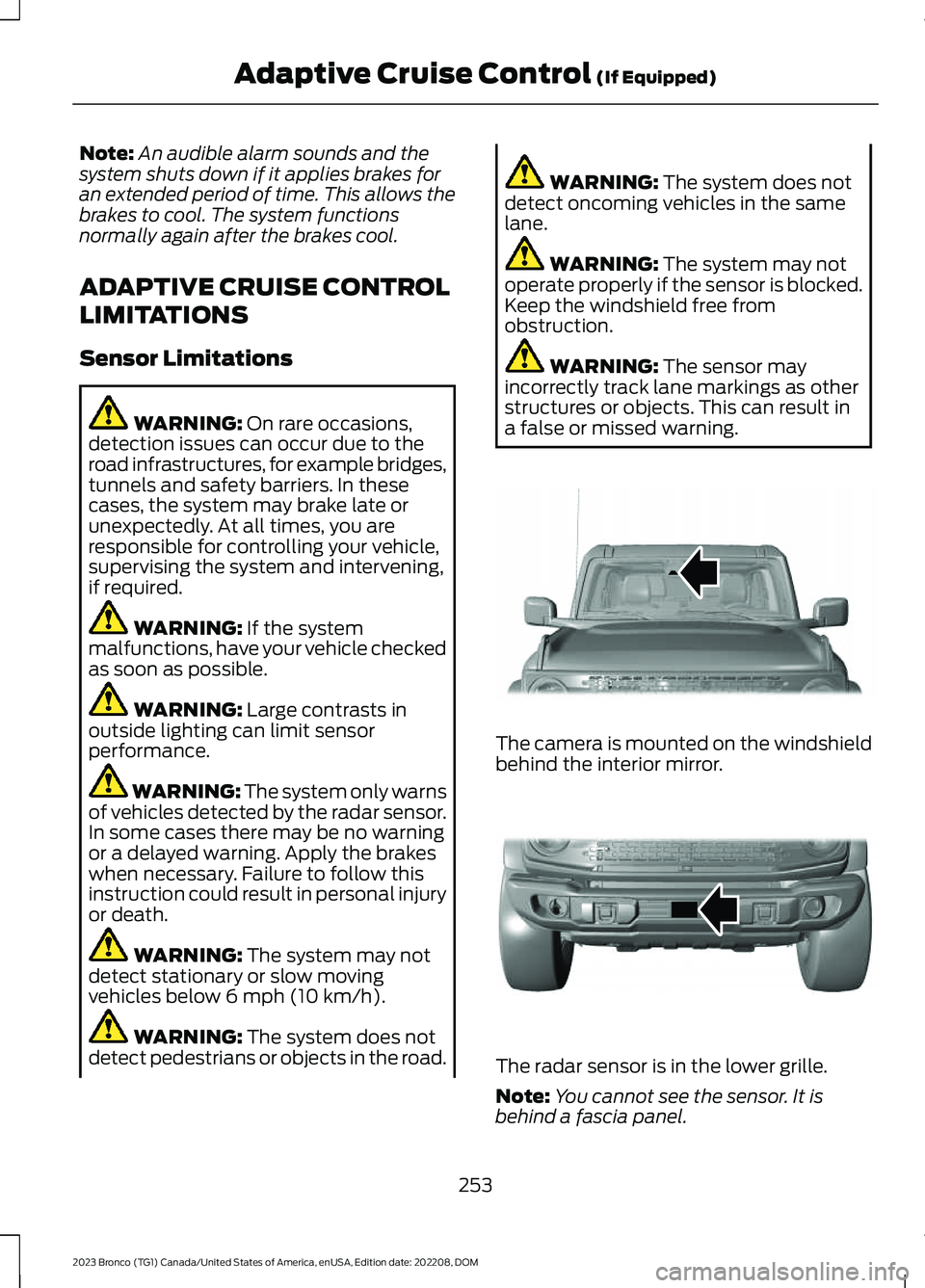
The camera is mounted on the windshieldbehind the interior mirror.
The radar sensor is in the lower grille.
Note:You cannot see the sensor. It isbehind a fascia panel.
253
2023 Bronco (TG1) Canada/United States of America, enUSA, Edition date: 202208, DOMAdaptive Cruise Control (If Equipped)E327935 E327936
Page 258 of 642
Note:Keep the front of your vehicle free ofdirt, metal badges or objects. Vehicle frontprotectors, aftermarket lights, additionalpaint or plastic coatings could also degradesensor performance.
A message displays if something obstructsthe camera or the sensor. When somethingblocks the sensor, the system cannotdetect a vehicle ahead and does notfunction. See Adaptive Cruise Control –Information Messages (page 258).
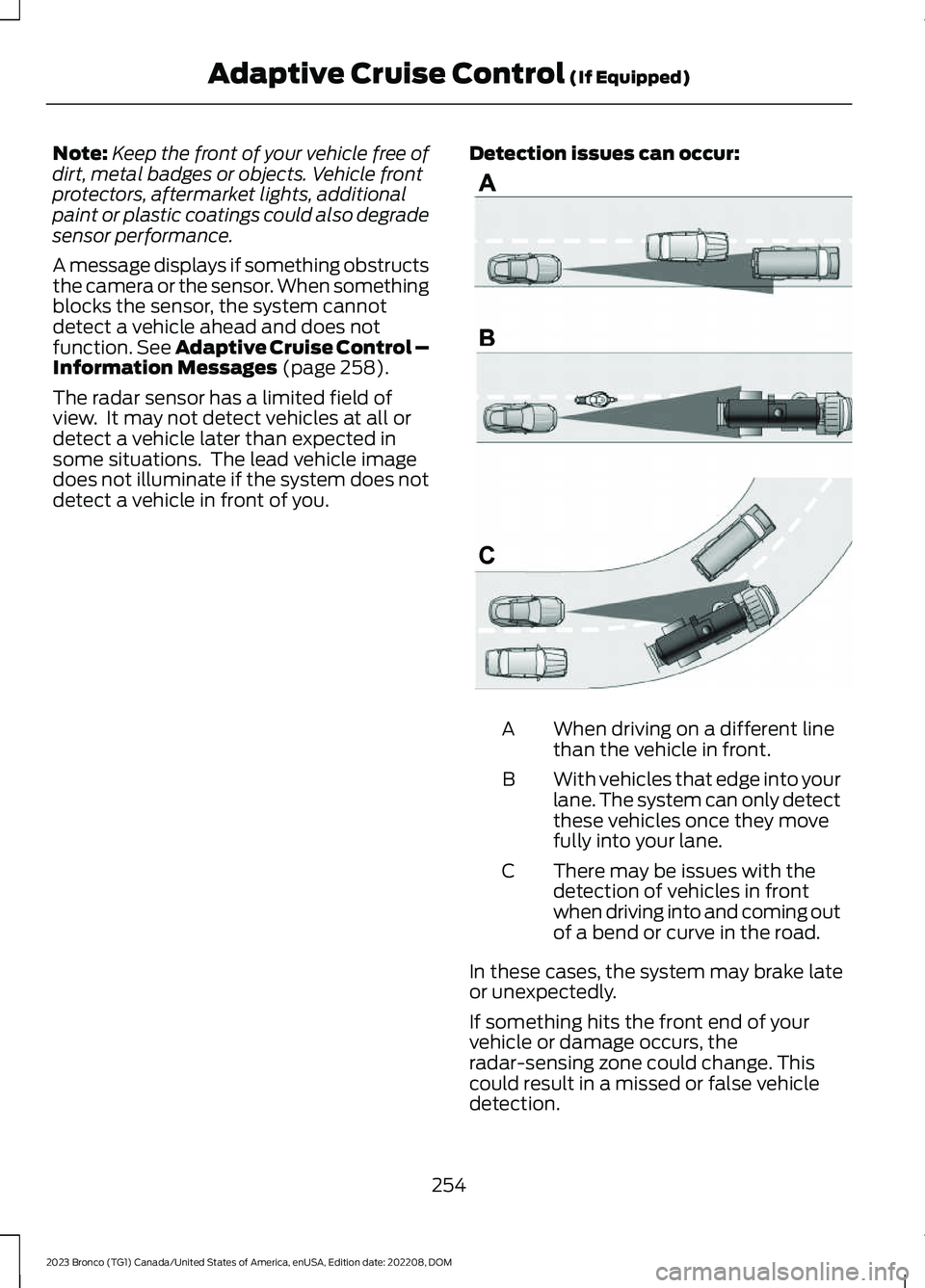
The radar sensor has a limited field ofview. It may not detect vehicles at all ordetect a vehicle later than expected insome situations. The lead vehicle imagedoes not illuminate if the system does notdetect a vehicle in front of you.
Detection issues can occur:
When driving on a different linethan the vehicle in front.A
With vehicles that edge into yourlane. The system can only detectthese vehicles once they movefully into your lane.
B
There may be issues with thedetection of vehicles in frontwhen driving into and coming outof a bend or curve in the road.
C
In these cases, the system may brake lateor unexpectedly.
If something hits the front end of yourvehicle or damage occurs, theradar-sensing zone could change. Thiscould result in a missed or false vehicledetection.
254
2023 Bronco (TG1) Canada/United States of America, enUSA, Edition date: 202208, DOMAdaptive Cruise Control (If Equipped)E71621
Page 259 of 642
Optimal system performance requires aclear view of the road by thewindshield-mounted camera.
Optimal performance may not occur if:
•The camera is blocked.
•There is poor visibility or lightingconditions.
•There are bad weather conditions.
SWITCHING ADAPTIVE
CRUISE CONTROL ON AND OFF
The cruise controls are on the steeringwheel. See Cruise Control (page 250).
Switching Adaptive Cruise ControlOn
Press the button to activate thesystem. When the systemactivates, the set speed is equalto the current vehicle speed. If the speedis too low, or other conditions are notcorrect for adaptive cruise controlactivation, the system enters standbymode.
Note:The minimum set speed is 15 mph or20 km/h.
The indicator, current gap setting and setspeed appear in the instrument clusterdisplay.
Switching Adaptive Cruise ControlOff
Press the button when thesystem is in standby mode orswitch the ignition off.
Note:When you switch the system off, theset speed clears.
Automatic Cancellation orDeactivation
The system may cancel if:
•The tires lose traction.
•You apply the parking brake.
•Your vehicle speed falls significantlybelow 15 mph or 20 km/h.
The system may turn off or preventactivating when requested if:
•The vehicle has a blocked sensor.
•The brake temperature is too high.
•There is a failure in the system or arelated system.
SETTING THE ADAPTIVE
CRUISE CONTROL SPEED
Drive to the speed you prefer.
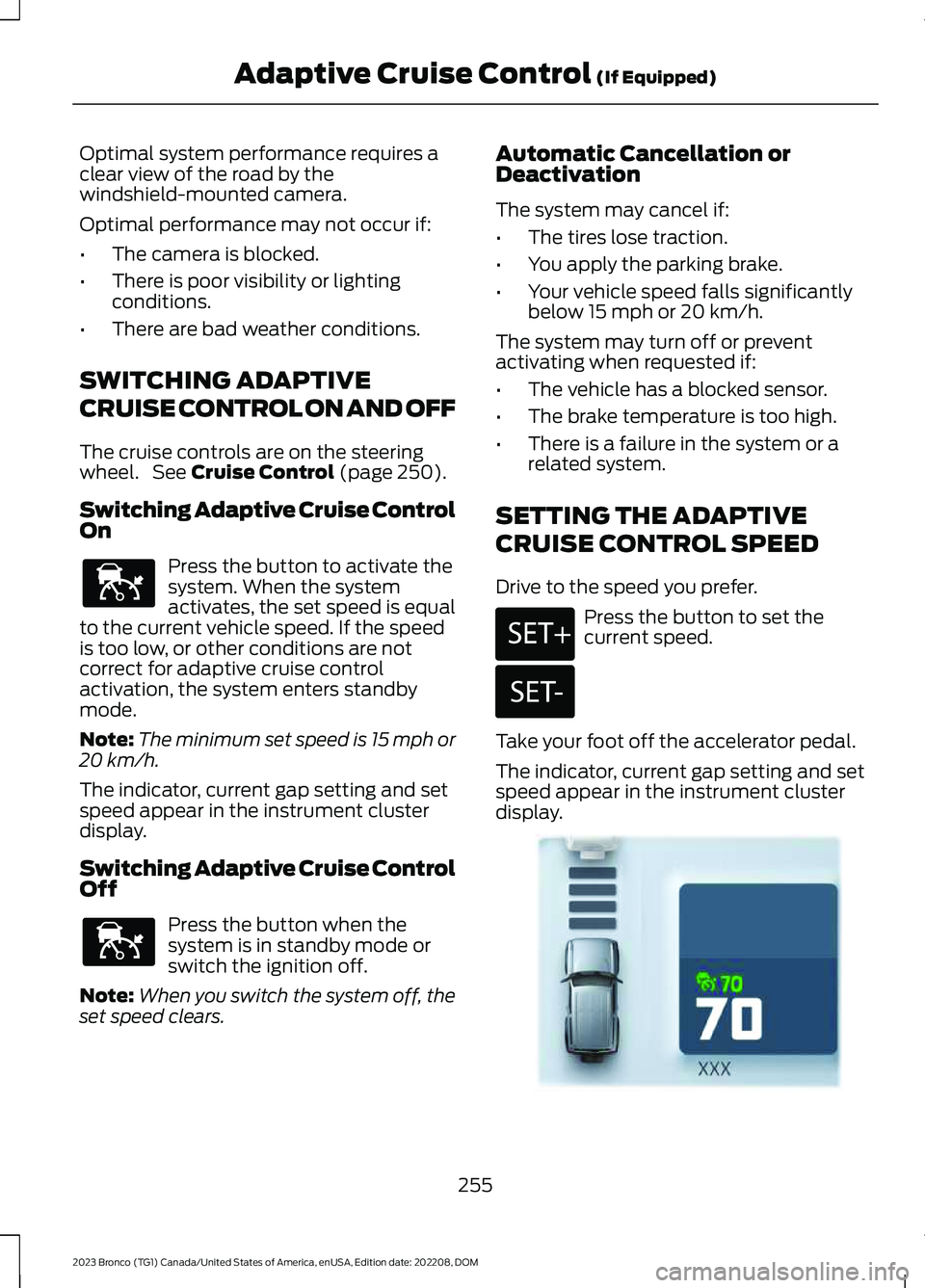
Press the button to set thecurrent speed.
Take your foot off the accelerator pedal.
The indicator, current gap setting and setspeed appear in the instrument clusterdisplay.
255
2023 Bronco (TG1) Canada/United States of America, enUSA, Edition date: 202208, DOMAdaptive Cruise Control (If Equipped)E144529 E144529 E246884 E246885 E355963
Page 260 of 642
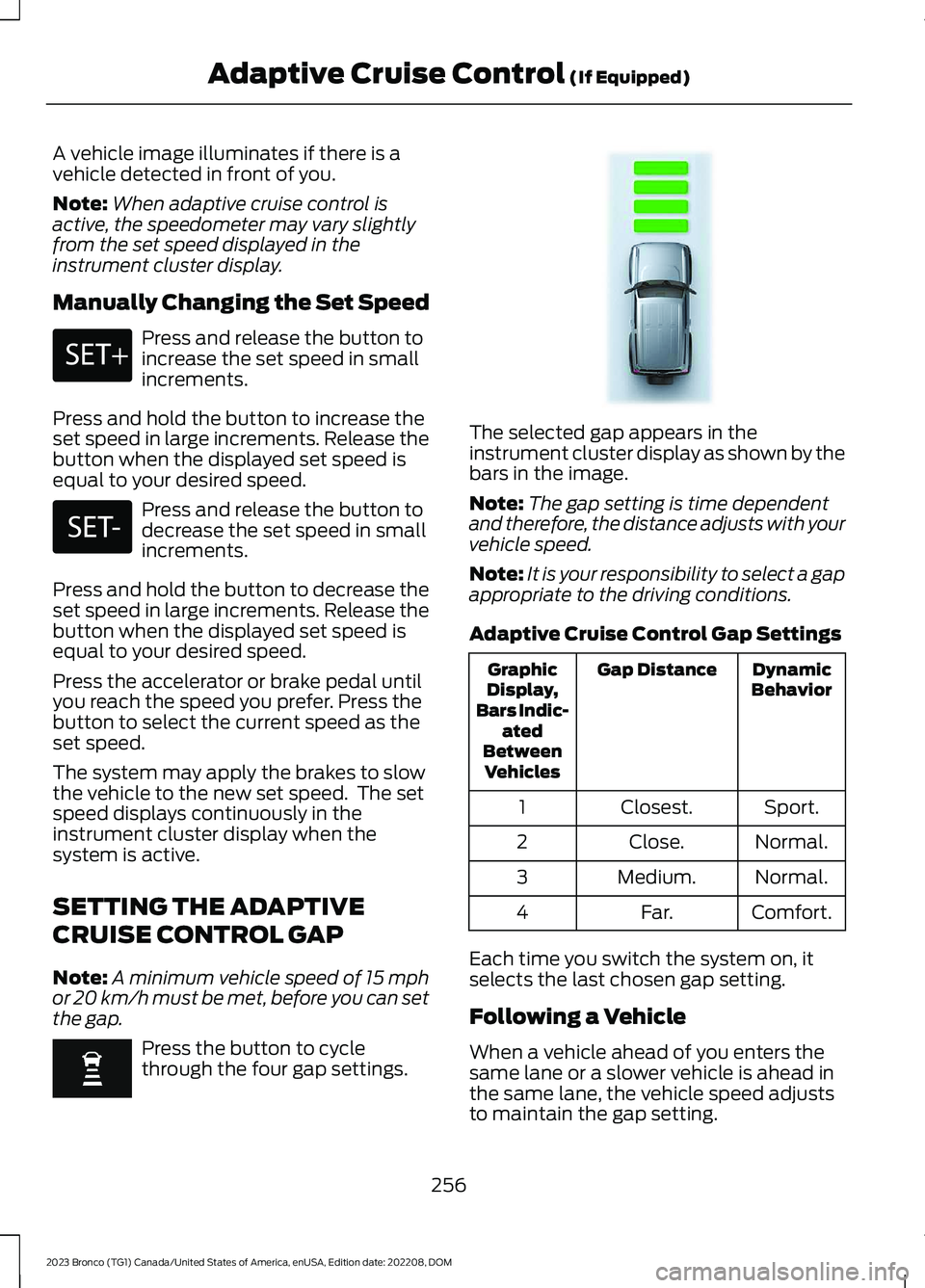
A vehicle image illuminates if there is avehicle detected in front of you.
Note:When adaptive cruise control isactive, the speedometer may vary slightlyfrom the set speed displayed in theinstrument cluster display.
Manually Changing the Set Speed
Press and release the button toincrease the set speed in smallincrements.
Press and hold the button to increase theset speed in large increments. Release thebutton when the displayed set speed isequal to your desired speed.
Press and release the button todecrease the set speed in smallincrements.
Press and hold the button to decrease theset speed in large increments. Release thebutton when the displayed set speed isequal to your desired speed.
Press the accelerator or brake pedal untilyou reach the speed you prefer. Press thebutton to select the current speed as theset speed.
The system may apply the brakes to slowthe vehicle to the new set speed. The setspeed displays continuously in theinstrument cluster display when thesystem is active.
SETTING THE ADAPTIVE
CRUISE CONTROL GAP
Note:A minimum vehicle speed of 15 mphor 20 km/h must be met, before you can setthe gap.
Press the button to cyclethrough the four gap settings.
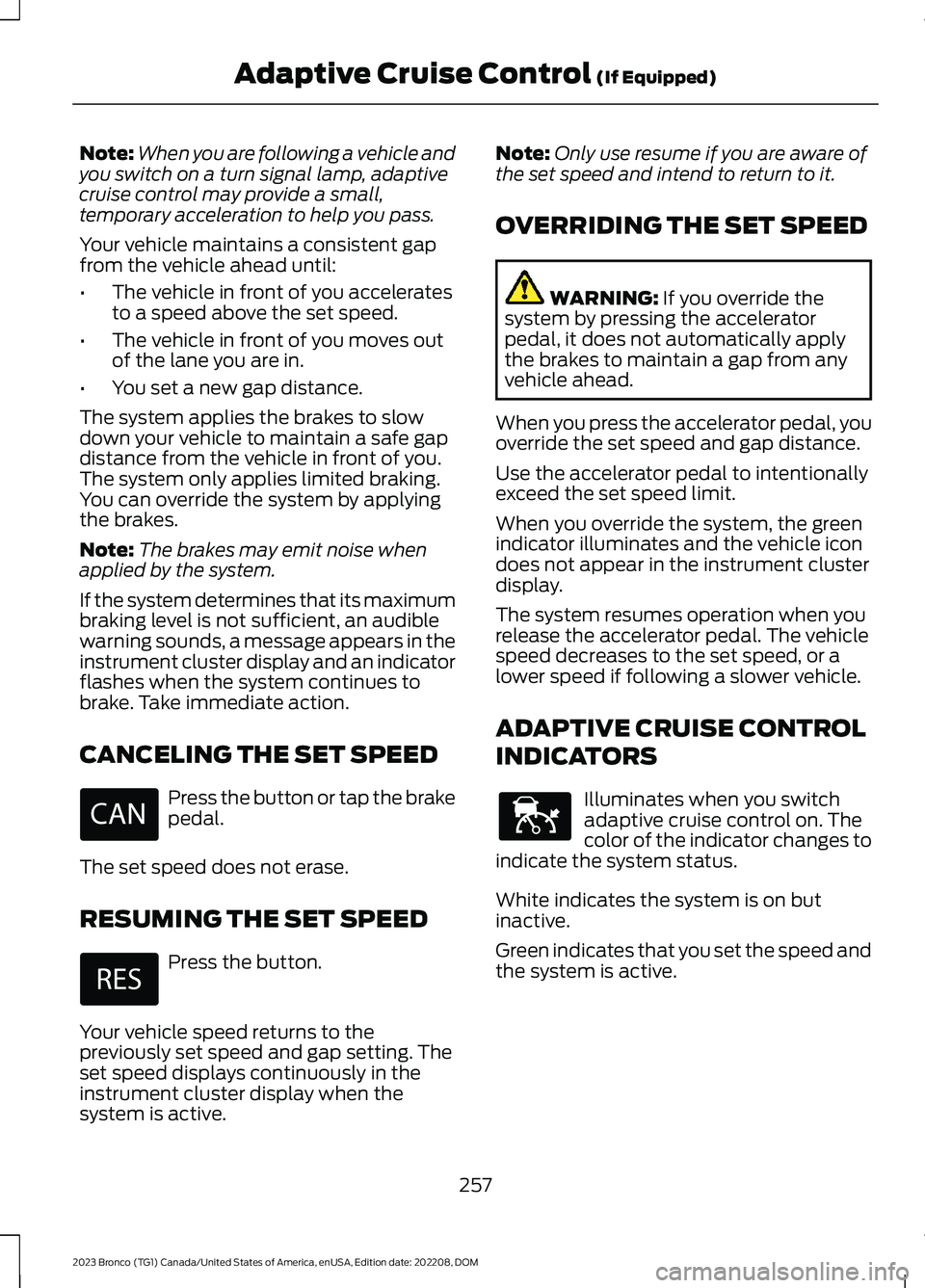
The selected gap appears in theinstrument cluster display as shown by thebars in the image.
Note:The gap setting is time dependentand therefore, the distance adjusts with yourvehicle speed.
Note:It is your responsibility to select a gapappropriate to the driving conditions.
Adaptive Cruise Control Gap Settings
DynamicBehaviorGap DistanceGraphicDisplay,Bars Indic-atedBetweenVehicles
Sport.Closest.1
Normal.Close.2
Normal.Medium.3
Comfort.Far.4
Each time you switch the system on, itselects the last chosen gap setting.
Following a Vehicle
When a vehicle ahead of you enters thesame lane or a slower vehicle is ahead inthe same lane, the vehicle speed adjuststo maintain the gap setting.
256
2023 Bronco (TG1) Canada/United States of America, enUSA, Edition date: 202208, DOMAdaptive Cruise Control (If Equipped)E246884 E246885 E348855
Page 261 of 642
Note:When you are following a vehicle andyou switch on a turn signal lamp, adaptivecruise control may provide a small,temporary acceleration to help you pass.
Your vehicle maintains a consistent gapfrom the vehicle ahead until:
•The vehicle in front of you acceleratesto a speed above the set speed.
•The vehicle in front of you moves outof the lane you are in.
•You set a new gap distance.
The system applies the brakes to slowdown your vehicle to maintain a safe gapdistance from the vehicle in front of you.The system only applies limited braking.You can override the system by applyingthe brakes.
Note:The brakes may emit noise whenapplied by the system.
If the system determines that its maximumbraking level is not sufficient, an audiblewarning sounds, a message appears in theinstrument cluster display and an indicatorflashes when the system continues tobrake. Take immediate action.
CANCELING THE SET SPEED
Press the button or tap the brakepedal.
The set speed does not erase.
RESUMING THE SET SPEED
Press the button.
Your vehicle speed returns to thepreviously set speed and gap setting. Theset speed displays continuously in theinstrument cluster display when thesystem is active.
Note:Only use resume if you are aware ofthe set speed and intend to return to it.
OVERRIDING THE SET SPEED
WARNING: If you override thesystem by pressing the acceleratorpedal, it does not automatically applythe brakes to maintain a gap from anyvehicle ahead.
When you press the accelerator pedal, youoverride the set speed and gap distance.
Use the accelerator pedal to intentionallyexceed the set speed limit.
When you override the system, the greenindicator illuminates and the vehicle icondoes not appear in the instrument clusterdisplay.
The system resumes operation when yourelease the accelerator pedal. The vehiclespeed decreases to the set speed, or alower speed if following a slower vehicle.
ADAPTIVE CRUISE CONTROL
INDICATORS
Illuminates when you switchadaptive cruise control on. Thecolor of the indicator changes toindicate the system status.
White indicates the system is on butinactive.
Green indicates that you set the speed andthe system is active.
257
2023 Bronco (TG1) Canada/United States of America, enUSA, Edition date: 202208, DOMAdaptive Cruise Control (If Equipped) E144529
Page 262 of 642
SWITCHING FROM ADAPTIVE
CRUISE CONTROL TO CRUISE
CONTROL
WARNING: Normal cruise controlwill not brake when your vehicle isapproaching slower vehicles. Always beaware of which mode you have selectedand apply the brakes when necessary.
1.Press Features on the touchscreen.
2.Press Driver Assistance.
3.Press Cruise Control.
4.Press Normal Cruise Control.
The cruise control indicatorreplaces the adaptive cruisecontrol indicator if you selectnormal cruise control. The gap settingdoes not display, and the system does notrespond to lead vehicles. Automaticbraking remains active to maintain setspeed. The system remembers the lastsetting when you start your vehicle.
ADAPTIVE CRUISE CONTROL
– TROUBLESHOOTING
ADAPTIVE CRUISE CONTROL –INFORMATION MESSAGES
Note:Depending on your vehicle optionsand instrument cluster type, not allmessages display or are available.
Note:The system could abbreviate orshorten certain messages depending uponwhich cluster type you have.
ActionMessage
A malfunction is preventing the adaptive cruise from engaging.Adaptive CruiseMalfunction
Front Sensor Not AlignedContact an authorized dealer to have the radar checked forproper coverage and operation.
Conditions exist preventing the system from being available.Adaptive Cruise NotAvailable
You have a blocked radar because of poor radar visibility dueto inclement weather or ice, mud, or water in front of the radar.You can typically clean the sensor to resolve this.
Adaptive Cruise NotAvailable SensorBlocked See ManualDue to the nature of radar technology, it is possible to get ablockage warning with no actual block. This happens, forexample, when driving in sparse rural or desert environments.A false blocked condition either self clears, or clears after yourestart your vehicle.
258
2023 Bronco (TG1) Canada/United States of America, enUSA, Edition date: 202208, DOMAdaptive Cruise Control (If Equipped)E71340
Page 263 of 642
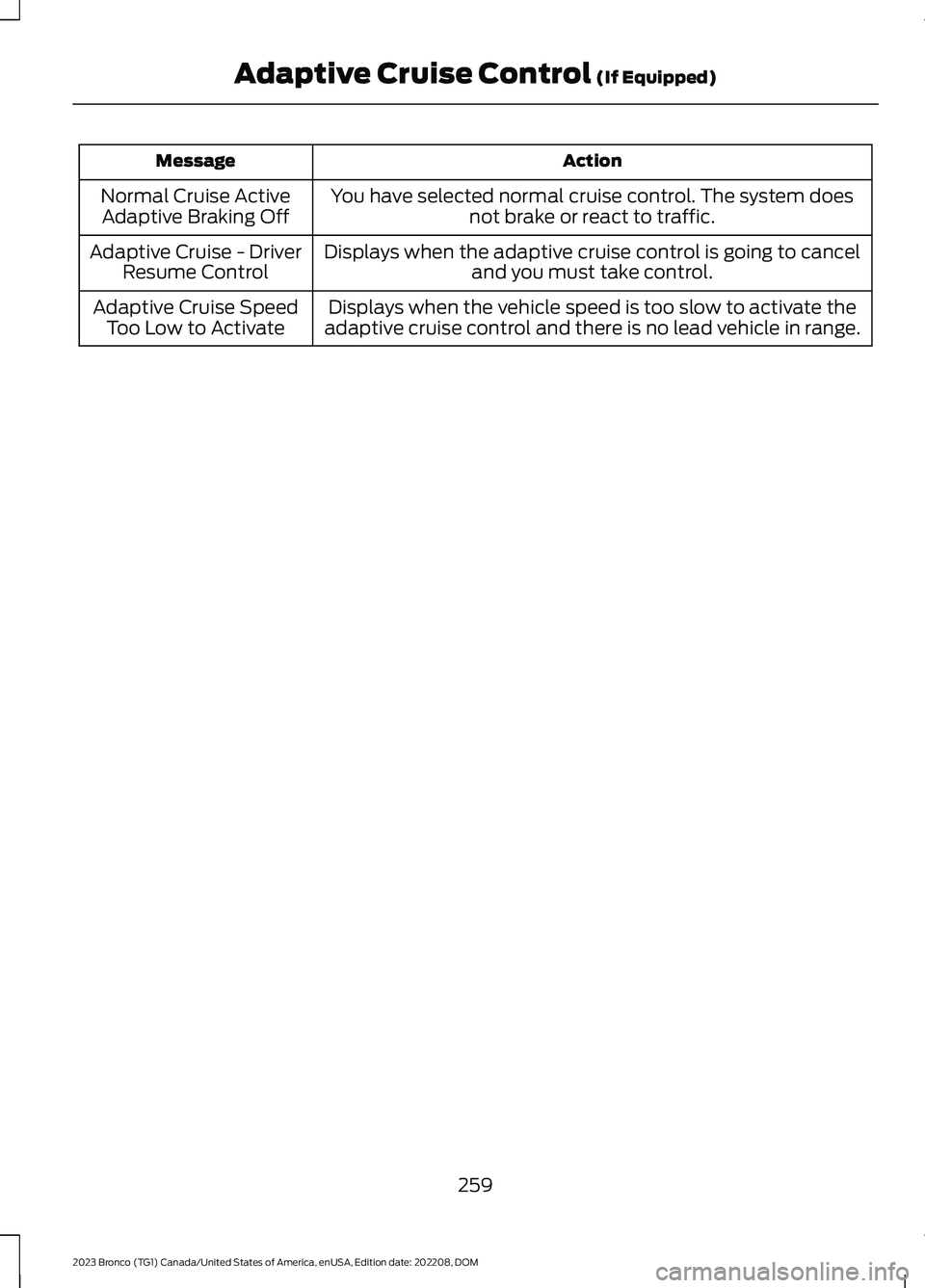
ActionMessage
You have selected normal cruise control. The system doesnot brake or react to traffic.Normal Cruise ActiveAdaptive Braking Off
Displays when the adaptive cruise control is going to canceland you must take control.Adaptive Cruise - DriverResume Control
Displays when the vehicle speed is too slow to activate theadaptive cruise control and there is no lead vehicle in range.Adaptive Cruise SpeedToo Low to Activate
259
2023 Bronco (TG1) Canada/United States of America, enUSA, Edition date: 202208, DOMAdaptive Cruise Control (If Equipped)
Page 265 of 642
Note:To optimize off-road drivingperformance, the system disables the brakeover accelerator feature when in off-roadmodes, including mud/ruts, sand, baja androck crawl modes. A message displays inthe instrument cluster when you select anoff-road mode. See G.O.A.T. Mode Control– Information Messages (page 269). Brakeover accelerator enables when an off-roadmode is exited or during the next key cycle.Return to on-road modes, normal, eco, sportor slippery, when driving on regular roads.See Brake Over Accelerator (page 209).
SELECTING A G.O.A.T. MODE -
RAPTOR
Bronco 4x4 Systems
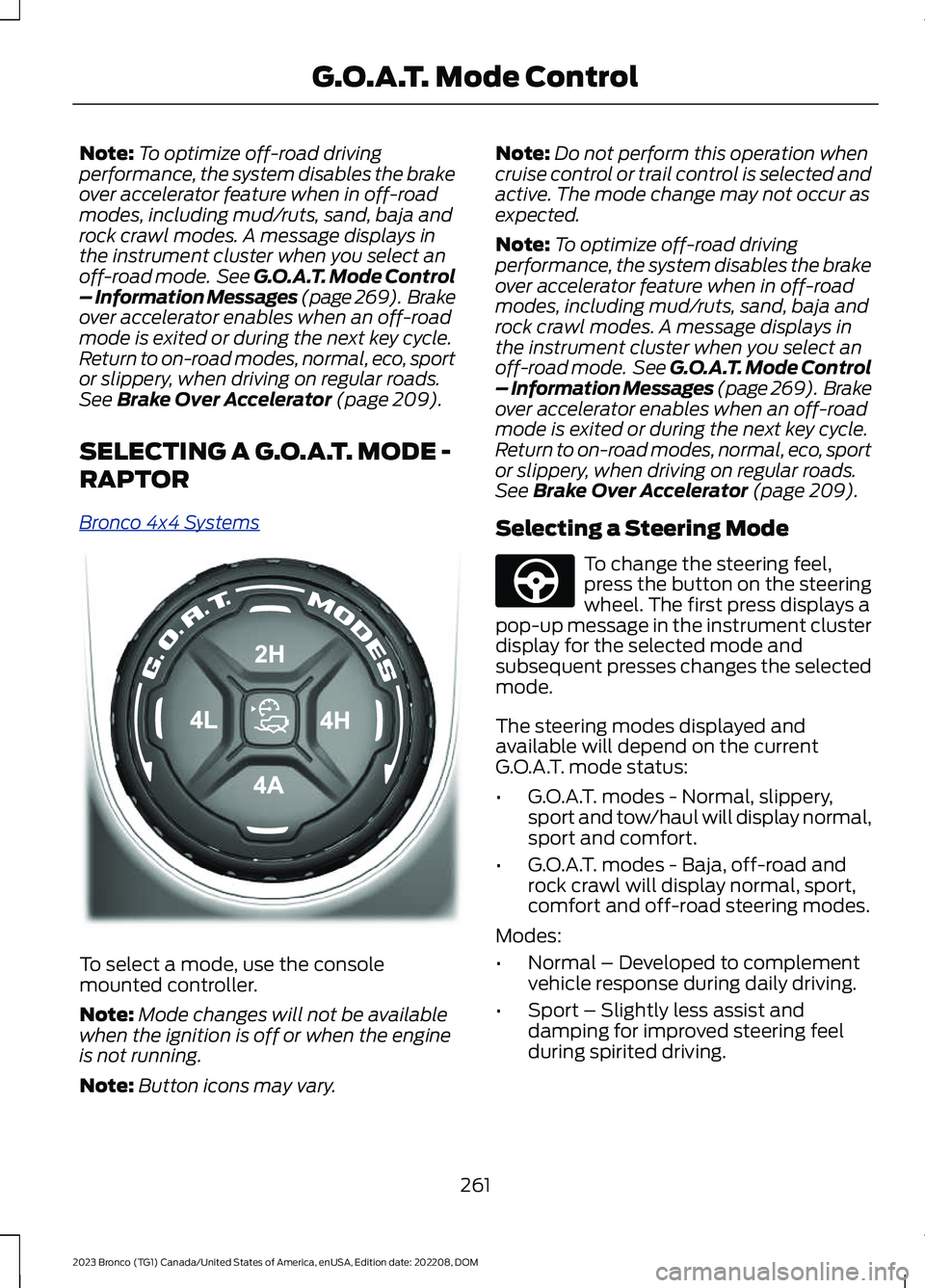
To select a mode, use the consolemounted controller.
Note:Mode changes will not be availablewhen the ignition is off or when the engineis not running.
Note:Button icons may vary.
Note:Do not perform this operation whencruise control or trail control is selected andactive. The mode change may not occur asexpected.
Note:To optimize off-road drivingperformance, the system disables the brakeover accelerator feature when in off-roadmodes, including mud/ruts, sand, baja androck crawl modes. A message displays inthe instrument cluster when you select anoff-road mode. See G.O.A.T. Mode Control– Information Messages (page 269). Brakeover accelerator enables when an off-roadmode is exited or during the next key cycle.Return to on-road modes, normal, eco, sportor slippery, when driving on regular roads.See Brake Over Accelerator (page 209).
Selecting a Steering Mode
To change the steering feel,press the button on the steeringwheel. The first press displays apop-up message in the instrument clusterdisplay for the selected mode andsubsequent presses changes the selectedmode.
The steering modes displayed andavailable will depend on the currentG.O.A.T. mode status:
•G.O.A.T. modes - Normal, slippery,sport and tow/haul will display normal,sport and comfort.
•G.O.A.T. modes - Baja, off-road androck crawl will display normal, sport,comfort and off-road steering modes.
Modes:
•Normal – Developed to complementvehicle response during daily driving.
•Sport – Slightly less assist anddamping for improved steering feelduring spirited driving.
261
2023 Bronco (TG1) Canada/United States of America, enUSA, Edition date: 202208, DOMG.O.A.T. Mode ControlE324543 E347142