settings FORD BRONCO SPORT 2021 User Guide
[x] Cancel search | Manufacturer: FORD, Model Year: 2021, Model line: BRONCO SPORT, Model: FORD BRONCO SPORT 2021Pages: 471, PDF Size: 7 MB
Page 71 of 471
4. Press the push button ignition switch
again and remove the key.
5. Within 10 seconds, place a second programmed intelligent access key in
the backup slot and press the push
button ignition switch.
The factory-set code appears in the
information display for a few seconds.
Note: You need to have two programmed
intelligent access keys for this procedure.
Note: The code may not display until after
any other warning messages first display.
Creating a Personal Entry Code Using
the Keypad
1. Enter the factory-set code.
2. Press 1·2 on the keypad within five
seconds.
3. Enter your personal five-digit code. You must enter each number within
five seconds of each other.
4. Press
1·2 on the keypad to save
personal code 1.
The doors lock then unlock to confirm that
programming was successful.
To program additional personal entry
codes, repeat Steps 1-3, then for Step 4:
• press
3·4 to save personal code 2.
• press
5·6 to save personal code 3.
• press
7·8 to save personal code 4.
• press
9·0 to save personal code 5.
Tips:
• Do not set a code that uses five of the
same number.
• Do not use five numbers in sequential
order.
• The factory-set code works even if you
have set your own personal code. Erasing a Personal Entry Code Using
the Keypad
1. Enter the factory-set five-digit code.
2. Press and release
1·2 on the keypad
within five seconds.
3. Press and hold 1·2 for two seconds. Do
this within five seconds of completing
Step 2.
All personal codes erase and only the
factory-set five-digit code works.
Creating a Personal Entry Codes Using
the Touchscreen
You can create or erase your own personal
entry code through the touchscreen
settings. See
Settings (page 378).
Anti-Scan Feature
The keypad goes into an anti-scan mode
if you enter the wrong code 7 times, or 35
button presses. This mode disables the
keypad for one minute and the keypad
lamp flashes.
The anti-scan feature turns off after:
• One minute of keypad inactivity.
• Pressing the unlock button on the
remote control.
• Switching the ignition on.
• Unlocking the vehicle using intelligent
access.
Unlocking and Locking the Doors
To Unlock the Driver Door
Enter the factory-set five-digit code or your
personal code. You must press each
number within five seconds of each other.
The interior lamps illuminate.
Note: All doors unlock if you disable the
two-stage unlocking feature. See
Locking
and Unlocking (page 64).
68
Bronco Sport (CHD) Canada/United States of America, enUSA, Edition date: 202007, Second-Printing Doors and Locks
Page 81 of 471
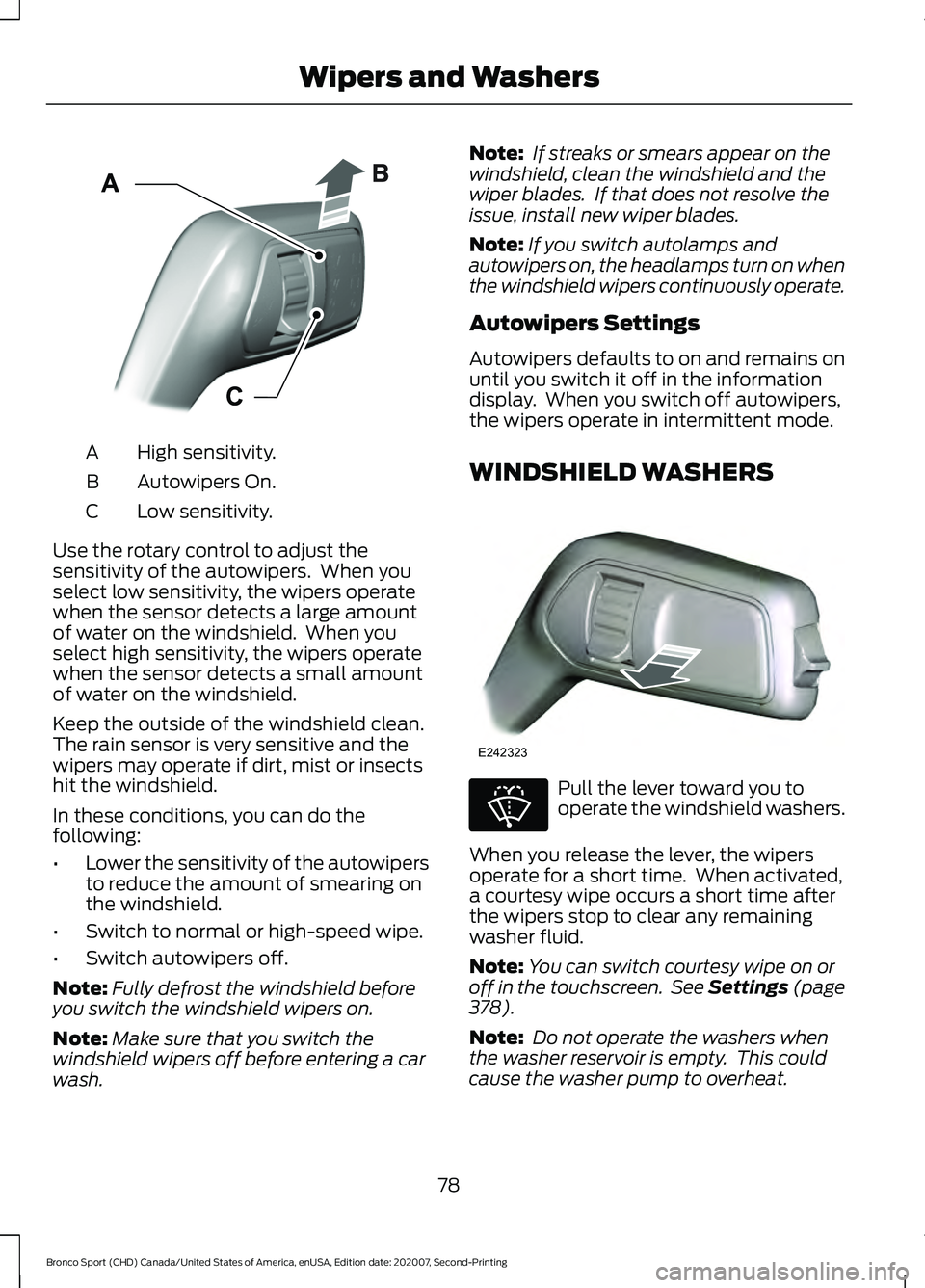
High sensitivity.
A
Autowipers On.
B
Low sensitivity.
C
Use the rotary control to adjust the
sensitivity of the autowipers. When you
select low sensitivity, the wipers operate
when the sensor detects a large amount
of water on the windshield. When you
select high sensitivity, the wipers operate
when the sensor detects a small amount
of water on the windshield.
Keep the outside of the windshield clean.
The rain sensor is very sensitive and the
wipers may operate if dirt, mist or insects
hit the windshield.
In these conditions, you can do the
following:
• Lower the sensitivity of the autowipers
to reduce the amount of smearing on
the windshield.
• Switch to normal or high-speed wipe.
• Switch autowipers off.
Note: Fully defrost the windshield before
you switch the windshield wipers on.
Note: Make sure that you switch the
windshield wipers off before entering a car
wash. Note:
If streaks or smears appear on the
windshield, clean the windshield and the
wiper blades. If that does not resolve the
issue, install new wiper blades.
Note: If you switch autolamps and
autowipers on, the headlamps turn on when
the windshield wipers continuously operate.
Autowipers Settings
Autowipers defaults to on and remains on
until you switch it off in the information
display. When you switch off autowipers,
the wipers operate in intermittent mode.
WINDSHIELD WASHERS Pull the lever toward you to
operate the windshield washers.
When you release the lever, the wipers
operate for a short time. When activated,
a courtesy wipe occurs a short time after
the wipers stop to clear any remaining
washer fluid.
Note: You can switch courtesy wipe on or
off in the touchscreen. See Settings (page
378).
Note: Do not operate the washers when
the washer reservoir is empty. This could
cause the washer pump to overheat.
78
Bronco Sport (CHD) Canada/United States of America, enUSA, Edition date: 202007, Second-Printing Wipers and WashersE295997 E242323 E270967
Page 85 of 471
DAYTIME RUNNING LAMPS -
VEHICLES WITH:
CONFIGURABLE DAYTIME
RUNNING LAMPS
WARNING: The daytime running
lamps system does not activate the rear
lamps and may not provide adequate
lighting during low visibility driving
conditions. Make sure you switch the
headlamps on, as appropriate, during all
low visibility conditions. Failure to do so
may result in a crash.
Switch the daytime running lamps on or
off using the touchscreen:
1. Select
Settings. See Settings (page
378).
2. Select
Vehicle.
3. Select
Lighting.
The daytime running lamps turn on when:
1. The lamps are on in the information display.
2. You switch the ignition on.
3. The transmission is not in park (P) for vehicles with automatic transmissions
or you release the parking brake for
vehicles with manual transmissions.
4. The lighting control is in the autolamps
position.
5. The headlamps are off.
The other lighting control switch positions
do not turn on the daytime running lamps.
If the daytime running lamps are off in the
information display, the lamps stay off in
all switch positions. DAYTIME RUNNING LAMPS -
VEHICLES WITH: DAYTIME
RUNNING LAMPS (DRL) WARNING:
The daytime running
lamps system does not activate the rear
lamps and may not provide adequate
lighting during low visibility driving
conditions. Make sure you switch the
headlamps on, as appropriate, during all
low visibility conditions. Failure to do so
may result in a crash.
The system turns the lamps on in daylight
conditions.
To switch the system on, switch the
lighting control to any position except
headlamps.
FRONT FOG LAMPS
(IF EQUIPPED)
Switching the Front Fog Lamps On
or Off
Only switch the front fog lamps on during
reduced visibility.
You can switch the front fog lamps on if
any of the following occur:
• You set the lighting control to the
parking lamps position.
• You set the lighting control to the
headlamps position.
• You set the lighting control to the
autolamps position and the headlamps
are on.
The front fog lamp button is on the lighting
control. Press the button to switch the
front fog lamps on or off.
82
Bronco Sport (CHD) Canada/United States of America, enUSA, Edition date: 202007, Second-Printing Lighting
Page 88 of 471
Switching the Rear Interior Lamps
On and Off
Press the edge of the lamp lens.
Note:
If the rear lamps are switched on
through the overhead console, you cannot
switch them off with the rear lamp switch.
AMBIENT LIGHTING (IF EQUIPPED)
Use the touchscreen to select the
following: Select the settings option on the
feature bar.
Select
Vehicle.
Select
Ambient Light. Switching Ambient Lighting On
Drag the slider above zero brightness.
Adjusting the Brightness
Drag the slider left or right.
Switching Ambient Lighting Off
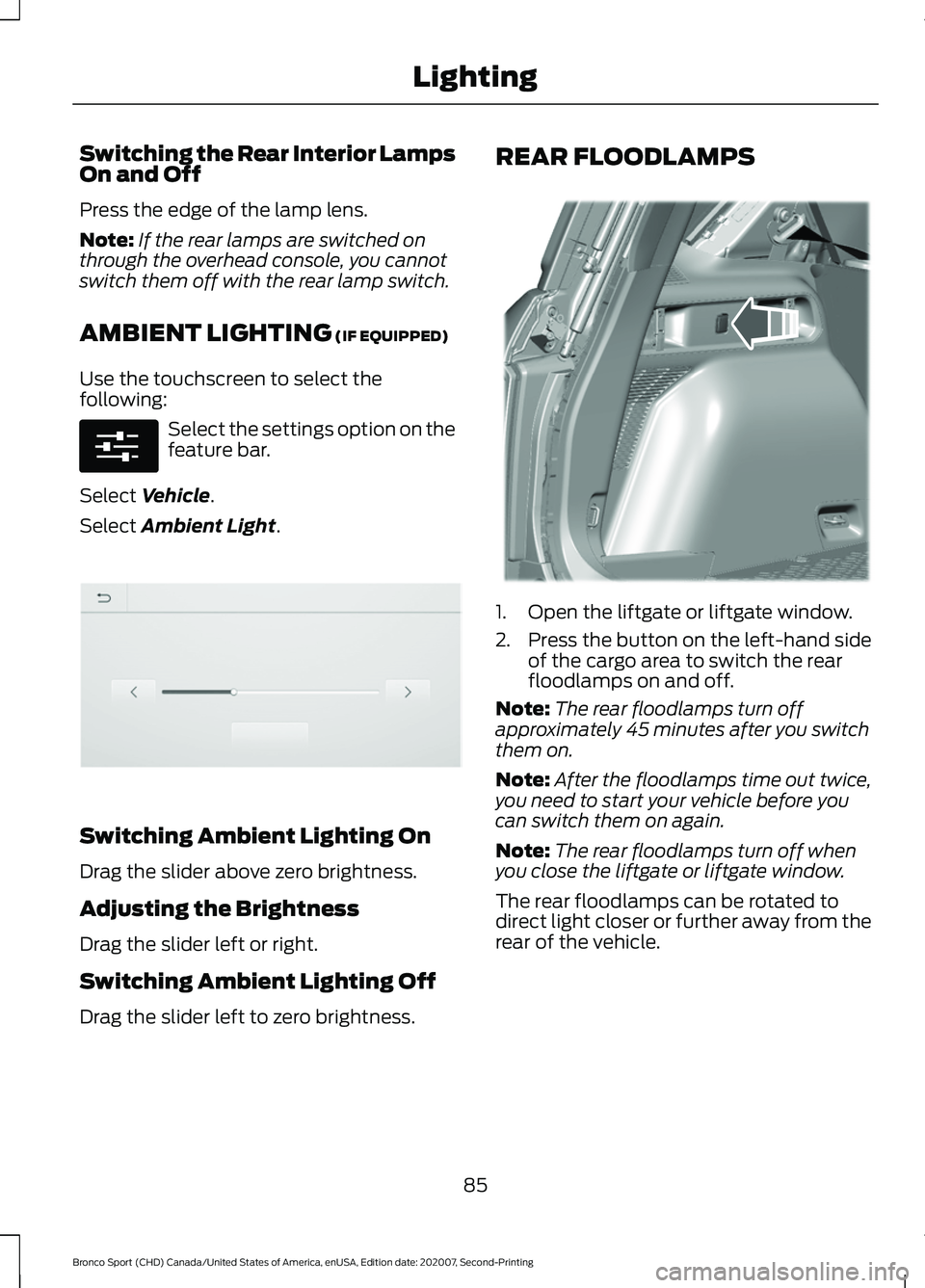
Drag the slider left to zero brightness. REAR FLOODLAMPS
1. Open the liftgate or liftgate window.
2. Press the button on the left-hand side
of the cargo area to switch the rear
floodlamps on and off.
Note: The rear floodlamps turn off
approximately 45 minutes after you switch
them on.
Note: After the floodlamps time out twice,
you need to start your vehicle before you
can switch them on again.
Note: The rear floodlamps turn off when
you close the liftgate or liftgate window.
The rear floodlamps can be rotated to
direct light closer or further away from the
rear of the vehicle.
85
Bronco Sport (CHD) Canada/United States of America, enUSA, Edition date: 202007, Second-Printing LightingE280315 E306304 E336624
Page 89 of 471
WHAT IS AUTOMATIC HIGH
BEAM CONTROL
The system turns on high beams if it is dark
enough and no other traffic is present. If it
detects an approaching vehicle
’s
headlamps or tail lamps, or street lighting
ahead, the system turns the high beams
off. Low beams remain on.
A camera sensor, centrally mounted
behind the windshield of your vehicle,
continuously monitors conditions to turn
the high beams on and off.
SWITCHING AUTOMATIC HIGH
BEAM CONTROL ON AND OFF WARNING: Do not use the system
in poor visibility, for example fog, heavy
rain, spray or snow.
1. Press
Settings on the touchscreen.
2. Press
Vehicle.
3. Press
Lighting.
Activating the Automatic High
Beam Control Switch the lighting control to the
autolamps position. See
Autolamps
(page 81).
Note: The lighting control defaults to
autolamps each time you switch your
vehicle on.
When active, the high beams turn on if:
• The ambient light level is low enough.
• There is no traffic in front of your
vehicle.
• The vehicle speed is greater than
approximately
32 mph (51 km/h). When active, the high beams turn off if:
•
The ambient light level is high enough
that high beams are not required.
• The system detects an approaching
vehicle's headlamps or tail lamps.
• The system detects severe rain, snow
or fog.
• The camera is blocked.
• The vehicle speed falls below
approximately
27 mph (44 km/h).
Note: The deactivation speed is lower on
curves.
Note: High beam reactivation may be
delayed in certain curvy road situations.
Note: The system may not operate properly
if the sensor is blocked. Keep the windshield
free from obstruction or damage.
Note: The system may not operate properly
in cold or inclement conditions. You can
switch on the high beams by overriding the
system.
Note: If the system detects a blockage, for
example bird droppings, bug splatter, snow
or ice, the system goes into low beam mode
until you clear the blockage. A message may
appear in the information display if the
camera is blocked.
Note: Using much larger tires or equipping
vehicle accessories such as snowplows can
modify your vehicle's ride height and
degrade automatic high beam control
performance.
AUTOMATIC HIGH BEAM
CONTROL INDICATORS The indicator illuminates to
confirm when the system is
ready to assist.
86
Bronco Sport (CHD) Canada/United States of America, enUSA, Edition date: 202007, Second-Printing Automatic High Beam ControlE281240
Page 95 of 471
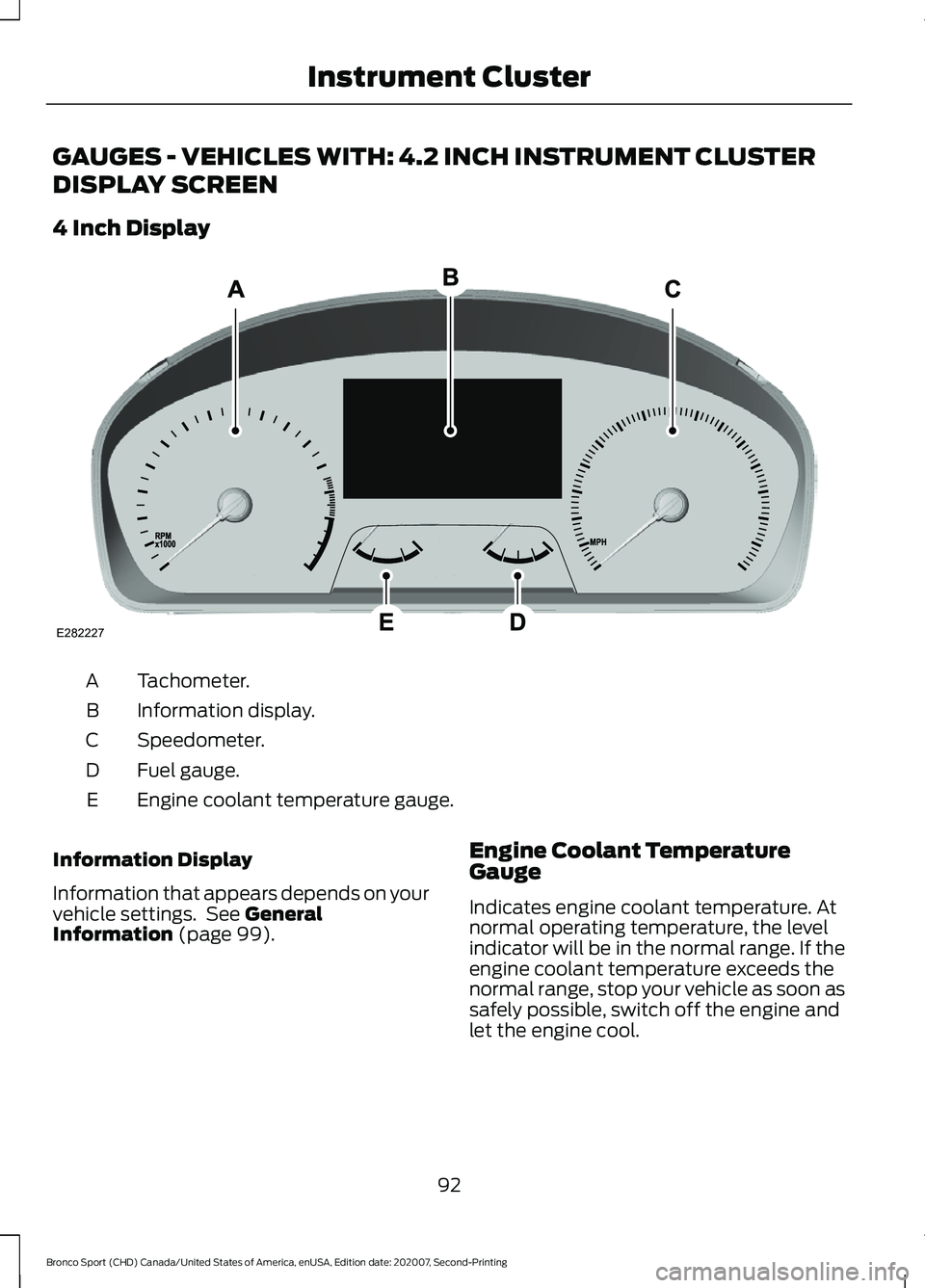
GAUGES - VEHICLES WITH: 4.2 INCH INSTRUMENT CLUSTER
DISPLAY SCREEN
4 Inch Display
Tachometer.
A
Information display.
B
Speedometer.
C
Fuel gauge.
D
Engine coolant temperature gauge.
E
Information Display
Information that appears depends on your
vehicle settings. See General
Information (page 99). Engine Coolant Temperature
Gauge
Indicates engine coolant temperature. At
normal operating temperature, the level
indicator will be in the normal range. If the
engine coolant temperature exceeds the
normal range, stop your vehicle as soon as
safely possible, switch off the engine and
let the engine cool.
92
Bronco Sport (CHD) Canada/United States of America, enUSA, Edition date: 202007, Second-Printing Instrument ClusterE282227
Page 104 of 471
Audio
Audio
Menu options covered in the SYNC chapter. See General Information (page 350).
Phone Phone
Menu options covered in the SYNC chapter. See
General Information (page 350).
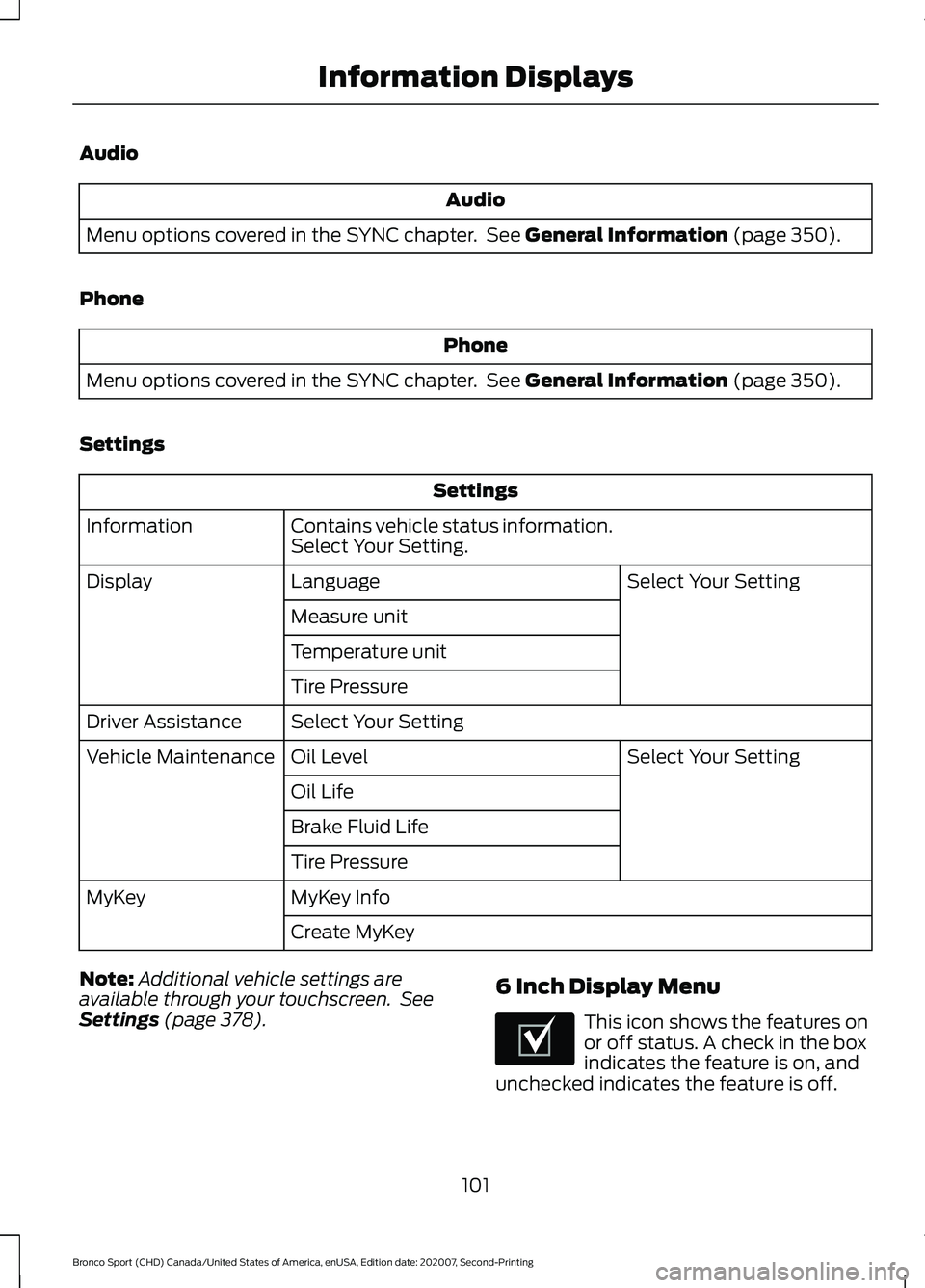
Settings Settings
Contains vehicle status information.
Select Your Setting.
Information
Select Your Setting
Language
Display
Measure unit
Temperature unit
Tire Pressure
Select Your Setting
Driver Assistance
Select Your Setting
Oil Level
Vehicle Maintenance
Oil Life
Brake Fluid Life
Tire Pressure
MyKey Info
MyKey
Create MyKey
Note: Additional vehicle settings are
available through your touchscreen. See
Settings
(page 378). 6 Inch Display Menu This icon shows the features on
or off status. A check in the box
indicates the feature is on, and
unchecked indicates the feature is off.
101
Bronco Sport (CHD) Canada/United States of America, enUSA, Edition date: 202007, Second-Printing Information DisplaysE204495
Page 105 of 471
Note:
Some options could appear slightly
different or not at all if the items are
optional. Note:
Some MyKey menu options only
appear if MyKey is enabled and at least one
MyKey is programmed.
Select Screens Select Screens
Menu options covered in Personalized Settings. See Personalized Settings (page
103).
Audio Audio
Menu options covered in the SYNC chapter. See
General Information (page 350).
Navigation Navigation
Menu options covered in the SYNC chapter. See
General Information (page 350).
Phone Phone
Menu options covered in the SYNC chapter. See
General Information (page 350).
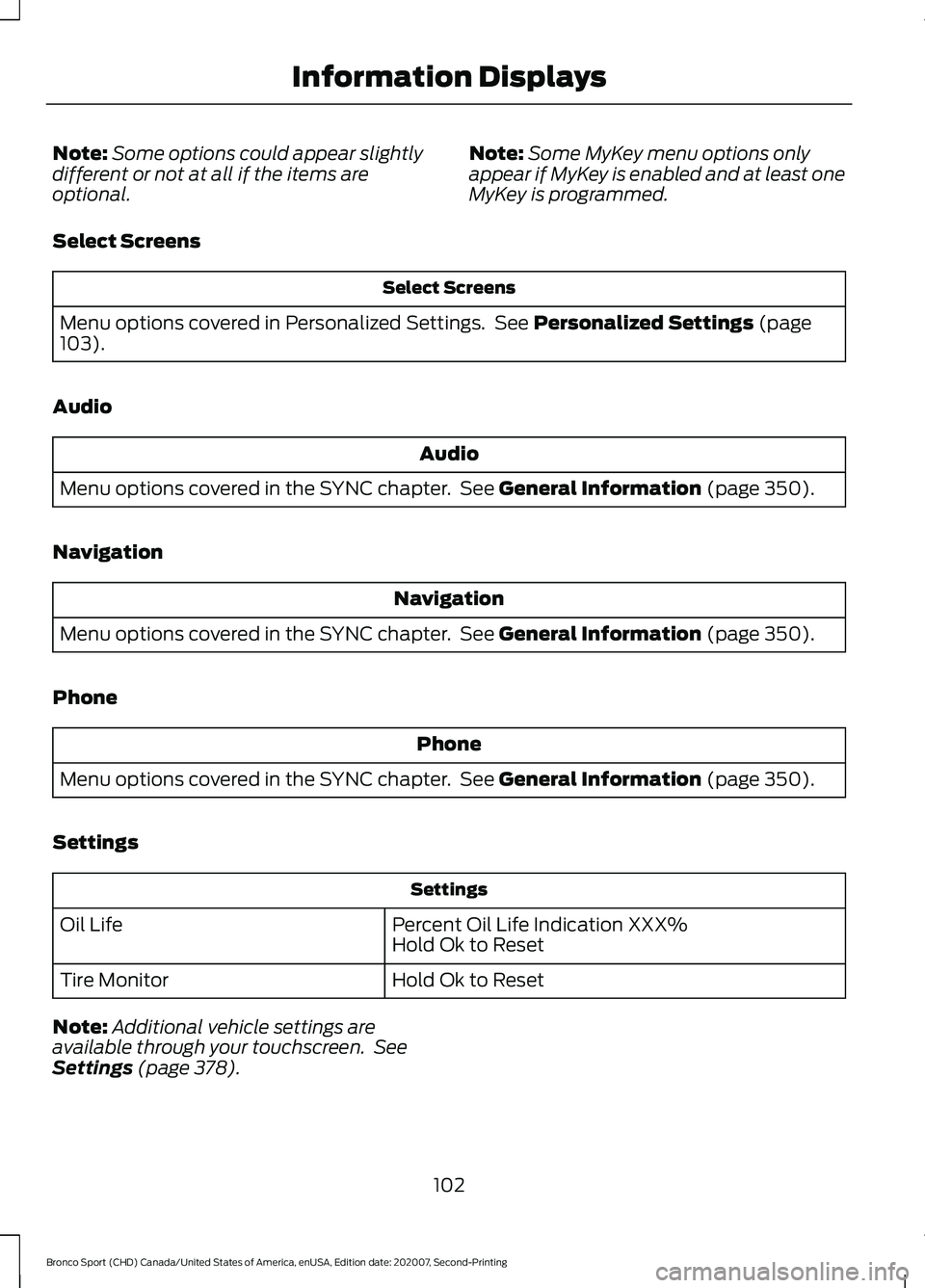
Settings Settings
Percent Oil Life Indication XXX%
Hold Ok to Reset
Oil Life
Hold Ok to Reset
Tire Monitor
Note: Additional vehicle settings are
available through your touchscreen. See
Settings
(page 378).
102
Bronco Sport (CHD) Canada/United States of America, enUSA, Edition date: 202007, Second-Printing Information Displays
Page 106 of 471
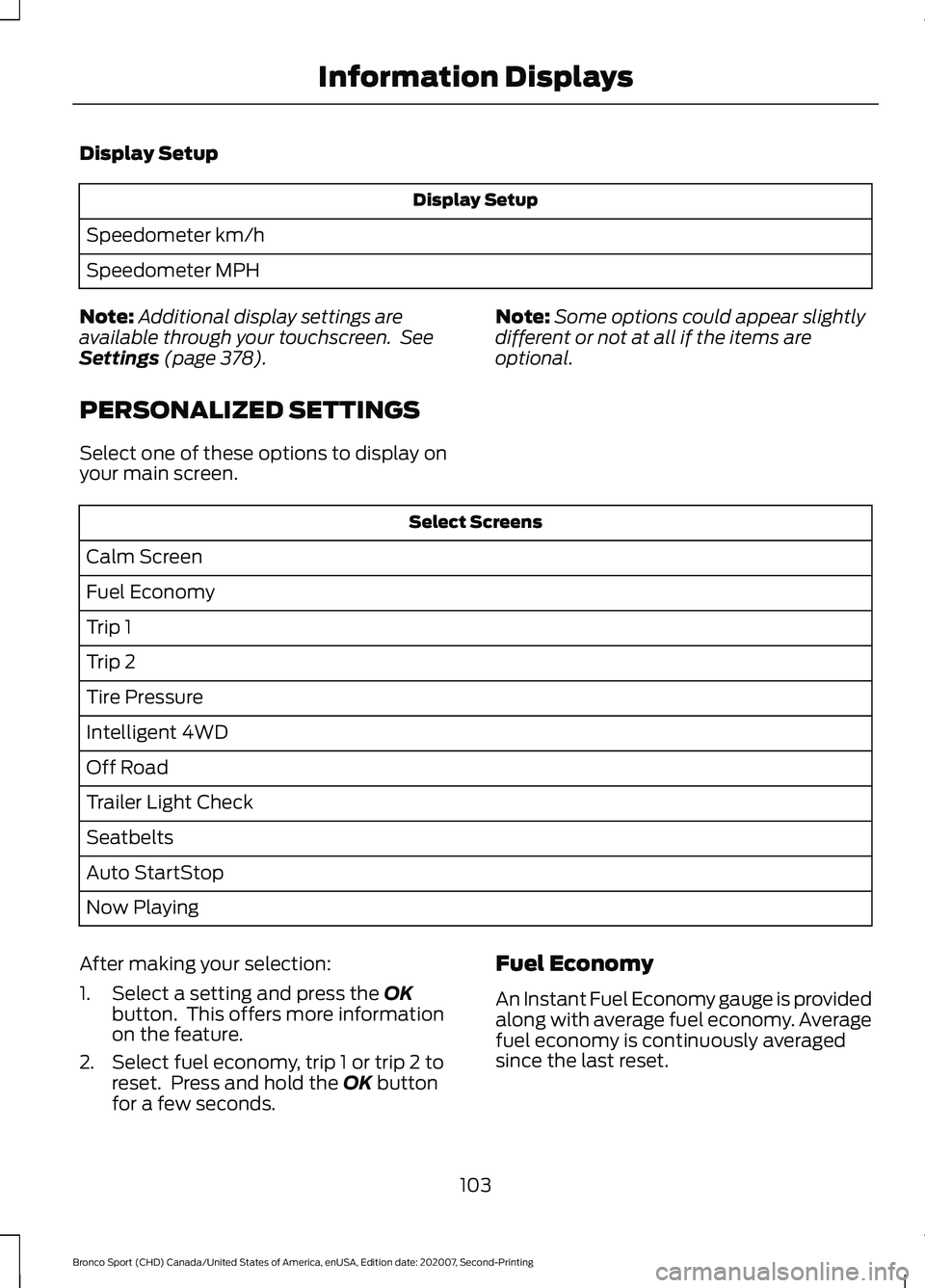
Display Setup
Display Setup
Speedometer km/h
Speedometer MPH
Note: Additional display settings are
available through your touchscreen. See
Settings (page 378).
PERSONALIZED SETTINGS
Select one of these options to display on
your main screen. Note:
Some options could appear slightly
different or not at all if the items are
optional. Select Screens
Calm Screen
Fuel Economy
Trip 1
Trip 2
Tire Pressure
Intelligent 4WD
Off Road
Trailer Light Check
Seatbelts
Auto StartStop
Now Playing
After making your selection:
1. Select a setting and press the
OK
button. This offers more information
on the feature.
2. Select fuel economy, trip 1 or trip 2 to reset. Press and hold the
OK button
for a few seconds. Fuel Economy
An Instant Fuel Economy gauge is provided
along with average fuel economy. Average
fuel economy is continuously averaged
since the last reset.
103
Bronco Sport (CHD) Canada/United States of America, enUSA, Edition date: 202007, Second-Printing Information Displays
Page 121 of 471
WHAT IS REMOTE START
The system allows you to remotely start
your vehicle and to adjust the interior
temperature according to the settings that
you chose.
REMOTE START
PRECAUTIONS
WARNING: Do not start the engine
in a closed garage or in other enclosed
areas. Exhaust fumes are toxic. Always
open the garage door before you start
the engine. Failure to follow this
instruction could result in personal injury
or death.
REMOTE START LIMITATIONS
Remote start does not work under the
following conditions:
• The alarm horn is sounding.
• The hood is open.
• The transmission is not in park (P).
• The ignition is on.
• The battery voltage is below the
minimum operating voltage.
Note: Do not use remote start if your fuel
level is low.
Note: You can use remote start with
FordPass. See Connecting the Vehicle to
a Wi-Fi Network (page 337).
ENABLING REMOTE START
1. Press
Settings on the touchscreen.
2. Press
Vehicle.
3. Press
Remote Start Setup.
4. Switch
System on. Note:
To use remote start, make sure that
the modem is enabled.
See Connected
Vehicle (page 337).
REMOTELY STARTING AND
STOPPING THE VEHICLE
Remotely Starting the Vehicle Press the button on the remote
control.
Within three seconds, press the
button on the remote control.
Within three seconds, press the
button again.
Note: You can also use FordPass to start
the vehicle.
Note: The turn signal lamps flash twice.
Note: The parking lamps turn on when the
vehicle is running.
Note: The horn sounds if the system fails
to start.
Note: All other vehicle systems remain off
when you have remotely started the vehicle.
Note: The vehicle remains secured when
you have remotely started the vehicle. A
valid key must be inside your vehicle to
switch the ignition on and drive your vehicle.
Remotely Stopping the Vehicle Within three seconds, press the
button on the remote control.
Within three seconds, press the
button again.
EXTENDING THE REMOTE
START DURATION
To extend the remote start duration during
remote start, do the following:
118
Bronco Sport (CHD) Canada/United States of America, enUSA, Edition date: 202007, Second-Printing Remote Start
(If Equipped)E138623 E138625 E138625