steering FORD BRONCO SPORT 2021 User Guide
[x] Cancel search | Manufacturer: FORD, Model Year: 2021, Model line: BRONCO SPORT, Model: FORD BRONCO SPORT 2021Pages: 471, PDF Size: 7 MB
Page 77 of 471
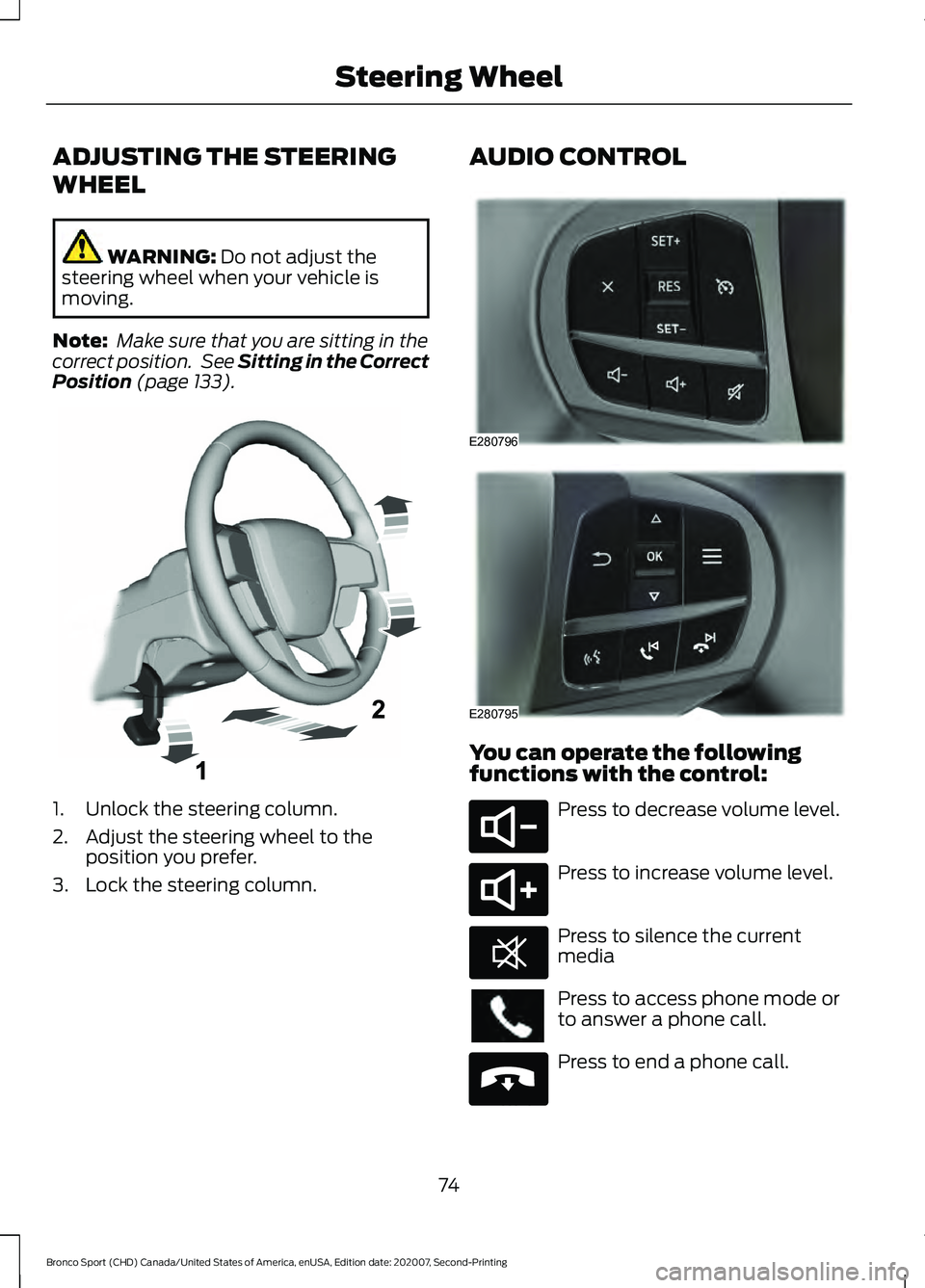
ADJUSTING THE STEERING
WHEEL
WARNING: Do not adjust the
steering wheel when your vehicle is
moving.
Note: Make sure that you are sitting in the
correct position. See
Sitting in the Correct
Position (page 133). 1. Unlock the steering column.
2. Adjust the steering wheel to the
position you prefer.
3. Lock the steering column. AUDIO CONTROL
You can operate the following
functions with the control:
Press to decrease volume level.
Press to increase volume level.
Press to silence the current
media
Press to access phone mode or
to answer a phone call.
Press to end a phone call.
74
Bronco Sport (CHD) Canada/United States of America, enUSA, Edition date: 202007, Second-Printing Steering WheelE261502 E280796 E280795 E280802 E280803 E268549 E265040
Page 78 of 471
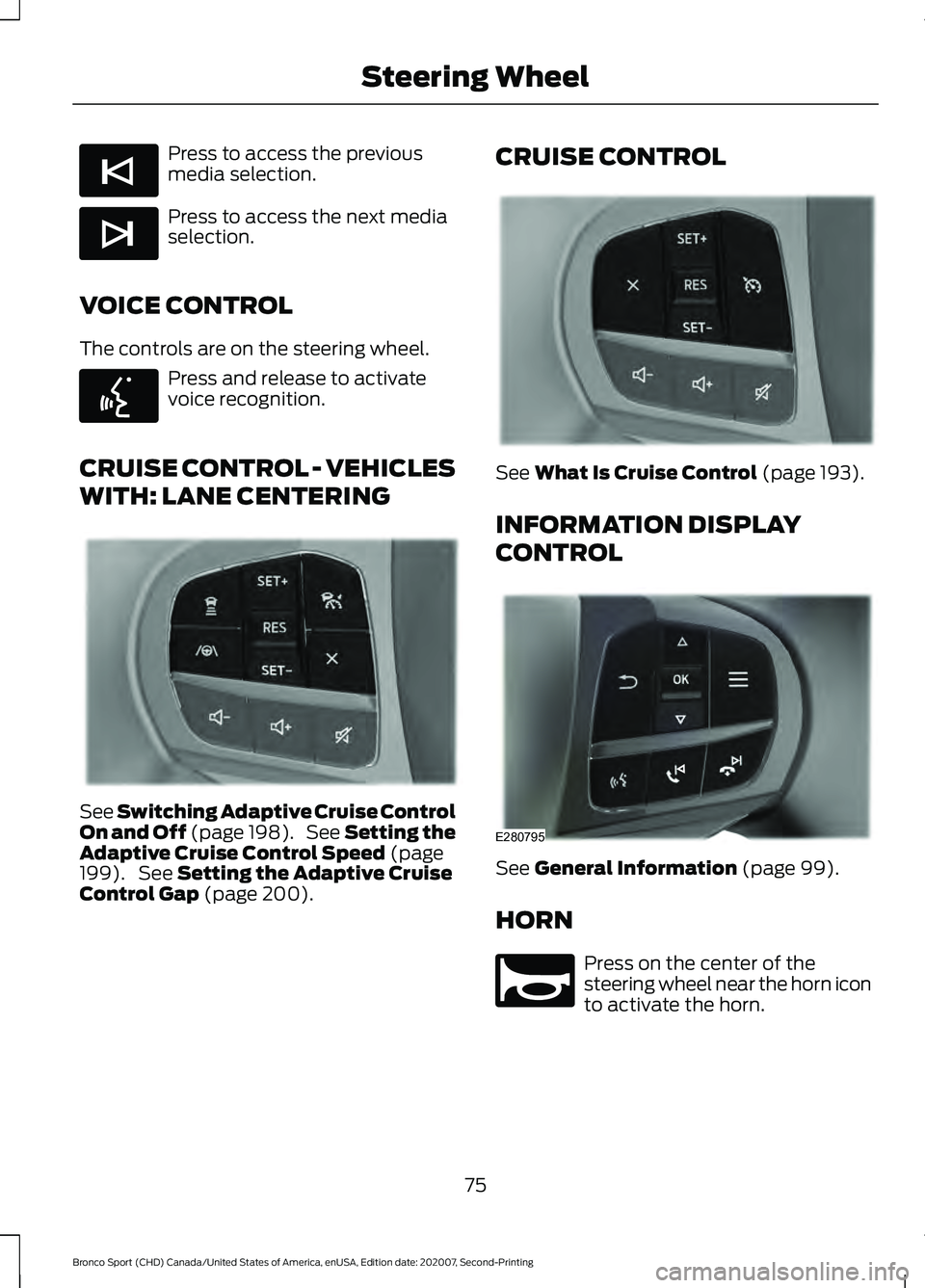
Press to access the previous
media selection.
Press to access the next media
selection.
VOICE CONTROL
The controls are on the steering wheel. Press and release to activate
voice recognition.
CRUISE CONTROL - VEHICLES
WITH: LANE CENTERING See Switching Adaptive Cruise Control
On and Off (page 198). See Setting the
Adaptive Cruise Control Speed
(page
199). See Setting the Adaptive Cruise
Control Gap (page 200). CRUISE CONTROL See
What Is Cruise Control (page 193).
INFORMATION DISPLAY
CONTROL See
General Information (page 99).
HORN Press on the center of the
steering wheel near the horn icon
to activate the horn.
75
Bronco Sport (CHD) Canada/United States of America, enUSA, Edition date: 202007, Second-Printing Steering WheelE265045 E265044 E142599 E349487 E349489 E280795 E270945
Page 79 of 471
SWITCHING THE HEATED
STEERING WHEEL ON AND OFF
(IF EQUIPPED)
To activate the heated steering
wheel, press the button on the
climate control unit.
On some vehicles, an indicator on the
button illuminates when the heated
steering wheel is on.
Note: A sensor regulates the temperature
of the steering wheel.
76
Bronco Sport (CHD) Canada/United States of America, enUSA, Edition date: 202007, Second-Printing Steering Wheel
Page 86 of 471
Note:
The brightness of the daytime running
lamps may decrease when the front fog
lamps are switched on. Front Fog Lamp Indicator It illuminates when you switch
the front fog lamps on.
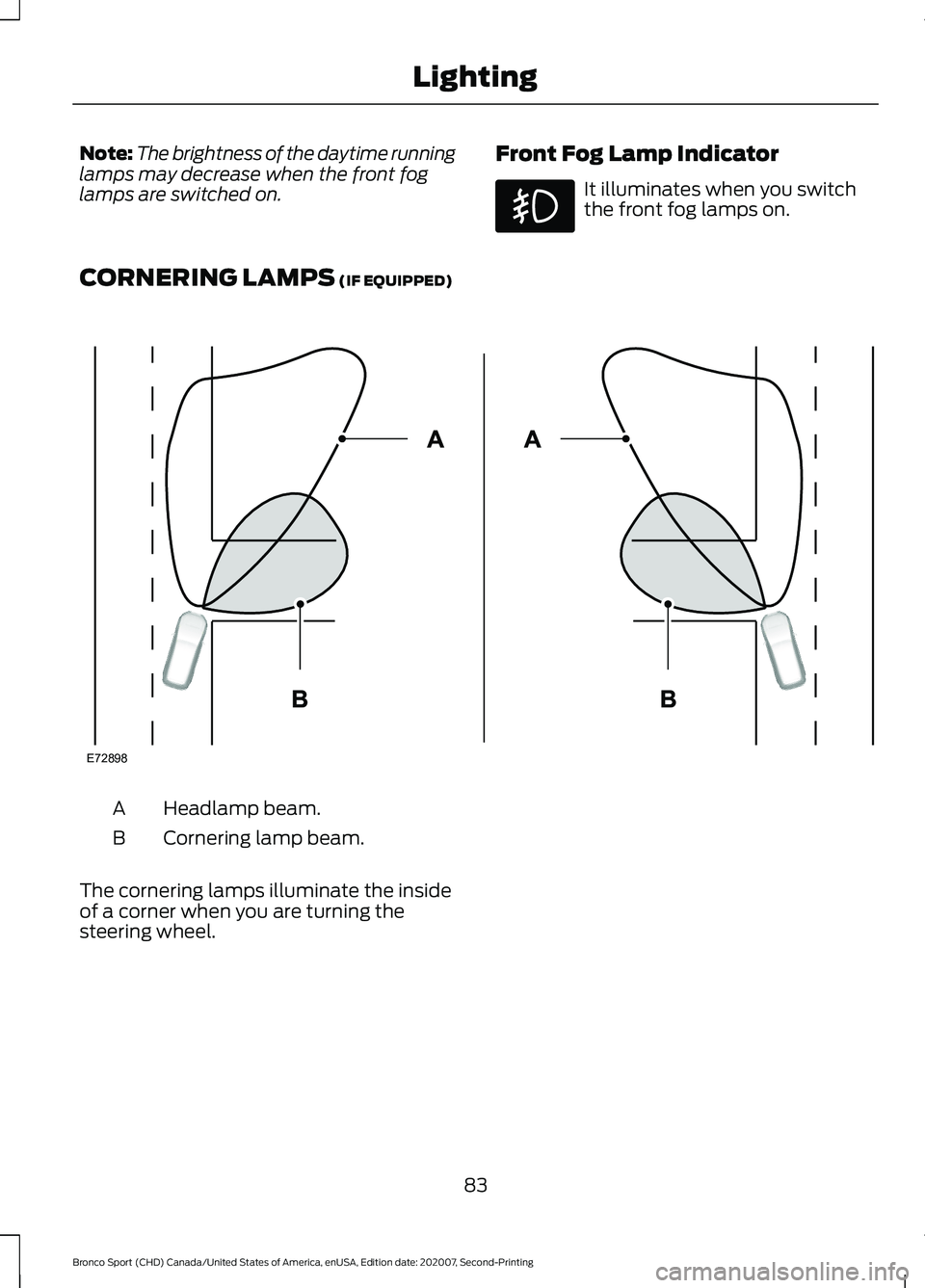
CORNERING LAMPS (IF EQUIPPED) Headlamp beam.
A
Cornering lamp beam.
B
The cornering lamps illuminate the inside
of a corner when you are turning the
steering wheel.
83
Bronco Sport (CHD) Canada/United States of America, enUSA, Edition date: 202007, Second-Printing Lighting E72898
Page 102 of 471
GENERAL INFORMATION
WARNING: Driving while distracted
can result in loss of vehicle control, crash
and injury. We strongly recommend that
you use extreme caution when using any
device that may take your focus off the
road. Your primary responsibility is the
safe operation of your vehicle. We
recommend against the use of any
hand-held device while driving and
encourage the use of voice-operated
systems when possible. Make sure you
are aware of all applicable local laws
that may affect the use of electronic
devices while driving.
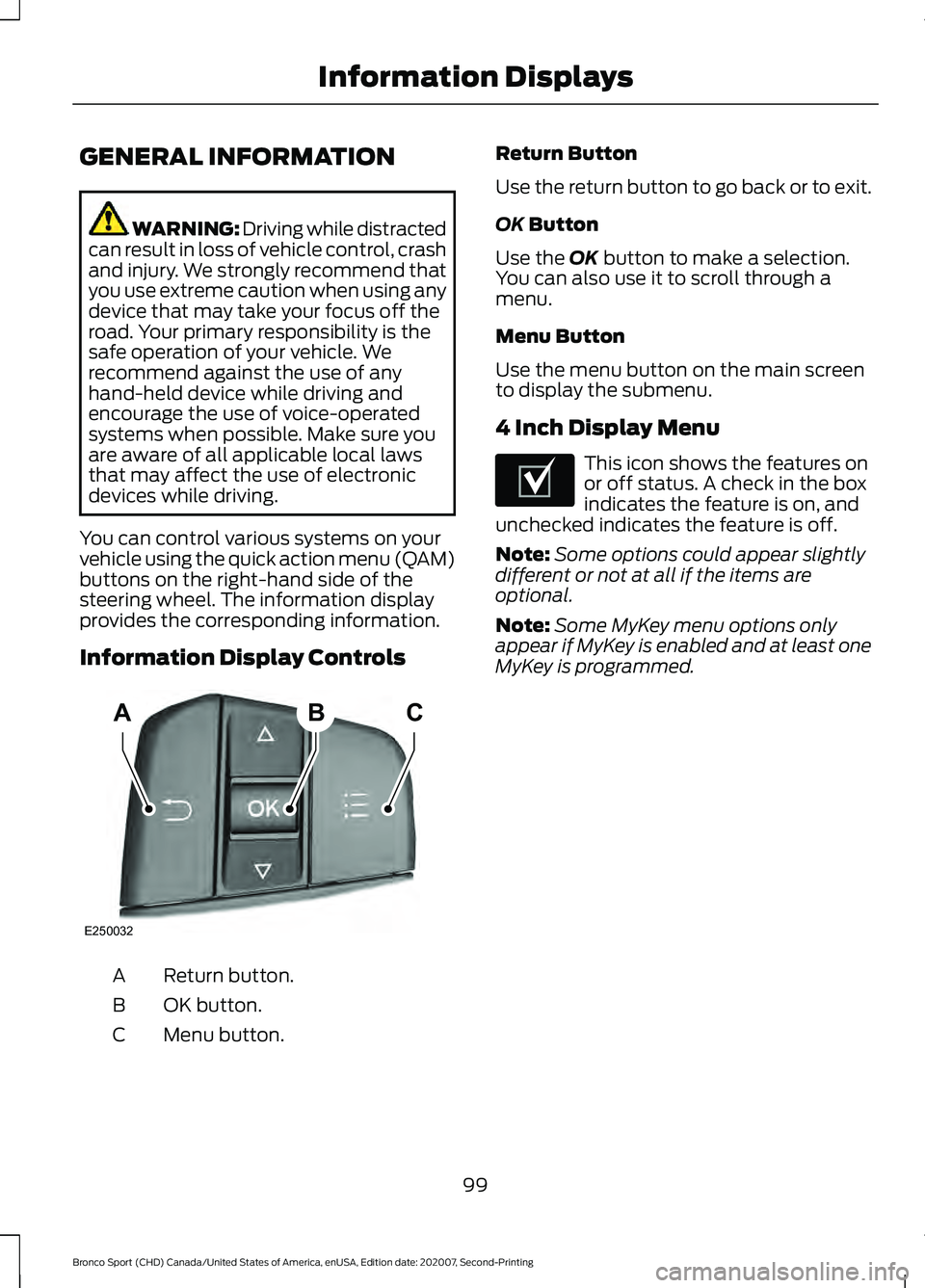
You can control various systems on your
vehicle using the quick action menu (QAM)
buttons on the right-hand side of the
steering wheel. The information display
provides the corresponding information.
Information Display Controls Return button.
A
OK button.
B
Menu button.
C Return Button
Use the return button to go back or to exit.
OK Button
Use the
OK button to make a selection.
You can also use it to scroll through a
menu.
Menu Button
Use the menu button on the main screen
to display the submenu.
4 Inch Display Menu This icon shows the features on
or off status. A check in the box
indicates the feature is on, and
unchecked indicates the feature is off.
Note: Some options could appear slightly
different or not at all if the items are
optional.
Note: Some MyKey menu options only
appear if MyKey is enabled and at least one
MyKey is programmed.
99
Bronco Sport (CHD) Canada/United States of America, enUSA, Edition date: 202007, Second-Printing Information DisplaysABC
E250032 E204495
Page 113 of 471
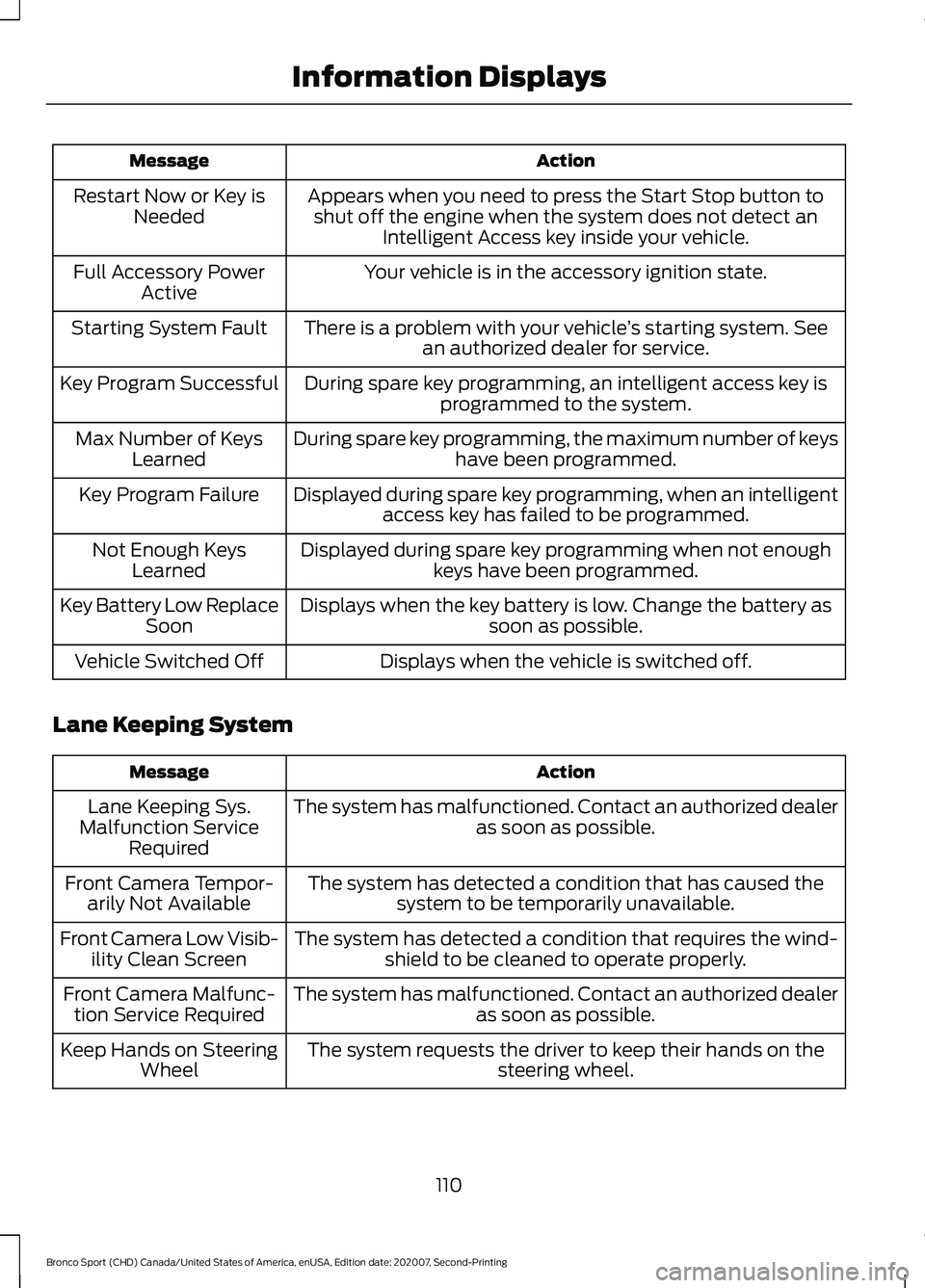
Action
Message
Appears when you need to press the Start Stop button toshut off the engine when the system does not detect an Intelligent Access key inside your vehicle.
Restart Now or Key is
Needed
Your vehicle is in the accessory ignition state.
Full Accessory Power
Active
There is a problem with your vehicle ’s starting system. See
an authorized dealer for service.
Starting System Fault
During spare key programming, an intelligent access key isprogrammed to the system.
Key Program Successful
During spare key programming, the maximum number of keyshave been programmed.
Max Number of Keys
Learned
Displayed during spare key programming, when an intelligentaccess key has failed to be programmed.
Key Program Failure
Displayed during spare key programming when not enoughkeys have been programmed.
Not Enough Keys
Learned
Displays when the key battery is low. Change the battery as soon as possible.
Key Battery Low Replace
Soon
Displays when the vehicle is switched off.
Vehicle Switched Off
Lane Keeping System Action
Message
The system has malfunctioned. Contact an authorized dealer as soon as possible.
Lane Keeping Sys.
Malfunction Service Required
The system has detected a condition that has caused thesystem to be temporarily unavailable.
Front Camera Tempor-
arily Not Available
The system has detected a condition that requires the wind-shield to be cleaned to operate properly.
Front Camera Low Visib-
ility Clean Screen
The system has malfunctioned. Contact an authorized dealeras soon as possible.
Front Camera Malfunc-
tion Service Required
The system requests the driver to keep their hands on thesteering wheel.
Keep Hands on Steering
Wheel
110
Bronco Sport (CHD) Canada/United States of America, enUSA, Edition date: 202007, Second-Printing Information Displays
Page 117 of 471
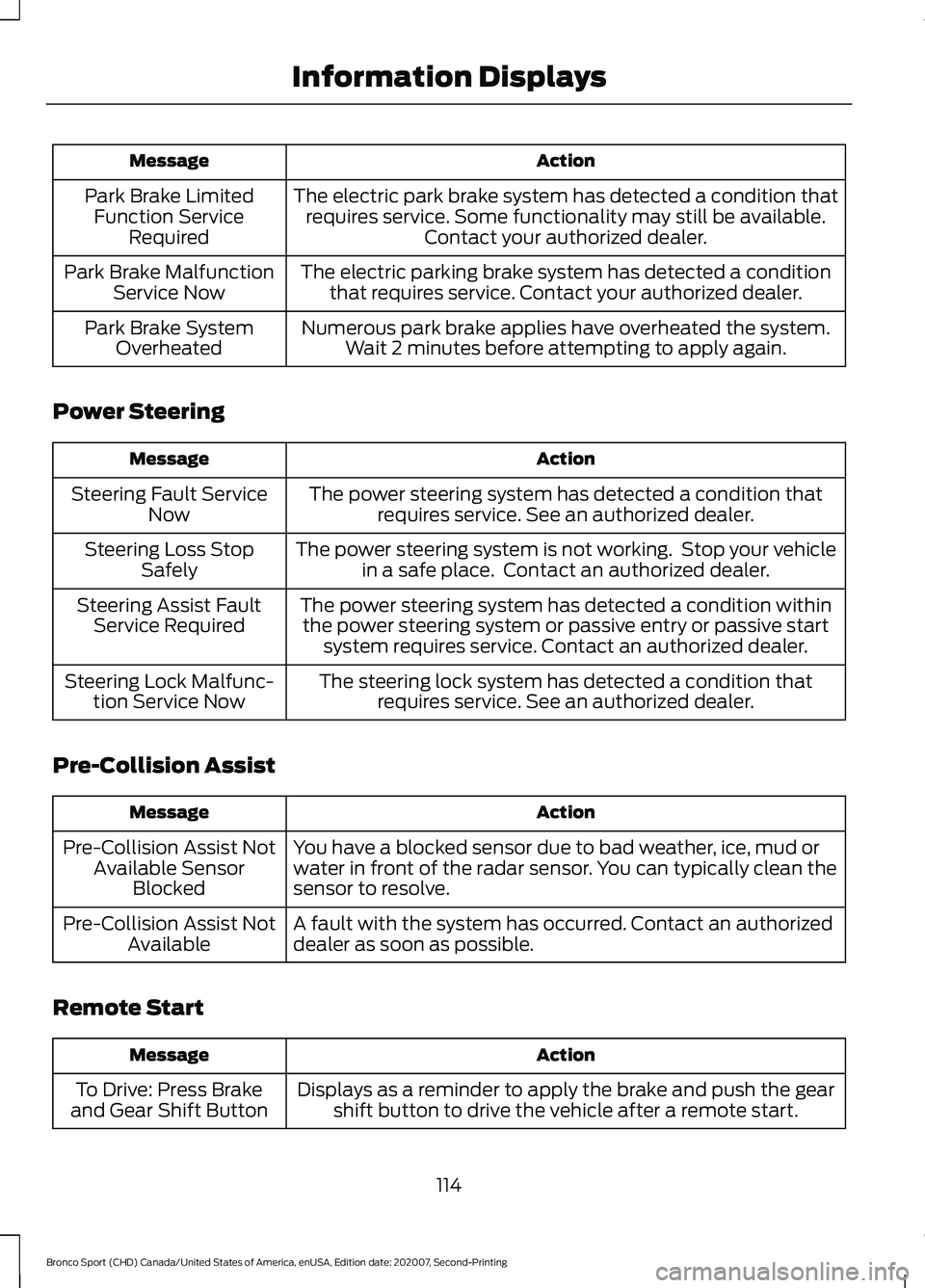
Action
Message
The electric park brake system has detected a condition thatrequires service. Some functionality may still be available. Contact your authorized dealer.
Park Brake Limited
Function Service Required
The electric parking brake system has detected a conditionthat requires service. Contact your authorized dealer.
Park Brake Malfunction
Service Now
Numerous park brake applies have overheated the system.Wait 2 minutes before attempting to apply again.
Park Brake System
Overheated
Power Steering Action
Message
The power steering system has detected a condition thatrequires service. See an authorized dealer.
Steering Fault Service
Now
The power steering system is not working. Stop your vehiclein a safe place. Contact an authorized dealer.
Steering Loss Stop
Safely
The power steering system has detected a condition withinthe power steering system or passive entry or passive start system requires service. Contact an authorized dealer.
Steering Assist Fault
Service Required
The steering lock system has detected a condition thatrequires service. See an authorized dealer.
Steering Lock Malfunc-
tion Service Now
Pre-Collision Assist Action
Message
You have a blocked sensor due to bad weather, ice, mud or
water in front of the radar sensor. You can typically clean the
sensor to resolve.
Pre-Collision Assist Not
Available Sensor Blocked
A fault with the system has occurred. Contact an authorized
dealer as soon as possible.
Pre-Collision Assist Not
Available
Remote Start Action
Message
Displays as a reminder to apply the brake and push the gearshift button to drive the vehicle after a remote start.
To Drive: Press Brake
and Gear Shift Button
114
Bronco Sport (CHD) Canada/United States of America, enUSA, Edition date: 202007, Second-Printing Information Displays
Page 122 of 471
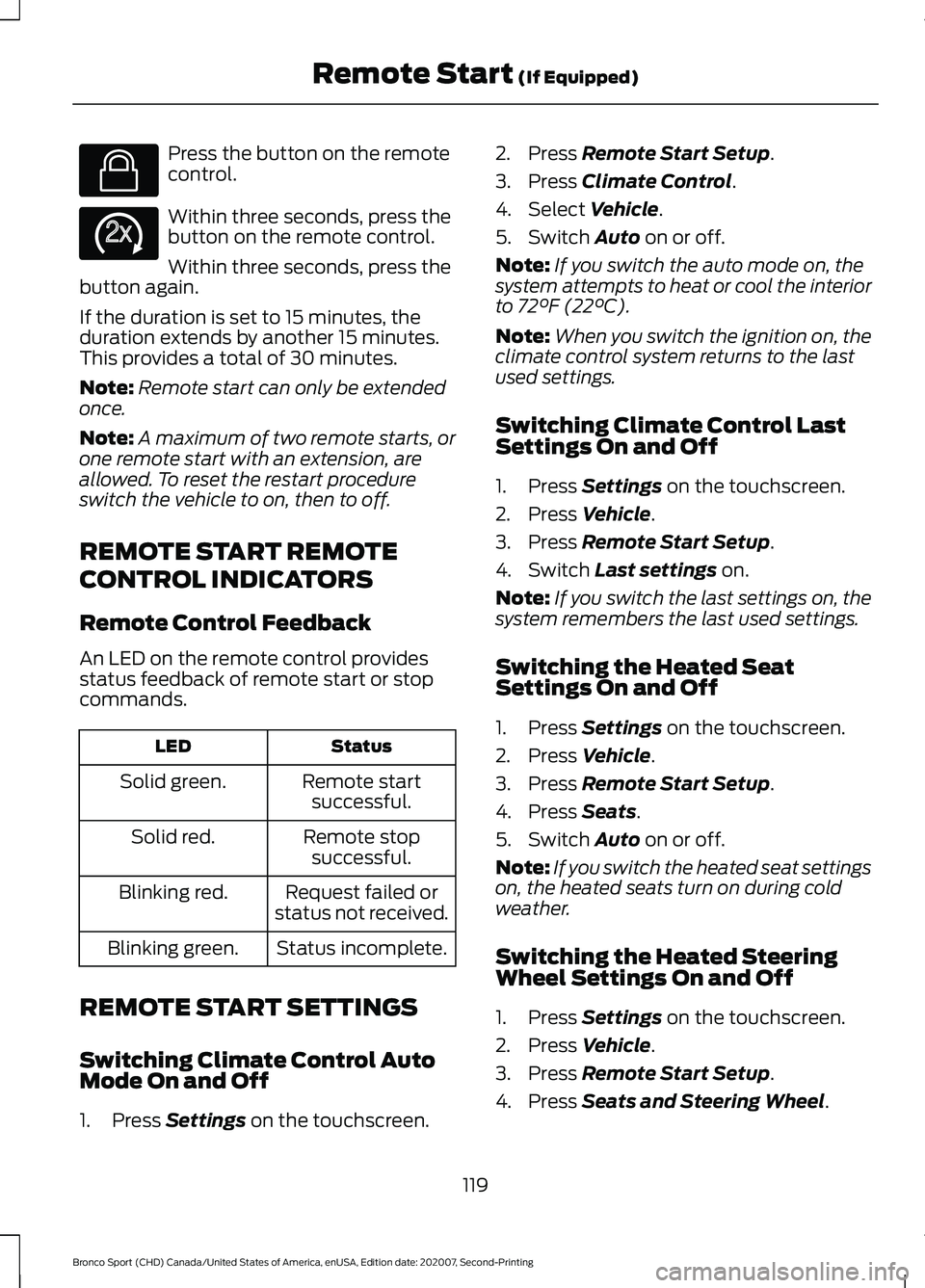
Press the button on the remote
control.
Within three seconds, press the
button on the remote control.
Within three seconds, press the
button again.
If the duration is set to 15 minutes, the
duration extends by another 15 minutes.
This provides a total of 30 minutes.
Note: Remote start can only be extended
once.
Note: A maximum of two remote starts, or
one remote start with an extension, are
allowed. To reset the restart procedure
switch the vehicle to on, then to off.
REMOTE START REMOTE
CONTROL INDICATORS
Remote Control Feedback
An LED on the remote control provides
status feedback of remote start or stop
commands. Status
LED
Remote startsuccessful.
Solid green.
Remote stopsuccessful.
Solid red.
Request failed or
status not received.
Blinking red.
Status incomplete.
Blinking green.
REMOTE START SETTINGS
Switching Climate Control Auto
Mode On and Off
1. Press Settings on the touchscreen. 2. Press
Remote Start Setup.
3. Press
Climate Control.
4. Select
Vehicle.
5. Switch
Auto on or off.
Note: If you switch the auto mode on, the
system attempts to heat or cool the interior
to
72°F (22°C).
Note: When you switch the ignition on, the
climate control system returns to the last
used settings.
Switching Climate Control Last
Settings On and Off
1. Press
Settings on the touchscreen.
2. Press
Vehicle.
3. Press
Remote Start Setup.
4. Switch
Last settings on.
Note: If you switch the last settings on, the
system remembers the last used settings.
Switching the Heated Seat
Settings On and Off
1. Press
Settings on the touchscreen.
2. Press
Vehicle.
3. Press
Remote Start Setup.
4. Press
Seats.
5. Switch
Auto on or off.
Note: If you switch the heated seat settings
on, the heated seats turn on during cold
weather.
Switching the Heated Steering
Wheel Settings On and Off
1. Press
Settings on the touchscreen.
2. Press
Vehicle.
3. Press
Remote Start Setup.
4. Press
Seats and Steering Wheel.
119
Bronco Sport (CHD) Canada/United States of America, enUSA, Edition date: 202007, Second-Printing Remote Start
(If Equipped)E138623 E138625
Page 123 of 471
5. Switch Auto on or off.
Note: If you switch the heated steering
wheel settings on, the heated steering wheel
turns on during cold weather.
Setting the Remote Start Duration
1. Press
Settings on the touchscreen.
2. Press
Vehicle.
3. Press
Remote Start Setup.
4. Press
Duration.
Note: Wait a few seconds before remotely
starting the vehicle after the vehicle stops
running.
120
Bronco Sport (CHD) Canada/United States of America, enUSA, Edition date: 202007, Second-Printing Remote Start
(If Equipped)
Page 136 of 471
SITTING IN THE CORRECT
POSITION
WARNING: Sitting improperly, out
of position or with the seatback reclined
too far can take weight off the seat
cushion and affect the decision of the
passenger sensing system, resulting in
serious injury or death in the event of a
crash. Always sit upright against your
seat back, with your feet on the floor. WARNING: Do not recline the seat
backrest too far as this can cause the
occupant to slide under the seatbelt,
resulting in personal injury in the event
of a crash. WARNING:
Do not place objects
higher than the top of the seat backrest.
Failure to follow this instruction could
result in personal injury or death in the
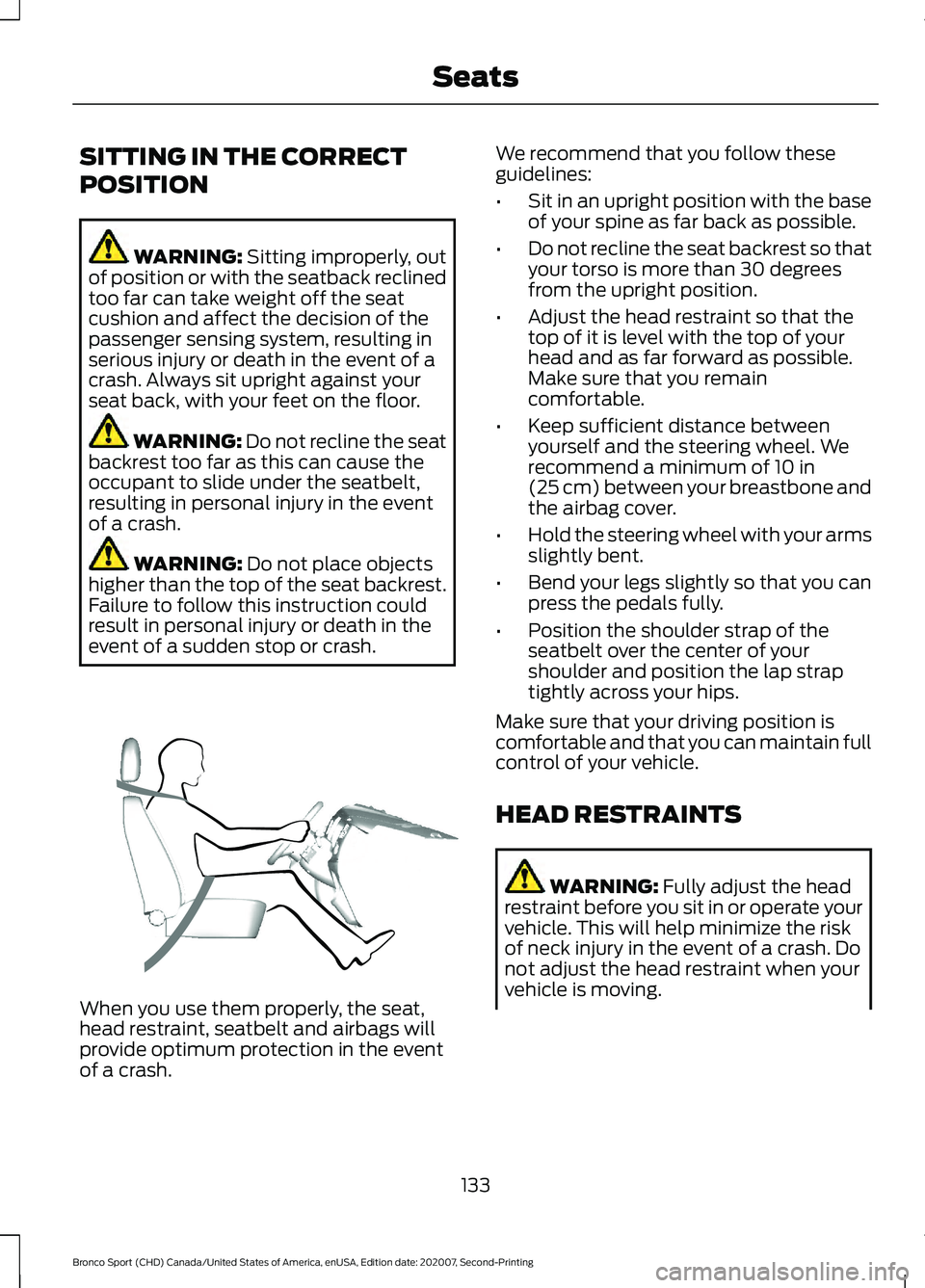
event of a sudden stop or crash. When you use them properly, the seat,
head restraint, seatbelt and airbags will
provide optimum protection in the event
of a crash. We recommend that you follow these
guidelines:
•
Sit in an upright position with the base
of your spine as far back as possible.
• Do not recline the seat backrest so that
your torso is more than 30 degrees
from the upright position.
• Adjust the head restraint so that the
top of it is level with the top of your
head and as far forward as possible.
Make sure that you remain
comfortable.
• Keep sufficient distance between
yourself and the steering wheel. We
recommend a minimum of
10 in
(25 cm) between your breastbone and
the airbag cover.
• Hold the steering wheel with your arms
slightly bent.
• Bend your legs slightly so that you can
press the pedals fully.
• Position the shoulder strap of the
seatbelt over the center of your
shoulder and position the lap strap
tightly across your hips.
Make sure that your driving position is
comfortable and that you can maintain full
control of your vehicle.
HEAD RESTRAINTS WARNING:
Fully adjust the head
restraint before you sit in or operate your
vehicle. This will help minimize the risk
of neck injury in the event of a crash. Do
not adjust the head restraint when your
vehicle is moving.
133
Bronco Sport (CHD) Canada/United States of America, enUSA, Edition date: 202007, Second-Printing SeatsE68595