warning FORD BRONCO SPORT 2023 Owners Manual
[x] Cancel search | Manufacturer: FORD, Model Year: 2023, Model line: BRONCO SPORT, Model: FORD BRONCO SPORT 2023Pages: 516, PDF Size: 14.27 MB
Page 214 of 516
WHAT IS CRUISE CONTROL
Cruise control lets you maintain a setspeed without keeping your foot on theaccelerator pedal.
Requirements
Use cruise control when the vehicle speedis greater than 20 mph (30 km/h).
SWITCHING CRUISE CONTROL
ON AND OFF
WARNING: Do not use cruisecontrol on winding roads, in heavy trafficor when the road surface is slippery. Thiscould result in loss of vehicle control,serious injury or death.
The cruise controls are on the steeringwheel.
Switching Cruise Control On
Press the button to put thesystem in standby mode.
Switching Cruise Control Off
Press the button when instandby mode or switch theignition off.
Note:When you switch cruise control offthe set speed clears.
SETTING THE CRUISE
CONTROL SPEED
WARNING: When you are goingdownhill, your vehicle speed couldincrease above the set speed. Thesystem does not apply the brakes.
Drive to the speed you prefer.
Press the toggle button upwardor downward to set the currentspeed.
Take your foot off the accelerator pedal.
Note:The indicator changes color in theinformation display.
Changing the Set Speed
Press and release the togglebutton upward to increase theset speed in small increments.
Press and hold the toggle button upwardto accelerate. Release the button whenyou have reached your preferred speed.
Press and release the togglebutton downward to decreasethe set speed in smallincrements.
Press and hold the toggle buttondownward to decelerate. Release thebutton when you have reached yourpreferred speed.
Note: If you accelerate by pressing theaccelerator pedal, the set speed does notchange. When you release the acceleratorpedal, your vehicle returns to the speed thatyou previously set.
210
2023 Bronco Sport (CHD) Canada/United States of America, enUSA, Edition date: 202208, First-PrintingCruise ControlE71340 E71340 E246884 E246885 E246884 E246885
Page 216 of 516
HOW DOES ADAPTIVE CRUISE
CONTROL WITH STOP AND GO
WORK
Adaptive cruise control with stop and gouses radar and camera sensors to adjustthe speed of your vehicle to maintain a setgap from the vehicle in front of you in thesame lane while following it to a completestop. You can also engage the system tofollow a vehicle in front of you and adjustset speed while stopped.
WHAT IS ADAPTIVE CRUISE
CONTROL WITH LANE
CENTERING
Adaptive cruise control with lane centeringuses radar and camera sensors to helpkeep your vehicle in the lane by applyingcontinuous assistance steering torqueinput toward the lane center on highways.
Note:The adaptive cruise control gapsetting operates normally.
WHAT IS INTELLIGENT
ADAPTIVE CRUISE CONTROL
Intelligent adaptive cruise controlcombines speed sign recognition withadaptive cruise control to adjust the cruiseset speed to the speed limit detected bythe speed sign recognition system. Forexample, if the speed sign recognitionsystem detects a 50 mph (80 km/h)speed limit, the cruise set speed is updatedto 50 mph (80 km/h) +/- the driver'sselected speed offset.
Note:The adaptive cruise control gapsetting operates normally.
ADAPTIVE CRUISE CONTROL
PRECAUTIONS
WARNING: You are responsible forcontrolling your vehicle at all times. Thesystem is designed to be an aid and doesnot relieve you of your responsibility todrive with due care and attention. Failureto follow this instruction could result inthe loss of control of your vehicle,personal injury or death.
WARNING: Pay close attention tochanging road conditions such asentering or leaving a highway, on roadswith intersections or roundabouts, roadswithout visible lanes of travel, roads thatare winding, slippery, unpaved, or steepslopes.
WARNING: The system does notcontrol speed in low traction conditionsor extremely steep slopes. The systemis designed to be an aid and does notrelieve you of your responsibility to drivewith due care and attention. Failure tofollow this instruction could result inpersonal injury.
WARNING: The system is not acrash warning or avoidance system.
WARNING: Do not use the systemwhen towing a trailer that hasaftermarket electronic trailer brakecontrols. Failure to follow this instructioncould result in the loss of control of yourvehicle, personal injury or death.
WARNING: Do not use tire sizesother than those recommended becausethis can affect the normal operation ofthe system. Failure to do so may resultin a loss of vehicle control, which couldresult in serious injury.
212
2023 Bronco Sport (CHD) Canada/United States of America, enUSA, Edition date: 202208, First-PrintingAdaptive Cruise Control (If Equipped)
Page 217 of 516
WARNING: Do not use the systemwith a snow plow blade installed.
WARNING: Do not use the systemin poor visibility, for example fog, heavyrain, spray or snow.
When Following a Vehicle
WARNING: When following avehicle that is braking, your vehicle doesnot always decelerate quickly enough toavoid a crash without driver intervention.Apply the brakes when necessary. Failureto follow this instruction could result inpersonal injury or death.
Hilly Condition Usage
You should select a lower gear when thesystem is active in situations such asprolonged downhill driving on steepgrades, for example in mountainous areas.The system needs additional enginebraking in these situations to reduce theload on the vehicle’s regular brake systemto prevent it from overheating.
Note:An audible alarm sounds and thesystem shuts down if it applies brakes foran extended period of time. This allows thebrakes to cool. The system functionsnormally again after the brakes cool.
Lane Centering Precautions
Adaptive cruise control precautions applyto lane centering unless stated otherwiseor contradicted by a lane centeringprecaution.
WARNING: Do not use the systemwhen towing a trailer. Failure to followthis instruction could result in the loss ofcontrol of your vehicle, personal injury ordeath.
WARNING: Do not use the systemif any changes or modifications to thesteering wheel have been made. Anychanges or modifications to the steeringwheel could affect the functionality orperformance of the system. Failure tofollow this instruction could result in theloss of control of your vehicle, personalinjury or death.
ADAPTIVE CRUISE CONTROL
LIMITATIONS
Sensor Limitations
WARNING: On rare occasions,detection issues can occur due to theroad infrastructures, for example bridges,tunnels and safety barriers. In thesecases, the system may brake late orunexpectedly. At all times, you areresponsible for controlling your vehicle,supervising the system and intervening,if required.
WARNING: If the systemmalfunctions, have your vehicle checkedas soon as possible.
WARNING: Large contrasts inoutside lighting can limit sensorperformance.
213
2023 Bronco Sport (CHD) Canada/United States of America, enUSA, Edition date: 202208, First-PrintingAdaptive Cruise Control (If Equipped)
Page 218 of 516
WARNING: The system only warnsof vehicles detected by the radar andcamera sensors. In some cases theremay be no warning or a delayed warning.Apply the brakes when necessary. Failureto follow this instruction could result inpersonal injury or death.
WARNING: The system may notdetect stationary or slow movingvehicles below 6 mph (10 km/h).
WARNING: The system does notdetect pedestrians or objects in the road.
WARNING: The system does notdetect oncoming vehicles in the samelane.
WARNING: The system may notoperate properly if the sensor is blocked.Keep the windshield free fromobstruction.
WARNING: The sensor mayincorrectly track lane markings as otherstructures or objects. This can result ina false or missed warning.
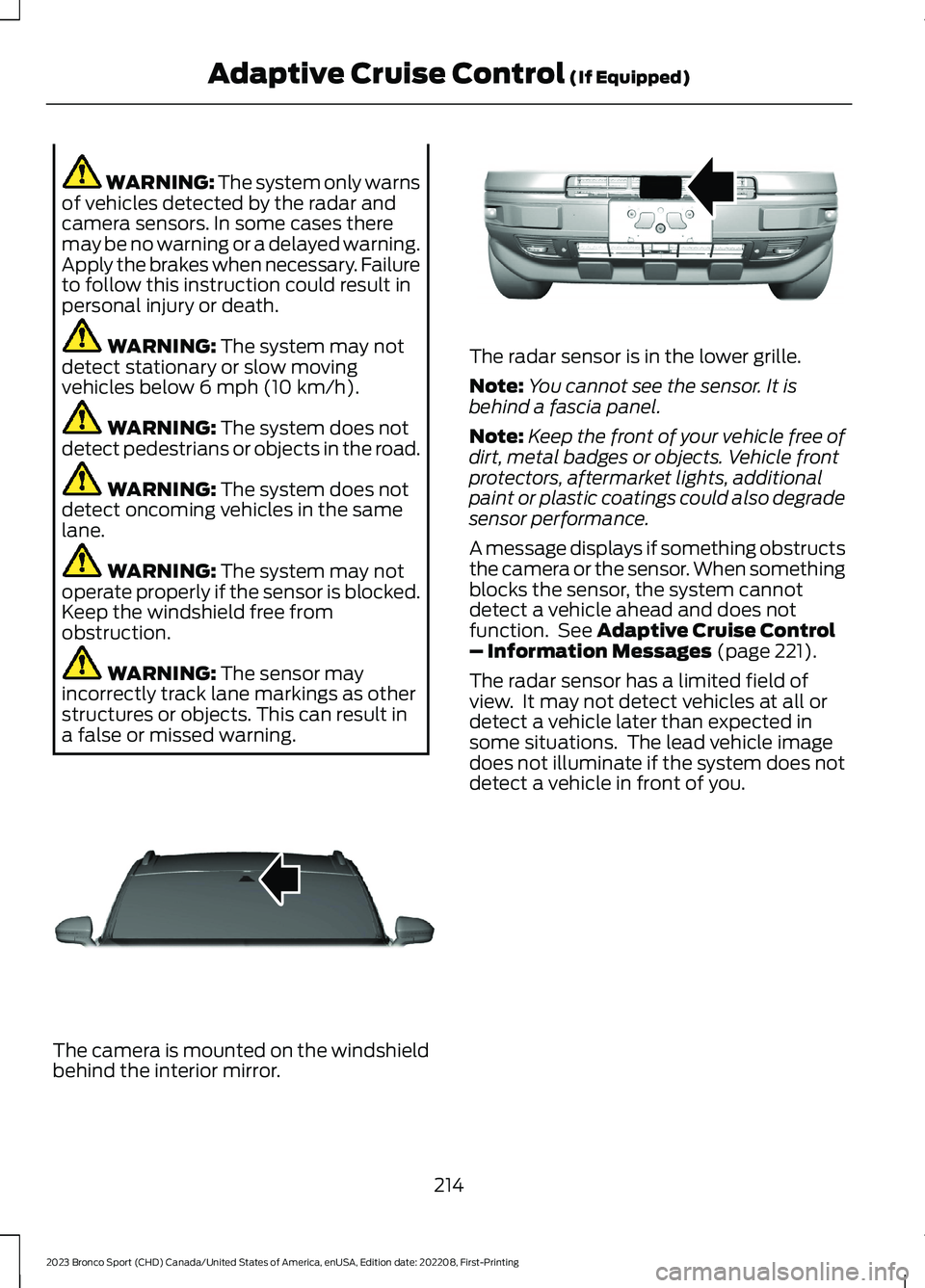
The camera is mounted on the windshieldbehind the interior mirror.
The radar sensor is in the lower grille.
Note:You cannot see the sensor. It isbehind a fascia panel.
Note:Keep the front of your vehicle free ofdirt, metal badges or objects. Vehicle frontprotectors, aftermarket lights, additionalpaint or plastic coatings could also degradesensor performance.
A message displays if something obstructsthe camera or the sensor. When somethingblocks the sensor, the system cannotdetect a vehicle ahead and does notfunction. See Adaptive Cruise Control– Information Messages (page 221).
The radar sensor has a limited field ofview. It may not detect vehicles at all ordetect a vehicle later than expected insome situations. The lead vehicle imagedoes not illuminate if the system does notdetect a vehicle in front of you.
214
2023 Bronco Sport (CHD) Canada/United States of America, enUSA, Edition date: 202208, First-PrintingAdaptive Cruise Control (If Equipped)E307893 E321483
Page 222 of 516
The system applies the brakes to slowdown your vehicle to maintain a safe gapdistance from the vehicle in front of you.The system only applies limited braking.You can override the system by applyingthe brakes.
Note:The brakes may emit noise whenapplied by the system.
If the system determines that its maximumbraking level is not sufficient, an audiblewarning sounds, a message appears in theinstrument cluster display and an indicatorflashes when the system continues tobrake. Take immediate action.
CANCELING THE SET SPEED
Press the button or tap the brakepedal.
The set speed does not erase.
RESUMING THE SET SPEED
Press the button.
Your vehicle speed returns to thepreviously set speed and gap setting. Theset speed displays continuously in theinformation display when the system isactive.
Note:Only use resume if you are aware ofthe set speed and intend to return to it.
Resuming the Set Speed from aComplete Stop
If your vehicle follows a vehicle to acomplete stop and remains stationary forless than three seconds, your vehicleaccelerates from a stationary position tofollow the vehicle ahead.
If your vehicle follows a vehicleto a complete stop and remainsstationary for more than threeseconds, press and release the button orpress the accelerator pedal to follow thevehicle ahead.
OVERRIDING THE SET SPEED
WARNING: If you override thesystem by pressing the acceleratorpedal, it does not automatically applythe brakes to maintain a gap from anyvehicle ahead.
When you press the accelerator pedal, youoverride the set speed and gap distance.
Use the accelerator pedal to intentionallyexceed the set speed limit.
When you override the system, the greenindicator illuminates and the vehicle icondoes not appear in the instrument clusterdisplay.
The system resumes operation when yourelease the accelerator pedal. The vehiclespeed decreases to the set speed, or alower speed if following a slower vehicle.
ADAPTIVE CRUISE CONTROL
INDICATORS
Illuminates when you switch thesystem on. The color of theindicator changes to indicate thesystem status.
White indicates the system is on butinactive.
Green indicates the system is active andthe speed has been set.
218
2023 Bronco Sport (CHD) Canada/United States of America, enUSA, Edition date: 202208, First-PrintingAdaptive Cruise Control (If Equipped)E280804 E323440
Page 223 of 516
Lane Centering Indicators
Illuminates when you switchlane centering on. The color ofthe indicator changes to indicatethe system status.
Gray indicates the system is on butinactive.
Green indicates the system is active andapplying assistance steering torque inputto keep your vehicle in the center of thelane.
Amber indicates a systemauto-cancellation.
Intelligent Adaptive Cruise ControlIndicators (If Equipped)
A bracket appears around the set speedand the detected speed limit sign in theinformation display.
System Warnings
If the set speed is increased beyond thespeed limit or speed limit plus a positivetolerance value, the set speed indicatorflashes.
The warning does not occur if:
•You override the set speed using theaccelerator pedal.
•The vehicle speed exceeds the setspeed due to being on a downhill slope.
SWITCHING FROM ADAPTIVE
CRUISE CONTROL TO CRUISE
CONTROL
WARNING: Normal cruise controlwill not brake when your vehicle isapproaching slower vehicles. Always beaware of which mode you have selectedand apply the brakes when necessary.
Use the touchscreen to select thefollowing:
1.Select Settings.
2.Select Driver Assist.
3.Select Cruise Control.
4.Select Normal.
The cruise control indicatorreplaces the adaptive cruisecontrol indicator if you selectnormal cruise control. The gap settingdoes not display, and the system does notrespond to lead vehicles. Automaticbraking remains active to maintain setspeed. The system remembers the lastsetting when you start your vehicle.
SWITCHING LANE CENTERING
ON AND OFF
The controls are on the steering wheel.See Cruise Control (page 80).
Press the button.
The indicator appears in the informationdisplay. When the system is on, the colorof the indicator changes to indicate thesystem status. See Adaptive CruiseControl Indicators (page 218).
Note:Adaptive cruise control must be onbefore you can switch lane centering on.
219
2023 Bronco Sport (CHD) Canada/United States of America, enUSA, Edition date: 202208, First-PrintingAdaptive Cruise Control (If Equipped)E262175 E339108 E71340 E262175
Page 224 of 516
Activating Lane Centering
The system only activates when all of thefollowing occur:
•You have adaptive cruise control withstop-and-go on.
•The vehicle is centered in the lane.
•Your hands are on the steering wheelat all times.
•The system detects both lanemarkings.
Note:If it does not detect valid lanemarkings, the system stays inactive untilvalid markings are available.
You can override the system at any timeby steering your vehicle.
When the system is active and thedirection indicator is switched on, thesystem immediately cancels. The systemremains in standby mode as long as thedirection indicator is engaged. The systemautomatically re-activates once the vehicleis centered in a lane and the directionindicator is switched off.
If you drive off-center within the lane, thesystem sets and maintains that preferredlane position. The system providescontinuous assistance steering torqueinput toward the preferred position.
Note:The system can only set preferredlane positions within the lane.
Note:If the system cancels, the preferredposition erases. On the next activation, thesystem provides continuous assistancesteering torque input toward the lane center.
System Alerts and AutomaticCancellation
You must keep your hands on the steeringwheel at all times.
When the system is active and detects nosteering activity for a certain period of time,the system alerts you to put your hands onthe steering wheel. If you do not react tothe warnings the system cancels and slowsyour vehicle down to idle speeds whilemaintaining steering control.
The system also alerts you if your vehiclecrosses lane markings without detectedsteering activity.
Note:The system may detect a light gripor touch on the steering wheel as hands-offdriving.
When the system cancels due to anexternal condition, for example, no lanemarkings are available and your hands arenot on the steering wheel, the systemimmediately alerts you to take control ofthe vehicle. If you ignore this alert, thesystem slows the vehicle while maintainingsteering control.
If your vehicle starts to slowdown, you must contribute tothe steering control and pressand release the button to regain fullsystem performance.
Automatic cancellation can also occur if:
•The lane becomes too wide or toonarrow.
•The system cannot detect valid lanemarkings.
•Lane markings are crossed.
Note:The system disables until the nextkey cycle if your vehicle slows down due todriver inactivity twice within a key cycle.
220
2023 Bronco Sport (CHD) Canada/United States of America, enUSA, Edition date: 202208, First-PrintingAdaptive Cruise Control (If Equipped)
Page 225 of 516
SWITCHING INTELLIGENT
MODE ON AND OFF
WARNING: You are responsible forcontrolling your vehicle at all times. Thesystem is designed to be an aid and doesnot relieve you of your responsibility todrive with due care and attention. Failureto follow this instruction could result inthe loss of control of your vehicle,personal injury or death.
1.Press Settings on the touchscreen.
2.Press Driver Assistance.
3.Press Cruise Control.
4.Press Intelligent.
Changing the Set Speed withIntelligent Adaptive Cruise Control
When intelligent mode is on, the systemadjusts the set speed to the speed limitdetected by the camera and the speedlimit information provided by thenavigation system.
Note:The set speed adjusts when thesystem detects a different maximum speedlimit.
Note:The speed limit information providedby the navigation map data may beinaccurate or out of date.
Note:The system alerts you if the set speedincreases beyond the speed limit. SeeAdaptive Cruise Control Indicators (page218).
If the system does not detect a speed limit,the vehicle speed remains at the currentset speed.
You can override the set speed at any time.You may need to override or cancel thesystem in certain situations such asinclement weather or if an incorrect speedis set.
Note:The system may not detect and readspeed limit signs with conditionalinformation, for example, when a sign isflashing, during specific time ranges, orwhen children are present.
Note:Under certain conditions, the systemmay not adjust the vehicle speed until afteryour vehicle passes the speed limit sign.
ADJUSTING THE SET SPEED
TOLERANCE
You can set a permanent speed tolerancethat is above or below the detected speedlimit.
Use the touchscreen to select thefollowing:
1.Press Settings.
2.Press Driver Assistance.
3.Press Cruise Control.
4.Press Tolerance.
5.Use + and - to set the tolerance.
Note:You cannot set the tolerance morethan 20 mph (30 km/h) above or below therecognized speed.
ADAPTIVE CRUISE CONTROL
– TROUBLESHOOTING
ADAPTIVE CRUISE CONTROL –INFORMATION MESSAGES
Note:Depending on your vehicle optionsand instrument cluster type, not allmessages display or are available.
Note:Certain messages may beabbreviated or shortened depending uponwhich cluster type you have.
221
2023 Bronco Sport (CHD) Canada/United States of America, enUSA, Edition date: 202208, First-PrintingAdaptive Cruise Control (If Equipped)
Page 226 of 516
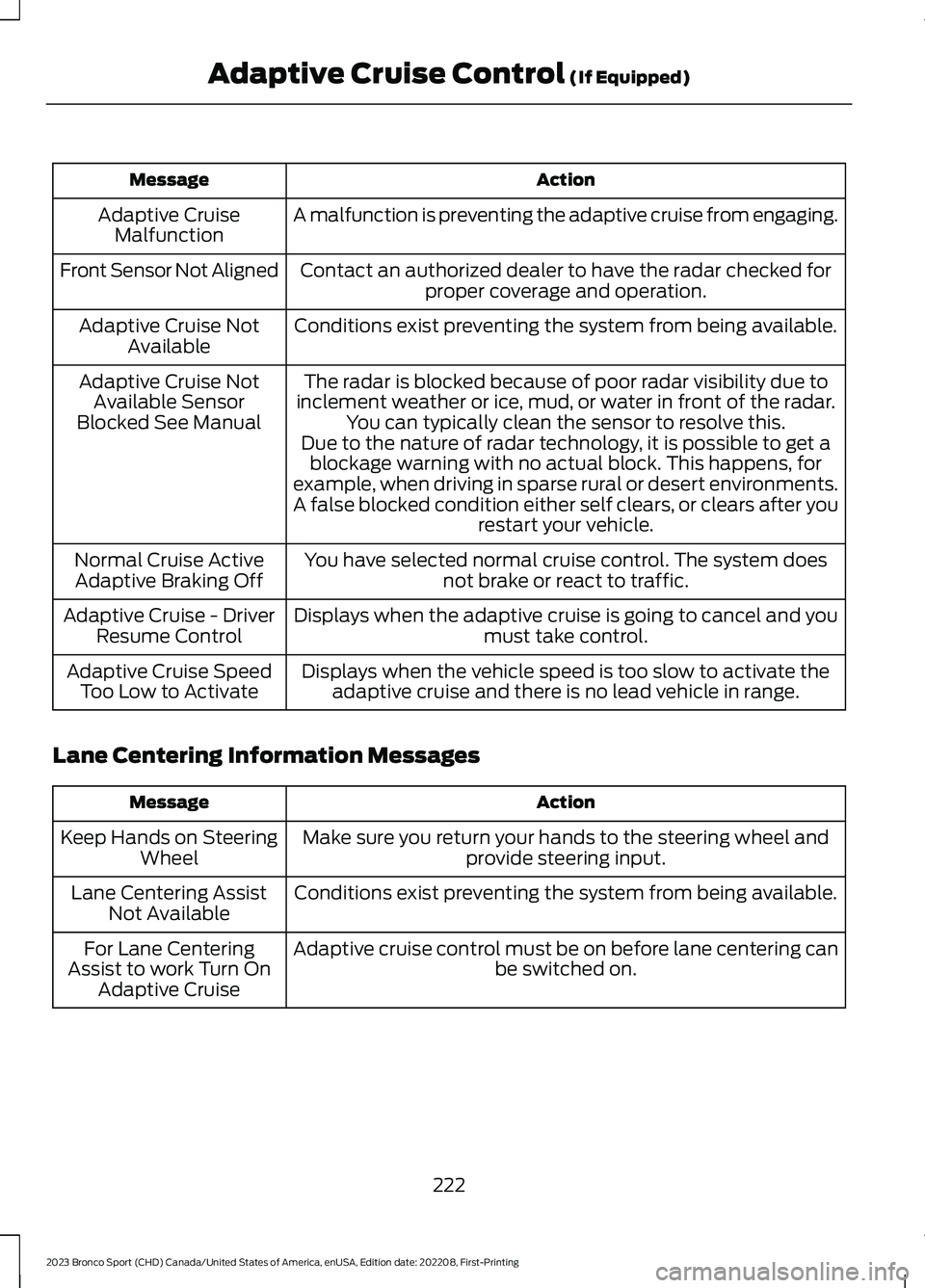
ActionMessage
A malfunction is preventing the adaptive cruise from engaging.Adaptive CruiseMalfunction
Front Sensor Not AlignedContact an authorized dealer to have the radar checked forproper coverage and operation.
Conditions exist preventing the system from being available.Adaptive Cruise NotAvailable
The radar is blocked because of poor radar visibility due toinclement weather or ice, mud, or water in front of the radar.You can typically clean the sensor to resolve this.
Adaptive Cruise NotAvailable SensorBlocked See ManualDue to the nature of radar technology, it is possible to get ablockage warning with no actual block. This happens, forexample, when driving in sparse rural or desert environments.A false blocked condition either self clears, or clears after yourestart your vehicle.
You have selected normal cruise control. The system doesnot brake or react to traffic.Normal Cruise ActiveAdaptive Braking Off
Displays when the adaptive cruise is going to cancel and youmust take control.Adaptive Cruise - DriverResume Control
Displays when the vehicle speed is too slow to activate theadaptive cruise and there is no lead vehicle in range.Adaptive Cruise SpeedToo Low to Activate
Lane Centering Information Messages
ActionMessage
Make sure you return your hands to the steering wheel andprovide steering input.Keep Hands on SteeringWheel
Conditions exist preventing the system from being available.Lane Centering AssistNot Available
Adaptive cruise control must be on before lane centering canbe switched on.For Lane CenteringAssist to work Turn OnAdaptive Cruise
222
2023 Bronco Sport (CHD) Canada/United States of America, enUSA, Edition date: 202208, First-PrintingAdaptive Cruise Control (If Equipped)
Page 228 of 516
DRIVER ALERT
WARNING: You are responsible forcontrolling your vehicle at all times. Thesystem is designed to be an aid and doesnot relieve you of your responsibility todrive with due care and attention. Failureto follow this instruction could result inthe loss of control of your vehicle,personal injury or death.
WARNING: The system may notfunction if the sensor is blocked.
WARNING: Take regular restbreaks if you feel tired. Do not wait forthe system to warn you.
WARNING: Certain driving stylesmay result in the system warning youeven if you are not feeling tired.
WARNING: In cold and severeweather conditions the system may notfunction. Rain, snow and spray can alllimit sensor performance.
WARNING: The system will notoperate if the sensor cannot track theroad lane markings.
WARNING: If damage occurs in theimmediate area surrounding the sensor,have your vehicle checked as soon aspossible.
WARNING: The system may notcorrectly operate if your vehicle is fittedwith a suspension kit not approved byus.
Note:Keep the windshield free fromobstructions. For example, bird droppings,insects and snow or ice.
Note:If the camera is blocked or if thewindshield is damaged, the system may notfunction.
Note:The system remembers the lastsetting when you start your vehicle, unlessit detects a MyKey™.
Note:If enabled in the menu, the systemactivates at speeds above 40 mph(64 km/h).
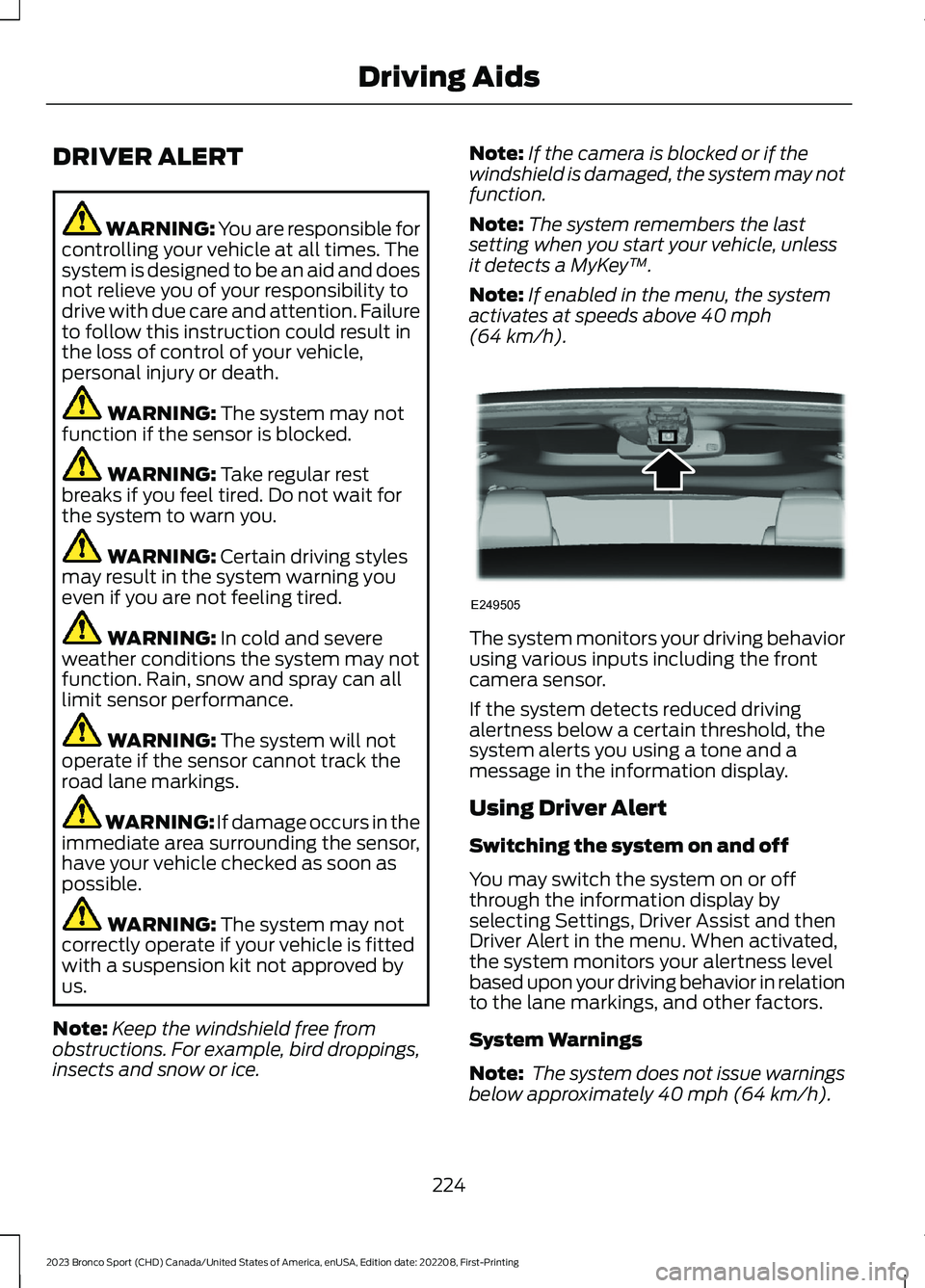
The system monitors your driving behaviorusing various inputs including the frontcamera sensor.
If the system detects reduced drivingalertness below a certain threshold, thesystem alerts you using a tone and amessage in the information display.
Using Driver Alert
Switching the system on and off
You may switch the system on or offthrough the information display byselecting Settings, Driver Assist and thenDriver Alert in the menu. When activated,the system monitors your alertness levelbased upon your driving behavior in relationto the lane markings, and other factors.
System Warnings
Note: The system does not issue warningsbelow approximately 40 mph (64 km/h).
224
2023 Bronco Sport (CHD) Canada/United States of America, enUSA, Edition date: 202208, First-PrintingDriving AidsE249505