display FORD BRONCO SPORT 2023 User Guide
[x] Cancel search | Manufacturer: FORD, Model Year: 2023, Model line: BRONCO SPORT, Model: FORD BRONCO SPORT 2023Pages: 516, PDF Size: 14.27 MB
Page 84 of 516
Press to access the previousmedia selection.
Press to access the next mediaselection.
VOICE CONTROL
The controls are on the steering wheel.
Press and release to activatevoice recognition.
CRUISE CONTROL - VEHICLES
WITH: ADAPTIVE CRUISE
CONTROL
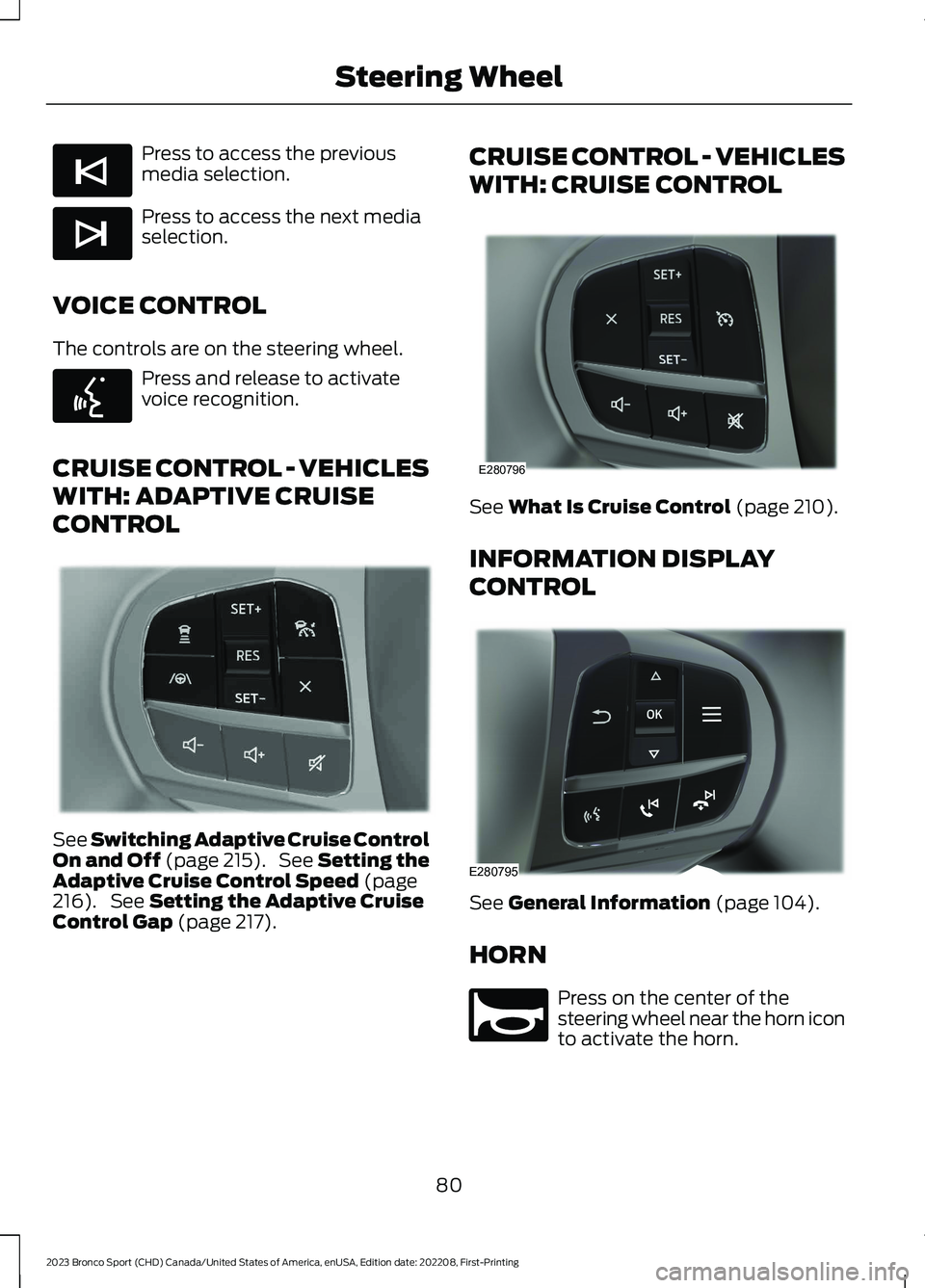
See Switching Adaptive Cruise ControlOn and Off (page 215). See Setting theAdaptive Cruise Control Speed (page216). See Setting the Adaptive CruiseControl Gap (page 217).
CRUISE CONTROL - VEHICLES
WITH: CRUISE CONTROL
See What Is Cruise Control (page 210).
INFORMATION DISPLAY
CONTROL
See General Information (page 104).
HORN
Press on the center of thesteering wheel near the horn iconto activate the horn.
80
2023 Bronco Sport (CHD) Canada/United States of America, enUSA, Edition date: 202208, First-PrintingSteering WheelE265045 E265044 E142599 E349487 E280796 E280795 E270945
Page 87 of 516
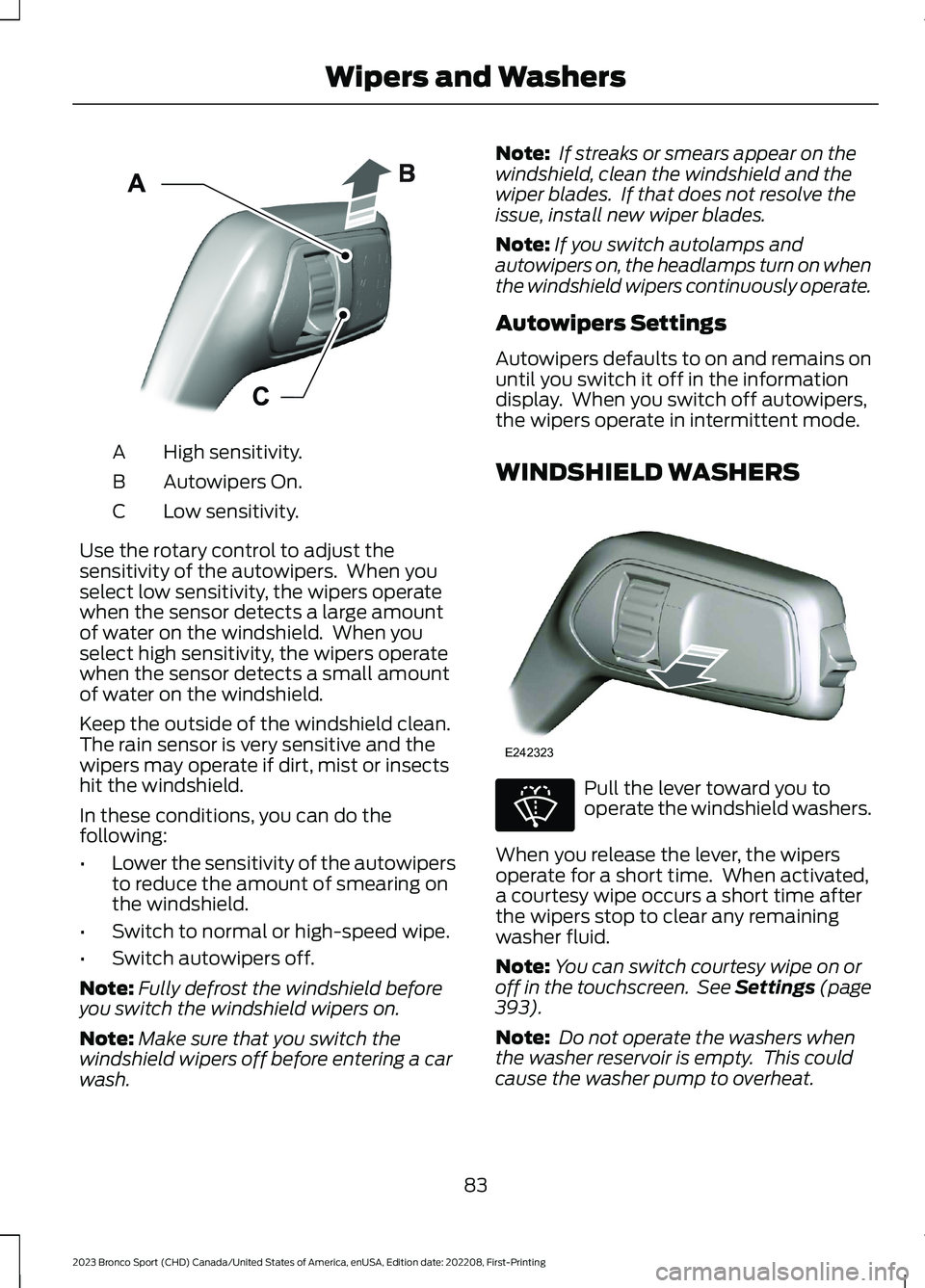
High sensitivity.A
Autowipers On.B
Low sensitivity.C
Use the rotary control to adjust thesensitivity of the autowipers. When youselect low sensitivity, the wipers operatewhen the sensor detects a large amountof water on the windshield. When youselect high sensitivity, the wipers operatewhen the sensor detects a small amountof water on the windshield.
Keep the outside of the windshield clean.The rain sensor is very sensitive and thewipers may operate if dirt, mist or insectshit the windshield.
In these conditions, you can do thefollowing:
•Lower the sensitivity of the autowipersto reduce the amount of smearing onthe windshield.
•Switch to normal or high-speed wipe.
•Switch autowipers off.
Note:Fully defrost the windshield beforeyou switch the windshield wipers on.
Note:Make sure that you switch thewindshield wipers off before entering a carwash.
Note: If streaks or smears appear on thewindshield, clean the windshield and thewiper blades. If that does not resolve theissue, install new wiper blades.
Note:If you switch autolamps andautowipers on, the headlamps turn on whenthe windshield wipers continuously operate.
Autowipers Settings
Autowipers defaults to on and remains onuntil you switch it off in the informationdisplay. When you switch off autowipers,the wipers operate in intermittent mode.
WINDSHIELD WASHERS
Pull the lever toward you tooperate the windshield washers.
When you release the lever, the wipersoperate for a short time. When activated,a courtesy wipe occurs a short time afterthe wipers stop to clear any remainingwasher fluid.
Note:You can switch courtesy wipe on oroff in the touchscreen. See Settings (page393).
Note: Do not operate the washers whenthe washer reservoir is empty. This couldcause the washer pump to overheat.
83
2023 Bronco Sport (CHD) Canada/United States of America, enUSA, Edition date: 202208, First-PrintingWipers and WashersE295997 E242323 E270967
Page 91 of 516
DAYTIME RUNNING LAMPS -
VEHICLES WITH:
CONFIGURABLE DAYTIME
RUNNING LAMPS
WARNING: The daytime runninglamps system does not activate the rearlamps and may not provide adequatelighting during low visibility drivingconditions. Make sure you switch theheadlamps on, as appropriate, during alllow visibility conditions. Failure to do somay result in a crash.
Switch the daytime running lamps on oroff using the touchscreen:
1.Select Settings. See Settings (page393).
2.Select Vehicle.
3.Select Lighting.
The daytime running lamps turn on when:
1.The lamps are on in the informationdisplay.
2.You switch the ignition on.
3.The transmission is not in park (P) forvehicles with automatic transmissionsor you release the parking brake forvehicles with manual transmissions.
4.The lighting control is in the autolampsposition.
5.The headlamps are off.
The other lighting control switch positionsdo not turn on the daytime running lamps.
If the daytime running lamps are off in theinformation display, the lamps stay off inall switch positions.
DAYTIME RUNNING LAMPS -
VEHICLES WITH: DAYTIME
RUNNING LAMPS (DRL)
WARNING: The daytime runninglamps system does not activate the rearlamps and may not provide adequatelighting during low visibility drivingconditions. Make sure you switch theheadlamps on, as appropriate, during alllow visibility conditions. Failure to do somay result in a crash.
The system turns the lamps on in daylightconditions.
To switch the system on, switch thelighting control to any position exceptheadlamps.
FRONT FOG LAMPS
Using the Front Fog Lamps
To switch the lamps on or off:
1.Set the lighting control to the parkinglamps, headlamps or autolampsposition.
Note:When the lighting control is in theautolamps position, you cannot switch thefog lamps on unless the low beamheadlamps are on.
2.
Press the button on thelighting control to switch the front foglamps on or off.
Note:Only switch the front fog lamps onduring reduced visibility.
Note:The brightness of the daytime runninglamps may decrease when the front foglamps are on.
87
2023 Bronco Sport (CHD) Canada/United States of America, enUSA, Edition date: 202208, First-PrintingLighting
Page 95 of 516
WHAT IS AUTOMATIC HIGH
BEAM CONTROL
The system turns on high beams if it is darkenough and no other traffic is present. If itdetects an approaching vehicle’sheadlamps or tail lamps, or street lightingahead, the system turns the high beamsoff. Low beams remain on.
A camera sensor, centrally mountedbehind the windshield of your vehicle,continuously monitors conditions to turnthe high beams on and off.
SWITCHING AUTOMATIC HIGH
BEAM CONTROL ON AND OFF
WARNING: Do not use the systemin poor visibility, for example fog, heavyrain, spray or snow.
Use the touchscreen to select thefollowing:
1.Select Settings.
2.Select Vehicle.
3.Select Lighting.
Activating the Automatic HighBeam Control
Switch the lighting control to theautolamps position. SeeAutolamps (page 86).
Note:The lighting control defaults toautolamps each time you switch yourvehicle on.
When active, the high beams turn on if allthe following conditions occur:
•The ambient light level is low enough.
•There is no traffic in front of yourvehicle.
•The vehicle speed is greater thanapproximately 25 mph (40 km/h).
When active, the high beams turn off if atleast one of the following conditions occur:
•The ambient light level is high enoughthat you do not require high beams.
•The system detects an approachingvehicle's headlamps or tail lamps.
•The system detects severe rain, snowor fog.
•A blocked vehicle camera.
•The vehicle speed falls belowapproximately 19 mph (30 km/h).
Note:The deactivation speed is lower oncurves.
Note:Certain curvy road situations maydelay high beam reactivation.
Note:If you have a blocked sensor, thesystem may not operate properly. Keep thewindshield free from obstruction or damage.
Note:The system may not operate properlyin cold or inclement conditions. You canswitch on the high beams by overriding thesystem.
Note:If the system detects a blockage, forexample bird droppings, bug splatter, snowor ice, the system goes into low beam modeuntil you clear the blockage. If you have ablocked camera, a message may appear inthe information display.
Note:Using much larger tires or equippingvehicle accessories such as snowplows canmodify your vehicle's ride height anddegrade automatic high beam controlperformance.
91
2023 Bronco Sport (CHD) Canada/United States of America, enUSA, Edition date: 202208, First-PrintingAutomatic High Beam ControlE281240
Page 98 of 516
3.Lift and hold the switch again for a fewseconds.
4.Release the switch.
5.Lift and hold the switch again for a fewseconds.
6.Release the switch.
7.Press and hold the switch until thewindow is fully open.
8.Lift and hold the switch until thewindow is fully closed.
9.Release the switch.
10.Open the window and then try toclose it using one-touch close.
Note:Repeat the procedure if the windowdoes not close when you use one-touch.
Accessory Delay
You can use the window controls forseveral minutes after switching off theignition or until opening either front door.
GLOBAL OPENING AND
CLOSING (IF EQUIPPED)
You can use the remote control to openthe windows with the ignition off.
Note:You can enable or disable this featurein the information display or see anauthorized dealer. See GeneralInformation (page 104).
Note:To operate this feature, accessorydelay must not be active.
Opening the Windows
You can only open the windows for a shorttime after you unlock your vehicle with theremote control. After you unlock yourvehicle, press and hold the remote controlunlock button to open the windows.Release the button once movement starts.Press the lock or unlock button to stopmovement.
Closing the Windows
WARNING: When closing thepower windows, verify they are free ofobstruction and make sure that childrenand pets are not in the proximity of thewindow openings.
To close the windows, press and hold theremote control lock button. Release thebutton once movement starts. Press thelock or unlock button to stop movement.
EXTERIOR MIRRORS
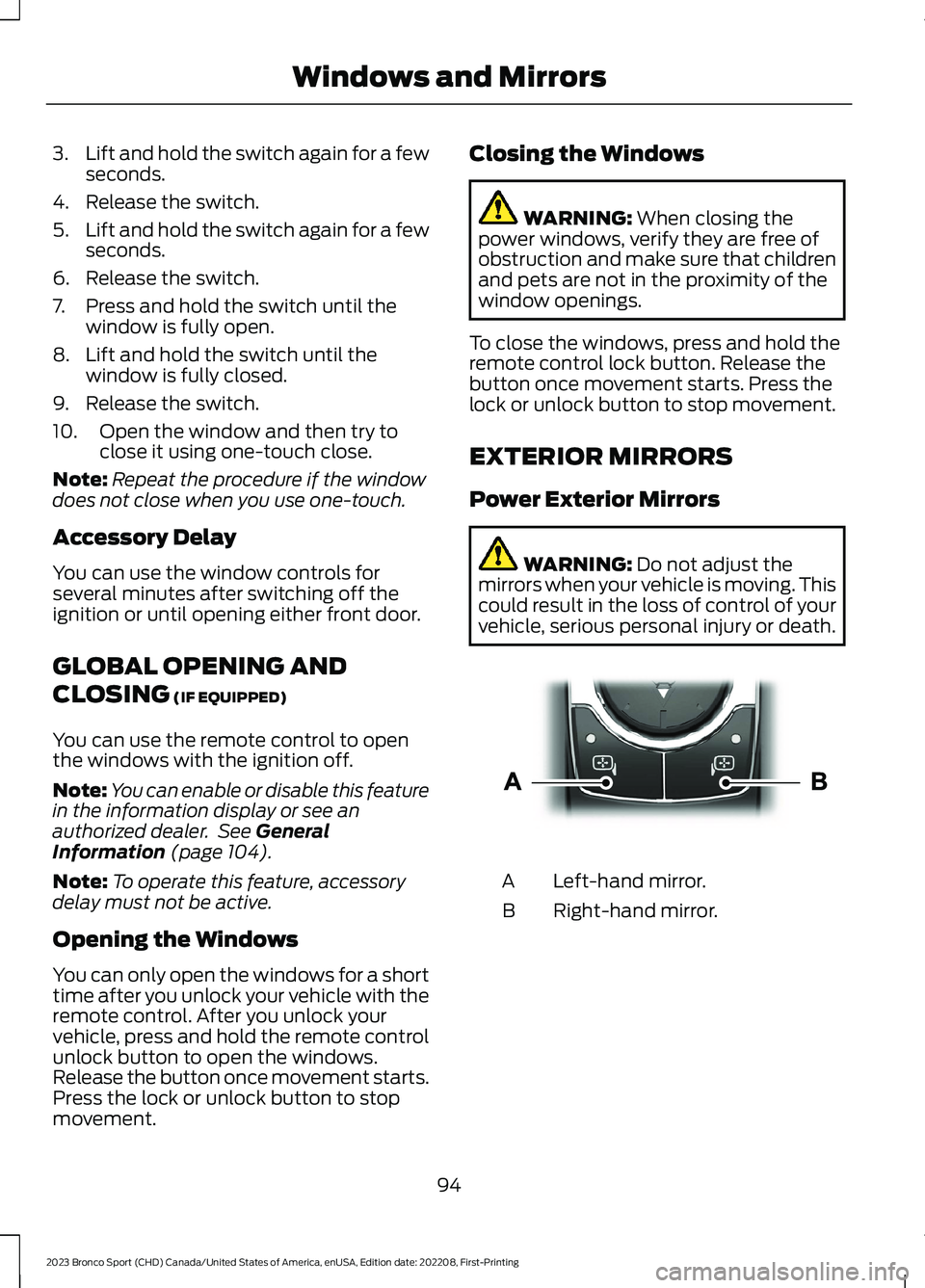
Power Exterior Mirrors
WARNING: Do not adjust themirrors when your vehicle is moving. Thiscould result in the loss of control of yourvehicle, serious personal injury or death.
Left-hand mirror.A
Right-hand mirror.B
94
2023 Bronco Sport (CHD) Canada/United States of America, enUSA, Edition date: 202208, First-PrintingWindows and MirrorsE303926
Page 101 of 516
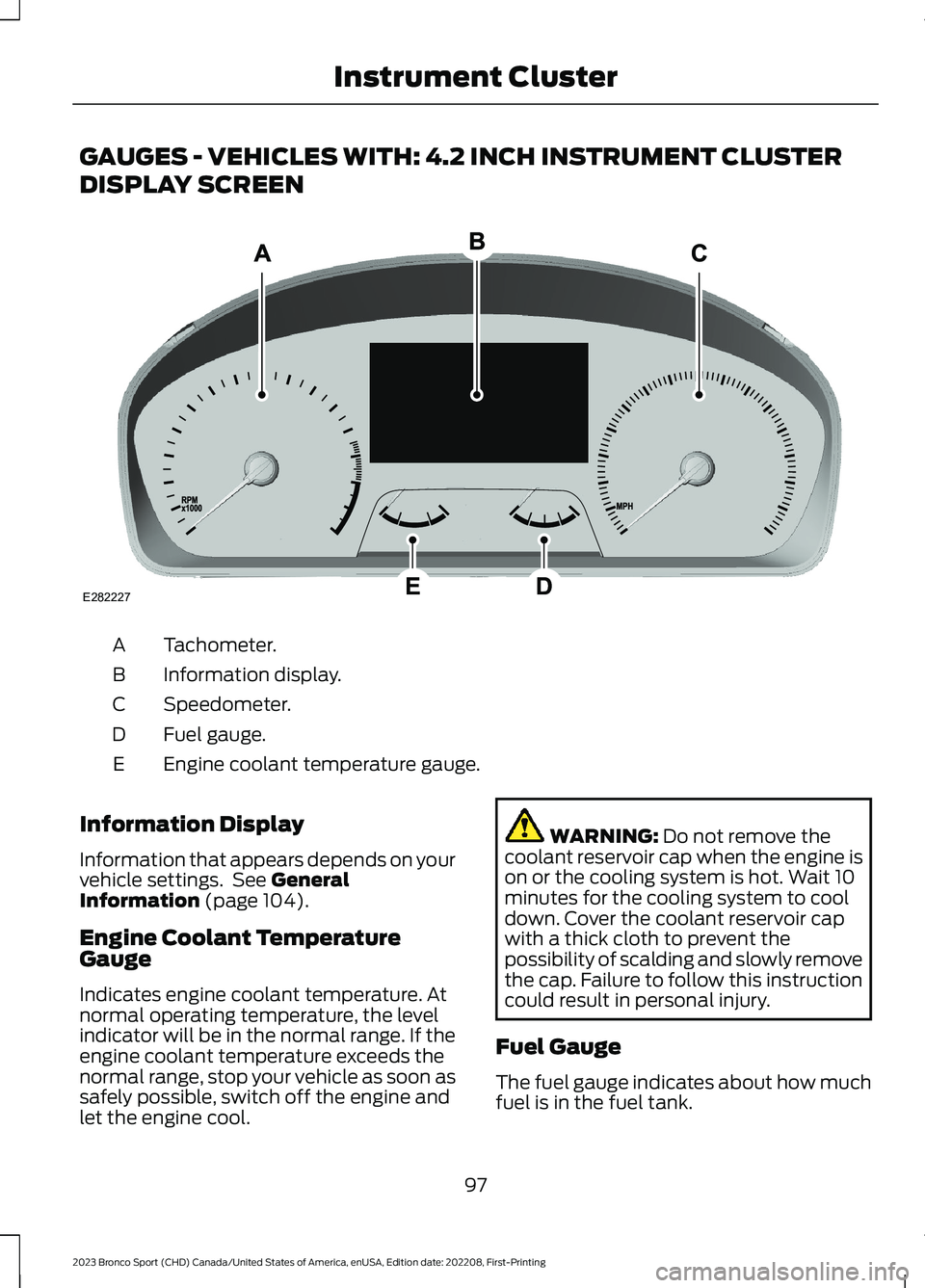
GAUGES - VEHICLES WITH: 4.2 INCH INSTRUMENT CLUSTER
DISPLAY SCREEN
Tachometer.A
Information display.B
Speedometer.C
Fuel gauge.D
Engine coolant temperature gauge.E
Information Display
Information that appears depends on yourvehicle settings. See GeneralInformation (page 104).
Engine Coolant TemperatureGauge
Indicates engine coolant temperature. Atnormal operating temperature, the levelindicator will be in the normal range. If theengine coolant temperature exceeds thenormal range, stop your vehicle as soon assafely possible, switch off the engine andlet the engine cool.
WARNING: Do not remove thecoolant reservoir cap when the engine ison or the cooling system is hot. Wait 10minutes for the cooling system to cooldown. Cover the coolant reservoir capwith a thick cloth to prevent thepossibility of scalding and slowly removethe cap. Failure to follow this instructioncould result in personal injury.
Fuel Gauge
The fuel gauge indicates about how muchfuel is in the fuel tank.
97
2023 Bronco Sport (CHD) Canada/United States of America, enUSA, Edition date: 202208, First-PrintingInstrument ClusterE282227
Page 102 of 516
The arrow adjacent to the fuel pumpsymbol indicates on which side of yourvehicle the fuel filler door is located.
Note:The fuel gauge can vary slightly whenyour vehicle is moving or on a slope.
Low Fuel Reminder
A low fuel level reminder displays andsounds when the distance to emptyreaches 75 mi (120 km) to empty forMyKey, and at 50 mi (80 km),25 mi(40 km),10 mi (20 km) and 0 mi (0 km)for all vehicle keys.
Note:The low fuel reminder can appear atdifferent fuel gauge positions depending onfuel economy conditions. This variation isnormal.
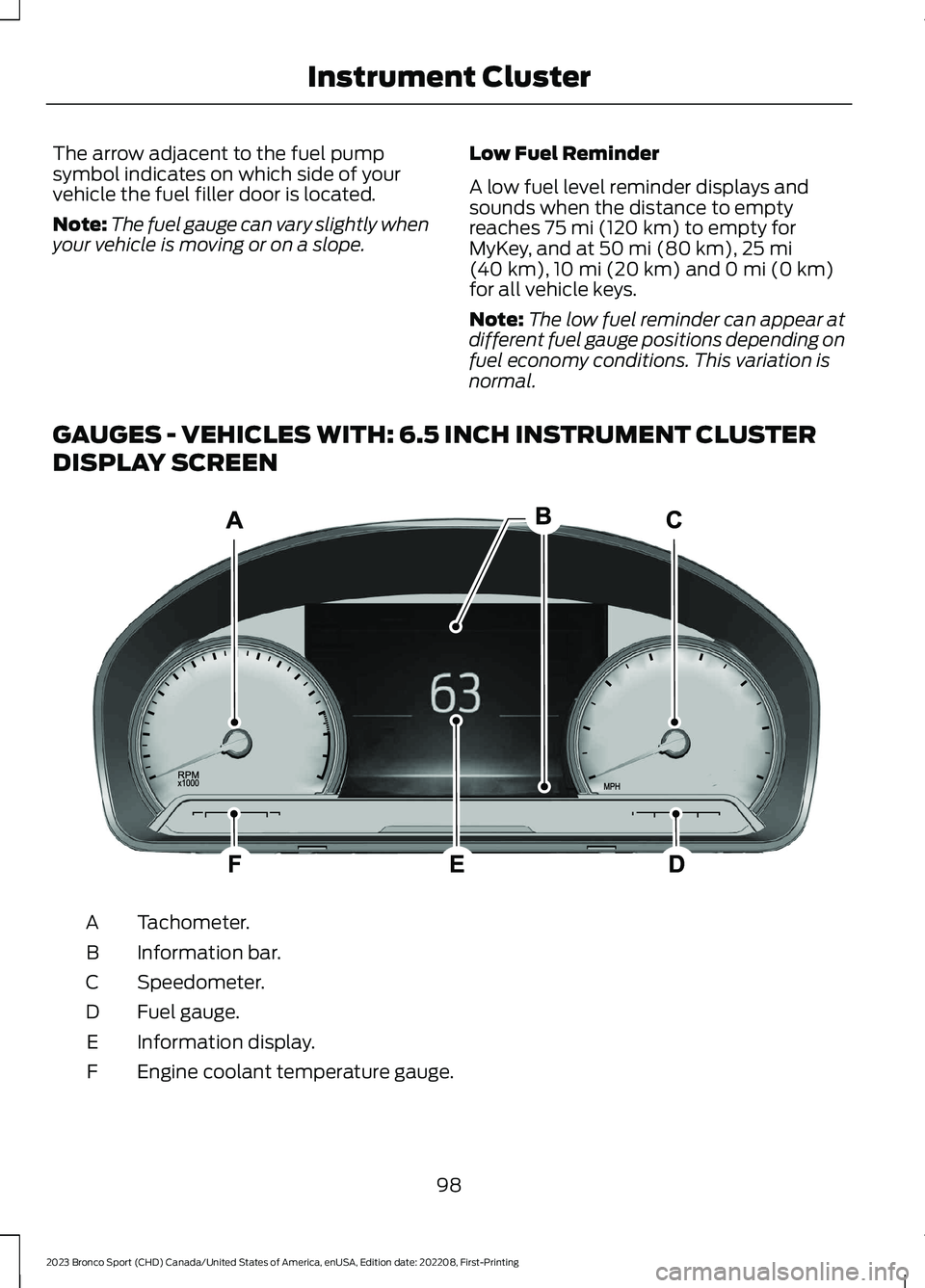
GAUGES - VEHICLES WITH: 6.5 INCH INSTRUMENT CLUSTER
DISPLAY SCREEN
Tachometer.A
Information bar.B
Speedometer.C
Fuel gauge.D
Information display.E
Engine coolant temperature gauge.F
98
2023 Bronco Sport (CHD) Canada/United States of America, enUSA, Edition date: 202208, First-PrintingInstrument ClusterE282067
Page 103 of 516
Information Bar
Displays information related to thenavigation, outside air temperature,odometer and distance to empty.
Information Display
Displays information related to thenavigation, outside air temperature,odometer and distance to empty.
Fuel Gauge
The fuel gauge indicates about how muchfuel is in the fuel tank.
The arrow adjacent to the fuel pumpsymbol indicates on which side of yourvehicle the fuel filler door is located.
Note:The fuel gauge may vary slightlywhen your vehicle is moving or on a slope.
Low Fuel Reminder
A low fuel level reminder displays andsounds when the distance to emptyreaches 75 mi (120 km) to empty forMyKey, and at 50 mi (80 km),25 mi(40 km),10 mi (20 km) and 0 mi (0 km)for all vehicle keys.
Note:The low fuel reminder can appear atdifferent fuel gauge positions depending onfuel economy conditions. This variation isnormal.
Distance to Empty
Indicates the approximate distance yourvehicle can travel on the fuel remaining inthe tank. Changes in driving pattern cancause the value to not only decrease butalso increase or stay constant for periodsof time.
Engine Coolant TemperatureGauge
WARNING: Do not remove thecoolant reservoir cap when the engine ison or the cooling system is hot. Wait 10minutes for the cooling system to cooldown. Cover the coolant reservoir capwith a thick cloth to prevent thepossibility of scalding and slowly removethe cap. Failure to follow this instructioncould result in personal injury.
Indicates engine coolant temperature. Atnormal operating temperature, the levelindicator will be in the normal range. If theengine coolant temperature exceeds thenormal range, stop your vehicle as soon assafely possible, switch off the engine andlet the engine cool.
WARNING LAMPS AND
INDICATORS
The following warning lamps andindicators alert you to a vehicle conditionthat may become serious. Some lampsilluminate when you start your vehicle tomake sure they work. If any lamps remainon after starting your vehicle, refer to therespective system warning lamp for furtherinformation.
Note:Some warning indicators appear inthe information display and function thesame as a warning lamp, but do not displaywhen you start your vehicle.
Note:Depending on your vehicle optionsand instrument cluster type, not allindicators display or are available.
99
2023 Bronco Sport (CHD) Canada/United States of America, enUSA, Edition date: 202208, First-PrintingInstrument Cluster
Page 108 of 516
GENERAL INFORMATION
WARNING: Driving while distractedcan result in loss of vehicle control, crashand injury. We strongly recommend thatyou use extreme caution when using anydevice that may take your focus off theroad. Your primary responsibility is thesafe operation of your vehicle. Werecommend against the use of anyhand-held device while driving andencourage the use of voice-operatedsystems when possible. Make sure youare aware of all applicable local lawsthat may affect the use of electronicdevices while driving.
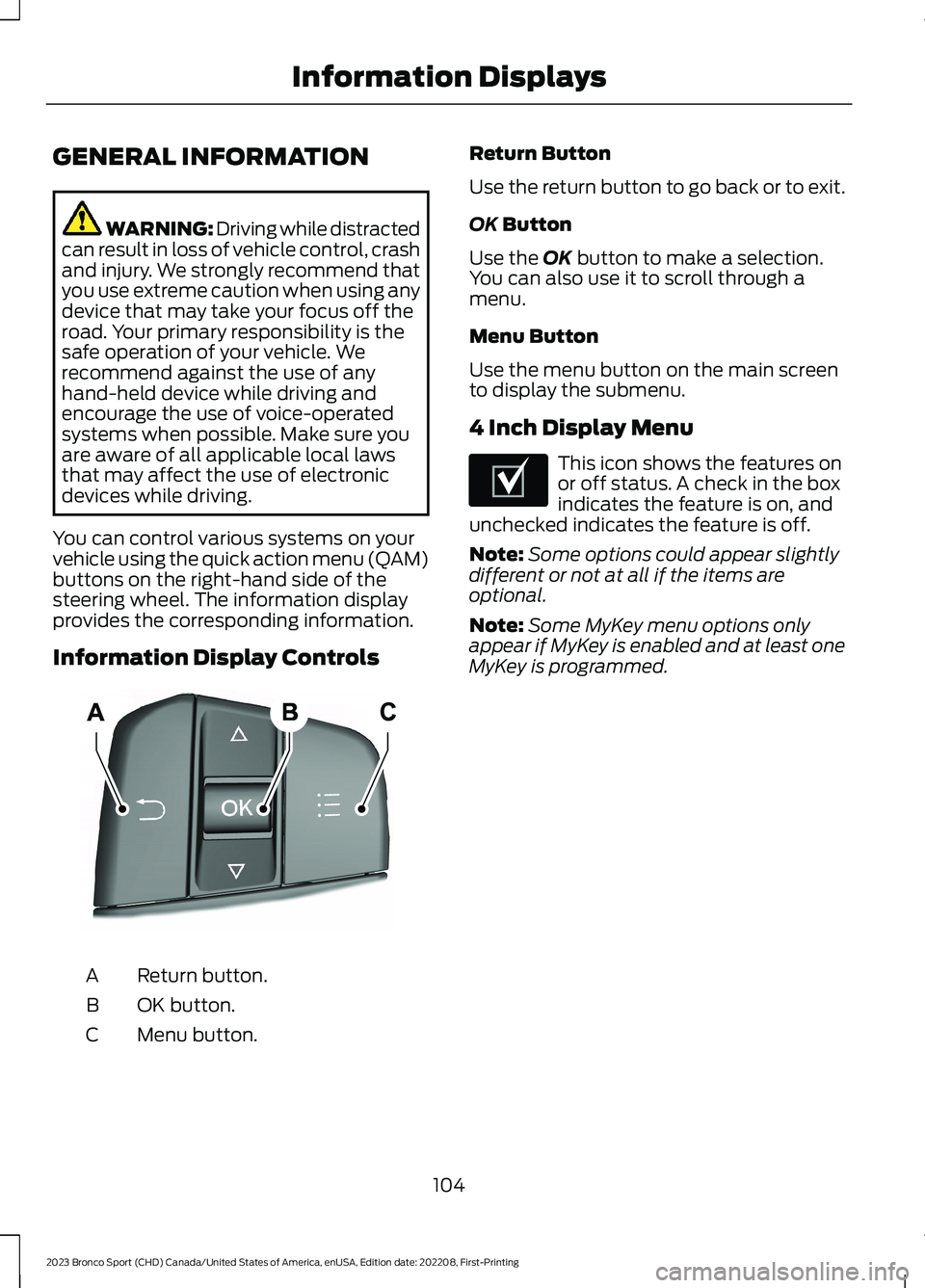
You can control various systems on yourvehicle using the quick action menu (QAM)buttons on the right-hand side of thesteering wheel. The information displayprovides the corresponding information.
Information Display Controls
Return button.A
OK button.B
Menu button.C
Return Button
Use the return button to go back or to exit.
OK Button
Use the OK button to make a selection.You can also use it to scroll through amenu.
Menu Button
Use the menu button on the main screento display the submenu.
4 Inch Display Menu
This icon shows the features onor off status. A check in the boxindicates the feature is on, andunchecked indicates the feature is off.
Note:Some options could appear slightlydifferent or not at all if the items areoptional.
Note:Some MyKey menu options onlyappear if MyKey is enabled and at least oneMyKey is programmed.
104
2023 Bronco Sport (CHD) Canada/United States of America, enUSA, Edition date: 202208, First-PrintingInformation DisplaysE250032 E204495
Page 109 of 516
Trip Menu
Trip Menu
Trip 1
Trip 2
Select Your SettingReset Individual Values
Select Your SettingConfigure View
•Trip Odometer - Registers the distance traveled of individual journeys or the totaldistance since the function was last reset.
•Trip Timer - Registers the elapsed time of individual journeys or the total time sincethe function was last reset.
•Average Fuel - Indicates the average fuel consumption of individual journeys or theaverage fuel consumption since the function was last reset.
•Average Speed - Indicates the average vehicle speed of individual journeys or theaverage vehicle speed since the function was last reset.
•Distance to Empty - Indicates the approximate distance your vehicle can travel onthe fuel remaining in the tank. Changes in driving pattern can cause the value to notonly decrease but also increase or stay constant for periods of time.
Note: Press and hold the OK button to reset your trip information.
MyView
MyView
Digital Speedometer
Fuel Economy
Trip/Audio
Calm Screen
Navigation
Navigation
Menu options covered in the SYNC chapter. See General Information (page 365).
105
2023 Bronco Sport (CHD) Canada/United States of America, enUSA, Edition date: 202208, First-PrintingInformation Displays