display FORD BRONCO SPORT 2023 Workshop Manual
[x] Cancel search | Manufacturer: FORD, Model Year: 2023, Model line: BRONCO SPORT, Model: FORD BRONCO SPORT 2023Pages: 516, PDF Size: 14.27 MB
Page 190 of 516
WARNING: If the parking brake isfully released, but the brake warninglamp remains illuminated, the brakesmay not be working properly. Have yourvehicle checked as soon as possible.
WARNING: Do not drive yourvehicle until you verify that thestoplamps are working.
Use the manual park release to move yourtransmission from the park (P) position inthe event of an electrical malfunction oremergency.
Activating the Manual Park ReleaseCable
1.Apply the parking brake. See ElectricParking Brake (page 194).
Note:If the vehicle battery has run out ofcharge, use an external power source toapply the parking brake.
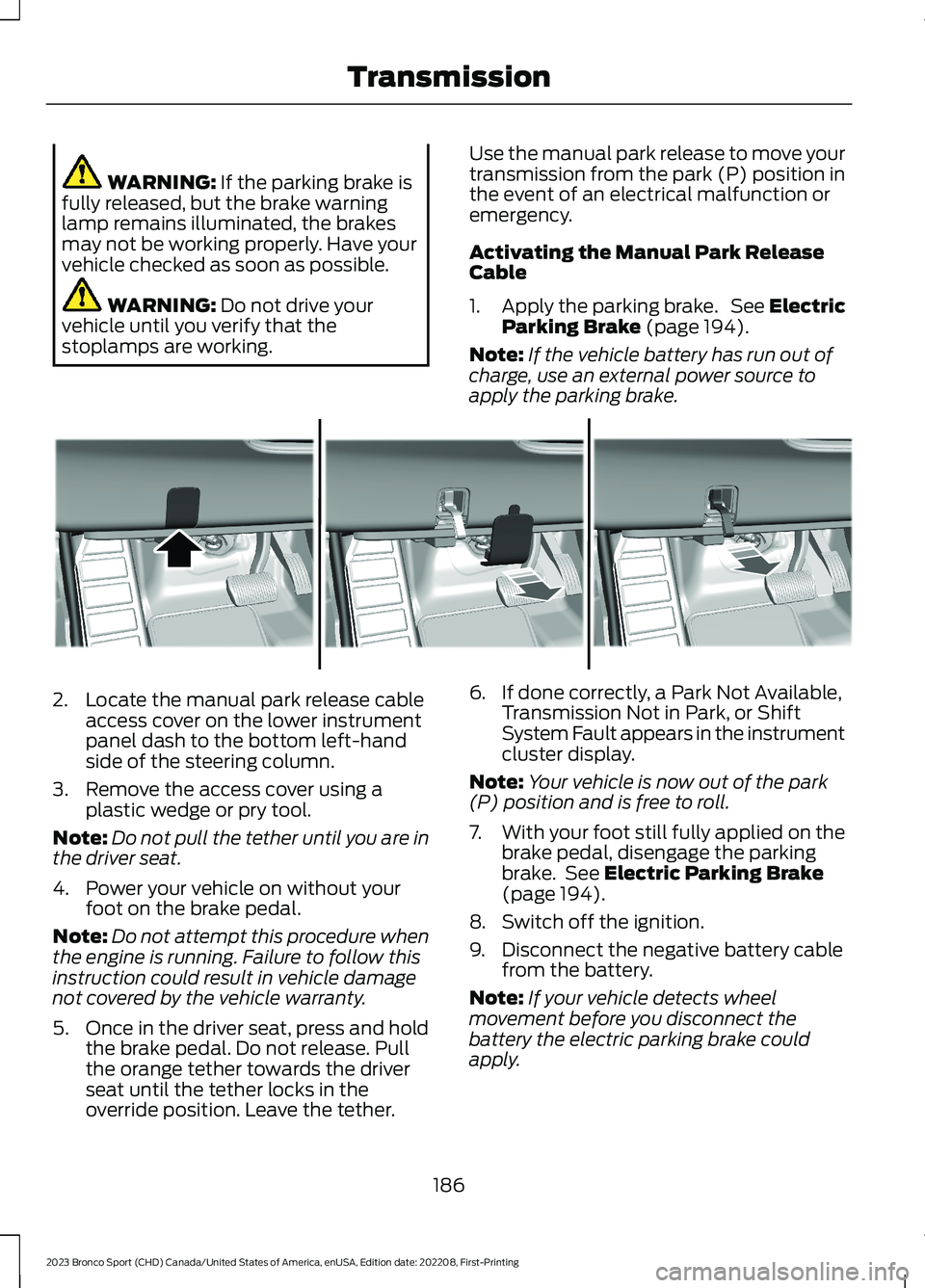
2.Locate the manual park release cableaccess cover on the lower instrumentpanel dash to the bottom left-handside of the steering column.
3.Remove the access cover using aplastic wedge or pry tool.
Note:Do not pull the tether until you are inthe driver seat.
4.Power your vehicle on without yourfoot on the brake pedal.
Note:Do not attempt this procedure whenthe engine is running. Failure to follow thisinstruction could result in vehicle damagenot covered by the vehicle warranty.
5.Once in the driver seat, press and holdthe brake pedal. Do not release. Pullthe orange tether towards the driverseat until the tether locks in theoverride position. Leave the tether.
6.If done correctly, a Park Not Available,Transmission Not in Park, or ShiftSystem Fault appears in the instrumentcluster display.
Note:Your vehicle is now out of the park(P) position and is free to roll.
7.With your foot still fully applied on thebrake pedal, disengage the parkingbrake. See Electric Parking Brake(page 194).
8.Switch off the ignition.
9.Disconnect the negative battery cablefrom the battery.
Note:If your vehicle detects wheelmovement before you disconnect thebattery the electric parking brake couldapply.
186
2023 Bronco Sport (CHD) Canada/United States of America, enUSA, Edition date: 202208, First-PrintingTransmissionE307867
Page 191 of 516
Returning Your Vehicle to NormalMode
1.Once it is safe to do so, reconnect thenegative (black) battery cable to thebattery.
2.Apply the parking brake. See ElectricParking Brake (page 194).
Note:If your vehicle detects wheelmovement, the electric parking brake couldapply.
Note:If the vehicle battery has run out ofcharge, use an external power source toapply the parking brake.
3.Sit in the driver seat.
4.Press and hold the brake pedal. Do notstart your vehicle.
5.Pull the orange tether towards you untilyou feel a hard stop. Release thetension and return the tether to thestowed position.
6.The cable releases and retracts backto its original rest position.
7.Stow the manual park release cabletether back inside the instrument paneldash hole and press the access coverback into position.
8.With your foot fully applied on thebrake pedal, start your vehicle. Confirmthat your vehicle is in the park (P)position and that the instrumentcluster display indicates park (P).
9.If the instrument cluster is notdisplaying the park (P) position or amessage displays on the instrumentcluster display, make sure you applythe parking brake before exiting yourvehicle. Have your vehicle checked assoon as possible.
Shifting Your Immobile VehicleOut of Park (P)
WARNING: When doing thisprocedure, you need to take thetransmission out of park (P) whichmeans your vehicle can roll freely. Toavoid unwanted vehicle movement,apply the parking brake prior to doingthis procedure. Use wheel chocks ifappropriate.
Use this procedure to shift your vehicle outof park (P) if you cannot start the engine.
Note:If the battery is out of charge, use anexternal power source.
Note:Do not tow your vehicle in this mode.See temporary neutral mode limitationswithin this chapter.
Shifting Your Vehicle Out of Park (P)
1.Apply the parking brake. See ElectricParking Brake (page 194).
Note:If the battery is out of charge, use anexternal power source to apply the parkingbrake.
2.Power your vehicle on without yourfoot on the brake pedal.
3.Press and hold the brake pedal.
4.Press and hold the accelerator pedal.
5.Shift into neutral (N).
6.Press the manual (M) or low (L)button.
7.Attempt to start your vehicle.
Note:A confirmation message appearswhen your vehicle enters the mode.
Note:Complete this procedure within 20seconds. If your vehicle shifts into park (P)attempt the procedure again.
8.Release the accelerator and brakepedals.
187
2023 Bronco Sport (CHD) Canada/United States of America, enUSA, Edition date: 202208, First-PrintingTransmission
Page 192 of 516
9.Release the parking brake.
Note:Your vehicle is free to roll.
10.Switch your vehicle off.
Note:Do not tow your vehicle in this mode.
Returning Your Vehicle to NormalMode
1.Press the brake pedal.
2.Shift into park (P).
Information Messages
DetailsMessage
The system detects a fault that requiresservice. Have your vehicle checked as soonas possible.
Transmission Malfunction Service Now
Displays when you shift into neutral (N).Select M To Confirm Stay In Neutral Mode
Displays when you shift into neutral (N).Select L to Confirm Stay in Neutral Mode
Displays to confirm that your vehicle hasentered Stay in Neutral mode.Stay in Neutral Mode Engaged
If Your Vehicle Gets Stuck in Mudor Snow
If your vehicle gets stuck in mud or snow,rock it out by shifting between forward andreverse gears, stopping between shifts ina steady pattern. Press lightly on theaccelerator in each gear.
Note:Do not rock the vehicle if the engineis not at normal operating temperature ordamage to the transmission could occur.
Note:Do not rock the vehicle for more thana minute or damage to the transmission andtires could occur, or the engine couldoverheat.
188
2023 Bronco Sport (CHD) Canada/United States of America, enUSA, Edition date: 202208, First-PrintingTransmission
Page 193 of 516
PRINCIPLE OF OPERATION
This system is a proactive system. It hasthe ability to anticipate wheel slip andtransfer torque to the rear wheels beforeslip occurs. Even when wheel slip is notpresent, the system is continuouslyadjusting to the torque distribution, in anattempt to improve straight line andcornering behavior, both on and off road.
The system automatically turns on everytime you switch the ignition on.
If any component requires maintenance,a message appears in the instrumentcluster display.
USING FOUR-WHEEL DRIVE
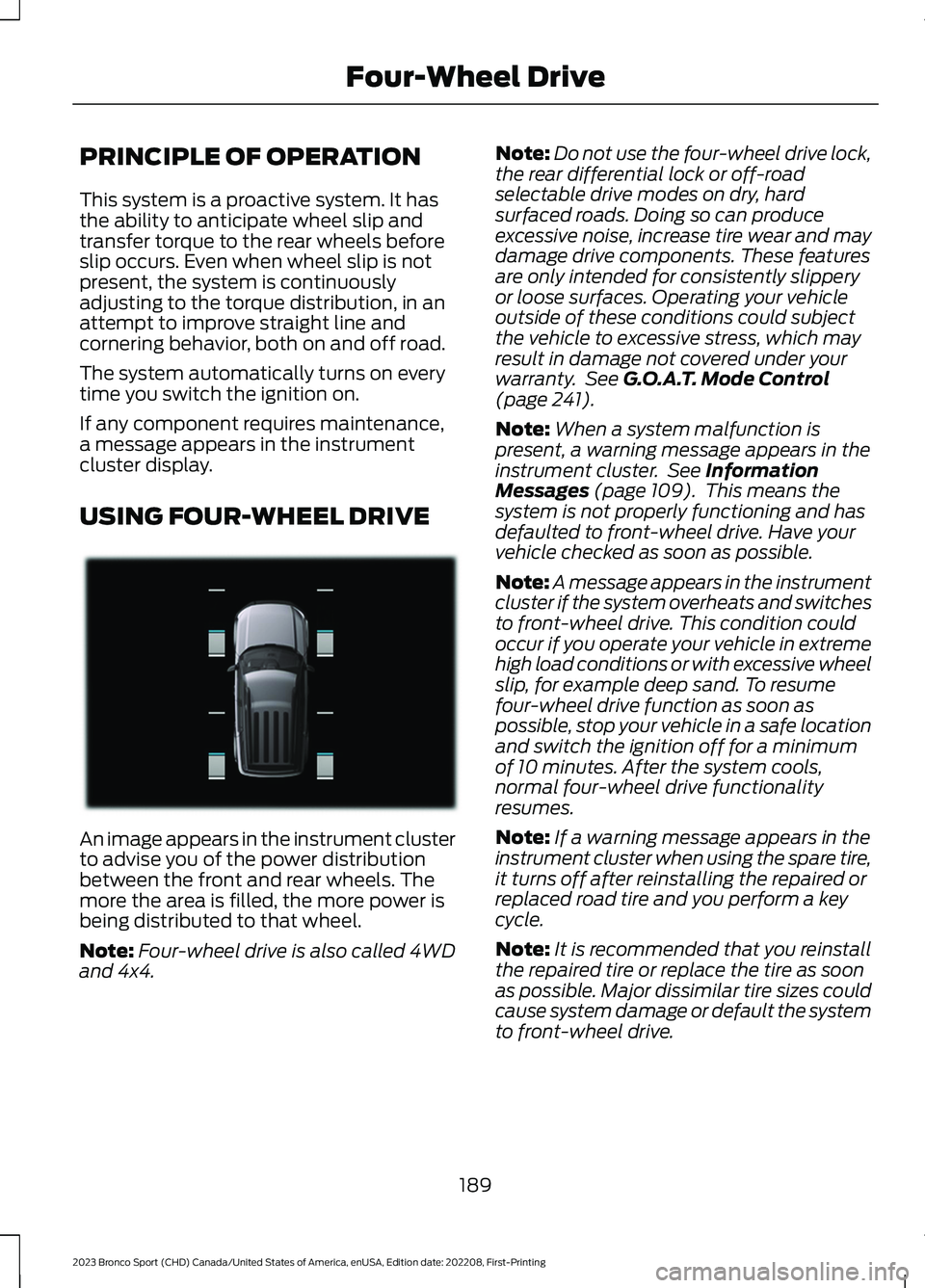
An image appears in the instrument clusterto advise you of the power distributionbetween the front and rear wheels. Themore the area is filled, the more power isbeing distributed to that wheel.
Note:Four-wheel drive is also called 4WDand 4x4.
Note:Do not use the four-wheel drive lock,the rear differential lock or off-roadselectable drive modes on dry, hardsurfaced roads. Doing so can produceexcessive noise, increase tire wear and maydamage drive components. These featuresare only intended for consistently slipperyor loose surfaces. Operating your vehicleoutside of these conditions could subjectthe vehicle to excessive stress, which mayresult in damage not covered under yourwarranty. See G.O.A.T. Mode Control(page 241).
Note:When a system malfunction ispresent, a warning message appears in theinstrument cluster. See InformationMessages (page 109). This means thesystem is not properly functioning and hasdefaulted to front-wheel drive. Have yourvehicle checked as soon as possible.
Note:A message appears in the instrumentcluster if the system overheats and switchesto front-wheel drive. This condition couldoccur if you operate your vehicle in extremehigh load conditions or with excessive wheelslip, for example deep sand. To resumefour-wheel drive function as soon aspossible, stop your vehicle in a safe locationand switch the ignition off for a minimumof 10 minutes. After the system cools,normal four-wheel drive functionalityresumes.
Note:If a warning message appears in theinstrument cluster when using the spare tire,it turns off after reinstalling the repaired orreplaced road tire and you perform a keycycle.
Note:It is recommended that you reinstallthe repaired tire or replace the tire as soonas possible. Major dissimilar tire sizes couldcause system damage or default the systemto front-wheel drive.
189
2023 Bronco Sport (CHD) Canada/United States of America, enUSA, Edition date: 202208, First-PrintingFour-Wheel DriveE331897
Page 195 of 516
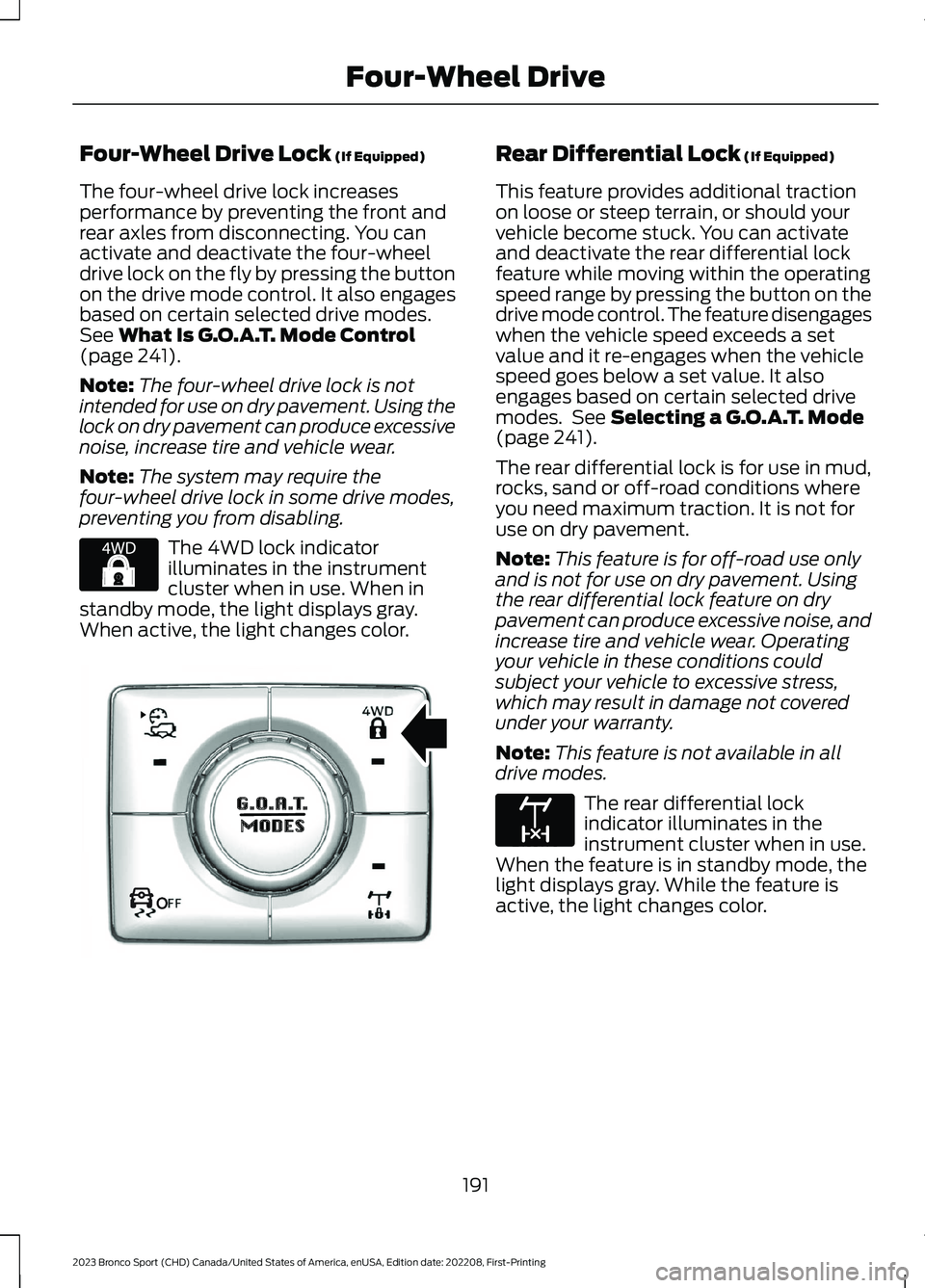
Four-Wheel Drive Lock (If Equipped)
The four-wheel drive lock increasesperformance by preventing the front andrear axles from disconnecting. You canactivate and deactivate the four-wheeldrive lock on the fly by pressing the buttonon the drive mode control. It also engagesbased on certain selected drive modes.See What Is G.O.A.T. Mode Control(page 241).
Note:The four-wheel drive lock is notintended for use on dry pavement. Using thelock on dry pavement can produce excessivenoise, increase tire and vehicle wear.
Note:The system may require thefour-wheel drive lock in some drive modes,preventing you from disabling.
The 4WD lock indicatorilluminates in the instrumentcluster when in use. When instandby mode, the light displays gray.When active, the light changes color.
Rear Differential Lock (If Equipped)
This feature provides additional tractionon loose or steep terrain, or should yourvehicle become stuck. You can activateand deactivate the rear differential lockfeature while moving within the operatingspeed range by pressing the button on thedrive mode control. The feature disengageswhen the vehicle speed exceeds a setvalue and it re-engages when the vehiclespeed goes below a set value. It alsoengages based on certain selected drivemodes. See Selecting a G.O.A.T. Mode(page 241).
The rear differential lock is for use in mud,rocks, sand or off-road conditions whereyou need maximum traction. It is not foruse on dry pavement.
Note:This feature is for off-road use onlyand is not for use on dry pavement. Usingthe rear differential lock feature on drypavement can produce excessive noise, andincrease tire and vehicle wear. Operatingyour vehicle in these conditions couldsubject your vehicle to excessive stress,which may result in damage not coveredunder your warranty.
Note:This feature is not available in alldrive modes.
The rear differential lockindicator illuminates in theinstrument cluster when in use.When the feature is in standby mode, thelight displays gray. While the feature isactive, the light changes color.
191
2023 Bronco Sport (CHD) Canada/United States of America, enUSA, Edition date: 202208, First-PrintingFour-Wheel DriveE327288 OOE351064 E163170
Page 201 of 516
Note:The system remembers the lastsetting when you start your vehicle.
Make sure you switch the system off beforetowing with your vehicle or before using anautomatic car wash.
Using Auto Hold
1.Use the brakes to bring your vehicle toa complete stop. The auto hold activeindicator illuminates in the informationdisplay.
2.Release the brake pedal. The systemholds your vehicle at a standstill. Theauto hold active indicator remainsilluminated in the information display.
Note:The system only activates if youapply enough brake pressure. If your vehicleis on a steep slope, you need to press thebrake pedal harder before the systemactivates.
Note:Under certain conditions, the systemcould apply the electric parking brake. Thebrake system warning lamp illuminates. Theelectric parking brake releases when youpress the accelerator pedal. See ElectricParking Brake (page 194).
Note:If auto-start-stop turns off theengine, auto hold remains active.
Note:The system deactivates if you shiftinto reverse (R) and press the brake pedal.
3.Pull away in the normal manner. Thesystem releases the brakes and theauto hold active indicator turns off.
Auto Hold Indicator
The auto hold indicatorilluminates in the informationdisplay when the system is onand is either active orunavailable.
Illuminates when the system is active. Yourvehicle remains stationary after yourelease the brake pedal.
Illuminates when the system is on butunavailable to hold your vehicle at astandstill.
The system could be unavailable when anyof the following occur:
•During an active park assist maneuver.
•Your vehicle is in stay in neutral mode.
•The driver door is open.
•You do not fasten your seatbelt.
•You shift into reverse (R) before thesystem is active.
197
2023 Bronco Sport (CHD) Canada/United States of America, enUSA, Edition date: 202208, First-PrintingBrakes
Page 202 of 516
PRINCIPLE OF OPERATION
The traction control system helps avoiddrive wheel spin and loss of traction.
If your vehicle begins to slide, the systemapplies the brakes to individual wheelsand, when needed, reduces engine powerat the same time. If the wheels spin whenaccelerating on slippery or loose surfaces,the system reduces engine power in orderto increase traction.
USING TRACTION CONTROL
WARNING: Operating your vehiclewith the traction control disabled couldlead to an increased risk of loss of vehiclecontrol, vehicle rollover, personal injuryand death.
The system automatically turns on eachtime you switch the ignition on.
If your vehicle is stuck in mud or snow,switching traction control off may bebeneficial as this allows the wheels to spin.
Note:When you switch traction control off,stability control remains fully active.
Switching the System Off
When you switch the system off or on, amessage appears in the informationdisplay showing system status.
You can switch the system off by eitherusing the information display controls orthe switch.
Using the Information DisplayControls
You can switch this feature off or on in theinformation display. See GeneralInformation (page 104).
Using a Switch (If Equipped)
Using the traction control switch on thecenter console to turn this feature off oron.
System Indicator Lights andMessages
The stability and traction controllight:
•Temporarily illuminates on enginestart-up.
•Flashes when a driving conditionactivates either of the systems.
•Illuminates if a problem occurs in eitherof the systems.
The stability and traction controloff light temporarily illuminateson engine start-up and stays onwhen you switch the traction controlsystem off.
198
2023 Bronco Sport (CHD) Canada/United States of America, enUSA, Edition date: 202208, First-PrintingTraction ControlE138639 E130458
Page 206 of 516
CANCELING THE SET SPEED
Press the button.
TRAIL CONTROL INDICATORS
TRAIL CONTROL – TROUBLESHOOTING
TRAIL CONTROL – INFORMATION MESSAGES
ActionMessage
You need to reduce your vehicle speed to use trailcontrol.Reduce Speed To Enter TrailControl
You need to release the park brake to use trail control.Trail Control Not Available withPark Brake Applied
You need to switch off the trailer backup assist to usetrail control.Trail Control Not AvailableWhile Pro Trailer BackupAssist™ Active
You successfully enabled trail control and can set aspeed with the Set + or SET- control.Trail Control Enabled Use SETButton to Set Speed
The system turns trail control off due to a system fault.You must resume control.Trail Control Off Driver ResumeControl
Displays when the system has turned off.Trail Control Off
Displays when a system fault is present. See the trailcontrol section in your owner's manual.Trail Control Fault See Manual
You need to select drive (D), neutral (N), or reverse(R) to use trail control.Trail Control To Activate SelectGear
You need to switch cruise control off to use trailcontrol.Trail Control Not Available withCruise Control Active
You need to close the driver door to use trail control.Trail Control Not Available withDriver Door Open
Due to some action from you, the system turned thetrail control propulsion system off. The vehicle will stillbrake if descending a hill. You need to press trailcontrol to switch it back on.
Descent Control Now ActivePress Trail Control Switch ToExit
202
2023 Bronco Sport (CHD) Canada/United States of America, enUSA, Edition date: 202208, First-PrintingTrail Control (If Equipped)E350925 E318506
Page 207 of 516
PRINCIPLE OF OPERATION
WARNING: To help avoid personalinjury, always use caution when inreverse (R) and when using the sensingsystem.
WARNING: The system may notdetect objects with surfaces that absorbreflection. Always drive with due careand attention. Failure to take care mayresult in a crash.
WARNING: Traffic control systems,fluorescent lamps, inclement weather,air brakes, external motors and fans mayaffect the correct operation of thesensing system. This may cause reducedperformance or false alerts.
WARNING: The system may notdetect small or moving objects,particularly those close to the ground.
WARNING: If damage occurs in theimmediate area surrounding the sensor,have your vehicle checked as soon aspossible.
WARNING: The parking aid systemcan only assist you to detect objectswhen your vehicle is moving at parkingspeeds. To help avoid personal injury youmust take care when using the parkingaid system.
WARNING: In cold and severeweather conditions the system may notfunction. Rain, snow and spray can alllimit sensor performance.
WARNING: The system may notfunction if the sensor is blocked.
Note:If your vehicle has MyKey™, thesensing system cannot be switched offwhen a MyKey™ is present. See Principleof Operation (page 203).
Note:Do not clean the sensors with sharpobjects.
Note:If your vehicle sustains damage tothe bumper or fascia and you leave itmisaligned or bent, the sensing zone couldbe altered causing inaccurate measurementof obstacles or false alerts.
Note:Add-on devices such as large trailerhitches, bike or surfboard racks, license platebrackets, or bumper covers installed aroundthe bumper or facia can block the normaldetection zone of the system causing falsealerts. Remove the add-on devices toprevent false alerts.
Note:When you connect a trailer to yourvehicle, the rear parking aid could detect thetrailer and therefore provide an alert. Disablethe rear parking aid when you connect atrailer to prevent the alert.
The sensing system warns you of obstacleswithin a certain range of your vehicle. Thesystem turns on when you switch theignition on.
You can switch the system offby shifting into reverse (R) andpressing the button on the rearview camera display screen.
If a fault is present in the system, a warningmessage appears in the informationdisplay. See Information Messages(page 109).
203
2023 Bronco Sport (CHD) Canada/United States of America, enUSA, Edition date: 202208, First-PrintingParking Aids (If Equipped)E139213
Page 208 of 516
REAR PARKING AID
WARNING: The system may notdetect objects with surfaces that absorbreflection. Always drive with due careand attention. Failure to take care mayresult in a crash.
WARNING: The system may notdetect small or moving objects,particularly those close to the ground.
WARNING: To help avoid personalinjury, always use caution when inreverse (R) and when using the sensingsystem.
WARNING: The parking aid systemcan only assist you to detect objectswhen your vehicle is moving at parkingspeeds. To help avoid personal injury youmust take care when using the parkingaid system.
The sensors are on the rear bumper.
The sensors are active when thetransmission is in reverse (R) and thevehicle speed is less than 5 mph (8 km/h).When the parking aid system sounds atone, the audio system could reduce theset volume.
Note:Keep the sensors free from snow, iceand large accumulations of dirt.
Note:Do not cover up the sensors.
Note:Do not clean the sensors with sharpobjects.
Note:If your vehicle sustains damageleaving the sensors misaligned, this couldcause inaccurate measurements or falsealerts.
Note:Some accessories, for example, largetrailer hitches or bike or surfboard racks cancause reduced performance or false alerts.
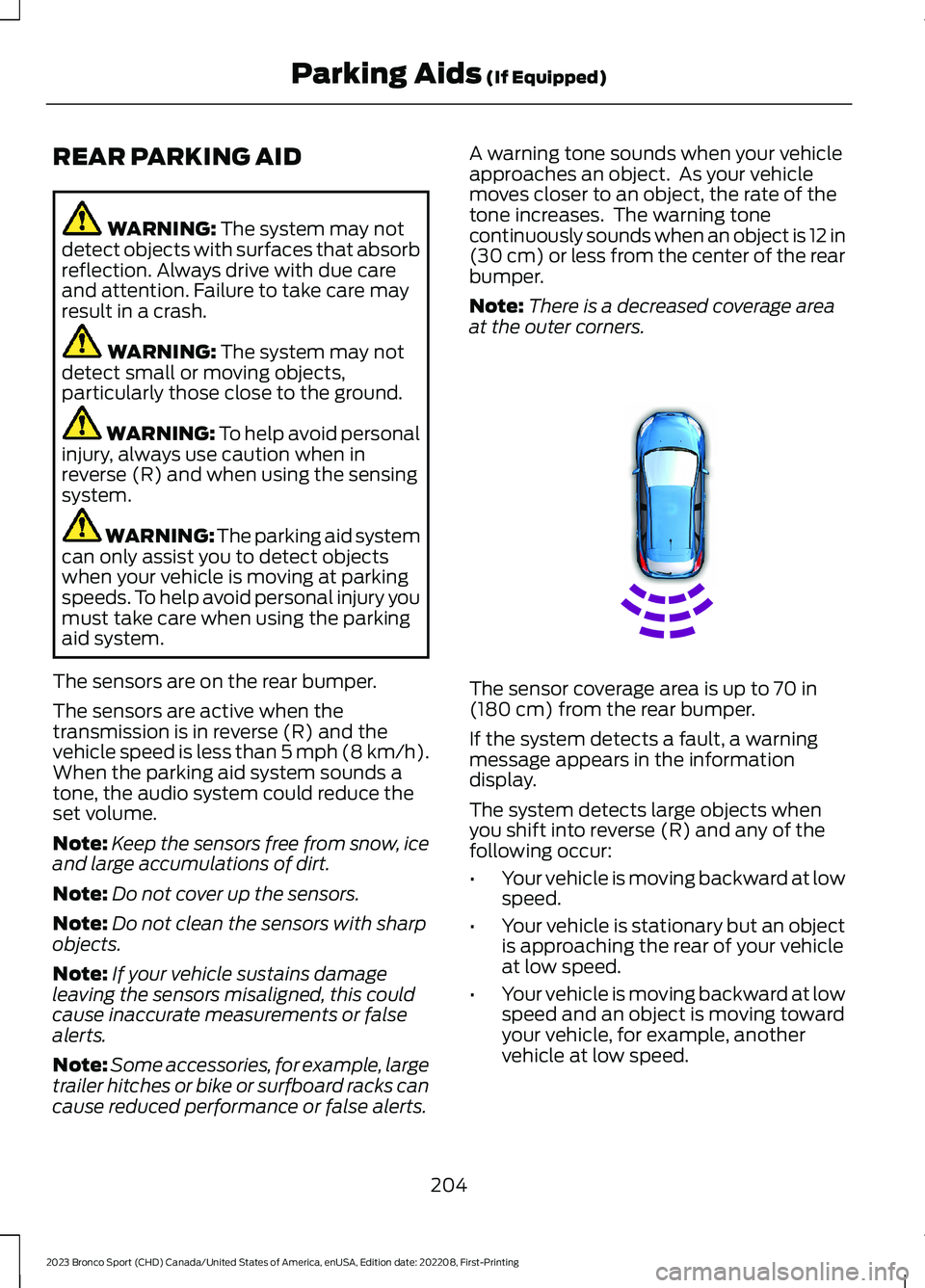
A warning tone sounds when your vehicleapproaches an object. As your vehiclemoves closer to an object, the rate of thetone increases. The warning tonecontinuously sounds when an object is 12 in(30 cm) or less from the center of the rearbumper.
Note:There is a decreased coverage areaat the outer corners.
The sensor coverage area is up to 70 in(180 cm) from the rear bumper.
If the system detects a fault, a warningmessage appears in the informationdisplay.
The system detects large objects whenyou shift into reverse (R) and any of thefollowing occur:
•Your vehicle is moving backward at lowspeed.
•Your vehicle is stationary but an objectis approaching the rear of your vehicleat low speed.
•Your vehicle is moving backward at lowspeed and an object is moving towardyour vehicle, for example, anothervehicle at low speed.
204
2023 Bronco Sport (CHD) Canada/United States of America, enUSA, Edition date: 202208, First-PrintingParking Aids (If Equipped)E130178