mirror FORD BRONCO SPORT 2023 User Guide
[x] Cancel search | Manufacturer: FORD, Model Year: 2023, Model line: BRONCO SPORT, Model: FORD BRONCO SPORT 2023Pages: 516, PDF Size: 14.27 MB
Page 209 of 516
If your vehicle remains stationary for twoseconds the audible warning turns off. Ifyour vehicle moves backward the tonesounds again.
Note:If the detected object is 12 in (30 cm)or less from the rear bumper, the audiblewarning does not turn off.
Object Distance Indicator (If Equipped)
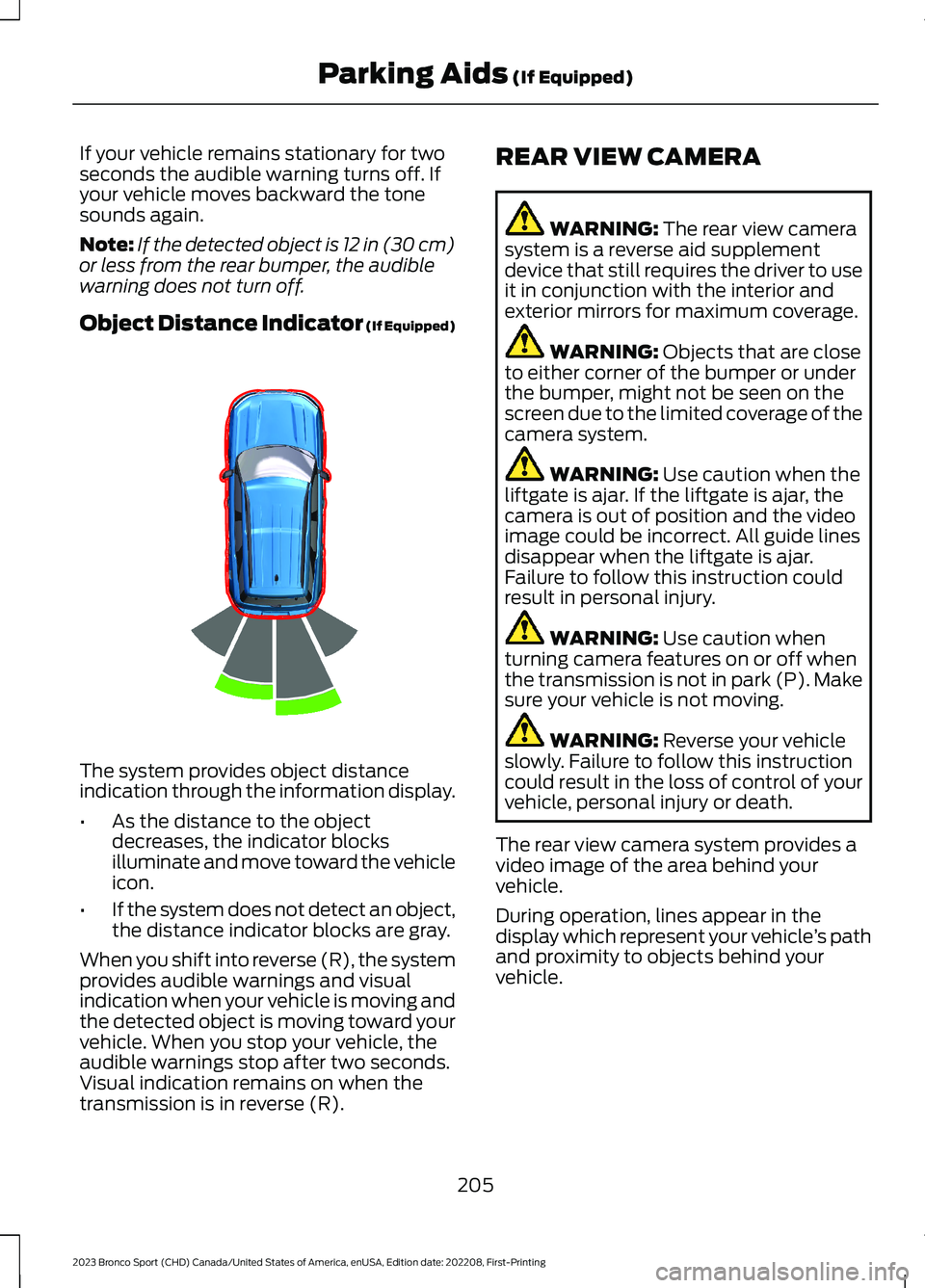
The system provides object distanceindication through the information display.
•As the distance to the objectdecreases, the indicator blocksilluminate and move toward the vehicleicon.
•If the system does not detect an object,the distance indicator blocks are gray.
When you shift into reverse (R), the systemprovides audible warnings and visualindication when your vehicle is moving andthe detected object is moving toward yourvehicle. When you stop your vehicle, theaudible warnings stop after two seconds.Visual indication remains on when thetransmission is in reverse (R).
REAR VIEW CAMERA
WARNING: The rear view camerasystem is a reverse aid supplementdevice that still requires the driver to useit in conjunction with the interior andexterior mirrors for maximum coverage.
WARNING: Objects that are closeto either corner of the bumper or underthe bumper, might not be seen on thescreen due to the limited coverage of thecamera system.
WARNING: Use caution when theliftgate is ajar. If the liftgate is ajar, thecamera is out of position and the videoimage could be incorrect. All guide linesdisappear when the liftgate is ajar.Failure to follow this instruction couldresult in personal injury.
WARNING: Use caution whenturning camera features on or off whenthe transmission is not in park (P). Makesure your vehicle is not moving.
WARNING: Reverse your vehicleslowly. Failure to follow this instructioncould result in the loss of control of yourvehicle, personal injury or death.
The rear view camera system provides avideo image of the area behind yourvehicle.
During operation, lines appear in thedisplay which represent your vehicle’s pathand proximity to objects behind yourvehicle.
205
2023 Bronco Sport (CHD) Canada/United States of America, enUSA, Edition date: 202208, First-PrintingParking Aids (If Equipped)E322352
Page 211 of 516
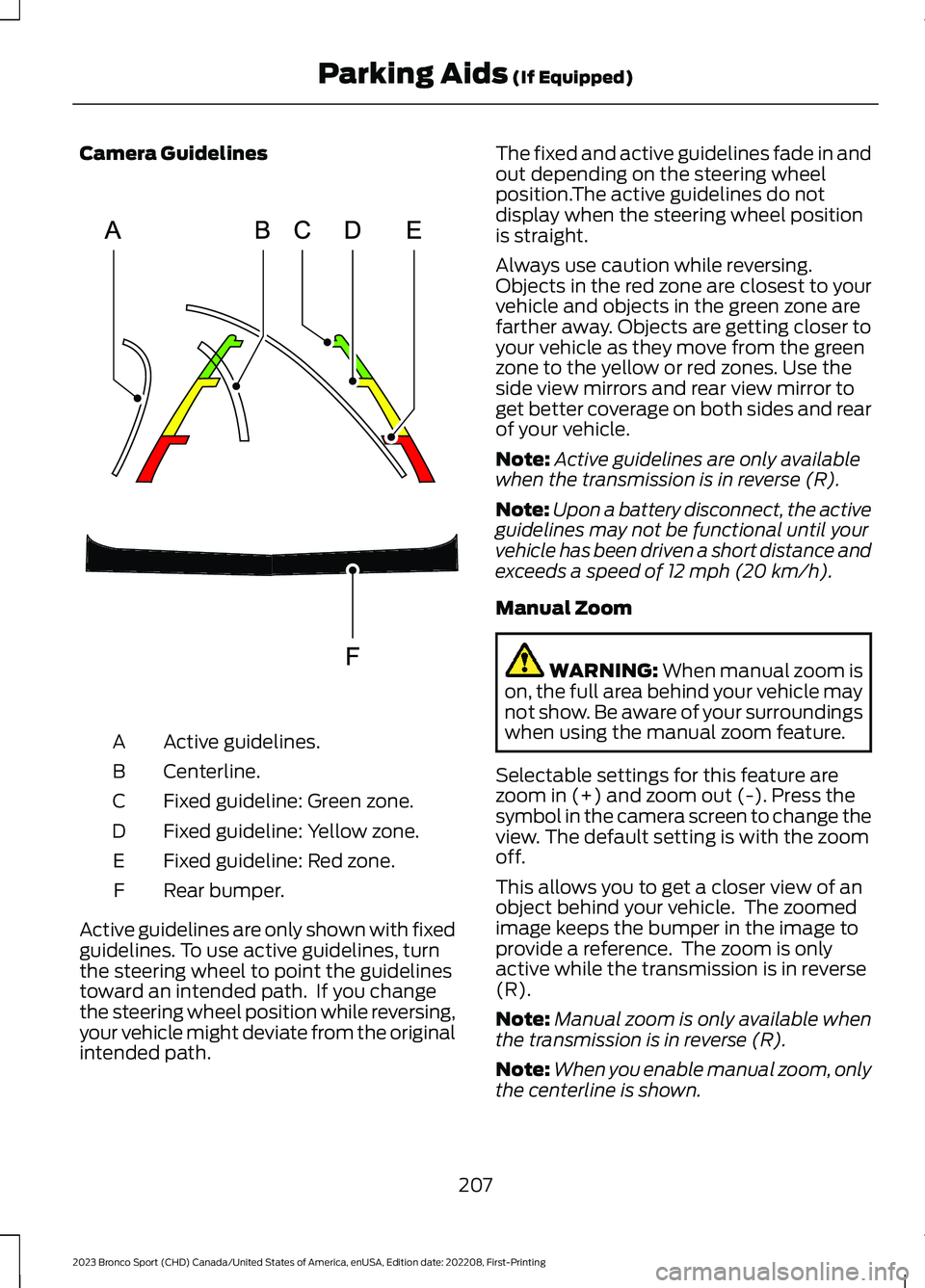
Camera Guidelines
Active guidelines.A
Centerline.B
Fixed guideline: Green zone.C
Fixed guideline: Yellow zone.D
Fixed guideline: Red zone.E
Rear bumper.F
Active guidelines are only shown with fixedguidelines. To use active guidelines, turnthe steering wheel to point the guidelinestoward an intended path. If you changethe steering wheel position while reversing,your vehicle might deviate from the originalintended path.
The fixed and active guidelines fade in andout depending on the steering wheelposition.The active guidelines do notdisplay when the steering wheel positionis straight.
Always use caution while reversing.Objects in the red zone are closest to yourvehicle and objects in the green zone arefarther away. Objects are getting closer toyour vehicle as they move from the greenzone to the yellow or red zones. Use theside view mirrors and rear view mirror toget better coverage on both sides and rearof your vehicle.
Note:Active guidelines are only availablewhen the transmission is in reverse (R).
Note:Upon a battery disconnect, the activeguidelines may not be functional until yourvehicle has been driven a short distance andexceeds a speed of 12 mph (20 km/h).
Manual Zoom
WARNING: When manual zoom ison, the full area behind your vehicle maynot show. Be aware of your surroundingswhen using the manual zoom feature.
Selectable settings for this feature arezoom in (+) and zoom out (-). Press thesymbol in the camera screen to change theview. The default setting is with the zoomoff.
This allows you to get a closer view of anobject behind your vehicle. The zoomedimage keeps the bumper in the image toprovide a reference. The zoom is onlyactive while the transmission is in reverse(R).
Note:Manual zoom is only available whenthe transmission is in reverse (R).
Note:When you enable manual zoom, onlythe centerline is shown.
207
2023 Bronco Sport (CHD) Canada/United States of America, enUSA, Edition date: 202208, First-PrintingParking Aids (If Equipped)E306774
Page 218 of 516
WARNING: The system only warnsof vehicles detected by the radar andcamera sensors. In some cases theremay be no warning or a delayed warning.Apply the brakes when necessary. Failureto follow this instruction could result inpersonal injury or death.
WARNING: The system may notdetect stationary or slow movingvehicles below 6 mph (10 km/h).
WARNING: The system does notdetect pedestrians or objects in the road.
WARNING: The system does notdetect oncoming vehicles in the samelane.
WARNING: The system may notoperate properly if the sensor is blocked.Keep the windshield free fromobstruction.
WARNING: The sensor mayincorrectly track lane markings as otherstructures or objects. This can result ina false or missed warning.
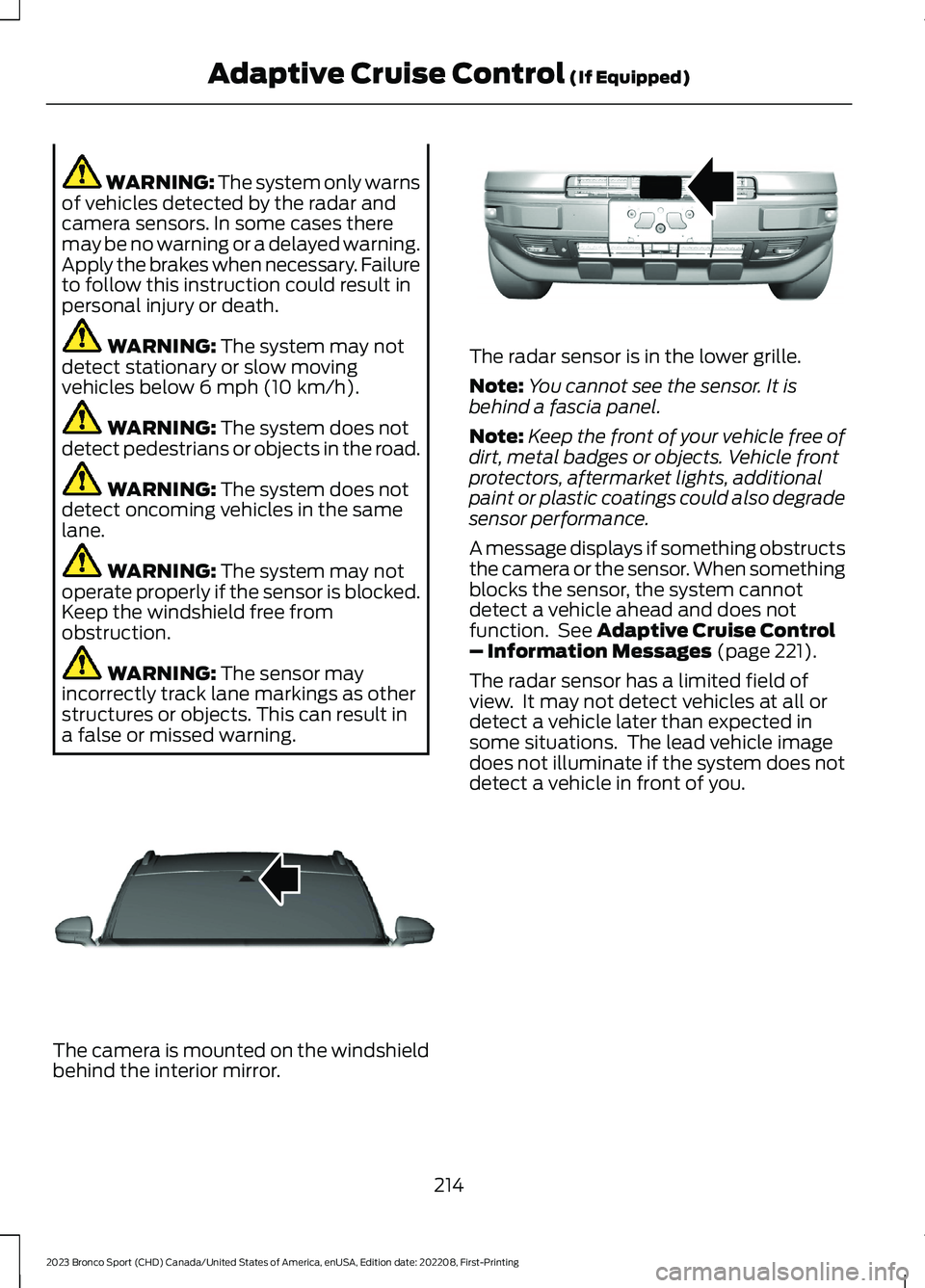
The camera is mounted on the windshieldbehind the interior mirror.
The radar sensor is in the lower grille.
Note:You cannot see the sensor. It isbehind a fascia panel.
Note:Keep the front of your vehicle free ofdirt, metal badges or objects. Vehicle frontprotectors, aftermarket lights, additionalpaint or plastic coatings could also degradesensor performance.
A message displays if something obstructsthe camera or the sensor. When somethingblocks the sensor, the system cannotdetect a vehicle ahead and does notfunction. See Adaptive Cruise Control– Information Messages (page 221).
The radar sensor has a limited field ofview. It may not detect vehicles at all ordetect a vehicle later than expected insome situations. The lead vehicle imagedoes not illuminate if the system does notdetect a vehicle in front of you.
214
2023 Bronco Sport (CHD) Canada/United States of America, enUSA, Edition date: 202208, First-PrintingAdaptive Cruise Control (If Equipped)E307893 E321483
Page 233 of 516
Why is the feature not available, line markings are gray, when I can see the lane markingson the road?
Lane width is too narrow or too wide.
The camera has not been calibrated after a windshield replacement.
Driving on tight roads or on uneven roads.
Why does the vehicle not come back toward the middle of the lane, as expected, in theaid or aid + alert mode?
High cross winds are present.
There is a large road crown.
Rough roads, grooves or shoulder drop-offs.
Heavy uneven loading of the vehicle or improper tire inflation pressure.
The tires have been changed, or the suspension has been modified.
BLIND SPOT INFORMATION
SYSTEM
WARNING: Do not use the blindspot information system as areplacement for using the interior andexterior mirrors or looking over yourshoulder before changing lanes. Theblind spot information system is not areplacement for careful driving.
WARNING: The system may notoperate properly during severe weatherconditions, for example snow, ice, heavyrain and spray. Always drive with duecare and attention. Failure to take caremay result in a crash.
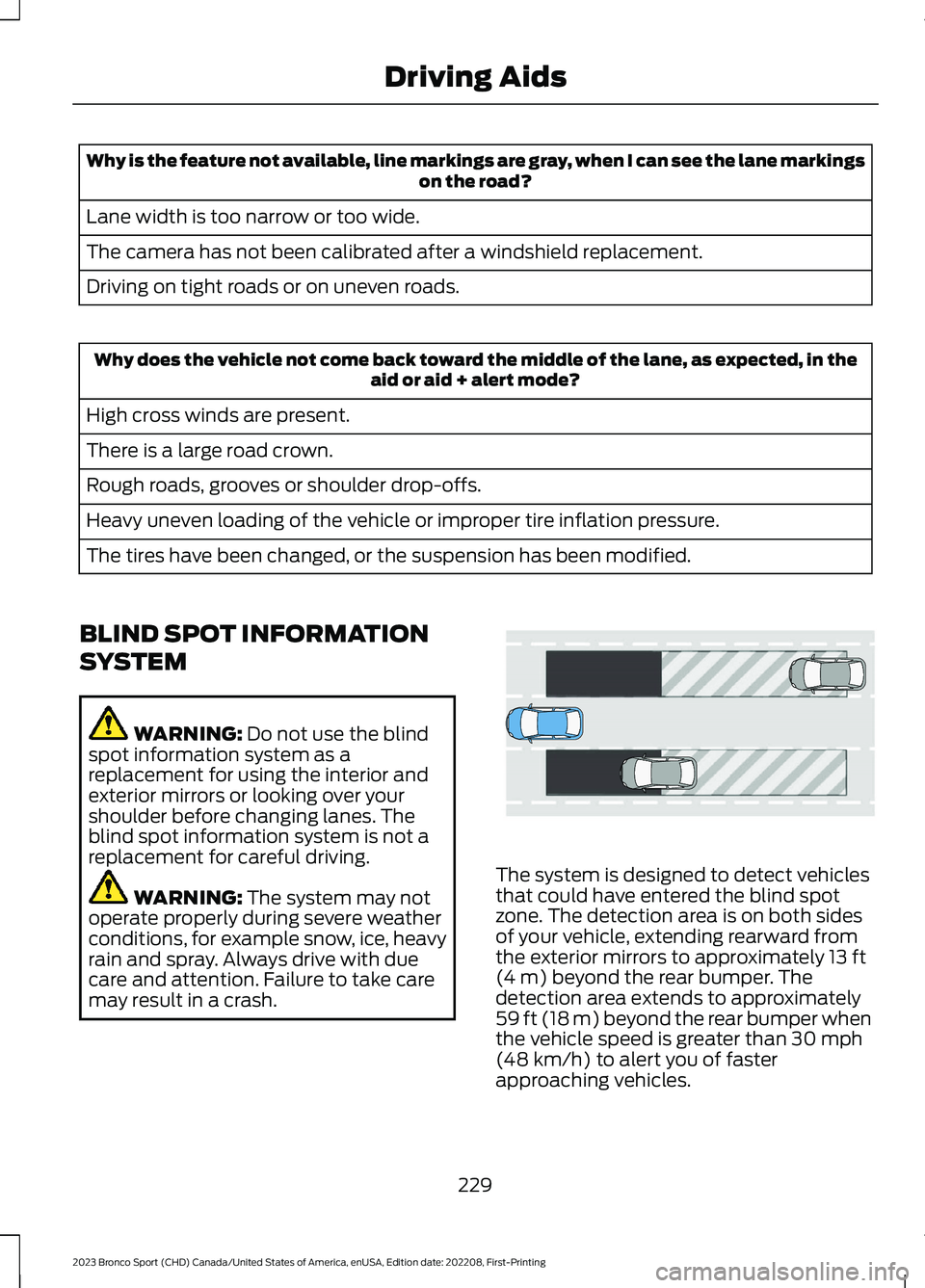
The system is designed to detect vehiclesthat could have entered the blind spotzone. The detection area is on both sidesof your vehicle, extending rearward fromthe exterior mirrors to approximately 13 ft(4 m) beyond the rear bumper. Thedetection area extends to approximately59 ft (18 m) beyond the rear bumper whenthe vehicle speed is greater than 30 mph(48 km/h) to alert you of fasterapproaching vehicles.
229
2023 Bronco Sport (CHD) Canada/United States of America, enUSA, Edition date: 202208, First-PrintingDriving AidsE255695
Page 234 of 516
Note:The system does not prevent contactwith other vehicles. It is not designed todetect parked vehicles, pedestrians, animalsor other infrastructures.
Using the Blind Spot InformationSystem
Vehicles with Automatic Transmission
The system turns on when all of thefollowing occur:
•You start your vehicle.
•You shift into drive (D).
•The vehicle speed is greater than6 mph (10 km/h).
Note:The system does not operate in park(P) or reverse (R).
Blind Spot Information SystemSensors
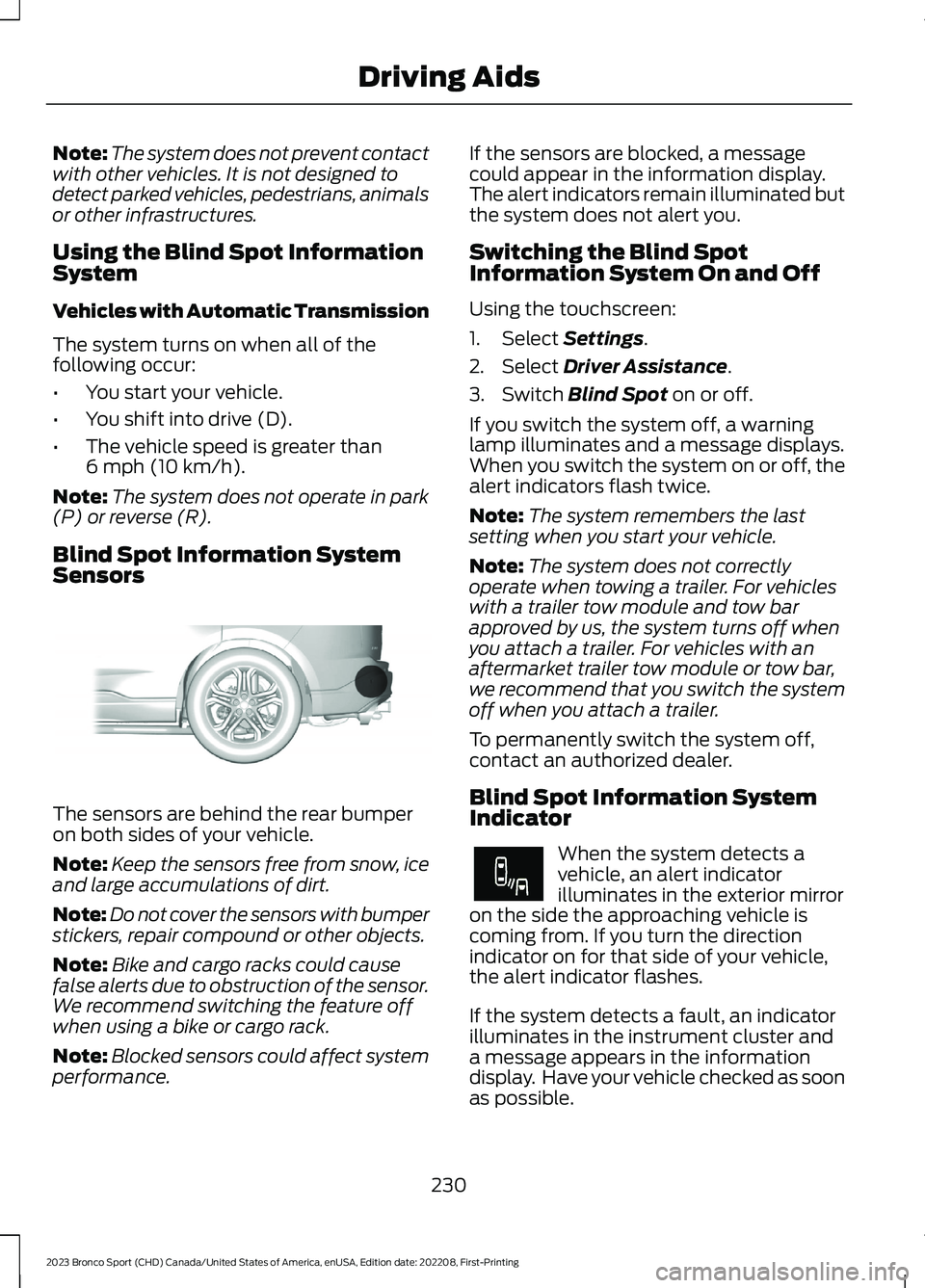
The sensors are behind the rear bumperon both sides of your vehicle.
Note:Keep the sensors free from snow, iceand large accumulations of dirt.
Note:Do not cover the sensors with bumperstickers, repair compound or other objects.
Note:Bike and cargo racks could causefalse alerts due to obstruction of the sensor.We recommend switching the feature offwhen using a bike or cargo rack.
Note:Blocked sensors could affect systemperformance.
If the sensors are blocked, a messagecould appear in the information display.The alert indicators remain illuminated butthe system does not alert you.
Switching the Blind SpotInformation System On and Off
Using the touchscreen:
1.Select Settings.
2.Select Driver Assistance.
3.Switch Blind Spot on or off.
If you switch the system off, a warninglamp illuminates and a message displays.When you switch the system on or off, thealert indicators flash twice.
Note:The system remembers the lastsetting when you start your vehicle.
Note:The system does not correctlyoperate when towing a trailer. For vehicleswith a trailer tow module and tow barapproved by us, the system turns off whenyou attach a trailer. For vehicles with anaftermarket trailer tow module or tow bar,we recommend that you switch the systemoff when you attach a trailer.
To permanently switch the system off,contact an authorized dealer.
Blind Spot Information SystemIndicator
When the system detects avehicle, an alert indicatorilluminates in the exterior mirroron the side the approaching vehicle iscoming from. If you turn the directionindicator on for that side of your vehicle,the alert indicator flashes.
If the system detects a fault, an indicatorilluminates in the instrument cluster anda message appears in the informationdisplay. Have your vehicle checked as soonas possible.
230
2023 Bronco Sport (CHD) Canada/United States of America, enUSA, Edition date: 202208, First-PrintingDriving AidsE205199 E249861E249861
Page 235 of 516
Note:The system could not alert you if avehicle quickly passes through the detectionzone.
Blind Spot Information System Information Messages
ActionMessage
Displays if the blind spot information system sensors areblocked.Blind Spot Not AvailableSensor Blocked SeeManual
Displays if you attach a trailer to your vehicle.Blis Deactivated TrailerAttached
The system has detected a fault that requires service. Haveyour vehicle checked as soon as possible.Blind Spot System Fault
CROSS TRAFFIC ALERT
WARNING: Do not use the crosstraffic alert system as a replacement forusing the interior and exterior mirrors orlooking over your shoulder beforereversing out of a parking space. Thecross traffic alert system is not areplacement for careful driving.
WARNING: The system may notoperate properly during severe weatherconditions, for example snow, ice, heavyrain and spray. Always drive with duecare and attention. Failure to take caremay result in a crash.
The system alerts you of vehiclesapproaching from the sides behind yourvehicle when you shift into reverse (R).
Using Cross Traffic Alert
The system detects vehicles that approachat a speed between 4 mph (6 km/h) and37 mph (60 km/h). Coverage decreaseswhen the sensors are partially, mostly orfully obstructed. Slowly reversing helpsincrease the coverage area andeffectiveness.
The system turns on when you start theengine and you shift into reverse (R). Thesystem turns off when you shift out ofreverse (R).
231
2023 Bronco Sport (CHD) Canada/United States of America, enUSA, Edition date: 202208, First-PrintingDriving Aids
Page 237 of 516
Zone coverage also decreases whenparking at narrow angles. The sensor onthe left-hand side is mostly obstructed andzone coverage on that side is severelyreduced.
Cross Traffic Alert SystemLimitations
The system may not correctly operatewhen any of the following occur:
•Something blocks the sensors.
•Adjacently parked vehicles or objectsobstruct the sensors.
•Vehicles approach at speeds less than4 mph (6 km/h) or greater than 37 mph(60 km/h).
•The vehicle speed is greater than 7 mph(12 km/h).
•You reverse out of an angled parkingspace.
Switching the System On and Off
To switch the system on or off, adjust thesettings using the touchscreen. SeeSettings (page 393).
Note:The system turns on every time youswitch the ignition on. To permanentlyswitch the system off, contact an authorizeddealer.
Cross Traffic Alert System Sensors
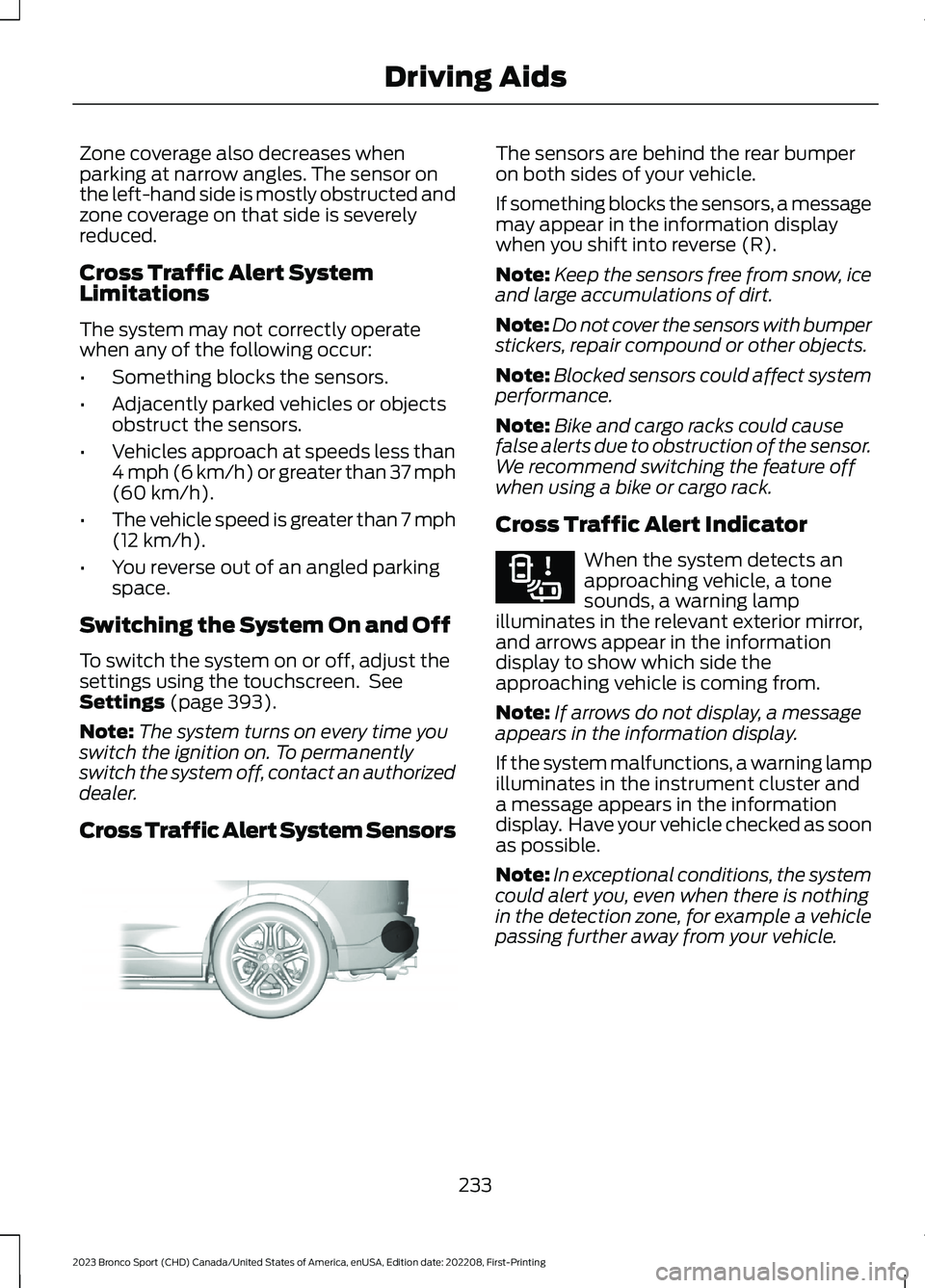
The sensors are behind the rear bumperon both sides of your vehicle.
If something blocks the sensors, a messagemay appear in the information displaywhen you shift into reverse (R).
Note:Keep the sensors free from snow, iceand large accumulations of dirt.
Note:Do not cover the sensors with bumperstickers, repair compound or other objects.
Note:Blocked sensors could affect systemperformance.
Note:Bike and cargo racks could causefalse alerts due to obstruction of the sensor.We recommend switching the feature offwhen using a bike or cargo rack.
Cross Traffic Alert Indicator
When the system detects anapproaching vehicle, a tonesounds, a warning lampilluminates in the relevant exterior mirror,and arrows appear in the informationdisplay to show which side theapproaching vehicle is coming from.
Note:If arrows do not display, a messageappears in the information display.
If the system malfunctions, a warning lampilluminates in the instrument cluster anda message appears in the informationdisplay. Have your vehicle checked as soonas possible.
Note:In exceptional conditions, the systemcould alert you, even when there is nothingin the detection zone, for example a vehiclepassing further away from your vehicle.
233
2023 Bronco Sport (CHD) Canada/United States of America, enUSA, Edition date: 202208, First-PrintingDriving AidsE205199 E268294
Page 238 of 516
Cross Traffic Alert Information Messages
ActionMessage
Displays instead of indication arrows when the systemdetects a vehicle. Check for approaching traffic.Cross Traffic Alert
Indicates blocked cross traffic alert system sensors. Cleanthe sensors. If the message continues to appear, have yourvehicle checked as soon as possible.
Cross Traffic Not Avail-able Sensor Blocked SeeManual
The system has malfunctioned. Have your vehicle checkedas soon as possible.Cross Traffic SystemFault
Displays if you attach a trailer to your vehicle.Cross Traffic Alert Deac-tivated Trailer Attached
SPEED SIGN RECOGNITION (IF
EQUIPPED)
Principle of Operation
WARNING: You are responsible forcontrolling your vehicle at all times. Thesystem is designed to be an aid and doesnot relieve you of your responsibility todrive with due care and attention. Failureto follow this instruction could result inthe loss of control of your vehicle,personal injury or death.
WARNING: In cold and severeweather conditions the system may notfunction. Rain, snow and spray can alllimit sensor performance.
WARNING: The system may notoperate properly if the sensor is blocked.Keep the windshield free fromobstruction.
The system is designed to detect speedlimit signs to inform you of the currentspeed limit. Detected speed signs appearin the information display. The sensor isbehind the interior mirror.
Note:Do not carry out windshield repairsin the immediate area surrounding thesensor.
Note:Speed sign data provided by thenavigation system contains informationintegrated to the data carrier release.
Note:The system may not detect orcorrectly read all speed signs.
Note:If your vehicle has a suspension kitnot approved by us, the system may notcorrectly function.
Note:Always replace headlamp bulbs withthose specifically designed for your vehicle.Other bulbs could reduce systemperformance.
The system turns on when you switch theignition on, and you cannot switch thesystem off.
234
2023 Bronco Sport (CHD) Canada/United States of America, enUSA, Edition date: 202208, First-PrintingDriving Aids
Page 285 of 516
Protected ComponentRatingItem
Heated exterior mirrors.10 A75
Heated rear window.30 A76
Not used.—77
Liftgate window release.15 A78
Not used.—79
Fuel pump.20 A80
Rear window washer pump.10 A81
Power inverter.40 A82
Not used.—83
Driveline control module.40 A84
Rain sensor.5 A85
Not used.—86
Not used.—87
Not used.—88
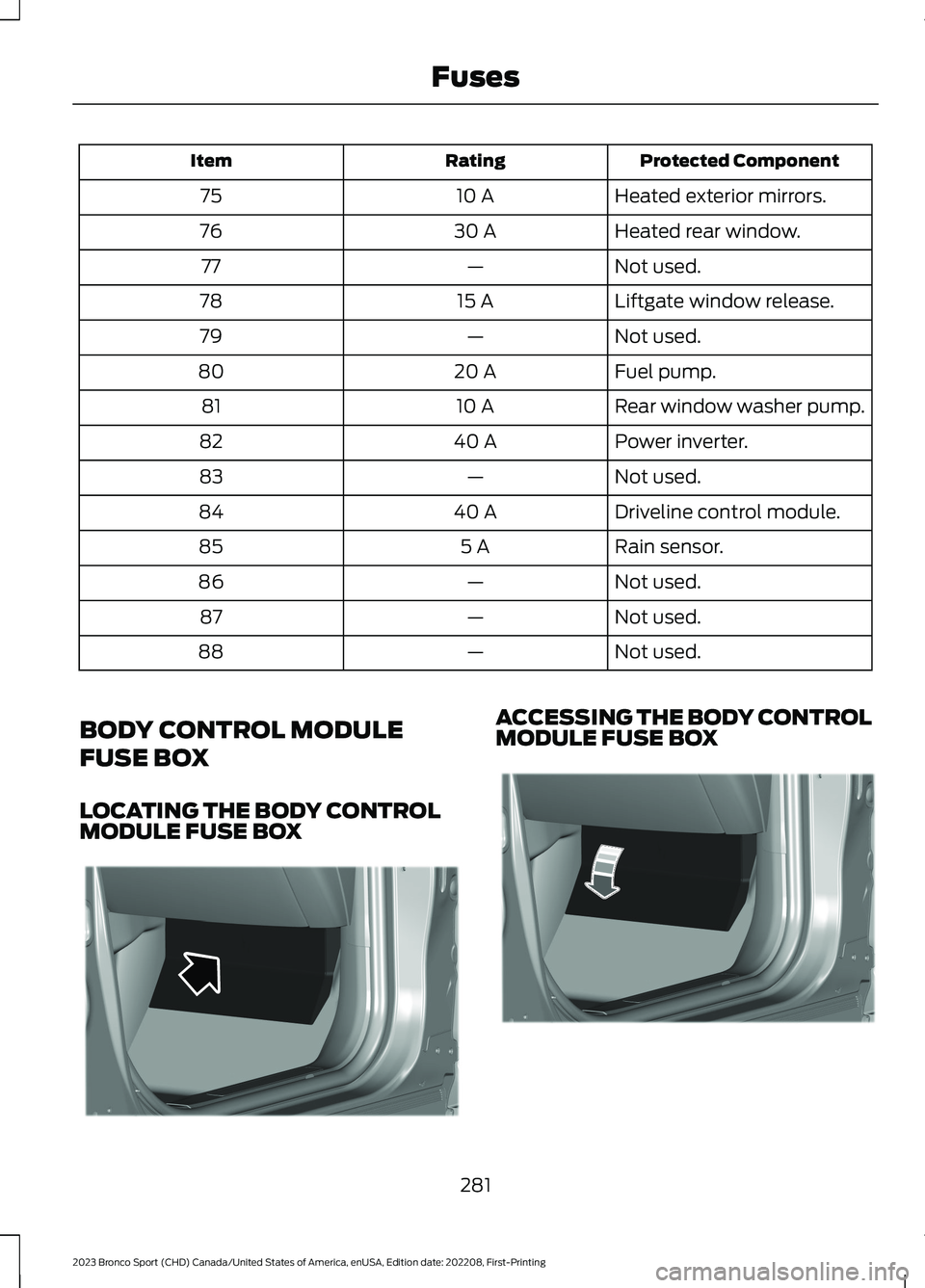
BODY CONTROL MODULE
FUSE BOX
LOCATING THE BODY CONTROLMODULE FUSE BOX
ACCESSING THE BODY CONTROLMODULE FUSE BOX
281
2023 Bronco Sport (CHD) Canada/United States of America, enUSA, Edition date: 202208, First-PrintingFusesE329070 E329071
Page 286 of 516
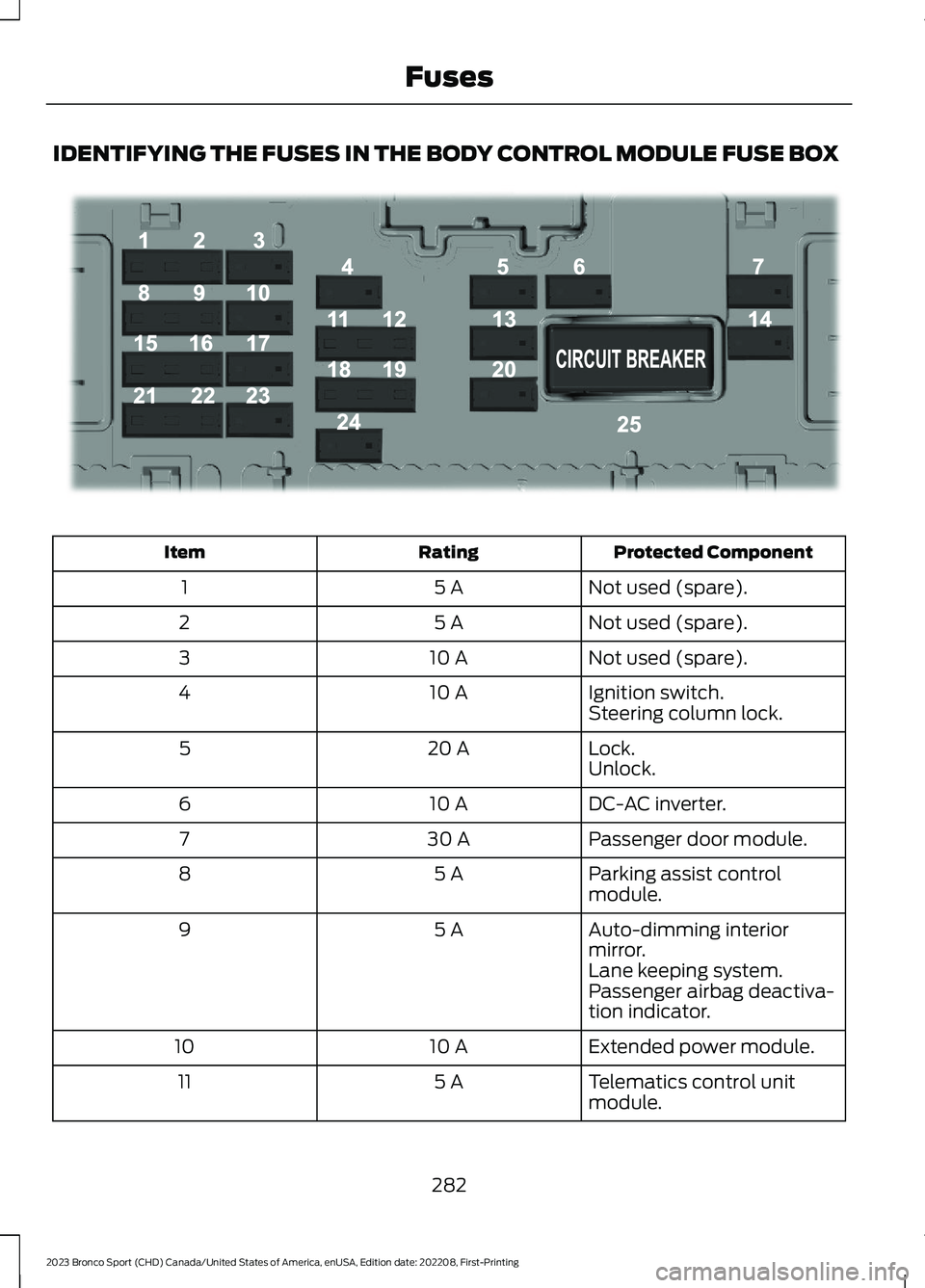
IDENTIFYING THE FUSES IN THE BODY CONTROL MODULE FUSE BOX
Protected ComponentRatingItem
Not used (spare).5 A1
Not used (spare).5 A2
Not used (spare).10 A3
Ignition switch.10 A4Steering column lock.
Lock.20 A5Unlock.
DC-AC inverter.10 A6
Passenger door module.30 A7
Parking assist controlmodule.5 A8
Auto-dimming interiormirror.5 A9
Lane keeping system.Passenger airbag deactiva-tion indicator.
Extended power module.10 A10
Telematics control unitmodule.5 A11
282
2023 Bronco Sport (CHD) Canada/United States of America, enUSA, Edition date: 202208, First-PrintingFusesE293328