key FORD BRONCO SPORT 2023 Owner's Manual
[x] Cancel search | Manufacturer: FORD, Model Year: 2023, Model line: BRONCO SPORT, Model: FORD BRONCO SPORT 2023Pages: 516, PDF Size: 14.27 MB
Page 80 of 516
WARNING: Make sure that you fullyclose the liftgate to prevent exhaustfumes from entering your vehicle. If youare unable to fully close the liftgate,open the air vents or the windows toallow fresh air to enter your vehicle.Failure to follow this instruction couldresult in personal injury or death.
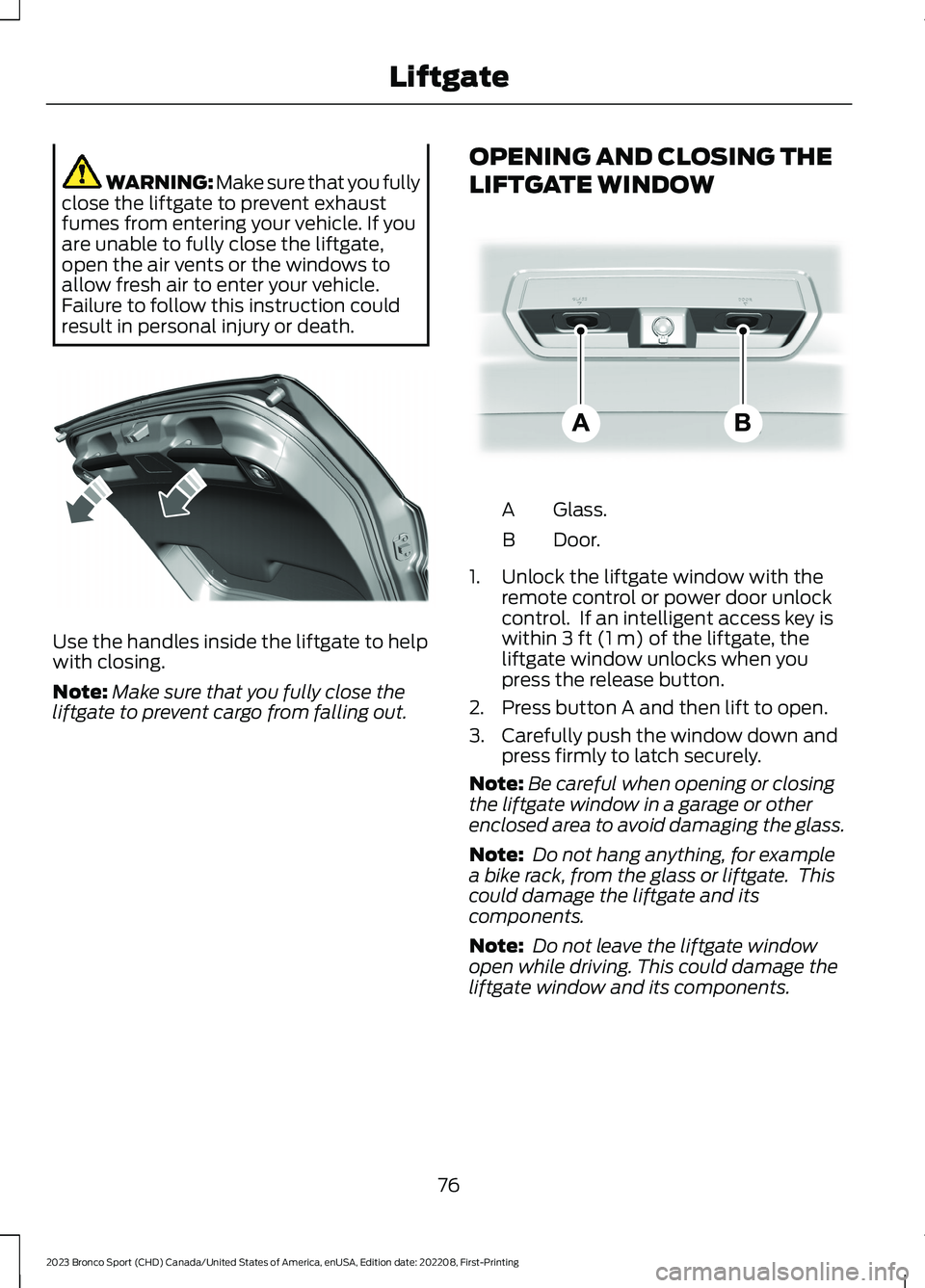
Use the handles inside the liftgate to helpwith closing.
Note:Make sure that you fully close theliftgate to prevent cargo from falling out.
OPENING AND CLOSING THE
LIFTGATE WINDOW
Glass.A
Door.B
1.Unlock the liftgate window with theremote control or power door unlockcontrol. If an intelligent access key iswithin 3 ft (1 m) of the liftgate, theliftgate window unlocks when youpress the release button.
2.Press button A and then lift to open.
3.Carefully push the window down andpress firmly to latch securely.
Note:Be careful when opening or closingthe liftgate window in a garage or otherenclosed area to avoid damaging the glass.
Note: Do not hang anything, for examplea bike rack, from the glass or liftgate. Thiscould damage the liftgate and itscomponents.
Note: Do not leave the liftgate windowopen while driving. This could damage theliftgate window and its components.
76
2023 Bronco Sport (CHD) Canada/United States of America, enUSA, Edition date: 202208, First-PrintingLiftgateE327259 E323752
Page 81 of 516
PASSIVE ANTI-THEFT
SYSTEM
Note: The system is not compatible withnon-Ford aftermarket remote start systems.Use of these systems could result in vehiclestarting problems and a loss of securityprotection.
Note:Metallic objects, electronic devicesor a second coded key on the same keychain could cause vehicle starting problemsif they are too close to the key when startingthe engine. Prevent these objects fromtouching the coded key while starting theengine. Switch the ignition off, move allobjects on the key chain away from thecoded key and restart the engine if aproblem occurs.
Note:Do not leave a duplicate coded keyin the vehicle. Always take your keys andlock all doors when leaving the vehicle.
SecuriLock®
The system is an engine immobilizationsystem. It helps to prevent anyone fromstarting the engine without using a codedkey programmed to your vehicle. Using thewrong key could prevent the engine fromstarting. A message may appear in theinformation display.
If you are unable to start the engine with acorrectly coded key, there is a problem withthe system and a message could appearin the information display.
Automatic Arming
The vehicle arms immediately after youswitch the ignition off.
Automatic Disarming
Switching the ignition on with a coded keydisarms the vehicle.
Replacement Keys
Note:Your vehicle comes with twointegrated keyhead transmitters or twointelligent access keys.
The integrated keyhead transmitterfunctions as a programmed ignition keythat operates all the locks and starts thevehicle, as well as a remote control.
The intelligent access key functions as aprogrammed key that operates the driverdoor lock and activates the intelligentaccess with push button start system, aswell as a remote control.
If your programmed transmitters orstandard SecuriLock coded keys(integrated keyhead transmitters only) arelost or stolen and you do not have an extracoded key, you will need to have yourvehicle towed to an authorized dealer. Youneed to erase the key codes from yourvehicle and program new coded keys.
Store an extra programmed key away fromthe vehicle in a safe place to help preventany inconveniences. See your authorizeddealer to purchase additional spare orreplacement keys.
Programming a Spare IntelligentAccess Key (If Equipped)
See your authorized dealer to haveadditional keys programmed to yourvehicle.
ANTI-THEFT ALARM
The system will warn you of anunauthorized entry to your vehicle. It willbe triggered if any door, the luggagecompartment or the hood is openedwithout using the key, remote control orkeyless entry keypad.
The direction indicators will flash and thehorn will sound if unauthorized entry isattempted while the alarm is armed.
77
2023 Bronco Sport (CHD) Canada/United States of America, enUSA, Edition date: 202208, First-PrintingSecurity
Page 82 of 516
Take all remote controls to an authorizeddealer if there is any potential alarmproblem with your vehicle.
Arming the Alarm
The alarm is ready to arm when there isnot a key in the ignition. Electronically lockthe vehicle to arm the alarm.
The message indicator flasheswhen theft protection is active.
Disarming the Alarm
Disarm the alarm by any of the followingactions:
•Unlock the doors or luggagecompartment with the remote controlor keyless entry keypad.
•Switch the ignition on or start thevehicle.
•Use a key in the driver’s door to unlockthe vehicle, then switch the ignition onwithin 12 seconds.
Note:Pressing the panic button on theremote control will stop the horn and signalindicators, but will not disarm the system.
78
2023 Bronco Sport (CHD) Canada/United States of America, enUSA, Edition date: 202208, First-PrintingSecurity
Page 102 of 516
The arrow adjacent to the fuel pumpsymbol indicates on which side of yourvehicle the fuel filler door is located.
Note:The fuel gauge can vary slightly whenyour vehicle is moving or on a slope.
Low Fuel Reminder
A low fuel level reminder displays andsounds when the distance to emptyreaches 75 mi (120 km) to empty forMyKey, and at 50 mi (80 km),25 mi(40 km),10 mi (20 km) and 0 mi (0 km)for all vehicle keys.
Note:The low fuel reminder can appear atdifferent fuel gauge positions depending onfuel economy conditions. This variation isnormal.
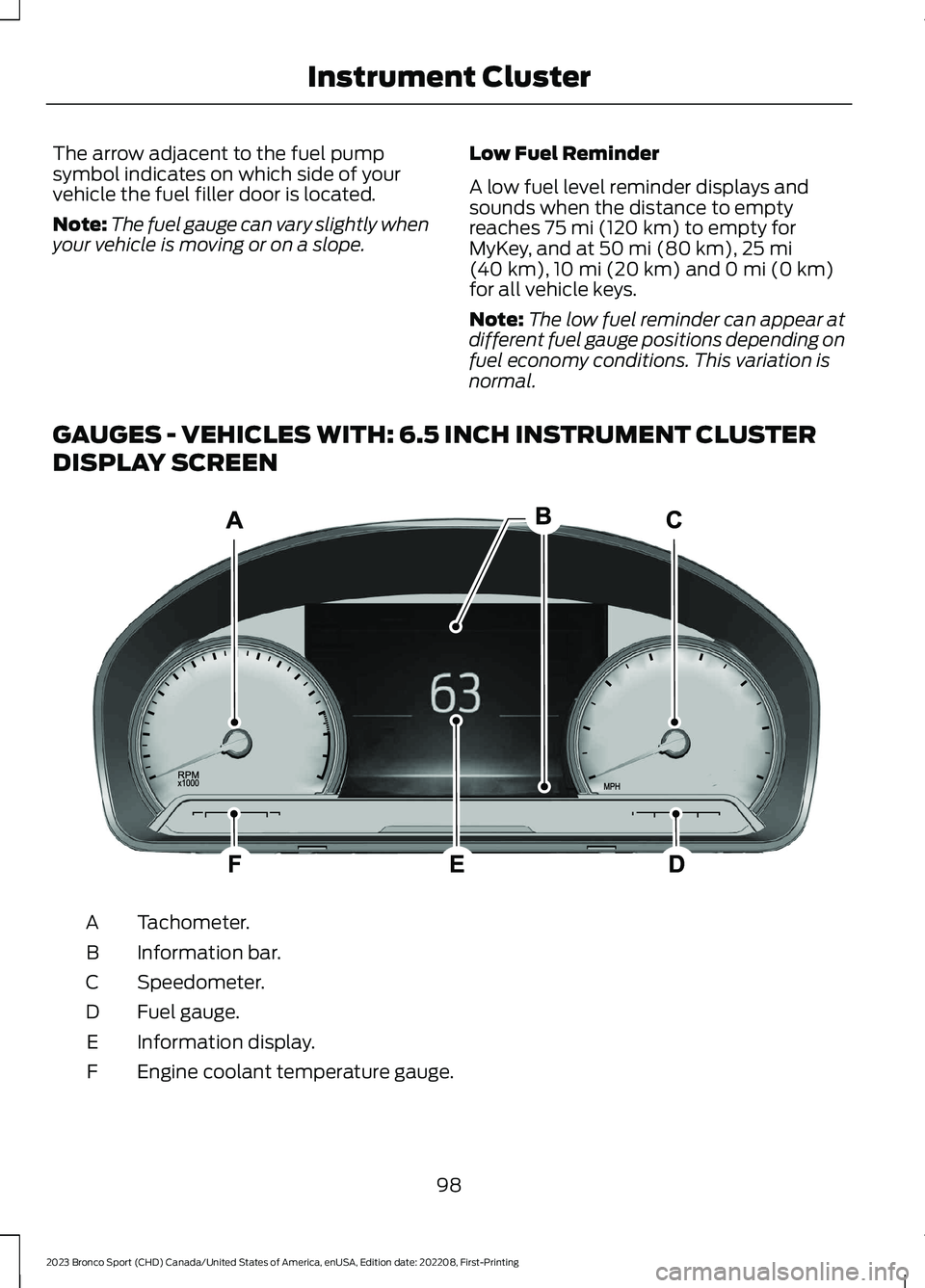
GAUGES - VEHICLES WITH: 6.5 INCH INSTRUMENT CLUSTER
DISPLAY SCREEN
Tachometer.A
Information bar.B
Speedometer.C
Fuel gauge.D
Information display.E
Engine coolant temperature gauge.F
98
2023 Bronco Sport (CHD) Canada/United States of America, enUSA, Edition date: 202208, First-PrintingInstrument ClusterE282067
Page 103 of 516
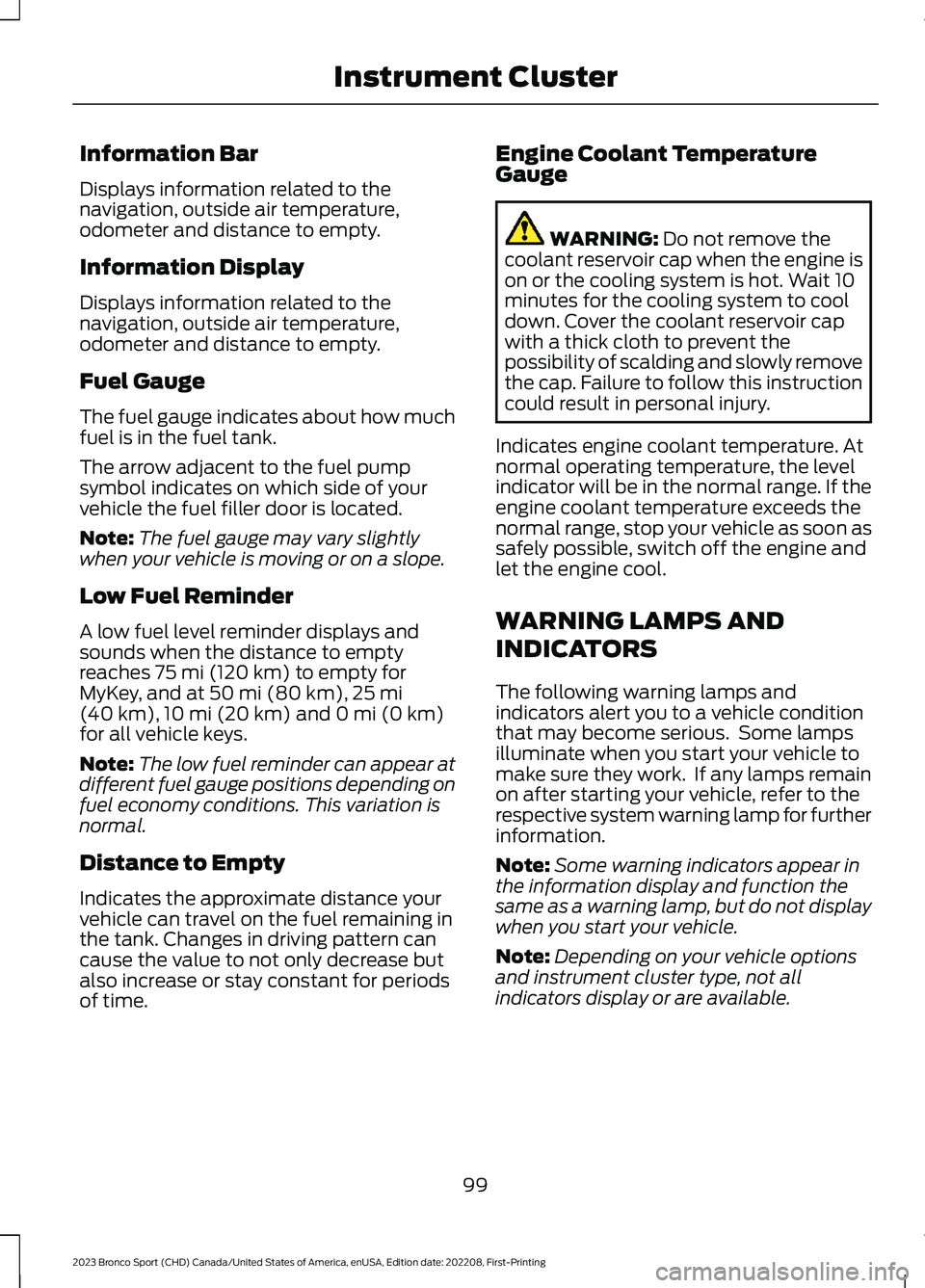
Information Bar
Displays information related to thenavigation, outside air temperature,odometer and distance to empty.
Information Display
Displays information related to thenavigation, outside air temperature,odometer and distance to empty.
Fuel Gauge
The fuel gauge indicates about how muchfuel is in the fuel tank.
The arrow adjacent to the fuel pumpsymbol indicates on which side of yourvehicle the fuel filler door is located.
Note:The fuel gauge may vary slightlywhen your vehicle is moving or on a slope.
Low Fuel Reminder
A low fuel level reminder displays andsounds when the distance to emptyreaches 75 mi (120 km) to empty forMyKey, and at 50 mi (80 km),25 mi(40 km),10 mi (20 km) and 0 mi (0 km)for all vehicle keys.
Note:The low fuel reminder can appear atdifferent fuel gauge positions depending onfuel economy conditions. This variation isnormal.
Distance to Empty
Indicates the approximate distance yourvehicle can travel on the fuel remaining inthe tank. Changes in driving pattern cancause the value to not only decrease butalso increase or stay constant for periodsof time.
Engine Coolant TemperatureGauge
WARNING: Do not remove thecoolant reservoir cap when the engine ison or the cooling system is hot. Wait 10minutes for the cooling system to cooldown. Cover the coolant reservoir capwith a thick cloth to prevent thepossibility of scalding and slowly removethe cap. Failure to follow this instructioncould result in personal injury.
Indicates engine coolant temperature. Atnormal operating temperature, the levelindicator will be in the normal range. If theengine coolant temperature exceeds thenormal range, stop your vehicle as soon assafely possible, switch off the engine andlet the engine cool.
WARNING LAMPS AND
INDICATORS
The following warning lamps andindicators alert you to a vehicle conditionthat may become serious. Some lampsilluminate when you start your vehicle tomake sure they work. If any lamps remainon after starting your vehicle, refer to therespective system warning lamp for furtherinformation.
Note:Some warning indicators appear inthe information display and function thesame as a warning lamp, but do not displaywhen you start your vehicle.
Note:Depending on your vehicle optionsand instrument cluster type, not allindicators display or are available.
99
2023 Bronco Sport (CHD) Canada/United States of America, enUSA, Edition date: 202208, First-PrintingInstrument Cluster
Page 107 of 516
Stability Control
It flashes when the system isactive. If it remains illuminatedor does not illuminate when youswitch the ignition on, this indicates asystem error. During a system error thesystem switches off. Have the systemchecked by an authorized dealerimmediately. See Using StabilityControl (page 200).
Stability Control Off
Illuminates when you switch thesystem off. It goes out when youswitch the system back on orwhen you switch the ignition off. SeeUsing Stability Control (page 200).
Trail Control
Illuminates when you switch trailcontrol on.
4WD Lock
Illuminates when four-wheeldrive is locked.
AUDIBLE WARNINGS AND
INDICATORS
Key in Ignition Warning Chime (If
Equipped)
Sounds when you open the driver's doorand you have left the key in the ignition.
Keyless Warning Alert (If Equipped)
Sounds the horn twice when you exit yourvehicle with the intelligent access key, afterthe last door is closed and your keylessvehicle is in RUN, indicating your vehicle isstill on.
Headlamps On Warning Chime
Sounds when you remove the key from theignition and open the driver's door and youhave left the headlamps or parking lampson.
Parking Brake On Warning Chime
Sounds when you have left the parkingbrake on and drive your vehicle. If thewarning chime remains on after you havereleased the parking brake, have thesystem checked by an authorized dealerimmediately.
103
2023 Bronco Sport (CHD) Canada/United States of America, enUSA, Edition date: 202208, First-PrintingInstrument ClusterE323869 E323870 E318506 E325580
Page 108 of 516
GENERAL INFORMATION
WARNING: Driving while distractedcan result in loss of vehicle control, crashand injury. We strongly recommend thatyou use extreme caution when using anydevice that may take your focus off theroad. Your primary responsibility is thesafe operation of your vehicle. Werecommend against the use of anyhand-held device while driving andencourage the use of voice-operatedsystems when possible. Make sure youare aware of all applicable local lawsthat may affect the use of electronicdevices while driving.
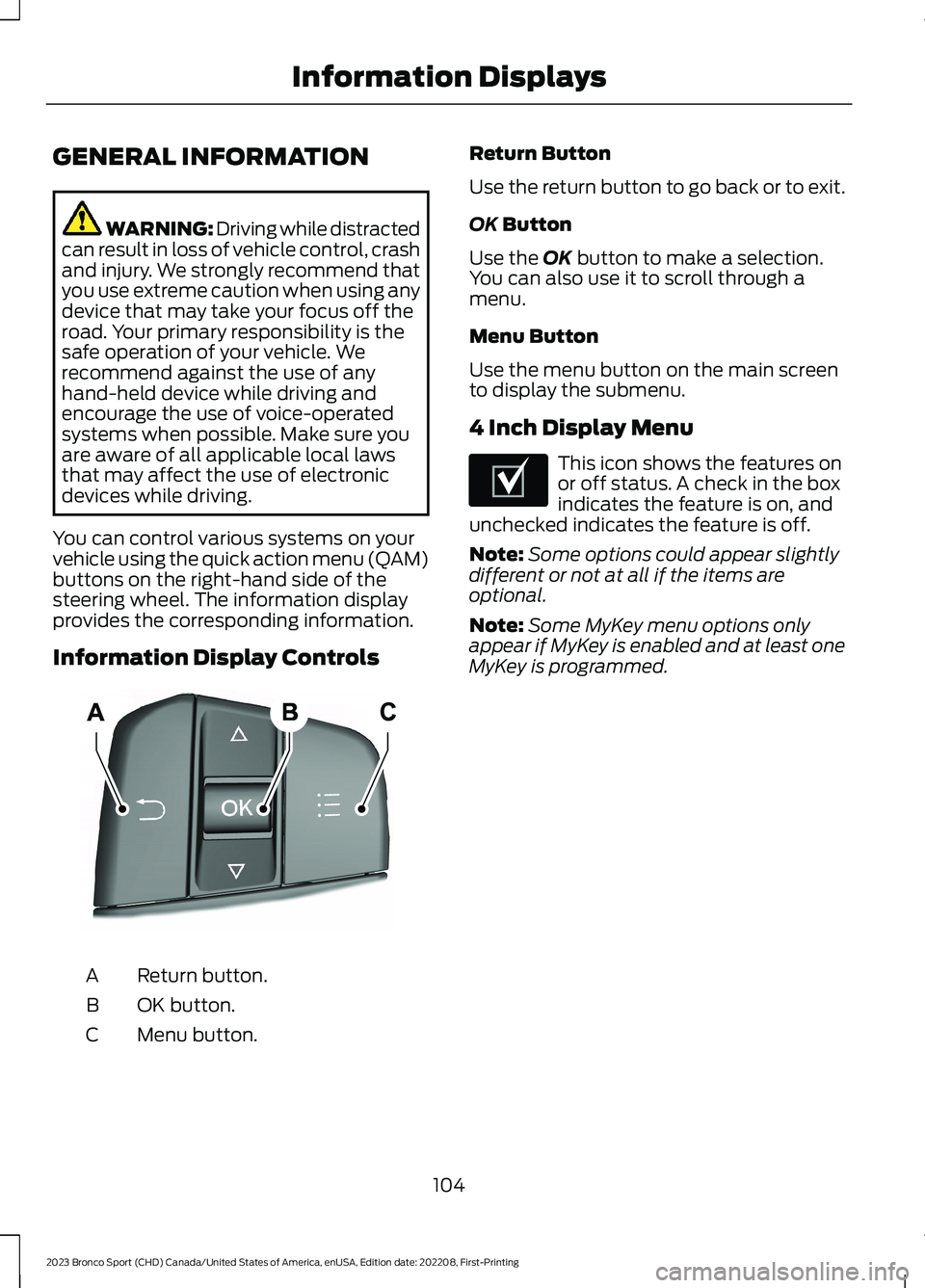
You can control various systems on yourvehicle using the quick action menu (QAM)buttons on the right-hand side of thesteering wheel. The information displayprovides the corresponding information.
Information Display Controls
Return button.A
OK button.B
Menu button.C
Return Button
Use the return button to go back or to exit.
OK Button
Use the OK button to make a selection.You can also use it to scroll through amenu.
Menu Button
Use the menu button on the main screento display the submenu.
4 Inch Display Menu
This icon shows the features onor off status. A check in the boxindicates the feature is on, andunchecked indicates the feature is off.
Note:Some options could appear slightlydifferent or not at all if the items areoptional.
Note:Some MyKey menu options onlyappear if MyKey is enabled and at least oneMyKey is programmed.
104
2023 Bronco Sport (CHD) Canada/United States of America, enUSA, Edition date: 202208, First-PrintingInformation DisplaysE250032 E204495
Page 110 of 516
Audio
Audio
Menu options covered in the SYNC chapter. See General Information (page 365).
Phone
Phone
Menu options covered in the SYNC chapter. See General Information (page 365).
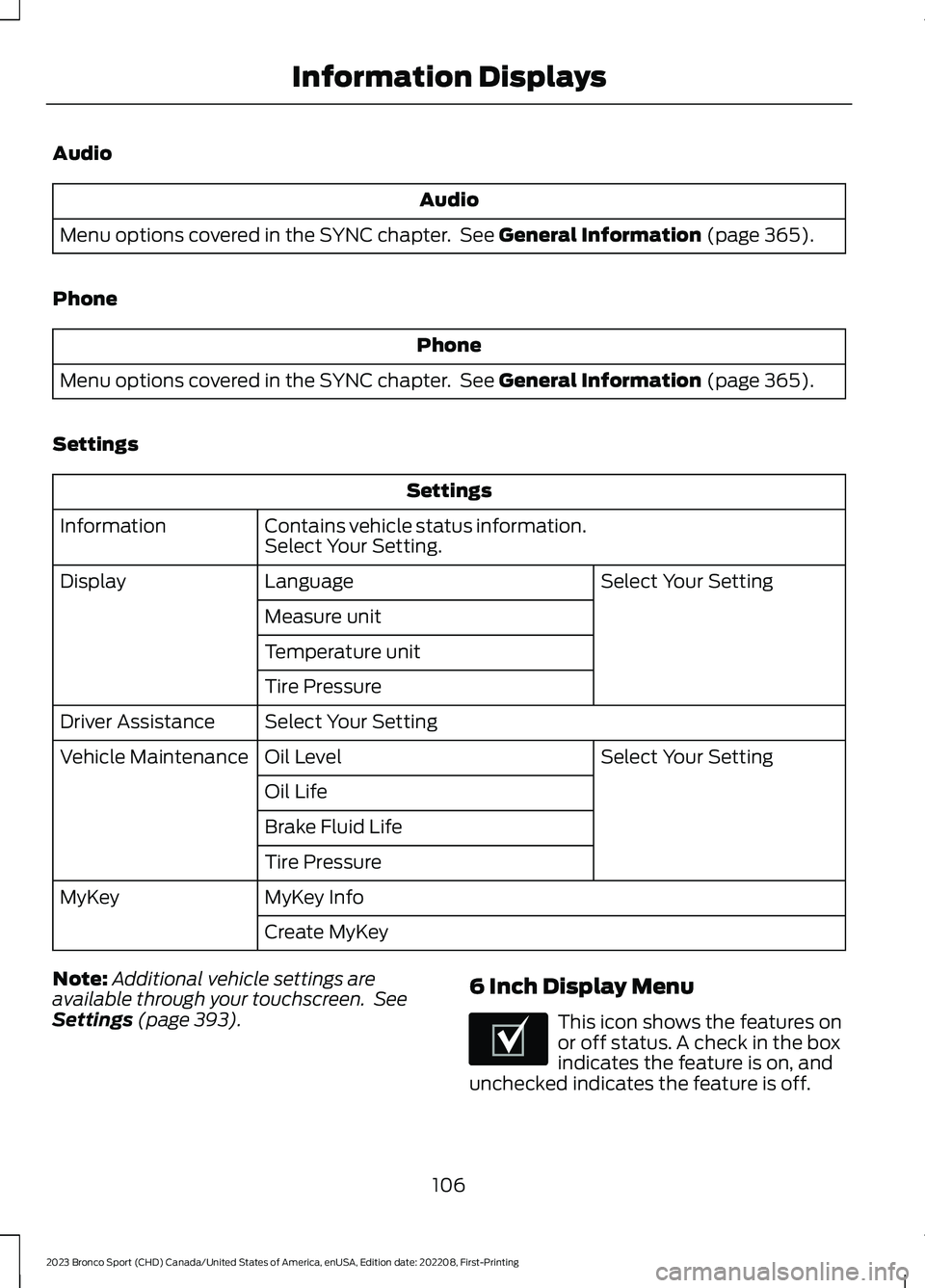
Settings
Settings
Contains vehicle status information.Select Your Setting.Information
Select Your SettingLanguageDisplay
Measure unit
Temperature unit
Tire Pressure
Select Your SettingDriver Assistance
Select Your SettingOil LevelVehicle Maintenance
Oil Life
Brake Fluid Life
Tire Pressure
MyKey InfoMyKey
Create MyKey
Note:Additional vehicle settings areavailable through your touchscreen. SeeSettings (page 393).
6 Inch Display Menu
This icon shows the features onor off status. A check in the boxindicates the feature is on, andunchecked indicates the feature is off.
106
2023 Bronco Sport (CHD) Canada/United States of America, enUSA, Edition date: 202208, First-PrintingInformation DisplaysE204495
Page 111 of 516
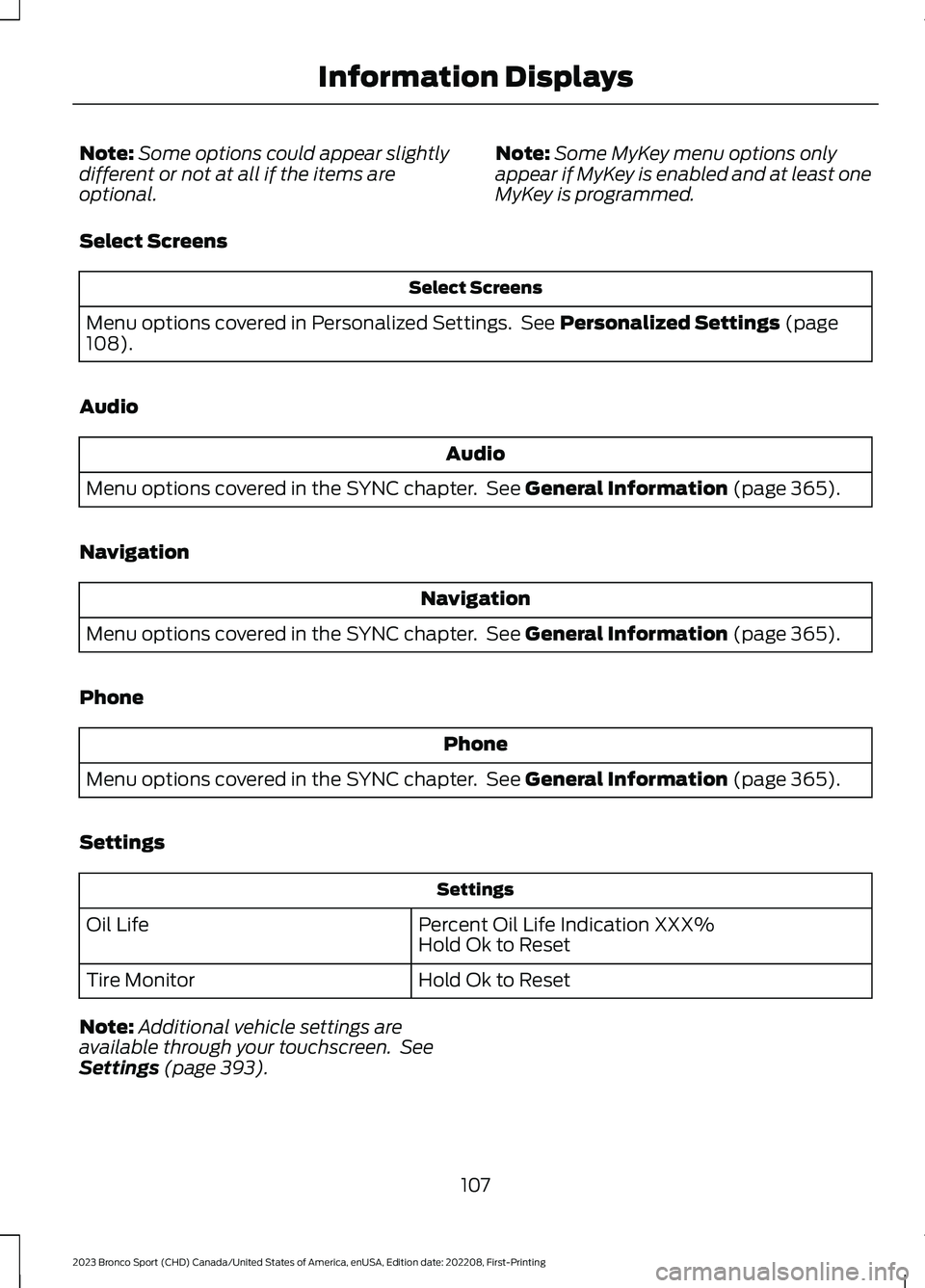
Note:Some options could appear slightlydifferent or not at all if the items areoptional.
Note:Some MyKey menu options onlyappear if MyKey is enabled and at least oneMyKey is programmed.
Select Screens
Select Screens
Menu options covered in Personalized Settings. See Personalized Settings (page108).
Audio
Audio
Menu options covered in the SYNC chapter. See General Information (page 365).
Navigation
Navigation
Menu options covered in the SYNC chapter. See General Information (page 365).
Phone
Phone
Menu options covered in the SYNC chapter. See General Information (page 365).
Settings
Settings
Percent Oil Life Indication XXX%Hold Ok to ResetOil Life
Hold Ok to ResetTire Monitor
Note:Additional vehicle settings areavailable through your touchscreen. SeeSettings (page 393).
107
2023 Bronco Sport (CHD) Canada/United States of America, enUSA, Edition date: 202208, First-PrintingInformation Displays
Page 117 of 516
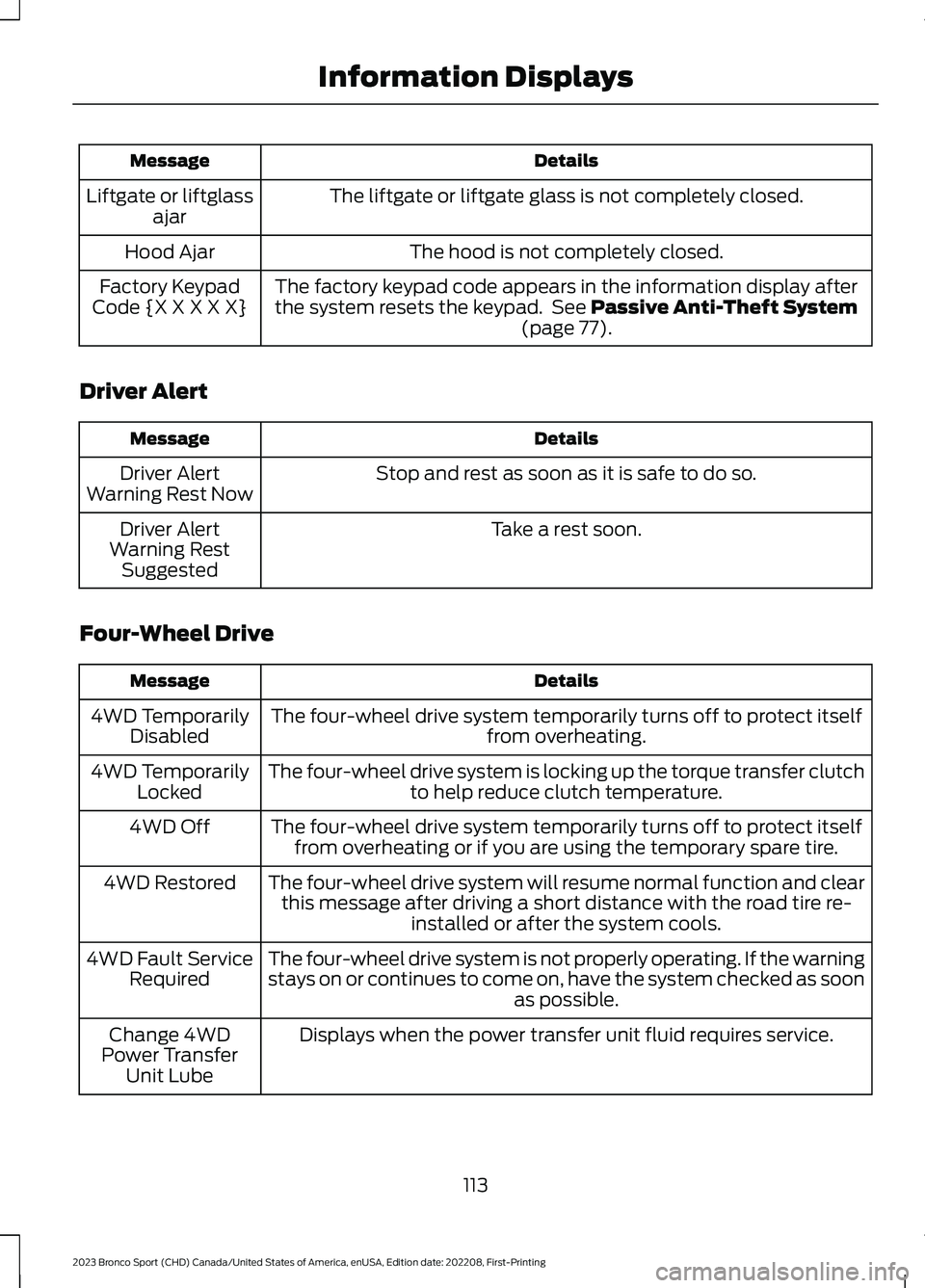
DetailsMessage
The liftgate or liftgate glass is not completely closed.Liftgate or liftglassajar
The hood is not completely closed.Hood Ajar
The factory keypad code appears in the information display afterthe system resets the keypad. See Passive Anti-Theft System(page 77).
Factory KeypadCode {X X X X X}
Driver Alert
DetailsMessage
Stop and rest as soon as it is safe to do so.Driver AlertWarning Rest Now
Take a rest soon.Driver AlertWarning RestSuggested
Four-Wheel Drive
DetailsMessage
The four-wheel drive system temporarily turns off to protect itselffrom overheating.4WD TemporarilyDisabled
The four-wheel drive system is locking up the torque transfer clutchto help reduce clutch temperature.4WD TemporarilyLocked
The four-wheel drive system temporarily turns off to protect itselffrom overheating or if you are using the temporary spare tire.4WD Off
The four-wheel drive system will resume normal function and clearthis message after driving a short distance with the road tire re-installed or after the system cools.
4WD Restored
The four-wheel drive system is not properly operating. If the warningstays on or continues to come on, have the system checked as soonas possible.
4WD Fault ServiceRequired
Displays when the power transfer unit fluid requires service.Change 4WDPower TransferUnit Lube
113
2023 Bronco Sport (CHD) Canada/United States of America, enUSA, Edition date: 202208, First-PrintingInformation Displays