remote control FORD BRONCO SPORT 2023 Owner's Guide
[x] Cancel search | Manufacturer: FORD, Model Year: 2023, Model line: BRONCO SPORT, Model: FORD BRONCO SPORT 2023Pages: 516, PDF Size: 14.27 MB
Page 356 of 516
WHAT IS A CONNECTED
VEHICLE
A connected vehicle has technology thatallows your vehicle to connect to a mobilenetwork and for you to access a range offeatures. When used in conjunction withthe FordPass app, it could allow you tomonitor and control your vehicle further,for example checking the tire pressures,the fuel level and the vehicle location. Foradditional information, refer to the localFord website.
CONNECTED VEHICLE
REQUIREMENTS
Connected service and related featurefunctionality requires a compatible vehiclenetwork.
Some remote features require additionalservice activation. Log in to your Fordaccount for details. Some restrictions, thirdparty terms and message or data ratesmay apply.
CONNECTED VEHICLE
LIMITATIONS
Evolving technology, cellular networks, orregulations could affect functionality andavailability, or continued provision of somefeatures. These changes could even stopsome features from functioning.
CONNECTING THE VEHICLE TO
A MOBILE NETWORK -
VEHICLES WITH: MODEM
WHAT IS THE MODEM
The modem allows access to arange of features built into yourvehicle.
ENABLING AND DISABLING THEMODEM
1.Press Settings.
2.Press FordPass Connect.
3.Press Connectivity Settings.
4.Switch connectivity features on or off.
CONNECTING FORDPASS TO THEMODEM
1.Make sure that the modem is enabledusing the vehicle settings menu.
2.Open the FordPass app on your deviceand log in.
3.Add your vehicle or select your vehicleif already added.
4.Select the option to activate yourvehicle.
5.Make sure that the name on the screenmatches the name shown in yourFordPass account.
6.Confirm that FordPass account isconnected to the modem.
CONNECTING THE VEHICLE TO
A WI-FI NETWORK - VEHICLES
WITH: SYNC 3
1.Press Settings.
2.Press Wi-Fi.
352
2023 Bronco Sport (CHD) Canada/United States of America, enUSA, Edition date: 202208, First-PrintingConnected Vehicle
Page 409 of 516
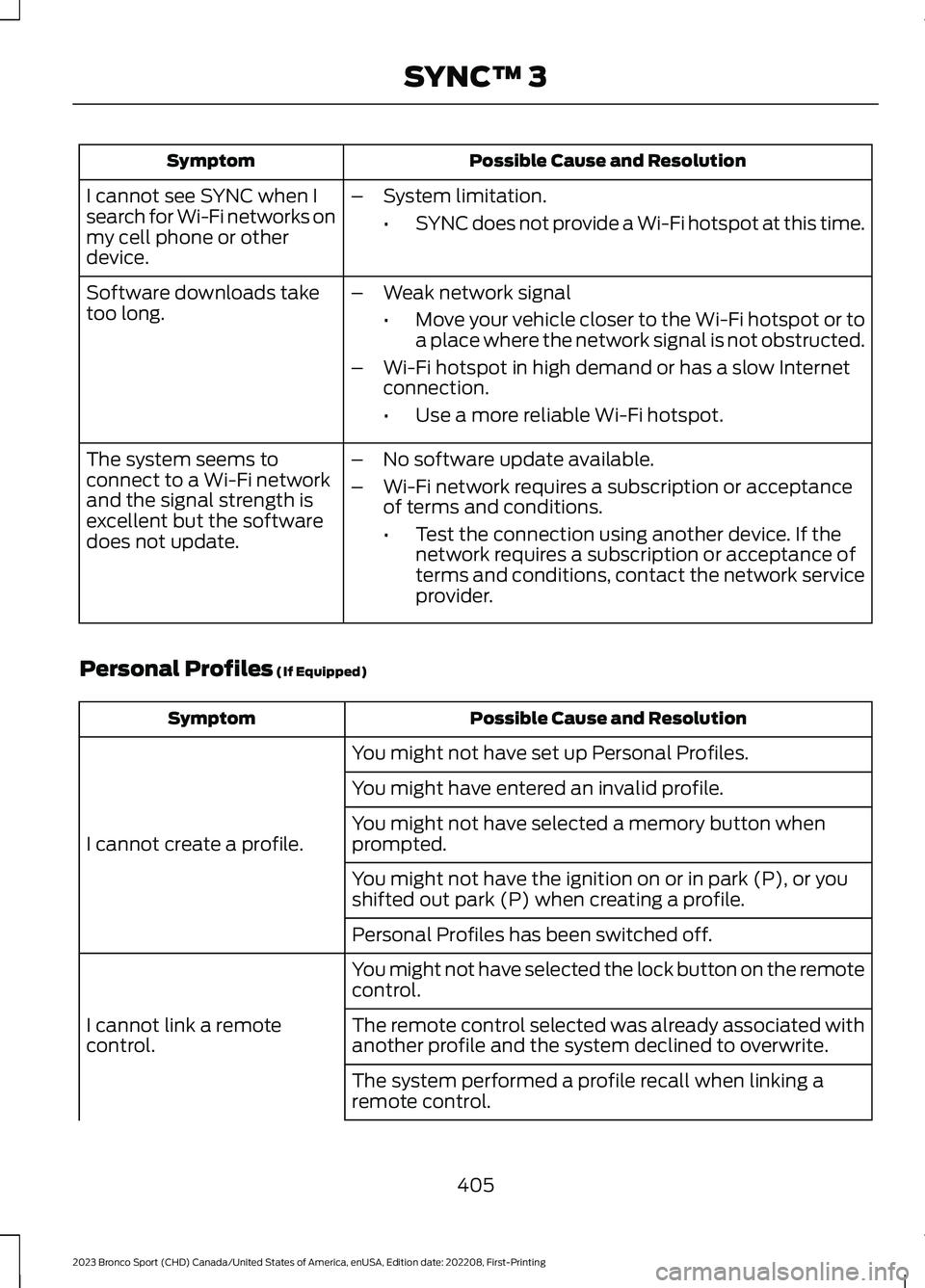
Possible Cause and ResolutionSymptom
I cannot see SYNC when Isearch for Wi-Fi networks onmy cell phone or otherdevice.
–System limitation.
•SYNC does not provide a Wi-Fi hotspot at this time.
–Weak network signal
•Move your vehicle closer to the Wi-Fi hotspot or toa place where the network signal is not obstructed.
–Wi-Fi hotspot in high demand or has a slow Internetconnection.
•Use a more reliable Wi-Fi hotspot.
Software downloads taketoo long.
–No software update available.
–Wi-Fi network requires a subscription or acceptanceof terms and conditions.
•Test the connection using another device. If thenetwork requires a subscription or acceptance ofterms and conditions, contact the network serviceprovider.
The system seems toconnect to a Wi-Fi networkand the signal strength isexcellent but the softwaredoes not update.
Personal Profiles (If Equipped)
Possible Cause and ResolutionSymptom
You might not have set up Personal Profiles.
I cannot create a profile.
You might have entered an invalid profile.
You might not have selected a memory button whenprompted.
You might not have the ignition on or in park (P), or youshifted out park (P) when creating a profile.
Personal Profiles has been switched off.
You might not have selected the lock button on the remotecontrol.
I cannot link a remotecontrol.The remote control selected was already associated withanother profile and the system declined to overwrite.
The system performed a profile recall when linking aremote control.
405
2023 Bronco Sport (CHD) Canada/United States of America, enUSA, Edition date: 202208, First-PrintingSYNC™ 3
Page 410 of 516
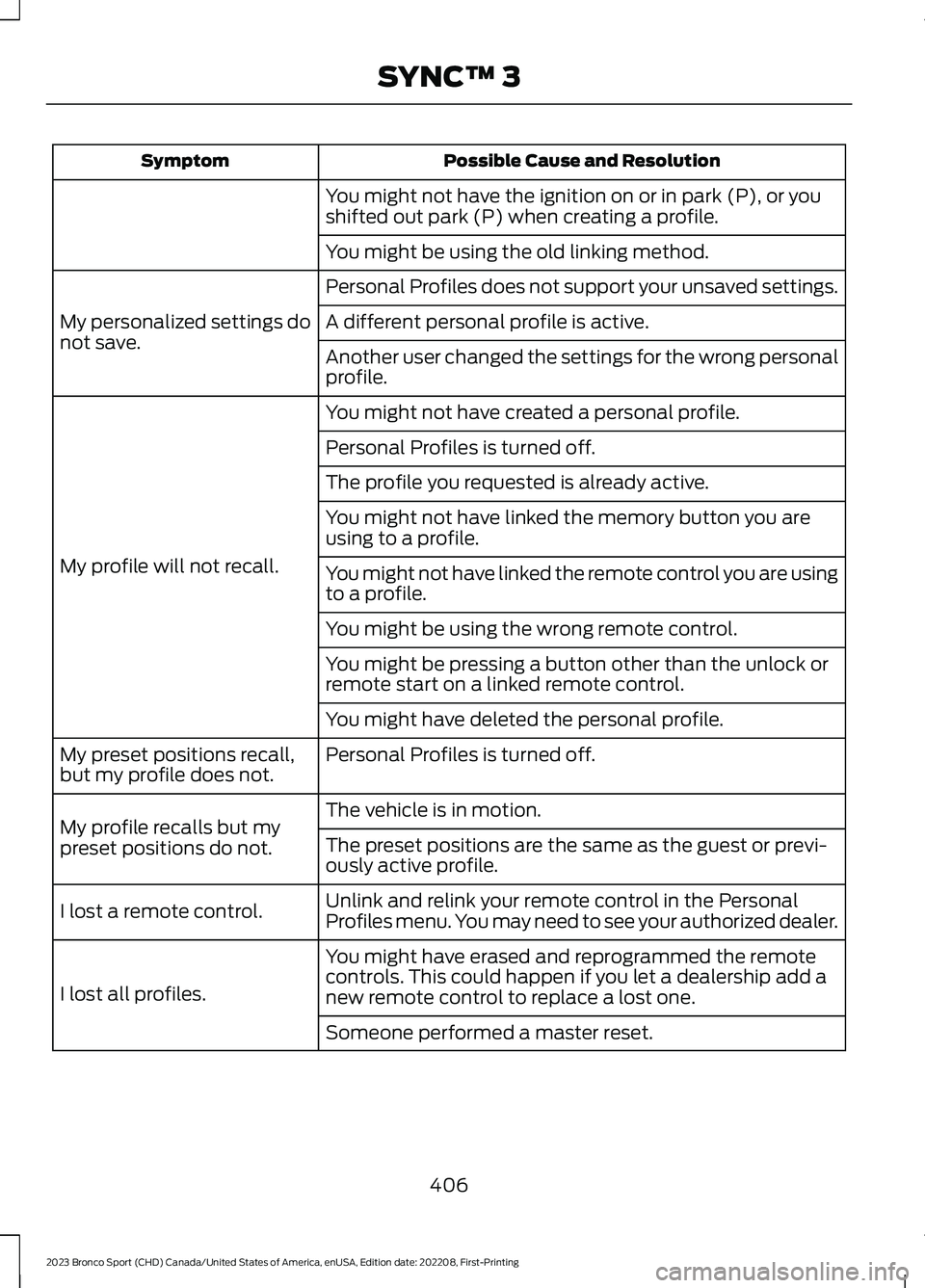
Possible Cause and ResolutionSymptom
You might not have the ignition on or in park (P), or youshifted out park (P) when creating a profile.
You might be using the old linking method.
Personal Profiles does not support your unsaved settings.
My personalized settings donot save.A different personal profile is active.
Another user changed the settings for the wrong personalprofile.
You might not have created a personal profile.
My profile will not recall.
Personal Profiles is turned off.
The profile you requested is already active.
You might not have linked the memory button you areusing to a profile.
You might not have linked the remote control you are usingto a profile.
You might be using the wrong remote control.
You might be pressing a button other than the unlock orremote start on a linked remote control.
You might have deleted the personal profile.
Personal Profiles is turned off.My preset positions recall,but my profile does not.
The vehicle is in motion.My profile recalls but mypreset positions do not.The preset positions are the same as the guest or previ-ously active profile.
Unlink and relink your remote control in the PersonalProfiles menu. You may need to see your authorized dealer.I lost a remote control.
You might have erased and reprogrammed the remotecontrols. This could happen if you let a dealership add anew remote control to replace a lost one.I lost all profiles.
Someone performed a master reset.
406
2023 Bronco Sport (CHD) Canada/United States of America, enUSA, Edition date: 202208, First-PrintingSYNC™ 3
Page 442 of 516
This device complies with Part 15 of theFCC Rules and with Innovation, Scienceand Economic Development Canada’slicence-exempt RSS(s). Operation issubject to the following two conditions:
1.This device may not cause harmfulinterference, and
2.This device must accept anyinterference received, includinginterference that may cause undesiredoperation.
Zambia
KEYS AND REMOTE CONTROLS
Argentina
438
2023 Bronco Sport (CHD) Canada/United States of America, enUSA, Edition date: 202208, First-PrintingCustomer InformationE340196 E339844 E342143 E340316 E340119
Page 472 of 516
PERCHLORATE
Certain components in your vehicle suchas airbag modules, seatbelt pretensionersand remote control batteries may containperchlorate material. Special handlingmay apply for service or vehicle end of lifedisposal.
For more information visit:www.dtsc.ca.gov/hazardouswaste/perchlorate.
REPLACEMENT PARTS
RECOMMENDATION
We have built your vehicle to the higheststandards using quality parts. Werecommend that you demand the use ofgenuine Ford and Motorcraft partswhenever your vehicle requires scheduledmaintenance or repair. You can clearlyidentify genuine Ford and Motorcraft partsby looking for the Ford, FoMoCo orMotorcraft branding on the parts or theirpackaging.
Scheduled Maintenance andMechanical Repairs
One of the best ways for you to make surethat your vehicle provides years of serviceis to have it maintained in line with ourrecommendations using parts thatconform to the specifications detailed inthis Owner’s Manual.
Genuine Ford and Motorcraft parts meetor exceed these specifications.
Collision Repairs
We hope that you never experience acollision, but accidents happen sometimes.
Genuine Ford replacement collision partsmeet our stringent requirements for fit,finish, structural integrity, corrosionprotection and dent resistance. Duringvehicle development we validate thatthese parts deliver the intended level ofprotection as a whole system. A great wayto know for sure you are getting this levelof protection is to use genuine Fordreplacement collision parts.
Warranty on Replacement Parts
Genuine Ford and Motorcraft replacementparts are the only replacement parts thatbenefit from a Ford Warranty.
The Ford Warranty may not cover damagecaused to your vehicle as a result of failednon-Ford parts.
For additional information, refer to theterms and conditions of the Ford Warranty.
MOBILE COMMUNICATIONS
EQUIPMENT
WARNING: Driving while distractedcan result in loss of vehicle control, crashand injury. We strongly recommend thatyou use extreme caution when using anydevice that may take your focus off theroad. Your primary responsibility is thesafe operation of your vehicle. Werecommend against the use of any
468
2023 Bronco Sport (CHD) Canada/United States of America, enUSA, Edition date: 202208, First-PrintingCustomer InformationE369444
Page 507 of 516
Cornering Lamps...........................................88Crash and Breakdown Information.......275Automatic Crash Shutoff................................275Post Impact Braking..........................................275Crash Sensors and Airbag Indicator.......56Creating a MyKey............................................67Creating a Vehicle Wi-Fi Hotspot..........355Cross Traffic Alert.........................................231Cruise Control................................................210Cruise Control Indicators.............................211Cruise Control - Vehicles With: AdaptiveCruise Control..............................................80Cruise Control - Vehicles With: CruiseControl............................................................80Cup Holders....................................................163Cup Holder Precautions...................................163Customer Information...............................420Radio Frequency CertificationLabels................................................................424
D
Data Privacy......................................................18Daytime Running Lamps - Vehicles With:Configurable Daytime RunningLamps..............................................................87Daytime Running Lamps - Vehicles With:Daytime Running Lamps (DRL)............87Digital Radio..................................................359Directing the Flow of Air.............................129Direction Indicators.......................................88Doors and Locks.............................................70Driver Alert......................................................224Driver and Passenger Airbags...................50Driver Knee Airbag.........................................54Driving Aids....................................................224Driving Economically..................................267Driving Hints..................................................260Off-Road Driving...............................................260DRLSee: Daytime Running Lamps - Vehicles With:Configurable Daytime Running Lamps....87See: Daytime Running Lamps - Vehicles With:Daytime Running Lamps (DRL)................87
E
Electric Parking Brake.................................194
Electromagnetic Compatibility..............498Emergency Call Limitations.......................59Emergency Call Requirements.................59Emergency Call System Data.....................21Emission Law................................................494Enabling Remote Start...............................125End User License Agreement.................469Engine Block Heater....................................168Engine Coolant Check...............................290Engine Emission Control............................179Engine ImmobilizerSee: Passive Anti-Theft System......................77Engine Oil Capacity and Specification -1.5L EcoBoost™........................................343Engine Oil Capacity and Specification -2.0L EcoBoost™.......................................344Engine Oil Check..........................................288Engine Oil Dipstick - 1.5LEcoBoost™.................................................288Engine Oil Dipstick - 2.0LEcoBoost™.................................................288Engine Specifications - 1.5LEcoBoost™.................................................339Engine Specifications - 2.0LEcoBoost™.................................................339Entertainment...............................................374Environment.....................................................22EPBSee: Electric Parking Brake.............................194Essential Towing Checks..........................256Event Data.........................................................19Export Unique Options.............................495Extending the Remote StartDuration.........................................................126Exterior Mirrors................................................94
F
Fastening the Seatbelts...............................42Federal Highway AdministrationRegulation...................................................469Flat TireSee: Changing a Road Wheel........................332Floor Mats.......................................................267Fog Lamps - FrontSee: Front Fog Lamps.........................................87Ford Protect..................................................409
503
2023 Bronco Sport (CHD) Canada/United States of America, enUSA, Edition date: 202208, First-PrintingIndex
Page 509 of 516
How Does the Rear Occupant AlertSystem Work...............................................149
I
Identifying Fuse Types...............................284Identifying the Climate ControlUnit..................................................................128Ignition Switch...............................................165Information Display Control......................80Information Displays...................................104General Information..........................................104Information Messages...............................109Installing Child Restraints...........................30Instrument Cluster.........................................97Instrument Lighting Dimmer.....................86Instrument Panel............................................24Interior Air Quality........................................140Interior Lamps.................................................89Interior Mirror...................................................95Introduction.......................................................13
J
Jump Starting the Vehicle........................270
K
Keyless Entry....................................................72Keyless Starting............................................165Keys and Remote Controls........................60
L
Lane Keeping System.................................225Liftgate...............................................................75Closing the Liftgate..............................................75Opening the Liftgate...........................................75Lighting Control..............................................85Lighting..............................................................85General Information............................................85Load CarriersSee: Roof Racks and Load Carriers............246Load Carrying................................................246Load Limit......................................................246Locating the Cabin Air Filter.....................140Locating the Memory FunctionButtons...........................................................151
Locating the Power Outlets......................159Locating the USB Ports..............................157Locating the Wireless AccessoryCharger..........................................................162Locking and Unlocking.................................70Luggage Compartment.............................252Lug NutsSee: Changing a Road Wheel........................332
M
Maintenance.................................................285General Information.........................................285Manual Seats.................................................144Map Pocket.....................................................164Locating the Map Pocket................................164Memory Function...........................................151Memory Function Precautions.................151Message CenterSee: Information Displays...............................104MirrorsSee: Windows and Mirrors................................93Mobile CommunicationsEquipment..................................................468Mobile Device Data.........................................21Moonroof..........................................................96Motorcraft Parts - 1.5LEcoBoost™................................................340Motorcraft Parts - 2.0LEcoBoost™..................................................341MyKey Settings...............................................66Configurable MyKey Settings..........................66Non-Configurable MyKey Settings................66MyKey – Troubleshooting...........................68MyKey – Frequently Asked Questions.........69MyKey – Information Messages.....................68MyKey™............................................................66MyKey Settings.....................................................66MyKey – Troubleshooting.................................68
N
Navigation......................................................386Normal Scheduled Maintenance...........414
505
2023 Bronco Sport (CHD) Canada/United States of America, enUSA, Edition date: 202208, First-PrintingIndex
Page 510 of 516
O
Off-Road Driving.........................................260After Driving Your Vehicle Off-Road..........266Basic Off-Road Driving Techniques...........260Driving Off-Road.................................................261Driving Through Water Limitations.............265Off-Road Driving Aids......................................265Off-Road Driving Precautions......................260What Is Off-Road Driving...............................260Oil Change Indicator Reset......................289Oil CheckSee: Engine Oil Check......................................288Opening and Closing the Hood..............285Opening and Closing the LiftgateWindow...........................................................76Opening the Liftgate.....................................75Opening the Liftgate From Outside YourVehicle..................................................................75Opening the Liftgate Using the RemoteControl.................................................................75Ordering a Canadian French Owner'sManual...........................................................421Our Sustainability Report........................420Overriding Automatic High BeamControl.............................................................92Overriding the Set Speed..........................218
P
Parking Aids...................................................203Principle of Operation......................................203Passive Anti-Theft System..........................77PATSSee: Passive Anti-Theft System......................77Perchlorate....................................................468Personalized Settings................................108Personal Safety System™.........................48Phone..............................................................384Playing Media Using the USB Port.........157Post-Crash Alert System...........................272Post Impact Braking....................................275How Does Post Impact Braking Work........275Overriding Post Impact Braking....................275Post Impact Braking Indicators.....................275Post Impact Braking Limitations..................275Power Door LocksSee: Locking and Unlocking.............................70
Power Outlet Indicators.............................160Power Outlet Limitations..........................160Power Outlet..................................................159Power Outlet Precautions.........................159Power Seats....................................................145Power Steering Fluid Check.....................295Power Windows..............................................93Pre-Collision Assist.....................................236Programming a MyKey.................................67Programming the Garage DoorOpener...........................................................154Protecting the Environment.......................22PunctureSee: Changing a Road Wheel........................332
R
Radio Frequency CertificationLabels............................................................424Blind Spot Information SystemSensors.............................................................424Body Control Module.......................................430Cruise Control Module.....................................434Keys and Remote Controls............................438Passive Anti-Theft System............................443Radio Transceiver Module.............................446SYNC......................................................................449Telematics Control Unit..................................453Tire Pressure Monitoring SystemSensors.............................................................454Wireless Accessory ChargingModule..............................................................462Rear Exterior.....................................................27Rear Floodlamps...........................................90Rear Occupant Alert System AudibleWarnings.......................................................150Rear Occupant Alert SystemIndicators......................................................150Rear Occupant Alert SystemLimitations...................................................149Rear Occupant Alert SystemPrecautions..................................................149Rear Occupant Alert System...................149Rear Parking Aid..........................................204Rear Seats.......................................................146Rear View Camera......................................205Rear View CameraSee: Rear View Camera..................................205
506
2023 Bronco Sport (CHD) Canada/United States of America, enUSA, Edition date: 202208, First-PrintingIndex
Page 511 of 516
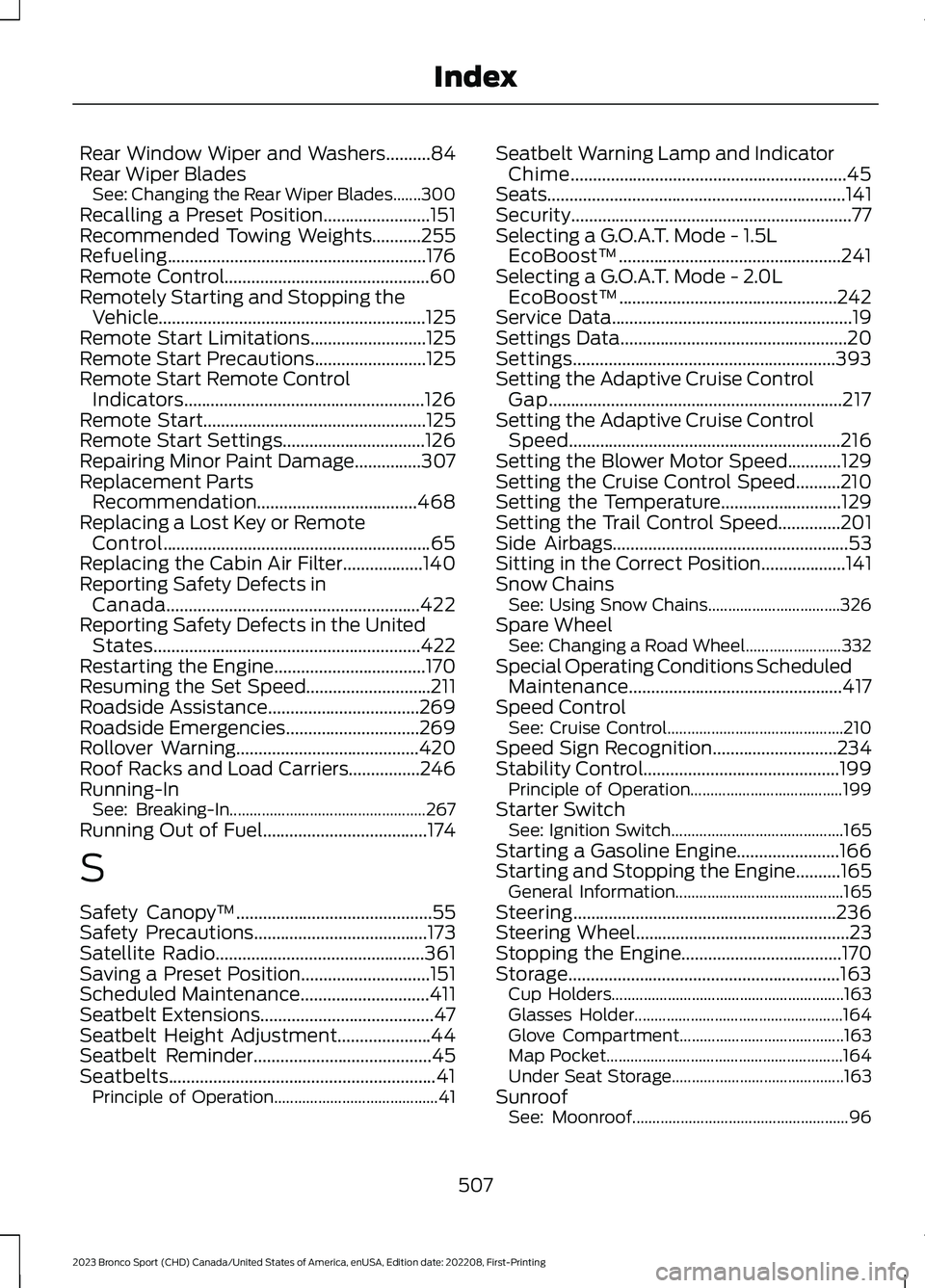
Rear Window Wiper and Washers..........84Rear Wiper BladesSee: Changing the Rear Wiper Blades.......300Recalling a Preset Position........................151Recommended Towing Weights...........255Refueling..........................................................176Remote Control..............................................60Remotely Starting and Stopping theVehicle............................................................125Remote Start Limitations..........................125Remote Start Precautions.........................125Remote Start Remote ControlIndicators......................................................126Remote Start..................................................125Remote Start Settings................................126Repairing Minor Paint Damage...............307Replacement PartsRecommendation....................................468Replacing a Lost Key or RemoteControl............................................................65Replacing the Cabin Air Filter..................140Reporting Safety Defects inCanada.........................................................422Reporting Safety Defects in the UnitedStates............................................................422Restarting the Engine..................................170Resuming the Set Speed............................211Roadside Assistance..................................269Roadside Emergencies..............................269Rollover Warning.........................................420Roof Racks and Load Carriers................246Running-InSee: Breaking-In.................................................267Running Out of Fuel.....................................174
S
Safety Canopy™............................................55Safety Precautions.......................................173Satellite Radio...............................................361Saving a Preset Position.............................151Scheduled Maintenance.............................411Seatbelt Extensions.......................................47Seatbelt Height Adjustment.....................44Seatbelt Reminder........................................45Seatbelts............................................................41Principle of Operation.........................................41
Seatbelt Warning Lamp and IndicatorChime..............................................................45Seats...................................................................141Security...............................................................77Selecting a G.O.A.T. Mode - 1.5LEcoBoost™..................................................241Selecting a G.O.A.T. Mode - 2.0LEcoBoost™.................................................242Service Data......................................................19Settings Data...................................................20Settings...........................................................393Setting the Adaptive Cruise ControlGap..................................................................217Setting the Adaptive Cruise ControlSpeed.............................................................216Setting the Blower Motor Speed............129Setting the Cruise Control Speed..........210Setting the Temperature...........................129Setting the Trail Control Speed..............201Side Airbags.....................................................53Sitting in the Correct Position...................141Snow ChainsSee: Using Snow Chains.................................326Spare WheelSee: Changing a Road Wheel........................332Special Operating Conditions ScheduledMaintenance................................................417Speed ControlSee: Cruise Control............................................210Speed Sign Recognition............................234Stability Control............................................199Principle of Operation......................................199Starter SwitchSee: Ignition Switch...........................................165Starting a Gasoline Engine.......................166Starting and Stopping the Engine..........165General Information..........................................165Steering...........................................................236Steering Wheel................................................23Stopping the Engine....................................170Storage.............................................................163Cup Holders..........................................................163Glasses Holder....................................................164Glove Compartment.........................................163Map Pocket...........................................................164Under Seat Storage...........................................163SunroofSee: Moonroof......................................................96
507
2023 Bronco Sport (CHD) Canada/United States of America, enUSA, Edition date: 202208, First-PrintingIndex
Page 512 of 516
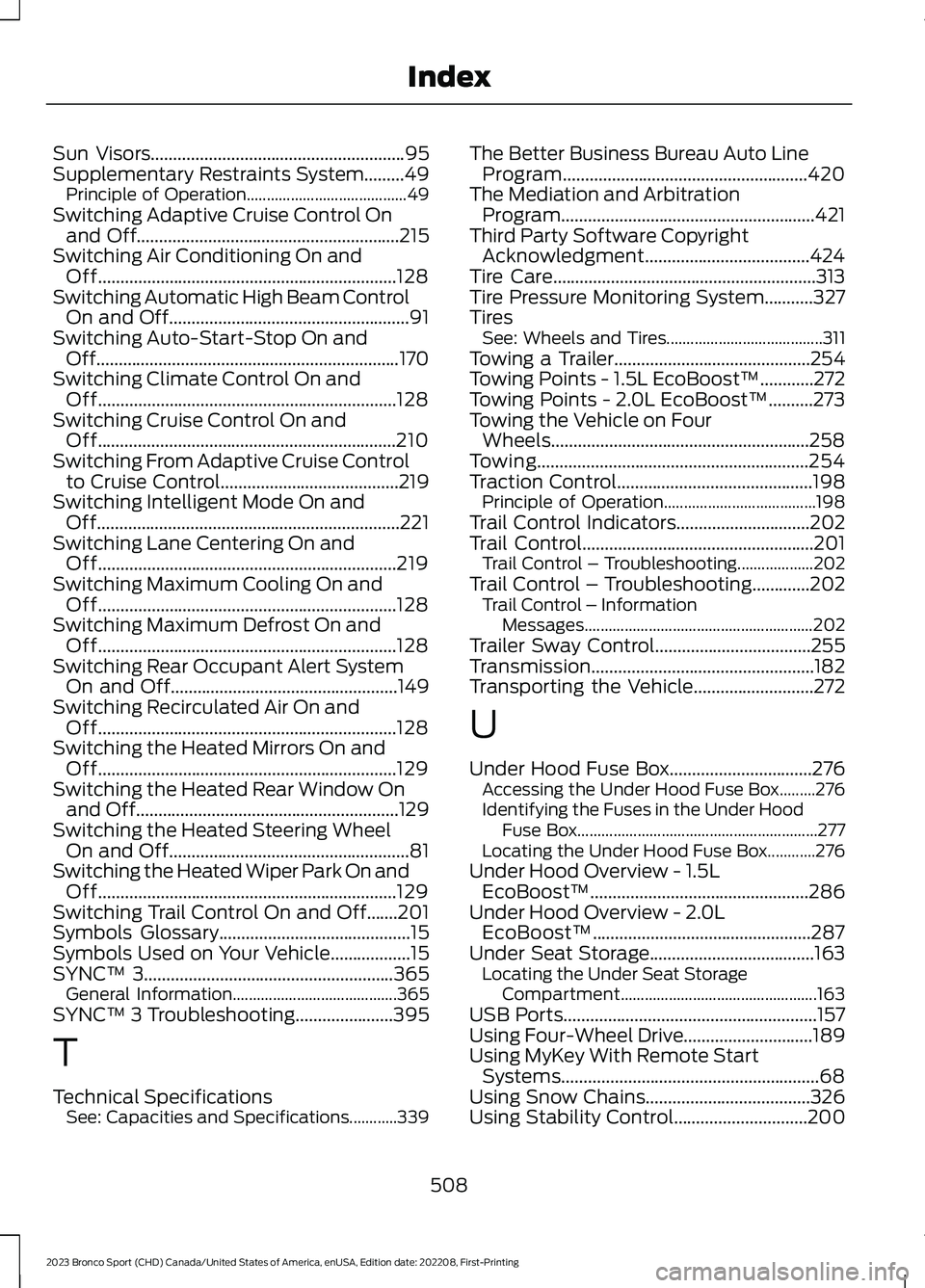
Sun Visors.........................................................95Supplementary Restraints System.........49Principle of Operation........................................49Switching Adaptive Cruise Control Onand Off...........................................................215Switching Air Conditioning On andOff...................................................................128Switching Automatic High Beam ControlOn and Off......................................................91Switching Auto-Start-Stop On andOff....................................................................170Switching Climate Control On andOff...................................................................128Switching Cruise Control On andOff...................................................................210Switching From Adaptive Cruise Controlto Cruise Control........................................219Switching Intelligent Mode On andOff....................................................................221Switching Lane Centering On andOff...................................................................219Switching Maximum Cooling On andOff...................................................................128Switching Maximum Defrost On andOff...................................................................128Switching Rear Occupant Alert SystemOn and Off...................................................149Switching Recirculated Air On andOff...................................................................128Switching the Heated Mirrors On andOff...................................................................129Switching the Heated Rear Window Onand Off...........................................................129Switching the Heated Steering WheelOn and Off......................................................81Switching the Heated Wiper Park On andOff...................................................................129Switching Trail Control On and Off.......201Symbols Glossary...........................................15Symbols Used on Your Vehicle..................15SYNC™ 3........................................................365General Information.........................................365SYNC™ 3 Troubleshooting......................395
T
Technical SpecificationsSee: Capacities and Specifications............339
The Better Business Bureau Auto LineProgram.......................................................420The Mediation and ArbitrationProgram.........................................................421Third Party Software CopyrightAcknowledgment.....................................424Tire Care...........................................................313Tire Pressure Monitoring System...........327TiresSee: Wheels and Tires.......................................311Towing a Trailer............................................254Towing Points - 1.5L EcoBoost™............272Towing Points - 2.0L EcoBoost™..........273Towing the Vehicle on FourWheels..........................................................258Towing.............................................................254Traction Control............................................198Principle of Operation......................................198Trail Control Indicators..............................202Trail Control....................................................201Trail Control – Troubleshooting...................202Trail Control – Troubleshooting.............202Trail Control – InformationMessages.........................................................202Trailer Sway Control...................................255Transmission..................................................182Transporting the Vehicle...........................272
U
Under Hood Fuse Box................................276Accessing the Under Hood Fuse Box.........276Identifying the Fuses in the Under HoodFuse Box............................................................277Locating the Under Hood Fuse Box............276Under Hood Overview - 1.5LEcoBoost™.................................................286Under Hood Overview - 2.0LEcoBoost™.................................................287Under Seat Storage.....................................163Locating the Under Seat StorageCompartment.................................................163USB Ports.........................................................157Using Four-Wheel Drive.............................189Using MyKey With Remote StartSystems..........................................................68Using Snow Chains.....................................326Using Stability Control..............................200
508
2023 Bronco Sport (CHD) Canada/United States of America, enUSA, Edition date: 202208, First-PrintingIndex