remote control FORD BRONCO SPORT 2023 Owner's Manual
[x] Cancel search | Manufacturer: FORD, Model Year: 2023, Model line: BRONCO SPORT, Model: FORD BRONCO SPORT 2023Pages: 516, PDF Size: 14.27 MB
Page 129 of 516

WHAT IS REMOTE START
The system allows you to remotely startyour vehicle and to adjust the interiortemperature according to the settings thatyou chose.
REMOTE START
PRECAUTIONS
WARNING: Do not start the enginein a closed garage or in other enclosedareas. Exhaust fumes are toxic. Alwaysopen the garage door before you startthe engine. Failure to follow thisinstruction could result in personal injuryor death.
REMOTE START LIMITATIONS
Remote start does not work under thefollowing conditions:
•The alarm horn is sounding.
•The hood is open.
•The transmission is not in park (P).
•The ignition is on.
•The battery voltage is below theminimum operating voltage.
•Remote start is not enabled.
Note:Do not use remote start if the fuellevel is low.
ENABLING REMOTE START
1.Press Settings on the touchscreen.
2.Press Vehicle.
3.Press Remote Start Setup.
4.Switch System on.
Note:To use remote start, make sure thatthe modem is enabled. See Connecting theVehicle to a Mobile Network (page 352).
REMOTELY STARTING AND
STOPPING THE VEHICLE
Remotely Starting the Vehicle
Press the button on the remotecontrol.
Within three seconds, press thebutton on the remote control.
Within three seconds, press thebutton again.
Note:You can also use FordPass to startthe vehicle.
Note:The vehicle doors lock when yousuccessfully remote start your vehicle.
Note:The turn signal lamps flash twice.
Note:The parking lamps turn on when thevehicle is running.
Note:The horn sounds if the system failsto start.
Note:All other vehicle systems remain offwhen you have remotely started the vehicle.
Note:The vehicle remains secured whenyou have remotely started the vehicle. Avalid key must be inside your vehicle toswitch the ignition on and drive your vehicle.
Remotely Stopping the Vehicle
Within three seconds, press thebutton on the remote control.
Within three seconds, press thebutton again.
125
2023 Bronco Sport (CHD) Canada/United States of America, enUSA, Edition date: 202208, First-PrintingRemote Start (If Equipped)E138623 E138625 E138625
Page 130 of 516
EXTENDING THE REMOTE
START DURATION
To extend the remote start duration duringremote start, do the following:
Press the button on the remotecontrol.
Within three seconds, press thebutton on the remote control.
Within three seconds, press thebutton again.
If the duration is set to 15 minutes, theduration extends by another 15 minutes.This provides a total of 30 minutes.
Note:Remote start can only be extendedonce.
Note:A maximum of two remote starts, orone remote start with an extension, areallowed. To reset the restart procedureswitch the vehicle to on, then to off.
REMOTE START REMOTE
CONTROL INDICATORS
Remote Control Feedback
An LED on the remote control providesstatus feedback of remote start or stopcommands.
StatusLED
Remote startsuccessful.Solid green.
Remote stopsuccessful.Solid red.
Request failed orstatus not received.Blinking red.
Status incomplete.Blinking green.
REMOTE START SETTINGS
Climate Control Settings
1.Press Settings on the touchscreen.
2.Press Vehicle Settings.
3.Press Remote Start Setup.
4.Press Climate Control.
5.Press Auto or Last settings.
Note:If you switch the auto mode on, thesystem attempts to heat or cool the interiorto 72°F (22°C). When you switch the vehicleon, the climate control system returns tothe last used settings.
Note:If you switch the last settings on, thesystem remembers the last used settings.
Heated Seat Settings (If Equipped)
1.Press Settings on the touchscreen.
2.Press Vehicle Settings.
3.Press Remote Start Setup.
4.Press Seats.
5.Press Auto or Off.
Note:If you switch the heated seat settingson, the heated seats turn on during coldweather.
Note:You cannot adjust the heated seatsettings when you remotely start yourvehicle.
Heated Steering Wheel Settings (If
Equipped)
1.Press Settings on the touchscreen.
2.Press Vehicle Settings.
3.Press Remote Start Setup.
4.Press Seats and Steering Wheel.
5.Press Auto or Off.
Note:If you switch the heated steeringwheel settings on, the heated steering wheelturns on during cold weather.
126
2023 Bronco Sport (CHD) Canada/United States of America, enUSA, Edition date: 202208, First-PrintingRemote Start (If Equipped)E138623 E138625
Page 155 of 516
HOW DOES THE MEMORY
FUNCTION WORK
The memory function recalls the positionof these features:
•Driver seat.
•Power mirrors.
MEMORY FUNCTION
PRECAUTIONS
WARNING: Before activating thememory seat, make sure that the areaimmediately surrounding the seat is clearof obstructions and that all occupantsare clear of moving parts.
WARNING: Do not use the memoryfunction when your vehicle is moving.
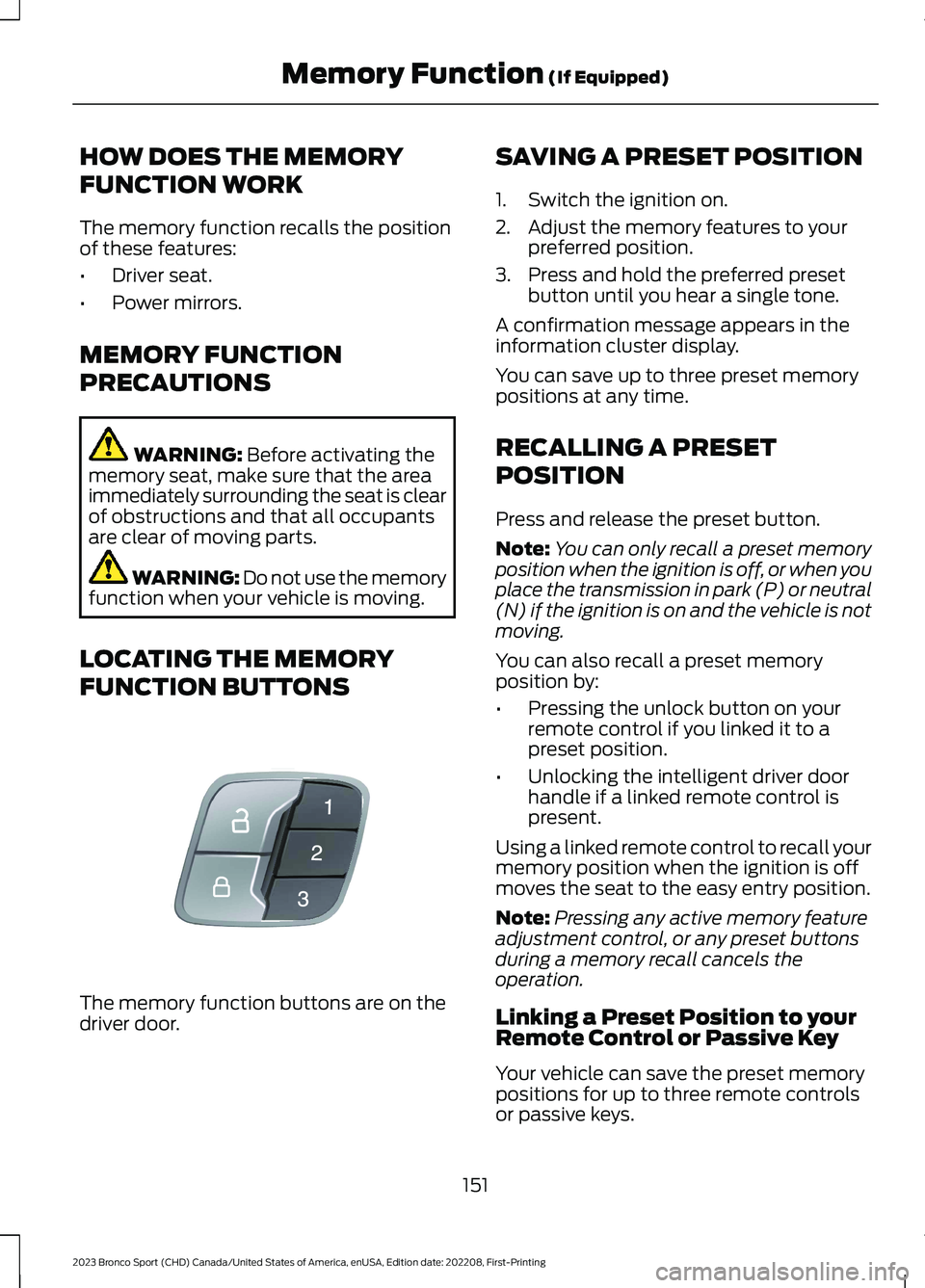
LOCATING THE MEMORY
FUNCTION BUTTONS
The memory function buttons are on thedriver door.
SAVING A PRESET POSITION
1.Switch the ignition on.
2.Adjust the memory features to yourpreferred position.
3.Press and hold the preferred presetbutton until you hear a single tone.
A confirmation message appears in theinformation cluster display.
You can save up to three preset memorypositions at any time.
RECALLING A PRESET
POSITION
Press and release the preset button.
Note:You can only recall a preset memoryposition when the ignition is off, or when youplace the transmission in park (P) or neutral(N) if the ignition is on and the vehicle is notmoving.
You can also recall a preset memoryposition by:
•Pressing the unlock button on yourremote control if you linked it to apreset position.
•Unlocking the intelligent driver doorhandle if a linked remote control ispresent.
Using a linked remote control to recall yourmemory position when the ignition is offmoves the seat to the easy entry position.
Note:Pressing any active memory featureadjustment control, or any preset buttonsduring a memory recall cancels theoperation.
Linking a Preset Position to yourRemote Control or Passive Key
Your vehicle can save the preset memorypositions for up to three remote controlsor passive keys.
151
2023 Bronco Sport (CHD) Canada/United States of America, enUSA, Edition date: 202208, First-PrintingMemory Function (If Equipped)E142554
Page 156 of 516
1.With the ignition on, move the memoryfeatures to the position you prefer.
2.Press and hold a preset button for fiveseconds. A tone sounds after twoseconds. Continue holding until youhear a second tone.
3.Within three seconds, press the lockbutton on the remote control you arelinking.
To unlink a remote control, follow thesame procedure – except in Step 3, pressthe unlock button on the remote control.
Note:If more than one linked remotecontrol or intelligent access key is in range,the memory function moves to the settingsof the first key to initiate a memory recall.
152
2023 Bronco Sport (CHD) Canada/United States of America, enUSA, Edition date: 202208, First-PrintingMemory Function (If Equipped)
Page 157 of 516
GARAGE DOOR OPENER
INTRODUCTION
HomeLink Wireless ControlSystem
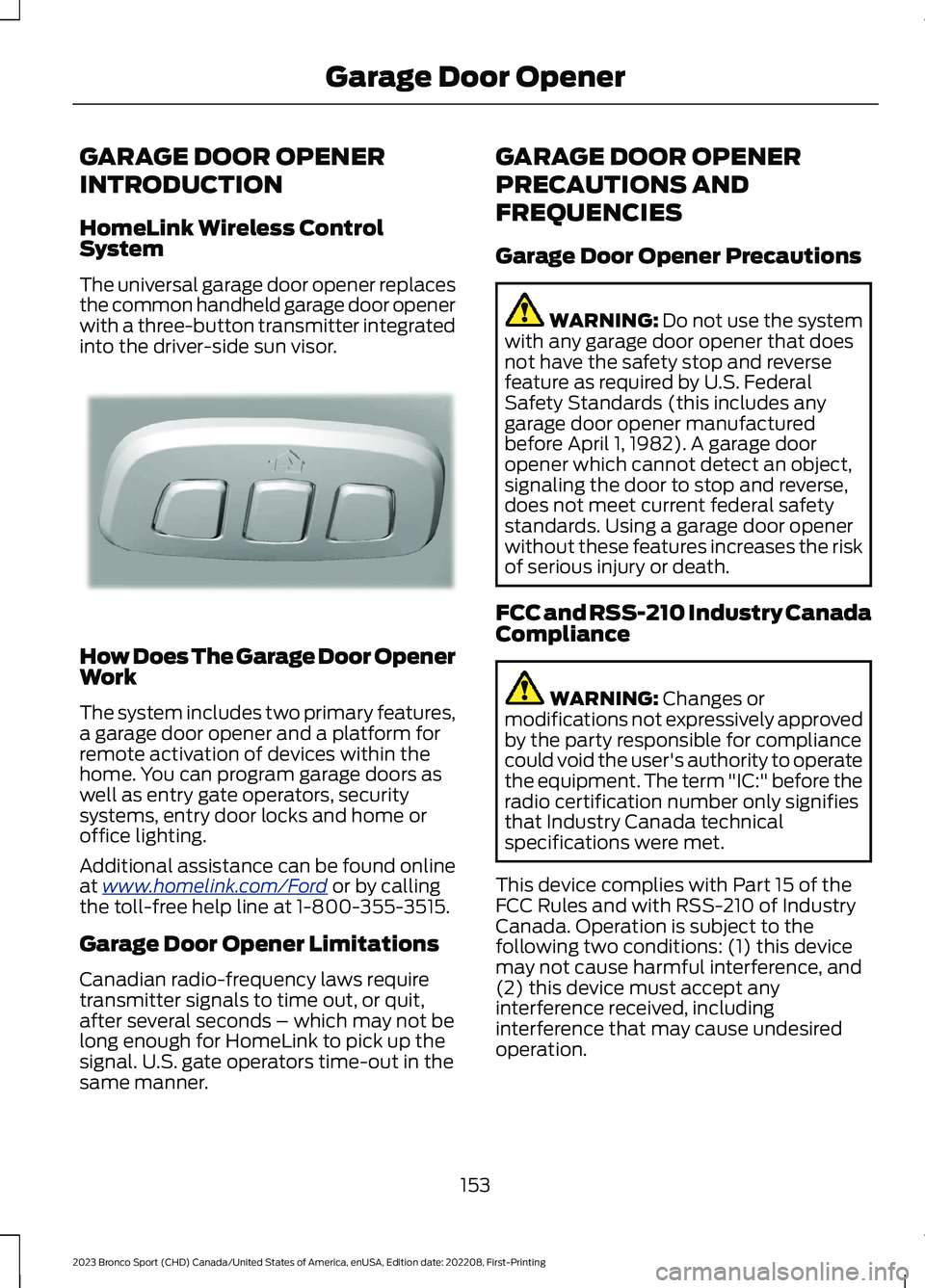
The universal garage door opener replacesthe common handheld garage door openerwith a three-button transmitter integratedinto the driver-side sun visor.
How Does The Garage Door OpenerWork
The system includes two primary features,a garage door opener and a platform forremote activation of devices within thehome. You can program garage doors aswell as entry gate operators, securitysystems, entry door locks and home oroffice lighting.
Additional assistance can be found onlineat www.homelink.com/Ford or by callingthe toll-free help line at 1-800-355-3515.
Garage Door Opener Limitations
Canadian radio-frequency laws requiretransmitter signals to time out, or quit,after several seconds – which may not belong enough for HomeLink to pick up thesignal. U.S. gate operators time-out in thesame manner.
GARAGE DOOR OPENER
PRECAUTIONS AND
FREQUENCIES
Garage Door Opener Precautions
WARNING: Do not use the systemwith any garage door opener that doesnot have the safety stop and reversefeature as required by U.S. FederalSafety Standards (this includes anygarage door opener manufacturedbefore April 1, 1982). A garage dooropener which cannot detect an object,signaling the door to stop and reverse,does not meet current federal safetystandards. Using a garage door openerwithout these features increases the riskof serious injury or death.
FCC and RSS-210 Industry CanadaCompliance
WARNING: Changes ormodifications not expressively approvedby the party responsible for compliancecould void the user's authority to operatethe equipment. The term "IC:" before theradio certification number only signifiesthat Industry Canada technicalspecifications were met.
This device complies with Part 15 of theFCC Rules and with RSS-210 of IndustryCanada. Operation is subject to thefollowing two conditions: (1) this devicemay not cause harmful interference, and(2) this device must accept anyinterference received, includinginterference that may cause undesiredoperation.
153
2023 Bronco Sport (CHD) Canada/United States of America, enUSA, Edition date: 202208, First-PrintingGarage Door OpenerE188211
Page 159 of 516
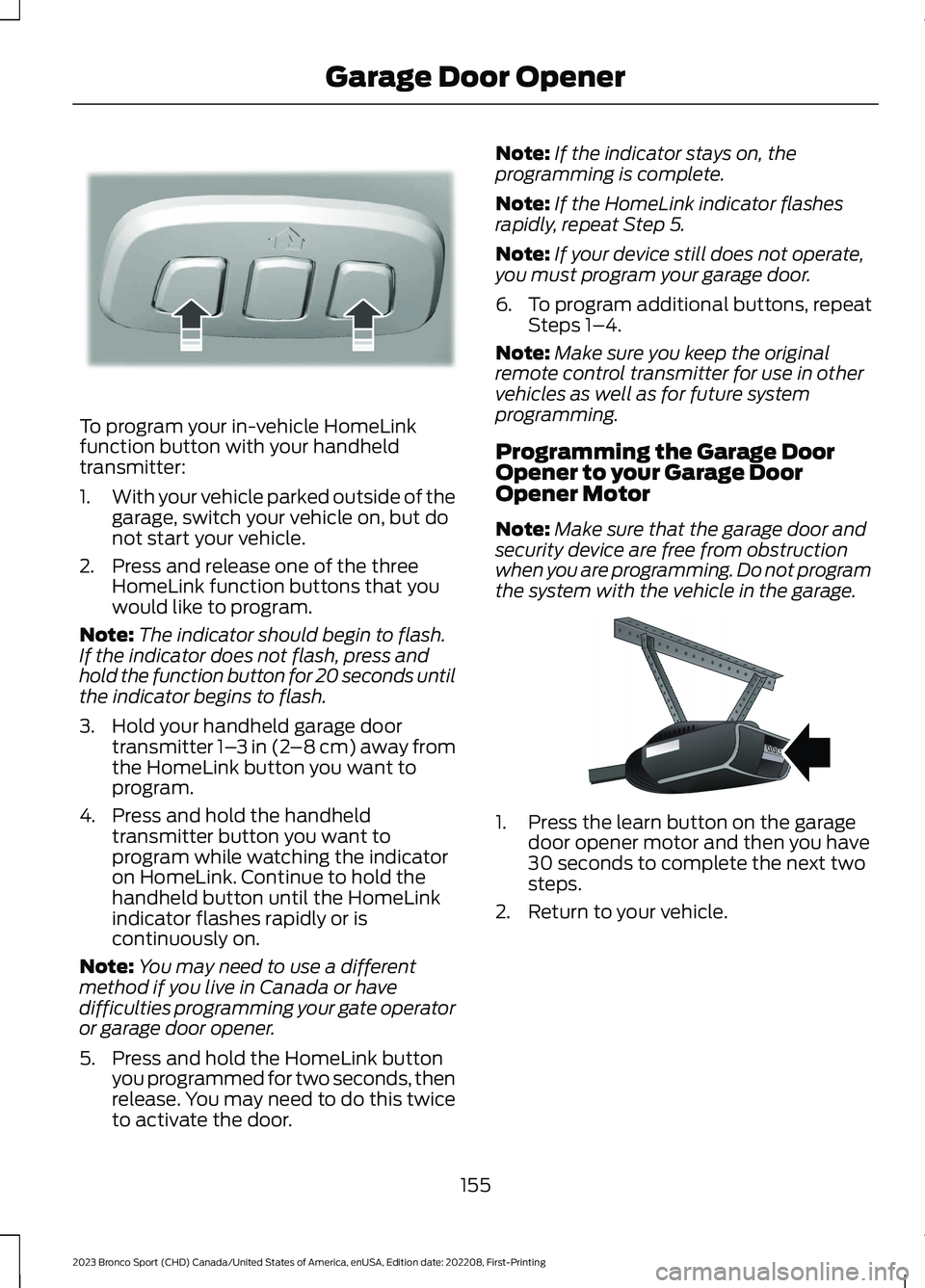
To program your in-vehicle HomeLinkfunction button with your handheldtransmitter:
1.With your vehicle parked outside of thegarage, switch your vehicle on, but donot start your vehicle.
2.Press and release one of the threeHomeLink function buttons that youwould like to program.
Note:The indicator should begin to flash.If the indicator does not flash, press andhold the function button for 20 seconds untilthe indicator begins to flash.
3.Hold your handheld garage doortransmitter 1–3 in (2–8 cm) away fromthe HomeLink button you want toprogram.
4.Press and hold the handheldtransmitter button you want toprogram while watching the indicatoron HomeLink. Continue to hold thehandheld button until the HomeLinkindicator flashes rapidly or iscontinuously on.
Note:You may need to use a differentmethod if you live in Canada or havedifficulties programming your gate operatoror garage door opener.
5.Press and hold the HomeLink buttonyou programmed for two seconds, thenrelease. You may need to do this twiceto activate the door.
Note:If the indicator stays on, theprogramming is complete.
Note:If the HomeLink indicator flashesrapidly, repeat Step 5.
Note:If your device still does not operate,you must program your garage door.
6.To program additional buttons, repeatSteps 1–4.
Note:Make sure you keep the originalremote control transmitter for use in othervehicles as well as for future systemprogramming.
Programming the Garage DoorOpener to your Garage DoorOpener Motor
Note:Make sure that the garage door andsecurity device are free from obstructionwhen you are programming. Do not programthe system with the vehicle in the garage.
1.Press the learn button on the garagedoor opener motor and then you have30 seconds to complete the next twosteps.
2.Return to your vehicle.
155
2023 Bronco Sport (CHD) Canada/United States of America, enUSA, Edition date: 202208, First-PrintingGarage Door OpenerE188213 E142659
Page 166 of 516
WHAT IS THE WIRELESS
ACCESSORY CHARGER
The wireless accessory charger allows youto charge one compatible Qi wirelesscharging device on the charging area.
WIRELESS ACCESSORY
CHARGER PRECAUTIONS
WARNING: Wireless chargingdevices can affect the operation ofimplanted medical devices, includingcardiac pacemakers. If you have anyimplanted medical devices, werecommend that you consult with yourphysician.
Keep the charging area clean and removeforeign objects prior to charging a device.
Do not place items with a magnetic stripor radio-frequency identification chip, forexample passports, parking tickets,transportation passes or credit cards, nearthe charging area when charging a device.Damage could occur to the magnetic stripor radio-frequency identification chip.
Do not place metal objects, for exampleremote controls, coins and candywrappers, on or near the charging areawhen charging a device. Metal objects mayheat up and degrade the chargingperformance, in addition to causinginterruptions in charging.
Charging could be interrupted, degraded,or could stop if any of the following occur:
•The system detects a foreign object.
•The device is misaligned on thecharging area.
•The device moves on the activecharging area when the vehicle is inmotion.
•The vehicle ambient temperature is toohigh.
•You attempt to charge a non-Qicompatible device on the wirelesscharger.
Note:During charging, the device and thecharger could heat up, this is normal. If thebattery gets hotter than usual, the devicemay stop charging.
LOCATING THE WIRELESS
ACCESSORY CHARGER
The charging area is on thecenter console or in the mediabin below the instrument panel.
CHARGING A WIRELESS
DEVICE
Place the device on the center of thecharging surface with the charging sidedown. The charging stops after your devicereaches a full charge.
You can use the charger when the vehicleis in accessory mode, when the vehicle isrunning, or when SYNC is on.
Displays on the status bar whenwireless charging is in progress.
Note:The charging performance may beaffected if your device is in a case. It may benecessary to remove the case to wirelesslycharge your device.
Note:Software and firmware updates mayaffect device compatibility, including theuse of unofficial software or firmware. Youshould verify charging functionality with yourspecific devices in-vehicle.
162
2023 Bronco Sport (CHD) Canada/United States of America, enUSA, Edition date: 202208, First-PrintingWireless Accessory Charger (If Equipped)E297549 E263583
Page 187 of 516
Park (P)
WARNING: Shift into park (P) onlywhen your vehicle is stationary.
In park (P) power is not transmitted to thedriven wheels.
Note:A tone sounds if you attempt to exityour vehicle without the vehicle in park (P).
Note:Your vehicle may not shift out of park(P) if the 12 V battery has run out of charge.
Note:Your vehicle may not shift out of park(P) if a fuse is blown.
Note:Your vehicle may not shift out of park(P) unless the key or remote control is insideyour vehicle.
Note:The electronic parking brake couldapply when you power your vehicle on withthe selector in park (P).
Note:The electronic parking brake couldapply if you shift to park (P) without fullypressing the brake pedal.
Note:The electronic parking brake couldapply if you shift to park (P) on a slope.
Note:Do not manually release the parkingbrake when the selector is in park (P).
Note:Your vehicle could shift into park (P)if you attempt to exit your vehicle withoutthe vehicle in park (P). See How DoesAutomatic Return to Park (P) Work.
Note:A tone could sound when you selectpark (P).
Automatic Return to Park
What is Automatic Return to Park (P)
Your vehicle shifts into park (P) if youattempt to exit your vehicle without thetransmission in park (P).
How Does Automatic Return to Park (P)Work
Your vehicle shifts into park (P) when yourvehicle is stationary and any of thefollowing occur:
•You switch the vehicle off.
•You open the driver door with the driverseatbelt unfastened.
•You unfasten the driver seatbelt whenthe driver door is open.
Note:Do not use automatic return to park(P) when your vehicle is moving, except inan emergency. See Starting and Stoppingthe Engine (page 165).
Automatic Return to Park (P) Limitations
Automatic return to park (P) may not workif the door ajar sensor or seatbelt sensorare malfunctioning.
See an authorized dealer if any of thefollowing occur:
•Seatbelt indicator illuminates or tonesounds with the seatbelt fastened.
•Door ajar indicator does not illuminatewith the driver door open.
•Door ajar indicator illuminates with thedriver door closed.
•Transmission not in park messageappears, with the driver door closed,after you shift out of park (P).
Reverse (R)
WARNING: Shift into reverse (R)only when your vehicle is stationary.
In reverse (R) power is transmitted to thedriven wheels.
183
2023 Bronco Sport (CHD) Canada/United States of America, enUSA, Edition date: 202208, First-PrintingTransmission
Page 276 of 516
POST-CRASH ALERT SYSTEM
The system flashes the direction indicatorsand sounds the horn (intermittently) in theevent of a serious impact that deploys anairbag (front, side, side curtain or SafetyCanopy) or the seatbelt pretensioners.
The horn and indicators turn off when:
•You press the hazard control button.
•You press the panic button on theremote entry transmitter (if equipped).
•Your vehicle runs out of power.
•Sounding of the horn is only enabledin specific markets.
TRANSPORTING THE VEHICLE
If you need to have your vehicle towed,contact a professional towing service or,if you are a member of a roadsideassistance program, your roadsideassistance service provider.
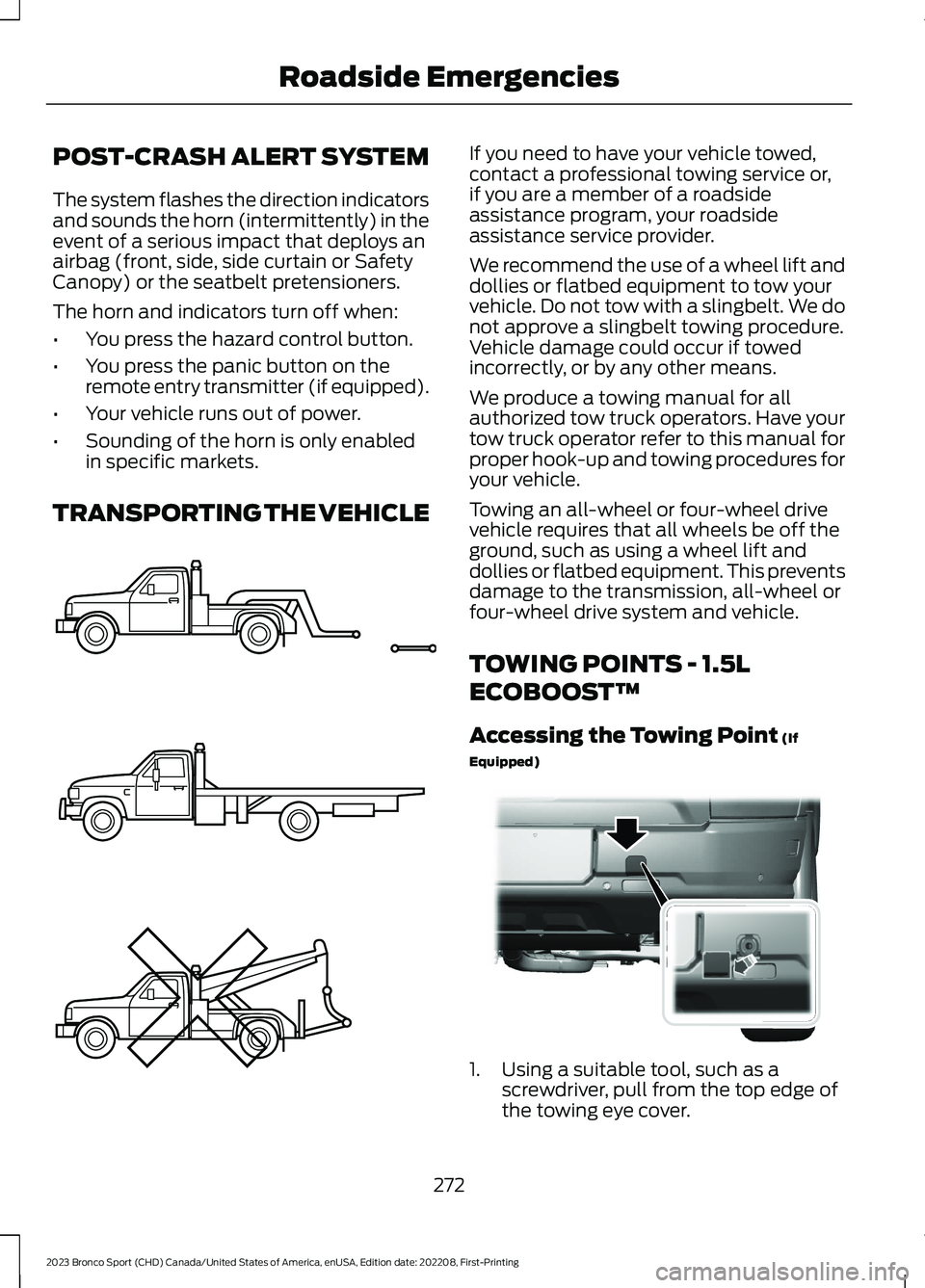
We recommend the use of a wheel lift anddollies or flatbed equipment to tow yourvehicle. Do not tow with a slingbelt. We donot approve a slingbelt towing procedure.Vehicle damage could occur if towedincorrectly, or by any other means.
We produce a towing manual for allauthorized tow truck operators. Have yourtow truck operator refer to this manual forproper hook-up and towing procedures foryour vehicle.
Towing an all-wheel or four-wheel drivevehicle requires that all wheels be off theground, such as using a wheel lift anddollies or flatbed equipment. This preventsdamage to the transmission, all-wheel orfour-wheel drive system and vehicle.
TOWING POINTS - 1.5L
ECOBOOST™
Accessing the Towing Point (If
Equipped)
1.Using a suitable tool, such as ascrewdriver, pull from the top edge ofthe towing eye cover.
272
2023 Bronco Sport (CHD) Canada/United States of America, enUSA, Edition date: 202208, First-PrintingRoadside EmergenciesE143886 E331356
Page 327 of 516
WARNING: Only usereplacement tires and wheelsthat are the same size, loadindex, speed rating and type(such as P-metric versusLT-metric or all-season versusall-terrain) as those originallyprovided by Ford. Therecommended tire and wheelsize may be found on either theSafety Compliance CertificationLabel (affixed to either the doorhinge pillar, door-latch post, orthe door edge that meets thedoor-latch post, next to thedriver's seating position), or theTire Label which is located onthe B-Pillar or edge of thedriver's door. If this informationis not found on these labels, thenyou should contact yourauthorized dealer as soon aspossible. Use of any tire or wheelnot recommended by Ford canaffect the safety andperformance of your vehicle,which could result in anincreased risk of loss of vehiclecontrol, vehicle rollover, personalinjury and death.
WARNING: To reduce therisk of serious injury, whenmounting replacement tires andwheels, you should not exceedthe maximum pressure indicatedon the sidewall of the tire to setthe beads without additionalprecautions listed below. If thebeads do not seat at themaximum pressure indicated,re-lubricate and try again.
WARNING: For a mountingpressure more than 20 psi(1.38 bar) greater than themaximum pressure, a Forddealer or other tire serviceprofessional should do themounting.
WARNING: Always inflatesteel carcass tires with a remoteair fill with the person inflatingstanding at a minimum of 12 ft(3.66 m) away from the wheeland tire assembly.
WARNING: When inflatingthe tire for mounting pressuresup to 20 psi (1.38 bar) greaterthan the maximum pressure onthe tire sidewall, the followingprecautions must be taken toprotect the person mounting thetire:
•Make sure that you have thecorrect tire and wheel size.
•Lubricate the tire bead andwheel bead seat area again.
323
2023 Bronco Sport (CHD) Canada/United States of America, enUSA, Edition date: 202208, First-PrintingWheels and Tires