warning FORD C MAX ENERGI 2016 Workshop Manual
[x] Cancel search | Manufacturer: FORD, Model Year: 2016, Model line: C MAX ENERGI, Model: FORD C MAX ENERGI 2016Pages: 395, PDF Size: 6.78 MB
Page 96 of 395
GENERAL INFORMATION
WARNING
Driving while distracted can result inloss of vehicle control, crash andinjury. We strongly recommend thatyou use extreme caution when using anydevice that may take your focus off theroad. Your primary responsibility is the safeoperation of your vehicle. We recommendagainst the use of any hand-held devicewhile driving and encourage the use ofvoice-operated systems when possible.Make sure you are aware of all applicablelocal laws that may affect the use ofelectronic devices while driving.
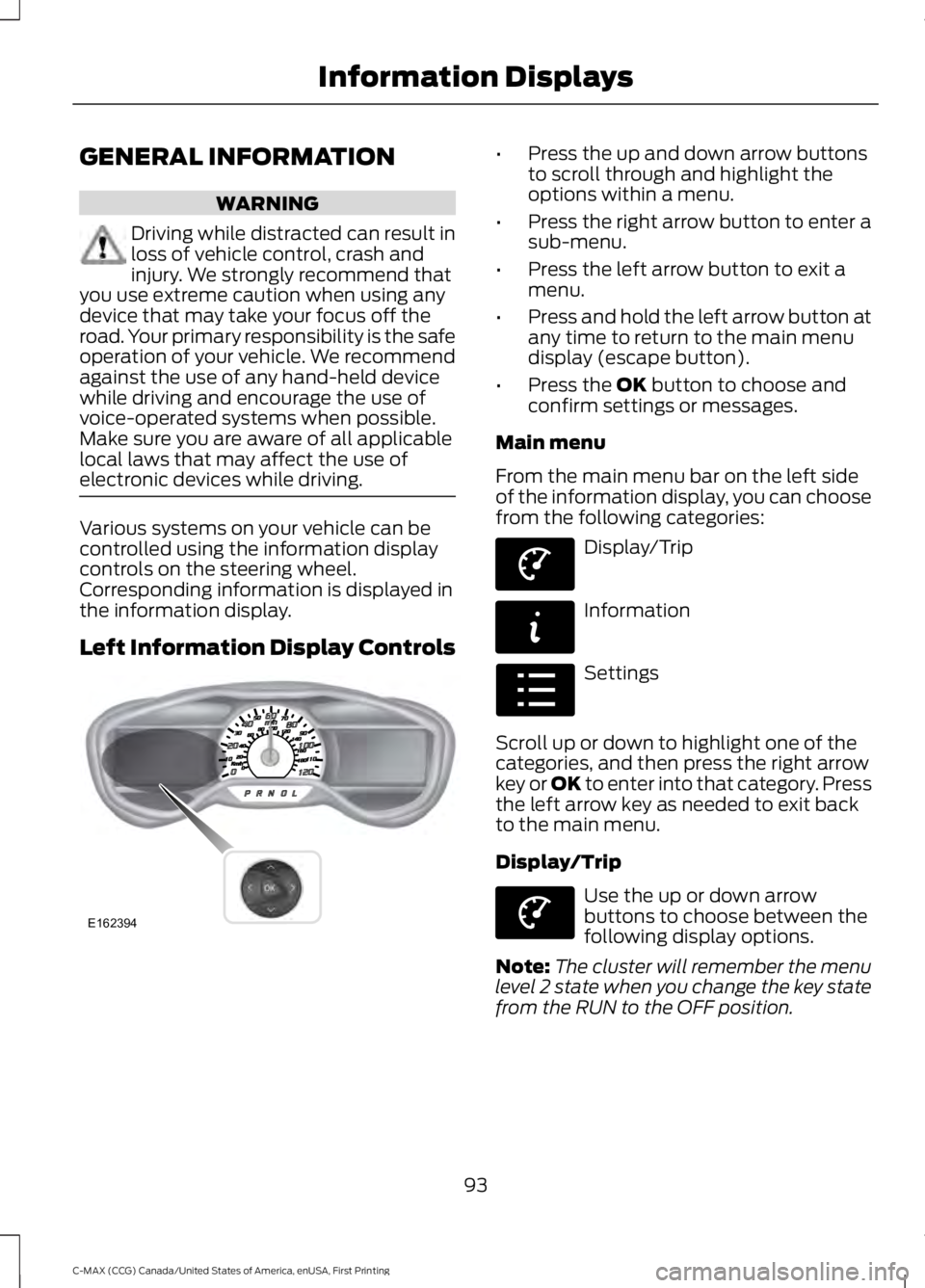
Various systems on your vehicle can becontrolled using the information displaycontrols on the steering wheel.Corresponding information is displayed inthe information display.
Left Information Display Controls
•Press the up and down arrow buttonsto scroll through and highlight theoptions within a menu.
•Press the right arrow button to enter asub-menu.
•Press the left arrow button to exit amenu.
•Press and hold the left arrow button atany time to return to the main menudisplay (escape button).
•Press the OK button to choose andconfirm settings or messages.
Main menu
From the main menu bar on the left sideof the information display, you can choosefrom the following categories:
Display/Trip
Information
Settings
Scroll up or down to highlight one of thecategories, and then press the right arrowkey or OK to enter into that category. Pressthe left arrow key as needed to exit backto the main menu.
Display/Trip
Use the up or down arrowbuttons to choose between thefollowing display options.
Note:The cluster will remember the menulevel 2 state when you change the key statefrom the RUN to the OFF position.
93
C-MAX (CCG) Canada/United States of America, enUSA, First Printing
Information DisplaysE162394 E144639 E144642 E100023 E144639
Page 100 of 395
Fuel Economy (Energi only)
This display is only available in HybridMode. In Plug-in Power Mode the displaychanges to Miles (or km)/Full Charge.
An Instant Fuel Economy gauge is providedalong with Avg Fuel Economy. Whileviewing this screen you can reset youraverage fuel economy by pressing andholding the OK button on the left handsteering wheel controls. For moreinformation see Common Displays in thischapter.
Trip 1 & 2
Provides trip odometer, trip average fueleconomy and trip timer.
Distance traveled on battery power onlywith the engine off is shown in blue nextto total trip distance.
For Energi vehicles total plug-in electricityused in kilowatt hours (kWh) is shown inblue next to trip average fuel economy.
Info
In this mode, you can viewdifferent vehicle systeminformation and perform asystem check.
Information
Displays a number of different system tutorials. Use the up/downarrows to scroll through the tutorials. Then press OK to view.Tutorial
MyKeys (Number of MyKeys programmed)MyKey
MyKey Miles (km) (Distance traveled using a programmed MyKey)
Admin Keys (Number of admin keys)
All active warnings will display first if applicable. The system checkmenu may appear different based upon equipment options andcurrent vehicle status. Use the up/down arrow buttons to scrollthrough the list.
System Check
Settings
In this mode, you can configuredifferent driver setting choices.
Note:Some items are optional and may not appear.
Note:Some MyKey items will only appear if a MyKey is set.
97
C-MAX (CCG) Canada/United States of America, enUSA, First Printing
Information DisplaysE144642 E100023
Page 102 of 395
Settings
—Choosedesired speedor off
Max Speed
—Choosedesired speedor off
SpeedWarning
—On or OffVolumeLimiter
—Hold OK toClear AllMyKeys
Clear MyKeys
—Select thedesiredlanguage
LanguageDisplay
Select the desired units of measureDistanceUnits
Fahrenheit (°F) or Celsius (°C)Temperature
—On or OffBrake Coach
—On or OffRegen Active
—On or OffCharge Assist
—Hold OK toResetDriving History
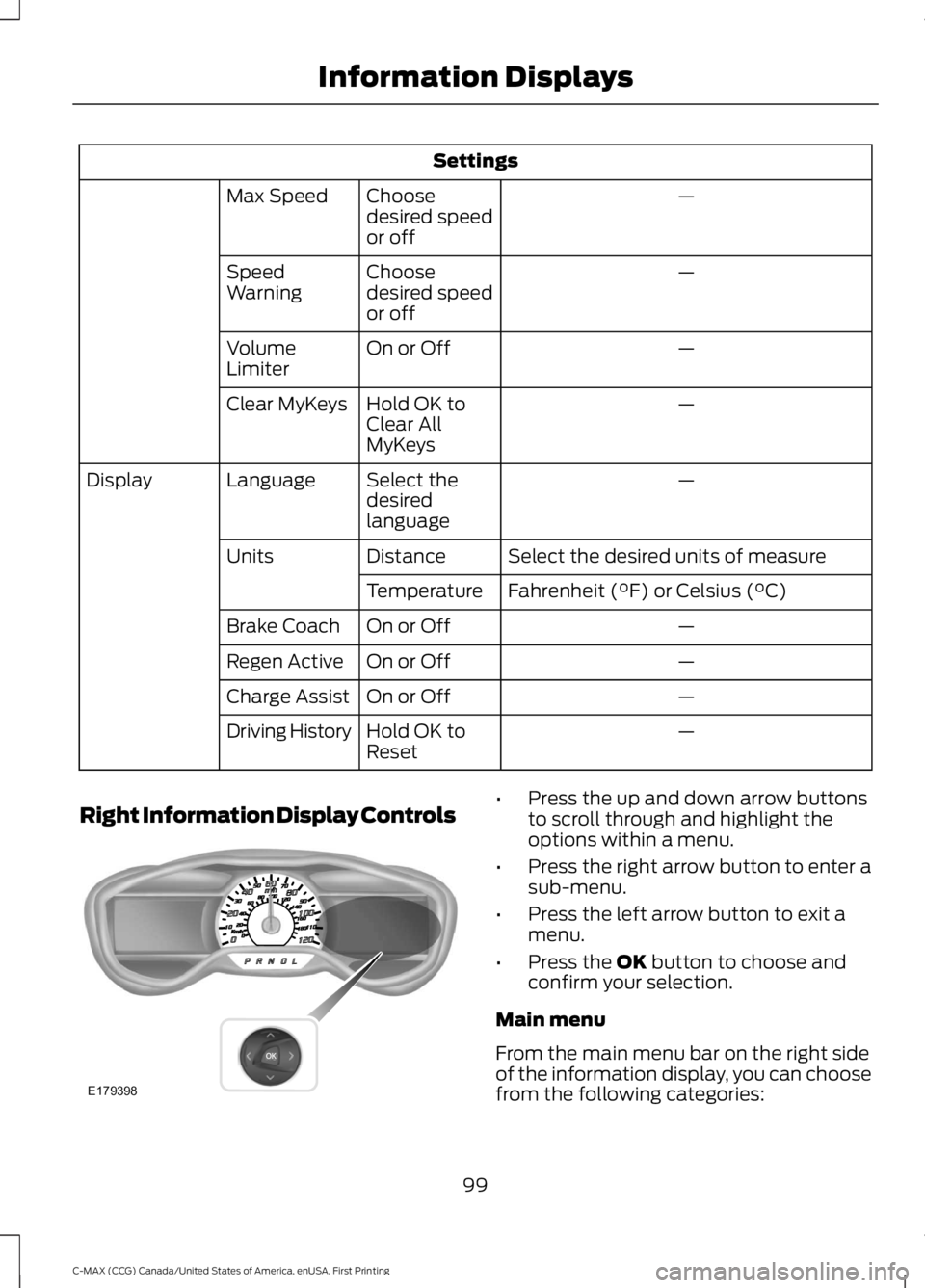
Right Information Display Controls•Press the up and down arrow buttonsto scroll through and highlight theoptions within a menu.
•Press the right arrow button to enter asub-menu.
•Press the left arrow button to exit amenu.
•Press the OK button to choose andconfirm your selection.
Main menu
From the main menu bar on the right sideof the information display, you can choosefrom the following categories:
99
C-MAX (CCG) Canada/United States of America, enUSA, First Printing
Information DisplaysE179398
Page 108 of 395
Maintenance
ActionMessage
Stop the vehicle as soon as safely possible, turn off the engine.Check the oil level. If the warning stays on or continues tocome on with your engine running, contact your authorizeddealer as soon as possible.
Low Engine Oil Pressure
Displayed when the engine oil life remaining is 10% or less.See Engine Oil Check (page 222).Change Engine Oil Soon
Displayed when the oil life left reaches 0%. See Engine OilCheck (page 222).Oil Change Required
Indicates the brake fluid level is low and the brake systemshould be inspected immediately. See Brake Fluid Check(page 227).
Brake Fluid Level Low
Displays when the brake system needs servicing. Stop thevehicle in a safe place. Contact your authorized dealer.Check Brake System
Displays when the engine coolant temperature is excessivelyhigh.Engine Coolant OverTemperature
Displays when the motor coolant temperature is excessivelyhigh.Motor Coolant OverTemperature
Displayed when the kit needs service. See your authorizeddealer.Service Tire Mobility Kit
Informs the driver that the powertrain needs service due to apowertrain malfunction.See Manual
Displays when EV functionality is disabled and the engine isrunning to maintain oil quality. See Plug-In Hybrid VehicleOperation (page 137).
Engine ON Due to LowUse Normal Operation
MyKey
ActionMessage
Displayed during key programming when MyKey cannot beprogrammed.MyKey not Created
Displays when MyKey is active.MyKey Active DriveSafely
Displays when a MyKey is in use and the MyKey speed limit ison and the vehicle speed is approaching 80 mph (130 km/h).Near Vehicle Top Speed
105
C-MAX (CCG) Canada/United States of America, enUSA, First Printing
Information Displays
Page 109 of 395
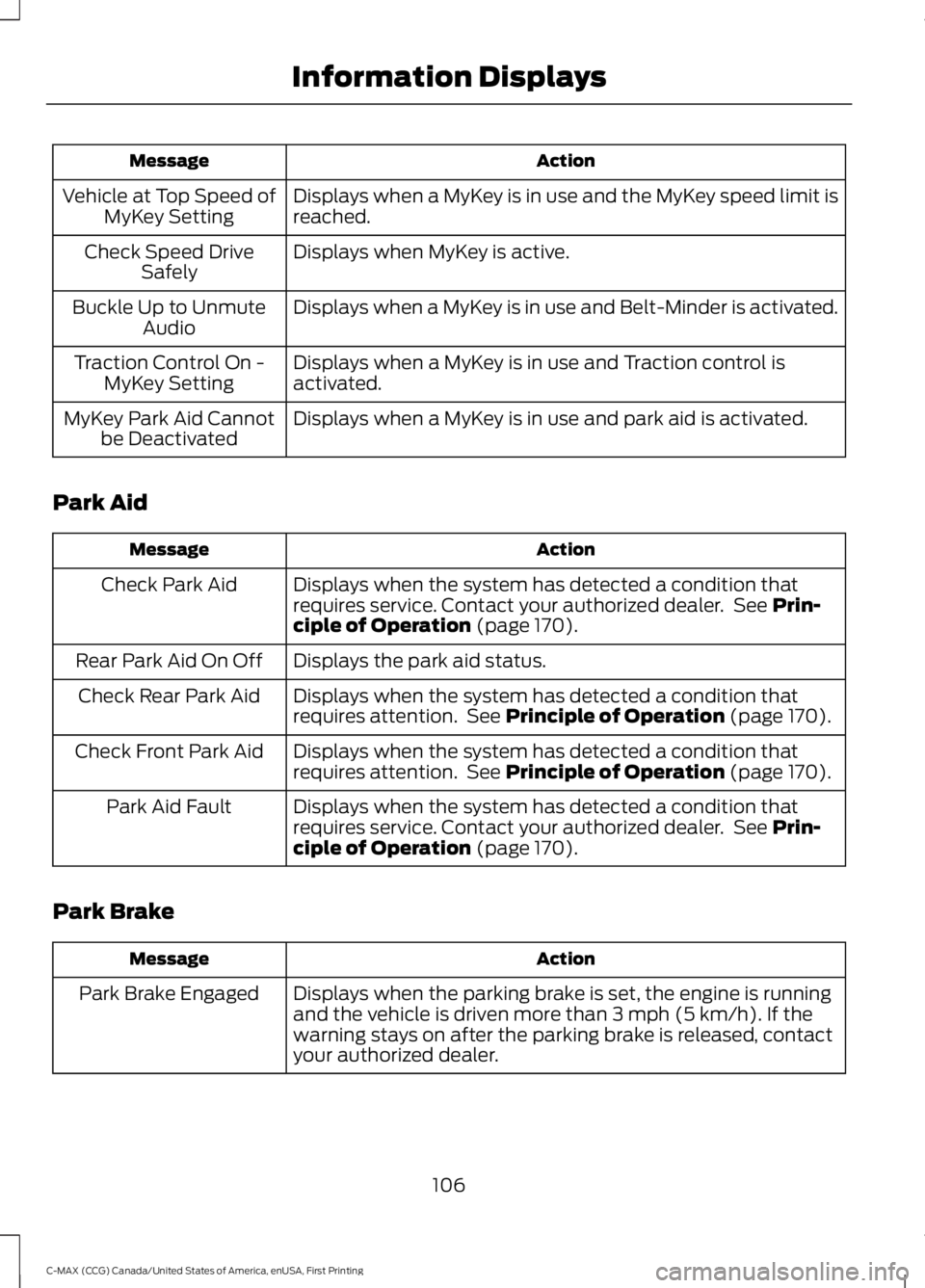
ActionMessage
Displays when a MyKey is in use and the MyKey speed limit isreached.Vehicle at Top Speed ofMyKey Setting
Displays when MyKey is active.Check Speed DriveSafely
Displays when a MyKey is in use and Belt-Minder is activated.Buckle Up to UnmuteAudio
Displays when a MyKey is in use and Traction control isactivated.Traction Control On -MyKey Setting
Displays when a MyKey is in use and park aid is activated.MyKey Park Aid Cannotbe Deactivated
Park Aid
ActionMessage
Displays when the system has detected a condition thatrequires service. Contact your authorized dealer. See Prin-ciple of Operation (page 170).
Check Park Aid
Displays the park aid status.Rear Park Aid On Off
Displays when the system has detected a condition thatrequires attention. See Principle of Operation (page 170).Check Rear Park Aid
Displays when the system has detected a condition thatrequires attention. See Principle of Operation (page 170).Check Front Park Aid
Displays when the system has detected a condition thatrequires service. Contact your authorized dealer. See Prin-ciple of Operation (page 170).
Park Aid Fault
Park Brake
ActionMessage
Displays when the parking brake is set, the engine is runningand the vehicle is driven more than 3 mph (5 km/h). If thewarning stays on after the parking brake is released, contactyour authorized dealer.
Park Brake Engaged
106
C-MAX (CCG) Canada/United States of America, enUSA, First Printing
Information Displays
Page 110 of 395
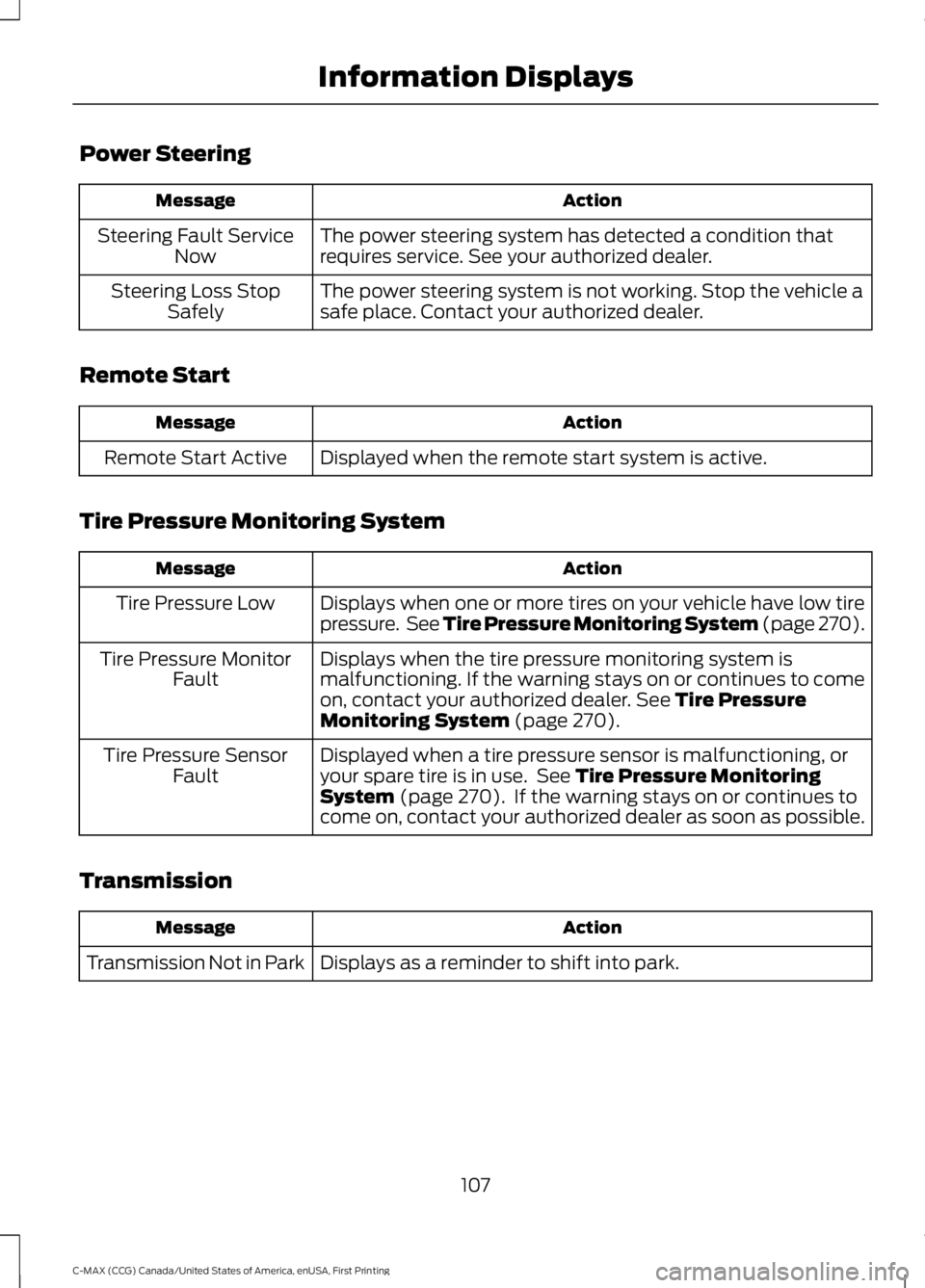
Power Steering
ActionMessage
The power steering system has detected a condition thatrequires service. See your authorized dealer.Steering Fault ServiceNow
The power steering system is not working. Stop the vehicle asafe place. Contact your authorized dealer.Steering Loss StopSafely
Remote Start
ActionMessage
Displayed when the remote start system is active.Remote Start Active
Tire Pressure Monitoring System
ActionMessage
Displays when one or more tires on your vehicle have low tirepressure. See Tire Pressure Monitoring System (page 270).Tire Pressure Low
Displays when the tire pressure monitoring system ismalfunctioning. If the warning stays on or continues to comeon, contact your authorized dealer. See Tire PressureMonitoring System (page 270).
Tire Pressure MonitorFault
Displayed when a tire pressure sensor is malfunctioning, oryour spare tire is in use. See Tire Pressure MonitoringSystem (page 270). If the warning stays on or continues tocome on, contact your authorized dealer as soon as possible.
Tire Pressure SensorFault
Transmission
ActionMessage
Displays as a reminder to shift into park.Transmission Not in Park
107
C-MAX (CCG) Canada/United States of America, enUSA, First Printing
Information Displays
Page 112 of 395
Air distribution control: Adjust to turn airflow from the windshield, instrumentpanel, or footwell vents on or off. You can distribute air through the followingcombinations: windshield, windshield/floor, panel, panel/floor, and floor.
G
A/C: Press to switch the air conditioning on or off. Air conditioning cools yourvehicle using outside air. To improve the time to reach a comfortabletemperature in hot weather, drive with the windows open until you feel cold airthrough the air vents.
H
Note: In certain conditions (for example, maximum defrost), the air conditioningcompressor may continue to operate even though the air conditioning isswitched off.
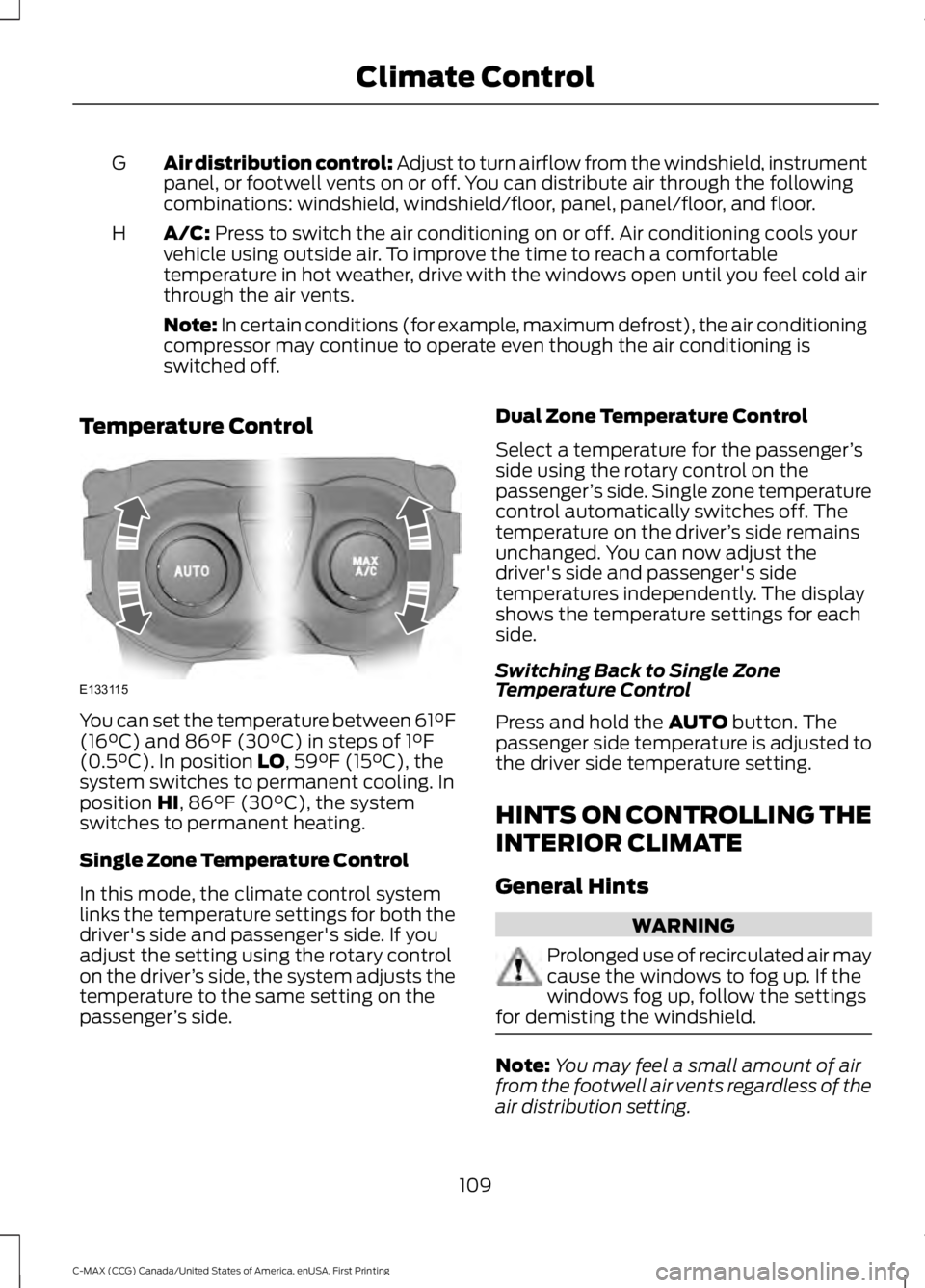
Temperature Control
You can set the temperature between 61°F(16°C) and 86°F (30°C) in steps of 1°F(0.5°C). In position LO, 59°F (15°C), thesystem switches to permanent cooling. Inposition HI, 86°F (30°C), the systemswitches to permanent heating.
Single Zone Temperature Control
In this mode, the climate control systemlinks the temperature settings for both thedriver's side and passenger's side. If youadjust the setting using the rotary controlon the driver’s side, the system adjusts thetemperature to the same setting on thepassenger’s side.
Dual Zone Temperature Control
Select a temperature for the passenger’sside using the rotary control on thepassenger’s side. Single zone temperaturecontrol automatically switches off. Thetemperature on the driver’s side remainsunchanged. You can now adjust thedriver's side and passenger's sidetemperatures independently. The displayshows the temperature settings for eachside.
Switching Back to Single ZoneTemperature Control
Press and hold the AUTO button. Thepassenger side temperature is adjusted tothe driver side temperature setting.
HINTS ON CONTROLLING THE
INTERIOR CLIMATE
General Hints
WARNING
Prolonged use of recirculated air maycause the windows to fog up. If thewindows fog up, follow the settingsfor demisting the windshield.
Note:You may feel a small amount of airfrom the footwell air vents regardless of theair distribution setting.
109
C-MAX (CCG) Canada/United States of America, enUSA, First Printing
Climate ControlE133115
Page 116 of 395
SITTING IN THE CORRECT
POSITION
WARNINGS
Sitting improperly, out of position orwith the seatback reclined too farcan take weight off the seat cushionand affect the decision of the passengersensing system, resulting in serious injuryor death in the event of a crash. Always situpright against your seat back, with yourfeet on the floor.
Do not recline the seatback as thiscan cause the occupant to slideunder the safety belt, resulting inserious injury in the event of a crash.
Do not place objects higher than theseatback to reduce the risk of seriousinjury in the event of a crash or duringheavy braking.
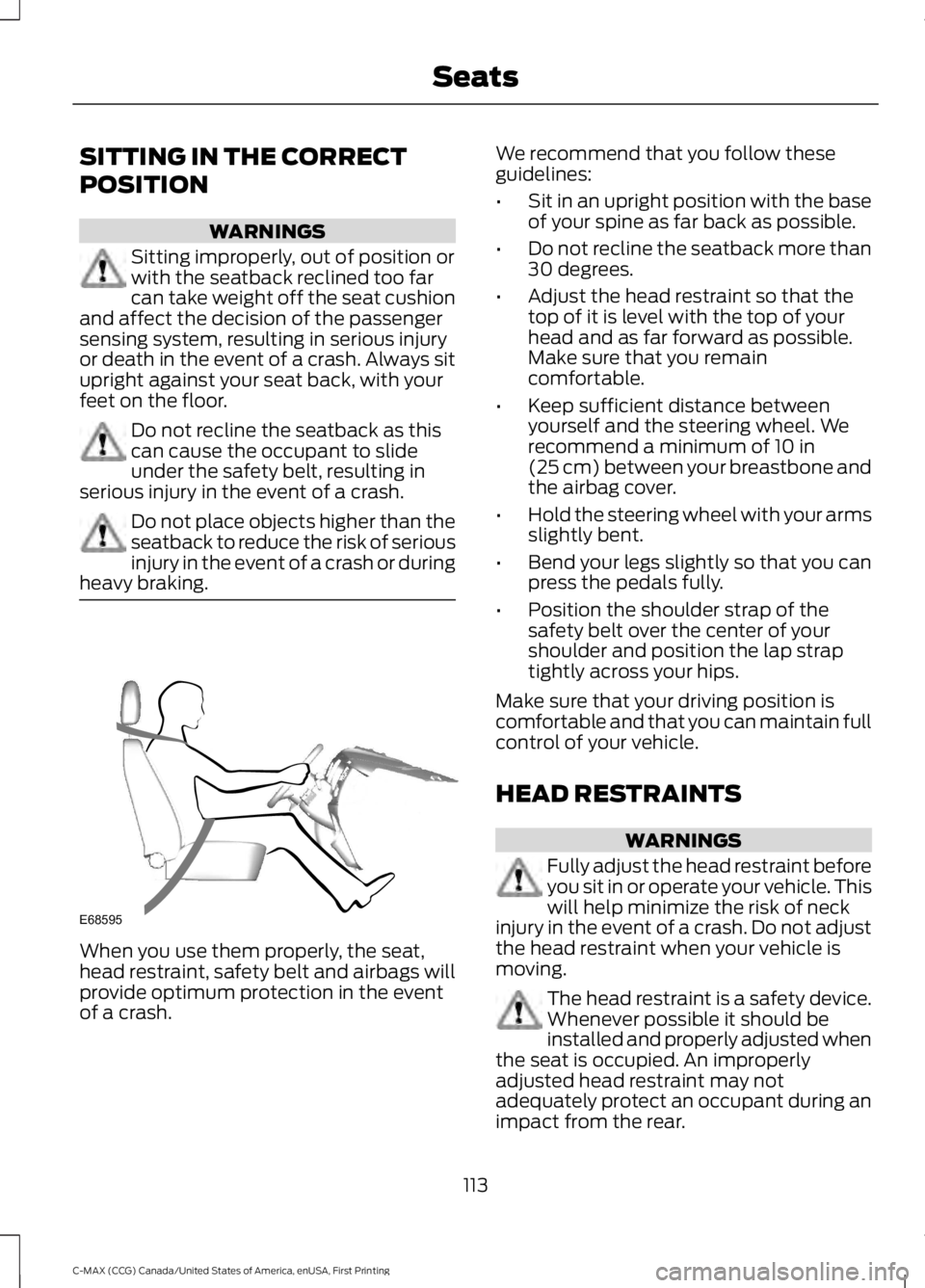
When you use them properly, the seat,head restraint, safety belt and airbags willprovide optimum protection in the eventof a crash.
We recommend that you follow theseguidelines:
•Sit in an upright position with the baseof your spine as far back as possible.
•Do not recline the seatback more than30 degrees.
•Adjust the head restraint so that thetop of it is level with the top of yourhead and as far forward as possible.Make sure that you remaincomfortable.
•Keep sufficient distance betweenyourself and the steering wheel. Werecommend a minimum of 10 in(25 cm) between your breastbone andthe airbag cover.
•Hold the steering wheel with your armsslightly bent.
•Bend your legs slightly so that you canpress the pedals fully.
•Position the shoulder strap of thesafety belt over the center of yourshoulder and position the lap straptightly across your hips.
Make sure that your driving position iscomfortable and that you can maintain fullcontrol of your vehicle.
HEAD RESTRAINTS
WARNINGS
Fully adjust the head restraint beforeyou sit in or operate your vehicle. Thiswill help minimize the risk of neckinjury in the event of a crash. Do not adjustthe head restraint when your vehicle ismoving.
The head restraint is a safety device.Whenever possible it should beinstalled and properly adjusted whenthe seat is occupied. An improperlyadjusted head restraint may notadequately protect an occupant during animpact from the rear.
113
C-MAX (CCG) Canada/United States of America, enUSA, First Printing
SeatsE68595
Page 117 of 395
WARNINGS
Install the head restraint properly tohelp minimize the risk of neck injuryin the event of a crash.
Note:Adjust the seatback to an uprightdriving position before adjusting the headrestraint. Adjust the head restraint so thatthe top of it is level with the top of your headand as far forward as possible. Make surethat you remain comfortable. If you areextremely tall, adjust the head restraint toits highest position.
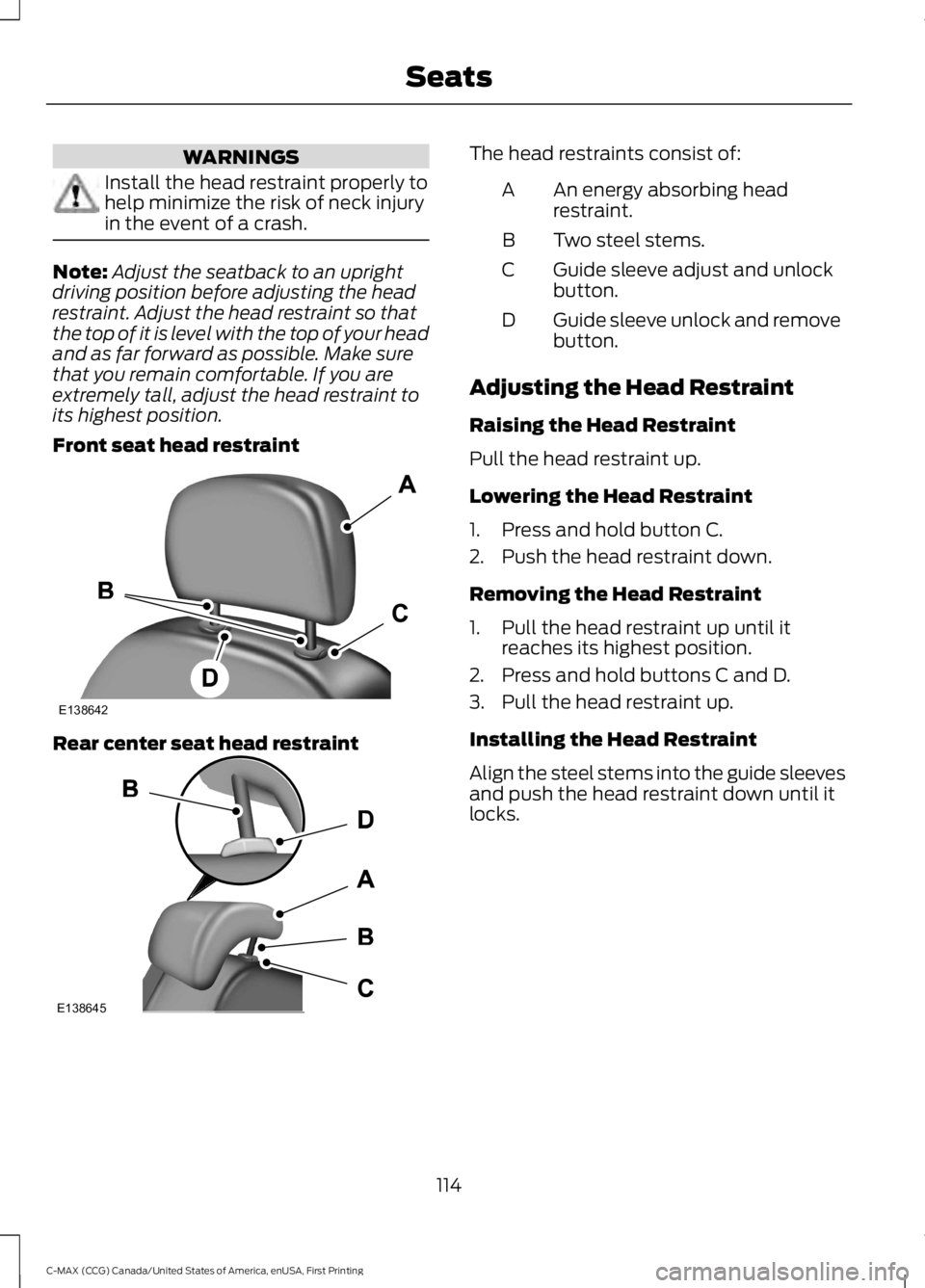
Front seat head restraint
Rear center seat head restraint
The head restraints consist of:
An energy absorbing headrestraint.A
Two steel stems.B
Guide sleeve adjust and unlockbutton.C
Guide sleeve unlock and removebutton.D
Adjusting the Head Restraint
Raising the Head Restraint
Pull the head restraint up.
Lowering the Head Restraint
1. Press and hold button C.
2. Push the head restraint down.
Removing the Head Restraint
1. Pull the head restraint up until itreaches its highest position.
2. Press and hold buttons C and D.
3. Pull the head restraint up.
Installing the Head Restraint
Align the steel stems into the guide sleevesand push the head restraint down until itlocks.
114
C-MAX (CCG) Canada/United States of America, enUSA, First Printing
SeatsE138642 E138645
Page 118 of 395
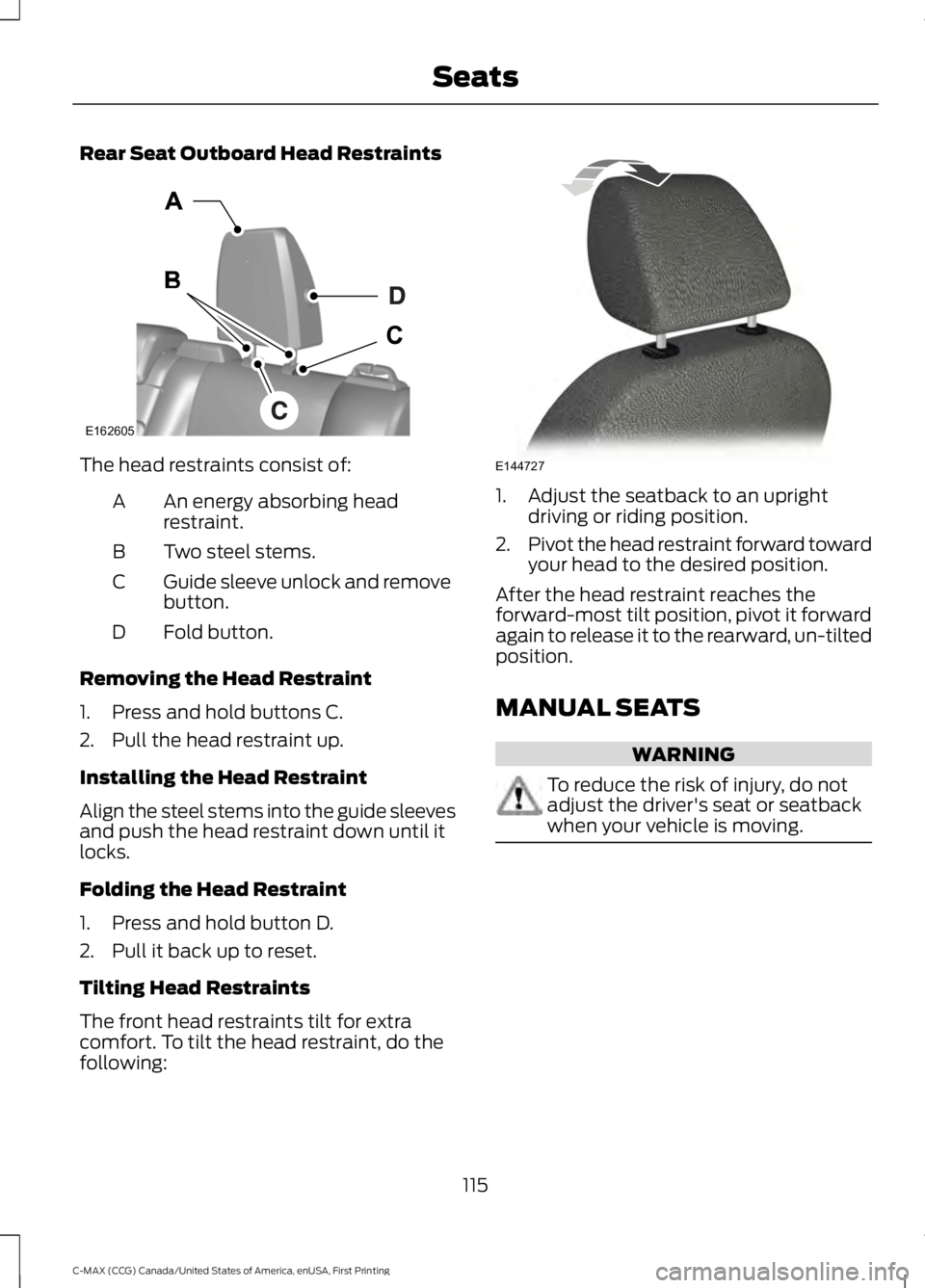
Rear Seat Outboard Head Restraints
The head restraints consist of:
An energy absorbing headrestraint.A
Two steel stems.B
Guide sleeve unlock and removebutton.C
Fold button.D
Removing the Head Restraint
1. Press and hold buttons C.
2. Pull the head restraint up.
Installing the Head Restraint
Align the steel stems into the guide sleevesand push the head restraint down until itlocks.
Folding the Head Restraint
1. Press and hold button D.
2. Pull it back up to reset.
Tilting Head Restraints
The front head restraints tilt for extracomfort. To tilt the head restraint, do thefollowing:
1. Adjust the seatback to an uprightdriving or riding position.
2.Pivot the head restraint forward towardyour head to the desired position.
After the head restraint reaches theforward-most tilt position, pivot it forwardagain to release it to the rearward, un-tiltedposition.
MANUAL SEATS
WARNING
To reduce the risk of injury, do notadjust the driver's seat or seatbackwhen your vehicle is moving.
115
C-MAX (CCG) Canada/United States of America, enUSA, First Printing
SeatsE162605 E144727