USB FORD C MAX ENERGI 2017 User Guide
[x] Cancel search | Manufacturer: FORD, Model Year: 2017, Model line: C MAX ENERGI, Model: FORD C MAX ENERGI 2017Pages: 497, PDF Size: 7.64 MB
Page 331 of 497
To Connect Using Voice Commands
Plug the device into one of the vehicle'sUSB ports.
Press the voice button and whenprompted, say:
Action and Descrip-tionVoice Command
You can now playmusic by saying anyof the appropriatevoice commands.See the mediavoice commands.
(USB [stick] | iPod| MP3 [player])
Words in brackets [ ] are optional and donot have to be spoken for the system tounderstand the command. For example,for where (USB [stick] | iPOD | MP3[player]) appears, you can say USB or USBstick.
To Connect Using the System Menu
1.Plug the device into one of the vehicle'sUSB ports.
2. Press the MEDIA button and selecteither USB 1 or USB 2 from the mediasource list in the audio display.
To view USB content select:
Description and ActionMessage
Depending on how many media files are on your connecteddevice, an indexing message may appear in the display. Whenindexing is complete, the selected source starts to playbackaudio automatically.
Browse USB
You can browse the files on the USBdevice in categories. Select BROWSEfrom the buttons at the bottom of theaudio display and choose from thefollowing:
Message
Play all
Playlists
Songs
Artists
Message
Albums
Genres
Browse USB
Reset USB
Media Voice Commands
Press the voice button and whenprompted say:
328
C-MAX Energi / C-MAX Hybrid (CCG) Canada/United States of America, enUSA, First Printing
SYNC™E142599
Page 332 of 497
![FORD C MAX ENERGI 2017 User Guide Description and ActionVoice Command
You can now play music by saying any of the appropriatevoice commands.(USB [stick] | iPod | MP3[player])
You can say any of the voice commands that appear within op](/img/11/58728/w960_58728-331.png "FORD C MAX ENERGI 2017 User Guide Description and ActionVoice Command
You can now play music by saying any of the appropriatevoice commands.(USB [stick] | iPod | MP3[player])
You can say any of the voice commands that appear within op")
Description and ActionVoice Command
You can now play music by saying any of the appropriatevoice commands.(USB [stick] | iPod | MP3[player])
You can say any of the voice commands that appear within open and close brackets thatare separated by |. For example, where; (what's | what is) appears you say; what's orwhat is.
You must say any of the voice commands that appear outside of open and close brackets.For example, where; (what's | what is) playing, you must say either "what's playing" or"what is playing".
Description and ActionCommand
Pauses device playback.pause
Resumes device playback.play
play [album] ___
Play all media on the device from the firsttrack to the last.play all
play [artist] ___
play [genre] ___
play [playlist] ___
Plays the next track on the current media.next [track | title | song | file | podcast |chapter | episode]
Plays the previous track on current media.previous [track | title | song | file |podcast | chapter | episode]
Creates a playlist with a similar genre to theone currently playing.[play] (similar music | more like this)
play [song | track | title | file] ___
repeat off
Repeats the current track.repeat (one | track) [on]
329
C-MAX Energi / C-MAX Hybrid (CCG) Canada/United States of America, enUSA, First Printing
SYNC™
Page 333 of 497
![FORD C MAX ENERGI 2017 User Guide Description and ActionCommand
Plays the current playlist in a random order.(Not all devices support this command.)shuffle [all] [on]
shuffle off
At any time during playback, you can pressthe voice but](/img/11/58728/w960_58728-332.png "FORD C MAX ENERGI 2017 User Guide Description and ActionCommand
Plays the current playlist in a random order.(Not all devices support this command.)shuffle [all] [on]
shuffle off
At any time during playback, you can pressthe voice but")
Description and ActionCommand
Plays the current playlist in a random order.(Not all devices support this command.)shuffle [all] [on]
shuffle off
At any time during playback, you can pressthe voice button and ask the system what isplaying. The system reads the metadata tags(if populated) of the current track.
((who's | who is) this | who plays this |(what's | what is) playing [now] | (what| which) (song | track | artist) is this |(who's | who is) playing | (what's | whatis) this)
___ is a dynamic listing, meaning that itcould be the name of anything, such as agroup, artist or song. For example youcould say "Play artist The Beatles".
Examples of USB Commands
SYNC provides the user with many intuitiveways to find and play a song using voice.For example, if we have a song called"Penny Lane" from the album "MagicalMystery Tour" we can say the following toplay this song:
•Play song "Penny Lane".
•Play "Penny Lane".
If we wanted to play the entire album, wecan say:
•Play album "Magical Mystery Tour".
•Play "Magical Mystery Tour".
Bluetooth Audio
The system is also capable of playingmusic from your cellular phone throughBluetooth.
To switch the Bluetooth Audio on, pressthe MEDIA button and select:
Menu Item
BT audio
Then any of the following:
Voice Command
pause
play
next [track | title | song | file | podcast | chapter | episode]
previous [track | title | song | file | podcast | chapter | episode]
Media Menu Features
The media menu allows you to select howto play your music (such as by artist, genre,shuffle or repeat), find similar music orreset the index of your USB devices.
Press the MEDIA button and select eitherUSB 1 or USB 2 from the media source listin the audio display to start USB playback.
330
C-MAX Energi / C-MAX Hybrid (CCG) Canada/United States of America, enUSA, First Printing
SYNC™
Page 334 of 497
Description and ActionMessage
This will enter the media menu.Options
Then any of the following:
Description and ActionMessage
Choose to shuffle or repeat your music. Once you make yourchoice, it remains on until you switch it off.Shuffle
Choose to shuffle or repeat your music. Once you make yourchoice, it remains on until you switch it off.Repeat track
You can play similar types of music to the current playlistfrom the USB port. The system uses the metadata informa-tion of each track to compile a playlist. The system thencreates a new list of similar tracks and then begins playing.Each track must have the metadata tags populated for thisfeature. With certain playing devices, if your metadata tags
Similar music
are not populated, the tracks will not be available in voicerecognition, the play menu or this option. However, if youplace these tracks onto your playing device in mass storagedevice mode they are available in voice recognition, the playmenu or this option. The system places unknowns into anyunpopulated metadata tag.
Resets the USB index. After the new indexing is completeyou can choose what to play from the USB song library.Reset USB
Accessing Your USB Song Library
1.Plug the device into your vehicle's USBport.
2. Press the MEDIA button (next to theaudio display) to select USB playback.
Description and ActionMessage
This menu allows you to select and play your media files byartist, album, genre, playlist or track.Browse USB
If there are no media files to access, thedisplay indicates there is no media.
331
C-MAX Energi / C-MAX Hybrid (CCG) Canada/United States of America, enUSA, First Printing
SYNC™
Page 335 of 497
If there are media files, you have the following options:
Description and ActionDisplay
Play all indexed media files from your device one at a time
in numerical order.*Play all
Press the OK button to select. The first track title appearsin the display.
Access your playlists (from formats like ASX, M3U, WPL,
or MTP).*Playlists
1. Press the OK button to select.2. Scroll to select the desired playlist, and then press theOK button.
Search for and play a specific indexed track.*Songs
1. Press the OK button to select.2. Scroll to select the desired track, and then press the OKbutton.
Sort all indexed media files by artist. The system then lists
and plays all artists and tracks alphabetically.*Artists
1. Press the OK button to select.2. Scroll to select the desired artist, and then press the OKbutton.
Sort all indexed media files by album.*Albums
1. Press the OK button to select.2. Scroll to select the desired album, and then press theOK button.
Sort all indexed media files by genre (category) type.*Genres
1. Press the OK button to select.2. Scroll to select the desired genre, and then press theOK button.
Browse all supported media files on your media playerconnected to the USB port. You can only view media filesthat are compatible with SYNC. (Other files are notvisible.)
Browse USB
1. Press the OK button to select.
332
C-MAX Energi / C-MAX Hybrid (CCG) Canada/United States of America, enUSA, First Printing
SYNC™
Page 336 of 497
Description and ActionDisplay
2. Scroll to browse indexed media files on the device, andthen press the OK button.
Resets the USB index. After the new indexing is complete,you can choose what to play from the USB song library.Reset USB
*You can use the buttons at the bottom of the audio display to jump to a certainalphabetical category quickly. You can also use the letters on the audio system's numerickeypad to jump in the list.
Using Voice Commands
You can access and view your USB songsusing voice commands.
Plug the device into your vehicle's USBport.
Press the voice button and whenprompted, say any of the followingcommands:
Accessing and Viewing USB Media
(browse | search | show) all (album |albums)
(browse | search | show) all (artist |artists)
(browse | search | show) all (genre |genres)
(browse | search | show) all (playlist |playlists)
(browse | search | show) all (song | songs| title | titles | file | files | track | tracks)
(browse | search | show) album ___
(browse | search | show) artist ___
(browse | search | show) genre ___
(browse | search | show) playlist ___
USB 2 (If Equipped)
Your vehicle may come equipped with anadditional USB port. If so, USB 1 is locatedat the front of the vehicle at the bottom ofthe instrument panel. USB 2 is locatedinside the storage compartment of thevehicle's center console.
You can plug in an additional USB deviceinto the second USB port.
You can access both USB devices by usingvoice commands.
To access a USB device press the voicebutton and when prompted say:
Voice command
USB 1
USB 2
Note:SYNC only supports one connectediOS (Apple) devices at a time (whicheverone you plug in first). When you connect asecond iOS device, the systems charges it,but does not support playback from it.
Bluetooth Devices and SystemSettings
You can access these menus using theaudio display. See Using SYNC™ WithYour Phone (page 310).
333
C-MAX Energi / C-MAX Hybrid (CCG) Canada/United States of America, enUSA, First Printing
SYNC™
Page 337 of 497
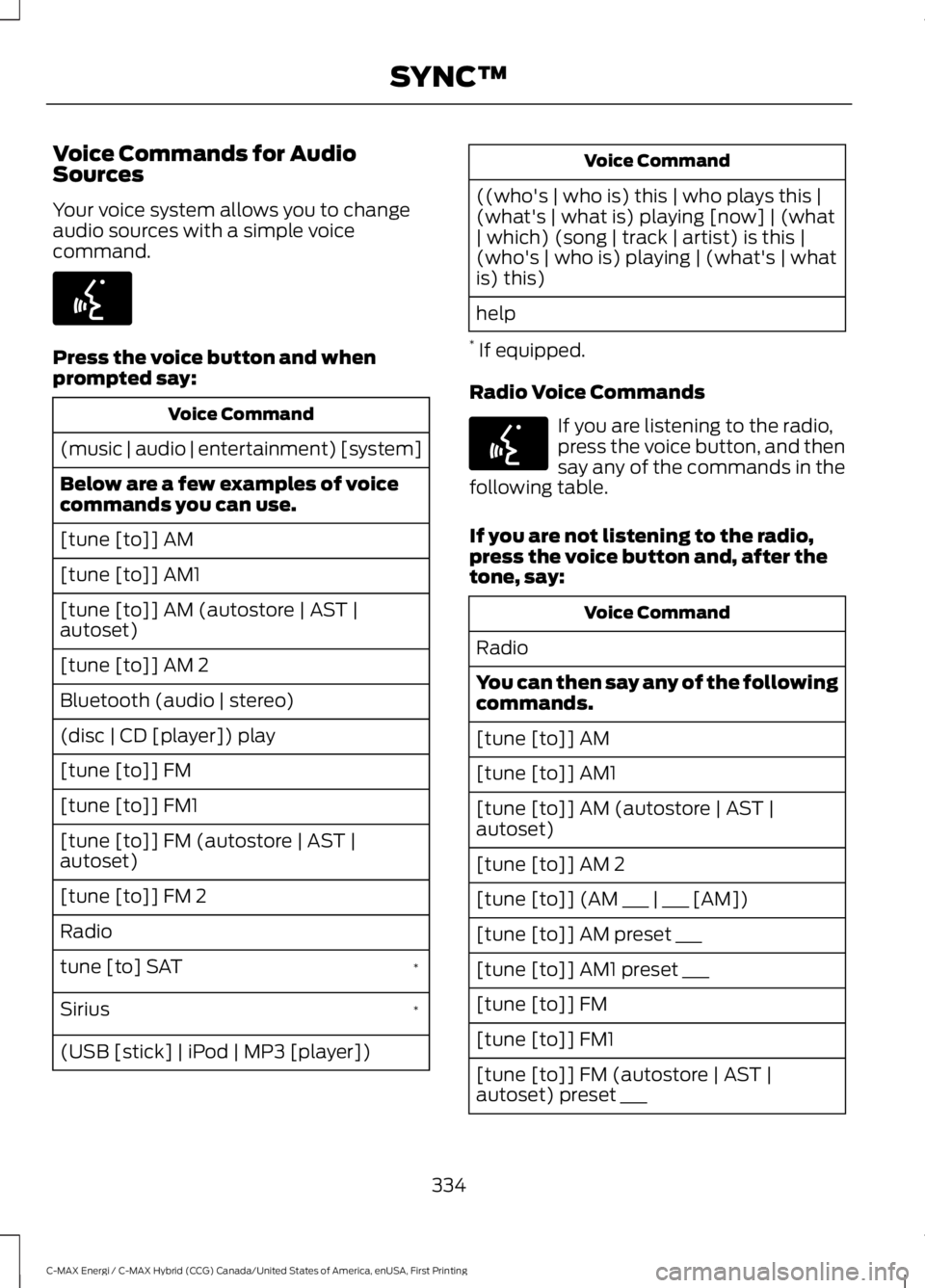
Voice Commands for AudioSources
Your voice system allows you to changeaudio sources with a simple voicecommand.
Press the voice button and whenprompted say:
Voice Command
(music | audio | entertainment) [system]
Below are a few examples of voicecommands you can use.
[tune [to]] AM
[tune [to]] AM1
[tune [to]] AM (autostore | AST |autoset)
[tune [to]] AM 2
Bluetooth (audio | stereo)
(disc | CD [player]) play
[tune [to]] FM
[tune [to]] FM1
[tune [to]] FM (autostore | AST |autoset)
[tune [to]] FM 2
Radio
*tune [to] SAT
*Sirius
(USB [stick] | iPod | MP3 [player])
Voice Command
((who's | who is) this | who plays this |(what's | what is) playing [now] | (what| which) (song | track | artist) is this |(who's | who is) playing | (what's | whatis) this)
help
* If equipped.
Radio Voice Commands
If you are listening to the radio,press the voice button, and thensay any of the commands in thefollowing table.
If you are not listening to the radio,press the voice button and, after thetone, say:
Voice Command
Radio
You can then say any of the followingcommands.
[tune [to]] AM
[tune [to]] AM1
[tune [to]] AM (autostore | AST |autoset)
[tune [to]] AM 2
[tune [to]] (AM ___ | ___ [AM])
[tune [to]] AM preset ___
[tune [to]] AM1 preset ___
[tune [to]] FM
[tune [to]] FM1
[tune [to]] FM (autostore | AST |autoset) preset ___
334
C-MAX Energi / C-MAX Hybrid (CCG) Canada/United States of America, enUSA, First Printing
SYNC™E142599 E142599
Page 341 of 497
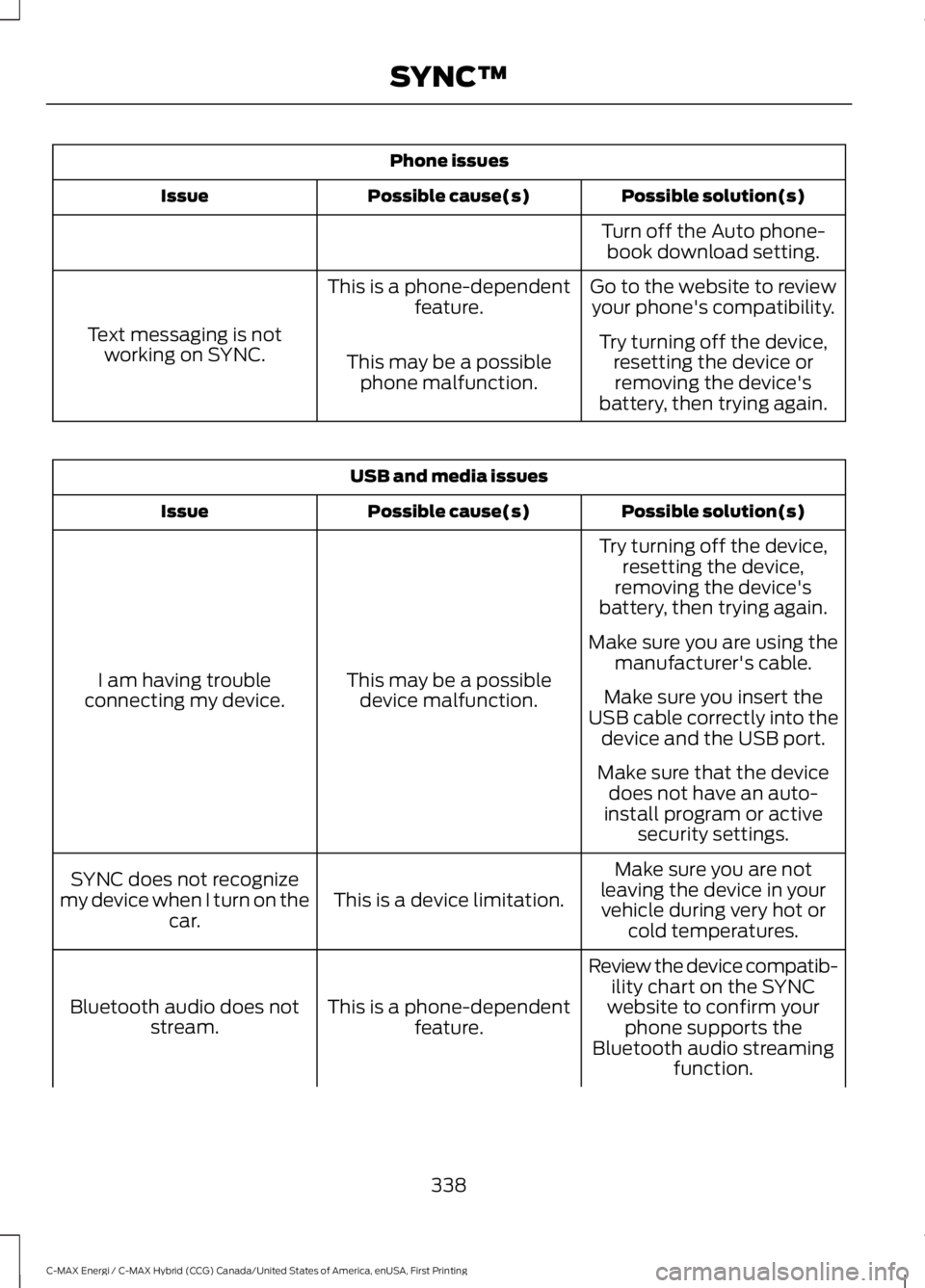
Phone issues
Possible solution(s)Possible cause(s)Issue
Turn off the Auto phone-book download setting.
Go to the website to reviewyour phone's compatibility.This is a phone-dependentfeature.
Text messaging is notworking on SYNC.Try turning off the device,resetting the device orremoving the device'sbattery, then trying again.
This may be a possiblephone malfunction.
USB and media issues
Possible solution(s)Possible cause(s)Issue
Try turning off the device,resetting the device,removing the device'sbattery, then trying again.
This may be a possibledevice malfunction.I am having troubleconnecting my device.
Make sure you are using themanufacturer's cable.
Make sure you insert theUSB cable correctly into thedevice and the USB port.
Make sure that the devicedoes not have an auto-install program or activesecurity settings.
Make sure you are notleaving the device in yourvehicle during very hot orcold temperatures.
This is a device limitation.SYNC does not recognizemy device when I turn on thecar.
Review the device compatib-ility chart on the SYNCwebsite to confirm yourphone supports theBluetooth audio streamingfunction.
This is a phone-dependentfeature.Bluetooth audio does notstream.
338
C-MAX Energi / C-MAX Hybrid (CCG) Canada/United States of America, enUSA, First Printing
SYNC™
Page 342 of 497
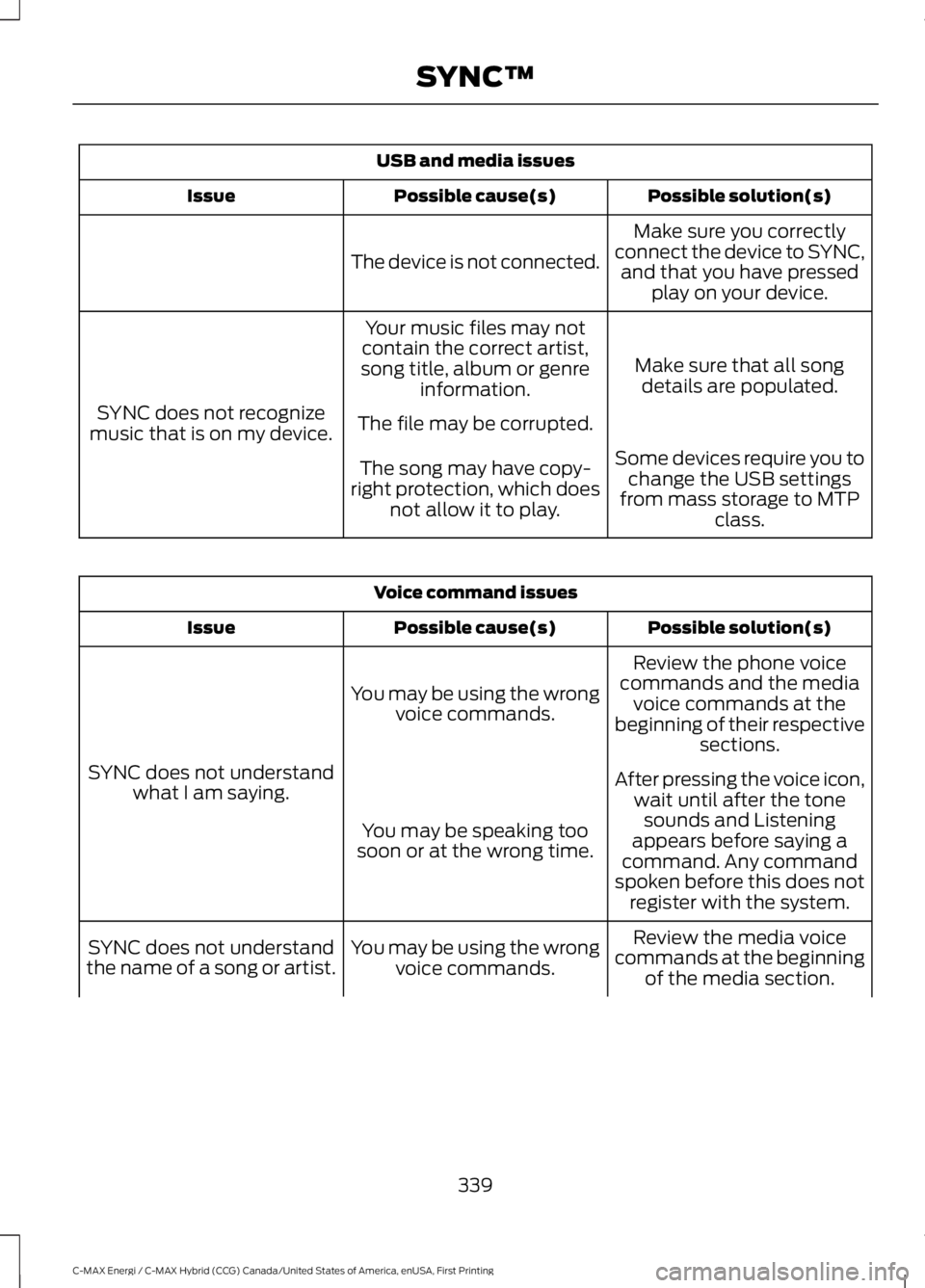
USB and media issues
Possible solution(s)Possible cause(s)Issue
Make sure you correctlyconnect the device to SYNC,and that you have pressedplay on your device.
The device is not connected.
Make sure that all songdetails are populated.
Your music files may notcontain the correct artist,song title, album or genreinformation.
SYNC does not recognizemusic that is on my device.The file may be corrupted.
Some devices require you tochange the USB settingsfrom mass storage to MTPclass.
The song may have copy-right protection, which doesnot allow it to play.
Voice command issues
Possible solution(s)Possible cause(s)Issue
Review the phone voicecommands and the mediavoice commands at thebeginning of their respectivesections.
You may be using the wrongvoice commands.
SYNC does not understandwhat I am saying.After pressing the voice icon,wait until after the tonesounds and Listeningappears before saying acommand. Any commandspoken before this does notregister with the system.
You may be speaking toosoon or at the wrong time.
Review the media voicecommands at the beginningof the media section.
You may be using the wrongvoice commands.SYNC does not understandthe name of a song or artist.
339
C-MAX Energi / C-MAX Hybrid (CCG) Canada/United States of America, enUSA, First Printing
SYNC™
Page 344 of 497
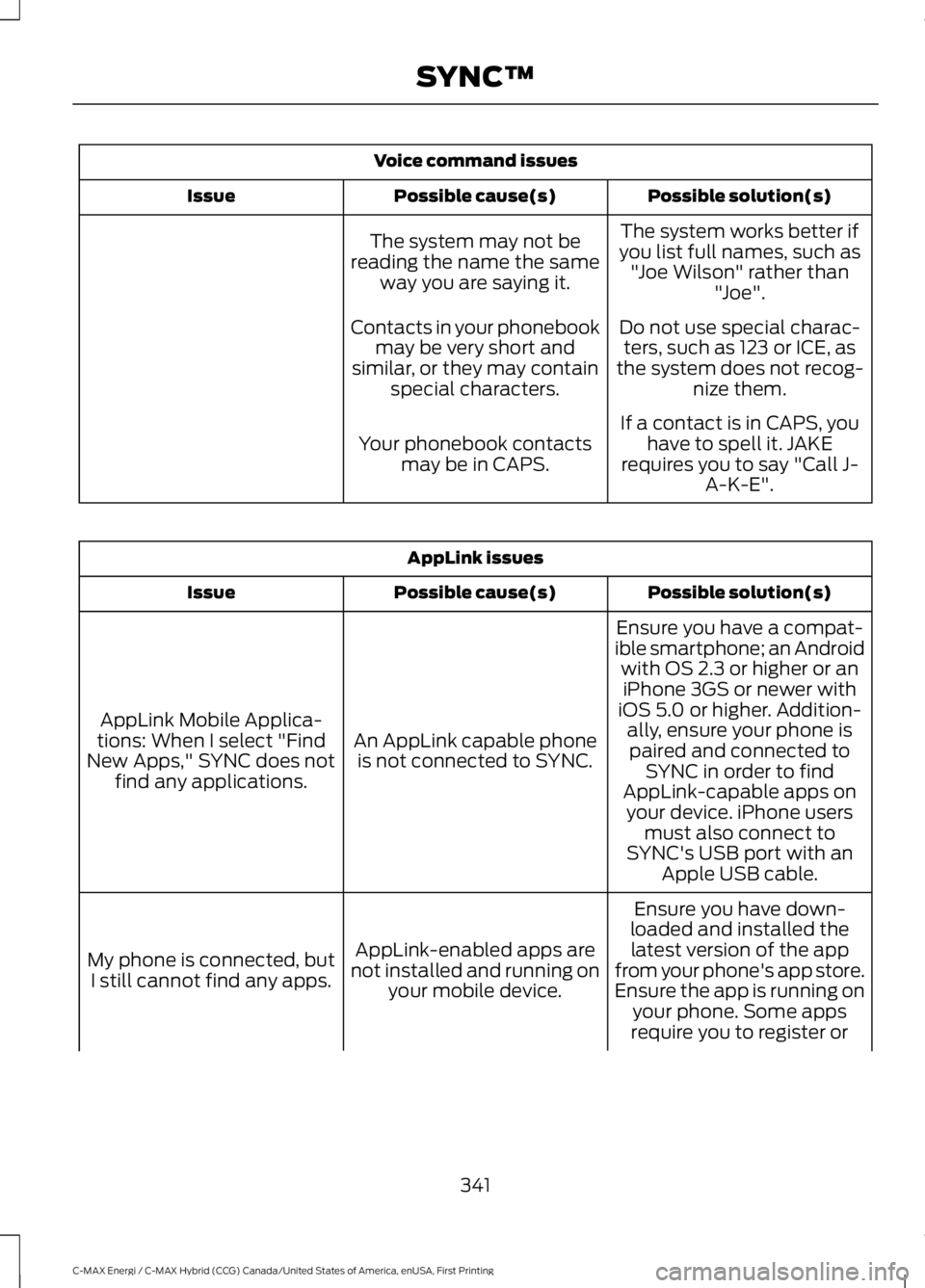
Voice command issues
Possible solution(s)Possible cause(s)Issue
The system works better ifyou list full names, such as"Joe Wilson" rather than"Joe".
The system may not bereading the name the sameway you are saying it.
Do not use special charac-ters, such as 123 or ICE, asthe system does not recog-nize them.
Contacts in your phonebookmay be very short andsimilar, or they may containspecial characters.
If a contact is in CAPS, youhave to spell it. JAKErequires you to say "Call J-A-K-E".
Your phonebook contactsmay be in CAPS.
AppLink issues
Possible solution(s)Possible cause(s)Issue
Ensure you have a compat-ible smartphone; an Androidwith OS 2.3 or higher or aniPhone 3GS or newer withiOS 5.0 or higher. Addition-ally, ensure your phone isAn AppLink capable phoneis not connected to SYNC.
AppLink Mobile Applica-tions: When I select "FindNew Apps," SYNC does notfind any applications.
paired and connected toSYNC in order to findAppLink-capable apps onyour device. iPhone usersmust also connect toSYNC's USB port with anApple USB cable.
Ensure you have down-loaded and installed thelatest version of the appfrom your phone's app store.Ensure the app is running onyour phone. Some apps
AppLink-enabled apps arenot installed and running onyour mobile device.
My phone is connected, butI still cannot find any apps.
require you to register or
341
C-MAX Energi / C-MAX Hybrid (CCG) Canada/United States of America, enUSA, First Printing
SYNC™