remote control FORD C MAX ENERGI 2017 User Guide
[x] Cancel search | Manufacturer: FORD, Model Year: 2017, Model line: C MAX ENERGI, Model: FORD C MAX ENERGI 2017Pages: 497, PDF Size: 7.64 MB
Page 60 of 497
LOCKING AND UNLOCKING
You can use the power door lock controlor the remote control to lock and unlockyour vehicle.
Note:Always take your keys and lock alldoors when leaving your vehicle.
Power Door Locks
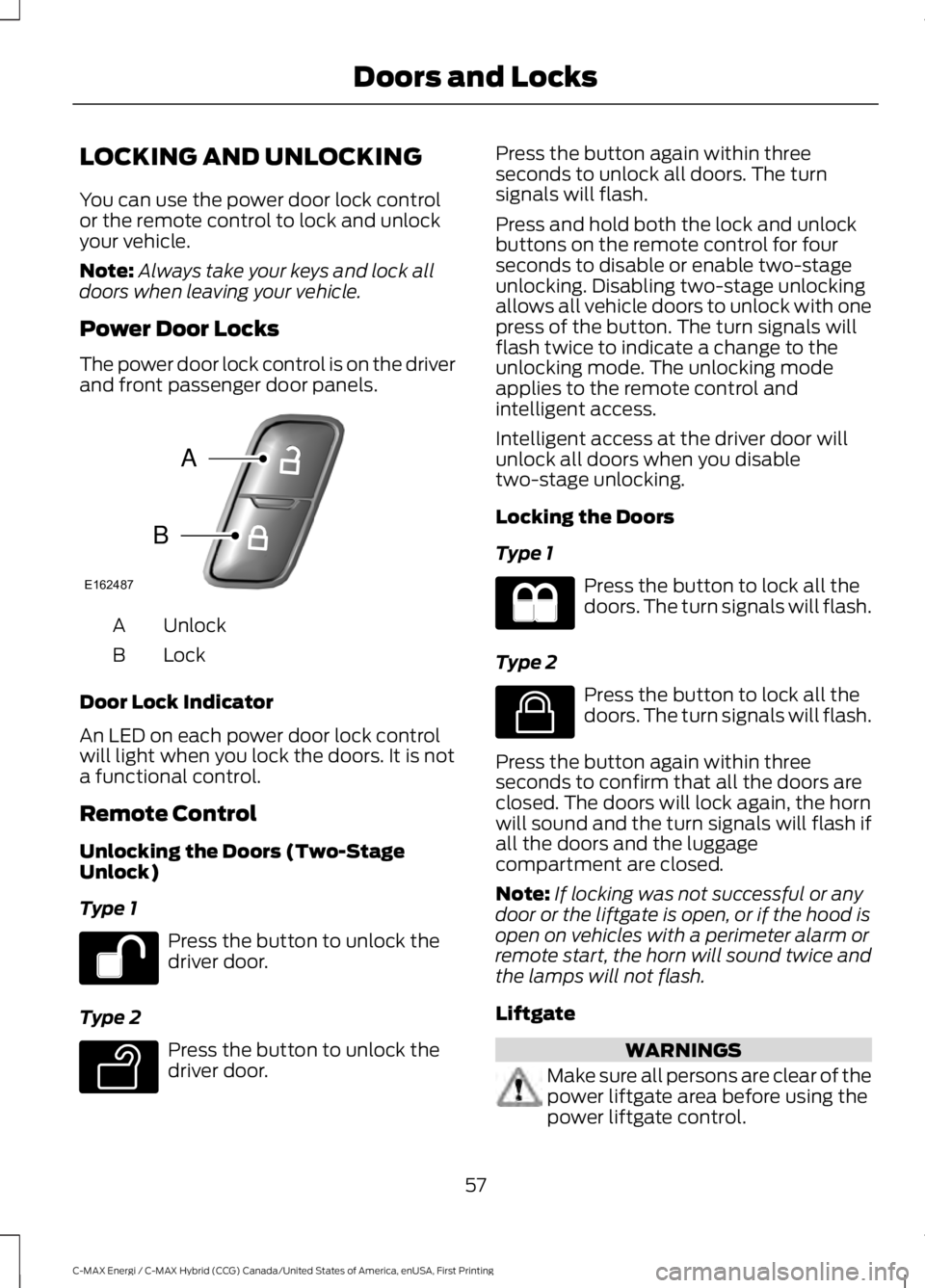
The power door lock control is on the driverand front passenger door panels.
UnlockA
LockB
Door Lock Indicator
An LED on each power door lock controlwill light when you lock the doors. It is nota functional control.
Remote Control
Unlocking the Doors (Two-StageUnlock)
Type 1
Press the button to unlock thedriver door.
Type 2
Press the button to unlock thedriver door.
Press the button again within threeseconds to unlock all doors. The turnsignals will flash.
Press and hold both the lock and unlockbuttons on the remote control for fourseconds to disable or enable two-stageunlocking. Disabling two-stage unlockingallows all vehicle doors to unlock with onepress of the button. The turn signals willflash twice to indicate a change to theunlocking mode. The unlocking modeapplies to the remote control andintelligent access.
Intelligent access at the driver door willunlock all doors when you disabletwo-stage unlocking.
Locking the Doors
Type 1
Press the button to lock all thedoors. The turn signals will flash.
Type 2
Press the button to lock all thedoors. The turn signals will flash.
Press the button again within threeseconds to confirm that all the doors areclosed. The doors will lock again, the hornwill sound and the turn signals will flash ifall the doors and the luggagecompartment are closed.
Note:If locking was not successful or anydoor or the liftgate is open, or if the hood isopen on vehicles with a perimeter alarm orremote start, the horn will sound twice andthe lamps will not flash.
Liftgate
WARNINGS
Make sure all persons are clear of thepower liftgate area before using thepower liftgate control.
57
C-MAX Energi / C-MAX Hybrid (CCG) Canada/United States of America, enUSA, First Printing
Doors and LocksE162487
A
B E138629 E138623
Page 63 of 497
•you shift into any gear putting yourvehicle in motion, and
•your vehicle attains a speed greaterthan 4 mph (7 km/h).
Autounlock (If Equipped)
The autounlock feature will unlock all thedoors when:
•the ignition is on, all the doors areclosed, and your vehicle has been inmotion at a speed greater than 4 mph(7 km/h);
•your vehicle comes to a stop and youswitch the ignition off or to accessory;and
•you open the driver door within 10minutes of the switching the ignitionoff or to accessory.
Note:The doors will not autounlock if youelectronically lock your vehicle after youswitch the ignition off and before you openthe driver door.
Enabling or Disabling Autounlock
Note:Your authorized dealer can performthis procedure, or you can do the procedureyourself.
To enable or disable these features, do thefollowing:
Note:You will have 30 seconds tocomplete the procedure.
1. Switch the ignition on.
2. Press the power door unlock buttonthree times.
3. Switch the ignition off.
4. Press the power door unlock buttonthree times.
5. Switch the ignition on. The horn willsound indicating your vehicle is inprogramming mode.
6.Press the power door lock button thenthe unlock button. The horn will soundonce if disabled or twice (one short andone long) if enabled.
After programming the feature, switch theignition off. The horn will sound onceindicating programming is complete.
Illuminated Entry
The interior lamps and select exteriorlamps will illuminate when you unlock thedoors with the remote entry system.
The illuminated entry system will turn offthe lights if:
•you start your vehicle,
•you press the remote control lockbutton, or
•after 25 seconds of illumination.
The lights will not turn off if:
•you turn them on with the lamp control,or
•any door is open.
Illuminated Exit
The interior lamps and select exteriorlamps will illuminate when all doors areclosed and you switch the ignition off.
The lamps will turn off if all the doorsremain closed and:
•25 seconds elapse, or
•you lock your vehicle from the outside.
Battery Saver
If you leave the courtesy lamps or domelamps on and switch the ignition off, thebattery saver shuts them off after sometime.
60
C-MAX Energi / C-MAX Hybrid (CCG) Canada/United States of America, enUSA, First Printing
Doors and Locks
Page 64 of 497
Accessory Mode Battery Saver forIntelligent Access Keys (If Equipped)
If you leave the ignition on after leavingyour vehicle, it will shut off 15 minutes afteryou close all of the doors.
MANUAL LIFTGATE
WARNINGS
It is extremely dangerous to ride in acargo area, inside or outside of avehicle. In a crash, people riding inthese areas are more likely to be seriouslyinjured or killed. Do not allow people to ridein any area of your vehicle that is notequipped with seats and safety belts. Besure everyone in your vehicle is in a seatand using a safety belt properly. Failure tofollow this warning could result in seriouspersonal injury or death.
Make sure to close and latch theliftgate to prevent drawing exhaustfumes into your vehicle. This will alsoprevent passengers and cargo from fallingout. If you must drive with the liftgate open,keep the vents or windows open so outsideair comes into your vehicle. Failure tofollow this warning could result in seriouspersonal injury.
Note:Be careful when opening or closingthe liftgate in a garage or other enclosedarea to avoid damaging the liftgate.
Note:Do not hang anything, for example abike rack, from the glass or liftgate. Thiscould damage the liftgate and itscomponents.
Note:Do not leave the liftgate open whiledriving. This could damage the liftgate andits components.
Opening the Liftgate
Manually
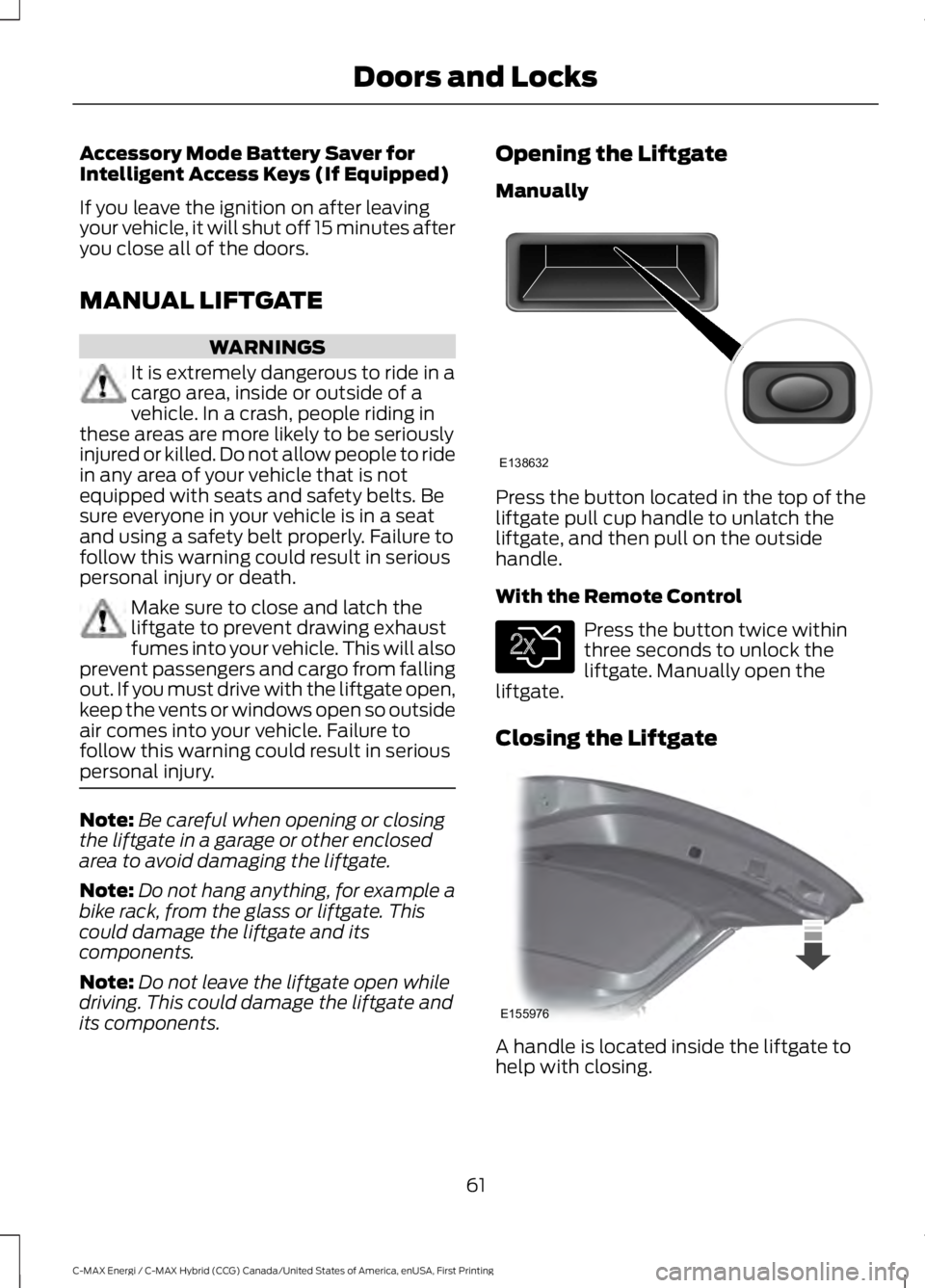
Press the button located in the top of theliftgate pull cup handle to unlatch theliftgate, and then pull on the outsidehandle.
With the Remote Control
Press the button twice withinthree seconds to unlock theliftgate. Manually open theliftgate.
Closing the Liftgate
A handle is located inside the liftgate tohelp with closing.
61
C-MAX Energi / C-MAX Hybrid (CCG) Canada/United States of America, enUSA, First Printing
Doors and LocksE138632 E138630 E155976
Page 66 of 497
With the Remote Control
Press the button twice withinthree seconds.
With the Outside Control Button
Opening the Liftgate
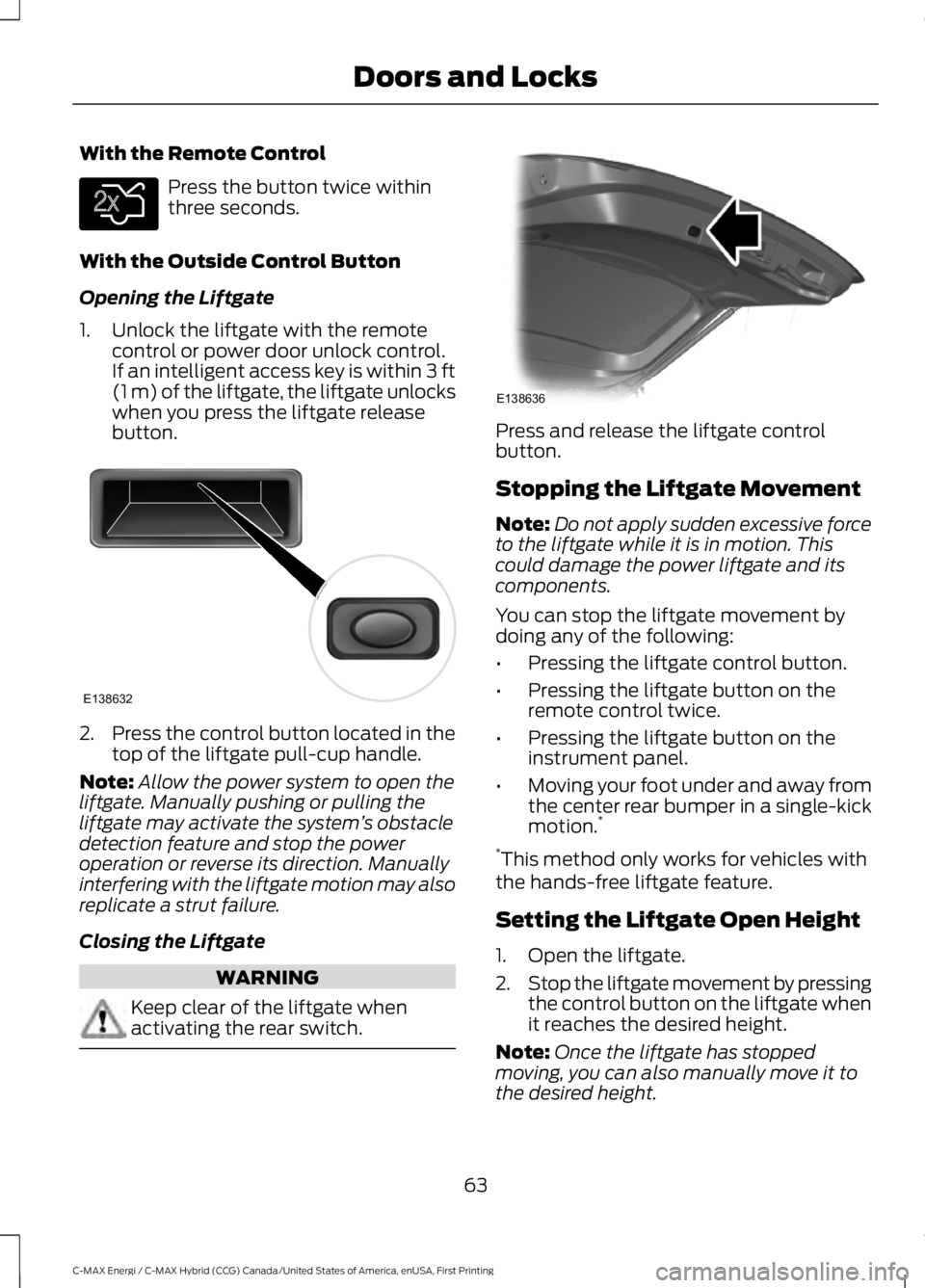
1. Unlock the liftgate with the remotecontrol or power door unlock control.If an intelligent access key is within 3 ft(1 m) of the liftgate, the liftgate unlockswhen you press the liftgate releasebutton.
2.Press the control button located in thetop of the liftgate pull-cup handle.
Note:Allow the power system to open theliftgate. Manually pushing or pulling theliftgate may activate the system’s obstacledetection feature and stop the poweroperation or reverse its direction. Manuallyinterfering with the liftgate motion may alsoreplicate a strut failure.
Closing the Liftgate
WARNING
Keep clear of the liftgate whenactivating the rear switch.
Press and release the liftgate controlbutton.
Stopping the Liftgate Movement
Note:Do not apply sudden excessive forceto the liftgate while it is in motion. Thiscould damage the power liftgate and itscomponents.
You can stop the liftgate movement bydoing any of the following:
•Pressing the liftgate control button.
•Pressing the liftgate button on theremote control twice.
•Pressing the liftgate button on theinstrument panel.
•Moving your foot under and away fromthe center rear bumper in a single-kickmotion.*
*This method only works for vehicles withthe hands-free liftgate feature.
Setting the Liftgate Open Height
1. Open the liftgate.
2.Stop the liftgate movement by pressingthe control button on the liftgate whenit reaches the desired height.
Note:Once the liftgate has stoppedmoving, you can also manually move it tothe desired height.
63
C-MAX Energi / C-MAX Hybrid (CCG) Canada/United States of America, enUSA, First Printing
Doors and LocksE138630 E138632 E138636
Page 69 of 497
PASSIVE ANTI-THEFT
SYSTEM
SecuriLock®
The system helps prevent your vehiclefrom starting unless you use a coded keyprogrammed to your vehicle. Using thewrong key may prevent your vehicle fromstarting. A message may appear in theinformation display.
If you are unable to start your vehicle witha correctly coded key, a malfunction hashappened. A message may appear in theinformation display.
Note:The system is not compatible withnon-Ford aftermarket remote start systems.Use of these systems may result in vehiclestarting problems and a loss of securityprotection.
Note:Metallic objects, electronic devicesor a second coded key on the same keychain may cause vehicle starting issues ifthey are too close to the key when startingyour vehicle. Prevent these objects fromtouching the coded key while starting theengine. Switch the ignition off, move allobjects on the key chain away from thecoded key and restart your vehicle if aproblem occurs.
Note:Do not leave a duplicate coded keyin your vehicle. Always take your keys andlock all doors when leaving your vehicle.
Automatic Arming
Your vehicle arms immediately after youswitch the ignition off.
Automatic Disarming
Switching the ignition on with a coded keydisarms your vehicle.
Replacement Keys
Note:Your vehicle comes equipped withtwo integrated keyhead transmitters or twointelligent access keys.
The integrated keyhead transmitterfunctions as a programmed ignition keythat operates all the locks and starts yourvehicle, as well as a remote control.
The intelligent access key functions as aprogrammed key that operates the driverdoor lock and activates the intelligentaccess with push button start system, aswell as a remote control.
If your programmed transmitters orstandard SecuriLock coded keys(integrated keyhead transmitters only) arelost or stolen and you do not have an extracoded key, you will need to have yourvehicle towed to an authorized dealer. Youneed to erase the key codes from yourvehicle and program new coded keys.
Store an extra programmed key away fromyour vehicle in a safe place to help preventany inconveniences. See your authorizeddealer to purchase additional spare orreplacement keys.
Programming a Spare IntegratedKeyhead Transmitter
Note:You can program a maximum of eightcoded keys to your vehicle. All eight can beintegrated keyhead transmitters.
You can program your own integratedkeyhead transmitter or standardSecuriLock coded keys to your vehicle. Thisprocedure will program both the vehicleimmobilizer keycode and the remote entryportion of the remote control to yourvehicle
Only use integrated keyhead transmittersor standard SecuriLock keys.
66
C-MAX Energi / C-MAX Hybrid (CCG) Canada/United States of America, enUSA, First Printing
Security
Page 70 of 497
You must have two previouslyprogrammed coded keys and the newunprogrammed key readily accessible. Seeyour authorized dealer to have the sparekey programmed if two previouslyprogrammed coded keys are not available.
Read and understand the entire procedurebefore you begin.
1.Insert the first previously programmedcoded key into the ignition.
2.Switch the ignition from off to on. Keepthe ignition on for at least threeseconds, but no more than 10 seconds.
3.Switch the ignition off and remove thefirst coded key from the ignition.
4. After three seconds but within 10seconds of switching the ignition off,insert the second previously coded keyinto the ignition.
5.Switch the ignition from off to on. Keepthe ignition on for at least threeseconds, but no more than 10 seconds.
6.Switch the ignition off and remove thesecond previously programmed codedkey from the ignition.
7. After three seconds but within 10seconds of switching the ignition offand removing the previouslyprogrammed coded key, insert the newunprogrammed key into the ignition.
8.Switch the ignition from off to on. Keepthe ignition on for at least six seconds.
9.Remove the newly programmed codedkey from the ignition.
If the key has been successfullyprogrammed it will start your vehicle andoperate the remote entry system (if thenew key is an integrated keyheadtransmitter).
If programming was not successful, wait10 seconds and repeat Steps 1 through 8.If you are still unsuccessful, take yourvehicle to your authorized dealer.
Programming a Spare IntelligentAccess Key
See your authorized dealer to haveadditional keys programmed to yourvehicle.
ANTI-THEFT ALARM (If Equipped)
The system warns you of an unauthorizedentry to your vehicle. It triggers if any door,the luggage compartment or the hoodopens without using the key or remotecontrol.
The direction indicators flash and the hornsounds if unauthorized entry is attemptedwhile the alarm is armed.
Take all remote controls to an authorizeddealer if there is any potential alarmproblem with your vehicle.
Arming the Alarm
The alarm is ready to arm when there isnot a key in the ignition. Electronically lockthe vehicle to arm the alarm.
Disarming the Alarm
Disarm the alarm by any of the followingactions:
•Unlock the doors or luggagecompartment with the remote controlor keyless entry keypad.
•Switch the ignition on or start thevehicle.
•Use a key in the driver’s door to unlockthe vehicle, then switch the ignition onwithin 12 seconds.
Note:Pressing the panic button on theremote control will stop the horn and signalindicators, but will not disarm the system.
67
C-MAX Energi / C-MAX Hybrid (CCG) Canada/United States of America, enUSA, First Printing
Security
Page 79 of 497

DAYTIME RUNNING LAMPS (If
Equipped)
WARNING
The autolamps switch position maynot activate the headlamps in all lowvisibility conditions, such as daytimefog. Always ensure that your headlampsare switched to auto or on, as appropriate,during all low visibility conditions. Failureto do so may result in a crash.
To switch the system on:
1. Switch the ignition on.
2.Switch the lighting control to the off orautolamp position.
FRONT FOG LAMPS
Press the control to switch the fog lampson or off.
You can switch the fog lamps on when thelighting control is in any position exceptOff and the high beams are not on.
DIRECTION INDICATORS
Push the lever up or down to use thedirection indicators.
Note:Tap the lever up or down to make thedirection indicators flash three times toindicate a lane change.
INTERIOR LAMPS
The lamps will switch on when one of thefollowing conditions have been met:
•You open any door.
•You press a remote control button.
•You press switch B on the front interiorlamp.
Front Interior Lamp (If Equipped)
76
C-MAX Energi / C-MAX Hybrid (CCG) Canada/United States of America, enUSA, First Printing
LightingE142453 E162681 E161163
DC
AB
Page 82 of 497
2. Close the window a third time to thepoint of resistance. The bounce-backfeature is now disabled and you canclose the window manually. Thewindow will go past the point ofresistance and you can close it fully.
See an authorized dealer as soon aspossible if the window does not close afterthe third attempt.
Resetting the Bounce-Back Feature
WARNING
The bounce-back feature remainsturned off until you reset thememory.
If you have disconnected the battery, youmust reset the bounce-back memoryseparately for each window.
1. Lift and hold the switch until thewindow is fully closed.
2. Release the switch.
3. Lift the switch again for one moresecond.
4. Press and hold the switch until thewindow is fully open.
5. Release the switch.
6. Lift and hold the switch until thewindow is fully closed.
7.Open the window and then try to closeit automatically.
8. Reset and repeat the procedure if thewindow does not close automatically.
Accessory Delay (If Equipped)
You can use the window switches forseveral minutes after you switch theignition off or until you open either frontdoor.
GLOBAL OPENING
You can use the remote control to operatethe windows with the ignition off.
Note:To operate this feature, accessorydelay must not be active.
Opening the Windows
You can use the global opening feature toopen the windows only for a short timeafter you unlock your vehicle by using theremote control.
To use the global opening feature:
1. Press and release the remote controlunlock button.
2.Press the remote control unlock buttonagain and hold it for approximatelythree seconds. Release the controlwhen the windows begin to open.
3.Press the lock or unlock button on yourremote control to stop the windowopening function.
Note:Contact an authorized Ford dealer todeactivate this feature.
EXTERIOR MIRRORS
Power Exterior Mirrors
WARNING
Do not adjust the mirrors when yourvehicle is moving. This could resultin the loss of control of your vehicle,serious personal injury or death.
79
C-MAX Energi / C-MAX Hybrid (CCG) Canada/United States of America, enUSA, First Printing
Windows and Mirrors
Page 100 of 497
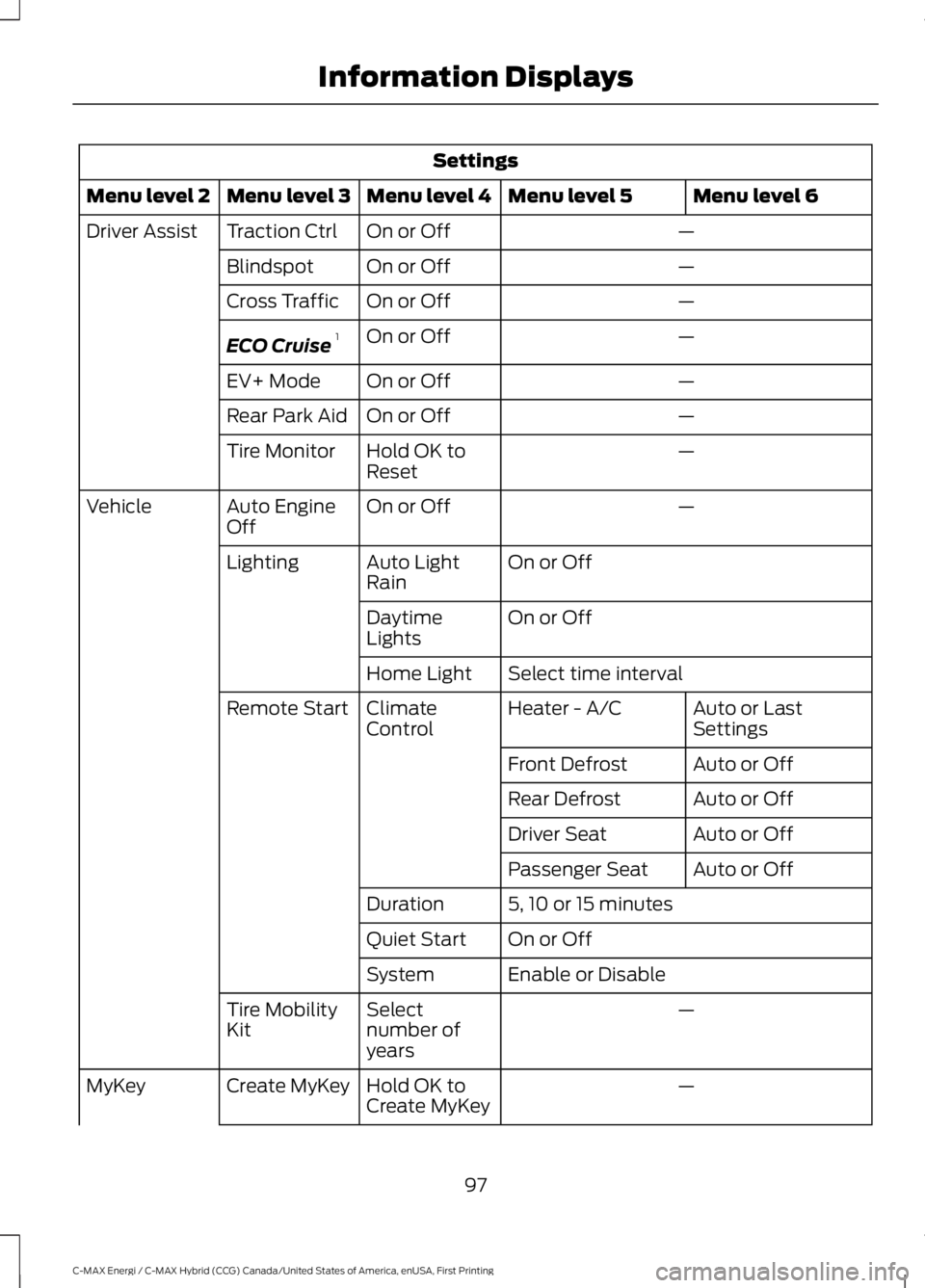
Settings
Menu level 6Menu level 5Menu level 4Menu level 3Menu level 2
—On or OffTraction CtrlDriver Assist
—On or OffBlindspot
—On or OffCross Traffic
—On or OffECO Cruise1
—On or OffEV+ Mode
—On or OffRear Park Aid
—Hold OK toResetTire Monitor
—On or OffAuto EngineOffVehicle
On or OffAuto LightRainLighting
On or OffDaytimeLights
Select time intervalHome Light
Auto or LastSettingsHeater - A/CClimateControlRemote Start
Auto or OffFront Defrost
Auto or OffRear Defrost
Auto or OffDriver Seat
Auto or OffPassenger Seat
5, 10 or 15 minutesDuration
On or OffQuiet Start
Enable or DisableSystem
—Selectnumber ofyears
Tire MobilityKit
—Hold OK toCreate MyKeyCreate MyKeyMyKey
97
C-MAX Energi / C-MAX Hybrid (CCG) Canada/United States of America, enUSA, First Printing
Information Displays
Page 116 of 497
Note: Do not use razor blades or othersharp objects to clean or remove decalsfrom the inside of the heated rear window.The vehicle warranty does not coverdamage caused to the heated rear windowgrid lines.
Heated Exterior Mirrors (If Equipped)
When you switch the heated rearwindow on, the heated exteriormirrors will automatically turnon.
Note:Do not remove ice from the mirrorswith a scraper or adjust the mirror glasswhen it is frozen in place.
Note:Do not clean the mirror housing orglass with harsh abrasives, fuel or otherpetroleum-based cleaning products.
CABIN AIR FILTER
The cabin air filter is under the instrumentpanel in the passenger footwell area.
The system filters airborne particles suchas dust, spores and pollen in the airsupplied to and recirculated in the interiorof your vehicle.
Make sure you have a cabin air filterinstalled at all times. Running the systemwithout a filter in place could degrade ordamage the system.
Your vehicle cabin air filter gives you andyour passengers the following benefits:
•It improves your driving comfort byreducing particle concentration.
•It improves the interior compartmentcleanliness.
•It protects the climate controlcomponents from particle deposits.
Change the air filter element at the properintervals.
For additional cabin air filter information,or to replace the filter, see an authorizeddealer.
REMOTE START (If Equipped)
You can switch this feature on or off andadjust the settings using the informationdisplay.
The system adjusts the interiortemperature depending on your chosensettings during remote start.
You cannot adjust the climate controlsetting during remote start operation.When you switch the ignition on, theclimate control system will return to theprevious settings. You can now makeadjustments.
You can switch on certainvehicle-dependent features when needed,such as:
•Heated seats.
•Cooled seats.
•Heated steering wheel.
•Heated mirrors.
•Heated rear window.
Automatic Settings
In hot weather, the system is set to 72°F(22°C). The cooled seats are set to high(if available, and selected to AUTO in theinformation display).
In moderate weather, the system eitherheats or cools (based on previoussettings). The rear defroster, heatedmirrors and heated or cooled seats do notautomatically turn on.
In cold weather, the system is set to 72°F(22°C). The heated seats are set to high(if available, and selected to AUTO in theinformation display). The heated rearwindow and heated mirrors automaticallyturn on.
113
C-MAX Energi / C-MAX Hybrid (CCG) Canada/United States of America, enUSA, First Printing
Climate ControlE72507