battery FORD C MAX ENERGI 2017 Owner's Manual
[x] Cancel search | Manufacturer: FORD, Model Year: 2017, Model line: C MAX ENERGI, Model: FORD C MAX ENERGI 2017Pages: 497, PDF Size: 7.64 MB
Page 98 of 497
MyView
You can choose what to display in thisview. Selecting Change MyView in theoptions menu allows you to scroll throughtwo columns of content choices.
•Press the up or down arrow to viewcontent.
•Press OK to save your selectedcontent.
•You must select content in bothcolumns before you can save your newMyView.
Unique content available in MyView:
•Vehicle Range (Energi vehicles only) –Indicates the estimated distance yourvehicle will travel with the energycurrently onboard. Separately displaysrange available in Hybrid Mode fueledby gasoline, electric range available inPlug-in Power Mode, and total range.Gasoline range and electric range arealso shown on the bottom of the rightinformation display. Changes in drivingpattern and climate control use willcause the values to vary.
•Accessory Power— Indicates electricalpower demands from your vehicle’saccessory systems. Accessories usepower but do not contribute topropelling your vehicle. The gaugeseparately displays power demand inkilowatts (kW) for climate and otheraccessories. Climate includes thepower being used by high voltageclimate control components such asthe electric A/C compressor and theelectric heater (Energi vehicles only).Other includes all power being used bythe low voltage accessories (cabinfans, headlights, heated seats, etc.).
•Coolant Temp – Indicates enginecoolant temperature. At normaloperating temperature, the levelindicator will be white and will be in thenormal range (between H and C). If theengine coolant temperature exceedsthe normal range, the level indicatorwill change to red to indicate that theengine is overheating. Stop your vehicleas soon as safely possible, turn yourvehicle off and let the engine cool.
•Tach rpm x 1000 — When the gasolineengine is running, the tachometergauge displays the engine speed inrevolutions per minute (RPM). Whenyour vehicle is operating on batterypower only with the engine off, EVdisplays and the tachometer is greyedout.
Note:The trip data, and average fueleconomy cannot be reset in MyView.
Miles (or km)/Full Charge (Energi only)
In Hybrid Mode the display changes to FuelEconomy. Miles or Kilometers per FullCharge is an estimate of your EV Rangewith a fully charged battery.
This display is only available in Plug-inPower Mode.
Average Miles or Kilometers per FullCharge is provided along with anInstantaneous gauge. This information isbased on your energy usage while driving.Energy usage is affected by your drivingstyle and route, climate control use,outside temperature and other factors. Formore information refer to Next Full Charge.See Gauges (page 84).
When you select EV Now operation thisscreen will automatically be shown. Youcan press OK to enable the engine whenviewing this screen during EV Nowoperation. See Plug-In Hybrid VehicleOperation (page 137).
95
C-MAX Energi / C-MAX Hybrid (CCG) Canada/United States of America, enUSA, First Printing
Information Displays
Page 99 of 497
Fuel Economy (Energi only)
This display is only available in HybridMode. In Plug-in Power Mode the displaychanges to Miles (or km)/Full Charge.
An Instant Fuel Economy gauge is providedalong with Avg Fuel Economy. Whileviewing this screen you can reset youraverage fuel economy by pressing andholding the OK button on the left handsteering wheel controls. For moreinformation see Common Displays in thischapter.
Trip 1 & 2
Provides trip odometer, trip average fueleconomy and trip timer.
Distance traveled on battery power onlywith the engine off is shown in blue nextto total trip distance.
For Energi vehicles total plug-in electricityused in kilowatt hours (kWh) is shown inblue next to trip average fuel economy.
Info
In this mode, you can viewdifferent vehicle systeminformation and perform asystem check.
Information
Displays a number of different system tutorials. Use the up/downarrows to scroll through the tutorials. Then press OK to view.Tutorial
MyKeys (Number of MyKeys programmed)MyKey
MyKey Miles (km) (Distance traveled using a programmed MyKey)
Admin Keys (Number of admin keys)
All active warnings will display first if applicable. The system checkmenu may appear different based upon equipment options andcurrent vehicle status. Use the up/down arrow buttons to scrollthrough the list.
System Check
Settings
In this mode, you can configuredifferent driver setting choices.
Note:Some items are optional and may not appear.
Note:Some MyKey items will only appear if a MyKey is set.
96
C-MAX Energi / C-MAX Hybrid (CCG) Canada/United States of America, enUSA, First Printing
Information DisplaysE144642 E100023
Page 101 of 497
Settings
—Always On orUser Select-able
TractionControl
—Choosedesired speedor off
Max Speed
—Choosedesired speedor off
SpeedWarning
—On or OffVolumeLimiter
—Hold OK toClear AllMyKeys
Clear MyKeys
—Select thedesiredlanguage
LanguageDisplay
Select the desired units of measureDistanceUnits
Fahrenheit (°F) or Celsius (°C)Temperature
—On or OffBrake Coach
—On or OffBatteryDisplay
—On or OffRegen Display
—Hold OK toResetDriving History
1 Energi only.
98
C-MAX Energi / C-MAX Hybrid (CCG) Canada/United States of America, enUSA, First Printing
Information Displays
Page 103 of 497
Efficiency Leaves
Efficiency leaves indicate short term drivingefficiency measured over the last fewminutes. The more leaves and vines thatappear on the display, the better your fueleconomy. Leaves and vines willoccasionally appear and disappear toindicate a change in your driving efficiency.
Fuel History
From left to right this view includes aninstantaneous fuel economy gauge,historical fuel economy data and averagefuel economy. The historical datarepresents an average over time intervalsof either 1, 2 or 6 minutes, with the leftmostinterval being the most recent. Shown atthe bottom of the view is the total timeduration for the 5 intervals. You can selecttotal duration in the options menu.Intervals shown in grey color are from theprevious drive. The blue horizontal linerepresents the average fuel economy valueshown to the right.
Note:Hold OK to reset fuel history andaverage fuel economy.
Coach
This view provides a comparison of yourrecent acceleration, braking and cruisingbehavior, then recommends the mostefficient use of energy under presentconditions. The horizontal bars fill from leftto right with best behavior and appear bluewhen at least half full. When the bars areless than half full, the color is amber,suggesting that you need a change in yourdriving behavior to achieve better energyefficiency.
Note:Fuel Economy will be impacted byyour use of brakes, accelerator andaccessories, as well as environmentalconditions such as hills and weather.
Note:Fuel economy is not always ameasure of appropriate driving behavior. Forexample, when driving uphill andmaintaining an appropriate speed, yourinstant fuel economy may not be good(losing leaves) but the Coach may show ablue bar for Acceleration and Cruising.
Common Displays
Both Average fuel economy and aninstantaneous fuel economy gauge areincluded in Engage, Empower, MyView (ifselected) and Fuel Economy (shown inHybrid Mode) on the left informationdisplay. They are also included in FuelHistory on the right information display.
Average Fuel Economy
Average Fuel Economy is continuouslyaveraged since the last reset. You can resetyour average fuel economy by pressing andholding the OK button on thecorresponding steering wheel controls. ForEnergi vehicles both Hybrid and Plug-inPower mode operation will be included inthe calculation.
Note:Average fuel economy cannot bereset in MyView.
Instantaneous Fuel Economy
If your instantaneous fuel economy isgreater than the maximum valuedisplayed, a + sign will be shown next tothe maximum scale number. When yourvehicle is operating on battery power only,EV will display and the gauge fill will showin blue.
100
C-MAX Energi / C-MAX Hybrid (CCG) Canada/United States of America, enUSA, First Printing
Information Displays
Page 105 of 497
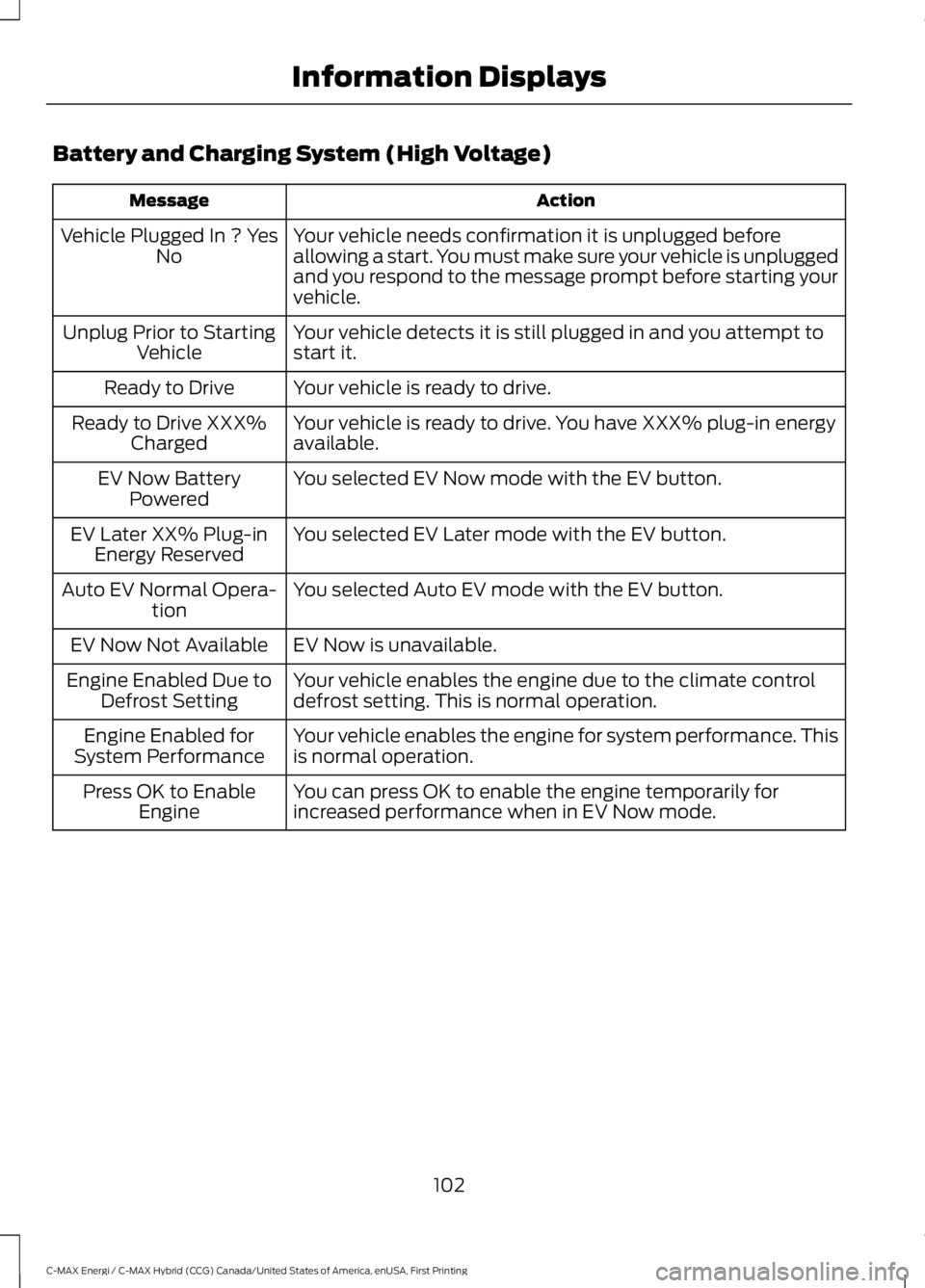
Battery and Charging System (High Voltage)
ActionMessage
Your vehicle needs confirmation it is unplugged beforeallowing a start. You must make sure your vehicle is unpluggedand you respond to the message prompt before starting yourvehicle.
Vehicle Plugged In ? YesNo
Your vehicle detects it is still plugged in and you attempt tostart it.Unplug Prior to StartingVehicle
Your vehicle is ready to drive.Ready to Drive
Your vehicle is ready to drive. You have XXX% plug-in energyavailable.Ready to Drive XXX%Charged
You selected EV Now mode with the EV button.EV Now BatteryPowered
You selected EV Later mode with the EV button.EV Later XX% Plug-inEnergy Reserved
You selected Auto EV mode with the EV button.Auto EV Normal Opera-tion
EV Now is unavailable.EV Now Not Available
Your vehicle enables the engine due to the climate controldefrost setting. This is normal operation.Engine Enabled Due toDefrost Setting
Your vehicle enables the engine for system performance. Thisis normal operation.Engine Enabled forSystem Performance
You can press OK to enable the engine temporarily forincreased performance when in EV Now mode.Press OK to EnableEngine
102
C-MAX Energi / C-MAX Hybrid (CCG) Canada/United States of America, enUSA, First Printing
Information Displays
Page 123 of 497
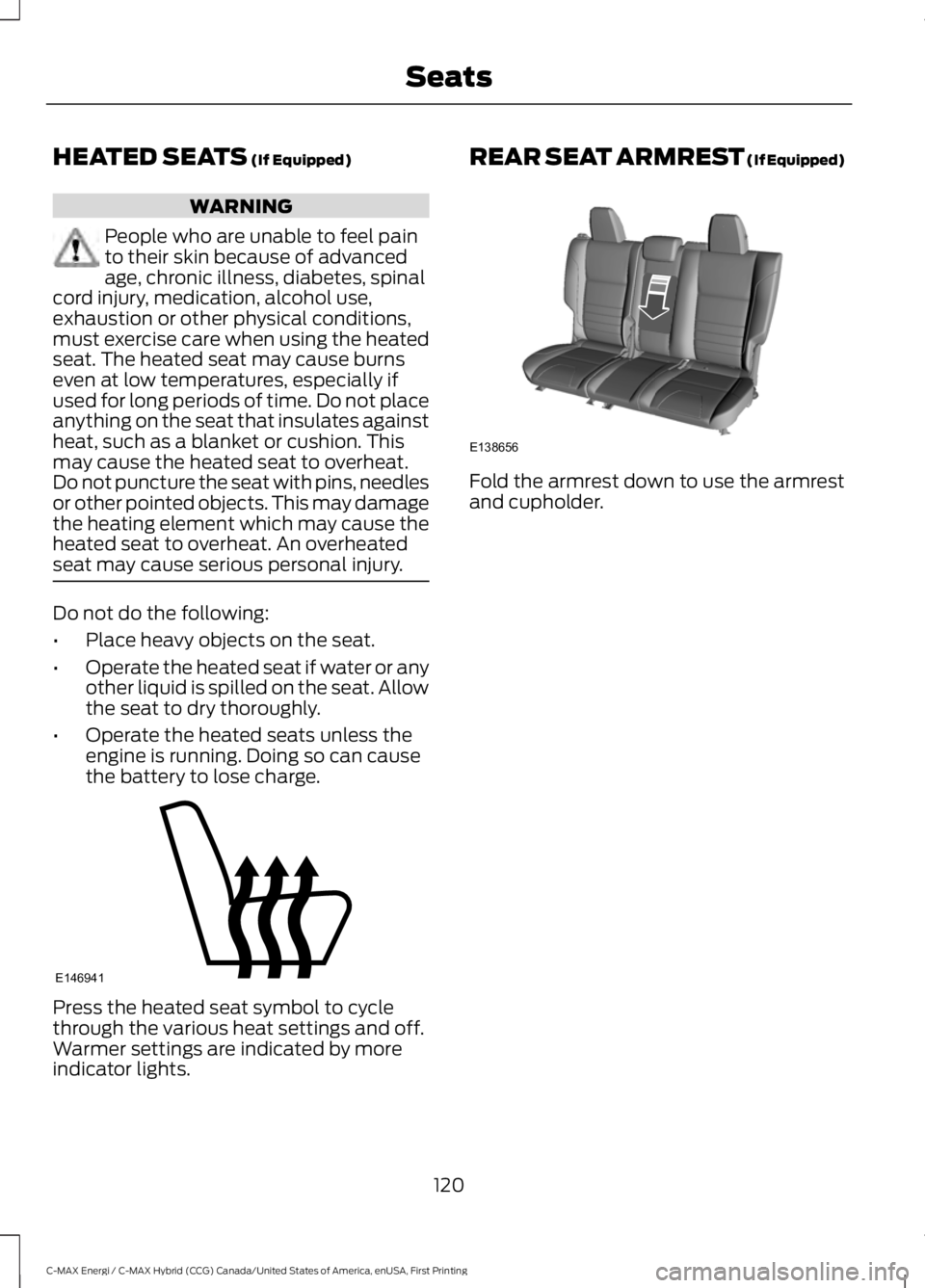
HEATED SEATS (If Equipped)
WARNING
People who are unable to feel painto their skin because of advancedage, chronic illness, diabetes, spinalcord injury, medication, alcohol use,exhaustion or other physical conditions,must exercise care when using the heatedseat. The heated seat may cause burnseven at low temperatures, especially ifused for long periods of time. Do not placeanything on the seat that insulates againstheat, such as a blanket or cushion. Thismay cause the heated seat to overheat.Do not puncture the seat with pins, needlesor other pointed objects. This may damagethe heating element which may cause theheated seat to overheat. An overheatedseat may cause serious personal injury.
Do not do the following:
•Place heavy objects on the seat.
•Operate the heated seat if water or anyother liquid is spilled on the seat. Allowthe seat to dry thoroughly.
•Operate the heated seats unless theengine is running. Doing so can causethe battery to lose charge.
Press the heated seat symbol to cyclethrough the various heat settings and off.Warmer settings are indicated by moreindicator lights.
REAR SEAT ARMREST (If Equipped)
Fold the armrest down to use the armrestand cupholder.
120
C-MAX Energi / C-MAX Hybrid (CCG) Canada/United States of America, enUSA, First Printing
SeatsE146941 E138656
Page 124 of 497
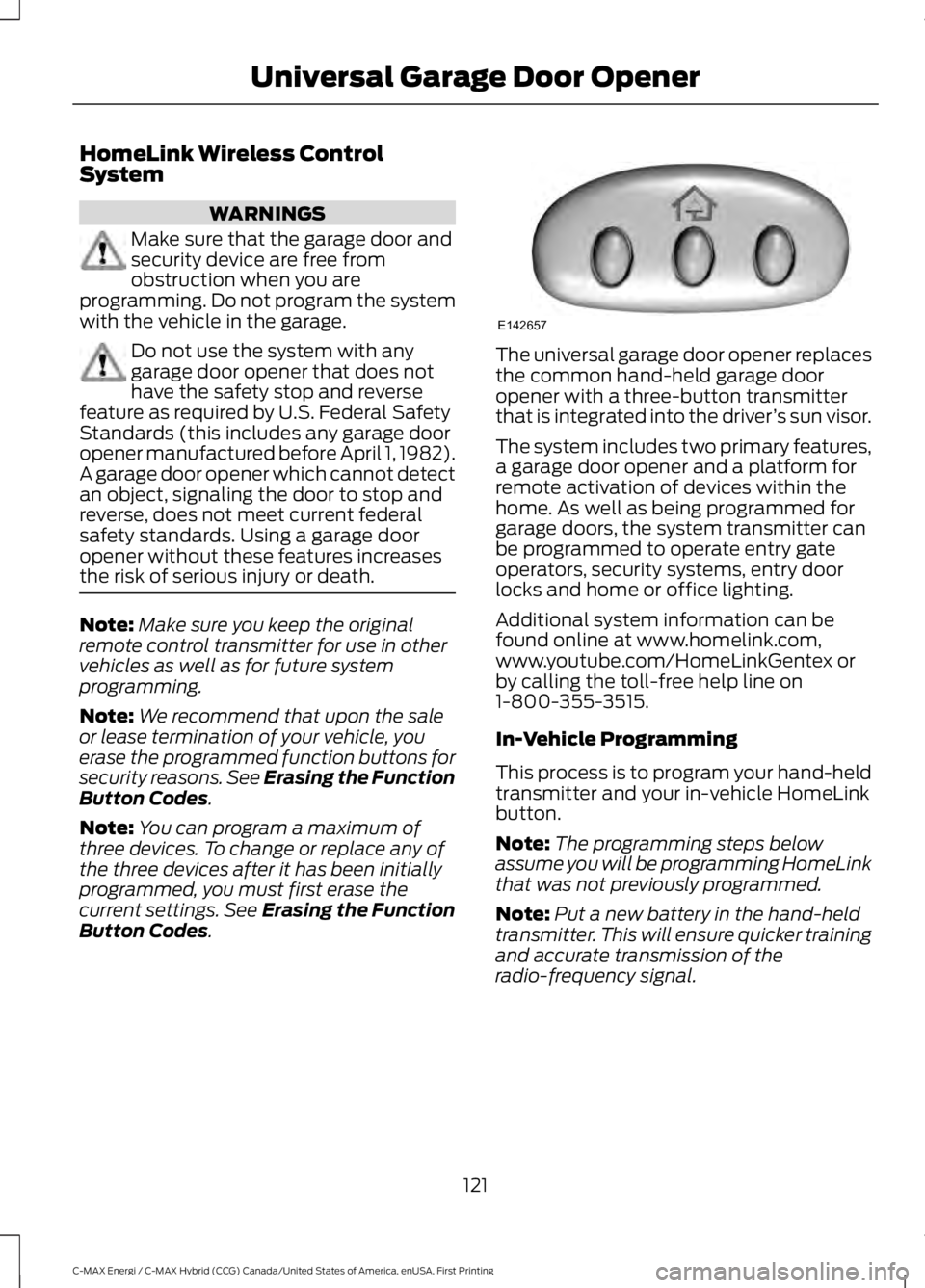
HomeLink Wireless ControlSystem
WARNINGS
Make sure that the garage door andsecurity device are free fromobstruction when you areprogramming. Do not program the systemwith the vehicle in the garage.
Do not use the system with anygarage door opener that does nothave the safety stop and reversefeature as required by U.S. Federal SafetyStandards (this includes any garage dooropener manufactured before April 1, 1982).A garage door opener which cannot detectan object, signaling the door to stop andreverse, does not meet current federalsafety standards. Using a garage dooropener without these features increasesthe risk of serious injury or death.
Note:Make sure you keep the originalremote control transmitter for use in othervehicles as well as for future systemprogramming.
Note:We recommend that upon the saleor lease termination of your vehicle, youerase the programmed function buttons forsecurity reasons. See Erasing the FunctionButton Codes.
Note:You can program a maximum ofthree devices. To change or replace any ofthe three devices after it has been initiallyprogrammed, you must first erase thecurrent settings. See Erasing the FunctionButton Codes.
The universal garage door opener replacesthe common hand-held garage dooropener with a three-button transmitterthat is integrated into the driver’s sun visor.
The system includes two primary features,a garage door opener and a platform forremote activation of devices within thehome. As well as being programmed forgarage doors, the system transmitter canbe programmed to operate entry gateoperators, security systems, entry doorlocks and home or office lighting.
Additional system information can befound online at www.homelink.com,www.youtube.com/HomeLinkGentex orby calling the toll-free help line on1-800-355-3515.
In-Vehicle Programming
This process is to program your hand-heldtransmitter and your in-vehicle HomeLinkbutton.
Note:The programming steps belowassume you will be programming HomeLinkthat was not previously programmed.
Note:Put a new battery in the hand-heldtransmitter. This will ensure quicker trainingand accurate transmission of theradio-frequency signal.
121
C-MAX Energi / C-MAX Hybrid (CCG) Canada/United States of America, enUSA, First Printing
Universal Garage Door OpenerE142657
Page 129 of 497
12 Volt DC Power Point
WARNINGS
Do not plug optional electricalaccessories into the cigar lightersocket. Incorrect use of the cigarlighter can cause damage not covered bythe vehicle warranty, and can result in fireor serious injury.
Do not use a power point foroperating a cigar lighter. Incorrectuse of the power points can causedamage not covered by the vehiclewarranty, and can result in fire or seriousinjury.
Note:When you switch the ignition on, youcan use the socket to power 12 voltappliances with a maximum current ratingof 15 amps.
If the power supply does not work after youswitch the ignition off, switch the ignitionon.Note:Do not hang any accessory from theaccessory plug.
Note:Do not use the power point over thevehicle capacity of 12 volt DC 180 watts ora fuse may blow.
Note:Always keep the power point capsclosed when not in use.
Do not insert objects other than anaccessory plug into the power point. Thiswill damage the power point and blow thefuse.
Run the vehicle for full capacity use of thepower point.
To prevent the battery from running out ofcharge:
•Do not use the power point longer thannecessary when the vehicle is notrunning.
•Do not leave devices plugged inovernight or when you park your vehiclefor extended periods.
Locations
Power points may be in the followinglocations:
•On the front of the center console.
•Inside the center console.
•Inside the luggage compartment.
110 Volt AC Power Point (If Equipped)
WARNING
Do not keep electrical devicesplugged in the power point wheneverthe device is not in use. Do not useany extension cord with the 110 volt ACpower point, since it will defeat the safetyprotection design. Doing so may cause thepower point to overload due to poweringmultiple devices that can reach beyondthe 150 watt load limit and could result infire or serious injury.
Note:The power point will turn off whenthe ignition is switched off or the batteryvoltage drops below 11 volts.
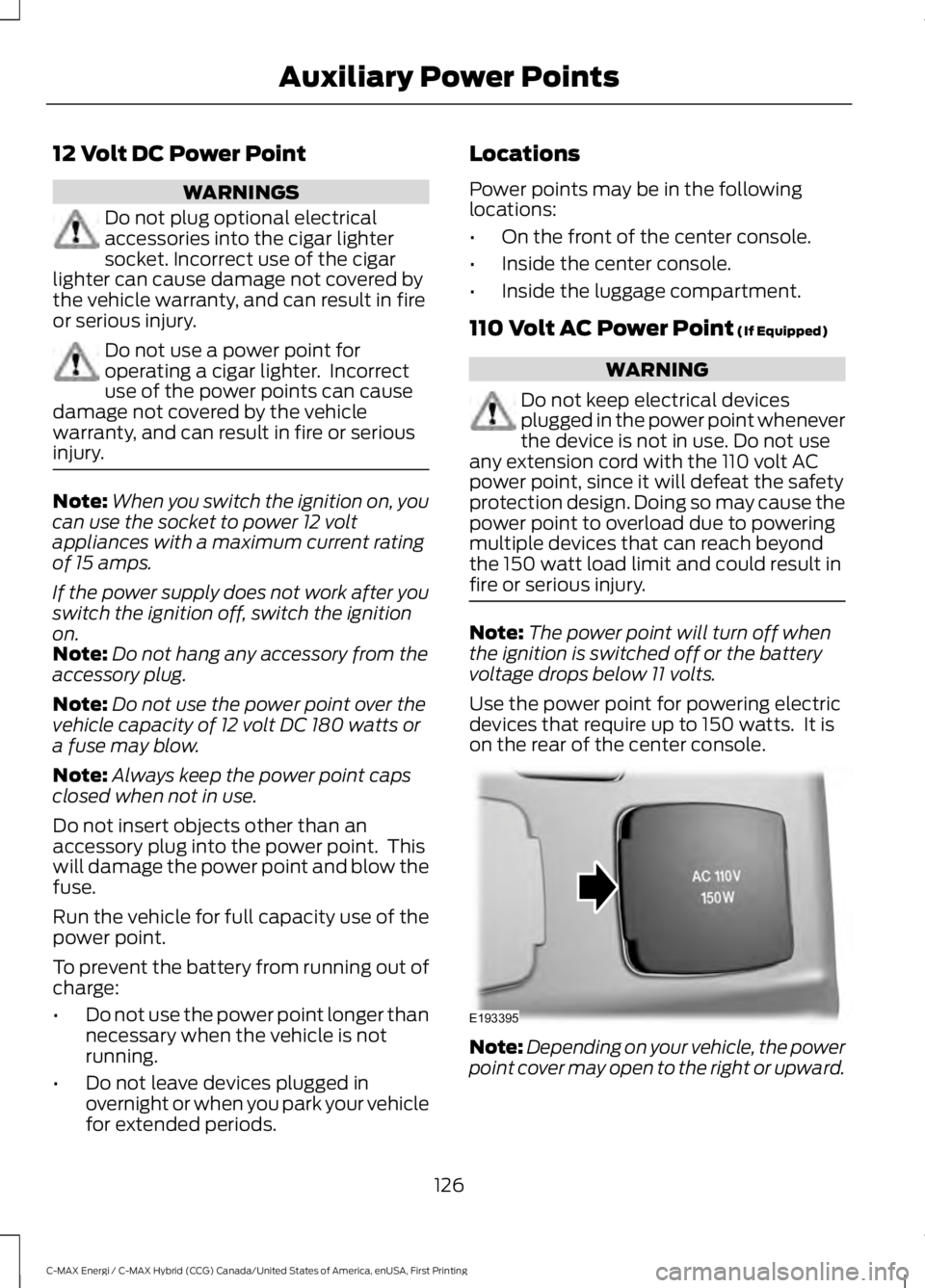
Use the power point for powering electricdevices that require up to 150 watts. It ison the rear of the center console.
Note:Depending on your vehicle, the powerpoint cover may open to the right or upward.
126
C-MAX Energi / C-MAX Hybrid (CCG) Canada/United States of America, enUSA, First Printing
Auxiliary Power PointsE193395
Page 132 of 497
GENERAL INFORMATION
WARNINGS
Extended idling at high enginespeeds can produce very hightemperatures in the engine andexhaust system, creating the risk of fire orother damage.
Do not park, idle or drive your vehicleon dry grass or other dry groundcover. The emission system heats upthe engine compartment and exhaustsystem, creating the risk of fire.
Do not start the vehicle in a closedgarage or in other enclosed areas.Exhaust fumes can be toxic. Alwaysopen the garage door before you start thevehicle.
If you smell exhaust fumes insideyour vehicle, have your vehiclechecked by an authorized dealerimmediately. Do not drive your vehicle ifyou smell exhaust fumes.
If you disconnect the battery, your vehiclemay exhibit some unusual drivingcharacteristics for approximately 5 mi(8 km) after you reconnect it. This isbecause the engine management systemmust realign itself with the engine. You candisregard any unusual drivingcharacteristics during this period.
The powertrain control system meets allCanadian interference-causing equipmentstandard requirements regulating theimpulse electrical field or radio noise.
When you start your vehicle, avoid pressingthe accelerator pedal until the ready todrive indicator illuminates. Only use theaccelerator pedal when you have difficultystarting your vehicle.
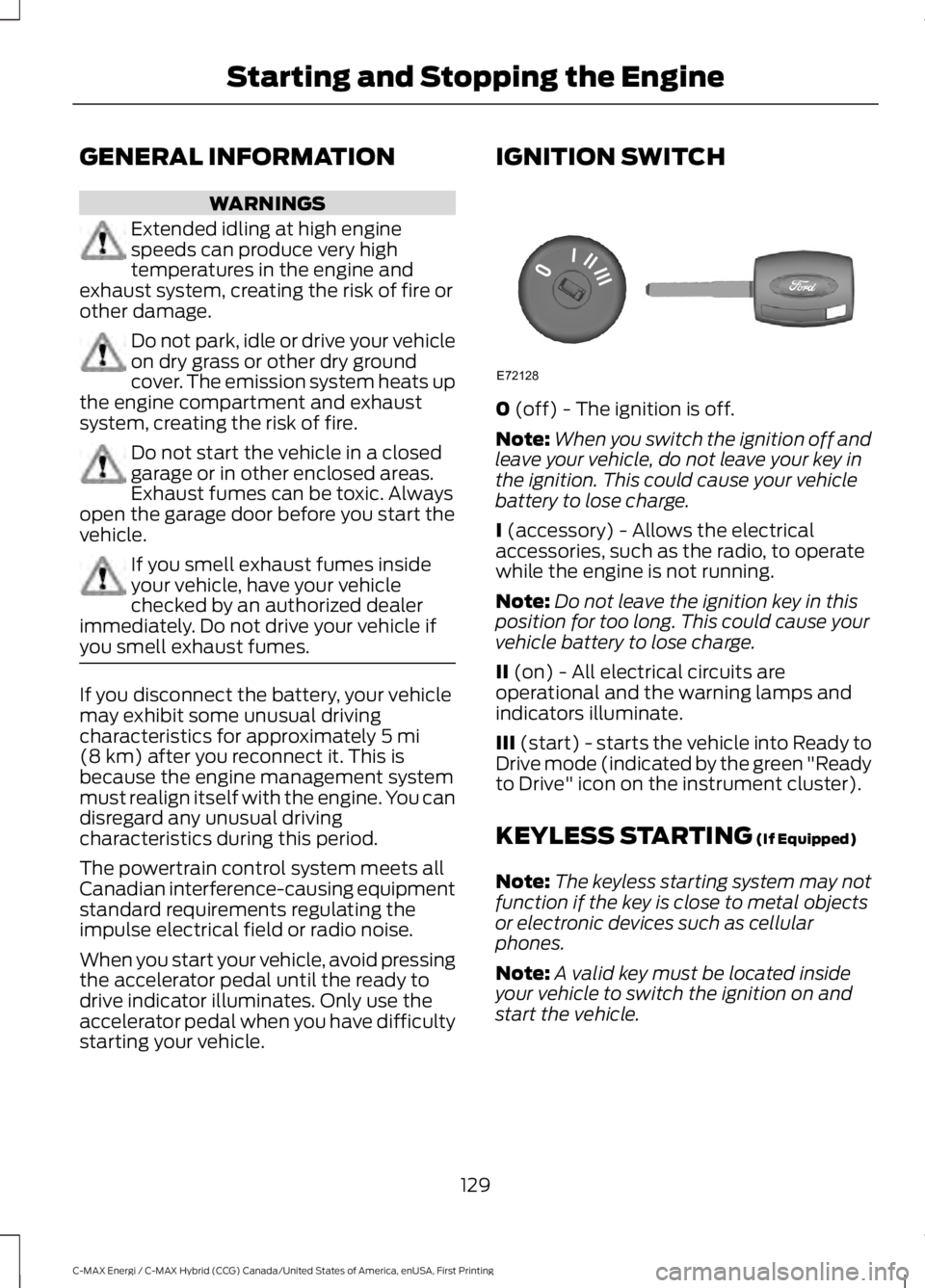
IGNITION SWITCH
0 (off) - The ignition is off.
Note:When you switch the ignition off andleave your vehicle, do not leave your key inthe ignition. This could cause your vehiclebattery to lose charge.
I (accessory) - Allows the electricalaccessories, such as the radio, to operatewhile the engine is not running.
Note:Do not leave the ignition key in thisposition for too long. This could cause yourvehicle battery to lose charge.
II (on) - All electrical circuits areoperational and the warning lamps andindicators illuminate.
III (start) - starts the vehicle into Ready toDrive mode (indicated by the green "Readyto Drive" icon on the instrument cluster).
KEYLESS STARTING (If Equipped)
Note:The keyless starting system may notfunction if the key is close to metal objectsor electronic devices such as cellularphones.
Note:A valid key must be located insideyour vehicle to switch the ignition on andstart the vehicle.
129
C-MAX Energi / C-MAX Hybrid (CCG) Canada/United States of America, enUSA, First Printing
Starting and Stopping the EngineE72128
Page 134 of 497
Note:The green ready indicator illuminatesletting you know that the vehicle is readyfor driving. Since your vehicle is equippedwith a silent key start, the engine may notstart at the time of the vehicle start. SeeHybrid Vehicle Operation (page 135).
The system does not function if:
•The key frequencies are jammed.
•The key battery has no charge.
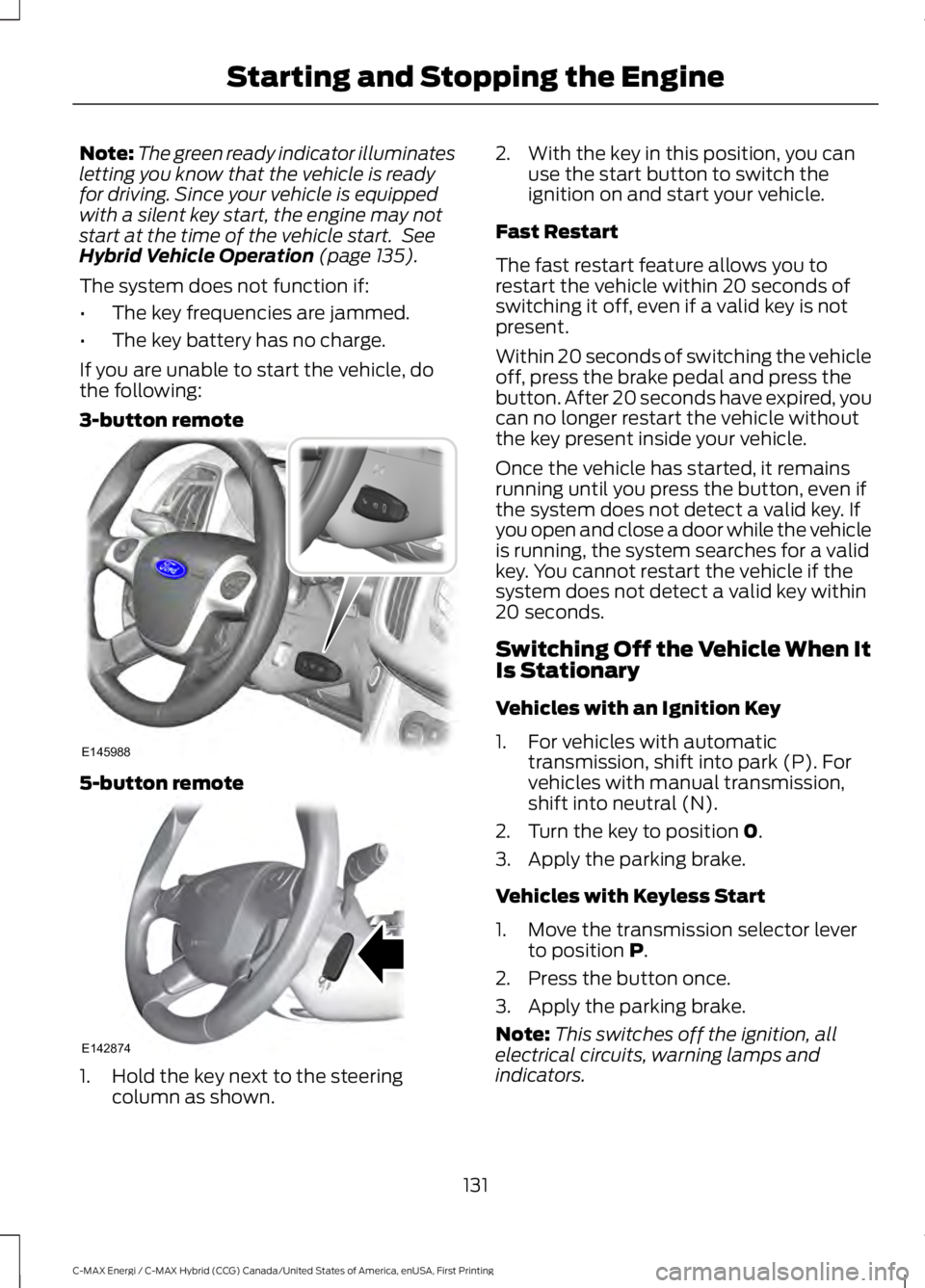
If you are unable to start the vehicle, dothe following:
3-button remote
5-button remote
1. Hold the key next to the steeringcolumn as shown.
2. With the key in this position, you canuse the start button to switch theignition on and start your vehicle.
Fast Restart
The fast restart feature allows you torestart the vehicle within 20 seconds ofswitching it off, even if a valid key is notpresent.
Within 20 seconds of switching the vehicleoff, press the brake pedal and press thebutton. After 20 seconds have expired, youcan no longer restart the vehicle withoutthe key present inside your vehicle.
Once the vehicle has started, it remainsrunning until you press the button, even ifthe system does not detect a valid key. Ifyou open and close a door while the vehicleis running, the system searches for a validkey. You cannot restart the vehicle if thesystem does not detect a valid key within20 seconds.
Switching Off the Vehicle When ItIs Stationary
Vehicles with an Ignition Key
1. For vehicles with automatictransmission, shift into park (P). Forvehicles with manual transmission,shift into neutral (N).
2. Turn the key to position 0.
3. Apply the parking brake.
Vehicles with Keyless Start
1. Move the transmission selector leverto position P.
2. Press the button once.
3. Apply the parking brake.
Note:This switches off the ignition, allelectrical circuits, warning lamps andindicators.
131
C-MAX Energi / C-MAX Hybrid (CCG) Canada/United States of America, enUSA, First Printing
Starting and Stopping the EngineE145988 E142874