instrument cluster FORD C MAX ENERGI 2017 Owner's Manual
[x] Cancel search | Manufacturer: FORD, Model Year: 2017, Model line: C MAX ENERGI, Model: FORD C MAX ENERGI 2017Pages: 497, PDF Size: 7.64 MB
Page 203 of 497
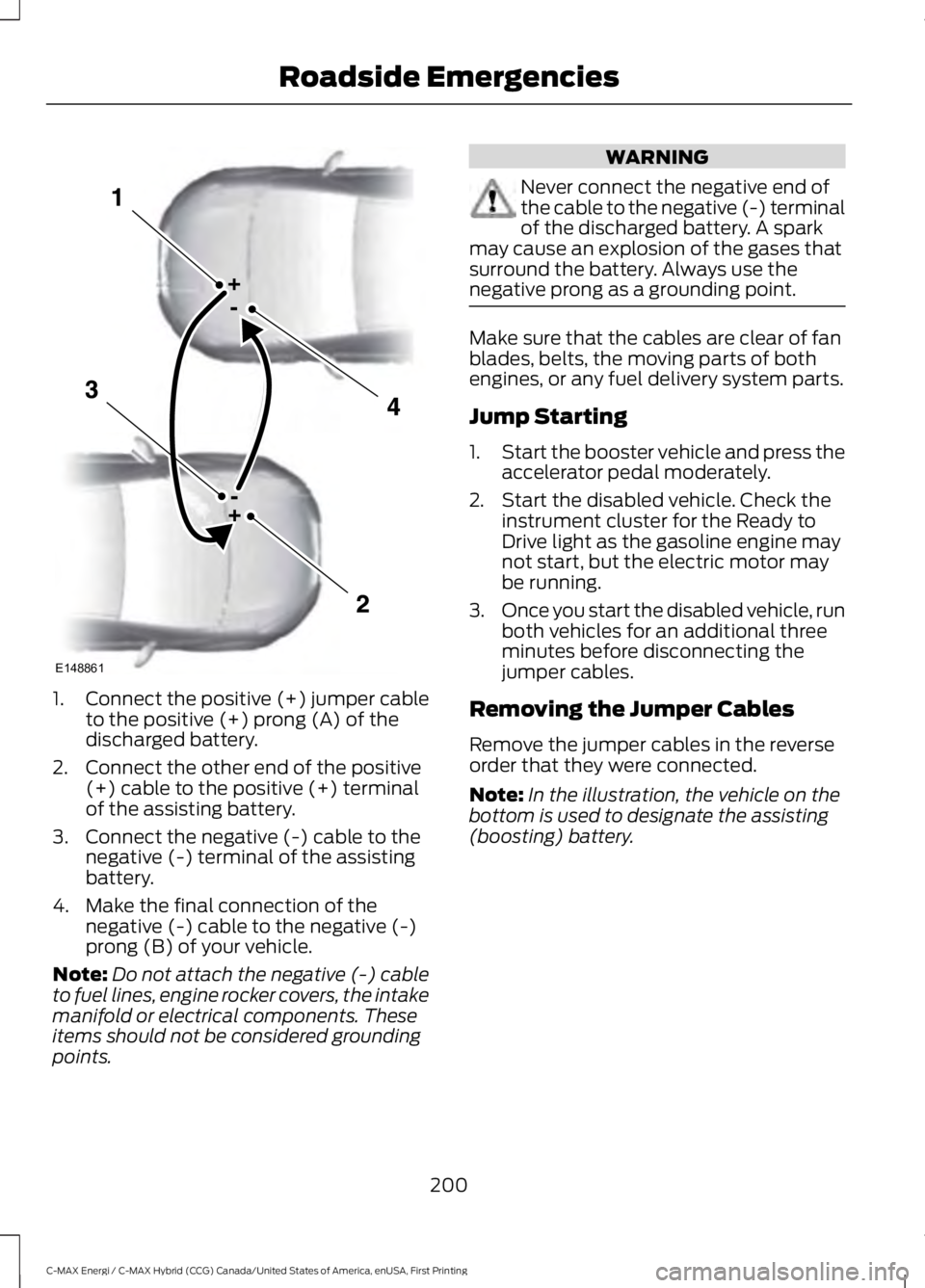
1.Connect the positive (+) jumper cableto the positive (+) prong (A) of thedischarged battery.
2. Connect the other end of the positive(+) cable to the positive (+) terminalof the assisting battery.
3. Connect the negative (-) cable to thenegative (-) terminal of the assistingbattery.
4. Make the final connection of thenegative (-) cable to the negative (-)prong (B) of your vehicle.
Note:Do not attach the negative (-) cableto fuel lines, engine rocker covers, the intakemanifold or electrical components. Theseitems should not be considered groundingpoints.
WARNING
Never connect the negative end ofthe cable to the negative (-) terminalof the discharged battery. A sparkmay cause an explosion of the gases thatsurround the battery. Always use thenegative prong as a grounding point.
Make sure that the cables are clear of fanblades, belts, the moving parts of bothengines, or any fuel delivery system parts.
Jump Starting
1.Start the booster vehicle and press theaccelerator pedal moderately.
2. Start the disabled vehicle. Check theinstrument cluster for the Ready toDrive light as the gasoline engine maynot start, but the electric motor maybe running.
3.Once you start the disabled vehicle, runboth vehicles for an additional threeminutes before disconnecting thejumper cables.
Removing the Jumper Cables
Remove the jumper cables in the reverseorder that they were connected.
Note:In the illustration, the vehicle on thebottom is used to designate the assisting(boosting) battery.
200
C-MAX Energi / C-MAX Hybrid (CCG) Canada/United States of America, enUSA, First Printing
Roadside EmergenciesE148861
Page 219 of 497
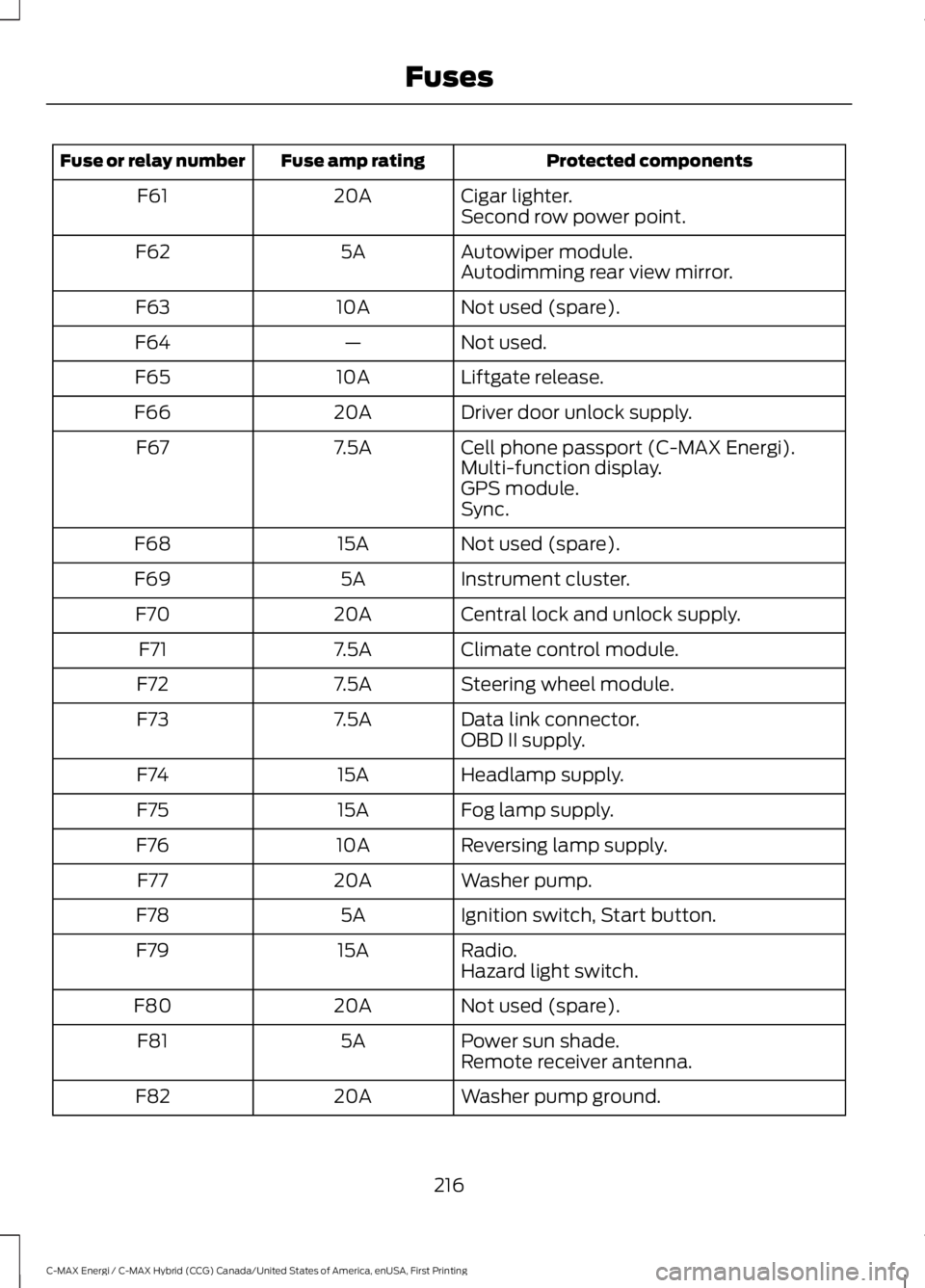
Protected componentsFuse amp ratingFuse or relay number
Cigar lighter.20AF61Second row power point.
Autowiper module.5AF62Autodimming rear view mirror.
Not used (spare).10AF63
Not used.—F64
Liftgate release.10AF65
Driver door unlock supply.20AF66
Cell phone passport (C-MAX Energi).7.5AF67Multi-function display.GPS module.Sync.
Not used (spare).15AF68
Instrument cluster.5AF69
Central lock and unlock supply.20AF70
Climate control module.7.5AF71
Steering wheel module.7.5AF72
Data link connector.7.5AF73OBD II supply.
Headlamp supply.15AF74
Fog lamp supply.15AF75
Reversing lamp supply.10AF76
Washer pump.20AF77
Ignition switch, Start button.5AF78
Radio.15AF79Hazard light switch.
Not used (spare).20AF80
Power sun shade.5AF81Remote receiver antenna.
Washer pump ground.20AF82
216
C-MAX Energi / C-MAX Hybrid (CCG) Canada/United States of America, enUSA, First Printing
Fuses
Page 254 of 497
Instrument Cluster Screens, LCDScreens and Radio Screens
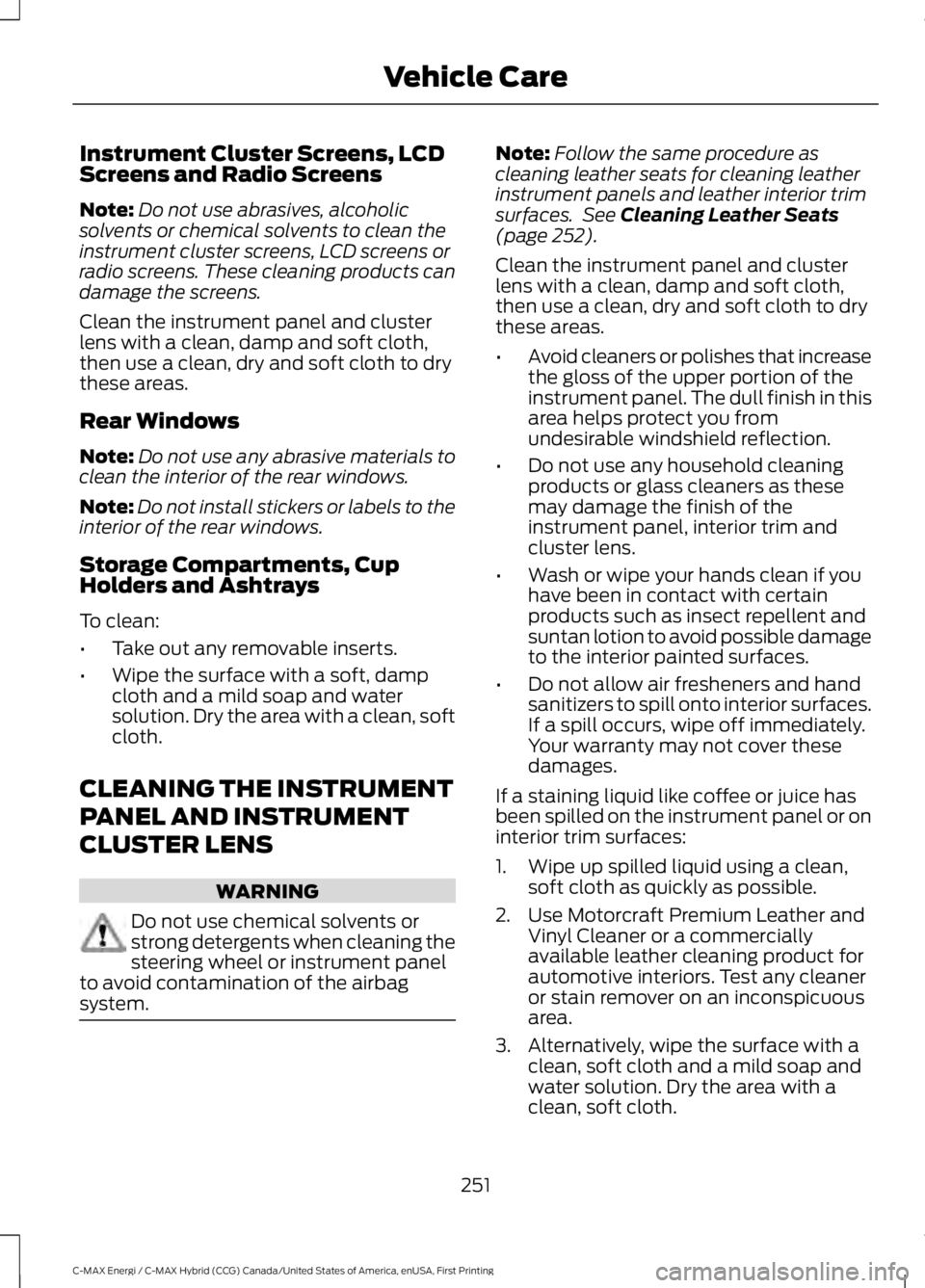
Note:Do not use abrasives, alcoholicsolvents or chemical solvents to clean theinstrument cluster screens, LCD screens orradio screens. These cleaning products candamage the screens.
Clean the instrument panel and clusterlens with a clean, damp and soft cloth,then use a clean, dry and soft cloth to drythese areas.
Rear Windows
Note:Do not use any abrasive materials toclean the interior of the rear windows.
Note:Do not install stickers or labels to theinterior of the rear windows.
Storage Compartments, CupHolders and Ashtrays
To clean:
•Take out any removable inserts.
•Wipe the surface with a soft, dampcloth and a mild soap and watersolution. Dry the area with a clean, softcloth.
CLEANING THE INSTRUMENT
PANEL AND INSTRUMENT
CLUSTER LENS
WARNING
Do not use chemical solvents orstrong detergents when cleaning thesteering wheel or instrument panelto avoid contamination of the airbagsystem.
Note:Follow the same procedure ascleaning leather seats for cleaning leatherinstrument panels and leather interior trimsurfaces. See Cleaning Leather Seats(page 252).
Clean the instrument panel and clusterlens with a clean, damp and soft cloth,then use a clean, dry and soft cloth to drythese areas.
•Avoid cleaners or polishes that increasethe gloss of the upper portion of theinstrument panel. The dull finish in thisarea helps protect you fromundesirable windshield reflection.
•Do not use any household cleaningproducts or glass cleaners as thesemay damage the finish of theinstrument panel, interior trim andcluster lens.
•Wash or wipe your hands clean if youhave been in contact with certainproducts such as insect repellent andsuntan lotion to avoid possible damageto the interior painted surfaces.
•Do not allow air fresheners and handsanitizers to spill onto interior surfaces.If a spill occurs, wipe off immediately.Your warranty may not cover thesedamages.
If a staining liquid like coffee or juice hasbeen spilled on the instrument panel or oninterior trim surfaces:
1. Wipe up spilled liquid using a clean,soft cloth as quickly as possible.
2. Use Motorcraft Premium Leather andVinyl Cleaner or a commerciallyavailable leather cleaning product forautomotive interiors. Test any cleaneror stain remover on an inconspicuousarea.
3. Alternatively, wipe the surface with aclean, soft cloth and a mild soap andwater solution. Dry the area with aclean, soft cloth.
251
C-MAX Energi / C-MAX Hybrid (CCG) Canada/United States of America, enUSA, First Printing
Vehicle Care
Page 439 of 497
General
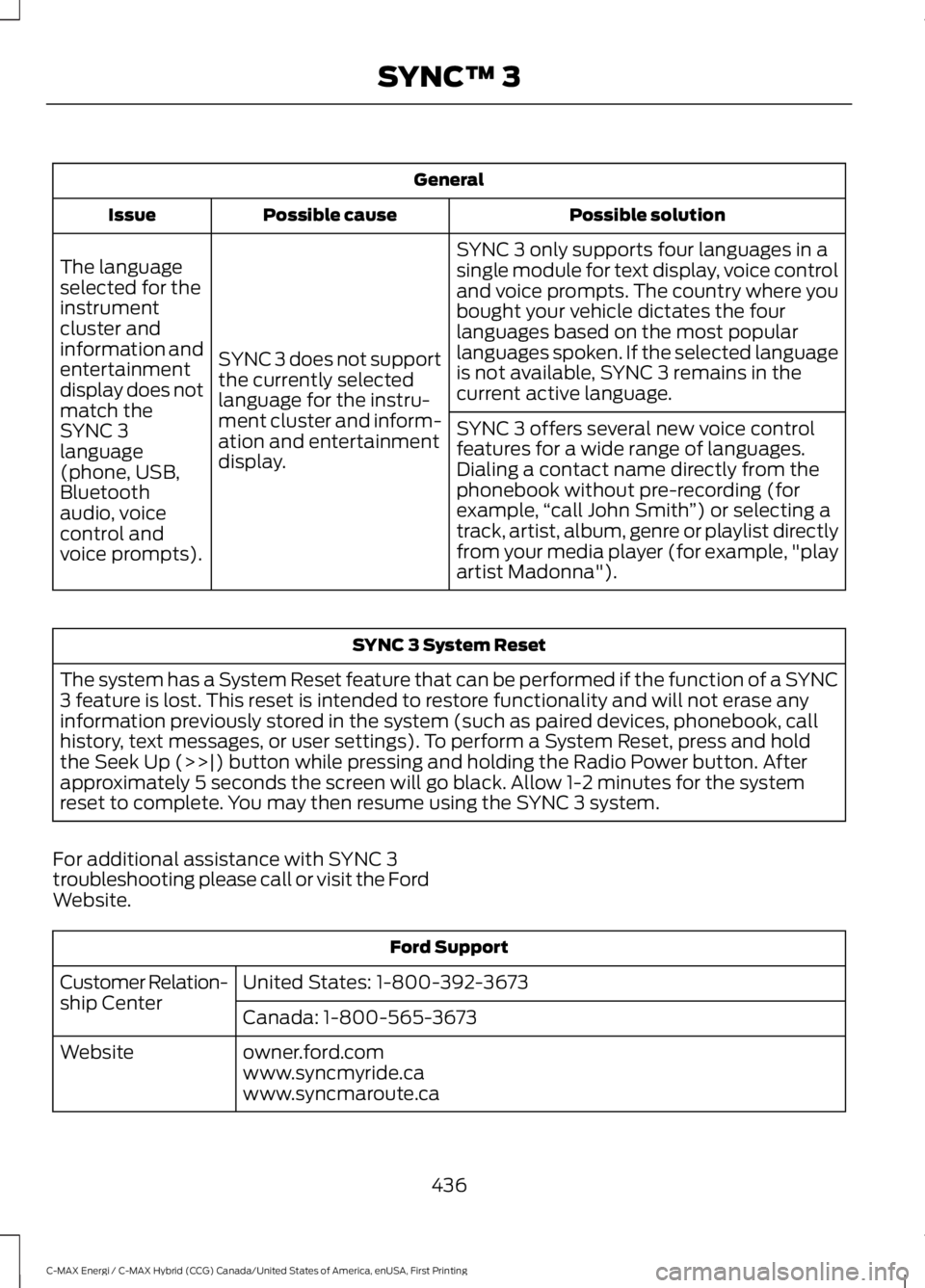
Possible solutionPossible causeIssue
SYNC 3 only supports four languages in asingle module for text display, voice controland voice prompts. The country where youbought your vehicle dictates the fourlanguages based on the most popularlanguages spoken. If the selected languageis not available, SYNC 3 remains in thecurrent active language.
SYNC 3 does not supportthe currently selectedlanguage for the instru-ment cluster and inform-ation and entertainmentdisplay.
The languageselected for theinstrumentcluster andinformation andentertainmentdisplay does notmatch theSYNC 3SYNC 3 offers several new voice controlfeatures for a wide range of languages.Dialing a contact name directly from thephonebook without pre-recording (forexample,“call John Smith”) or selecting atrack, artist, album, genre or playlist directlyfrom your media player (for example, "playartist Madonna").
language(phone, USB,Bluetoothaudio, voicecontrol andvoice prompts).
SYNC 3 System Reset
The system has a System Reset feature that can be performed if the function of a SYNC3 feature is lost. This reset is intended to restore functionality and will not erase anyinformation previously stored in the system (such as paired devices, phonebook, callhistory, text messages, or user settings). To perform a System Reset, press and holdthe Seek Up (>>|) button while pressing and holding the Radio Power button. Afterapproximately 5 seconds the screen will go black. Allow 1-2 minutes for the systemreset to complete. You may then resume using the SYNC 3 system.
For additional assistance with SYNC 3troubleshooting please call or visit the FordWebsite.
Ford Support
United States: 1-800-392-3673Customer Relation-ship CenterCanada: 1-800-565-3673
owner.ford.comWebsitewww.syncmyride.cawww.syncmaroute.ca
436
C-MAX Energi / C-MAX Hybrid (CCG) Canada/United States of America, enUSA, First Printing
SYNC™ 3
Page 489 of 497
Body Styling Kits..........................................254Bonnet LockSee: Opening and Closing the Hood...........222Booster Seats..................................................25Types of Booster Seats......................................26Brake Fluid Check........................................232Brakes...............................................................162General Information..........................................162Breaking-In.....................................................194Bulb Specification Chart...........................242
C
Cabin Air Filter.................................................113California Proposition 65..............................11Capacities and Specifications...............286Specifications.....................................................286Car WashSee: Cleaning the Exterior...............................247Center Console..............................................128Changing a Bulb...........................................238Replacing Fog, Park and Direction IndicatorBulbs..................................................................239Replacing Headlamp Bulbs...........................238Replacing License Plate Lamp Bulb............241Replacing Reverse Lamp and Tail LampBulbs...................................................................241Replacing Tail, Brake and DirectionIndicator Bulbs..............................................240Replacing the Center High Mounted BrakeLamp Bulbs.....................................................242Changing a Fuse..........................................220Fuses......................................................................220Changing the 12V Battery.........................233Changing the Engine Air Filter................244Air Cleaner Assembly Components...........244Installing the Engine Air FilterElement............................................................246Removing the Engine Air FilterElement............................................................245Changing the Wiper Blades.....................235Changing the Rear Window WiperBlade.................................................................236Changing the Windshield WiperBlades...............................................................235Service Position..................................................235Charging the High Voltage Battery........153Charge Port...........................................................156
Charging.................................................................156Charging Equipment..........................................153Disconnecting the Charging Coupler..........158Locking the Charging Coupler........................157Waiting to Charge...............................................157Checking MyKey System Status...............55MyKey Distance....................................................55Number of Admin Keys......................................55Number of MyKeys..............................................55Checking the Wiper Blades......................234Child Restraint and SeatbeltMaintenance.................................................36Child Restraint Positioning..........................27Child Safety.......................................................18General Information.............................................18Child Safety Locks.........................................28Left-Hand Side......................................................29Right-Hand Side...................................................29Cleaning Leather Seats.............................252Cleaning Products........................................247Materials................................................................247Cleaning the Engine....................................249Cleaning the Exterior...................................247Body Paintwork Preservation.......................248Cleaning Stripes or Graphics.........................248Cleaning the Chrome Trim.............................248Cleaning the Headlamps................................248Cleaning the Rear Window............................248Cleaning the Instrument Panel andInstrument Cluster Lens..........................251Cleaning the Interior...................................250Fabric, Carpets, Cloth Seats, Headlinersand Floor Mats...............................................250Instrument Cluster Screens, LCD Screensand Radio Screens........................................251Leather Interior...................................................250Rear Windows......................................................251Seatbelts..............................................................250Storage Compartments, Cup Holders andAshtrays.............................................................251Suede Micro Fiber Fabric................................250Cleaning the Wheels..................................252Cleaning the Windows and WiperBlades...........................................................249Clearing All MyKeys.......................................53Climate Control............................................109
486
C-MAX Energi / C-MAX Hybrid (CCG) Canada/United States of America, enUSA, First Printing
Index
Page 492 of 497
Using Hill Start Assist.......................................164Hints on Controlling the InteriorClimate............................................................111Cooling the Interior Quickly..............................112Defrosting and Defogging the WindowsQuickly.................................................................112General Hints..........................................................111Heating the Interior Quickly.............................112Recommended Settings for Cooling ...........112Recommended Settings for Heating............112Side Window Defogging in ColdWeather..............................................................112Hints on Driving With Anti-LockBrakes............................................................163Home Screen.................................................357Hood LockSee: Opening and Closing the Hood...........222Hybrid Vehicle Frequently AskedQuestions.....................................................140Hybrid Vehicle Operation...........................135Battery:...................................................................136Braking:...................................................................136Driving:....................................................................135Driving to Optimize Fuel Economy..............136Engine:....................................................................136Starting:..................................................................135Stopping:................................................................135Transmission Operation:..................................135
I
Ignition Switch...............................................129In California (U.S. Only)............................205Information Display Control.......................70Multimedia Controls...........................................70Information Displays.....................................92General Information............................................92Information Messages.................................101AdvanceTrac®......................................................101Alarm........................................................................101Battery and Charging System (HighVoltage)............................................................102Blind Spot Information and Cross TrafficAlert System....................................................103Doors.......................................................................103Fuel..........................................................................103Hill Start Assist...................................................104Keys and Intelligent Access............................104
Maintenance........................................................105MyKey.....................................................................106Park Aid..................................................................106Park Brake..............................................................107Power Steering....................................................107Remote Start........................................................107Tire Pressure Monitoring System..................107Transmission........................................................108Installing Child Restraints............................19Child Seats...............................................................19Using Lap and Shoulder Belts.........................20Using Lower Anchors and Tethers forCHildren (LATCH)............................................22Using Tether Straps.............................................24Instrument Cluster........................................84Instrument Lighting Dimmer......................75Instrument Panel Overview........................16Interior Lamps.................................................76Front Interior Lamp..............................................76Front Interior Lamp - With PanoramaRoof.......................................................................77Rear Interior Lamp................................................77Interior Mirror....................................................81Auto-Dimming Mirror...........................................81Introduction.........................................................7
J
Jump Starting the Vehicle.........................199Connecting the Jumper Cables.....................199Jump Starting.....................................................200Preparing Your Vehicle.....................................199Removing the Jumper Cables......................200
K
Keyless Starting............................................129Ignition Modes.....................................................130Keys and Remote Controls.........................47
L
Lighting Control...............................................74Headlamp Flasher................................................74High Beams.............................................................74Lighting...............................................................74Load Carrying.................................................186
489
C-MAX Energi / C-MAX Hybrid (CCG) Canada/United States of America, enUSA, First Printing
Index